
cesium-测量高度垂直距离
cesium做垂直测量
完整代码
<template><div id="cesiumContainer" style="height: 100vh;"></div><div id="toolbar" style="position: fixed;top:20px;left:220px;"><el-breadcrumb><el-breadcrumb-item>量测</el-breadcrumb-item><el-breadcrumb-item>垂直距离</el-breadcrumb-item></el-breadcrumb><el-row class="mb-4" style="margin-top: 15px"><el-button type="primary" @click="handleDrawPolyline">画线</el-button><el-button type="primary" @click="handleDrawPolylineCancel">清除</el-button></el-row></div>
</template>
<script setup>
import {onMounted, ref} from "vue";
import * as Cesium from "cesium";
import InitCesium from "../js/InitCesiumHide.js";
import DrawVerticalDistance from "@/assets/utils/measure/DrawVerticalDistance.js";let viewer = null;
let verticalDistance = null;onMounted(() => {let initCesium = new InitCesium('cesiumContainer')viewer = initCesium.initViewer({});verticalDistance = new DrawVerticalDistance(viewer);flyToRight2();
})const handleDrawPolyline = () => {if (verticalDistance) {// 开始量算verticalDistance.start();}
}const handleDrawPolylineCancel = () => {if (!verticalDistance) return;verticalDistance.destroy();
}const flyToRight2 = async () => {let tileset = await Cesium.Cesium3DTileset.fromUrl('/src/assets/tileset/12/tileset.json', {});update3dtilesMaxtrix(tileset);viewer.scene.primitives.add(tileset);viewer.flyTo(tileset);
}function update3dtilesMaxtrix(tileSet) {//调整参数let params = {tx: 113.06265738392063, //模型中心X轴坐标(经度,单位:十进制度)ty: 22.646803971034342, //模型中心Y轴坐标(纬度,单位:十进制度)tz: 40, //模型中心Z轴坐标(高程,单位:米)rx: 0, //X轴(经度)方向旋转角度(单位:度)ry: 0, //Y轴(纬度)方向旋转角度(单位:度)rz: 2, //Z轴(高程)方向旋转角度(单位:度)scale: 1.3, //缩放比例};//旋转const mx = Cesium.Matrix3.fromRotationX(Cesium.Math.toRadians(params.rx));const my = Cesium.Matrix3.fromRotationY(Cesium.Math.toRadians(params.ry));const mz = Cesium.Matrix3.fromRotationZ(Cesium.Math.toRadians(params.rz));const rotationX = Cesium.Matrix4.fromRotationTranslation(mx);const rotationY = Cesium.Matrix4.fromRotationTranslation(my);const rotationZ = Cesium.Matrix4.fromRotationTranslation(mz);//平移const position = Cesium.Cartesian3.fromDegrees(params.tx,params.ty,params.tz);const m = Cesium.Transforms.eastNorthUpToFixedFrame(position);//旋转、平移矩阵相乘Cesium.Matrix4.multiply(m, rotationX, m);Cesium.Matrix4.multiply(m, rotationY, m);Cesium.Matrix4.multiply(m, rotationZ, m);//比例缩放const scale = Cesium.Matrix4.fromUniformScale(params.scale);Cesium.Matrix4.multiply(m, scale, m);// console.log("矩阵m:", m);//赋值给tilesettileSet._root.transform = m;
}
</script>
<style scoped>
#cesiumContainer {overflow: hidden;
}
</style>
<style>
.el-breadcrumb__inner {color: #ffffff !important;
}
</style>
InitCesiumHide
import * as Cesium from "cesium";class InitCesiumHide {constructor(cesiumContainer, options) {this.cesiumContainer = cesiumContainer;}initViewer(options) {Cesium.Ion.defaultAccessToken = 'token';// 西南东北,默认显示中国Cesium.Camera.DEFAULT_VIEW_RECTANGLE = Cesium.Rectangle.fromDegrees(90, -20, 110, 90);return new Cesium.Viewer(this.cesiumContainer, {animation: false, // 隐藏动画控件baseLayerPicker: false, // 隐藏图层选择控件fullscreenButton: false, // 隐藏全屏按钮vrButton: false, // 隐藏VR按钮,默认falsegeocoder: false, // 隐藏地名查找控件  地理编码homeButton: false, // 隐藏Home按钮infoBox: false, // 隐藏点击要素之后显示的信息窗口sceneModePicker: false, // 隐藏场景模式选择控件selectionIndicator: false, // 显示实体对象选择框,默认truetimeline: false, // 隐藏时间线控件navigationHelpButton: false, // 隐藏帮助按钮scene3DOnly: true, // 每个几何实例将只在3D中呈现,以节省GPU内存shouldAnimate: true, // 开启动画自动播放sceneMode: 3, // 初始场景模式 1:2D 2:2D循环 3:3D,默认3requestRenderMode: true, // 减少Cesium渲染新帧总时间并减少Cesium在应用程序中总体CPU使用率...options});}
}export default InitCesiumHide
DrawVerticalDistance
import BaseMeasure from "./baseMeasure";
import '../prompt/prompt.css'
import Prompt from '../prompt/prompt.js'
import * as Cesium from "cesium";/*** 三角测量类* @class* @augments BaseMeasure* @alias BaseMeasure.MeasureTriangle*/
class DrawVerticalDistance extends BaseMeasure {constructor(viewer, opt) {super(viewer, opt);if (!opt) opt = {};this.unitType = "length";this.style = opt.style || {};//线this.heightfloatLabel = null;this.spaceDistancefloatLabel = null;this.horizonDistancefloatLabel = null;this.heightLine = null;this.spaceLine = null;this.horizonLine = null;this.firstPosition = null;this.endPosition = null;this.midPosition = undefined;this.lowPosition = undefined;this.highPosition = undefined;}//开始测量start(callback) {if (!this.prompt && this.promptStyle.show) {this.prompt = new Prompt(this.viewer, this.promptStyle)}var that = this;this.state = 1;that.handler.setInputAction((evt) => { //单击开始绘制var cartesian = that.getCatesian3FromPX(evt.position, that.viewer);if (!cartesian) return;if (!that.firstPosition) {that.firstPosition = cartesian.clone();that.heightfloatLabel = that.createLabel(cartesian, "");that.spaceDistancefloatLabel = that.createLabel(cartesian, "", 10);that.horizonDistancefloatLabel = that.createLabel(cartesian, "");let point = that.createPoint(cartesian.clone());point.wz = 0;that.controlPoints.push(point);} else {that.endPosition = cartesian;that.computerPosition(that.firstPosition, that.endPosition);let point = that.createPoint(cartesian.clone());point.wz = 1;that.controlPoints.push(point);if (that.handler) {that.handler.destroy();that.handler = null;}if (that.prompt) {that.prompt.destroy();that.prompt = null;}that.state = "endCreate";if (callback) callback();}}, Cesium.ScreenSpaceEventType.LEFT_CLICK);this.handler.setInputAction(function (evt) {that.state = "creating";if (!that.firstPosition) {that.prompt.update(evt.endPosition, "左键点击确定起点,再次点击确定终点并结束");return;}that.prompt.update(evt.endPosition, "左键点击确定起点,再次点击确定终点并结束");var cartesian = that.getCatesian3FromPX(evt.endPosition, that.viewer);if (!cartesian) return;that.endPosition = cartesian;that.computerPosition(that.firstPosition, that.endPosition);if (that.firstPosition && that.endPosition && !that.heightLine) {that.heightLine = that.viewer.entities.add({polyline: {positions: new Cesium.CallbackProperty(function () {return [that.lowPosition, that.midPosition]}, false),show: true,material: new Cesium.PolylineOutlineMaterialProperty({color: Cesium.Color.GOLD,outlineWidth: 2,outlineColor: Cesium.Color.BLACK,}),width: 3,}});that.heightLine.objId = that.objId;that.horizonLine = that.viewer.entities.add({polyline: {positions: new Cesium.CallbackProperty(function () {return [that.highPosition, that.midPosition]}, false),show: true,material: new Cesium.PolylineOutlineMaterialProperty({color: Cesium.Color.GOLD,outlineWidth: 2,outlineColor: Cesium.Color.BLACK,}),width: 3,}});that.horizonLine.objId = that.objId;}if (that.heightLine) that.createLabels();}, Cesium.ScreenSpaceEventType.MOUSE_MOVE);}//计算正上方的点computerPosition(p1, p2) {const cartographic1 = Cesium.Cartographic.fromCartesian(p1.clone());const cartographic2 = Cesium.Cartographic.fromCartesian(p2.clone());if (cartographic1.height > cartographic2.height) {this.highPosition = p1.clone();this.lowPosition = p2.clone();this.midPosition = Cesium.Cartesian3.fromRadians(cartographic2.longitude, cartographic2.latitude, cartographic1.height);} else {this.lowPosition = p1.clone();this.highPosition = p2.clone();this.midPosition = Cesium.Cartesian3.fromRadians(cartographic1.longitude, cartographic1.latitude, cartographic2.height);}}startEdit(callback) {if (!(this.state == "endCrerate" || this.state == "endEdit")) return;this.state = "startEdit";if (!this.modifyHandler) this.modifyHandler = new Cesium.ScreenSpaceEventHandler(this.viewer.scene.canvas);let that = this;for (let i = 0; i < that.controlPoints.length; i++) {let point = that.controlPoints[i];if (point) point.show = true;}this.modifyHandler.setInputAction(function (evt) {let pick = that.viewer.scene.pick(evt.position);if (Cesium.defined(pick) && pick.id) {if (!pick.id.objId)that.modifyPoint = pick.id;that.forbidDrawWorld(true);}}, Cesium.ScreenSpaceEventType.LEFT_DOWN);this.modifyHandler.setInputAction(function (evt) {if (!that.modifyPoint) return;let cartesian = that.getCatesian3FromPX(evt.endPosition, that.viewer);if (!cartesian) return;that.modifyPoint.position.setValue(cartesian.clone());if (that.modifyPoint.wz == 0) {that.firstPosition = cartesian.clone()} else {that.endPosition = cartesian.clone()}that.computerPosition(that.firstPosition, that.endPosition);that.createLabels();}, Cesium.ScreenSpaceEventType.MOUSE_MOVE);this.modifyHandler.setInputAction(function (evt) {if (!that.modifyPoint) return;that.modifyPoint = null;that.forbidDrawWorld(false);that.state = "endEdit";if (callback) callback();}, Cesium.ScreenSpaceEventType.LEFT_UP);}endEdit() {let that = this;this.state = "endEdit";if (this.modifyHandler) {this.modifyHandler.destroy();this.modifyHandler = null;}for (let i = 0; i < that.controlPoints.length; i++) {let point = that.controlPoints[i];if (point) point.show = false;}}createLabels() {let that = this;//高度差var height = Math.abs(Cesium.Cartographic.fromCartesian(that.highPosition).height - Cesium.Cartographic.fromCartesian(that.lowPosition).height);var height_mid = Cesium.Cartesian3.midpoint(that.lowPosition, that.midPosition, new Cesium.Cartesian3());that.heightfloatLabel.show = true;that.heightfloatLabel.position.setValue(height_mid);let text1 = that.formateLength(height, that.unit);that.heightfloatLabel.label.text = "垂直距离:" + text1;that.heightfloatLabel.length = height;}claer() {this.destroy();}//清除测量结果destroy() {this.state = "no";let that = this;if (that.heightLine) {that.viewer.entities.remove(that.heightLine);that.heightLine = null;}// if (this.spaceLine) {// 	this.viewer.entities.remove(this.spaceLine);// 	this.spaceLine = null;// }if (that.horizonLine) {that.viewer.entities.remove(that.horizonLine);that.horizonLine = null;}if (that.heightfloatLabel) {that.viewer.entities.remove(that.heightfloatLabel);that.heightfloatLabel = null;}that.heightfloatLabel = null;if (this.spaceDistancefloatLabel) {this.viewer.entities.remove(this.spaceDistancefloatLabel);this.spaceDistancefloatLabel = null;}that.spaceDistancefloatLabel = null;if (that.horizonDistancefloatLabel) {that.viewer.entities.remove(that.horizonDistancefloatLabel);that.horizonDistancefloatLabel = null;}that.horizonDistancefloatLabel = null;if (that.prompt) {that.prompt.destroy();that.prompt = null;}if (that.handler) {that.handler.destroy();that.handler = null;}}setUnit(unit) {if (this.heightfloatLabel) {let text1 = this.formateLength(this.heightfloatLabel.length, unit);this.heightfloatLabel.label.text = "垂直距离:" + text1;}this.unit = unit;}
}export default DrawVerticalDistance;
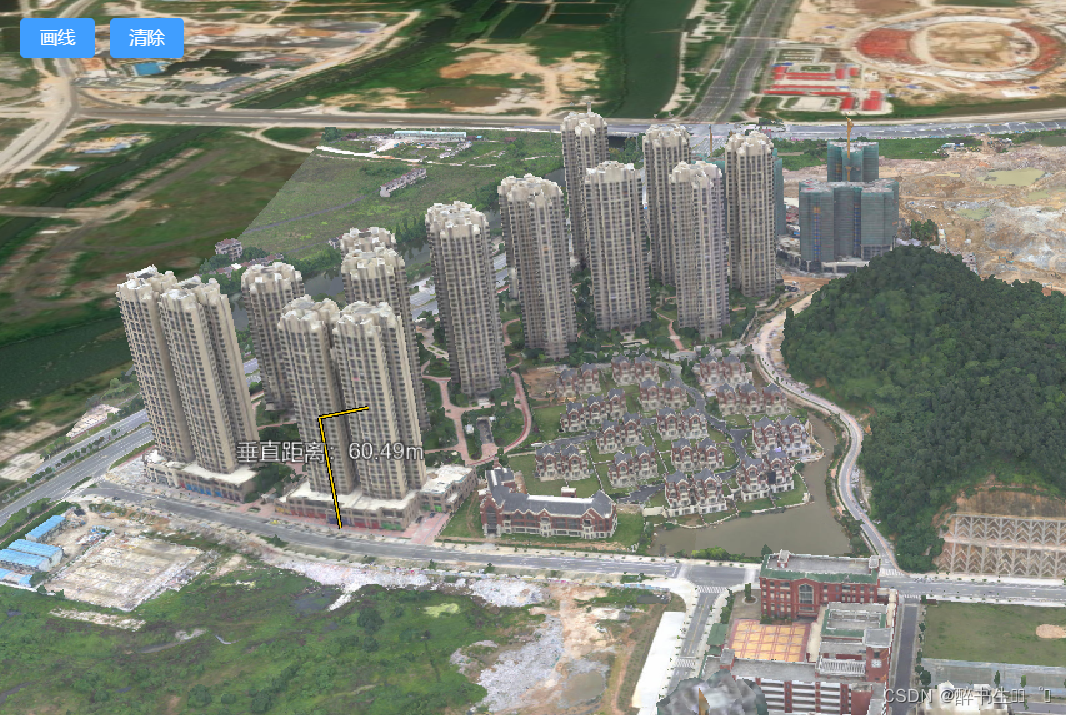
效果图
相关文章:
cesium-测量高度垂直距离
cesium做垂直测量 完整代码 <template><div id"cesiumContainer" style"height: 100vh;"></div><div id"toolbar" style"position: fixed;top:20px;left:220px;"><el-breadcrumb><el-breadcrumb-i…...

Adobe Illustrator CEP插件开发入门指南
引言 Adobe Creative Cloud(创意云)中的Illustrator作为一款全球领先的矢量图形设计软件,为设计师提供了丰富的功能和无限的创作可能性。为了进一步增强其功能并满足个性化工作流程需求,Adobe引入了Common Extensibility Platform…...
【Spring】自定义注解 + AOP 记录用户的使用日志
目录 编辑 自定义注解 AOP 记录用户的使用日志 使用背景 落地实践 一:自定义注解 二:切面配置 三:Api层使用 使用效果 自定义注解 AOP 记录用户的使用日志 使用背景 (1)在学校项目中,安防平台…...

linux互斥锁:递归锁,非递归锁用法详解
在实际的项目中经常涉及到共享资源,共享资源被多个线程访问会出现竞争现象;为了解决竞争和保护共享资源常用的机制之一就是互斥锁! 互斥锁又分为递归锁和非递归锁,互斥锁默认是非递归锁,也是我们常用的上锁方式。那么什么是递归锁和非递归锁呢? 非递归锁(Non-recursive …...

MacOS安装dmg提示已文件已损坏的解决方法
MacOS安装dmg提示已文件已损坏的解决方法 导致原因是应用没有上传到苹果的appstroe,系统限制了安装,破碎提示是苹果的误导小手段 方法 一 App 在macOS Catalina(比较新的系统,例如m1,m2也适用)下提示已损坏…...

前端输入框简单实现检测@成员输入
大体逻辑是 给input框添加一个input监听,并判断输入是否为获取当前光标的位置,你输入的肯定在光标之前,且肯定是最后一个input输入的内容换行可以被认为空格,需要进行全局替换判断成功的逻辑分为两部分,前方一般来说是…...
通过与chatGPT交流实现零样本事件抽取
1、写作动机: 近来的大规模语言模型(例如Chat GPT)在零样本设置下取得了很好的表现,这启发作者探索基于提示的方法来解决零样本IE任务。 2、主要贡献: 提出了基于chatgpt的多阶段的信息抽取方法:在第一阶…...

使用nodejs和html布局一个简单的视频播放网站,但是使用localhost:端口访问html无法加载视频
js代码: // app.js const express require(express); const path require(path); const app express();// 设置静态文件目录,这里假设你的视频文件在public/videos/目录下 app.use(express.static(path.join(__dirname, )));// 设置主页路由…...
【AG32VF407】国产MCU+FPGA Verilog双边沿检测输出方波
视频讲解 [AG32VF407]国产MCUFPGA Verilog双边沿检测输出方波 实验过程 本次使用使用AG32VF407开发板中的FPGA,使用双clk的双边沿进行检测,同步输出方波 同时可以根据输出的方波检测clk的频率,以及双clk的相位关系,如下为verilog…...

[晓理紫]每日论文分享(有中文摘要,源码或项目地址)--强化学习、模仿学习、机器人
专属领域论文订阅 关注{晓理紫},每日更新论文,如感兴趣,请转发给有需要的同学,谢谢支持 如果你感觉对你有所帮助,请关注我,每日准时为你推送最新论文。 为了答谢各位网友的支持,从今日起免费为3…...
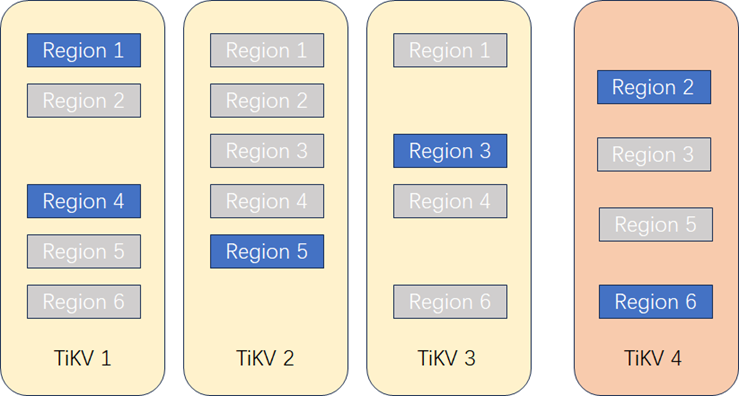
为什么说TiDB在线扩容对业务几乎没有影响
作者: 数据源的TiDB学习之路 原文来源: https://tidb.net/blog/e82b2c5f 当前的数据库种类繁多,墨天轮当前统计的所有国产数据库已经有 290个 ,其中属于关系型数据库的有 166个 。关系型数据库从部署架构上又可以分为集中式…...
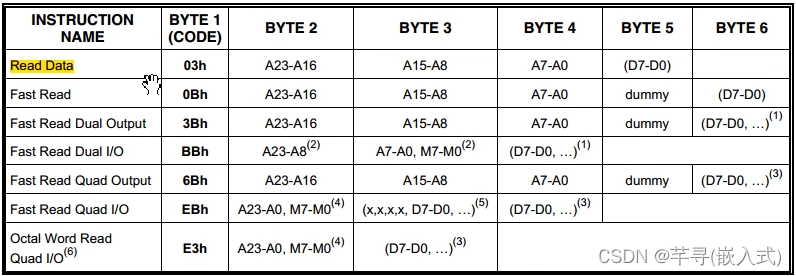
STM32--SPI通信协议(2)W25Q64简介
一、W25Q64简介 1、W25Qxx中的xx是不同的数字,表示了这个芯片不同的存储容量; 2、存储器分为易失性与非易失性,主要区别是存储的数据是否是掉电不丢失: 易失性存储器:SRAM、DRAM; 非易失性存储器ÿ…...

svn安装与搭建
1、svn搭建 # yum install subversion -y //安装 # svnserve --version //查看版本 2、创建仓库目录repo # mkdir -p /opt/svn/repo //创建目录 # svnadmin create /opt/svn/repo/ //创建新仓库 # ls !$ …...

什么是缓存击穿、缓存穿透、缓存雪崩?
缓存雪崩 缓存雪崩是指缓存同一时间大面积的失效,所以,后面的请求都会落到数据库上,造成数据库短时间内承受大量请求而崩掉。 解决方案 缓存数据的过期时间设置随机,防止同一时间大量数据过期现象发生。一般并发量不是特别多的时…...
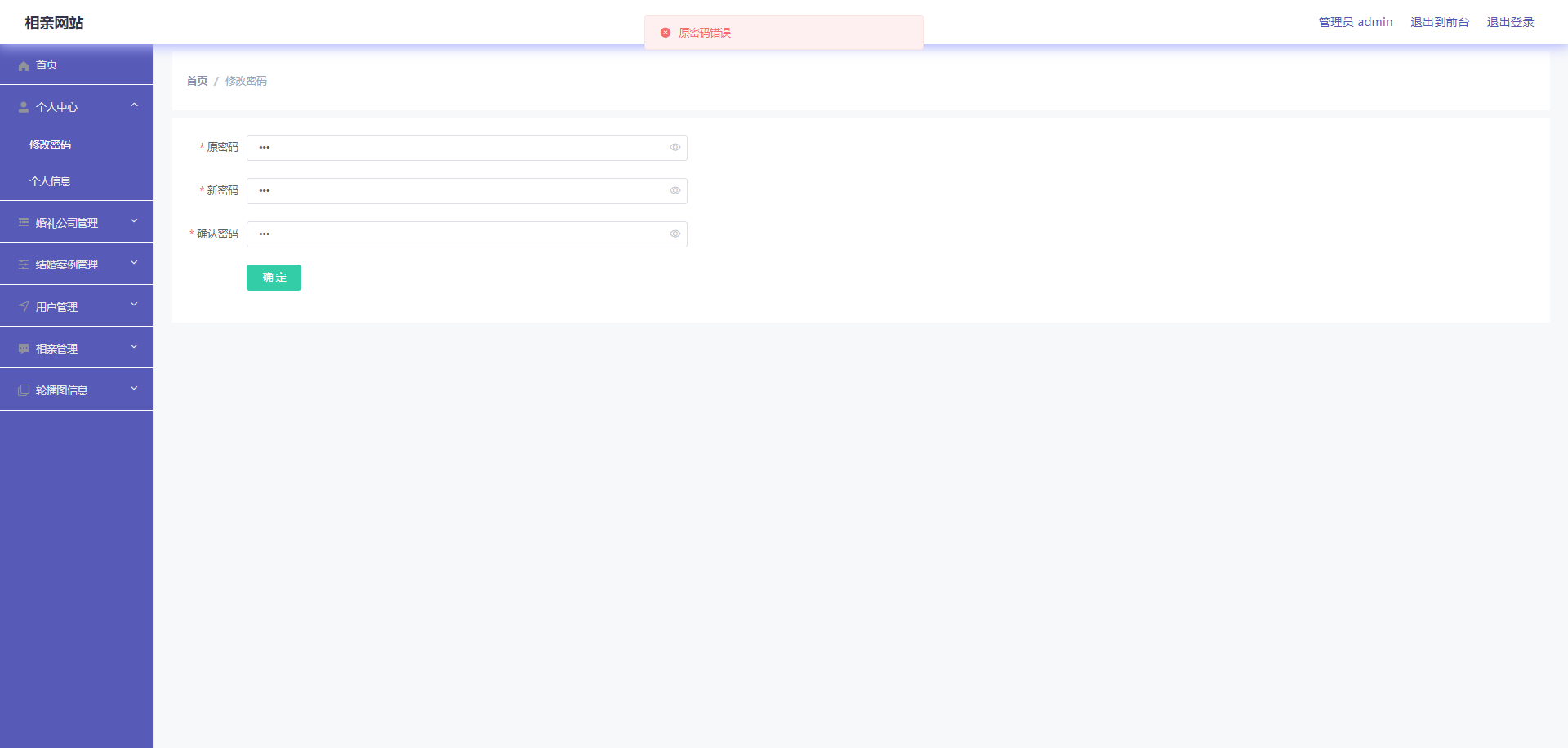
springboot153相亲网站
简介 【毕设源码推荐 javaweb 项目】基于springbootvue 的 适用于计算机类毕业设计,课程设计参考与学习用途。仅供学习参考, 不得用于商业或者非法用途,否则,一切后果请用户自负。 看运行截图看 第五章 第四章 获取资料方式 **项…...
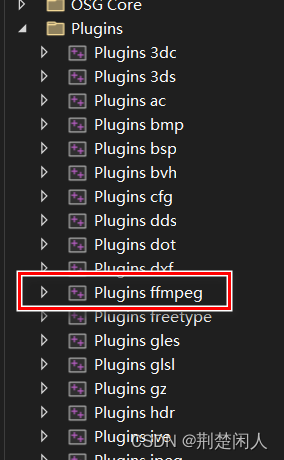
CMake生成osg的FFMPEG插件及Windows下不生成VS工程问题解决
在Windows下,如何利用CMake生成osg的FFMPEG插件,请参考如下博文,同生成jpeg插件类似: osg第三方插件的编译方法(以jpeg插件来讲解)。 如下为生成FFMPEG时必要的设置: 注意: 一定要…...

代码随想录算法训练营Day25 | 216.组合总和III、17.电话号码的字母组合
216.组合总和III 与77.组合差不多,就返回条件中收集结果步骤多了一步判断,同时剪枝策略多了一种 vector<vector<int>> ans; vector<int> path; int sum 0;void backtracking(int num, int& k, int& n) {if (path.size() k…...
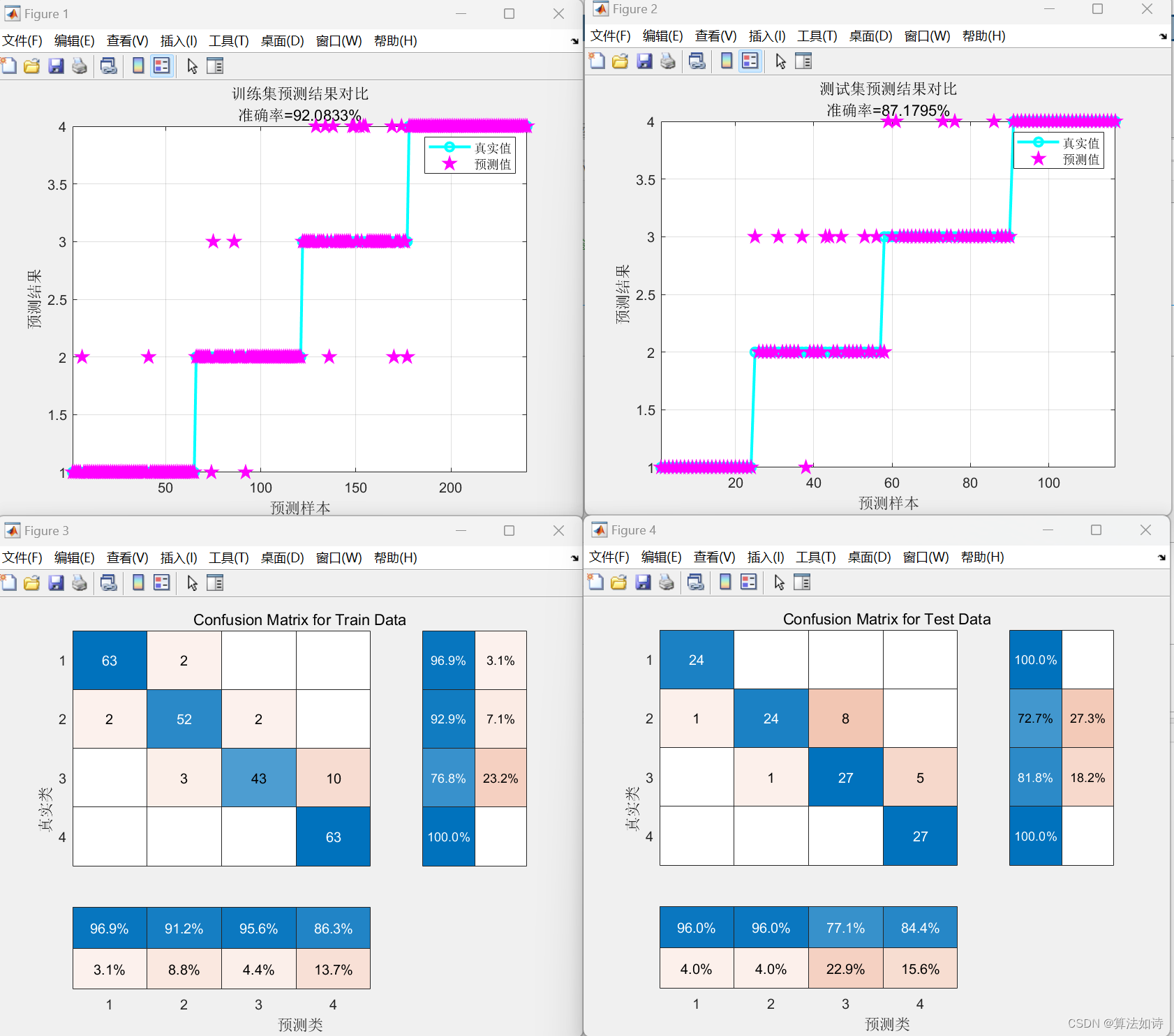
故障诊断 | 一文解决,SVM支持向量机的故障诊断(Matlab)
效果一览 文章概述 故障诊断 | 一文解决,SVM支持向量机的故障诊断(Matlab) 支持向量机(Support Vector Machine,SVM)是一种常用的监督学习算法,用于分类和回归分析。SVM的主要目标是找到一个最优的超平面(或者在非线性情况下是一个最优的超曲面),将不同类别的样本分开…...
)
12.1 Web开发_DOMBOM:JS关联CSS(❤❤)
12.1 Web开发_DOM&BOM 1. DOM&BOM2. DOM:文档对象模型2.1 获取页面元素1. getElementById2. getElementsByClassName3. querySelector3. 事件3.1 事件三要素3.2 绑定事件的三种方式1. 标签on2. 对象.on事件3. addEventListener3.3 常用事件...

scoped样式隔离原理
在 Vue 中,作用域样式(Scoped Styles)是通过以下原理实现的: 1、唯一选择器: 当 Vue 编译单文件组件时,在样式中使用 scoped 特性或 module 特性时,Vue 会为每个样式选择器生成一个唯一的属性…...

vllm 安装
别在Windows里安装vllm了,总有很多问题, 可以在WSL2的Unbuntu 24.04里安装vllm,轻松完成 一、相关链接 vllm https://docs.vllm.ai/en/latest/index.html github https://github.com/vllm-project/vllm vLLM 中文站 https://vllm.hyper.…...

告别第三方软件!用Win10远程桌面高效管理家里和公司的电脑,完整设置流程分享
高效混合办公指南:用Win10远程桌面无缝连接家庭与工作电脑 混合办公模式已成为现代职场的新常态,无论是居家办公时访问公司电脑处理紧急文件,还是出差途中远程连接家中设备获取资料,Win10内置的远程桌面功能都能提供稳定高效的解决…...

新手零基础入门:借助快马AI生成带详细注释的51单片机流水灯项目
作为一个刚接触51单片机的新手,我最近尝试用InsCode(快马)平台完成了第一个流水灯项目。整个过程比我预想的顺利很多,特别适合零基础入门。下面分享我的学习过程和关键要点: 项目准备阶段 刚开始连开发板长什么样都不知道,通过平台…...

3个实战技巧:彻底解锁Cursor Pro功能的高效完整指南
3个实战技巧:彻底解锁Cursor Pro功能的高效完整指南 【免费下载链接】cursor-free-vip [Support 0.45](Multi Language 多语言)自动注册 Cursor Ai ,自动重置机器ID , 免费升级使用Pro 功能: Youve reached your trial…...

突破NCM格式限制:ncmdump实现音乐自由的全方位解决方案
突破NCM格式限制:ncmdump实现音乐自由的全方位解决方案 【免费下载链接】ncmdump 项目地址: https://gitcode.com/gh_mirrors/ncmd/ncmdump 【场景化痛点:当音乐文件变成"数字牢笼"】 周末自驾游途中,你精心准备的网易云音…...
庆祝动画+HP状态变化的沉浸式交互录屏)
Pixel Language Portal效果展示:实时翻译+st.balloons()庆祝动画+HP状态变化的沉浸式交互录屏
Pixel Language Portal效果展示:实时翻译st.balloons()庆祝动画HP状态变化的沉浸式交互录屏 1. 像素冒险工坊的诞生 在传统翻译工具千篇一律的界面中,Pixel Language Portal(像素语言跨维传送门)带来了全新的视觉冲击。这款基于…...

如何将你的小爱音箱改造成智能AI语音助手:MiGPT终极教程
如何将你的小爱音箱改造成智能AI语音助手:MiGPT终极教程 【免费下载链接】mi-gpt 🏠 将小爱音箱接入 ChatGPT 和豆包,改造成你的专属语音助手。 项目地址: https://gitcode.com/GitHub_Trending/mi/mi-gpt 想让家里的智能音箱从"…...

华为云CCE内网部署Nacos集群实战:不用Helm,纯页面操作搞定镜像上传与配置
华为云CCE内网部署Nacos集群实战:纯控制台操作指南 在企业级容器化部署场景中,内网环境下的服务部署往往面临特殊挑战。当安全合规要求严格限制外网访问时,传统依赖公网镜像仓库和Helm工具的部署方案便不再适用。本文将详细介绍如何在华为云…...

用OpenMV和麦克纳姆轮给智能车做个‘漂移外挂’:从循迹到横滑的代码改造实录
OpenMV与麦克纳姆轮智能车的可控漂移改造实战 当一台普通的循迹小车突然在弯道甩出漂亮的横滑轨迹,围观者的惊叹声往往比技术本身更早到达终点。本文将彻底拆解如何通过运动解算逻辑重构和视觉处理优化,将基础麦轮智能车升级为"赛道艺术家"的…...

从服务器被黑到主动防御:fail2ban实战部署与多服务防护策略
1. 从一次真实的服务器入侵说起 去年夏天的一个凌晨,我被手机警报声惊醒——自建服务器的CPU占用率飙升至100%。登录管理界面后,发现有个名为kworker的进程持续消耗资源。经过排查,在/tmp目录下发现了伪装成系统文件的挖矿程序,攻…...