
飞天使-k8s知识点17-kubernetes实操2-pod探针的使用
文章目录
- 探针的使用
- 容器探针启动实验1-启动探针的使用-startupprobe
- Liveness Probes 和 Readiness Probes
- 演示
- 若存在started.html 则进行
探针的使用
kubectl edit deploy -n kube-system corednslivenessprobe 的使用 livenessProbe:failureThreshold: 5httpGet:path: /healthport: 8080scheme: HTTPinitialDelaySeconds: 60periodSeconds: 10successThreshold: 1timeoutSeconds: 5readinessProbereadinessProbe:failureThreshold: 3httpGet:path: /readyport: 8181scheme: HTTPperiodSeconds: 10successThreshold: 1timeoutSeconds: 1kubectl edit po nginx kubectl describe po nginx-daemon
最下面有容器启动时候相关日志
容器探针启动实验1-启动探针的使用-startupprobe
Events:Type     Reason     Age               From               Message----     ------     ----              ----               -------Normal   Scheduled  20s               default-scheduler  Successfully assigned default/my-pod1 to ha2.example.localNormal   Pulled     20s               kubelet            Container image "nginx:1.7.9" already present on machineNormal   Created    20s               kubelet            Created container nginxNormal   Started    20s               kubelet            Started container nginxWarning  Unhealthy  4s (x2 over 14s)  kubelet            Startup probe failed: HTTP probe failed with statuscode: 404
[root@kubeadm-master1 test]# kubectl get pod
NAME                                 READY   STATUS    RESTARTS   AGE
client                               1/1     Running   0          48d
my-pod                               1/1     Running   0          7d23h
my-pod1                              0/1     Running   0          37s
net-test1                            1/1     Running   133        55d
net-test2                            1/1     Running   13         55d
nginx-deployment-67dfd6c8f9-5s6nz    1/1     Running   1          55d
tomcat-deployment-6c44f58b47-4pz6d   1/1     Running   1          55d
[root@kubeadm-master1 test]# kubectl get pod
NAME                                 READY   STATUS    RESTARTS   AGE
client                               1/1     Running   0          48d
my-pod                               1/1     Running   0          7d23h
my-pod1                              0/1     Running   0          42s
net-test1                            1/1     Running   133        55d
net-test2                            1/1     Running   13         55d
nginx-deployment-67dfd6c8f9-5s6nz    1/1     Running   1          55d
tomcat-deployment-6c44f58b47-4pz6d   1/1     Running   1          55d
[root@kubeadm-master1 test]# cat nginx-po.yaml
apiVersion: v1
kind: Pod
metadata:name: my-pod1labels:type: apptest: "1.0.0"namespace: default
spec:containers:- name: nginximage: nginx:1.7.9imagePullPolicy: IfNotPresentcommand:- nginx- -g- 'daemon off;'workingDir: /usr/share/nginx/htmlports:- name: httpcontainerPort: 80protocol: TCPenv:- name: JVM_OPTSvalue: '-Xms128m -Xmx128m'resources:requests:cpu: 100mmemory: 128Milimits:cpu: 200mmemory: 256MistartupProbe:httpGet:path: /api/pathport: 80failureThreshold: 3periodSeconds: 10successThreshold: 1timeoutSeconds: 5restartPolicy: OnFailure
Liveness Probes 和 Readiness Probes
用于检查容器是否还在运行。如果 liveness 探针失败,Kubernetes 将杀死容器,并根据其重启策略来处理。
用于检查容器是否已经准备好接收流量。如果 readiness 探针失败,Kubernetes 将不会将流量路由到该容器。定义了一个 startupProbe,它在容器启动后通过 HTTP GET 请求检查 /api/path 端点。现在我们将添加 livenessProbe 和 readinessProbe。一个 livenessProbe 可以如下定义:livenessProbe:httpGet:path: /api/healthport: 80initialDelaySeconds: 30periodSeconds: 10
这个 livenessProbe 会在容器启动后的30秒开始工作,每10秒检查一次 /api/health 端点。一个 readinessProbe 可以如下定义:readinessProbe:httpGet:path: /api/readyport: 80initialDelaySeconds: 5periodSeconds: 5
这个 readinessProbe 会在容器启动后的5秒开始工作,每5秒检查一次 /api/ready 端点。
演示
[root@kubeadm-master1 test]# cat liveness.yml
apiVersion: v1
kind: Pod
metadata:name: my-pod1labels:type: apptest: "1.0.0"namespace: default
spec:containers:- name: nginximage: nginx:1.7.9imagePullPolicy: IfNotPresentcommand:- nginx- -g- 'daemon off;'workingDir: /usr/share/nginx/htmlports:- name: httpcontainerPort: 80protocol: TCPenv:- name: JVM_OPTSvalue: '-Xms128m -Xmx128m'resources:requests:cpu: 100mmemory: 128Milimits:cpu: 200mmemory: 256MistartupProbe:httpGet:path: /api/pathport: 80failureThreshold: 3periodSeconds: 10successThreshold: 1timeoutSeconds: 5livenessProbe:httpGet:path: /api/healthport: 80initialDelaySeconds: 30periodSeconds: 10readinessProbe:httpGet:path: /api/readyport: 80initialDelaySeconds: 5periodSeconds: 5restartPolicy: OnFailureState:          RunningStarted:      Thu, 15 Feb 2024 15:15:19 +0800Ready:          FalseRestart Count:  0Limits:cpu:     200mmemory:  256MiRequests:cpu:      100mmemory:   128MiLiveness:   http-get http://:80/api/health delay=30s timeout=1s period=10s #success=1 #failure=3Readiness:  http-get http://:80/api/ready delay=5s timeout=1s period=5s #success=1 #failure=3Startup:    http-get http://:80/api/path delay=0s timeout=5s period=10s #success=1 #failure=3Environment:JVM_OPTS:  -Xms128m -Xmx128mMounts:/var/run/secrets/kubernetes.io/serviceaccount from default-token-75cq9 (ro)
Conditions:Type              StatusInitialized       TrueReady             FalseContainersReady   FalsePodScheduled      True
Volumes:default-token-75cq9:Type:        Secret (a volume populated by a Secret)SecretName:  default-token-75cq9Optional:    false
QoS Class:       Burstable
Node-Selectors:  <none>
Tolerations:     node.kubernetes.io/not-ready:NoExecute op=Exists for 300snode.kubernetes.io/unreachable:NoExecute op=Exists for 300s
Events:Type     Reason     Age               From               Message----     ------     ----              ----               -------Normal   Scheduled  19s               default-scheduler  Successfully assigned default/my-pod1 to ha2.example.localNormal   Pulled     19s               kubelet            Container image "nginx:1.7.9" already present on machineNormal   Created    19s               kubelet            Created container nginxNormal   Started    19s               kubelet            Started container nginxWarning  Unhealthy  2s (x2 over 12s)  kubelet            Startup probe failed: HTTP probe failed with statuscode: 404
若存在started.html 则进行

相关文章:
飞天使-k8s知识点17-kubernetes实操2-pod探针的使用
文章目录 探针的使用容器探针启动实验1-启动探针的使用-startupprobeLiveness Probes 和 Readiness Probes演示若存在started.html 则进行 探针的使用 kubectl edit deploy -n kube-system corednslivenessprobe 的使用 livenessProbe:failureThreshold: 5httpGet:path: /heal…...

tee漏洞学习-翻译-3:TrustZone exploit for MSM8974
原文:http://bits-please.blogspot.com/2015/08/full-trustzone-exploit-for-msm8974.html 在这篇博文中,我们将介绍利用上一篇文章中描述的 TrustZone 漏洞的完整过程。 在开发此漏洞时,我只使用了我值得信赖的(个人࿰…...

rust递归遍历磁盘目录及文件
Std库实现 //遍历dir目录,找出修改日期距离当前超过age天的文件名称,存入file_list中 fn visit_dir(dir: &Path, file_list: &mut Vec<String>, age: u64) -> io::Result<()> {if dir.is_dir() {for entry in fs::read_dir(dir)…...
C语言每日一题(56)平衡二叉树
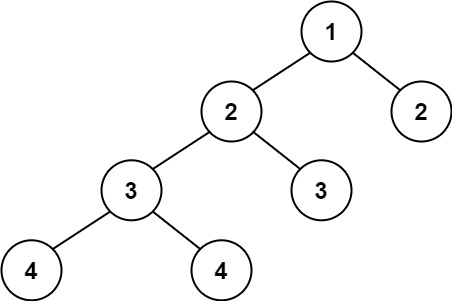
力扣网 110 平衡二叉树 题目描述 给定一个二叉树,判断它是否是高度平衡的二叉树。 本题中,一棵高度平衡二叉树定义为: 一个二叉树每个节点 的左右两个子树的高度差的绝对值不超过 1 。 示例 1: 输入:root [3,9,20,…...
Flutter Android开发 梳理Google Material Design颜色体系
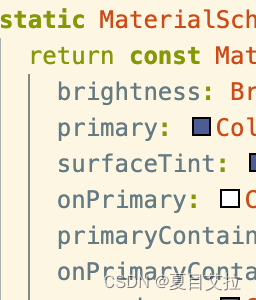
前言 做安卓开发(Kotlin语言),Flutter开发的人员应该都听说过谷歌一直推崇的Material Design,而Material Design Color是其推崇的颜色体系,具体来说,Material Design Color是一套旨在帮助设计师和开发者创…...

每日五道java面试题之java基础篇(六)
目录: 第一题:Java 创建对象有哪⼏种⽅式?第二题 .Integer a 127,Integer b 127;Integer c 128,Integer d 128;相等吗?第三题.Object 类的常⻅⽅法?第四题 List和Set的区别第五题 ArrayList和…...
map)
c++ STL系列——(五)map
目录 引言 特点 包含头文件 基本特性 基本操作 插入元素 访问元素 移除元素 检查是否包含某个键 获取元素数量 高级特性 迭代器 自定义比较函数 实际应用 统计字符出现次数 缓存最近访问的元素 总结 引言 在C中,标准模板库(STL…...

Huggingface 文档翻译完毕
Accelerate 0.27 中文文档音频课程文档AutoTrain 中文文档AWS 中文文档竞赛中文文档Diffusers 0.26 中文文档深度强化学习课程文档数据集服务器中文文档Datasets 2.17 中文文档 Evaluate 0.4 中文文档Huggingface.js 中文文档Hub 中文文档Hub 客户端库 JS 0.20 中文文档推理 AP…...
C++中类的6个默认成员函数 【拷贝构造函数】
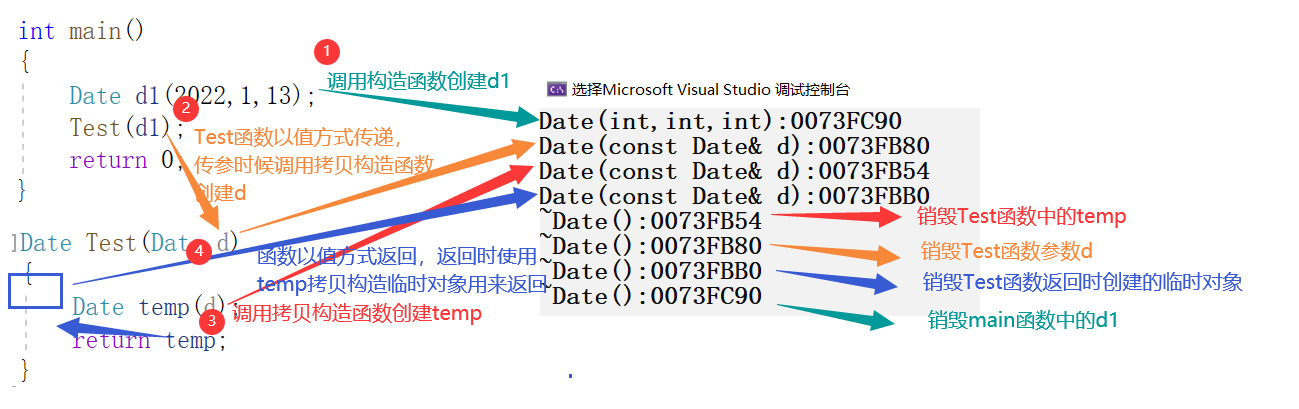
文章目录 拷贝构造函数的使用拷贝构造对于自定义类型【浅拷贝】深拷贝拷贝构造函数典型调用场景 拷贝构造函数的使用 在前几章学习对象的时候,我们有的时候需要一个与已存在对象一某一样的新对象 那在创建对象时,可否创建一个与已存在对象一某一样的新对…...

【前端高频面试题--Vuex下篇】
🚀 作者 :“码上有前” 🚀 文章简介 :前端高频面试题 🚀 欢迎小伙伴们 点赞👍、收藏⭐、留言💬前端高频面试题--Vuex篇 往期精彩内容Vuex 的原理Vuex中action和mutation的区别Vuex 和 localStor…...
-查询语句的优化与重构)
MySQL性能调优篇(4)-查询语句的优化与重构
MySQL数据库查询语句的优化与重构 MySQL是一种常用的关系型数据库管理系统,广泛应用于Web开发中。在实际应用中,对数据库查询语句的优化和重构是提高应用性能和响应速度的重要手段。本文将介绍一些常见的优化技巧和重构方法,帮助开发者提高数…...

LInux、源码编译安装
步骤: 步骤1:安装开发工具gcc与make,释放源代码至指定目录 yum -y install gcc make 步骤2:tar解包,释放源代码至指定目录 tar -xf /root/tools.tar.gz -C /usr/local 步骤3:./configure 配置,…...

wordpress好的网站主题
有什么好的网站主题,都分享在这里了。 蓝色风格的wordpress模板,好的wordpress网站主题,需要既好看,又好用。 https://www.zhanyes.com/qiye/6305.html 血红色的好看的wordpress主题,布局经典,设计好的&am…...

【Java多线程】对进程与线程的理解
目录 1、进程/任务(Process/Task) 2、进程控制块抽象(PCB Process Control Block) 2.1、PCB重要属性 2.2、PCB中支持进程调度的一些属性 3、 内存分配 —— 内存管理(Memory Manage) 4、线程(Thread)…...
C# CAD交互界面-自定义面板集-查找定位(六)
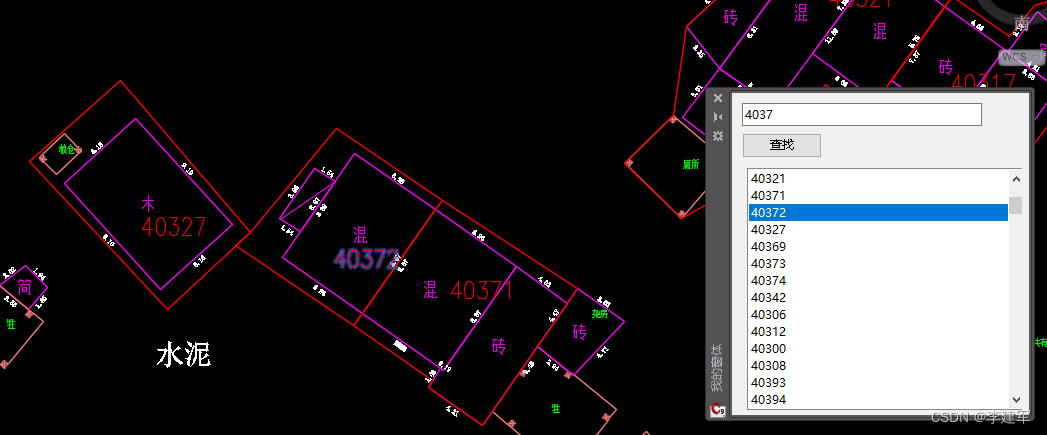
运行环境 vs2022 c# cad2016 调试成功 一、代码说明 1. 类成员变量声明: List<ObjectId> objectIds new List<ObjectId>(); // 用于存储AutoCAD实体对象的ObjectId列表 private static Autodesk.AutoCAD.Windows.PaletteSet _ps2; // 自定义浮动面板…...

5.7 BCC工具之disksnoop.py解读
一,disksnoop.py简介 disksnoop工具用于追踪块设备的I/O操作的延迟,它会在每次I/O执行完成后打印一行摘要信息。我们根据这些摘要日志,来分析当前的I/O操作是否存在延迟,以判断I/O是否达到了瓶颈。 二,代码示例 #!/usr/bin/python # # disksnoop.py Trace block device…...

QT:实现图片选择器
一、效果图 二、用到的类 qApp:可以快速获取到项目目录位置。 QSettings :编写config文件,记录上次打开图片的位置,下次打开图片会从上次的位置查找图片。 QPixmap:用于图片的缩放,防止图片过小࿰…...

LLM大模型相关问题汇总---包括问题与答案
一、基础篇 1. 目前主流的开源模型体系有哪些? - Transformer体系:由Google提出的Transformer模型及其变体,如BERT、GPT等。 - PyTorch Lightning:一个基于PyTorch的轻量级深度学习框架,用于快速原型设计和实验…...

自动化测试定位不到元素怎么办?
1.动态id定位不到元素 分析原因:每次打开页面,ID都会变化。用ID去找元素,每次刷新页面ID都会发生变化。 解决方案:推荐使用xpath的相对路径方法或者cssSelector查找到该元素。 2.iframe原因定位不到元素 分析原因:…...

1 scala集合-数组
1 定长数组 定长数组,是指数组长度不可变。定义定长数组的方法有如下两种: 方法1: var/val variable_name new Array[元素类型](数组长度) // 通过制定长度定义例如,定义一个长度为20的Int 类型数组。 scala> val a new …...

别再让电池充不满!用CN3791芯片设计太阳能充电电路,这几个调试坑我帮你踩了
太阳能充电电路实战:CN3791芯片调试避坑指南 当阳光洒在太阳能板上,理论上我们应该获得源源不断的清洁能源。但现实往往比理想骨感得多——尤其当你发现精心设计的CN3791充电电路始终无法将锂电池充满时。这不是芯片的错,而是我们在参数设置和…...

开源阅读鸿蒙版技术架构解析:构建去中心化数字阅读生态的实践方案
开源阅读鸿蒙版技术架构解析:构建去中心化数字阅读生态的实践方案 【免费下载链接】legado-Harmony 开源阅读鸿蒙版仓库 项目地址: https://gitcode.com/gh_mirrors/le/legado-Harmony 开源阅读鸿蒙版(Legado-Harmony)是一款专为鸿蒙操…...

英雄联盟智能助手Seraphine:如何用3个核心功能提升你的排位胜率
英雄联盟智能助手Seraphine:如何用3个核心功能提升你的排位胜率 【免费下载链接】Seraphine 英雄联盟战绩查询工具 项目地址: https://gitcode.com/gh_mirrors/se/Seraphine 你是否曾在英雄联盟排位赛中因为BP阶段手忙脚乱而错失先机?是否因为不了…...

瑞萨RL78/G16开发板与EZ-CUBE3仿真器连接调试全攻略
1. 项目概述与核心价值 最近在折腾瑞萨的RL78系列MCU,手头正好有一块RL78/G16的快速原型开发板和一个EZ-CUBE3仿真器。对于刚接触瑞萨生态的朋友来说,如何把这套硬件正确地连接起来,并成功跑通第一个LED闪烁程序,往往是入门路上的…...

BiliTools终极指南:2026年最强大的免费哔哩哔哩下载工具
BiliTools终极指南:2026年最强大的免费哔哩哔哩下载工具 【免费下载链接】BiliTools A cross-platform bilibili toolbox. 跨平台哔哩哔哩工具箱,支持下载视频、番剧等等各类资源 项目地址: https://gitcode.com/GitHub_Trending/bilit/BiliTools …...

量子错误校正与机器学习中的辅助比特影响研究
1. 量子错误校正与量子机器学习的基础概念量子计算的核心挑战之一是量子态的脆弱性。与环境相互作用导致的退相干效应会迅速破坏量子信息,这使得量子错误校正(QEC)成为实现实用量子计算的关键技术。在传统量子计算中,QEC通过冗余编…...

别再写一堆CASE WHEN了!PostgreSQL里COALESCE和NULLIF这两个函数,帮你把SQL写得又短又稳
告别冗长SQL:用PostgreSQL的COALESCE和NULLIF重构条件逻辑 在数据处理的世界里,SQL就像是我们与数据库对话的语言。但你是否经常遇到这样的情况:为了处理各种空值和边界条件,你的SQL查询变成了一个由无数CASE WHEN语句组成的庞然大…...

3分钟掌握APK Installer:在Windows电脑上轻松安装安卓应用的终极方案
3分钟掌握APK Installer:在Windows电脑上轻松安装安卓应用的终极方案 【免费下载链接】APK-Installer An Android Application Installer for Windows 项目地址: https://gitcode.com/GitHub_Trending/ap/APK-Installer 你是否曾想在Windows电脑上直接运行An…...

紧急通知:NotebookLM v2.3将移除手动标签覆盖功能!立即执行这5项存量标签加固操作,否则知识链永久断裂
更多请点击: https://intelliparadigm.com 第一章:NotebookLM标签管理方法 NotebookLM 原生不提供显式的“标签(Tags)”UI 控件,但可通过其底层的 source 元数据机制实现语义化标签管理。核心思路是将标签作为自定义…...

初创团队如何利用 Taotoken 以更低成本试用多种大模型
🚀 告别海外账号与网络限制!稳定直连全球优质大模型,限时半价接入中。 👉 点击领取海量免费额度 初创团队如何利用 Taotoken 以更低成本试用多种大模型 对于初创团队和独立开发者而言,在产品原型验证阶段,…...