
MySQL高可用架构之InnoDB Cluster部署
MySQL高可用架构之InnoDB Cluster部署
- InnoDB Cluster适用场景
- 准备工作
- 安装MySQL Shell
- 使用MySQL Shell搭建InnoDB Cluster
- 初始化第一个实例
- 创建InnoDB Cluster
- 添加副本实例
- 创建相关用户
- MySQL Router部署
- 安装MySQL Router
- 引导MySQL Router
- 启动MySQL Router
环境准备
| 主机名 | IP | OS版本 | MySQL版本 |
|---|---|---|---|
| mysql-ic-1 | 172.16.x.y1 | CentOS 7.7 | 8.0.32 |
| mysql-ic-2 | 172.16.x.y2 | CentOS 7.7 | 8.0.32 |
| mysql-ic-3 | 172.16.x.y3 | CentOS 7.7 | 8.0.32 |
InnoDB Cluster适用场景
MySQL InnoDB Cluster是一套完整部署和管理MySQL的高可用性解决方案,整合了MySQL的多项技术,以弥补组复制无法提供具有自动化故障转移功能的中间件,无法自动配置等不足。InnoDB Cluster需要至少3台MySQL服务器实例组成,并且提供高可用性和扩展功能。
🍕InnoDB Cluster包括如下组件:
- MySQL Shell:MySQL的高级客户端、管理工具和代码编辑器。
- MySQL Server和Group Replication:使一组MySQL实例能够提供高可用性。组复制通过分布式状态机实现数据同步,组中的所有服务器都可以参与数据更新,并自动解决数据冲突。
- X DevAPI和AdminAPI:X DevAPI应用编程接口是一个类和方法库,实现了MySQL的NoSQL接口。使用X DevAPI必须启用X插件。AdminAPI实现了管理InnoDB Cluster的接口。
- MySQL Router:一种轻量级的中间件,提供负载均衡功能,并可在应用程序和多台MySQL实例之间提供透明的连接路由。
🐬搭建InnoDB Cluster需要满足的要求如下:
-
InnoDB集群使用了Group Replication,因此必须满足使用组复制的要求。具体可以参见
https://dev.mysql.com/doc/refman/8.0/en/group-replication-requirements.html。其中比较重要的几点有:- 必须开启二进制日志,并且日志格式为ROW,即
--log-bin和binglog_format=ROW; - 必须开启副本更新日志,即
log_slave_updates=ON; - 必须开启GTID,即
gtid_mode=ON和enforce_gtid_consistency=ON。
- 必须开启二进制日志,并且日志格式为ROW,即
-
存储引擎只能使用InnoDB。最好禁用其他存储引擎:
disabled_storage_engines="MyISAM,BLACKHOLE,FEDERATED,ARCHIVE,MEMORY"
- 任一实例上不能有入站复制通道(inbound replication channel)。
group_replication_tls_source参数不能设置为mysql_admin。- 必须启用Performance Schema。
- Shell环境中必须有python。
/usr/bin/env python
- 集群中的实例必须使用不同的
server_id。 - 从8.0.23开始,集群中的实例要启用并行复制。需要配置以下系统变量:
binlog_transaction_dependency_tracking=WRITESET
slave_preserve_commit_order=ON
slave_parallel_type=LOGICAL_CLOCK
transaction_write_set_extraction=XXHASH64
- 事务隔离级别默认为可重复读。如果要使用多主集群,需要将
transaction_isolation参数修改为提交读。 - 只支持一个参数文件(option file),不支持使用
--defaults-extra-file参数选项。
🐙InnoDB Cluster的不足主要有:
- MySQL Server最好使用8.0.26及其以后的版本,否则可能与MySQL Shell出现兼容性问题。
- InnoDB Cluster不支持管理手动配置的异步复制通道。
- InnoDB Cluster是为局域网内部署而设计的。在广域网内部署的集群的写性能会受到明显的影响。
- 对AdminAPI操作,仅支持通过TCP/IP连接和经典MySQL协议连接到MySQL实例,不支持Unix socket、named pipes和X Protocol连接。
- 使用多主模式时,不支持在多个实例上同时对同一个数据库对象进行DDL和DML操作。
准备工作
需要先安装三台单机MySQL,具体教程参见MySQL 8.0 Server单机安装教程。
然后配置好三台服务器的/etc/hosts:
echo "172.16.x.y1   mysql-ic-1      mysql-ic-1" >> /etc/hosts
echo "172.16.x.y2   mysql-ic-2      mysql-ic-2" >> /etc/hosts
echo "172.16.x.y3   mysql-ic-3      mysql-ic-3" >> /etc/hosts
检查三台服务器MySQL的server-id和server-uuid,使其不同。如果相同,修改后重启MySQL服务。
grep 'server-id' /etc/my.cnf
grep 'server-uuid' /mysql/data/auto.cnf
创建'root'@'%'用户并授予管理员权限(如果没有):
mysql> create user 'root'@'%' identified with mysql_native_password by 'XXXXX';mysql> GRANT SELECT, INSERT, UPDATE, DELETE, CREATE, DROP, RELOAD, SHUTDOWN, PROCESS, FILE, REFERENCES, INDEX, ALTER, SHOW DATABASES, SUPER, CREATE TEMPORARY TABLES, LOCK TABLES, EXECUTE, REPLICATION SLAVE, REPLICATION CLIENT, CREATE VIEW, SHOW VIEW, CREATE ROUTINE, ALTER ROUTINE, CREATE USER, EVENT, TRIGGER, CREATE TABLESPACE, CREATE ROLE, DROP ROLE ON *.* TO `root`@`%` WITH GRANT OPTION;mysql> GRANT APPLICATION_PASSWORD_ADMIN,AUDIT_ABORT_EXEMPT,AUDIT_ADMIN,AUTHENTICATION_POLICY_ADMIN,BACKUP_ADMIN,BINLOG_ADMIN,BINLOG_ENCRYPTION_ADMIN,CLONE_ADMIN,CONNECTION_ADMIN,ENCRYPTION_KEY_ADMIN,FIREWALL_EXEMPT,FLUSH_OPTIMIZER_COSTS,FLUSH_STATUS,FLUSH_TABLES,FLUSH_USER_RESOURCES,GROUP_REPLICATION_ADMIN,GROUP_REPLICATION_STREAM,INNODB_REDO_LOG_ARCHIVE,INNODB_REDO_LOG_ENABLE,PASSWORDLESS_USER_ADMIN,PERSIST_RO_VARIABLES_ADMIN,REPLICATION_APPLIER,REPLICATION_SLAVE_ADMIN,RESOURCE_GROUP_ADMIN,RESOURCE_GROUP_USER,ROLE_ADMIN,SENSITIVE_VARIABLES_OBSERVER,SERVICE_CONNECTION_ADMIN,SESSION_VARIABLES_ADMIN,SET_USER_ID,SHOW_ROUTINE,SYSTEM_USER,SYSTEM_VARIABLES_ADMIN,TABLE_ENCRYPTION_ADMIN,XA_RECOVER_ADMIN ON *.* TO `root`@`%` WITH GRANT OPTION;mysql> GRANT PROXY ON ``@`` TO `root`@`%` WITH GRANT OPTION;
安装MySQL Shell
官方推荐通过配置MySQL YUM源安装。这里我们直接通过下载解压压缩包来安装(两台服务器都安装)。
wget https://dev.mysql.com/get/Downloads/MySQL-Shell/mysql-shell-8.0.32-linux-glibc2.12-x86-64bit.tar.gztar xvf mysql-shell-8.0.32-linux-glibc2.12-x86-64bit.tar.gz -C /usr/local/
添加到环境变量:
ln -s /usr/local/mysql-shell-8.0.32-linux-glibc2.12-x86-64bit /usr/local/mysql-shell echo "export PATH=$PATH:/usr/local/mysql-shell/bin" >> /root/.bash_profile
source /root/.bash_profile
测试X Protocol连接:
mysqlsh
MySQL  JS > \connect mysqlx://root@localhost:33060
使用MySQL Shell搭建InnoDB Cluster
初始化第一个实例
检查实例配置是否满足要求:
mysqlsh --mysqlx -hlocalhost -uroot -P33060
MySQL  localhost:33060+ ssl  JS > dba.checkInstanceConfiguration('mysql-ic-1:3306')
Please provide the password for 'root@mysql-ic-1:3306': **********
Save password for 'root@mysql-ic-1:3306'? [Y]es/[N]o/Ne[v]er (default No): y
Validating local MySQL instance listening at port 3306 for use in an InnoDB cluster...This instance reports its own address as mysql-ic-1:3306
Clients and other cluster members will communicate with it through this address by default. If this is not correct, the report_host MySQL system variable should be changed.Checking whether existing tables comply with Group Replication requirements...
No incompatible tables detectedChecking instance configuration...NOTE: Some configuration options need to be fixed:
+----------------------------------------+---------------+----------------+--------------------------------------------------+
| Variable                               | Current Value | Required Value | Note                                             |
+----------------------------------------+---------------+----------------+--------------------------------------------------+
| binlog_transaction_dependency_tracking | COMMIT_ORDER  | WRITESET       | Update the server variable                       |
| master_info_repository                 | FILE          | TABLE          | Update read-only variable and restart the server |
+----------------------------------------+---------------+----------------+--------------------------------------------------+Some variables need to be changed, but cannot be done dynamically on the server.
NOTE: Please use the dba.configureInstance() command to repair these issues.{"config_errors": [{"action": "server_update", "current": "COMMIT_ORDER", "option": "binlog_transaction_dependency_tracking", "required": "WRITESET"}, {"action": "server_update+restart", "current": "FILE", "option": "master_info_repository", "required": "TABLE"}], "status": "error"
}
修复检测出来的配置问题:
MySQL  localhost:33060+ ssl  JS > dba.configureInstance('mysql-ic-1:3306')
Configuring local MySQL instance listening at port 3306 for use in an InnoDB cluster...This instance reports its own address as mysql-ic-1:3306
Clients and other cluster members will communicate with it through this address by default. If this is not correct, the report_host MySQL system variable should be changed.applierWorkerThreads will be set to the default value of 4.NOTE: Some configuration options need to be fixed:
+----------------------------------------+---------------+----------------+--------------------------------------------------+
| Variable                               | Current Value | Required Value | Note                                             |
+----------------------------------------+---------------+----------------+--------------------------------------------------+
| binlog_transaction_dependency_tracking | COMMIT_ORDER  | WRITESET       | Update the server variable                       |
| master_info_repository                 | FILE          | TABLE          | Update read-only variable and restart the server |
+----------------------------------------+---------------+----------------+--------------------------------------------------+Some variables need to be changed, but cannot be done dynamically on the server.
Do you want to perform the required configuration changes? [y/n]: y
Do you want to restart the instance after configuring it? [y/n]: y
Configuring instance...
The instance 'mysql-ic-1:3306' was configured to be used in an InnoDB cluster.
Restarting MySQL...
ERROR: Remote restart of MySQL server failed: MySQL Error 3707 (HY000): Restart server failed (mysqld is not managed by supervisor process).
Please restart MySQL manually (check https://dev.mysql.com/doc/refman/en/restart.html for more details).
Dba.configureInstance: Restart server failed (mysqld is not managed by supervisor process). (MYSQLSH 3707)
手动修改配置文件并重启数据库:
[root@mysql-ic-1 ~]# vim /etc/my.cnf
[root@mysql-ic-1 ~]# systemctl restart mysqld
[root@mysql-ic-1 ~]#
[root@mysql-ic-1 ~]# grep 'master_info' /etc/my.cnf
master_info_repository = TABLE
重新初始化第一个实例:
MySQL  localhost:33060+ ssl  JS > dba.checkInstanceConfiguration('mysql-ic-1:3306')
Validating local MySQL instance listening at port 3306 for use in an InnoDB cluster...This instance reports its own address as mysql-ic-1:3306
Clients and other cluster members will communicate with it through this address by default. If this is not correct, the report_host MySQL system variable should be changed.Checking whether existing tables comply with Group Replication requirements...
No incompatible tables detectedChecking instance configuration...
Instance configuration is compatible with InnoDB clusterThe instance 'mysql-ic-1:3306' is valid to be used in an InnoDB cluster.{"status": "ok"
}MySQL  localhost:33060+ ssl  JS > dba.configureInstance('mysql-ic-1:3306')
Configuring local MySQL instance listening at port 3306 for use in an InnoDB cluster...This instance reports its own address as mysql-ic-1:3306
Clients and other cluster members will communicate with it through this address by default. If this is not correct, the report_host MySQL system variable should be changed.applierWorkerThreads will be set to the default value of 4.The instance 'mysql-ic-1:3306' is valid to be used in an InnoDB cluster.
The instance 'mysql-ic-1:3306' is already ready to be used in an InnoDB cluster.Successfully enabled parallel appliers.
创建InnoDB Cluster
初始化完第一个实例后,就可以创建集群了。
MySQL  localhost:33060+ ssl  JS > var mycluster = dba.createCluster('clusterdemo')
A new InnoDB Cluster will be created on instance 'mysql-ic-1:3306'.Validating instance configuration at localhost:3306...This instance reports its own address as mysql-ic-1:3306Instance configuration is suitable.
NOTE: Group Replication will communicate with other members using 'mysql-ic-1:3306'. Use the localAddress option to override.Creating InnoDB Cluster 'clusterdemo' on 'mysql-ic-1:3306'...Adding Seed Instance...
Cluster successfully created. Use Cluster.addInstance() to add MySQL instances.
At least 3 instances are needed for the cluster to be able to withstand up to
one server failure.
添加副本实例
初始化第二个和第三个实例:
MySQL  localhost:33060+ ssl  JS > dba.configureInstance('mysql-ic-2:3306')
Please provide the password for 'root@mysql-ic-2:3306': **********
Save password for 'root@mysql-ic-2:3306'? [Y]es/[N]o/Ne[v]er (default No): y
Configuring MySQL instance at mysql-ic-2:3306 for use in an InnoDB cluster...This instance reports its own address as mysql-ic-2:3306
Clients and other cluster members will communicate with it through this address by default. If this is not correct, the report_host MySQL system variable should be changed.applierWorkerThreads will be set to the default value of 4.NOTE: Some configuration options need to be fixed:
+----------------------------------------+---------------+----------------+----------------------------+
| Variable                               | Current Value | Required Value | Note                       |
+----------------------------------------+---------------+----------------+----------------------------+
| binlog_transaction_dependency_tracking | COMMIT_ORDER  | WRITESET       | Update the server variable |
+----------------------------------------+---------------+----------------+----------------------------+Do you want to perform the required configuration changes? [y/n]: y
Configuring instance...
The instance 'mysql-ic-2:3306' was configured to be used in an InnoDB cluster.MySQL  localhost:33060+ ssl  JS > MySQL  localhost:33060+ ssl  JS > dba.configureInstance('mysql-ic-3:3306')
Please provide the password for 'root@mysql-ic-3:3306': **********
Save password for 'root@mysql-ic-3:3306'? [Y]es/[N]o/Ne[v]er (default No): y
Configuring MySQL instance at mysql-ic-3:3306 for use in an InnoDB cluster...This instance reports its own address as mysql-ic-3:3306
Clients and other cluster members will communicate with it through this address by default. If this is not correct, the report_host MySQL system variable should be changed.applierWorkerThreads will be set to the default value of 4.NOTE: Some configuration options need to be fixed:
+----------------------------------------+---------------+----------------+----------------------------+
| Variable                               | Current Value | Required Value | Note                       |
+----------------------------------------+---------------+----------------+----------------------------+
| binlog_transaction_dependency_tracking | COMMIT_ORDER  | WRITESET       | Update the server variable |
+----------------------------------------+---------------+----------------+----------------------------+Do you want to perform the required configuration changes? [y/n]: y
Configuring instance...
The instance 'mysql-ic-3:3306' was configured to be used in an InnoDB cluster.
添加副本实例到创建好的集群。如果提示副本实例的GTID与集群不一致,选择通过Clone方式覆盖副本实例上的数据即可。
MySQL  localhost:33060+ ssl  JS > var mycluster = dba.getCluster()MySQL  localhost:33060+ ssl  JS > mycluster.addInstance('mysql-ic-2:3306')WARNING: A GTID set check of the MySQL instance at 'mysql-ic-2:3306' determined that it contains transactions that do not originate from the cluster, which must be discarded before it can join the cluster.mysql-ic-2:3306 has the following errant GTIDs that do not exist in the cluster:
79a3b9d1-bafc-11ed-be1d-00163e01c0d0:1-4WARNING: Discarding these extra GTID events can either be done manually or by completely overwriting the state of mysql-ic-2:3306 with a physical snapshot from an existing cluster member. To use this method by default, set the 'recoveryMethod' option to 'clone'.Having extra GTID events is not expected, and it is recommended to investigate this further and ensure that the data can be removed prior to choosing the clone recovery method.Please select a recovery method [C]lone/[A]bort (default Abort): C
Validating instance configuration at mysql-ic-2:3306...This instance reports its own address as mysql-ic-2:3306Instance configuration is suitable.
NOTE: Group Replication will communicate with other members using 'mysql-ic-2:3306'. Use the localAddress option to override.A new instance will be added to the InnoDB Cluster. Depending on the amount of
data on the cluster this might take from a few seconds to several hours.Adding instance to the cluster...Monitoring recovery process of the new cluster member. Press ^C to stop monitoring and let it continue in background.
Clone based state recovery is now in progress.NOTE: A server restart is expected to happen as part of the clone process. If the
server does not support the RESTART command or does not come back after a
while, you may need to manually start it back.* Waiting for clone to finish...
NOTE: mysql-ic-2:3306 is being cloned from mysql-ic-1:3306
** Stage DROP DATA: Completed
** Clone Transfer  FILE COPY  ############################################################  100%  CompletedPAGE COPY  ############################################################  100%  CompletedREDO COPY  ############################################################  100%  CompletedNOTE: mysql-ic-2:3306 is shutting down...* Waiting for server restart... timeout
WARNING: Clone process appears to have finished and tried to restart the MySQL server, but it has not yet started back up.Please make sure the MySQL server at 'mysql-ic-2:3306' is restarted and call <Cluster>.rescan() to complete the process. To increase the timeout, change shell.options["dba.restartWaitTimeout"].
ERROR: MYSQLSH 51156: Timeout waiting for server to restart
Cluster.addInstance: Timeout waiting for server to restart (MYSQLSH 51156)
这里需要手动重启副本实例后,重新扫描副本实例将其加入集群:
MySQL  localhost:33060+ ssl  JS > mycluster.rescan()
Rescanning the cluster...Result of the rescanning operation for the 'clusterdemo' cluster:
{"name": "clusterdemo", "newTopologyMode": null, "newlyDiscoveredInstances": [{"host": "mysql-ic-2:3306", "member_id": "79a3b9d1-bafc-11ed-be1d-00163e01c0d0", "name": null, "version": "8.0.32"}], "unavailableInstances": [], "updatedInstances": []
}A new instance 'mysql-ic-2:3306' was discovered in the cluster.
Would you like to add it to the cluster metadata? [Y/n]: y
Adding instance to the cluster metadata...
The instance 'mysql-ic-2:3306' was successfully added to the cluster metadata.Fixing incorrect recovery account 'mysql_innodb_cluster_102' in instance 'mysql-ic-1:3306'MySQL  localhost:33060+ ssl  JS > mycluster.status()
{"clusterName": "clusterdemo", "defaultReplicaSet": {"name": "default", "primary": "mysql-ic-1:3306", "ssl": "REQUIRED", "status": "OK_NO_TOLERANCE", "statusText": "Cluster is NOT tolerant to any failures.", "topology": {"mysql-ic-1:3306": {"address": "mysql-ic-1:3306", "memberRole": "PRIMARY", "mode": "R/W", "readReplicas": {}, "replicationLag": "applier_queue_applied", "role": "HA", "status": "ONLINE", "version": "8.0.32"}, "mysql-ic-2:3306": {"address": "mysql-ic-2:3306", "memberRole": "SECONDARY", "mode": "R/O", "readReplicas": {}, "replicationLag": "applier_queue_applied", "role": "HA", "status": "ONLINE", "version": "8.0.32"}}, "topologyMode": "Single-Primary"}, "groupInformationSourceMember": "mysql-ic-1:3306"
}
重复上面的流程,将第三个实例也添加到集群中后,检查集群状态:
MySQL  localhost:33060+ ssl  JS > mycluster.status()
{"clusterName": "clusterdemo", "defaultReplicaSet": {"name": "default", "primary": "mysql-ic-1:3306", "ssl": "REQUIRED", "status": "OK", "statusText": "Cluster is ONLINE and can tolerate up to ONE failure.", "topology": {"mysql-ic-1:3306": {"address": "mysql-ic-1:3306", "memberRole": "PRIMARY", "mode": "R/W", "readReplicas": {}, "replicationLag": "applier_queue_applied", "role": "HA", "status": "ONLINE", "version": "8.0.32"}, "mysql-ic-2:3306": {"address": "mysql-ic-2:3306", "memberRole": "SECONDARY", "mode": "R/O", "readReplicas": {}, "replicationLag": "applier_queue_applied", "role": "HA", "status": "ONLINE", "version": "8.0.32"}, "mysql-ic-3:3306": {"address": "mysql-ic-3:3306", "memberRole": "SECONDARY", "mode": "R/O", "readReplicas": {}, "replicationLag": "applier_queue_applied", "role": "HA", "status": "ONLINE", "version": "8.0.32"}}, "topologyMode": "Single-Primary"}, "groupInformationSourceMember": "mysql-ic-1:3306"
}
注意到集群状态已变为"status": "OK"和"statusText": "Cluster is ONLINE and can tolerate up to ONE failure."。
创建相关用户
- 创建集群管理用户
MySQL  localhost:33060+ ssl  JS > mycluster.setupAdminAccount('icadmin')Missing the password for new account icadmin@%. Please provide one.
Password for new account: *********
Confirm password: *********Creating user icadmin@%.
Account icadmin@% was successfully created.
- 创建MySQL Router用户
MySQL  localhost:33060+ ssl  JS > mycluster.setupRouterAccount('icrouter')Missing the password for new account icrouter@%. Please provide one.
Password for new account: *********
Confirm password: *********Creating user icrouter@%.
Account icrouter@% was successfully created.
MySQL Router部署
安装MySQL Router
下载并解压MySQL Router安装包:
wget https://dev.mysql.com/get/Downloads/MySQL-Router/mysql-router-8.0.32-linux-glibc2.12-x86_64.tar.xztar xvf mysql-router-8.0.32-linux-glibc2.12-x86_64.tar.xz -C /usr/local/
添加到环境变量:
ln -s /usr/local/mysql-router-8.0.32-linux-glibc2.12-x86_64 /usr/local/mysql-router echo "export PATH=$PATH:/usr/local/mysql-router/bin" >> /root/.bash_profile
source /root/.bash_profile
引导MySQL Router
以MySQL用户来引导MySQL Router启动(不建议使用root):
[root@mysql-ic-2 ~]# mysqlrouter --bootstrap root@localhost:3306 --directory=/home/mysql/myrouter --conf-use-sockets --account icrouter --user=mysql --force
Please enter MySQL password for root:
# Bootstrapping MySQL Router instance at '/home/mysql/myrouter'...Please enter MySQL password for icrouter:
Fetching Cluster Members
trying to connect to mysql-server at mysql-ic-1:3306
- Creating account(s) (only those that are needed, if any)
- Verifying account (using it to run SQL queries that would be run by Router)
- Storing account in keyring
- Adjusting permissions of generated files
- Creating configuration /home/mysql/myrouter/mysqlrouter.conf# MySQL Router configured for the InnoDB Cluster 'clusterdemo'After this MySQL Router has been started with the generated configuration$ mysqlrouter -c /home/mysql/myrouter/mysqlrouter.confInnoDB Cluster 'clusterdemo' can be reached by connecting to:## MySQL Classic protocol- Read/Write Connections: localhost:6446, /home/mysql/myrouter/mysql.sock
- Read/Only Connections:  localhost:6447, /home/mysql/myrouter/mysqlro.sock## MySQL X protocol- Read/Write Connections: localhost:6448, /home/mysql/myrouter/mysqlx.sock
- Read/Only Connections:  localhost:6449, /home/mysql/myrouter/mysqlxro.sock
启动MySQL Router
使用生成的脚本启动MySQL Router:
sh /home/mysql/myrouter/start.sh
测试MySQL Router连接:
# 经典MySQL协议连接
mysqlsh --mysql -hlocalhost -uroot -P6446# X协议连接
mysqlsh --mysqlx -hlocalhost -uroot -P6448
相关文章:

MySQL高可用架构之InnoDB Cluster部署
MySQL高可用架构之InnoDB Cluster部署InnoDB Cluster适用场景准备工作安装MySQL Shell使用MySQL Shell搭建InnoDB Cluster初始化第一个实例创建InnoDB Cluster添加副本实例创建相关用户MySQL Router部署安装MySQL Router引导MySQL Router启动MySQL Router环境准备 主机名IPOS版…...
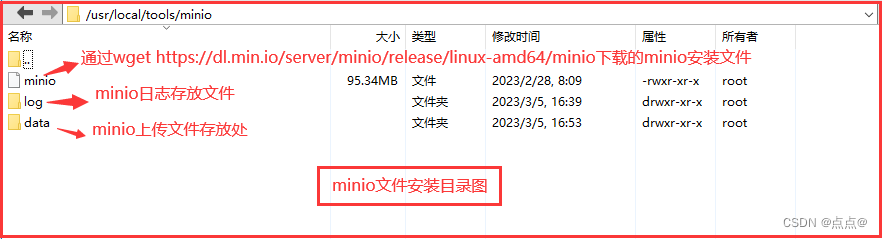
Linux安装minio单机版
说明:因为前面记录了一下minio的使用,这里说一下minio的安装,只是单机版哦 环境准备:Linux系统 说明图: 1.创建文件夹命令 我的是安装在/usr/local 文件夹下面的创建文件夹命令 #进入目标文件夹 cd /usr/local#创建…...
四)
网络总结知识点(网络工程师必备)四
♥️作者:小刘在C站 ♥️个人主页:小刘主页 ♥️每天分享云计算网络运维课堂笔记,努力不一定有收获,但一定会有收获加油!一起努力,共赴美好人生! ♥️夕阳下,是最美的绽放,树高千尺,落叶归根人生不易,人间真情 目录 前言 71.NAPT有什么特点? 72.ARP欺骗解决方法...
)
数据结构——第三章 栈与队列(5)
共用栈和双队列1.共用栈2.双端队列栈与队列的本章小节1.共用栈 在实际应用中,有时一个应用程序需要多个栈,但这些栈的数据元素类型相同。假设每个栈都采用顺序栈,由于每个栈的使用情况不尽相同,势必会造成存储空间的浪费。若让多…...

CSDN竞赛第33期题解
CSDN竞赛第33期题解 1、题目名称:奇偶排序 给定一个存放整数的数组,重新排列数组使得数组左边为奇数,右边为偶数。(奇数和偶数的顺序根据输入的数字顺序排 列) #include<bits/stdc.h> using namespace std; t…...
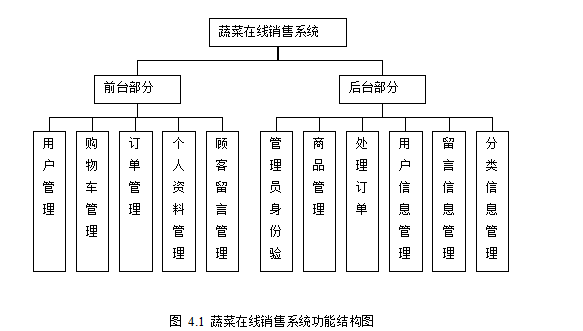
农产品销售系统的设计与实现
技术:Java、JSP等摘要:这篇文章主要描述的是农产品蔬菜在线销售系统的设计与实现。主要应用关于JSP网站开发技术,并联系到网站所处理的数据的结构特点和所学到的知识,应用的主要是Mysql数据库系统。系统实现了网站的基本功能&…...

C语言-基础了解-08-C判断
C判断 一、C判断 判断结构要求程序员指定一个或多个要评估或测试的条件,以及条件为真时要执行的语句(必需的)和条件为假时要执行的语句(可选的)。 C 语言把任何非零和非空的值假定为 true,把零或 null 假…...
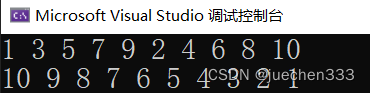
用数组名作函数参数的详解,以及形参实参采用数组名,形参实参采用指针变量的几种情况解析
关于地址,指针,指针变量可以参考我的这篇文章: 地址,指针,指针变量是什么?他们的区别?符号(*)在不同位置的解释?_juechen333的博客-CSDN博客https://blog.csd…...
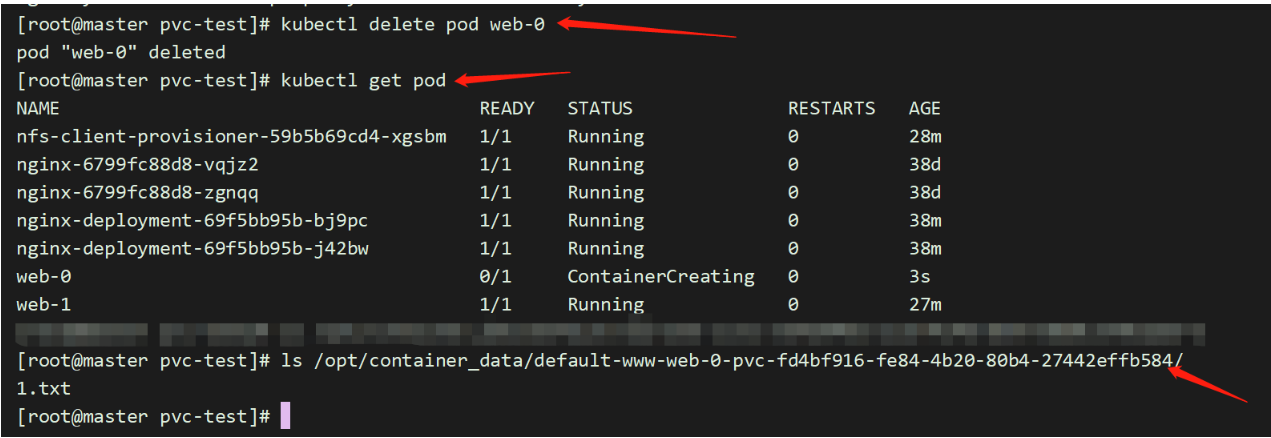
k8s中的PV和PVS
前言:容器磁盘上的文件的生命周期是短暂的,这就使得在容器中运行重要应用时会出现一些问题。首先,当容器崩溃时,kubelet 会重启它,但是容器中的文件将丢失——容器以干净的状态(镜像最初的状态)…...
【云原生】Gateway网关选型
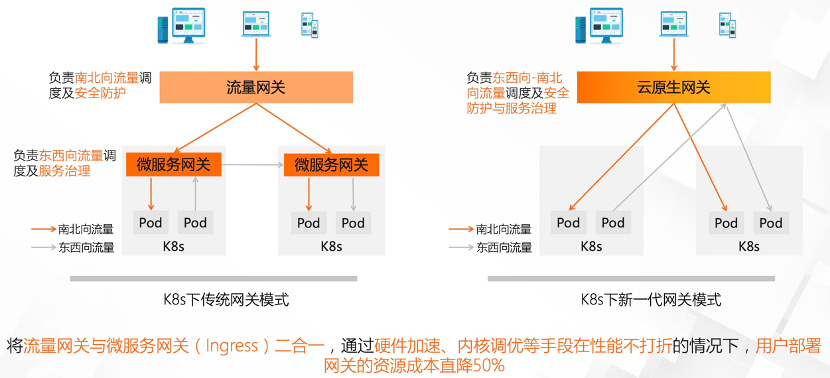
网关一般分为流量网关和业务网关,流量网关负责接入所有的流量,并分发给不同的子系统,那在具体的业务接入之前,还有一层业务网关。流量网关提供全局性的、与后端业务应用无关的策略,例如 HTTPS证书卸载、Web防火墙、全局…...
QML Button详解
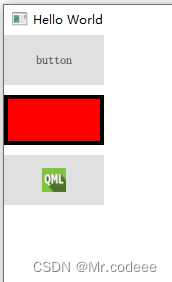
1.Button简介 Button表示用户可以按下或单击的按钮控件。按钮通常用于执行一个动作,或回答一个问题。典型的按钮有确定、应用、取消、关闭、是、否和帮助。 Button继承自AbstractButton,提供了以下几种信号。 void canceled() //当按…...

【编程实践】什么是好/坏代码?非程序员的示例
What is good/bad code? An illustrated example for non-programmers 什么是好/坏代码?非程序员的示例 目录 What is good/bad code? An illustrated example for non-programmers什么是好/坏代码?非程序员的示例 So what is ‘Bad Code’, as a layperson?那么,作为…...
一个简单的Sublime设置
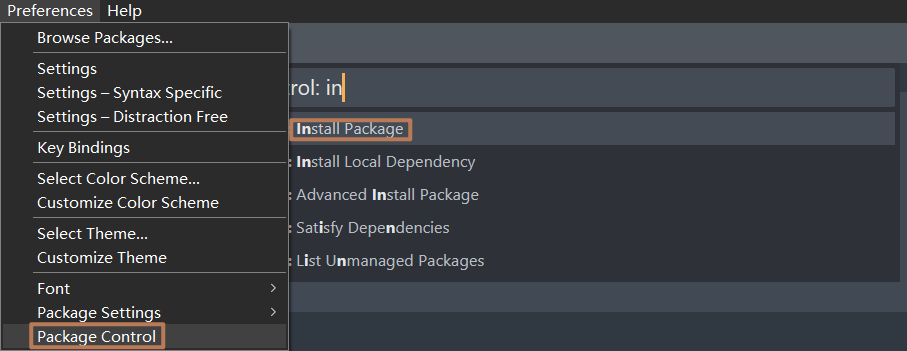
问题 如果读者熟悉我,应该会发现我经常使用 VSCode 作为主力编辑器,但随着我安装的 VSCode 的插件逐渐增加,我发现对于部分较小的任务使用 VSCode 过于笨重,比如简单的 Markdown 文件编辑工作。 在经过一系列寻找后,…...

c语言经典例题-选择结构程序设计进阶
(创作不易,感谢有你,你的支持,就是我前行的最大动力,如果看完对你有帮助,请留下您的足迹) 目录 快递费用计算: 题目: 代码思路: 代码表示: 计算一元二…...

NOI 2023春季测试 游记
怎么说,没遇到大波折即幸运。 Day 0 睡到下午三点,然后列了一堆复习计划,大概是左偏树等一些早就忘没的科技。 但是沉迷打块,最后基本什么计划也没完成。 白天睡多了,晚上睡不着,大概半梦半醒过了一整夜…...
【VC 7/8】vCenter Server 基于文件的备份和还原Ⅱ——使用 FTP 协议备份 VC(VAMI 英文)
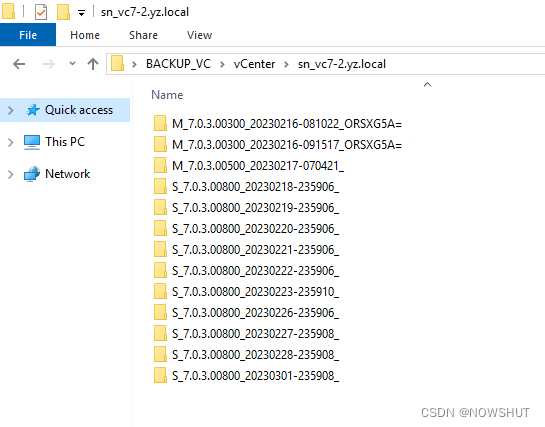
目录2. 备份 vCenter Server2.1 使用 FTP 协议备份 VC(1)登录 vCenter Server 管理界面(2)进入Backup页面(3)配置 Backup Schedule(4)开始备份(5)备份成功&am…...
Python基础—文件操作(二)
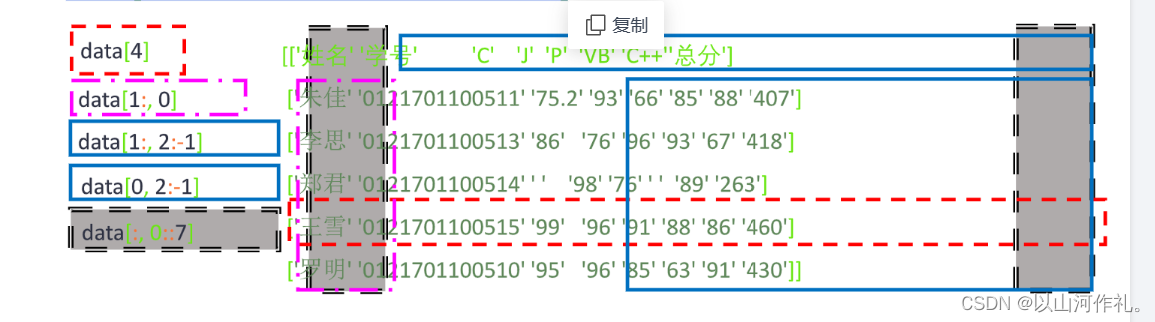
Python基础—文件操作(二) CSV格式文件 逗号分隔值,以纯文本形式存储表格数据 由任意数目的记录组成,记录间以换行符分隔 每条记录由字段组成,字段间用逗号或制表符分隔 每条记录都有同样的字段序列 如有列名,位于文件第一行 每条…...

学校的班级个数【并查集基础应用,Java实现】
题目描述 现有一个学校,学校中有若干个班级,每个班级中有若干个学生,每个学生只会存在于一个班级中。如果学生A和学生B处于一个班级,学生B和学生C处于一个班级,那么我们称学生A和学生C也处于一个班级。 现已知学校中共…...
WSL2使用Nvidia-Docker实现CUDA版本自由切换
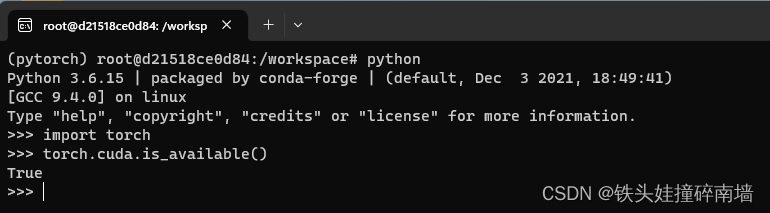
众所周知,深度学习的环境往往非常麻烦,经常不同的项目所依赖的 torch、tensorflow 包对 CUDA 的版本也有不同的要求,Linux 下进行 CUDA 的管理比较麻烦,是一个比较头疼的问题。 随着 WSL2 对物理机显卡的支持,Nvidia-…...

pygame9 扫雷游戏2
一、响应鼠标左键事件 pygame.MOUSEBUTTONDOWN 表示鼠标事件发生, pygame.mouse.get_pressed()[0] 确认是鼠标左键被按下 pygame.mouse.get_pos() 获取到鼠标按下时的坐标值。 因此,我们可以在事件逻辑中例用此三个函数判断鼠标事件及对应的坐标&#x…...

嵌入式差分升级技术解析与实践指南
1. 嵌入式差分升级方案概述在嵌入式设备固件更新领域,差分升级(Delta Update)已经成为解决传统OTA升级痛点的关键技术方案。作为一名长期从事嵌入式开发的工程师,我亲历过多次因固件体积过大导致的升级失败案例,直到采…...

如何用Bubblewrap CLI创建你的第一个Trusted Web Activity项目
如何用Bubblewrap CLI创建你的第一个Trusted Web Activity项目 【免费下载链接】bubblewrap Bubblewrap is a Command Line Interface (CLI) that helps developers to create a Project for an Android application that launches an existing Progressive Web App (PWAs) usi…...

2025届毕业生推荐的降重复率神器实测分析
Ai论文网站排名(开题报告、文献综述、降aigc率、降重综合对比) TOP1. 千笔AI TOP2. aipasspaper TOP3. 清北论文 TOP4. 豆包 TOP5. kimi TOP6. deepseek 于学术写作跟内容创作范畴之中,降重网站已然成了规避文本重复率过高的关键辅助工…...

Condition底层机制剖析:多线程等待与通知机制 _
在使用Lock之前,使用的最多的同步方式应该是synchronized关键字来实现同步方式了。配合Object的wait()、notify()系列方法可以实现等待/通知模式。 Condition接口也提供了类似Object的监视器方法,与Lock配合可以实现等待/通知模式,但是这两者…...
)
别再死记命令了!用eNSP模拟器一步步拆解华为GRE隧道配置(附排错思路)
从零理解GRE隧道:用eNSP模拟真实网络故障排查全流程 第一次在eNSP里配置GRE隧道时,看着两边路由器突然亮起的绿色指示灯,那种"通了!"的成就感至今难忘。但真正让我理解GRE价值的,反而是后来故意制造故障并排…...

公开信息整理|2026年4月4日:消费复苏、金融调节、教育规范、科技安全与部分国际动态速览
🔥个人主页:杨利杰YJlio❄️个人专栏:《Sysinternals实战教程》《Windows PowerShell 实战》《WINDOWS教程》《IOS教程》《微信助手》《锤子助手》 《Python》 《Kali Linux》 《那些年未解决的Windows疑难杂症》🌟 让复杂的事情更…...
)
保姆级教程:用Python 3.10和Hugging Face镜像站,10分钟搞定通义千问1.8B-Chat本地部署(CPU也能跑)
零基础CPU部署通义千问1.8B指南:从镜像加速到对话实战 在开源大模型如火如荼的今天,许多开发者都渴望亲手体验这些前沿技术的魅力,却常常被显卡门槛劝退。本文将打破这一限制,带你用普通笔记本电脑或云服务器CPU环境,…...

突破JSXBIN加密限制:Jsxer高效解码解决方案
突破JSXBIN加密限制:Jsxer高效解码解决方案 【免费下载链接】jsxer A fast and accurate JSXBIN decompiler. 项目地址: https://gitcode.com/gh_mirrors/js/jsxer 当创意设计师和开发人员面对Adobe ExtendScript的JSXBIN二进制文件时,往往陷入代…...

ECAPA-TDNN:通道注意力驱动的说话人验证技术革新
ECAPA-TDNN:通道注意力驱动的说话人验证技术革新 【免费下载链接】ECAPA-TDNN Unofficial reimplementation of ECAPA-TDNN for speaker recognition (EER0.86 for Vox1_O when train only in Vox2) 项目地址: https://gitcode.com/gh_mirrors/ec/ECAPA-TDNN …...

颠覆式开源工具OpCore-Simplify:自动化配置提升Hackintosh效率的完整指南
颠覆式开源工具OpCore-Simplify:自动化配置提升Hackintosh效率的完整指南 【免费下载链接】OpCore-Simplify A tool designed to simplify the creation of OpenCore EFI 项目地址: https://gitcode.com/GitHub_Trending/op/OpCore-Simplify 你是否曾为黑苹果…...