
【服务发现--ingress】
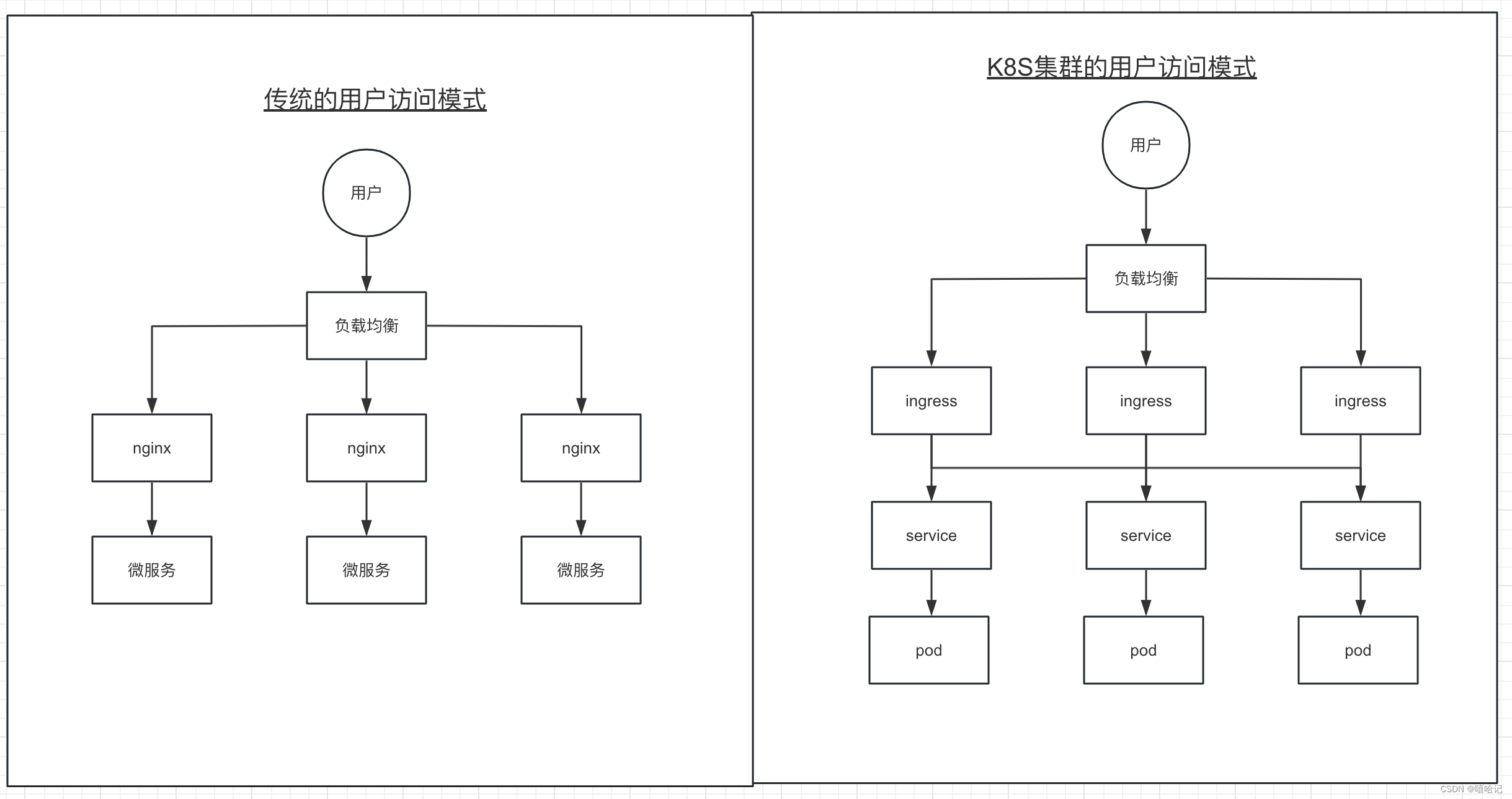
1、ingress介绍
-
Ingress 提供从集群外部到集群内服务的 HTTP 和 HTTPS 路由。 流量路由由 Ingress 资源所定义的规则来控制。
-
Ingress 是对集群中服务的外部访问进行管理的 API 对象,典型的访问方式是 HTTP。
-
Ingress 可以提供负载均衡、SSL 终结和基于名称的虚拟托管。
2、ingress 的依赖
-
你必须拥有一个 Ingress 控制器 才能满足 Ingress 的要求。仅创建 Ingress 资源本身没有任何效果。
-
你可能需要部署一个 Ingress 控制器,例如 ingress-nginx。 你可以从许多 (Ingress 控制器)中进行选择。
-
理想情况下,所有 Ingress 控制器都应遵从参考规范。 但实际上,各个 Ingress 控制器操作略有不同。
3、ingress-nginx 安装流程
参考链接:https://kubernetes.github.io/ingress-nginx/deploy/
3.1 k8s的包管理器 Helm 安装
- Helm官网:https://helm.sh/zh/docs/intro/quickstart/
- 注:安装Helm的时候需要注意k8s的版本
# 下载helm
[root@k8s-master ~]# wget https://get.helm.sh/helm-v3.10.0-linux-amd64.tar.gz  -O helm-v3.10.0-linux-amd64.tar.gz[root@k8s-master ~]# tar -zxvf helm-v3.10.0-linux-amd64.tar.gz[root@k8s-master ~]# mv linux-amd64/helm /usr/local/bin/
[root@k8s-master ~]# helm version
version.BuildInfo{Version:"v3.10.0", GitCommit:"ce66412a723e4d89555dc67217607c6579ffcb21", GitTreeState:"clean", GoVersion:"go1.18.6"}
3.2 添加helm仓库
[root@k8s-master ~]# helm repo add ingress-nginx  https://kubernetes.github.io/ingress-nginx
"ingress-nginx" has been added to your repositories
[root@k8s-master ~]# helm repo list
NAME         	URL
ingress-nginx	https://kubernetes.github.io/ingress-nginx
[root@k8s-master ~]# helm search repo  ingress-nginx
NAME                       	CHART VERSION	APP VERSION	DESCRIPTION
ingress-nginx/ingress-nginx	4.9.1        	1.9.6      	Ingress controller for Kubernetes using NGINX a...
3.3 通过helm下载ingress-nginx
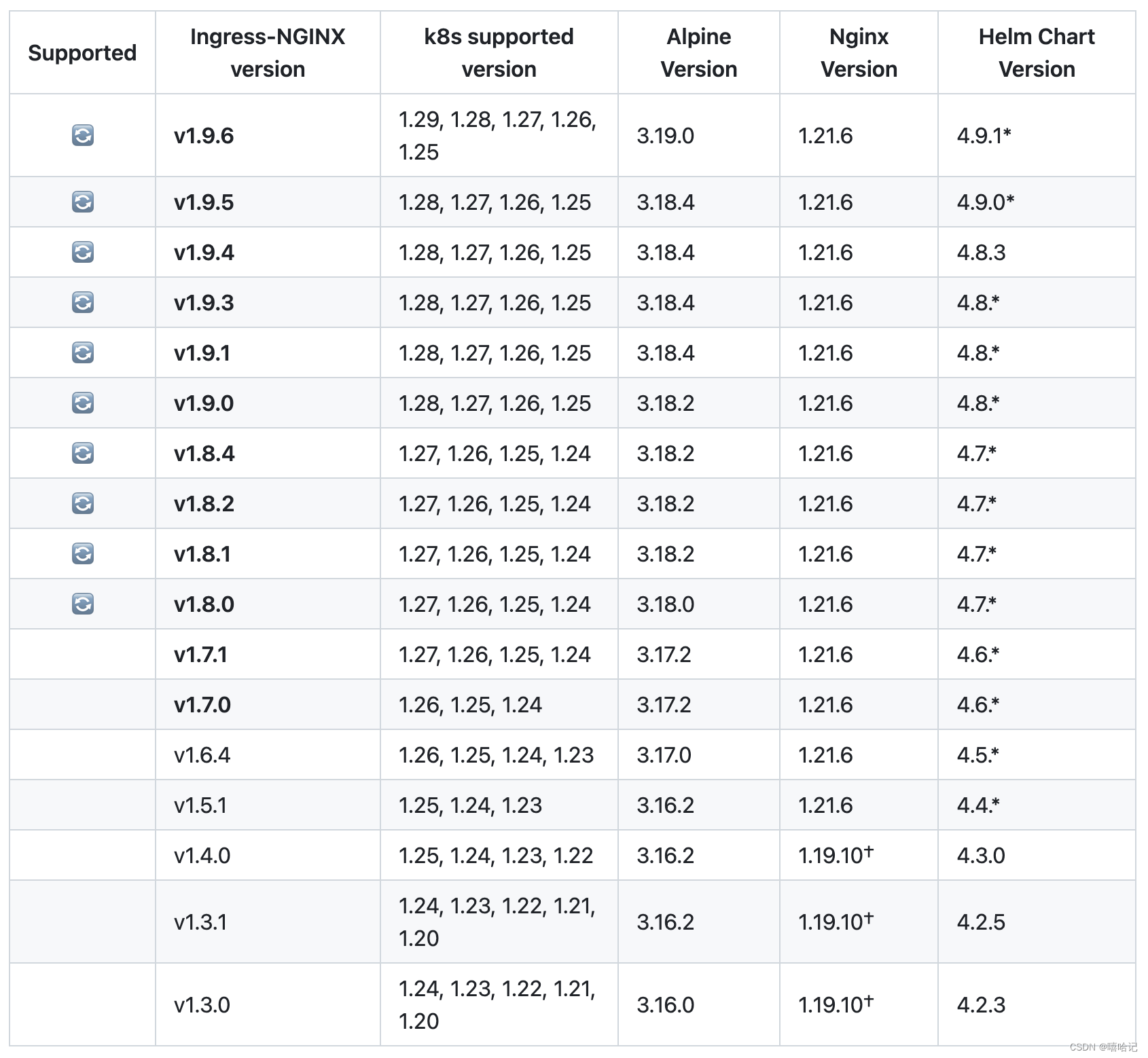
下载ingress-nginx的时候需要查看版本是否匹配k8s的版本:地址链接查看新版本是否支持,由于我的k8s版本是1.25,所以最新的v1.9.6可以使用。
[root@k8s-master ~]# helm pull ingress-nginx/ingress-nginx
[root@k8s-master ~]# ll ingress-nginx-4.9.1.tgz
-rw-r--r--. 1 root root 53966 2月  25 14:38 ingress-nginx-4.9.1.tgz
[root@k8s-master ~]# mv ingress-nginx-4.9.1.tgz  /opt/helm/
[root@k8s-master ~]# cd !$
cd /opt/helm[root@k8s-master helm]# ll
总用量 4088
-rw-r--r--. 1 root root 2293749 2月  25 14:40 helm-v3.10.0-linux-amd64.tar.gz
-rw-r--r--. 1 root root   53966 2月  25 14:38 ingress-nginx-4.9.1.tgz[root@k8s-master helm]# tar -xf ingress-nginx-4.9.1.tgz[root@k8s-master helm]# cd ingress-nginx
[root@k8s-master ingress-nginx]# ll
总用量 128
drwxr-xr-x. 2 root root  4096 2月  25 14:40 changelog
-rw-r--r--. 1 root root   702 1月  27 15:46 Chart.yaml
drwxr-xr-x. 2 root root  4096 2月  25 14:40 ci
-rw-r--r--. 1 root root   213 1月  27 15:46 OWNERS
-rw-r--r--. 1 root root 48217 1月  27 15:46 README.md
-rw-r--r--. 1 root root 11358 1月  27 15:46 README.md.gotmpl
drwxr-xr-x. 3 root root  4096 2月  25 14:40 templates
drwxr-xr-x. 2 root root  4096 2月  25 14:40 tests
-rw-r--r--. 1 root root 44163 1月  27 15:46 values.yaml
3.4 修改values.yaml参数配置
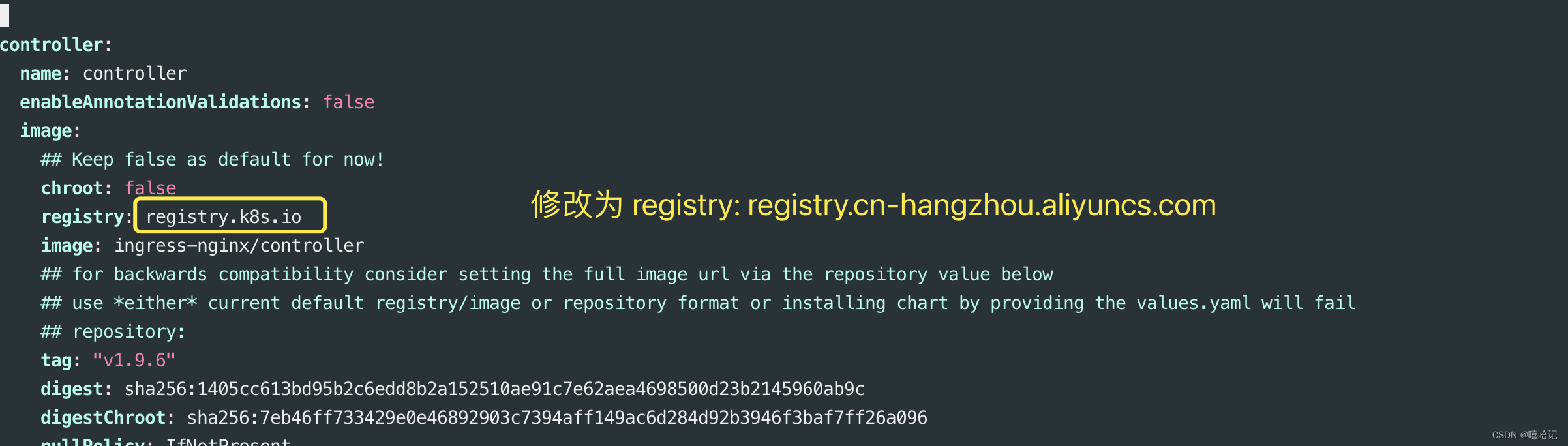
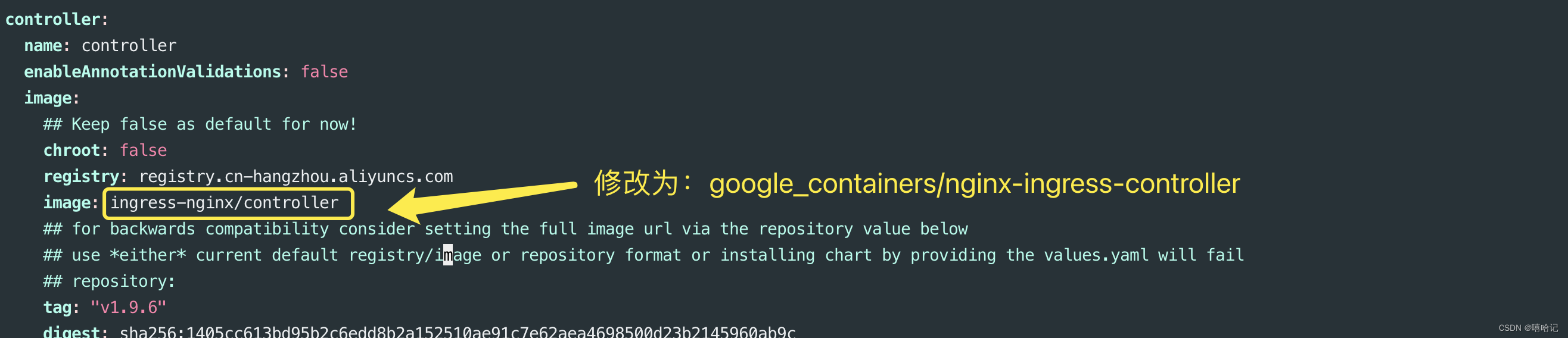
3.4.1 修改ingress的控制器的镜像地址为国内地址
registry: registry.cn-hangzhou.aliyuncs.com
image: google_containers/nginx-ingress-controller
3.4.2 注释ingress的控制器中的哈希校验
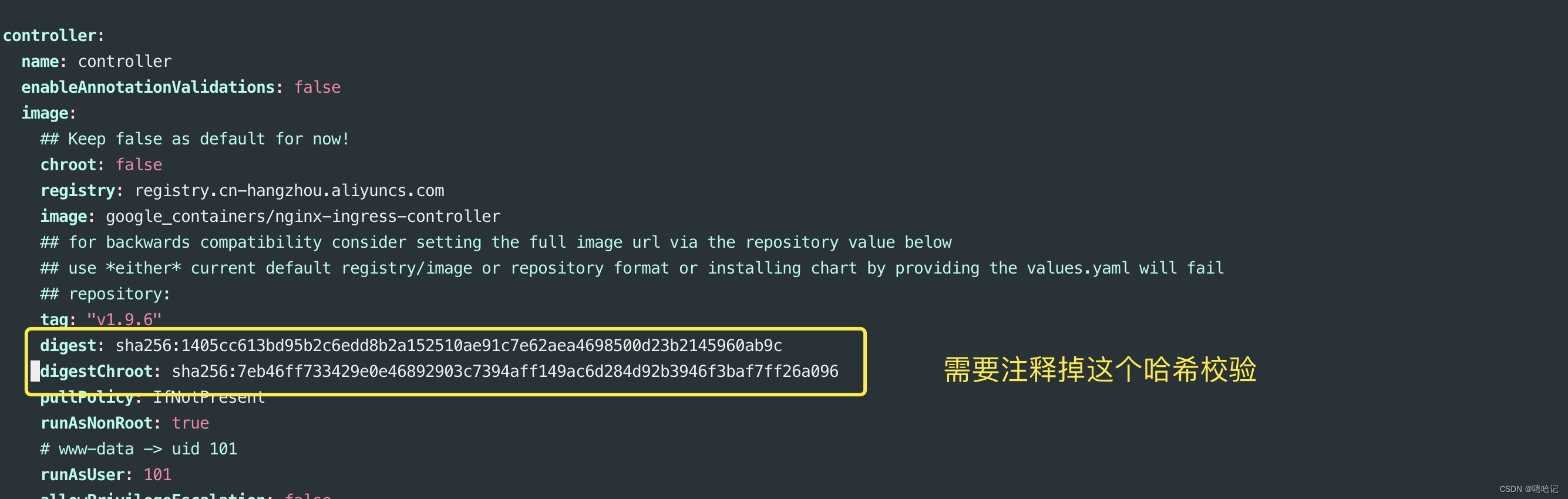
3.4.3 修改dnsPolicy的值为 ClusterFirstWithHostNet

3.4.4 修改hostNetwork的值为true
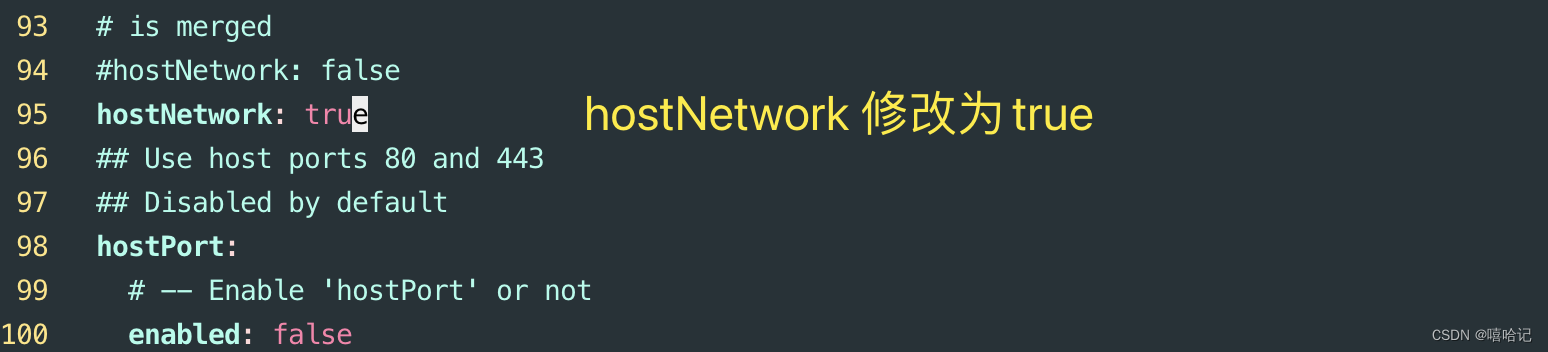
3.4.5 修改kind的值为DaemonSET
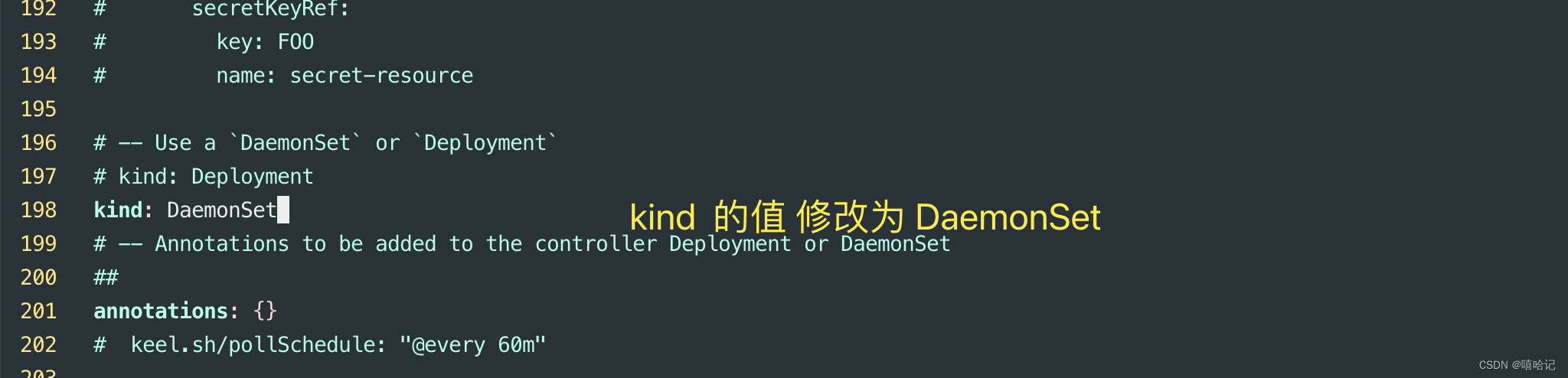
3.4.6 在nodeSelector下添加 ingress: “true”
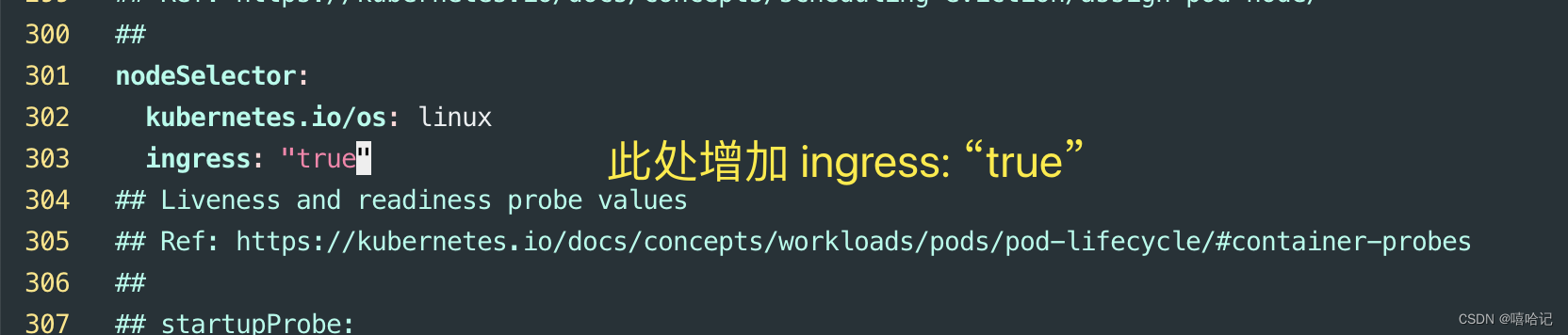
3.4.7 修改这里的type的值为ClusterIP

3.4.8 修改enabled的值为false
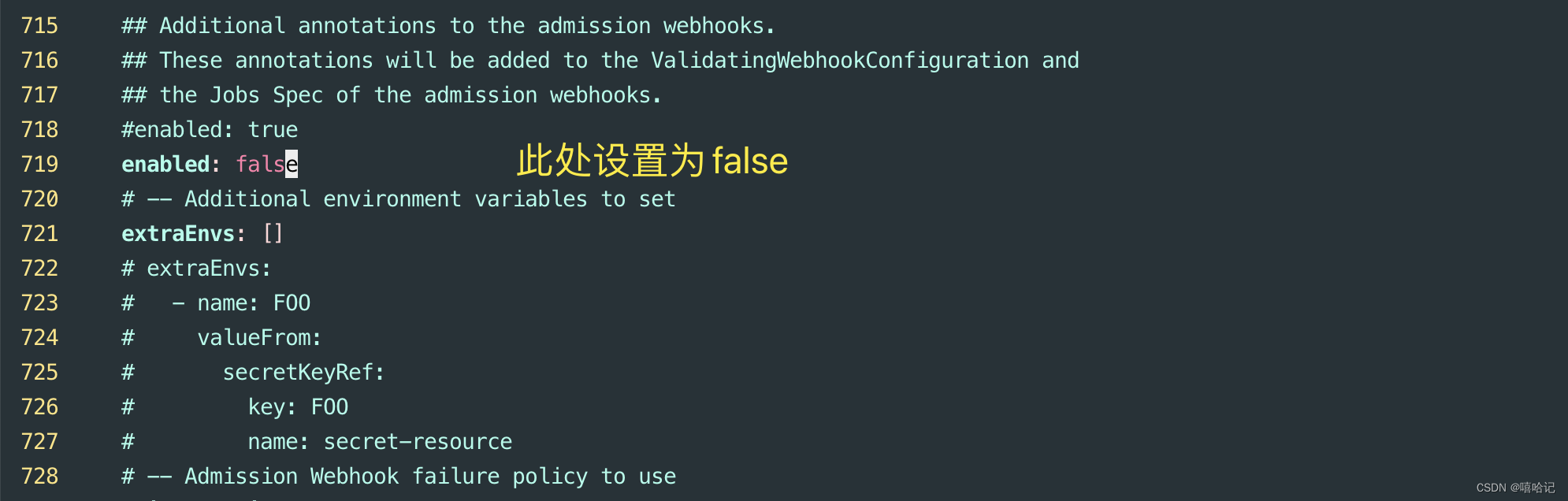
3.4.9 修改kube-webhook处的镜像地址和type
registry: registry.cn-hangzhou.aliyuncs.com
image: google_containers/kube-webhook-certgen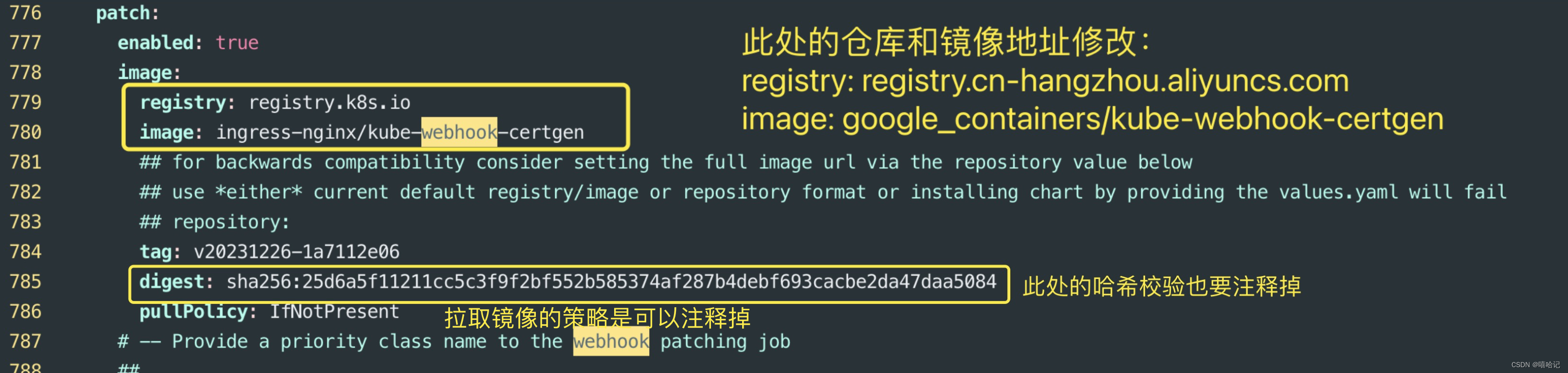
3.5 创建这个ingress资源
3.5.1 专门为ingress-nginx创建一个namespace
[root@k8s-master ingress-nginx]# kubectl create ns  ingress-nginx
namespace/ingress-nginx created
3.5.2 为需要部署的ingress节点上添加标签
[root@k8s-master ingress-nginx]# kubectl label node k8s-master ingress=true
node/k8s-master labeled[root@k8s-master ingress-nginx]# kubectl get nodes  --show-labels
NAME          STATUS   ROLES           AGE     VERSION   LABELS
k8s-master    Ready    control-plane   5d21h   v1.25.0   beta.kubernetes.io/arch=amd64,beta.kubernetes.io/os=linux,ingress=true,kubernetes.io/arch=amd64,kubernetes.io/hostname=k8s-master,kubernetes.io/os=linux,node-role.kubernetes.io/control-plane=,node.kubernetes.io/exclude-from-external-load-balancers=
k8s-node-01   Ready    <none>          5d20h   v1.25.0   beta.kubernetes.io/arch=amd64,beta.kubernetes.io/os=linux,kubernetes.io/arch=amd64,kubernetes.io/hostname=k8s-node-01,kubernetes.io/os=linux,type=microsvc
k8s-node-02   Ready    <none>          3d21h   v1.25.0   beta.kubernetes.io/arch=amd64,beta.kubernetes.io/os=linux,kubernetes.io/arch=amd64,kubernetes.io/hostname=k8s-node-02,kubernetes.io/os=linux,type=microsvc
3.5.3 安装ingress-nginx
[root@k8s-master ingress-nginx]# ll
总用量 128
drwxr-xr-x. 2 root root  4096 2月  25 14:40 changelog
-rw-r--r--. 1 root root   702 1月  27 15:46 Chart.yaml
drwxr-xr-x. 2 root root  4096 2月  25 14:40 ci
-rw-r--r--. 1 root root   213 1月  27 15:46 OWNERS
-rw-r--r--. 1 root root 48217 1月  27 15:46 README.md
-rw-r--r--. 1 root root 11358 1月  27 15:46 README.md.gotmpl
drwxr-xr-x. 3 root root  4096 2月  25 14:40 templates
drwxr-xr-x. 2 root root  4096 2月  25 14:40 tests
-rw-r--r--. 1 root root 44366 2月  25 16:55 values.yaml
[root@k8s-master ingress-nginx]# helm install ingress-nginx  -n ingress-nginx .
NAME: ingress-nginx
LAST DEPLOYED: Sun Feb 25 19:35:55 2024
NAMESPACE: ingress-nginx
STATUS: deployed
REVISION: 1
TEST SUITE: None
NOTES:
The ingress-nginx controller has been installed.
Get the application URL by running these commands:export POD_NAME="$(kubectl get pods --namespace ingress-nginx --selector app.kubernetes.io/name=ingress-nginx,app.kubernetes.io/instance=ingress-nginx,app.kubernetes.io/component=controller --output jsonpath="{.items[0].metadata.name}")"kubectl port-forward --namespace ingress-nginx "${POD_NAME}" 8080:80echo "Visit http://127.0.0.1:8080 to access your application."An example Ingress that makes use of the controller:apiVersion: networking.k8s.io/v1kind: Ingressmetadata:name: examplenamespace: foospec:ingressClassName: nginxrules:- host: www.example.comhttp:paths:- pathType: Prefixbackend:service:name: exampleServiceport:number: 80path: /# This section is only required if TLS is to be enabled for the Ingresstls:- hosts:- www.example.comsecretName: example-tlsIf TLS is enabled for the Ingress, a Secret containing the certificate and key must also be provided:apiVersion: v1kind: Secretmetadata:name: example-tlsnamespace: foodata:tls.crt: <base64 encoded cert>tls.key: <base64 encoded key>type: kubernetes.io/tls
3.5.4 在node1上添加一个标签
由于master有个污点的问题,所以ingress-nginx暂时无法创建上,这个问题后续在写,现在在node1上添加一个ingress=true的标签。在来查看下。
root@k8s-master ingress-nginx]# kubectl label nodes  k8s-node-01   ingress=true
node/k8s-node-01 labeled
[root@k8s-master ingress-nginx]# kubectl get -n ingress-nginx  po
NAME                             READY   STATUS              RESTARTS   AGE
ingress-nginx-controller-jn65t   0/1     ContainerCreating   0          12s[root@k8s-master ingress-nginx]# kubectl describe   -n ingress-nginx  po  ingress-nginx-controller-jn65t
Name:             ingress-nginx-controller-jn65t
Namespace:        ingress-nginx
Priority:         0
Service Account:  ingress-nginx
Node:             k8s-node-01/10.10.10.177
Start Time:       Sun, 25 Feb 2024 19:42:49 +0800
Labels:           app.kubernetes.io/component=controllerapp.kubernetes.io/instance=ingress-nginxapp.kubernetes.io/managed-by=Helmapp.kubernetes.io/name=ingress-nginxapp.kubernetes.io/part-of=ingress-nginxapp.kubernetes.io/version=1.9.6controller-revision-hash=78d8f9c87chelm.sh/chart=ingress-nginx-4.9.1pod-template-generation=1
Annotations:      <none>
Status:           Running
IP:               10.10.10.177
IPs:IP:           10.10.10.177
Controlled By:  DaemonSet/ingress-nginx-controller
Containers:controller:Container ID:  docker://5a25f4de88555d15c0a335afda6dcbe02fed2bcf992c30a06c02b05397c50649Image:         registry.cn-hangzhou.aliyuncs.com/google_containers/nginx-ingress-controller:v1.9.6Image ID:      docker-pullable://registry.cn-hangzhou.aliyuncs.com/google_containers/nginx-ingress-controller@sha256:195a471f4765b6c752919003bf5b9a029b250531f9f48caf0beae64495daa4c2Ports:         80/TCP, 443/TCPHost Ports:    80/TCP, 443/TCPArgs:/nginx-ingress-controller--publish-service=$(POD_NAMESPACE)/ingress-nginx-controller--election-id=ingress-nginx-leader--controller-class=k8s.io/ingress-nginx--ingress-class=nginx--configmap=$(POD_NAMESPACE)/ingress-nginx-controllerState:          RunningStarted:      Sun, 25 Feb 2024 19:43:12 +0800Ready:          TrueRestart Count:  0Requests:cpu:      100mmemory:   90MiLiveness:   http-get http://:10254/healthz delay=10s timeout=1s period=10s #success=1 #failure=5Readiness:  http-get http://:10254/healthz delay=10s timeout=1s period=10s #success=1 #failure=3Environment:POD_NAME:       ingress-nginx-controller-jn65t (v1:metadata.name)POD_NAMESPACE:  ingress-nginx (v1:metadata.namespace)LD_PRELOAD:     /usr/local/lib/libmimalloc.soMounts:/var/run/secrets/kubernetes.io/serviceaccount from kube-api-access-dklj9 (ro)
Conditions:Type              StatusInitialized       TrueReady             TrueContainersReady   TruePodScheduled      True
Volumes:kube-api-access-dklj9:Type:                    Projected (a volume that contains injected data from multiple sources)TokenExpirationSeconds:  3607ConfigMapName:           kube-root-ca.crtConfigMapOptional:       <nil>DownwardAPI:             true
QoS Class:                   Burstable
Node-Selectors:              ingress=truekubernetes.io/os=linux
Tolerations:                 node.kubernetes.io/disk-pressure:NoSchedule op=Existsnode.kubernetes.io/memory-pressure:NoSchedule op=Existsnode.kubernetes.io/network-unavailable:NoSchedule op=Existsnode.kubernetes.io/not-ready:NoExecute op=Existsnode.kubernetes.io/pid-pressure:NoSchedule op=Existsnode.kubernetes.io/unreachable:NoExecute op=Existsnode.kubernetes.io/unschedulable:NoSchedule op=Exists
Events:Type    Reason     Age   From                      Message----    ------     ----  ----                      -------Normal  Scheduled  45s   default-scheduler         Successfully assigned ingress-nginx/ingress-nginx-controller-jn65t to k8s-node-01Normal  Pulling    44s   kubelet                   Pulling image "registry.cn-hangzhou.aliyuncs.com/google_containers/nginx-ingress-controller:v1.9.6"Normal  Pulled     23s   kubelet                   Successfully pulled image "registry.cn-hangzhou.aliyuncs.com/google_containers/nginx-ingress-controller:v1.9.6" in 20.899701523sNormal  Created    23s   kubelet                   Created container controllerNormal  Started    22s   kubelet                   Started container controllerNormal  RELOAD     20s   nginx-ingress-controller  NGINX reload triggered due to a change in configuration[root@k8s-master ingress-nginx]# kubectl get -n ingress-nginx  po  -owide
NAME                             READY   STATUS    RESTARTS   AGE   IP             NODE          NOMINATED NODE   READINESS GATES
ingress-nginx-controller-jn65t   1/1     Running   0          2m    10.10.10.177   k8s-node-01   <none>           <none>
3.5.5 配置文件
[root@k8s-master ingress-nginx]# grep -Ev  '^#|^  #|^    #|^      #|^        #|^$'  values.yaml
namespaceOverride: ""
commonLabels: {}
controller:name: controllerenableAnnotationValidations: falseimage:chroot: falseregistry: registry.cn-hangzhou.aliyuncs.comimage: google_containers/nginx-ingress-controllertag: "v1.9.6"pullPolicy: IfNotPresentrunAsNonRoot: truerunAsUser: 101allowPrivilegeEscalation: falseseccompProfile:type: RuntimeDefaultreadOnlyRootFilesystem: falseexistingPsp: ""containerName: controllercontainerPort:http: 80https: 443config: {}configAnnotations: {}proxySetHeaders: {}addHeaders: {}dnsConfig: {}hostAliases: []hostname: {}dnsPolicy: ClusterFirstWithHostNetreportNodeInternalIp: falsewatchIngressWithoutClass: falseingressClassByName: falseenableTopologyAwareRouting: falseallowSnippetAnnotations: falsehostNetwork: truehostPort:enabled: falseports:http: 80https: 443networkPolicy:enabled: falseelectionID: ""ingressClassResource:name: nginxenabled: truedefault: falsecontrollerValue: "k8s.io/ingress-nginx"parameters: {}ingressClass: nginxpodLabels: {}podSecurityContext: {}sysctls: {}containerSecurityContext: {}publishService:enabled: truepathOverride: ""scope:enabled: falsenamespace: ""namespaceSelector: ""configMapNamespace: ""tcp:configMapNamespace: ""annotations: {}udp:configMapNamespace: ""annotations: {}maxmindLicenseKey: ""extraArgs: {}extraEnvs: []kind: DaemonSetannotations: {}labels: {}updateStrategy: {}minReadySeconds: 0tolerations: []affinity: {}topologySpreadConstraints: []terminationGracePeriodSeconds: 300nodeSelector:kubernetes.io/os: linuxingress: "true"livenessProbe:httpGet:path: "/healthz"port: 10254scheme: HTTPinitialDelaySeconds: 10periodSeconds: 10timeoutSeconds: 1successThreshold: 1failureThreshold: 5readinessProbe:httpGet:path: "/healthz"port: 10254scheme: HTTPinitialDelaySeconds: 10periodSeconds: 10timeoutSeconds: 1successThreshold: 1failureThreshold: 3healthCheckPath: "/healthz"healthCheckHost: ""podAnnotations: {}replicaCount: 1minAvailable: 1resources:requests:cpu: 100mmemory: 90Miautoscaling:enabled: falseannotations: {}minReplicas: 1maxReplicas: 11targetCPUUtilizationPercentage: 50targetMemoryUtilizationPercentage: 50behavior: {}autoscalingTemplate: []keda:apiVersion: "keda.sh/v1alpha1"enabled: falseminReplicas: 1maxReplicas: 11pollingInterval: 30cooldownPeriod: 300restoreToOriginalReplicaCount: falsescaledObject:annotations: {}triggers: []behavior: {}enableMimalloc: truecustomTemplate:configMapName: ""configMapKey: ""service:enabled: trueexternal:enabled: trueannotations: {}labels: {}type: ClusterIPclusterIP: ""externalIPs: []loadBalancerIP: ""loadBalancerSourceRanges: []loadBalancerClass: ""externalTrafficPolicy: ""sessionAffinity: ""ipFamilyPolicy: SingleStackipFamilies:- IPv4enableHttp: trueenableHttps: trueports:http: 80https: 443targetPorts:http: httphttps: httpsappProtocol: truenodePorts:http: ""https: ""tcp: {}udp: {}internal:enabled: falseannotations: {}type: ""clusterIP: ""externalIPs: []loadBalancerIP: ""loadBalancerSourceRanges: []loadBalancerClass: ""externalTrafficPolicy: ""sessionAffinity: ""ipFamilyPolicy: SingleStackipFamilies:- IPv4ports: {}targetPorts: {}appProtocol: truenodePorts:http: ""https: ""tcp: {}udp: {}shareProcessNamespace: falseextraContainers: []extraVolumeMounts: []extraVolumes: []extraInitContainers: []extraModules: []opentelemetry:enabled: falsename: opentelemetryimage:registry: registry.k8s.ioimage: ingress-nginx/opentelemetrytag: "v20230721-3e2062ee5"digest: sha256:13bee3f5223883d3ca62fee7309ad02d22ec00ff0d7033e3e9aca7a9f60fd472distroless: truecontainerSecurityContext:runAsNonRoot: truerunAsUser: 65532allowPrivilegeEscalation: falseseccompProfile:type: RuntimeDefaultcapabilities:drop:- ALLreadOnlyRootFilesystem: trueresources: {}admissionWebhooks:name: admissionannotations: {}enabled: falseextraEnvs: []failurePolicy: Failport: 8443certificate: "/usr/local/certificates/cert"key: "/usr/local/certificates/key"namespaceSelector: {}objectSelector: {}labels: {}existingPsp: ""service:annotations: {}externalIPs: []loadBalancerSourceRanges: []servicePort: 443type: ClusterIPcreateSecretJob:name: createsecurityContext:runAsNonRoot: truerunAsUser: 65532allowPrivilegeEscalation: falseseccompProfile:type: RuntimeDefaultcapabilities:drop:- ALLreadOnlyRootFilesystem: trueresources: {}patchWebhookJob:name: patchsecurityContext:runAsNonRoot: truerunAsUser: 65532allowPrivilegeEscalation: falseseccompProfile:type: RuntimeDefaultcapabilities:drop:- ALLreadOnlyRootFilesystem: trueresources: {}patch:enabled: trueimage:registry: registry.cn-hangzhou.aliyuncs.comimage: google_containers/kube-webhook-certgentag: v20231226-1a7112e06priorityClassName: ""podAnnotations: {}networkPolicy:enabled: falsenodeSelector:kubernetes.io/os: linuxtolerations: []labels: {}securityContext: {}certManager:enabled: falserootCert:duration: ""admissionCert:duration: ""metrics:port: 10254portName: metricsenabled: falseservice:annotations: {}labels: {}externalIPs: []loadBalancerSourceRanges: []servicePort: 10254type: ClusterIPserviceMonitor:enabled: falseadditionalLabels: {}annotations: {}namespace: ""namespaceSelector: {}scrapeInterval: 30stargetLabels: []relabelings: []metricRelabelings: []prometheusRule:enabled: falseadditionalLabels: {}rules: []lifecycle:preStop:exec:command:- /wait-shutdownpriorityClassName: ""
revisionHistoryLimit: 10
defaultBackend:enabled: falsename: defaultbackendimage:registry: registry.k8s.ioimage: defaultbackend-amd64tag: "1.5"pullPolicy: IfNotPresentrunAsNonRoot: truerunAsUser: 65534allowPrivilegeEscalation: falseseccompProfile:type: RuntimeDefaultreadOnlyRootFilesystem: trueexistingPsp: ""extraArgs: {}serviceAccount:create: truename: ""automountServiceAccountToken: trueextraEnvs: []port: 8080livenessProbe:failureThreshold: 3initialDelaySeconds: 30periodSeconds: 10successThreshold: 1timeoutSeconds: 5readinessProbe:failureThreshold: 6initialDelaySeconds: 0periodSeconds: 5successThreshold: 1timeoutSeconds: 5updateStrategy: {}minReadySeconds: 0tolerations: []affinity: {}podSecurityContext: {}containerSecurityContext: {}podLabels: {}nodeSelector:kubernetes.io/os: linuxpodAnnotations: {}replicaCount: 1minAvailable: 1resources: {}extraVolumeMounts: []extraVolumes: []extraConfigMaps: []autoscaling:annotations: {}enabled: falseminReplicas: 1maxReplicas: 2targetCPUUtilizationPercentage: 50targetMemoryUtilizationPercentage: 50networkPolicy:enabled: falseservice:annotations: {}externalIPs: []loadBalancerSourceRanges: []servicePort: 80type: ClusterIPpriorityClassName: ""labels: {}
rbac:create: truescope: false
podSecurityPolicy:enabled: false
serviceAccount:create: truename: ""automountServiceAccountToken: trueannotations: {}
imagePullSecrets: []
tcp: {}
udp: {}
portNamePrefix: ""
dhParam: ""
3.6 ingress的使用
3.6.1 编写 ingress 服务的配置
apiVersion: networking.k8s.io/v1
kind: Ingress  # ingress类型
metadata:  name: ingress-nginx-example  # ingress的名字annotations:  nginx.ingress.kubernetes.io/rewrite-target: /
spec:  ingressClassName: nginx  rules:  - host: k8s.test.cn   # 访问域名,可是使用通配符http:   paths:  # 相当于nginx的location配置,可以配置多个- path: /   # 等价与nginx中的location 路径匹配 # 路径类型,按照路径类型进行匹配 ImplementationSpecific  需要指定IngressClass,具体匹配规则以IngressClass中的规则为准。# Exact 精确匹配,URL需要与path完全匹配上,且区分大小写 # Prefix 前缀匹配,以/作为分隔符,来进行前缀匹配pathType: Prefix  # 匹配模式backend:  service:  name: nginx-svc   # ingress转发给service,service的名字port:  number: 80     # service的端口# 如果有TLS配置,可以添加tls字段  #tls:  #- hosts:  #  - example.com  #  secretName: my-tls-secret
3.6.2 创建这个ingress资源
[root@k8s-master ~]# kubectl create -f ingress-nginx-example.yaml
ingress.networking.k8s.io/ingress-nginx-example created
3.6.3 查看这个ingress资源信息
[root@k8s-master ~]# kubectl get ingress ingress-nginx-example  -o wide
NAME                    CLASS   HOSTS         ADDRESS        PORTS   AGE
ingress-nginx-example   nginx   k8s.test.cn   10.1.119.138   80      50s[root@k8s-master ~]# kubectl get -n ingress-nginx    pod  -o wide
NAME                             READY   STATUS    RESTARTS   AGE   IP             NODE          NOMINATED NODE   READINESS GATES
ingress-nginx-controller-jn65t   1/1     Running   0          62m   10.10.10.177   k8s-node-01   <none>           <none>
3.6.4 测试使用域名访问
[root@k8s-master ~]# echo "10.10.10.177 k8s.test.cn " >> /etc/hosts
[root@k8s-master ~]# curl k8s.test.cn
<!DOCTYPE html>
<html>
<head>
<title>Welcome to nginx!</title>
<style>body {width: 35em;margin: 0 auto;font-family: Tahoma, Verdana, Arial, sans-serif;}
</style>
</head>
<body>
<h1>Welcome to nginx!</h1>
<p>If you see this page, the nginx web server is successfully installed and
working. Further configuration is required.</p><p>For online documentation and support please refer to
<a href="http://nginx.org/">nginx.org</a>.<br/>
Commercial support is available at
<a href="http://nginx.com/">nginx.com</a>.</p><p><em>Thank you for using nginx.</em></p>
</body>
</html>
3.6.5 查询访问日志
[root@k8s-master ~]# kubectl logs  -f -n ingress-nginx   ingress-nginx-controller-jn65t
-------------------------------------------------------------------------------
NGINX Ingress controllerRelease:       v1.9.6Build:         6a73aa3b05040a97ef8213675a16142a9c95952aRepository:    https://github.com/kubernetes/ingress-nginxnginx version: nginx/1.21.6-------------------------------------------------------------------------------W0225 11:43:12.164749       7 client_config.go:618] Neither --kubeconfig nor --master was specified.  Using the inClusterConfig.  This might not work.
I0225 11:43:12.165295       7 main.go:205] "Creating API client" host="https://10.1.0.1:443"
I0225 11:43:12.177840       7 main.go:249] "Running in Kubernetes cluster" major="1" minor="25" git="v1.25.0" state="clean" commit="a866cbe2e5bbaa01cfd5e969aa3e033f3282a8a2" platform="linux/amd64"
I0225 11:43:12.436449       7 main.go:101] "SSL fake certificate created" file="/etc/ingress-controller/ssl/default-fake-certificate.pem"
I0225 11:43:12.565821       7 nginx.go:260] "Starting NGINX Ingress controller"
I0225 11:43:12.627098       7 event.go:298] Event(v1.ObjectReference{Kind:"ConfigMap", Namespace:"ingress-nginx", Name:"ingress-nginx-controller", UID:"ffe00f65-b957-4108-ac62-9f88e3b3887f", APIVersion:"v1", ResourceVersion:"482046", FieldPath:""}): type: 'Normal' reason: 'CREATE' ConfigMap ingress-nginx/ingress-nginx-controller
I0225 11:43:13.773928       7 nginx.go:303] "Starting NGINX process"
I0225 11:43:13.774090       7 leaderelection.go:245] attempting to acquire leader lease ingress-nginx/ingress-nginx-leader...
I0225 11:43:13.777086       7 controller.go:190] "Configuration changes detected, backend reload required"
I0225 11:43:13.793435       7 leaderelection.go:255] successfully acquired lease ingress-nginx/ingress-nginx-leader
I0225 11:43:13.795060       7 status.go:84] "New leader elected" identity="ingress-nginx-controller-jn65t"
I0225 11:43:14.211765       7 controller.go:210] "Backend successfully reloaded"
I0225 11:43:14.211878       7 controller.go:221] "Initial sync, sleeping for 1 second"
I0225 11:43:14.211918       7 event.go:298] Event(v1.ObjectReference{Kind:"Pod", Namespace:"ingress-nginx", Name:"ingress-nginx-controller-jn65t", UID:"aa348af4-9773-4ca2-b2fc-45eb2c842c83", APIVersion:"v1", ResourceVersion:"482645", FieldPath:""}): type: 'Normal' reason: 'RELOAD' NGINX reload triggered due to a change in configuration
I0225 12:43:04.755446       7 store.go:440] "Found valid IngressClass" ingress="default/ingress-nginx-example" ingressclass="nginx"
I0225 12:43:04.756941       7 event.go:298] Event(v1.ObjectReference{Kind:"Ingress", Namespace:"default", Name:"ingress-nginx-example", UID:"cf861f68-6f06-4279-acda-9884e7fd3557", APIVersion:"networking.k8s.io/v1", ResourceVersion:"488205", FieldPath:""}): type: 'Normal' reason: 'Sync' Scheduled for sync
I0225 12:43:04.757794       7 controller.go:190] "Configuration changes detected, backend reload required"
I0225 12:43:04.989965       7 controller.go:210] "Backend successfully reloaded"
I0225 12:43:04.990671       7 event.go:298] Event(v1.ObjectReference{Kind:"Pod", Namespace:"ingress-nginx", Name:"ingress-nginx-controller-jn65t", UID:"aa348af4-9773-4ca2-b2fc-45eb2c842c83", APIVersion:"v1", ResourceVersion:"482645", FieldPath:""}): type: 'Normal' reason: 'RELOAD' NGINX reload triggered due to a change in configuration
I0225 12:43:13.804201       7 status.go:304] "updating Ingress status" namespace="default" ingress="ingress-nginx-example" currentValue=null newValue=[{"ip":"10.1.119.138"}]
I0225 12:43:13.813972       7 event.go:298] Event(v1.ObjectReference{Kind:"Ingress", Namespace:"default", Name:"ingress-nginx-example", UID:"cf861f68-6f06-4279-acda-9884e7fd3557", APIVersion:"networking.k8s.io/v1", ResourceVersion:"488223", FieldPath:""}): type: 'Normal' reason: 'Sync' Scheduled for sync
10.10.10.100 - - [25/Feb/2024:12:46:25 +0000] "GET / HTTP/1.1" 200 612 "-" "curl/7.29.0" 75 0.008 [default-nginx-svc-80] [] 10.2.1.55:80 612 0.008 200 e2b058939e017bdfa86c953e312ea057
3.6.6 ingress配置多域名
配置多域名和单域名很相通,如下一个例子
apiVersion: networking.k8s.io/v1
kind: Ingress
metadata:name: ingress-nginx-exampleannotations:nginx.ingress.kubernetes.io/rewrite-target: /
spec:ingressClassName: nginxrules:# 配置第一个域名- host: k8s.test.cnhttp:paths:- path: /pathType: Prefixbackend:service:name: nginx-svcport:number: 80# 配置第二个域名            - host: k8s.test.comhttp:paths:# 配置第一个路径- path: /pathType: Prefixbackend:service:name: nginx-svcport:number: 80# 配置第二个路径       - path: /htmlpathType: Prefixbackend:service:name: nginx-svcport:number: 80
相关文章:
【服务发现--ingress】
1、ingress介绍 Ingress 提供从集群外部到集群内服务的 HTTP 和 HTTPS 路由。 流量路由由 Ingress 资源所定义的规则来控制。 Ingress 是对集群中服务的外部访问进行管理的 API 对象,典型的访问方式是 HTTP。 Ingress 可以提供负载均衡、SSL 终结和基于名称的虚拟…...
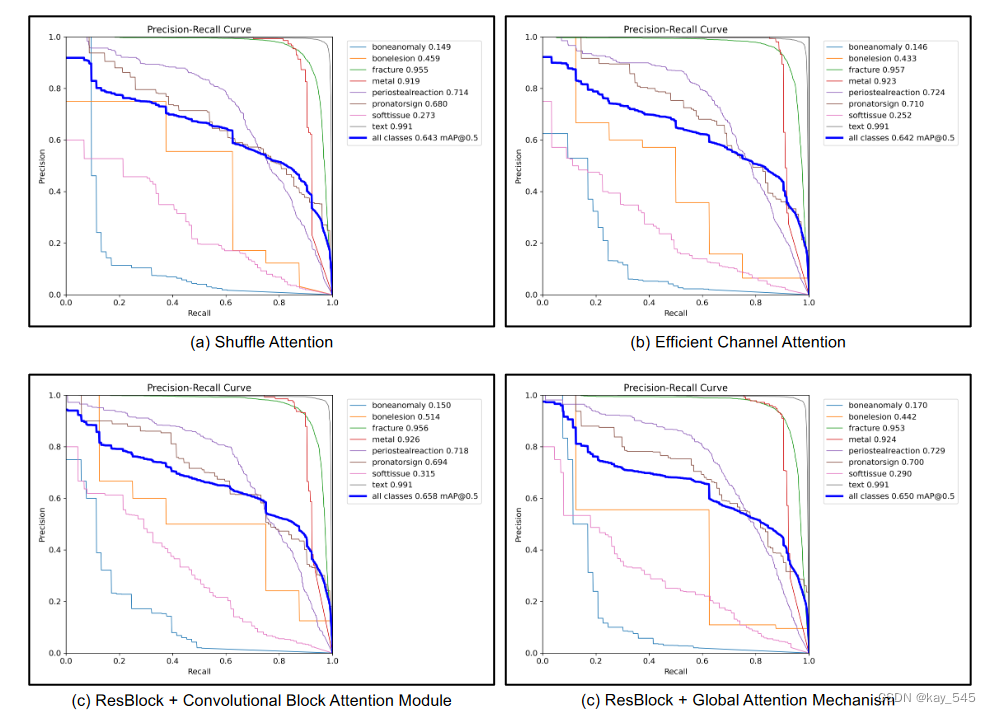
Yolov8有效涨点:YOLOv8-AM,添加多种注意力模块提高检测精度,含代码,超详细
前言 2023 年,Ultralytics 推出了最新版本的 YOLO 模型。注意力机制是提高模型性能最热门的方法之一。 本次介绍的是YOLOv8-AM,它将注意力机制融入到原始的YOLOv8架构中。具体来说,我们分别采用四个注意力模块:卷积块注意力模块…...
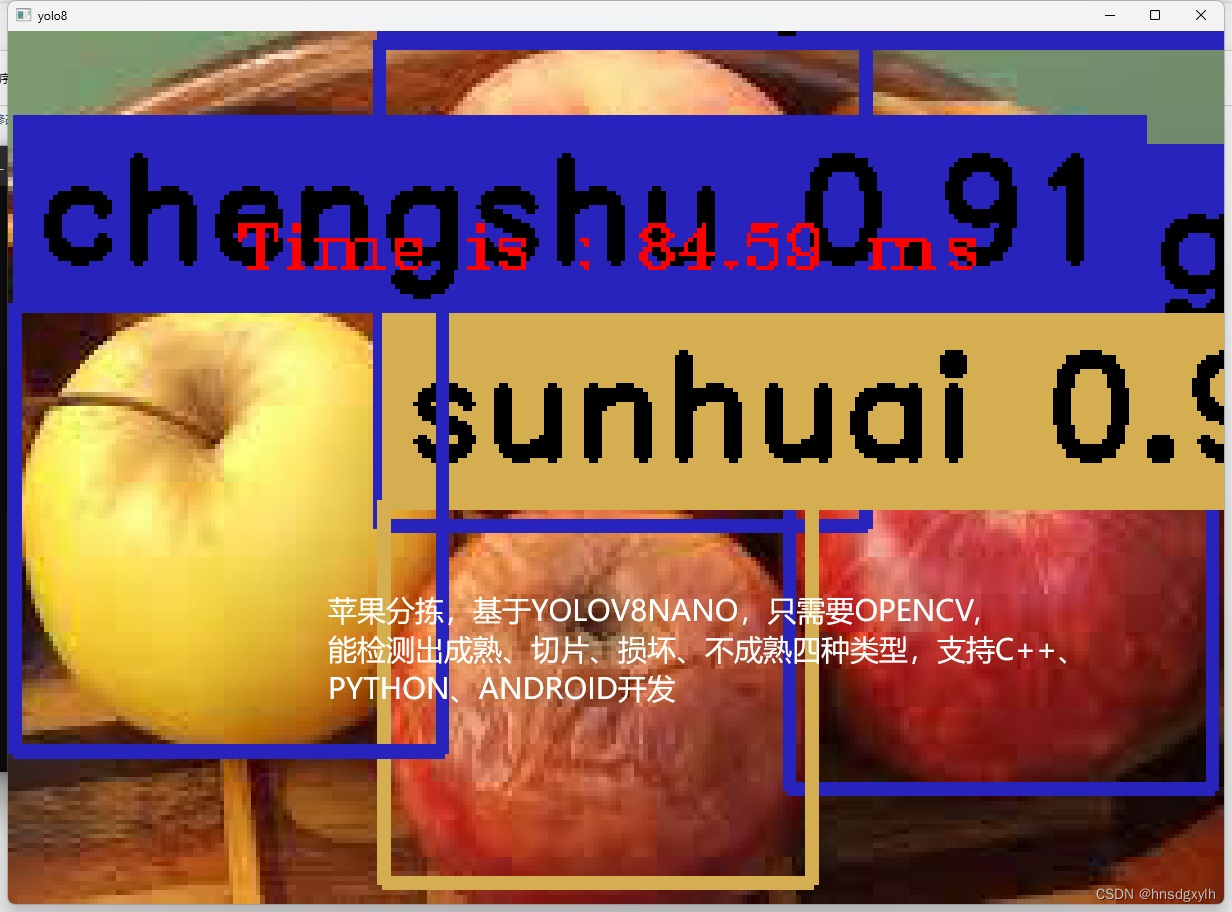
苹果分拣检测YOLOV8NANO
苹果分拣,可以检测成熟、切片、损坏、不成熟四种类型,YOLOV8NANO,训练得到PT模型,然后转换成ONNX,OPENCV的DNN调用,支持C,PYTHON 苹果分拣检测YOLOV8NANO,检测四种类型苹果...

使用 Verilog 做一个可编程数字延迟定时器 LS7211-7212
今天的项目是在 Verilog HDL 中实现可编程数字延迟定时器。完整呈现了延迟定时器的 Verilog 代码。 所实现的数字延迟定时器是 CMOS IC LS7212,用于生成可编程延迟。延迟定时器的规格可以在这里轻松找到。基本上,延迟定时器有 4 种操作模式:…...

戏说c语言文章汇总
c语言的起源GNU C和标准C第一篇: hello c!第二篇: 为什么需要编译第三篇: 当你运行./a.out时,发生了什么?第四篇: 简单的加法器第五篇: 两个正数相加竟然变成了负数!第六篇: 西西弗斯推石头(循环)第七篇: 九九乘法表(双循环)第八篇: 如果上天…...
面试redis篇-12Redis集群方案-分片集群
原理 主从和哨兵可以解决高可用、高并发读的问题。但是依然有两个问题没有解决: 海量数据存储问题高并发写的问题 使用分片集群可以解决上述问题,分片集群特征: 集群中有多个master,每个master保存不同数据每个master都可以有…...
【Java EE初阶二十三】servlet的简单理解
1. 初识servlet Servlet 是一个比较古老的编写网站的方式,早起Java 编写网站,主要使用 Servlet 的方式,后来 Java 中产生了一个Spring(一套框架),Spring 又是针对 Servlet 进行了进一步封装,从而让我们编写网站变的更简单了;Sprin…...

c++ http操作接口
很简单的使用libcurl来操作http与服务器来通讯,包含http与https,对外只开放 #include "request.h" #include "response.h" #include "url.h" 三个头文件,简单易用,使用的实例如下: vo…...
oracle官网下载早期jdk版本
Java Downloads | Oracle JDK Builds from Oracle 以上压缩版,以下安装版 Java Downloads | Oracle 该链接往下拉能看到jdk8和jdk11的安装版 -- end...

Python爬虫实战:图片爬取与保存
引言: 在本文中,我们将学习如何使用Python创建一个简单的图片爬虫。 我们将利用requests库来发送HTTP请求,BeautifulSoup库来解析HTML页面,以及os和shutil库来下载和保存图片。通过这个教程,你将学会如何爬取网…...

CMS垃圾回收器
CMS垃圾回收 CMS GC的官方名称为“Mostly Concurrenct Mark and Sweep Garbage Collector”(最大-并发-标记-清除-垃圾收集器)。 作用范围: 老年代 算法: 并发标记清除算法。 启用参数:-XX:UseConMarkSweepGC 默认回收…...
【力扣白嫖日记】184.部门工资最高的员工
前言 练习sql语句,所有题目来自于力扣(https://leetcode.cn/problemset/database/)的免费数据库练习题。 今日题目: 184.部门工资最高的员工 表:Employee 列名类型idintnamevarcharsalaryvarchardepartmentIdint …...

JAVA讲解算法-排序算法-选择排序算法-02
一、定义 选择排序法是一种不稳定的排序算法。它的工作原理是每一次从待排序的数据元素中选出最小(或最大)的一个元素,存放在序列的起始位置,然后,再从剩余未排序元素中继续寻找最小(大)元素&a…...
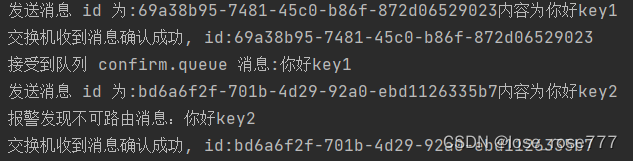
【初始RabbitMQ】高级发布确认的实现
在生产环境中由于一些不明原因,导致 rabbitmq 重启,在 RabbitMQ 重启期间生产者消息投递失败, 导致消息丢失,需要手动处理和恢复。于是,我们开始思考,如何才能进行 RabbitMQ 的消息可靠投递呢? …...

用39块钱的全志V851se视觉开发板做了个小相机,还可以物品识别、自动追焦!
用39块钱的V851se视觉开发板做了个小相机。 可以进行物品识别、自动追焦! 这个超低成本的小相机是在V851se上移植使用全志在线开源版本的Tina Linux与OpenCV框架开启摄像头拍照捕获视频,并结合NPU实现Mobilenet v2目标分类识别以及运动追踪等功能…并最终…...

主从复制实现Redis集群
主从复制实现Redis集群实验 (一主二从): 实验环境: 使用Docker 搭建 Redis 版本 5.0.5 打开一个终端窗口,在其中运行如下命令创建一个名为redis-master的Redis容器。注意,它的端口是6379 (本地的端口:映射到容器的端口) docker run -itd--name redis-m…...

高分文献解读|3D打印骨支架实现梯度密度颌骨功能性重建
近月,浙江大学医学院附属口腔医院谢志坚教授团队与浙江大学化学系唐睿康教授团队、机械工程学院贺永教授团队合作,在期刊《Advanced Functional Materials》(IF19)上发表题为“A Hierarchical 3D Graft Printed with Nanoink for …...
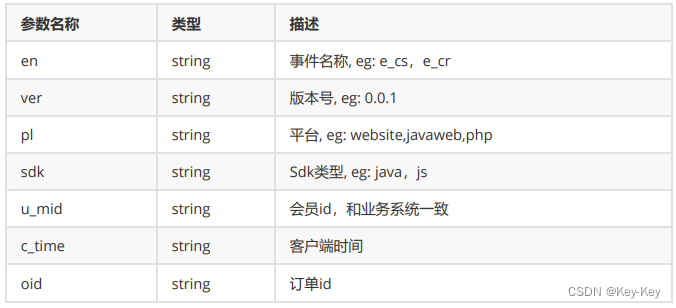
大型电商日志离线分析系统(一)
一、项目需求分析 某大型网站日志离线分析系统 1.1 概述 该部分的主要目标就是描述本次项目最终七个分析模块的页面展示。 1.2 工作流 在我们的demo展示中,我们使用jqueryecharts的方式调用程序后台提供的rest api接口,获取json数据,然后…...

FL Studio Fruity Edition2024中文入门版Win/Mac
FL Studio Fruity Edition2024是一款功能强大的音乐制作软件,适合初学者和音乐爱好者使用。它提供了丰富的音乐制作工具,包括音频录制、编辑、混音以及MIDI制作等功能,帮助用户轻松创作出动人的音乐作品。 FL Studio 21.2.3 Win-安装包下载如…...
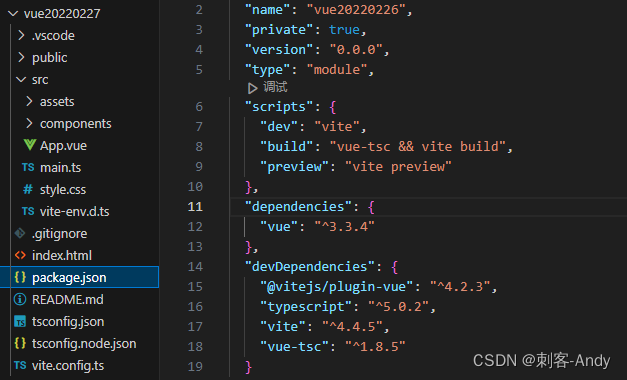
学习vue3第二节(使用vite 创建vue3项目)
使用vite 创建vue3项目 node 安装请移步 node官网: https://nodejs.p2hp.com/ node 版本控制 请移步 nvm官网:https://nvm.uihtm.com/ vite 生成vue项目完整版 请移步 vite官网:https://cn.vitejs.dev/ 1、使用 npm 或者 yarn 创建vue3 项目…...
)
adb 实战:精准识别安卓设备与 APK 的 CPU 架构(从基础查询到多设备管理)
1. 为什么需要精准识别CPU架构? 第一次给不同型号的安卓设备打包APK时,我就被CPU架构问题坑惨了。明明在模拟器上运行良好的应用,安装到测试机上直接闪退。后来才发现是没正确配置ABI过滤,导致应用包体臃肿不说,还出现…...

撕下“全能模型”的伪装:Anthropic 官方揭秘长周期 Agent 的“脚手架工程”与抗焦虑指南
文章目录🚀 撕下“全能模型”的伪装:Anthropic 官方揭秘长周期 Agent 的“脚手架工程”与抗焦虑指南🔗 文章获取链接📝 核心简要信息1. 为什么“让 AI 自己写一天代码”总是失败?(两大绝症的底层剖析)🚨 绝…...

告别数据丢失!深入解析M24C08 EEPROM的页写缓冲与自定时写入周期
告别数据丢失!深入解析M24C08 EEPROM的页写缓冲与自定时写入周期 在嵌入式系统开发中,数据可靠性往往决定着产品的成败。想象这样一个场景:你的设备刚刚完成了一次关键数据写入,系统立即读取验证却发现数据异常——这不是代码逻辑…...
在文本分类中的原理与实践)
词袋模型(Bag Of Words)在文本分类中的原理与实践
1. 文本分类与预测的Bag Of Words方法解析在自然语言处理领域,文本分类是最基础也最实用的任务之一。我十年前第一次接触这个课题时,Bag Of Words(词袋模型)就像一把瑞士军刀,简单却异常有效。直到今天,虽然…...

数据科学与AI入门指南:从基础到实战
1. 数据科学与AI职业入门指南我刚入行数据科学时,最头疼的就是不知道从哪开始。网上资料太多太杂,各种技术名词满天飞,Python、机器学习、深度学习、TensorFlow...到底该先学哪个?这份手册就是帮你理清思路的实战指南,…...

日志吞吐暴跌60%?Docker默认json-file驱动正在悄悄拖垮你的K8s集群,立即检查这3个隐藏参数!
第一章:Docker 日志优化Docker 容器默认将应用日志输出到 stdout/stderr,由 Docker daemon 统一捕获并存储为 JSON 文件。随着容器数量和运行时长增加,未经管理的日志会迅速膨胀,占用大量磁盘空间,甚至导致宿主机存储耗…...

2026最权威的六大降AI率工具推荐榜单
Ai论文网站排名(开题报告、文献综述、降aigc率、降重综合对比) TOP1. 千笔AI TOP2. aipasspaper TOP3. 清北论文 TOP4. 豆包 TOP5. kimi TOP6. deepseek 去降低那AI生成文本被检测出来的概率,其核心要点在于去模仿人类写作所具备的那种…...

Docker Daemon国产化配置失效?97%运维忽略的4个内核参数与2个systemd服务单元文件改造细节
第一章:Docker Daemon国产化配置失效的典型现象与根因定位在基于国产操作系统(如麒麟V10、统信UOS、欧拉openEuler)部署Docker时,常出现Docker Daemon启动后无法加载自定义配置、/etc/docker/daemon.json 中的国产化适配参数&…...
)
【生产环境零事故日志架构】:基于127个微服务节点验证的Docker日志分级采集方案(含logrotate+rsyslog+Loki无缝迁移路径)
第一章:Docker 日志优化Docker 容器默认将应用 stdout/stderr 输出重定向为 JSON 格式日志,长期运行易导致磁盘空间耗尽、查询效率低下及日志轮转缺失。优化日志行为需从驱动配置、大小限制与外部集成三方面协同治理。配置日志驱动与轮转策略 通过 --log…...

PageAdmin平台化:多业务系统动态构建技术
以下是针对“PageAdmin应用系统平台化”的技术实现方案,聚焦于将传统单应用后台管理系统改造为可无限创建业务系统的低代码平台,仅涉及技术架构与实现步骤。 一、平台化核心架构设计 将PageAdmin从“单个后台系统”改造为多业务系统托管平台,…...