
软件更新快讯-Obsidian更新-1.5.8 linux Appimage直装
更新内容 1.5.8:
从具有相同属性的文件导航时,固定属性不会显示。 修复了Home和End在导航文档顶部和底部时不总是起作用的问题。
- Fixed properties not appearing when navigating from a file that has the same properties.
- Fixed
HomeandEndnot always navigating to the top and bottom of the document.
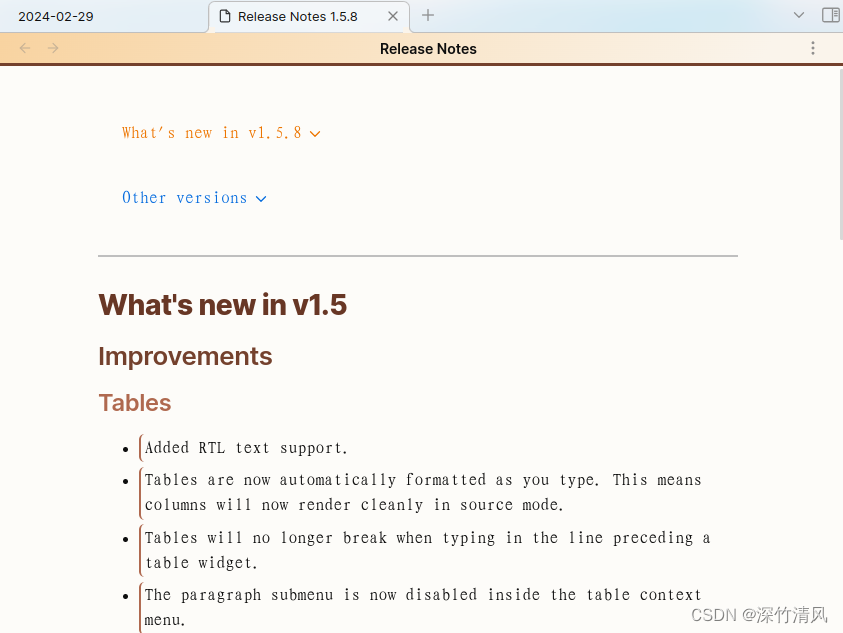
1.5 版本的重大更新内容:
Improvements
Tables
- Added RTL text support.
- Tables are now automatically formatted as you type. This means columns will now render cleanly in source mode.
- Tables will no longer break when typing in the line preceding a table widget.
- The paragraph submenu is now disabled inside the table context menu.
- Typing "---" will no longer autocomplete inside a table cell.
- Fixed issue where long horizontal tables would lose their scroll position on edit.
- Fixed issue where right-clicking inside a table would cause multiple context menus to appear.
- Lots of small fixes to how we handle editing text adjacent to tables.
- Fixed table not always getting focused when using "Insert table" command.
- Fixed issue where undo/redo would put cursor in wrong position.
- You can now press backspace after a table to select the table. Pressing backspace again will delete the table.
- You can now click links and tags inside table cells.
-
添加了RTL文本支持。
表格在您输入时会自动格式化。这意味着列现在将在源模式中呈现清晰。
在表格小部件前面输入时,表格将不再中断。
段落子菜单现在在表格上下文菜单中被禁用。
在表格单元格内,"---"将不再自动完成。
修复了长水平表格在编辑时会丢失滚动位置的问题。
修复了在表格内右键点击会导致多个上下文菜单出现的问题。我们对编辑表格旁边的文本进行了许多小的修复。
修复了使用“插入表格”命令时,表格不一直获得焦点的问题。
修复了撤销/重做时光标位置不正确的问题。
现在您可以在表格后按退格键来选择表格。再次按退格键将删除表格。
您现在可以在表格单元格内点击链接和标签。
Editing
- Formatting commands now recognize
_for italic and__for bold. - Fixed issue where "Copy" would not work in a file where a PDF was embedded.
- "Quick font size adjustment" is now disabled by default.
- Fixed some weird behavior with "Toggle comment" command when it was used next to other comments.
- It's no longer possible to accidentally edit text inside a fold. Navigating into a fold will automatically open the fold.
- "Close" has been moved to the top in the tab menu.
- 格式化命令现在可以识别_斜体_和__粗体__。
修复了在嵌入PDF文件的文件中“复制”无法正常工作的问题。
“快速字体大小调整”现在默认已禁用。
修复了“切换注释”命令在旁边有其他注释时的一些奇怪行为。
不再可能意外编辑折叠内的文本。导航到折叠中将自动展开该折叠。
“关闭”已移动到标签菜单的顶部。
Misc
- Sync: When viewing your remote vaults inside Obsidian, you can now see the total storage space used by each vault.
- Improvements for indented text and lists in Live Preview.
No longer broken
- The focused item in the File Explorer will now hide after opening a file.
- Fixed the appearance of the embedded backlinks for right-to-left interfaces.
- Pressing
Homewhen editing a table in source mode will now always go to the beginning of the line. - Fixed issue where Canvas would fail to render if a zero-byte image file was embedded on the canvas.
- Fixed issue where files would fail to save when navigating between files at the same time the properties are being edited.
- Fixed Live Preview issue where tokens inside Markdown code blocks will no longer get parsed and rendered.
- Fixed Outgoing links "link" button missing for unresolved links.
- Fixed "copy" button on the Sync history modal not working.
- Fixed Outline view not showing leading numerics.
- Fixed page preview sometimes getting triggered when mouse is not hovering over the app.
- Fixed issue where Backlinks view would incorrectly render links if they are on the same line as an embed.
- We have reverted the changes to how lists are displayed in Live Preview. They will be formatted how they were in v1.4.
- Fixed
Enter,F2, andCommand + ArrowDownnot working when File Explorer is focused. Enter should now open the focused file on linux/win and rename the file on macOS. F2 will rename the focused folder/file. AndCommand + ArrowDownwill open the focused file on macOS. - Editing a ordered checklist (i.e.
1. [ ]) will no longer cause the checkboxes to get wiped out. -
文件资源管理器中的焦点项目现在在打开文件后将隐藏。
修复了从右到左接口的嵌入式返回链接的外观问题。
在源代码模式下编辑表格时按Home键现在将始终移到行开头。
修复了Canvas在画布上嵌入零字节图像文件时无法渲染的问题。
修复了文件在同时导航文件并编辑属性时保存失败的问题。修复了实时预览问题,Markdown代码块内的标记不再被解析和呈现。
解决了外向链接中“链接”按钮在未解决的链接中缺失的问题。
修复了同步历史模态框中“复制”按钮无法工作的问题。
修复了大纲视图无法显示前导数字的问题。
修复了页面预览有时在鼠标未悬停在应用程序上时触发的问题。
修正了反向链接视图在链接与嵌入在同一行时会错误呈现链接的问题。我们已经将Live Preview中列表显示方式的更改还原。它们将以v1.4中的格式显示。
修复了当文件资源管理器处于焦点状态时,Enter、F2和Command + ArrowDown无法正常工作的问题。在Linux/Windows系统上,按下Enter应该打开焦点文件,并在macOS系统上重命名文件。按下F2将重命名焦点文件夹/文件。同时在macOS系统上,按下Command + ArrowDown将打开焦点文件。
编辑有序清单(例如1. [ ])不再会导致复选框消失。
macOS
- Double-clicking on the sidebar tabs will no longer trigger "maximize window."
- Fixed
View → Source ModeandView → Reading Viewapp menu items getting out of sync with the app. - Fixed issue where dragging and dropping screenshots into Obsidian would produce broken links.
Vim
- Fixed issue where the Vim cursor got out of sync with the app cursor. This made it possible to accidentally edit Properties inside Vim mode.
- The Vim cursor will now be hidden if the editor is not focused.
- Restyled the Vim normal mode command panel.
Developers
- The installer has been updated to Electron v28.2.3.
注释
no longer broken: It means that something has been repaired. It does not imply it will never break again. 就是Bug修复。
相关文章:
软件更新快讯-Obsidian更新-1.5.8 linux Appimage直装
更新内容 1.5.8: 从具有相同属性的文件导航时,固定属性不会显示。 修复了Home和End在导航文档顶部和底部时不总是起作用的问题。 Fixed properties not appearing when navigating from a file that has the same properties.Fixed Home and End not a…...

Android Gradle开发与应用 (二) : Groovy基础语法
1. Groovy是什么 Groovy是基于JVM虚拟机的一种动态语言,语法和Java非常相似,并能够无缝地与Java代码集成和互操作,增加了很多动态类型和灵活的特性。(闭包、DSL) 语法和Java非常相似这个特点,意味着,如果我们完全不懂…...

iptables学习
iptables的4表5链的处理流程 一:业务地址请求服务时,首先经过iptables服务,iptables通过校验规则,通过校验是否同意业务访问,规则从上到下,匹配规则都失败了的话,走默认规则 (1&…...

kafka 集群搭建
kafka集群搭建 1. kafka介绍 Apache Kafka是一个开源的流处理平台,由Scala和Java编写1。它是一个分布式、支持分区的(partition)、多副本的(replica),基于zookeeper协调的分布式消息系统2。Kafka的最大特…...
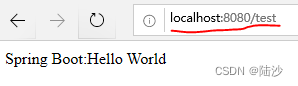
springboot-基础-eclipse配置+helloword示例
备份笔记。所有代码都是2019年测试通过的,如有问题请自行搜索解决! 下一篇:springboot-基础-添加model和controller的简单例子常用注解含义 目录 配置helloword示例新建项目创建文件 配置 spring boot官方有定制版eclipse,也就是…...

关于HTML标签应用教程
简介 HTML(HyperText Markup Language)是用于创建网页结构的标记语言。在本教程中,我们将介绍一些常用的HTML标签,以及它们的用法和示例。 1. HTML基础结构 <!DOCTYPE html> <html> <head><title>页面…...

3. 台阶问题
数楼梯 题目描述 楼梯有 N N N 阶,上楼可以一步上一阶,也可以一步上二阶。 编一个程序,计算共有多少种不同的走法。 输入格式 一个数字,楼梯数。 输出格式 输出走的方式总数。 样例 #1 样例输入 #1 4样例输出 #1 5提示…...
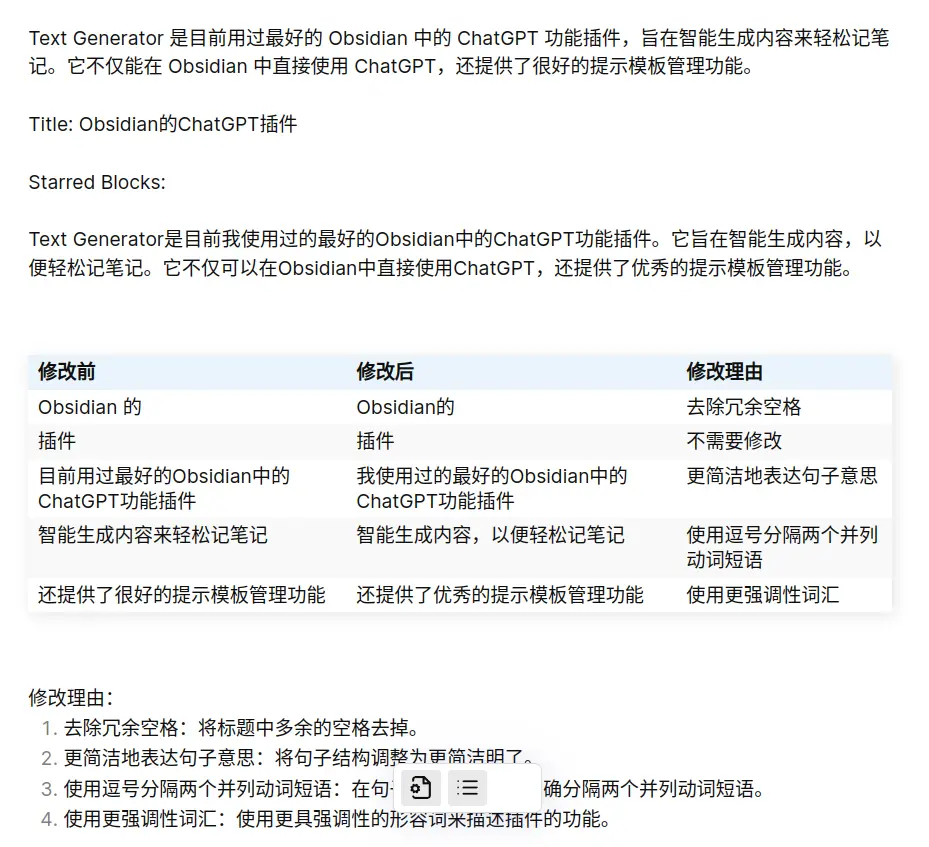
推荐一个 Obsidian 的 ChatGPT 插件
源码地址:https://github.com/nhaouari/obsidian-textgenerator-plugin Text Generator 是目前我使用过的最好的 Obsidian 中的 ChatGPT 功能插件。它旨在智能生成内容,以便轻松记笔记。它不仅可以在 Obsidian 中直接使用 ChatGPT,还提供了优…...
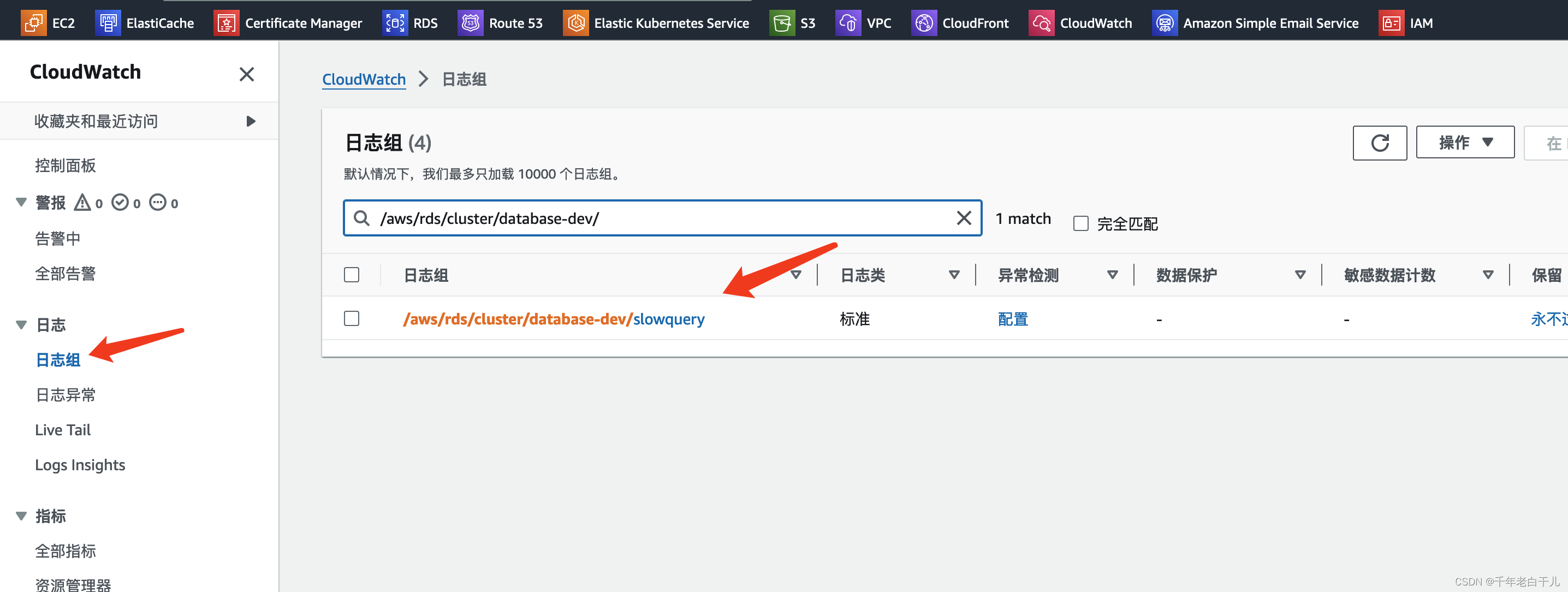
aws的RDS数据库开启慢查询日志
#开启慢日志两个参数 slow_query_log 1 设置为1,来启用慢查询日志 long_query_time 5 (单位秒) sql执行多长时间被定义为慢日志1. 点击RDS然后点击参数组,选择slow_query_log,设置为1【表示开启慢日志】点击保存…...
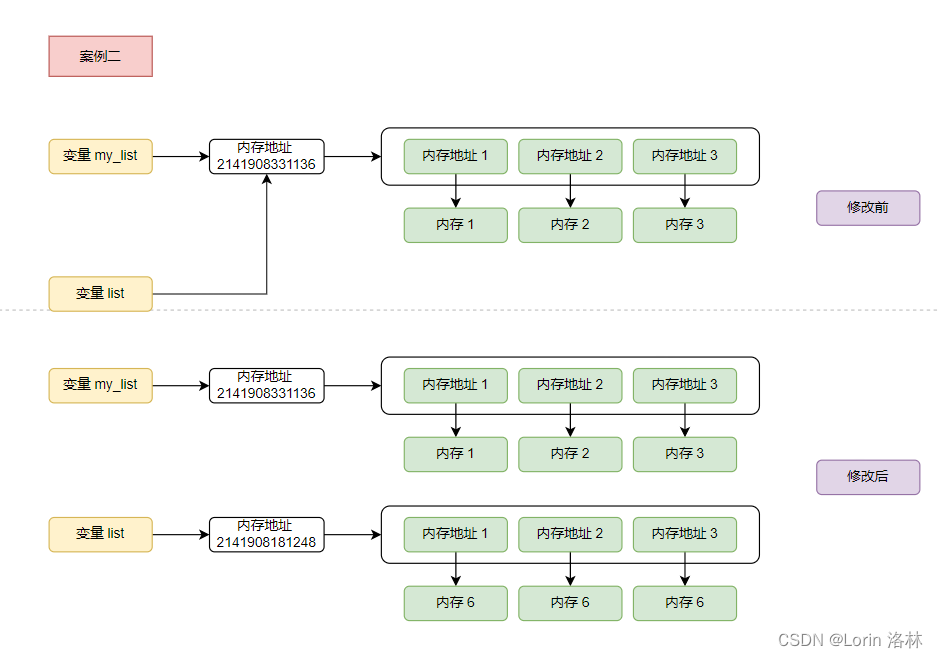
一文读懂 Python 值传递和引用传递
文章目录 版本前言形参和实参值传递和引用传递Python 变量存储值语义和引用语义值语义引用语义 探讨 Python 值传递和引用传递不可变(immutable)类型可变(mutable)类型案例一案例二 拓展:不可变类型真的不可变…...
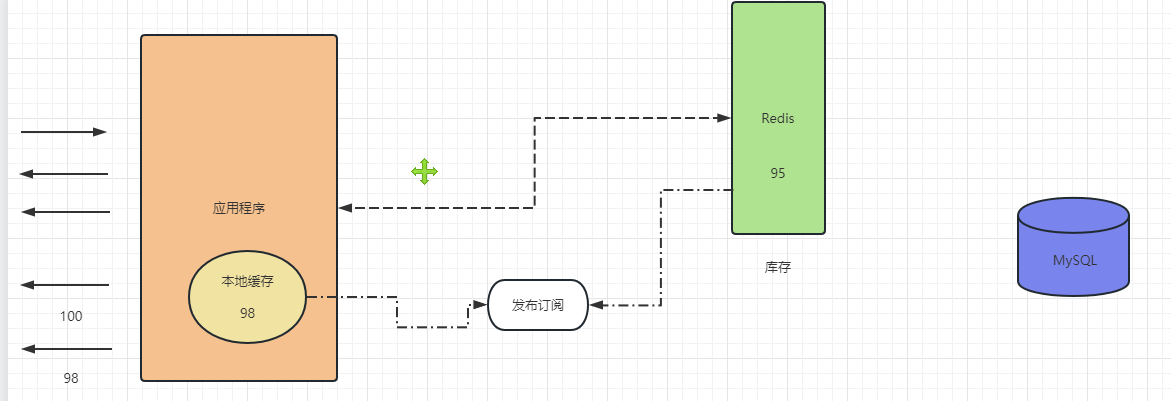
Linux进阶——系统安全,重要文件,加固系统的相关配置
目录 引出Linux系统安全一、重要文件二、帐户口令三、权限管理四、日志配置五、服务安全六、其他配置 缓存三兄弟:缓存击穿、穿透、雪崩缓存击穿缓存穿透缓存雪崩 总结 引出 Linux进阶——系统安全,重要文件,加固系统的相关配置 Linux系统安…...

C++三级专项 字符串逆序
输入一串‘!’结束的字符,按逆序输出。 输入 如题述。 输出 如题述。 输入样例 abc! 输出样例 cba解析:strlen(s)用来计算指定的字符串s的长度,不包括结束字符“\0”。 不准直接抄!!! …...
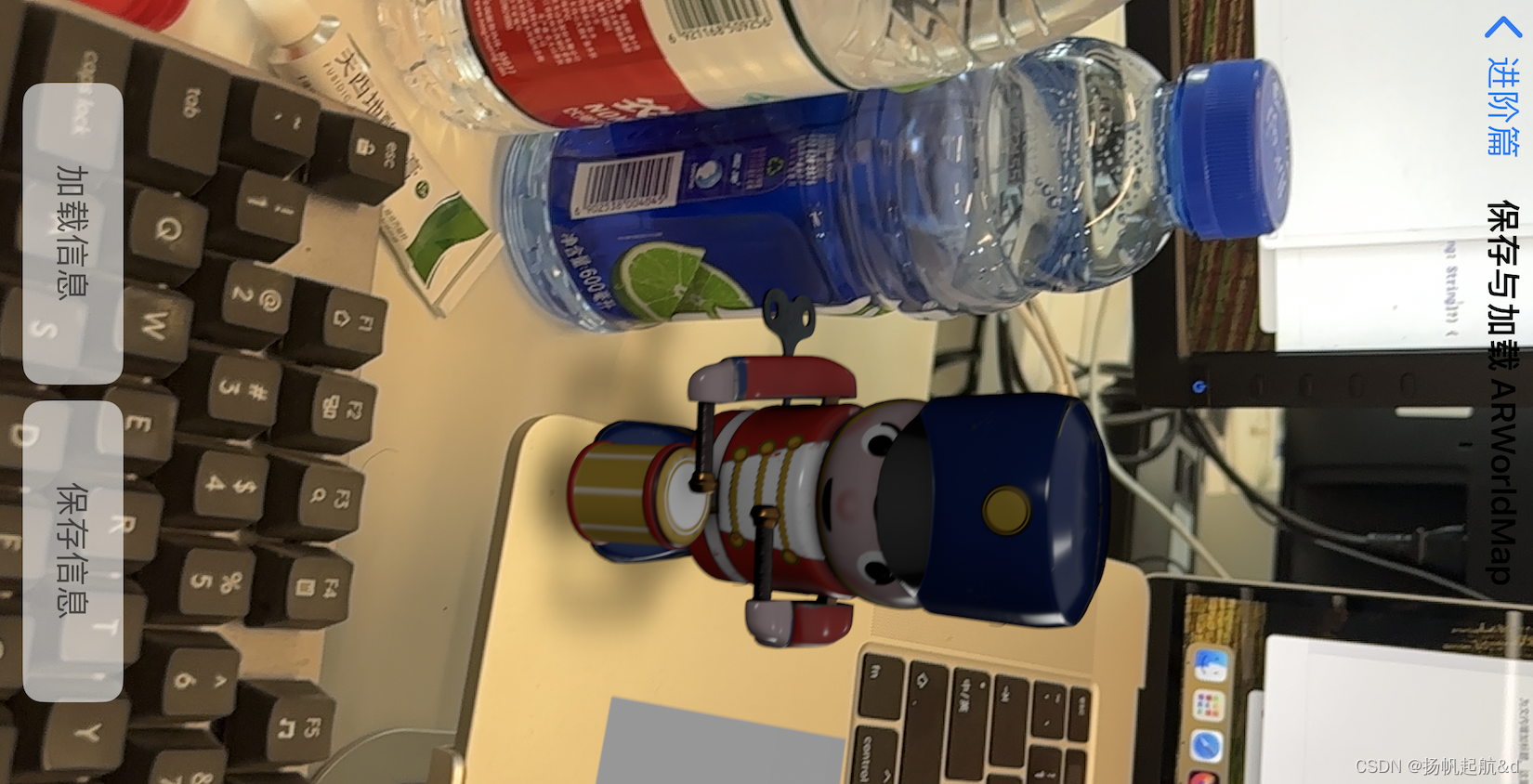
【iOS ARKit】ARWorldMap
ARWorldMap 用于存储 ARSession 检测扫描到的空间信息数据,包括地标(Landmark)、特征点(Feature Point)、平面(Plane)等,以及使用者的操作信息,如使用者添加的 ARAnchor …...

敏捷开发最佳实践:质量维度实践案例之软硬一体持续交付
在过去的Top敏捷实践案例中,我们可以看到企业或团队在敏捷质量管理上的创新,包括场景化测试、迭代T1自动化覆盖、一套自动用例到处运行、用例持续运行可视化等,而这也进一步促进了价值流动。本文将继续给大家带来全新的质量维度实践案例&…...
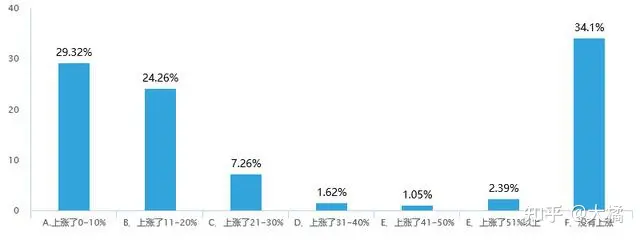
PMP证书的含金量如何?
PMP含金量更多的是“敲门砖”作用,公司招聘的门槛,现在坐项目的大部分都需要PMP/NPDP证书。 当然现在PMP管理模式也很热门,对企业发展很有利,各大企业都有引进改良应用在公司的项目上,之前在校友群里面大家在讨论PMP …...
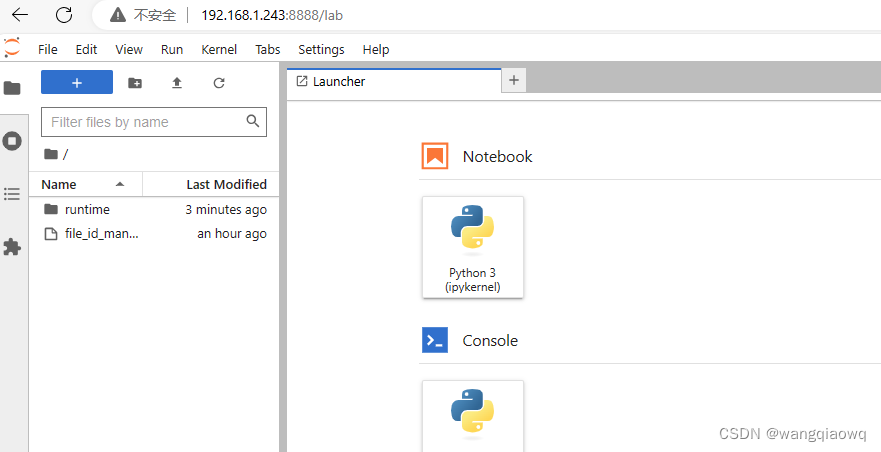
Linux 下安装Jupyter
pip3 install jupyter pip3 install ipython -------------------------------------------- pip3 install jupyterlab jupyter lab pip3 list | grep jupyterlab 启动: python3 -m jupyter lab 2.安装朱皮特 pip3 install -i https://pypi.douban.com/simpl…...
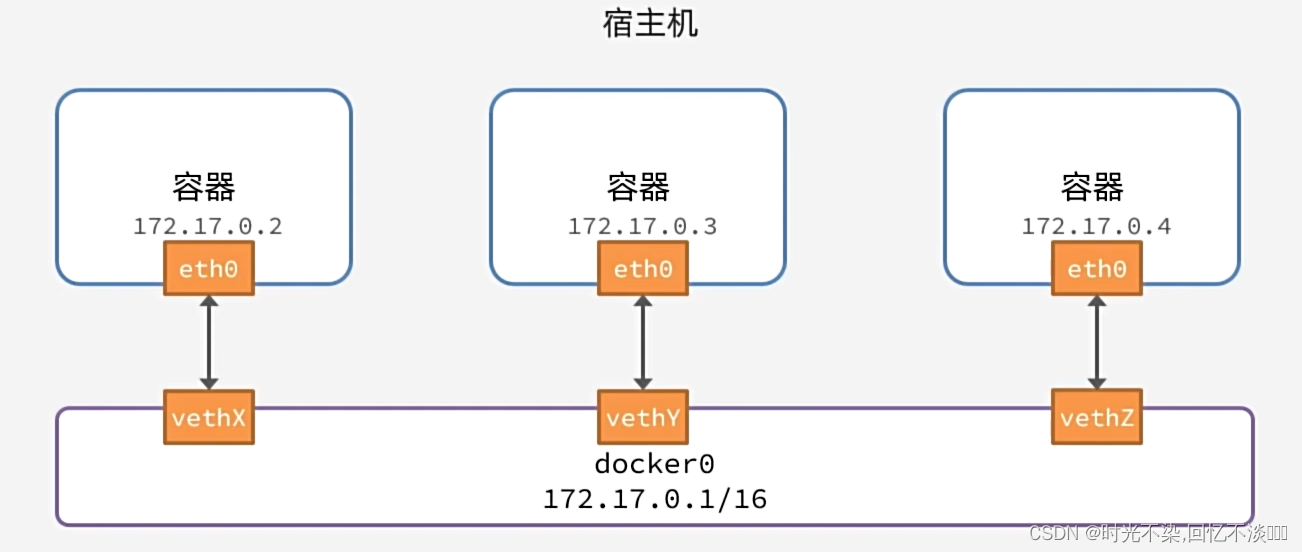
docker 基础(二)
常见命令 Docker最常见的命令就是操作镜像、容器的命令,详见官方文档:https://docs.docker.com/ 数据卷 命令说明文档地址docker volume create创建数据卷docker volume createdocker volume ls创建数据卷docker volume lsdocker volume rm查看所有数…...
LeetCode 刷题 [C++] 第236题.二叉树的最近公共祖先
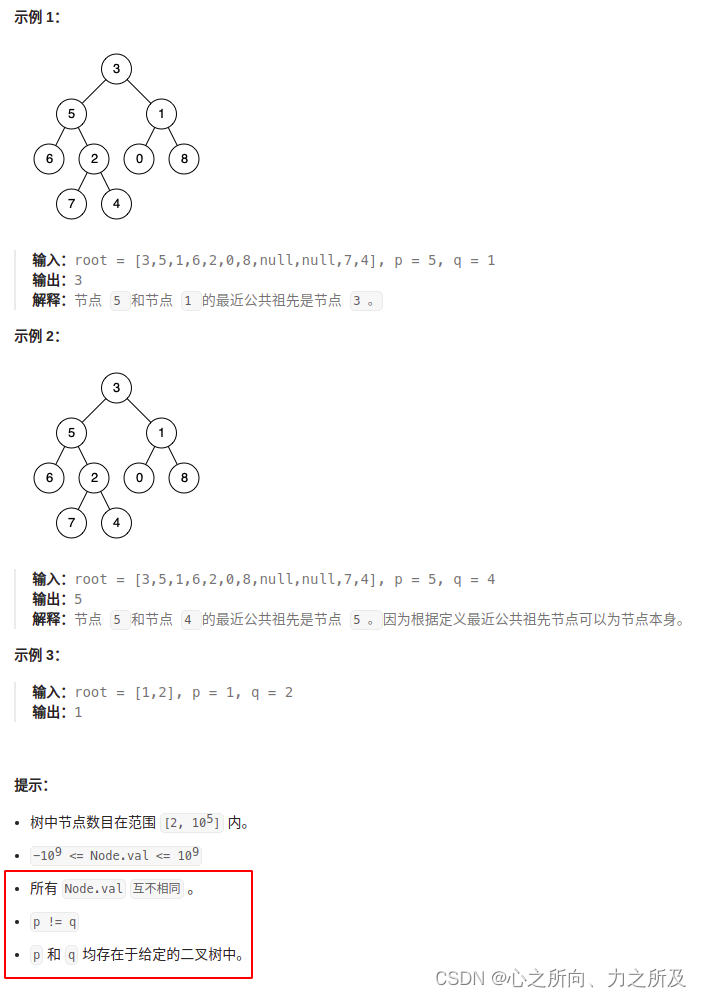
题目描述 给定一个二叉树, 找到该树中两个指定节点的最近公共祖先。 百度百科中最近公共祖先的定义为:“对于有根树 T 的两个节点 p、q,最近公共祖先表示为一个节点 x,满足 x 是 p、q 的祖先且 x 的深度尽可能大(一个节点也可以…...
vue3+vite 项目的创建
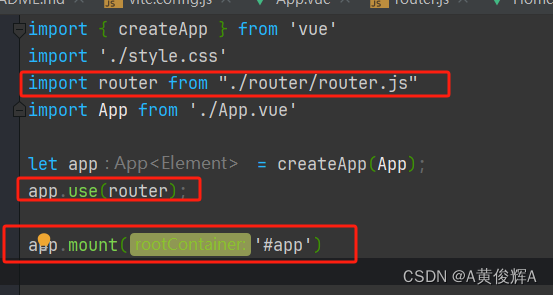
这里要提醒一下,如果我们要使用 vue3 的组合式api 的写法的话, 那么我们使用的 vue 版本不能低于 vue3.2 版本,不能低于 vue3.2 版本,不能低于 vue3.2 版本 vue2 已停止维护了, 现在全面拥抱vue3 之前用 vue-cli 创建…...
Windows Server 2022 使用ApacheDS用户认证
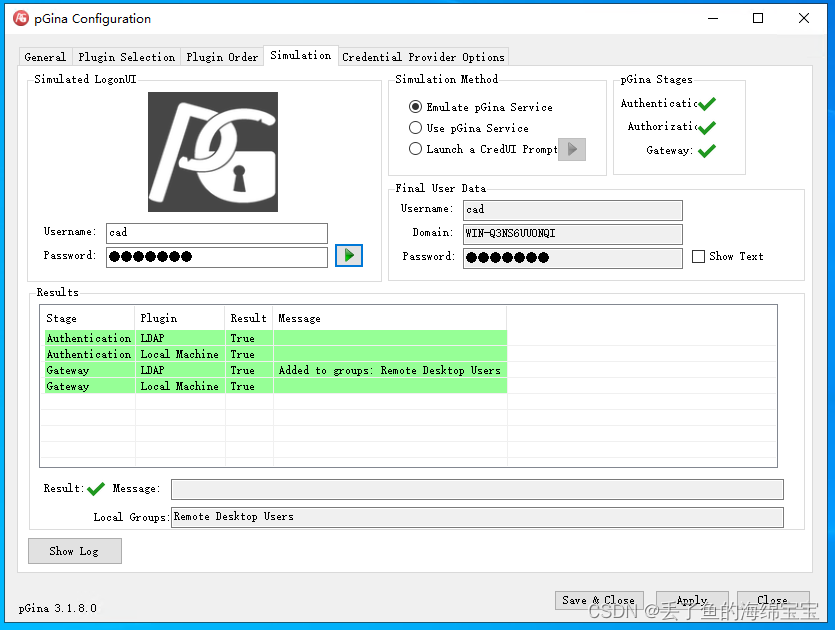
Windows Server 2022 使用ApacheDS用户认证 参考文档:https://docs.foxpass.com/docs/windows-ldap-auth-with-pgina 安装pGina软件,打开pGina软件 勾选启用LDAP认证,点击Configure 修改LDAP认证信息 点击Gateway,设置只要登…...
)
V4L2应用开发避坑指南:手把手教你用C语言采集USB摄像头图像(附完整代码)
V4L2实战:从零构建USB摄像头图像采集系统 在嵌入式开发和桌面应用中,Linux系统下的USB摄像头图像采集是一个常见需求。不同于复杂的驱动开发,大多数应用开发者更关注如何快速构建一个稳定高效的图像采集程序。本文将带你从设备识别到图像采集…...
)
Matlab绘图避坑:你的对数坐标轴标签和刻度设置对了吗?(附完整代码)
Matlab对数坐标轴进阶指南:从基础绘制到出版级图表优化 第一次用Matlab绘制对数坐标轴时,我盯着默认生成的10^0、10^1标签陷入了沉思——这种格式在学术论文中显得过于"工程化",而导师要求的是简洁的数字标注。更糟的是,…...

AutoLisp实战:从零到一构建你的第一个绘图工具
1. 为什么选择AutoLisp来自动化绘图 如果你经常使用AutoCAD进行绘图工作,一定会遇到大量重复性的操作。比如每次都要手动选择两点画线,然后再单独添加标注。这种机械劳动不仅效率低下,还容易出错。AutoLisp就是AutoCAD内置的解决方案…...

番茄小说下载器终极指南:三步将在线小说转为EPUB电子书
番茄小说下载器终极指南:三步将在线小说转为EPUB电子书 【免费下载链接】Tomato-Novel-Downloader 番茄小说下载器不精简版 项目地址: https://gitcode.com/gh_mirrors/to/Tomato-Novel-Downloader 你是否经常遇到网络信号不稳定而无法追更小说的困扰&#x…...
 微服务拆分不是拍脑袋-WMS怎么拆)
微服务系列(二) 微服务拆分不是拍脑袋-WMS怎么拆
微服务拆分不是拍脑袋,WMS 怎么拆?用 DDD 给仓储系统划边界,我们踩过的弯路第一次拆分的"翻车"经历 说实话,我第一次拆微服务的时候,自信满满。 那时候公司有个单体 WMS(仓储管理系统)…...

Java 代码质量与静态分析最佳实践 2027:构建高质量软件
Java 代码质量与静态分析最佳实践 2027:构建高质量软件别叫我大神,叫我 Alex 就好。今天我们来聊聊 Java 代码质量与静态分析的最佳实践 2027,这些实践可以帮助我们构建更可靠、更可维护的软件。一、引言 代码质量是软件开发的核心要素之一&a…...

CXPatcher:智能升级CrossOver依赖,一键提升游戏兼容性的高效工具
CXPatcher:智能升级CrossOver依赖,一键提升游戏兼容性的高效工具 【免费下载链接】CXPatcher A patcher to upgrade Crossover dependencies and improve compatibility 项目地址: https://gitcode.com/gh_mirrors/cx/CXPatcher 你是否曾经为Cros…...

华为EulerOS 2.0 SP8 ARM版yum源配置避坑指南:从DNS问题到完整流程
华为EulerOS 2.0 SP8 ARM版yum源配置全流程与深度排错指南 1. 环境准备与系统确认 在ARM架构服务器上配置华为EulerOS的yum源前,必须确保系统环境符合要求。不同于x86架构,ARM平台的特殊性往往会导致一些意料之外的问题。 验证系统架构与版本…...
全网最全)
【Jenkins】----- Ubuntu 24.04 自动化部署项目 CICD 实战教程(docker+gitee+jenkins+阿里云容器镜像服务 ACR)全网最全
文章目录 Ubuntu 24.04 保姆级 Java 项目 CICD 实战教程 🚀一、前置准备 📋1. 统一创建软件安装目录2. 必须安装的环境 三、服务器授权 Jenkins 操作 Docker 权限 🔑四、阿里云私有镜像仓库配置 🪐1. 开通阿里云容器镜像服务2. 服…...

Windows平台APK安装器终极指南:从零构建Android应用部署工作流
Windows平台APK安装器终极指南:从零构建Android应用部署工作流 【免费下载链接】APK-Installer An Android Application Installer for Windows 项目地址: https://gitcode.com/GitHub_Trending/ap/APK-Installer APK Installer是一款专为Windows平台设计的A…...