
Vins-Moon配准运行
Vins-Moon运行
- 求助!!!
- 源码地址
- 电脑配置
- 环境配置
- 编译
- Kitti数据集制作
- IMU时间戳问题
- 适配Kitti数据集
- 运行结果
- Euroc数据集
- kitti数据集
- evo评估(KITTI数据)
- 输出轨迹(tum格式)
- 结果
- 求助!!!
求助!!!
跑了vinsmoon在kitti_2011_10_03_0034上,出现big translation,然后重启的问题。想请问下大家怎么理解这个问题,然后从rviz上看重启之后是因为重启代码的问题导致轨迹再次从初始点开始了,这个是不是需要修改代码解决?有想讨论的朋友或者大佬可以私信我,也可以私信加联系方式,感谢!!!
源码地址
源码链接:https://github.com/HKUST-Aerial-Robotics/VINS-Mono.git
电脑配置
Ubuntu 18.04 + ROS Melodic + GTSAM 4.0.2 + CERES 1.14.0
pcl1.8+vtk8.2.0+opencv3.2.0
环境配置
之前已经配置过LVI-SAM的环境,所以没有什么额外需要配置的(可参考之前的博客)
编译
cd ~/catkin_ws/srcgit clone https://github.com/HKUST-Aerial-Robotics/VINS-Mono.gitcd ..catkin_make -j2
注:直接catkin_make会死机
Kitti数据集制作
参考链接:
1.https://blog.csdn.net/GuanLingde/article/details/133938758?spm=1001.2101.3001.6650.1&utm_medium=distribute.pc_relevant.none-task-blog-2%7Edefault%7ECTRLIST%7ERate-1-133938758-blog-127442772.235%5Ev43%5Econtrol&depth_1-utm_source=distribute.pc_relevant.none-task-blog-2%7Edefault%7ECTRLIST%7ERate-1-133938758-blog-127442772.235%5Ev43%5Econtrol&utm_relevant_index=2
2.https://zhuanlan.zhihu.com/p/115562083
IMU时间戳问题
首先用*_extract/oxts文件夹把*_sync/oxt的文件夹替换掉
KITTI提供的的原始的IMU数据的时间戳存在断续和逆序的情况,只能解决逆序情况,断续问题无法解决, 通过下面的程序查看断续的和逆序的IMU时间戳,并对逆序的IMU数据的时间戳进行手动修改
import datetime as dt
import glob
import os
import matplotlib.pyplot as plt
import numpy as npdata_path = "/home/nssc/sbk/code/slam/datasets/kitti2bag/modify/2011_10_03_drive_0034_sync"
def load_timestamps(data='oxts'):"""Load timestamps from file."""timestamp_file = os.path.join(data_path, data, 'timestamps.txt')# Read and parse the timestampstimestamps = []with open(timestamp_file, 'r') as f:for line in f.readlines():# NB: datetime only supports microseconds, but KITTI timestamps# give nanoseconds, so need to truncate last 4 characters to# get rid of \n (counts as 1) and extra 3 digitst = dt.datetime.strptime(line[:-4], '%Y-%m-%d %H:%M:%S.%f')t = dt.datetime.timestamp(t)timestamps.append(t)# Subselect the chosen range of frames, if anyreturn timestamps
timestamps = np.array(load_timestamps())
x = np.arange(0, len(timestamps))last_timestamp = timestamps[:-1]
curr_timestamp = timestamps[1:]
dt = np.array(curr_timestamp - last_timestamp) #计算前后帧时间差print("dt > 0.015: \n{}".format(dt[dt> 0.015])) # 打印前后帧时间差大于0.015的IMU index
dt = dt.tolist()
dt.append(0.01)
dt = np.array(dt)
print("dt > 0.015: \n{}".format(x[dt> 0.015])) # 打印时间差大于0.015的具体时间差
plt.plot(x, timestamps, 'r', label='imu')# 可视化IMU的时间戳
plt.show()

打开timestamps.txt文件,分别找到
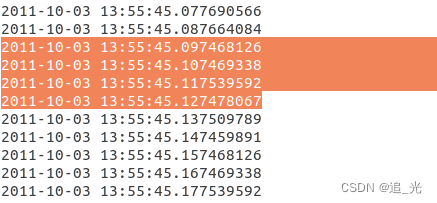
380 4890 7833 32773 33734 34035 34539 38553行,手动修改时间戳
如380行:
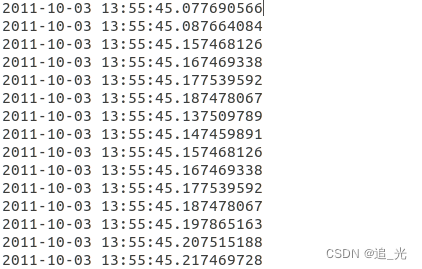
依次按顺序把时间加0.01,改完后:
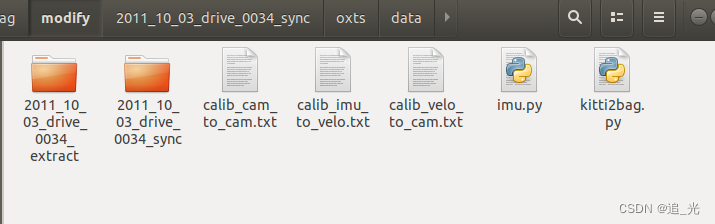
 运行kitti2bag.py
LIO-SAM中有config/doc/kitti2bag.py的工具文件
注:如果手动替换了文件夹,则注释掉这行代码 unsynced_path = synced_path.replace(‘sync’, ‘extract’)
python kitti2bag.py -t 2011_10_03 -r 0034 raw_synced .
#!env python
# -*- coding: utf-8 -*-import systry:import pykitti
except ImportError as e:print('Could not load module \'pykitti\'. Please run `pip install pykitti`')sys.exit(1)import tf
import os
import cv2
import rospy
import rosbag
from tqdm import tqdm
from tf2_msgs.msg import TFMessage
from datetime import datetime
from std_msgs.msg import Header
from sensor_msgs.msg import CameraInfo, Imu, PointField, NavSatFix
import sensor_msgs.point_cloud2 as pcl2
from geometry_msgs.msg import TransformStamped, TwistStamped, Transform
from cv_bridge import CvBridge
import numpy as np
import argparsedef save_imu_data(bag, kitti, imu_frame_id, topic):print("Exporting IMU")for timestamp, oxts in zip(kitti.timestamps, kitti.oxts):q = tf.transformations.quaternion_from_euler(oxts.packet.roll, oxts.packet.pitch, oxts.packet.yaw)imu = Imu()imu.header.frame_id = imu_frame_idimu.header.stamp = rospy.Time.from_sec(float(timestamp.strftime("%s.%f")))imu.orientation.x = q[0]imu.orientation.y = q[1]imu.orientation.z = q[2]imu.orientation.w = q[3]imu.linear_acceleration.x = oxts.packet.afimu.linear_acceleration.y = oxts.packet.alimu.linear_acceleration.z = oxts.packet.auimu.angular_velocity.x = oxts.packet.wfimu.angular_velocity.y = oxts.packet.wlimu.angular_velocity.z = oxts.packet.wubag.write(topic, imu, t=imu.header.stamp)def save_imu_data_raw(bag, kitti, imu_frame_id, topic):print("Exporting IMU Raw")synced_path = kitti.data_path# unsynced_path = synced_path.replace('sync', 'extract')imu_path = os.path.join(synced_path, 'oxts')# read time stamp (convert to ros seconds format)with open(os.path.join(imu_path, 'timestamps.txt')) as f:lines = f.readlines()imu_datetimes = []for line in lines:if len(line) == 1:continuetimestamp = datetime.strptime(line[:-4], '%Y-%m-%d %H:%M:%S.%f')imu_datetimes.append(float(timestamp.strftime("%s.%f")))# fix imu time using a linear model (may not be ideal, ^_^)imu_index = np.asarray(range(len(imu_datetimes)), dtype=np.float64)z = np.polyfit(imu_index, imu_datetimes, 1)imu_datetimes_new = z[0] * imu_index + z[1]imu_datetimes = imu_datetimes_new.tolist()# get all imu dataimu_data_dir = os.path.join(imu_path, 'data')imu_filenames = sorted(os.listdir(imu_data_dir))imu_data = [None] * len(imu_filenames)for i, imu_file in enumerate(imu_filenames):imu_data_file = open(os.path.join(imu_data_dir, imu_file), "r")for line in imu_data_file:if len(line) == 1:continuestripped_line = line.strip()line_list = stripped_line.split()imu_data[i] = line_listassert len(imu_datetimes) == len(imu_data)for timestamp, data in zip(imu_datetimes, imu_data):roll, pitch, yaw = float(data[3]), float(data[4]), float(data[5]), q = tf.transformations.quaternion_from_euler(roll, pitch, yaw)imu = Imu()imu.header.frame_id = imu_frame_idimu.header.stamp = rospy.Time.from_sec(timestamp)imu.orientation.x = q[0]imu.orientation.y = q[1]imu.orientation.z = q[2]imu.orientation.w = q[3]imu.linear_acceleration.x = float(data[11])imu.linear_acceleration.y = float(data[12])imu.linear_acceleration.z = float(data[13])imu.angular_velocity.x = float(data[17])imu.angular_velocity.y = float(data[18])imu.angular_velocity.z = float(data[19])bag.write(topic, imu, t=imu.header.stamp)imu.header.frame_id = 'imu_enu_link'bag.write('/imu_correct', imu, t=imu.header.stamp) # for LIO-SAM GPSdef save_dynamic_tf(bag, kitti, kitti_type, initial_time):print("Exporting time dependent transformations")if kitti_type.find("raw") != -1:for timestamp, oxts in zip(kitti.timestamps, kitti.oxts):tf_oxts_msg = TFMessage()tf_oxts_transform = TransformStamped()tf_oxts_transform.header.stamp = rospy.Time.from_sec(float(timestamp.strftime("%s.%f")))tf_oxts_transform.header.frame_id = 'world'tf_oxts_transform.child_frame_id = 'base_link'transform = (oxts.T_w_imu)t = transform[0:3, 3]q = tf.transformations.quaternion_from_matrix(transform)oxts_tf = Transform()oxts_tf.translation.x = t[0]oxts_tf.translation.y = t[1]oxts_tf.translation.z = t[2]oxts_tf.rotation.x = q[0]oxts_tf.rotation.y = q[1]oxts_tf.rotation.z = q[2]oxts_tf.rotation.w = q[3]tf_oxts_transform.transform = oxts_tftf_oxts_msg.transforms.append(tf_oxts_transform)bag.write('/tf', tf_oxts_msg, tf_oxts_msg.transforms[0].header.stamp)elif kitti_type.find("odom") != -1:timestamps = map(lambda x: initial_time + x.total_seconds(), kitti.timestamps)for timestamp, tf_matrix in zip(timestamps, kitti.T_w_cam0):tf_msg = TFMessage()tf_stamped = TransformStamped()tf_stamped.header.stamp = rospy.Time.from_sec(timestamp)tf_stamped.header.frame_id = 'world'tf_stamped.child_frame_id = 'camera_left't = tf_matrix[0:3, 3]q = tf.transformations.quaternion_from_matrix(tf_matrix)transform = Transform()transform.translation.x = t[0]transform.translation.y = t[1]transform.translation.z = t[2]transform.rotation.x = q[0]transform.rotation.y = q[1]transform.rotation.z = q[2]transform.rotation.w = q[3]tf_stamped.transform = transformtf_msg.transforms.append(tf_stamped)bag.write('/tf', tf_msg, tf_msg.transforms[0].header.stamp)def save_camera_data(bag, kitti_type, kitti, util, bridge, camera, camera_frame_id, topic, initial_time):print("Exporting camera {}".format(camera))if kitti_type.find("raw") != -1:camera_pad = '{0:02d}'.format(camera)image_dir = os.path.join(kitti.data_path, 'image_{}'.format(camera_pad))image_path = os.path.join(image_dir, 'data')image_filenames = sorted(os.listdir(image_path))with open(os.path.join(image_dir, 'timestamps.txt')) as f:image_datetimes = map(lambda x: datetime.strptime(x[:-4], '%Y-%m-%d %H:%M:%S.%f'), f.readlines())calib = CameraInfo()calib.header.frame_id = camera_frame_idcalib.width, calib.height = tuple(util['S_rect_{}'.format(camera_pad)].tolist())calib.distortion_model = 'plumb_bob'calib.K = util['K_{}'.format(camera_pad)]calib.R = util['R_rect_{}'.format(camera_pad)]calib.D = util['D_{}'.format(camera_pad)]calib.P = util['P_rect_{}'.format(camera_pad)]elif kitti_type.find("odom") != -1:camera_pad = '{0:01d}'.format(camera)image_path = os.path.join(kitti.sequence_path, 'image_{}'.format(camera_pad))image_filenames = sorted(os.listdir(image_path))image_datetimes = map(lambda x: initial_time + x.total_seconds(), kitti.timestamps)calib = CameraInfo()calib.header.frame_id = camera_frame_idcalib.P = util['P{}'.format(camera_pad)]iterable = zip(image_datetimes, image_filenames)for dt, filename in tqdm(iterable, total=len(image_filenames)):image_filename = os.path.join(image_path, filename)cv_image = cv2.imread(image_filename)calib.height, calib.width = cv_image.shape[:2]if camera in (0, 1):cv_image = cv2.cvtColor(cv_image, cv2.COLOR_BGR2GRAY)encoding = "mono8" if camera in (0, 1) else "bgr8"image_message = bridge.cv2_to_imgmsg(cv_image, encoding=encoding)image_message.header.frame_id = camera_frame_idif kitti_type.find("raw") != -1:image_message.header.stamp = rospy.Time.from_sec(float(datetime.strftime(dt, "%s.%f")))topic_ext = "/image_raw"elif kitti_type.find("odom") != -1:image_message.header.stamp = rospy.Time.from_sec(dt)topic_ext = "/image_rect"calib.header.stamp = image_message.header.stampbag.write(topic + topic_ext, image_message, t = image_message.header.stamp)bag.write(topic + '/camera_info', calib, t = calib.header.stamp) def save_velo_data(bag, kitti, velo_frame_id, topic):print("Exporting velodyne data")velo_path = os.path.join(kitti.data_path, 'velodyne_points')velo_data_dir = os.path.join(velo_path, 'data')velo_filenames = sorted(os.listdir(velo_data_dir))with open(os.path.join(velo_path, 'timestamps.txt')) as f:lines = f.readlines()velo_datetimes = []for line in lines:if len(line) == 1:continuedt = datetime.strptime(line[:-4], '%Y-%m-%d %H:%M:%S.%f')velo_datetimes.append(dt)iterable = zip(velo_datetimes, velo_filenames)count = 0for dt, filename in tqdm(iterable, total=len(velo_filenames)):if dt is None:continuevelo_filename = os.path.join(velo_data_dir, filename)# read binary datascan = (np.fromfile(velo_filename, dtype=np.float32)).reshape(-1, 4)# get ring channeldepth = np.linalg.norm(scan, 2, axis=1)pitch = np.arcsin(scan[:, 2] / depth) # arcsin(z, depth)fov_down = -24.8 / 180.0 * np.pifov = (abs(-24.8) + abs(2.0)) / 180.0 * np.piproj_y = (pitch + abs(fov_down)) / fov  # in [0.0, 1.0]proj_y *= 64  # in [0.0, H]proj_y = np.floor(proj_y)proj_y = np.minimum(64 - 1, proj_y)proj_y = np.maximum(0, proj_y).astype(np.int32)  # in [0,H-1]proj_y = proj_y.reshape(-1, 1)scan = np.concatenate((scan,proj_y), axis=1)scan = scan.tolist()for i in range(len(scan)):scan[i][-1] = int(scan[i][-1])# create headerheader = Header()header.frame_id = velo_frame_idheader.stamp = rospy.Time.from_sec(float(datetime.strftime(dt, "%s.%f")))# fill pcl msgfields = [PointField('x', 0, PointField.FLOAT32, 1),PointField('y', 4, PointField.FLOAT32, 1),PointField('z', 8, PointField.FLOAT32, 1),PointField('intensity', 12, PointField.FLOAT32, 1),PointField('ring', 16, PointField.UINT16, 1)]pcl_msg = pcl2.create_cloud(header, fields, scan)pcl_msg.is_dense = True# print(pcl_msg)bag.write(topic, pcl_msg, t=pcl_msg.header.stamp)# count += 1# if count > 200:#     breakdef get_static_transform(from_frame_id, to_frame_id, transform):t = transform[0:3, 3]q = tf.transformations.quaternion_from_matrix(transform)tf_msg = TransformStamped()tf_msg.header.frame_id = from_frame_idtf_msg.child_frame_id = to_frame_idtf_msg.transform.translation.x = float(t[0])tf_msg.transform.translation.y = float(t[1])tf_msg.transform.translation.z = float(t[2])tf_msg.transform.rotation.x = float(q[0])tf_msg.transform.rotation.y = float(q[1])tf_msg.transform.rotation.z = float(q[2])tf_msg.transform.rotation.w = float(q[3])return tf_msgdef inv(transform):"Invert rigid body transformation matrix"R = transform[0:3, 0:3]t = transform[0:3, 3]t_inv = -1 * R.T.dot(t)transform_inv = np.eye(4)transform_inv[0:3, 0:3] = R.Ttransform_inv[0:3, 3] = t_invreturn transform_invdef save_static_transforms(bag, transforms, timestamps):print("Exporting static transformations")tfm = TFMessage()for transform in transforms:t = get_static_transform(from_frame_id=transform[0], to_frame_id=transform[1], transform=transform[2])tfm.transforms.append(t)for timestamp in timestamps:time = rospy.Time.from_sec(float(timestamp.strftime("%s.%f")))for i in range(len(tfm.transforms)):tfm.transforms[i].header.stamp = timebag.write('/tf_static', tfm, t=time)def save_gps_fix_data(bag, kitti, gps_frame_id, topic):for timestamp, oxts in zip(kitti.timestamps, kitti.oxts):navsatfix_msg = NavSatFix()navsatfix_msg.header.frame_id = gps_frame_idnavsatfix_msg.header.stamp = rospy.Time.from_sec(float(timestamp.strftime("%s.%f")))navsatfix_msg.latitude = oxts.packet.latnavsatfix_msg.longitude = oxts.packet.lonnavsatfix_msg.altitude = oxts.packet.altnavsatfix_msg.status.service = 1bag.write(topic, navsatfix_msg, t=navsatfix_msg.header.stamp)def save_gps_vel_data(bag, kitti, gps_frame_id, topic):for timestamp, oxts in zip(kitti.timestamps, kitti.oxts):twist_msg = TwistStamped()twist_msg.header.frame_id = gps_frame_idtwist_msg.header.stamp = rospy.Time.from_sec(float(timestamp.strftime("%s.%f")))twist_msg.twist.linear.x = oxts.packet.vftwist_msg.twist.linear.y = oxts.packet.vltwist_msg.twist.linear.z = oxts.packet.vutwist_msg.twist.angular.x = oxts.packet.wftwist_msg.twist.angular.y = oxts.packet.wltwist_msg.twist.angular.z = oxts.packet.wubag.write(topic, twist_msg, t=twist_msg.header.stamp)if __name__ == "__main__":parser = argparse.ArgumentParser(description = "Convert KITTI dataset to ROS bag file the easy way!")# Accepted argument valueskitti_types = ["raw_synced", "odom_color", "odom_gray"]odometry_sequences = []for s in range(22):odometry_sequences.append(str(s).zfill(2))parser.add_argument("kitti_type", choices = kitti_types, help = "KITTI dataset type")parser.add_argument("dir", nargs = "?", default = os.getcwd(), help = "base directory of the dataset, if no directory passed the deafult is current working directory")parser.add_argument("-t", "--date", help = "date of the raw dataset (i.e. 2011_09_26), option is only for RAW datasets.")parser.add_argument("-r", "--drive", help = "drive number of the raw dataset (i.e. 0001), option is only for RAW datasets.")parser.add_argument("-s", "--sequence", choices = odometry_sequences,help = "sequence of the odometry dataset (between 00 - 21), option is only for ODOMETRY datasets.")args = parser.parse_args()bridge = CvBridge()compression = rosbag.Compression.NONE# compression = rosbag.Compression.BZ2# compression = rosbag.Compression.LZ4# CAMERAScameras = [(0, 'camera_gray_left', '/kitti/camera_gray_left'),(1, 'camera_gray_right', '/kitti/camera_gray_right'),(2, 'camera_color_left', '/kitti/camera_color_left'),(3, 'camera_color_right', '/kitti/camera_color_right')]if args.kitti_type.find("raw") != -1:if args.date == None:print("Date option is not given. It is mandatory for raw dataset.")print("Usage for raw dataset: kitti2bag raw_synced [dir] -t <date> -r <drive>")sys.exit(1)elif args.drive == None:print("Drive option is not given. It is mandatory for raw dataset.")print("Usage for raw dataset: kitti2bag raw_synced [dir] -t <date> -r <drive>")sys.exit(1)bag = rosbag.Bag("kitti_{}_drive_{}_{}.bag".format(args.date, args.drive, args.kitti_type[4:]), 'w', compression=compression)kitti = pykitti.raw(args.dir, args.date, args.drive)if not os.path.exists(kitti.data_path):print('Path {} does not exists. Exiting.'.format(kitti.data_path))sys.exit(1)if len(kitti.timestamps) == 0:print('Dataset is empty? Exiting.')sys.exit(1)try:# IMUimu_frame_id = 'imu_link'imu_topic = '/kitti/oxts/imu'imu_raw_topic = '/imu_raw'gps_fix_topic = '/gps/fix'gps_vel_topic = '/gps/vel'velo_frame_id = 'velodyne'velo_topic = '/points_raw'T_base_link_to_imu = np.eye(4, 4)T_base_link_to_imu[0:3, 3] = [-2.71/2.0-0.05, 0.32, 0.93]# tf_statictransforms = [('base_link', imu_frame_id, T_base_link_to_imu),(imu_frame_id, velo_frame_id, inv(kitti.calib.T_velo_imu)),(imu_frame_id, cameras[0][1], inv(kitti.calib.T_cam0_imu)),(imu_frame_id, cameras[1][1], inv(kitti.calib.T_cam1_imu)),(imu_frame_id, cameras[2][1], inv(kitti.calib.T_cam2_imu)),(imu_frame_id, cameras[3][1], inv(kitti.calib.T_cam3_imu))]util = pykitti.utils.read_calib_file(os.path.join(kitti.calib_path, 'calib_cam_to_cam.txt'))# Export# save_static_transforms(bag, transforms, kitti.timestamps)# save_dynamic_tf(bag, kitti, args.kitti_type, initial_time=None)# save_imu_data(bag, kitti, imu_frame_id, imu_topic)save_imu_data_raw(bag, kitti, imu_frame_id, imu_raw_topic)save_gps_fix_data(bag, kitti, imu_frame_id, gps_fix_topic)save_gps_vel_data(bag, kitti, imu_frame_id, gps_vel_topic)for camera in cameras:save_camera_data(bag, args.kitti_type, kitti, util, bridge, camera=camera[0], camera_frame_id=camera[1], topic=camera[2], initial_time=None)breaksave_velo_data(bag, kitti, velo_frame_id, velo_topic)finally:print("## OVERVIEW ##")print(bag)bag.close()elif args.kitti_type.find("odom") != -1:if args.sequence == None:print("Sequence option is not given. It is mandatory for odometry dataset.")print("Usage for odometry dataset: kitti2bag {odom_color, odom_gray} [dir] -s <sequence>")sys.exit(1)bag = rosbag.Bag("kitti_data_odometry_{}_sequence_{}.bag".format(args.kitti_type[5:],args.sequence), 'w', compression=compression)kitti = pykitti.odometry(args.dir, args.sequence)if not os.path.exists(kitti.sequence_path):print('Path {} does not exists. Exiting.'.format(kitti.sequence_path))sys.exit(1)kitti.load_calib()         kitti.load_timestamps() if len(kitti.timestamps) == 0:print('Dataset is empty? Exiting.')sys.exit(1)if args.sequence in odometry_sequences[:11]:print("Odometry dataset sequence {} has ground truth information (poses).".format(args.sequence))kitti.load_poses()try:util = pykitti.utils.read_calib_file(os.path.join(args.dir,'sequences',args.sequence, 'calib.txt'))current_epoch = (datetime.utcnow() - datetime(1970, 1, 1)).total_seconds()# Exportif args.kitti_type.find("gray") != -1:used_cameras = cameras[:2]elif args.kitti_type.find("color") != -1:used_cameras = cameras[-2:]save_dynamic_tf(bag, kitti, args.kitti_type, initial_time=current_epoch)for camera in used_cameras:save_camera_data(bag, args.kitti_type, kitti, util, bridge, camera=camera[0], camera_frame_id=camera[1], topic=camera[2], initial_time=current_epoch)finally:print("## OVERVIEW ##")print(bag)bag.close()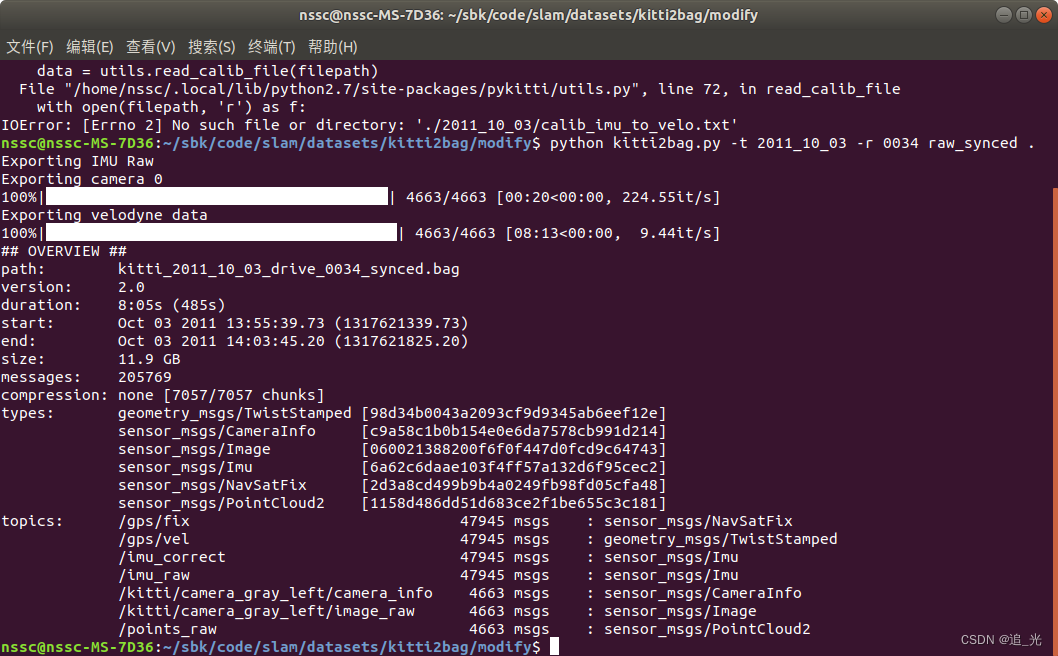
适配Kitti数据集
在config文件夹下新建kitti文件夹
新建kitti_config.yaml文件
(具体参数设置的方式,可以参考之前LVI-SAM博客)
%YAML:1.0#common parameters
imu_topic: "/imu_raw"   #"/kitti/oxts/imu"
image_topic: "/kitti/camera_gray_left/image_raw"
output_path: "/home/nssc/sbk/outputs/map/vinsmoon/"#camera calibration
model_type: PINHOLE
camera_name: camera0
#10_03
# image_width: 1241
# image_height: 376
# 09_30
image_width: 1226
image_height: 370
distortion_parameters:k1: 0.0k2: 0.0p1: 0.0p2: 0.0
projection_parameters:
# 10_03
#   fx: 7.188560e+02
#   fy: 7.188560e+02
#   cx: 6.071928e+02
#   cy: 1.852157e+02# 09_30fx: 7.070912e+02fy: 7.070912e+02cx: 6.018873e+02cy: 1.831104e+02# Extrinsic parameter between IMU and Camera.
estimate_extrinsic: 0   # 0  Have an accurate extrinsic parameters. We will trust the following imu^R_cam, imu^T_cam, don't change it.# 1  Have an initial guess about extrinsic parameters. We will optimize around your initial guess.# 2  Don't know anything about extrinsic parameters. You don't need to give R,T. We will try to calibrate it. Do some rotation movement at beginning.
#If you choose 0 or 1, you should write down the following matrix.
#Rotation from camera frame to imu frame, imu^R_cam
extrinsicRotation: !!opencv-matrixrows: 3cols: 3dt: d#  10_03# data: [0.00875116, -0.00479609,  0.99995027, -0.99986428, -0.01400249,  0.00868325, 0.01396015, -0.99989044, -0.00491798]#  09_30data: [0.00781298, -0.0042792,  0.99996033,-0.99985947, -0.01486805,  0.00774856, 0.0148343 , -0.99988023, -0.00439476]     #Translation from camera frame to imu frame, imu^T_cam
extrinsicTranslation: !!opencv-matrixrows: 3cols: 1dt: d#  10_03# data: [1.10224312,-0.31907194,  0.74606588]
#09_30 data: [1.14389871,-0.31271847,  0.72654605]#feature traker paprameters
max_cnt: 150            # max feature number in feature tracking
min_dist: 30            # min distance between two features
freq: 10                # frequence (Hz) of publish tracking result. At least 10Hz for good estimation. If set 0, the frequence will be same as raw image
F_threshold: 1.0        # ransac threshold (pixel)
show_track: 1           # publish tracking image as topic
equalize: 1             # if image is too dark or light, trun on equalize to find enough features
fisheye: 0              # if using fisheye, trun on it. A circle mask will be loaded to remove edge noisy points#optimization parameters
max_solver_time: 0.04  # max solver itration time (ms), to guarantee real time
max_num_iterations: 8   # max solver itrations, to guarantee real time
keyframe_parallax: 10.0 # keyframe selection threshold (pixel)#imu parameters       The more accurate parameters you provide, the better performance
acc_n: 0.08          # accelerometer measurement noise standard deviation. #0.2   0.04
gyr_n: 0.004         # gyroscope measurement noise standard deviation.     #0.05  0.004
acc_w: 0.00004         # accelerometer bias random work noise standard deviation.  #0.02
gyr_w: 2.0e-6       # gyroscope bias random work noise standard deviation.     #4.0e-5
g_norm: 9.81007     # gravity magnitude#loop closure parameters
loop_closure: 1                    # start loop closure
load_previous_pose_graph: 0        # load and reuse previous pose graph; load from 'pose_graph_save_path'
fast_relocalization: 0             # useful in real-time and large project
pose_graph_save_path: "/home/nssc/sbk/outputs/map/vinsmoon/pose_graph/" # save and load path#unsynchronization parameters
estimate_td: 0                      # online estimate time offset between camera and imu
td: 0.0                             # initial value of time offset. unit: s. readed image clock + td = real image clock (IMU clock)#rolling shutter parameters
rolling_shutter: 0                  # 0: global shutter camera, 1: rolling shutter camera
rolling_shutter_tr: 0               # unit: s. rolling shutter read out time per frame (from data sheet). #visualization parameters
save_image: 1                   # save image in pose graph for visualization prupose; you can close this function by setting 0
visualize_imu_forward: 0        # output imu forward propogation to achieve low latency and high frequence results
visualize_camera_size: 0.4      # size of camera marker in RVIZ
在vins_estimator/launch/文件夹下新建文件kitti.launch
(主要修改一下config_path的路径)
<launch><arg name="config_path" default = "$(find feature_tracker)/../config/kitti/kitti_config.yaml" /><arg name="vins_path" default = "$(find feature_tracker)/../config/../" /><node name="feature_tracker" pkg="feature_tracker" type="feature_tracker" output="log"><param name="config_file" type="string" value="$(arg config_path)" /><param name="vins_folder" type="string" value="$(arg vins_path)" /></node><node name="vins_estimator" pkg="vins_estimator" type="vins_estimator" output="screen"><param name="config_file" type="string" value="$(arg config_path)" /><param name="vins_folder" type="string" value="$(arg vins_path)" /></node><node name="pose_graph" pkg="pose_graph" type="pose_graph" output="screen"><param name="config_file" type="string" value="$(arg config_path)" /><param name="visualization_shift_x" type="int" value="0" /><param name="visualization_shift_y" type="int" value="0" /><param name="skip_cnt" type="int" value="0" /><param name="skip_dis" type="double" value="0" /></node></launch>运行结果
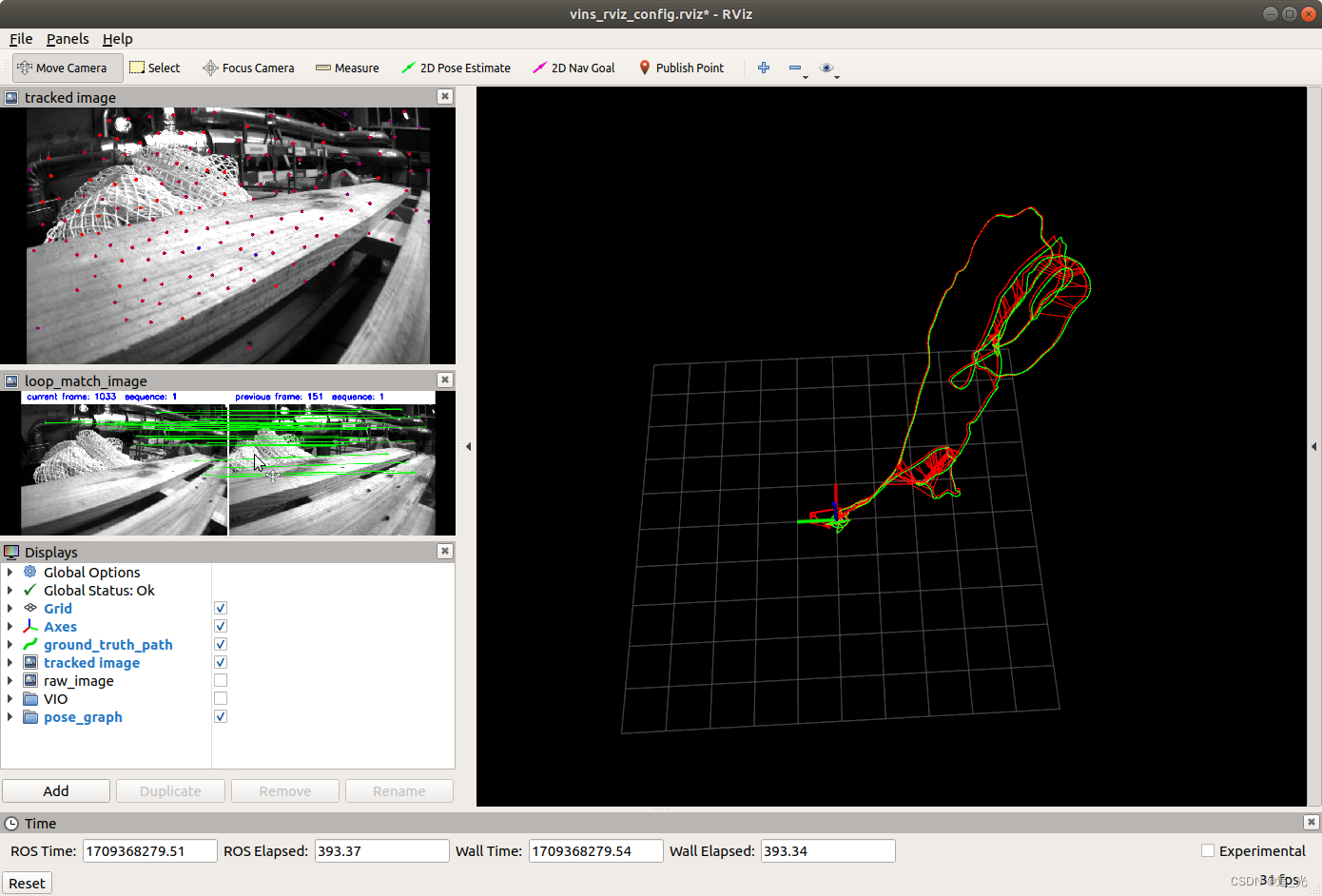
Euroc数据集
roslaunch vins_estimator euroc.launch roslaunch vins_estimator vins_rviz.launchrosbag play YOUR_PATH_TO_DATASET/MH_01_easy.bag
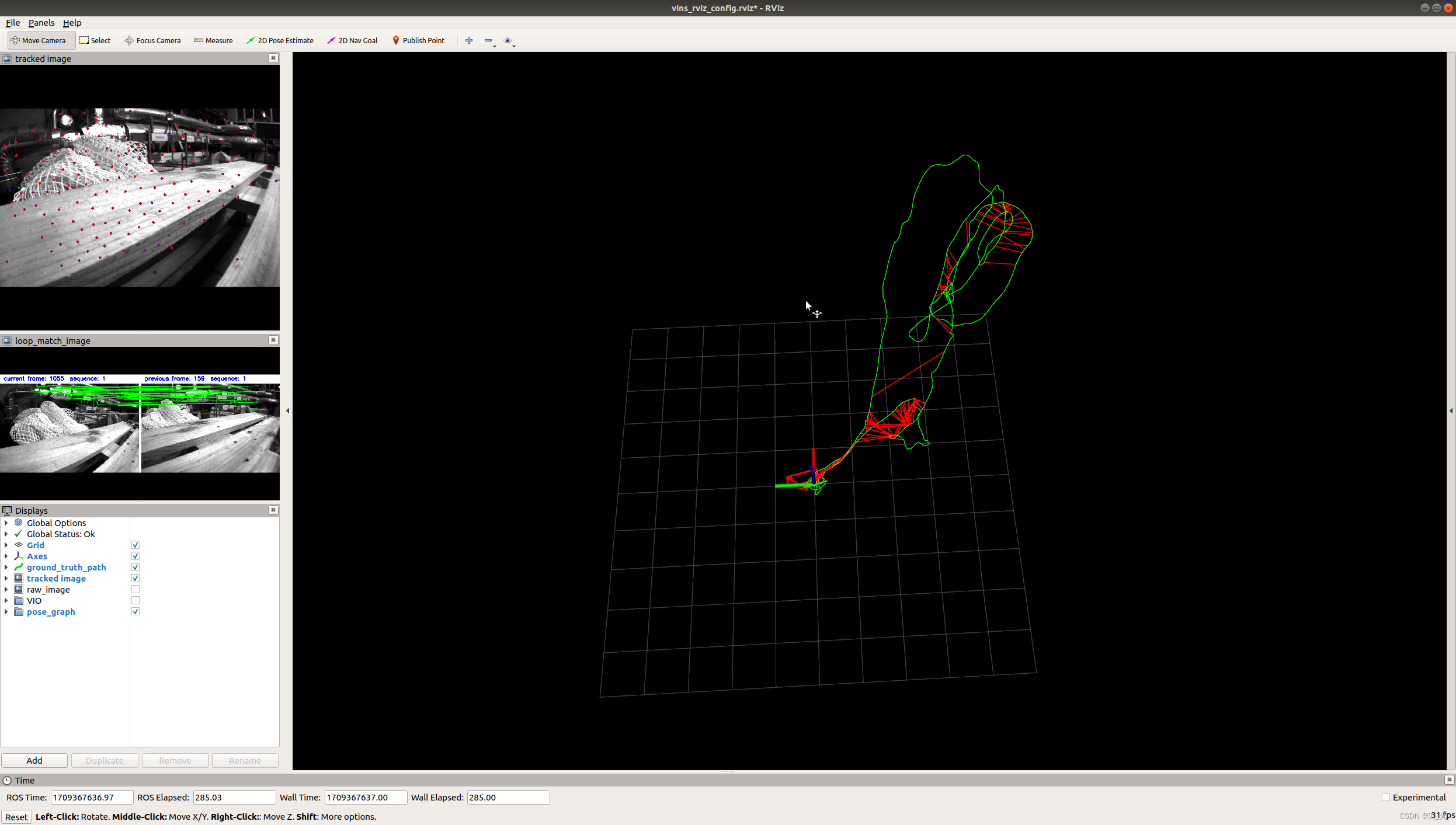 同时看到groundtrue:
roslaunch benchmark_publisher publish.launch sequence_name:=MH_01_easy
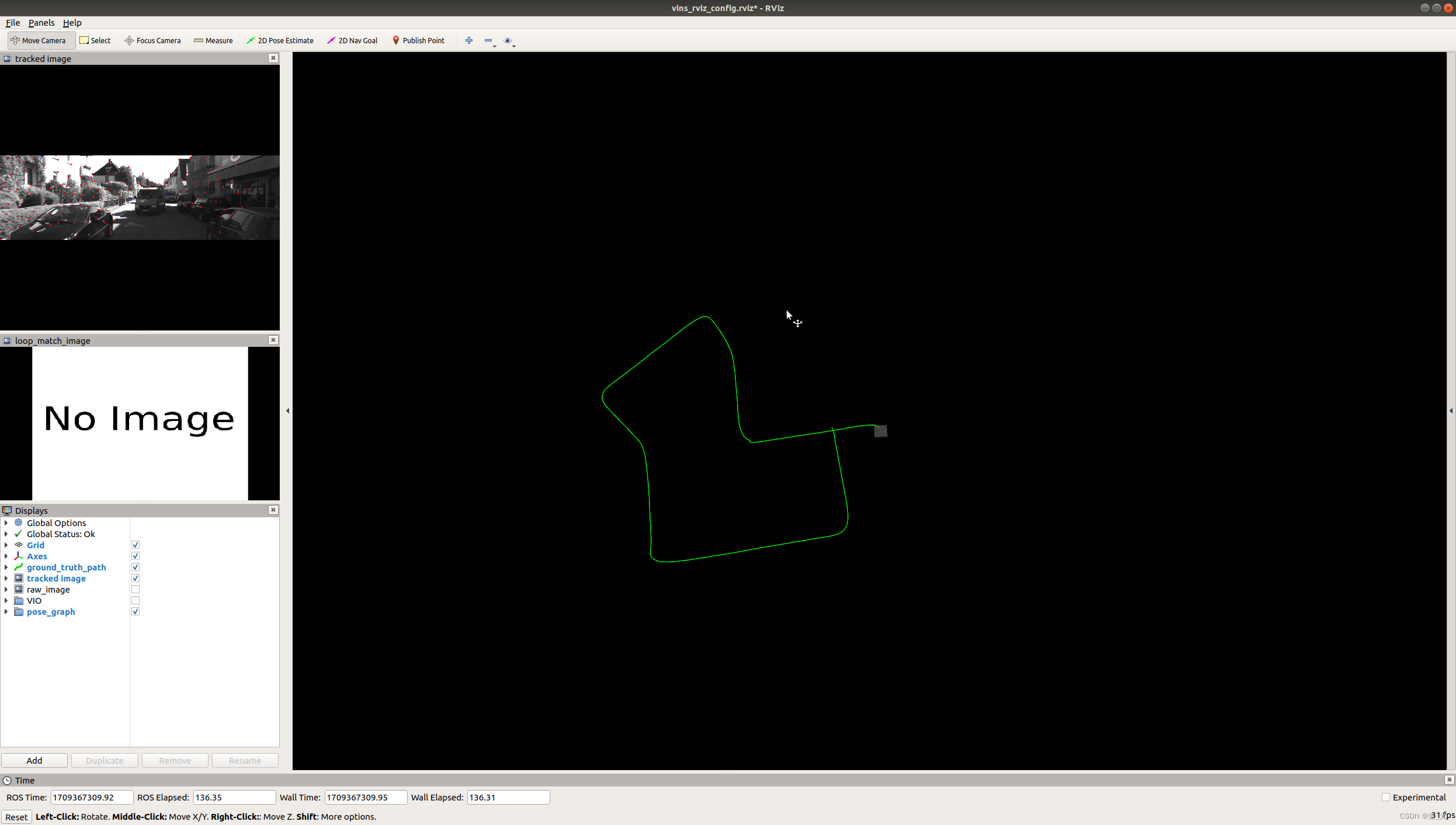
kitti数据集
有关kitti数据集生成bag包的方式,可参考之前生成LVI-SAM适配数据的博客
roslaunch vins_estimator kitti.launch roslaunch vins_estimator vins_rviz.launchrosbag play kitti_2011_09_30_drive_0027_synced.bag
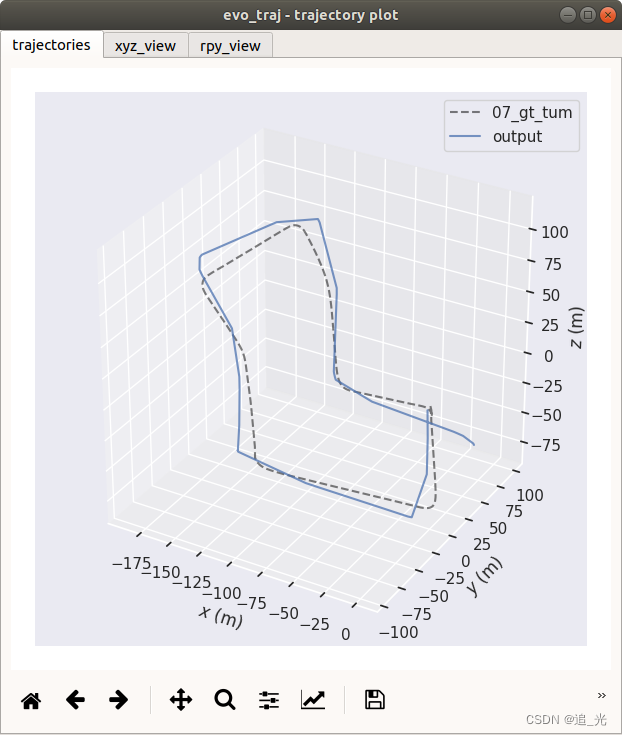
evo评估(KITTI数据)
输出轨迹(tum格式)
vins_estimator/src/utility/visualization.cpp
pubOdometry()函数150+行
// write result to file// ofstream foutC(VINS_RESULT_PATH, ios::app);// foutC.setf(ios::fixed, ios::floatfield);// foutC.precision(0);// foutC << header.stamp.toSec() * 1e9 << ",";// foutC.precision(5);// foutC << estimator.Ps[WINDOW_SIZE].x() << ","// << estimator.Ps[WINDOW_SIZE].y() << ","// << estimator.Ps[WINDOW_SIZE].z() << ","// << tmp_Q.w() << ","// << tmp_Q.x() << ","// << tmp_Q.y() << ","// << tmp_Q.z() << ","// << estimator.Vs[WINDOW_SIZE].x() << ","// << estimator.Vs[WINDOW_SIZE].y() << ","// << estimator.Vs[WINDOW_SIZE].z() << "," << endl;ofstream foutC(VINS_RESULT_PATH, ios::app);foutC.setf(ios::fixed, ios::floatfield);foutC.precision(9);foutC << header.stamp.toSec() << " ";foutC.precision(5);foutC << estimator.Ps[WINDOW_SIZE].x() << " "<< estimator.Ps[WINDOW_SIZE].y() << " "<< estimator.Ps[WINDOW_SIZE].z() << " "<< tmp_Q.x() << " "<< tmp_Q.y() << " "<< tmp_Q.z() << " "<< tmp_Q.w() << endl;foutC.close();
pose_graph/src/pose_graph.cpp
addKeyFrame()函数150+行
if (SAVE_LOOP_PATH){// ofstream loop_path_file(VINS_RESULT_PATH, ios::app);// loop_path_file.setf(ios::fixed, ios::floatfield);// loop_path_file.precision(0);// loop_path_file << cur_kf->time_stamp * 1e9 << ",";// loop_path_file.precision(5);// loop_path_file << P.x() << ","// << P.y() << ","// << P.z() << ","// << Q.w() << ","// << Q.x() << ","// << Q.y() << ","// << Q.z() << ","// << endl;ofstream loop_path_file(VINS_RESULT_PATH, ios::app);loop_path_file.setf(ios::fixed, ios::floatfield);loop_path_file.precision(0);loop_path_file << cur_kf->time_stamp << " ";loop_path_file.precision(5);loop_path_file << P.x() << " "<< P.y() << " "<< P.z() << " "<< Q.x() << " "<< Q.y() << " "<< Q.z() << " "<< Q.w() << endl; loop_path_file.close();}
updatePath()函数600+行
if (SAVE_LOOP_PATH){// ofstream loop_path_file(VINS_RESULT_PATH, ios::app);// loop_path_file.setf(ios::fixed, ios::floatfield);// loop_path_file.precision(0);// loop_path_file << (*it)->time_stamp * 1e9 << ",";// loop_path_file.precision(5);// loop_path_file << P.x() << ","// << P.y() << ","// << P.z() << ","// << Q.w() << ","// << Q.x() << ","// << Q.y() << ","// << Q.z() << ","// << endl;ofstream loop_path_file(VINS_RESULT_PATH, ios::app);loop_path_file.setf(ios::fixed, ios::floatfield);loop_path_file.precision(0);loop_path_file << (*it)->time_stamp << " ";loop_path_file.precision(5);loop_path_file << P.x() << " "<< P.y() << " "<< P.z() << " "<< Q.x() << " "<< Q.y() << " "<< Q.z() << " "<< Q.w() << endl;loop_path_file.close();}
pose_graph_node.cpp中的main()函数
# VINS_RESULT_PATH = VINS_RESULT_PATH + "/vins_result_loop.csv";VINS_RESULT_PATH = VINS_RESULT_PATH + "/vins_result_loop.txt";
对输出的vins_result_loop.txt文件修改时间戳
# 读取txt文件
with open('vins_result_loop.txt', 'r') as file:lines = file.readlines()# 处理数据
first_line = lines[0].strip().split()
first_num = int(first_line[0])
output_lines = []
for line in lines[0:]:parts = line.split()new_num = float(parts[0]) - first_numnew_line = str(new_num)  +' '+ ' '.join(parts[1:]) + '\n'output_lines.append(new_line)# 写入txt文件
with open('output.txt', 'w') as file:for line in output_lines:file.write(''.join(line))
结果
evo_traj tum output.txt 07_gt_tum.txt --ref=07_gt_tum.txt -a -p --plot_mode=xyz
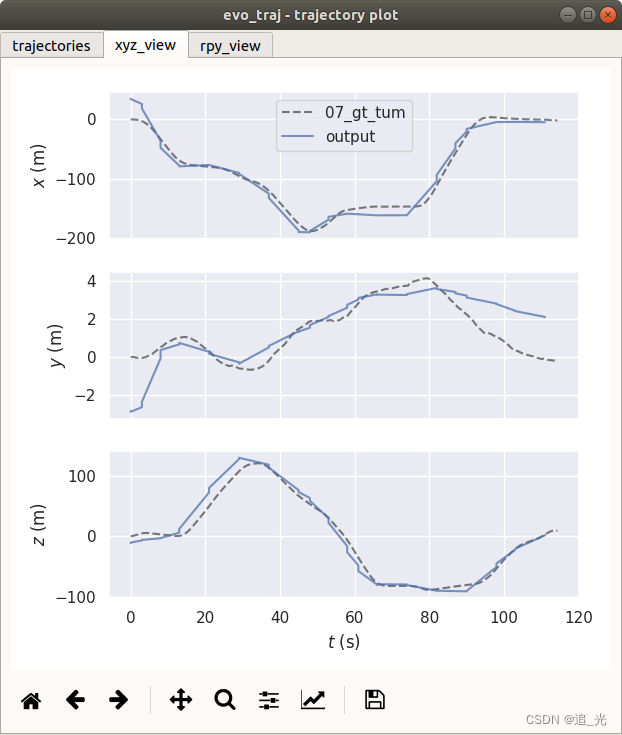
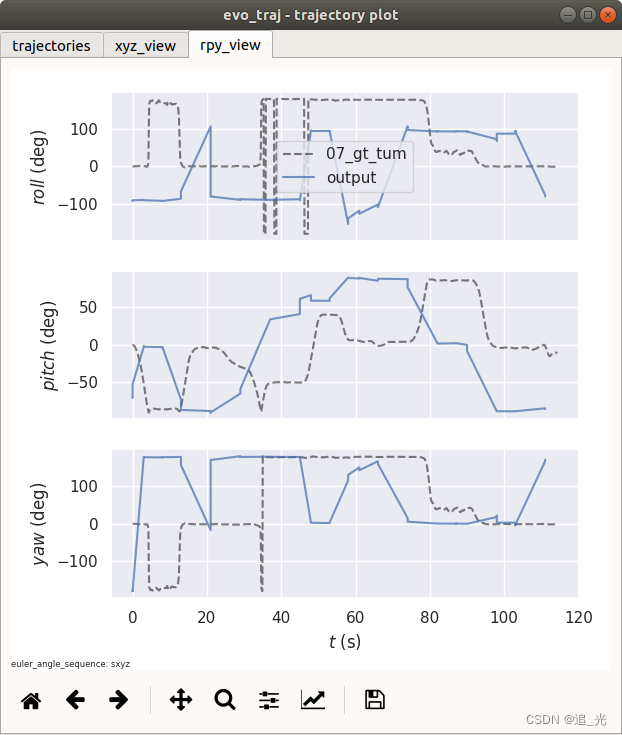
求助!!!
跑了vinsmoon在kitti_2011_10_03_0034上,出现big translation,然后重启的问题。想请问下大家怎么理解这个问题,然后从rviz上看重启之后是因为重启代码的问题导致轨迹再次从初始点开始了,这个是不是需要修改代码解决?有想讨论的朋友或者大佬可以私信我,也可以私信加联系方式,感谢!!!
参考链接:
https://blog.csdn.net/m0_49066914/article/details/131814856
https://blog.csdn.net/Hanghang_/article/details/104535370
https://zhuanlan.zhihu.com/p/75672946
相关文章:
Vins-Moon配准运行
Vins-Moon运行 求助!!!源码地址电脑配置环境配置编译Kitti数据集制作IMU时间戳问题 适配Kitti数据集运行结果Euroc数据集kitti数据集 evo评估(KITTI数据)输出轨迹(tum格式)结果 求助!!ÿ…...
MSCKF3讲:后端理论推导(上)
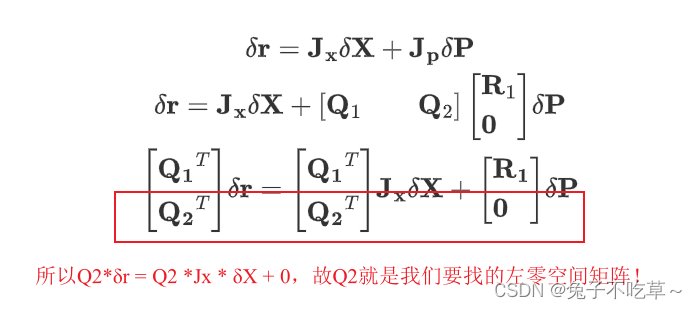
MSCKF3讲:后端理论推导(上) 文章目录 MSCKF3讲:后端理论推导(上)1 MSCKF中的状态变量① IMU状态:② cam0状态:③ IMU和cam0间状态关系 2 微分方程递推(数值解)3 IMU状态预…...

群控代理IP搭建教程:打造一流的网络爬虫
目录 前言 一、什么是群控代理IP? 二、搭建群控代理IP的步骤 1. 获取代理IP资源 2. 配置代理IP池 3. 选择代理IP策略 4. 编写代理IP设置代码 5. 异常处理 三、总结 前言 群控代理IP是一种常用于网络爬虫的技术,通过使用多个代理IP实现并发请求…...
【IO流系列】字符流练习(拷贝、文件加密、修改文件数据)
字符流练习 练习1:文件夹拷贝1.1 需求1.2 代码实现1.3 输出结果 练习2:文件加密与解密2.1 需求2.2 代码实现2.3 输出结果 练习3:修改文件数据(常规方法)3.1 需求3.2 代码实现3.3 输出结果 练习4:修改文件数…...
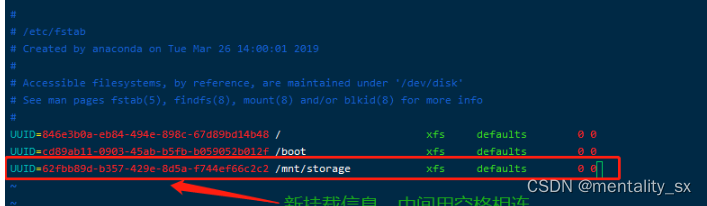
华为云磁盘挂载
华为云磁盘挂载 磁盘挂载情况 fdisk -l 2. 查看当前分区情况 df -h 3.给新硬盘添加新分区 fdisk /dev/vdb 4.分区完成,查询所有设备的文件系统类型 blkid 发现新分区并没有文件系统类型(type为文件系统具体类型,有ext3,ext4,xfs,iso9660等…...
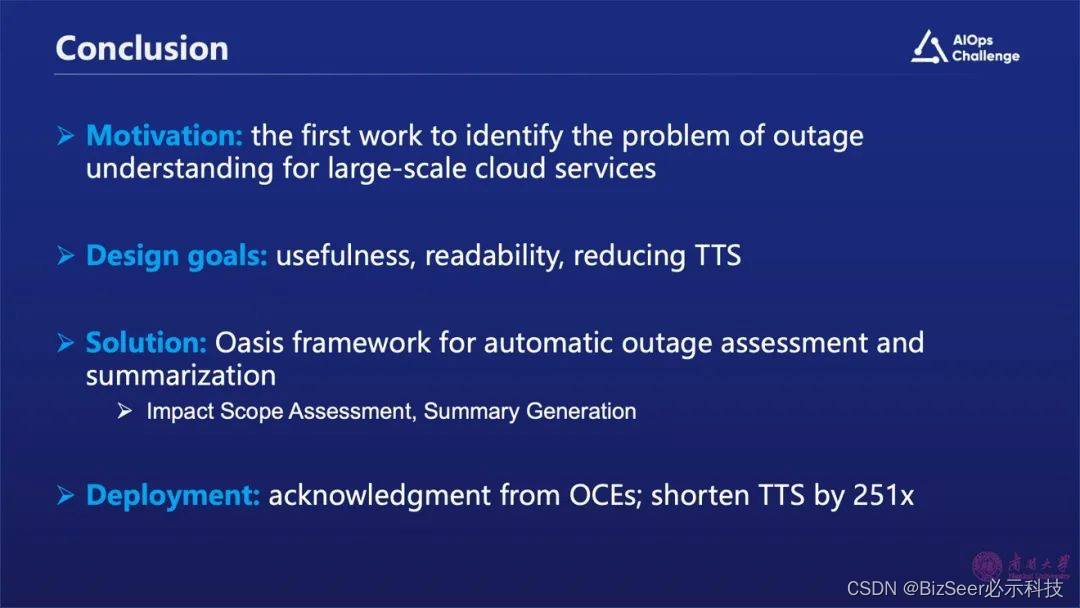
通过大语言模型理解运维故障:评估和总结
张圣林 南开大学软件学院副教授、博士生导师 第六届CCF国际AIOps挑战赛程序委员会主席 在ATC、WWW、VLDB、KDD、SIGMETRICS等国际会议和JSAC、TC、TSC等国际期刊发表高水平论文50余篇。主持国家自然科学基金项目2项,横向项目13项(与华为、字节跳动、腾讯…...
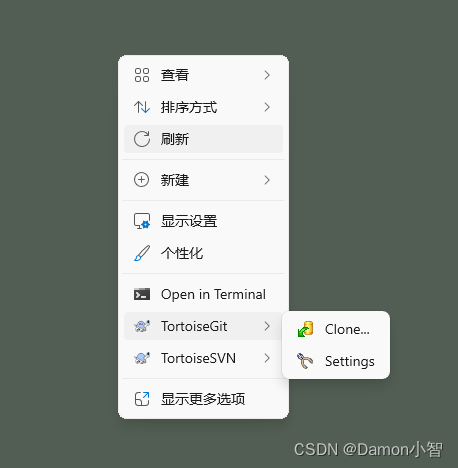
SVN教程-SVN的基本使用
SVN(Apache Subversion)是一款强大的集中式版本控制系统,它在软件开发项目中扮演着至关重要的角色,用于有效地跟踪、记录和管理代码的演变过程。与分布式系统相比,SVN 的集中式架构使得团队能够更加协同地进行开发&…...
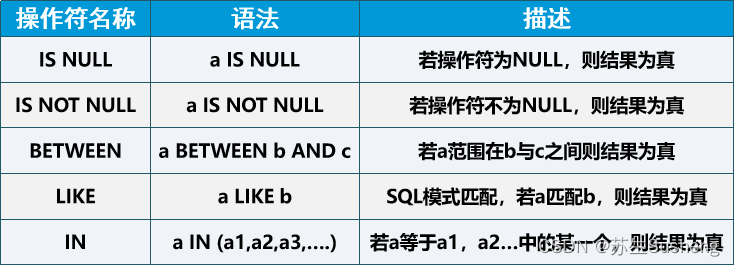
【MySQL】数据查询——DQL基本数据库查询
目录 查询语法1. 查询表中所有的数据行和列,采用“*”符号2. 查询表中指定列的数据。3. 在查询中使用别名,使用“AS”关键字。4. 在查询中使用常量列:如果需要将一些常量的默认信息添加到输出结果中,以方便统计或计算。可以使用常…...
机器人持续学习基准LIBERO系列9——数据集轨迹查看
0.前置 机器人持续学习基准LIBERO系列1——基本介绍与安装测试机器人持续学习基准LIBERO系列2——路径与基准基本信息机器人持续学习基准LIBERO系列3——相机画面可视化及单步移动更新机器人持续学习基准LIBERO系列4——robosuite最基本demo机器人持续学习基准LIBERO系列5——…...

uniapp中canvas的基础使用
canvas简介 canvas是uniapp中提供的一个组件,用于生成自定义的图形界面。通过canvas,我们可以通过JavaScript代码在页面上绘制各种图形和图像。 使用canvas 在页面中添加canvas 首先需要在页面的template中添加一个canvas组件: <template><view><canvas ca…...
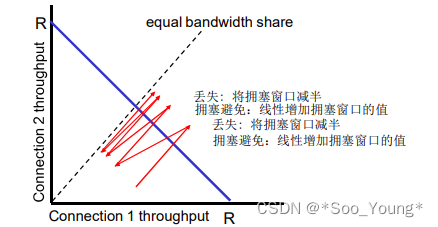
中科大计网学习记录笔记(十七):拥塞控制原理 | TCP 拥塞控制
前言: 学习视频:中科大郑烇、杨坚全套《计算机网络(自顶向下方法 第7版,James F.Kurose,Keith W.Ross)》课程 该视频是B站非常著名的计网学习视频,但相信很多朋友和我一样在听完前面的部分发现信…...
老隋蓝海项目有人盈利的吗?怎么做比较好些呢?
在互联网创业的浪潮中,蓝海项目总是令人心动。老隋,作为一位经验丰富的创业者,近期分享了他所发现的蓝海项目。但不少人可能会有疑问:老隋分享的蓝海项目真的有人盈利了吗?如果真的盈利了,又该怎么做才能确保成功呢?…...
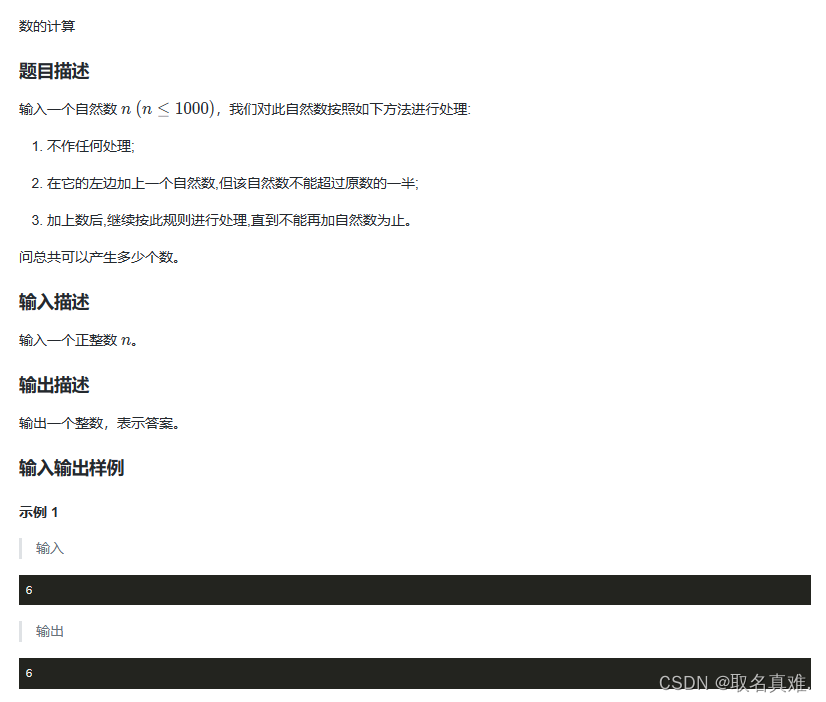
递归与递推(蓝桥杯 c++)
目录 题目一: 代码: 题目二: 代码: 题目三: 代码: 题目四: 代码: 题目一: 代码: #include<iostream> #include<cstring> using namespace std; int …...

ArduinoTFTLCD应用
ArduinoTFTLCD应用 ArduinoTFTLCD应用硬件连接软件导入库显示数字、字符显示汉字方案1方案2 显示图片 总结 ArduinoTFTLCD应用 对于手工喜欢DIY的人来说,Arduino驱动的TFTLCD被很多人使用,此处就总结一下,使用的是VScode的PlatformIO插件驱动…...

《秦时明月》IP新高度:与陕西历史博物馆共同书写文化传承新篇章!
在IP产业风起云涌的今天,如何以创意和匠心为传统文化注入新的活力,成为了摆在每一位文化工作者面前的重要课题。近日,《秦时明月》作为一部深受观众喜爱的国产动画IP,在迎来其十七周年之际,联手陕西历史博物馆…...

2、事件机制、DOM操作、jquery对尺寸操作、jquery添加和删除
一、事件机制 1、事件源.事件类型(事件处理程序) $(this)中的this不能加引号 $(#box).click(function () {$(this).css(background-color,blue)//点击颜色变为蓝色 })2、事件源.on/bind(事件类型,事件处理程序) $("#box").on(dbclick,function () {$(…...
YOLOv6-Openvino和ONNXRuntime推理【CPU】
1 环境: CPU:i5-12500 Python:3.8.18 2 安装Openvino和ONNXRuntime 2.1 Openvino简介 Openvino是由Intel开发的专门用于优化和部署人工智能推理的半开源的工具包,主要用于对深度推理做优化。 Openvino内部集成了Opencv、Tens…...
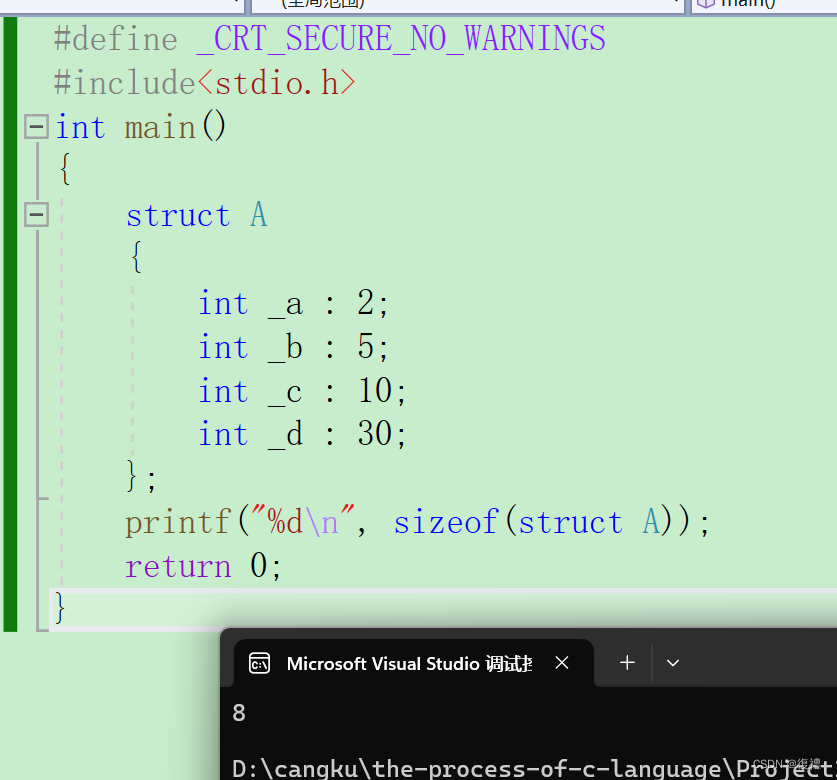
C语言:结构体(自定义类型)知识点(包括结构体内存对齐的热门知识点)
和黛玉学编程呀,大家一起努力呀............. 结构体类型的声明 回顾一下 struct tag { member-list; }variable-list; 创建和初始化 我们知道,在C语言中,对于一些数据是必须初始化的,但是结构体怎么创建并且初始化呢࿱…...
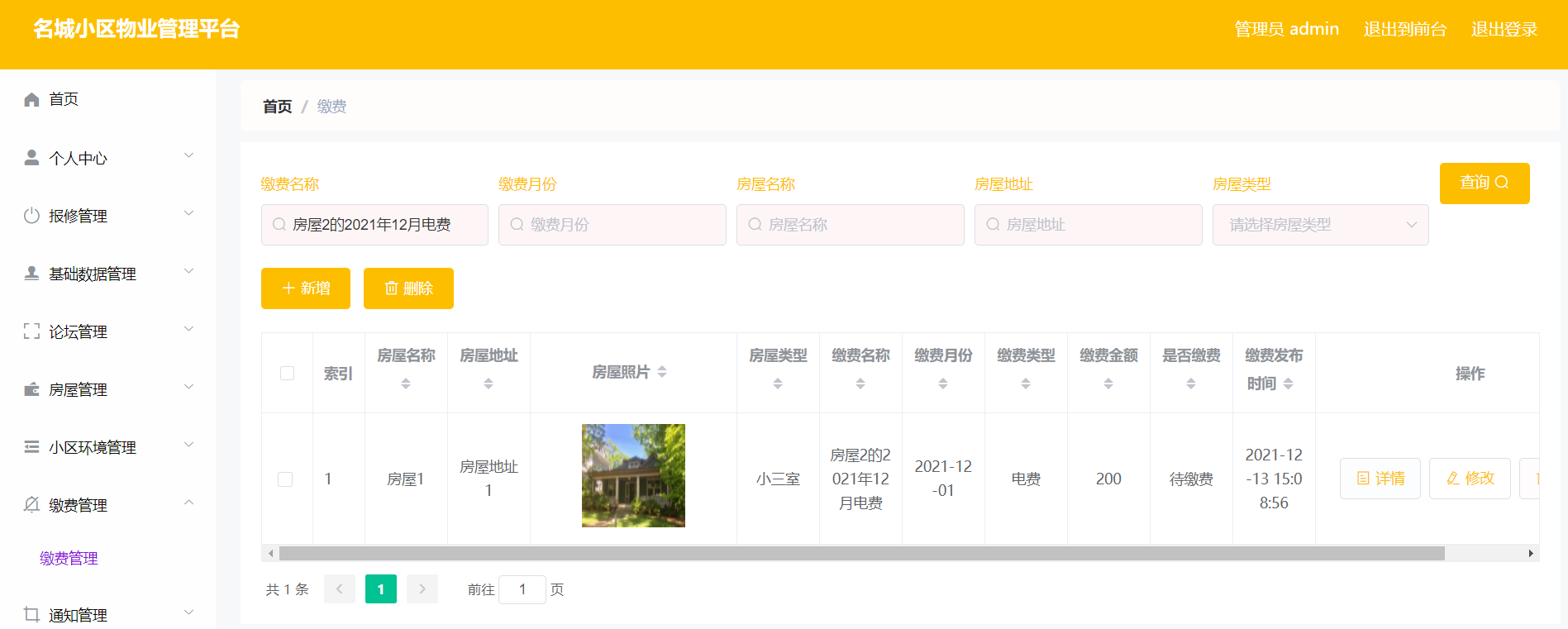
springboot240基于Spring boot的名城小区物业管理系统
基于Spring boot的名城小区物业管理系统的设计与实现 摘要 当下,正处于信息化的时代,许多行业顺应时代的变化,结合使用计算机技术向数字化、信息化建设迈进。以前相关行业对于物业信息的管理和控制,采用人工登记的方式保存相关数…...
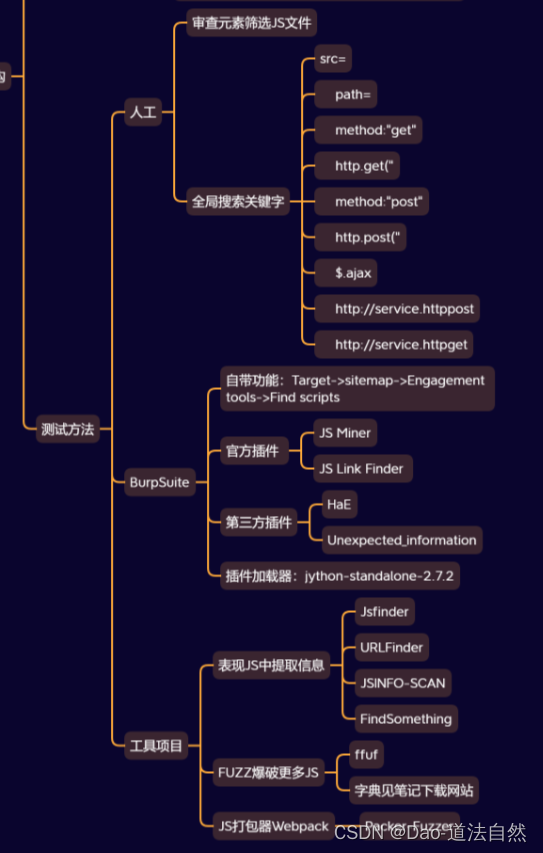
Day13:信息打点-JS架构框架识别泄漏提取API接口枚举FUZZ爬虫插件项目
目录 JS前端架构-识别&分析 JS前端架构-开发框架分析 前端架构-半自动Burp分析 前端架构-自动化项目分析 思维导图 章节知识点 Web:语言/CMS/中间件/数据库/系统/WAF等 系统:操作系统/端口服务/网络环境/防火墙等 应用:APP对象/API接…...

创业团队如何利用Taotoken的多模型能力平衡效果与成本
🚀 告别海外账号与网络限制!稳定直连全球优质大模型,限时半价接入中。 👉 点击领取海量免费额度 创业团队如何利用Taotoken的多模型能力平衡效果与成本 对于资源有限的创业团队而言,在产品研发过程中,大模…...

3分钟定位:Windows热键冲突终极排查工具
3分钟定位:Windows热键冲突终极排查工具 【免费下载链接】hotkey-detective A small program for investigating stolen key combinations under Windows 7 and later. 项目地址: https://gitcode.com/gh_mirrors/ho/hotkey-detective Hotkey Detective是一款…...

破解行业共性管控难题,推动矿山安全体系迭代升级 ——基于视频孪生无感定位的矿山安全体系革新技术方案
破解行业共性管控难题,推动矿山安全体系迭代升级——基于视频孪生无感定位的矿山安全体系革新技术方案一、方案引言国内煤炭矿山长期在人员监管、灾害应急、隐患溯源、空间管控层面沉淀诸多共性难题,佩戴管控流于形式、监测数据失真失实、灾变监测体系快…...

Legacy iOS Kit:让旧款iPhone/iPad重获新生的终极指南
Legacy iOS Kit:让旧款iPhone/iPad重获新生的终极指南 【免费下载链接】Legacy-iOS-Kit An all-in-one tool to restore/downgrade, save SHSH blobs, jailbreak legacy iOS devices, and more 项目地址: https://gitcode.com/gh_mirrors/le/Legacy-iOS-Kit …...

使用taotoken为ubuntu系统中的openclaw工具配置聚合模型端点
🚀 告别海外账号与网络限制!稳定直连全球优质大模型,限时半价接入中。 👉 点击领取海量免费额度 使用 Taotoken 为 Ubuntu 系统中的 OpenClaw 工具配置聚合模型端点 基础教程类,指导习惯使用 OpenClaw 进行 AI 工作流…...

微信小程序wxapkg逆向解析原理与合规源码还原实践
1. 这不是“破解”,而是合法合规的源码审计实践微信小程序生态里,每天有数百万个新版本上线,而开发者真正能拿到手的,往往只有.wxapkg文件——一个经过混淆、压缩、资源内联、逻辑分包的二进制容器。很多人第一反应是:…...

QuPath终极入门指南:快速掌握数字病理分析神器
QuPath终极入门指南:快速掌握数字病理分析神器 【免费下载链接】qupath QuPath - Open-source bioimage analysis for research 项目地址: https://gitcode.com/gh_mirrors/qu/qupath 数字病理分析正成为现代医学研究的重要工具,而QuPath作为一款…...

ShopXO任意文件读取漏洞CNVD-2021-15822深度解析
1. 这不是“读文件”,而是绕过权限边界的系统级失守 ShopXO 是国内中小电商项目中出镜率极高的开源系统,轻量、模板丰富、部署快,很多本地生活类小程序后台、县域特产商城、校园二手平台都用它打底。但就在2021年CNVD公布的编号 CNVD-2021-15…...

KMS_VL_ALL_AIO:开源智能激活工具让Windows和Office激活变得简单
KMS_VL_ALL_AIO:开源智能激活工具让Windows和Office激活变得简单 【免费下载链接】KMS_VL_ALL_AIO Smart Activation Script 项目地址: https://gitcode.com/gh_mirrors/km/KMS_VL_ALL_AIO 还在为Windows系统未激活的水印烦恼吗?Office软件频繁弹…...

开发个人职场专注深度工作计时程序,区分深度工作和摸鱼时间,提升工作创新效率。
一、实际应用场景描述在真实职场中,开发者常面临如下场景:- 上午:写复杂业务逻辑、设计技术方案(需要深度专注)- 下午:回消息、开会、处理琐事(浅层工作)- 中间频繁穿插:…...