
android 快速实现 圆角矩形控件 及 圆形控件
1.自定义RoundImageView
package com.examle.widget;import android.content.Context;
import android.content.res.TypedArray;
import android.graphics.Bitmap;
import android.graphics.Canvas;
import android.graphics.Color;
import android.graphics.Paint;
import android.graphics.PorterDuff;
import android.graphics.PorterDuffXfermode;
import android.graphics.drawable.Drawable;
import android.util.AttributeSet;
import android.util.TypedValue;
import android.widget.ImageView;import androidx.annotation.ColorInt;
import androidx.annotation.Dimension;
import androidx.annotation.Nullable;import com.examlpe.R;public class RoundImageView extends ImageView {private String TGA=RoundImageView.class.getSimpleName();private final PorterDuffXfermode xfermode=new PorterDuffXfermode(PorterDuff.Mode.DST_ATOP);//绘制模式private final Paint mPaint;//实体paintprivate final Paint mStrokePaint;//描边paintprivate int mRadius;//圆角值private int mStrokeWidthColor;//描边颜色private int mStrokeWidth;//描边宽度private boolean mIsCircle;//true-圆形模式,false-圆角矩形模式public RoundImageView(Context context) {this(context, null);}public RoundImageView(Context context, @Nullable AttributeSet attrs) {this(context, attrs, 0);}public RoundImageView(Context context, @Nullable AttributeSet attrs, int defStyleAttr) {this(context, attrs, defStyleAttr, 0);}public RoundImageView(Context context, @Nullable AttributeSet attrs, int defStyleAttr, int defStyleRes) {super(context, attrs, defStyleAttr, defStyleRes);TypedArray a = context.obtainStyledAttributes(attrs, R.styleable.RoundImageView);mStrokeWidthColor = a.getColor(R.styleable.RoundImageView_riv_stroke_color, Color.WHITE);mStrokeWidth = a.getDimensionPixelSize(R.styleable.RoundImageView_riv_stroke_width, 0);mRadius = a.getDimensionPixelSize(R.styleable.RoundImageView_riv_round_radius, 0);mIsCircle = a.getBoolean(R.styleable.RoundImageView_riv_circle, false);a.recycle();mPaint = new Paint();mPaint.setAntiAlias(true);//抗锯齿mPaint.setColor(Color.WHITE);mPaint.setStyle(Paint.Style.FILL);mStrokePaint = new Paint();mStrokePaint.setAntiAlias(true);//抗锯齿mStrokePaint.setStyle(Paint.Style.STROKE);}@Overrideprotected void onDraw(Canvas canvas) {int layerId = canvas.saveLayer(0, 0, getWidth(), getHeight(), null);//保存图层super.onDraw(canvas);Drawable src = getDrawable();int tmpBpW = getWidth() - getPaddingLeft() - getPaddingRight();//位图宽度,必须大于0int tmpBpH = getHeight() - getPaddingTop() - getPaddingBottom();//位图高度,必须大于0if (src != null && getWidth() > 0 && getHeight() > 0 && tmpBpW>0 && tmpBpH>0) {Bitmap tmpBp = Bitmap.createBitmap(tmpBpW, tmpBpH, Bitmap.Config.ARGB_8888);Canvas tmpCv = new Canvas(tmpBp);//tmpBp画布float tmpR = Math.min(tmpBp.getWidth(), tmpBp.getHeight()) * 0.5f;//取最小宽度if (mIsCircle) {//圆形模式tmpCv.drawCircle(tmpR, tmpR, tmpR, mPaint);//绘制圆形} else {//圆角矩形模式tmpCv.drawRoundRect(0, 0, tmpBp.getWidth(), tmpBp.getHeight(), mRadius, mRadius, mPaint);//绘制圆角矩形}mPaint.setXfermode(xfermode);//绘制模式canvas.drawBitmap(tmpBp, getPaddingLeft(), getPaddingTop(), mPaint);//绘制位图if (mStrokeWidth > 0) {//描边mStrokePaint.setColor(mStrokeWidthColor);//描边颜色mStrokePaint.setStrokeWidth(mStrokeWidth);//描边宽度if (mIsCircle) {//圆形模式canvas.drawCircle(getPaddingLeft()+tmpR, getPaddingTop()+tmpR, tmpR-mStrokeWidth*0.5f, mStrokePaint);} else {//圆角矩形模式canvas.drawRoundRect(getPaddingLeft()+mStrokeWidth*0.5f, getPaddingTop()+mStrokeWidth*0.5f, getWidth() - getPaddingRight()-mStrokeWidth*0.5f, getHeight() - getPaddingBottom()-mStrokeWidth*0.5f, mRadius-mStrokeWidth*0.5f, mRadius-mStrokeWidth*0.5f, mStrokePaint);//绘制圆角}}}canvas.restoreToCount(layerId);//恢复图层}/*** 圆角值 dp* @param dpValue*/public void setRadius(@Dimension int dpValue) {this.mRadius =(int) TypedValue.applyDimension(TypedValue.COMPLEX_UNIT_DIP,dpValue,getResources().getDisplayMetrics());invalidate();}/*** 描边颜色* @param strokeWidthColor*/public void setStrokeWidthColor(@ColorInt int strokeWidthColor) {this.mStrokeWidthColor = strokeWidthColor;invalidate();}/*** 描边宽度 dp* @param dpValue*/public void setStrokeWidth(@Dimension int dpValue) {this.mStrokeWidth =(int) TypedValue.applyDimension(TypedValue.COMPLEX_UNIT_DIP,dpValue,getResources().getDisplayMetrics());invalidate();}/*** 圆角矩形 或 圆形控件* @param isCircle*/public void setCircle(boolean isCircle) {this.mIsCircle = isCircle;invalidate();}
}
2.新建attrs.xml 文件,路径 res/values/attrs.xml
<?xml version="1.0" encoding="utf-8"?>
<resources><declare-styleable name="RoundImageView"><attr name="riv_stroke_width" format="dimension" /><attr name="riv_stroke_color" format="color" /><attr name="riv_round_radius" format="dimension" /><attr name="riv_circle" format="boolean"/></declare-styleable>
</resources>
3.布局使用:圆角矩形
<com.examlpe.widget.RoundImageViewandroid:id="@+id/riv"android:layout_width="180dp"android:layout_height="180dp"app:riv_circle="false"android:scaleType="fitXY"app:riv_round_radius="20dp"app:riv_stroke_width="2dp"app:riv_stroke_color="@color/white"android:src="@mipmap/ic_launcher" />4.布局使用:圆形控件
<com.examlpe.widget.RoundImageViewandroid:id="@+id/riv"android:layout_width="180dp"android:layout_height="180dp"app:riv_circle="true"android:scaleType="fitXY"app:riv_stroke_width="2dp"app:riv_stroke_color="@color/white"android:src="@mipmap/ic_launcher" />相关文章:

android 快速实现 圆角矩形控件 及 圆形控件
1.自定义RoundImageView package com.examle.widget;import android.content.Context; import android.content.res.TypedArray; import android.graphics.Bitmap; import android.graphics.Canvas; import android.graphics.Color; import android.graphics.Paint; import an…...
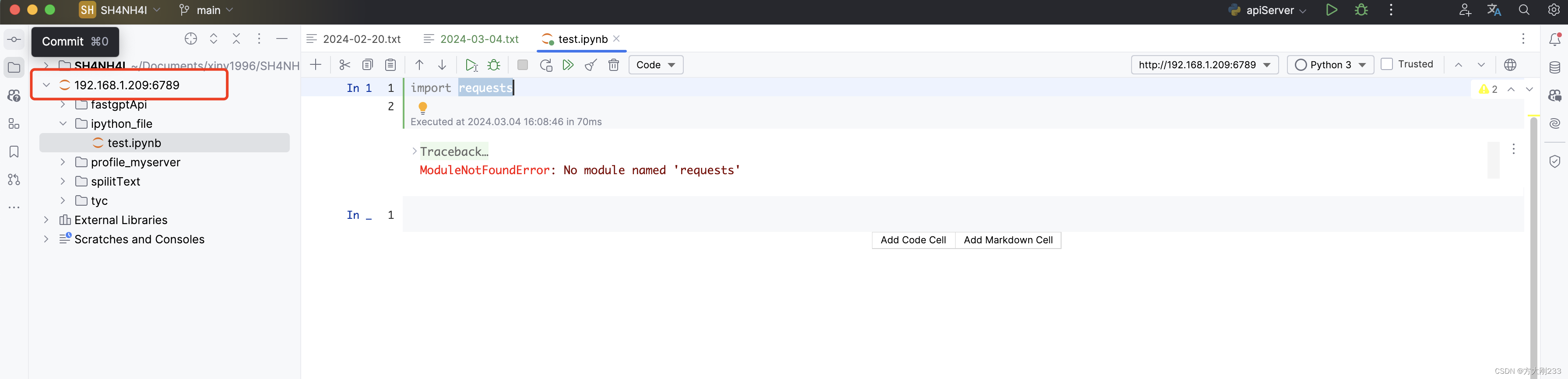
【Python】外网远程登录访问jupyter notebook+pycharm使用ipython
第一步:创建python虚拟环境 conda create -n py3610 python3.6.10第二步:安装ipython pip install ipython pip install ipython notebook第三步:创建 IPython Notebook 服务器配置文件 # 进入python交互shell,设置密码 >&…...

error:0308010C:digital envelope routines::unsupported
error:0308010C:digital envelope routines::unsupported 报错原因解决方案方案一:降低node版本在17以下指定node版本 mac node版本降级 mac切换node版本 方案二:启用legacy OpenSSL provider方案三:配置package.json文件拓展:pac…...
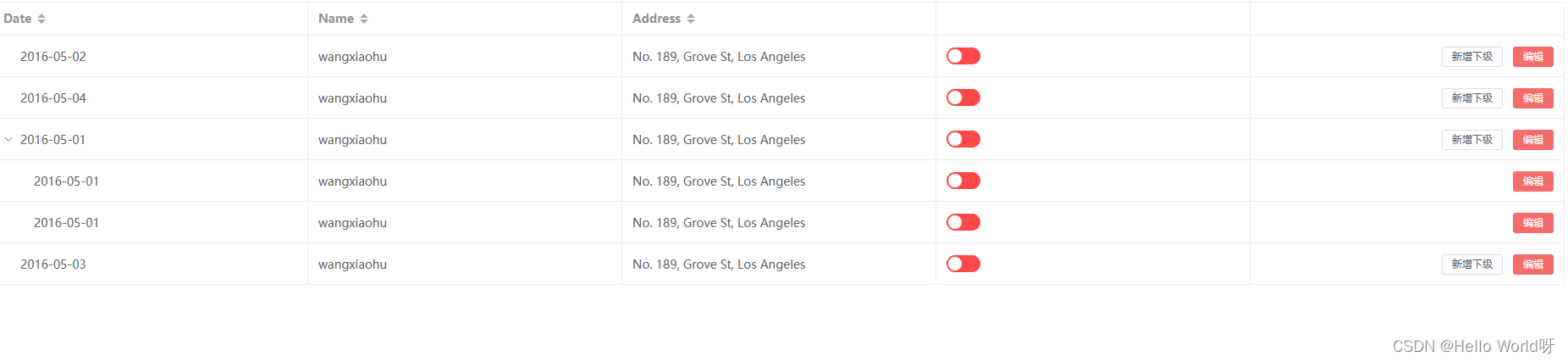
Vue前端的工作需求
加油,新时代打工人! 需求: 实现带树形结构的表格,父数据显示新增下级,和父子都显示编辑。 技术: Vue3 Element Plus <template><div><el-table:data"tableData"style"width…...

97. 常用的HTTP服务压测工具
文章目录 导言一、ab二、wrk三、go-wrk 导言 在项目正式上线之前,我们通常需要通过压测来评估当前系统能够支撑的请求量、排查可能存在的隐藏bug,同时了解了程序的实际处理能力能够帮我们更好的匹配项目的实际需求(服务器实例个数,如需要部署…...

活动预告|听云猿生数据创始人 CEO 曹伟分享云数据库行业十余年经验总结
3月16日,KubeBlocks 将携手 OceanBase 开源社区、AutoMQ 带来《LLMs 时代下的企业数据管理与降本增效之路》主题 meetup,扫描下方二维码,即刻报名👇。 云猿生数据创始人 & CEO 曹伟将带来《KubeBlocks:把所有数据…...
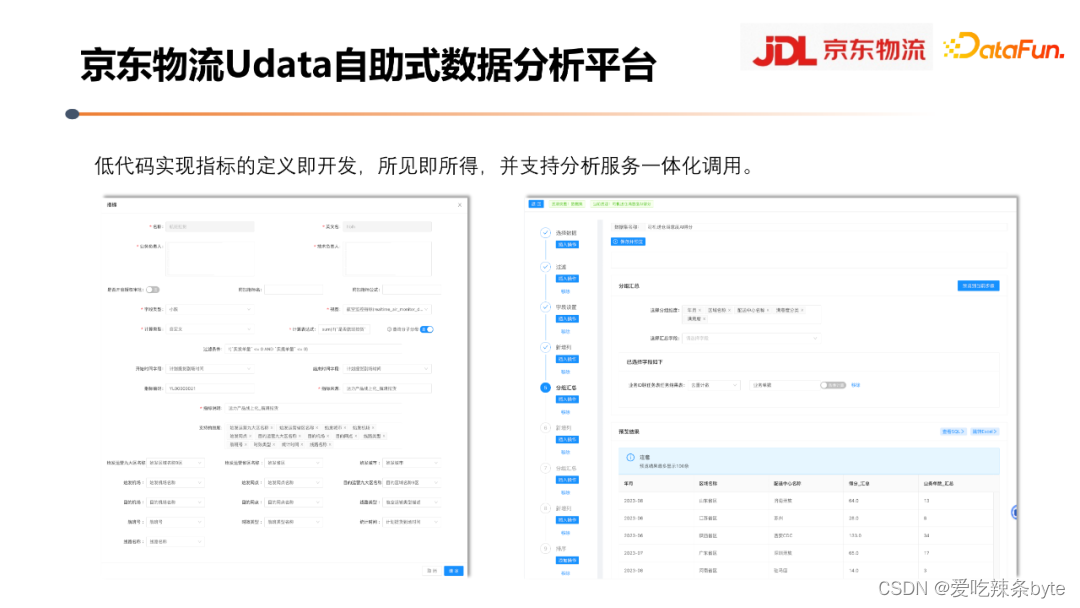
数仓实战——京东数据指标体系的构建与实践
目录 一、如何理解指标体系 1.1 指标和指标体系的基本含义 1.2 指标和和标签的区别 1.3 指标体系在数据链路中的位置和作用 1.4 流量指标体系 1.5 指标体系如何向上支撑业务应用 1.6 指标体系背后的数据加工逻辑 二、如何搭建和应用指标体系 2.1 指标体系建设方法—OS…...

Alias许可配置
在数字化时代,软件已成为企业竞争的核心要素。然而,随着软件市场的日益复杂,如何合理配置和使用软件许可,已成为企业亟待解决的问题。Alias许可配置服务,凭借其卓越的功能和性能,帮助企业优化软件使用&…...
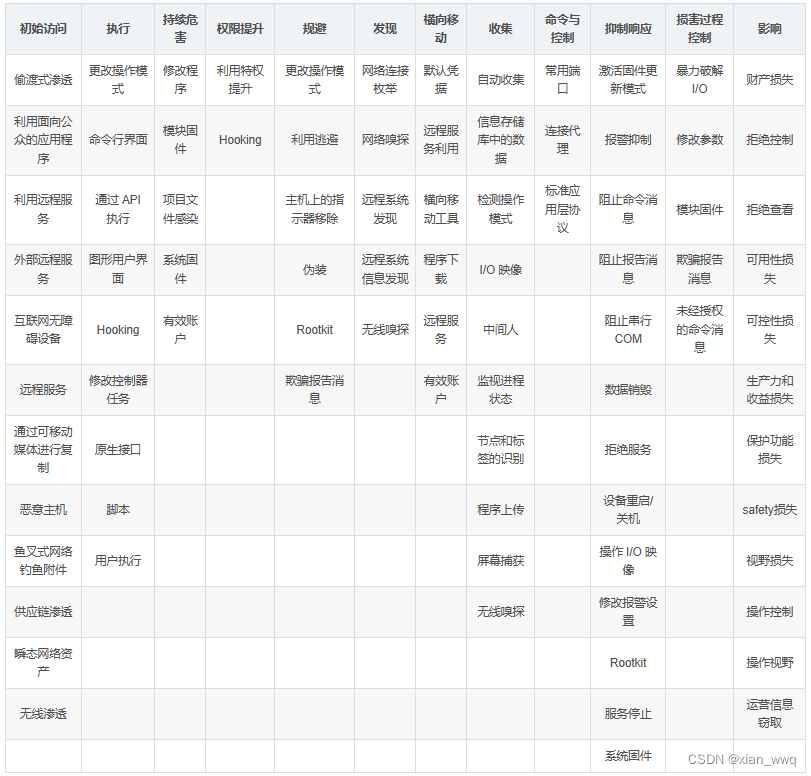
【读书笔记】针对ICS的ATTCK矩阵详解(一)
Techniques - ICS | MITRE ATT&CKhttps://attack.mitre.org/techniques/ics/ 一、初始访问(Initial Access) 该阶段:攻击者正在尝试进入ICS环境。 初始访问包括攻击者可能用作入口向量,从而可以在 ICS 环境中获得初始立足点的…...

Rust多线程访问数据,推荐使用mutex还是channel?
在Rust中,选择使用互斥锁(mutex)还是通道(channel)来进行多线程间的数据访问,主要取决于你的具体需求和数据共享的模式。 互斥锁(Mutex) 互斥锁是一种同步原语,用于保护…...
基于pytorch的手写体识别
一、环境搭建 链接: python与深度学习——基础环境搭建 二、数据集准备 本次实验用的是MINIST数据集,利用MINIST数据集进行卷积神经网络的学习,就类似于学习单片机的点灯实验,学习一门机器语言输出hello world。MINIST数据集,可以…...

Leetcode 56. 合并区间
题目描述:以数组 intervals 表示若干个区间的集合,其中单个区间为 intervals[i] [starti, endi] 。请你合并所有重叠的区间,并返回 一个不重叠的区间数组,该数组需恰好覆盖输入中的所有区间 。 示例 1: 输入…...

C++:List的使用和模拟实现
创作不易,感谢三连!! 一、List的介绍 list的文档介绍 1. list是可以在常数范围内在任意位置进行插入和删除的序列式容器,并且该容器可以前后双向迭代。 2. list的底层是双向链表结构,双向链表中每个元素存储在互不…...

20个Python函数程序实例
前面介绍的函数太简单了: 以下是 20 个不同的 Python 函数实例 下面深入一点点: 以下是20个稍微深入一点的,使用Python语言定义并调用函数的示例程序: 20个函数实例 简单函数调用 def greet():print("Hello!")greet…...
Wireshark——获取捕获流量的前N个数据包
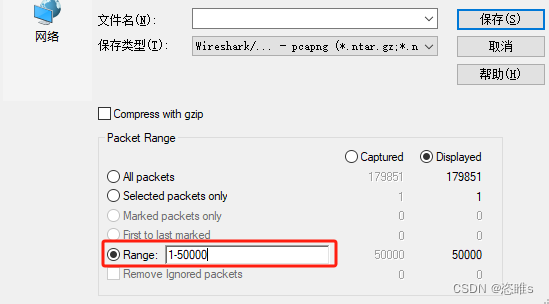
1、问题 使用Wireshark捕获了大量的消息,但是只想要前面一部分。 2、方法 使用Wireshark捕获了近18w条消息,但只需要前5w条。 选择文件,导出特定分组。 输入需要保存的消息范围。如:1-50000。 保存即可。...

006-浏览器输入域名到返回
浏览器输入域名到返回 1、URL 输入2、DNS 域名解析3、建立 TCP 连接三次握手概念三次握手理解 4、发送 HTTP/HTTPS 请求5、服务器处理,并返回响应6、浏览器解析并渲染页面7、请求结束,端口 TCP 连接四次挥手概念四次挥手理解 1、URL 输入 2、DNS 域名解析…...
【kubernetes】关于k8s集群如何将pod调度到指定node节点?
目录 一、k8s的watch机制 二、scheduler的调度策略 Predicate(预选策略) 常见算法: priorities(优选策略)常见的算法有: 三、k8s的标签管理之增删改查 四、k8s的将pod调度到指定node的方法 方案一&am…...

【框架】React和Vue的异同
1. 前言 React对于原生JS要求会高一级,国外React用的多,国内Vue用的多。 2. 共同点 组件化函数式编程 (vue3函数式编程、vue2声明式编程)单向数据流,数据驱动视图VirtualDOM Diff算法操作DOM社区成熟,…...

如何选择阅读软件技术学习书籍
如何选择阅读软件技术学习书籍 这里以软件技术学习的角度结合自身感悟谈谈,如何选择阅读书籍。 人的时间和精力都是非常有限的,软件技术学习者如何选择阅读书籍。以下是从我的经验教训总结的一些体会: 1、确定自己的兴趣领域和阅读目标 选…...
做抖店用平板能代替电脑操作吗?抖店运营相关注意事项,注意规避
我是王路飞。 之前给你们讲在抖音开店流程的时候,说过开店需要用到电脑,还需要执照、资金、时间等等。 那么做抖店用平板能代替电脑操作吗? 这个问题其实有很多新手问过我,有的甚至是想直接在手机上操作,想着能省点…...

信创协同办公价格与成本:这样选,性价比直接拉满!
“一套信创协同办公到底多少钱?”“是按人头收费,还是按项目打包算?”“前期买着便宜,后期维护会不会无底洞?”不管是政企单位采购,还是企业选型,这三个问题几乎是所有人的核心顾虑。毕竟信创办…...

**发散创新:策略即代码——用 Rust实现动态权限控制引擎**在现代软件系统中,权限管理早已不是简单的“用
发散创新:策略即代码——用 Rust 实现动态权限控制引擎 在现代软件系统中,权限管理早已不是简单的“用户-角色-资源”映射。越来越多的业务场景要求我们具备灵活、可扩展、易维护的权限决策机制。传统硬编码方式难以应对频繁变更的业务规则,而…...

别再只用官方节点了!手把手教你安装n8n社区节点,解锁隐藏工作流能力
解锁n8n隐藏潜能:社区节点深度应用指南 你是否曾在n8n中构建工作流时,发现官方节点无法满足某些特定需求?比如需要更复杂的文本处理、社交媒体深度集成,或是与某些小众API对接?这正是社区节点大显身手的时刻。作为n8n生…...

ESP32 LVGL8.1 —— 消息框进阶:自定义按钮与事件处理实战
1. ESP32与LVGL8.1消息框基础认知 第一次接触ESP32和LVGL8.1的消息框功能时,我完全被它的灵活性震惊了。想象一下,你正在开发一个智能家居控制面板,当用户操作不当或者系统需要确认时,弹出一个美观的对话框是多么自然的事情。这就…...

DanKoe 视频笔记:深度工作:改变生活的常规 [特殊字符]
在本教程中,我们将学习一套能极大提升专注力与生产力的深度工作常规。这套方法的核心在于理解并管理你的注意力,将其视为最宝贵的资源,并像管理计算机内存一样去优化它。我们将从核心概念开始,逐步拆解具体步骤,帮助你…...

SEO_避开这些SEO误区,优化效果事半功倍
SEO误区:避开这些误区,优化效果事半功倍 在当今竞争激烈的互联网环境中,搜索引擎优化(SEO)成为了每一个网站主的必修课。不少人在SEO实践中却犯下了一些常见的误区,这些误区不仅没有提升网站的排名&#x…...

3分钟掌握哔哩下载姬:零安装B站视频下载神器使用指南
3分钟掌握哔哩下载姬:零安装B站视频下载神器使用指南 【免费下载链接】downkyi 哔哩下载姬downkyi,哔哩哔哩网站视频下载工具,支持批量下载,支持8K、HDR、杜比视界,提供工具箱(音视频提取、去水印等&#x…...

深度解析BG3ModManager:博德之门3模组加载顺序重置问题的架构设计与解决方案
深度解析BG3ModManager:博德之门3模组加载顺序重置问题的架构设计与解决方案 【免费下载链接】BG3ModManager A mod manager for Baldurs Gate 3. 项目地址: https://gitcode.com/gh_mirrors/bg/BG3ModManager BG3ModManager作为《博德之门3》的核心模组管理…...

LangChain 与 LangGraph 介绍
一、AI 时代下的编程范式 1. Vibe Coding 氛围编程 1.1 Vibe Coding 的起源 在过去十年间,低代码 / 无代码平台和 AI 代码助手持续冲击着软件开发行业。如今,一种被称为 Vibe Coding 的新兴实践突然走红,甚至颠覆了人们对 "…...

聊聊我对CompletableFuture的理解
Java提供了许多工具来处理并发编程,而本文将重点介绍Java8中的CompletableFuture。在本文中,笔者通过查阅资料和实践经验,避免了重复已有优秀文章的内容和思路,而是用更简单明了的示例和语言来介绍CompletableFuture,并…...