
Qt多弹窗实现包括QDialog、QWidget、QMainWindow
1.相关说明
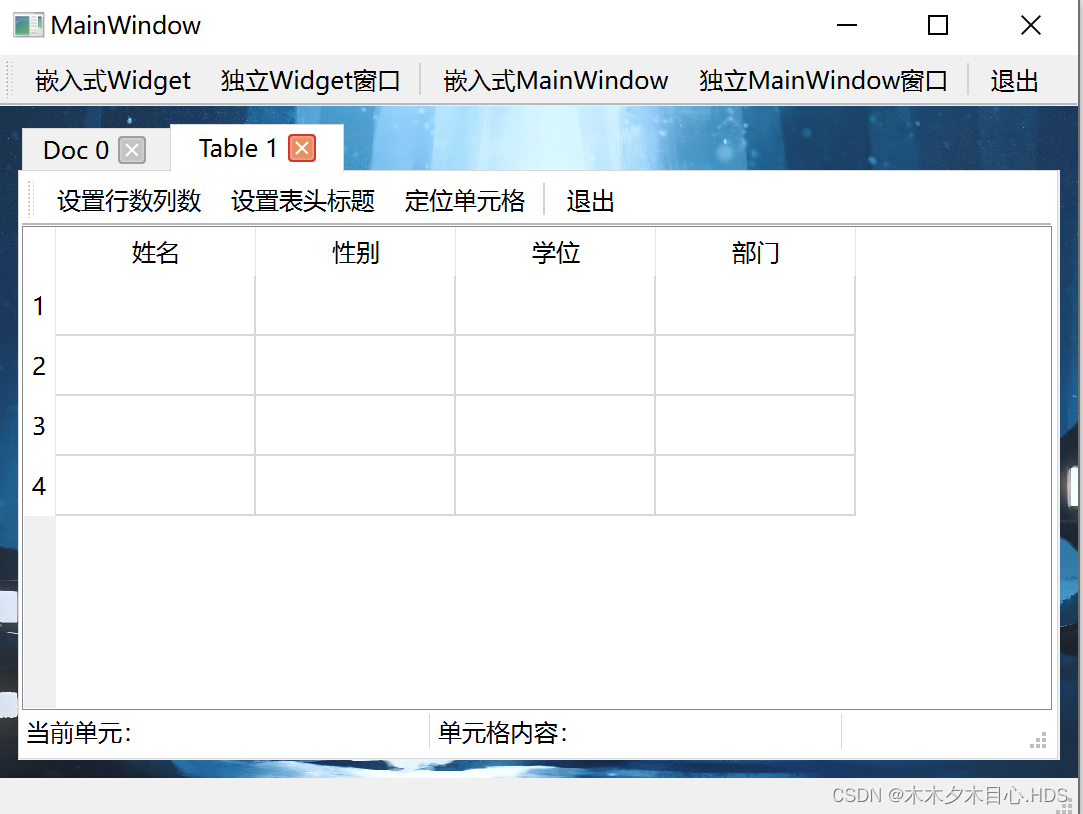
独立Widget窗口、嵌入式Widget、嵌入式MainWindow窗口、独立MainWindow窗口等弹窗的实现
相关界面包含关系

2.相关界面


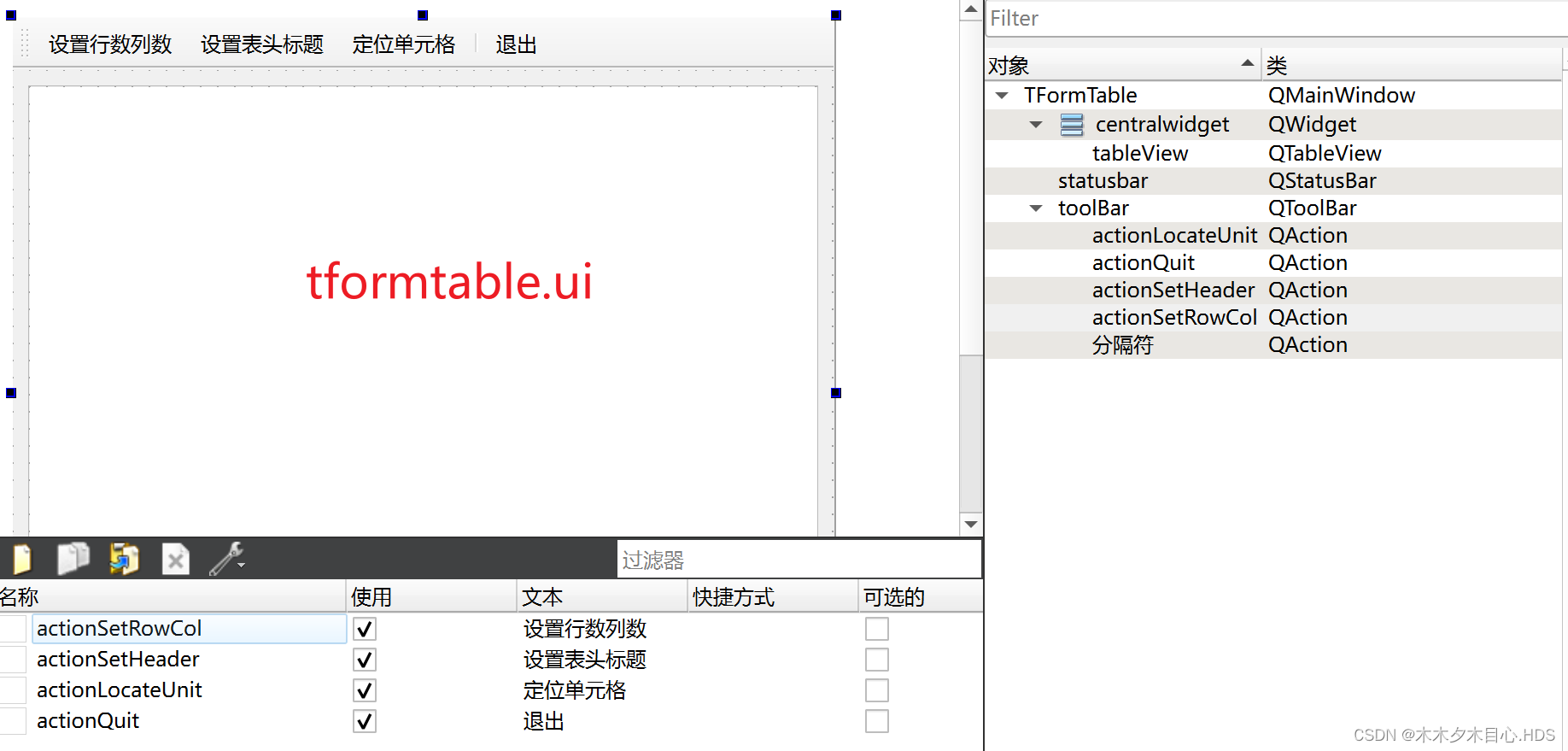
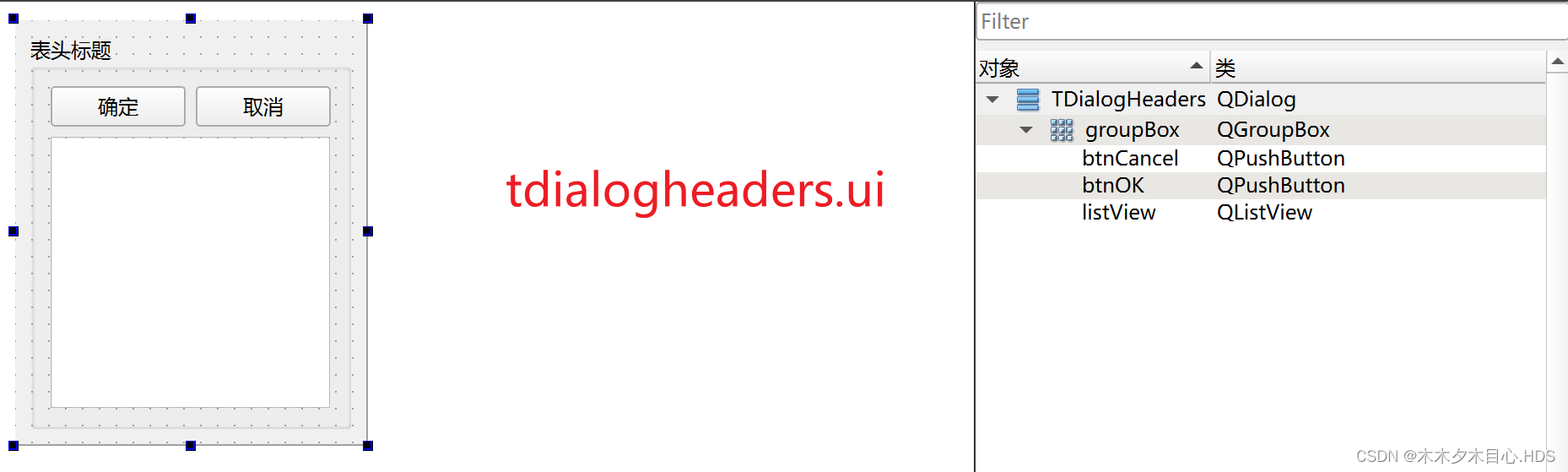

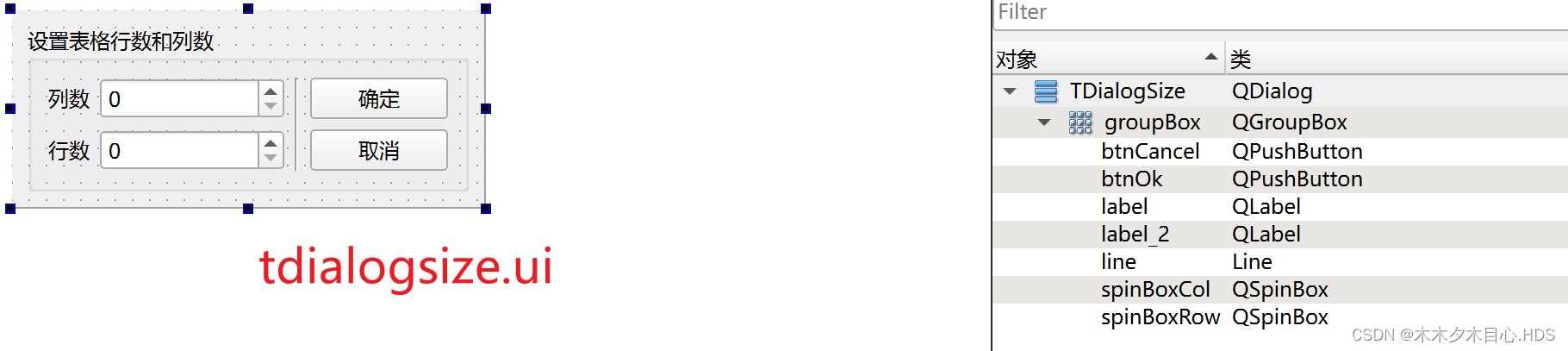
3.相关代码
mainwindow.cpp
#include "mainwindow.h"
#include "ui_mainwindow.h"
#include "tformdoc.h"
#include "tformtable.h"#include <QPainter>MainWindow::MainWindow(QWidget *parent): QMainWindow(parent), ui(new Ui::MainWindow)
{ui->setupUi(this);// setCentralWidget(ui->tabWidget);ui->tabWidget->setVisible(false);ui->tabWidget->clear();ui->tabWidget->setTabsClosable(true);}MainWindow::~MainWindow()
{delete ui;
}void MainWindow::do_changeTabTitle(QString title)
{int index = ui->tabWidget->currentIndex();ui->tabWidget->setTabText(index, title);
}void MainWindow::on_actionWidgetInsite_triggered()
{TFormDoc *formDoc = new TFormDoc(this);formDoc->setAttribute(Qt::WA_DeleteOnClose);int cur = ui->tabWidget->addTab(formDoc, QString::asprintf("Doc %d", ui->tabWidget->count()));ui->tabWidget->setCurrentIndex(cur);ui->tabWidget->setVisible(true);connect(formDoc, &TFormDoc::titleChanged, this, &MainWindow::do_changeTabTitle);
}
// tab的关闭
void MainWindow::on_tabWidget_tabCloseRequested(int index)
{ui->tabWidget->widget(index)->close();
}void MainWindow::paintEvent(QPaintEvent *event)
{QPainter painter(this);painter.drawPixmap(0, ui->toolBar->height(),width(), height()-ui->toolBar->height()-ui->statusbar->height(),QPixmap(":/jpg/jpg/shenli.jpg"));
}// 独立Widget窗口
void MainWindow::on_actionWidgetAlone_triggered()
{TFormDoc *formDoc = new TFormDoc();formDoc->setAttribute(Qt::WA_DeleteOnClose);formDoc->setWindowTitle("基于QWidget的窗口");formDoc->setWindowOpacity(0.8);formDoc->show();
}// 嵌入式MainWindow窗口
void MainWindow::on_actionMainWindowInsite_triggered()
{TFormTable *formTable = new TFormTable(this);formTable->setAttribute(Qt::WA_DeleteOnClose);int cur = ui->tabWidget->addTab(formTable, QString::asprintf("Table %d", ui->tabWidget->count()));ui->tabWidget->setCurrentIndex(cur);ui->tabWidget->setVisible(true);
}
// 独立式MainWindow窗口
void MainWindow::on_actionMainWindowAlone_triggered()
{TFormTable *formTable = new TFormTable();formTable->setAttribute(Qt::WA_DeleteOnClose);formTable->setWindowTitle("独立的window");formTable->show();
}
tformdoc.cpp
#include "tformdoc.h"
#include "ui_tformdoc.h"
#include <QToolBar>
#include <QFileDialog>
#include <QFontDialog>
#include <QVBoxLayout>
TFormDoc::TFormDoc(QWidget *parent): QWidget(parent), ui(new Ui::TFormDoc)
{ui->setupUi(this);QToolBar *locToolBar = new QToolBar("文档", this);locToolBar->addAction(ui->actionOpenFile);locToolBar->addAction(ui->actionFont);locToolBar->addSeparator();locToolBar->addAction(ui->actionCut);locToolBar->addAction(ui->actionCopy);locToolBar->addAction(ui->actionPatse);locToolBar->addAction(ui->actionRedo);locToolBar->addAction(ui->actionUndo);locToolBar->addSeparator();locToolBar->addAction(ui->actionClose);locToolBar->setToolButtonStyle(Qt::ToolButtonTextUnderIcon);QVBoxLayout *layout = new QVBoxLayout(this);layout->addWidget(locToolBar);layout->addWidget(ui->plainTextEdit);this->setLayout(layout);
}TFormDoc::~TFormDoc()
{delete ui;
}void TFormDoc::on_actionOpenFile_triggered()
{QString curPath = QCoreApplication::applicationDirPath();QString aFileName = QFileDialog::getOpenFileName(this, "打开一个文件", curPath, "(*.h *.cpp);;(*.txt);;(*.*)");if(aFileName.isEmpty()){return;}QFile aFile(aFileName);if(aFile.open(QIODevice::ReadOnly | QIODevice::Text)){ui->plainTextEdit->clear();QTextStream aStream(&aFile);while(!aStream.atEnd()){QString str = aStream.readLine();ui->plainTextEdit->appendPlainText(str);}aFile.close();QFileInfo fileInfo(aFileName);QString shortName = fileInfo.fileName();setWindowTitle(shortName);emit titleChanged(shortName);}}void TFormDoc::on_actionFont_triggered()
{QFont font = ui->plainTextEdit->font();bool ok;font = QFontDialog::getFont(&ok, font);if(ok){ui->plainTextEdit->setFont(font);}
}void TFormDoc::on_actionClose_triggered()
{this->close();
}
tformtable.cpp
#include "tformtable.h" #include "ui_TFormTable.h" #include <QStandardItemModel> #include <QItemSelectionModel> #include <QMessageBox> #include <QLabel> #include "tdialogsize.h" #include "tdialogheaders.h" #include "tdialoglocate.h"TFormTable::TFormTable(QWidget *parent): QMainWindow(parent), ui(new Ui::TFormTable) {ui->setupUi(this);dlgHeaders = NULL; // 初始化m_model = new QStandardItemModel(4, 4, this);QStringList header;header << "姓名" << "性别" << "学位" << "部门";m_model->setHorizontalHeaderLabels(header);m_selection = new QItemSelectionModel(m_model);ui->tableView->setModel(m_model);ui->tableView->setSelectionModel(m_selection);setCentralWidget(ui->tableView);labCellPos = new QLabel("当前单元:", this);labCellPos->setMinimumWidth(200);labCellText = new QLabel("单元格内容:", this);labCellText->setMinimumWidth(200);ui->statusbar->addWidget(labCellPos);ui->statusbar->addWidget(labCellText);connect(m_selection, &QItemSelectionModel::currentChanged, this, &TFormTable::do_model_currentChanged); }TFormTable::~TFormTable() {delete ui;}// void TFormTable::on_actionSetRowCol_triggered() // { // TDialogSize *dlgTableSize = new TDialogSize(); // dlgTableSize->setWindowFlag(Qt::MSWindowsFixedSizeDialogHint); // dlgTableSize->setRowColumn(m_model->rowCount(), m_model->columnCount()); // int ret = dlgTableSize->exec(); // if(ret == QDialog::Accepted){ // m_model->setColumnCount(dlgTableSize->columnCount()); // m_model->setRowCount(dlgTableSize->rowCount()); // } // delete dlgTableSize; // }void TFormTable::on_actionSetRowCol_triggered() {TDialogSize dlgTableSize;dlgTableSize.setWindowFlag(Qt::MSWindowsFixedSizeDialogHint);dlgTableSize.setRowColumn(m_model->rowCount(), m_model->columnCount());int ret = dlgTableSize.exec();if(ret == QDialog::Accepted){m_model->setColumnCount(dlgTableSize.columnCount());m_model->setRowCount(dlgTableSize.rowCount());}// delete dlgTableSize; }void TFormTable::on_actionSetHeader_triggered() {if(dlgHeaders == NULL){dlgHeaders = new TDialogHeaders(this);}QStringList strList;for(int i = 0; i < m_model->columnCount(); i++){strList.append(m_model->headerData(i, Qt::Horizontal, Qt::DisplayRole).toString());}dlgHeaders->setHeaderList(strList);int ret = dlgHeaders->exec();if(ret == QDialog::Accepted){m_model->setHorizontalHeaderLabels(dlgHeaders->headerList());} }void TFormTable::do_setCellText(int row, int column, QString text) {QModelIndex index = m_model->index(row, column);m_selection->clearSelection();m_selection->setCurrentIndex(index, QItemSelectionModel::Select);m_model->setData(index, text, Qt::DisplayRole); }void TFormTable::on_actionLocateUnit_triggered() {TDialogLocate *dlgLocate = new TDialogLocate(this);dlgLocate->setAttribute(Qt::WA_DeleteOnClose);dlgLocate->setWindowFlag(Qt::WindowStaysOnTopHint);// 初始化对话框dlgLocate->setSpinRange(m_model->rowCount(), m_model->columnCount());QModelIndex curIndex = m_selection->currentIndex();if(curIndex.isValid()){dlgLocate->setSpinValue(curIndex.row(), curIndex.column());}dlgLocate->show();dlgLocate->setModal(false);connect(dlgLocate, &TDialogLocate::changeCellText, this, &TFormTable::do_setCellText);connect(dlgLocate, &TDialogLocate::changeActionEnable, ui->actionLocateUnit, &QAction::setEnabled);connect(this, &TFormTable::cellIndexChanged, dlgLocate, &TDialogLocate::setSpinValue);}void TFormTable::on_tableView_clicked(const QModelIndex &index) {emit cellIndexChanged(index.row(), index.column()); }void TFormTable::do_model_currentChanged(const QModelIndex ¤t, const QModelIndex &previous) {Q_UNUSED(previous);if(current.isValid()){labCellPos->setText(QString::asprintf("当前单元格:%d行,%d列",current.row(), current.column()));QStandardItem *aItem = m_model->itemFromIndex(current);labCellText->setText("单元格内容:" + aItem->text());} }tdialogheaders.cpp
#include "tdialogheaders.h"
#include "ui_tdialogheaders.h"
#include <QStringListModel>TDialogHeaders::TDialogHeaders(QWidget *parent): QDialog(parent), ui(new Ui::TDialogHeaders)
{ui->setupUi(this);m_model = new QStringListModel(this);ui->listView->setModel(m_model);
}TDialogHeaders::~TDialogHeaders()
{delete ui;
}void TDialogHeaders::setHeaderList(QStringList &headers)
{m_model->setStringList(headers);
}QStringList TDialogHeaders::headerList()
{return m_model->stringList();
}
tdialoglocate.cpp
#include "tdialoglocate.h"
#include "ui_tdialoglocate.h"
#include <QCloseEvent>
#include <QShowEvent>TDialogLocate::TDialogLocate(QWidget *parent): QDialog(parent), ui(new Ui::TDialogLocate)
{ui->setupUi(this);
}TDialogLocate::~TDialogLocate()
{delete ui;
}void TDialogLocate::setSpinRange(int rowCount, int colCount)
{ui->spinBoxRow->setMaximum(rowCount-1);ui->spinBoxCol->setMaximum(colCount-1);
}void TDialogLocate::setSpinValue(int rowNo, int colNo)
{ui->spinBoxRow->setValue(rowNo);ui->spinBoxCol->setValue(colNo);
}// 设定文字
void TDialogLocate::on_btnSetText_clicked()
{QString text = ui->lineEdit->text();int row = ui->spinBoxRow->value();int col = ui->spinBoxCol->value();if(ui->chkIncRow->isChecked()){ui->spinBoxRow->setValue(ui->spinBoxRow->value()+1);}if(ui->chkIncCol->isChecked()){ui->spinBoxCol->setValue(ui->spinBoxCol->value()+1);}emit changeCellText(row, col, text);
}void TDialogLocate::closeEvent(QCloseEvent *event)
{event->accept();emit changeActionEnable(true);
}void TDialogLocate::showEvent(QShowEvent *event)
{event->accept();emit changeActionEnable(false);
}
tdialogsize.cpp
#include "tdialogsize.h"
#include "ui_tdialogsize.h"
#include <QMessageBox>TDialogSize::TDialogSize(QWidget *parent): QDialog(parent), ui(new Ui::TDialogSize)
{ui->setupUi(this);
}TDialogSize::~TDialogSize()
{delete ui;QMessageBox::information(this, "提示", "TDialogSize释放资源");
}void TDialogSize::setRowColumn(int row, int column)
{ui->spinBoxRow->setValue(row);ui->spinBoxCol->setValue(column);
}int TDialogSize::rowCount()
{return ui->spinBoxRow->value();
}int TDialogSize::columnCount()
{return ui->spinBoxCol->value();
}
相关文章:
Qt多弹窗实现包括QDialog、QWidget、QMainWindow
1.相关说明 独立Widget窗口、嵌入式Widget、嵌入式MainWindow窗口、独立MainWindow窗口等弹窗的实现 相关界面包含关系 2.相关界面 3.相关代码 mainwindow.cpp #include "mainwindow.h" #include "ui_mainwindow.h" #include "tformdoc.h" #incl…...

Django高级之-forms组件
Django高级之-forms组件 1 校验字段功能 针对一个实例:注册用户讲解。 模型:models.py class UserInfo(models.Model):namemodels.CharField(max_length32)pwdmodels.CharField(max_length32)emailmodels.EmailField()模版文件 <!DOCTYPE html&g…...

GPT实战系列-LangChain实现简单链
GPT实战系列-LangChain实现简单链 LangChain GPT实战系列-LangChain如何构建基通义千问的多工具链 GPT实战系列-构建多参数的自定义LangChain工具 GPT实战系列-通过Basetool构建自定义LangChain工具方法 GPT实战系列-一种构建LangChain自定义Tool工具的简单方法 GPT实战系…...

关于tomcat服务器配置及性能优化的20道高级面试题
1. 请描述Tomcat服务器的基本架构和组件。 Tomcat服务器的基本架构主要包括Server、Service、Connector和Container等组件。具体来看: Server:是Tomcat中最顶层的容器,代表着整个服务器。它负责运行Tomcat服务器,例如打开和关闭…...
LeetCode 1315.祖父节点值为偶数的节点和
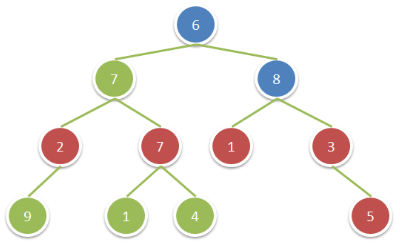
给你一棵二叉树,请你返回满足以下条件的所有节点的值之和: 该节点的祖父节点的值为偶数。(一个节点的祖父节点是指该节点的父节点的父节点。) 如果不存在祖父节点值为偶数的节点,那么返回 0 。 示例: 输入…...

C语言分支和循环总结
文章目录 概要结构介绍不同结构的语句简单运用小结 概要 C语言中分为三种结构:顺序结构,选择结构,循环结构 结构介绍 顺序结构就是从上到下,从左到右等等;选择结构可以想象是Y字路口就是到了一个地方会有不同的道路…...
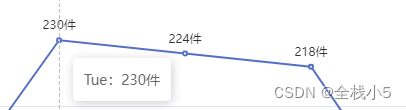
【Echarts】曲线图上方显示数字以及自定义值,标题和副标题居中,鼠标上显示信息以及自定义信息
欢迎来到《小5讲堂》 大家好,我是全栈小5。 这是《前端》系列文章,每篇文章将以博主理解的角度展开讲解, 特别是针对知识点的概念进行叙说,大部分文章将会对这些概念进行实际例子验证,以此达到加深对知识点的理解和掌握…...
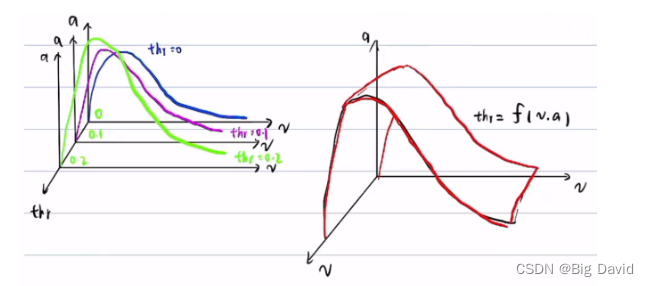
双环PID控制详细讲解
参考博客: (1)PID双环控制(速度环和位置环) (2)PID控制(四)(单环与双环PID) (3)内外双环pid算法 0 单环PID 目标位置→系…...

深入解析Java内存模型
一、背景 并发编程本质问题是:CPU、内存以及IO三者之间的速度差异。CPU速度快于内存、内存访问速度又远远快于IO,根据木桶理论,程序性能取决于最慢的操作,即IO操作。这样会出现CPU和内存交互时,CPU性能无法被充分利用…...

python使用国内镜像源
使用格式 格式为:pip install 库名 -i 镜像地址(注意空格的存在) pip install pandas -i https://pypi.tuna.tsinghua.edu.cn/simple 推荐的镜像源: 清华大学(推荐):https://pypi.tuna.tsing…...
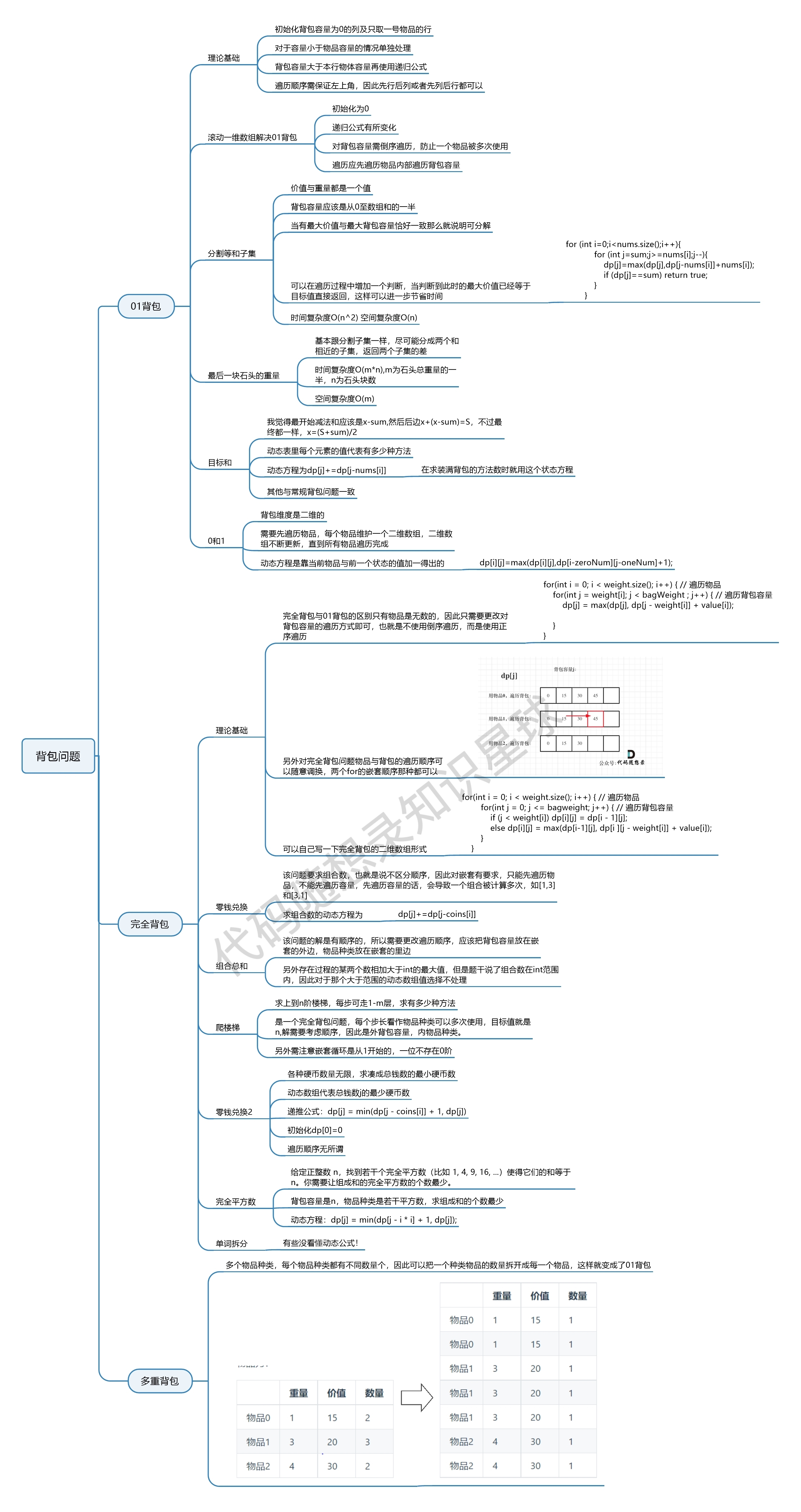
【动态规划】代码随想录算法训练营第四十六天 |139.单词拆分,关于多重背包,你该了解这些! ,背包问题总结篇!(待补充)
139.单词拆分 1、题目链接:. - 力扣(LeetCode) 2、文章讲解:代码随想录 3、题目: 给定一个非空字符串 s 和一个包含非空单词的列表 wordDict,判定 s 是否可以被空格拆分为一个或多个在字典中出现的单词…...
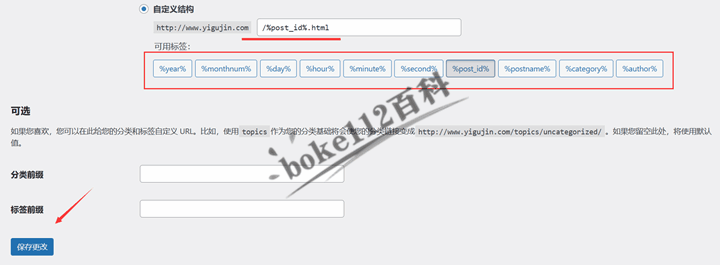
WordPress建站入门教程:如何选择和设置固定链接结构?
我们成功搭建好WordPress网站后,发布的文章对应的URL地址默认是使用“日期和名称型”,即是网站域名跟着的是年月日,最后是文章标题,如http://www.yigujin.com/2024/03/06/免费响应式WordPress博客主题JianYue/ 为了让我们的文章U…...
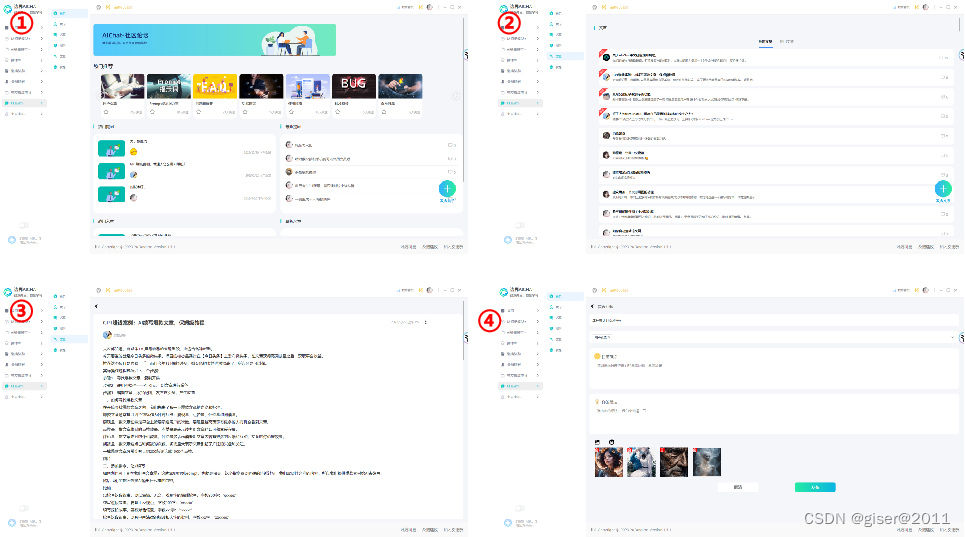
一款好用的AI工具——边界AICHAT(三)
目录 3.23、文档生成PPT演示3.24、AI文档翻译3.25、AI翻译3.26、论文模式3.27、文章批改3.28、文章纠正3.29、写作助手3.30、文言文翻译3.31、日报周报月报生成器3.32、OCR-DOC办公文档识别3.33、AI真人语音合成3.34、录音音频总结3.35、域方模型市场3.36、模型创建3.37、社区交…...

编程示例: 矩阵的多项式计算以javascript语言为例
编程示例: 矩阵的多项式计算以javascript语言为例 国防工业出版社的《矩阵理论》一书中第一章第8个习题 试计算2*A^8-3*A^5A^4A^2-4I A[[1,0,2],[0,-1,1],[0,1,0]] 代码如下 <html> <head> <title> 矩阵乘法 </title> <script srcset.js ><…...

project generator 简单使用
文章目录 1 progen 资源2 使用简介2.1 安装2.2 添加 target(可选)2.3 替换 CMake 模板(可选)2.4 创建 progen 项目 3 总结 1 progen 资源 0)简介:progen(project-generator,项目生成…...
C语言 —— 图形打印
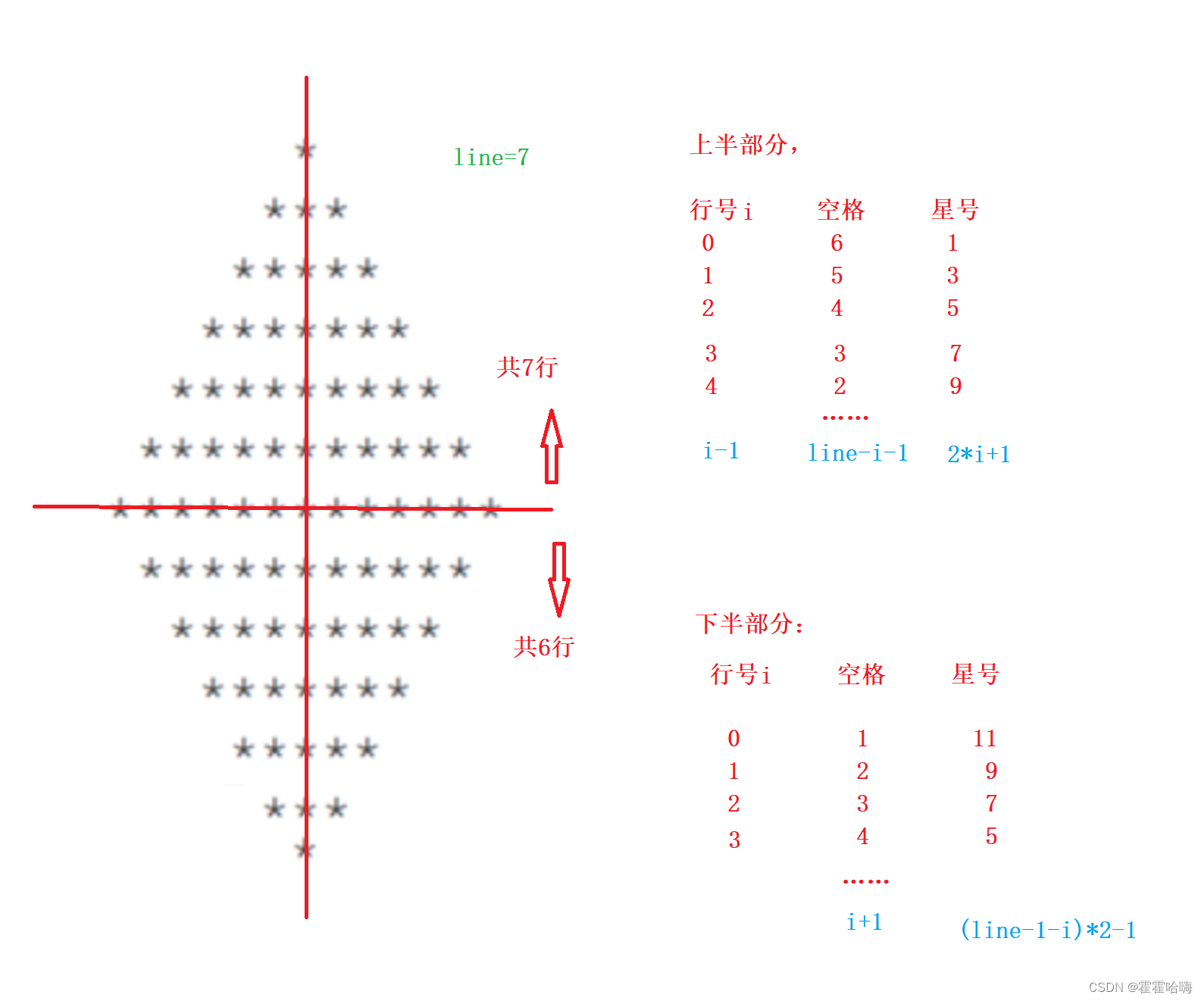
题目1: 思路: 如果我们要打印一个实心正方形,其实就是一个二维数组,i控制行,j控制列,行列不需要控制,arr[i][j]直接打印星号即可。 对于空心正方形,我们只需要控制行和列的条件&…...
常用模块)
Python基础学习(11)常用模块
文章目录 一、time二、random三、os四、sys五、json补充1:JSON字符串补充2:JSON字符串和字典的区别 六、hashlib Python基础学习(1)基本知识 Python基础学习(2)序列类型方法与数据类型转换 Python基础学习(3)进阶字符串(格式化输出) Python基础学习(4)散…...
嵌入式学习37-TCP并发模型
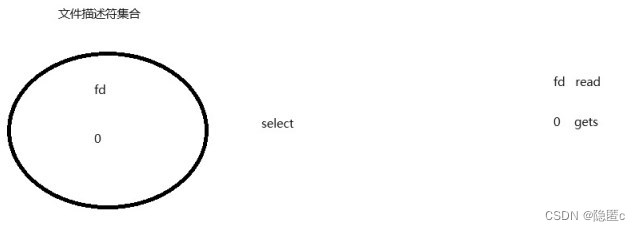
TCP并发模型: 1.TCP多线程模型: 缺点: 1.创建线程会带来 资源开销 2.能够实现的 并发量 比较有限 2.IO模型: 1.阻塞IO: 没有…...
C语言字符函数和字符串函数
前言 今天这篇博客咱们一起来认识一些特殊的函数,在编程的过程中,我们经常要处理字符和字符串,为了方便字符和字符串,C语言提供了一些库函数,让我们一起看看这些函数都有什么功能吧!!࿰…...

Go语言必知必会100问题-22 空切片与nil切片有区别吗?
空切片与nil切片有区别吗? 很多开发人员经常混淆nil切片和空切片,不清楚什么时候使用空切片什么时候使用nil,而有些库函数又对这两者使用进行了区分。下面先来看看它们的定义。 空切片是length为0的切片当切片等于nil时为nil切片 下面是几种不同空切片…...

Unity UGUI轻量UI框架:200行代码实现零GC界面管理
1. 为什么还要自己手写UI框架?——当UGUI原生方案开始“卡脖子”很多人看到这个标题第一反应是:“都2024年了,还手写UI框架?Asset Store里几十个成熟方案,NGUI、FairyGUI、TextMeshPro配套的UI系统一抓一大把ÿ…...

DMA-330地址空间限制与扩展方案解析
1. DMA-330地址空间限制解析DMA-330作为Arm CoreLink系列中的直接内存访问控制器,其物理寻址能力直接由AxADDR信号宽度决定。这个32位地址总线宽度意味着它原生仅支持4GB(2^32字节)的物理地址空间访问。在实际嵌入式系统设计中,这…...

Onekey终极指南:如何5分钟快速获取Steam游戏清单的免费神器
Onekey终极指南:如何5分钟快速获取Steam游戏清单的免费神器 【免费下载链接】Onekey Onekey Steam Depot Manifest Downloader 项目地址: https://gitcode.com/gh_mirrors/one/Onekey 还在为复杂的Steam游戏清单下载而头疼吗?想要备份游戏资源却不…...

三步实现跨架构程序兼容:Box64高效架构转换指南
三步实现跨架构程序兼容:Box64高效架构转换指南 【免费下载链接】box64 Box64 - Linux Userspace x86_64 Emulator with a twist, targeted at ARM64, RV64 and LoongArch Linux devices 项目地址: https://gitcode.com/gh_mirrors/bo/box64 你是否曾在ARM64…...

保姆级教程:在Windows 10上用QEMU+Kylin搭建可内外网访问的完整开发环境
在Windows 10上构建QEMUKylin全功能开发环境的终极指南当开发者需要在本地快速搭建一个隔离的国产操作系统开发环境时,QEMU虚拟化方案配合银河麒麟系统能提供高度灵活的沙箱体验。本文将手把手带你完成从零配置到内外网联通的完整工作流,涵盖虚拟化环境部…...

抖音内容批量下载实战:从零开始构建个人视频资料库
抖音内容批量下载实战:从零开始构建个人视频资料库 【免费下载链接】douyin-downloader A practical Douyin downloader for both single-item and profile batch downloads, with progress display, retries, SQLite deduplication, and browser fallback support.…...

基于Arduino与433MHz射频的智能灯光定时系统设计与实现
1. 项目概述:告别机械定时器,打造智能灯光管家家里前后院的照明,还有出门度假时屋内的几盏灯,过去一直靠四个老旧的机械定时器来管理。说实话,这玩意儿用起来真是费劲。它的核心问题在于“死板”——你设定好晚上7点开…...

XZ6128A工作电压5-100V 输出电流5A 升压型大功率LED灯恒流驱动控制芯片
概述 XZ6128A是一款高效率、高精度的升压型大功率LED灯恒流驱动控制芯片。 XZ6128A内置高精度误差放大器,固定关断时间控制电路,恒流驱动电路等,特别适合大功率、多个高亮度LED灯串的恒流驱动。 XZ6128A采用固定关断时间的控制方式࿰…...

3步快速上手Whisper-WebUI:轻松实现语音转字幕的完整指南
3步快速上手Whisper-WebUI:轻松实现语音转字幕的完整指南 【免费下载链接】Whisper-WebUI A Web UI for easy subtitle using whisper model. 项目地址: https://gitcode.com/gh_mirrors/wh/Whisper-WebUI 还在为视频制作繁琐的字幕而烦恼吗?Whis…...

基于ISDN信令的来电语音播报系统:从原理到树莓派实现
1. 项目概述:一个基于ISDN的来电语音播报系统如果你家里或办公室里还有一台老式的ISDN路由器,别急着把它当电子垃圾处理掉。我最近就利用手头一台闲置的ISDN路由器,折腾出了一个挺有意思的小玩意儿:一个能自动识别来电号码&#x…...