
【工具类】git log 常用别名,git log 干活,git log常用参数
git log 常用参数及 .gitconfig 配置
- git log 常用参数及 .gitconfig 配置
- 干货,执行下边命令,添加别名
- git log 参数
- 参考资料
干货,执行下边命令,添加别名
- 注意,需要将 knowledgebao 修改为自己的名字,根据自己需要添加,常用的别名有:st ll lg lga lgb
- 执行下边语句,添加各种快捷键,执行 git lm, git lms, git ls, git lsm … 等试试效果吧
git config --global alias.co "checkout"
git config --global alias.ck "checkout --track -b" # checkout and tracked
git config --global alias.ci "commit"
git config --global alias.cl "clean -x -d -f"  # force clean and remove ignored files.
git config --global alias.st "status"
git config --global alias.sst "status --ignore-submodules=all"
git config --global alias.pl "pull"
git config --global alias.ps "push"
git config --global alias.lb "remote show origin"  # list branch
git config --global alias.li "status --short --porcelain --ignored"  # list ignored
git config --global alias.lo "ls-files -o '--exclude=build/*' '--exclude=.vscode/*'"  # list others
git config --global alias.cp "cherry-pick"
git config --global alias.ca "commit -a"
git config --global alias.br "branch"
git config --global alias.df "diff --ignore-cr-at-eol --ignore-space-at-eol"
git config --global alias.dc "diff --cached --ignore-cr-at-eol --ignore-space-at-eol"
git config --global alias.m "merge"
git config --global alias.dt "difftool"
git config --global alias.mt "mergetool"
git config --global alias.desc "describe --tags --long"# 通过 git lm 查看自己的修改记录,关键字 --author --abbrev-commit
git config --global alias.lm "log --no-merges --color --author='knowledgebao' --date=format:'%Y-%m-%d %H:%M:%S' --pretty=format:'%Cred%h%Creset -%C(yellow)%d%Cblue %s %Cgreen(%cd) %C(bold blue)<%an>%Creset' --abbrev-commit"# 通过 git lms 查看自己的修改记录, 同步显示被修改的文件,关键字 --stat --author --abbrev-commit
git config --global alias.lms "log --no-merges --color --stat --author='knowledgebao' --date=format:'%Y-%m-%d %H:%M:%S' --pretty=format:'%Cred%h%Creset -%C(yellow)%d%Cblue %s %Cgreen(%cd) %C(bold blue)<%an>%Creset' --abbrev-commit"# 通过 git ls 查看所有的修改记录,关键字 --graph --abbrev-commit
git config --global alias.ls "log --no-merges --color --graph --date=format:'%Y-%m-%d %H:%M:%S' --pretty=format:'%Cred%h%Creset -%C(yellow)%d%Cblue %s %Cgreen(%cd) %C(bold blue)<%an>%Creset' --abbrev-commit"# 通过 git lss 查看所有的修改记录,同步显示被修改的文件,关键字 --stat --graph --abbrev-commit
git config --global alias.lss "log --no-merges --color --stat --graph --date=format:'%Y-%m-%d %H:%M:%S' --pretty=format:'%Cred%h%Creset -%C(yellow)%d%Cblue %s %Cgreen(%cd) %C(bold blue)<%an>%Creset' --abbrev-commit"# 通过 git ll  关键字 --first-parent
git config --global alias.ll "log --graph --oneline --abbrev-commit --decorate --first-parent --pretty='tformat:%ai %C(auto) %h %d %s %Cblue<%an %ar>'"# 通过 git lg  关键字 --branches
git config --global alias.lg "log --graph --oneline --abbrev-commit --decorate --branches --pretty='format:%C(auto) %h %d %s %Cblue<%an %ar>'"# 通过 git lga  关键字 --all
git config --global alias.lga "log --graph --oneline --abbrev-commit --decorate --all --pretty='format:%C(auto) %h %d %s %Cblue<%an %ar>'"# 通过 git lgb  关键字 --all --simplify-by-decoration
git config --global alias.lgb "log --graph --oneline --abbrev-commit --decorate --all --simplify-by-decoration --pretty='format:%C(auto) %h %d %s %Cblue<%an %ar>'"
执行后 ~/gitconfig 文件内容增加了下边内容
[alias]co = checkoutck = checkout --track -bci = commitcl = clean -x -d -fst = statussst = status --ignore-submodules=allpl = pullps = pushlb = remote show originli = status --short --porcelain --ignoredlo = ls-files -o '--exclude=build/*' '--exclude=.vscode/*'cp = cherry-pickca = commit -abr = branchdf = diff --ignore-cr-at-eol --ignore-space-at-eoldc = diff --cached --ignore-cr-at-eol --ignore-space-at-eolm = mergedt = difftoolmt = mergetooldesc = describe --tags --longlm = log --no-merges --color --author='knowledgebao' --date=format:'%Y-%m-%d %H:%M:%S' --pretty=format:'%Cred%h%Creset -%C(yellow)%d%Cblue %s %Cgreen(%cd) %C(bold blue)<%an>%Creset' --abbrev-commitlms = log --no-merges --color --stat --author='knowledgebao' --date=format:'%Y-%m-%d %H:%M:%S' --pretty=format:'%Cred%h%Creset -%C(yellow)%d%Cblue %s %Cgreen(%cd) %C(bold blue)<%an>%Creset' --abbrev-commitls = log --no-merges --color --graph --date=format:'%Y-%m-%d %H:%M:%S' --pretty=format:'%Cred%h%Creset -%C(yellow)%d%Cblue %s %Cgreen(%cd) %C(bold blue)<%an>%Creset' --abbrev-commitlss = log --no-merges --color --stat --graph --date=format:'%Y-%m-%d %H:%M:%S' --pretty=format:'%Cred%h%Creset -%C(yellow)%d%Cblue %s %Cgreen(%cd) %C(bold blue)<%an>%Creset' --abbrev-commitll = log --graph --oneline --abbrev-commit --decorate --first-parent --pretty='tformat:%ai %C(auto) %h %d %s %Cblue<%an %ar>'lg = log --graph --oneline --abbrev-commit --decorate --branches --pretty='format:%C(auto) %h %d %s %Cblue<%an %ar>'lga = log --graph --oneline --abbrev-commit --decorate --all --pretty='format:%C(auto) %h %d %s %Cblue<%an %ar>'lgb = log --graph --oneline --abbrev-commit --decorate --all --simplify-by-decoration --pretty='format:%C(auto) %h %d %s %Cblue<%an %ar>'
git log 参数
git log --help 查看,1700多行帮助
--follow--no-decorate, --decorate[=short|full|auto|no]--decorate-refs=<pattern>, --decorate-refs-exclude=<pattern>--source--[no-]use-mailmap--full-diff--log-size--summary, --name-only, --name-status, --check) are not currently implemented.--grep=<pattern> further limits to commits whose log message has a line that matches <pattern>), unless otherwise noted.--skip=<number>--since=<date>, --after=<date>--until=<date>, --before=<date>--author=<pattern>, --committer=<pattern>--author=<pattern>, commits whose author matches any of the given patterns are chosen (similarly for multiple --committer=<pattern>).--grep-reflog=<pattern>--grep=<pattern>--grep=<pattern>, commits whose message matches any of the given patterns are chosen (but see --all-match).--all-match--invert-grep--basic-regexp--remove-empty--merges--no-merges--min-parents=<number>, --max-parents=<number>, --no-min-parents, --no-max-parents--min-parents=2 is the same as --merges. --max-parents=0 gives all root commits and --min-parents=3 all octopus merges.--no-min-parents and --no-max-parents reset these limits (to no limit) again. Equivalent forms are --min-parents=0 (any commit has 0 or more--first-parent--not--all--branches[=<pattern>]--tags[=<pattern>]--remotes[=<pattern>]--glob=<glob-pattern>--exclude=<glob-pattern>--reflog--alternate-refs--single-worktree--ignore-missing--bisect--stdin--cherry-mark--cherry-pick--left-only, --right-only--cherry--merge--boundary--simplify-by-decoration--full-history--dense--sparse--simplify-merges--ancestry-path--full-history without parent rewriting--full-history with parent rewriting--dense--sparse--simplify-merges--ancestry-path--date-order--author-date-order--topo-order---1----2----4----7--reverse--no-walk[=(sorted|unsorted)]--do-walk--pretty[=<format>], --format=<format>--pretty=tformat:<format> were given.--abbrev-commit--no-abbrev-commit--oneline--encoding=<encoding>--expand-tabs=<n>, --expand-tabs, --no-expand-tabs--expand-tabs=0, which disables tab expansion.--notes[=<ref>]--no-notes--show-notes[=<ref>], --[no-]standard-notes--show-signature--relative-date--date=<format>--date=relative shows dates relative to the current time, e.g. “2 hours ago”. The -local option has no effect for --date=relative.--date=local is an alias for --date=default-local.--date=iso (or --date=iso8601) shows timestamps in a ISO 8601-like format. The differences to the strict ISO 8601 format are:--date=iso-strict (or --date=iso8601-strict) shows timestamps in strict ISO 8601 format.--date=rfc (or --date=rfc2822) shows timestamps in RFC 2822 format, often found in email messages.--date=short shows only the date, but not the time, in YYYY-MM-DD format.--date=raw shows the date as seconds since the epoch (1970-01-01 00:00:00 UTC), followed by a space, and then the timezone as an offset from--date=human shows the timezone if the timezone does not match the current time-zone, and doesn’t print the whole date if that matches (ie--date=unix shows the date as a Unix epoch timestamp (seconds since 1970). As with --raw, this is always in UTC and therefore -local has no--date=format:... feeds the format ... to your system strftime, except for %z and %Z, which are handled internally. Use --date=format:%c to--date=default is the default format, and is similar to --date=rfc2822, with a few exceptions:--parents--children--left-right--graph--show-linear-break[=<barrier>]--cc--combined-all-paths--cc are specified, and is likely only useful if filename changes are detected (i.e. when either rename or copy detection have been--raw. To get full object names in a raw diff format, use --no-abbrev.--output=<file>--output-indicator-new=<char>, --output-indicator-old=<char>, --output-indicator-context=<char>--raw--patch-with-raw--indent-heuristic--no-indent-heuristic--minimal--patience--histogram--anchored=<text>--diff-algorithm={patience|minimal|histogram|myers}--diff-algorithm=default option.--stat[=<width>[,<name-width>[,<count>]]]--stat-graph-width=<width> (affects all commands generating a stat graph) or by setting diff.statGraphWidth=<width> (does not affect git--compact-summary--numstat--shortstat--cumulative--dirstat-by-file[=<param1,param2>...]--summary--patch-with-stat--name-only--name-status--submodule[=<format>]--color[=<when>]--no-color--color-moved[=<mode>]--no-color-moved--color-moved-ws=<modes>--no-color-moved-ws--color-moved-ws=no.--word-diff[=<mode>]--word-diff-regex=<regex>--color-words[=<regex>]--no-renames--[no-]rename-empty--check--ws-error-highlight=<kind>--full-index--binary--abbrev[=<n>]--find-copies-harder--diff-filter=[(A|C|D|M|R|T|U|X|B)...[*]]--find-object=<object-id>--pickaxe-all--pickaxe-regex--relative[=<path>]--ignore-cr-at-eol--ignore-space-at-eol--ignore-blank-lines--inter-hunk-context=<lines>--ext-diff--no-ext-diff--textconv, --no-textconv--ignore-submodules[=<when>]--src-prefix=<prefix>--dst-prefix=<prefix>--no-prefix--line-prefix=<prefix>--ita-invisible-in-index--ita-visible-in-index. Both options are experimental and could be removed in future.--- a/describe.c--- a/file--- a/file--- a/file--- a/file--notes=<ref> option.
–abbrev-commit 仅显示 SHA-1 的前几个字符,而非所有的 40 个字符。
–stat 显示每次更新的文件修改统计信息
–graph 显示 ASCII 图形表示的分支合并历史。
–no-merges 没有合并的提交信息
–color
–oneline --pretty=oneline --abbrev-commit 合用的简写。
–decorate 参数用来显示一些相关的信息,如HEAD、分支名、tag名等
–first-parent 紧当前分支的父分支
–author=‘xxx’ 提交至,使用单引号
–date=format:‘%Y-%m-%d %H:%M:%S’ 时间格式
–pretty 使用其他格式显示历史提交信息。可用的选项包括 oneline,short,full,fuller 和 format(后跟指定格式)
–pretty=format:‘%C(red)%h%Creset -%C(yellow)%d%C(blue) %s %C(green)(%cd) %C(bold blue)<%an>%C(reset)’
–pretty=format:‘%C(auto) %h %d %s %C(blue)<%an %ar>’
–pretty=format:‘%ai %C(auto) %h %d %s %C(blue)<%an %ar>’
- format:
- %H 提交对象(commit)的完整哈希字串
- %h 提交对象的简短哈希字串
- %T 树对象(tree)的完整哈希字串
- %t 树对象的简短哈希字串
- %P 父对象(parent)的完整哈希字串
- %p 父对象的简短哈希字串
- %an 作者(author)的名字
- %ae 作者的电子邮件地址
- %ad 作者修订日期(可以用 -date= 选项定制格式)
- %ar 作者修订日期,按多久以前的方式显示
- %cn 提交者(committer)的名字
- %ce 提交者的电子邮件地址
- %cd 提交日期
- %cr 提交日期,按多久以前的方式显示
- %s 提交说明
- %ai author date, ISO 8601-like format
参考资料
- git log命令全解析
- 2.3 Git 基础 - 查看提交历史
- git log命令全解析
- git log 常用命令及技巧
相关文章:

【工具类】git log 常用别名,git log 干活,git log常用参数
git log 常用参数及 .gitconfig 配置 git log 常用参数及 .gitconfig 配置 干货,执行下边命令,添加别名git log 参数参考资料 干货,执行下边命令,添加别名 注意,需要将 knowledgebao 修改为自己的名字,…...
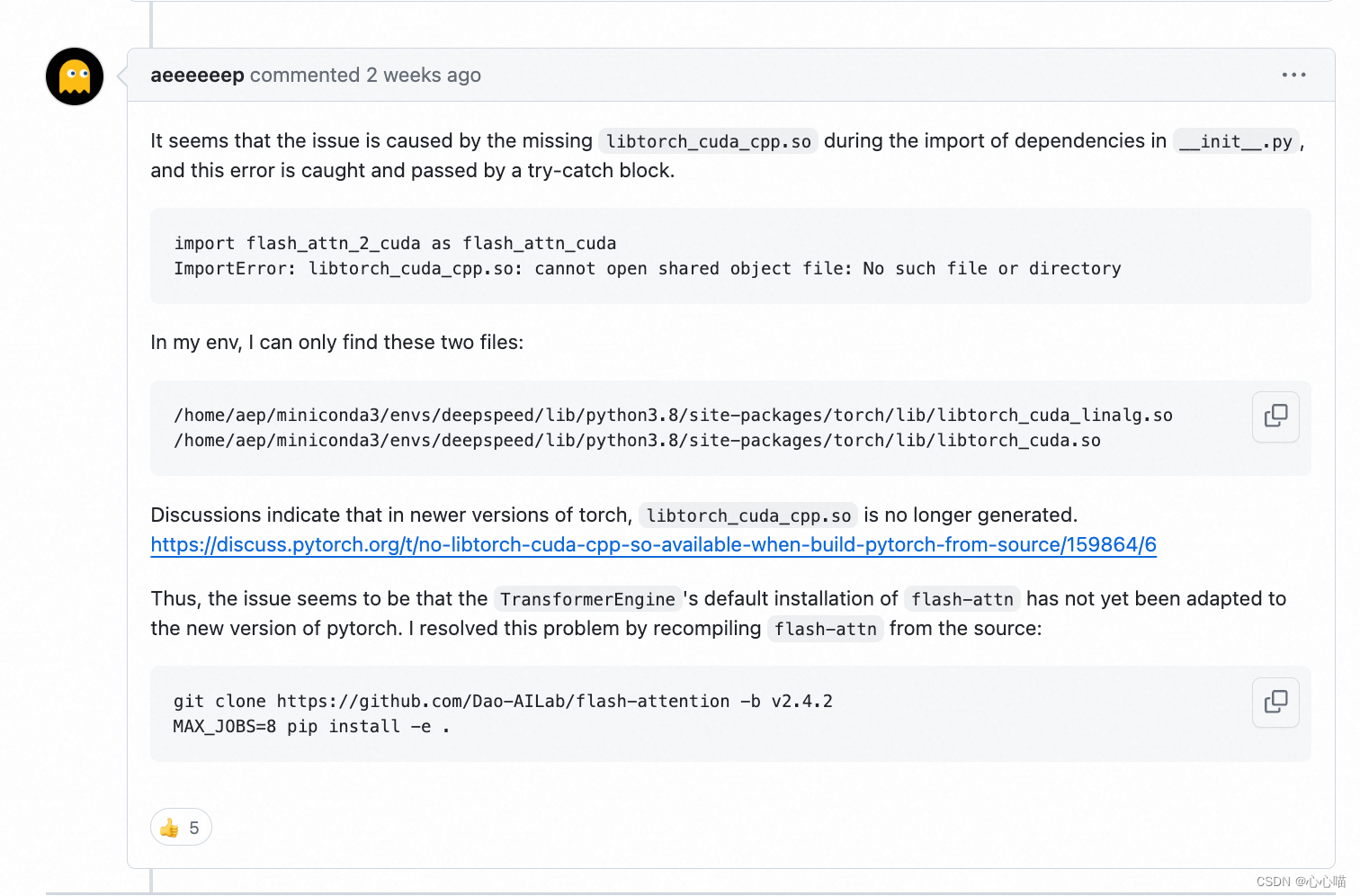
[linux] AttributeError: module ‘transformer_engine‘ has no attribute ‘pytorch‘
[BUG] AttributeError: module transformer_engine has no attribute pytorch Issue #696 NVIDIA/Megatron-LM GitHub 其中这个答案并没有解决我的问题: import flash_attn_2_cuda as flash_attn_cuda Traceback (most recent call last): File "<stdi…...

前端面试题---->JavaScript
const声明的对象属性和数组的值可以被修改吗?为什么 原因:当使用const声明一个对象或数组时,实际上是保证了对象或数组的引用不会被修改,但对象或数组本身的属性或元素是可以被修改的。这是因为const只能保证指向的内存地址不变&a…...
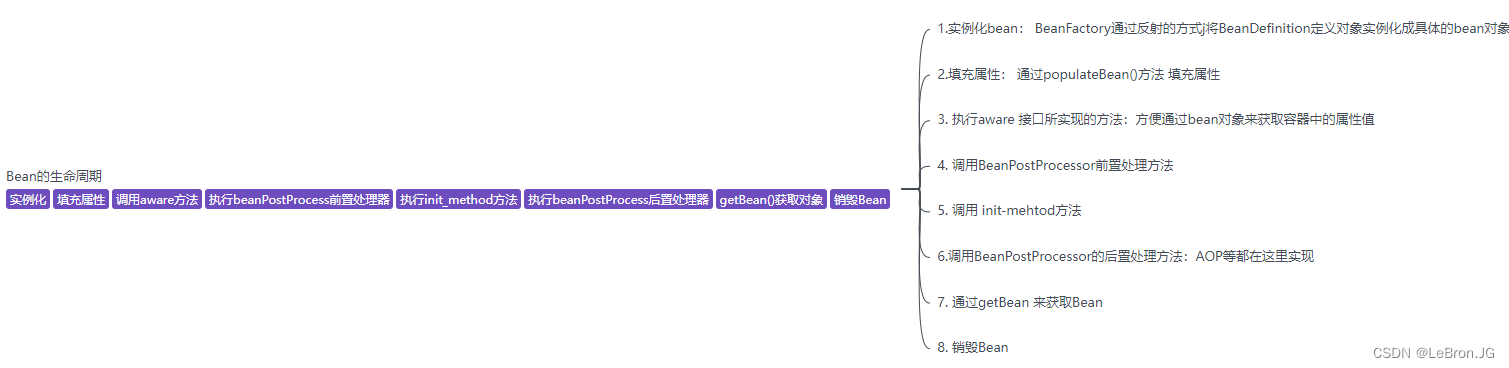
spring 的理解
spring 的理解 spring 是一个基础的框架,同时提高了一个Bean 的容器,用来装载Bean对象spring会帮我们创建Bean 对象并维护Bean对象 的生命周期。在spring 框架上,还有springCloud,spring Boot 的技术框架,都是以Spring为基石的sp…...
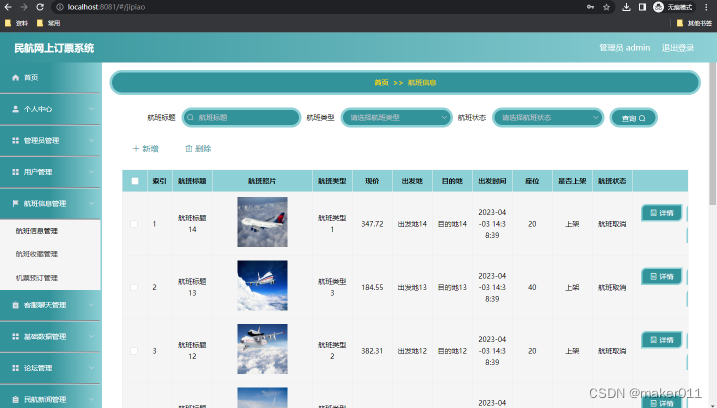
【Java程序设计】【C00384】基于(JavaWeb)Springboot的民航网上订票系统(有论文)
【C00384】基于(JavaWeb)Springboot的民航网上订票系统(有论文) 项目简介项目获取开发环境项目技术运行截图 博主介绍:java高级开发,从事互联网行业六年,已经做了六年的毕业设计程序开发&#x…...
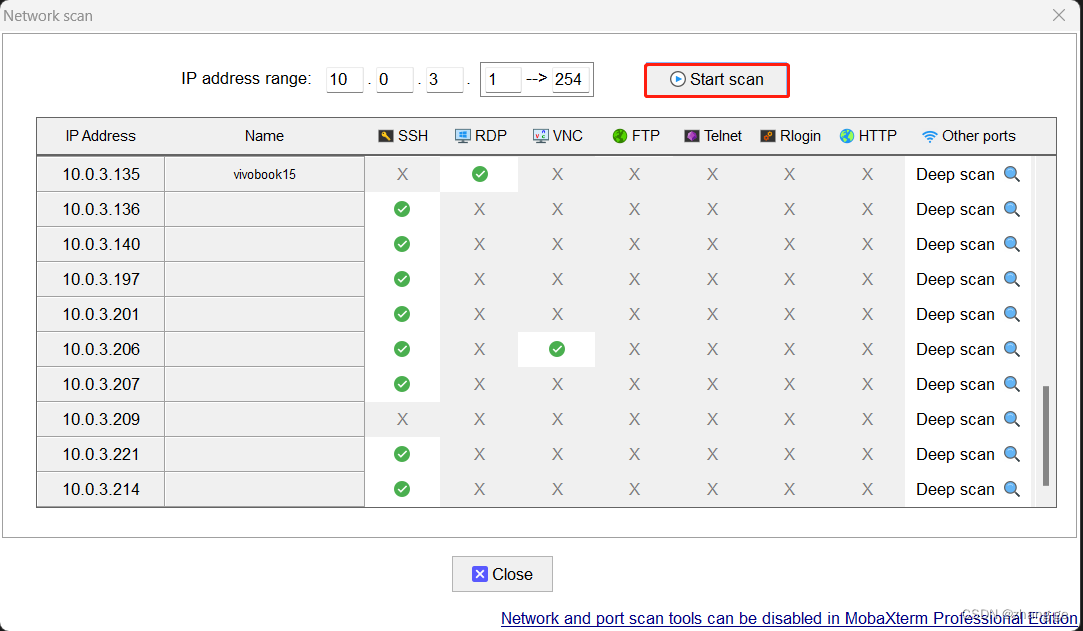
如何查看局域网内所有的ip和对应的mac地址
1、windows下查看 方法一、 按快捷键“winr”打开运行界面,输入“CMD”回车: 输入以下命令: for /L %i IN (1,1,254) DO ping -w 1 -n 1 192.168.0.%i 其中 192.168.0.%i 部分要使用要查询的网段,比如 192.168.1.%i 192.168.137.%i 172.16.2…...
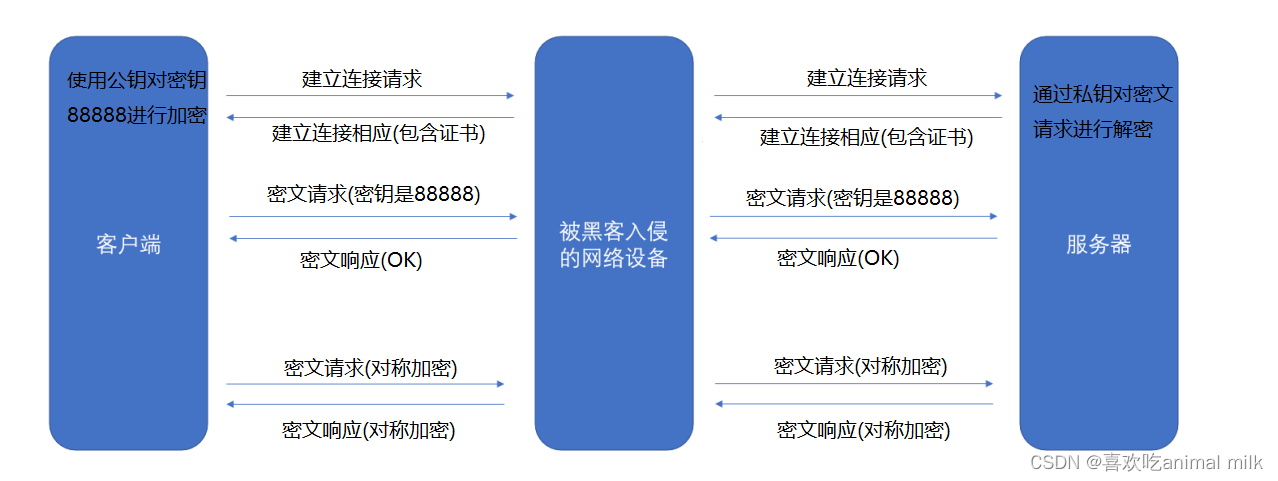
应用层协议 - HTTP
文章目录 目录 文章目录 前言 1 . 应用层概要 2. WWW 2.1 互联网的蓬勃发展 2.2 WWW基本概念 2.3 URI 3 . HTTP 3.1 工作过程 3.2 HTTP协议格式 3.3 HTTP请求 3.3.1 URL基本格式 3.3.2 认识方法 get方法 post方法 其他方法 3.3.2 认识请求报头 3.3.3 认识请…...

mysql安装及操作
一、Mysql 1.1 MySQL数据库介绍 1.1.1 什么是数据库DB? DB的全称是database,即数据库的意思。数据库实际上就是一个文件集合,是一个存储数据的仓库,数据库是按照特定的格式把数据存储起来,用户可以对存储的数据进行…...

【计算机操作系统】深入探究CPU,PCB和进程工作原理
˃͈꒵˂͈꒱ write in front ꒰˃͈꒵˂͈꒱ ʕ̯•͡˔•̯᷅ʔ大家好,我是xiaoxie.希望你看完之后,有不足之处请多多谅解,让我们一起共同进步૮₍❀ᴗ͈ . ᴗ͈ აxiaoxieʕ̯•͡˔•̯᷅ʔ—CSDN博客 本文由xiaoxieʕ̯•͡˔•̯᷅ʔ 原创 CSDN 如…...

Pillow教程04:学习ImageDraw+Font字体+alpha composite方法,给图片添加文字水印
---------------Pillow教程集合--------------- Python项目18:使用Pillow模块,随机生成4位数的图片验证码 Python教程93:初识Pillow模块(创建Image对象查看属性图片的保存与缩放) Pillow教程02:图片的裁…...

fastjson2 反序列化包含多层泛型结构的实体类
前言 由于使用到httpUtill来调用接口 工具类的返回是字符串 其中接口的实现返回值是个多层泛型结构的实体类 例如Result<Page<UserDto>> 当使用 JSON.parseObject("res",new TypeReference<Result<Page<UserDto>>>{})发现在page中存在…...

P6学习:解析P6 WBS-工作分解结构的原则
前言 WBS,及Work Breakdown Structure,中文工作分解结构,是总结工作阶段的项目的层次结构分解。 WBS 就像项目的大纲——它将项目分解为特定的可交付成果或阶段。 然后将活动添加到这些层中以创建项目计划的时间表。 WBS 使用流程会有所不…...

C++ empalce_back 和 push_back的区别
在C中,push_back和emplace_back都是向容器(如std::vector、std::list等)尾部添加元素的成员函数。它们的主要区别在于元素的构造方式和参数传递方式。 push_back函数接受一个已经构造好的元素,并将其复制或移动到容器的尾部。这意…...

java1.8常考面试题
在Java 1.8版本中,引入了很多重要的新特性,这些特性常常成为面试的焦点。下面是一些在面试中常见的关于Java 1.8的问题及其解答,帮助你准备面试: 1. Java 1.8的主要新特性有哪些? Lambda表达式(Lambda Ex…...

Java 中的业务是指什么?
在 Java 编程中,业务(Business)是指软件系统中负责实现特定功能或处理特定任务的一组逻辑和功能。业务通常是指与业务需求直接相关的功能和处理过程,包括数据处理、业务逻辑、交易处理、业务规则等。在软件开发中,业务…...

【MySQL】聊聊自增id用完怎么办?
在实际的开发中,一般都会将数据存储到数据库中,在设计表的时候,其实id如果达到最大值的话,会出现什么问题。其实主要分两种情况,一种是设置了主键id,另一种没有设置主键id。 表定义自增值id create table…...
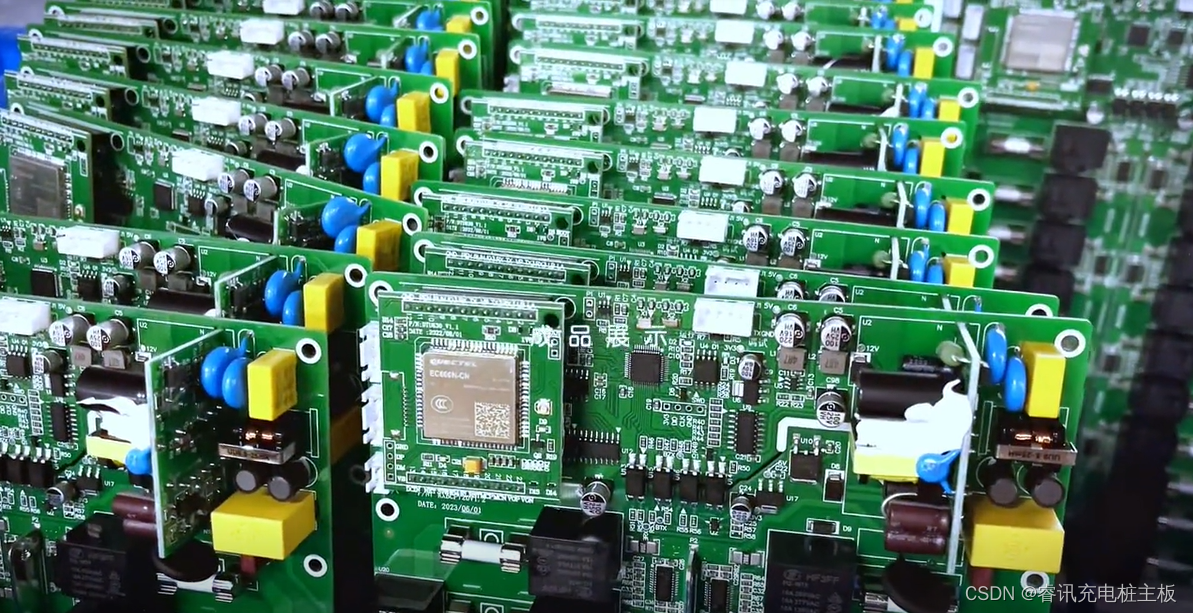
新能源汽车充电桩主板各模块成本占比解析
汽车充电桩主板是汽车充电桩的重要组件,主要由微处理器模块、通信模块、控制模块、安全保护模块、传感器模块等多个模块构成。深入探究各模块在总成本中的比重,我们可以更好地优化成本结构、提高生产效率,并为未来的技术创新和市场需求变化做…...
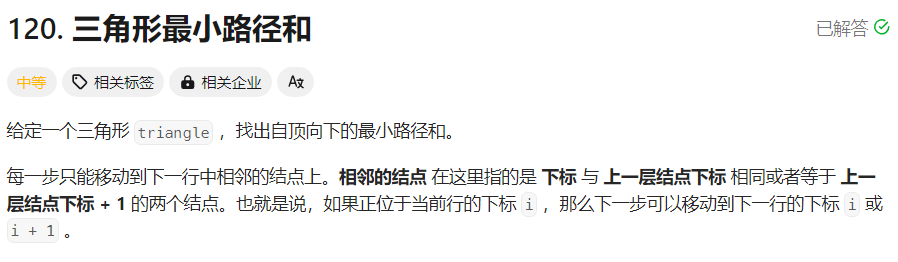
【面试经典150 | 动态规划】三角形最小路径和
文章目录 写在前面Tag题目来源解题思路方法一:动态规划 写在最后 写在前面 本专栏专注于分析与讲解【面试经典150】算法,两到三天更新一篇文章,欢迎催更…… 专栏内容以分析题目为主,并附带一些对于本题涉及到的数据结构等内容进行…...
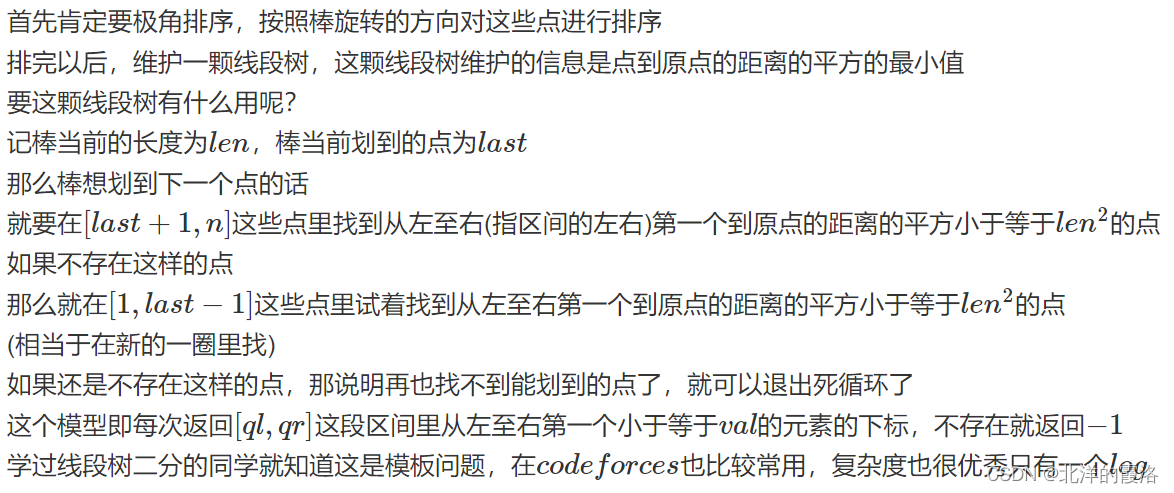
【线段树二分】第十三届蓝桥杯省赛C++ A组/研究生组 Python 研究生组《扫描游戏》(C++)
【题目描述】 有一根围绕原点 O 顺时针旋转的棒 OA,初始时指向正上方(Y 轴正向)。 在平面中有若干物件,第 i 个物件的坐标为(,),价值为 。 当棒扫到某个物件时,棒的长度会瞬间增长 ÿ…...

类模板与继承及成员、全局函数的实现
一、类模板与继承 当类模板碰到继承时,需要注意一下几点: 1.当子类继承的父类是一个类模板时,子类在声明的时候,要指定出父类中T的类型 2.如果不指定,编译器无法给子类分配内存 3.如果想灵活指定出父类中T的类型&a…...
)
手把手教你用AD9834 DDS模块DIY一个可调信号源(附AD原理图/PCB/程序)
从零构建AD9834 DDS可调信号源:硬件搭建与软件调优全指南 在电子设计与射频实验中,一个稳定可靠的可调信号源是不可或缺的工具。商用信号发生器往往价格昂贵,而基于AD9834 DDS模块的DIY方案,能以极低成本实现0-10MHz频率范围内的高…...

CAXA 表格样式
位置属性和 CAD 类似默认【标准】自带,删不掉。预览常规-表格方向向上;向下;单元样式标题;表头;数据;【切换】对应下方 常规、文字的属性设置。常规【对齐】创建行时合并单元:文字命令位置先设置…...

如何用MusicFree插件构建你的跨平台音乐生态:从零开始的全流程指南
如何用MusicFree插件构建你的跨平台音乐生态:从零开始的全流程指南 【免费下载链接】MusicFreePlugins MusicFree播放插件 项目地址: https://gitcode.com/gh_mirrors/mu/MusicFreePlugins 厌倦了在不同音乐应用间反复切换?MusicFree插件系统为你…...

工业边缘计算实战:基于Wind River Helix与App Cloud的云原生应用部署与管理
1. 项目概述:当工业边缘计算遇上云原生应用最近在跟几个做工业物联网和智能网关项目的朋友聊天,发现一个挺有意思的现象:大家手里的硬件平台越来越强,但软件开发和部署的效率却成了新的瓶颈。一个典型的场景是,你有一台…...

第一性原理缺陷计算准备:以氢掺杂氧化镓为例的VASP实践指南
1. 项目概述:从“掺杂”到“缺陷”的计算准备在半导体材料研究领域,尤其是宽禁带半导体,对材料进行掺杂以调控其电学、光学性质是核心课题之一。氧化镓(Ga2O3)作为一种新兴的超宽禁带半导体,因其在功率电子…...

NXP LPC2000中断向量校验和机制与Keil实现
1. NXP LPC2000设备向量校验和机制解析在嵌入式开发领域,NXP LPC2000系列微控制器以其ARM7内核和丰富的外设资源广受欢迎。这类设备有一个独特的启动要求——中断向量表的校验和验证机制。具体来说,地址0x00000014处(ARM保留的中断向量位置&a…...

我用了半年只留下这1个!2026年录音怎么转换成文字亲测准确率真的超高
我前后用了大半年录音转文字工具,试了免费小工具、大厂办公套件自带功能、好几个专门做转写的产品,踩了一堆坑之后最终只留了一个——听脑AI。作为常年要整理课堂录音、调研访谈的学生党,我可以负责任说,2026年做录音转文字&#…...

Conductor工作流引擎:5个步骤构建企业级分布式任务编排系统
Conductor工作流引擎:5个步骤构建企业级分布式任务编排系统 【免费下载链接】conductor Distributed workflow server 项目地址: https://gitcode.com/gh_mirrors/cond/conductor 在当今复杂的微服务架构中,分布式任务编排已经成为企业数字化转型…...

8051仿真器OMF转SIG格式的实战指南
1. Signum 8051 仿真器符号转换器使用指南在嵌入式开发领域,Signum Systems 的 8051 仿真器是一个常用的调试工具。很多开发者在使用 Vision 开发环境时,经常遇到需要将链接器生成的绝对目标模块(OMF)转换为仿真器专用格式的需求。本文将详细介绍这个转换…...

程序员如何平衡工作与生活?我的“时间块”管理法
作为一名深耕软件测试领域十年的老兵,我见过太多同行陷入"996是福报"的自我消耗:刚毕业的年轻人为了赶项目连续三个月住在公司,三十岁的测试主管在孩子升学夜还在改缺陷报告,干了十五年的资深测试工程师熬出了颈椎病却不…...