
缓存菜品、套餐、购物车相关功能
一、缓存菜品
通过缓存的方式提高查询性能
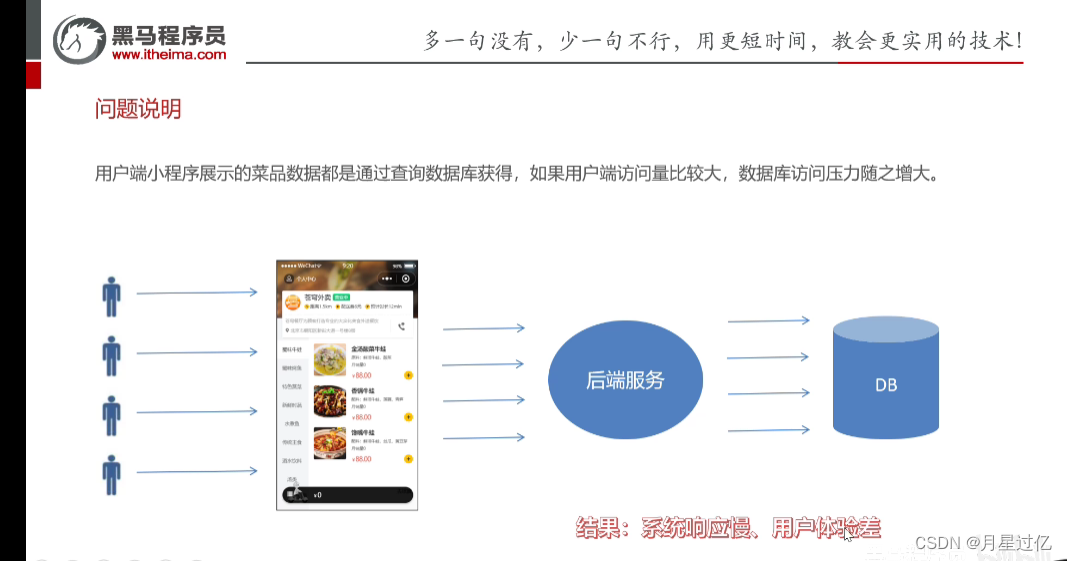
1.1问题说明
大量的用户访问导致数据库访问压力增大,造成系统响应慢,用户体验差
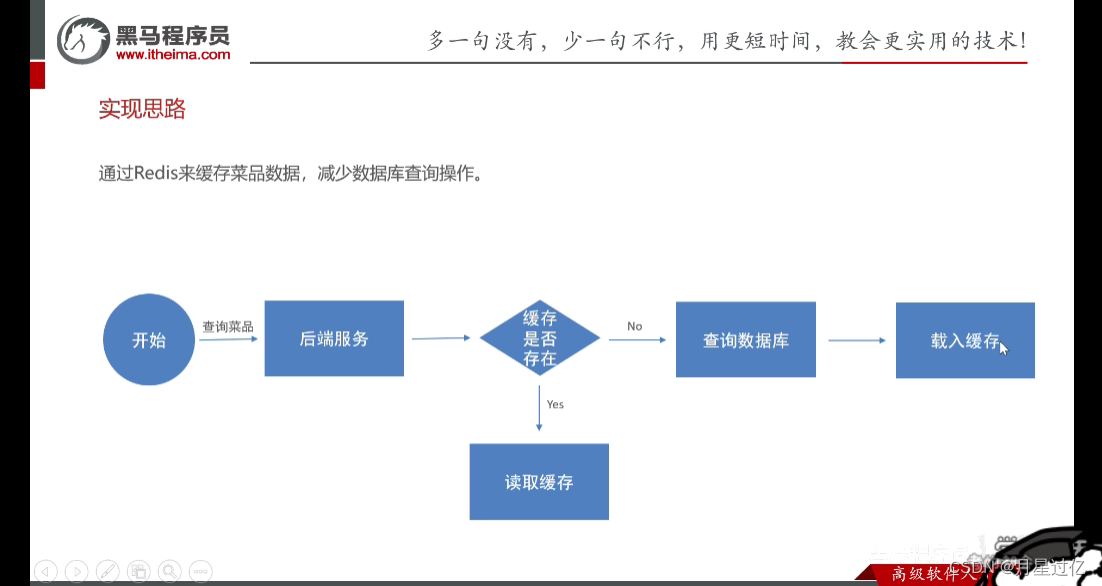
1.2 实现思路
优先查询缓存,如果缓存没有再去查询数据库,然后载入缓存
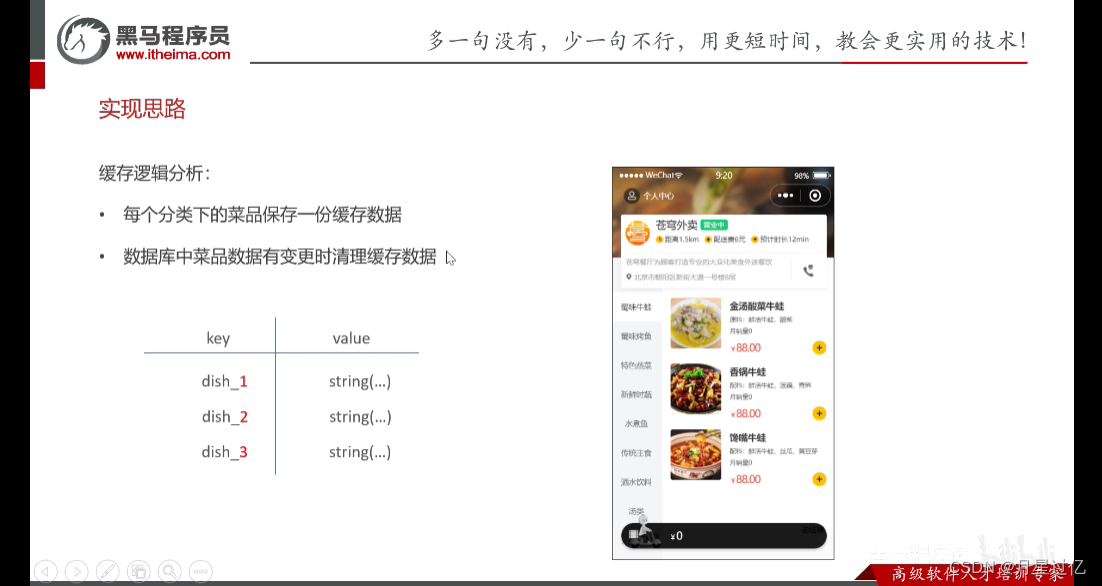
将菜品集合序列化后缓存入redis key为每个分类的id
1.3 代码开发(缓存菜品)
import com.sky.constant.StatusConstant;
import com.sky.entity.Dish;
import com.sky.result.Result;
import com.sky.service.DishService;
import com.sky.vo.DishVO;
import io.swagger.annotations.Api;
import io.swagger.annotations.ApiOperation;
import lombok.extern.slf4j.Slf4j;
import org.springframework.beans.factory.annotation.Autowired;
import org.springframework.data.redis.core.RedisTemplate;
import org.springframework.web.bind.annotation.GetMapping;
import org.springframework.web.bind.annotation.RequestMapping;
import org.springframework.web.bind.annotation.RestController;
import java.util.List;@RestController("userDishController")
@RequestMapping("/user/dish")
@Slf4j
@Api(tags = "C端-菜品浏览接口")
public class DishController {@Autowiredprivate DishService dishService;@Autowiredprivate RedisTemplate redisTemplate;/*** 根据分类id查询菜品** @param categoryId* @return*/@GetMapping("/list")@ApiOperation("根据分类id查询菜品")public Result<List<DishVO>> list(Long categoryId) {//构造redis中的key,规则:dish_分类idString key ="dish_"+categoryId;//查询redis中是否存在菜品数据List<DishVO> list =(List<DishVO>) redisTemplate.opsForValue().get(key);if (list!=null&&list.size()>0){//如果存在,直接返回,无需查询数据库return Result.success(list);}//如果不存在,查询数据库,将查询到的数据放入redis中Dish dish = new Dish();dish.setCategoryId(categoryId);dish.setStatus(StatusConstant.ENABLE);//查询起售中的菜品list = dishService.listWithFlavor(dish);redisTemplate.opsForValue().set(key,list);return Result.success(list);}}
1.4 代码开发(清除缓存)
为什么要清除缓存? 为了保证数据的一致性,数据库修改后,缓存中的数据并没有发生改变,用户再次请求后不会请求到新修改的数据,而是过期的数据所以要清除缓存。
什么时候清除缓存? 后端修改数据后对缓存进行及时的清除
/*** 统一清除缓存数据* @param pattern*/private void cleanCache(String pattern){Set keys = redisTemplate.keys(pattern);redisTemplate.delete(keys);}} /*** 启用禁用菜品* @param status* @param id* @return*/@PostMapping("/status/{status}")@ApiOperation("启用禁用菜品")public Result startOrStop(@PathVariable Integer status,Long id){log.info("启用禁用菜品,{},{}",status,id);dishService.startOrStop(status,id);//将所有的菜品缓存数据清理掉,所有以dish_开头的key
// Set keys = redisTemplate.keys("dish_");
// redisTemplate.delete(keys);cleanCache("dish_*");return Result.success();}
二、缓存套餐(基于SpringCache)
2.1 SpringCache
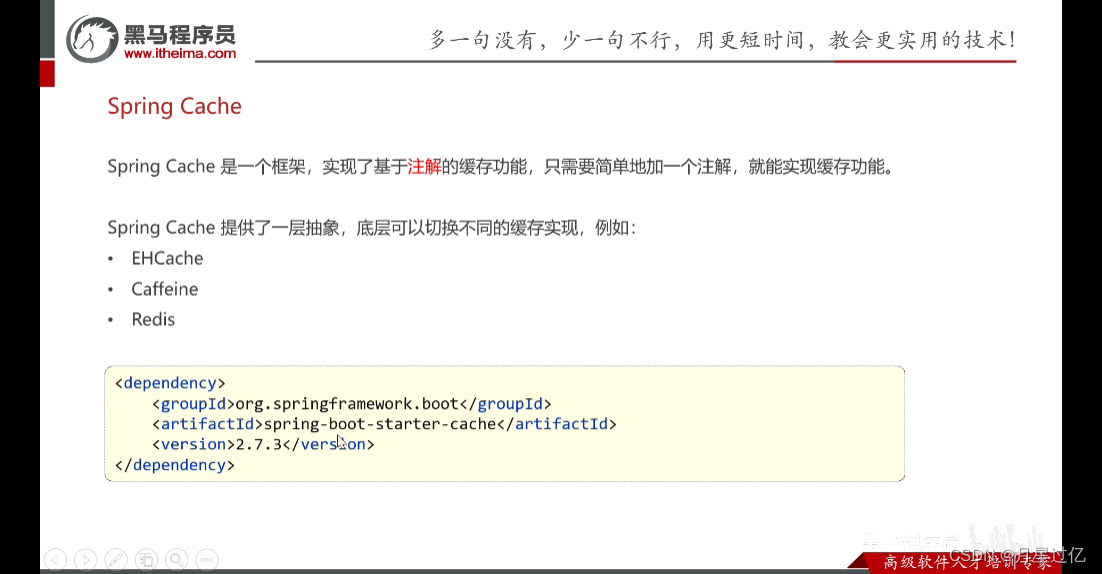
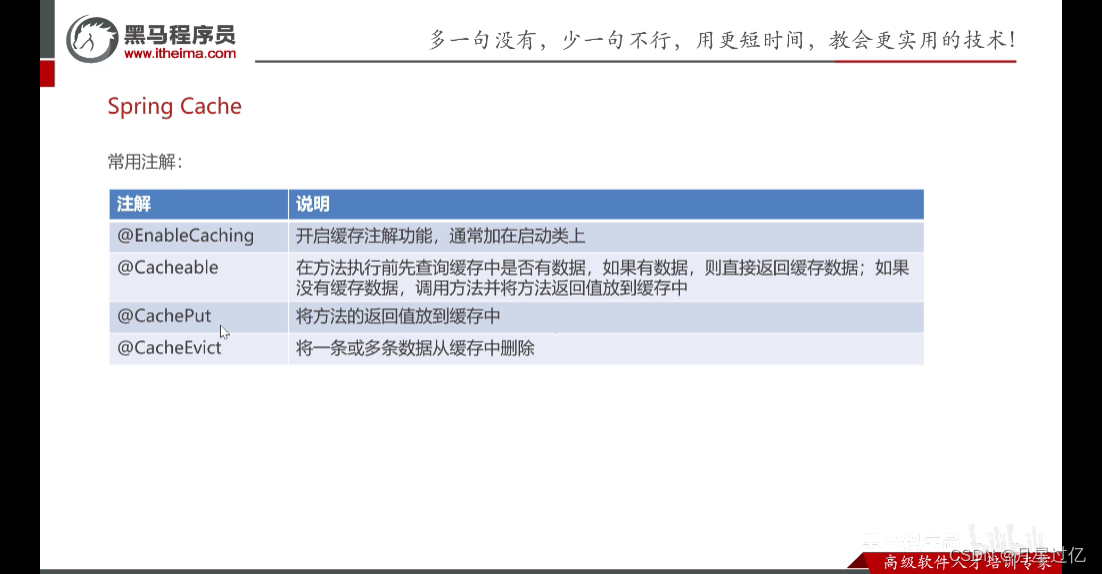
-
被写死了(没有意义)
@CachePut(cacheNames ="userCache",key = "abc")//如果使用SpringCache缓存数据,key的生成:userCache::abc            //生成的key 与cacheNames,key有关系
-
动态生成key  + SpEL表达式
@CachePut(cacheNames ="userCache",key = "#user.id")//如果使用SpringCache缓存数据,key的生成:userCache::#user.id
2.2 入门案例
1.CachePut:将方法返回值放到缓存中
//    @CachePut(cacheNames ="userCache",key = "#user.id")//如果使用SpringCache缓存数据,key的生成:userCache::abc@PostMapping
//    @CachePut(cacheNames = "userCache",key ="#result.id")//对象导航
//    @CachePut(cacheNames = "userCache",key = "#p0.id")//#p0代表第一个参数
//    @CachePut(cacheNames = "userCache",key = "#a0.id")@CachePut(cacheNames = "userCache",key = "#root.args[0].id")//#root.args[0]代表第一个参数public User save(@RequestBody User user){userMapper.insert(user);return user;}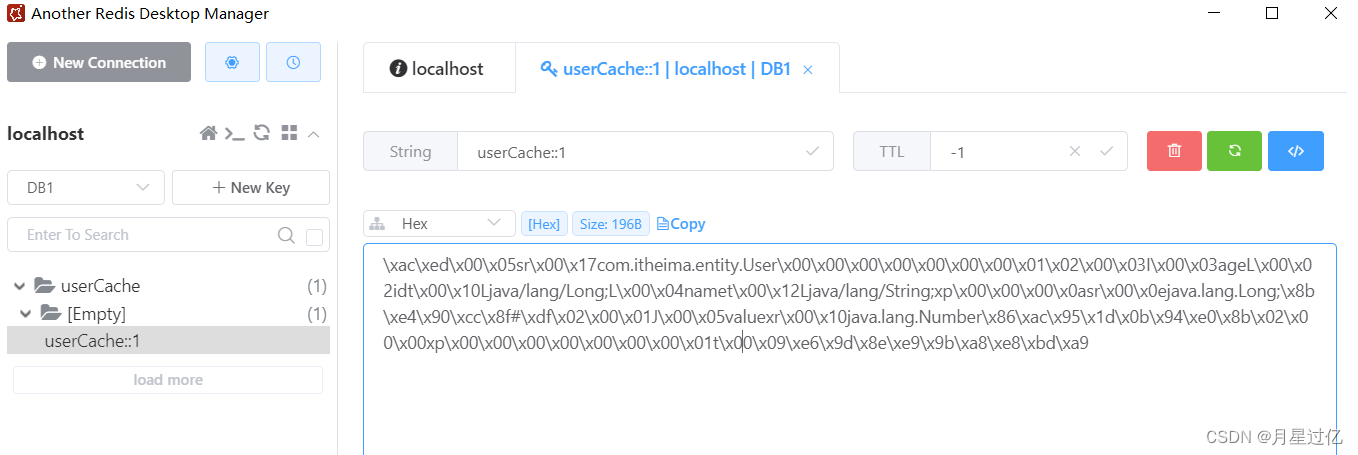
2.Cacheable:在方法执行前先查询缓存,如果缓存中有该数据,直接返回缓存中的数据。如果没有在方法执行后再将返回值放入缓存中
@GetMapping@Cacheable(cacheNames = "userCache",key = "#id")public User getById(Long id){User user = userMapper.getById(id);return user;}Cacheable 不能使用#result.id这种方式设置key的值
3.CacheEvict :将一条或者多条数据从缓存中删除
- 删除单条数据
@CacheEvict(cacheNames = "userCache",key ="#id" )@DeleteMappingpublic void deleteById(Long id){userMapper.deleteById(id);}- 删除多条数据(allEntries = true)
@CacheEvict(cacheNames = "userCache",allEntries = true)@DeleteMapping("/delAll")public void deleteAll(){userMapper.deleteAll();}
2.3实现思路
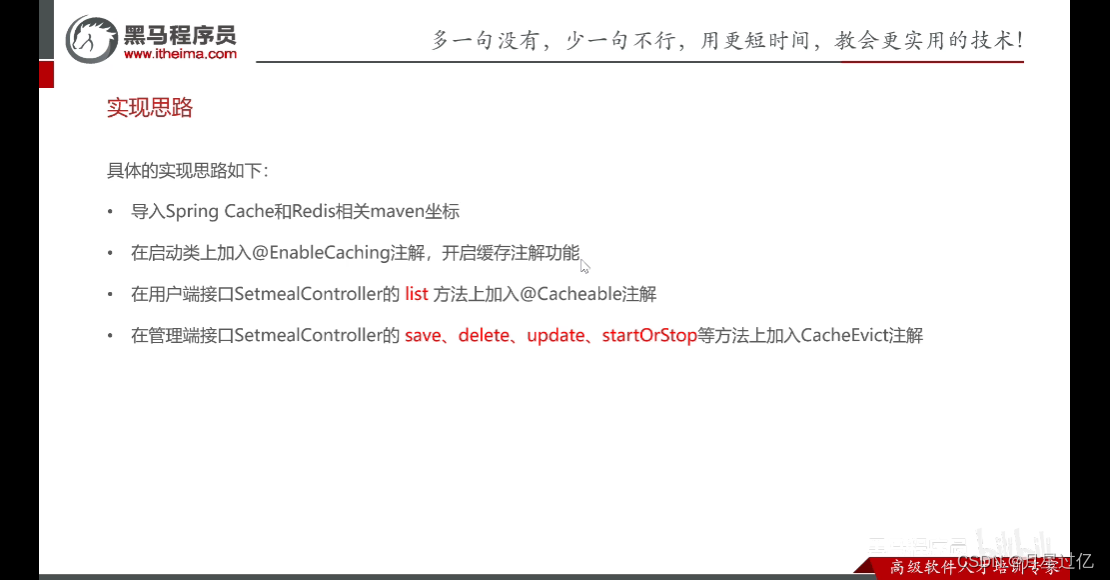
2.4代码开发
import com.sky.constant.StatusConstant;
import com.sky.entity.Setmeal;
import com.sky.result.Result;
import com.sky.service.SetmealService;
import com.sky.vo.DishItemVO;
import io.swagger.annotations.Api;
import io.swagger.annotations.ApiOperation;
import org.springframework.beans.factory.annotation.Autowired;
import org.springframework.cache.annotation.Cacheable;
import org.springframework.web.bind.annotation.GetMapping;
import org.springframework.web.bind.annotation.PathVariable;
import org.springframework.web.bind.annotation.RequestMapping;
import org.springframework.web.bind.annotation.RestController;
import java.util.List;@RestController("userSetmealController")
@RequestMapping("/user/setmeal")
@Api(tags = "C端-套餐浏览接口")
public class SetmealController {@Autowiredprivate SetmealService setmealService;/*** 条件查询** @param categoryId* @return*/@Cacheable(cacheNames = "setmealCache",key = "#categoryId")//key :setmealCache::100@GetMapping("/list")@ApiOperation("根据分类id查询套餐")public Result<List<Setmeal>> list(Long categoryId) {Setmeal setmeal = new Setmeal();setmeal.setCategoryId(categoryId);setmeal.setStatus(StatusConstant.ENABLE);List<Setmeal> list = setmealService.list(setmeal);return Result.success(list);}/*** 根据套餐id查询包含的菜品列表** @param id* @return*/@GetMapping("/dish/{id}")@ApiOperation("根据套餐id查询包含的菜品列表")public Result<List<DishItemVO>> dishList(@PathVariable("id") Long id) {List<DishItemVO> list = setmealService.getDishItemById(id);return Result.success(list);}
}
import com.github.pagehelper.Page;
import com.sky.dto.SetmealDTO;
import com.sky.dto.SetmealPageQueryDTO;
import com.sky.result.PageResult;
import com.sky.result.Result;
import com.sky.service.SetmealService;
import com.sky.vo.SetmealVO;
import io.swagger.annotations.Api;
import io.swagger.annotations.ApiOperation;
import lombok.extern.slf4j.Slf4j;
import org.springframework.beans.factory.annotation.Autowired;
import org.springframework.cache.annotation.CacheEvict;
import org.springframework.web.bind.annotation.*;import java.util.List;/*** 套餐管理*/
@RestController
@RequestMapping("/admin/setmeal")
@Api(tags = "套餐管理相关接口")
@Slf4j
public class SetmealController {@Autowiredprivate SetmealService setmealService;@CacheEvict(cacheNames = "setmealCache",key = "setmealDTO.categoryId")@PostMapping@ApiOperation("新增套餐接口")public Result save(@RequestBody SetmealDTO setmealDTO){log.info("新增套餐:{}",setmealDTO);setmealService.saveWithDish(setmealDTO);return Result.success();}/*** 套餐分页查询* @param setmealPageQueryDTO* @return*/@GetMapping("/page")@ApiOperation("套餐分页查询")public Result<PageResult> pageQuery(SetmealPageQueryDTO setmealPageQueryDTO){log.info("套餐分页查询:{}",setmealPageQueryDTO);PageResult pageResult  = setmealService.pageQuery(setmealPageQueryDTO);return Result.success(pageResult);}/*** 批量删除套餐* @param ids* @return*/@CacheEvict(cacheNames = "setmealCache",allEntries = true)@DeleteMapping@ApiOperation("批量删除菜品")public Result delete(@RequestParam List<Long> ids){log.info("批量删除套餐:{}",ids);setmealService.deleteBatch(ids);return Result.success();}/*** 根据id查询套餐,用于修改页面回显数据** @param id* @return*/@GetMapping("/{id}")@ApiOperation("根据id查询套餐")public Result<SetmealVO> getById(@PathVariable Long id) {SetmealVO setmealVO = setmealService.getByIdWithDish(id);return Result.success(setmealVO);}/*** 修改套餐** @param setmealDTO* @return*/@CacheEvict(cacheNames = "setmealCache",allEntries = true)@PutMapping@ApiOperation("修改套餐")public Result update(@RequestBody SetmealDTO setmealDTO) {setmealService.update(setmealDTO);return Result.success();}/*** 套餐起售停售* @param status* @param id* @return*/@CacheEvict(cacheNames = "setmealCache",allEntries = true)@PostMapping("/status/{status}")@ApiOperation("套餐起售停售")public Result startOrStop(@PathVariable Integer status, Long id) {setmealService.startOrStop(status, id);return Result.success();}}
三、添加购物车
3.1需求分析和设计
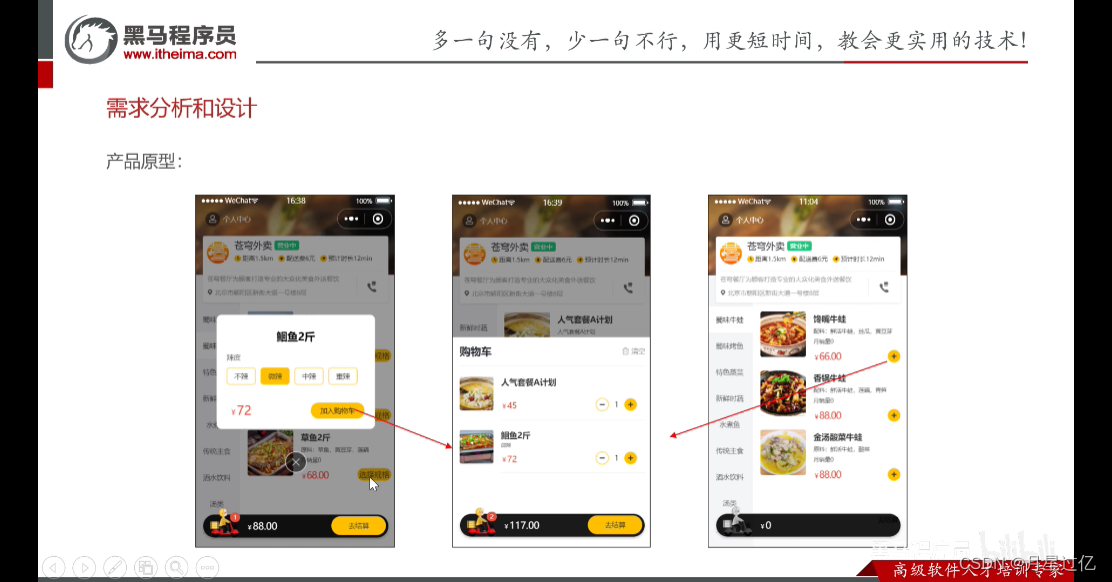
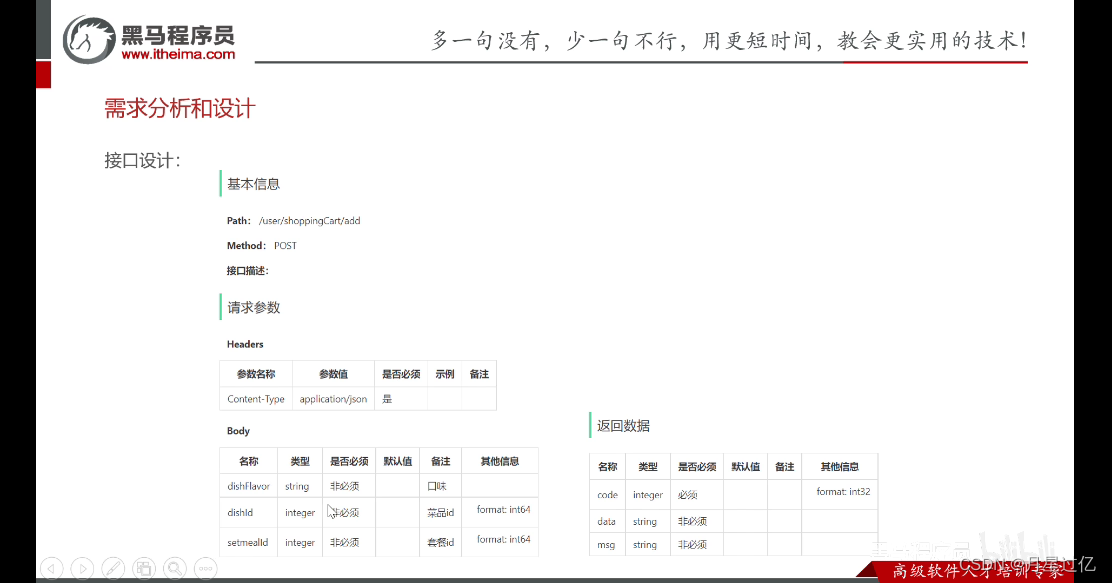
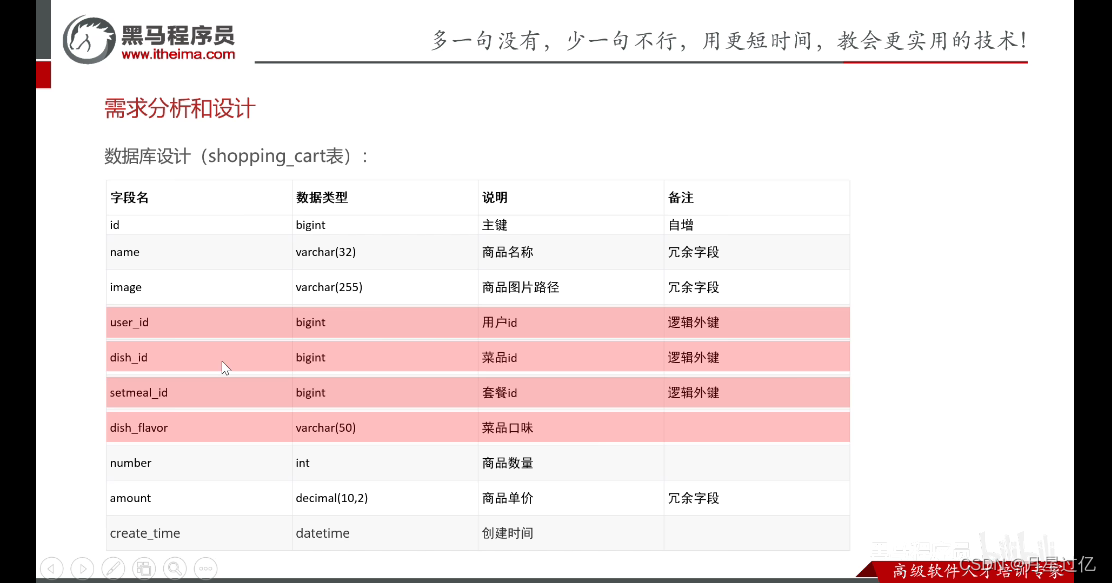
3.2 代码开发
3.2.1Controller
import com.sky.dto.ShoppingCartDTO;
import com.sky.result.Result;
import com.sky.service.ShoppingCartService;
import io.swagger.annotations.Api;
import io.swagger.annotations.ApiOperation;
import lombok.extern.slf4j.Slf4j;
import org.springframework.beans.factory.annotation.Autowired;
import org.springframework.web.bind.annotation.PostMapping;
import org.springframework.web.bind.annotation.RequestBody;
import org.springframework.web.bind.annotation.RequestMapping;
import org.springframework.web.bind.annotation.RestController;@RestController
@RequestMapping("/user/shoppingCart")
@Api(tags = "C端购物车相关接口")
@Slf4j
public class ShoppingCartController {@Autowiredprivate ShoppingCartService shoppingCartService;/*** 添加购物车* @param shoppingCartDTO* @return*/@PostMapping("/add")@ApiOperation("添加购物车")public Result add(@RequestBody ShoppingCartDTO shoppingCartDTO){log.info("添加购物车,商品信息为:",shoppingCartDTO);shoppingCartService.addShoppingCart(shoppingCartDTO);return Result.success();}}
3.2.2 Serveice层
import com.sky.context.BaseContext;
import com.sky.dto.ShoppingCartDTO;
import com.sky.entity.Dish;
import com.sky.entity.Setmeal;
import com.sky.entity.ShoppingCart;
import com.sky.mapper.DishMapper;
import com.sky.mapper.SetmealMapper;
import com.sky.mapper.ShoppingCartMapper;
import com.sky.service.ShoppingCartService;
import lombok.extern.slf4j.Slf4j;
import org.springframework.beans.BeanUtils;
import org.springframework.beans.factory.annotation.Autowired;
import org.springframework.stereotype.Service;import java.time.LocalDateTime;
import java.util.List;@Service
@Slf4j
public class ShoppingCartServiceImpl implements ShoppingCartService {@Autowiredprivate ShoppingCartMapper shoppingCartMapper;@Autowiredprivate DishMapper dishMapper;@Autowiredprivate SetmealMapper setmealMapper;/*** 添加购物车* @param shoppingCartDTO*/@Overridepublic void addShoppingCart(ShoppingCartDTO shoppingCartDTO) {//判断当前加入到购物车中的商品是否已经存在了ShoppingCart shoppingCart = new ShoppingCart();BeanUtils.copyProperties(shoppingCartDTO,shoppingCart);Long userId = BaseContext.getCurrentId();shoppingCart.setUserId(userId);List<ShoppingCart> list = shoppingCartMapper.list(shoppingCart);//如果已经存在了,只需要将其数量加1if (list !=null && list.size()>0){ShoppingCart cart = list.get(0);cart.setNumber(cart.getNumber()+1);shoppingCartMapper.updateNumberById(cart);}else {//如果不存在,需要插入一条购物车数据//判断本次添加购物车的是菜品还是套餐Long dishId = shoppingCartDTO.getDishId();if (dishId !=null){//本次添加的是菜品Dish dish = dishMapper.getById(dishId);shoppingCart.setName(dish.getName());shoppingCart.setImage(dish.getImage());shoppingCart.setAmount(dish.getPrice());
//                shoppingCart.setNumber(1);
//                shoppingCart.setCreateTime(LocalDateTime.now());
//}else {//本次添加的是套餐Long setmealId = shoppingCartDTO.getSetmealId();Setmeal setmeal = setmealMapper.getById(setmealId);shoppingCart.setName(setmeal.getName());shoppingCart.setImage(setmeal.getImage());shoppingCart.setAmount(setmeal.getPrice());
//                shoppingCart.setNumber(1);
//                shoppingCart.setCreateTime(LocalDateTime.now());}shoppingCart.setNumber(1);shoppingCart.setCreateTime(LocalDateTime.now());shoppingCartMapper.insert(shoppingCart);}}
}
四、查看购物车
4.1 需求分析和设计
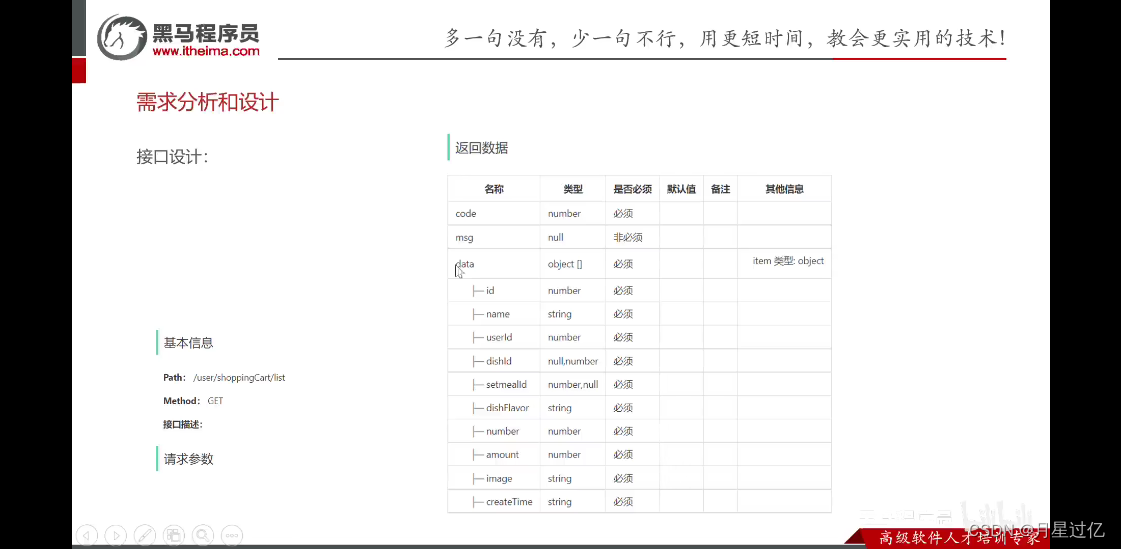
4.2 代码开发
4.2.1Controller层
/*** 查看购物车* @return*/@GetMapping("/list")@ApiOperation("查看购物车")public Result<List<ShoppingCart>> list(){List<ShoppingCart> list = shoppingCartService.showShoppingCart();return Result.success(list);}4.2.2 Service层
/*** 查看购物车* @return*/@Overridepublic List<ShoppingCart> showShoppingCart() {//获取当前微信用户的idLong userId = BaseContext.getCurrentId();ShoppingCart shoppingCart = ShoppingCart.builder().userId(userId).build();List<ShoppingCart> list = shoppingCartMapper.list(shoppingCart);return list;}五、清空购物车
5.1 需求分析和设计
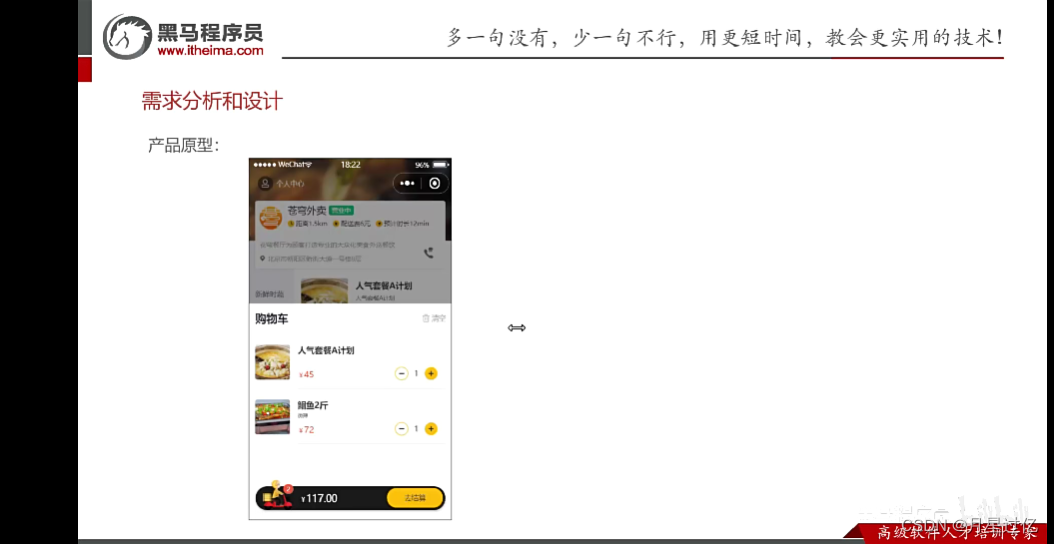
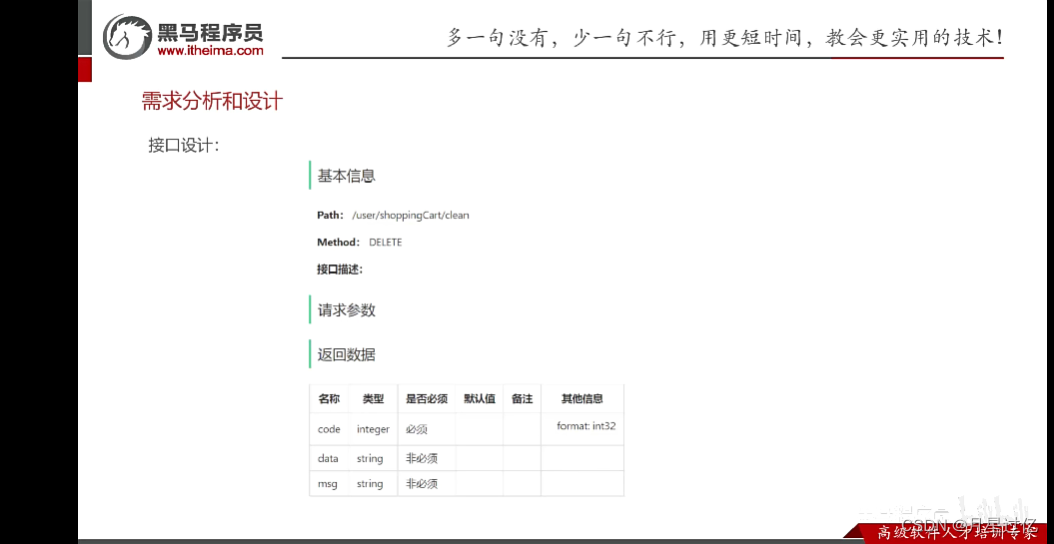
5.2 代码开发
5.2.1 Controller层
/*** 清空购物车* @return*/@DeleteMapping("/clean")public Result clean(){shoppingCartService.cleanShoppingCart();return Result.success();}
5.2.2 Service层
/*** 清空购物车*/@Overridepublic void cleanShoppingCart() {Long userId = BaseContext.getCurrentId();shoppingCartMapper.deleteByUserId(userId);}5.2.3 Mapper层
/*** 根据用户id删除购物车数据* @param userId*/@Delete("delete from shopping_cart where user_id =#{userId}")void deleteByUserId(Long userId);相关文章:
缓存菜品、套餐、购物车相关功能
一、缓存菜品 通过缓存的方式提高查询性能 1.1问题说明 大量的用户访问导致数据库访问压力增大,造成系统响应慢,用户体验差 1.2 实现思路 优先查询缓存,如果缓存没有再去查询数据库,然后载入缓存 将菜品集合序列化后缓存入red…...

微信小程序的页面交互1
一、page()函数 每个页面的s代码全部写入对应的js文件的page()函数里面。点击编译,就可以显示js代码的运行效果。注意,每个页面的page()函数是唯一的。 page(ÿ…...

win10 docker zookeeper和kafka搭建
好久没用参与大数据之类的开发了,近日接触到一个项目中使用到kafka,因此要在本地搭建一个简易的kafka服务。时间比较紧急,之前有使用docker的经验,因此本次就使用docker来完成搭建。在搭建过程中出现的一些问题,及时记…...
【Redis】快速入门 数据类型 常用指令 在Java中操作Redis
文章目录 一、简介二、特点三、下载与安装四、使用4.1 服务器启动4.2 客户端连接命令4.3 修改Redis配置文件4.4 客户端图形化界面 五、数据类型5.1 五种常用数据类型介绍5.2 各种数据类型特点 六、常用命令6.1 字符串操作命令6.2 哈希操作命令6.3 列表操作命令6.4 集合操作命令…...
【tingsboard开源平台】下载数据库,IDEA编译,项目登录
一, PostgreSQL 下载 需要看官网的:点此下载直达地址:点此进行相关学习:PostgreSQL 菜鸟教程 二,PostgreSQL 安装 点击安装包进行安装 出现乱码错误: There has been an error. Error running C:\Wind…...

Web3:探索区块链与物联网的融合
引言 随着科技的不断发展,区块链技术和物联网技术都成为了近年来备受瞩目的前沿技术。而当这两者结合在一起,将产生怎样的化学反应呢?本文将深入探讨Web3时代中区块链与物联网的融合,探索其意义、应用场景以及未来发展趋势。 1. …...
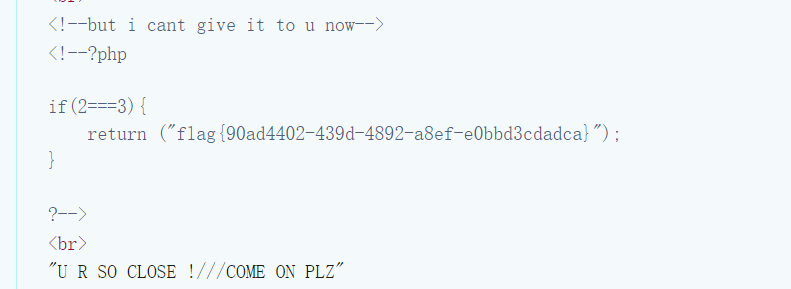
[BT]BUUCTF刷题第9天(3.27)
第9天(共2题) [护网杯 2018]easy_tornado 打开网站就是三个txt文件 /flag.txt flag in /fllllllllllllag/welcome.txt render/hints.txt md5(cookie_secretmd5(filename))当点进flag.txt时,url变为 http://b9e52e06-e591-46ad-953e-7e8c5f…...

html页面使用@for(){},@if(){},利用jquery 获取当前class在列表中的下标
基于以前的项目进行修改优化,前端代码根据List元素在html里进行遍历显示 原先的代码: 其中,noticeGuide.Id是标识noticeGuide的唯一值,但是不是从0开始的【是数据库自增字段】 但是在页面初始化加载的时候,我们只想…...

pulsar: 批量接收消息
接收消息时,和kafka类似,如果topic有多个分区,则只能保证分区内数据的接收有序,不能保证全局有序。 一、发送消息 package cn.edu.tju.test1;import org.apache.pulsar.client.api.*;public class BatchProducer01 {private sta…...
LNMP架构之mysql数据库实战
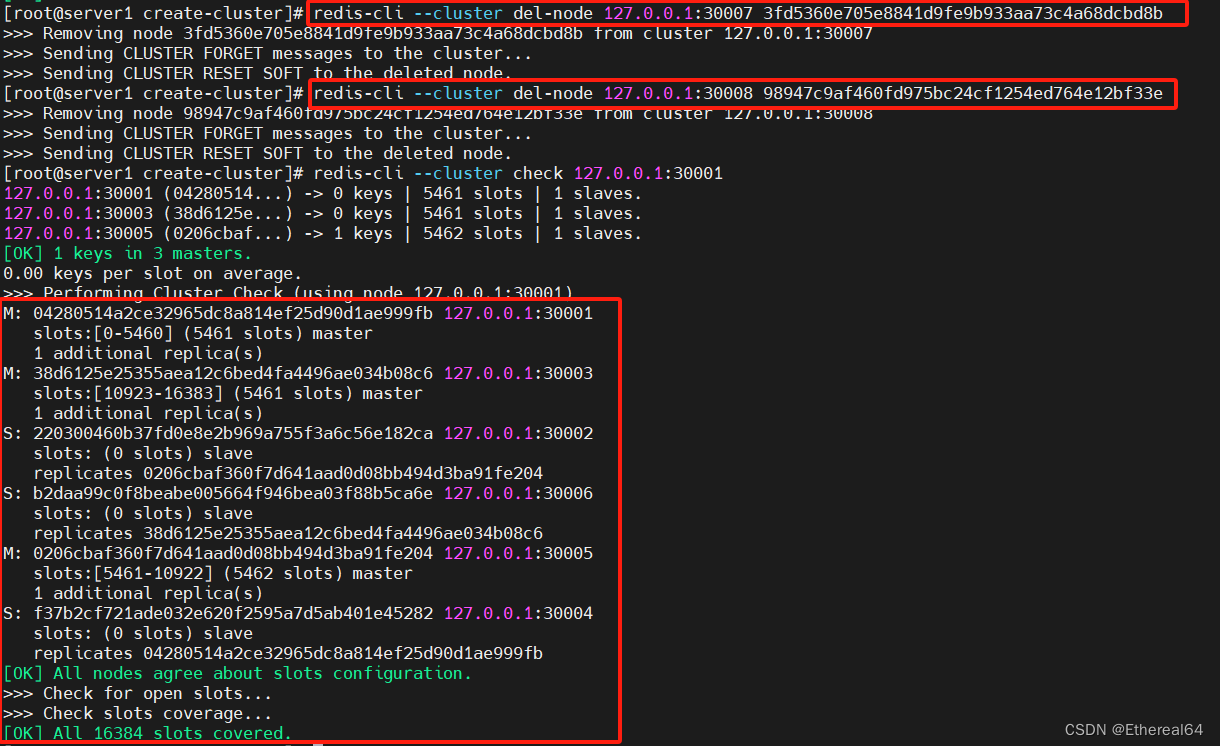
mysql安装 到官网www.mysql.com下载源码版本 实验室使用5.7.40版本 tar xf mysql-boost-5.7.40.tar.gz #解压 cd mysql-boost-5.7.40/ yum install -y cmake gcc-c bison #安装依赖性 cmake -DCMAKE_INSTALL_PREFIX/usr/local/mysql -DMYSQL_DATADIR/data/mysql -DMYSQL_…...
aws使用记录
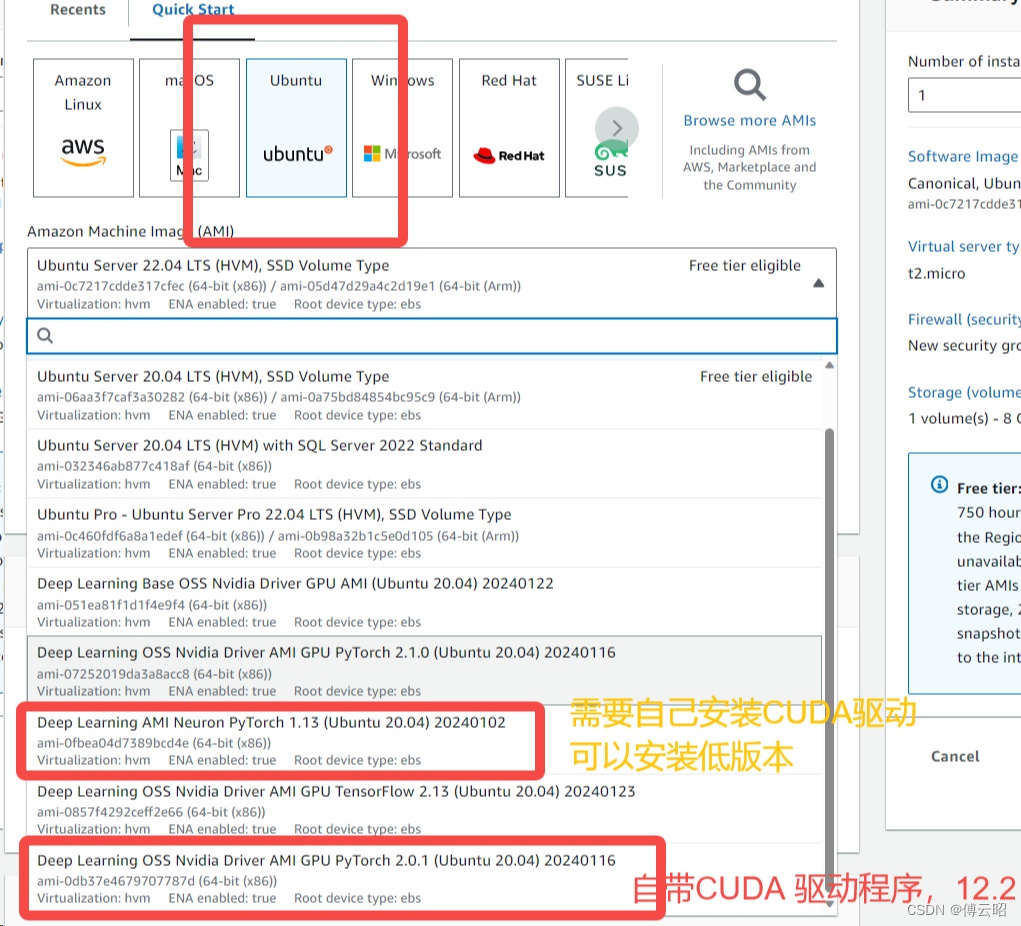
数据传输(S3) 安装命令行 安装awscli: https://docs.aws.amazon.com/zh_cn/cli/latest/userguide/getting-started-install.html#getting-started-install-instructions 直到 aws configure list 可以运行 身份验证: 运行: aws config…...

区块链食品溯源案例实现(二)
引言 随着前端界面的完成,我们接下来需要编写后端代码来与区块链网络进行交互。后端将负责处理前端发送的请求,调用智能合约的方法获取食品溯源信息,并将结果返回给前端。 通过前后端的整合,我们可以构建一个食品溯源系统…...
RabbitMQ(简单模式)
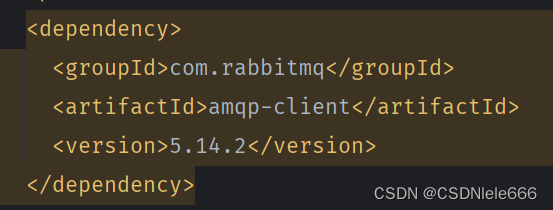
2种远程服务调用 1openFeign: 优点:能拿到被调用的微服务返回的数据,系统系耦度高,系统稳定。 缺点:同步调用,如果有很多服务需要被调用,耗时长。 MQ,消息队列,RabbitMQ是消息we…...

ES集群部署的注意事项
文章目录 引言I ES集群部署前期工作II 部署ES2.1 配置安全组2.2 创建ES用户和组2.3 下载安装ES2.4 修改内存相关配置III es集群添加用户安全认证功能3.1 生成 elastic-certificates.p123.2 创建 Elasticsearch 集群密码3.2 设置kibana的 elasticsearch帐号角色和密码3.3 logsta…...
Etcd 基本入门
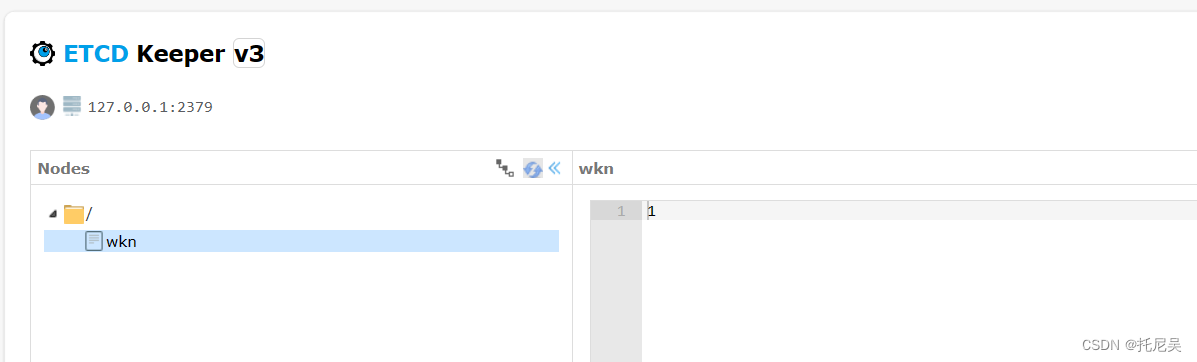
1:什么是 Etcd ? Etcd 是 CoreOS 团队于2013年6月发起的开源项目,它的目标是构建一个高可用的分布式键值(key-value)数据库。etcd内部采用raft协议作为一致性算法,Etcd基于 Go 语言实现。 名字由来,它源于两个方面,…...

PPT没保存怎么恢复?3个方法(更新版)!
“我刚做完一个PPT,正准备保存的时候电脑没电自动关机了,打开电脑后才发现我的PPT没保存。这可怎么办?还有机会恢复吗?” 在日常办公和学习中,PowerPoint是制作演示文稿的重要工具。我们会在各种场景下使用它。但有时候…...
DBeaver修改sql语句保存位置
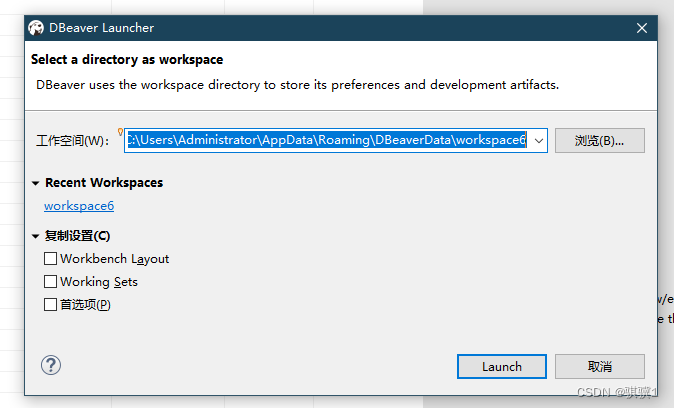
1、dbeaver通过工作空间方式来管理Script的sql脚本以及数据库连接。 工作空间,其实也就是一个文件夹 默认保存路径查看: 文件--> 切换工作空间 --> 其他 sql脚本的保存位置默认在工作空间下的 \General\Scripts 文件夹中。 2、 3、点击浏览&#…...

LabVIEW2024中文版软件安装包、工具包、安装教程下载
下载链接:LabVIEW及工具包大全-三易电子工作室http://blog.eeecontrol.com/labview6666 《LabVIEW2024安装图文教程》 1、解压后,双击install.exe安装 2、选中“我接受上述许可协议”,点击下一步 3、点击下一步,安装NI Package …...
对AOP的理解
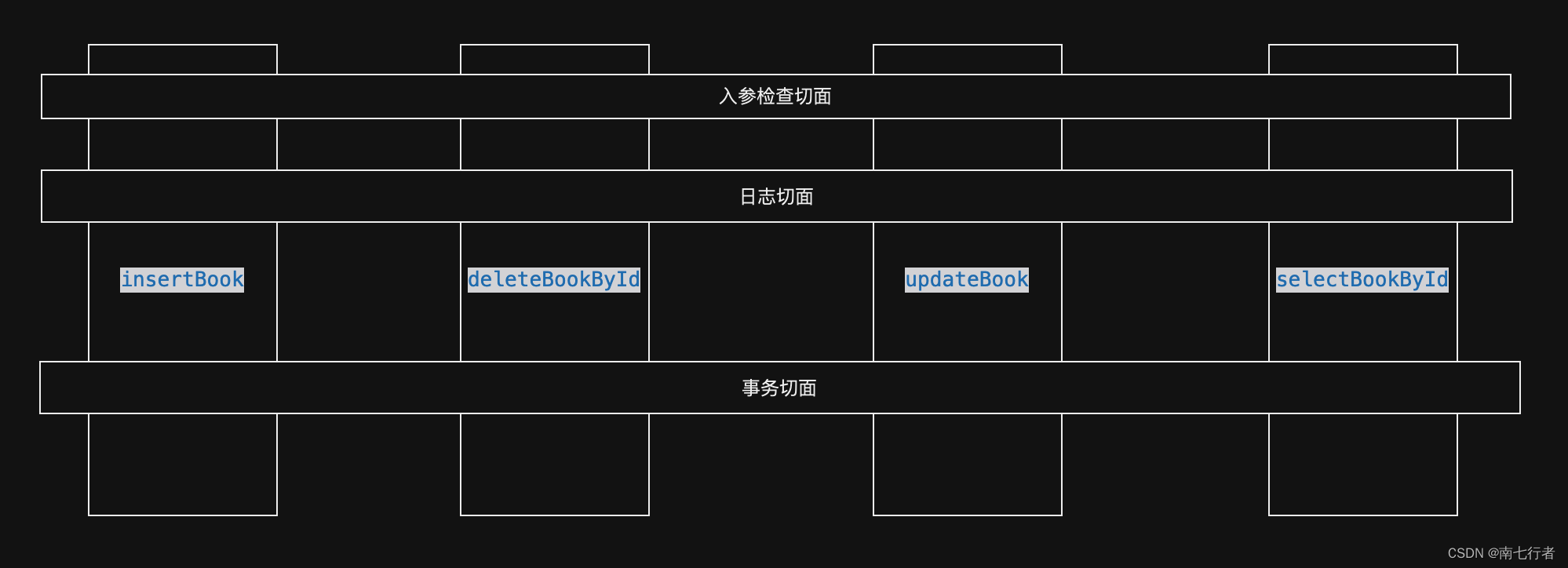
目录 一、为何需要AOP?1、从实际需求出发2、现有的技术能解决吗?3、AOP可以解决 二、如何实现AOP?1、基本使用2、更推荐的做法2.1 “基本使用”存在的隐患2.2 最佳实践2.2.1 参考Transactional(通过AOP实现事务管理)2.…...

C 指针数组
C 指针数组是一个数组,其中的每个元素都是指向某种数据类型的指针。 指针数组存储了一组指针,每个指针可以指向不同的数据对象。 指针数组通常用于处理多个数据对象,例如字符串数组或其他复杂数据结构的数组。 让我们来看一个实例…...

Montserrat可变字体深度解析:实现响应式排版的最佳实践
Montserrat可变字体深度解析:实现响应式排版的最佳实践 【免费下载链接】Montserrat 项目地址: https://gitcode.com/gh_mirrors/mo/Montserrat Montserrat字体项目是一款源自布宜诺斯艾利斯传统街区的开源字体,以其独特的城市排版风格和灵活的可…...

wechatferry 高级技巧:如何实现AI驱动的智能对话机器人
wechatferry 高级技巧:如何实现AI驱动的智能对话机器人 【免费下载链接】wechatferry - 项目地址: https://gitcode.com/gh_mirrors/wec/wechatferry WechatFerry 是一款功能强大的微信机器人底层框架,通过 Node 生态下的第三方客户端实现&#x…...

HarmonyOS 6 Chip 组件:不显示后缀图标使用文档
文章目录概述源码隐藏后缀图标核心实现原理1. 核心控制字段2. 双重隐藏条件3. 冗余回调说明组件配置解析总结概述 Chip组件后缀图标包含两类:系统默认关闭图标、自定义suffixIcon后缀图标。 通过组件配置项可统一关闭后缀图标展示,实现仅前缀图标文字的…...

工业设备数据采集太难?这款.NET8边缘网关,轻松搞定多协议对接
🌈前言如今工业数字化、智能化转型脚步越来越快,工厂现场各类 PLC、仪表、传感器设备型号繁杂,通信协议五花八门,设备数据采集难、协议对接繁琐、多设备统一管控麻烦,一直是很多制造企业、工控从业者头疼的实际问题。市…...
)
STL专题三:list(2,关于list的若干问题)
1 迭代器细节问题大家可暂时将迭代器理解成一个指针,该指针指向list中的某个节点。在list中进行插入时是不会导致list的迭代器失效的,只有在删除时才会失效,并且失效的只是指向被删除节点的迭代器,其他迭代器不会受到影响。一个容…...

PTFE材料在多领域的创新应用与发展分析
PTFE材料在生活领域的独特贡献不粘锅技术的演变与PTFE应用不粘锅的问世大大推动了厨房烹饪的便利性,而PTFE材料在其中扮演了关键角色。随着科技的发展,我们见证了PTFE涂层技术的不断创新,早期的传统不粘锅被更为耐磨、不易脱落的新型PTFE涂层…...

企业数字化破局:AI低代码为何是唯一刚需?
聊企业数字化转型,现在最绕不开的就是AI低代码。但很多技术人仍有偏见:“低代码低技术”“AI能写代码,没必要用低代码”“中小企业用不起,大企业用不上”。真相很扎心:信通院2026年数据显示,AI低代码化率已…...

虚幻5细节面板消失的真相与四步唤醒方案
1. 这不是Bug,是虚幻5蓝图编辑器的“细节面板隐身术”在作祟2025年用虚幻引擎5做项目,突然发现蓝图编辑器右侧的细节面板(Details Panel)怎么点都不出来——节点选中了没反应,右键菜单里找不到“显示细节”,…...

Chrome无痕模式下Selenium BiDi协议断连原因与解决方案
1. 这个问题不是“能不能用”,而是“为什么一开无痕就断连”我第一次在CI流水线里跑通Chrome DevTools Protocol(CDP)自动化时,兴奋地加了--incognito参数想让测试更干净——结果WebDriver直接抛出org.openqa.selenium.devtools.D…...

从低空协议劫持实战看 MAVLink 二进制审计在飞控发布环节的必要性
攻防实测复盘:协议劫持漏洞成因解析无人机接管攻击的本质不是高危漏洞,而是协议与生俱来的默认信任逻辑。近期多项低空攻防实测中,攻击者依托通用射频采集设备,即可持续捕获空口无线交互数据,实现对飞行设备的非正常控…...