
Android 自定义坐标曲线图(二)
Android 自定义坐标曲线图_android 自定义曲线图-CSDN博客

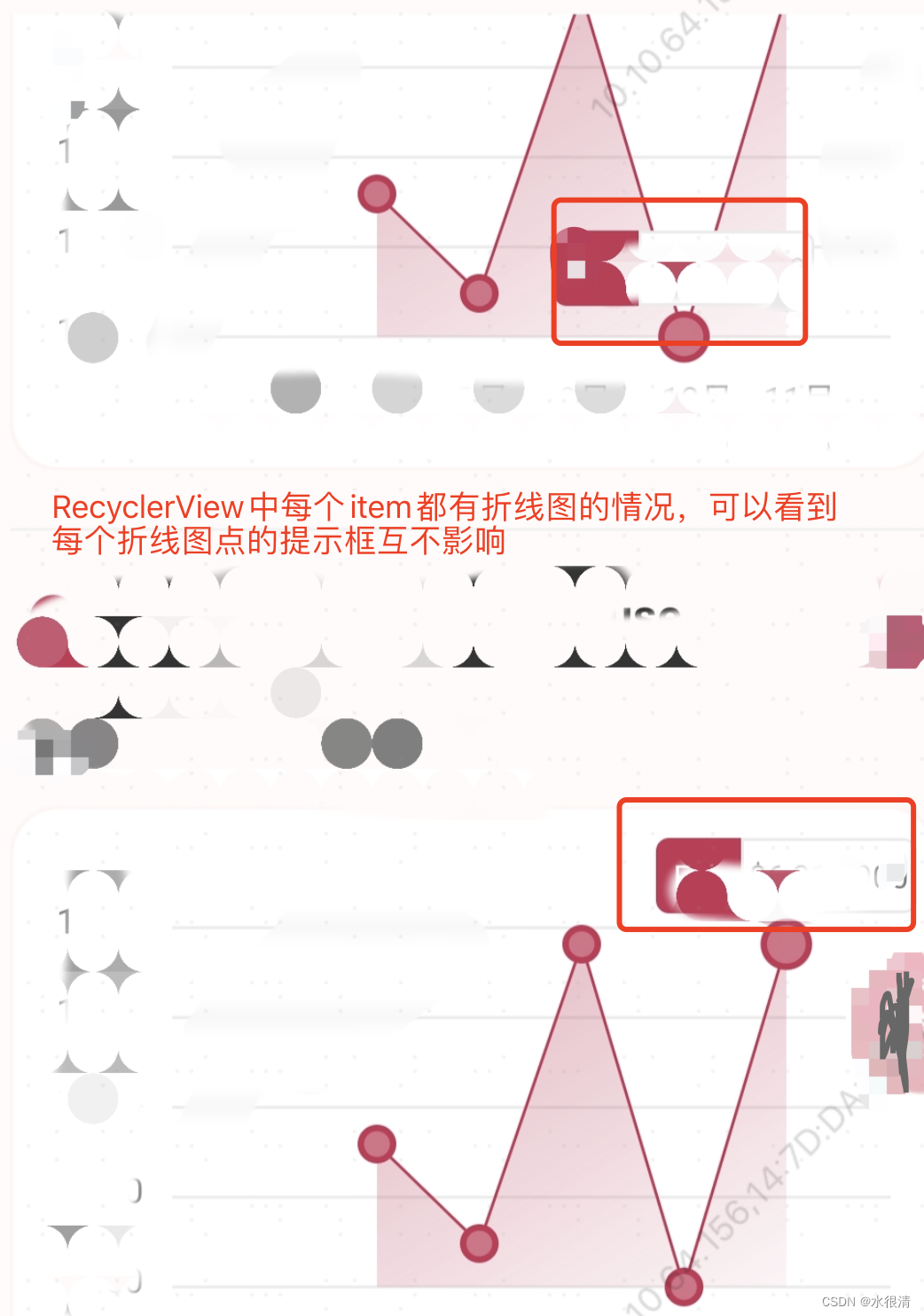
继上一篇文章,点击折线图上的点,显示提示信息进行修改,之前通过回调,调用外部方法,使用popupwindow或dialog来显示,但是这种方法对于弹框显示的位置很难控制,而且采用popupwindow或dialog是具有唯一性的,也就是显示后,必须先关闭,才能显示下一个点的弹框,这种在某些需求上是不符合的,这种只适合每次只弹一个弹框,且固定在底部,或者居中显示,就可以,实现起来简单。这种方式只适合在页面只有一个折线图的情况下,不适合运用到RecyclerView中,每个item都出现折线图的情况。
如果是要显示在点击到的点的上方,就很难控制,无法精准,并且在分辨率不同的手机会出现较大的差异。因此做了以下修改:
更新如下(20240329):点击点提示信息,不再使用popupwindow或dialog,还是通过自定义,引入xml布局来实现,适合运用到页面只有一个折线图,也适合RecyclerView中出现多个折线图的情况。具体实现代码如下:
public void showDialog(Canvas c, Point point) {c.save();c.translate((point.x - dip2px(45f)), (point.y - dip2px(30f) - CIRCLE_SIZE / 2f));FrameLayout frameLayout = new FrameLayout(mContext);frameLayout.setLayoutParams(new ViewGroup.LayoutParams(200, 200));LayoutInflater li = (LayoutInflater) mContext.getSystemService(Context.LAYOUT_INFLATER_SERVICE);View v = li.inflate(R.layout.dialog_valuation_tracker, null);v.setLayoutParams(newFrameLayout.LayoutParams(dip2px(90f), dip2px(26f)));frameLayout.addView(v);frameLayout.measure(bWidth, bHeight);frameLayout.layout(100, 100, 100, 100);frameLayout.draw(c);c.restore();}可以看到,是通过引入xml的形式来实现,使用xml能更加的实现多样化样式,要显示什么样子的提示框,可自行在xml里面修改,比如可以加入图片等;并且可以更好的控制显示的位置。可以通过再添加一些方法给外部调用即可
完整代码如下
public class BrokenLineView extends View {private static final int CIRCLE_SIZE = 40;private static enum LineStyle {LINE, CURVE}private static enum YLineStyle {DASHES_LINE, FULL_LINE, NOT_LINE}private static enum ShaderOrientationStyle {ORIENTATION_H, ORIENTATION_V}private final Context mContext;private OnClickListener listener;private LineStyle mStyle = LineStyle.LINE;private YLineStyle mYLineStyle = YLineStyle.NOT_LINE;private ShaderOrientationStyle mShaderOrientationStyle = ShaderOrientationStyle.ORIENTATION_V;private int canvasWidth;private int bHeight = 0;private int bWidth = 0;private int marginLeft;private int marginRight;private boolean isMeasure = true;private int xTextWidth = 0;//Y textprivate int spacingHeight;private double averageValue;private int marginTop = 0;private int marginBottom = 0;/*** data*/private Point[] mPoints;private List<String> yRawData = new ArrayList<>();private ValuationTrackerPointData pointData;private List<String> xRawData = new ArrayList<>();private final List<Double> dataList = new ArrayList<>();private final List<Integer> xList = new ArrayList<>();// x valueprivate final Map<String, Integer> xMap = new HashMap<>();/*** paint color*/private int xTextPaintColor;private int yTextPaintColor;private int startShaderColor;private int endShaderColor;private int mCanvasColor;private int mXLinePaintColor;/*** paint size*/private int xTextSize = 12;private int yTextSize = 12;private Point mSelPoint;public BrokenLineView(Context context) {this(context, null);}public BrokenLineView(Context context, AttributeSet attrs) {super(context, attrs);this.mContext = context;initView();}private void initView() {xTextPaintColor = getColor(mContext, R.color.cl_858585);yTextPaintColor = getColor(mContext, R.color.cl_858585);startShaderColor = getColor(mContext, R.color.cl_c53355_30);endShaderColor = getColor(mContext, R.color.cl_c53355_5);mCanvasColor = getColor(mContext, R.color.white);mXLinePaintColor = getColor(mContext, R.color.cl_EBEBEB);}public void setData(ValuationTrackerPointData pointData) {this.pointData = pointData;averageValue = pointData.getyAverageValue();xRawData.clear();yRawData.clear();dataList.clear();xRawData = pointData.getxAxis();xRawData.add(0, "");yRawData = pointData.getyAxis();for (int i = 0; i < pointData.getPointInfo().size(); i++) {dataList.add(pointData.getPointInfo().get(i).getPrice());}if (null != dataList) {mPoints = new Point[dataList.size()];}if (null != yRawData) {spacingHeight = yRawData.size();}}@Overrideprotected void onSizeChanged(int w, int h, int oldW, int oldH) {if (isMeasure) {marginLeft = dip2px(20);marginRight = dip2px(10);marginTop = dip2px(5);marginBottom = dip2px(40);int canvasHeight = getHeight();this.canvasWidth = getWidth();if (bHeight == 0) {bHeight = canvasHeight - marginBottom - marginTop;}if (bWidth == 0) {bWidth = canvasWidth - marginLeft - marginRight;}isMeasure = false;}}@Overrideprotected void onDraw(Canvas canvas) {canvas.drawColor(mCanvasColor);//canvas color//draw X linedrawAllXLine(canvas);if (YLineStyle.DASHES_LINE == mYLineStyle) {drawPathYDashesLine(canvas);//draw Y dashes line} else if (YLineStyle.FULL_LINE == mYLineStyle) {drawAllYLine(canvas);// draw Y line} else {noDrawYLine(canvas);}// point initmPoints = getPoints();//draw cure linedrawCurve(canvas);//draw Polygon bg colordrawPolygonBgColor(canvas);// is click pointif (null == mSelPoint) {drawDot(canvas);// draw dot} else {clickUpdateDot(canvas);// update dot after click}}private void drawCurve(Canvas c) {Paint p = new Paint(Paint.ANTI_ALIAS_FLAG);p.setColor(getColor(mContext, R.color.cl_c53355));p.setStrokeWidth(dip2px(1f));p.setStyle(Paint.Style.STROKE);if (mStyle == LineStyle.CURVE) {drawScrollLine(c, p);} else {drawLine(c, p);}}private void drawDot(Canvas c) {if (null == mPoints || mPoints.length == 0) {return;}Paint p = new Paint(Paint.ANTI_ALIAS_FLAG);p.setStyle(Paint.Style.FILL);for (Point point : mPoints) {p.setColor(getColor(mContext, R.color.cl_c53355));c.drawCircle(point.x, point.y, CIRCLE_SIZE / 2f, p);p.setColor(getColor(mContext, R.color.cl_d77188));c.drawCircle(point.x, point.y, CIRCLE_SIZE / 3f, p);}}private void clickUpdateDot(Canvas c) {if (null == mPoints || mPoints.length == 0) {return;}Paint p = new Paint(Paint.ANTI_ALIAS_FLAG);p.setStyle(Paint.Style.FILL);for (Point point : mPoints) {if (null != mSelPoint && mSelPoint.x == point.x && mSelPoint.y == point.y) {p.setColor(getColor(mContext, R.color.cl_c53355));c.drawCircle(point.x, point.y, CIRCLE_SIZE / 1.5f, p);p.setColor(getColor(mContext, R.color.cl_d77188));c.drawCircle(point.x, point.y, (CIRCLE_SIZE / 2f), p);showDialog(c, point);} else {p.setColor(getColor(mContext, R.color.cl_c53355));c.drawCircle(point.x, point.y, CIRCLE_SIZE / 2f, p);p.setColor(getColor(mContext, R.color.cl_d77188));c.drawCircle(point.x, point.y, CIRCLE_SIZE / 3f, p);}}}private void drawPolygonBgColor(Canvas c) {if (null == mPoints || mPoints.length == 0) {return;}Path p = new Path();float startX = 0;float endX = 0;int endPoint = mPoints.length - 1;for (int i = 0; i < mPoints.length; i++) {if (i == 0) {startX = mPoints[i].x;p.moveTo(mPoints[i].x, 0);p.lineTo(mPoints[i].x, mPoints[i].y);} else {p.lineTo(mPoints[i].x, mPoints[i].y);if (i == endPoint) {endX = mPoints[i].x;}}}p.lineTo(endX, (bHeight + marginTop));p.lineTo(startX, (bHeight + marginTop));p.close();Paint paint = new Paint();paint.setStyle(Paint.Style.FILL);Shader shader = null;if (mShaderOrientationStyle == ShaderOrientationStyle.ORIENTATION_H) {shader = new LinearGradient(endX, (bHeight + marginTop), startX, (bHeight + marginTop),startShaderColor, endShaderColor, Shader.TileMode.REPEAT);} else {Point point = getYBiggestPoint();if (null != point) {shader = new LinearGradient(point.x, point.y, endX, (bHeight + marginTop),startShaderColor, endShaderColor, Shader.TileMode.REPEAT);}}paint.setShader(shader);c.drawPath(p, paint);}private Point getYBiggestPoint() {Point p = null;if (null != mPoints && mPoints.length > 0) {p = mPoints[0];for (int i = 0; i < mPoints.length - 1; i++) {if (p.y > mPoints[i + 1].y) {p = mPoints[i + 1];}}}return p;}private void drawPathYDashesLine(Canvas canvas) {if (null == xRawData || xRawData.isEmpty()) {return;}Path path = new Path();int dashLength = 16;int blankLength = 16;Paint p = new Paint();p.setStyle(Paint.Style.STROKE);p.setStrokeWidth(4);p.setColor(getColor(mContext, R.color.colorGray));p.setPathEffect(new DashPathEffect(new float[]{dashLength, blankLength}, 0));for (int i = 0; i < xRawData.size(); i++) {drawTextY(xRawData.get(i), (getMarginWidth() + getBWidth() / xRawData.size() * i) - dip2px(8), bHeight + marginTop + dip2px(26),canvas);if (null != xMap) {xMap.put(xRawData.get(i), getMarginWidth() + getBWidth() / xRawData.size() * i);}int startX = (getMarginWidth() + getBWidth() / xRawData.size() * i);int startY = marginTop;int endY = bHeight + marginTop;path.moveTo(startX, startY);path.lineTo(startX, endY);canvas.drawPath(path, p);}getPointX();}/*** draw Y*/private void drawAllYLine(Canvas canvas) {if (null == xRawData || xRawData.isEmpty()) {return;}Paint p = new Paint(Paint.ANTI_ALIAS_FLAG);p.setColor(getColor(mContext, R.color.colorBlack));for (int i = 0; i < xRawData.size(); i++) {int w = (getMarginWidth() + getBWidth() / xRawData.size()) * i;canvas.drawLine(w, marginTop, w, (bHeight + marginTop), p);drawTextY(xRawData.get(i), getMarginWidth() + getBWidth() / xRawData.size() * i - dip2px(8), bHeight + marginTop + dip2px(26),canvas);if (null != xMap) {xMap.put(xRawData.get(i), getMarginWidth() + getBWidth() / xRawData.size() * i);}}getPointX();}private void noDrawYLine(Canvas canvas) {if (null == xRawData || xRawData.isEmpty()) {return;}for (int i = 0; i < xRawData.size(); i++) {drawTextY(xRawData.get(i), (getMarginWidth() + getBWidth() / xRawData.size() * i) - dip2px(8), bHeight + marginTop + dip2px(26),canvas);if (null != xMap) {xMap.put(xRawData.get(i), getMarginWidth() + getBWidth() / xRawData.size() * i);}}getPointX();}private void getPointX() {if (null == xMap || xMap.size() == 0) {return;}if (null != pointData && !pointData.getPointInfo().isEmpty()) {for (ValuationTrackerPointData.PointInfo info : pointData.getPointInfo()) {for (Map.Entry<String, Integer> entry : xMap.entrySet()) {if (entry.getKey().equals(info.getMouth())) {xList.add(xMap.get(entry.getKey()));}}}}}/*** draw x*/private void drawAllXLine(Canvas canvas) {if (null == yRawData || yRawData.isEmpty()) {return;}Paint p = new Paint(Paint.ANTI_ALIAS_FLAG);p.setColor(mXLinePaintColor);p.setStrokeWidth(dip2px(1f));p.setStyle(Paint.Style.FILL);int h = bHeight / spacingHeight;for (int i = 0; i < yRawData.size(); i++) {drawTextX(yRawData.get(i), marginLeft / 2,bHeight - (bHeight / spacingHeight) * i + marginTop + dip2px(2), canvas);canvas.drawLine(getMarginWidth(), (bHeight - h * i + marginTop), (canvasWidth - marginRight),(bHeight - h * i + marginTop), p);}}private void drawScrollLine(Canvas canvas, Paint paint) {if (null == mPoints || mPoints.length == 0) {return;}Point startP;Point endP;for (int i = 0; i < mPoints.length - 1; i++) {startP = mPoints[i];endP = mPoints[i + 1];int wt = (startP.x + endP.x) / 2;Point p3 = new Point();Point p4 = new Point();p3.y = startP.y;p3.x = wt;p4.y = endP.y;p4.x = wt;Path path = new Path();path.moveTo(startP.x, startP.y);path.cubicTo(p3.x, p3.y, p4.x, p4.y, endP.x, endP.y);canvas.drawPath(path, paint);}}private void drawLine(Canvas canvas, Paint paint) {if (null == mPoints || mPoints.length == 0) {return;}Point startP;Point endP;for (int i = 0; i < mPoints.length - 1; i++) {startP = mPoints[i];endP = mPoints[i + 1];canvas.drawLine(startP.x, startP.y, endP.x, endP.y, paint);}}private void drawTextY(String text, int x, int y, Canvas canvas) {if (null == yRawData || yRawData.isEmpty()) {return;}Paint p = new Paint(Paint.ANTI_ALIAS_FLAG);p.setTextSize(dip2px(yTextSize));p.setColor(yTextPaintColor);p.setTextAlign(Paint.Align.LEFT);canvas.drawText(text, x, y, p);}private void drawTextX(String text, int x, int y, Canvas canvas) {if (null == xRawData || xRawData.isEmpty()) {return;}Paint p = new Paint(Paint.ANTI_ALIAS_FLAG);p.setTextSize(dip2px(xTextSize));p.setColor(xTextPaintColor);p.setTextAlign(Paint.Align.LEFT);xTextWidth = (int) p.measureText(text);canvas.drawText(text, x, y, p);}private Point[] getPoints() {Point[] points = new Point[dataList.size()];for (int i = 0; i < dataList.size(); i++) {int ph = bHeight - (int) (((dataList.get(i) - pointData.getyAxisSmallValue()) / averageValue) * (bHeight * 1.0f / spacingHeight));points[i] = new Point(xList.get(i), ph + marginTop);}return points;}private int getMarginWidth() {if (xTextWidth == 0) {return marginLeft;} else {return xTextWidth + marginLeft;}}private int getBWidth() {if (xTextWidth == 0) {return bWidth;} else {return bWidth - xTextWidth;}}@SuppressLint("ClickableViewAccessibility")@Overridepublic boolean onTouchEvent(MotionEvent event) {int x = (int) event.getX();int y = (int) event.getY();int action = event.getAction();if (action == MotionEvent.ACTION_DOWN) {dealClick(x, y);}return true;}private void dealClick(int x, int y) {if (null != mPoints && mPoints.length > 0) {for (Point p : mPoints) {if ((p.x - CIRCLE_SIZE) < x && x < (p.x + CIRCLE_SIZE) &&(p.y - CIRCLE_SIZE) < y && y < (p.y + CIRCLE_SIZE)) {mSelPoint = p;invalidate();if (null != listener) {listener.onClick(this, p.x, p.y);}}}}}public void showDialog(Canvas c, Point point) {c.save();c.translate((point.x - dip2px(45f)), (point.y - dip2px(30f) - CIRCLE_SIZE / 2f));FrameLayout frameLayout = new FrameLayout(mContext);frameLayout.setLayoutParams(new ViewGroup.LayoutParams(200, 200));LayoutInflater li = (LayoutInflater) mContext.getSystemService(Context.LAYOUT_INFLATER_SERVICE);View v = li.inflate(R.layout.dialog_valuation_tracker, null);v.setLayoutParams(newFrameLayout.LayoutParams(dip2px(90f), dip2px(26f)));frameLayout.addView(v);frameLayout.measure(bWidth, bHeight);frameLayout.layout(100, 100, 100, 100);frameLayout.draw(c);c.restore();}public void setAverageValue(int averageValue) {this.averageValue = averageValue;}public void setMarginTop(int marginTop) {this.marginTop = marginTop;}public void setMarginBottom(int marginBottom) {this.marginBottom = marginBottom;}public void setMStyle(LineStyle mStyle) {this.mStyle = mStyle;}public void setMYLineStyle(YLineStyle style) {this.mYLineStyle = style;}public void setShaderOrientationStyle(ShaderOrientationStyle shaderOrientationStyle) {this.mShaderOrientationStyle = shaderOrientationStyle;}public void setBHeight(int bHeight) {this.bHeight = bHeight;}public void setXTextPaintColor(int xTextPaintColor) {this.xTextPaintColor = xTextPaintColor;}public void setYTextPaintColor(int yTextPaintColor) {this.yTextPaintColor = yTextPaintColor;}public void setXTextSize(int xTextSize) {this.xTextSize = xTextSize;}public void setYTextSize(int yTextSize) {this.yTextSize = yTextSize;}public void setXLinePaintColor(int color) {mXLinePaintColor = color;}public void setShaderColor(int startColor, int endColor) {this.startShaderColor = startColor;this.endShaderColor = endColor;}private int dip2px(float dpValue) {float scale = mContext.getResources().getDisplayMetrics().density;return (int) (dpValue * scale + 0.5f);}public interface OnClickListener {void onClick(View v, int x, int y);}public void setListener(OnClickListener listener) {this.listener = listener;}
}
相关文章:
Android 自定义坐标曲线图(二)
Android 自定义坐标曲线图_android 自定义曲线图-CSDN博客 继上一篇文章,点击折线图上的点,显示提示信息进行修改,之前通过回调,调用外部方法,使用popupwindow或dialog来显示,但是这种方法对于弹框显示的位…...

每日OJ题_子序列dp⑧_力扣446. 等差数列划分 II - 子序列
目录 力扣446. 等差数列划分 II - 子序列 解析代码 力扣446. 等差数列划分 II - 子序列 446. 等差数列划分 II - 子序列 难度 困难 给你一个整数数组 nums ,返回 nums 中所有 等差子序列 的数目。 如果一个序列中 至少有三个元素 ,并且任意两个相邻…...

GOPROXY 代理设置
通常报错: 1.http: server gave HTTP response to HTTPS client 2.timeout 解决指令:(会话临时性),长久的可以在配置文件中配置 go env -w GOPROXYhttps://goproxy.cn,direct 长久的,在~/.bashrc文件中添加: expo…...

Redis面经
Redis面经 Redis缓存穿透、缓存击穿和缓存雪崩及解决方案概述缓存穿透详解及解决方案缓存击穿详解及解决方案缓存雪崩详解及解决方案 Redis持久化机制什么是数据持久化?Redis数据持久化概述RDB持久化的优缺点AOF持久化混合持久化 Redis缓存穿透、缓存击穿和缓存雪崩…...
【c++】类和对象(六)深入了解隐式类型转换
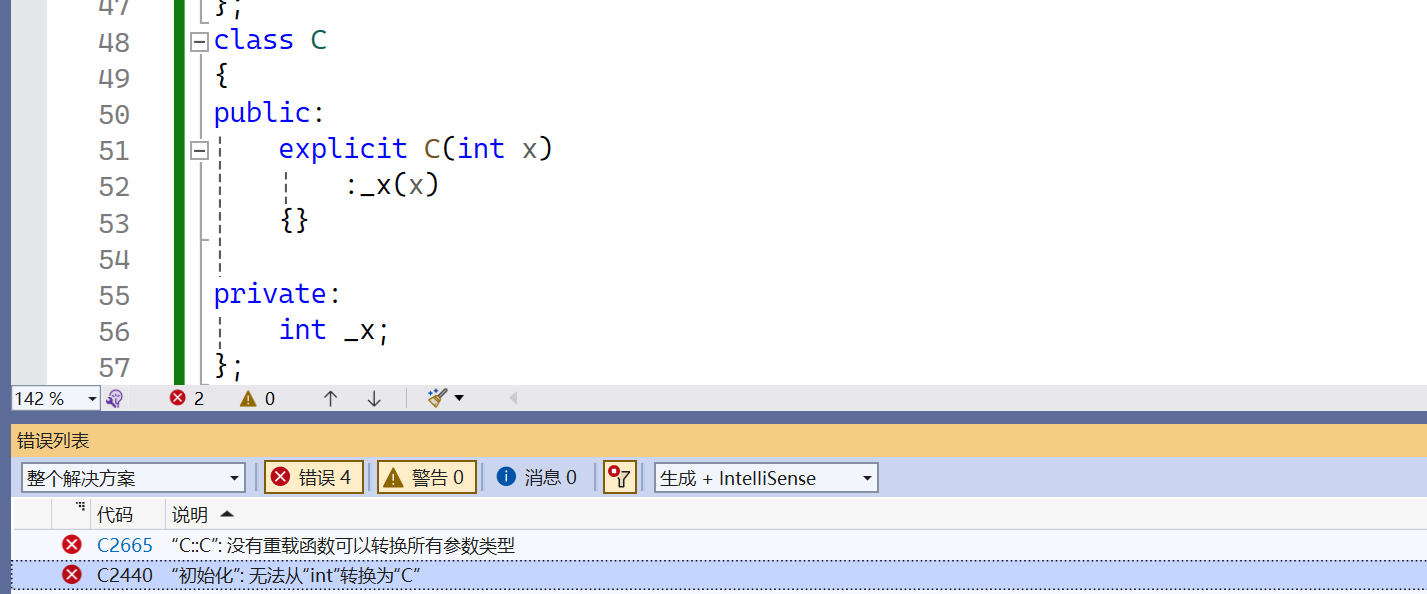
🔥个人主页:Quitecoder 🔥专栏:c笔记仓 朋友们大家好,本篇文章我们来到初始化列表,隐式类型转换以及explicit的内容 目录 1.初始化列表1.1构造函数体赋值1.2初始化列表1.2.1隐式类型转换与复制初始化 1.3e…...

什么是nginx正向代理和反向代理?
什么是代理? 代理(Proxy), 简单理解就是自己做不了的事情或实现不了的功能,委托别人去做。 什么是正向代理? 在nginx中,正向代理指委托者是客户端,即被代理的对象是客户端 在这幅图中,由于左边内网中…...

【Go】面向萌新的Gin框架知识梳理学习笔记
目录 Gin框架简介 路由&路由组 1. 定义基本路由 2. 参数传递 3. 查询字符串参数 4. 路由组 5. 路由中间件 模板渲染 1. 加载模板 2. 定义模板 3. 渲染模板 4. 自定义模板函数 返回json 1. 导入 Gin 包 2. 创建 Gin 引擎 3. 定义路由和处理器函数 4. 运行服…...

baseDao增删改查.
这里写目录标题 1、baseDao增删改查介绍2、basDao类3、BasDao类的作用 1、baseDao增删改查介绍 (1)、增加Create)操作: 通过BaseDao的insert方法可以向数据库中插入一条新的记录。 该方法接受一个实体对象作参数,将该对象的属性映射到表的字…...

什么是面向对象【大白话Java面试题】
什么是面向对象 同样是解决一个问题,面向对象的角度是将问题抽象成对象的形式。通过分类的思维方式,将问题分成几个解决方案的对象。给每个对象赋值属性和方法,对每个对象的细节进行面向过程的思维,执行自己的方法来解决问题。 …...
PyTorch 教程-快速上手指南
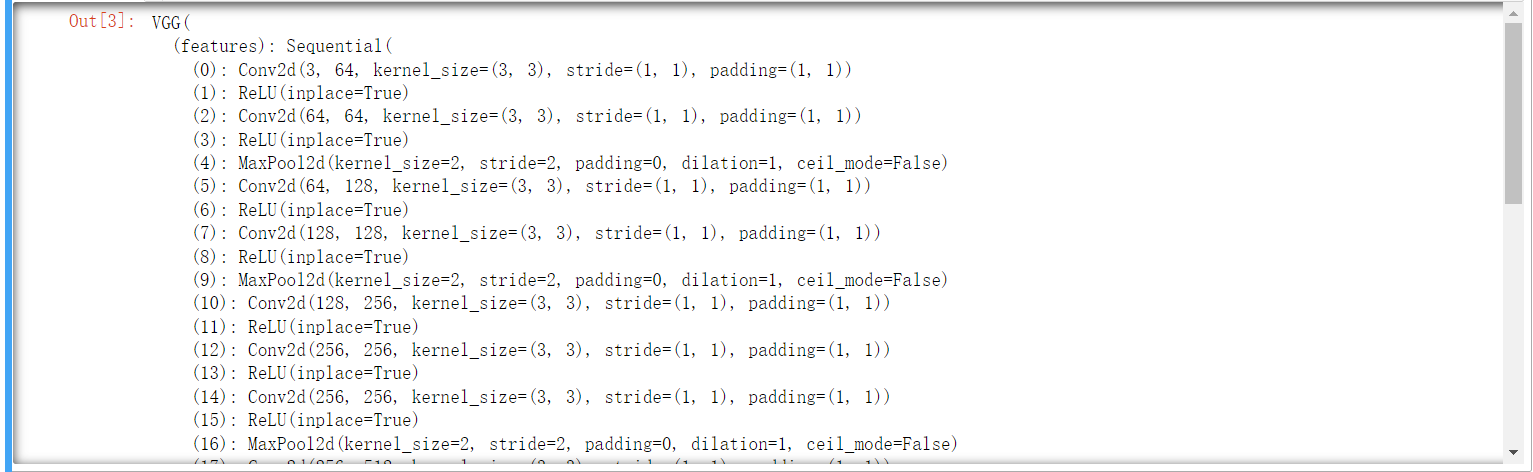
文章目录 PyTorch Quickstart1.处理数据2.创建模型3.优化模型参数4.保存模型5.加载模型 PyTorch 基础入门1.Tensors1.1初始化张量1.2张量的属性1.3张量运算1.3.1张量的索引和切片1.3.2张量的连接1.3.3算术运算1.3.4单元素张量转变为Python数值 1.4Tensor与NumPy的桥接1.4.1Tens…...

【有芯职说】数字芯片BES工程师
一、 数字芯片BES工程师简介 今天来聊聊数字芯片BES工程师,其中BES是Back End Support的缩写,就是后端支持的意思。其实这个岗位是数字IC前端设计和数字IC后端设计之间的一座桥,完成从寄存器传输级设计到具体工艺的mapping和实现。这个岗位在…...
暴力破解pdf文档密码
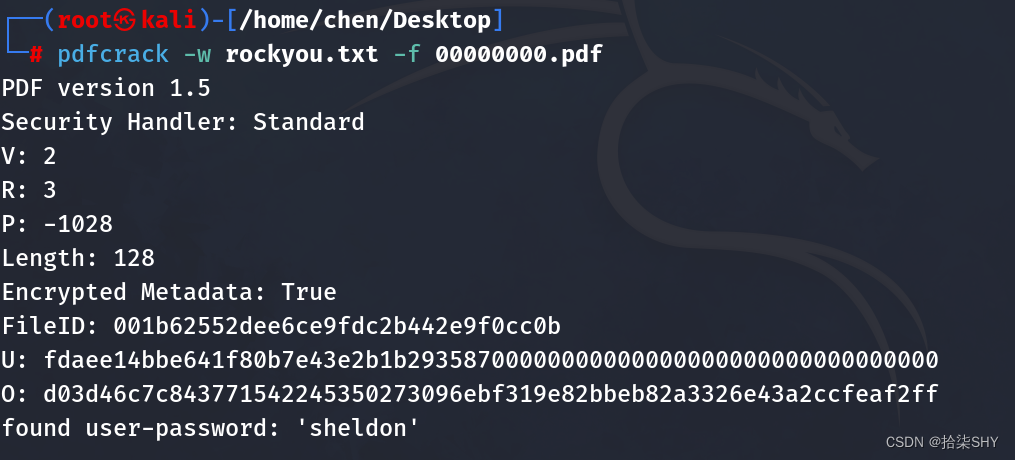
首先安装pdfcrack工具包 apt install pdfcrack 默认密码字典存储在/usr/share/wordlists里,是gz文件,将它解压并copy到pdf目录 然后使用pdfcrack破解 密码在最后一行user-password的单引号里...
蓝桥杯刷题第四天
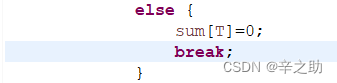
思路: 这道题很容易即可发现就是简单的暴力即可完成题目,我们只需满足所有数的和为偶数即可保证有满足条件的分法,同时也不需要存下每个输入的数据,只需要知道他是偶数还是奇数即可,因为我们只需要偶数个奇数搭配在一块…...

03-数据库的用户管理
一、创建新用户 mysql> create user xjzw10.0.0.% identified by 1; Query OK, 0 rows affected (0.01 sec) 二、查看当前数据库正在登录的用户 mysql> select user(); ---------------- | user() | ---------------- | rootlocalhost | ---------------- 1 row …...

每日一题 --- 三数之和[力扣][Go]
三数之和 题目:15. 三数之和 给你一个整数数组 nums ,判断是否存在三元组 [nums[i], nums[j], nums[k]] 满足 i ! j、i ! k 且 j ! k ,同时还满足 nums[i] nums[j] nums[k] 0 。请 你返回所有和为 0 且不重复的三元组。 **注意&#x…...
)
vue render 函数详解 (配参数详解)
vue render 函数详解 (配参数详解) 在 Vue 3 中,render 函数被用来代替 Vue 2 中的模板语法。 它接收一个 h 函数(或者是 createElement 函数的别名),并且返回一个虚拟 DOM。 render 函数的语法结构如下: render(h) …...
ubuntu23.10配置RUST开发环境
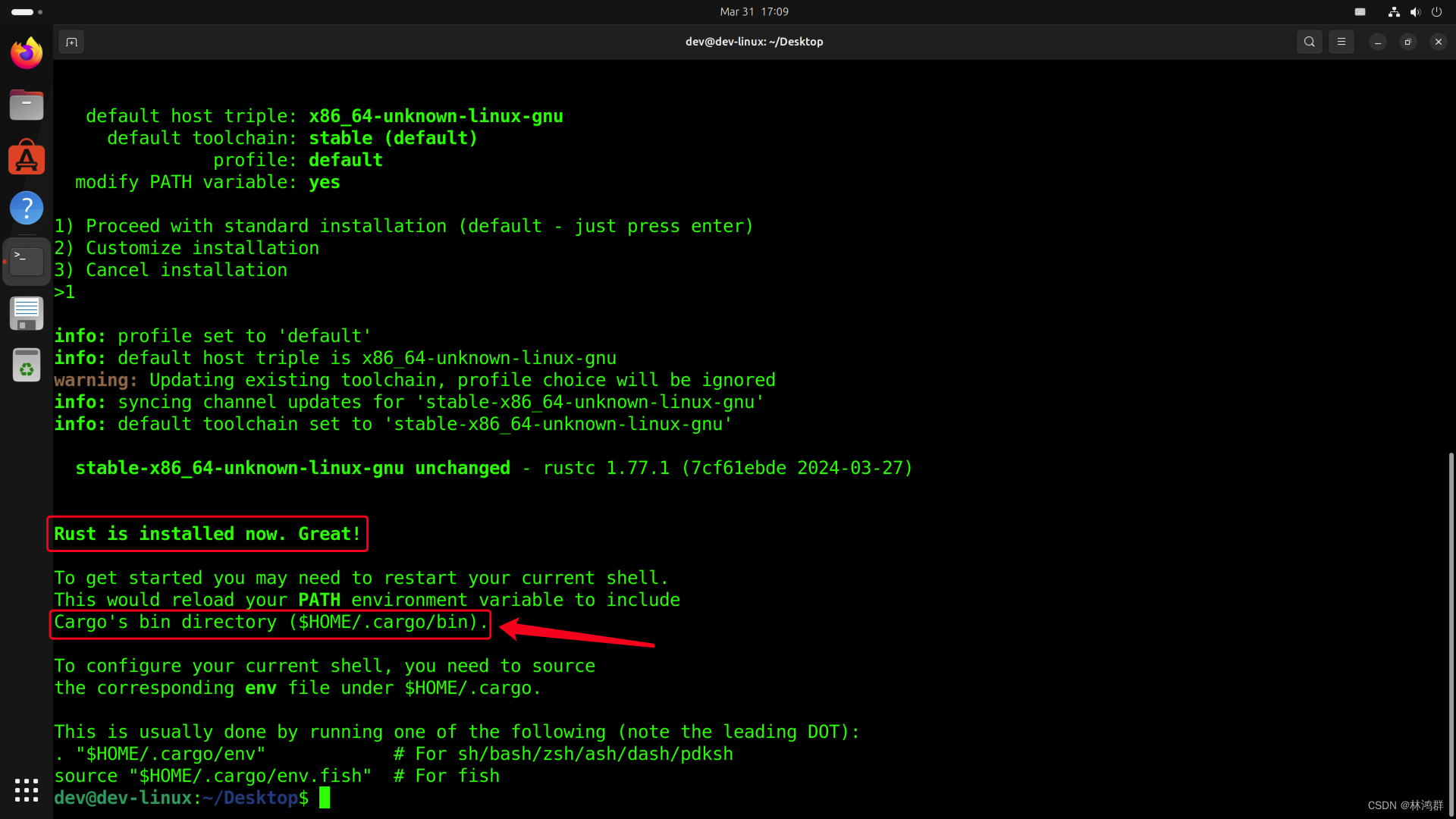
系统版本: gcc版本 下载rustup安装脚本: curl --proto =https --tlsv1.2 https://sh.rustup.rs -sSf | sh下载完成后会自动执行 选择默认安装选项 添加cargo安装目录到环境变量 vim ~/.bashrc<...

Vue性能优化--gZip
一、gZip简单介绍 1.1 什么是gzip gzip是GNUzip的缩写,最早用于UNIX系统的文件压缩。HTTP协议上的gzip编码是一种用来改进web应用程序性能的技术,web服务器和客户端(浏览器)必须共同支持gzip。目前主流的浏览器,Chro…...
蓝桥杯第七届大学B组详解
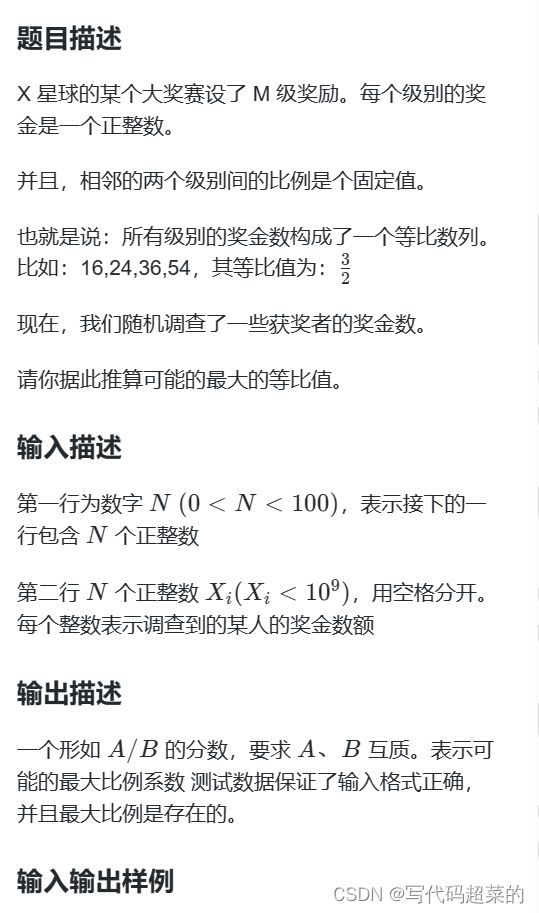
目录 1.煤球数量; 2.生日蜡烛; 3.凑算式 4.方格填数 5.四平方和 6.交换瓶子 7.最大比例 1.煤球数量 题目解析:可以根据题目的意思,找到规律。 1 *- 1个 2 *** 3个 3 ****** 6个 4 ********** 10个 不难发现 第…...
荣誉 | 人大金仓连续三年入选“金融信创优秀解决方案”
3月28日,由中国人民银行领导,中国金融电子化集团有限公司牵头组建的金融信创生态实验室发布“第三期金融信创优秀解决方案”,人大金仓新一代手机银行系统解决方案成功入选,这也是人大金仓金融行业解决方案连续第三年获得用户认可。…...

手机号查QQ号终极指南:3分钟掌握Python逆向查询技巧
手机号查QQ号终极指南:3分钟掌握Python逆向查询技巧 【免费下载链接】phone2qq 项目地址: https://gitcode.com/gh_mirrors/ph/phone2qq 你是否曾需要快速验证手机号与QQ号的绑定关系?手机号查QQ号工具是一个简单高效的Python开源项目࿰…...

免费一键去图片水印的App有哪些?免费去图片水印软件推荐,2026实测好用工具盘点
免费一键去图片水印的App有哪些?免费去图片水印软件推荐,2026实测好用工具盘点 在日常用图的过程中,水印几乎是绕不开的麻烦——从网络下载的素材到平台截图,从拍摄叠加的文字标注到品牌Logo,各种形式的水印让图片用起…...
与时间参数STmin)
从CANoe实战出发:深度解析UDS网络层诊断中的流控帧(FC)与时间参数STmin
从CANoe实战解析UDS流控帧:FC与STmin参数调优指南 在汽车电子测试领域,UDS诊断协议的网络层流控机制直接影响着ECU通信的可靠性与效率。当测试工程师在CANoe环境中模拟诊断会话时,经常会遇到因流控帧参数配置不当导致的报文丢失、响应超时等问…...

联邦学习与RAG融合:构建隐私保护的分布式智能问答系统
1. 项目概述:当联邦学习遇上检索增强生成最近在折腾一个挺有意思的开源项目,叫fed-rag,来自 Vector Institute。光看名字,老司机们大概就能猜出个七七八八了:这玩意儿是把联邦学习和检索增强生成给揉到一块儿去了。我花…...

Azure流分析快速入门:构建实时数据处理管道的完整指南 [特殊字符]
Azure流分析快速入门:构建实时数据处理管道的完整指南 🚀 【免费下载链接】azure-quickstart-templates Azure Quickstart Templates 项目地址: https://gitcode.com/gh_mirrors/az/azure-quickstart-templates Azure流分析是微软提供的实时数据分…...

淘金币自动化脚本:每天6分钟搞定淘宝全任务,彻底解放你的双手
淘金币自动化脚本:每天6分钟搞定淘宝全任务,彻底解放你的双手 【免费下载链接】taojinbi 淘宝淘金币自动执行脚本,包含蚂蚁森林收取能量,芭芭农场全任务,解放你的双手 项目地址: https://gitcode.com/gh_mirrors/ta/…...

终极网盘直链下载助手完整指南:免费解锁八大平台高速下载
终极网盘直链下载助手完整指南:免费解锁八大平台高速下载 【免费下载链接】Online-disk-direct-link-download-assistant 一个基于 JavaScript 的网盘文件下载地址获取工具。基于【网盘直链下载助手】修改 ,支持 百度网盘 / 阿里云盘 / 中国移动云盘 / 天…...

技术人必备的Chrome插件清单:第7个让调试效率翻倍
对于软件测试从业者而言,浏览器早已不是单纯的信息浏览窗口,而是集接口调试、性能分析、元素定位、辅助功能验证于一体的核心工作站。面对日益复杂的Web应用和紧迫的交付周期,一套精悍的Chrome插件组合往往能带来远超预期的效率回报。本文从测…...

droidrun-agent:基于MCP协议连接AI智能体与安卓设备的自动化桥梁
1. 项目概述:当AI助手需要“动手”时在AI Agent(智能体)领域,我们常常遇到一个瓶颈:模型可以生成完美的计划、写出漂亮的代码,但它如何与真实世界交互,尤其是如何操作一台物理设备?比…...

PixelAnnotationTool:破解语义分割标注效率瓶颈的智能解决方案
PixelAnnotationTool:破解语义分割标注效率瓶颈的智能解决方案 【免费下载链接】PixelAnnotationTool Annotate quickly images. 项目地址: https://gitcode.com/gh_mirrors/pi/PixelAnnotationTool 在计算机视觉领域,高质量的语义分割数据标注是…...