
Unity照片墙简易圆形交互效果总结
还要很多可以优化的点地方,有兴趣的可以做
比如对象的销毁和生成可以做成对象池,走到最左边后再移动到最右边循环利用
分析过程文件,采用Blender,资源已上传,可以播放动画看效果,下面截个图:
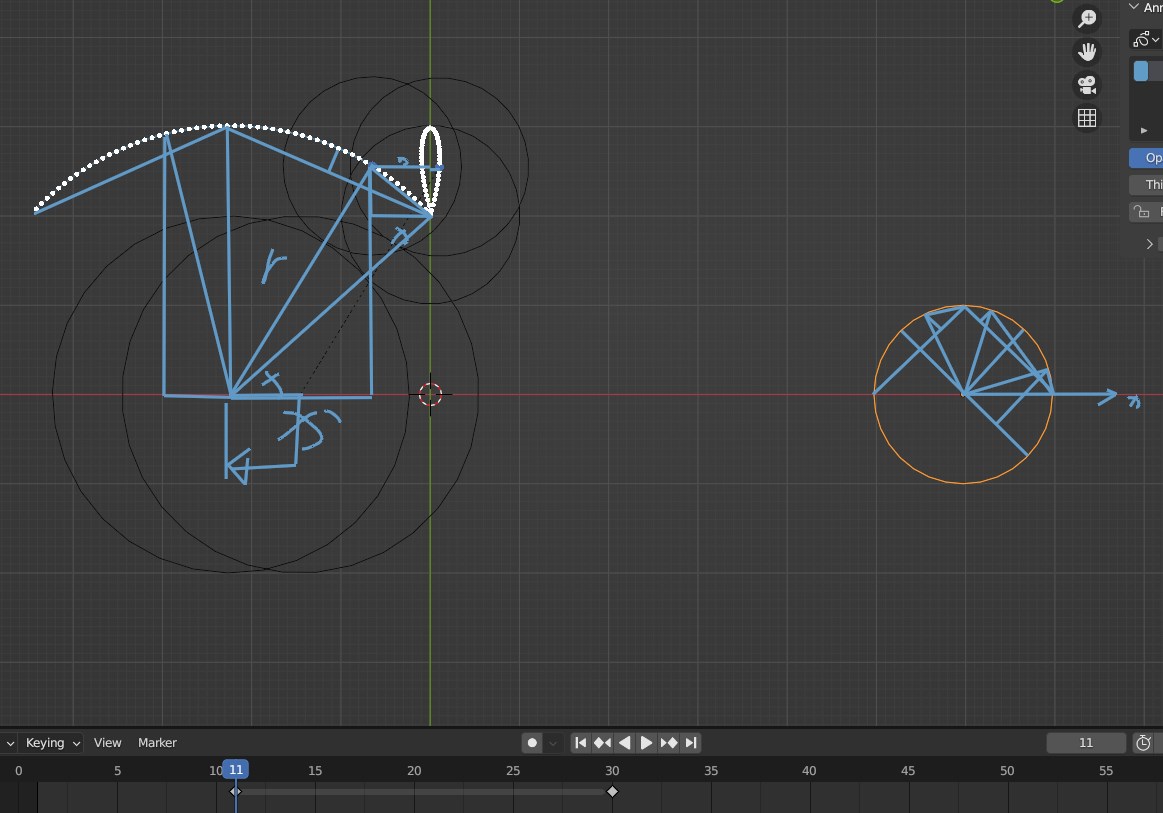
视频效果如下:
anim
Untiy结构如下:
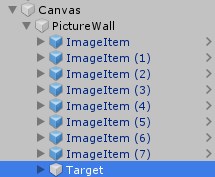
上面的ImageItem是我手动添加展示关系用的,默认就一个Target,PictureWall挂PictureWall脚本,ImageItem(预制体)挂ImageItemController 脚本即可
using UnityEngine;public class ImageItemController : MonoBehaviour
{public RectTransform target;public float speed = 10;[SerializeField]private float radiusScale = 1;public float horizontalOffset = 0;private RectTransform rect;private float radius = 0;private Vector2 originalPos = Vector2.zero;private bool isCheck = false;private bool isStartRotate = false;private Vector2 circleCenter;private float xDelta = 0;private float offset = 0;void Start(){rect = transform as RectTransform;rect.anchoredPosition = new Vector2(rect.anchoredPosition.x - horizontalOffset, rect.anchoredPosition.y);radius = target.rect.width * radiusScale;// * Random.Range(0.8f, 1); 半径可以在范围内随机}/* 1.现根据接触点计算出圆的路径:目标移动的位移,计算在圆的的位置,只需修改x即可,y保持不变* 2.计算出的位置x加上移动的距离,得出最总x的位置* 3.设置位置即可* 4.走远时的接触点:开始接触时的关于x对称位置  * 5.添加移动:平移原点和圆点即可*///移动void Update(){if (!isCheck){var dis = Vector2.Distance(target.anchoredPosition, rect.anchoredPosition);if (dis <= radius){isCheck = true;originalPos = rect.anchoredPosition;float y = Mathf.Abs(originalPos.y - target.anchoredPosition.y);float xToCircleCenter = Mathf.Sqrt(radius * radius - y * y);float x = originalPos.x - xToCircleCenter;circleCenter = new Vector2(x, target.anchoredPosition.y);isStartRotate = true;rect.SetSiblingIndex(transform.parent.childCount - 2);}}xDelta = Time.deltaTime * speed;rect.anchoredPosition = new Vector2(rect.anchoredPosition.x - xDelta, rect.anchoredPosition.y);if (isStartRotate){circleCenter.x -= xDelta;originalPos.x -= xDelta;float moveXDistance = target.anchoredPosition.x - circleCenter.x;float x = originalPos.x - circleCenter.x - moveXDistance;float y = Mathf.Sqrt(radius * radius - x * x);float maxY = radius;if (originalPos.y < circleCenter.y){y = -y;maxY = -radius;}Vector2 circlePoint = new Vector2(x, y);if (rect.anchoredPosition.x >= target.anchoredPosition.x){var v1 = circlePoint - (originalPos - circleCenter);var v2 = (originalPos - circleCenter) + new Vector2(0, maxY);v2.Normalize();offset = Vector2.Dot(v1, v2);}else{float tempX = originalPos.x - circleCenter.x;Vector2 originalPos2 = originalPos + 2 * new Vector2(-tempX, 0);var v1 = circlePoint - new Vector2(0, maxY);var v2 = originalPos2 - circleCenter + new Vector2(0, maxY);v2.Normalize();offset = -Vector2.Dot(v1, v2);}if (float.IsNaN(offset)){offset = 0;}x += moveXDistance + offset;Vector2 pos = circleCenter + new Vector2(x, y);rect.anchoredPosition = pos;if (target.anchoredPosition.x >= originalPos.x + originalPos.x - circleCenter.x){rect.anchoredPosition = originalPos;rect.SetAsFirstSibling();}else if (target.anchoredPosition.x <= circleCenter.x){rect.anchoredPosition = originalPos;rect.SetAsFirstSibling();}}if (rect.anchoredPosition.x < -rect.rect.width){Destroy(gameObject);}}
}
using System.Collections;
using System.Collections.Generic;
using System.IO;
using UnityEngine;
using UnityEngine.UI;
using Utility;public class PictureWall : MonoBehaviour
{[SerializeField]private GameObject prefab;private const float WIDTH = 3072;private const float HEIGHT = 1664;private int row = 6;private int column;private float intervalDistance = 20;[SerializeField]private float offset = 200;private float itemWidth;private float itemHeight;public float speed = 10;private float time = 0;[SerializeField]private RectTransform target;private string path = "/PictureWall/";private List<string> texturePaths;private int currentIndex = 0;private List<Texture2D> textureList;void Start(){textureList = new List<Texture2D>();path = Application.streamingAssetsPath + path;ReadImage();CalculateRowColumn();enabled = false;}private void ReadImage(){if (!Directory.Exists(path)){Directory.CreateDirectory(path);return;}texturePaths = new List<string>();var jpgs = Directory.GetFiles(path, "*.jpg");texturePaths.AddRange(jpgs);texturePaths.Reverse();if (texturePaths.Count > 100){for (int i = texturePaths.Count - 1; i == 100; i--){File.Delete(texturePaths[i]);texturePaths.RemoveAt(i);}}foreach (var filePath in texturePaths){UtilityLoadImage.I.LoadImage(filePath, tex =>{textureList.Add(tex);addNum++;if (addNum == texturePaths.Count){Spawn();}});}}float addNum = 0;private void Spawn(){float x = 0;float y = 0;for (int i = 0; i < row; i++){y = i * (itemHeight + intervalDistance);for (int j = 0; j < column; j++){x = j * (itemWidth + intervalDistance);if (i % 2 != 0){//x -= offset;}RectTransform rect = Instantiate(prefab, transform).transform as RectTransform;rect.pivot = new Vector2(0.5f, 0.5f);rect.SetSizeWithCurrentAnchors(RectTransform.Axis.Horizontal, itemWidth);rect.SetSizeWithCurrentAnchors(RectTransform.Axis.Vertical, itemHeight);rect.anchoredPosition = new Vector2(x, -y) + new Vector2(rect.rect.width / 2, -rect.rect.height / 2);var controller = rect.GetComponent<ImageItemController>();controller.speed = speed;controller.target = target;if (i % 2 != 0){controller.horizontalOffset = offset;}SetTexture(rect);}}target.SetAsLastSibling();  enabled = true;}private void CalculateRowColumn(){itemHeight = (HEIGHT - (row - 1) * intervalDistance) / row;itemWidth = itemHeight * 16 / 9;//offset = itemWidth / 2;column = (int)(WIDTH / (itemWidth + intervalDistance)) + 3;time = itemWidth / speed;}bool isSpawned = false;private void Update(){if (!isSpawned && transform.childCount <= (column - 1) * row + 1){isSpawned = true;SpawnColumn();}}private void SpawnColumn(){float x = 0;float y = 0;for (int i = 0; i < row; i++){y = i * (itemHeight + intervalDistance);for (int j = 0; j < 1; j++){x = (column - 1) * (itemWidth + intervalDistance);RectTransform rect = Instantiate(prefab, transform).transform as RectTransform;rect.pivot = new Vector2(0.5f, 0.5f);rect.SetSizeWithCurrentAnchors(RectTransform.Axis.Horizontal, itemWidth);rect.SetSizeWithCurrentAnchors(RectTransform.Axis.Vertical, itemHeight);rect.anchoredPosition = new Vector2(x, -y) + new Vector2(intervalDistance - Time.deltaTime * speed, -rect.rect.height / 2);var controller = rect.GetComponent<ImageItemController>();controller.speed = speed;controller.target = target;if (i % 2 != 0){controller.horizontalOffset = offset;}SetTexture(rect);}}target.SetAsLastSibling();StartCoroutine(Delay());}private void SetTexture(RectTransform rect){        rect.GetComponent<RawImage>().texture = textureList[currentIndex];currentIndex = (currentIndex + 1) % texturePaths.Count;}private IEnumerator Delay(){//yield return new WaitForSeconds(0.1f);yield return null;isSpawned = false;}
}
工具类
using System;
using System.IO;
using System.Collections;
using System.Collections.Generic;
using UnityEngine;
using UnityEngine.Networking;namespace Utility
{public class UtilityLoadImage{public class MonoHelper : MonoBehaviour { }public static UtilityLoadImage I;private static MonoHelper helper;static UtilityLoadImage(){var go = new GameObject("UtilityLoadImage");helper = go.AddComponent<MonoHelper>();UnityEngine.Object.DontDestroyOnLoad(go);I = new UtilityLoadImage();}private UtilityLoadImage() { }#region inner methodprivate IEnumerator LoadTexture2D(string path, Action<Texture2D> callback){ //Debug.Log("path:" + path); UnityWebRequest uwr = UnityWebRequestTexture.GetTexture(path);yield return uwr.SendWebRequest();if (uwr.downloadHandler.isDone){var tex = DownloadHandlerTexture.GetContent(uwr);callback?.Invoke(tex);}}private void LoadTexture2DByFile(string path, Action<Texture2D> callback){if (path.StartsWith("file://")){var bytes = File.ReadAllBytes(path);Texture2D tex = new Texture2D(1, 1);if (tex.LoadImage(bytes))callback?.Invoke(tex);}}private IEnumerator LoadByte(string path, Action<byte[]> callback){UnityWebRequest uwr = UnityWebRequest.Get(path);yield return uwr.SendWebRequest();if (uwr.downloadHandler.isDone){var data = uwr.downloadHandler.data;callback?.Invoke(data);}}private void DeleteFolder(string savedFolder, bool clearSavedPath, bool isRecursive = false){if (!Directory.Exists(savedFolder)){Debug.LogError("要删除的文件夹不存在!");return;}if (clearSavedPath){Directory.Delete(savedFolder, isRecursive);Directory.CreateDirectory(savedFolder);}}private byte[] Texture2DToByte(string path, Texture2D tex){byte[] data = null;int index = path.LastIndexOf('.');if (index != -1){string expandedName = path.Substring(index + 1);switch (expandedName){case "jpeg":case "jpg":data = tex.EncodeToJPG();break;case "png":data = tex.EncodeToPNG();break;default:Debug.Log("");break;}}else{Debug.Log("path is not correct!!!");}return data;}private IEnumerator LoadAudio(string path, string savedFolder, string fileName, Action<AudioClip> callback){UnityWebRequest request = UnityWebRequestMultimedia.GetAudioClip(path, AudioType.MPEG);yield return request.SendWebRequest();if (request.downloadHandler.isDone){File.WriteAllBytes(savedFolder + "/" + fileName, request.downloadHandler.data);AudioClip clip = DownloadHandlerAudioClip.GetContent(request);callback?.Invoke(clip);}}private IEnumerator LoadAudio(string path, string savePath, Action<AudioClip> callback){UnityWebRequest request = UnityWebRequestMultimedia.GetAudioClip(path, AudioType.MPEG);yield return request.SendWebRequest();if (request.downloadHandler.isDone){File.WriteAllBytes(savePath, request.downloadHandler.data);AudioClip clip = DownloadHandlerAudioClip.GetContent(request);callback?.Invoke(clip);}}private IEnumerator LoadAudio(string path, Action<AudioClip> callback){UnityWebRequest request = UnityWebRequestMultimedia.GetAudioClip(path, AudioType.MPEG);yield return request.SendWebRequest();if (request.downloadHandler.isDone){AudioClip clip = DownloadHandlerAudioClip.GetContent(request);if (callback != null)callback(clip);elseDebug.Log("加载音频回调为null");}}#endregion#region load and download imagepublic void LoadImage(string path, Action<Texture2D> callback){helper.StartCoroutine(LoadTexture2D(path, callback));}public void LoadImageByFile(string path, Action<Texture2D> callback){LoadTexture2DByFile(path, callback);}public void LoadImages(string[] paths, Action<List<Texture2D>> callback){Debug.Log("start!!!!!");List<Texture2D> list = new List<Texture2D>();for (int i = 0; i < paths.Length; i++){LoadImage(paths[i], tex => list.Add(tex));}callback?.Invoke(list);Debug.Log("end!!!!!" + list.Count);}public void LoadImagesByFile(string[] paths, Action<List<Texture2D>> callback){List<Texture2D> list = new List<Texture2D>();for (int i = 0; i < paths.Length; i++){var data = File.ReadAllBytes(paths[i]);Texture2D tex = new Texture2D(1, 1);if (tex.LoadImage(data))list.Add(tex);}callback?.Invoke(list);}public void DownloadImageAndSave(string url, string savedFolder, string fileName, Action callback = null){helper.StartCoroutine(LoadTexture2D(url, tex =>{File.WriteAllBytes(savedFolder + "/" + fileName, Texture2DToByte(url, tex));callback?.Invoke();}));}public void DownloadImageAndSave(string url, string savePath, Action callback = null){helper.StartCoroutine(LoadTexture2D(url, tex =>{File.WriteAllBytes(savePath, Texture2DToByte(url, tex));callback?.Invoke();}));}public void DownloadImageAndSave_Texture2D(string url, string savedFolder, string fileName, Action<Texture2D> callback = null){helper.StartCoroutine(LoadTexture2D(url, tex =>{File.WriteAllBytes(savedFolder + "/" + fileName, Texture2DToByte(url, tex));callback?.Invoke(tex);}));}public void DownloadImageAndSave_Texture2D(string url, string savePath, Action<Texture2D> callback = null){helper.StartCoroutine(LoadTexture2D(url, tex =>{File.WriteAllBytes(savePath, Texture2DToByte(url, tex));callback?.Invoke(tex);}));}public void DownloadImageAndSave_FilePath(string url, string savedFolder, string fileName, Action<string> callback = null){helper.StartCoroutine(LoadTexture2D(url, tex =>{string path = savedFolder + "/" + fileName;File.WriteAllBytes(path, Texture2DToByte(url, tex));callback?.Invoke(path);}));}public void DownloadImageAndSave_FilePath(string url, string savePath, Action<string> callback = null){helper.StartCoroutine(LoadTexture2D(url, tex =>{File.WriteAllBytes(savePath, Texture2DToByte(url, tex));callback?.Invoke(savePath);}));}public void DownloadImagesAndSave(string[] urls, string savedFolder, string[] fileNames, Action completedCallback = null, bool deleteFolder = false, bool recursive = false){if (urls.Length != fileNames.Length){Debug.Log("下载数量和保存的文件数量不一致!");return;}DeleteFolder(savedFolder, deleteFolder, recursive);int completedNum = 0;for (int i = 0; i < urls.Length; i++){DownloadImageAndSave(urls[i], savedFolder, fileNames[i], () =>{++completedNum;if (completedNum == urls.Length){completedCallback?.Invoke();Debug.Log("所以文件下载完成!");}});}}public void DownloadImagesAndSave_Texture2DPaths(string[] urls, string savedFolder, string[] fileNames, Action<string[]> callback = null, bool deleteFolder = false, bool recursive = false){if (urls.Length != fileNames.Length){Debug.Log("下载数量和保存的文件数量不一致!");return;}DeleteFolder(savedFolder, deleteFolder, recursive);int completedNum = 0;string[] filePaths = new string[fileNames.Length];for (int i = 0; i < urls.Length; i++){DownloadImageAndSave_FilePath(urls[i], savedFolder, fileNames[i], path =>{filePaths[completedNum] = path;++completedNum;if (completedNum == urls.Length){callback?.Invoke(filePaths);Debug.Log("所以图片下载完成!");}});}}public void DownloadImagesAndSave_Texture2DPaths(string[] urls, string[] savePaths, Action<string[]> callback = null){if (urls.Length != savePaths.Length){Debug.Log("下载数量和保存的文件数量不一致!");return;}int completedNum = 0;string[] filePaths = new string[savePaths.Length];for (int i = 0; i < urls.Length; i++){DownloadImageAndSave_FilePath(urls[i], savePaths[i], path =>{filePaths[completedNum] = path;++completedNum;if (completedNum == urls.Length){callback?.Invoke(filePaths);Debug.Log("所以图片下载完成!");}});}}public void DownloadImagesAndSave_Texture2Ds(string[] urls, string savedFolder, string[] fileNames, Action<Texture2D[]> callback = null, bool deleteFolder = false, bool recursive = false){if (urls.Length != fileNames.Length){Debug.Log("下载数量和保存的文件数量不一致!");return;}DeleteFolder(savedFolder, deleteFolder, recursive);int completedNum = 0;Texture2D[] textures = new Texture2D[fileNames.Length];for (int i = 0; i < urls.Length; i++){DownloadImageAndSave_Texture2D(urls[i], savedFolder, fileNames[i], tex =>{textures[completedNum] = tex;++completedNum;if (completedNum == urls.Length){callback?.Invoke(textures);Debug.Log("所以图片下载完成!");}});}}public void DownloadImagesAndSave_Texture2Ds(string[] urls, string[] savePaths, Action<Texture2D[]> callback = null){if (urls.Length != savePaths.Length){Debug.Log("下载数量和保存的文件数量不一致!");return;}int completedNum = 0;Texture2D[] textures = new Texture2D[savePaths.Length];for (int i = 0; i < urls.Length; i++){DownloadImageAndSave_Texture2D(urls[i], savePaths[i], tex =>{textures[completedNum] = tex;++completedNum;if (completedNum == urls.Length){callback?.Invoke(textures);Debug.Log("所以图片下载完成!");}});}}#endregion#region download filepublic void DownloadFileAndSave(string url, string savedFolder, string fileName, Action callback = null){helper.StartCoroutine(LoadByte(url, data =>{File.WriteAllBytes(savedFolder + "/" + fileName, data);callback?.Invoke();}));}public void DownloadFileAndSave(string url, string savePath, Action callback = null){helper.StartCoroutine(LoadByte(url, data =>{File.WriteAllBytes(savePath, data);callback?.Invoke();}));}public void DownloadFileAndSave_FilePath(string url, string savedFolder, string fileName, Action<string> callback = null){helper.StartCoroutine(LoadByte(url, data =>{string path = savedFolder + "/" + fileName;File.WriteAllBytes(path, data);callback?.Invoke(path);}));}public void DownloadFileAndSave_FilePath(string url, string savePath, Action<string> callback = null){helper.StartCoroutine(LoadByte(url, data =>{File.WriteAllBytes(savePath, data);callback?.Invoke(savePath);}));}public void DownloadFileAndSave_FileData(string url, string savedFolder, string fileName, Action<byte[]> callback = null){helper.StartCoroutine(LoadByte(url, data =>{string path = savedFolder + "/" + fileName;File.WriteAllBytes(path, data);callback?.Invoke(data);}));}public void DownloadFileAndSave_FileData(string url, string savePath, Action<byte[]> callback = null){helper.StartCoroutine(LoadByte(url, data =>{File.WriteAllBytes(savePath, data);callback?.Invoke(data);}));}public void DownloadFilesAndSave(string[] urls, string savedFolder, string[] fileNames, Action completedCallback = null, bool deleteFolder = false, bool recursive = false){if (urls.Length != fileNames.Length){Debug.Log("下载数量和保存的文件数量不一致!");return;}DeleteFolder(savedFolder, deleteFolder, recursive);int completedNum = 0;for (int i = 0; i < urls.Length; i++){DownloadFileAndSave(urls[i], savedFolder, fileNames[i], () =>{++completedNum;if (completedNum == fileNames.Length){completedCallback?.Invoke();}});}}public void DownloadFilesAndSave(string[] urls, string[] savePath, Action callback = null){if (urls.Length != savePath.Length){Debug.Log("下载数量和保存的文件数量不一致!");return;}int completedNum = 0;for (int i = 0; i < urls.Length; i++){DownloadFileAndSave(urls[i], savePath[i], () =>{++completedNum;if (completedNum == savePath.Length){callback?.Invoke();}});}}public void DownloadFilesAndSave_FilePaths(string[] urls, string savedFolder, string[] fileNames, Action<string[]> completedCallback = null, bool deleteFolder = false, bool recursive = false){if (urls.Length != fileNames.Length){Debug.Log("下载数量和保存的文件数量不一致!");return;}DeleteFolder(savedFolder, deleteFolder, recursive);int completedNum = 0;string[] filePaths = new string[fileNames.Length];for (int i = 0; i < urls.Length; i++){DownloadFileAndSave_FilePath(urls[i], savedFolder, fileNames[i], path =>{filePaths[completedNum] = path;++completedNum;if (completedNum == fileNames.Length){completedCallback?.Invoke(filePaths);}});}}public void DownloadFilesAndSave_FilePaths(string[] urls, string[] savePath, Action<string[]> completedCallback = null){if (urls.Length != savePath.Length){Debug.Log("下载数量和保存的文件数量不一致!");return;}int completedNum = 0;string[] filePaths = new string[savePath.Length];for (int i = 0; i < urls.Length; i++){DownloadFileAndSave_FilePath(urls[i], savePath[i], path =>{filePaths[completedNum] = path;++completedNum;if (completedNum == savePath.Length){completedCallback?.Invoke(filePaths);}});}}public void DownloadFilesAndSave_FileDatas(string[] urls, string savedFolder, string[] fileNames, Action<List<byte[]>> completedCallback = null, bool deleteFolder = false, bool recursive = false){if (urls.Length != fileNames.Length){Debug.Log("下载数量和保存的文件数量不一致!");return;}DeleteFolder(savedFolder, deleteFolder, recursive);int completedNum = 0;List<byte[]> allDatas = new List<byte[]>(fileNames.Length);for (int i = 0; i < urls.Length; i++){DownloadFileAndSave_FileData(urls[i], savedFolder, fileNames[i], data =>{allDatas.Add(data);++completedNum;if (completedNum == fileNames.Length){completedCallback?.Invoke(allDatas);}});}}public void DownloadFilesAndSave_FileDatas(string[] urls, string[] savePath, Action<List<byte[]>> completedCallback = null){if (urls.Length != savePath.Length){Debug.Log("下载数量和保存的文件数量不一致!");return;}int completedNum = 0;List<byte[]> allDatas = new List<byte[]>(savePath.Length);for (int i = 0; i < urls.Length; i++){DownloadFileAndSave_FileData(urls[i], savePath[i], data =>{allDatas.Add(data);++completedNum;if (completedNum == savePath.Length){completedCallback?.Invoke(allDatas);}});}}#endregion#region download audiopublic void DownloadAudioAndSave_FileData(string url, string savedFolder, string fileName, Action<AudioClip> callback = null){helper.StartCoroutine(LoadAudio(url, savedFolder, fileName, callback));}public void DownloadAudioAndSave_FileData(string url, string savePath, Action<AudioClip> callback = null){helper.StartCoroutine(LoadAudio(url, savePath, callback));}public void LoadAudioClip(string url, Action<AudioClip> callback = null){helper.StartCoroutine(LoadAudio(url, callback));}#endregion}
}相关文章:
Unity照片墙简易圆形交互效果总结
还要很多可以优化的点地方,有兴趣的可以做 比如对象的销毁和生成可以做成对象池,走到最左边后再移动到最右边循环利用 分析过程文件,采用Blender,资源已上传,可以播放动画看效果,下面截个图: …...

Unity2018发布安卓报错 Exception: Gradle install not valid
Unity2018发布安卓报错 Exception: Gradle install not valid Exception: Gradle install not valid UnityEditor.Android.GradleWrapper.Run (System.String workingdir, System.String task, System.Action1[T] progress) (at <c67d1645d7ce4b76823a39080b82c1d1>:0) …...

蓝桥杯省赛刷题——题目 2656:刷题统计
刷题统计OJ链接:蓝桥杯2022年第十三届省赛真题-刷题统计 - C语言网 (dotcpp.com) 题目描述 小明决定从下周一开始努力刷题准备蓝桥杯竞赛。他计划周一至周五每天做 a 道题目,周六和周日每天做 b 道题目。请你帮小明计算,按照计划他将在第几…...

Python爬虫之异步爬虫
异步爬虫 一、协程的基本原理 1、案例 案例网站:https://www.httpbin.org/delay/5、这个服务器强制等待了5秒时间才返回响应 测试:用requests写一个遍历程序,遍历100次案例网站: import requests import logging import time…...
【Web】NSSCTF Round#20 Basic 个人wp
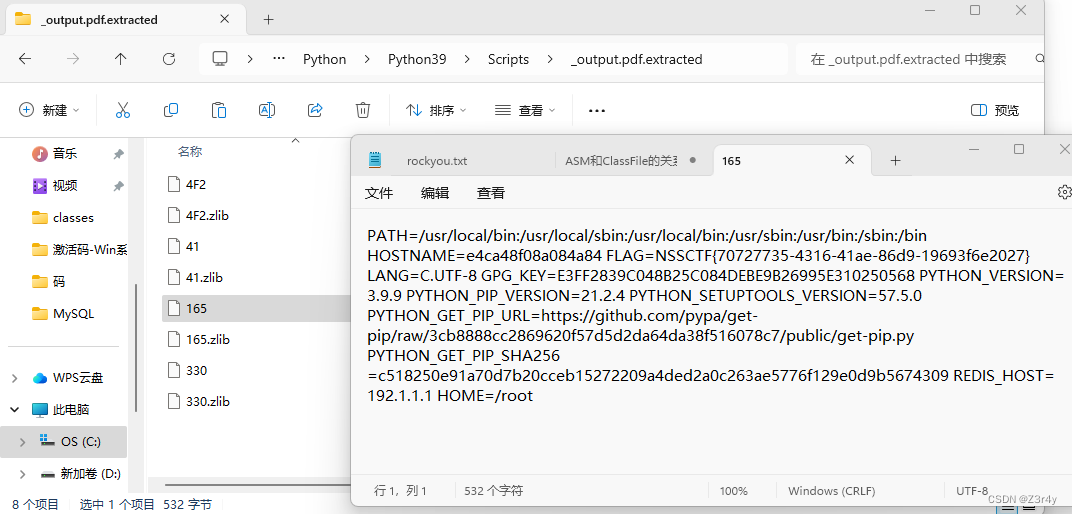
目录 前言 真亦假,假亦真 CSDN_To_PDF V1.2 前言 感谢17👴没让我爆零 真亦假,假亦真 直接getshell不行,那就一波信息搜集呗,先开dirsearch扫一下 扫的过程中先试试常规的robots.txt,www.zip,shell.phps,.git,.sv…...

【Java笔记】实现延时队列1:JDK DelayQueue
文章目录 需求创建订单类创建延时队列优缺点 Reference JDK DelayQueue是一个无阻塞队列,底层是 PriorityQueue 需求 经典的订单超时取消 创建订单类 放入DelayQueue的对象需要实现Delayed接口 public interface Delayed extends Comparable<Delayed> {…...

npm淘宝镜像源切换
查询 npm config get registry注意因为淘宝的镜像域名更换,https://registry.npm.taobao.org域名HTTPS证书到期更换为https://registry.npmmirror.com/ 切换 npm config set registry https://registry.npmmirror.com/...
ENet——实时语义分割的深度神经网络架构与代码实现
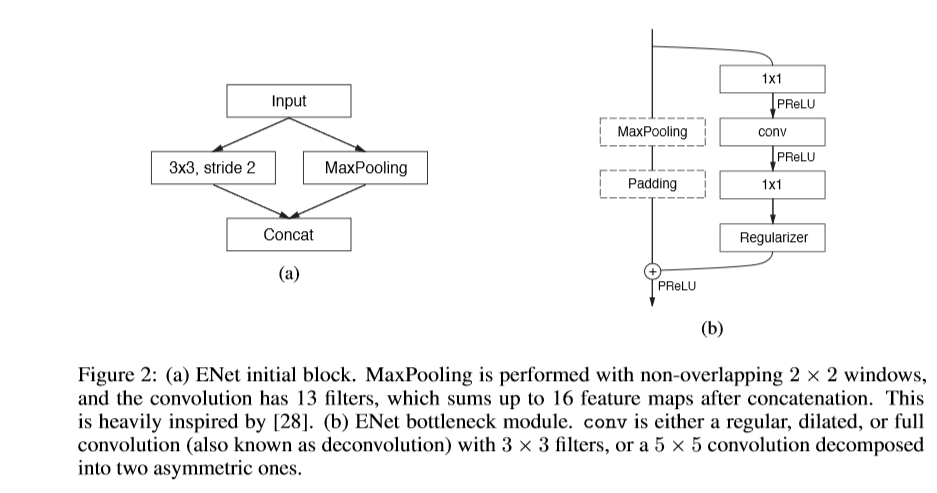
概述 在移动设备上执行实时像素级分割任务具有重要意义。现有的基于分割的深度神经网络需要大量的浮点运算,并且通常需要较长时间才能投入使用。本文提出的ENet架构旨在减少潜在的计算负担。ENet在保持或提高分割精度的同时,相比现有的分割网络…...
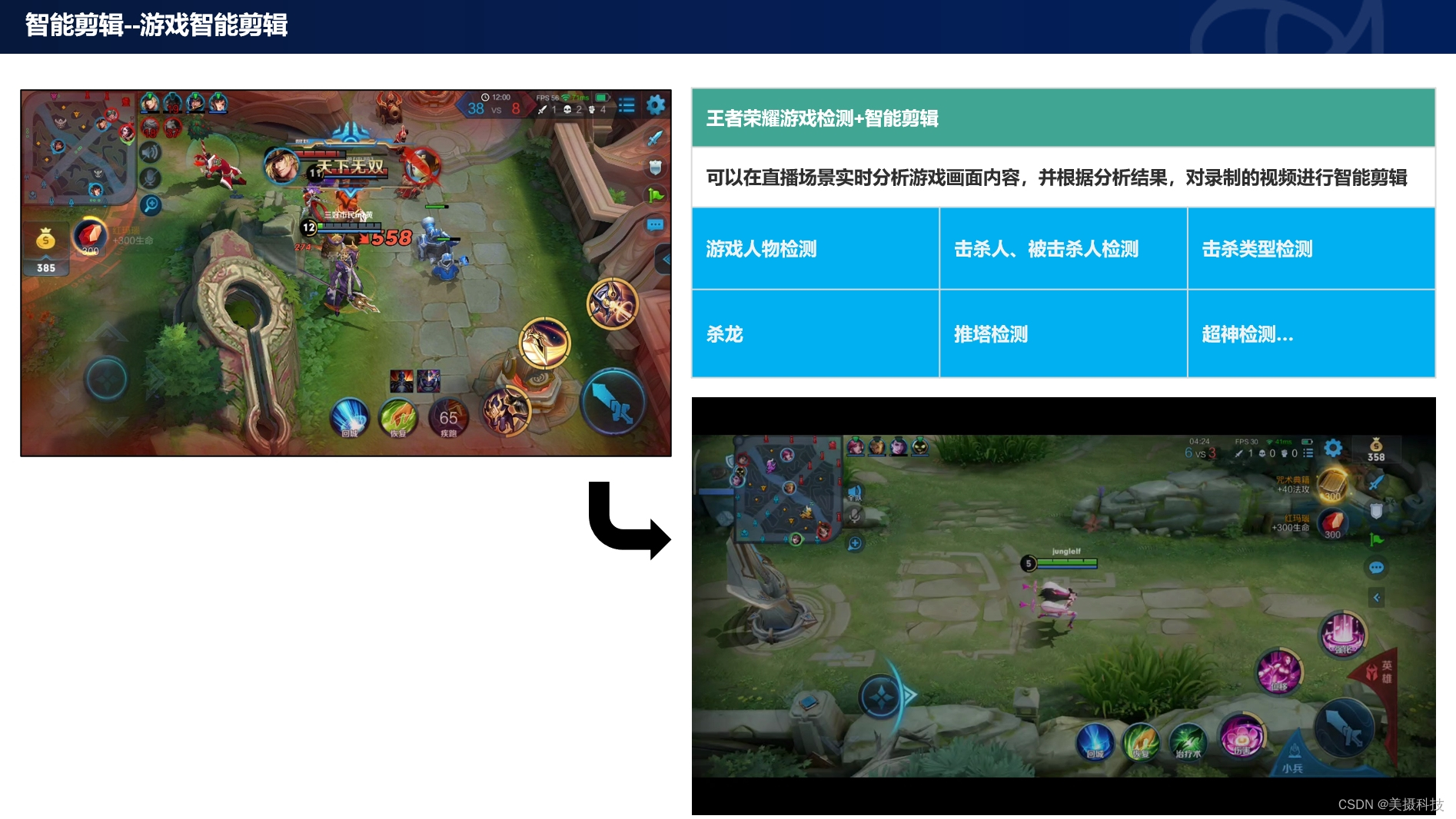
游戏领域AI智能视频剪辑解决方案
游戏行业作为文化创意产业的重要组成部分,其发展和创新速度令人瞩目。然而,随着游戏内容的日益丰富和直播文化的兴起,传统的视频剪辑方式已难以满足玩家和观众日益增长的需求。美摄科技,凭借其在AI智能视频剪辑领域的深厚积累和创…...

腾讯云轻量2核2G3M云服务器优惠价格61元一年,限制200GB月流量
腾讯云轻量2核2G3M云服务器优惠价格61元一年,配置为轻量2核2G、3M带宽、200GB月流量、40GB SSD盘,腾讯云优惠活动 yunfuwuqiba.com/go/txy 活动链接打开如下图: 腾讯云轻量2核2G云服务器优惠价格 腾讯云:轻量应用服务器100%CPU性能…...
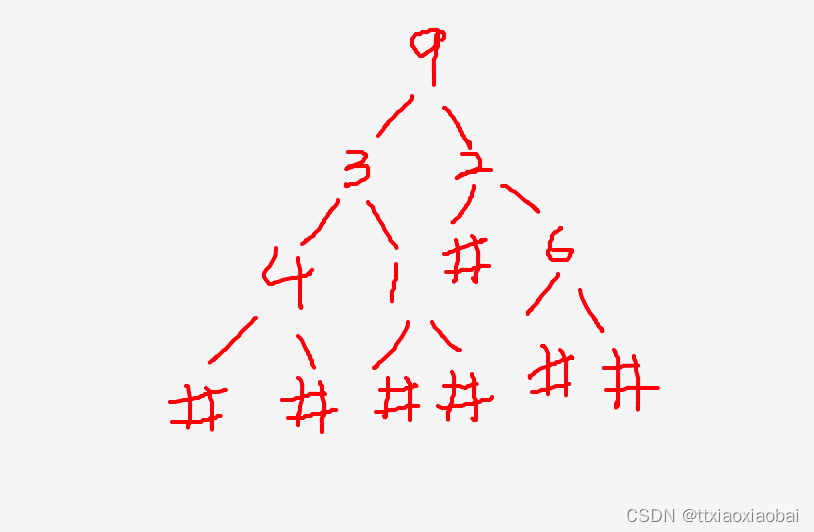
leecode 331 |验证二叉树的前序序列化 | gdb 调试找bug
计算的本质是数据的计算 数据的计算需要采用格式化的存储, 规则的数据结果,可以快速的按照指定要求存储数据 这里就不得不说二叉树了,二叉树应用场景真的很多 本题讲的是,验证二叉树的前序序列化 换言之,不采用建立树的…...

服务器安全事件应急响应排查方法
针对服务器操作系统的安全事件也非常多的。攻击方式主要是弱口令攻击、远程溢出攻击及其他应用漏洞攻击等。分析安全事件,找到入侵源,修复漏洞,总结经验,避免再次出现安全事件,以下是参考网络上文章,总结的…...

数码视讯Q7盒子刷armbian或emuelec的一些坑
首先,我手头的盒子是nand存储的,如果是emmc的,会省事很多…… 以下很多结论是我的推测,不一定准确。 1,原装安卓系统不支持SD卡或U盘启动,所以只能进uboot修改启动参数 2,原装安卓系统应该是…...

2_2.Linux中的远程登录服务
# 一.Openssh的功能 # 1.sshd服务的用途# #作用:可以实现通过网络在远程主机中开启安全shell的操作 Secure SHell >ssh ##客户端 Secure SHell daemon >sshd ##服务端 2.安装包# openssh-server 3.主配置文件# /etc/ssh/sshd_conf 4.…...
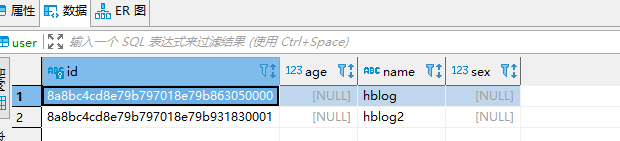
Spring Boot集成JPA快速入门demo
1.JPA介绍 JPA (Java Persistence API) 是 Sun 官方提出的 Java 持久化规范。它为 Java 开发人员提供了一种对象/关联映射工具来管理 Java 应用中的关系数据。他的出现主要是为了简化现有的持久化开发工作和整合 ORM 技术,结束现在 Hibernate,TopLink&am…...

深度学习理解及学习推荐(持续更新)
主推YouTuBe和Bilibili 深度学习博主推荐: Umar Jamil - YouTubehttps://www.youtube.com/umarjamilai StatQuest with Josh Starmer - YouTubehttps://www.youtube.com/statquest RNN Illustrated Guide to Recurrent Neural Networks: Understanding the Int…...

【C语言】贪吃蛇【附源码】
欢迎来到英杰社区https://bbs.csdn.net/topics/617804998 一、游戏说明: 一个基于C语言链表开发的贪吃蛇游戏: 1. 按方向键上下左右,可以实现蛇移动方向的改变。 2. 短时间长按方向键上下左右其中之一,可实现蛇向该方向的短时间…...

【技巧】压缩文件如何设置“自动加密”?
很多人会在压缩文件的时候,同时设置密码,以此保护私密文件。如果经常需要压缩文件并设置密码,不妨使用解压缩软件的“自动加密”功能,更省时省力。 下面介绍WinRAR解压缩软件的两种“自动加密”的方法,一起来看看吧&a…...
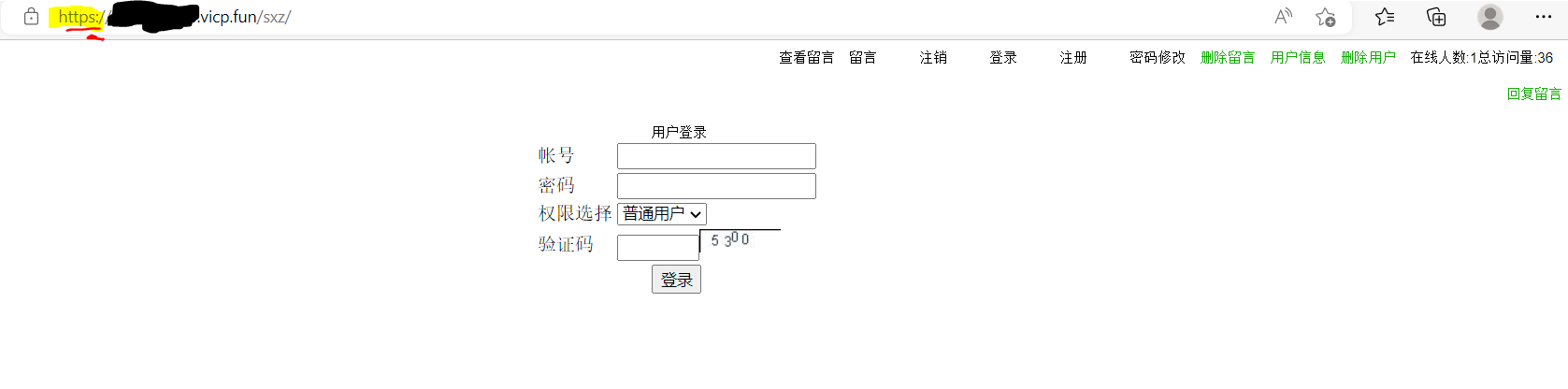
内网穿透时报错【Bad Request This combination of host and port requires TLS.】的原因
目录 前言:介绍一下内网穿透 1.内网直接https访问(可以正常访问) 程序配置的证书 2.内网穿透后,通过外网访问 3.原因 4.内网非https的Web应用,使用https后,也变成了https访问 5.题外话 感觉自己的web应用配置了…...
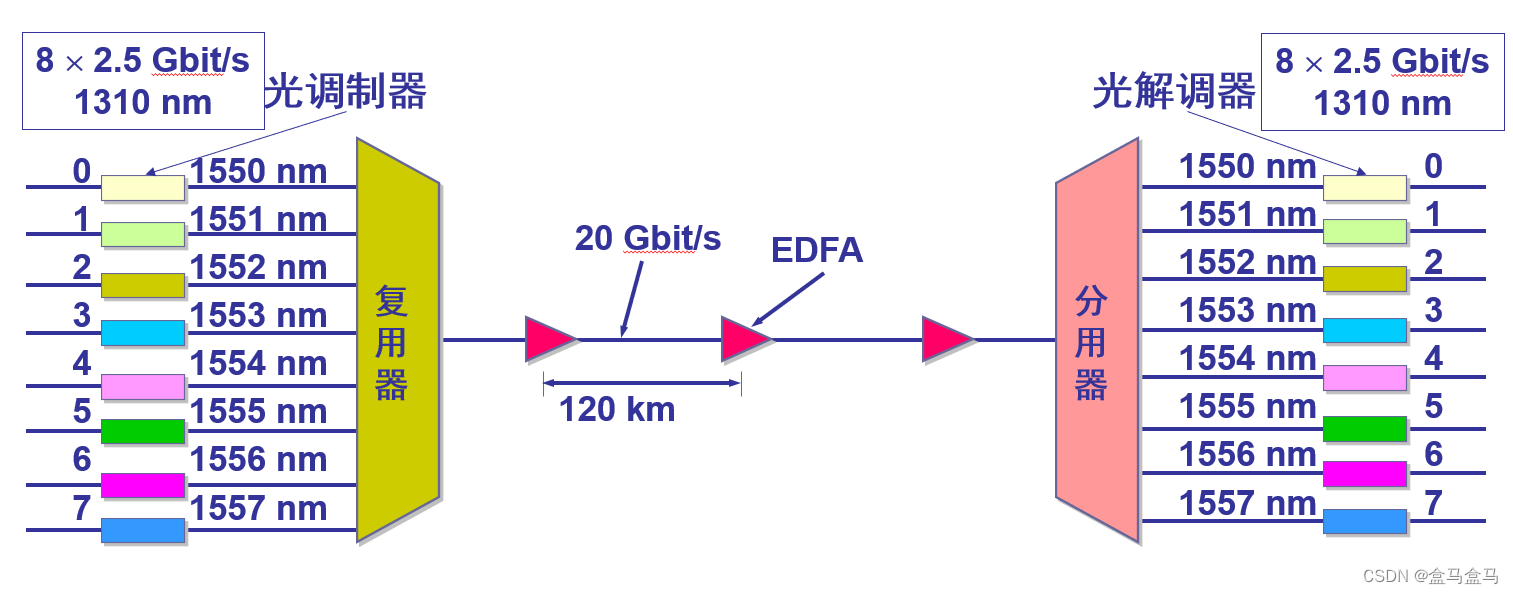
计算机网络:物理层 - 信道复用
计算机网络:物理层 - 信道复用 频分复用时分复用统计时分复用波分复用码分复用 计算机网络中,用户之间通过信道进行通信,但是信道是有限的,想要提高网络的效率,就需要提高信道的利用效率。因此计算机网络中普遍采用信道…...

【研报 A110】物理AI时代的具身数据采集需求研究:国家级训练场落地,开源生态加速建设
摘要:物理AI时代,具身智能与世界模型的发展,推动具身数据采集成为下一代数据基建的核心浪潮。具身大模型对数据有着EB级的海量需求,同时对多模态、异构性与质量要求极高,当前数据缺口成为制约具身智能发展的核心瓶颈&a…...

文献阅读 260511-Wildfire damages and the cost-effective role of forest fuel treatments
Wildfire damages and the cost-effective role of forest fuel treatments 来自 <https://www.science.org/doi/10.1126/science.aea6463> ## Abstract: Gave the core question: Wildfires are among the most pressing environmental challenges of the 21st century,…...

从怀疑到真香!2026年我亲测十多款语音识别转文字app只留这一个
开完2小时讨论会,你要花3小时逐句整理纪要?采访了3个受访者,你戴耳机听一天录音,还漏了一半核心观点?做方言访谈,转出来的文字驴唇不对马嘴,你还要返工重听? 这些磨人的痛点…...
)
告别疲劳计算烦恼:用nCode DesignLife搞定汽车悬架非线性载荷分析(附信号处理技巧)
告别疲劳计算烦恼:用nCode DesignLife搞定汽车悬架非线性载荷分析(附信号处理技巧) 悬架系统作为汽车底盘的核心部件,其疲劳寿命直接关系到整车可靠性与安全性。但在实际工程分析中,工程师们常常被一个棘手问题困扰&am…...

Flutter 自定义动画完全指南
Flutter 自定义动画完全指南 引言 动画是现代移动应用的重要组成部分,它能够提升用户体验,使界面更加生动。Flutter 提供了强大的动画系统,本文将深入探讨如何创建自定义动画效果。 动画基础回顾 动画类型 补间动画 (Tween Animation) - 最常…...

从微波炉到激光加工:手把手教你用COMSOL搞定4种电磁加热的仿真设置
从微波炉到激光加工:COMSOL电磁加热仿真实战指南 电磁加热技术早已渗透进现代工业与生活的每个角落——从家用微波炉的磁控管震荡,到新能源汽车电池的感应焊接,再到精密医疗器械的激光切割。这些看似迥异的应用背后,都遵循着相同…...
)
航模老鸟的‘省钱’秘籍:一块BB响如何守护你的多块锂电池(附设置误区避坑)
航模电池管理的低成本智慧:BB响的进阶使用策略 在航模和无人机领域,电池管理一直是玩家们关注的焦点。对于拥有多块电池的资深爱好者或小型工作室来说,如何在保证安全的前提下优化成本,是一个值得深入探讨的话题。传统做法是为每块…...

Ubuntu16.04高效桌面管理全攻略:多工作区、分屏与终端Terminator进阶技巧
1. Ubuntu16.04多工作区高效管理 刚接触Ubuntu时,最让我惊喜的功能就是多工作区。这个功能相当于给你的电脑桌面"扩容",把不同任务分散到不同虚拟桌面,再也不用在一堆窗口里来回切换了。在Ubuntu16.04上设置多工作区特别简单&#…...
)
逆向工程师的视角:如何用Windbg双机调试分析一个未知Windows驱动(实战案例解析)
逆向工程师的视角:如何用Windbg双机调试分析未知Windows驱动 在安全研究和恶意代码分析领域,逆向工程师常常需要面对未知的Windows驱动程序。这些驱动可能是第三方闭源组件,也可能是潜在的恶意软件载体。与传统的驱动开发调试不同,…...

菜单栏管理革命:Ice 如何用智能算法重塑 macOS 效率界面
菜单栏管理革命:Ice 如何用智能算法重塑 macOS 效率界面 【免费下载链接】Ice Powerful menu bar manager for macOS 项目地址: https://gitcode.com/GitHub_Trending/ice/Ice 当 macOS 菜单栏成为现代工作流的瓶颈时,Ice 以开源解决方案的身份出…...