
Kubernetes学习笔记8
Kubernetes集群客户端工具kubectl
我们已经能够部署Kubernetes了,那么我们如何使用Kubernetes集群运行企业的应用程序呢?那么,我们就需要使用命令行工具kubectl。
kubectl就是控制Kubernetes的驾驶舱,它允许你执行所有可能的Kubernetes操作,从技术角度来看,Kubectl就是Kubernetes API的一个客户端而已。
Kubernetes API 是一个 HTTP REST API 服务,该 API 服务才是 Kubernetes 的真正用到的用户接口,所以 Kubernetes 通过该 API 进行实际的控制。这也就意味着每个 Kubernetes 的操作都会通过 API 端点暴露出去,当然也就可以通过对这些 API 端口进行 HTTP 请求来执行相应的操作。所以,kubectl 最主要的工作就是执行 Kubernetes API 的 HTTP 请求。
学习目标:
了解kubectl 命令帮助方法
了解kubectl子命令使用分类
课程内容:
1、kubectl帮助方法:
我们预先是在所有节点上安装了kubectl工具。
# 检查kubectl是否安装:
[root@master1 ~]# rpm -qa |grep kubectl
kubectl-1.21.10-0.x86_64
[root@master1 ~]## 获取kubectl帮助方法:
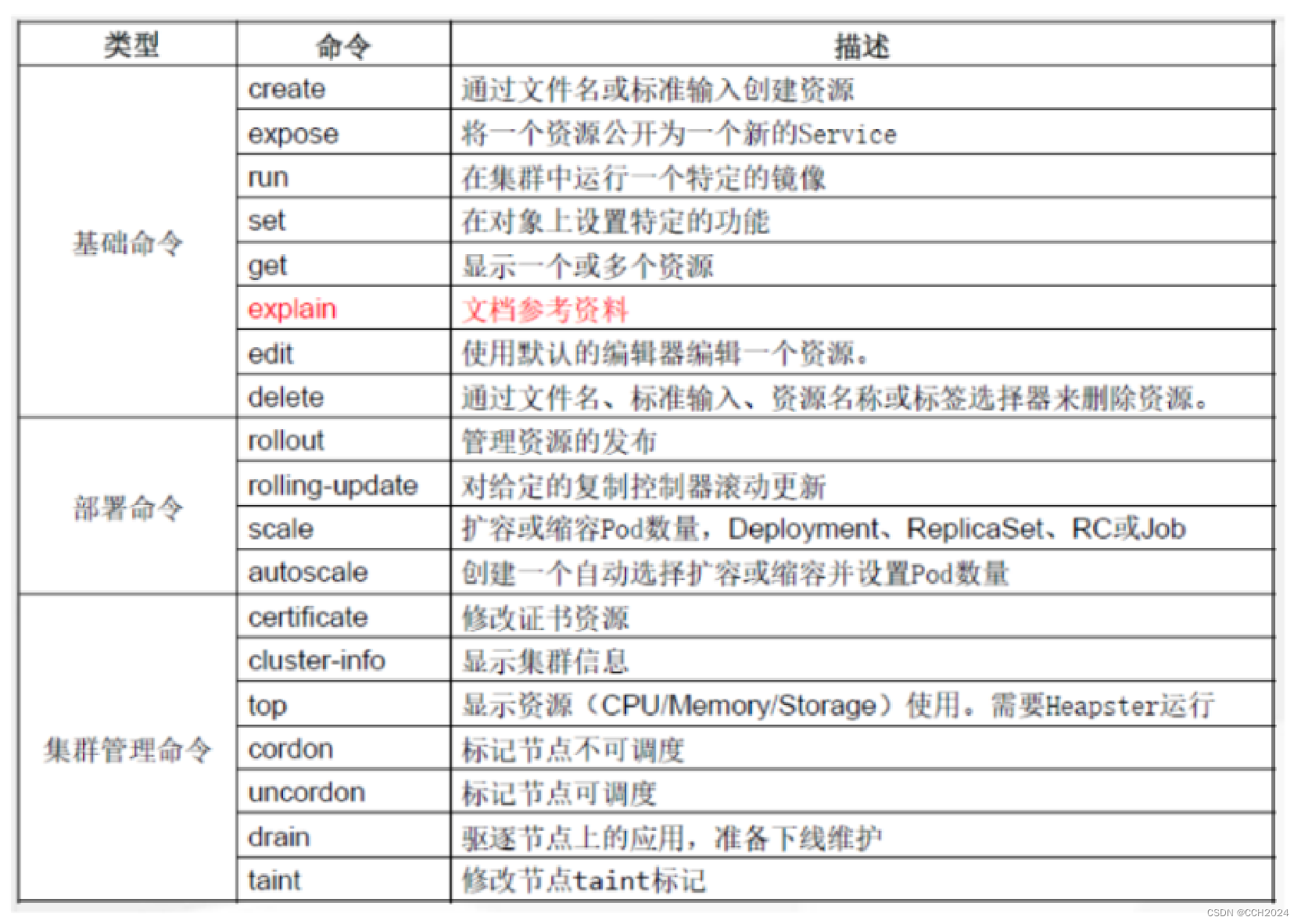
[root@master1 ~]# kubectl --help
kubectl controls the Kubernetes cluster manager.Find more information at:
https://kubernetes.io/docs/reference/kubectl/overview/Basic Commands (Beginner):create        Create a resource from a file or from stdin.expose        Take a replication controller, service, deployment or pod and
expose it as a new Kubernetes Servicerun           Run a particular image on the clusterset           Set specific features on objectsBasic Commands (Intermediate):explain       Documentation of resourcesget           Display one or many resourcesedit          Edit a resource on the serverdelete        Delete resources by filenames, stdin, resources and names, or by
resources and label selectorDeploy Commands:rollout       Manage the rollout of a resourcescale         Set a new size for a Deployment, ReplicaSet or Replication
Controllerautoscale     Auto-scale a Deployment, ReplicaSet, StatefulSet, or
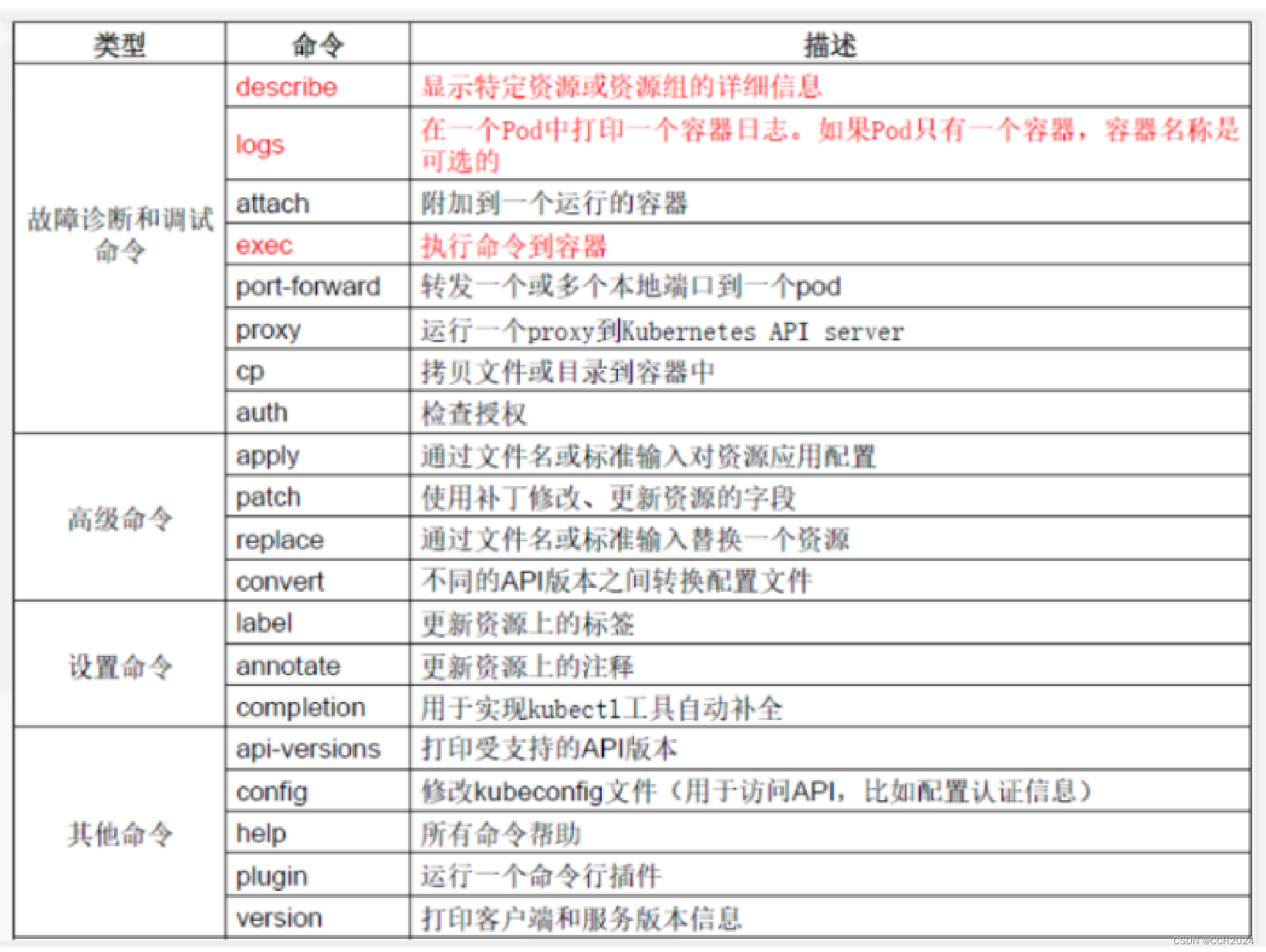
ReplicationControllerCluster Management Commands:certificate   Modify certificate resources.cluster-info  Display cluster infotop           Display Resource (CPU/Memory) usage.cordon        Mark node as unschedulableuncordon      Mark node as schedulabledrain         Drain node in preparation for maintenancetaint         Update the taints on one or more nodesTroubleshooting and Debugging Commands:describe      Show details of a specific resource or group of resourceslogs          Print the logs for a container in a podattach        Attach to a running containerexec          Execute a command in a containerport-forward  Forward one or more local ports to a podproxy         Run a proxy to the Kubernetes API servercp            Copy files and directories to and from containers.auth          Inspect authorizationdebug         Create debugging sessions for troubleshooting workloads and
nodesAdvanced Commands:diff          Diff live version against would-be applied versionapply         Apply a configuration to a resource by filename or stdinpatch         Update field(s) of a resourcereplace       Replace a resource by filename or stdinwait          Experimental: Wait for a specific condition on one or many
resources.kustomize     Build a kustomization target from a directory or URL.Settings Commands:label         Update the labels on a resourceannotate      Update the annotations on a resourcecompletion    Output shell completion code for the specified shell (bash or
zsh)Other Commands:api-resources Print the supported API resources on the serverapi-versions  Print the supported API versions on the server, in the form of
"group/version"config        Modify kubeconfig filesplugin        Provides utilities for interacting with plugins.version       Print the client and server version informationUsage:kubectl [flags] [options]Use "kubectl <command> --help" for more information about a given command.
Use "kubectl options" for a list of global command-line options (applies to all
commands).
kubectl子命令使用分类:
列出所有pod并显示详细信息
[root@master1 ~]# kubectl get pods -o wide
NAME                     READY   STATUS    RESTARTS   AGE   IP           NODE      NOMINATED NODE   READINESS GATES
nginx-65c4bffcb6-gd9z6   1/1     Running   0          8h    10.244.1.4   worker1   <none>           <none>
查看所有deployment对象。
[root@master1 ~]# kubectl get deployment nginx
NAME    READY   UP-TO-DATE   AVAILABLE   AGE
nginx   1/1     1            1           9h
查看所有service对象:
[root@master1 ~]# kubectl get svc
NAME         TYPE        CLUSTER-IP     EXTERNAL-IP   PORT(S)        AGE
kubernetes   ClusterIP   10.96.0.1      <none>        443/TCP        10h
nginx        NodePort    10.101.138.1   <none>        80:30831/TCP   9h
[root@master1 ~]#
[root@master1 ~]#
[root@master1 ~]# kubectl get service
NAME         TYPE        CLUSTER-IP     EXTERNAL-IP   PORT(S)        AGE
kubernetes   ClusterIP   10.96.0.1      <none>        443/TCP        10h
nginx        NodePort    10.101.138.1   <none>        80:30831/TCP   9h
查看不同namespace下的Pod对象:
[root@master1 ~]# kubectl get pods -n default
NAME                     READY   STATUS    RESTARTS   AGE
nginx-65c4bffcb6-gd9z6   1/1     Running   0          9h[root@master1 ~]# kubectl get pods --all-namespaces
NAMESPACE      NAME                                       READY   STATUS    RESTARTS   AGE
default        nginx-65c4bffcb6-gd9z6                     1/1     Running   0          9h
kube-flannel   kube-flannel-ds-dvjnd                      1/1     Running   0          9h
kube-flannel   kube-flannel-ds-gxl4h                      1/1     Running   0          9h
kube-flannel   kube-flannel-ds-jvdzc                      1/1     Running   0          9h
kube-system    calico-kube-controllers-594649bd75-xjbgr   1/1     Running   0          9h
kube-system    calico-node-6lz45                          1/1     Running   0          9h
kube-system    calico-node-fdprn                          1/1     Running   0          9h
kube-system    calico-node-szs6x                          1/1     Running   0          9h
kube-system    coredns-558bd4d5db-fmrpg                   1/1     Running   0          10h
kube-system    coredns-558bd4d5db-fnxdn                   1/1     Running   0          10h
kube-system    etcd-master1                               1/1     Running   1          10h
kube-system    kube-apiserver-master1                     1/1     Running   1          10h
kube-system    kube-controller-manager-master1            1/1     Running   1          10h
kube-system    kube-proxy-rz26h                           1/1     Running   0          9h
kube-system    kube-proxy-spf9t                           1/1     Running   1          9h
kube-system    kube-proxy-x4fq5                           1/1     Running   0          10h
kube-system    kube-scheduler-master1                     1/1     Running   1          10h
查看资源描述:
[root@master1 ~]# kubectl describe pods
Name:         nginx-65c4bffcb6-gd9z6
Namespace:    default
Priority:     0
Node:         worker1/192.168.17.147
Start Time:   Sat, 06 Apr 2024 19:04:43 +0800
Labels:       app=nginxpod-template-hash=65c4bffcb6
Annotations:  <none>
Status:       Running
IP:           10.244.1.4
IPs:IP:           10.244.1.4
Controlled By:  ReplicaSet/nginx-65c4bffcb6
Containers:nginx:Container ID:   docker://b0860e41573587a5c065c9aa18c398475b1b31f9f56d7d3c2e04171f80f1e1c1Image:          nginx:1.14-alpineImage ID:       docker-pullable://nginx@sha256:485b610fefec7ff6c463ced9623314a04ed67e3945b9c08d7e53a47f6d108dc7Port:           <none>Host Port:      <none>State:          RunningStarted:      Sat, 06 Apr 2024 19:05:04 +0800Ready:          TrueRestart Count:  0Environment:    <none>Mounts:/var/run/secrets/kubernetes.io/serviceaccount from kube-api-access-mjhtz (ro)
Conditions:Type              StatusInitialized       TrueReady             TrueContainersReady   TruePodScheduled      True
Volumes:kube-api-access-mjhtz:Type:                    Projected (a volume that contains injected data from multiple sources)TokenExpirationSeconds:  3607ConfigMapName:           kube-root-ca.crtConfigMapOptional:       <nil>DownwardAPI:             true
QoS Class:                   BestEffort
Node-Selectors:              <none>
Tolerations:                 node.kubernetes.io/not-ready:NoExecute op=Exists for 300snode.kubernetes.io/unreachable:NoExecute op=Exists for 300s
Events:                      <none>
所有的命令都要熟练使用。
使用kubectl命令必要环境:
在worker节点如何使用kubectl命令管理K8s集群?
准备集群管理配置文件:
mkdir .kube
scp master1:/root/.kube/config .kube/
使用命令验证:
[root@worker1 ~]# kubectl get nodes
NAME      STATUS   ROLES                  AGE   VERSION
master1   Ready    control-plane,master   10h   v1.21.10
worker1   Ready    <none>                 10h   v1.21.10
worker2   Ready    <none>                 10h   v1.21.10
其中这个config的配置文件:

这是一个连接Kubernetes API (IP地址+端口),就能管理到集群。
相关文章:
Kubernetes学习笔记8
Kubernetes集群客户端工具kubectl 我们已经能够部署Kubernetes了,那么我们如何使用Kubernetes集群运行企业的应用程序呢?那么,我们就需要使用命令行工具kubectl。 kubectl就是控制Kubernetes的驾驶舱,它允许你执行所有可能的Kube…...
[渗透利器]在线渗透测试工具箱?测评
前言 hxd更新完了在线工具箱,受邀写一下使用体验以及测评 使用体验 这个工具箱设计的比较轻便,以往用过的工具箱大多都是以离线打包的方式发布,该工具箱,作者自己掏钱自己买服务器,自己买带宽,先生大义。…...
rocketmq和rabbitmq总是分不清?
1. 官方解答 摘自百度搜索: 2. 通俗易懂的回答...

利用Python ARM网关仓储物流AGV小车控制器
在现代智慧物流体系中,高效的信息管理系统是物流中心实现精准跟踪货物、科学管理库存及优化配送路线的关键环节。通过采用ARM架构的工控机或网关,并结合Python的二次开发能力,可以有效集成并强化物流管理系统的数据处理与通信功能,…...
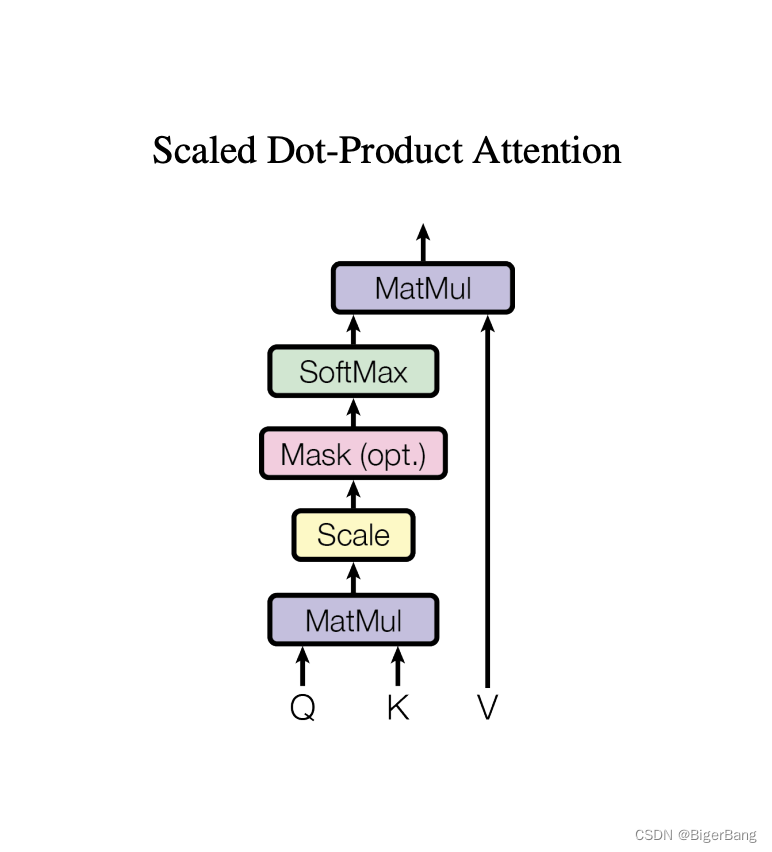
Transformer详解和知识点总结
目录 1. 注意力机制1.1 注意力评分函数1.2 多头注意力(Multi-head self-attention) 2. Layer norm3. 模型结构4. Attention在Transformer中三种形式的应用 论文:https://arxiv.org/abs/1706.03762 李沐B站视频:https://www.bilibi…...
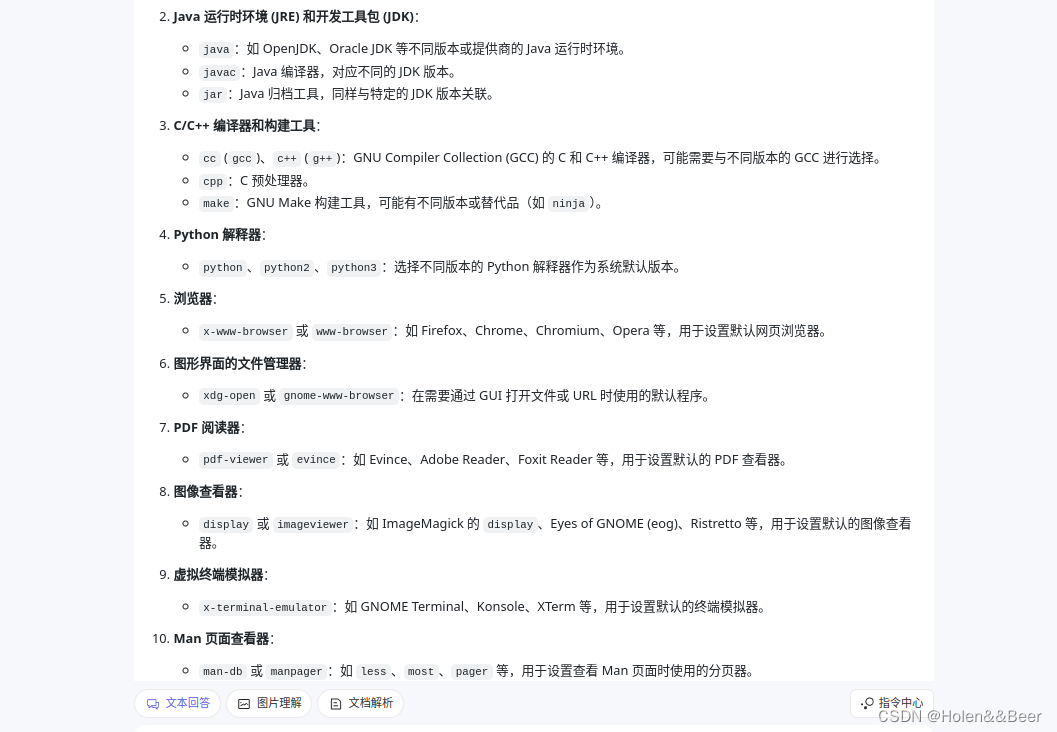
【Ubuntu】update-alternatives 命令详解
1、查看所有候选项 sudo update-alternatives --list java 2、更换候选项 sudo update-alternatives --config java 3、自动选择优先级最高的作为默认项 sudo update-alternatives --auto java 4、删除候选项 sudo update-alternatives --rem…...

数据结构之堆练习题及PriorityQueue深入讲解!
题外话 上午学了一些JavaEE初阶知识,下午继续复习数据结构内容 正题 本篇内容把堆的练习题做一下 第一题 1.下列关键字序列为堆的是:( A ) A: 100,60,70,50,32,65 B: 60,70,65,50,32,100 C: 65,100,70,32,50,60 D: 70,65,100,32,50,60 E: 32,50,100,70,65,60 …...

MySQL——Linux安装包
一、下载安装包 MySQL下载路径: MySQL :: MySQL Downloads //默认下载的企业版MySQL 下载社区版MySQL MySQL :: MySQL Community Downloads 1、源码下载 2、仓库配置 3、二进制安装包 基于官方仓库安装 清华centos 软件仓库: Index of /cen…...

MySQL学习笔记(数据类型, DDL, DML, DQL, DCL)
Learning note 1、前言2、数据类型2.1、数值类型2.2、字符串类型2.3、日期类型 3、DDL总览数据库/表切换数据库查看表内容创建数据库/表删除数据库/表添加字段删除字段表的重命名修改字段名(以及对应的数据类型) 4、DML往字段里写入具体内容修改字段内容…...
)
Asible管理变量与事实——管理变量(1)
Ansible简介 Ansible支持利用变量来储存值,并在Ansible项目的所有文件中重复使用这些值。这可以简化项目的创建和维护,并减少错误的数量。 通过变量,您可以轻松地在Ansible项目中管理给定环境的动态值。例如,变量可能包含下面这些…...
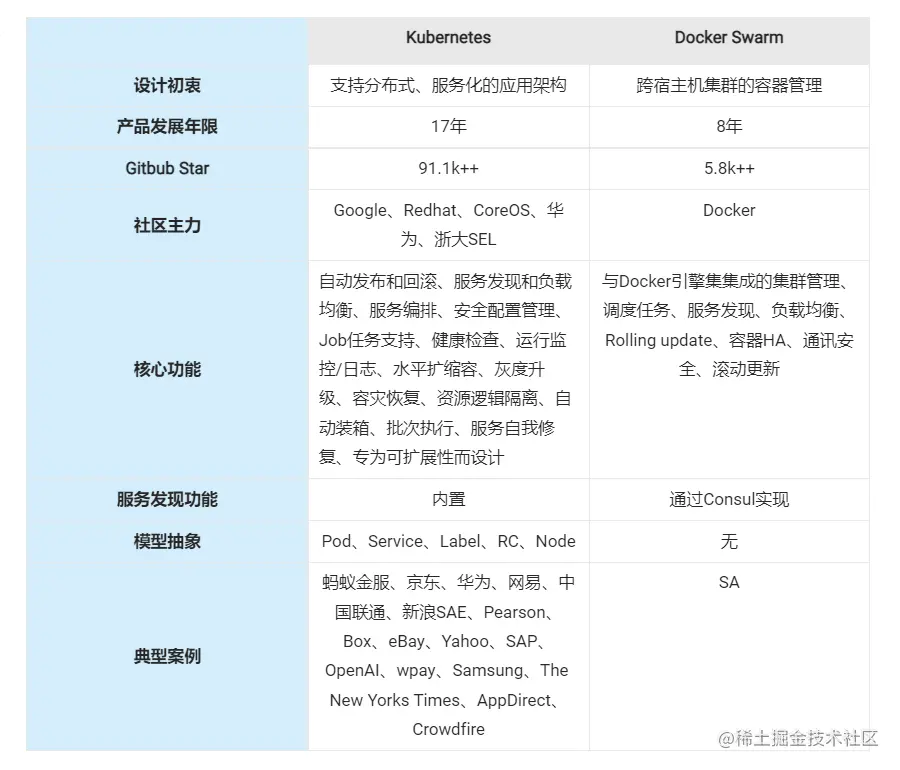
【微服务】------微服务架构技术栈
目前微服务早已火遍大江南北,对于开发来说,我们时刻关注着技术的迭代更新,而项目采用什么技术栈选型落地是开发、产品都需要关注的事情,该篇博客主要分享一些目前普遍公司都在用的技术栈,快来分享一下你当前所在用的技…...
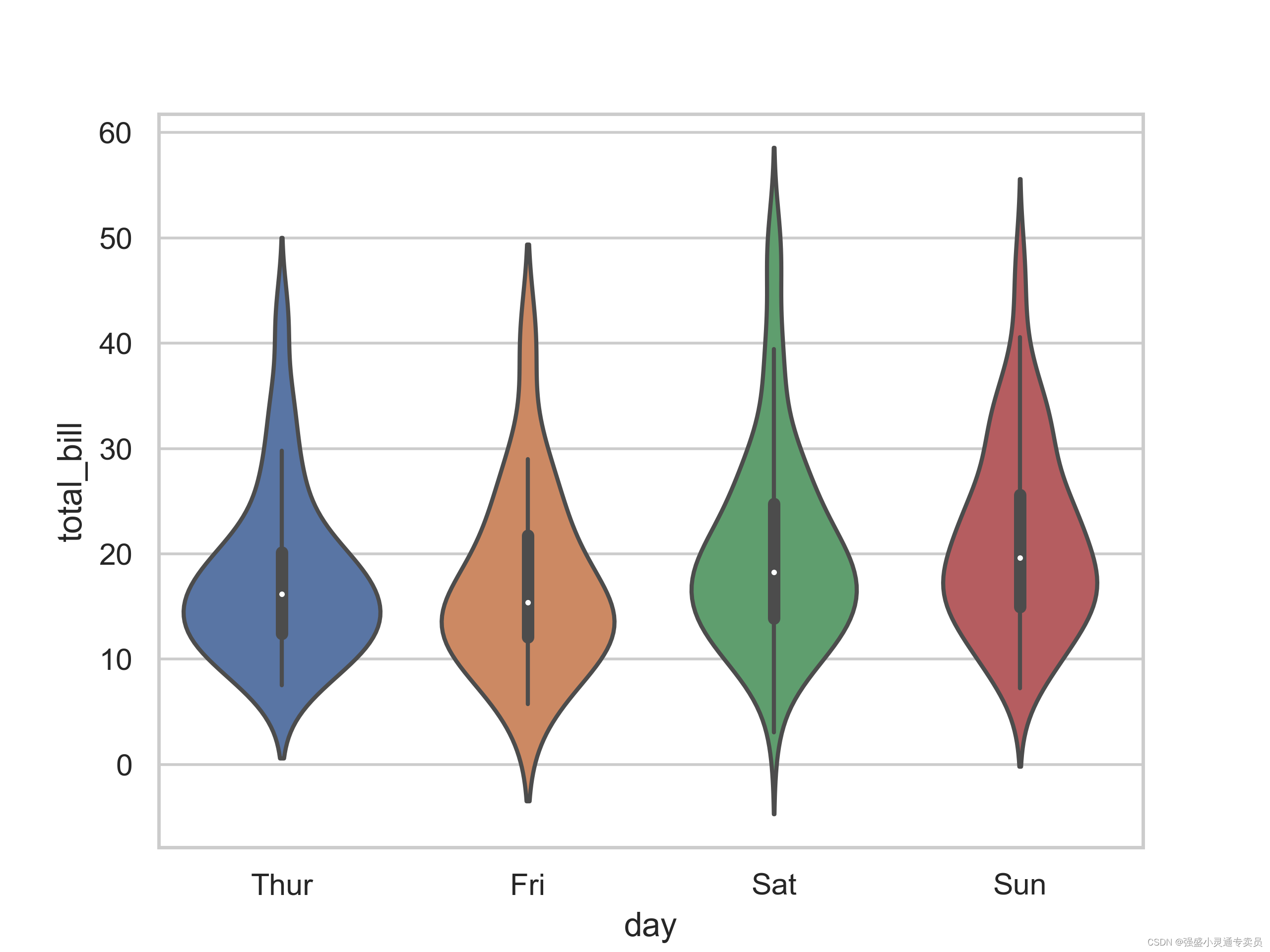
【SCI绘图】【小提琴系列1 python】绘制按分类变量分组的垂直小提琴图
SCI,CCF,EI及核心期刊绘图宝典,爆款持续更新,助力科研! 本期分享: 【SCI绘图】【小提琴系列1 python】绘制按分类变量分组的垂直小提琴图,文末附完整代码 小提琴图是一种常用的数据可视化工具…...
docker------docker入门
🎈个人主页:靓仔很忙i 💻B 站主页:👉B站👈 🎉欢迎 👍点赞✍评论⭐收藏 🤗收录专栏:Linux 🤝希望本文对您有所裨益,如有不足之处&#…...

终极数据传输隐秘通道
SOCKS5代理作为网络请求中介的高级形态,提供了一种方法,通过它,数据包在传达其最终目的地前,首先经过一个第三方服务器。这种代理的先进之处在于其对各种协议的支持,包括HTTP、FTP和SMTP,以及它的认证机制&…...

Qt中的事件与事件处理
Qt框架中的事件处理机制是其GUI编程的核心部分,它确保了用户与应用程序之间的交互能够得到正确的响应。以下是对Qt事件处理机制的详细讲解以及提供一些基本示例。 1. 事件与事件处理简介 事件:在Qt中,所有的事件都是从QEvent基类派生出来的&…...
中间件漏洞攻防学习总结
前言 面试常问的一些中间件,学习总结一下。以下环境分别使用vulhub和vulfocus复现。 Apache apache 文件上传 (CVE-2017-15715) 描述: Apache(音译为阿帕奇)是世界使用排名第一的Web服务器软件。它可以运行在几乎所有广泛使用的计算机平台上,由于其跨…...
HarmonyOS开发实例:【分布式数据管理】
介绍 本示例展示了在eTS中分布式数据管理的使用,包括KVManager对象实例的创建和KVStore数据流转的使用。 通过设备管理接口[ohos.distributedDeviceManager],实现设备之间的kvStore对象的数据传输交互,该对象拥有以下能力 ; 1、注册和解除注…...

蓝桥杯——运动会
题目 n 个运动员参加一个由 m 项运动组成的运动会,要求每个运动员参加每个项目。每个运动员在每个项目都有一个成绩,成绩越大排名越靠前。每个项目,不同运功员的成绩不会相 同,因此排名不会相同。(但是不同项目可能成绩会相同) 每…...

如何搭建APP分发平台分发平台搭建教程
搭建一个APP分发平台可以帮助开发者更好地分发和管理他们的应用程序。下面是一个简要的教程,介绍如何搭建一个APP分发平台。 1.确定需求和功能:首先,确定你的APP分发平台的需求和功能。考虑以下几个方面: 用户注册和登录ÿ…...

【计算机专业必看】详细说明文件打开模式r,w,a,r+,w+,a+的区别和联系
文章目录 1、联系2、区别r(只读)w(只写)a(追加)r(读写,文件必须存在)w(读写,文件不存在则创建,存在则清空)a(读…...

OpenHarmony模块配置实战:从GN模板到部件依赖的完整指南
1. 从零开始理解OpenHarmony的模块配置:一个资深开发者的实战拆解如果你刚开始接触OpenHarmony的源码开发,面对那一堆BUILD.gn文件和bundle.json配置,是不是感觉有点无从下手?模块、部件、子系统,这些概念听起来就让人…...

为什么你的电脑风扇总是“抽风“?3个简单步骤彻底解决Windows风扇控制难题
为什么你的电脑风扇总是"抽风"?3个简单步骤彻底解决Windows风扇控制难题 【免费下载链接】FanControl.Releases This is the release repository for Fan Control, a highly customizable fan controlling software for Windows. 项目地址: https://git…...

分享一些常见的SQL计算面试题
代码都是基于mysql实现,如果小伙伴们有其他的思路欢迎留言~ 1.行列转换2.分组求top-n3.连续登录问题(包括日期可间断和不可间断)4.找连续出现3次及以上的数字5.直播间同时在线人数统计1.行列转换 表tb1: 表tb2: 行转…...

基于Agen项目构建个人AI代理:从LLM原理到邮件处理实战
1. 项目概述:从“Agen”看个人化AI代理的构建思路最近在GitHub上看到一个名为“Agen”的项目,作者是Anjuan555。这个项目名本身就很值得玩味——“Agen”,很容易让人联想到“Agent”(代理),但又少了一个“t…...

终极免费音频编辑神器:告别昂贵软件,开启专业音频创作之旅
终极免费音频编辑神器:告别昂贵软件,开启专业音频创作之旅 【免费下载链接】audacity Audio Editor 项目地址: https://gitcode.com/GitHub_Trending/au/audacity 你是否曾因音频编辑软件的复杂界面而望而却步?是否在寻找一款既能满足…...

SAP 报SNAP_NO_NEW_ENTY错误【DB2 LOGSECOND参数】
1、在AI的指导下,备份并删除sapprd.snap db2 > create table sapqas.snap_bak_20250101 as (select * from sapqas.snap) with data; DB21034E The command was processed as an SQL statement because it was not a valid Command Line Processor command. D…...

终极ZPL虚拟打印机指南:5步实现无硬件条码标签开发
终极ZPL虚拟打印机指南:5步实现无硬件条码标签开发 【免费下载链接】Virtual-ZPL-Printer An ethernet based virtual Zebra Label Printer that can be used to test applications that produce bar code labels. 项目地址: https://gitcode.com/gh_mirrors/vi/V…...

Windows 10系统优化深度指南:使用Win10BloatRemover打造高效工作环境
Windows 10系统优化深度指南:使用Win10BloatRemover打造高效工作环境 【免费下载链接】Win10BloatRemover Configurable CLI tool to easily and aggressively debloat and tweak Windows 10 by removing preinstalled UWP apps, services and more. Originally bas…...

从零到一:基于Playwright与OpenCV的滑块验证码自动化破解实战
1. 环境准备与工具介绍 第一次接触滑块验证码自动化破解时,我也被那些复杂的图像处理算法吓到了。但实际用下来发现,只要选对工具组合,整个过程比想象中简单得多。这里我推荐PlaywrightOpenCV这对黄金搭档——前者是微软开源的浏览器自动化工…...

CircuitPython开发板选型指南:从需求到Adafruit产品实战解析
1. 项目概述:为什么选择CircuitPython开发板是个技术活如果你刚开始接触硬件编程,或者是从Arduino转向更友好的开发环境,那么CircuitPython绝对是一个让人眼前一亮的选项。它把Python的简洁语法带到了微控制器上,让你能用几行代码…...