
elementUI2
ElementUI
- 图片引用
- 查询表单
- 表格展示
- 新增修改
- 详情
- 图表
图片引用
<img :src="logo" width="100%" height="100%"/>import logoImg from '@/assets/logo/home.png'data() {return {logo: logoImg,}}
查询表单
<el-form :model="queryParams" ref="queryForm" size="small" :inline="true" v-show="showSearch" label-width="68px"><el-form-item label="姓名" prop="name"><el-inputv-model="queryParams.name"placeholder="请输入姓名"clearable@keyup.enter.native="handleQuery"/></el-form-item><el-form-item label="出生日期" prop="dateOfBirth"><el-date-picker clearablev-model="queryParams.dateOfBirth"type="date"value-format="yyyy-MM-dd":picker-options="pickerOptions"placeholder="请选择出生日期"></el-date-picker></el-form-item><el-form-item><el-button type="primary" icon="el-icon-search" size="mini" @click="handleQuery">搜索</el-button><el-button icon="el-icon-refresh" size="mini" @click="resetQuery">重置</el-button></el-form-item>
</el-form>import { listInformation, getInformation, delInformation, addInformation, updateInformation } from "@/api/system/information";
export default {data() {return {pickerOptions: {disabledDate(time) {return time.getTime() > Date.now();},},// 遮罩层loading: true,// 总条数total: 0,// 信息表格数据informationList: [],// 查询参数queryParams: {pageNum: 1,pageSize: 10,name: null,dateOfBirth: null,},}methods: {/** 重置按钮操作 */resetQuery() {this.resetForm("queryForm");this.handleQuery();},/** 搜索按钮操作 */handleQuery() {this.queryParams.pageNum = 1;this.getList();},/** 查询信息列表 */getList() {this.loading = true;listInformation(this.queryParams).then(response => {this.informationList = response.rows;this.total = response.total;this.loading = false;});},}
}
表格展示
// 表格上面的按钮
<el-row :gutter="10" class="mb8"><el-col :span="1.5"><el-buttontype="primary"plainicon="el-icon-plus"size="mini"@click="handleAdd"v-hasPermi="['system:information:add']">新增</el-button></el-col><el-col :span="1.5"><el-buttontype="danger"plainicon="el-icon-delete"size="mini":disabled="multiple"@click="handleDelete"v-hasPermi="['system:information:remove']">删除</el-button></el-col><el-col :span="1.5"><el-buttontype="warning"plainicon="el-icon-download"size="mini"@click="handleExport"v-hasPermi="['system:information:export']">导出</el-button></el-col><right-toolbar :showSearch.sync="showSearch" @queryTable="getList"></right-toolbar>
</el-row><el-table v-loading="loading" :data="informationList" @selection-change="handleSelectionChange"><el-table-column type="selection" width="55" align="center" /><el-table-column label="主键" align="center" prop="id" /><el-table-column label="姓名" align="center" prop="name" /><el-table-column label="性别" align="center" prop="sex" ><template slot-scope="scope"><dict-tag :options="dict.type.sys_user_sex" :value="scope.row.sex ? scope.row.sex.split(',') : []"/></template></el-table-column><el-table-column label="审核状态" align="center" prop="status" v-if="user.userName!='admin' "><template slot-scope="scope"><dict-tag :options="dict.type.info_status" :value="scope.row.status ? scope.row.status.split(',') : []"/></template></el-table-column><el-table-column label="操作" align="center"  fixed="right" class-name="small-padding fixed-width"  width="240px"><template slot-scope="scope"><span v-if="user.userName=='admin' "><el-buttonsize="mini"type="text"@click="updateStatus(scope.row)"v-hasPermi="['system:information:edit']">审批</el-button><el-buttonsize="mini"type="text"@click="cancelStatus(scope.row)"v-hasPermi="['system:information:edit']">取消审批</el-button><el-buttonsize="mini"type="text"@click="handleView(scope.row)"v-hasPermi="['system:information:edit']">查看详情</el-button><br/></span><el-buttonsize="mini"type="text"icon="el-icon-edit"@click="handleUpdate(scope.row)"v-hasPermi="['system:information:edit']"style="margin-left: 10px;">修改</el-button><el-buttonsize="mini"type="text"icon="el-icon-delete"@click="handleDelete(scope.row)"v-hasPermi="['system:information:remove']">删除</el-button></template></el-table-column>
</el-table>
<paginationv-show="total>0":total="total":page.sync="queryParams.pageNum":limit.sync="queryParams.pageSize"@pagination="getList"/>
import { selectDictLabel} from '@/main.js'
import { listInformation, getInformation, delInformation, addInformation, updateInformation } from "@/api/system/information";
export default {// 数据字典(这个是若依封装好的)dicts: ['sys_user_sex'],data() {},created() {this.getList();this.getUser();this.getDeptTree();},methods: {// 多选框选中数据handleSelectionChange(selection) {this.ids = selection.map(item => item.id)this.single = selection.length!==1this.multiple = !selection.length},/** 新增按钮操作 */handleAdd() {this.reset();this.open = true;this.title = "添加档案基本信息";},/** 导出按钮操作 */handleExport() {this.download('system/information/export', {...this.queryParams}, `information_${new Date().getTime()}.xlsx`)}//审批按钮(确认弹框)updateStatus(row){//根据 row所选中的数据,传入获取ID,调用修改方法修改数据状态const id = row.id || this.idsthis.$modal.confirm('是否确认审批档案基本信息编号为"' + id + '"的数据项?').then(function() {row.status="1";return updateInformation(row);}).then(() => {this.getList();this.$modal.msgSuccess("审批成功");}).catch(() => {});},//取消审批(确认弹框,需填入信息)cancelStatus(row){const id = row.id || this.idsthis.$prompt('请输入档案基本信息编号为"' + id + '"取消审批的原因:', '提示', {confirmButtonText: '确定',cancelButtonText: '取消',}).then(({ value }) => {row.status = "2";row.rmk = value;updateInformation(row);this.getList();this.$modal.msgSuccess("取消成功");}).catch(() => {});},/** 详情按钮操作 */handleView(row){this.reset();const id = row.id || this.idsgetInformation(id).then(response => {this.form = response.data;this.openDetail = true;});},/** 修改按钮操作 */handleUpdate(row) {this.reset();const id = row.id || this.idsgetInformation(id).then(response => {this.form = response.data;this.open = true;this.title = "修改档案基本信息";});},/** 删除按钮操作 */handleDelete(row) {const ids = row.id || this.ids;this.$modal.confirm('是否确认删除档案基本信息编号为"' + ids + '"的数据项?').then(function() {return delInformation(ids);}).then(() => {this.getList();this.$modal.msgSuccess("删除成功");}).catch(() => {});},// 表单重置reset() {this.form = {id: null,name: null,sex: null,。。。};this.resetForm("form");},}
新增修改
<!-- 添加或修改档案基本信息对话框 -->
<el-dialog :title="title" :visible.sync="open" width="1500px" append-to-body><el-form ref="form" :model="form" :rules="rules" label-width="160px"><el-tabs v-model="activeName" @tab-click="handleClick"><el-tab-pane label="基础身份信息" name="first"><el-row><el-col :span="6"><el-form-item label="姓名" prop="name"><el-input v-model="form.name" placeholder="请输入姓名" /></el-form-item></el-col><el-col :span="6"><el-form-item label="性别" prop="sex"><el-select v-model="form.sex" placeholder="请选择"><el-optionv-for="dict in dict.type.sys_user_sex":key="dict.value":label="dict.label":value="dict.value"></el-option></el-select></el-form-item></el-col><el-col :span="6"><el-form-item label="联系电话" prop="phone"><el-input v-model="form.phone" placeholder="请输入联系电话" /></el-form-item></el-col><el-col :span="6"><el-form-item label="出生日期" prop="dateOfBirth"><el-date-picker clearablev-model="form.dateOfBirth"type="date"value-format="yyyy-MM-dd":picker-options="pickerOptions"placeholder="请选择出生日期"></el-date-picker></el-form-item></el-col></el-row></el-tab-pane><el-tab-pane label="组织生活、社会活动信息" name="second"><el-row><el-col :span="24"><el-form-item label="身份证号" prop="idCard"><el-input v-model="form.idCard" placeholder="请输入身份证号" /></el-form-item></el-col></el-row></el-tab-pane></el-tabs></el-form><div slot="footer" class="dialog-footer"><el-button type="primary" @click="submitForm">确 定</el-button><el-button @click="cancel">取 消</el-button></div>
</el-dialog>
import { deptTreeSelect } from "@/api/system/user";
import Treeselect from "@riophae/vue-treeselect";
import "@riophae/vue-treeselect/dist/vue-treeselect.css";
export default {name: "Information",dicts: ['sys_info_marital_status', 。。。],components: { Treeselect },data() {var isCardId = (rule, value, callback) => {if (!value) {return new Error("请输入身份证号)");} else {const reg =/^[1-9]\d{5}(18|19|20|21|22|23|24)\d{2}((0[1-9])|(1[0-2]))(([0-2][1-9])|10|20|30|31)\d{3}[0-9Xx]$/;const card = reg.test(value);if (!card) { callback(new Error("身份证号格式有误!"));} else {callback();}}};//手机号格式校验var validatorPhone = function (rule, value, callback) {if (value === '') {callback(new Error('手机号不能为空'))} else if (!/^1\d{10}$/.test(value)) {callback(new Error('手机号格式错误'))} else {callback()}}return {// 表单校验rules: {name: [{ required: true, message: '请输入姓名', trigger: 'blur' },{ min: 2, max: 5, message: '长度在 2 到 5 个字符', trigger: 'blur' }],sex: [{ required: true, message: '请选择性别', trigger: 'change' }],dateOfBirth: [{ type: 'string', required: true, message: '请选择出生日期', trigger: 'change' }],idCard: [{ required: true, message: '请输入身份证号', trigger: 'blur' },{ validator: isCardId, message: '身份证号格式有误', trigger: "blur" }],phone: [{ required: true, message: '请输入联系电话', trigger: 'blur' },{ validator: validatorPhone, message: '联系电话格式有误', trigger: "blur" }],}},methods: {// 取消按钮cancel() {this.open = false;this.reset();},/** 提交按钮 */submitForm() {this.$refs["form"].validate(valid => {if (valid) {if (this.form.id != null) {updateInformation(this.form).then(response => {this.$modal.msgSuccess("修改成功");this.open = false;this.getList();});} else {addInformation(this.form).then(response => {this.$modal.msgSuccess("新增成功");this.open = false;this.getList();});}} else {this.$message({message: '请将必填信息填写完整!!',type: 'warning'});}});},}
详情
<!-- 信息详细 -->
<el-dialog title="信息详细" :visible.sync="openDetail" width="1000px" append-to-body><el-form ref="form" :model="form" label-width="160px" size="mini"><dev style="margin-bottom: 20px;font-size: 18px; " ><b style="margin-left: 450px;">基础信息</b></dev><el-row style="margin-top: 20px;"><el-col :span="6"><el-form-item label="姓名:">{{ form.name }}</el-form-item></el-col><el-col :span="6"><el-form-item label="民族:">{{ form.ethnicGroup }}</el-form-item></el-col><el-col :span="6"><el-form-item label="出生日期:">{{ form.dateOfBirth }}</el-form-item></el-col><el-col :span="12"><el-form-item label="户籍类别:">{{ selectDictLabel(dict.type.type_status,form.type) }}</el-form-item></el-col></el-row><dev style="margin-bottom: 20px;font-size: 18px;"><b style="margin-left: 400px;">组织生活、社会活动信息</b></dev><el-row style="margin-top: 20px;"><el-col :span="12"><el-form-item label="所在党支部:">{{ form.partyBranch }}</el-form-item></el-col><el-col :span="12"><el-form-item label="社会职务:">{{ selectDictLabel(dict.type.sys_socialduty,form.socialDuty) }}</el-form-item></el-col></el-form><div slot="footer" class="dialog-footer"><el-button @click="openDetail = false">关 闭</el-button></div>
</el-dialog>
图表
<div><el-row style="margin-top: 40px;margin-left: 30px;"><el-col  :span="12"><div ref="chart" style="width: 600px; height: 400px;"></div></el-col>。。。</el-row>
</div>import { listInformation2 } from "@/api/system/table";
import * as echarts  from 'echarts';
export default {name: "Table",data() {return {dataEchars1:[],dataEchars2:[],dataEchars3:[],dataEchars4:[],};},created() {this.getList2();},methods: {getList2() {listInformation2().then(response => {// 学历/学位/户籍类别//审批状态this.dataEchars1=response[0].rows;。。。this.initechars();  });},initechars(){// 基于准备好的dom,初始化echarts实例let myChart = echarts.init(this.$refs.chart);// 指定图表的配置项和数据let  option = {title: {text: '学历状态统计',subtext: '全部档案',left: 'center'},tooltip: {trigger: 'item'},legend: {orient: 'vertical',left: 'left'},series: [{name: '学历状态统计图',type: 'pie',radius: '50%',data: this.dataEchars1,emphasis: {itemStyle: {shadowBlur: 10,shadowOffsetX: 0,shadowColor: 'rgba(0, 0, 0, 0.5)'}}}]};// 使用刚指定的配置项和数据显示图表myChart.setOption(option);。。。。},}
};
@PreAuthorize("@ss.hasPermi('system:table:query')")
@GetMapping("/list1")
public List<TableDataInfo> list1(SoldierInformation soldierInformation) {List<Long> Null;List<SoldierInformation> list = soldierInformationService.selectAllSoldierInformationList();//设置初始化Echars图表数据集合List<PieChart> pieChart1 = new ArrayList<PieChart>();List<PieChart> pieChart2 = new ArrayList<PieChart>();。。。//判断表中数据不能为空if (list.size() > 0) {//学历情况int qualification1 = 0;//博士研究生int qualification2 = 0;//硕士研究生。。。//学位情况int education1 = 0;//博士int education2 = 0;//硕士。。。if (list.size() > 0) {for (int i = 0; i < list.size(); i++) {//计算学历情况if (("0").equals(list.get(i).getEducation())) {qualification1 += 1;} else if (("1").equals(list.get(i).getEducation())) {qualification2 += 1;} else if (("2").equals(list.get(i).getEducation())) {qualification3 += 1;} else 。。。//计算学位情况if (("0").equals(list.get(i).getEducation1())) {education1 += 1;} else if (("1").equals(list.get(i).getEducation1())) {education2 += 1;} else。。。}//学位情况pieChart1.add(new PieChart("博士研究生", qualification1));pieChart1.add(new PieChart("硕士研究生", qualification2));。。。//学位情况pieChart2.add(new PieChart("博士", education1));pieChart2.add(new PieChart("硕士", education2));。。。}}TableDataInfo tableDataInfo1 = getDataTable(pieChart1);TableDataInfo tableDataInfo2 = getDataTable(pieChart2);。。。List<TableDataInfo> resultList =  new ArrayList<>();resultList.add(tableDataInfo1);resultList.add(tableDataInfo2);。。。return resultList;
}
相关文章:

elementUI2
ElementUI 图片引用查询表单表格展示新增修改详情图表 图片引用 <img :src"logo" width"100%" height"100%"/>import logoImg from /assets/logo/home.pngdata() {return {logo: logoImg,}}查询表单 <el-form :model"queryParams…...
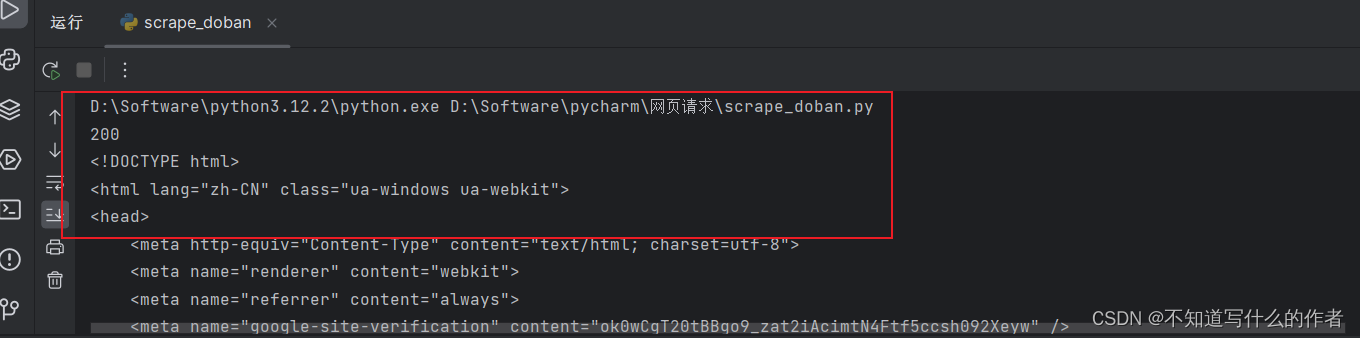
Python 爬虫基础——http请求和http响应
写本篇文章,我认为是能把自己所理解的内容分享出来,说不定就有和我一样有这样思维的共同者,希望本篇文章能帮助大家!✨✨ 文章目录 一、 🌈python介绍和分析二、 🌈http请求三、 🌈http响应四、…...

【Hadoop】Hive导入导出数据指南
穿新衣吧 剪新发型呀 轻松一下Windows98 打扮漂亮 18岁是天堂 我们的生活甜得像糖 穿新衣吧 剪新发型呀 轻松一下Windows98 以后的路不再会有痛苦 我们的未来该有多酷 🎵 房东的猫《new boy》 Apache Hive 是一个基于Hadoop的数据仓库工具&…...

Mybatis 执行批量插入
首先,创建一个简单的 insert 语句: <insert id”insertname”>insert into names (name) values (#{value}) </insert>然后在 java 代码中像下面这样执行批处理插入: list < string > names new arraylist(); names.add(“fred”); names.add(“barney”)…...
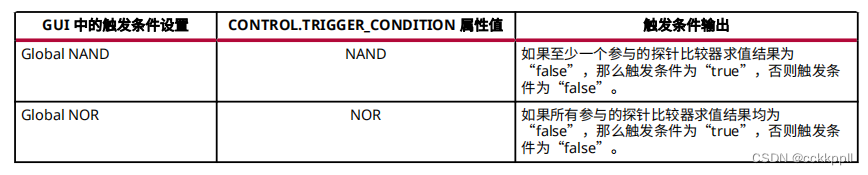
vivado 使用基本触发器模式
使用基本触发器模式 基本触发器模式用于描述触发条件 , 即由参与其中的调试探针比较器组成的全局布尔公式。当“触发器模式 (Trigger Mode) ”设置为 BASIC_ONLY 或 BASIC_OR_TRIG_IN 时 , 即启用基本触发器模式。使用“基本触发器设置 (Basic Trig…...

Chrome 浏览器无法保存或自动填充密码
Chrome 浏览器无法保存或自动填充密码 分类 平时使用 Chrome 浏览器都会对网站的用户名密码自动填充,今天发现突然不行了,找到一个解决办法: 1、退出 Chrome 浏览器。2、打开 Chrome 安装目录下的的 Profile 目录,删除 Login Da…...

C语言面试指针辨析
1. const int *p int const *p p可以改变,*p不可以改变 p可以指向任意空间,但无法利用p修改指针空间的值 2. int *const p p不能改变,*p可以改变 3. const int *const p int const *const p p和*p都不能改变 4. 面试问题 将内存地址为0x2…...
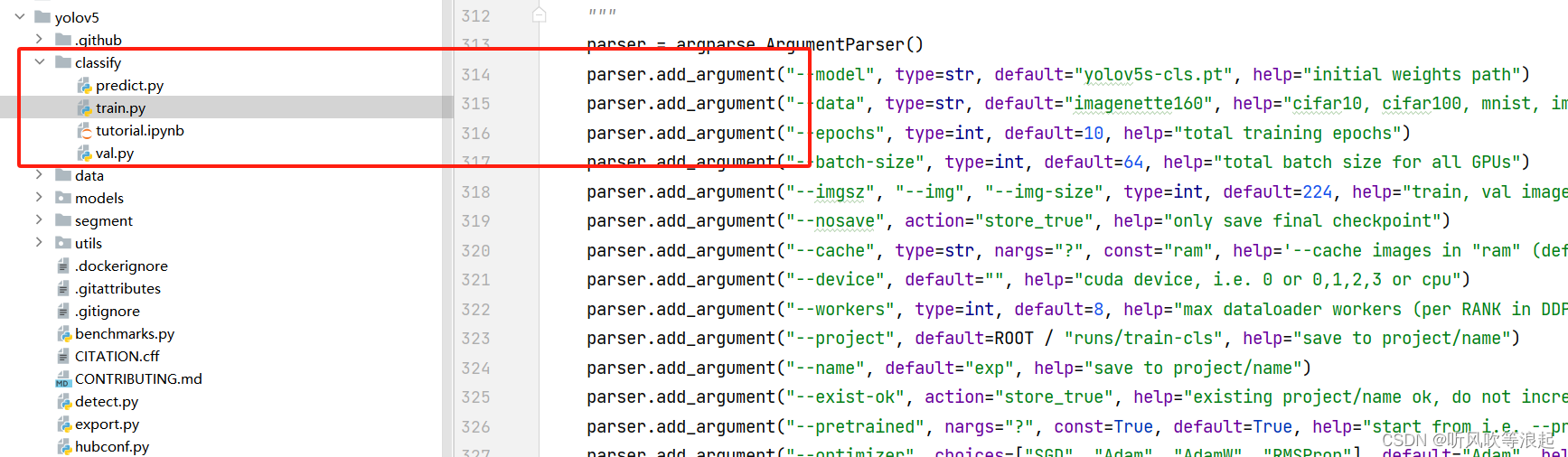
YOLOV5 分类:利用yolov5进行图像分类
1、前言 之前介绍了yolov5的目标检测示例,这次将介绍yolov5的分类展示 目标检测:YOLOv5 项目:训练代码和参数详细介绍(train)_yolov5训练代码的详解-CSDN博客 yolov5和其他网络的性能对比 yolov5分类的代码部分在这 2、数据集准备 yolov5分类的数据集就是常规的摆放方式…...
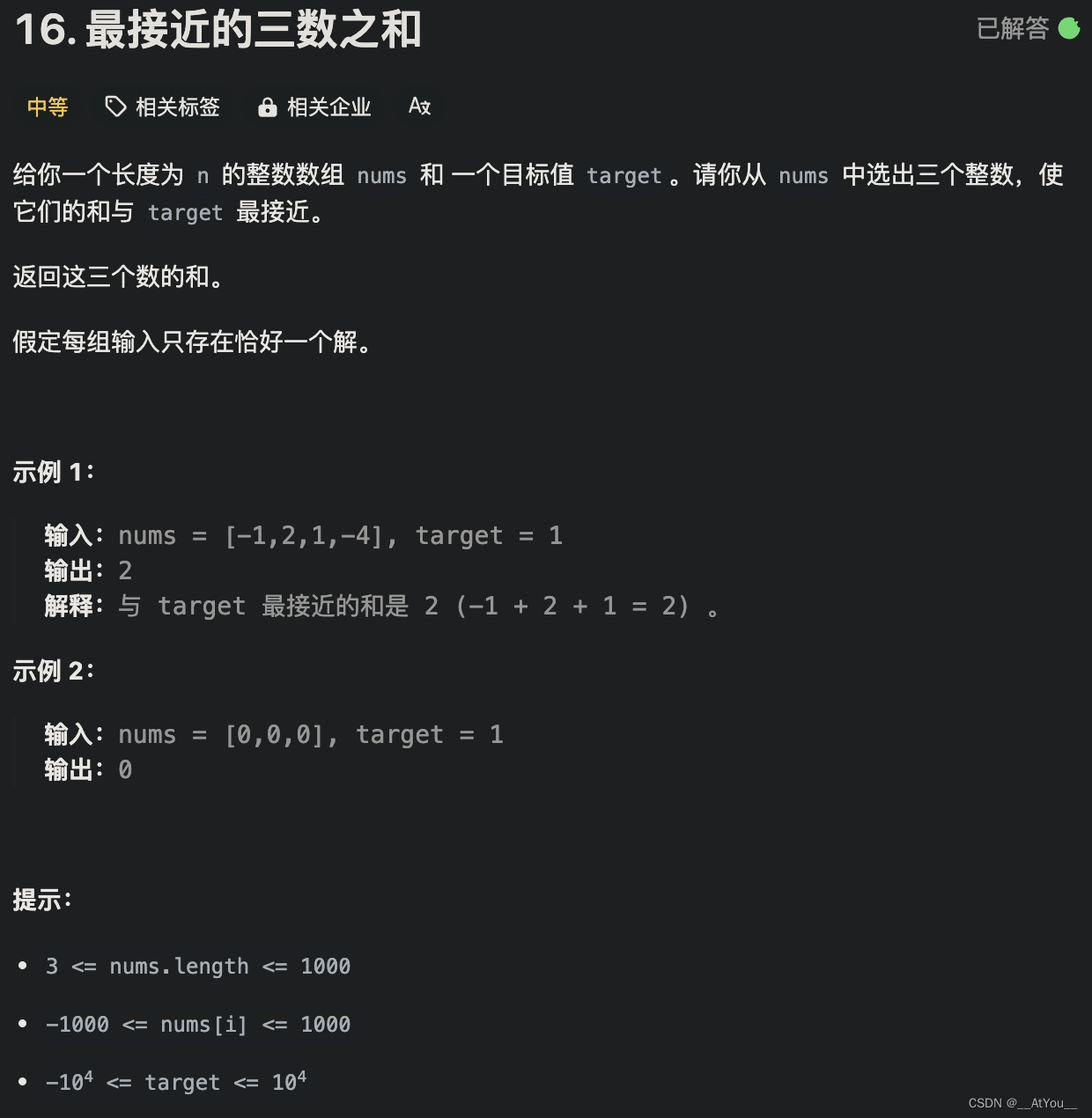
Golang | Leetcode Golang题解之第16题最接近的三数之和
题目: 题解: func threeSumClosest(nums []int, target int) int {sort.Ints(nums)var (n len(nums)best math.MaxInt32)// 根据差值的绝对值来更新答案update : func(cur int) {if abs(cur - target) < abs(best - target) {best cur}}// 枚举 a…...
React添加到现有项目
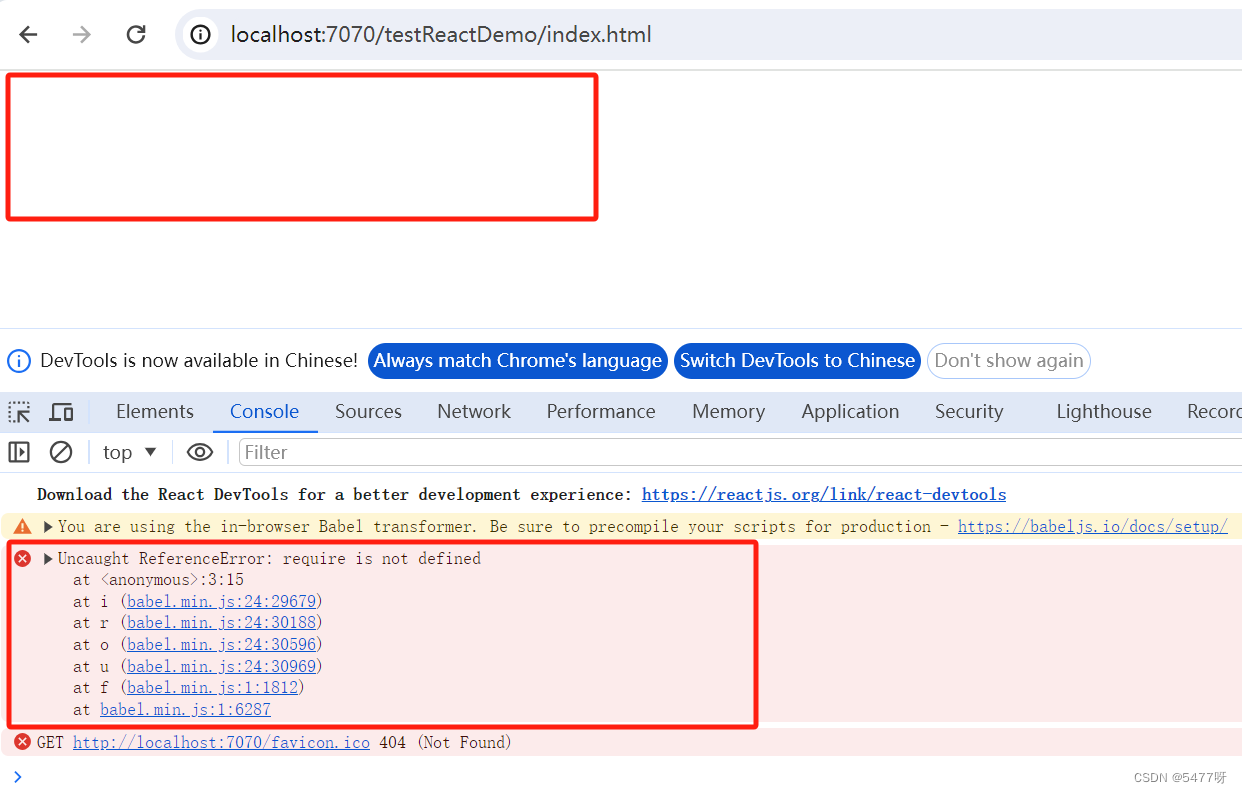
1.检查现有项目的根目录下是否有package.json文件 如果没有,则在项目的根目录下初始化一个package.json配置文件 2.在根目录下安装react和react-dom依赖 npm install --save react react-dom react-scripts安装成功后,react、react-dom以及react-scr…...
java 邮件发送表格
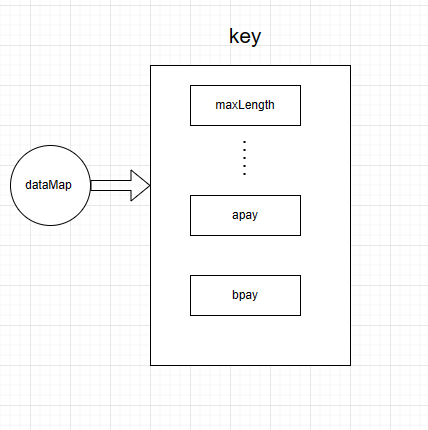
邮件发送表格 问题导入效果图 实现方案1. 拼接HTML文件(不推荐)2. excel 转HTML使用工具类来转化依赖工具类代码示例 使用已工具包 如 aspose-cells依赖代码示例 3.使用模板生成流程准备模板工具类代码示例 问题导入 在一些定时任务中,经常会…...

鸿蒙ArkTS小短剧开源项目进行中
鸿蒙小短剧开源项目进行中 短剧项目名称:CCShort-TV 短剧项目名称:CCShort-TV 使用ArtTS语言,API9以上,HarmonyOS系统的短剧开源代码,使用GSYVideoPlayer作为核心播放器的小短剧。主要以ArkTS,ArkUI编写为…...
Go 项目依赖注入wire工具最佳实践介绍与使用
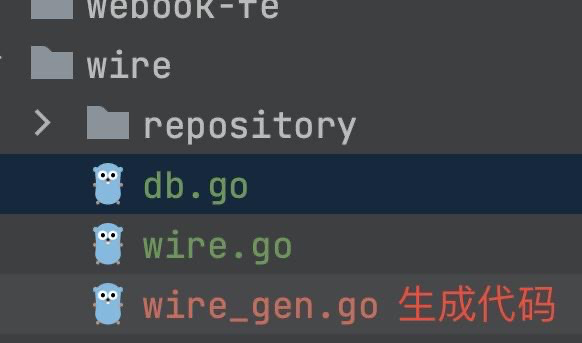
文章目录 一、引入二、控制反转与依赖注入三、为什么需要依赖注入工具3.1 示例3.2 依赖注入写法与非依赖注入写法 四、wire 工具介绍与安装4.1 wire 基本介绍4.2 安装 五、Wire 的基本使用5.1 前置代码准备5.2 使用 Wire 工具生成代码 六、Wire 核心技术5.1 抽象语法树分析5.2 …...

地推网推拉新致富是真的吗?靠谱平台揭秘
在互联网时代,各种平台层出不穷。为了吸引更多用户,这些平台常常会推出各种地推网推拉新活动。如果你懂得如何利用,那么你也有机会从中获得一笔不小的收入。 当然,在地推网推拉新赚钱的过程中,也需要注意一些问题。首…...

VTK使用交互器来从三维体数据中提取二维切片
VTK中鼠标消息是在交互类型对象(interactorstyle)中响应,因此通过为交互类型对象(interactorstyle)添加观察者(observer)来监听相应的消息,当消息触发时,由命令模式执行相…...
NCBI 数据下载
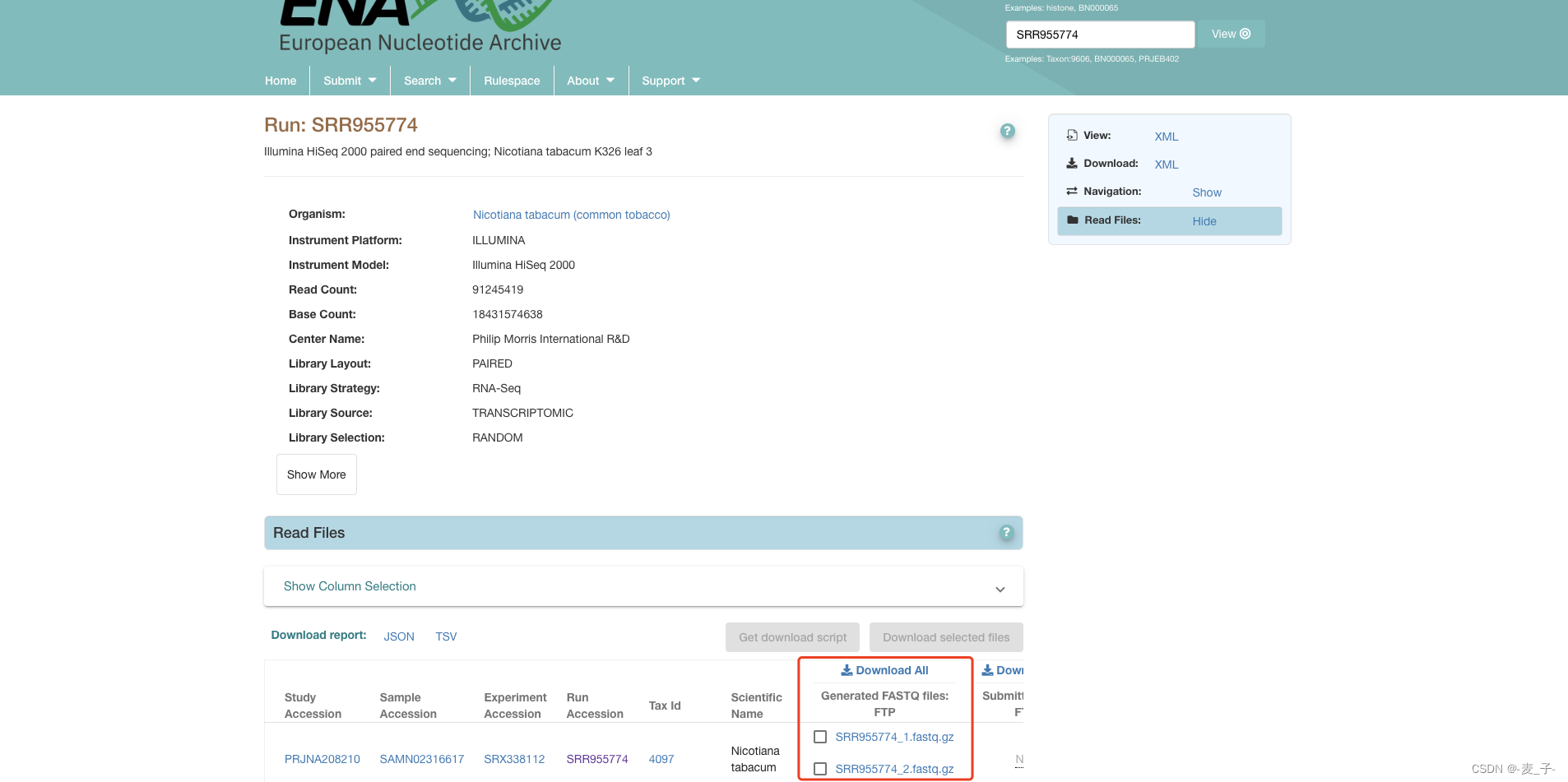
网上介绍的那几种直接下载NCBI数据的方法大都下载速度很慢,但是EBI (European Bioinformatics Institute) 下载很快,而且它的数据库和NCBI是共享的,所以我们可以直接从 EBI 下载。 1 、 确定要下载的 SRA 编号; 2 、 EBI (https…...

【Rust】基础语法
变量,基本类型,函数,注释和控制流,这些几乎是每种编程语言都具有的编程概念。 这些基础概念将存在于每个 Rust 程序中,及早学习它们将使你以最快的速度学习 Rust 的使用。 变量 首先必须说明,Rust 是强类…...
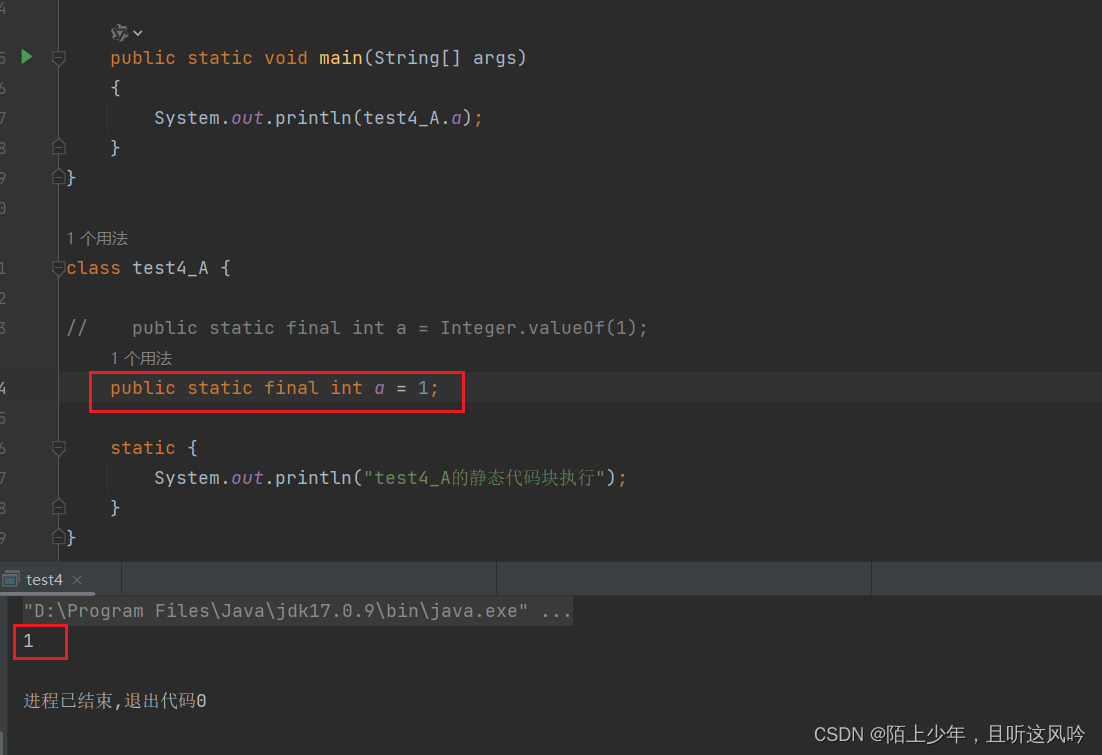
JVM基础:类的生命周期详解
JDK版本:jdk8 IDEA版本:IntelliJ IDEA 2022.1.3 文章目录 一. 生命周期概述二. 加载阶段(Loading)2.1 加载步骤2.2 查看内存中的对象 三. 连接阶段(Linking)3.1 连接之验证3.2 连接之准备3.3 连接阶段之解析 四. 初始化阶段(Initialization)4.1 单个类的…...
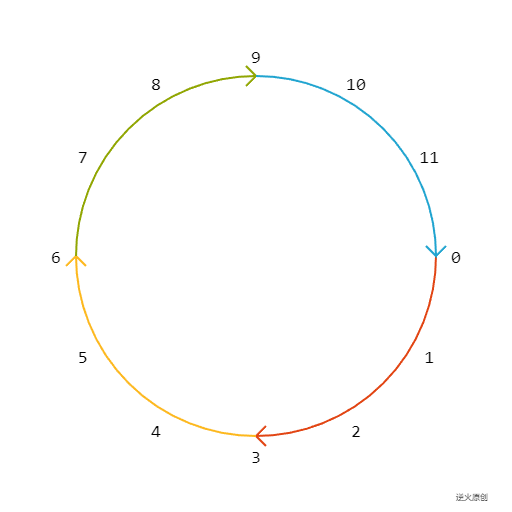
【Canvas技法】在Canvas按圆周绘制图形或是标注文字时,角度累加的方向为顺时针,起点为x轴正向
【图解说明】 【核心代码】 // 画圆弧及方向for(var i0;i<4;i){var startMath.PI/2*i;var endstartMath.PI/2;var x1180*Math.cos(start);var y1180*Math.sin(start);var x2180*Math.cos(end);var y2180*Math.sin(end);ctx.beginPath();ctx.arc(0,0,180,start,end,false);ct…...

计算机网络-TCP断开连接阶段错误应对机制
连接断开阶段 四次挥手机制:TCP连接的断开需要四次挥手,这是因为双方都需要独立地关闭数据传输。第二次和第三次挥手不能合并,因为在回复第二次挥手的时候,可能还有数据没有接收完成,所以需要先回复ACK报文,…...
纯手搓,已验证,有序版在下一篇)
力扣原题《长度最小的子数组》,无序版(不考虑元素必须要相邻)纯手搓,已验证,有序版在下一篇
给定一个含有 n 个正整数的数组和一个正整数 target 。 找出该数组中满足其总和大于等于 target 的长度最小的 子数组 [numsl, numsl1, …, numsr-1, numsr] ,并返回其长度。如果不存在符合条件的子数组,返回 0 。 示例 1: 输入:t…...

解锁新可能:ArkData 在智能穿戴设备中的应用
解锁新可能:ArkData 在智能穿戴设备中的应用随着人们对健康生活的重视,智能穿戴设备愈发普及。这些设备能够实时收集心率、步数、睡眠等健康数据,为人们的健康管理提供重要参考。在这一背景下,如何高效管理和利用这些健康数据成为…...

基于comsol的三相电力变压器电磁场与电路耦合计算的电压电流及磁通密度分布分析
comsol三相电力变压器电磁场和电路耦合计算,可以得到变压器高低压绕组电压电流分布以及变压器磁通密度分布三相电力变压器建模这事儿,说难不难说简单也不简单。前两天用COMSOL折腾了个带电路耦合的模型,顺手把绕组电流分布和铁芯磁通都摸清楚…...

新版药典解读:生物制品生产用动物细胞基质的质量控制修订重点
2025年版《中国药典》已正式实施2个多月,其对生物制品生产用动物细胞基质的质量控制要求进行了重要修订。本次修订对生物制品生产企业和检测机构的影响路径和深度虽有差异,但都指向一个核心转变:从“遵循规定”到“证明科学性”。接下来&…...

3.23-3.25笔记
这期实现温湿度采集、光照强度监测、智能设备控制(加湿器、PWM 调光 LED、PWM 调速风扇)确定引脚,根据原理图找出可以使用的引脚开关。根据手册信息PWM口GPIO0_D0和GPIO0_C6,把设备树GPIO0_D0做5G的复位disable,再加入…...
)
手把手推导NCP1380准谐振反激公式:用Mathcad复现ON官方计算书(附推导过程)
从零推导NCP1380准谐振反激公式:Mathcad实战全解析 当电源工程师第一次打开NCP1380官方计算书时,那些看似魔术般直接呈现的公式往往让人既兴奋又困惑。兴奋的是有了现成的设计工具,困惑的是这些公式背后的物理本质和数学逻辑被隐藏在技术文档…...

浏览器兼容性问题汇总
1.IE10版本以上浏览器input标签后面自带一个X问题IE10,IE11浏览器当点击input text文本框时,输入文本后出现一个删除功能的X按钮IE浏览器效果,而谷歌浏览器没有解决方案:给input添加如下CSS样式 input::-ms-clear{display:none;}2…...

强强联合!望石智慧携手华为、华鲲振宇发布AI药物研发联合解决方案,共筑中国智慧医药创新生态
近日,以“因聚而升 融智有为”为主题的华为中国合作伙伴大会2026在深圳圆满落幕。望石智慧作为其国内AI驱动医药创新领域的核心技术伙伴受邀参会,并在智能制造医药行业论坛发表演讲。会议期间,望石智慧、华为、华鲲振宇三方达成战略级生态合作…...

效率直接起飞!盘点2026年全网顶尖的AI论文工具
一天写完毕业论文在2026年已不再是天方夜谭。2026年最炸裂的AI论文工具,实测提速效果惊人,覆盖选题构思、文献整理、内容生成、格式排版全流程,让你高效搞定论文,告别熬夜赶工。 一、全流程王者:一站式搞定论文全链路&…...

AS3935闪电传感器Arduino驱动库深度解析与工业级应用
1. 项目概述AS3935 是一款由 AMS(现为 ams OSRAM)推出的专用闪电检测传感器芯片,集成 RF 前端、数字信号处理器(DSP)、闪电算法引擎及 IC/SPI 接口,可实现对 40 km 范围内云地闪(CG)…...