
LlamaIndex 组件 - Storing
文章目录
- 一、储存概览
- 1、概念
- 2、使用模式
- 3、模块
- 二、Vector Stores
- 1、简单向量存储
- 2、矢量存储选项和功能支持
- 3、Example Notebooks
- 三、文件存储
- 1、简单文档存储
- 2、MongoDB 文档存储
- 3、Redis 文档存储
- 4、Firestore 文档存储
- 四、索引存储
- 1、简单索引存储
- 2、MongoDB 索引存储
- 3、Redis索引存储
- 五、Chat Stores
- 1、简单聊天商店
- 2、Redis聊天商店
- 六、键值存储
- 七、保存和加载数据
- 1、持久化数据
- 2、加载数据中
- 3、使用远程后端
- 八、自定义存储
- 低级API
- 矢量存储集成和存储
本文转载改编自: https://docs.llamaindex.ai/en/stable/module_guides/storing/
一、储存概览
1、概念
LlamaIndex 提供了一个用于摄取、索引和查询外部数据的高级接口。
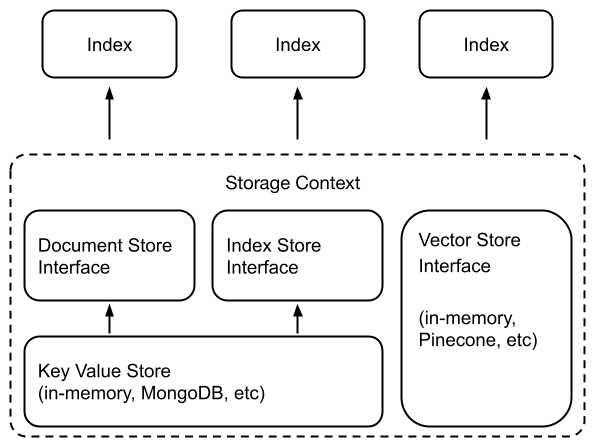
在底层,LlamaIndex 还支持可交换存储组件,允许您自定义:
- 文档存储
Node:存储摄取的文档(即对象)的地方, - 索引存储:存储索引元数据的位置,
- 向量存储:存储嵌入向量的位置。
- 图存储:存储知识图的位置(即 for
KnowledgeGraphIndex)。 - 聊天存储:存储和组织聊天消息的地方。
文档/索引存储依赖于通用的键值存储抽象,这也在下面详细介绍。
LlamaIndex 支持将数据持久保存到fsspec支持的任何存储后端。我们已确认支持以下存储后端:
- 本地文件系统
- AWS S3
- Cloudflare R2
2、使用模式
许多向量存储(FAISS 除外)将存储数据和索引(嵌入)。
这意味着您不需要使用单独的文档存储或索引存储。
这也意味着您不需要显式地保留这些数据——这会自动发生。用法如下所示来构建新索引/重新加载现有索引。
## build a new index
from llama_index.core import VectorStoreIndex, StorageContext
from llama_index.vector_stores.deeplake import DeepLakeVectorStore# construct vector store and customize storage context
vector_store = DeepLakeVectorStore(dataset_path="<dataset_path>")
storage_context = StorageContext.from_defaults(vector_store=vector_store)
# Load documents and build index
index = VectorStoreIndex.from_documents(documents, storage_context=storage_context
)***
## reload an existing one
index = VectorStoreIndex.from_vector_store(vector_store=vector_store)
有关更多详细信息,请参阅下面的矢量存储模块指南。
请注意,通常要使用存储抽象,您需要定义一个StorageContext对象:
from llama_index.core.storage.docstore import SimpleDocumentStore
from llama_index.core.storage.index_store import SimpleIndexStore
from llama_index.core.vector_stores import SimpleVectorStore
from llama_index.core import StorageContext# create storage context using default stores
storage_context = StorageContext.from_defaults(docstore=SimpleDocumentStore(),vector_store=SimpleVectorStore(),index_store=SimpleIndexStore(),
)
有关自定义/持久性的更多详细信息可以在下面的指南中找到。
- 定制化
- 保存/加载
3、模块
我们提供有关不同存储组件的深入指南。
- Vector Stores
- Docstores
- Index Stores
- Key-Val Stores
- Graph Stores
- ChatStores
二、Vector Stores
向量存储包含所摄取文档块(有时也包含文档块)的嵌入向量。
1、简单向量存储
默认情况下,LlamaIndex 使用简单的内存向量存储,非常适合快速实验。它们可以通过调用vector_store.persist()(分别)保存到磁盘(并从磁盘加载)SimpleVectorStore.from_persist_path(...)。
2、矢量存储选项和功能支持
LlamaIndex 支持 20 多种不同的矢量存储选项。我们正在积极添加更多集成并提高每个集成的功能覆盖范围。
| Vector Store | Type | Metadata Filtering | Hybrid Search | Delete | Store Documents | Async |
|---|---|---|---|---|---|---|
| Apache Cassandra® | self-hosted / cloud | ✓ | ✓ | ✓ | ||
| Astra DB | cloud | ✓ | ✓ | ✓ | ||
| Azure AI Search | cloud | ✓ | ✓ | ✓ | ✓ | |
| Azure CosmosDB MongoDB | cloud | ✓ | ✓ | |||
| BaiduVectorDB | cloud | ✓ | ✓ | ✓ | ||
| ChatGPT Retrieval Plugin | aggregator | ✓ | ✓ | |||
| Chroma | self-hosted | ✓ | ✓ | ✓ | ||
| DashVector | cloud | ✓ | ✓ | ✓ | ✓ | |
| Databricks | cloud | ✓ | ✓ | ✓ | ||
| Deeplake | self-hosted / cloud | ✓ | ✓ | ✓ | ||
| DocArray | aggregator | ✓ | ✓ | ✓ | ||
| DuckDB | in-memory / self-hosted | ✓ | ✓ | ✓ | ||
| DynamoDB | cloud | ✓ | ||||
| Elasticsearch | self-hosted / cloud | ✓ | ✓ | ✓ | ✓ | ✓ |
| FAISS | in-memory | |||||
| txtai | in-memory | |||||
| Jaguar | self-hosted / cloud | ✓ | ✓ | ✓ | ✓ | |
| LanceDB | cloud | ✓ | ✓ | ✓ | ||
| Lantern | self-hosted / cloud | ✓ | ✓ | ✓ | ✓ | ✓ |
| Metal | cloud | ✓ | ✓ | ✓ | ||
| MongoDB Atlas | self-hosted / cloud | ✓ | ✓ | ✓ | ||
| MyScale | cloud | ✓ | ✓ | ✓ | ✓ | |
| Milvus / Zilliz | self-hosted / cloud | ✓ | ✓ | ✓ | ||
| Neo4jVector | self-hosted / cloud | ✓ | ✓ | |||
| OpenSearch | self-hosted / cloud | ✓ | ✓ | ✓ | ✓ | ✓ |
| Pinecone | cloud | ✓ | ✓ | ✓ | ✓ | |
| Postgres | self-hosted / cloud | ✓ | ✓ | ✓ | ✓ | ✓ |
| pgvecto.rs | self-hosted / cloud | ✓ | ✓ | ✓ | ✓ | |
| Qdrant | self-hosted / cloud | ✓ | ✓ | ✓ | ✓ | ✓ |
| Redis | self-hosted / cloud | ✓ | ✓ | ✓ | ||
| Simple | in-memory | ✓ | ✓ | |||
| SingleStore | self-hosted / cloud | ✓ | ✓ | ✓ | ||
| Supabase | self-hosted / cloud | ✓ | ✓ | ✓ | ||
| Tair | cloud | ✓ | ✓ | ✓ | ||
| TiDB | cloud | ✓ | ✓ | ✓ | ||
| TencentVectorDB | cloud | ✓ | ✓ | ✓ | ✓ | |
| Timescale | ✓ | ✓ | ✓ | ✓ | ||
| Typesense | self-hosted / cloud | ✓ | ✓ | ✓ | ||
| Upstash | cloud | ✓ | ||||
| Weaviate | self-hosted / cloud | ✓ | ✓ | ✓ | ✓ |
有关更多详细信息,请参阅矢量存储集成。
3、Example Notebooks
- Astra DB
- Async Index Creation
- Azure AI Search
- Azure Cosmos DB
- Baidu
- Caasandra
- Chromadb
- Dash
- Databricks
- Deeplake
- DocArray HNSW
- DocArray in-Memory
- DuckDB
- Espilla
- Jaguar
- LanceDB
- Lantern
- Metal
- Milvus
- MyScale
- ElsaticSearch
- FAISS
- MongoDB Atlas
- Neo4j
- OpenSearch
- Pinecone
- Pinecone Hybrid Search
- PGvectoRS
- Postgres
- Redis
- Qdrant
- Qdrant Hybrid Search
- Rockset
- Simple
- Supabase
- Tair
- TiDB
- Tencent
- Timesacle
- Upstash
- Weaviate
- Weaviate Hybrid Search
- Zep
三、文件存储
文档存储包含摄取的文档块,我们将其称为Node对象。
有关更多详细信息,请参阅API 参考。
1、简单文档存储
默认情况下,将对象SimpleDocumentStore存储Node在内存中。它们可以通过调用docstore.persist()(分别)保存到磁盘(并从磁盘加载)SimpleDocumentStore.from_persist_path(...)。
可以在这里找到更完整的示例
2、MongoDB 文档存储
我们支持 MongoDB 作为替代文档存储后端,在Node摄取对象时保留数据。
from llama_index.storage.docstore.mongodb import MongoDocumentStore
from llama_index.core.node_parser import SentenceSplitter# create parser and parse document into nodes
parser = SentenceSplitter()
nodes = parser.get_nodes_from_documents(documents)# create (or load) docstore and add nodes
docstore = MongoDocumentStore.from_uri(uri="<mongodb+srv://...>")
docstore.add_documents(nodes)# create storage context
storage_context = StorageContext.from_defaults(docstore=docstore)# build index
index = VectorStoreIndex(nodes, storage_context=storage_context)
在后台,MongoDocumentStore连接到固定的 MongoDB 数据库并为节点初始化新集合(或加载现有集合)。
注意:您可以在实例化时配置
db_name和,否则它们默认为和。namespace``MongoDocumentStore``db_name="db_docstore"``namespace="docstore"
请注意,使用 an 时无需调用storage_context.persist()(或) ,因为默认情况下数据是持久保存的。docstore.persist()``MongoDocumentStore
MongoDocumentStore您可以轻松地重新连接到 MongoDB 集合并通过使用现有的db_name和重新初始化 来重新加载索引collection_name。
可以在这里找到更完整的示例
3、Redis 文档存储
我们支持 Redis 作为替代文档存储后端,在Node摄取对象时保留数据。
from llama_index.storage.docstore.redis import RedisDocumentStore
from llama_index.core.node_parser import SentenceSplitter# create parser and parse document into nodes
parser = SentenceSplitter()
nodes = parser.get_nodes_from_documents(documents)# create (or load) docstore and add nodes
docstore = RedisDocumentStore.from_host_and_port(host="127.0.0.1", port="6379", namespace="llama_index"
)
docstore.add_documents(nodes)# create storage context
storage_context = StorageContext.from_defaults(docstore=docstore)# build index
index = VectorStoreIndex(nodes, storage_context=storage_context)
在后台,RedisDocumentStore连接到 redis 数据库并将节点添加到存储在{namespace}/docs.
namespace注意:实例化时可以配置RedisDocumentStore,否则默认namespace="docstore"。
RedisDocumentStore您可以轻松地重新连接到 Redis 客户端并通过使用现有的host、port和重新初始化 来重新加载索引namespace。
可以在这里找到更完整的示例
4、Firestore 文档存储
我们支持 Firestore 作为替代文档存储后端,在Node摄取对象时保留数据。
from llama_index.storage.docstore.firestore import FirestoreDocumentStore
from llama_index.core.node_parser import SentenceSplitter# create parser and parse document into nodes
parser = SentenceSplitter()
nodes = parser.get_nodes_from_documents(documents)# create (or load) docstore and add nodes
docstore = FirestoreDocumentStore.from_database(project="project-id",database="(default)",
)
docstore.add_documents(nodes)# create storage context
storage_context = StorageContext.from_defaults(docstore=docstore)# build index
index = VectorStoreIndex(nodes, storage_context=storage_context)
在后台,FirestoreDocumentStore连接到 Google Cloud 中的 firestore 数据库,并将您的节点添加到存储在{namespace}/docs.
namespace注意:实例化时可以配置FirestoreDocumentStore,否则默认namespace="docstore"。
FirestoreDocumentStore您可以轻松地重新连接到 Firestore 数据库并通过使用现有的project、database和重新初始化 来重新加载索引namespace。
可以在这里找到更完整的示例
四、索引存储
索引存储包含轻量级索引元数据(即构建索引时创建的附加状态信息)。
有关更多详细信息,请参阅API 参考。
1、简单索引存储
默认情况下,LlamaIndex 使用由内存中键值存储支持的简单索引存储。它们可以通过调用index_store.persist()(分别)保存到磁盘(并从磁盘加载)SimpleIndexStore.from_persist_path(...)。
2、MongoDB 索引存储
与文档存储类似,我们也可以将其用作MongoDB索引存储的存储后端。
from llama_index.storage.index_store.mongodb import MongoIndexStore
from llama_index.core import VectorStoreIndex# create (or load) index store
index_store = MongoIndexStore.from_uri(uri="<mongodb+srv://...>")# create storage context
storage_context = StorageContext.from_defaults(index_store=index_store)# build index
index = VectorStoreIndex(nodes, storage_context=storage_context)# or alternatively, load index
from llama_index.core import load_index_from_storageindex = load_index_from_storage(storage_context)
在后台,MongoIndexStore连接到固定的 MongoDB 数据库并为索引元数据初始化新集合(或加载现有集合)。
注意:您可以在实例化时配置
db_name和,否则它们默认为和。namespace``MongoIndexStore``db_name="db_docstore"``namespace="docstore"
请注意,使用 an 时无需调用storage_context.persist()(或) ,因为默认情况下数据是持久保存的。index_store.persist()``MongoIndexStore
MongoIndexStore您可以轻松地重新连接到 MongoDB 集合并通过使用现有的db_name和重新初始化 来重新加载索引collection_name。
可以在这里找到更完整的示例
3、Redis索引存储
我们支持 Redis 作为替代文档存储后端,在Node摄取对象时保留数据。
from llama_index.storage.index_store.redis import RedisIndexStore
from llama_index.core import VectorStoreIndex# create (or load) docstore and add nodes
index_store = RedisIndexStore.from_host_and_port(host="127.0.0.1", port="6379", namespace="llama_index"
)# create storage context
storage_context = StorageContext.from_defaults(index_store=index_store)# build index
index = VectorStoreIndex(nodes, storage_context=storage_context)# or alternatively, load index
from llama_index.core import load_index_from_storageindex = load_index_from_storage(storage_context)
在后台,RedisIndexStore连接到 redis 数据库并将节点添加到存储在{namespace}/index.
namespace注意:实例化时可以配置RedisIndexStore,否则默认namespace="index_store"。
RedisIndexStore您可以轻松地重新连接到 Redis 客户端并通过使用现有的host、port和重新初始化 来重新加载索引namespace。
可以在这里找到更完整的示例
五、Chat Stores
聊天存储充当存储您的聊天历史记录的集中式界面。与其他存储格式相比,聊天历史记录是独一无二的,因为消息的顺序对于维持整体对话非常重要。
user_ids聊天存储可以通过键(如或其他唯一可识别字符串)组织聊天消息序列,并处理delete、insert、 和get操作。
1、简单聊天商店
最基本的聊天存储是SimpleChatStore,它将消息存储在内存中,并且可以保存到磁盘或从磁盘保存,也可以序列化并存储在其他地方。
通常,您将实例化一个聊天存储并将其提供给内存模块。SimpleChatStore如果未提供,则使用聊天存储的内存模块将默认使用。
from llama_index.core.storage.chat_store import SimpleChatStore
from llama_index.core.memory import ChatMemoryBufferchat_store = SimpleChatStore()chat_memory = ChatMemoryBuffer.from_defaults(token_limit=3000,chat_store=chat_store,chat_store_key="user1",
)
创建内存后,您可以将其包含在代理或聊天引擎中:
agent = OpenAIAgent.from_tools(tools, memory=memory)
# OR
chat_engine = index.as_chat_engine(memory=memory)
要保存聊天存储供以后使用,您可以从磁盘保存/加载
chat_store.persist(persist_path="chat_store.json")
loaded_chat_store = SimpleChatStore.from_persist_path(persist_path="chat_store.json"
)
或者您可以与字符串进行转换,同时将字符串保存在其他位置
chat_store_string = chat_store.json()
loaded_chat_store = SimpleChatStore.parse_raw(chat_store_string)
2、Redis聊天商店
使用RedisChatStore,您可以远程存储聊天记录,而不必担心手动保存和加载聊天记录。
from llama_index.storage.chat_store.redis import RedisChatStore
from llama_index.core.memory import ChatMemoryBufferchat_store = RedisChatStore(redis_url="redis://localhost:6379", ttl=300)chat_memory = ChatMemoryBuffer.from_defaults(token_limit=3000,chat_store=chat_store,chat_store_key="user1",
)
六、键值存储
键值存储是为我们的文档存储和索引存储提供支持的底层存储抽象。
我们提供以下键值存储:
- 简单键值存储:内存中的 KV 存储。用户可以选择调用
persist这个kv存储来将数据保存到磁盘。 - MongoDB 键值存储:MongoDB KV 存储。
有关更多详细信息,请参阅API 参考。
注意:目前,这些存储抽象不面向外部。
七、保存和加载数据
1、持久化数据
默认情况下,LlamaIndex 将数据存储在内存中,如果需要,可以显式保留该数据:
storage_context.persist(persist_dir="<persist_dir>")
这将根据指定persist_dir(或./storage默认)将数据保存到磁盘。
假设您跟踪要加载的索引 ID,则可以保留多个索引并从同一目录加载多个索引。
用户还可以配置MongoDB默认保存数据的替代存储后端(例如)。在这种情况下,调用storage_context.persist()将不会执行任何操作。
2、加载数据中
要加载数据,用户只需使用相同的配置重新创建存储上下文(例如传入相同的persist_dir或向量存储客户端)。
storage_context = StorageContext.from_defaults(docstore=SimpleDocumentStore.from_persist_dir(persist_dir="<persist_dir>"),vector_store=SimpleVectorStore.from_persist_dir(persist_dir="<persist_dir>"),index_store=SimpleIndexStore.from_persist_dir(persist_dir="<persist_dir>"),
)
StorageContext然后我们可以通过下面的一些便利函数加载特定的索引。
from llama_index.core import (load_index_from_storage,load_indices_from_storage,load_graph_from_storage,
)# load a single index
# need to specify index_id if multiple indexes are persisted to the same directory
index = load_index_from_storage(storage_context, index_id="<index_id>")# don't need to specify index_id if there's only one index in storage context
index = load_index_from_storage(storage_context)# load multiple indices
indices = load_indices_from_storage(storage_context)  # loads all indices
indices = load_indices_from_storage(storage_context, index_ids=[index_id1, ...]
)  # loads specific indices# load composable graph
graph = load_graph_from_storage(storage_context, root_id="<root_id>"
)  # loads graph with the specified root_id
3、使用远程后端
默认情况下,LlamaIndex 使用本地文件系统来加载和保存文件。但是,您可以通过传递对象来覆盖它fsspec.AbstractFileSystem。
这是一个简单的例子,实例化一个向量存储:
import dotenv
import s3fs
import osdotenv.load_dotenv("../../../.env")# load documents
documents = SimpleDirectoryReader("../../../examples/paul_graham_essay/data/"
).load_data()
print(len(documents))
index = VectorStoreIndex.from_documents(documents)
至此,一切都已经是一样了。现在 - 让我们实例化一个 S3 文件系统并从那里保存/加载。
# set up s3fs
AWS_KEY = os.environ["AWS_ACCESS_KEY_ID"]
AWS_SECRET = os.environ["AWS_SECRET_ACCESS_KEY"]
R2_ACCOUNT_ID = os.environ["R2_ACCOUNT_ID"]assert AWS_KEY is not None and AWS_KEY != ""s3 = s3fs.S3FileSystem(key=AWS_KEY,secret=AWS_SECRET,endpoint_url=f"https://{R2_ACCOUNT_ID}.r2.cloudflarestorage.com",s3_additional_kwargs={"ACL": "public-read"},
)# If you're using 2+ indexes with the same StorageContext,
# run this to save the index to remote blob storage
index.set_index_id("vector_index")# persist index to s3
s3_bucket_name = "llama-index/storage_demo"  # {bucket_name}/{index_name}
index.storage_context.persist(persist_dir=s3_bucket_name, fs=s3)# load index from s3
index_from_s3 = load_index_from_storage(StorageContext.from_defaults(persist_dir=s3_bucket_name, fs=s3),index_id="vector_index",
)
默认情况下,如果您不传递文件系统,我们将假定本地文件系统。
八、自定义存储
默认情况下,LlamaIndex 隐藏了复杂性,让您可以用不到 5 行代码查询数据:
from llama_index.core import VectorStoreIndex, SimpleDirectoryReaderdocuments = SimpleDirectoryReader("data").load_data()
index = VectorStoreIndex.from_documents(documents)
query_engine = index.as_query_engine()
response = query_engine.query("Summarize the documents.")
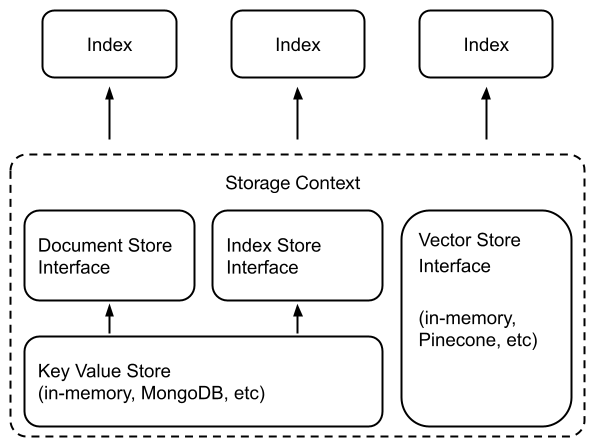
在底层,LlamaIndex 还支持可交换的存储层,允许您自定义提取的文档(即Node对象)、嵌入向量和索引元数据的存储位置。
低级API
为此,无需使用高级 API,
index = VectorStoreIndex.from_documents(documents)
我们使用较低级别的 API 来提供更精细的控制:
from llama_index.core.storage.docstore import SimpleDocumentStore
from llama_index.core.storage.index_store import SimpleIndexStore
from llama_index.core.vector_stores import SimpleVectorStore
from llama_index.core.node_parser import SentenceSplitter# create parser and parse document into nodes
parser = SentenceSplitter()
nodes = parser.get_nodes_from_documents(documents)# create storage context using default stores
storage_context = StorageContext.from_defaults(docstore=SimpleDocumentStore(),vector_store=SimpleVectorStore(),index_store=SimpleIndexStore(),
)# create (or load) docstore and add nodes
storage_context.docstore.add_documents(nodes)# build index
index = VectorStoreIndex(nodes, storage_context=storage_context)# save index
index.storage_context.persist(persist_dir="<persist_dir>")# can also set index_id to save multiple indexes to the same folder
index.set_index_id("<index_id>")
index.storage_context.persist(persist_dir="<persist_dir>")# to load index later, make sure you setup the storage context
# this will loaded the persisted stores from persist_dir
storage_context = StorageContext.from_defaults(persist_dir="<persist_dir>")# then load the index object
from llama_index.core import load_index_from_storageloaded_index = load_index_from_storage(storage_context)# if loading an index from a persist_dir containing multiple indexes
loaded_index = load_index_from_storage(storage_context, index_id="<index_id>")# if loading multiple indexes from a persist dir
loaded_indicies = load_index_from_storage(storage_context, index_ids=["<index_id>", ...]
)
您可以通过一行更改来自定义底层存储,以实例化不同的文档存储、索引存储和向量存储。有关更多详细信息,请参阅文档存储、向量存储、索引存储指南。
矢量存储集成和存储
我们的大多数矢量存储集成将整个索引(矢量+文本)存储在矢量存储本身中。这样做的主要好处是不必显式地持久化索引,如上所示,因为矢量存储已经托管并将数据持久化在我们的索引中。
支持这种做法的矢量存储是:
- AzureAISearchVectorStore
- ChatGPTRetrievalPluginClient
- CassandraVectorStore
- ChromaVectorStore
- EpsillaVectorStore
- DocArrayHnswVectorStore
- DocArrayInMemoryVectorStore
- JaguarVectorStore
- LanceDBVectorStore
- MetalVectorStore
- MilvusVectorStore
- MyScaleVectorStore
- OpensearchVectorStore
- PineconeVectorStore
- QdrantVectorStore
- RedisVectorStore
- UpstashVectorStore
- WeaviateVectorStore
下面是一个使用 Pinecone 的小例子:
import pinecone
from llama_index.core import VectorStoreIndex, SimpleDirectoryReader
from llama_index.vector_stores.pinecone import PineconeVectorStore# Creating a Pinecone index
api_key = "api_key"
pinecone.init(api_key=api_key, environment="us-west1-gcp")
pinecone.create_index("quickstart", dimension=1536, metric="euclidean", pod_type="p1"
)
index = pinecone.Index("quickstart")# construct vector store
vector_store = PineconeVectorStore(pinecone_index=index)# create storage context
storage_context = StorageContext.from_defaults(vector_store=vector_store)# load documents
documents = SimpleDirectoryReader("./data").load_data()# create index, which will insert documents/vectors to pinecone
index = VectorStoreIndex.from_documents(documents, storage_context=storage_context
)
如果您有一个已加载数据的现有矢量存储,您可以连接到它并直接创建一个VectorStoreIndex,如下所示:
index = pinecone.Index("quickstart")
vector_store = PineconeVectorStore(pinecone_index=index)
loaded_index = VectorStoreIndex.from_vector_store(vector_store=vector_store)
2014-04-15(一)
相关文章:
LlamaIndex 组件 - Storing
文章目录 一、储存概览1、概念2、使用模式3、模块 二、Vector Stores1、简单向量存储2、矢量存储选项和功能支持3、Example Notebooks 三、文件存储1、简单文档存储2、MongoDB 文档存储3、Redis 文档存储4、Firestore 文档存储 四、索引存储1、简单索引存储2、MongoDB 索引存储…...

在Linux系统中设定延迟任务
一、在系统中设定延迟任务要求如下: 要求: 在系统中建立easylee用户,设定其密码为easylee 延迟任务由root用户建立 要求在5小时后备份系统中的用户信息文件到/backup中 确保延迟任务是使用非交互模式建立 确保系统中只有root用户和easylee用户…...
JVM之方法区的详细解析
方法区 方法区:是各个线程共享的内存区域,用于存储已被虚拟机加载的类信息、常量、即时编译器编译后的代码等数据,虽然 Java 虚拟机规范把方法区描述为堆的一个逻辑部分,但是也叫 Non-Heap(非堆) 设置方法…...

Go 使用ObjectID
ObjectID介绍 MongoDB中的ObjectId是一种特殊的12字节 BSON 类型数据,用于为主文档提供唯一的标识符,默认情况下作为 _id 字段的默认值出现在每一个MongoDB集合中的文档中。以下是ObjectId的具体组成: 1. 时间戳(Timestamp&…...

基于SpringBoot+Vue的疾病防控系统设计与实现(源码+文档+包运行)
一.系统概述 在如今社会上,关于信息上面的处理,没有任何一个企业或者个人会忽视,如何让信息急速传递,并且归档储存查询,采用之前的纸张记录模式已经不符合当前使用要求了。所以,对疾病防控信息管理的提升&a…...
2024年阿里云4核8G配置云服务器价格低性能高!
阿里云4核8G服务器租用优惠价格700元1年,配置为ECS通用算力型u1实例(ecs.u1-c1m2.xlarge)4核8G配置、1M到3M带宽可选、ESSD Entry系统盘20G到40G可选,CPU采用Intel(R) Xeon(R) Platinum处理器,阿里云优惠 aliyunfuwuqi…...

关于ContentProvider这一遍就够了
ContentProvider是什么? ContentProvider是Android四大组件之一,主要用于不同应用程序之间或者同一个应用程序的不同部分之间共享数据。它是Android系统中用于存储和检索数据的抽象层,允许不同的应用程序通过统一的接口访问数据,…...

《1w实盘and大盘基金预测 day23》
这几天预测错麻了,哈哈哈,完全和技术没关系,全是消息面。 昨日预测: 2958-2984-3010 证券继续下跌,昨天诱多把我诱惑进去了(看2-3天的反弹也没了),今天直接出掉昨天买的。 整体操作…...
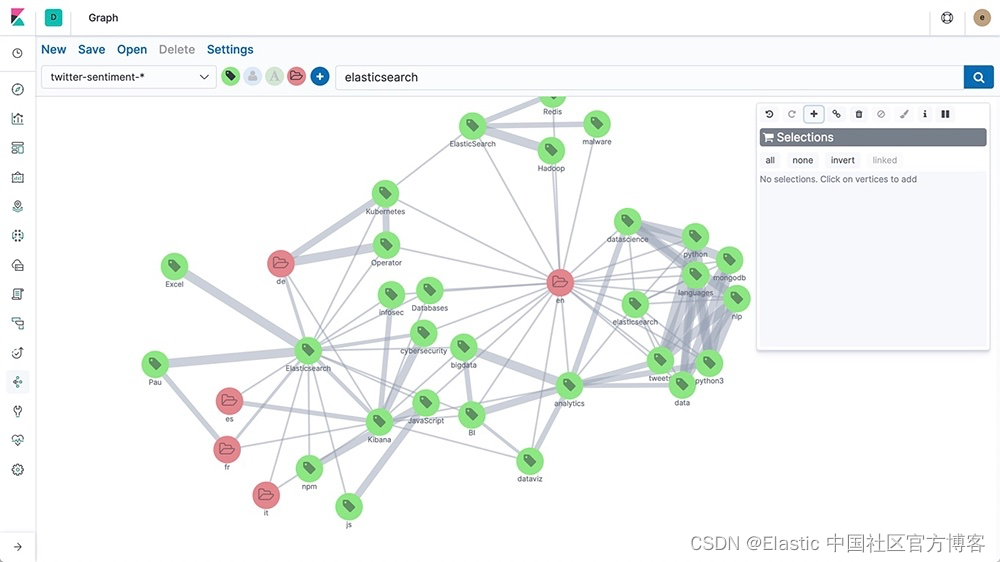
向量数据库与图数据库:理解它们的区别
作者:Elastic Platform Team 大数据管理不仅仅是尽可能存储更多的数据。它关乎能够识别有意义的见解、发现隐藏的模式,并做出明智的决策。这种对高级分析的追求一直是数据建模和存储解决方案创新的驱动力,远远超出了传统关系数据库。 这些创…...
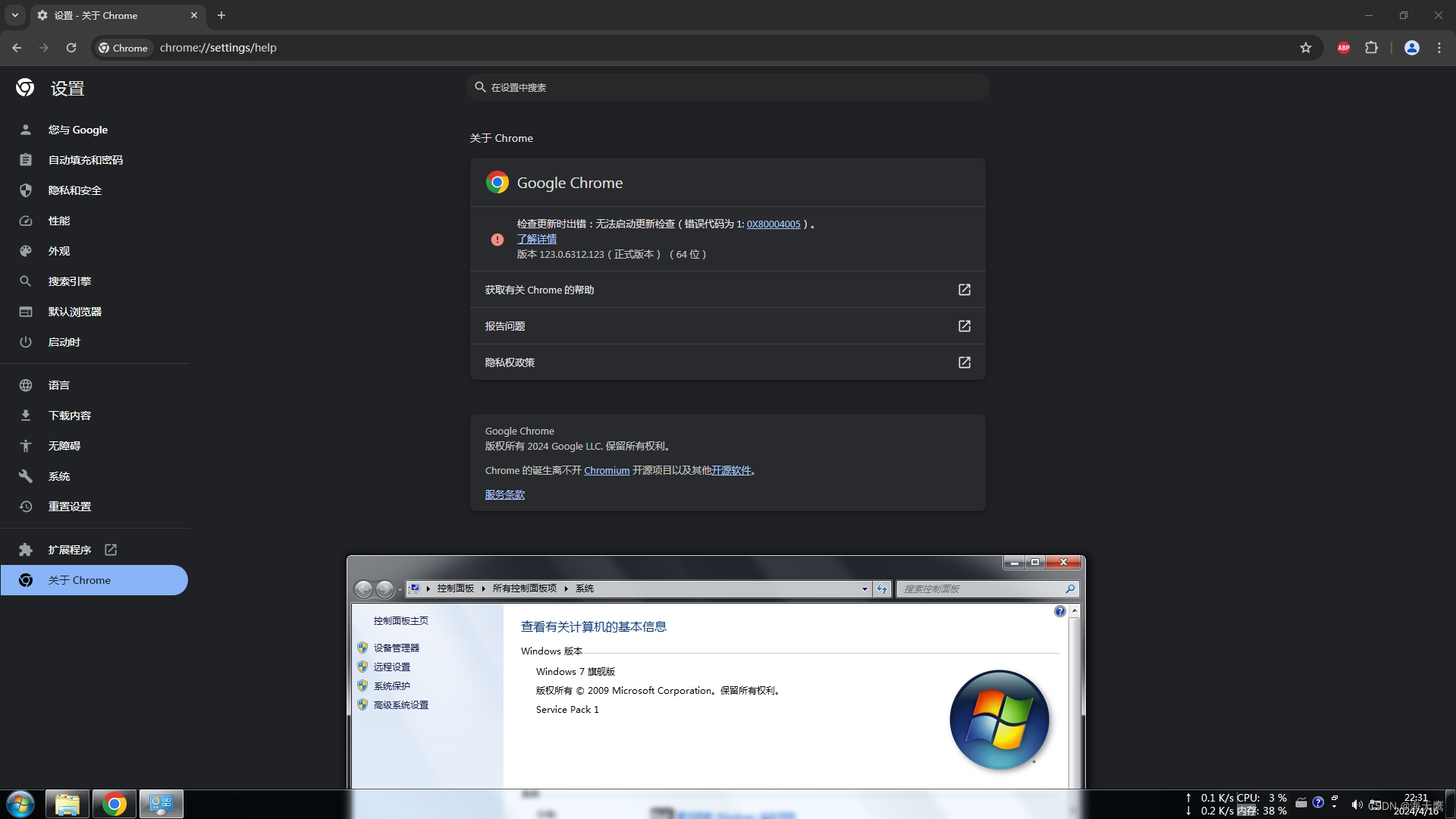
WIN7用上最新版Chrome
1.下载WIN10最新版Chrome的离线安装包 谷歌浏览器 Chrome 最新版离线安装包下载地址 v123.0.6312.123 - 每日自动更新 | 异次元软件 文件名称:123.0.6312.123_chrome_installer.exe。 123.0.6312.123_chrome_installer.exe 文件右键解压缩得到 chrome.7z&#x…...
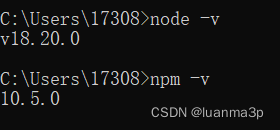
node.jd版本降级/升级
第一步.先清空本地安装的node.js版本 按健winR弹出窗口,键盘输入cmd,然后敲回车(或者鼠标直接点击电脑桌面最左下角的win窗口图标弹出,输入cmd再点击回车键) 进入命令控制行窗口,输入where node,查看本地…...
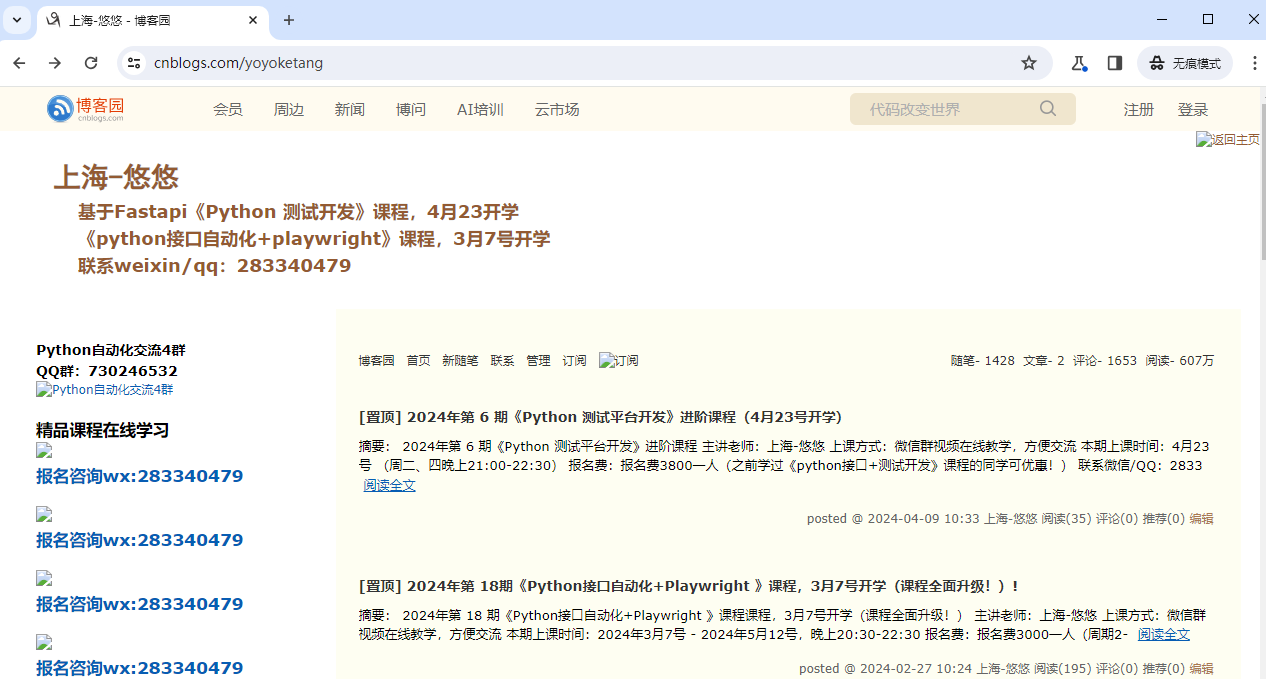
python+playwright 学习-88 禁止加载图片等资源
前言 对于爬虫的小伙伴来说,有时候只需抓取页面的文本,不用加载图片,可以加快操作页面速度,那么我们可以设置禁止加载图片等资源。 禁止图片加载 根据url地址的后缀,图片资源后缀一般是png,jpg,jpeg,gif等格式。 from playwright.sync_api import sync_playwrightwith…...
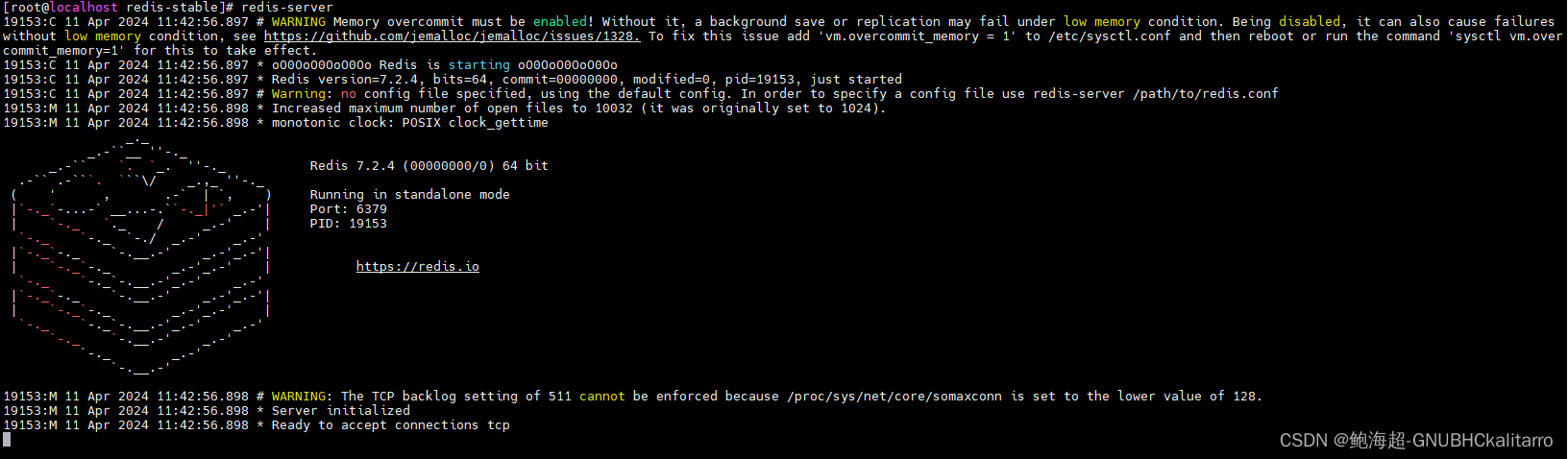
Linux:Redis7.2.4的简单在线部署(1)
注意:我写的这个文章是以最快速的办法去搭建一个redis的基础环境,作用是为了做实验简单的练习,如果你想搭建一个相对稳定的redis去使用,可以看我下面这个文章 Linux:Redis7.2.4的源码包部署(2)-…...
HackMyVM-Connection
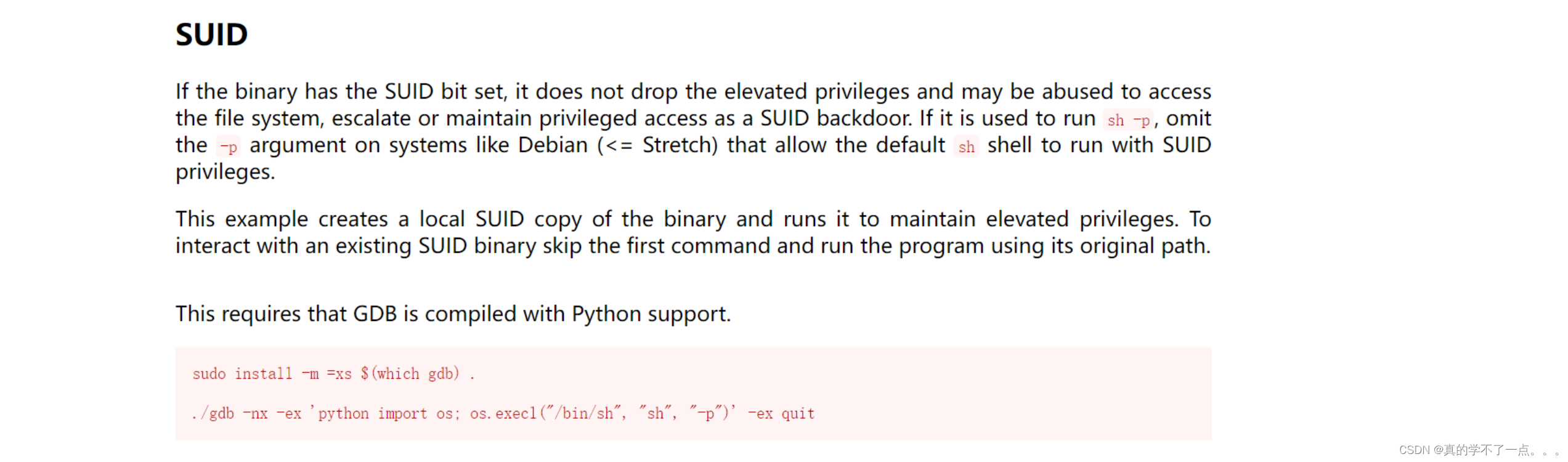
目录 信息收集 arp nmap WEB web信息收集 dirsearch smbclient put shell 提权 系统信息收集 suid gdb提权 信息收集 arp ┌─[rootparrot]─[~/HackMyVM] └──╼ #arp-scan -l Interface: enp0s3, type: EN10MB, MAC: 08:00:27:16:3d:f8, IPv4: 192.168.9.115 S…...
Prometheus接入AlterManager配置邮件告警(基于K8S环境部署)
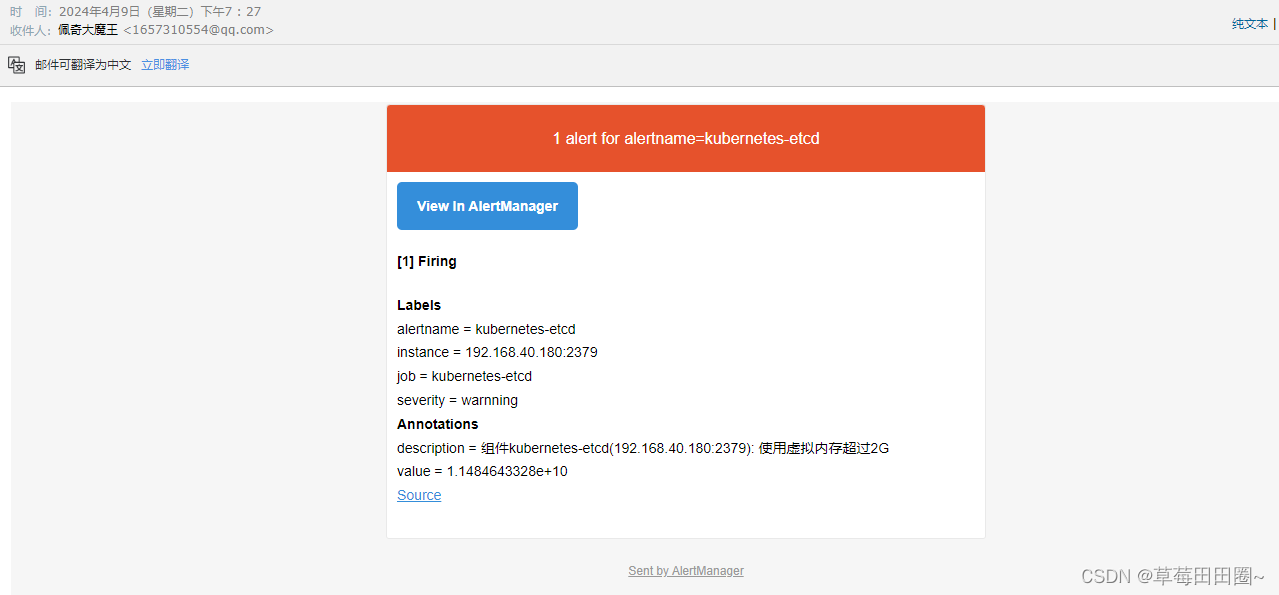
目录 一.配置Alertmanager告警发送至邮箱二.Prometheus接入AlertManager三.部署PrometheusAlterManager(放到一个Pod中)四. 测试告警 基于 此环境做实验 一.配置Alertmanager告警发送至邮箱 1.创建AlertManager ConfigMap资源清单 vim alertmanager-cm.yaml --- kind: Confi…...
find方法
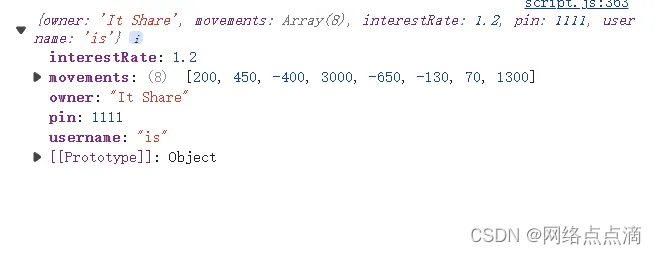
find() 方法用于在数组中查找符合条件的第一个元素,并返回该元素。如果找到匹配的元素,则返回该元素的值;如果未找到匹配的元素,则返回 undefined。 例如: const firstWithdrawal movements.find(mov > mov < 0); consol…...
TLS v1.3 导致JetBrains IDE jdk.internal.net.http.common CPU占用高
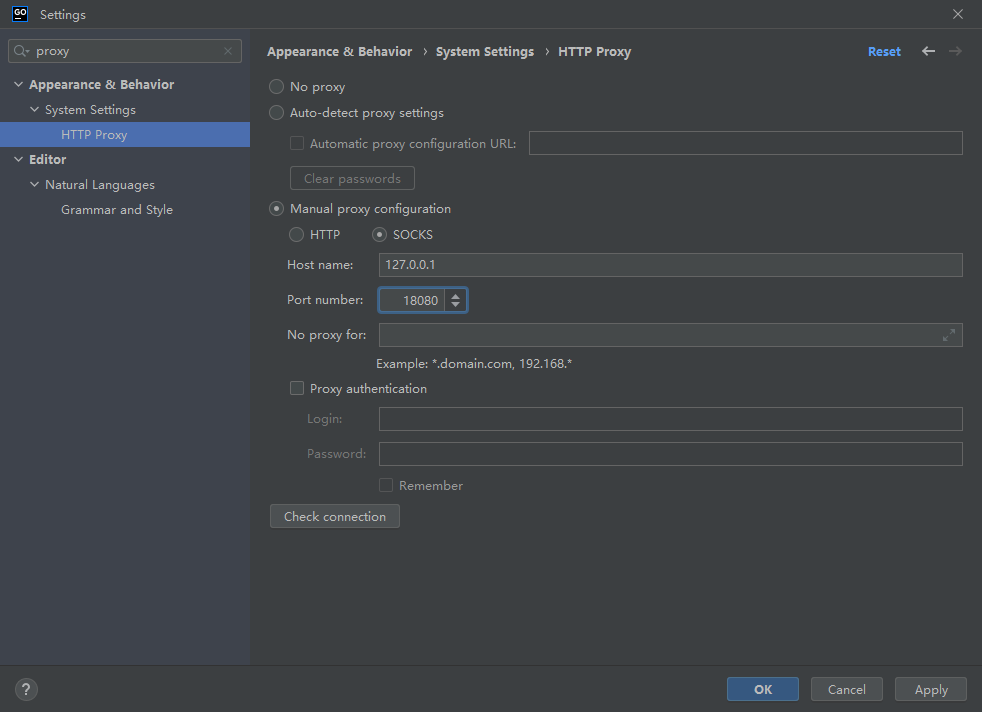
开发环境 GoLand版本:2022.3.4 问题原因 JDK 中的 TLS v1.3 实现引起 解决办法 使用 SOCKS 代理代替HTTP代理 禁用 Space 和 Code With Me 插件 禁用 TLS v1.3,参考:https://stackoverflow.com/questions/54485755/java-11-httpclient-…...
计算机网络 2.2数据传输方式
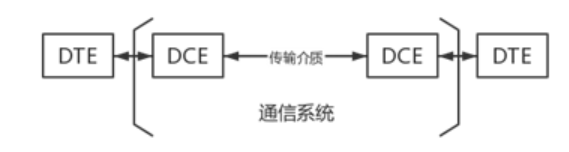
第二节 数据传输方式 一、数据通信系统模型 添加图片注释,不超过 140 字(可选) 1.数据终端设备(DTE) 作用:用于处理用户数据的设备,是数据通信系统的信源和信宿。 设备:便携计算机…...

陇剑杯 流量分析 webshell CTF writeup
陇剑杯 流量分析 链接:https://pan.baidu.com/s/1KSSXOVNPC5hu_Mf60uKM2A?pwdhaek 提取码:haek目录结构 LearnCTF ├───LogAnalize │ ├───linux简单日志分析 │ │ linux-log_2.zip │ │ │ ├───misc日志分析 │ │ …...
【测试开发学习历程】python常用的模块(下)
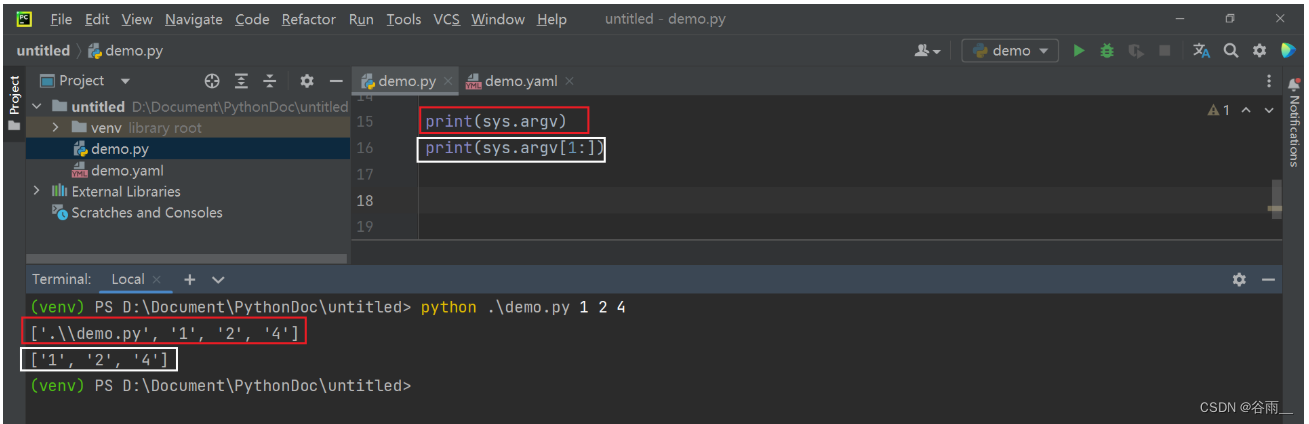
目录 8、MySQL数据库的操作-pymysql 8.1 连接并操作数据库 9、ini文件的操作-configparser 9.1 模块-configparser 9.2 读取ini文件中的内容 9.3 获取指定建的值 10 json文件操作-json 10.1 json文件的格式或者json数据的格式 10.2 json.load/json.loads 10.3 json.du…...

cPanel三连漏洞CVE-2026-29201/29202/29203深度解析:150万服务器面临全面接管危机
一、事件引言:2026年主机行业最大安全地震 2026年5月8日,全球市场份额第一的服务器管理面板cPanel & WHM 发布紧急安全公告,一次性披露三个高危安全漏洞(CVE-2026-29201/29202/29203)。这组被安全界称为"cPa…...

服装吊牌变量条码打印机:优质供应商选择策略解析
“选对服装吊牌变量条码打印机供应商,比单纯比价更重要的是匹配柔性生产需求——这是超六成服装从业者反馈的采购核心准则。”中小商家面临小批量吊牌外发成本高、出货慢的困境,大企业则受限于多SKU适配难、数据不同步的痛点,如何找到能覆盖全…...
)
别再折腾Bootloader了!STM32H7内部Flash+QSPI Flash混合运行实战(MDK配置详解)
STM32H7混合存储架构开发实战:告别Bootloader的繁琐时代 在嵌入式开发领域,STM32H7系列凭借其高性能Cortex-M7内核和丰富的外设资源,已成为工业控制、智能设备和图形界面应用的宠儿。然而,传统开发模式中Bootloader与应用程序分离…...

ESP32内存不够用?手把手教你修改Arduino IDE分区表,榨干16MB Flash
ESP32内存优化实战:深度定制Arduino IDE分区表释放16MB Flash潜力 当你兴致勃勃地为ESP32开发板换上16MB大容量Flash芯片,却发现Arduino IDE仍然报出"内存不足"的错误时,那种挫败感我深有体会。去年我在开发一个智能家居网关项目时…...

基于大语言模型的私有化AI健康助手:Open Health Agent设计与实践
1. 项目概述:一个真正属于你的AI健康数据管家 最近几年,我自己的健康数据越来越“散装”了。体重秤的数据在App A里,跑步机的记录在App B里,偶尔在微信上跟朋友吐槽一句“昨晚又没睡好”,这些碎片化的信息就像沙滩上的…...

ARM RAS架构:错误记录与注入机制详解
1. ARM RAS架构概述在现代计算系统中,可靠性、可用性和可服务性(Reliability, Availability, and Serviceability, RAS)已成为关键设计指标。ARM架构通过一系列硬件机制实现这些特性,其中错误记录与注入机制是核心组成部分。这套机制允许系统检测、记录硬…...

卷积运算:数字信号处理的核心原理与实践
1. 卷积在数字信号处理中的核心地位第一次接触卷积这个概念时,我正坐在实验室里调试一个音频滤波器。示波器上的波形始终无法达到预期效果,直到导师走过来画了那个著名的"翻转滑动"示意图。那一刻我突然明白,卷积不是抽象的数学运算…...

电光非线性计算加速Transformer注意力机制
1. 电光非线性计算加速Transformer注意力机制的技术背景Transformer架构已经成为当前自然语言处理和计算机视觉领域的主导性神经网络结构,其核心组件——注意力机制依赖于Softmax等非线性运算。虽然这些非线性操作仅占模型总计算量的不到1%,但由于现代GP…...

别再只会用WinHex看十六进制了!这5个隐藏功能帮你搞定90%的数据恢复难题
WinHex高阶数据恢复实战:5个被低估的杀手级功能解析 在数据恢复领域,WinHex早已超越了简单的十六进制编辑器定位。这款由X-Ways公司开发的专业工具集成了磁盘编辑、内存分析、数据解释等多项强大功能,但大多数用户仅停留在基础的文件浏览和简…...

2026 年 TanStack npm 供应链遭入侵:42 个包 84 版本受影响,多方面待解决问题待明确
总结2026 年 5 月 11 日 19:20 至 19:26 UTC 期间,攻击者通过结合“Pwn Request”模式的 pull_request_target、跨越分叉↔主库信任边界的 GitHub Actions 缓存投毒,以及从 GitHub Actions 运行器进程中提取 OIDC 令牌,在 42 个 tanstack/* n…...