
WPF之创建无外观控件
1,定义无外观控件。
- 定义默认样式,在其静态构造函数中调用DefaultStyleKeyProperty.OverrideMetadata()。
//设置默认样式DefaultStyleKeyProperty.OverrideMetadata(typeof(ColorPicker), new FrameworkPropertyMetadata(typeof(ColorPicker)));- 在项目中创建Themes文件夹, 在Themes文件夹中创建资源字典:generic.xaml。/Themes/generic.xaml 此格式路径为规定格式不得修改,此路径字典中的样式将被自动识别为自定义控件的默认样式。
- 样式必须指定适用的对象类型:TargetType
<Style TargetType="local:ColorPicker"> <!--必须指定类型-->- 在generic.xaml中合并位于themes/colorpicker.xaml的字典时,需要使用包含程序集的路径(assemblyName;component/themes/colorpicker.xaml),如果只是使用/themes/colorpicker.xaml虽然在运行时可以正常运行,但是在编辑状态下无法预览效果。
2,使用Vs生成无外观控件框架。
- 选择自定义控件
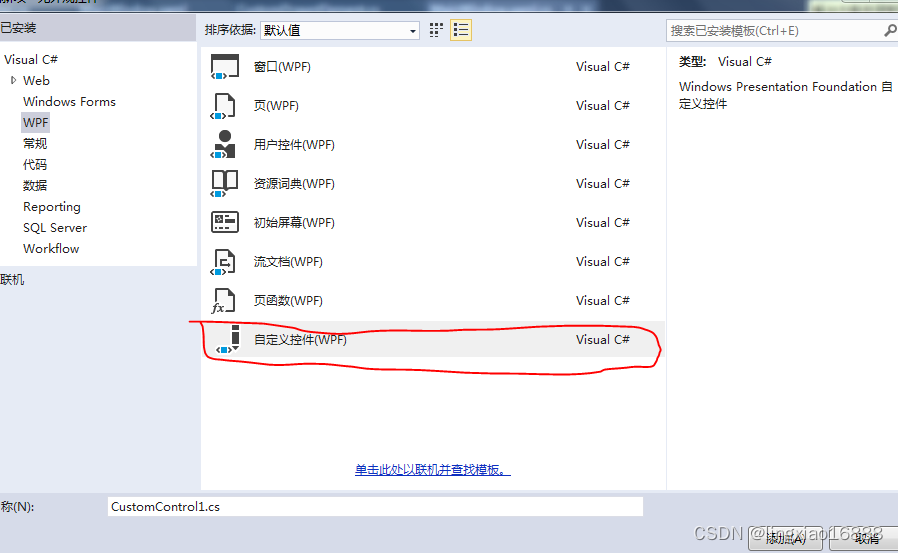
- 自动生成包含静态样式重写的静态构造函数 。
public class ColorPicker : Control{static ColorPicker(){//设置默认样式DefaultStyleKeyProperty.OverrideMetadata(typeof(ColorPicker), new FrameworkPropertyMetadata(typeof(ColorPicker)));}}
- 自动创建Themes文件,以及Themes文件下的generic.xaml资源字典。
3,定义资源字典:colorpicker.xaml。
<ResourceDictionary xmlns="http://schemas.microsoft.com/winfx/2006/xaml/presentation"xmlns:x="http://schemas.microsoft.com/winfx/2006/xaml"xmlns:local="clr-namespace:无外观控件"><Style TargetType="local:ColorPicker"> <!--必须指定类型--><Setter Property="Template"><Setter.Value><ControlTemplate TargetType="local:ColorPicker"><Border BorderBrush="{TemplateBinding BorderBrush}" BorderThickness="{TemplateBinding BorderThickness}" Background="{TemplateBinding Background}"><Grid Margin="{TemplateBinding Padding}"><Grid.RowDefinitions><RowDefinition ></RowDefinition><RowDefinition ></RowDefinition><RowDefinition ></RowDefinition><RowDefinition ></RowDefinition></Grid.RowDefinitions><Grid.ColumnDefinitions><ColumnDefinition Width="auto"></ColumnDefinition><ColumnDefinition Width="3*"></ColumnDefinition><ColumnDefinition Width="2*"></ColumnDefinition></Grid.ColumnDefinitions><Grid.Resources><Style TargetType="TextBlock"><Setter Property="VerticalAlignment" Value="Center"></Setter><Setter Property="Margin" Value="5,0,0,0"></Setter></Style><Style TargetType="Slider"><Setter Property="VerticalAlignment" Value="Center"></Setter><Setter Property="Margin" Value="0,5,5,5"></Setter><Setter Property="Maximum" Value="255"></Setter><Setter Property="Minimum" Value="0"></Setter><Setter Property="SmallChange" Value="1"></Setter></Style></Grid.Resources><TextBlock Text="Alpha:"></TextBlock><Slider x:Name="PART_AlphaSlider" Grid.Column="1"></Slider><TextBlock Text="Red:" Grid.Row="1"></TextBlock><Slider x:Name="PART_RedSlider" Grid.Row="1" Grid.Column="1"></Slider><TextBlock Text="Green:" Grid.Row="2"></TextBlock><Slider x:Name="PART_GreenSlider" Grid.Row="2" Grid.Column="1"></Slider><TextBlock Text="Blue:" Grid.Row="3"></TextBlock><Slider x:Name="PART_BlueSlider" Grid.Row="3" Grid.Column="1"></Slider><Rectangle  Grid.Column="2" Grid.RowSpan="4"><Rectangle.Fill><SolidColorBrush x:Name="PART_RecBrush"></SolidColorBrush></Rectangle.Fill></Rectangle></Grid></Border></ControlTemplate></Setter.Value></Setter></Style>
</ResourceDictionary>
4,在generic.xaml中添加资源字典colorpicker.xaml。
<ResourceDictionaryxmlns="http://schemas.microsoft.com/winfx/2006/xaml/presentation"xmlns:x="http://schemas.microsoft.com/winfx/2006/xaml"><ResourceDictionary.MergedDictionaries><ResourceDictionary Source="无外观控件;component/Themes/colorpicker.xaml"></ResourceDictionary><ResourceDictionary Source="无外观控件;component/Themes/FlipPanel.xaml"></ResourceDictionary></ResourceDictionary.MergedDictionaries>
</ResourceDictionary>
5,编写代码
[TemplatePart(Name = "PART_AlphaSlider", Type = typeof(RangeBase))]//此特性无特殊意义,只是用于标识提示[TemplatePart(Name = "PART_RedSlider", Type = typeof(RangeBase))][TemplatePart(Name = "PART_GreenSlider", Type = typeof(RangeBase))][TemplatePart(Name = "PART_BlueSlider", Type = typeof(RangeBase))][TemplatePart(Name = "PART_RecBrush", Type = typeof(SolidColorBrush))]public class ColorPicker : Control{//注册依赖属性public static readonly DependencyProperty AlphaProperty;public static readonly DependencyProperty RedColorProperty;public static readonly DependencyProperty GreenColorProperty;public static readonly DependencyProperty BlueColorProperty;public static readonly DependencyProperty ColorProperty;public static readonly RoutedEvent ColorChangedEvent;static ColorPicker(){//设置默认样式DefaultStyleKeyProperty.OverrideMetadata(typeof(ColorPicker), new FrameworkPropertyMetadata(typeof(ColorPicker)));AlphaProperty = DependencyProperty.Register("Alpha", typeof(Byte), typeof(ColorPicker), new PropertyMetadata((byte)0, RedGreenBlueChangedCallBack));RedColorProperty = DependencyProperty.Register("Red", typeof(Byte), typeof(ColorPicker), new PropertyMetadata((byte)0, RedGreenBlueChangedCallBack));GreenColorProperty = DependencyProperty.Register("Green", typeof(Byte), typeof(ColorPicker), new PropertyMetadata((byte)0, RedGreenBlueChangedCallBack));BlueColorProperty = DependencyProperty.Register("Blue", typeof(Byte), typeof(ColorPicker), new PropertyMetadata((byte)0, RedGreenBlueChangedCallBack));ColorProperty = DependencyProperty.Register("Color", typeof(Color), typeof(ColorPicker), new PropertyMetadata(Colors.Yellow, ColorPropertyChanged));ColorChangedEvent = EventManager.RegisterRoutedEvent("ColorChanged", RoutingStrategy.Bubble, typeof(RoutedPropertyChangedEventHandler<Color>), typeof(ColorPicker));}public override void OnApplyTemplate(){//进行绑定设置RangeBase alpha = GetTemplateChild("PART_AlphaSlider") as RangeBase;RangeBase red = GetTemplateChild("PART_RedSlider") as RangeBase;RangeBase green = GetTemplateChild("PART_GreenSlider") as RangeBase;RangeBase blue = GetTemplateChild("PART_BlueSlider") as RangeBase;SolidColorBrush brush = GetTemplateChild("PART_RecBrush") as SolidColorBrush;alpha?.SetBinding(Slider.ValueProperty, new Binding(nameof(Alpha)) { Source = this });red?.SetBinding(Slider.ValueProperty, new Binding(nameof(Red)) { Source = this });green?.SetBinding(Slider.ValueProperty, new Binding(nameof(Green)) { Source = this });blue?.SetBinding(Slider.ValueProperty, new Binding(nameof(Blue)) { Source = this });// this.SetBinding(ColorProperty, new Binding("Color") { Source = brush });BindingOperations.SetBinding(brush, SolidColorBrush.ColorProperty, new Binding(nameof(Color)) { Source = this });base.OnApplyTemplate();}private static void ColorPropertyChanged(DependencyObject d, DependencyPropertyChangedEventArgs e){Color curColor = (Color)e.NewValue;ColorPicker picker = d as ColorPicker;picker.Alpha = curColor.A;picker.Red = curColor.R;picker.Green = curColor.G;picker.Blue = curColor.B;RoutedPropertyChangedEventArgs<Color> args = new RoutedPropertyChangedEventArgs<Color>((Color)e.OldValue, (Color)e.NewValue);args.RoutedEvent = ColorChangedEvent;picker.RaiseEvent(args);}private static void RedGreenBlueChangedCallBack(DependencyObject d, DependencyPropertyChangedEventArgs e){ColorPicker picker = d as ColorPicker;Color curColor = picker.Color;byte val = (byte)e.NewValue;switch (e.Property.Name){case "Alpha":curColor.A = val;break;case "Red":curColor.R = val;break;case "Green":curColor.G = val;break;case "Blue":curColor.B = val;break;default:break;}picker.Color = curColor;}/// <summary>/// 设置颜色的Alpha值/// </summary>/// [System.ComponentModel.Bindable(true)][System.ComponentModel.Browsable(true)][Category("颜色设置")]public byte Alpha{get{return (byte)this.GetValue(AlphaProperty);}set{this.SetValue(AlphaProperty, value);}}/// <summary>/// 设置颜色的Red值/// </summary>[Bindable(true), Browsable(true), Category("颜色设置")]public byte Red{get{return (byte)GetValue(RedColorProperty);}set{SetValue(RedColorProperty, value);}}/// <summary>/// 设置颜色的Green值/// </summary>[Bindable(true), Browsable(true), Category("颜色设置")]public byte Green{get{return (byte)GetValue(GreenColorProperty);}set{SetValue(GreenColorProperty, value);}}/// <summary>/// 设置颜色的Blue值/// </summary>[Bindable(true), Browsable(true), Category("颜色设置")]public byte Blue{get{return (byte)GetValue(BlueColorProperty);}set{SetValue(BlueColorProperty, value);}}/// <summary>/// 设置颜色值/// </summary>[Bindable(true), Browsable(true), Category("颜色设置")]public Color Color{get{return (Color)GetValue(ColorProperty);}set{SetValue(ColorProperty, value);}}//对事件进行包装/// <summary>/// 颜色变化完成事件/// </summary>public event RoutedPropertyChangedEventHandler<Color> ColorChanged{add{this.AddHandler(ColorChangedEvent, value);}remove{this.RemoveHandler(ColorChangedEvent, value);}}}6,在UI中添加此控件。
- 默认情况:
<local:ColorPicker Color="SkyBlue" Padding="5" BorderBrush="Black" BorderThickness="2"></local:ColorPicker>
- 二次自定义控件模板:
<Window.Resources><ControlTemplate x:Key="FancyColorPickerTemplate"><Border Background="LightGoldenrodYellow"BorderBrush="Black"BorderThickness="1"><Grid><Grid.RowDefinitions><RowDefinition></RowDefinition><RowDefinition Height="Auto"></RowDefinition></Grid.RowDefinitions><Grid.ColumnDefinitions><ColumnDefinition></ColumnDefinition><ColumnDefinition Width="Auto"></ColumnDefinition><ColumnDefinition Width="Auto"></ColumnDefinition><ColumnDefinition Width="Auto"></ColumnDefinition></Grid.ColumnDefinitions><Grid.Resources><Style TargetType="{x:Type Slider}"><Setter Property="Orientation" Value="Vertical"></Setter><Setter Property="TickPlacement" Value="TopLeft"></Setter><Setter Property="TickFrequency" Value="10"></Setter><Setter Property="Minimum" Value="0"></Setter><Setter Property="Maximum" Value="255"></Setter><Setter Property="Margin" Value="5"></Setter></Style><Style TargetType="{x:Type TextBlock}"><Setter Property="Margin" Value="3"></Setter><Setter Property="FontSize" Value="10"></Setter></Style></Grid.Resources><Ellipse Grid.Column="0" Grid.RowSpan="2" Margin="10" Height="120" Stroke="LightGray" StrokeThickness="5"><Ellipse.Fill><SolidColorBrush x:Name="PART_RecBrush"></SolidColorBrush></Ellipse.Fill></Ellipse><Slider Name="PART_RedSlider" Grid.Column="1"></Slider><TextBlock Grid.Row="1" Grid.Column="1">RED</TextBlock><Slider Name="PART_GreenSlider" Grid.Column="2"></Slider><TextBlock Grid.Row="1" Grid.Column="2">GREEN</TextBlock><Slider Name="PART_BlueSlider" Grid.Column="3"></Slider><TextBlock Grid.Row="1" Grid.Column="3">BLUE</TextBlock></Grid></Border></ControlTemplate></Window.Resources>- 引用对象资源
<local:ColorPicker Template="{StaticResource FancyColorPickerTemplate}" Padding="5" Grid.Column="1" Margin="5" BorderBrush="BurlyWood" BorderThickness="2" Color="Red">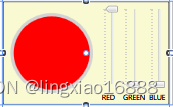
7,Demo链接
https://download.csdn.net/download/lingxiao16888/89253829?spm=1001.2014.3001.5501
相关文章:
WPF之创建无外观控件
1,定义无外观控件。 定义默认样式,在其静态构造函数中调用DefaultStyleKeyProperty.OverrideMetadata()。 //设置默认样式DefaultStyleKeyProperty.OverrideMetadata(typeof(ColorPicker), new FrameworkPropertyMetadata(typeof(ColorPicker))); 在项目…...
MySQL利用变量进行查询操作
新建连接,自带world数据库,里面自带city表格。 # MySQL利用变量进行查询操作 set cityNameHaarlemmermeer; select * from city where NamecityName;# 多个结果查询 set cityName1Haarlemmermeer; set cityName2Breda; set cityName3Willemstad; selec…...

算法--动态规划
动态规划(Dynamic Programming, DP)是一种算法设计技巧,用于解决具有重叠子问题和最优子结构性质的问题。通过将原问题分解为相对简单的子问题的方式来求解复杂问题,动态规划避免了计算重复子问题,从而提高了算法的效率…...
Python基础详解一
一,print打印 print("hello word") print(hello word) 双引号和单引号都可以 二,数据类型 Python中常用的有6种值的类型 输出类型信息 print(type(11)) print(type("22")) print(type(22.2)) <class int> <class str&…...
3.SpringSecurity基本原理
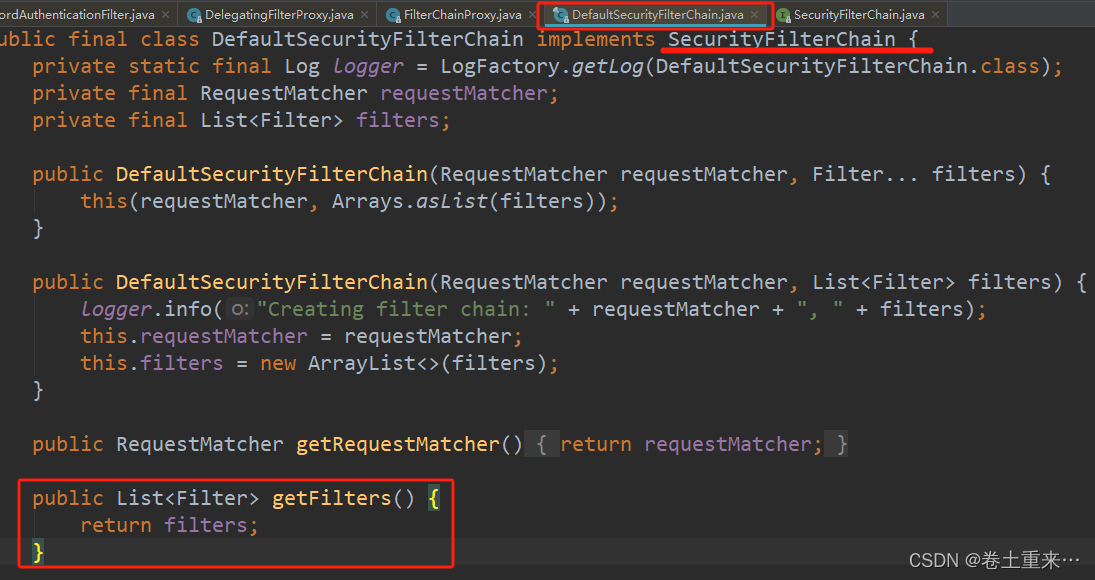
SpringSecurity本质是一个过滤器链。十多个过滤器构成一个过滤器链。 这些过滤器在项目启动就会进行加载。每个过滤器执行放行操作才会执行下一个过滤器。 常见过滤器 FilterSecurityInterceptor 是一个方法级的权限过滤器,基本位于过滤器链的最底部。 Excepti…...
Cesium--加载天地图
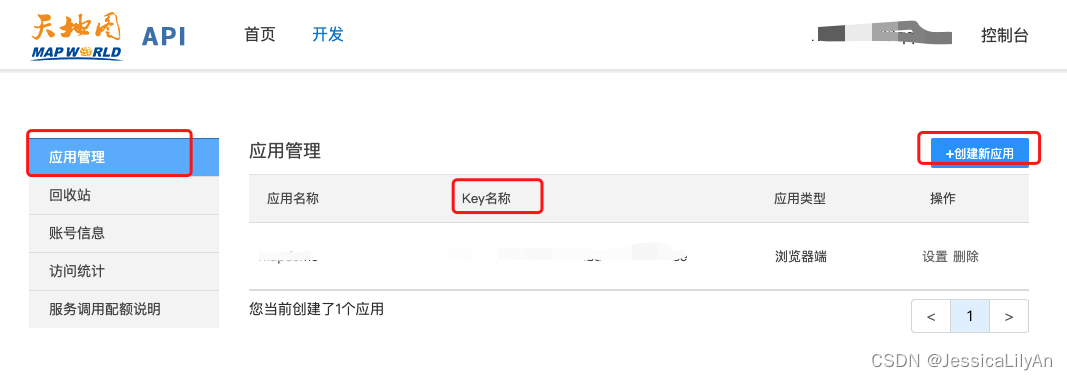
背景:vue-admin-temlate cesium 天地图 天地图地址:国家地理信息公共服务平台 天地图 步骤一:申请成为天地图开发者,创建应用 1,天地图使用方法(点击开发资源即可看到此页面) 2,点击控制台-登录账号 …...
2024蓝桥杯CTF writeUP--packet
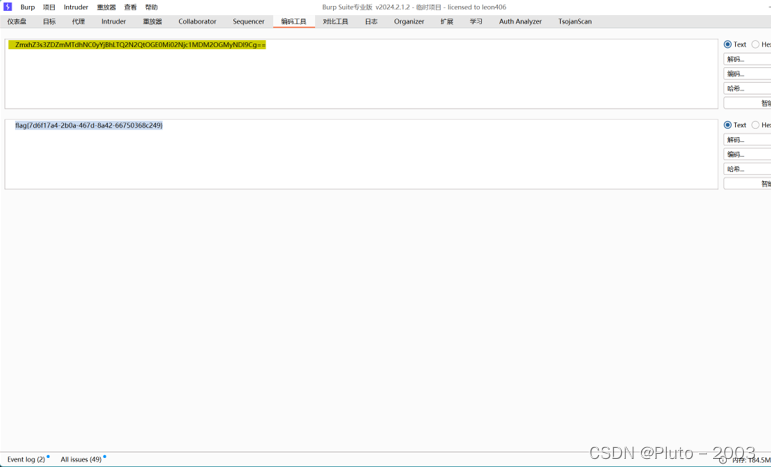
根据流量分析,我们可以知道129是攻击机,128被留了php后门,129通过get请求来获得数据 129请求ls Respons在这 里面有flag文件 这里请求打开flag文件,并以base64编码流传输回来 获得flag的base64的数据 然后解码 到手...
C++容器——deque
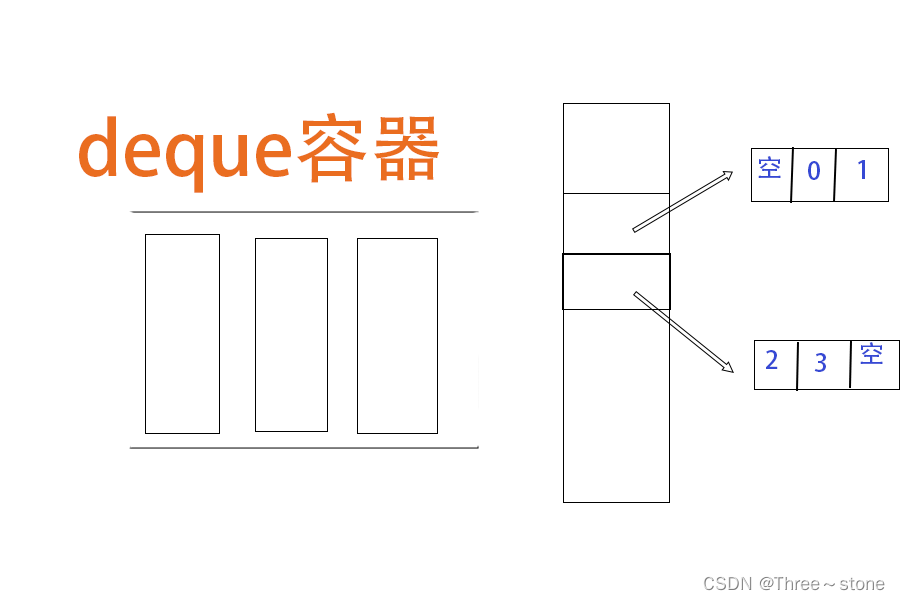
deque容器 定义:动态数组,是一种双向开口的线性容器,意味着你不仅可以像在普通队列的末尾添加和移除元素,还可以在前端执行这些操作。 与其他容器相比不同的点: 与vector的主要区别: 连续性:…...
docker-compose安装es+kibana 8.12.2
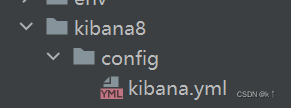
小伙伴们,你们好,我是老寇,我又回来辣,几个月不见甚是想念啊!!! 因云平台需要改造,es7升级为es8,所以记录一下,es8需要开启ssl认证,需要配置证书…...
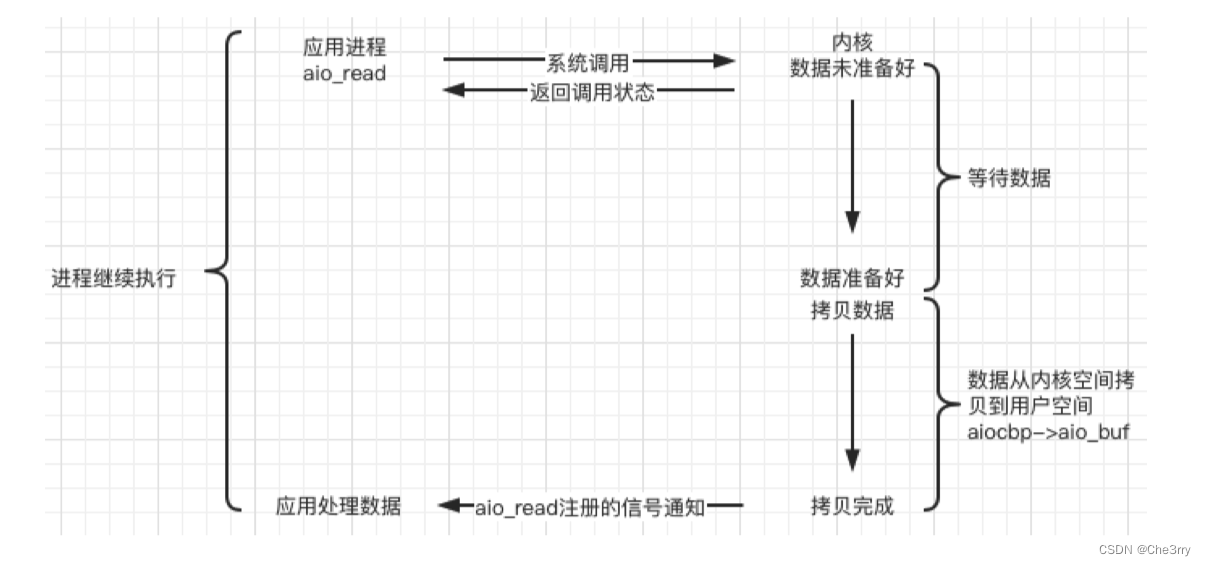
websevere服务器从零搭建到上线(二)|Linux上的五种IO模型
文章目录 阻塞 blocking非阻塞 non-blockingIO复用 IO multiplexing信号驱动 signal-driven异步 asynchronous拓展知识 看过上篇文章英国基本能理解本文五张图的内容websevere服务器从零搭建到上线(一)|阻塞、非阻塞、同步、异步 本文要能够在…...

STM32外设编程指南:GPIO、UART、SPI和I2C
STM32外设编程是嵌入式系统开发中的重要组成部分。以下是对STM32中GPIO(通用输入输出)、UART(通用异步接收传输器)、SPI(串行外设接口)和I2C(互连集成电路)等常见外设的编程指南&…...

git对远程和本地分支进行重命名
要同时对Git的远程和本地分支进行重命名,你需要分几个步骤操作: 重命名本地分支 切换到其他分支:在重命名当前分支之前,确保你不在你想要重命名的那个分支上。你可以通过以下命令切换到另一个分支(比如切换到master分…...

if 语句逻辑判断顺序
C 里面写if语句的时候是按照书写顺序来判断的,不好意思我之前没有考虑过这个问题; 如if(path.back nums[i] && !path.empty()),当path为空时,就会报错,因为编译器先判断的前面的path.back nums[i]࿰…...

第IV章-Ⅱ Vue3中的插槽使用
第IV章-Ⅱ Vue3中的插槽使用 基本插槽默认内容 具名插槽作用域插槽 在 Vue 3 中,插槽(slots)是一种强大的模式,用于将模板代码从父组件注入到子组件中,使得子组件的内容可以在使用时被自定义。Vue 3 中的插槽用法包括基…...
【半个月我拿下了软考证】软件设计师高频考点--系统化教学-网络安全
👨💻 收录于专栏:软件设计师考点暴击 ⭐🅰️进入狂砍分⭐ ⭐软件设计师高频考点文档, ⭐软件设计师高频考点专栏 ⭐软件设计师高频考点⭐ 🎶(A) 考点1,网络攻击 理解记忆 &#…...

E2PROM读写函数
void EEP_write(u8 add,u8 date) {I2CStart();I2CSendByte(0xa0);I2CWaitAck();I2CSendByte(add);I2CWaitAck();I2CSendByte(date);I2CWaitAck();I2CStop();HAL_Delay(5); }这段代码是一个用于向一个I2C设备写入数据的函数。 函数定义: void EEP_write(u8 add,u8 data)这定义…...

MySql中什么是回表? 如何减少回表的次数
背景 在InnerDB中, B数的叶子节点存储数据的索引是聚集索引,也就是我们说的主键索引,而B数的叶子节点存储主键索引的是非聚集索引,也就是其他的索引 普通索引 唯一索引 组合索引,也就是非主键索引,在InnerD…...

【Linux】目录和文件相关的命令,补充:centos7系统目录结构
【Linux】Linux操作系统的设计理念之一就是“一切皆文件”(Everything is a file),即将设备、文件等都当作“文件”处理。 “文件”主要类型有:目录(即文件夹),链接文档(即快捷方式…...
【读点论文】SAM-LIGHTENING: A LIGHTWEIGHT SEGMENT ANYTHING MODEL,改进自注意力机制,然后知识蒸馏提点
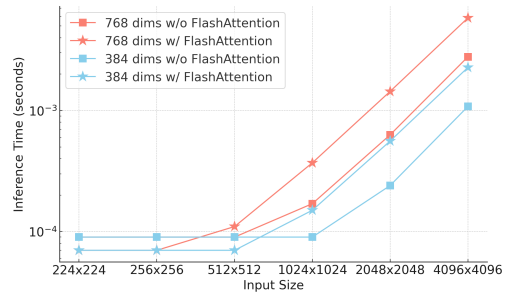
SAM-LIGHTENING: A LIGHTWEIGHT SEGMENT ANYTHING MODEL WITH DILATED FLASH ATTENTION TO ACHIEVE 30 ACCELERATION ABSTRACT 分割任意模型(SAM)由于其零样本泛化能力,在分割任务中引起了广泛的关注。然而,SAM在现实世界实践中…...

PostgreSQL函数和运算符
PostgreSQL为内置的数据类型提供了大量的函数和运算符,用户也可以定义自己的函数和运算符,使用psql命令\df和\do可以列出所有可用的函数和运算符 1. 逻辑运算符 常用的逻辑运算符有AND、OR、NOT,逻辑系统有三个值true、fase和nullÿ…...

K型热电偶的5个常见设计坑:从运放选型到单片机ADC采样的避坑指南
K型热电偶的5个常见设计坑:从运放选型到单片机ADC采样的避坑指南 在工业测温领域,K型热电偶凭借其宽温区、高性价比和良好的线性度,成为工程师们的首选传感器之一。然而,许多初入行业的硬件工程师在实际应用中常常踩入一些"…...

暗黑破坏神2存档编辑器的创意实验:开启你的游戏世界无限可能
暗黑破坏神2存档编辑器的创意实验:开启你的游戏世界无限可能 【免费下载链接】d2s-editor 项目地址: https://gitcode.com/gh_mirrors/d2/d2s-editor 你是否曾想过在暗黑破坏神2的世界里创造属于自己的传奇?当传统的游戏进程无法满足你的创意需求…...

LeRobot SO100主从臂配置全流程:从硬件组装到模型训练
LeRobot SO100主从臂实战指南:从零搭建到智能控制 1. 项目概述与硬件准备 LeRobot SO100作为HuggingFace开源社区推出的机器人学习平台,为开发者提供了从硬件组装到AI模型训练的全套解决方案。这套主从臂系统最吸引人的特点在于其模块化设计——六自由度…...

当LLM学会“思考”算法逻辑:拆解EoH如何用“思想+代码”协同进化,碾压传统自动设计
当LLM成为算法设计师:揭秘EoH如何用“思维代码”双螺旋进化重塑自动算法设计 想象一下,你正在指挥一支由建筑师和施工队组成的特殊团队。建筑师负责绘制蓝图,施工队负责将蓝图变为现实。但与传统团队不同,你的建筑师能根据施工反…...

解决QGIS 3.22.4编译后启动报错:从‘dll未加载’到‘plugins缺失’的实战排错记录
QGIS 3.22.4编译后启动报错的深度排查与解决方案 当你终于完成了QGIS 3.22.4的源码编译,满怀期待地双击qgis.exe时,却遭遇了"qgis_app.dll无法加载"的报错。这就像跑完马拉松却在终点线前摔倒一样令人沮丧。但别担心,这些问题其实都…...

交换机堆灰指南:为什么你的HSRP热备切换总超15秒?从生成树到接口追踪的完整排错
交换机堆灰指南:为什么你的HSRP热备切换总超15秒?从生成树到接口追踪的完整排错 当核心交换机的HSRP切换时间超过15秒,业务中断的每一毫秒都在考验运维团队的神经。这不是简单的协议超时问题,而是网络冗余架构中多个子系统协同失效…...

终极指南:如何轻松解包Godot PCK文件并提取游戏资源
终极指南:如何轻松解包Godot PCK文件并提取游戏资源 【免费下载链接】godot-unpacker godot .pck unpacker 项目地址: https://gitcode.com/gh_mirrors/go/godot-unpacker 还在为Godot游戏的PCK文件无法解包而烦恼吗?无论你是游戏开发者想要复用资…...
上手动编译PyQt5 5.15.2的完整记录)
告别pip安装失败:在Jetson Nano(ARM64)上手动编译PyQt5 5.15.2的完整记录
在Jetson Nano(ARM64)上手动编译PyQt5 5.15.2的完整指南 当你在Jetson Nano这样的ARM64架构设备上尝试用pip安装PyQt5时,很可能会遇到各种兼容性问题。作为一款强大的Python GUI库,PyQt5在嵌入式开发中有着广泛的应用场景&#x…...
)
WRF风场后处理实战:用Python+Cartopy绘制500hPa风场矢量图(附完整代码)
WRF风场后处理实战:用PythonCartopy绘制500hPa风场矢量图(附完整代码) 气象数据分析中,风场可视化是理解大气环流特征的关键环节。WRF(Weather Research and Forecasting)模式输出的数据包含丰富的三维风场…...

终极Neovim AI助手:Avante.nvim如何彻底改变你的编码体验 [特殊字符]
终极Neovim AI助手:Avante.nvim如何彻底改变你的编码体验 🚀 【免费下载链接】avante.nvim Use your Neovim like using Cursor AI IDE! 项目地址: https://gitcode.com/GitHub_Trending/ava/avante.nvim 在当今AI驱动的开发时代,Neov…...