
GNU/Linux - 系统启动流程及rcS脚本介绍
Linux系统启动流程
在 Linux 系统启动过程中,会按特定顺序执行多个脚本和初始化例程,以使系统进入可用状态。虽然具体顺序可能因 Linux 发行版和版本而异,但以下是典型执行顺序的概括性概述:
1. BIOS/UEFI: 系统开机后,BIOS(或 UEFI 固件)会执行开机自检(POST),然后加载引导加载程序。
对于嵌入式 Linux,它们可能是芯片中的特殊引导 ROM。
2. 引导加载程序: 引导加载器,如 GRUB(Grand Unified Bootloader,统一引导加载器)或 LILO(Linux Loader,Linux 加载器),将 Linux 内核加载到内存中并开始执行,同时按需要初始化重要的硬件组件。
嵌入式系统常用的引导加载器包括 U-Boot、Das U-Boot 和 Barebox。
3. Linux 内核初始化: 一旦引导加载器将内核映像加载到内存中,Linux 内核就会开始控制。Linux 内核会初始化基本硬件组件或设备、设置内存管理、挂载初始 ramdisk(initramfs)、挂载根文件系统、配置其他基本系统参数,并开始初始化根文件系统的过程。
4. 初始化进程: 内核初始化完成后,会启动初始进程。传统上,这是 System V init(SysVinit),但现在许多现代发行版都使用 systemd 或 Upstart 作为 init 系统。
在嵌入式系统中,内核初始化完成后,init 进程(通常为 /sbin/init)就会启动。init 进程负责初始化用户空间环境和启动系统服务。对于嵌入式系统,init 进程可以是一个简单的 shell 脚本,也可以是一个最小的 init 系统(如 BusyBox)。
5. 用户空间初始化和初始脚本:
init 进程运行后,会执行启动脚本或其他初始化任务来设置用户空间环境。
init 进程会读取配置文件并执行启动脚本,这些脚本负责初始化各种系统服务和配置。这些脚本通常位于 /etc/init.d 等目录中,或定义为 /etc/systemd/system 中的 systemd 单元文件。
这可能包括加载额外的文件系统、配置网络接口、设置系统日志以及初始化其他系统服务。
6. 运行级别或目标单元: 根据系统的运行级别(在 SysVinit 中)或目标单元(在 systemd 中),会执行不同的启动脚本或单元文件集。运行级别/目标单元定义了不同的系统状态,如单用户模式、多用户模式或图形模式。
7. 应用程序启动:
系统完全初始化后,将启动配置为自动启动的任何用户应用程序或服务。
这些应用程序可能包括针对嵌入式系统功能的定制软件,以及系统监控或管理工具。
8. 服务管理: 系统服务根据其依赖关系和配置启动。这包括联网、文件系统挂载和系统日志等基本系统服务。
9. 用户会话: 如果系统支持图形用户界面,则启动显示管理器(如 GDM、LightDM),并初始化用户会话。
10. 用户交互或登录提示:
最后,系统显示登录提示(文本或图形),允许用户登录并与系统交互。
根据嵌入式系统的设计,它可能会提供一个用户交互界面,如命令行界面或图形用户界面。
用户可以与系统交互,执行任务或监控系统运行。
本序列提供了 Linux 系统启动过程的高级概览。实际细节和具体步骤可能因发行版、init 系统和配置而异。
英文版:
During the startup process on a Linux system, several scripts and initialization routines are executed in a specific sequence to bring the system to a usable state. While the exact sequence may vary depending on the distribution and version of Linux, here's a generalized overview of the typical execution sequence:
1. BIOS/UEFI: When the system is powered on, the BIOS (or UEFI firmware) performs Power-On Self Test (POST) and then loads the bootloader.
For embedded linux, they may be special boot ROM in the chip.
2. Bootloader: The bootloader, such as GRUB (Grand Unified Bootloader) or LILO (Linux Loader), loads the Linux kernel into memory and starts its execution, and initialize required essential hardware components.
Common bootloaders for embedded systems include U-Boot, Das U-Boot, and Barebox.
3. Linux Kernel Initialization: Once the bootloader has loaded the kernel image into memory, the Linux kernel takes control. The Linux kernel initializes essential hardware components or devices, sets up memory management, mounts the initial ramdisk (initramfs), mounts the root filesystem, configures other essential system parameters, and begins the process of initializing the root filesystem.
4. Init Process: Once the kernel has initialized, it starts the init process. Traditionally, this was System V init (SysVinit), but many modern distributions now use systemd or Upstart as the init system.
In embedded system, after the kernel initialization, the init process (typically /sbin/init) is started. The init process is responsible for initializing the user space environment and launching system services. For embedded systems, the init process may be a simple shell script or a minimal init system like BusyBox.
5. User Space Initialization and Init Scripts:
Once the init process is running, it executes startup scripts or other initialization tasks to set up the user space environment.
The init process reads configuration files and executes startup scripts, which are responsible for initializing various system services and configurations. These scripts are typically located in directories like /etc/init.d or defined as systemd unit files in /etc/systemd/system.
This may include mounting additional filesystems, configuring network interfaces, setting up system logging, and initializing other system services.
6. Runlevels or Target Units: Depending on the system's runlevel (in SysVinit) or target unit (in systemd), different sets of startup scripts or unit files are executed. Runlevels/target units define different system states, such as single-user mode, multi-user mode, or graphical mode.
7. Application Launch:
Once the system is fully initialized, any user applications or services configured to start automatically are launched.
These applications may include custom software specific to the embedded system's functionality, as well as system monitoring or management tools.
8. Service Management: System services are started according to their dependencies and configuration. This includes essential system services like networking, filesystem mounting, and system logging.
9. User Sessions: If the system supports graphical user interfaces, the display manager (e.g., GDM, LightDM) is started, and user sessions are initialized.
10. User Interaction or Login Prompt:
Finally, the system displays a login prompt (either text-based or graphical), allowing users to log in and interact with the system.
Depending on the embedded system's design, it may provide a user interface for interaction, such as a command-line interface or a graphical user interface.
Users can interact with the system to perform tasks or monitor its operation.
This sequence provides a high-level overview of the startup process on a Linux system. The actual details and specific steps may vary based on the distribution, init system, and configuration.
===== 分割线 =====
rcS脚本介绍
在 Linux 中,rcS 脚本文件是启动过程中使用的初始化脚本之一。该脚本通常位于 /etc/init.d 目录中,由系统在启动过程中执行。
一种说法,"rcS "通常指 "启动时运行命令 "脚本。在包括 Linux 在内的类 Unix 操作系统中,"rcS "脚本通常是系统启动过程中最先执行的脚本之一。它设置初始环境并运行各种系统初始化任务。
还一种说法,"rcS "代表 "单用户模式运行命令"。它是 System V(SysV)init 系统的一部分,是启动类 Unix 操作系统的传统方法。
rcS "脚本在系统启动过程中执行,特别是当系统启动到单用户模式时。单用户模式是一种故障诊断模式,只有单个用户(通常是 root 用户)可以访问系统。它通常用于系统恢复或修复系统问题等维护任务。
rcS "脚本负责初始化启动过程早期所需的基本系统服务和配置,这些服务和配置是单用户模式运行所必需的。这包括挂载基本文件系统、设置基本网络、初始化系统时钟、挂载基本文件系统、配置系统环境以及执行其他必要的设置任务,以使系统达到最低功能状态。
它之所以重要,是因为它为启动过程的其他部分奠定了基础,确保系统在其他服务和应用程序启动前处于正常运行状态。rcS 脚本的内容因 Linux 发行版而异,但其主要目的在大多数发行版中都是一致的。
总的来说,"rcS "脚本在准备系统进入单用户模式时起着至关重要的作用,它能确保基本服务和配置就位,以便进行故障排除和维护。
英文版:
In Linux, the rcS script file is one of the initialization scripts used during the boot process. This script is typically found in the /etc/init.d directory, and it's executed by the system during the boot sequence.
For one explanation, "rcS" typically refers to the "run commands at startup" script. In Unix-like operating systems, including Linux, the "rcS" script is often one of the first scripts executed during the system boot process. It sets up the initial environment and runs various system initialization tasks.
And another explanation, "rcS" stands for "run commands for Single-user mode." It's part of the System V (SysV) init system, which is a traditional method for booting Unix-like operating systems.
The "rcS" script is executed during the system startup process, specifically when the system boots into single-user mode. Single-user mode is a troubleshooting mode where only a single user (typically the root user) has access to the system. It's often used for maintenance tasks such as system recovery or repairing system issues.
The "rcS" script is responsible for initializing essential system services and configurations that are required early in the boot process and are needed for single-user mode operation. This includes tasks like mounting essential filesystems, setting up basic networking, initializing the system clock, mounting essential filesystems, configuring the system environment, and performing other necessary setup tasks to bring the system to a minimal functional state.
It's important because it lays the groundwork for the rest of the boot process, ensuring that the system is in a functional state before other services and applications start up. The contents of the rcS script can vary depending on the Linux distribution, but its primary purpose is consistent across most distributions.
Overall, the "rcS" script plays a crucial role in preparing the system for single-user mode, ensuring that essential services and configurations are in place for troubleshooting and maintenance purposes.
====== 分割线 ======
嵌入式系统执行的启动脚本
通常嵌入式系统启动和重启前执行的脚本是rcS和rcK。
# ls /etc/init.d/rc*
rcK rcS
启动和重启时调用rcS和rcK脚本,这个是在/etc/inittab 文件里设置的。Linux系统启动进程会读取这个文件。
# cat /etc/inittab# This is run first except when booting in single-user mode.# Startup the system::sysinit:echo "<< inittab >>"::sysinit:/bin/mount -t proc proc /proc::sysinit:/bin/mount -t sysfs sysfs /sys::sysinit:/bin/mount -t devtmpfs devtmpfs /dev::sysinit:/bin/mount -o remount,rw /::sysinit:/bin/mkdir -p /dev/pts::sysinit:/bin/mount -t devpts devpts /dev/pts::sysinit:/bin/mount -a::sysinit:/sbin/swapon -anull::sysinit:/bin/ln -sf /proc/self/fd /dev/fdnull::sysinit:/bin/ln -sf /proc/self/fd/0 /dev/stdinnull::sysinit:/bin/ln -sf /proc/self/fd/1 /dev/stdoutnull::sysinit:/bin/ln -sf /proc/self/fd/2 /dev/stderr# set hostnamenull::sysinit:/bin/busybox hostname -F /etc/hostname::sysinit:/etc/init.d/rcS# Stuff to do before rebooting#::ctrlaltdel:/sbin/reboot::shutdown:/etc/init.d/rcK::shutdown:/sbin/swapoff -a::shutdown:/bin/umount -a -r# Stuff to do when restarting the init process::restart:/sbin/initttyLP0::respawn:/sbin/getty 115200 ttyLP0# /sbin/getty invocations for the runlevels.## The "id" field MUST be the same as the last# characters of the device (after "tty").## Format:# <id>:<runlevels>:<action>:<process>#tty1:12345:respawn:/sbin/getty 38400 tty1
启动进程就是系统启动后第一个执行的进程:
# ps
PID USER VSZ STAT COMMAND
1 root 3500 S /sbin/init
...
...
具体步骤如下:
1. 初始进程:
* 内核执行指定的初始进程,通常是 /sbin/init 或其符号链接。
* 在使用 BusyBox 的嵌入式系统中,/sbin/init 可能是指向 BusyBox 二进制文件的符号链接。
2. 执行初始化脚本
* 初始进程会读取配置文件(如 /etc/inittab 或 /etc/init/rcS.conf),以确定要执行的脚本。
* 通常,init 进程会生成配置文件中指定的多个脚本,这些脚本通常位于 /etc/init.d/ 或 /etc/rc.d/ 等目录中。
* 这些脚本处理各种系统初始化任务,如加载文件系统、配置网络接口、启动基本服务和设置硬件外设。
1. Init Process:
* The kernel executes the designated init process, which is typically /sbin/init or a symbolic link to it.
* In embedded systems using BusyBox, /sbin/init may be a symbolic link to the BusyBox binary.
2. Init Script Execution:
* The init process reads its configuration file (e.g., /etc/inittab or /etc/init/rcS.conf) to determine which scripts to execute.
* Commonly, the init process spawns multiple scripts specified in the configuration file, usually located in directories like /etc/init.d/ or /etc/rc.d/.
* These scripts handle various system initialization tasks, such as mounting filesystems, configuring network interfaces, starting essential services, and setting up hardware peripherals.
相关文章:

GNU/Linux - 系统启动流程及rcS脚本介绍
Linux系统启动流程 在 Linux 系统启动过程中,会按特定顺序执行多个脚本和初始化例程,以使系统进入可用状态。虽然具体顺序可能因 Linux 发行版和版本而异,但以下是典型执行顺序的概括性概述: 1. BIOS/UEFI: 系统开机后…...

对象,字符串的解构赋值
大家想了解更多,可以去看阮一峰的ECMAScript6(ES6)标准入门课程 对象 简介 解构不仅可以用于数组,还可以用于对象。 let { foo, bar } { foo: aaa, bar: bbb }; foo // "aaa" bar // "bbb" 对象的解构与数组有一个重要的不同。…...
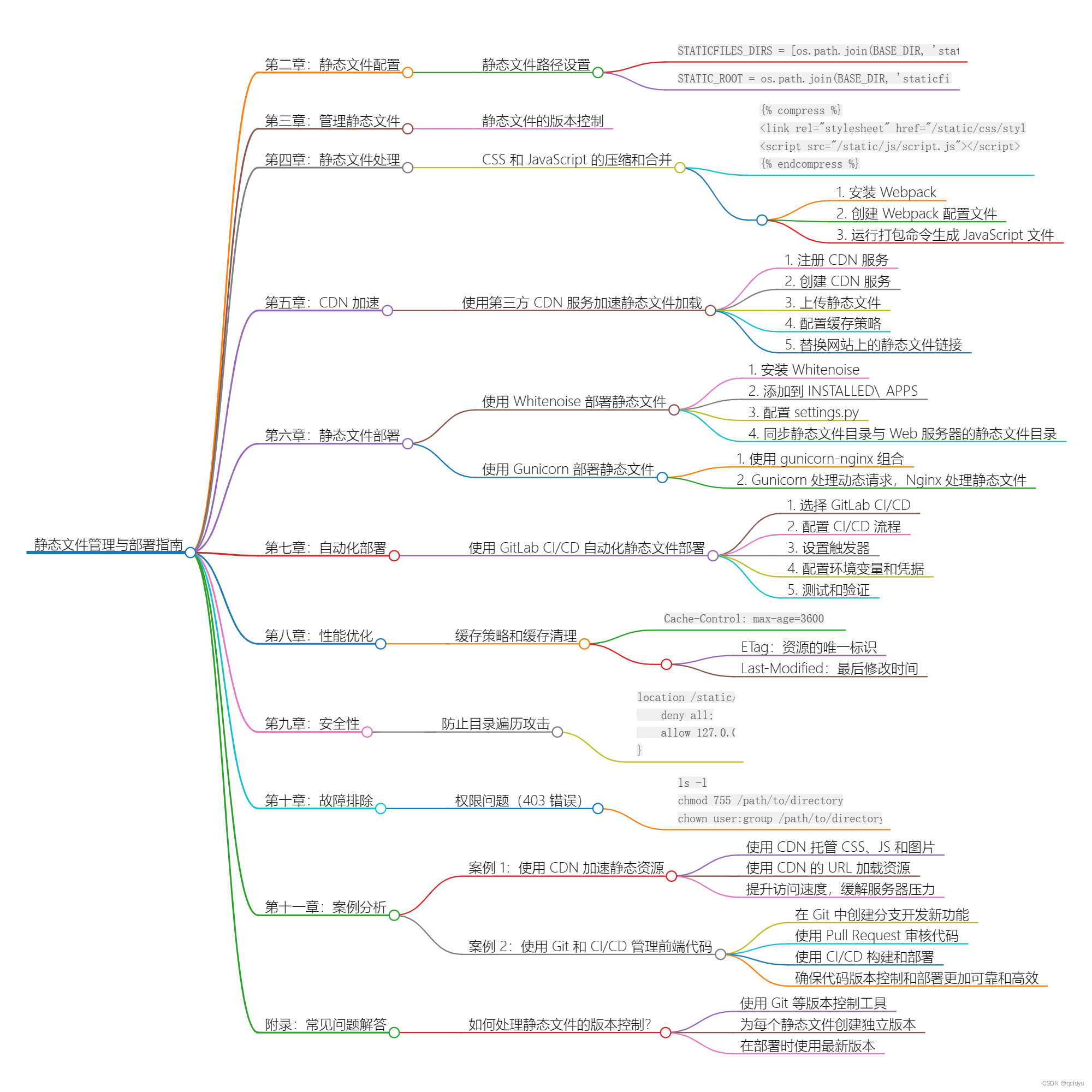
Django 静态文件管理与部署指南
title: Django 静态文件管理与部署指南 date: 2024/5/10 17:38:36 updated: 2024/5/10 17:38:36 categories: 后端开发 tags: WebOptCDN加速DjangoCompressWebpackStaticDeployCICD-ToolsSecStatic 第一章:介绍 Django 静态文件的概念和重要性 在 Web 开发中&a…...

ORACLE ODAX9-2的一个误告警Affects: /SYS/MB的分析处理
在运维的多套ORACLE ODAX9-2版本,都遇到了一个计算节点的告警:Description: The service Processor poweron selftest has deteced a problem. Probabity;:100, UulD:cd1ebbdf-f099-61de-ca44-ef646defe034, Resource:/SYS/MB,;此告警从描述上…...

Spring AOP浅谈
什么是AOP? AOP是Aspect-Oriented Programming的缩写,是一种面向切面的编程方法。 在AOP中,一个切面是一组可以独立于其他代码执行的功能,如日志记录、安全性检查、事务处理等。这些功能通常被称为"通知",并…...
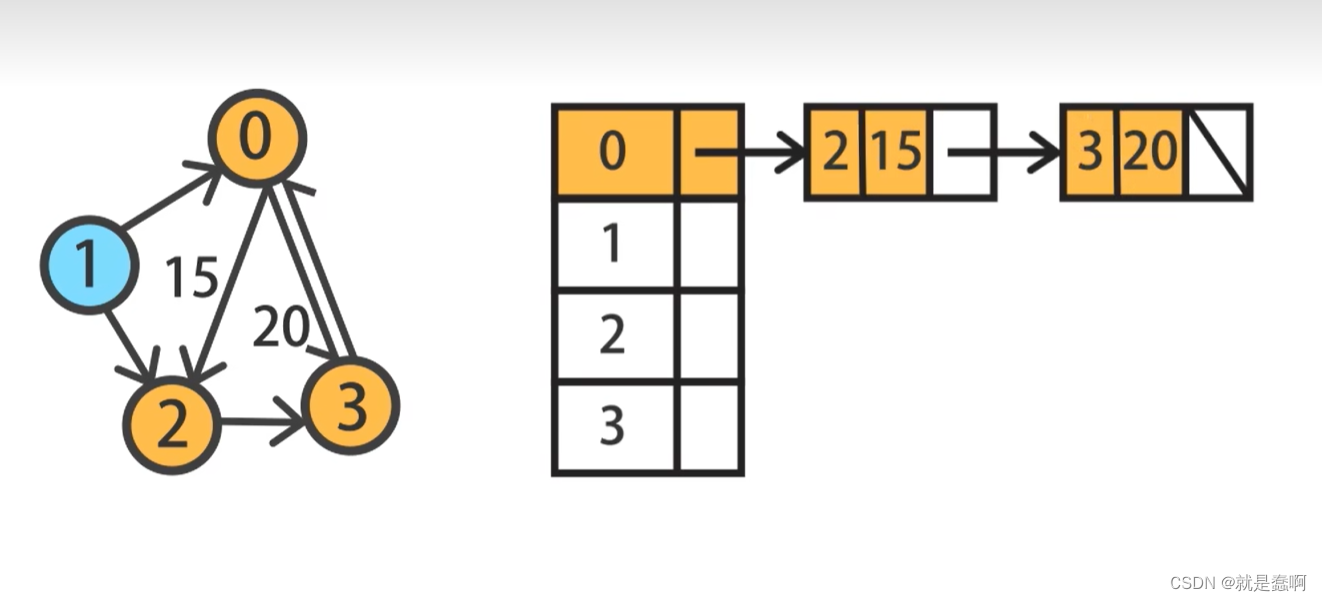
数据结构——图的基础知识与其表示
一:图的定义 由顶点的集合和边的集合组成;常以 G(V,E) 表示,G 代表图,V代表 顶点的集合,E代表边的集合; 如图: 在G1图中,有 0~4 五个顶点,有 0-1,0-2&…...
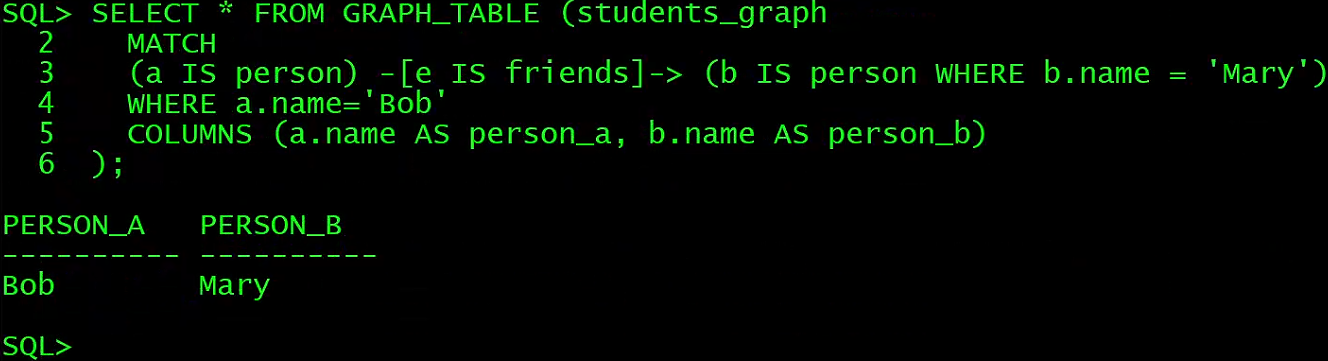
数据库管理-第187期 23ai:怎么用SQL创建图(20240510)
数据库管理187期 2024-05-10 数据库管理-第187期 23ai:怎么用SQL创建图(20240510)1 安装PGX1.1 数据库配置对应用户1.2 使用RPM包安装Graph Server1.3 安装Oracle Graph Client1.4 访问PGX页面 2 SQL Property Graph2.1 创建SQL属性图2.2 关于点和边图元…...
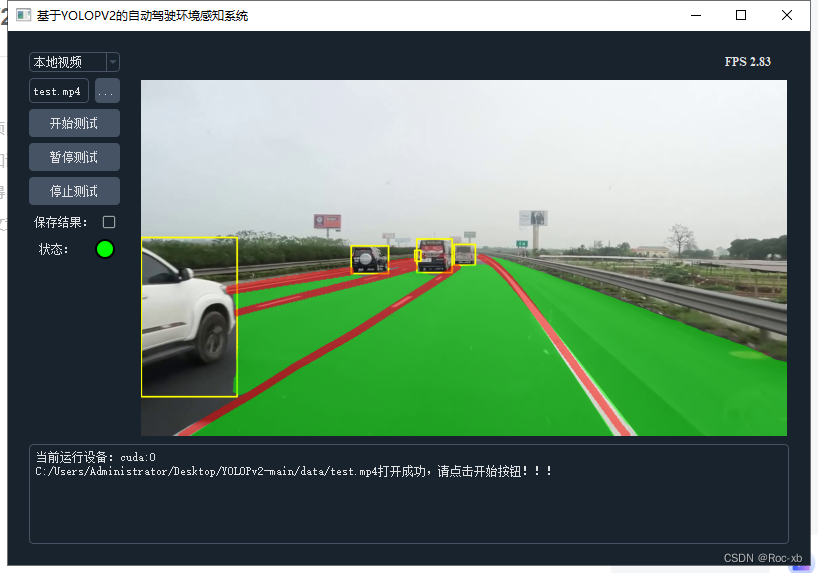
基于VOLOPV2的自动驾驶环境感知系统
基于VOLOPV2的自动驾驶环境感知系统是一个复杂的系统,它主要负责实时检测并识别周围环境中的各种物体和信息,为自动驾驶车辆提供必要的感知数据。以下是对该系统的一个简要介绍: 环境感知是自动驾驶系统中的一个关键部分,它依赖于…...
)
使用Python爬虫会遇到的问题和解决方法(包含案例)
一、HTTP错误(如403 Forbidden) 问题描述: 当使用requests库发起请求时,可能会遇到HTTP 403 Forbidden错误,这通常意味着服务器理解了请求,但是拒绝执行它。 解决方法: 1.设置headers…...

Spring Boot 读取配置优先级顺序是什么?
在使用 Spring Boot 进行开发时,配置文件是非常重要的一部分,它可以用来配置应用程序的行为、数据源、日志级别等信息。 但是,当配置文件中存在多个配置来源时,Spring Boot 是如何确定读取配置的优先级顺序的呢? 本文…...
数据挖掘(二)数据预处理
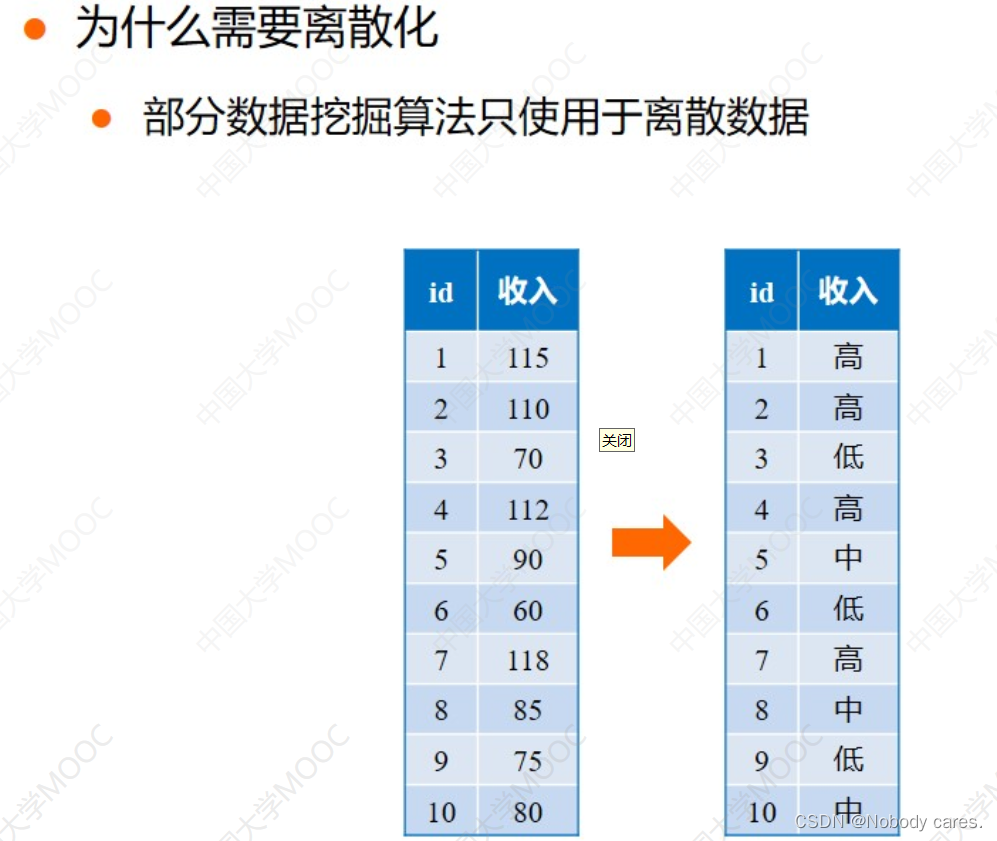
前言 基于国防科技大学 丁兆云老师的《数据挖掘》 数据挖掘 数据挖掘(一)数据类型与统计 2、数据预处理 2.1数据清理 缺失值处理: from sklearn.impute import SimpleImputer# 创建一个SimpleImputer对象,指定缺失值的处理策略…...
docker学习-docker常用其他命令整理
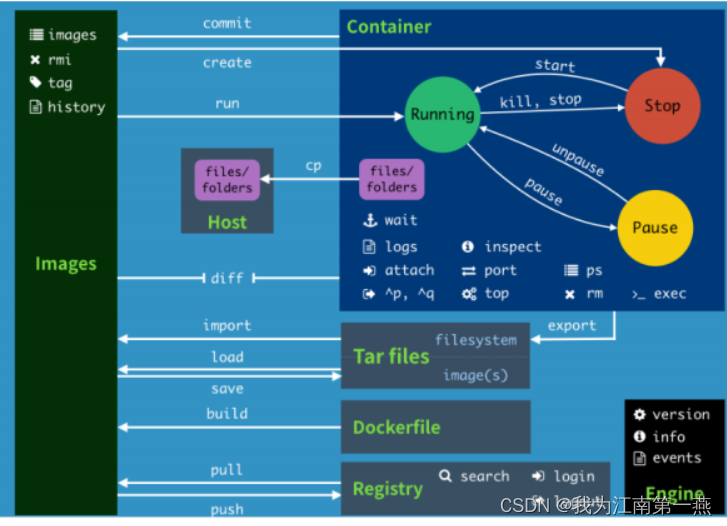
随便写写,后面有空再更新 镜像命令,容器命令已在之前略有更新,这次不写, 一、后台启动命令 # 命令 docker run -d 容器名 # 例子 docker run -d centos # 启动centos,使用后台方式启动 # 问题: 使用doc…...
【matlab基础知识代码】(十六)代数方程的图解法多项式型方程的准解析解方法
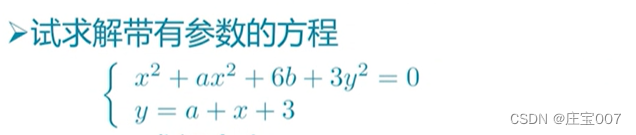
>> ezplot(exp(-3*t)*sin(4*t2)4*exp(-0.5*t)*cos(2*t)-0.5,[0 5]), line([0 5],[0 0]) 验证 >> t0.6738; >> exp(-3*t)*sin(4*t2)4*exp(-0.5*t)*cos(2*t)-0.5 ans -2.9852e-04 >> ezplot(x^2*exp(-x*y^2/2)exp(-x/2)*sin(x*y)) >> hold on; …...

智能奶柜:健康生活新风尚
智能奶柜:健康生活新风尚 在快节奏的都市生活中,健康与便利成为了现代人的双重追求。而在这两者交汇之处,智能奶柜应运而生,它不仅是科技与生活的完美融合,更是日常营养补给的智慧之选。 清晨的第一缕温暖 —— 新鲜…...

SpringBoot 集成 FFmpeg 解析音视频
文章目录 1 摘要2 核心 Maven 依赖3 核心代码3.1 FFmpeg 解析音视频工具类3.2 音视频文件信息参数3.3 音视频文件上传Controller3.4 application 配置文件 4 测试数据4.1 视频文件解析4.2 音频文件解析 5 注意事项5.1 文件必须在本地 6 推荐参考文档7 Github 源码 1 摘要 FFmp…...
基于单片机的直流电机测速装置研究与设计
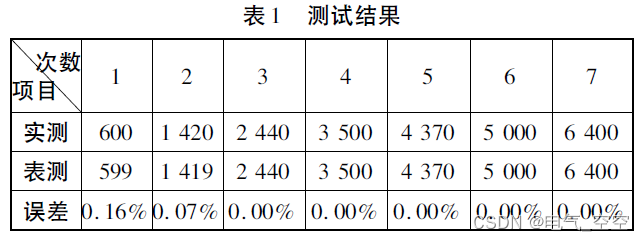
摘要: 基于单片机的直流电机测速装置采用了对直流电机的中枢供电回路串联取样电阻的方式实现对电机转速的精确实时测量。系统由滤波电路、信号放大电路、单片机控制电路以及稳压电源等功能模块电路构成。工作过程中高频磁环作为载体,利用电磁感应的基本原理对直流电…...

【快捷部署】022_ZooKeeper(3.5.8)
📣【快捷部署系列】022期信息 编号选型版本操作系统部署形式部署模式复检时间022ZooKeeper3.5.8Ubuntu 20.04tar包单机2024-05-07 一、快捷部署 #!/bin/bash ################################################################################# # 作者ÿ…...
引领AI数据标注新纪元:景联文科技为智能未来筑基
在人工智能蓬勃发展的今天,数据如同燃料,驱动着每一次技术飞跃。在这场智能革命的浪潮中,景联文科技凭借其深厚的专业实力与前瞻性的战略眼光,正站在行业前沿,为全球的人工智能企业提供坚实的数据支撑。 全国布局&…...
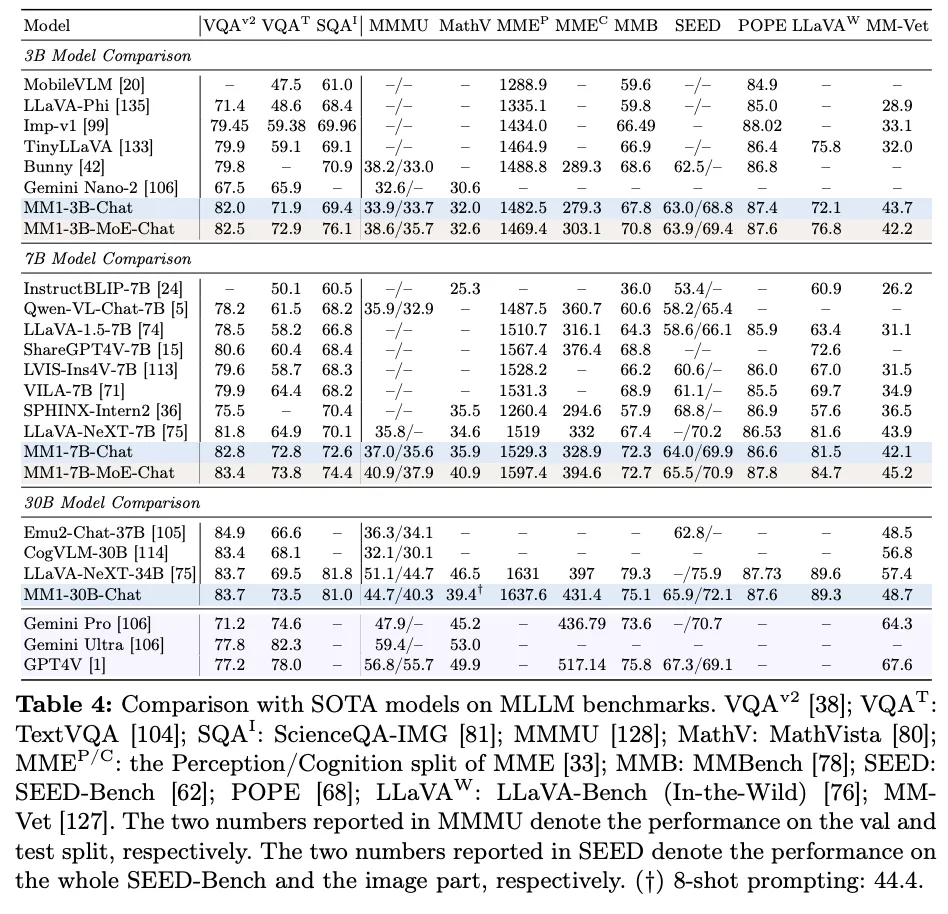
多模态大语言模型和 Apple 的 MM1
原文地址:multimodal-large-language-models-apples-mm1 2024 年 4 月 13 日 抽象是计算机科学中最关键的概念之一,具有一些最强大的影响。从简单的角度来看,抽象就是将某一事物应用于多种不同情况的能力。例如,如果你创造了一种…...
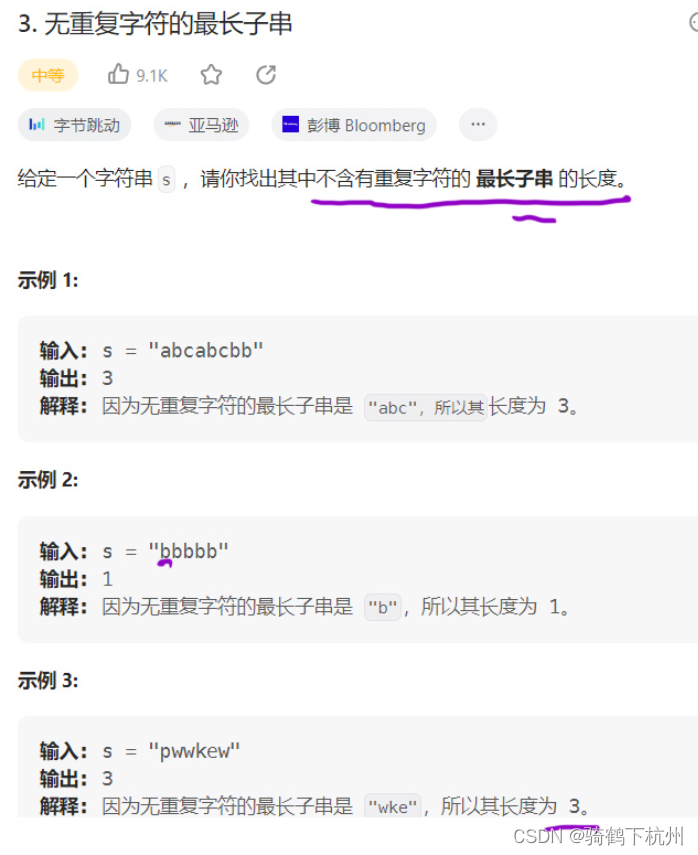
算法day04
第一题 : 209. 长度最小的子数组 有上题可知,我们会采用双指针和单调性的思路来解决 我们本题采用左右双指针从数组的0位置同向前进,所以将此类模型称为滑块; 步骤思路如下: 步骤一: 定义所有双指针都指向…...
的妙用:打造可交互的矩形标注控件(附避坑指南))
WPF装饰器(Adorner)的妙用:打造可交互的矩形标注控件(附避坑指南)
WPF装饰器实战:构建智能矩形标注控件的完整指南 在图像处理、数据标注或UI设计工具中,矩形标注功能几乎是标配需求。想象一下这样的场景:用户双击图片生成标注区域,通过拖拽调整位置,自由缩放大小,所有操作…...

3步掌握BilibiliDown:从视频下载到音频提取的完整攻略
3步掌握BilibiliDown:从视频下载到音频提取的完整攻略 【免费下载链接】BilibiliDown (GUI-多平台支持) B站 哔哩哔哩 视频下载器。支持稍后再看、收藏夹、UP主视频批量下载|Bilibili Video Downloader 😳 项目地址: https://gitcode.com/gh_mirrors/b…...

导师推荐!盘点2026年好评如潮的AI论文平台
一天写完毕业论文在2026年已不再是天方夜谭。2026年最炸裂、实测能大幅提速的AI论文平台正在席卷学术圈,覆盖选题构思、文献综述、内容生成、降重润色与格式排版全流程,真正帮你高效搞定论文写作。 一、全流程王者:一站式搞定论文全链路&…...

UI-TARS-desktop效果实测:内置Qwen3-4B模型响应速度有多快
UI-TARS-desktop效果实测:内置Qwen3-4B模型响应速度有多快 在当今AI应用日益普及的背景下,响应速度已成为衡量模型实用性的关键指标。本文将带您实测UI-TARS-desktop内置的Qwen3-4B-Instruct-2507模型在实际使用中的响应表现,通过多场景测试…...

E-Hentai-Downloader:高效漫画资源本地化解决方案
E-Hentai-Downloader:高效漫画资源本地化解决方案 【免费下载链接】E-Hentai-Downloader Download E-Hentai archive as zip file 项目地址: https://gitcode.com/gh_mirrors/eh/E-Hentai-Downloader 核心价值:重新定义漫画资源管理 E-Hentai-Do…...

罗技鼠标宏压枪脚本终极指南:3步实现绝地求生精准射击
罗技鼠标宏压枪脚本终极指南:3步实现绝地求生精准射击 【免费下载链接】logitech-pubg PUBG no recoil script for Logitech gaming mouse / 绝地求生 罗技 鼠标宏 项目地址: https://gitcode.com/gh_mirrors/lo/logitech-pubg 还在为绝地求生中枪口乱跳而烦…...

Java网络编程实战:从零实现一个支持视频通话的聊天室
最近在学习Java网络编程,恰好之前写过一个基于TCP的多人聊天室,一直想给它加上视频通话功能。经过几天的折腾,终于把UDP视频流和TCP信令成功整合到了一起。这篇文章会完整记录开发过程、踩过的坑以及最终的代码实现 一、项目背景与目标 原有…...

别再乱写状态流转了!用这5个真实业务模板,帮你搞定订单、审批、工单设计
状态流转设计的黄金法则:5个高复用业务模板与深度避坑指南 当你在深夜接到一个"简单"的状态流转需求时,是否经历过这些噩梦时刻?产品经理说"加个状态很容易",结果上线后出现幽灵订单;开发同学抱怨…...

OpenClaw与Qwen3-VL:30B:高效个人AI办公助手实战
OpenClaw与Qwen3-VL:30B:高效个人AI办公助手实战 1. 为什么选择OpenClawQwen3-VL组合 去年冬天,当我第5次因为会议记录整理到凌晨两点时,终于决定寻找自动化解决方案。在尝试了市面上各种RPA工具后,偶然发现了OpenClaw这个开源框…...

CLaMP技术深度解析:对比学习如何实现语言与音乐的完美融合
CLaMP技术深度解析:对比学习如何实现语言与音乐的完美融合 【免费下载链接】muzic 这是一个微软研究院开发的音乐生成AI项目。适合对音乐、音频处理以及AI应用感兴趣的开发者、学生和研究者。特点是使用深度学习技术生成音乐,具有较高的创作质量和听觉体…...