
Spring Boot集成rss快速入门demo
1.什么是rss?
RSS 的全称是「简易内容聚合」(Really Simple Syndication),是一个能让你在一个地方订阅各种感兴趣网站的工具。
一个网站支持 RSS,就意味着每当它新发布一篇新文章,就会往一个位于特定网址的文件中,以特定的语法(具体而言是 XML 标记语言或 JSON)增加一条记录,列明这篇文章的标题、作者、发表时间和内容(可以是全文,也可以是摘要)等信息。这样,用户只要搜集所有他感兴趣的网站提供的这种文件的网址,并不时检查这些文件内容的更新,就能知道这些网站是否、何时发布了什么内容。RSS 阅读器的核心功能,就是存储用户订阅的 RSS 地址,以固定的频率自动检查更新,并将其内容转换为易读的格式呈现给用户。
为什么用 RSS
RSS 的对立面是算法推荐,像微信公众号、知乎、微博、今日头条等平台。 且不说算法推送平台广告多,迁移麻烦的问题。算法推荐的特点是,你不需要刻意选择,算法会根据你的喜好,给你推送内容。这样一来,你几乎没有选择的余地,在不断被「喂饱」中逐渐失去判断的能力。更可怕的地方在于,它替你定义了你的画像,然后把你潜移默化中变成了它所认为的你。「大数据杀熟」的东窗事发绝非偶然,用算法窥视用户隐私是当今互联网公司的通配。
做信息的主人,而不是奴隶。RSS 是一种公开的协议,可自由更换平台与客户端。重要的一点是,获取信息的权力完全自治。RSS 相比算法推荐,拥有了可控性和安全感,隐私完全掌握在自己手里。
什么是atom?
Atom是一对彼此相关的标准。Atom供稿格式(Atom Syndication Format)是用于网站消息来源,基于XML的文档格式;而Atom出版协定(Atom Publishing Protocol,简称AtomPub或APP)是用于新增及修改网络资源,基于HTTP的协议。
它借鉴了各种版本RSS的使用经验,被许多的聚合工具广泛使用在发布和使用上。Atom供稿格式设计作为RSS的替代品;而Atom出版协定用来取 代现有的多种发布方式(如Blogger API和LiveJournal XML-RPC Client/Server Protocol)。而值得一提的是Google提供的多种服务正在使用Atom。Google Data API(GData)亦基于Atom。
Atom是IETF的"建议标准",Atom供稿格式列为RFC 4287,而Atom出版协定列为RFC 5023。
2.代码工程
实验目标:实现rss和atom订阅源
pom.xml
<?xml version="1.0" encoding="UTF-8"?>
<project xmlns="http://maven.apache.org/POM/4.0.0"xmlns:xsi="http://www.w3.org/2001/XMLSchema-instance"xsi:schemaLocation="http://maven.apache.org/POM/4.0.0 http://maven.apache.org/xsd/maven-4.0.0.xsd"><parent><artifactId>springboot-demo</artifactId><groupId>com.et</groupId><version>1.0-SNAPSHOT</version></parent><modelVersion>4.0.0</modelVersion><artifactId>rss</artifactId><properties><maven.compiler.source>8</maven.compiler.source><maven.compiler.target>8</maven.compiler.target></properties><dependencies><dependency><groupId>org.springframework.boot</groupId><artifactId>spring-boot-starter-web</artifactId></dependency><dependency><groupId>org.springframework.boot</groupId><artifactId>spring-boot-autoconfigure</artifactId></dependency><dependency><groupId>org.springframework.boot</groupId><artifactId>spring-boot-starter-test</artifactId><scope>test</scope></dependency><!--ROAM依赖  RSS 订阅--><dependency><groupId>com.rometools</groupId><artifactId>rome</artifactId><version>1.15.0</version></dependency><!-- https://mvnrepository.com/artifact/com.rometools/rome-utils --><dependency><groupId>com.rometools</groupId><artifactId>rome-utils</artifactId><version>1.15.0</version></dependency><dependency><groupId>org.jdom</groupId><artifactId>jdom2</artifactId><version>2.0.6</version></dependency></dependencies>
</project>
controller
采用rome库实现rss和atom订阅
package com.et.rss.controller;import com.rometools.rome.feed.atom.*;
import com.rometools.rome.feed.rss.Channel;
import com.rometools.rome.feed.rss.Description;
import com.rometools.rome.feed.rss.Image;
import com.rometools.rome.feed.rss.Item;
import com.rometools.rome.feed.synd.SyndPerson;
import org.springframework.web.bind.annotation.GetMapping;
import org.springframework.web.bind.annotation.RequestMapping;
import org.springframework.web.bind.annotation.RestController;
import java.util.Collections;
import java.util.Date;@RestController
@RequestMapping("/feed")
public class FeedController {@GetMapping(path = "/rss")public Channel rss() {Channel channel = new Channel();channel.setFeedType("rss_2.0");channel.setTitle("HBLOG Feed");channel.setDescription("Recent posts");channel.setLink("http://www.liuhaihua.cn");channel.setUri("http://www.liuhaihua.cn");channel.setGenerator("Harries");Image image = new Image();image.setUrl("http://www.liuhaihua.cn/img/hblog.png");image.setTitle("HBLOG Feed");image.setHeight(32);image.setWidth(32);channel.setImage(image);Date postDate = new Date();channel.setPubDate(postDate);Item item = new Item();item.setAuthor("Harries");item.setLink("http://www.liuhaihua.cn/archives/710608.html");item.setTitle("Spring Boot integrated banner   quick start demo");item.setUri("http://www.liuhaihua.cn/archives/710608.html");item.setComments("http://www.liuhaihua.cn/archives/710608.html#commnet");com.rometools.rome.feed.rss.Category category = new com.rometools.rome.feed.rss.Category();category.setValue("CORS");item.setCategories(Collections.singletonList(category));Description descr = new Description();descr.setValue("pring Boot Banner is a feature for displaying custom ASCII art and information at application startup. This ASCII art usually includes the project name, version number, author information");item.setDescription(descr);item.setPubDate(postDate);channel.setItems(Collections.singletonList(item));//Like more Entries here about different new topicsreturn channel;}@GetMapping(path = "/atom")public Feed atom() {Feed feed = new Feed();feed.setFeedType("atom_1.0");feed.setTitle("HBLOG");feed.setId("http://www.liuhaihua.cn");Content subtitle = new Content();subtitle.setType("text/plain");subtitle.setValue("recents post");feed.setSubtitle(subtitle);Date postDate = new Date();feed.setUpdated(postDate);Entry entry = new Entry();Link link = new Link();link.setHref("http://www.liuhaihua.cn/archives/710608.html");entry.setAlternateLinks(Collections.singletonList(link));SyndPerson author = new Person();author.setName("HBLOG");entry.setAuthors(Collections.singletonList(author));entry.setCreated(postDate);entry.setPublished(postDate);entry.setUpdated(postDate);entry.setId("710608");entry.setTitle("Spring Boot integrated banner   quick start demo");Category category = new Category();category.setTerm("CORS");entry.setCategories(Collections.singletonList(category));Content summary = new Content();summary.setType("text/plain");summary.setValue("Spring Boot Banner is a feature for displaying custom ASCII art and information at application startup. This ASCII art usually includes the project name, version number, author information");entry.setSummary(summary);feed.setEntries(Collections.singletonList(entry));//add different topicreturn feed;}}
DemoApplication.java
package com.et.rss;import org.springframework.boot.SpringApplication;
import org.springframework.boot.autoconfigure.SpringBootApplication;@SpringBootApplication
public class DemoApplication {public static void main(String[] args) {SpringApplication.run(DemoApplication.class, args);}
}
application.yaml
server:port: 8088以上只是一些关键代码,所有代码请参见下面代码仓库
代码仓库
- GitHub - Harries/springboot-demo: a simple springboot demo with some components for example: redis,solr,rockmq and so on.
3.测试
启动Spring Boot应用
rss
http://127.0.0.1:8088/feed/rss
<?xml version="1.0" encoding="UTF-8"?>
<rss version="2.0"><channel><title>HBLOG Feed</title><link>http://www.liuhaihua.cn</link><description>Recent posts</description><pubDate>Fri, 24 May 2024 14:26:21 GMT</pubDate><generator>Harries</generator><image><title>HBLOG Feed</title><url>http://www.liuhaihua.cn/img/hblog.png</url><width>32</width><height>32</height></image><item><title>Spring Boot integrated banner   quick start demo</title><link>http://www.liuhaihua.cn/archives/710608.html</link><description>pring Boot Banner is a feature for displaying custom ASCII art and information at application startup. This ASCII art usually includes the project name, version number, author information</description><category>CORS</category><pubDate>Fri, 24 May 2024 14:26:21 GMT</pubDate><author>Harries</author><comments>http://www.liuhaihua.cn/archives/710608.html#commnet</comments></item></channel>
</rss>
atom
http://127.0.0.1:8088/feed/atom
<?xml version="1.0" encoding="UTF-8"?>
<feed xmlns="http://www.w3.org/2005/Atom"><title>HBLOG</title><subtitle type="text">recents post</subtitle><id>http://www.liuhaihua.cn</id><updated>2024-05-24T14:25:38Z</updated><entry><title>Spring Boot integrated banner   quick start demo</title><link rel="alternate" href="http://www.liuhaihua.cn/archives/710608.html" /><category term="CORS" /><author><name>HBLOG</name></author><id>710608</id><updated>2024-05-24T14:25:38Z</updated><published>2024-05-24T14:25:38Z</published><summary type="text">Spring Boot Banner is a feature for displaying custom ASCII art and information at application startup. This ASCII art usually includes the project name, version number, author information</summary></entry>
</feed>
4.引用
- Spring boot RSS feed with rome
- Spring Boot集成rss快速入门demo | Harries Blog™
相关文章:

Spring Boot集成rss快速入门demo
1.什么是rss? RSS 的全称是「简易内容聚合」(Really Simple Syndication),是一个能让你在一个地方订阅各种感兴趣网站的工具。 一个网站支持 RSS,就意味着每当它新发布一篇新文章,就会往一个位于特定网址的…...
重学java 49 List接口
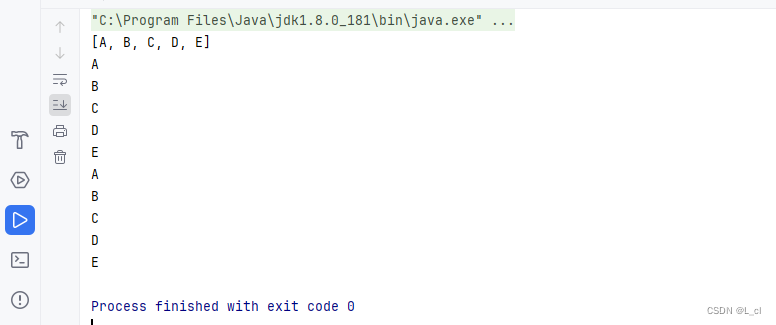
但逢良辰,顺颂时宜 —— 24.5.28 一、List接口 1.概述: 是collection接口的子接口 2.常见的实现类: ArrayList LinkedList Vector 二、List集合下的实现类 1.ArrayList集合的使用及源码分析 1.概述 ArrayList是List接口的实现类 2.特点 a.元素有序 —> 按照什么顺…...

【html+css(大作业)】二级菜单导航栏
目录 实现效果 代码及其解释 html部分 CSS部分 hello,hello好久不见! 今天我们来写二级导航栏,所谓二级导航栏,简单来说就是鼠标放上去就有菜单拉出: 实现效果 代码及其解释 html部分 <!DOCTYPE html> &l…...

算法基础之集合-Nim游戏
集合-Nim游戏 核心思想: 博弈论 sg函数:在有向图游戏中,对于每个节点x,设从x出发共有k条有向边,分别到达节点y1,y2,yk,定义SG(x)的后记节点y1,y2,,yk的SG函数值构成的集合在执行mex运算的结果,即:SG(x)mex({SG(y1),SG(y2)SG(yk)}) **特别地,**整个有向图…...
Diffusion Model, Stable Diffusion, Stable Diffusion XL 详解
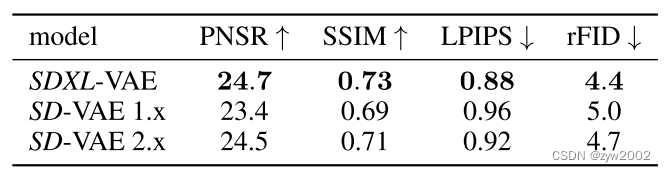
文章目录 Diffusion Model生成模型DDPM概述向前扩散过程前向扩散的逐步过程前向扩散的整体过程 反向去噪过程网络结构训练和推理过程训练过程推理过程优化目标 详细数学推导数学基础向前扩散过程反向去噪过程 Stable Diffusion组成结构运行流程网络结构变分自编码器 (VAE)文本编…...

智能奶柜:重塑牛奶零售新篇章
智能奶柜:重塑牛奶零售新篇章 回忆往昔,孩童时代对送奶员每日拜访的期待,那熟悉的一幕——新鲜牛奶被细心放置于家门口的奶箱中,成为了许多人温馨的童年记忆。如今,尽管直接投递袋装牛奶的情景已不多见,但…...

源代码防泄密--沙盒技术安全风险分析
将原本用于防护病毒木马的沙盒(沙箱)技术,运用于源代码防泄密领域,形成沙盒防泄密系统,是否安全可行?依据沙盒防泄密基本工作原理,可从安全模型、沙箱逃逸以及与进程相关性等多个角度࿰…...
韭菜收割项目
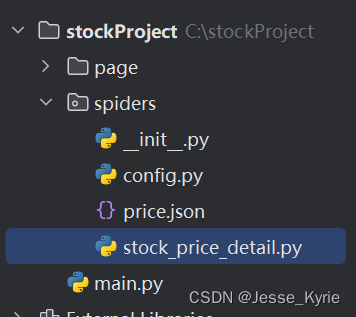
最近在玩股票,被人当成韭菜收割了一顿。高点追涨,第二天直接跌停。以为是低点,想抄底,结果别人直接抄家,血亏!!! 作为一个程序员,还是好好敲代码赚钱好了,一步一步。想不劳而获是不可能的。 我写…...
Unity3D输入事件
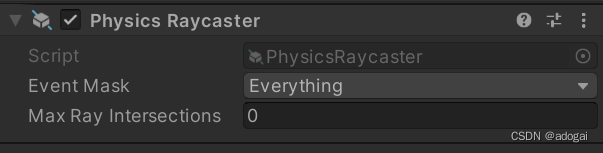
文章目录 前言一、全局事件二、射线三、点选3D模型四、点击地面控制人物移动总结 前言 Unity输入事件分为两类,全局触发和监听式触发。全局触发通常是运行在update在每帧进行检测,而监听式触发是被动的输入事件。 一、全局事件 在最新的unity中有新和旧…...

c++ thread detach
#include <thread> #include <iostream>using namespace std;void func() {cout << "子线程func开始执行!" << endl;//do somethingcout << "子线程func执行结束!" << endl; }int main() {cout…...
入门四认识HTML
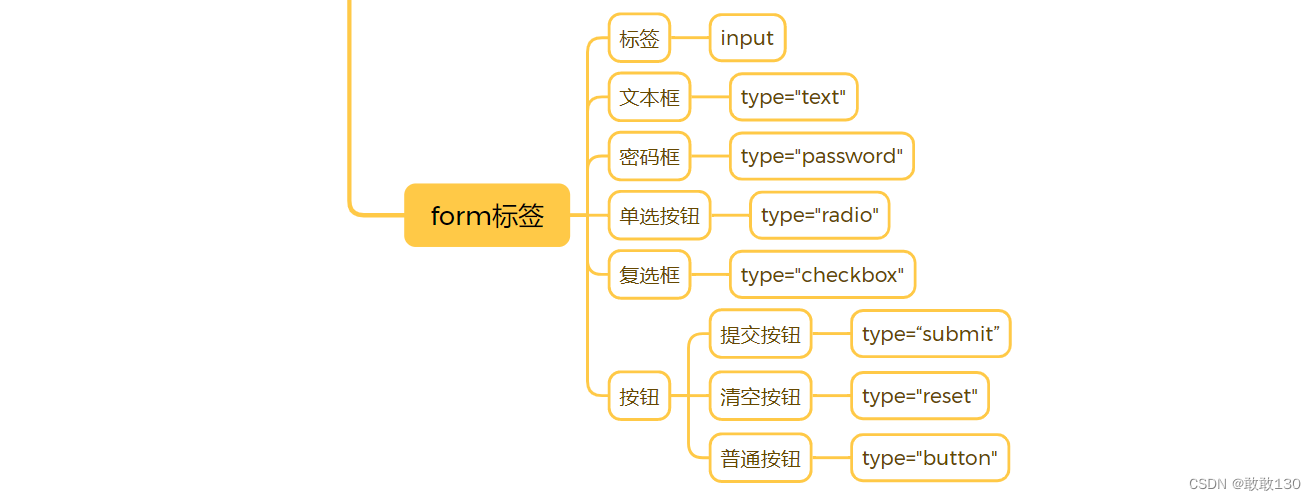
目录 一、HTML介绍 1、Web前端三大核心技术 2、什么是HTML 3、Html标签 4、标签属性 二、HTML骨架标签 三、编写HTML工具 四、常用标签 1、注释 2、标题标签 3、段落标签 4、超链接标签 5、图片标签 6、换行与空格 7、布局标签 8、列表标签 9、表单…...

js怎么生成验证码?js生成指定长度的随机字符串
在项目中经常有生成随机字符串的需求,比如验证接口签名、验证码(Node.js发送短信或邮箱验证码、生成图片验证码),我们可以使用Javascript生成随机字符。 使用随机数从给出的可能字符中抽取合并字符串 优点是可以自定义结果中字符的取值,比如…...

Python魔法之旅-魔法方法(01)
目录 一、概述 1、定义 2、作用 二、主要应用场景 1、构造和析构 2、操作符重载 3、字符串和表示 4、容器管理 5、可调用对象 6、上下文管理 7、属性访问和描述符 8、迭代器和生成器 9、数值类型 10、复制和序列化 11、自定义元类行为 12、自定义类行为 13、类…...

介绍下 npm 模块安装机制,为什么输入 npm install 就可以自动安装对应的模块
npm(Node Package Manager)模块安装机制是Node.js生态系统中非常重要的一部分,它允许开发者轻松管理和安装Node.js项目的依赖项。下面我将详细介绍npm模块的安装机制,以及为什么输入npm install就可以自动安装对应的模块。 npm模…...

vue2如何父组件 对象 双向绑定子组件
对于Vue 2,你不能直接用v-model绑定对象,但可以通过在子组件内部处理value prop的变化并触发input事件来模拟这一行为。 父组件A 1<template> 2 <ComponentB v-model"item" prop-names"addressId,date,startTime,endTime&quo…...

[Android]在后台线程执行耗时操作,然后在主线程更新UI
1.Coroutines(官方推荐) Coroutines 提供了一种轻量级的线程管理方式,使得在后台线程执行任务和在主线程更新 UI 变得简单。以下是如何在 Kotlin 中使用 Coroutines 来处理耗时逻辑并更新 UI 的步骤: 添加 Coroutines 依赖: 首…...

平方回文数-第13届蓝桥杯选拔赛Python真题精选
[导读]:超平老师的Scratch蓝桥杯真题解读系列在推出之后,受到了广大老师和家长的好评,非常感谢各位的认可和厚爱。作为回馈,超平老师计划推出《Python蓝桥杯真题解析100讲》,这是解读系列的第73讲。 平方回文数&#…...
 2D旋转位置编码)
位置编码(三) 2D旋转位置编码
Rotary Position Embedding for Vision Transformer https://arxiv.org/abs/2403.13298 Transformer升级之路:4、二维位置的旋转式位置编码 https://kexue.fm/archives/8397 Transformer升级之路:17、多模态位置编码的简单思考 https://kexue.fm/archive…...
1、pikachu靶场之xss钓鱼复现
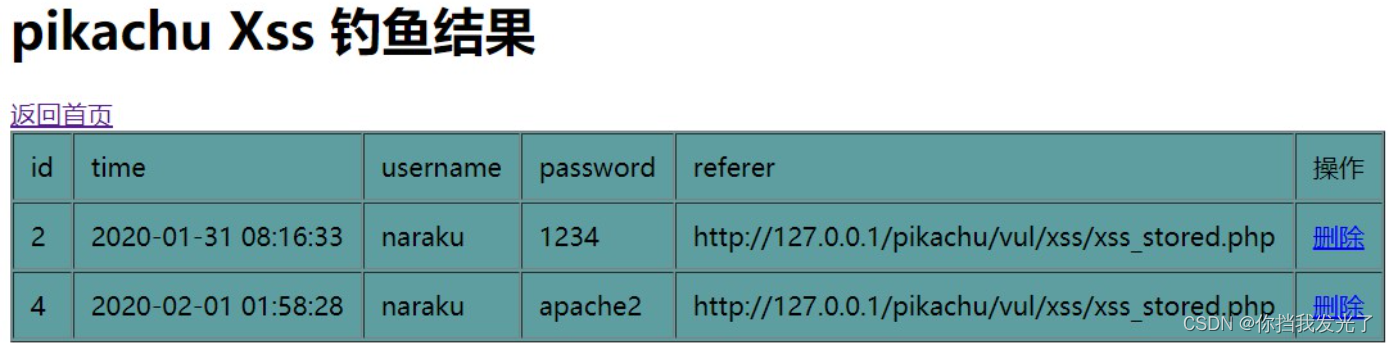
一、复现过程 1、payload <script src"http://127.0.0.1/pkxss/xfish/fish.php"></script> 将这段代码插入到含有储存xss的网页上,如下留言板 2、此时恶意代码已经存入数据库,并存在网页中,当另一个用户打开这个网页…...

弘君资本炒股技巧:股票定向增发是什么意思?是好是坏?
股票定向增发是指已上市的公司向指定的组织或者个人投资者额外发行股份募集资金的融资方法,发行价格为发行前某一阶段的平均价的必定比例,增发的价格不得低于前二十个买卖日股票均价的80%。 例如,个股定增前二十个买卖股票平均价为…...
)
为什么你的ElevenLabs四川话输出总像“普通话+口音”?3步声学特征解耦法让韵律自然度提升2.8倍(附Python声谱可视化代码)
更多请点击: https://intelliparadigm.com 第一章:为什么你的ElevenLabs四川话输出总像“普通话口音”? ElevenLabs 当前并未提供原生四川话(西南官话成渝片)语音模型,其所谓“方言支持”实为在标准普通话…...

摆脱论文困扰!!2026 最新降AIGC软件测评与推荐
2026年真正好用的AI论文降重与改写工具,核心看降重效果、去AI味、格式保留、学术适配四大指标。综合实测,千笔AI、ThouPen、豆包、DeepSeek、Grammarly 是当前最值得推荐的梯队,覆盖从免费到付费、从中文到英文、从文科到理工的全场景需求。 …...

ChatGPT-web-midjourney-proxy 项目常见问题解决方案
ChatGPT-web-midjourney-proxy 项目常见问题解决方案 1. 项目基础介绍和主要编程语言 ChatGPT-web-midjourney-proxy 是一个开源项目,它基于 ChatGPT 和 Midjourney-proxy 技术构建,提供了丰富的文生图、图生文、文生视频等功能。该项目支持自定义 API k…...

如何在Mayo中使用剪辑平面和爆炸视图:复杂装配体分析利器
如何在Mayo中使用剪辑平面和爆炸视图:复杂装配体分析利器 【免费下载链接】mayo 3D CAD viewer and converter based on Qt OpenCascade 项目地址: https://gitcode.com/gh_mirrors/ma/mayo Mayo是一款功能强大的开源3D CAD查看器和转换器,基于Q…...

别再用 STVP 了!用 IAR 3.11.1 调试 STM8S003 点灯程序,效率翻倍
告别STVP:用IAR 3.11.1高效调试STM8S003点灯程序全指南 在嵌入式开发领域,工具链的选择往往决定了开发效率的上限。对于STM8系列开发,许多工程师仍在使用STVP这种基础的烧录工具,却不知已经错过了IAR Embedded Workbench带来的效…...

百度文库纯净打印终极指南:3分钟解锁文档自由保存的完整方案
百度文库纯净打印终极指南:3分钟解锁文档自由保存的完整方案 【免费下载链接】baidu-wenku fetch the document for free 项目地址: https://gitcode.com/gh_mirrors/ba/baidu-wenku 你是否曾在百度文库找到心仪的学习资料,却被满屏的广告、导航栏…...

GHelper:华硕笔记本性能调优的终极解决方案
GHelper:华硕笔记本性能调优的终极解决方案 【免费下载链接】g-helper Lightweight Armoury Crate alternative for Asus laptops with nearly the same functionality. Works with ROG Zephyrus, Flow, TUF, Strix, Scar, ProArt, Vivobook, Zenbook, Expertbook, …...

30天学会AI工程师|Day 14:自己实现一个小工具,你才会真正理解 Agent 是怎么“动起来”的
你先知道一件事 昨天你理解了 Tool Calling 的概念,今天最好亲手做一个最小工具。 为什么这一步重要 你完全可以从一个非常简单的例子开始。比如做一个计算器工具,输入两个数字和一个运算符,返回结果。或者做一个时间查询工具,返回…...

如何快速在Windows上安装安卓应用?APK Installer的终极免费解决方案
如何快速在Windows上安装安卓应用?APK Installer的终极免费解决方案 【免费下载链接】APK-Installer An Android Application Installer for Windows 项目地址: https://gitcode.com/GitHub_Trending/ap/APK-Installer 你是否曾想在Windows电脑上运行安卓应用…...

DS4Windows终极指南:如何免费解决手柄漂移并优化游戏操控精度
DS4Windows终极指南:如何免费解决手柄漂移并优化游戏操控精度 【免费下载链接】DS4Windows Like those other ds4tools, but sexier 项目地址: https://gitcode.com/gh_mirrors/ds/DS4Windows 你是否遇到过手柄摇杆自动漂移、瞄准时准星抖动、按键响应延迟等…...