
spring boot 3.x版本 引入 swagger2启动时报错

一,问题
Spring Boot 3.x版本的项目里,准备引入Swagger2作为接口文档,但是项目启动报错:
java.lang.TypeNotPresentException: Type javax.servlet.http.HttpServletRequest not present
at java.base/sun.reflect.generics.factory.CoreReflectionFactory.makeNamedType(CoreReflectionFactory.java:117) ~[na:na]
at java.base/sun.reflect.generics.visitor.Reifier.visitClassTypeSignature(Reifier.java:125) ~[na:na]
at java.base/sun.reflect.generics.tree.ClassTypeSignature.accept(ClassTypeSignature.java:49) ~[na:na]
at java.base/sun.reflect.generics.visitor.Reifier.reifyTypeArguments(Reifier.java:68) ~[na:na]
at java.base/sun.reflect.generics.visitor.Reifier.visitClassTypeSignature(Reifier.java:138) ~[na:na]
at java.base/sun.reflect.generics.tree.ClassTypeSignature.accept(ClassTypeSignature.java:49) ~[na:na]
at java.base/sun.reflect.generics.repository.ClassRepository.computeSuperInterfaces(ClassRepository.java:117) ~[na:na]
at java.base/sun.reflect.generics.repository.ClassRepository.getSuperInterfaces(ClassRepository.java:95) ~[na:na]
at java.base/java.lang.Class.getGenericInterfaces(Class.java:1211) ~[na:na]
at org.springframework.core.ResolvableType.getInterfaces(ResolvableType.java:517) ~[spring-core-6.1.8.jar:6.1.8]
at org.springframework.core.ResolvableType.as(ResolvableType.java:465) ~[spring-core-6.1.8.jar:6.1.8]
at org.springframework.core.ResolvableType.forClass(ResolvableType.java:1093) ~[spring-core-6.1.8.jar:6.1.8]
at org.springframework.plugin.core.config.PluginRegistriesBeanDefinitionRegistrar.getTargetType(PluginRegistriesBeanDefinitionRegistrar.java:101) ~[spring-plugin-core-2.0.0.RELEASE.jar:2.0.0.RELEASE]
at org.springframework.plugin.core.config.PluginRegistriesBeanDefinitionRegistrar.registerBeanDefinitions(PluginRegistriesBeanDefinitionRegistrar.java:71) ~[spring-plugin-core-2.0.0.RELEASE.jar:2.0.0.RELEASE]
at org.springframework.context.annotation.ImportBeanDefinitionRegistrar.registerBeanDefinitions(ImportBeanDefinitionRegistrar.java:86) ~[spring-context-6.1.8.jar:6.1.8]
at org.springframework.context.annotation.ConfigurationClassBeanDefinitionReader.lambda$loadBeanDefinitionsFromRegistrars$1(ConfigurationClassBeanDefinitionReader.java:376) ~[spring-context-6.1.8.jar:6.1.8]
at java.base/java.util.LinkedHashMap.forEach(LinkedHashMap.java:721) ~[na:na]
at org.springframework.context.annotation.ConfigurationClassBeanDefinitionReader.loadBeanDefinitionsFromRegistrars(ConfigurationClassBeanDefinitionReader.java:375) ~[spring-context-6.1.8.jar:6.1.8]
at org.springframework.context.annotation.ConfigurationClassBeanDefinitionReader.loadBeanDefinitionsForConfigurationClass(ConfigurationClassBeanDefinitionReader.java:148) ~[spring-context-6.1.8.jar:6.1.8]
at org.springframework.context.annotation.ConfigurationClassBeanDefinitionReader.loadBeanDefinitions(ConfigurationClassBeanDefinitionReader.java:120) ~[spring-context-6.1.8.jar:6.1.8]
at org.springframework.context.annotation.ConfigurationClassPostProcessor.processConfigBeanDefinitions(ConfigurationClassPostProcessor.java:429) ~[spring-context-6.1.8.jar:6.1.8]
at org.springframework.context.annotation.ConfigurationClassPostProcessor.postProcessBeanDefinitionRegistry(ConfigurationClassPostProcessor.java:290) ~[spring-context-6.1.8.jar:6.1.8]
at org.springframework.context.support.PostProcessorRegistrationDelegate.invokeBeanDefinitionRegistryPostProcessors(PostProcessorRegistrationDelegate.java:349) ~[spring-context-6.1.8.jar:6.1.8]
at org.springframework.context.support.PostProcessorRegistrationDelegate.invokeBeanFactoryPostProcessors(PostProcessorRegistrationDelegate.java:118) ~[spring-context-6.1.8.jar:6.1.8]
at org.springframework.context.support.AbstractApplicationContext.invokeBeanFactoryPostProcessors(AbstractApplicationContext.java:788) ~[spring-context-6.1.8.jar:6.1.8]
at org.springframework.context.support.AbstractApplicationContext.refresh(AbstractApplicationContext.java:606) ~[spring-context-6.1.8.jar:6.1.8]
at org.springframework.boot.web.servlet.context.ServletWebServerApplicationContext.refresh(ServletWebServerApplicationContext.java:146) ~[spring-boot-3.3.0.jar:3.3.0]
at org.springframework.boot.SpringApplication.refresh(SpringApplication.java:754) ~[spring-boot-3.3.0.jar:3.3.0]
at org.springframework.boot.SpringApplication.refreshContext(SpringApplication.java:456) ~[spring-boot-3.3.0.jar:3.3.0]
at org.springframework.boot.SpringApplication.run(SpringApplication.java:335) ~[spring-boot-3.3.0.jar:3.3.0]
at org.springframework.boot.SpringApplication.run(SpringApplication.java:1363) ~[spring-boot-3.3.0.jar:3.3.0]
at org.springframework.boot.SpringApplication.run(SpringApplication.java:1352) ~[spring-boot-3.3.0.jar:3.3.0]
at com.xgd.demo.SpringBootDemoApplication.main(SpringBootDemoApplication.java:19) ~[classes/:na]
Caused by: java.lang.ClassNotFoundException: javax.servlet.http.HttpServletRequest
at java.base/jdk.internal.loader.BuiltinClassLoader.loadClass(BuiltinClassLoader.java:641) ~[na:na]
at java.base/jdk.internal.loader.ClassLoaders$AppClassLoader.loadClass(ClassLoaders.java:188) ~[na:na]
at java.base/java.lang.ClassLoader.loadClass(ClassLoader.java:520) ~[na:na]
at java.base/java.lang.Class.forName0(Native Method) ~[na:na]
at java.base/java.lang.Class.forName(Class.java:467) ~[na:na]
at java.base/sun.reflect.generics.factory.CoreReflectionFactory.makeNamedType(CoreReflectionFactory.java:114) ~[na:na]
... 32 common frames omitted
二,描述
当前的配置如下:
1,pom里的swagger配置
<!-- swagger -->
<dependency><groupId>io.springfox</groupId><artifactId>springfox-swagger2</artifactId><version>3.0.0</version><scope>compile</scope><exclusions><exclusion><groupId>io.swagger</groupId><artifactId>swagger-models</artifactId></exclusion><exclusion><groupId>io.swagger</groupId><artifactId>swagger-annotations</artifactId></exclusion></exclusions>
</dependency>
<dependency><groupId>io.springfox</groupId><artifactId>springfox-swagger-ui</artifactId><version>3.0.0</version><scope>compile</scope>
</dependency>
<!-- 引入1.5.22及以上版本的swagger组件,以解决example默认解析报错(NumberFormatException)的问题 -->
<dependency><groupId>io.swagger</groupId><artifactId>swagger-models</artifactId><version>1.5.22</version>
</dependency>
<dependency><groupId>io.swagger</groupId><artifactId>swagger-annotations</artifactId><version>1.5.22</version>
</dependency>
Spring Boot版本是3.3.0
2,swagger配置
import org.springframework.context.annotation.Bean;
import org.springframework.context.annotation.Configuration;
import org.springframework.context.annotation.Profile;
import springfox.documentation.builders.PathSelectors;
import springfox.documentation.builders.RequestHandlerSelectors;
import springfox.documentation.spi.DocumentationType;
import springfox.documentation.spring.web.plugins.Docket;
import springfox.documentation.swagger2.annotations.EnableSwagger2;@Configuration
@Profile("dev")
@EnableSwagger2
public class SwaggerConfig {@Beanpublic Docket createApi() {return new Docket(DocumentationType.SWAGGER_2).select().apis(RequestHandlerSelectors.basePackage("com.xxx.demo")).paths(PathSelectors.any()).build();}
}
然后启动报错!
原因是HttpServletRequest的包路径有问题,在SpringBoot 3 之后已经不在javax.servlet 下了, 而是移到了jakarta.servlet包下面, 所以就会运行报错。
注意: 如果你用的是Spring Boot 2.x 版本,上面配置就没有问题。
三,解决
已知是因为HttpServletRequest包路径不对,那么就针对这个修改pom引入就好了。
在pom文件后面加上下面配置
<!-- 升級到Spring Boot 3.x之后,需要从Springfox迁移到SpringDoc,Springfox已经很久没有维护了,不兼容Spring Boot 3.x -->
<dependency><groupId>org.springdoc</groupId><artifactId>springdoc-openapi-starter-webmvc-ui</artifactId><version>2.3.0</version>
</dependency>
<dependency><groupId>org.springdoc</groupId><artifactId>springdoc-openapi-starter-webmvc-api</artifactId><version>2.3.0</version>
</dependency>
swagger配置
import io.swagger.v3.oas.models.OpenAPI;
import io.swagger.v3.oas.models.info.Info;
import org.springframework.context.annotation.Bean;
import org.springframework.context.annotation.Configuration;
import org.springframework.context.annotation.Profile;@Configuration
@Profile("dev")
public class SwaggerConfig {@Beanpublic OpenAPI openApi() {return new OpenAPI().info(new Info().title("demo").description("demo").version("1.0"));}
}
接口上引用如下
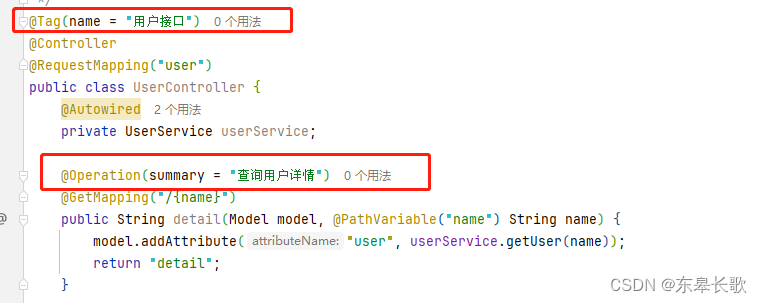
问题解决!
相关文章:
spring boot 3.x版本 引入 swagger2启动时报错
一,问题 Spring Boot 3.x版本的项目里,准备引入Swagger2作为接口文档,但是项目启动报错: java.lang.TypeNotPresentException: Type javax.servlet.http.HttpServletRequest not present at java.base/sun.reflect.generics.…...

华为机械工程师面试问题
在机械工程师的面试中,面试官可能会提出一系列问题,以评估应聘者的专业知识、技能、经验以及解决问题的能力。以下是一些可能的面试题: 基础知识与技能: 请解释机械工程中常用的几种传动方式,并比较它们的优缺点。描述一下你在机械设计过程中常用的软件,并举例说明你是如…...

一个简单并完整的springboot项目
一个简单并完整的springboot项目 项目地址1:https://download.csdn.net/download/qq_38234785/89398614 项目地址2:https://mbd.pub/o/buranxin/work 一、接口 curl --location --request POST http://localhost:8080/api/test \ --header Cookie: USER…...

SASS基础知识
什么是SASS 1. SASS与CSS的关系 SASS(Syntactically Awesome Stylesheets)是一种强大的CSS扩展语言,它允许开发者使用变量、嵌套规则、混合宏和更多功能,这些在纯CSS中是不可能做到的。SASS旨在简化CSS代码的维护,并…...
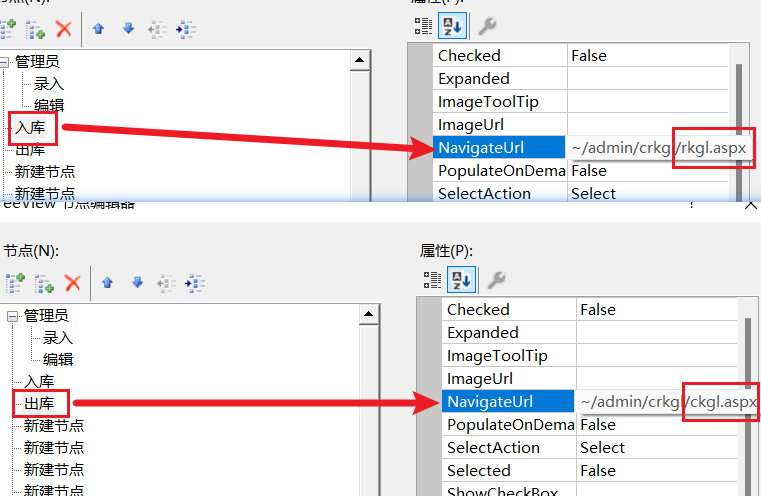
基于C#开发web网页管理系统模板流程-主界面管理员入库和出库功能完善
前言 紧接上篇->基于C#开发web网页管理系统模板流程-主界面管理员录入和编辑功能完善-CSDN博客 本篇将完善主界面的管理员入库和出库功能,同样的,管理员入库和出库的设计套路适用于动态表的录入和编辑 首先还是介绍一下本项目将要实现的功能 …...
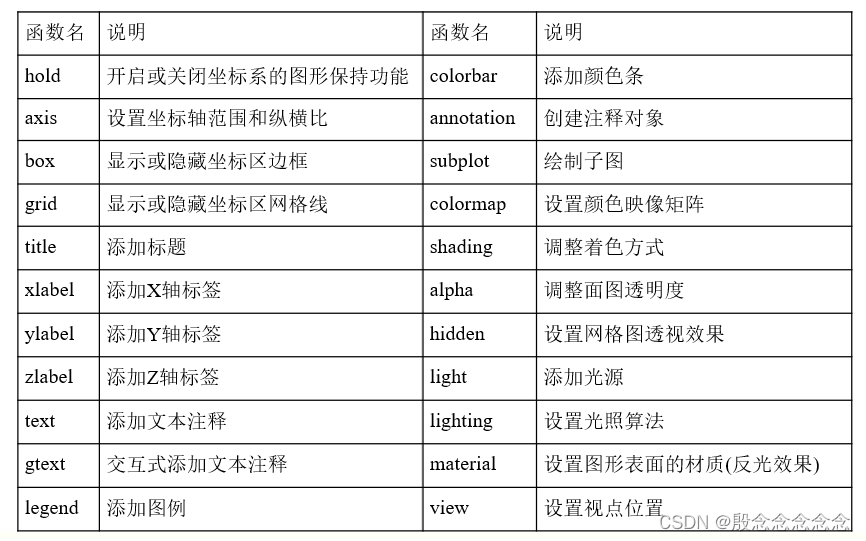
【MATLAB】概述1
非 ~ 注释 % 定义 >> 数组 赋值 赋值:>> x1 函数 数组 x[x1,x2] 行向量(,or ) x[x1;x2] 列向量 x. 转置等间隔向量 1-10 向量:>>xlinspace(1,10,10) 矩阵 矩阵:>>A[1,2,3;4,5,6;7,8,9] …...

容器中运行ip addr提示bash: ip: command not found【笔记】
容器中运行ip addr提示bash: ip: command not found 原因没有安装ip命令。 rootdocker-desktop:/# ip addr bash: ip: command not found rootdocker-desktop:/# apt-get install -y iproute2...

香橙派OrangePi AIpro,助力国产AIoT迈向新的台阶!
前言:很高兴受邀CSDN与OrangePi官方组织的测评活动,本次测评是一块基于AI边缘计算的香橙派开发板OrangePi AIpro。这是 香橙派 联合 华为昇腾 合作精心打造的新一代边缘AI计算产品,于2023年12月初发布,提供 8/20TOPS澎湃算力[1]&a…...
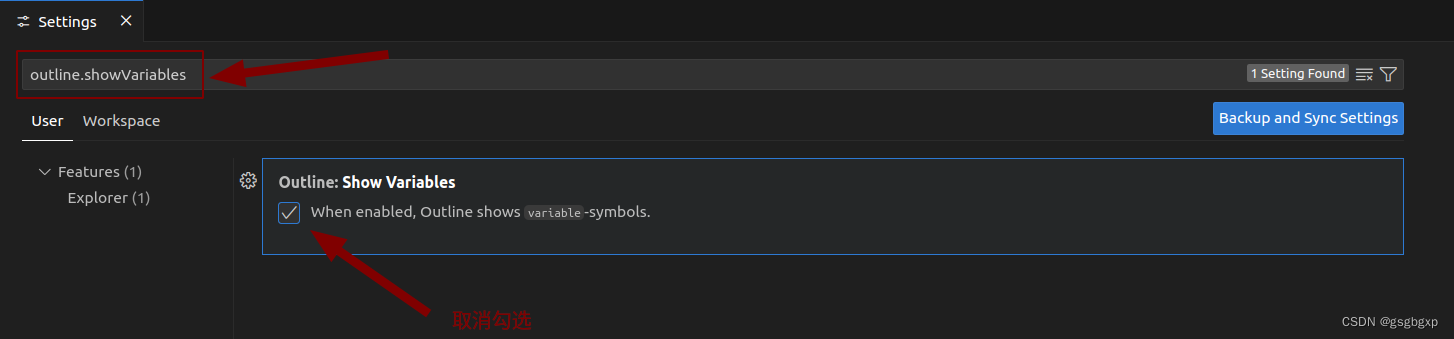
VSCode界面Outline只显示类名和函数名,隐藏变量名
参考链接 https://blog.csdn.net/Zjhao666/article/details/120523879https://blog.csdn.net/Williamcsj/article/details/122401996 VSCode中界面左下角的Outline能够方便快速跳转到文件的某个类或函数,但默认同时显示变量,导致找某个函数时很不方便。…...

运维开发详解:现代IT环境的核心角色
随着信息技术的快速发展和互联网应用的广泛普及,运维开发(DevOps)在现代IT环境中扮演着越来越重要的角色。本文将详细探讨运维开发的概念、历史背景、关键实践、工具和未来趋势,旨在为读者提供全面的理解。 什么是运维开发&#…...

Docker 容器中运行Certbot获取和管理 SSL 证书
如果你在 Docker 容器中运行 Nginx 并希望使用 Certbot 获取和管理 SSL 证书,可以使用 Certbot 的官方 Docker 镜像来完成这项工作。以下是使用 Docker 和 Certbot 获取 SSL 证书并配置 Nginx 的详细步骤: 1. 拉取 Certbot Docker 镜像 首先࿰…...

FL Studio21.2.8中文版水果音乐制作的革新之旅!
在数字化浪潮的推动下,音乐制作领域经历了翻天覆地的变化。从最初的模拟技术到如今的全数字化处理,音乐制作的门槛被大幅降低,越来越多的音乐爱好者和专业人士开始尝试自行创作和编辑音乐。在这个过程中,各种专业音乐制作软件成为…...

03-JavaScript 中的相等判断与隐式类型转换
深入理解 JavaScript 中的相等判断与隐式类型转换 笔记分享 JavaScript 是一门动态类型语言,这意味着变量的类型是在运行时确定的。这种灵活性虽然提供了便利,但也带来了相应的复杂性,特别是在判断相等性时。本文将深入探讨 JavaScript 中相…...

Linux 命令:head
1. 写在前面 本文主要介绍 Linux head 命令:可用于查看文件的开头部分的内容,有一个常用的参数 -n 用于显示行数,默认为 10,即显示 10 行的内容。 关注 公众号 获取最新博文: 滑翔的纸飞机 2. head 命令 head 命令的…...
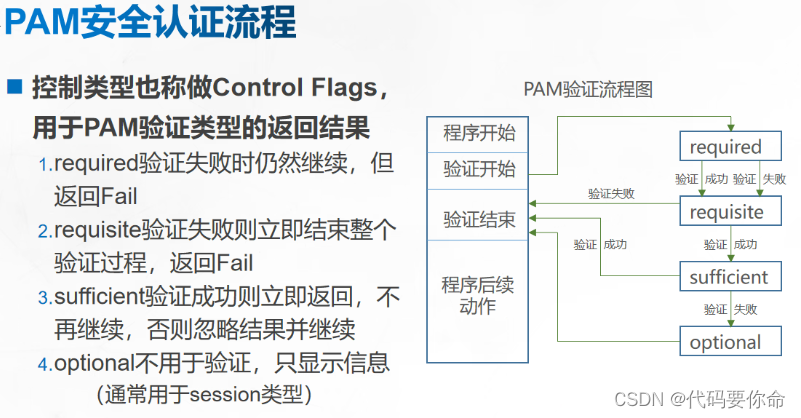
系统安全及其应用
系统安全及其应用 部署服务器的初始化步骤: 1、配置IP地址,网关,DNS解析 2、安装源,外网(在线即可yum) 内网(只能用源码包编译安装) 3、磁盘分区 lvm raid 4、系统权限配置和基础安…...

韩文图片文字识别,这几款软件轻松驾驭韩语文本
在当今信息爆炸的时代,跨语言交流已成为日常生活和工作中的常态。对于需要处理韩文文本的用户来说,韩文图片文字识别技术无疑是一大福音。今天,就为大家介绍几款优秀的韩文图片文字识别软件,让你轻松驾驭韩语文本,提升…...
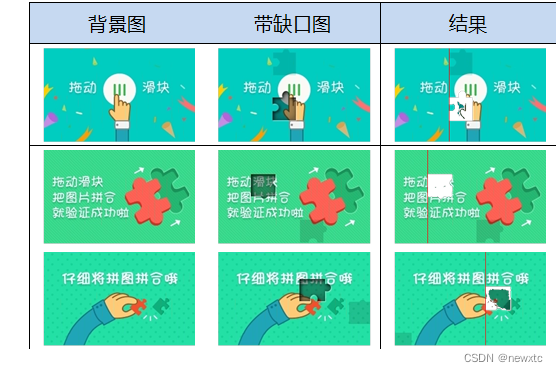
登录安全分析报告:小米官网注册
前言 由于网站注册入口容易被黑客攻击,存在如下安全问题: 暴力破解密码,造成用户信息泄露短信盗刷的安全问题,影响业务及导致用户投诉带来经济损失,尤其是后付费客户,风险巨大,造成亏损无底洞 …...

LVS精益价值管理系统 LVS.Web.ashx SQL注入漏洞复现
0x01 产品简介 LVS精益价值管理系统是杭州吉拉科技有限公司研发的一款专注于企业精益化管理和价值流优化的解决方案。该系统通过集成先进的数据分析工具、可视化的价值流映射技术和灵活的流程改善机制,帮助企业实现高效、低耗、高质量的生产和服务。 0x02 漏洞概述 LVS精益…...

【JavaScript脚本宇宙】图表库大盘点:选择最适合你的工具
掌握数据可视化:详解JavaScript图表库 前言 本篇文章将详细解析六种不同的JavaScript图表库。这些库各有特色,由简单到高级,应用广泛,无论你是初学者还是专业开发者,都能在其中找到适合自己的工具。 欢迎订阅专栏&am…...
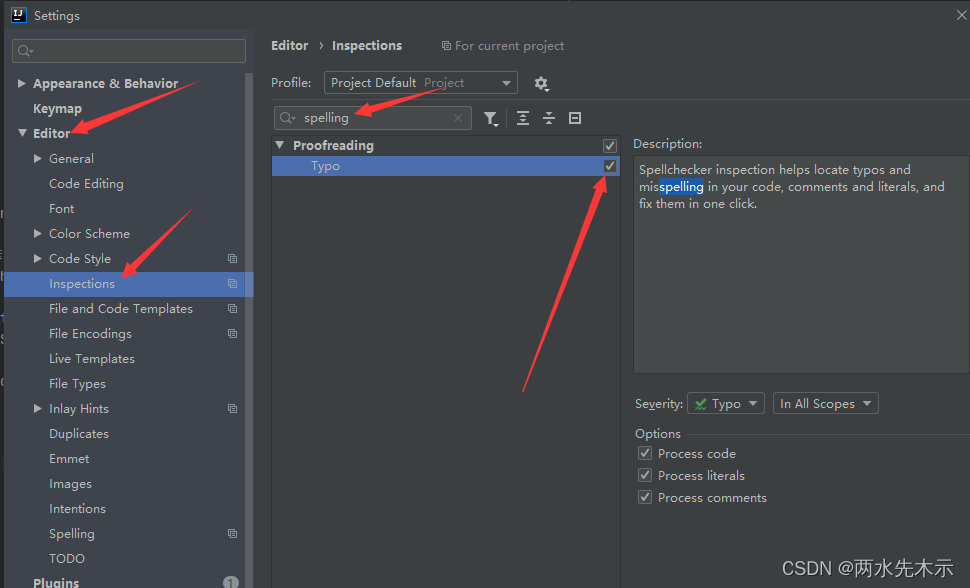
【Lua】IntelliJ IDEA 写注释或选中变量单词时偶尔会选中相邻的内容或下一行内容
例如: --UI代码local a 0 当你想在a变量上方加一行 --UI代码注释时,会发现敲打daima中文拼音时(还未按回车)就会选中当前行以及下一行前半部分。 打完按空格就会变成这样子! 原因是因为开启了英文检测,需要关掉它。 …...

多任务学习调参新思路:如何让模型自己决定分类和回归任务谁更重要?
多任务学习中的自适应权重分配:让模型学会动态平衡分类与回归任务 想象一下,你正在训练一个自动驾驶系统,它需要同时完成车辆检测(分类任务)和深度估计(回归任务)。传统方法中,你需要…...

如何彻底解决Windows快捷键冲突:Hotkey Detective完整指南
如何彻底解决Windows快捷键冲突:Hotkey Detective完整指南 【免费下载链接】hotkey-detective A small program for investigating stolen key combinations under Windows 7 and later. 项目地址: https://gitcode.com/gh_mirrors/ho/hotkey-detective 你是…...
)
实战演练:三种常见办公文档加密破解技巧(ZIP密码/ZIP伪加密/DOC密码)
1. ZIP密码破解实战:从入门到精通 工作中经常会遇到这种情况:同事发来的压缩包设置了密码,但对方忘记告诉你密码是什么;或者多年前自己加密的压缩包,现在怎么也打不开了。这时候就需要掌握一些ZIP密码破解的技巧。 我遇…...

2025届必备的十大降重复率工具实测分析
Ai论文网站排名(开题报告、文献综述、降aigc率、降重综合对比) TOP1. 千笔AI TOP2. aipasspaper TOP3. 清北论文 TOP4. 豆包 TOP5. kimi TOP6. deepseek 用于学术论文、科研报告以及各类文档,提供查重与改写服务的在线工具是降重网站。…...

CS231n实战解析:从HOG/HSV特征到图像分类性能提升
1. 图像特征工程入门:为什么HOG和HSV如此重要 第一次接触CS231n作业时,我对HOG和HSV这两个特征提取方法感到既陌生又好奇。直到在CIFAR-10数据集上做了对比实验才发现,使用原始像素训练的模型准确率只有0.51,而加入特征工程后直接…...

2025平航杯电子取证实战:从木马溯源到服务器渗透的完整链条分析
1. 木马溯源:从可疑流量到攻击者定位 2025年4月,杭州滨江警方接到一起特殊报案。市民刘晓倩(化名倩倩)发现自己的手机出现异常发热、电量消耗过快等现象,怀疑设备被人监控。这个看似普通的个人隐私案件,最终…...

3步解决ComfyUI-Florence2视觉语言模型加载失败:实战配置指南
3步解决ComfyUI-Florence2视觉语言模型加载失败:实战配置指南 【免费下载链接】ComfyUI-Florence2 Inference Microsoft Florence2 VLM 项目地址: https://gitcode.com/gh_mirrors/co/ComfyUI-Florence2 当您在ComfyUI中部署Microsoft Florence2视觉语言模型…...

从BGA封装到Xtacking架构:图解NAND堆叠技术如何影响SSD性能
从BGA封装到Xtacking架构:NAND堆叠技术如何重塑SSD性能格局 当一块企业级SSD的读写速度突破7GB/s时,工程师们发现传统的NAND封装技术正在成为性能提升的瓶颈。在PCIe 5.0时代,信号传输速率需要达到2400MT/s才能充分发挥带宽潜力,而…...

抖音批量下载工具:高效解决方案与实战指南
抖音批量下载工具:高效解决方案与实战指南 【免费下载链接】douyin-downloader A practical Douyin downloader for both single-item and profile batch downloads, with progress display, retries, SQLite deduplication, and browser fallback support. 抖音批量…...
流水线搭建)
Wan2.2-I2V-A14B持续集成/持续部署(CI/CD)流水线搭建
Wan2.2-I2V-A14B持续集成/持续部署(CI/CD)流水线搭建 1. 引言 在AI模型服务开发中,频繁的迭代更新是常态。每次代码修改后手动执行测试、构建和部署不仅效率低下,还容易出错。本文将带你从零开始,为Wan2.2-I2V-A14B模…...