
Elasticsearch挂掉后,如何快速恢复数据
目录
一、Elasticsearch使用
二、实体类
2.1 mysql 实体类
2.2 Elasticsearch实体类
三、XXL-job定时执行
一、Elasticsearch使用
当我们做搜索功能时,如果为了提高查询效率,通常使用Elasticsearch搜索引擎加快搜索效率。以搜索商品为例,我们mysql肯定有一张商品表,对应的有一个实体类,而我们的es索引中,我们要多冗余两个字段,销量和好评。当用户搜索的时候,我们直接查Elasticsearch中的数据,但是当我们的Elasticsearch挂了之后,es数据会消失,我们可以用xxl-job做个定时任务,先查询mysql中的数据,再将数据库里的数据遍历出来再添加到Elasticsearch中。
二、实体类
2.1 mysql 实体类
//
// Source code recreated from a .class file by IntelliJ IDEA
// (powered by FernFlower decompiler)
//package com.beimao.common.model;import com.beimao.common.enums.ProductStatus;
import java.math.BigDecimal;public class Product extends BaseModel {private Integer id;private String name;private String subName;private Integer categoryId;private String img;private Integer status = 1;private String statusX;private BigDecimal price;private String brief;private Integer seq = 0;private String tags;public String getStatusX() {ProductStatus productStatus = ProductStatus.findByCode(this.status);return productStatus != null ? productStatus.getDesc() : "未定义";}public Product() {}public Integer getId() {return this.id;}public String getName() {return this.name;}public String getSubName() {return this.subName;}public Integer getCategoryId() {return this.categoryId;}public String getImg() {return this.img;}public Integer getStatus() {return this.status;}public BigDecimal getPrice() {return this.price;}public String getBrief() {return this.brief;}public Integer getSeq() {return this.seq;}public String getTags() {return this.tags;}public void setId(final Integer id) {this.id = id;}public void setName(final String name) {this.name = name;}public void setSubName(final String subName) {this.subName = subName;}public void setCategoryId(final Integer categoryId) {this.categoryId = categoryId;}public void setImg(final String img) {this.img = img;}public void setStatus(final Integer status) {this.status = status;}public void setStatusX(final String statusX) {this.statusX = statusX;}public void setPrice(final BigDecimal price) {this.price = price;}public void setBrief(final String brief) {this.brief = brief;}public void setSeq(final Integer seq) {this.seq = seq;}public void setTags(final String tags) {this.tags = tags;}public boolean equals(final Object o) {if (o == this) {return true;} else if (!(o instanceof Product)) {return false;} else {Product other = (Product)o;if (!other.canEqual(this)) {return false;} else {label143: {Object this$id = this.getId();Object other$id = other.getId();if (this$id == null) {if (other$id == null) {break label143;}} else if (this$id.equals(other$id)) {break label143;}return false;}Object this$categoryId = this.getCategoryId();Object other$categoryId = other.getCategoryId();if (this$categoryId == null) {if (other$categoryId != null) {return false;}} else if (!this$categoryId.equals(other$categoryId)) {return false;}Object this$status = this.getStatus();Object other$status = other.getStatus();if (this$status == null) {if (other$status != null) {return false;}} else if (!this$status.equals(other$status)) {return false;}label122: {Object this$seq = this.getSeq();Object other$seq = other.getSeq();if (this$seq == null) {if (other$seq == null) {break label122;}} else if (this$seq.equals(other$seq)) {break label122;}return false;}label115: {Object this$name = this.getName();Object other$name = other.getName();if (this$name == null) {if (other$name == null) {break label115;}} else if (this$name.equals(other$name)) {break label115;}return false;}Object this$subName = this.getSubName();Object other$subName = other.getSubName();if (this$subName == null) {if (other$subName != null) {return false;}} else if (!this$subName.equals(other$subName)) {return false;}Object this$img = this.getImg();Object other$img = other.getImg();if (this$img == null) {if (other$img != null) {return false;}} else if (!this$img.equals(other$img)) {return false;}label94: {Object this$statusX = this.getStatusX();Object other$statusX = other.getStatusX();if (this$statusX == null) {if (other$statusX == null) {break label94;}} else if (this$statusX.equals(other$statusX)) {break label94;}return false;}label87: {Object this$price = this.getPrice();Object other$price = other.getPrice();if (this$price == null) {if (other$price == null) {break label87;}} else if (this$price.equals(other$price)) {break label87;}return false;}Object this$brief = this.getBrief();Object other$brief = other.getBrief();if (this$brief == null) {if (other$brief != null) {return false;}} else if (!this$brief.equals(other$brief)) {return false;}Object this$tags = this.getTags();Object other$tags = other.getTags();if (this$tags == null) {if (other$tags != null) {return false;}} else if (!this$tags.equals(other$tags)) {return false;}return true;}}}protected boolean canEqual(final Object other) {return other instanceof Product;}public int hashCode() {int PRIME = true;int result = 1;Object $id = this.getId();result = result * 59 + ($id == null ? 43 : $id.hashCode());Object $categoryId = this.getCategoryId();result = result * 59 + ($categoryId == null ? 43 : $categoryId.hashCode());Object $status = this.getStatus();result = result * 59 + ($status == null ? 43 : $status.hashCode());Object $seq = this.getSeq();result = result * 59 + ($seq == null ? 43 : $seq.hashCode());Object $name = this.getName();result = result * 59 + ($name == null ? 43 : $name.hashCode());Object $subName = this.getSubName();result = result * 59 + ($subName == null ? 43 : $subName.hashCode());Object $img = this.getImg();result = result * 59 + ($img == null ? 43 : $img.hashCode());Object $statusX = this.getStatusX();result = result * 59 + ($statusX == null ? 43 : $statusX.hashCode());Object $price = this.getPrice();result = result * 59 + ($price == null ? 43 : $price.hashCode());Object $brief = this.getBrief();result = result * 59 + ($brief == null ? 43 : $brief.hashCode());Object $tags = this.getTags();result = result * 59 + ($tags == null ? 43 : $tags.hashCode());return result;}public String toString() {return "Product(id=" + this.getId() + ", name=" + this.getName() + ", subName=" + this.getSubName() + ", categoryId=" + this.getCategoryId() + ", img=" + this.getImg() + ", status=" + this.getStatus() + ", statusX=" + this.getStatusX() + ", price=" + this.getPrice() + ", brief=" + this.getBrief() + ", seq=" + this.getSeq() + ", tags=" + this.getTags() + ")";}
}
//
// Source code recreated from a .class file by IntelliJ IDEA
// (powered by FernFlower decompiler)
//package com.beimao.common.model;import java.time.LocalDateTime;public abstract class BaseModel {private String lastUpdateBy;private LocalDateTime lastUpdateTime;public BaseModel() {}public String getLastUpdateBy() {return this.lastUpdateBy;}public void setLastUpdateBy(String lastUpdateBy) {this.lastUpdateBy = lastUpdateBy;}public LocalDateTime getLastUpdateTime() {return this.lastUpdateTime;}public void setLastUpdateTime(LocalDateTime lastUpdateTime) {this.lastUpdateTime = lastUpdateTime;}
}
2.2 Elasticsearch实体类
package com.beimao.model;import cn.easyes.annotation.IndexField;
import cn.easyes.annotation.IndexId;
import cn.easyes.annotation.IndexName;
import cn.easyes.annotation.rely.Analyzer;
import cn.easyes.annotation.rely.FieldType;
import cn.easyes.annotation.rely.IdType;
import lombok.AllArgsConstructor;
import lombok.Builder;
import lombok.Data;
import lombok.NoArgsConstructor;import java.math.BigDecimal;
import java.time.LocalDateTime;
import java.util.List;/*** EsProduct 类用于表示一个商品实体,并定义了商品相关的属性。* 它使用了特定的注解来定义如何在搜索引擎中索引这些属性。*/
@IndexName(aliasName = "beimao_product") // 定义索引的别名
@Data
@NoArgsConstructor
@AllArgsConstructor
@Builder
public class EsProduct {//商品id@IndexId(type = IdType.CUSTOMIZE) // 定义自定义的主键IDprivate Integer id;//商品名称@IndexField(fieldType = FieldType.TEXT, analyzer = Analyzer.IK_MAX_WORD, searchAnalyzer = Analyzer.IK_MAX_WORD)private String name;// 商品名称,使用IK分词器进行索引,便于全文检索//商品标签@IndexField(fieldType = FieldType.TEXT, analyzer = Analyzer.IK_MAX_WORD)private List<String> tags; //使用列表存储并使用IK分词器,便于检索具有多个标签的商品//商品副标题@IndexField(fieldType = FieldType.TEXT, analyzer = Analyzer.IK_MAX_WORD)private String subName;  // 假设subName也需要全文搜索//商品价格@IndexField(fieldType = FieldType.DOUBLE)private BigDecimal price;//商品状态@IndexField(fieldType = FieldType.INTEGER)private Integer status; // 使用KEYWORD类型更改为TEXT以示例中保持一致,实际根据需求可调整为FieldType.KEYWORD以进行精确匹配//商品品类private Integer categoryId; // 商品所属的类别ID//商品图片@IndexField(fieldType = FieldType.KEYWORD)private String img; // 商品图片链接,使用关键词类型索引,适用于精确匹配//商品简介@IndexField(fieldType = FieldType.TEXT, analyzer = Analyzer.IK_MAX_WORD)private String brief; // 商品简介,使用IK分词器进行索引,便于全文检索//商品排序@IndexField(fieldType = FieldType.INTEGER)private Integer sort;//商品库存@IndexField(fieldType = FieldType.INTEGER)private String stock;//商品好评数量@IndexField(fieldType = FieldType.INTEGER)private Integer highOpinion = 0; // 默认好评数量为0//商品销量@IndexField(fieldType = FieldType.INTEGER)private Integer salesVolume = 0; // 商品销量,整型存储}
三、XXL-job定时执行
相关文章:

Elasticsearch挂掉后,如何快速恢复数据
目录 一、Elasticsearch使用 二、实体类 2.1 mysql 实体类 2.2 Elasticsearch实体类 三、XXL-job定时执行 一、Elasticsearch使用 当我们做搜索功能时,如果为了提高查询效率,通常使用Elasticsearch搜索引擎加快搜索效率。以搜索商品为例,我…...
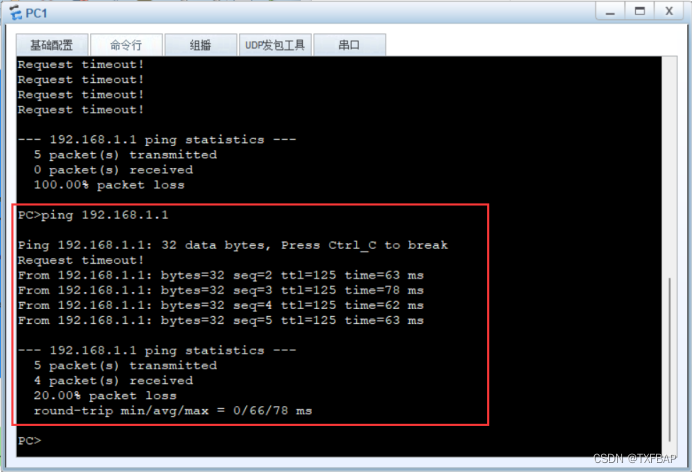
eNSP学习——连接RIP与OSPF网络、默认路由
目录 相关主要命令 实验一、连接RIP与OSPF网络 原理概述 实验目的 实验内容 实验拓扑 实验编址 实验步骤 1、基本配置 2、搭建RIP和OSPF网络 3、配置双向路由引入 4、手工配置引入时的开销值 实验二、使用OSPF、RIP发布默认路由 原理介绍 实验目的 实验内容 实…...
)
工具MyBatis Generator(MBG)
MyBatis Generator(MBG),这是官方帮我们提供的一个自动生成代码的工具,前面的课程中,我们都是脑袋里想好,pojo有哪些属性,属性的类型是什么,对应的数据表中的字段名字是什么,匹配的类型是什么..…...

NeuralForecast 模型的参数 windows_batch的含义
NeuralForecast 模型的参数 windows_batch的含义 flyfish import pandas as pd import numpy as npAirPassengers np.array([112.0, 118.0, 132.0, 129.0, 121.0, 135.0, 148.0, 148.0, 136.0, 119.0],dtypenp.float32, )AirPassengersDF pd.DataFrame({"unique_id&qu…...
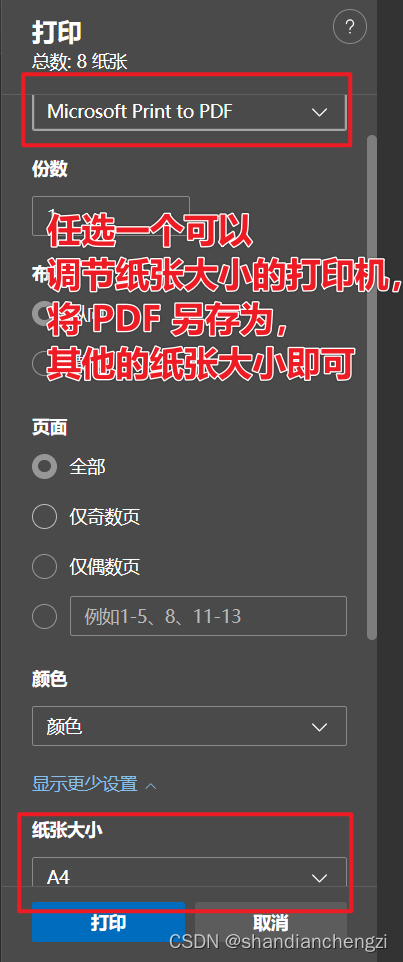
【记录】打印|用浏览器生成证件照打印PDF,打印在任意尺寸的纸上(简单无损!)
以前我打印证件照的时候,我总是在网上找在线证件照转换或者别的什么。但是我今天突然就琢磨了一下,用 PDF 打印应该也可以直接打印出来,然后就琢磨出来了,这么一条路大家可以参考一下。我觉得比在线转换成一张 a4 纸要方便的多&am…...

【python实现】实时监测GPU,空闲时自动执行脚本
文章目录 代码 代码 # author: muzhan # contact: levio.pkugmail.com import os import sys import time cmd nohup python -u train_post_2d_aut.py > output1.log & # gpu空闲时,需要执行的脚本命令 def gpu_info():gpu_status os.popen(nvidia-smi…...

chrome 浏览器历史版本下载
最近做一个项目,要使用到chrome浏览器比较久远的版本,在网上查找资源时,发现chrome比较老的版本的安装包特别难找,几经寻找,总算找到,具体方法如下 打开百度,搜索关键字【chrome版本号‘浏览迷’】,例如“chrome41浏览迷”,找到“全平台”开头的链接&am…...
⭐⭐⭐)
【设计模式】工厂模式(创建型)⭐⭐⭐
文章目录 1.概念1.1 什么是工厂模式1.2 优点与缺点 2.实现方式2.1 简单工厂模式(Simple Factory)2.2 简单工厂模式缺点2.3 抽象工厂模式(Abstract Factory Pattern) 3 Java 哪些地方用到了工厂模式4 Spring 哪些地方用到了工厂模式…...

Postman 连接数据库 利用node+xmysql
1、准备nodejs环境 如果没有安装,在网上找教程,安装好后,在控制台输入命令查看版本,如下就成功了 2、安装xmysql 在控制台输入 npm install -g xmysql 3、连接目标数据库 帮助如下: 示例: 目标数据库…...
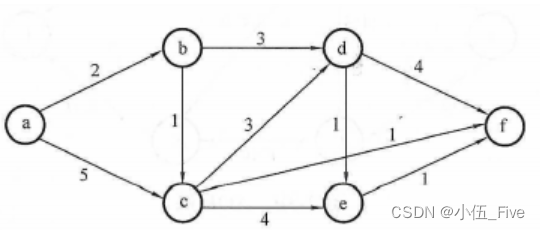
挑战你的数据结构技能:复习题来袭【6】
1. (单选题)设无向图的顶点个数为n,则该图最多有()条边 A. n-1 B. n(n-1)/2 C. n(n1)/2 D. 0 答案:B 分析: 2. (单选题)含有n个顶点的连通无向图,其边的个数至少为()。 A. n-1 B. n C. n1 D. nlog2n 答案:A…...

如何反编译jar并修改后还原为jar
如何反编译jar并修改后还原为jar 目标:修改jar包中某个类的某个方法后还原为新的jar 1.新建android工程,把旧的jar添加为lib 2.用jadx-gui打开旧的jar并保存所有资源 3.找到保存的资源中想修改的.java类 4.复制类中的内容, 在android工程中新建一个同样路径的包,并在包下创建…...
统计信号处理基础 习题解答10-5
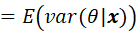
题目 通过令 并进行计算来重新推导MMSE估计量。提示:利用结果 解答 首先需要明确的是: 上式是关于观测值x 的函数 其次需要说明一下这个结果 和教材一样,我们用求期望,需要注意的是,在贝叶斯情况下,是个…...
—从零开始:一步步搭建Vue 3自定义插件)
Vue3实战笔记(60)—从零开始:一步步搭建Vue 3自定义插件
文章目录 前言一、自定义插件二、使用步骤总结 前言 在开发和学习中,经常使用一些好用的插件,那么如何创建一个自己的插件呢?在 Vue 3 中,你可以通过创建一个包含 install 方法的对象来定义自定义插件。install 方法接收两个参数…...
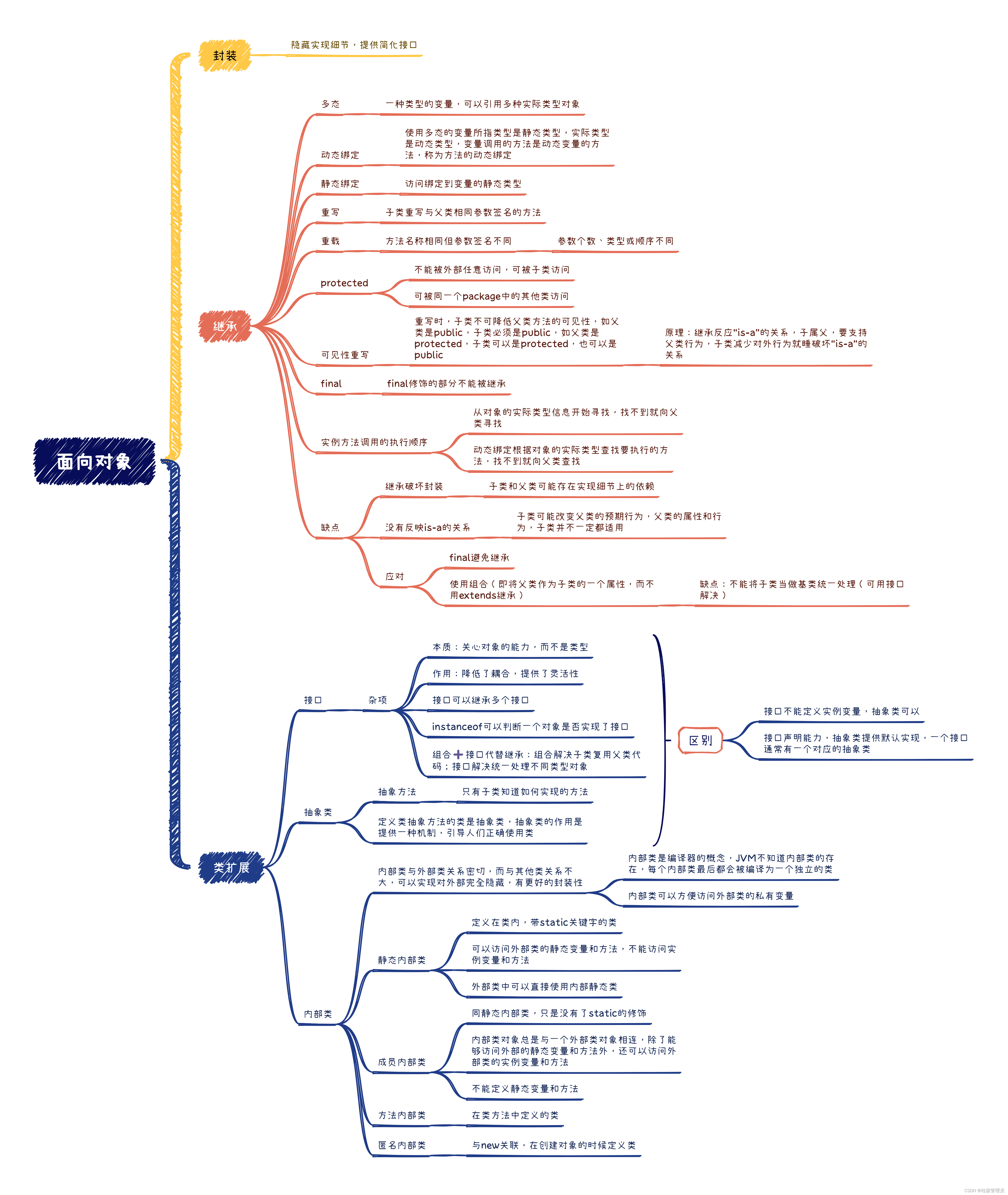
Java面向对象笔记
多态 一种类型的变量可以引用多种实际类型的对象 如 package ooplearn;public class Test {public static void main(String[] args) {Animal[] animals new Animal[2];animals[0] new Dog();animals[1] new Cat();for (Animal animal : animals){animal.eat();}} }class …...
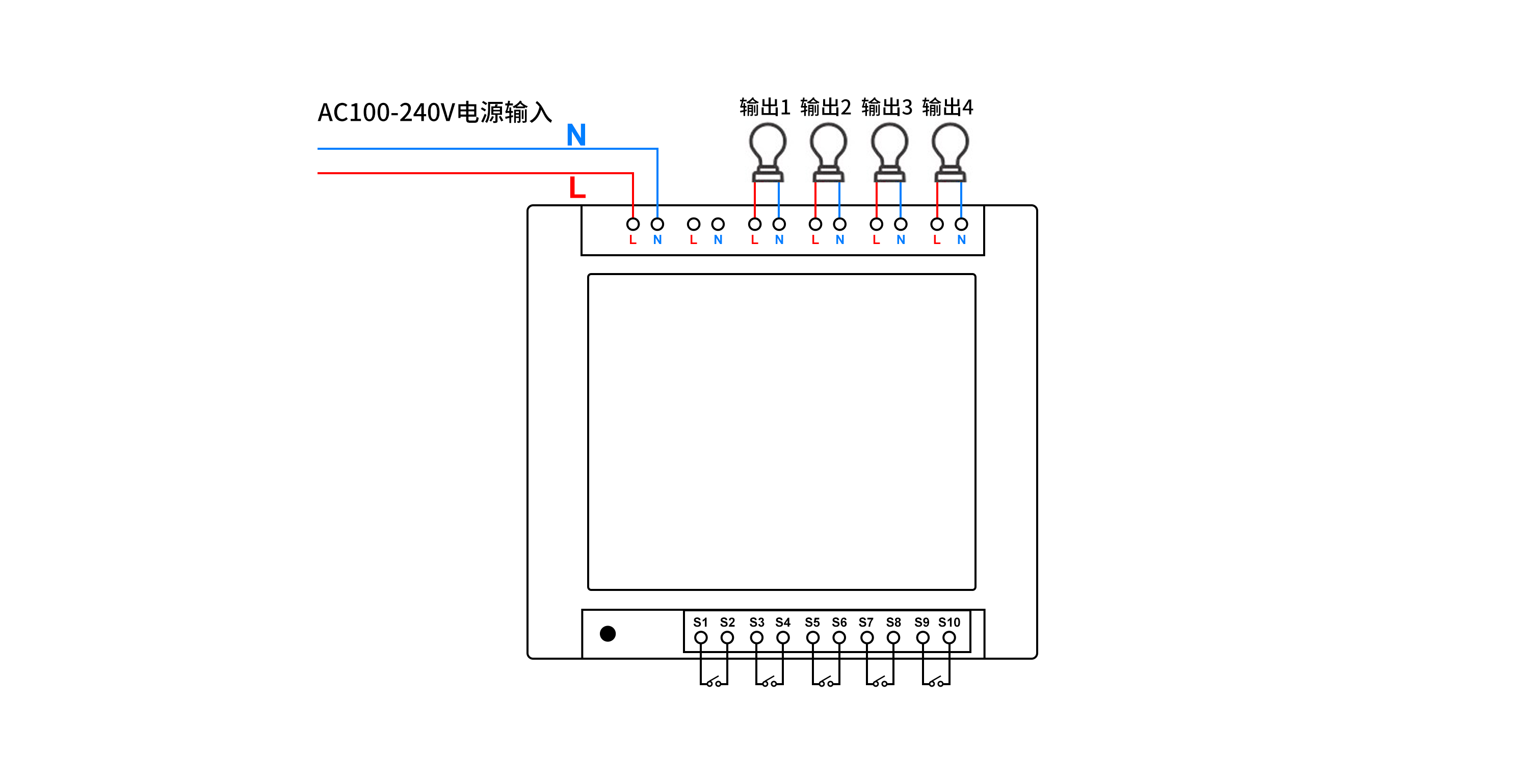
如何通过PHP语言实现远程控制多路照明
如何通过PHP语言实现远程控制多路照明呢? 本文描述了使用PHP语言调用HTTP接口,实现控制多路照明,通过多路控制器,可独立远程控制多路照明。 可选用产品:可根据实际场景需求,选择对应的规格 序号设备名称厂…...

Capture One Pro 23:专业 Raw 图像处理的卓越之选
在当今的数字摄影时代,拥有一款强大的图像处理软件至关重要。而 Capture One Pro 23 for Mac/Win 无疑是其中的佼佼者,为摄影师和图像爱好者带来了前所未有的体验。 Capture One Pro 23 以其出色的 Raw 图像处理能力而闻名。它能够精准地解析和处理各种…...
【主题广泛|投稿优惠】2024年交通运输与信息科学国际会议(ICTIS 2024)
2024年交通运输与信息科学国际会议(ICTIS 2024) 2024 International Conference on Transportation and Information Science 【重要信息】 大会地点:青岛 大会官网:http://www.icictis.com 投稿邮箱:icictissub-conf.…...

表格误删数据保存关闭后如何恢复?5个恢复方法大公开!
“我在编辑表格的时候一不小心就删除了部分数据,现在真的不知道该怎么操作了。希望大家能帮帮我吧!” 在日常工作中,我们经常会使用到各种表格软件来处理和分析数据。然而,有时由于操作失误或其他原因,我们可能会误删表…...

Go 语言中的切片:灵活的数据结构
切片(slice)是 Go 语言中一种非常重要且灵活的数据结构,它提供了对数组子序列的动态窗口。这使得切片在 Go 中的使用非常频繁,特别是在处理动态数据集时。本文将探讨切片的概念、操作和与函数的交互,以及如何有效地使用…...
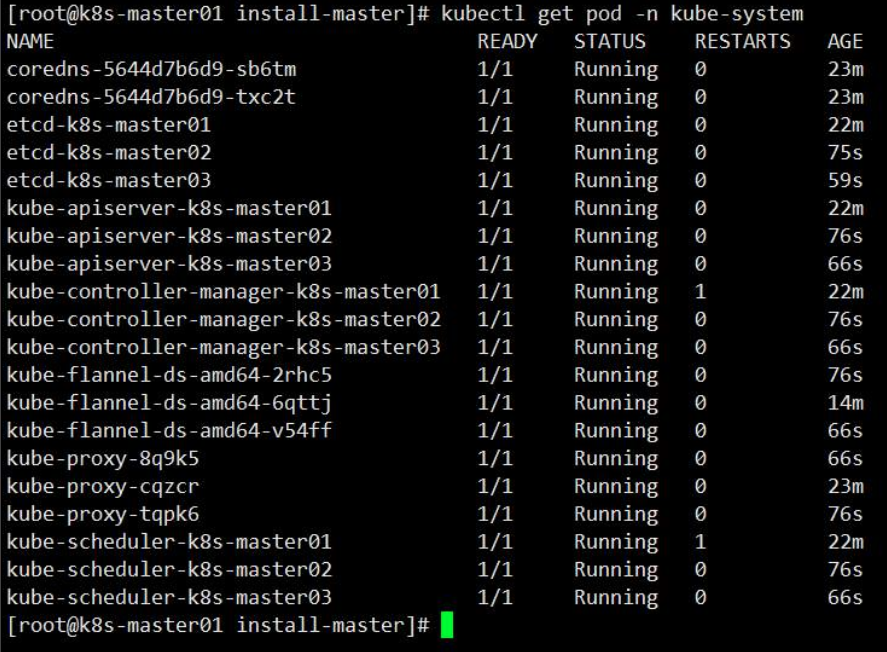
在鲲鹏服务器搭建k8s高可用集群分享
高可用架构 本文采用kubeadm方式搭建k8s高可用集群,k8s高可用集群主要是对apiserver、etcd、controller-manager、scheduler做的高可用;高可用形式只要是为: 1. apiserver利用haproxykeepalived做的负载,多apiserver节点同时工作…...

3大场景解放双手:SteamShutdown智能管理下载与自动控制电脑的完整方案
3大场景解放双手:SteamShutdown智能管理下载与自动控制电脑的完整方案 【免费下载链接】SteamShutdown Automatic shutdown after Steam download(s) has finished. 项目地址: https://gitcode.com/gh_mirrors/st/SteamShutdown 你是否曾在深夜开启游戏下载后…...

如何突破Cursor AI编程助手的使用限制:技术原理与实践指南
如何突破Cursor AI编程助手的使用限制:技术原理与实践指南 【免费下载链接】cursor-free-vip [Support 0.45](Multi Language 多语言)自动注册 Cursor Ai ,自动重置机器ID , 免费升级使用Pro 功能: Youve reached your…...

90% 的开发者都在错误理解 async/await:协程本质与高并发实战指南
90% 的开发者都在错误理解 async/await:协程本质与高并发实战指南 很多人在第一次写 async def await 的时候,心里都暗暗期待:这下代码应该变快了吧? 结果写完一测,单个接口的响应时间和以前同步写法几乎一模一样&…...

VLN性能飙升的秘密:手把手拆解JanusVLN的‘记忆宫殿’与KV缓存增量更新机制
VLN性能飙升的工程密码:JanusVLN混合缓存与增量更新机制深度解析 视觉语言导航(VLN)技术正面临一个关键瓶颈——随着导航路径延长,系统需要处理的视觉帧数量呈线性增长,导致计算资源消耗急剧上升。传统方法要么反复处理…...

告别人工筛选!用Word2vec构建主题词库,我们拿“网络暴力”关键词试了试
智能主题词库构建实战:用Word2vec挖掘语义关联词汇 在信息爆炸的时代,内容运营和产品经理们常常面临一个共同挑战:如何从海量文本中快速识别和归类相关主题内容。传统的人工筛选方法不仅效率低下,还容易遗漏那些变体表达和新兴网络…...

mPLUG-Owl3-2B多场景落地指南:教育、电商、医疗、政务四大方向实操
mPLUG-Owl3-2B多场景落地指南:教育、电商、医疗、政务四大方向实操 1. 引言:当AI能“看懂”图片,你的业务能做什么? 想象一下,你是一位电商运营,每天要处理上千张商品图,手动写描述、打标签&a…...

智能电动汽车芯片全景解析:从MCU到SoC的技术跃迁
1. 智能电动汽车的芯片革命:从机械控制到数字大脑 十年前打开汽车引擎盖,看到的是一堆机械部件和少量电子控制单元;现在掀开一辆特斯拉的"前备箱",映入眼帘的却是布满芯片的电路板。这个直观变化背后,是汽车…...

Phi-4-mini-reasoning企业落地:金融风控规则推理+合规性自动校验
Phi-4-mini-reasoning企业落地:金融风控规则推理合规性自动校验 1. 模型概述与金融场景价值 Phi-4-mini-reasoning是微软推出的3.8B参数轻量级开源模型,专为数学推理、逻辑推导和多步解题等强逻辑任务设计。在金融领域,这个"小参数、强…...

LogonTracer核心功能深度解析:4624、4625等关键事件ID的实战应用
LogonTracer核心功能深度解析:4624、4625等关键事件ID的实战应用 【免费下载链接】LogonTracer Investigate malicious Windows logon by visualizing and analyzing Windows event log 项目地址: https://gitcode.com/gh_mirrors/lo/LogonTracer LogonTrace…...

Keepass2Android密码库完整性验证终极指南:如何确保你的密码安全无虞
Keepass2Android密码库完整性验证终极指南:如何确保你的密码安全无虞 【免费下载链接】keepass2android Password manager app for Android 项目地址: https://gitcode.com/gh_mirrors/ke/keepass2android 在当今数字化时代,密码管理器已成为保护…...