
003.数据分析_PandasSeries对象

我 的 个 人 主 页:👉👉 失心疯的个人主页 👈👈
入 门 教 程 推 荐 :👉👉 Python零基础入门教程合集 👈👈
虚 拟 环 境 搭 建 :👉👉 Python项目虚拟环境(超详细讲解) 👈👈
PyQt5 系 列 教 程:👉👉 Python GUI(PyQt5)文章合集 👈👈
Oracle数据库教程:👉👉 Oracle数据库文章合集 👈👈
优 质 资 源 下 载 :👉👉 资源下载合集 👈👈
优 质 教 程 推 荐:👉👉 Python爬虫从入门到入狱系列 合集👈👈

Pandas&Series对象
- Series对象
- 概念
- 创建Series对象
- Series对象标签操作
- Series对象切片操作
- Series对象属性和常用方法
- Series对象算术运算操作
- Series对象API汇总
Series对象
- 官方文档:https://pandas.pydata.org/pandas-docs/version/0.24.1/reference/series.html
概念
-
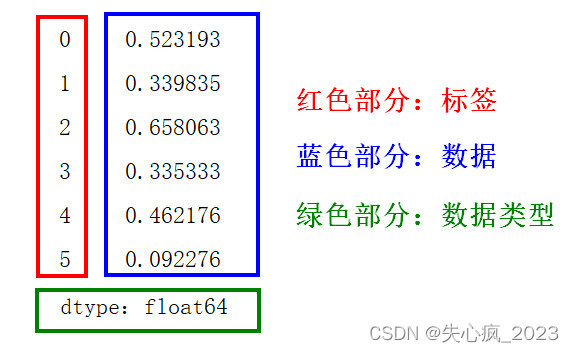
Series对象,也称Series序列,是Pandas常用的数据结构之一
-
Series类似表格中的一个列(column),类似于一维数组,可以保存任何数据类型
-
Series对象由一组数据值(value)和一组标签组成,其中标签与数据值具有对应关系。标签不必是唯一的,但必须是可哈希类型。
-
Series对象既支持基于整数的索引,也支持基于标签的索引,并提供了许多方法来执行涉及索引的操作
-
Series对象结构如图:
-
Series 特点
1. 一维数组:Series是一维的,这意味着它只有一个轴(或维度),类似于 Python 中的列表。
2. 标签索引:每个Series都有一个索引,它可以是整数、字符串、日期等类型。如果不指定索引,Pandas 将默认创建一个从 0 开始的整数索引。
3. 数据类型:Series 可以容纳不同数据类型的元素,包括整数、浮点数、字符串、Python 对象等。
4. 大小不变性:Series 的大小在创建后是不变的,但可以通过某些操作(如 append 或 delete)来改变。
5. 操作:Series支持各种操作,如数学运算、统计分析、字符串处理等。
6. 缺失数据:Series可以包含缺失数据,Pandas使用NaN(Not a Number)来表示缺失或无值
创建Series对象
- 语法
Series(data=None, index=None, dtype=None, name=None, copy=False, fastpath=False)# 参数详解# data # 数据源# 可以是列表、常量、ndarray数组等,如果是字典,则保持参数顺序# index # 设置标签索引# 必须是可散列的(不可变数据类型(str,bytes和数值类型))# 如果不提供此参数,将默认为RangeIndex(0, 1, 2,...,n)# dtype # 输出系列的数据类型# 可以是 NumPy 的数据类型,例如 np.int64、np.float64 等# 如果不提供此参数,则根据数据自动推断数据类型# name # 为Series对象(即列)命名# 当将Series对象放入DataFrame时,该列将根据name参数命名# copy # 指定是否强制创建data源数据的副本,默认为False# 仅当ndarray数组和Series对象作为源数据转换为Series对象时有效# 当copy=False时,不创建副本,源数据和Series对象数据会同步发生改变# 当copy=True时,创建副本,源数据和Series对象数据发生改变时,互相不会受影响# fastpath # 是否启用快速路径。默认为 False。# 启用快速路径可能会在某些情况下提高性能 - 创建示例
-
不设置参数,使用列表创建
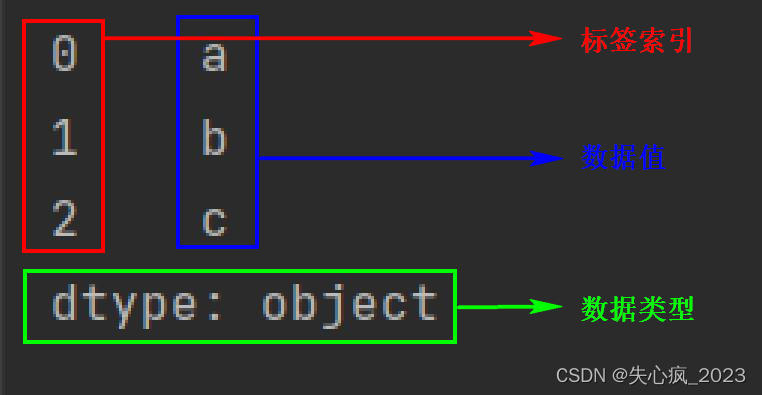
import pandas as pd# 不设置参数 # 创建数据源 a = ['a', 'b', 'c']# 创建Series对象 ser = pd.Series(a)print(ser) # 0 a # 1 b # 2 c # dtype: object# 通过索引获取数据值 print(ser[1]) # b- Series对象结构图
-
不设置参数,使用字典创建
import pandas as pd# 不设置参数,使用字典创建 # 示例1 # 创建数据源 dic = {1: '张三', 2: '李四', 3: '王五', 4: '赵六'}# 创建Series数据结果 ser = pd.Series(dic)print(ser) # 1 张三 # 2 李四 # 3 王五 # 4 赵六 # dtype: object# 通过标签获取值 print(ser[3]) # 王五# 示例2 # 创建数据源 dic2 = {'name':'张三','age':30,'gender':'男'}# 创建Series数据结果 ser2 = pd.Series(dic2)print(ser2) # name 张三 # age 30 # gender 男 # dtype: object# 通过标签获取值 print(ser2['gender']) # 男 -
不设置参数,使用ndarray数组创建
import numpy as np import pandas as pd# 不设置参数,使用numpy数组创建 # 创建数据源 arr = np.arange(1, 6)# 创建Series数据结果 ser = pd.Series(arr)print(ser) # 0 1 # 1 2 # 2 3 # 3 4 # 4 5 # dtype: int32# 通过标签获取值 print(ser[4]) # 5 -
设置index参数
import pandas as pd# 示例1a = ['张三', 30, '男']# 不设置index参数 ser1 = pd.Series(a) print(ser1) # 0 张三 # 1 30 # 2 男 # dtype: object# 设置index参数 ser2 = pd.Series(a, index=['name', 'age', 'gender']) print(ser2) # name 张三 # age 30 # gender 男 # dtype: object# 示例2 # 当index参数的标签与源数据字典的key不匹配时,使用NaN(非数字)填充数据值 # 示例2 dic = {1: 'a', 2: 'b', 3: 'c', 4: 'd'}ser3 = pd.Series(dic, index=[1, 2, 3, 4]) ser4 = pd.Series(dic, index=[1, 2, 8, 9])print('index完全匹配字典的key') print(ser3) # index完全匹配字典的key # 1 a # 2 b # 3 c # 4 d # dtype: objectprint('\nindex不匹配字典的key') print(ser4) # index不匹配字典的key # 1 a # 2 b # 8 NaN # 9 NaN # dtype: object# 原理: # 首先使用字典中的键(key)构建标签,然后再用index指定的标签对序列重新编制索引 # 当新标签匹配到对应的标签,则取对应的数据值 # 当新标签未匹配到对应的标签,则使用NaN(非数字)填充数据值 -
设置dtype参数
import pandas as pda = [11, 12, 13, 14, 15]ser1 = pd.Series(a) print(ser1) # 0 11 # 1 12 # 2 13 # 3 14 # 4 15 # dtype: int64ser2 = pd.Series(a, dtype=str) print(ser2) # 0 11 # 1 12 # 2 13 # 3 14 # 4 15 # dtype: object -
设置name参数
import pandas as pda = ['张三', '李四', '王五', '赵六']ser = pd.Series(a, name='xingm') print(ser) # 0 张三 # 1 李四 # 2 王五 # 3 赵六 # Name: xingm, dtype: object -
设置copy参数
# 示例1
import pandas as pd
import numpy as np# 创建源数据
data = np.array([1, 2, 3, 4, 5])# 创建Series,copy=False不复制数据
ser1 = pd.Series(data, copy=False)# 创建Series,copy=True强制复制数据创建副本
ser2 = pd.Series(data, copy=True)print('修改前源数据:data')
print(data)
print('\n源数据修改前series数据:ser1')
print(ser1)
print('\n源数据修改前series数据:ser2')
print(ser2)print('\n==========源数据修改========')
# 修改原始数组
data[0] = 100
print('修改后源数据:data')
print(data)print('\n源数据修改后series数据:ser1')
print(ser1)
print('\n源数据修改后series数据:ser2')
print(ser2)# ===========输出结果================
修改前源数据:data
[1 2 3 4 5]源数据修改前series数据:ser1
0    1
1    2
2    3
3    4
4    5
dtype: int32源数据修改前series数据:ser2
0    1
1    2
2    3
3    4
4    5
dtype: int32==========源数据修改========
修改后源数据:data
[100   2   3   4   5]源数据修改后series数据:ser1
0    100
1      2
2      3
3      4
4      5
dtype: int32源数据修改后series数据:ser2
0    1
1    2
2    3
3    4
4    5
dtype: int32# 示例2:仅当源数据是ndarray数组和Series对象时有效
import pandas as pd
import numpy as npa1 = [0, 1, 2, 3]
a2 = {0: 'a', 1: 'b', 2: 'c', 3: 'd'}
a3 = np.arange(1, 5)
a4 = pd.Series([0, 1, 2, 3])ser1 = pd.Series(a1, copy=False)
ser2 = pd.Series(a2, copy=False)
ser3 = pd.Series(a3, copy=False)
ser4 = pd.Series(a4, copy=False)print(ser1)
# 0    0
# 1    1
# 2    2
# 3    3
# dtype: int64print(ser2)
# 0    a
# 1    b
# 2    c
# 3    d
# dtype: objectprint(ser3)
# 0    1
# 1    2
# 2    3
# 3    4
# dtype: int32print(ser4)
# 0    0
# 1    1
# 2    2
# 3    3
# dtype: int64# 修改源数据对Series对象的影响
a1[1] = 6666
a2[1] = 7777
a3[1] = 8888
a4[1] = 9999
print('a1:', a1)       # ---> a1: [0, 6666, 2, 3]
print('a2:', a2)       # ---> a2: {0: 'a', 1: 7777, 2: 'c', 3: 'd'}
print('a3:', a3)       # ---> a3: [   1 8888    3    4]
print('a4:', a4)
# a4
# 0       0
# 1    9999
# 2       2
# 3       3
# dtype: int64print('\n修改源数据后的ser1')
print(ser1)
# 修改源数据后的ser1
# 0    0
# 1    1
# 2    2
# 3    3
# dtype: int64print('\n修改源数据后的ser2')
print(ser2)
# 修改源数据后的ser2
# 0    a
# 1    b
# 2    c
# 3    d
# dtype: objectprint('\n修改源数据后的ser3')
print(ser3)
# 修改源数据后的ser3
# 0       1
# 1    8888
# 2       3
# 3       4
# dtype: int32print('\n修改源数据后的ser4')
print(ser4)
# 修改源数据后的ser4
# 0       0
# 1    9999
# 2       2
# 3       3
# dtype: int64# 修改Series对象数据值对源数据的影响
ser1[3] = 11111
ser2[3] = 22222
ser3[3] = 33333
ser4[3] = 44444print(a1)           # [0, 6666, 2, 3]
print(a2)           # {0: 'a', 1: 7777, 2: 'c', 3: 'd'}
print(a3)           # [    1  8888     3 33333]
print(a4)
# 0        0
# 1     9999
# 2        2
# 3    44444
# dtype: int64
-
Series对象标签操作
- 通过标签获取、修改、添加值
- 通过位置索引获取、修改值<不推荐使用,要使用位置索引可以通过ser.iloc(pos)方法使用>
- 使用整型数值作为索引取值时,会优先按标签进行查找
- 可以使用标签列表一次性获取多个值,返回一个新Series对象
- 不能像列表一样直接使用负数索引从后往前取值,可以通过ser.iloc()方法使用负数位置索引
- 使用index参数指定标签时,未匹配到源数据字典的key时,会使用NaN(非数字)填充数据值
- index参数指定的标签顺序决定series对象的数据顺序
- 语法
# 通过标签获取值 ser[index]# 通过标签列表获取多个值 ser[[index1, index2, ..., indexn]]# 通过标签修改值 ser[index] = new_value# 通过标签添加值 ser[new_index] = value# 通过位置索引获取值 ser.iloc[pos_index]# 使用负数位置索引反向取值 ser.iloc[-pos_index]# 通过位置索引修改值 ser.iloc[pos_index] = new_value - 示例
- 通过标签获取、修改、添加值
import pandas as pda = ['a', 'b', 'c', 'd'] ser1 = pd.Series(a) print(ser1) # 0 a # 1 b # 2 c # 3 d # dtype: object# 通过标签获取值 print(ser1[2]) # c# 通过标签修改值 ser1[2] = 'ccc' print(ser1) # 0 a # 1 b # 2 ccc # 3 d # dtype: object# 通过标签添加值 ser1[99] = 9999 print(ser1) # 0 a # 1 b # 2 ccc # 3 d # 99 9999 # dtype: object - 通过位置索引获取、修改值
import pandas as pdd = {'a': 1, 'b': 2, 'c': 3, 'd': 4} ser2 = pd.Series(d) print(ser2) # a 1 # b 2 # c 3 # d 4 # dtype: int64# 通过标签获取值 print(ser2['b']) # 2# 通过位置索引获取值 # print(ser2[1]) # 虽然能使用,但不建议使用该方式 print(ser2.iloc[1]) # 建议使用iloc方法 # 2# 通过位置索引修改值 # ser2[1] = 999 # 虽然能使用,但不建议使用该方式 ser2.iloc[1] = 999 # 建议使用iloc方法 print(ser2) # a 1 # b 999 # c 3 # d 4 # dtype: int64# 当表签中存在整型,使用位置索引获取、修改值会报错 d = {'a': 1, 'b': 2, 'c': 3, 'd': 4, 5: 5} ser3 = pd.Series(d) print(ser3) # a 1 # b 2 # c 3 # d 4 # 5 5 # dtype: int64# 标签中含有整型时,直接使用位置索引会报错,使用iloc()方法不报错 # print(ser3[5]) # 报错 print(ser3.iloc[4]) # 5 - 通过标签列表获取多个值
import pandas as pda = [1, 2, 3, 4, 5] ser = pd.Series(a, index=list('abcde')) print(ser) # a 1 # b 2 # c 3 # d 4 # e 5 # dtype: int64# 通过标签列表获取多个值,返回一个新Series对象 b = ser[['a', 'c', 'e']] # 注:多个标签需要用列表装载 print(b) # a 1 # c 3 # e 5 # dtype: int64 - 关于使用负数位置索引
import pandas as pda = ['a', 'b', 'c', 'd'] ser4 = pd.Series(a) print(ser4) # 0 a # 1 b # 2 c # 3 d # dtype: objectprint(ser4[0]) # ---> a # print(ser4[-1]) # ---> 报错:KeyError: -1print(ser4.iloc[-1]) # ---> d - 关于index参数指定标签与源数据字典key不匹配
import pandas as pd# 创建源数据 d = {'a': 100, 'b': 200, 'c': 300, 'd': 400}# index参数标签完全匹配字典key ser1 = pd.Series(d, index=['a', 'b', 'c', 'd']) print(ser1) # a 100 # b 200 # c 300 # d 400 # dtype: int64# index参数标签不能完全匹配字典key ser2 = pd.Series(d, index = ['e', 'b', 'c', 'f']) print(ser2) # e NaN # b 200.0 # c 300.0 # f NaN # dtype: float64 - index参数标签顺序决定Series对象的数据顺序
import pandas as pdd = {'a': 1, 'b': 2, 'c': 3, 'd': 4}
ser = pd.Series(d, index=['c', 'b', 'a', 'd'])
print(ser)
# c    3
# b    2
# a    1
# d    4
# dtype: int64
- 通过标签获取、修改、添加值
Series对象切片操作
- Series对象使用位置索引进行切片时,含头不含尾(ser[1:4] 不包含位置索引是4的元素)
- Series对象使用标签进行切片时,既含头又含尾(ser[‘a’:‘d’] 包含标签是’d’的元素)
- 使用整型数值进行切片时,会优先按位置索引进行操作(与标签取值不同)
- 使用位置索引进行切片时,可以使用负数表示从后往前的位置索引
- 语法
ser[start: stop: step]start:开始位置索引/标签 stop:结束位置索引/标签 step:步长 - 示例
- 使用位置索引进行切片(含头不含尾)
import pandas as pda = range(5)ser = pd.Series(a) print(ser) # 0 0 # 1 1 # 2 2 # 3 3 # 4 4 # dtype: int64# 使用位置索引切片,含头不含尾 # 所以[1:3]所切元素位置索引是:1和2 print(ser[1:3]) # 1 1 # 2 2 # dtype: int64# 使用整型数值切片时,优先按照位置索引进行操作a = range(5) ser = pd.Series(a, index=list('abcde')) print(ser) # a 0 # b 1 # c 2 # d 3 # e 4 # dtype: int64# ser的标签中并没有1、2、3,但是可以直接使用[1:4]切片 # 此时[1:4]是优先按位置索引进行操作 print(ser[1:4]) # b 1 # c 2 # d 3 # dtype: int64 - 使用标签进行切片,含头含尾
import pandas as pda = range(5) ser = pd.Series(a, index=list('abcde')) print(ser) # a 0 # b 1 # c 2 # d 3 # e 4 # dtype: int64# 使用标签切片,含头含尾 print(ser['a':'d']) # a 0 # b 1 # c 2 # d 3 # dtype: int64# 使用标签切片,设置步长 print(ser['a':'e':2]) # a 0 # c 2 # e 4 # dtype: int64b = range(5) ser2 = pd.Series(b, index=list('ceadb')) print(ser2) # c 0 # e 1 # a 2 # d 3 # b 4 # dtype: int64print(ser2['c':'b']) # c 0 # e 1 # a 2 # d 3 # b 4 # dtype: int64 - 使用负数位置索引切片
import pandas as pda = range(5)
ser1 = pd.Series(a)
print(ser1)
# 0    0
# 1    1
# 2    2
# 3    3
# 4    4
# dtype: int64# 负数位置索引
print(ser1[-3:])
# 2    2
# 3    3
# 4    4
# dtype: int64# 负数位置索引+负数步长反向切片
print(ser1[-1:-3:-1])
# 4    4
# 3    3
# dtype: int64b = range(10,15)
ser2 = pd.Series(b, index=list('abcde'))
print(ser2)
# a    10
# b    11
# c    12
# d    13
# e    14
# dtype: int64# 负数位置索引切片
print(ser2[-4:-1])
# b    11
# c    12
# d    13
# dtype: int64# 负数位置索引切片
print(ser2[-1:-5: -2])
# e    14
# c    12
# dtype: int64
- 使用位置索引进行切片(含头不含尾)
Series对象属性和常用方法
- 属性和常用方法
方法 说明 语法 index 获取Series对象的标签对象 ser.index name 给Series对象设置名称
获取Series对象名称ser.name=‘ser_name’
ser.nameindex.name 给标签对象设置名称
获取标签对象名称ser.index.name=‘index_name’
ser.index.namedtype 获取数据类型 ser.dtype shape 获取形状 ser.shape size 获取元素个数 ser.size values 获取值数组 ser.values describe() 获取描述统计信息 ser.describe() head() 获取标签名及前n条数据 ser.head(n=5) tail() 获取标签名及后n条数据 ser.tail(n=5) reindex() 重新设置标签,返回一个新数组 ser.reindex(IndexLabel, fill_value=NaN) astype(type) 将Series对象的数据类型转换成指定数据类型 ser.astype(type) drop() 根据指定标签删除数据值,返回一个新数组 inplace参数决定是否修改原数组ser.drop(IndexLabel,inplace=False) sum() 输出 Series 的总和 ser.sum() mean() 输出 Series 的平均值 ser.mean() max() 输出 Series 的最大值 ser.max() min() 输出 Series 的最小值 ser.min() std() 输出 Series 的标准差 ser.std() idxmax() 获取最大值的索引 ser.idxmax() idxmin() 获取最小值的索引 ser.idxmin() - 方法示例
import pandas as pda = range(5)
ser = pd.Series(a, index=list('abcde'))# 获取Series对象的标签对象
print('ser.index', ser.index)
# Index(['a', 'b', 'c', 'd', 'e'], dtype='object')# 给Series对象设置名称
ser.name = 'ser_name'# 给Series对象的标签对象设置名称
ser.index.name = 'index_name'# 获取Series对象名称
print('ser.name',)
print(ser.name)
# ser_name# 获取Series对象的标签对象名称
print('ser.index.name')
print(ser.index.name)
# index_name# 获取前n条数据
print('\nser.head()')
print(ser.head())
# index_name
# a    0
# b    1
# c    2
# d    3
# e    4
# Name: ser_name, dtype: int64print('\nser.head(2)')
print(ser.head(2))
# index_name
# a    0
# b    1
# Name: ser_name, dtype: int64print('\nser.tail()')
print(ser.tail())
# index_name
# a    0
# b    1
# c    2
# d    3
# e    4
# Name: ser_name, dtype: int64print('\nser.tail(3)')
print(ser.tail(3))
# index_name
# c    2
# d    3
# e    4
# Name: ser_name, dtype: int64# 重新设置标签对象,未匹配到标签,使用NaN填充数据值
ser2 = ser.reindex(list('abcDE'))
print(ser2)
# index_name
# a    0.0
# b    1.0
# c    2.0
# D    NaN
# E    NaN
# Name: ser_name, dtype: float64# 重新设置标签对象,并设置未匹配到标签,使用的默认填充数据值
ser3 = ser.reindex(list('abcDE'),fill_value=0)
print(ser3)
# index_name
# a    0
# b    1
# c    2
# D    0
# E    0
# Name: ser_name, dtype: int64# 根据标签删除数据值,不设置inplace参数,原数组不变,返回新数组
ser4 = ser3.drop('D')
print(ser4)
# index_name
# a    0
# b    1
# c    2
# E    0
# Name: ser_name, dtype: int64print(ser3)
# index_name
# a    0
# b    1
# c    2
# D    0
# E    0
# Name: ser_name, dtype: int64# 根据标签删除数据值,设置inplace参数为True,直接修改原数组,返回None
ser5 = ser3.drop('D', inplace=True)
print(ser5)
# Noneprint(ser3)
# index_name
# a    0
# b    1
# c    2
# E    0
# Name: ser_name, dtype: int64
Series对象算术运算操作
Series对象的算术运算是基于index进行的- 可以用加减乘除
(+、-、*、/)这样的运算符对两个Series进行运算 Pandas将会根据索引index对响应的数据进行计算,结果将会以浮点数的形式存储,以避免丢失精度- 如果
Pandas在两个Series里找不到相同的index,对应的位置就返回一个空值NaN - 算术运算示例
index完全匹配,位置一一对应import pandas as pd import numpy as npa = np.random.randint(10, 100, 5) b = np.random.randint(50, 200, 5)print('a:', a) # a: [14 32 85 14 57] print('b:', b) # b: [131 182 108 112 191]ser1 = pd.Series(a, index=['col1', 'col2', 'col3', 'col4', 'col5']) ser2 = pd.Series(b, index=['col1', 'col2', 'col3', 'col4', 'col5'])print('\nser1') print(ser1) # ser1 # col1 14 # col2 32 # col3 85 # col4 14 # col5 57 # dtype: int32print('\nser2') print(ser2) # ser2 # col1 131 # col2 182 # col3 108 # col4 112 # col5 191 # dtype: int32print('\nser1 + ser2') print(ser1 + ser2) # ser1 + ser2 # col1 145 # col2 214 # col3 193 # col4 126 # col5 248 # dtype: int32index完全匹配,位置错乱import pandas as pd import numpy as npa = np.random.randint(10, 100, 5) b = np.random.randint(50, 200, 5)print('a:', a) # a: [37 91 79 22 35] print('b:', b) # b: [ 64 65 179 147 162]ser1 = pd.Series(a, index=['col2', 'col3', 'col4', 'col5', 'col1']) ser2 = pd.Series(b, index=['col1', 'col3', 'col2', 'col5', 'col4'])print('\nser1') print(ser1) # ser1 # col2 37 # col3 91 # col4 79 # col5 22 # col1 35 # dtype: int32print('\nser2') print(ser2) # ser2 # col1 64 # col3 65 # col2 179 # col5 147 # col4 162 # dtype: int32print('\nser1 + ser2') print(ser1 + ser2) # ser1 + ser2 # col1 99 # col2 216 # col3 156 # col4 241 # col5 169 # dtype: int32index不能完全匹配import pandas as pd import numpy as npa = np.random.randint(10, 100, 5) b = np.random.randint(50, 200, 5)print('a:', a) # a: [33 26 40 95 94] print('b:', b) # b: [ 70 187 144 100 172]ser1 = pd.Series(a, index=['col2', 'col3', 'col4', 'col5', 'col1']) ser2 = pd.Series(b, index=['col11', 'col13', 'col2', 'col5', 'col4'])print('\nser1') print(ser1) # ser1 # col2 33 # col3 26 # col4 40 # col5 95 # col1 94 # dtype: int32print('\nser2') print(ser2) # ser2 # col11 70 # col13 187 # col2 144 # col5 100 # col4 172 # dtype: int32print('\nser1 + ser2') print(ser1 + ser2) # ser1 + ser2 # col1 NaN # col11 NaN # col13 NaN # col2 177.0 # col3 NaN # col4 212.0 # col5 195.0 # dtype: float64# ser1中的col1标签在ser2中没有匹配项,所以运算后的数据值用NaN填充 # ser2中的col11和col13标签在ser1中没有匹配项,所以运算后的数据值用NaN填充
Series对象API汇总
| 方法 | 说明 |
|---|---|
| 属性 | |
| Series.index | 系列的索引(轴标) |
| Series.array | 支持该系列或索引的数据的ExtensionArray |
| Series.values | 根据d类型返回ndarray或类似ndarray的Series |
| Series.dtype | 返回底层数据的dtype对象 |
| Series.ftype | 如果数据是稀疏/密集则返回 |
| Series.shape | 返回底层数据形状的元组 |
| Series.nbytes | 返回基础数据中的字节数 |
| Series.ndim | 根据定义,底层数据的维数 |
| Series.size | 返回基础数据中的元素个数 |
| Series.strides | 返回底层数据的步长 |
| Series.itemsize | 返回基础数据项的dtype的大小 |
| Series.base | 如果底层数据的内存是共享的,则返回基对象 |
| Series.T | 返回转置,根据定义是self |
| Series.memory_usage([index,deep]) | 返回该系列的内存使用情况 |
| Series.hasnans | 如果我有任何请求,请返回;启用各种性能加速 |
| Series.flags | |
| Series.empty | |
| Series.dtypes | 返回底层数据的dtype对象 |
| Series.ftypes | 如果数据是稀疏/密集则返回 |
| Series.data | 返回底层数据的数据指针 |
| Series.is_copy | 归还副本 |
| Series.name | 返回系列的名称 |
| Series.put(*args,**kwargs) | 将put方法应用于它的values属性(如果它有) |
| 转换 | |
| Series.astype(dtype[,copy,errors]) | 将pandas对象强制转换为指定的dtype |
| Series.infer_objects() | 尝试为对象列推断更好的dtype |
| Series.convert_objects([convert_dates,…]) | (已弃用)尝试为对象列推断更好的dtype |
| Series.copy([deep]) | 复制该对象的索引和数据 |
| Series.bool() | 返回单个元素PandasObject的bool值 |
| Series.to_numpy([dtype,copy]) | 表示该系列或索引中的值的NumPy数组 |
| Series.to_period([freq,copy]) | 将Series从DatetimeIndex转换为所需频率的PeriodIndex(如果未传递则从索引推断) |
| Series.to_timestamp([freq,how,copy]) | 转换为时间戳的datetimeindex,在时间段的开始 |
| Series.to_list() | 返回值的列表 |
| Series.get_values() | 与值相同(但处理稀疏转换);是一个视图 |
| Series.array([dtype]) | 以NumPy数组的形式返回值 |
| 索引、迭代 | |
| Series.get(key[,default]) | 从给定键(DataFrame列,Panel切片等)的对象中获取项 |
| Series.at | 访问行/列标签对的单个值 |
| Series.iat | 按整数位置访问行/列对的单个值 |
| Series.loc | 通过标签或布尔数组访问一组行和列 |
| Series.iloc | 用于按位置选择的纯整数位置索引 |
| Series.iter() | 返回值的迭代器 |
| Series.iteritems() | 惰性迭代(索引,值)元组 |
| Series.items() | 惰性迭代(索引,值)元组 |
| Series.keys() | 索引的别名 |
| Series.pop(item) | 返回项目并从框架中删除 |
| Series.item() | 以python标量形式返回底层数据的第一个元素 |
| Series.xs(key[,axis,level,drop_level]) | 返回系列/数据框架的截面 |
| 二元算子函数 | |
| Series.add(other[,level,fill_value,axis]) | 级数和其他元素的加法(二进制操作符add) |
| Series.sub(other[,level,fill_value,axis]) | 级数和其他元素的减法(二进制运算符sub) |
| Series.mul(other[,level,fill_value,axis]) | 级数和其他元素的乘法(二进制运算符mul) |
| Series.div(other[,level,fill_value,axis]) | 级数和其他元素的浮点除法(二进制运算符truediv) |
| Series.truediv(other[,level,fill_value,axis]) | 级数和其他元素的浮点除法(二进制运算符truediv) |
| Series.floordiv(other[,level,fill_value,axis]) | 级数和其他元素的整数除法(二进制运算符floordiv) |
| Series.mod(other[,level,fill_value,axis]) | 级数和其他元素的模(二进制运算符mod) |
| Series.pow(other[,level,fill_value,axis]) | 级数和其他元素的指数幂(二进制运算符pow) |
| Series.radd(other[,level,fill_value,axis]) | 级数和其他元素的加法(二进制运算符radd) |
| Series.rsub(other[,level,fill_value,axis]) | 级数和其他元素的减法(二进制运算符rsub) |
| Series.rmul(other[,level,fill_value,axis]) | 级数和其他元素的乘法(二进制运算符rmul) |
| Series.rdiv(other[,level,fill_value,axis]) | 级数和其他元素的浮点除法(二进制运算符rtruediv) |
| Series.rtruediv(other[,level,fill_value,axis]) | 级数和其他元素的浮点除法(二进制运算符rtruediv) |
| Series.rfloordiv(other[,level,fill_value,…]) | 级数和其他元素的整数除法(二进制运算符rfloordiv) |
| Series.rmod(other[,level,fill_value,axis]) | 级数和其他元素的模(二进制运算符rmod) |
| Series.rpow(other[,level,fill_value,axis]) | 级数和其他元素的指数幂(二进制运算符rpow) |
| Series.combine(other,func[,fill_value]) | 根据函数将级数与级数或标量组合 |
| Series.combine_first(other) | 组合系列值,首先选择调用系列的值 |
| Series.round([decimals]) | 将数列中的每个值四舍五入到给定的小数位数 |
| Series.lt(other[,level,fill_value,axis]) | 小于系列和其他元素(二进制运算符lt) |
| Series.gt(other[,level,fill_value,axis]) | 大于系列和其他元素(二进制运算符gt) |
| Series.le(other[,level,fill_value,axis]) | 小于或等于级数和其他元素的(二进制运算符le) |
| Series.ge(other[,level,fill_value,axis]) | 大于或等于级数和其他元素(二进制运算符ge) |
| Series.ne(other[,level,fill_value,axis]) | 不等于系列和其他元素(二进制运算符ne) |
| Series.eq(other[,level,fill_value,axis]) | 等于级数和其他元素(二元运算符eq) |
| Series.product([axis,skipna,level,…]) | 返回所请求轴的值的乘积 |
| Series.dot(other) | 计算该级数与其它的列之间的点积 |
| 函数应用程序,分组和窗口 | |
| Series.apply(func[,convert_dtype,args]) | 对Series的值调用函数 |
| Series.agg(func[,axis]) | 使用指定轴上的一个或多个操作进行聚合 |
| Series.aggregate(func[,axis]) | 使用指定轴上的一个或多个操作进行聚合 |
| Series.transform(func[,axis]) | 在self上调用函数,生成具有转换值的序列,并且具有与self相同的轴长 |
| Series.map(arg[,na_action]) | 根据输入对应映射Series的值 |
| Series.groupby([by,axis,level,as_index,…]) | 使用映射器或按列对数据框或序列进行分组 |
| Series.rolling(window[,min_periods,…]) | 提供滚动窗口计算 |
| Series.expanding([min_periods,center,axis]) | 提供扩展转换 |
| Series.ewm([com,span,halflife,alpha,…]) | 提供指数加权函数 |
| Series.pipe(func,*args,**kwargs) | 应用func(self, *args, **kwargs) |
| 计算/描述性统计 | |
| Series.abs() | 返回一个包含每个元素的绝对数值的Series/DataFrame |
| Series.all([axis,bool_only,skipna,level]) | 返回是否所有元素都为True,可能在一个轴上 |
| Series.any([axis,bool_only,skipna,level]) | 返回任何元素是否为True,可能在一个轴上 |
| Series.autocorr([lag]) | 计算lag-N自相关 |
| Series.between(left,right[,inclusive]) | 返回等价于left <= Series <= right的boolean Series |
| Series.clip([lower,upper,axis,inplace]) | 输入阈值处的微调值 |
| Series.clip_lower(threshold[,axis,inplace]) | (已弃用)修剪值低于给定阈值 |
| Series.clip_upper(threshold[,axis,inplace]) | (已弃用)高于给定阈值的修剪值 |
| Series.corr(other[,method,min_periods]) | 计算与其他系列的相关性,排除缺失值 |
| Series.count([level]) | 返回序列中非na /null观测值的个数 |
| Series.cov(other[,min_periods]) | 用序列计算协方差,排除缺失值 |
| Series.cummax([axis,skipna]) | 返回数据帧或序列轴上的累积最大值 |
| Series.cummin([axis,skipna]) | 返回数据帧或序列轴上的累积最小值 |
| Series.cumprod([axis,skipna]) | 返回DataFrame或Series轴上的累积乘积 |
| Series.cumsum([axis,skipna]) | 返回数据帧或序列轴上的累积和 |
| Series.describe([percentiles,include,exclude]) | 生成描述性统计,总结数据集分布的集中趋势、分散和形状,不包括NaN值 |
| Series.diff([periods]) | 首先是单元的离散差分 |
| Series.factorize([sort,na_sentinel]) | 将对象编码为枚举类型或分类变量 |
| Series.kurt([axis,skipna,level,numeric_only]) | 使用Fisher的峰度定义(正常峰度== 0.0)返回请求轴上的无偏峰度 |
| Series.mad([axis,skipna,level]) | 返回所请求轴的值的平均绝对偏差 |
| Series.max([axis,skipna,level,numeric_only]) | 返回所请求轴的最大值 |
| Series.mean([axis,skipna,level,numeric_only]) | 返回所请求轴的平均值 |
| Series.median([axis,skipna,level,…]) | 返回所请求轴的值的中间值 |
| Series.min([axis,skipna,level,numeric_only]) | 返回所请求轴的最小值 |
| Series.mode([dropna]) | 返回数据集的模式 |
| Series.nlargest([n,keep]) | 返回最大的n个元素 |
| Series.nsmallest([n,keep]) | 返回最小的n个元素 |
| Series.pct_change([periods,fill_method,…]) | 当前元素与先前元素之间的百分比变化 |
| Series.prod([axis,skipna,level,…]) | 返回所请求轴的值的乘积 |
| Series.quantile([q,interpolation]) | 返回给定分位数处的值 |
| Series.rank([axis,method,numeric_only,…]) | 沿轴计算数值数据秩(1到n) |
| Series.sem([axis,skipna,level,ddof,…]) | 返回请求轴上平均值的无偏标准误差 |
| Series.skew([axis,skipna,level,numeric_only]) | 返回请求轴上的无偏斜度,经N-1归一化 |
| Series.std([axis,skipna,level,ddof,…]) | 返回样品标准偏差超过要求的轴 |
| Series.sum([axis,skipna,level,…]) | 返回所请求轴的值的总和 |
| Series.var([axis,skipna,level,ddof,…]) | 返回请求轴上的无偏方差 |
| Series.kurtosis([axis,skipna,level,…]) | 使用Fisher的峰度定义(正常峰度== 0.0)返回请求轴上的无偏峰度 |
| Series.unique() | 返回系列对象的唯一值 |
| Series.nunique([dropna]) | 返回对象中唯一元素的个数 |
| Series.is_unique | 如果对象中的值是唯一的,则返回布尔值 |
| Series.is_monotonic | 如果对象中的值为单调递增,则返回布尔值 |
| Series.is_monotonic_increasing | 如果对象中的值为单调递增,则返回布尔值 |
| Series.is_monotonic_decreasing | 如果对象中的值是单调递减的,则返回布尔值 |
| Series.value_counts([normalize,sort,…]) | 返回包含唯一值计数的Series |
| Series.compound([axis,skipna,level]) | 返回所请求轴值的复合百分比 |
| 重建索引/选择/标签操作 | |
| Series.align(other[,join,axis,level,…]) | 使用每个轴索引的指定连接方法在其轴上对齐两个对象 |
| Series.drop([labels,axis,index,columns,…]) | 返回删除指定索引标签的系列 |
| Series.droplevel(level[,axis]) | 返回删除请求索引/列级别的DataFrame |
| Series.drop_duplicates([keep,inplace]) | 返回删除重复值的序列 |
| Series.duplicated([keep]) | 指示重复的Series值 |
| Series.equals(other) | 测试两个对象是否包含相同的元素 |
| Series.first(offset) | 基于日期偏移量的时间序列数据初始周期子集的方便方法 |
| Series.head([n]) | 返回前n行 |
| Series.idxmax([axis,skipna]) | 返回最大值的行标签 |
| Series.idxmin([axis,skipna]) | 返回最小值的行标签 |
| Series.isin(values) | 检查“Series”中是否包含值 |
| Series.last(offset) | 基于日期偏移量的时间序列数据最后期间子集的方便方法 |
| Series.reindex([index]) | 使用可选的填充逻辑使Series与新索引一致,将NA/NaN放置在前一个索引中没有值的位置 |
| Series.reindex_like(other[,method,copy,…]) | 返回一个索引与其他对象匹配的对象 |
| Series.rename([index]) | 修改系列索引标签或名称 |
| Series.rename_axis([mapper,index,columns,…]) | 设置索引或列的轴线名称 |
| Series.reset_index([level,drop,name,inplace]) | 重置索引后生成新的DataFrame或Series |
| Series.sample([n,frac,replace,weights,…]) | 从对象轴返回项目的随机样本 |
| Series.select(crit[,axis]) | (DEPRECATED)返回与匹配条件的轴标签相对应的数据 |
| Series.set_axis(labels[,axis,inplace]) | 将所需的索引分配给给定的轴 |
| Series.take(indices[,axis,convert,is_copy]) | 沿轴返回给定位置索引中的元素 |
| Series.tail([n]) | 返回最后n行 |
| Series.truncate([before,after,axis,copy]) | 截断某个索引值前后的序列或数据帧 |
| Series.where(cond[,other,inplace,axis,…]) | 替换条件为False的值 |
| Series.mask(cond[,other,inplace,axis,…]) | 替换条件为True的值 |
| Series.add_prefix(prefix) | 前缀标签使用字符串前缀 |
| Series.add_suffix(suffix) | 用字符串后缀后缀标签 |
| Series.filter([items,like,regex,axis]) | 根据指定索引中的标签对数据框的行或列进行子集 |
| 缺少数据处理 | |
| Series.isna() | 检测缺失值 |
| Series.notna() | 检测现有的(非缺失的)值 |
| Series.dropna([axis,inplace]) | 返回一个删除了缺失值的新Series |
| Series.fillna([value,method,axis,…]) | 使用指定的方法填写NA/NaN值 |
| Series.interpolate([method,axis,limit,…]) | 根据不同的方法插值值 |
| 重塑、排序 | |
| Series.argsort([axis,kind,order]) | 覆盖ndarray.argsort |
| Series.argmin([axis,skipna]) | (已弃用)返回最小值的行标签 |
| Series.argmax([axis,skipna]) | (已弃用)返回最大值的行标签 |
| Series.reorder_levels(order) | 使用输入顺序重新排列索引级别 |
| Series.sort_values([axis,ascending,…]) | 按值排序 |
| Series.sort_index([axis,level,ascending,…]) | 按索引标签对系列进行排序 |
| Series.swaplevel([i,j,copy]) | 交换MultiIndex中的级别i和j |
| Series.unstack([level,fill_value]) | Unstack一个省, |
| Series.searchsorted(value[,side,sorter]) | 查找应该插入元素的索引以保持顺序 |
| Series.ravel([order]) | 将平面化的底层数据作为narray返回 |
| Series.repeat(repeats[,axis]) | 重复一系列的元素 |
| Series.squeeze([axis]) | 将一维轴对象压缩成标量 |
| Series.view([dtype]) | 创建系列的新视图 |
| 组合/加入/合并 | |
| Series.append(to_append[,ignore_index,…]) | 串联两个或多个系列 |
| Series.replace([to_replace,value,inplace,…]) | 用value替换to_replace中给出的值 |
| Series.update(other) | 使用传递的Series中的非na值就地修改Series |
| 时间序列相关 | |
| Series.asfreq(freq[,method,how,…]) | 将TimeSeries转换为指定的频率 |
| Series.asof(where[,subset]) | 返回where之前没有任何nan的最后一行 |
| Series.shift([periods,freq,axis,fill_value]) | 使用可选的时间频率按所需周期数移动索引 |
| Series.first_valid_index() | 返回第一个非na /空值的索引 |
| Series.last_valid_index() | 返回最后一个非na /空值的索引 |
| Series.resample(rule[,how,axis,…]) | 重新采样时间序列数据 |
| Series.tz_convert(tz[,axis,level,copy]) | 将z感知轴转换为目标时区 |
| Series.tz_localize(tz[,axis,level,copy,…]) | 将Series或DataFrame的z-naive索引本地化为目标时区 |
| Series.at_time(time[,asof,axis]) | 在一天中的特定时间选择值(例如: |
| Series.between_time(start_time,end_time[,…]) | 选择一天中特定时间之间的值(例如9:00-9:30 AM) |
| Series.tshift([periods,freq,axis]) | 移动时间索引,如果可用,使用索引的频率 |
| Series.slice_shift([periods,axis]) | 相当于不复制数据的移位 |
| Datetime属性 | |
| Series.dt.date | 返回python日期时间numpy数组date对象(即没有时区信息的Timestamps的日期部分) |
| Series.dt.time | 返回numpy数组的datetime.time |
| Series.dt.timetz | 返回numpy数组的日期时间时间也包含时区信息 |
| Series.dt.year | 年的日期时间 |
| Series.dt.month | 一月=1,十二月=12 |
| Series.dt.day | 日期时间的天数 |
| Series.dt.hour | 日期时间的小时数 |
| Series.dt.minute | 日期时间的分钟数 |
| Series.dt.second | 日期时间的秒数 |
| Series.dt.microsecond | 日期时间的微秒数 |
| Series.dt.nanosecond | 日期时间的纳秒数 |
| Series.dt.week | 第几周一年中的第几周 |
| Series.dt.weekofyear | 第几周一年中的第几周 |
| Series.dt.dayofweek | 星期一=0,星期日=6的星期几 |
| Series.dt.weekday | 星期一=0,星期日=6的星期几 |
| Series.dt.dayofyear | 一年中平常的一天 |
| Series.dt.quarter | 四分之一的日期 |
| Series.dt.is_month_start | 是否为每月的第一天 |
| Series.dt.is_month_end | 是否为该月的最后一天 |
| Series.dt.is_quarter_start | 该日期是否为季度的第一天 |
| Series.dt.is_quarter_end | 显示日期是否为季度最后一天 |
| Series.dt.is_year_start | 指定日期是否为一年的第一天 |
| Series.dt.is_year_end | 指示日期是否为一年的最后一天 |
| Series.dt.is_leap_year | 如果日期属于闰年,则Boolean指示符 |
| Series.dt.daysinmonth | 一个月的天数 |
| Series.dt.days_in_month | 一个月的天数 |
| Series.dt.tz | 返回时区,如果有的话 |
| Series.dt.freq | |
| Datetime方法 | |
| Series.dt.to_period(*args,**kwargs) | 以特定频率转换为PeriodArray/Index |
| Series.dt.to_pydatetime() | 以本地Python datetime对象数组的形式返回数据 |
| Series.dt.tz_localize(*args,**kwargs) | 将z-naive Datetime Array/Index本地化为z-aware Datetime Array/Index |
| Series.dt.tz_convert(*args,**kwargs) | 转换具有时区意识的日期时间数组/索引从一个时区到另一个时区 |
| Series.dt.normalize(*args,**kwargs) | 将时间转换为午夜 |
| Series.dt.strftime(*args,**kwargs) | 使用指定的date_format转换为索引 |
| Series.dt.round(*args,**kwargs) | 对指定频率的数据进行舍入运算 |
| Series.dt.floor(*args,**kwargs) | 对指定频率的数据进行遍历操作 |
| Series.dt.ceil(*args,**kwargs) | 对指定频率的数据执行ceil操作 |
| Series.dt.month_name(*args,**kwargs) | 返回具有指定语言环境的DateTimeIndex的月份名称 |
| Series.dt.day_name(*args,**kwargs) | 返回具有指定语言环境的DateTimeIndex的日期名称 |
| 时间属性 | |
| Series.dt.qyear | |
| Series.dt.start_time | |
| Series.dt.end_time | |
| Timedelta属性 | |
| Series.dt.days | 每个元素的天数 |
| Series.dt.seconds | 每个元素的秒数(>= 0且小于1天) |
| Series.dt.microseconds | 每个元素的微秒数(>= 0且小于1秒) |
| Series.dt.nanoseconds | 每个元素的纳秒数(>= 0且小于1微秒) |
| Series.dt.components | 返回timedelta组件的Dataframe |
| Timedelta方法 | |
| Series.dt.to_pytimedelta() | 返回一个原生datetime数组timedelta对象 |
| Series.dt.total_seconds(*args,**kwargs) | 返回以秒表示的每个元素的总持续时间 |
| 字符串处理 | |
| Series.str.capitalize() | 将Series/Index中的字符串转换为大写 |
| Series.str.cat([others,sep,na_rep,join]) | 用给定的分隔符连接Series/Index中的字符串 |
| Series.str.center(width[,fillchar]) | 用一个额外的字符填充系列/索引中字符串的左右两侧 |
| Series.str.contains(pat[,case,flags,na,…]) | 测试pattern或regex是否包含在Series或Index的字符串中 |
| Series.str.count(pat[,flags]) | 计数在Series/Index的每个字符串中pattern的出现次数 |
| Series.str.decode(encoding[,errors]) | 使用指定的编码解码系列/索引中的字符串 |
| Series.str.encode(encoding[,errors]) | 使用指定的编码对系列/索引中的字符串进行编码 |
| Series.str.endswith(pat[,na]) | 测试每个字符串元素的结尾是否匹配一个模式 |
| Series.str.extract(pat[,flags,expand]) | 将正则表达式部分中的捕获组提取为DataFrame中的列 |
| Series.str.extractall(pat[,flags]) | 对于系列中的每个主题字符串,从正则表达式部分的所有匹配中提取组 |
| Series.str.find(sub[,start,end]) | 返回系列/索引中子字符串完全包含在[start:end]之间的每个字符串的最低索引 |
| Series.str.findall(pat[,flags]) | 查找在序列/索引中出现的所有模式或正则表达式 |
| Series.str.get(i) | 从指定位置的每个组件中提取元素 |
| Series.str.index(sub[,start,end]) | 返回子字符串完全包含在[start:end]之间的每个字符串中的最低索引 |
| Series.str.join(sep) | 连接列表包含在带有传递分隔符的系列/索引中的元素 |
| Series.str.len() | 计算系列/索引中每个元素的长度 |
| Series.str.ljust(width[,fillchar]) | 用一个额外的字符填充序列/索引中字符串的右侧 |
| Series.str.lower() | 将Series/Index中的字符串转换为小写 |
| Series.str.lstrip([to_strip]) | 删除开头和结尾字符 |
| Series.str.match(pat[,case,flags,na]) | 确定每个字符串是否与正则表达式匹配 |
| Series.str.normalize(form) | 返回Series/Index中字符串的Unicode标准形式 |
| Series.str.pad(width[,side,fillchar]) | 在系列/索引中填充字符串以达到宽度 |
| Series.str.partition([sep,expand]) | 在sep第一次出现时拆分字符串 |
| Series.str.repeat(repeats) | 复制系列或索引中的每个字符串 |
| Series.str.replace(pat,repl[,n,case,…]) | 用其他字符串替换系列/索引中出现的pattern/regex |
| Series.str.rfind(sub[,start,end]) | 返回系列/索引中子字符串完全包含在[start:end]之间的每个字符串的最高索引 |
| Series.str.rindex(sub[,start,end]) | 返回子字符串完全包含在[start:end]之间的每个字符串中的最高索引 |
| Series.str.rjust(width[,fillchar]) | 用一个额外的字符填充系列/索引中字符串的左侧 |
| Series.str.rpartition([sep,expand]) | 在sep最后出现时拆分字符串 |
| Series.str.rstrip([to_strip]) | 删除开头和结尾字符 |
| Series.str.slice([start,stop,step]) | 从Series或Index中的每个元素切片子字符串 |
| Series.str.slice_replace([start,stop,repl]) | 用另一个值替换字符串的位置切片 |
| Series.str.split([pat,n,expand]) | 围绕给定的分隔符/分隔符拆分字符串 |
| Series.str.rsplit([pat,n,expand]) | 围绕给定的分隔符/分隔符拆分字符串 |
| Series.str.startswith(pat[,na]) | 测试每个字符串元素的开头是否匹配一个模式 |
| Series.str.strip([to_strip]) | 删除开头和结尾字符 |
| Series.str.swapcase() | 转换要交换的Series/Index中的字符串 |
| Series.str.title() | 将Series/Index中的字符串转换为标题大小写 |
| Series.str.translate(table[,deletechars]) | 通过给定的映射表映射字符串中的所有字符 |
| Series.str.upper() | 将Series/Index中的字符串转换为大写 |
| Series.str.wrap(width,**kwargs) | 将系列/索引中的长字符串换行,以格式化为长度小于给定宽度的段落 |
| Series.str.zfill(width) | 通过在序列/索引中添加’ 0 '字符来填充字符串 |
| Series.str.isalnum() | 检查每个字符串中的所有字符是否都是字母数字 |
| Series.str.isalpha() | 检查每个字符串中的所有字符是否都是字母 |
| Series.str.isdigit() | 检查每个字符串中的字符是否都是数字 |
| Series.str.isspace() | 检查每个字符串中是否所有字符都是空白 |
| Series.str.islower() | 检查每个字符串中的字符是否全部为小写 |
| Series.str.isupper() | 检查每个字符串中的字符是否全部大写 |
| Series.str.istitle() | 检查每个字符串中的所有字符是否都是标题大小写 |
| Series.str.isnumeric() | 检查每个字符串中的所有字符是否都是数字 |
| Series.str.isdecimal() | 检查每个字符串中的字符是否都是十进制 |
| Series.str.get_dummies([sep]) | 按sep拆分系列中的每个字符串,并返回一帧虚拟/指示符变量 |
| Categorical访问器 | |
| Series.cat.categories | 这个范畴的范畴 |
| Series.cat.ordered | 类别是否具有有序关系 |
| Series.cat.codes | 返回一系列代码以及索引 |
| Series.cat.rename_categories(*args,**kwargs) | 重命名类别 |
| Series.cat.reorder_categories(*args,**kwargs) | 按照new_categories中指定的重新排序类别 |
| Series.cat.add_categories(*args,**kwargs) | 添加新类别 |
| Series.cat.remove_categories(*args,**kwargs) | 移除指定的类别 |
| Series.cat.remove_unused_categories(*args,…) | 删除未使用的类别 |
| Series.cat.set_categories(*args,**kwargs) | 将类别设置为指定的new_categories |
| Series.cat.as_ordered(*args,**kwargs) | 设置要排序的“分类” |
| Series.cat.as_unordered(*args,**kwargs) | 将“分类”设置为无序 |
| Sparse访问器 | |
| Series.sparse.npoints | 非fill_value点的个数 |
| Series.sparse.density | 非fill_value点的百分比,以十进制表示 |
| Series.sparse.fill_value | 数据中为fill_value的元素不被存储 |
| Series.sparse.sp_values | 包含非fill_value值的数组 |
| Series.sparse.from_coo(A[,dense_index]) | 从scipy.sparse.coo_matrix创建SparseSeries |
| Series.sparse.to_coo([row_levels,…]) | 创建一个scipy.sparse从具有MultiIndex的SparseSeries中获取coo_matrix |
| 绘图 | |
| Series.plot([kind,ax,figsize,….]) | 串联绘图的访问器和方法 |
| Series.plot.area(**kwds) | 区域图 |
| Series.plot.bar(**kwds) | 竖条形图 |
| Series.plot.barh(**kwds) | 横杆图 |
| Series.plot.box(**kwds) | 箱线图 |
| Series.plot.density([bw_method,ind]) | 使用高斯核生成核密度估计图 |
| Series.plot.hist([bins]) | 直方图 |
| Series.plot.kde([bw_method,ind]) | 使用高斯核生成核密度估计图 |
| Series.plot.line(**kwds) | 线情节 |
| Series.plot.pie(**kwds) | 饼图 |
| Series.hist([by,ax,grid,xlabelsize,…]) | 使用matplotlib绘制输入序列的直方图 |
| 序列化/ IO /转换 | |
| Series.to_pickle(path[,compression,protocol]) | Pickle(序列化)对象到文件 |
| Series.to_csv(*args,**kwargs) | 将对象写入逗号分隔值(csv)文件 |
| Series.to_dict([into]) | 将Series转换为{label -> value}字典或类似字典的对象 |
| Series.to_excel(excel_writer[,sheet_name,…]) | 将对象写入Excel工作表 |
| Series.to_frame([name]) | 将系列转换为数据框架 |
| Series.to_xarray() | 从pandas对象返回一个xarray对象 |
| Series.to_hdf(path_or_buf,key,**kwargs) | 使用HDFStore将包含的数据写入HDF5文件 |
| Series.to_sql(name,con[,schema,…]) | 将存储在DataFrame中的记录写入SQL数据库 |
| Series.to_msgpack([path_or_buf,encoding]) | 使用msgpack格式序列化对象到输入文件路径 |
| Series.to_json([path_or_buf,orient,…]) | 将对象转换为JSON字符串 |
| Series.to_sparse([kind,fill_value]) | 将Series转换为SparseSeries |
| Series.to_dense() | 返回NDFrame的密集表示(而不是稀疏表示) |
| Series.to_string([buf,na_rep,…]) | 呈现系列的字符串表示形式 |
| Series.to_clipboard([excel,sep]) | 将对象复制到系统剪贴板 |
| Series.to_latex([buf,columns,col_space,…]) | 将对象呈现给LaTeX表格环境表 |
| Sparse | |
| SparseSeries.to_coo([row_levels,…]) | 创建一个scipy.sparse从具有MultiIndex的SparseSeries中获取coo_matrix |
| SparseSeries.from_coo(A[,dense_index]) | 从scipy.sparse.coo_matrix创建SparseSeries |
相关文章:
003.数据分析_PandasSeries对象
我 的 个 人 主 页:👉👉 失心疯的个人主页 👈👈 入 门 教 程 推 荐 :👉👉 Python零基础入门教程合集 👈👈 虚 拟 环 境 搭 建 :👉&…...

【介绍下什么是Kubernetes编排系统】
🌈个人主页: 程序员不想敲代码啊 🏆CSDN优质创作者,CSDN实力新星,CSDN博客专家 👍点赞⭐评论⭐收藏 🤝希望本文对您有所裨益,如有不足之处,欢迎在评论区提出指正,让我们共…...

linux防止nmap扫描
1、首先关闭Centos7自带的firewalld [rootnode ~]# systemctl disable firewalld.service && systemctl stop firewalld.service 2、安装iptables服务 [rootnode ~]# yum install iptables-services iptables-devel -y [rootnode ~]# systemctl enable iptables …...

基于SpringBoot的装饰工程管理系统源码数据库
如今社会上各行各业,都喜欢用自己行业的专属软件工作,互联网发展到这个时候,人们已经发现离不开了互联网。新技术的产生,往往能解决一些老技术的弊端问题。因为传统装饰工程项目信息管理难度大,容错率低,管…...

2024前端面试准备2-JS基础知识回顾
变量类型和计算 1.值类型和引用类型的区别 常见值类型:undefined(定义undefined只能用let,不能用const)、字符串、bool、number、 Symbol; 常见引用类型: 对象, 数组、null(特殊引用类型,指针指向为空地址) 、function(特殊引用类型); 值类型的值直接存储在栈中;引用类型值存储…...
)
C++ 环形链表(解决约瑟夫问题)
约瑟夫问题描述: 编号为 1 到 n 的 n 个人围成一圈。从编号为 1 的人开始报数,报到 m 的人离开。下一个人继续从 1 开始报数。n-1 轮结束以后,只剩下一个人,问最后留下的这个人编号是多少? 约瑟夫问题例子:…...
【微信小程序】模板语法
数据绑定 对应页面的 js 文件中 定义数据到 data 中: 在页面中使用 {{}} 语法直接使用: 事件绑定 事件触发 常用事件: 事件对象的属性列表(事件回调触发,会收到一个事件对象 event,它的详细属性如下&…...
深入了解 C 语言 Bug
目录 一、引言二、Bug的定义三、Bug的由来四、Bug的影响五、应对 Bug 的方法六、结论 一、引言 1、在 C 语言的编程世界中,Bug 是一个我们无法回避的话题。 2、Bug,简单来说,就是程序中存在的错误或缺陷。它可以表现为程序运行结果的异常、崩…...

Redis 内存回收
文章目录 1. 过期key处理1.1 惰性删除1.2 周期删除 2. 内存淘汰策略 Redis 中数据过期策略采用定期删除惰性删除策略结合起来,以及采用淘汰策略来兜底。 定期删除策略:Redis 启用一个定时器定时监视所有的 key,判断key是否过期,过…...

【讲解下ECMAScript和JavaScript之间有何区别?】
🌈个人主页: 程序员不想敲代码啊 🏆CSDN优质创作者,CSDN实力新星,CSDN博客专家 👍点赞⭐评论⭐收藏 🤝希望本文对您有所裨益,如有不足之处,欢迎在评论区提出指正,让我们共…...

Linux基本指令查询硬件信息001
在Linux系统中查询硬件信息可以通过多种命令行工具完成,本章主要讲述如何查询Linux硬件信息。 操作系统: CentOS Stream 9 操作步骤: 指令uname -a : 显示内核版本、硬件名称、操作系统等基本信息。 [rootlocalhost ~]# uname -a Linux …...
:集成Guava 库实现布隆过滤器(Bloom Filter))
Spring Boot(七十四):集成Guava 库实现布隆过滤器(Bloom Filter)
之前在redis(17):什么是布隆过滤器?如何实现布隆过滤器?中介绍了布隆过滤器,以及原理,布隆过滤器有很多实现和优化,由 Google 开发著名的 Guava 库就提供了布隆过滤器(Bloom Filter)的实现。在基于 Maven 的 Java 项目中要使用 Guava 提供的布隆过滤器,只需要引入以…...
二叉查找树详解
目录 二叉查找树的定义 二叉查找树的基本操作 查找 插入 建立 删除 二叉树查找树的性质 二叉查找树的定义 二叉查找树是一种特殊的二叉树,又称为排序二叉树、二叉搜索树、二叉排序树。 二叉树的递归定义如下: (1)要么二…...
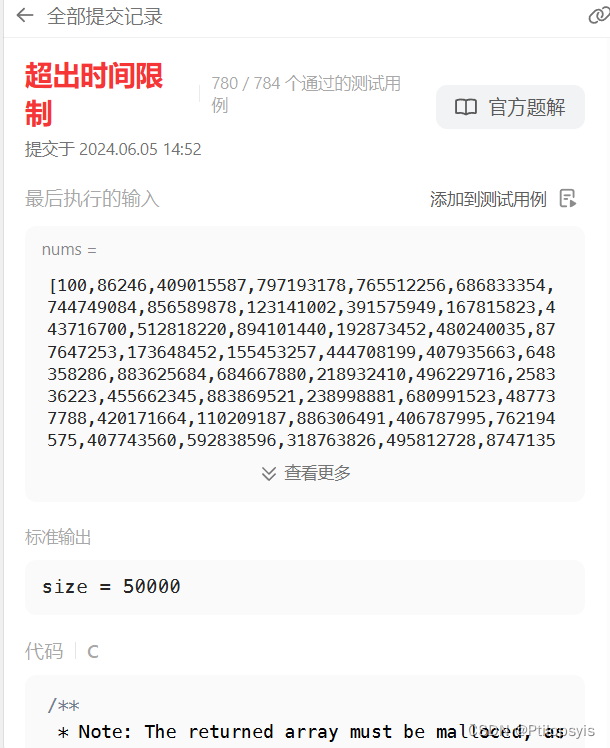
3072. 将元素分配到两个数组中 II
题目 给你一个下标从 1 开始、长度为 n 的整数数组 nums 。 现定义函数 greaterCount ,使得 greaterCount(arr, val) 返回数组 arr 中 严格大于 val 的元素数量。 你需要使用 n 次操作,将 nums 的所有元素分配到两个数组 arr1 和 arr2 中。在第一次操…...
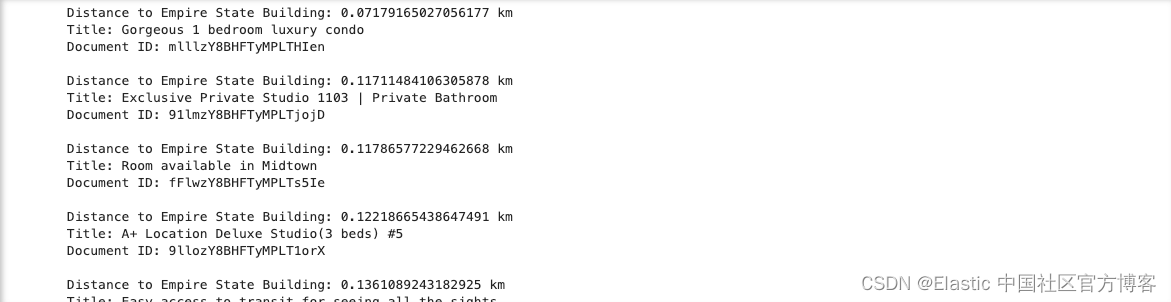
城市之旅:使用 LLM 和 Elasticsearch 简化地理空间搜索(二)
我们在之前的文章 “城市之旅:使用 LLM 和 Elasticsearch 简化地理空间搜索(一)”,在今天的练习中,我将使用本地部署来做那里面的 Jupyter notebook。 安装 Elasticsearch 及 Kibana 如果你还没有安装好自己的 Elasti…...

【知识点】 C++ 构造函数 参数类型为右值引用的模板函数
C 构造函数是一种特殊的成员函数,用于初始化类对象。C 中的构造函数主要分为以下几种类型: 默认构造函数(Default Constructor)参数化构造函数(Parameterized Constructor)拷贝构造函数(Copy C…...

华为云服务器-云容器引擎 CCE环境构建及项目部署
1、切换地区 2、搜索云容器引擎 CCE 3、购买集群 4、创建容器节点 通过漫长的等待(五分钟左右),由创建中变为运行中,则表明容器已经搭建成功 购买成功后,返回容器控制台界面 5、节点容器管理 6、创建redis工作负载 7、创建mysql工作负载 8、…...
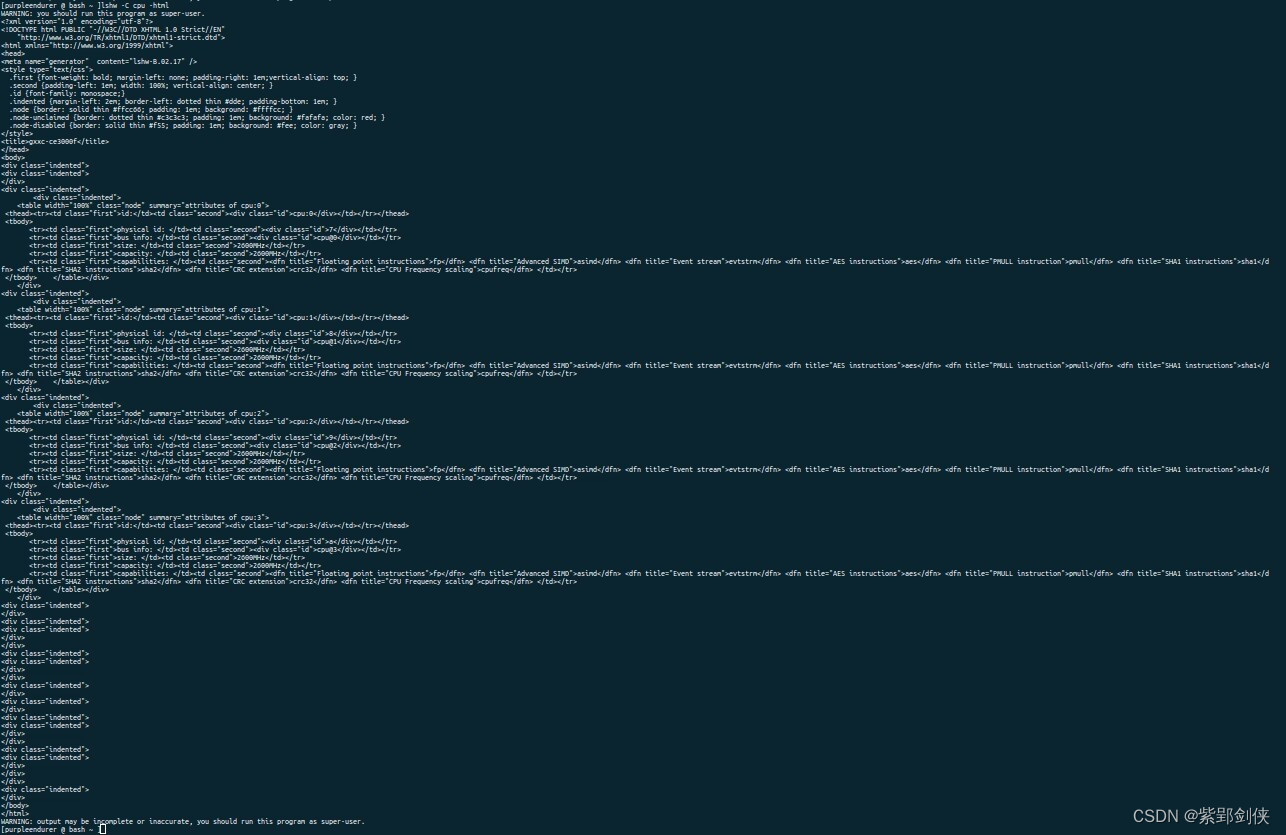
Linux shell编程学习笔记57:lshw命令 获取cpu设备信息
0 前言 在Linux中,获取cpu信息的命令很多,除了我们已经研究的 cat /proc/cpuinfo、lscpu、nproc、hwinfo --cpu 命令,还有 lshw命令。 1 lshw命令的功能 lshw命令源自英文list hardware,即列出系统的硬件信息,这些硬…...

连山露【诗词】
连山露 雾隐黄山路,十步一松树。 树上惊松鼠,松子衔木屋。 松子青嫩芽,尖尖头探出。 卷挂白露珠,装映黄山雾。...

【Qt】Frame和Widget的区别
1. 这两个伙计有啥区别? 2. 区别 2.1 Frame继承自Widget,多了一些专有的功能 Frame Widget 2.2 Frame可以设置边框...

大模型Transformer架构学习
基础知识: 损失函数:梯度下降单次训练过程过拟合数据增强:增加训练数据,对原始数据加噪,翻转,旋转 正则化:防止该函数过分变化,让损失函数加上该参数,调整损失函数时会抑…...

别再死记硬背了!用华为eNSP图解OSPF、VRRP这些协议到底怎么用
用华为eNSP图解网络协议:从抽象概念到可视化实战 网络协议学习常常陷入"理论-记忆-遗忘"的循环,OSPF的邻居状态机、VRRP的主备切换机制、STP的根桥选举过程,这些在教材中冰冷的概念,如何转化为可感知的网络行为…...

GlitchTip:开源错误追踪平台完全指南:Sentry替代方案的完整教程
GlitchTip:开源错误追踪平台完全指南:Sentry替代方案的完整教程 背景 在应用开发和运维过程中,错误追踪是保障服务质量的关键环节。Sentry 作为业界领先的错误追踪服务,提供了强大的错误收集和分析能力,但其云服务版…...
)
AD7606模数转换器的FPGA驱动设计与实现(串行/并行双模式解析)
1. AD7606模数转换器核心特性解析 AD7606这颗16位模数转换芯片在工业现场堪称"数据捕手",我经手过的电力监控、振动分析项目中都能看到它的身影。与普通ADC不同,它最吸引工程师的特性是双模数据输出——就像高速公路的ETC和人工通道可以并行运…...

10BASE-T1S PLCA参数配置避坑指南:从Node ID重复到Burst Timer设置,这些坑你踩过几个?
10BASE-T1S PLCA参数配置避坑指南:从Node ID重复到Burst Timer设置,这些坑你踩过几个? 在车载以太网的实际部署中,10BASE-T1S因其单对线缆实现多节点通信的特性,正逐渐成为智能座舱和传感器网络的热门选择。但当我们真…...

3个核心突破:LangChain的大语言模型应用开发指南
3个核心突破:LangChain的大语言模型应用开发指南 【免费下载链接】langchain LangChain是一个由大型语言模型 (LLM) 驱动的应用程序开发框架。。源项目地址:https://github.com/langchain-ai/langchain 项目地址: https://gitcode.com/GitHub_Trending…...

Arduino轻量级软件消抖库FTDebouncer原理与应用
1. 项目概述Future Tailors’ Debouncer(简称 FTDebouncer)是一个专为 Arduino 平台设计的轻量级、高效率、低资源占用的软件消抖库。其核心目标是解决嵌入式开发中一个看似简单却极易出错的基础问题:机械按键或开关引脚的硬件抖动࿰…...

MobaXterm远程免密登录疑难杂症全解析:从pk.pub到authorized_keys的避坑指南
1. 密钥文件格式的坑:从pk.pub到ppk的生死局 第一次用MobaXterm配置SSH免密登录时,我对着那个死活弹不出警告的"pk.pub"文件发了半小时呆。后来才发现Windows这个老狐狸默认隐藏了文件扩展名,我的"pk.pub"其实是个披着羊…...

2K2000龙芯主板以科技创新为驱动力,赋能产业高质量发展
当前,新一轮科技革命和产业变革深入演进,科技创新已成为引领产业高质量发展的核心引擎,更是实现高水平科技自立自强、掌握产业发展主动权的关键支撑。科技创新作为新质生产力的核心驱动力,早已成为引领产业高质量发展的“第一引擎…...
)
你的模型评估做对了吗?深入解读泰勒图里的R、RMSE和STD(以sklearn预测为例)
你的模型评估做对了吗?深入解读泰勒图里的R、RMSE和STD(以sklearn预测为例) 泰勒图作为模型评估的经典可视化工具,表面上只是几个点和线的组合,实则暗藏玄机。许多开发者在使用泰勒图时,常常陷入"距离…...