
SpringFramework总结
一.SpringFramework介绍
(一)Spring
广义上的 Spring 泛指以 Spring Framework 为基础的 Spring 技术栈。
Spring 已经不再是一个单纯的应用框架,而是逐渐发展成为一个由多个不同子项目(模块)组成的成熟技术,例如 Spring Framework、Spring MVC、SpringBoot、Spring Cloud、Spring Data、Spring Security 等,其中 Spring Framework 是其他子项目的基础。
(二)SpringFramework
Spring Framework(Spring框架)是一个开源的应用程序框架,它提供了很多功能,例如:依赖注入(Dependency Injection)、面向切面编程(AOP)、声明式事务管理(TX)等
二.Spring Ioc容器 和 核心概念
(一)组件和组件管理
注意:组件是映射到应用程序中所有可重用组件的Java对象,应该是可复用的功能对象!
- 组件一定是对象
- 对象不一定是组件

组件可以完全交给Spring 框架进行管理,Spring框架替代了程序员原有的new对象和对象属性赋值动作等!
Spring具体的组件管理动作包含:
- 组件对象实例化
- 组件属性属性赋值
- 组件对象之间引用
- 组件对象存活周期管理
- ......
Spring 充当一个组件容器,创建、管理、存储组件,减少了我们的编码压力,让我们更加专注进行业务编写!
(二)Spring Ioc容器和容器实现
1.Spring Ioc容器介绍
Spring IoC 容器,负责实例化、配置和组装 bean(组件)。
容器通过读取配置元数据来获取有关要实例化、配置和组装组件的指令。配置元数据以 XML、Java 注解或 Java 代码形式表现。
2.Spring Ioc容器的具体接口和实现类
BeanFactory:接口提供了一种高级配置机制,能够管理任何类型的对象,提供了配置框架和基本功能,它是SpringIoC容器标准化超接口!
ApplicationContext:是 BeanFactory 的子接口,添加了更多特定于企业的功能!
FileSystemXmlApplicationContext:通过文件系统路径读取 XML 格式的配置文件创建 IOC 容器对象
ClassPathXmlApplicationContext:通过读取类路径下的 XML 格式的配置文件创建 IOC 容器对象
AnnotationConfigApplicationContext:通过读取Java配置类创建 IOC 容器对象
WebApplicationContext:专门为 Web 应用准备,基于 Web 环境创建 IOC 容器对象,并将对象引入存入 ServletContext 域中
Spring框架提供了多种配置方式:XML配置方式、注解方式和Java配置类方式
(三)IoC 和 DI
Ioc (Inversion of Control):控制反转
当应用程序需要使用一个对象时,不再是应用程序直接创建该对象,而是由 IoC 容器来创建和管理,即控制权由应用程序转移到 IoC 容器中,也就是“反转”了控制权
DI(Dependency Injection):依赖注入
DI 是指在组件之间传递依赖关系的过程中,将依赖关系在容器内部进行处理,这样就不必在应用程序代码中硬编码对象之间的依赖关系,实现了对象之间的解耦合。在 Spring 中,DI 是通过 XML 配置文件或注解的方式实现的。它提供了三种形式的依赖注入:构造函数注入、Setter 方法注入和接口注入。
三.Spring Ioc实践和应用
(一)Spring Ioc/DI 实现步骤
1.配置
配置元数据,既是编写交给SpringIoC容器管理组件的信息,配置方式有三种:xml,注解,配置类.
2.实例化Ioc容器
提供给 ApplicationContext 构造函数的位置路径是资源字符串地址,允许容器从各种外部资源(如本地文件系统、Java CLASSPATH 等)加载配置元数据。
创建容器 选择合适的容器 实现即可
编译后,如果配置文件放在在classes文件里用ClassPathXmlApplicationContext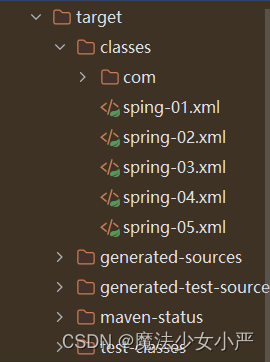
public void createIoc() {//方式1:方式1在源码中使用了方式2ApplicationContext applicationContext = new ClassPathXmlApplicationContext("spring-03.xml");//方式2:先创建ioc容器对象,再指定配置文件,再刷新ClassPathXmlApplicationContext applicationContext1 = new ClassPathXmlApplicationContext();applicationContext1.setConfigLocations("spring-03.xml");//外部配置文件的设置applicationContext1.refresh();//调用ioc和di的流程}3.获得Bean组件
ApplicationContext 是一个高级工厂的接口,能够维护不同 bean 及其依赖项的注册表。通过使用方法 T getBean(String name, Class requiredType) ,您可以检索 bean 的实例。
<beans xmlns="http://www.springframework.org/schema/beans"xmlns:xsi="http://www.w3.org/2001/XMLSchema-instance"xsi:schemaLocation="http://www.springframework.org/schema/beans http://www.springframework.org/schema/beans/spring-beans.xsd">
<!--
组件的信息 ioc的配置->applicationContext读取->实例化对象
--><bean id="happyComponent" class="com.yan.Ioc_03.HappyComponent"/></beans>
@Testpublic void getBeanFormIoc() {//创建ioc容器ClassPathXmlApplicationContext applicationContext = new ClassPathXmlApplicationContext();applicationContext.setConfigLocations("spring-03.xml");applicationContext.refresh();//读取ioc容器的组件//方案1:直接根据beanId获取即可 返回值类型是Objec 需要强转,不推荐HappyComponent happyComponent1 = (HappyComponent) applicationContext.getBean("happyComponent");//方案2:根据beanId,同时指定bean的类型ClassHappyComponent happyComponent2 = applicationContext.getBean("happyComponent", HappyComponent.class);//方案3:直接根据类型获取//根据Bean的类型 获取,同一类型在IOC容器中只能有一个bean!!!!!!//如果有多个同类型bean,则会报NoUniqueBeanDefinitionException//ioc的配置一定是实现类,但是可以根据接口类型获取值HappyComponent happyComponent3 = applicationContext.getBean(HappyComponent.class);happyComponent3.doWork();System.out.println(happyComponent1 == happyComponent2);//trueSystem.out.println(happyComponent2 == happyComponent3);//true}(二)基于XML方式
1.组件信息声明配置
通过定义XML配置文件,声明组件类信息,交给 Spring 的 IoC 容器进行组件管理
(1)准备项目
a.创建maven工程(spring-ioc-xml-01)
b.导入SpringIoC相关依赖
pom.xml
<dependencies><!--spring context依赖--><!--当你引入Spring Context依赖之后,表示将Spring的基础依赖引入了--><dependency><groupId>org.springframework</groupId><artifactId>spring-context</artifactId><version>6.0.6</version></dependency><!--junit5测试--><dependency><groupId>org.junit.jupiter</groupId><artifactId>junit-jupiter-api</artifactId><version>5.3.1</version></dependency>
</dependencies>
(2)基于无参构造函数
<bean 一个组件信息 一个组件对象
id 组件的标识 方便后期读取
class 组件的类的全限定符
将一个组件类,声明两个组件信息,默认是单例模式,会实例化两个组件对象
a.准备组件类
public class HappyComponent {}b.编写xml配置文件
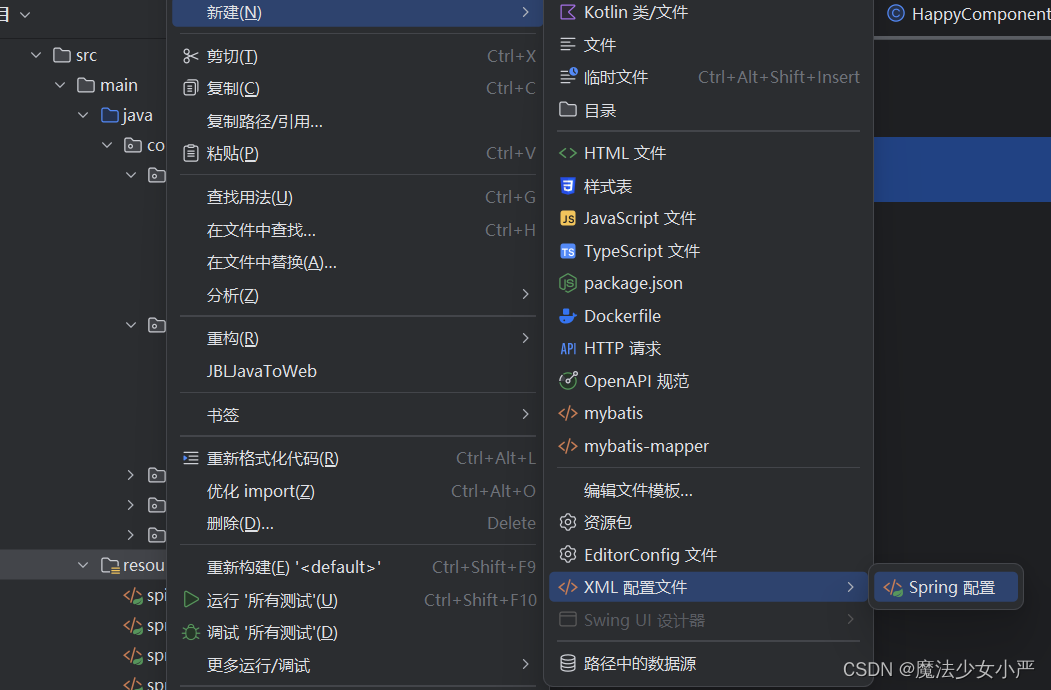
<bean id="happyComponent1" class="com.yan.Ioc_01.HappyComponent"/>
<bean id="happyComponent2" class="com.yan.Ioc_01.HappyComponent"/>
要求当前组件类必须包含无参数构造函数!
(3)基于静态工厂方法实例化
a.准备组件类
public class ClientService {private static ClientService clientService = new ClientService();private ClientService() {}public static ClientService createInstance() {return clientService;}
}
b.编写配置文件
<!--静态工厂类如何工厂方法进行ioc配置id="组件的标识"class ="工厂类的的全限定"factory-method=静态工厂方法"--><bean id="clientService" class="com.yan.Ioc_01.ClientService" factory-method="createInstance"/>(4)基于基于静态工厂方法实例化
a.准备组件类
public class DefaultServiceLocator {private static ClientServiceImpl clientService = new ClientServiceImpl();public ClientServiceImpl createClientServiceInstance() {return clientService;}
}
b.编写配置文件
<!--1.配置工厂类的组件信息--><bean id="defaultServiceLocator" class="com.yan.Ioc_01.DefaultServiceLocator"/><!--2.facctory-bean 属性:指定当前容器中工厂Bean的名称factory-method:指定实例工厂方法名,注意实例方法必须是非static--><bean id="clientService2" factory-bean="defaultServiceLocator" factory-method="createClientServiceInstance"/>2.组件依赖注入配置
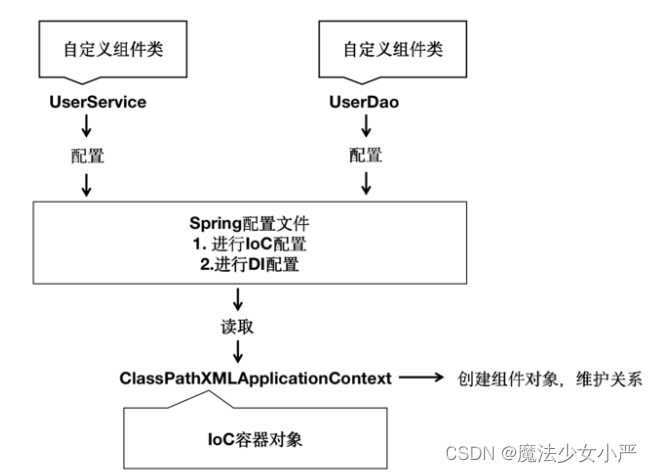
通过配置文件,实现IoC容器中Bean之间的引用(依赖注入DI配置)
主要涉及注入场景:基于构造函数的依赖注入和基于 Setter 的依赖注入
(1)基于构造函数的依赖注入(单个构造参数)
springioc容器是一个高级容器,内部有缓存,先创建对象,再进行属性赋值
引用和被引用的组件,必须全部在ioc容器
a.准备实体类
public class UserService {private UserDao userDao;private int age;private String name;public UserService(UserDao userDao) {this.userDao = userDao;}
}
b.编写配置文件
<!--单个构造参数注入--><!--步骤1 将他们都存在ioc容器--><bean id="userDao" class="com.yan.Ioc_02.UserDao"/><bean id="userService" class="com.yan.Ioc_02.UserService"><!--步骤2 构造参数传值 di的配置<constructor-arg 构造参数传值的di配置value = 直接属性值 String name="二狗子" int age="18"ref = 引用其他的bean id值--><constructor-arg ref="userDao"/></bean>(2) 基于构造函数的依赖注入(多构造参数解析)
a.准备实体类
public class UserService {private UserDao userDao;private int age;private String name;public UserService(int age, String name, UserDao userDao) {this.userDao = userDao;this.age = age;this.name = name;}
}
b.编写配置文件
方式一:
<!--多个构造参数注入--><bean id="userDao" class="com.yan.Ioc_02.UserDao"/><bean id="userService1" class="com.yan.Ioc_02.UserService"><!--构造参数的顺序填写--><constructor-arg value="18"/><constructor-arg value="二狗"/><constructor-arg ref="userDao"/></bean>方式二:
<!--多个构造参数注入--><bean id="userService1" class="com.yan.Ioc_02.UserService"><!--构造参数的名字进行填写,不用考虑顺序 name=构造参数的名字--><constructor-arg name="age" value="18"/><constructor-arg name="name" value="二狗"/><constructor-arg name="userDao" ref="userDao"/></bean>方式三:
<!--多个构造参数注入--><bean id="userService1" class="com.yan.Ioc_02.UserService"><!--构造参数的下角标进行填写,不用考虑顺序 index=构造参数的下角标 从左到右 从0开始 --><constructor-arg index="0" name="age" value="18"/><constructor-arg index="1" name="name" value="二狗"/><constructor-arg index="2" name="userDao" ref="userDao"/></bean>(3)基于Setter方法依赖注入
a.准备实体类
public class SimpleMovieLister {private MovieFinder movieFinder;private String movieName;public void setMovieFinder(MovieFinder movieFinder) {this.movieFinder = movieFinder;}public void setMovieName(String movieName) {this.movieName = movieName;}}b.编写配置文件
<!--触发setter方法进行注入--><bean id="movieFinder" class="com.yan.Ioc_02.MovieFinder"/><bean id="simpleMovieLister" class="com.yan.Ioc_02.SimpleMovieLister"><!--namev->属性名 setter方法的去set和首字母小写的值,调用set方法setMovieFinder -> movieFindervalue | ref 二选一 value-"直接属性值" ref-"其他bean的Id"--><property name="movieFinder" ref="movieFinder"/><property name="movieName" value="消失的她"/></bean>3. 组件的作用域和周期方法配置
(1)周期方法
a.周期方法概念
我们可以在组件类中定义方法,然后当IoC容器实例化和销毁组件对象的时候进行调用!这两个方法我们成为生命周期方法!
类似于Servlet的init/destroy方法,我们可以在周期方法完成初始化和释放资源等工作。
b.周期方法声明
public class BeanOne {//周期方法要求: 方法命名随意,但是要求方法必须是 public void 无形参列表public void init() {// 初始化逻辑System.out.println("初始化!");}
}
public class BeanTwo {public void cleanup() {// 释放资源逻辑System.out.println("销毁!");}
}c.周期方法的配置
<?xml version="1.0" encoding="UTF-8"?>
<beans xmlns="http://www.springframework.org/schema/beans"xmlns:xsi="http://www.w3.org/2001/XMLSchema-instance"xsi:schemaLocation="http://www.springframework.org/schema/beans http://www.springframework.org/schema/beans/spring-beans.xsd"><beans><!--init-method=初始化方法destroy-method=销毁方法spring ioc容器就会在对应的时间结点回调对应的方法,我们可以在其中写对应的业务--><bean id="beanOne" class="com.yan.Ioc_04.BeanOne" init-method="init"/><bean id="beanTwo" class="com.yan.Ioc_04.BeanTwo" destroy-method="cleanup"/></beans>
</beans>
(2)组件作用域
a.作用域概念
`<bean` 标签声明Bean,只是将Bean的信息配置给SpringIoC容器!
在IoC容器中,这些标签对应的信息转成Spring内部 BeanDefinition 对象,BeanDefinition 对象内,包含定义的信息
SpringIoC容器可以可以根据BeanDefinition对象反射创建多个Bean对象实例,具体创建多少个Bean的实例对象,由Bean的作用域Scope属性指定!
b.作用域可选值
singleton:在 IOC 容器中,这个 bean 的对象始终为单实例,默认值,在IOC 容器初始化时创建对象
prototype:这个 bean 在 IOC 容器中有多个实例,获取 bean 时创建对象
c.作用域配置
<!--bean的作用域 准备两个引用关系的组件类即可!!
-->
<!-- scope属性:取值singleton(默认值),bean在IOC容器中只有一个实例,IOC容器初始化时创建对象 -->
<!-- scope属性:取值prototype,bean在IOC容器中可以有多个实例,getBean()时创建对象 -->
<bean id="happyMachine8" scope="prototype" class="com.atguigu.ioc.HappyMachine"><property name="machineName" value="happyMachine"/>
</bean><bean id="happyComponent8" scope="singleton" class="com.atguigu.ioc.HappyComponent"><property name="componentName" value="happyComponent"/>
</bean>
4.FactoryBean
(1)简介
用于配置复杂的Bean对象,可以将创建过程存储在FactoryBean 的getObject方法!
FactoryBean 接口提供三种方法:
T getObject()
返回此工厂创建的对象的实例。该返回值会被存储到IoC容器!
boolean isSingleton()
如果此 FactoryBean 返回单例,则返回 true ,否则返回 false 。此方法的默认实现返回 true (注意,lombok插件使用,可能影响效果)
Class getObjectType()
返回 getObject() 方法返回的对象类型,如果事先不知道类型,则返回 null
(2)配置
a.准备实现类
public class JavaBean {private  String name;public String getName() {return name;}public void setName(String name) {this.name = name;}@Overridepublic String toString() {return "JavaBean{" +"name='" + name + '\'' +'}';}
}
package com.yan.Ioc_05;import org.springframework.beans.factory.FactoryBean;/*** 制造JavaBean的工厂的bean对象* <p>* 步骤:* 1.实现FactoryBean接口<返回值泛型>*/
public class JavaBeanFactoryBean implements FactoryBean<JavaBean> {private String name;@Overridepublic JavaBean getObject() throws Exception {//使用自己的方式实例化对象JavaBean javaBean = new JavaBean();javaBean.setName(name);return javaBean;}public void setName(String name) {this.name = name;}@Overridepublic Class<?> getObjectType() {return JavaBean.class;}//默认单例@Overridepublic boolean isSingleton() {return FactoryBean.super.isSingleton();}
}
b.配置实现类
<?xml version="1.0" encoding="UTF-8"?>
<beans xmlns="http://www.springframework.org/schema/beans"xmlns:xsi="http://www.w3.org/2001/XMLSchema-instance"xsi:schemaLocation="http://www.springframework.org/schema/beans http://www.springframework.org/schema/beans/spring-beans.xsd"><!--id:getObject方法返回的对象的标识--><!--Class:factoryBean标准化工厂方法--><!--工厂bean的标识  &id值  &javaBean--><bean id="javaBean" class="com.yan.Ioc_05.JavaBeanFactoryBean"><!--要给javaBean的name赋值,需要在JavaBeanFactoryBean的方法中给javaBean赋值此位置是给JavaBeanFactoryBean配置的--><property name="name" value="二狗"/></bean></beans>
(3)FactoryBean和BeanFactory区别
FactoryBean 是 Spring 中一种特殊的 bean,可以在 getObject() 工厂方法自定义的逻辑创建Bean!是一种能够生产其他 Bean 的 Bean。FactoryBean 在容器启动时被创建,而在实际使用时则是通过调用 getObject() 方法来得到其所生产的 Bean。因此,FactoryBean 可以自定义任何所需的初始化逻辑,生产出一些定制化的 bean。
BeanFactory 是 Spring 框架的基础,其作为一个顶级接口定义了容器的基本行为,例如管理 bean 的生命周期、配置文件的加载和解析、bean 的装配和依赖注入等。BeanFactory 接口提供了访问 bean 的方式,例如 getBean() 方法获取指定的 bean 实例。它可以从不同的来源(例如 Mysql 数据库、XML 文件、Java 配置类等)获取 bean 定义,并将其转换为 bean 实例。同时,BeanFactory 还包含很多子类(例如,ApplicationContext 接口)提供了额外的强大功能。
(三)基于注解方式
和 XML 配置文件一样,注解本身并不能执行,注解本身仅仅只是做一个标记,具体的功能是框架检测到注解标记的位置,然后针对这个位置按照注解标记的功能来执行具体操作。
本质上:所有一切的操作都是 Java 代码来完成的,XML 和注解只是告诉框架中的 Java 代码如何执行。
1.Bean注解的标记和扫描
(1)导入依赖pom.xml
<dependencies><!--spring context依赖--><!--当你引入Spring Context依赖之后,表示将Spring的基础依赖引入了--><dependency><groupId>org.springframework</groupId><artifactId>spring-context</artifactId><version>6.0.6</version></dependency><!--junit5测试--><dependency><groupId>org.junit.jupiter</groupId><artifactId>junit-jupiter-api</artifactId><version>5.3.1</version></dependency>
</dependencies>
(2)准备组件
public class XxxController {
}
public class XxxDao {
}
public class XxxService {
}
(3)添加注解
标记注解 @Component @Controller @Repository @Service
@Controller
public class XxxController {
}
@Repository("ergou")
public class XxxDao {
}
@Service
public class XxxService {
}
(4)配置文件确定扫描范围
普通配置包扫描
base-package:指定容器取哪些包下查找注解类 ioc容器
多个包用逗号相隔开
指定包,相当于指定了子包中的所有类
<?xml version="1.0" encoding="UTF-8"?>
<beans xmlns="http://www.springframework.org/schema/beans"xmlns:xsi="http://www.w3.org/2001/XMLSchema-instance"xmlns:context="http://www.springframework.org/schema/context"xsi:schemaLocation="http://www.springframework.org/schema/beans http://www.springframework.org/schema/beans/spring-beans.xsd http://www.springframework.org/schema/context https://www.springframework.org/schema/context/spring-context.xsd"><!--1.普通配置包扫描base-package:指定容器取哪些包下查找注解类 ioc容器多个包用逗号相隔开指定包,相当于指定了子包中的所有类--><context:component-scan base-package="com.yan.Ioc_01"/>
</beans>
指定包,但排除注解
     <!-- context:exclude-filter标签:指定排除规则 --><!-- type属性:指定根据什么来进行排除,annotation取值表示根据注解来排除 --><!-- expression属性:指定排除规则的表达式,对于注解来说指定全类名即可 -->
<context:component-scan base-package="com.yan"><context:exclude-filter type="annotation" expression="org.springframework.stereotype.Repository"/></context:component-scan>
仅扫描指定的组件
仅扫描 = 关闭默认规则 + 追加规则
use-default-filters属性:取值false表示关闭默认扫描规则
context:include-filter标签:指定在原有扫描规则的基础上追加的规则
<context:component-scan base-package="com.yan.Ioc_01" use-default-filters="false"><context:include-filter type="annotation" expression="org.springframework.stereotype.Repository"/></context:component-scan>(5)组件BeanName问题
现在使用注解后,每个组件仍然应该有一个唯一标识。
默认情况:
类名首字母小写就是 bean 的 id
使用value属性指定:
@Controller(value = "tianDog")
public class SoldierController {
}
当注解中只设置一个属性时,value属性的属性名可以省略:
@Service("smallDog")
public class SoldierService {
}
2.组件的作用域和周期注解
(1)注解
@Scope:不指定@Scope的情况下,所有的bean都是单实例的bean
singleton 在 IOC 容器中,这个 bean 的对象始终为单实例 IOC 容器初始化时创建对象 默认
prototype 这个 bean 在 IOC 容器中有多个实例 获取 bean 时
@PostConstruct 注解 :指定初始化方法
@PreDestroy 注解:指定销毁方法
(2)配置
@Scope(scopeName = ConfigurableBeanFactory.SCOPE_SINGLETON)//单例 默认值
@Component
public class JavaBean {@PostConstructpublic void init(){//周期方法命名随意   但必须public voidSystem.out.println("初始化方法------");}@PreDestroypublic void destory(){System.out.println("销毁方法-----");}
}
3.Bean属性赋值(引用类型自动装配)
(1)自动装配
a前提
参与自动装配的组件(需要装配、被装配)全部都必须在IoC容器中
b.注解
@Autowired注解
在成员变量上直接标记@Autowired注解即可,不需要提供setXxx()方法
boolean required() default true;必须有对应类型的组件
boolean required() false; 佛性装配,可以没有对应的组件 后面可能会出现空指针报错
同一类型有多个对应的组件,Autowired会报错
解决方法:
方法一:
使用@Autowired和 @Qualifier(value = "xxxxx")
用Qualifier 注释指定获得bean的id,不能单独使用,必须配合Autowired
方法二:
使用@Resource注解
Autowired (required=true) + Qualifier(value=userServiceImpl) = Resource(name="userServiceImpl")
如果没有指定name,先根据属性名查找IoC中组件xxxService
如果没有指定name,并且属性名没有对应的组件,会根据属性类型查找
@Resource注解属于JDK扩展包,所以不在JDK当中,需要额外引入以下依赖:【高于JDK11或低于JDK8需要引入以下依赖】
<dependency><groupId>jakarta.annotation</groupId><artifactId>jakarta.annotation-api</artifactId><version>2.1.1</version>
</dependency>
(2)代码实现
public interface UserService {public String show();
}
@Controller
public class UserServiceImpl implements  UserService{@Overridepublic String show() {return "";}
}
@Controller
public class UserController {@Autowired(required = false)UserService userService = new UserServiceImpl();public void show() {//调用业务层show方法}
}
@Controller
public class XxxController {/*** 1. 如果没有指定name,先根据属性名查找IoC中组件xxxService* 2. 如果没有指定name,并且属性名没有对应的组件,会根据属性类型查找* 3. 可以指定name名称查找! @Resource(name='test') == @Autowired + @Qualifier(value='test')*/@Resourceprivate XxxService xxxService;//@Resource(name = "指定beanName")//private XxxService xxxService;public void show(){System.out.println("XxxController.show");xxxService.show();}
}4.Bean属性赋值(基本类型属性赋值)
@Value 通常用于注入外部化属性
(1)声明配置
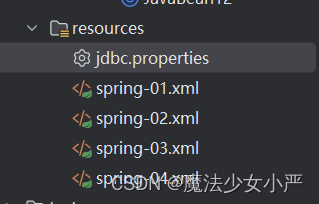
创建一个jdbc.properties文件
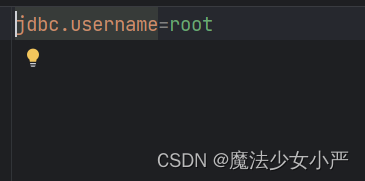
(2)xml引入外部配置
<!-- 引入外部配置文件-->
<context:property-placeholder location="application.properties" />
(3)@Value注解读取配置
${key} 取外部配置key对应的值!
${key:defaultValue} 没有key,可以给与默认值
@Component
public class JavaBean12 {/*** 方案1:直接赋值* 方案2:注解赋值 value* 引入默认值 @Value(${key:默认值})*/private String name = "二狗子";@Value("19")private int age;@Value("${jdbc.username:admin}")//默认值adminprivate String username;@Overridepublic String toString() {return "JavaBean{" +"name='" + name + '\'' +", age=" + age +", username='" + username + '\'' +'}';}
}
(四)基于配置类方法
配置类
将一个普通的类标记为 Spring 的配置类 @Configuration 注解
包扫描注释配置 @ComponentScan({""})
引用外部的配置文件 @PropertySource(value = "classpath:jdbc.properties")
import org.springframework.context.annotation.ComponentScan;
import org.springframework.context.annotation.Configuration;
import org.springframework.context.annotation.PropertySource;//标注当前类是配置类,替代application.xml
@Configuration
//使用注解读取外部配置,替代 <context:property-placeholder标签
@PropertySource("classpath:application.properties")
//使用@ComponentScan注解,可以配置扫描包,替代<context:component-scan标签
@ComponentScan(basePackages = {"com.yan.components"})
public class MyConfiguration {}
2.实例化IoC容器
// AnnotationConfigApplicationContext 根据配置类创建 IOC 容器对象
ApplicationContext iocContainerAnnotation =
new AnnotationConfigApplicationContext(MyConfiguration.class);
// AnnotationConfigApplicationContext-IOC容器对象
ApplicationContext iocContainerAnnotation =
new AnnotationConfigApplicationContext();
//外部设置配置类
iocContainerAnnotation.register(MyConfiguration.class);
//刷新后方可生效!!
iocContainerAnnotation.refresh();
3.@Bean定义组件
需求:将Druid连接池对象存储到IoC容器
需求分析:第三方jar包的类,添加到ioc容器,无法使用@Component等相关注解!因为源码jar包内容为只读模式!
(1)xml实现
<?xml version="1.0" encoding="UTF-8"?>
<beans xmlns="http://www.springframework.org/schema/beans"xmlns:xsi="http://www.w3.org/2001/XMLSchema-instance"xmlns:context="http://www.springframework.org/schema/context"xsi:schemaLocation="http://www.springframework.org/schema/beans http://www.springframework.org/schema/beans/spring-beans.xsd http://www.springframework.org/schema/context https://www.springframework.org/schema/context/spring-context.xsd"><!-- 引入外部属性文件 --><context:property-placeholder location="classpath:jdbc.properties"/><!-- 给bean的属性赋值:引入外部属性文件 --><bean id="druidDataSource" class="com.alibaba.druid.pool.DruidDataSource"><property name="url" value="${jdbc.url}"/><property name="driverClassName" value="${jdbc.driver}"/><property name="username" value="${jdbc.user}"/><property name="password" value="${jdbc.password}"/></bean></beans>(2)配置类实现
可以使用方法返回值+@Bean注解
//标注当前类是配置类,替代application.xml
@Configuration
//引入jdbc.properties文件
@PropertySource({"classpath:application.properties","classpath:jdbc.properties"})
@ComponentScan(basePackages = {"com.yan.components"})
public class MyConfiguration {@Beanpublic DataSource createDataSource(@Value("${jdbc.user}") String username,@Value("${jdbc.password}")String password,@Value("${jdbc.url}")String url,@Value("${jdbc.driver}")String driverClassName){//使用Java代码实例化DruidDataSource dataSource = new DruidDataSource();dataSource.setUsername(username);dataSource.setPassword(password);dataSource.setUrl(url);dataSource.setDriverClassName(driverClassName);//返回结果即可return dataSource;}
}
(3)@Bean生成BeanName问题
缺省情况下,Bean 名称与方法名称相同
指定@Bean的名称:
@Configuration
public class AppConfig {@Bean("myThing") //指定名称public Thing thing() {return new Thing();}
}
(4)@Bean 初始化和销毁方法指定
public class BeanOne {public void init() {// initialization logic}
}public class BeanTwo {public void cleanup() {// destruction logic}
}@Configuration
public class AppConfig {@Bean(initMethod = "init")public BeanOne beanOne() {return new BeanOne();}@Bean(destroyMethod = "cleanup")public BeanTwo beanTwo() {return new BeanTwo();}
}
(5)@Bean Scope作用域
@Configuration
public class MyConfiguration {@Bean@Scope("prototype")public Encryptor encryptor() {// ...}
}
(6)@Bean方法直接的依赖
方式一
直接调用方法返回 Bean 实例,虽然是方法调用,也是通过IoC容器获取对应的Bean
@Configuration
public class JavaConfig {@Beanpublic HappyMachine happyMachine(){return new HappyMachine();}@Beanpublic HappyComponent happyComponent(){HappyComponent happyComponent = new HappyComponent();//直接调用方法即可! happyComponent.setHappyMachine(happyMachine());return happyComponent;}}
方式二
通过方法参数传递 Bean 实例的引用来解决 Bean 实例之间的依赖关系
可以直接在形参列表接收IoC容器中的Bean!
情况1: 如果只有一个,直接指定类型即可,Ioc容器会注入,要求必须有对应类型的组件
情况2: 如果有多个bean,(HappyMachine 名称 ) 形参名称等于要指定的bean名称!
@Configuration
public class JavaConfig {@Beanpublic HappyMachine happyMachine(){return new HappyMachine();}@Beanpublic HappyComponent happyComponent(HappyMachine happyMachine){HappyComponent happyComponent = new HappyComponent();//赋值happyComponent.setHappyMachine(happyMachine);return happyComponent;}}
4.@Import注解
@Import 注释允许从另一个配置类加载 @Bean 定义
@Configuration
public class ConfigA {@Beanpublic A a() {return new A();}
}@Configuration
@Import(ConfigA.class)
public class ConfigB {@Beanpublic B b() {return new B();}
}
public static void main(String[] args) {ApplicationContext ctx = new AnnotationConfigApplicationContext(ConfigB.class);// now both beans A and B will be available...A a = ctx.getBean(A.class);B b = ctx.getBean(B.class);
}(五)三种配置方式总结
1.XML方式
1. 所有内容写到xml格式配置文件中
2. 声明bean通过<bean标签
3. <bean标签包含基本信息(id,class)和属性信息 <property name value / ref
4. 引入外部的properties文件可以通过<context:property-placeholder
5. IoC具体容器实现选择ClassPathXmlApplicationContext对象
2.XML方式+注解
1. 注解负责标记IoC的类和进行属性装配
2. xml文件依然需要,需要通过<context:component-scan标签指定注解范围
3. 标记IoC注解:@Component,@Service,@Controller,@Repository
4. 标记DI注解:@Autowired @Qualifier @Resource @Value
5. IoC具体容器实现选择ClassPathXmlApplicationContext对象
3.配置类+注解
1. 完全注解方式指的是去掉xml文件,使用配置类 + 注解实现
2. xml文件替换成使用@Configuration注解标记的类
3. 标记IoC注解:@Component,@Service,@Controller,@Repository
4. 标记DI注解:@Autowired @Qualifier @Resource @Value
5. <context:component-scan标签指定注解范围使用@ComponentScan(basePackages = {""})替代
6. <context:property-placeholder引入外部配置文件使用@PropertySource({"classpath:application.properties","classpath:jdbc.properties"})替代
7. <bean 标签使用@Bean注解和方法实现
8. IoC具体容器实现选择AnnotationConfigApplicationContext对象
(六)Spring5-test5搭建测试环境
整合测试环境作用
好处1:不需要自己创建IOC容器对象了
好处2:任何需要的bean都可以在测试类中直接享受自动装配
1.导入依赖
<!--junit5测试-->
<dependency><groupId>org.junit.jupiter</groupId><artifactId>junit-jupiter-api</artifactId><version>5.3.1</version>
</dependency>
<dependency><groupId>org.springframework</groupId><artifactId>spring-test</artifactId><version>6.0.6</version><scope>test</scope>
</dependency>
2.使用
//@SpringJUnitConfig(locations = {"classpath:spring-context.xml"})  //指定配置文件xml
@SpringJUnitConfig(value = {BeanConfig.class})  //指定配置类
public class Junit5IntegrationTest {@Autowiredprivate User user;@Testpublic void testJunit5() {System.out.println(user);}
}
四.Spring Aop面向切面编程
将重复的代码统一提取,并且[[动态插入]]到每个业务方法
(一)初步实现
1.导入依赖
<!-- spring-aspects会帮我们传递过来aspectjweaver -->
<dependency><groupId>org.springframework</groupId><artifactId>spring-aop</artifactId><version>6.0.6</version>
</dependency><dependency><groupId>org.springframework</groupId><artifactId>spring-aspects</artifactId><version>6.0.6</version>
</dependency>
2.声明切面类
@Component //保证这个切面类能够放入IOC容器
@Aspect//表示这个类是一个切面类
@Order (10) //指定一个优先级的值,值越小,优先级越高,而后执行,在外圈
public class LogAdvice {@Before("execution(* com..impl.*.*(..))")public void start(JoinPoint joinPoint) {System.out.println("方法开始了");//1.获取方法属于的类的信息String simpleName = joinPoint.getTarget().getClass().getSimpleName();//2.获取方法名称String name = joinPoint.getSignature().getName();//获取方法名//3.获取参数列表Object[] args= joinPoint.getArgs();//获取目标方法参数}@After("com.yan.pointcut.MyPointCut.pc()")public void after() {System.out.println("方法结束了");}@AfterThrowing("com.yan.pointcut.MyPointCut.pc()")public void error() {System.out.println("方法报错了");}}
3.开启aspectj注解支持
(1)xml方式
<?xml version="1.0" encoding="UTF-8"?>
<beans xmlns="http://www.springframework.org/schema/beans"xmlns:xsi="http://www.w3.org/2001/XMLSchema-instance"xmlns:context="http://www.springframework.org/schema/context"xmlns:aop="http://www.springframework.org/schema/aop"xsi:schemaLocation="http://www.springframework.org/schema/beans http://www.springframework.org/schema/beans/spring-beans.xsd http://www.springframework.org/schema/context https://www.springframework.org/schema/context/spring-context.xsd http://www.springframework.org/schema/aop https://www.springframework.org/schema/aop/spring-aop.xsd"><!-- 进行包扫描--><context:component-scan base-package="com.xx" /><!-- 开启aspectj框架注解支持--><aop:aspectj-autoproxy />
</beans>
(2)配置类方式
@Configuration
@ComponentScan(basePackages = "com.atguigu")
//作用等于 <aop:aspectj-autoproxy /> 配置类上开启 Aspectj注解支持!
@EnableAspectJAutoProxy
public class MyConfig {
}
(二)获取通知细节信息
1.JointPoint接口
(1)获取方法属于的类的信息
joinPoint.getTarget().getClass()
(2)获取方法名称
joinPoint.getSignature().getName();
(3)获取参数列表
joinPoint.getArgs();
(二)插入位置
使用注解配置 指定插入目标方法的位置
前置 @Before
后置 @AfterReturning
异常 @AfterThrowing
最后 @After
环绕 @Around
try{前置目标方法执行后置}catch(){异常}finally{最后}@AfterThrowing注解标记异常通知方法
// @AfterThrowing注解标记异常通知方法
// 在异常通知中获取目标方法抛出的异常分两步:
// 第一步:在@AfterThrowing注解中声明一个throwing属性设定形参名称
// 第二步:使用throwing属性指定的名称在通知方法声明形参,Spring会将目标方法抛出的异常对象从这里传给我们
@AfterThrowing(value = "execution(public int com.atguigu.aop.api.Calculator.add(int,int))",throwing = "targetMethodException"
)
public void printLogAfterCoreException(JoinPoint joinPoint, Throwable targetMethodException) {String methodName = joinPoint.getSignature().getName();System.out.println("[AOP异常通知] "+methodName+"方法抛异常了,异常类型是:" + targetMethodException.getClass().getName());
}
@AfterReturning注解标记返回通知方法
// @AfterReturning注解标记返回通知方法
// 在返回通知中获取目标方法返回值分两步:
// 第一步:在@AfterReturning注解中通过returning属性设置一个名称
// 第二步:使用returning属性设置的名称在通知方法中声明一个对应的形参
@AfterReturning(value = "execution(public int com.atguigu.aop.api.Calculator.add(int,int))",returning = "targetMethodReturnValue"
)
public void printLogAfterCoreSuccess(JoinPoint joinPoint, Object targetMethodReturnValue) {String methodName = joinPoint.getSignature().getName();System.out.println("[AOP返回通知] "+methodName+"方法成功结束了,返回值是:" + targetMethodReturnValue);
}
(三)切面表达式语法
固定语法 excution(1 2 3.4.5(6))
1.访问修饰符
public/private
2.方法的返回参数类型
如果不考虑访问修饰符和返回值 这两位整合成 *
3.包的位置
单层模糊:com.yan.service.*
多层模糊:com..impl ..impl 是任意层的impl包
..不能开头
*.. 任意包下
4.类的名称
模糊:*
部分模糊:*Impl
5.方法名 语法和类名一致
6.形参数列表
没有参数()
有具体参数(String)
模糊参数(..)没有参数/多个参数
部分模糊 (String..) 第一个是String
a.查询某包某类下,访问修饰符是公有,返回值是int的全部方法
public int xx.xx.jj.*(..)
b.查询某包下类中第一个参数是String的方法
* xx.xx.jj.*.(String)
c.查询全部包下,无参数的方法!
* *..*.*()
d.查询com包下,以int参数类型结尾的方法
* com..*.*(..int)
e.查询指定包下,Service开头类的私有返回值int的无参数方法
private int xx.xx.service*.*()
(四)重用切点表达式
将切点提取,在增强上进行引用即可!
建议:将切点表达式统一存储到一个类中进行集中管理和维护!
@Component
public class MyPointCut {@Pointcut("execution(* com..impl.*.*(..))")public  void pc(){}}
@After("com.yan.pointcut.MyPointCut.pc()")public void after() {System.out.println("方法结束了");}(五)环绕通知
@Component
@Aspect
@Order(1)
public class TxAroundAdvice {/*** 环绕通知,需要你在通知中定义目标方法的执行** @param proceedingJoinPoint 目标方法(获取目标方法信息,多了一个执行方法)* @return 目标方法的返回值*/@Around("com.yan.pointcut.MyPointCut.pc()")public Object transsction(ProceedingJoinPoint proceedingJoinPoint) {//保证目标方法被执行Object[] args = proceedingJoinPoint.getArgs();Object result = null;try {System.out.println("开启事务");//目标方法的返回值一定要返回给外界调用者result = proceedingJoinPoint.proceed(args);System.out.println("结束事务");} catch (Throwable e) {System.out.println("事务回滚");throw new RuntimeException(e);}finally {System.out.println("释放连接");}return result;}}
(六)切面优先级设置
使用 @Order 注解可以控制切面的优先级:
优先级高的切面:外面
优先级低的切面:里面
@Order(较小的数):优先级高
@Order(较大的数):优先级低
(七)动态代理
代理方式可以解决附加功能代码干扰核心代码和不方便统一维护的问题!
他主要是将附加功能代码提取到代理中执行,不干扰目标核心代码!
在目标类没有实现任何接口的情况下,Spring会自动使用cglib技术实现代理
@Service
public class EmployeeService {public void getEmpList() {System.out.print("方法执行!");}
}
@Autowiredprivate EmployeeService employeeService;@Testpublic void testNoInterfaceProxy() {employeeService.getEmpList();}目标类有接口,必须使用接口接收ioc容器的中代理组件
Calculator是接口
@SpringJUnitConfig(value = JavaConfig.class)
public class SpringAopTest {@Autowiredprivate Calculator calculator;//如果使用AOP技术,目标类有接口,必须使用接口接收ioc容器的中代理组件@Testpublic void test() {int add = calculator.add(1, 1);System.out.println(add);}
}
总结:
a. 如果目标类有接口,选择使用jdk动态代理
a. 如果目标类有接口,选择使用jdk动态代理
c. 如果有接口,接口接值
d. 如果没有接口,类进行接值
五.Spring 声明式事务
(一)概念
声明式事务是指使用注解或 XML 配置的方式来控制事务的提交和回滚。
开发者只需要添加配置即可, 具体事务的实现由第三方框架实现,避免我们直接进行事务操作!
(二)事务控制
1.导入依赖
<dependencies><!--spring context依赖--><!--当你引入Spring Context依赖之后,表示将Spring的基础依赖引入了--><dependency><groupId>org.springframework</groupId><artifactId>spring-context</artifactId><version>6.0.6</version></dependency><!--junit5测试--><dependency><groupId>org.junit.jupiter</groupId><artifactId>junit-jupiter-api</artifactId><version>5.3.1</version></dependency><dependency><groupId>org.springframework</groupId><artifactId>spring-test</artifactId><version>6.0.6</version><scope>test</scope></dependency><dependency><groupId>jakarta.annotation</groupId><artifactId>jakarta.annotation-api</artifactId><version>2.1.1</version></dependency><!-- 数据库驱动 和 连接池--><dependency><groupId>mysql</groupId><artifactId>mysql-connector-java</artifactId><version>8.0.25</version></dependency><dependency><groupId>com.alibaba</groupId><artifactId>druid</artifactId><version>1.2.8</version></dependency><!-- spring-jdbc --><dependency><groupId>org.springframework</groupId><artifactId>spring-jdbc</artifactId><version>6.0.6</version></dependency><!-- 声明式事务依赖--><dependency><groupId>org.springframework</groupId><artifactId>spring-tx</artifactId><version>6.0.6</version></dependency><dependency><groupId>org.springframework</groupId><artifactId>spring-aop</artifactId><version>6.0.6</version></dependency><dependency><groupId>org.springframework</groupId><artifactId>spring-aspects</artifactId><version>6.0.6</version></dependency>
</dependencies>
2.配置事务管理器
@Configuration
@ComponentScan("com.yan")
@PropertySource("classpath:jdbc.properties")
//@EnableAspectJAutoProxy//开启aspectj
@EnableTransactionManagement //开启事务注解的支持
public class JavaConfig {@Value("${yan.driver}")private String driver;@Value("${yan.url}")private String url;@Value("${yan.username}")private String username;@Value("${yan.password}")private String password;//druid连接池实例化@Beanpublic DataSource dataSource() {DruidDataSource dataSource = new DruidDataSource();dataSource.setDriverClassName(driver);dataSource.setUrl(url);dataSource.setPassword(password);dataSource.setUsername(username);return dataSource;}//jdbcTemplate@Beanpublic JdbcTemplate jdbcTemplate(DataSource dataSource) {JdbcTemplate jdbcTemplate = new JdbcTemplate();jdbcTemplate.setDataSource(dataSource);return jdbcTemplate;}@Beanpublic TransactionManager transactionManager(DataSource dataSource) {//内部要进行事务的操作,基于连接池DataSourceTransactionManager dataSourceTransactionManager= new DataSourceTransactionManager();//需要连接池对象dataSourceTransactionManager.setDataSource(dataSource);return dataSourceTransactionManager;}}
3.使用声明事务注解@Transactional
@Transactional
位置:方法|类上
方法:当前方法有事务
类:类下所有方法都有事务
@Service
public class StudentService {@Autowiredprivate StudentDao studentDao;@Transactional(rollbackFor = Exception.class, noRollbackFor = FileNotFoundException.class)public void changeInfo() throws FileNotFoundException {studentDao.updateAgeById(236, 1);throw new FileNotFoundException("FF");}@Transactional(readOnly = true)public void getStudentInfo() {//获取学生信息,不修改}@Transactional(propagation = Propagation.REQUIRES_NEW)public void changeAge() {studentDao.updateAgeById(998, 1);}@Transactional(propagation = Propagation.REQUIRED)public void changeName() {studentDao.updateNameById("二狗子", 1);}
}
(三)事务属性
1.只读
对一个查询操作来说,如果我们把它设置成只读,就能够明确告诉数据库,这个操作不涉及写操作。这样数据库就能够针对查询操作来进行优化。
readOnly = true把当前事务设置为只读 默认是false!
一般情况下,都是通过类添加事务,类下的所有方法都有事务,查询方法通过再次添加注解,设置为只读模式,提高效率
@Transactional(readOnly = true)
@Service
@Transactional(readOnly = true)
public class EmpService {// 为了便于核对数据库操作结果,不要修改同一条记录@Transactional(readOnly = false)public void updateTwice(……) {……}// readOnly = true把当前事务设置为只读// @Transactional(readOnly = true)public String getEmpName(Integer empId) {……}}
2.超时时间
事务在执行过程中,有可能因为遇到某些问题,导致程序卡住,从而长时间占用数据库资源。而长时间占用资源,大概率是因为程序运行出现了问题
此时这个很可能出问题的程序应该被回滚,撤销它已做的操作,事务结束,把资源让出来,让其他正常程序可以执行
默认:不超时 -1 设置 timeout= 时间 秒数
超过时间,就会回滚事务和释放异常,报错TransactionTimedOutException
如果类上设置事务属性 ,方法也设置事务注解 方法上的注解会覆盖类上的注解
@Service
public class StudentService {@Autowiredprivate StudentDao studentDao;/*** timeout设置事务超时时间,单位秒! 默认: -1 永不超时,不限制事务时间!*/@Transactional(readOnly = false,timeout = 3)public void changeInfo(){studentDao.updateAgeById(100,1);//休眠4秒,等待方法超时!try {Thread.sleep(4000);} catch (InterruptedException e) {throw new RuntimeException(e);}studentDao.updateNameById("test1",1);}
}
3.事务异常
默认只针对运行时异常回滚,受检异常不回滚
@Service
public class StudentService {@Autowiredprivate StudentDao studentDao;/*** timeout设置事务超时时间,单位秒! 默认: -1 永不超时,不限制事务时间!* rollbackFor = 指定哪些异常才会回滚,默认是 RuntimeException and Error 异常方可回滚!* noRollbackFor = 指定哪些异常不会回滚, 默认没有指定,如果指定,应该在rollbackFor的范围内!*/@Transactional(readOnly = false,timeout = 3)public void changeInfo() throws FileNotFoundException {studentDao.updateAgeById(100,1);//主动抛出一个检查异常,测试! 发现不会回滚,因为不在rollbackFor的默认范围内! new FileInputStream("xxxx");studentDao.updateNameById("test1",1);}
}
rollbackFor属性:指定哪些异常类才会回滚,默认是 RuntimeException and Error 异常方可回滚!
noRollbackFor属性: 回滚异常范围内,控制某个异常不回滚
成功修改,事务不回滚:
@Transactional(rollbackFor = Exception.class, noRollbackFor = FileNotFoundException.class)public void changeInfo() throws FileNotFoundException {studentDao.updateAgeById(236, 1);throw new FileNotFoundException("FF");}4.事务隔离级别
isolation = 设置事务的隔离级别,mysql默认是repeatable read!
5.事务传播行为
@Transactional 注解通过 propagation 属性设置事务的传播行为。
它的默认值是:Propagation.REQUIRED; 如果父方法有事务,就加入,如果没有就新建自己独立!
REQUIRES_NEW:不管父方法是否有事务,我都新建事务,都是独立的
(1)声明两个业务方法
@Service
public class StudentService {@Autowiredprivate StudentDao studentDao;/*** timeout设置事务超时时间,单位秒! 默认: -1 永不超时,不限制事务时间!* rollbackFor = 指定哪些异常才会回滚,默认是 RuntimeException and Error 异常方可回滚!* noRollbackFor = 指定哪些异常不会回滚, 默认没有指定,如果指定,应该在rollbackFor的范围内!* isolation = 设置事务的隔离级别,mysql默认是repeatable read!*/@Transactional(readOnly = false,timeout = 3,rollbackFor = Exception.class,noRollbackFor = FileNotFoundException.class,isolation = Isolation.REPEATABLE_READ)public void changeInfo() throws FileNotFoundException {studentDao.updateAgeById(100,1);//主动抛出一个检查异常,测试! 发现不会回滚,因为不在rollbackFor的默认范围内!new FileInputStream("xxxx");studentDao.updateNameById("test1",1);}/*** 声明两个独立修改数据库的事务业务方法*/@Transactional(propagation = Propagation.REQUIRED)public void changeAge(){studentDao.updateAgeById(99,1);}@Transactional(propagation = Propagation.REQUIRED)public void changeName(){studentDao.updateNameById("test2",1);int i = 1/0;}}
(2)声明一个整合业务方法
@Service
public class TopService {@Autowiredprivate StudentService studentService;@Transactionalpublic void  topService(){studentService.changeAge();studentService.changeName();}
}
(3)添加传播行为测试
@SpringJUnitConfig(classes = AppConfig.class)
public class TxTest {@Autowiredprivate StudentService studentService;@Autowiredprivate TopService topService;@Testpublic void  testTx() throws FileNotFoundException {topService.topService();}
}
在同一个类中,对于@Transactional注解的方法调用,事务传播行为不会生效,这是因为Spring框架中使用代理模式实现了事务机制,在同一个类中的方法调用并不经过代理,而是通过对象的方法调用,因此@Transactional注解的设置不会被代理捕获,也就不会产生任何事务传播行为的效果
相关文章:
SpringFramework总结
一.SpringFramework介绍 (一)Spring 广义上的 Spring 泛指以 Spring Framework 为基础的 Spring 技术栈。 Spring 已经不再是一个单纯的应用框架,而是逐渐发展成为一个由多个不同子项目(模块)组成的成熟技术,例如 Spring Frame…...

品牌与产品:消费者决策的经济逻辑与品牌宣传的战略意义
在当今日益全球化的经济环境中,品牌与产品之间的关系对于企业的成功与否起着至关重要的作用。然而,在消费者做出购买决策时,他们到底是在选择产品本身,还是在选择附着在产品之上的品牌价值?同样,当客户选择…...

MFC四种方法编写多线程
本文以四个demo为例,对MFC的多线程进行学习。学习的过程中写了四个demo,将其做成笔记,发布在csdn上面。 mfc多线程demo1 volatile BOOL m_bRun; CEdit* edit; void ThreadFunc(){CTime time;CString strTime;m_bRun true;while(m_bRun){ti…...

VPN简介
一、VPN 概念定义 VPN,即虚拟专用网络(Virtual Private Network),依靠ISP(Internet Service Provider)和NSP(Network Service Provider)在公共网络中建立的虚拟专用通信网络&#x…...

【C/C++】用C语言写一个数据仓库,存储和修改数据
这个代码实现了一个简单的数据仓库,其中数据被存储在一个3x3的二维数组中。用户可以通过控制台界面与这个数据仓库进行交互,可以选择查看数据或者修改数据。 基础版源码: #include <stdio.h>#define HOUSESIZE 3 int arr[HOUSESIZE][…...

YOLO v5与YOLO v8框图比较
1. 介绍 YOLO (You Only Look Once) 是一个用于目标检测的卷积神经网络模型,以其高精度、高速度和易用性著称。YOLO v5 是目前最流行的 YOLO 版本之一,而 YOLO v8 是 YOLO 的最新版本。 2. 原理详解 YOLO 系列模型的基本原理是将目标检测任务转化为图…...
Redis集群(5)
集群原理 节点通信 通信流程 在分布式存储系统中,维护节点元数据(如节点负责的数据、节点的故障状态等)是关键任务。常见的元数据维护方式分为集中式和P2P方式。Redis集群采用P2P的Gossip协议,这种协议的工作原理是节点之间不断…...

STM32H5 DAC 配置
STM32 H5 DAC的详细初始化过程可以分为以下几个步骤,以下是根据参考文章和相关资料整理的具体步骤和参数设置: 1、使能相关时钟: 使能GPIOA(或其他对应DAC输出引脚的GPIO端口)的时钟。这通常是通过调用RCC_APB2Perip…...
第十九节:暴力递归到动态规划
一 动画规划的概念 优化出现重复解的递归 一旦写出递归来,改动态规划就很快 尝试策略和状态转移方程是一码事 学会尝试是攻克动态规划最本质的能力 如果你发现你有重复调用的过程,动态规划在算过一次之后把答案记下来,下回在越到重复调用过程…...

服务器部署spring项目jar包使用bat文件,省略每次输入java -jar了
echo off set pathC:\Program Files\Java\jre1.8.0_191\bin START "YiXiangZhengHe-8516" "%path%/java" -Xdebug -jar -Dspring.profiles.activeprod -Dserver.port8516 YiXiangZhengHe-0.0.1-SNAPSHOT.jar 将set path后面改成jre的bin文件夹 START 后…...

2024备忘知识点
1. adb shell dumpsys package f |grep fin 过滤查找指纹服务 1. adsp write /sys/kernel/boot_adsp/boot 1 Please change replace dev_dbg into dev_err in kernel file adsp-loader.c. Then check whether "write /sys/kernel/boot_adsp/…...

JS基础与高级应用: 性能优化
在现代Web开发中,性能优化已成为前端工程师必须掌握的核心技能之一。本文从URL输入到页面加载完成的全过程出发,深入分析了HTTP协议的演进、域名解析、代码层面性能优化以及编译与渲染的最佳实践。通过节流、防抖、重复请求合并等具体技术手段࿰…...
Python | Leetcode Python题解之第145题二叉树的后序遍历
题目: 题解: class Solution:def postorderTraversal(self, root: TreeNode) -> List[int]:def addPath(node: TreeNode):count 0while node:count 1res.append(node.val)node node.righti, j len(res) - count, len(res) - 1while i < j:res…...

公司面试题总结(二)
7. 说说 JavaScript 中的数据类型?存储上的差别? • 基本类型: o Number o String o Boolean o Undefined o null o symbol • 引用类型 o Object o Array o Function • 声明变量时不同的内存地址分配: o 简单类型的…...

人脸识别和 ArcFace:用于深度人脸识别的附加角边际损失
在本文中,您将发现一种 ArcFace 方法,该方法可获得用于人脸识别的高分辨特征。阅读本文后,你将了解: 人脸识别任务如何工作。如何计算人脸匹配。SoftMax 和 ArcFace 的直观区别。ArcFace 的几何解释。ArcFace 背后的数学原理本文假定您已经熟悉用于多类分类、检测和 SoftMax…...

双标引领:汽车软件安全的ASPICE与ISO21434之道
随着汽车行业的飞速发展,尤其是智能化、网联化趋势的加剧,汽车软件开发的复杂性和安全性需求日益提升。在这样的背景下,ASPICE标准和ISO21434安全标准应运而生,为汽车软件的开发和管理提供了坚实的支撑。 ASPICE(Auto…...
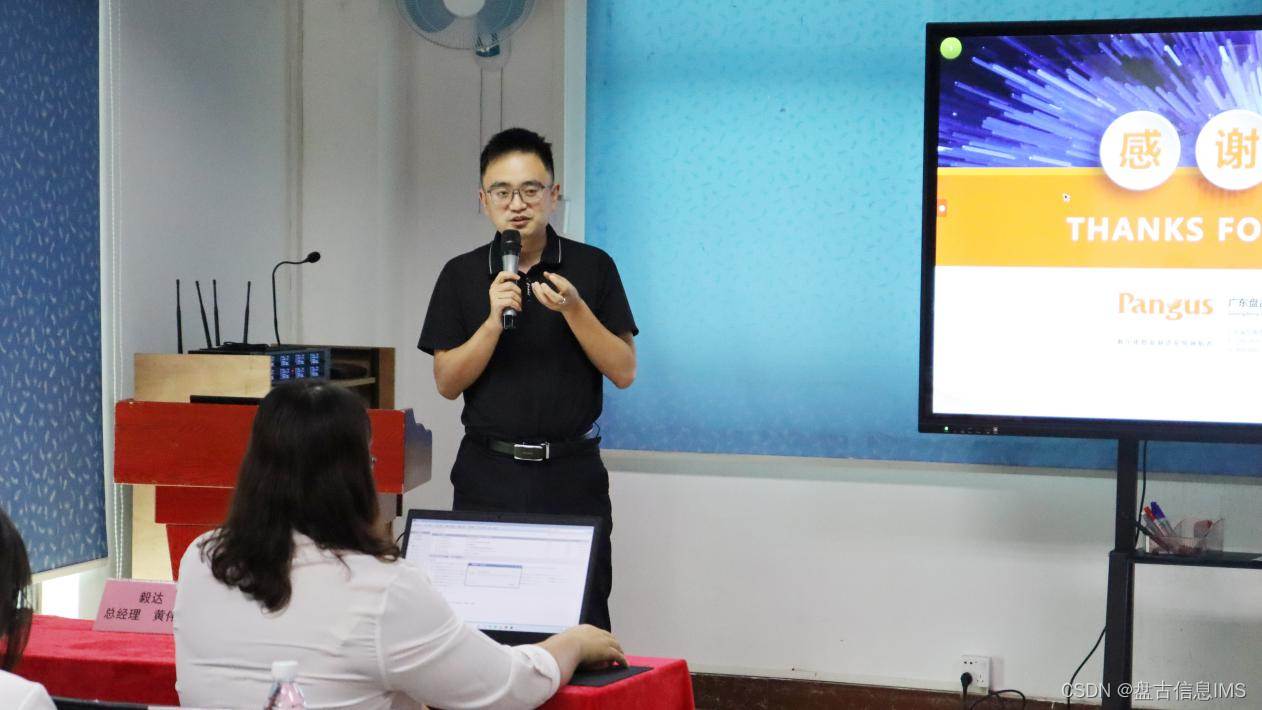
再度牵手,制造升级 | 毅达科技IMS OS+通用产品集+行业套件项目正式启动!
在数字化与智能制造的浪潮中,制造业企业纷纷加快转型步伐,力求通过技术创新实现生产效率与质量的双重提升。近日,广东毅达医疗科技股份有限公司(以下简称“毅达科技”)再次携手盘古信息,正式启动了IMS 数字…...

大疆智图_空三二维重建成果传输
一、软件环境 1.1 所需软件 1、 大疆智图:点击下载; 2、 ArcGIS Pro 3.1.5:点击下载,建议使用IDM或Aria2等多线程下载器; 3、 IDM下载器:点击下载,或自行搜索; 4、 Fas…...

python实现无人机航拍图片像素坐标转世界坐标
背景 已知相机参数(传感器宽度和高度、图像宽度和高度、焦距、相对航高、像主点坐标 ),在给定像素坐标的前提下,求世界坐标,大部分通过AI来实现,不知道哪个步骤有问题,望大家指正 脚本 impor…...

C#面:什么是 Windows 服务,它的生命周期与标准的 EXE 程序有什么不同
C#中的Windows服务是一种在后台运行的长时间运行的应用程序,它可以在Windows操作系统启动时自动启动,并在系统运行期间持续运行。与标准的EXE程序相比,Windows服务具有以下不同之处: 生命周期:Windows服务的生命周期与…...

5分钟快速上手JD-GUI:免费Java反编译工具的完整实战指南
5分钟快速上手JD-GUI:免费Java反编译工具的完整实战指南 【免费下载链接】jd-gui A standalone Java Decompiler GUI 项目地址: https://gitcode.com/gh_mirrors/jd/jd-gui 你是否曾面对一个只有.class文件的Java项目,却急于想了解它的内部实现&a…...
)
别再乱点鼠标了!用netsh advfirewall命令搞定Windows防火墙,效率翻倍(附常用场景命令清单)
Windows防火墙命令行实战:netsh advfirewall高阶应用指南 每次看到同事在图形界面里一层层点击"控制面板→系统和安全→Windows Defender防火墙→高级设置"时,我都忍不住想递给他一个命令行窗口。作为IT运维老手,我早已习惯用netsh…...

如何免费获取Book118文档?这个Java工具让你轻松下载完整PDF
如何免费获取Book118文档?这个Java工具让你轻松下载完整PDF 【免费下载链接】book118-downloader 基于java的book118文档下载器 项目地址: https://gitcode.com/gh_mirrors/bo/book118-downloader 你是否曾经在Book118网站上找到了一份急需的学习资料&#x…...

5分钟掌握PT一键转载神器:Auto Feed JS让资源分享效率提升10倍
5分钟掌握PT一键转载神器:Auto Feed JS让资源分享效率提升10倍 【免费下载链接】auto_feed_js PT站一键转载脚本 项目地址: https://gitcode.com/gh_mirrors/au/auto_feed_js 如果你是一位PT(Private Tracker)爱好者,一定经…...

免费开源桌面分区工具:如何用NoFences在5分钟内整理好你的Windows桌面
免费开源桌面分区工具:如何用NoFences在5分钟内整理好你的Windows桌面 【免费下载链接】NoFences 🚧 Open Source Stardock Fences alternative 项目地址: https://gitcode.com/gh_mirrors/no/NoFences 你是否每天都要面对杂乱无章的Windows桌面&…...

基于LLM的邮件智能体:从语义理解到自动化工作流实战
1. 项目概述:一个能“思考”的邮件智能体 最近在折腾一个挺有意思的开源项目,叫 XueJourney/mail-agent 。简单来说,它不是一个简单的邮件收发工具,而是一个能帮你“思考”和“行动”的邮件智能体。想象一下,你每天被…...
)
从DICOM到NIfTI:3D Slicer中医学图像坐标转换的完整避坑指南(附Python代码片段)
从DICOM到NIfTI:3D Slicer中医学图像坐标转换的完整避坑指南(附Python代码片段) 医学影像处理中,数据格式和坐标系的差异常常成为工程师和研究员们的"隐形杀手"。想象一下,你花了三天三夜训练的深度学习模型…...

深度解析RSA加密机制:3种Beyond Compare 5授权验证方案实战指南
深度解析RSA加密机制:3种Beyond Compare 5授权验证方案实战指南 【免费下载链接】BCompare_Keygen Keygen for BCompare 5 项目地址: https://gitcode.com/gh_mirrors/bc/BCompare_Keygen Beyond Compare 5作为专业文件对比工具的佼佼者,其授权验…...

ERP生产模块设计:从BOM到完工
一、基础数据:BOM与工艺路线生产模块的核心是BOM(物料清单)和工艺路线。这两个搞不清楚,生产计划无从谈起。1. BOM表结构CREATE TABLE bd_bom (id BIGINT PRIMARY KEY AUTO_INCREMENT,bom_no VARCHAR(30) NOT NULL UNIQUE,materia…...

从数据焦虑到数字资产:WeChatExporter如何重塑你的微信记忆管理
从数据焦虑到数字资产:WeChatExporter如何重塑你的微信记忆管理 【免费下载链接】WeChatExporter 一个可以快速导出、查看你的微信聊天记录的工具 项目地址: https://gitcode.com/gh_mirrors/wec/WeChatExporter 你是否曾因手机存储空间不足而不得不删除珍贵…...