
测试bert_base不同并行方式下的推理性能
测试bert_base不同并行方式下的推理性能
- 一.测试数据
- 二.测试步骤
- 1.生成bert配置文件
- 2.安装依赖
- 3.deepspeed 4卡tp并行
- 4.FSDP 4卡并行
- 5.手动将权值平均拆到4张卡,单进程多卡推理
- 6.手动切分成4份,基于NCCL实现pipeline并行
本文测试了bert_base模型在不同并行方式下的推理性能
约束
- 1.当前服务器上GPU不支持P2P且链路仅为PCIE GEN1 X16
可参考的点
- deepspeed 推理的使用
- FSDP推理的使用
- 如果将权值拆到多卡
- 自定义pipeline并行(切分网络并插入自定义修改)
- 如何自动处理pytorch算子输入tensor不在同一个设备上的问题
一.测试数据
| 并行方式 | QPS | GPU利用率 |
|---|---|---|
| deepspeed 4卡tp并行 | 175.73 | rank:0 util:100.00 rank:1 util:100.00 rank:2 util:97.00 rank:3 util:97.00 |
| FSDP 4卡并行 | 137.80 | rank:0 util:40.00 rank:1 util:40.00 rank:2 util:39.00 rank:3 util:40.00 |
| 手动将权值平均拆到4张卡,单进程多卡推理 | 29.34 | |
| 手动切分成4份,基于NCCL实现pipeline并行 | 244.76 | rank:1 util:40.00 rank:0 util:97.00 rank:2 util:39.00 rank:3 util:78.00 |
二.测试步骤
1.生成bert配置文件
tee ./config.json <<-'EOF'
{"architectures": ["BertForMaskedLM"],"attention_probs_dropout_prob": 0.1,"directionality": "bidi","hidden_act": "gelu","hidden_dropout_prob": 0.1,"hidden_size": 768,"initializer_range": 0.02,"intermediate_size": 3072,"layer_norm_eps": 1e-12,"max_position_embeddings": 512,"model_type": "bert","num_attention_heads": 12,"num_hidden_layers": 12,"pad_token_id": 0,"pooler_fc_size": 768,"pooler_num_attention_heads": 12,"pooler_num_fc_layers": 3,"pooler_size_per_head": 128,"pooler_type": "first_token_transform","type_vocab_size": 2,"vocab_size": 21128
}
EOF
2.安装依赖
pip install nvidia-ml-py3
3.deepspeed 4卡tp并行
tee ds_bert_infer.py <<-'EOF'
import torch
import deepspeed
import os
from deepspeed.accelerator import get_accelerator
import time
import torch.distributed as dist
import pynvml
import numpy as np
import threading#统计GPU利用率
class PynvmlGPUUtilizationThread(threading.Thread):def __init__(self,device,interval=1):super().__init__()self.interval = intervalself.running = Trueself.device=device        self.handle = pynvml.nvmlDeviceGetHandleByIndex(device)self.utilizations=[]def run(self):while self.running:self.get_and_print_gpu_utilization()time.sleep(self.interval)def stop(self):self.running = Falsedef get_and_print_gpu_utilization(self):utilization = pynvml.nvmlDeviceGetUtilizationRates(self.handle)self.utilizations.append(utilization.gpu)def data(self):return np.max(self.utilizations)def inference():    deepspeed.init_distributed(dist_backend='nccl')world_size = torch.distributed.get_world_size()local_rank=int(os.environ['LOCAL_RANK'])rank=torch.distributed.get_rank()pynvml.nvmlInit()torch.manual_seed(1)from transformers import AutoModelForMaskedLM,BertConfigconfig=BertConfig.from_pretrained("./config.json")model = AutoModelForMaskedLM.from_config(config)model.eval()engine = deepspeed.init_inference(model,tensor_parallel={"tp_size": world_size},dtype=torch.float32,replace_with_kernel_inject=True)device=get_accelerator().current_device_name()input_tokens=torch.randint(0,config.vocab_size,(1,128)).to(device)epoch=1024gpu_thread = PynvmlGPUUtilizationThread(local_rank,interval=1)gpu_thread.start()    t0=time.time()for i in range(epoch):outputs = engine(input_tokens)dist.barrier()torch.cuda.synchronize()t1=time.time()gpu_thread.stop()gpu_thread.join()       time.sleep(0.2*rank)        if rank==0:qps=epoch/(t1-t0)print(f"default stream qps:{qps:.2f}")print(f"rank:{rank} util:{gpu_thread.data():.2f}")stream_nbs=[1,2,4,8]    for n in stream_nbs:dist.barrier()if rank==0:print("-----------------------------------------------")streams=[torch.cuda.Stream() for _ in range(n)]total_samples=0        gpu_thread = PynvmlGPUUtilizationThread(local_rank,interval=1)gpu_thread.start()t0=time.time()for _ in range(epoch//n):for i in range(n):with torch.cuda.stream(streams[i]):total_samples+=1outputs = engine(input_tokens)        dist.barrier()torch.cuda.synchronize()t1=time.time()gpu_thread.stop()gpu_thread.join()    time.sleep(0.2*rank)        if rank==0:qps=total_samples/(t1-t0)print(f"{n} streams qps:{qps:.2f}")                print(f"rank:{rank} util:{gpu_thread.data():.2f}")if __name__ == "__main__":inference()EOF
deepspeed --num_gpus=4 ds_bert_infer.py
输出
------------------------------------------------------
default stream qps: 147.10
rank:0 util:90.00
rank:1 util:86.00
rank:2 util:89.00
rank:3 util:89.00
-----------------------------------------------
1 streams qps:162.62
rank:0 util:100.00
rank:1 util:100.00
rank:2 util:92.00
rank:3 util:88.00
-----------------------------------------------
2 streams qps:177.31
rank:0 util:100.00
rank:1 util:100.00
rank:2 util:99.00
rank:3 util:98.00
-----------------------------------------------
4 streams qps:176.11
rank:0 util:100.00
rank:1 util:100.00
rank:2 util:98.00
rank:3 util:97.00
-----------------------------------------------
8 streams qps:175.73
rank:0 util:100.00
rank:1 util:100.00
rank:2 util:97.00
rank:3 util:97.00
4.FSDP 4卡并行
tee fsdp_bert_infer.py <<-'EOF'
import time
import os
import torch
import torch.distributed as dist
import torch.multiprocessing as mp
from torch.distributed.fsdp import FullyShardedDataParallel as FSDP
import torchvision.models as models
import torch.nn as nn
import torch.nn.init as init
import time
import pynvml
import numpy as np
import threadingclass PynvmlGPUUtilizationThread(threading.Thread):def __init__(self,device,interval=1):super().__init__()self.interval = intervalself.running = Trueself.device=device        self.handle = pynvml.nvmlDeviceGetHandleByIndex(device)self.utilizations=[]def run(self):while self.running:self.get_and_print_gpu_utilization()time.sleep(self.interval)def stop(self):self.running = Falsedef get_and_print_gpu_utilization(self):utilization = pynvml.nvmlDeviceGetUtilizationRates(self.handle)self.utilizations.append(utilization.gpu)def data(self):return np.max(self.utilizations)def cleanup():dist.destroy_process_group()def demo_fsdp(rank, world_size,multi_stream):pynvml.nvmlInit()device = torch.device(f"cuda:{rank}")torch.manual_seed(1)from transformers import AutoModelForMaskedLM,BertConfigconfig=BertConfig.from_pretrained("./config.json")model = AutoModelForMaskedLM.from_config(config)model.eval()fsdp_model = FSDP(model,forward_prefetch=True).to(device)input_tokens=torch.randint(0,config.vocab_size,(1,128)).to(device)epoch_sz=1024gpu_thread = PynvmlGPUUtilizationThread(local_rank,interval=1)gpu_thread.start()    sz=8total_sample=0streams=[torch.cuda.Stream() for _ in range(sz)]t0=time.time()for epoch in range(epoch_sz):with torch.no_grad():outputs=[]if multi_stream:for i in range(sz):with torch.cuda.stream(streams[i]):total_sample+=1outputs.append(fsdp_model(input_tokens))else:output = fsdp_model(input_tokens)total_sample+=1torch.cuda.synchronize(rank)t1=time.time()gpu_thread.stop()gpu_thread.join()       time.sleep(0.2*rank)        if rank==0:qps=total_sample/(t1-t0)print(f"qps:{qps:.2f}")print(f"rank:{rank} util:{gpu_thread.data():.2f}")cleanup()if __name__ == "__main__":dist.init_process_group(backend='nccl')world_size = torch.distributed.get_world_size()rank=torch.distributed.get_rank()local_rank=int(os.environ['LOCAL_RANK'])torch.cuda.set_device(local_rank)demo_fsdp(local_rank,world_size,True)
EOF
torchrun -m --nnodes=1 --nproc_per_node=4 fsdp_bert_infer
输出
qps:137.80
rank:0 util:40.00
rank:1 util:40.00
rank:2 util:39.00
rank:3 util:40.00
5.手动将权值平均拆到4张卡,单进程多卡推理
tee split_bert_infer.py <<-'EOF'
import torch
import os
import time
from torch.utils._python_dispatch import TorchDispatchMode
from dataclasses import dataclass
from typing import Any@dataclass
class _ProfilerState:cls: Anyobject: Any = Noneclass EmptyModule(torch.nn.Module):def __init__(self):super(EmptyModule, self).__init__()passdef forward(self,x):return xclass TorchDumpDispatchMode(TorchDispatchMode):def __init__(self,parent):super().__init__()self.parent=parentself.op_index=0self.cvt_count=0def get_max_gpu_id(self,tensors):max_gpu_id = -1max_index = -1tensor_index=[]for i, tensor in enumerate(tensors):if not isinstance(tensor, torch.Tensor):continuetensor_index.append(i)if tensor.is_cuda:gpu_id = tensor.get_device()if gpu_id > max_gpu_id:max_gpu_id = gpu_idmax_index = iif max_gpu_id == -1:return None, None,tensor_indexreturn max_index, max_gpu_id,tensor_indexdef convert(self,op_type,tensor_list):index, gpu_id,tensor_index = self.get_max_gpu_id(tensor_list)if index is None:returnkeep_index=set(tensor_index)-set([index])device=torch.device(f"cuda:{gpu_id}")for i in keep_index:if tensor_list[i].device!=device:#print(f"{op_type} {i} {tensor_list[i].device} -> {device}")tensor_list[i].data=tensor_list[i].data.to(device,non_blocking=True) #卡间通信是串行的,所有多stream并不能充分提升性能def __torch_dispatch__(self, func, types, args=(),kwargs=None):func_packet = func._overloadpacketif kwargs is None:kwargs = {}op_type=f"{func}"self.op_index+=1if isinstance(args, list) or isinstance(args, tuple):self.convert(op_type,args)elif isinstance(args[0], list) or isinstance(args[0], tuple):self.convert(op_type,args[0])else:print(op_type)output= func(*args,**kwargs)return outputclass TorchDumper:def __init__(self,**kwargs):self.p= _ProfilerState(TorchDumpDispatchMode)self.kwargs=kwargsdef __enter__(self):if self.p.object is None:o = self.p.cls(self,**self.kwargs)o.__enter__()self.p.object = oelse:self.p.object.step()return selfdef __exit__(self, exc_type, exc_val, exc_tb):TorchDumper._CURRENT_Dumper = Noneif self.p.object is not None:self.p.object.__exit__(exc_type, exc_val, exc_tb)del self.p.objecttorch.manual_seed(1)
from transformers import AutoModelForMaskedLM,BertConfig
config=BertConfig.from_pretrained("./config.json")
model = AutoModelForMaskedLM.from_config(config)
model.eval()cur_dev=0
from collections import OrderedDictparam_size=OrderedDict()
total_size=0
for name, param in model.named_parameters():#print(f"{name} {param.device} {param.shape}")sz=param.numel()*param.element_size()key=".".join(name.split(".")[:-1])if key not in param_size:param_size[key]=0param_size[key]+=sztotal_size+=szfor name, param in model.named_buffers():#print(name,param.device)sz=param.numel()*param.element_size()key=".".join(name.split(".")[:-1])if key not in param_size:param_size[key]=0param_size[key]+=sztotal_size+=szsz_per_dev=total_size/4
cur_size=0dev_map=OrderedDict()
for k,v in param_size.items():sz=vcur_size+=szif cur_size>=sz_per_dev:print(cur_dev,cur_size)cur_size=0cur_dev+=1dev_map[k]=cur_devfor name, param in model.named_parameters():key=".".join(name.split(".")[:-1])op=dict(model.named_parameters())[name]device=f"cuda:{dev_map[key]}"op.data=op.data.to(device)for name, param in model.named_buffers():key=".".join(name.split(".")[:-1])op=dict(model.named_buffers())[name]device=f"cuda:{dev_map[key]}"op.data=op.data.to(device)with TorchDumper():sz=4input_tokens=torch.randint(0,config.vocab_size,(1,128)).to("cuda:0")streams=[torch.cuda.Stream() for _ in range(sz)]batch_size=0t0=time.time()for epoch in range(1024):outputs=[]for i in range(sz):with torch.cuda.stream(streams[i]):batch_size+=1outputs.append(model(input_tokens))torch.cuda.synchronize()t1=time.time()print("qps:",batch_size/(t1-t0))
EOF
python split_bert_infer.py
输出
qps: 29.34
6.手动切分成4份,基于NCCL实现pipeline并行
tee pp_bert_infer.py <<-'EOF'
import torch
import os
import time
from collections import OrderedDict
import torch.distributed as dist
import torch.nn as nn
import torch.nn.init as init
import numpy as np
import time
import pynvml
import numpy as np
import threadingclass EmptyModule(torch.nn.Module):def __init__(self):super(EmptyModule, self).__init__()passdef forward(self,x):return x[0]class PynvmlGPUUtilizationThread(threading.Thread):def __init__(self,device,interval=1):super().__init__()self.interval = intervalself.running = Trueself.device=device        self.handle = pynvml.nvmlDeviceGetHandleByIndex(device)self.utilizations=[]def run(self):while self.running:self.get_and_print_gpu_utilization()time.sleep(self.interval)def stop(self):self.running = Falsedef get_and_print_gpu_utilization(self):utilization = pynvml.nvmlDeviceGetUtilizationRates(self.handle)self.utilizations.append(utilization.gpu)def data(self):return np.max(self.utilizations)pynvml.nvmlInit()dist.init_process_group(backend='nccl')
world_size = torch.distributed.get_world_size()
rank=torch.distributed.get_rank()
local_rank=int(os.environ['LOCAL_RANK'])
torch.cuda.set_device(local_rank)torch.manual_seed(1)
from transformers import AutoModelForMaskedLM,BertConfig
config=BertConfig.from_pretrained("./config.json")
model = AutoModelForMaskedLM.from_config(config)
model.eval()divided=[]
#查看modeling_bert.py找到相关的名字
submodules=[]
submodules.append(("embeddings",model.bert.embeddings))
for i,m in enumerate(model.bert.encoder.layer[:3]):submodules.append((f"{i}",m))submodules.append((f"{i}-1",EmptyModule()))
divided.append(submodules)submodules=[]
for i,m in enumerate(model.bert.encoder.layer[3:7]):submodules.append((f"{i}",m))submodules.append((f"{i}-1",EmptyModule()))
divided.append(submodules)submodules=[]for i,m in enumerate(model.bert.encoder.layer[7:11]):submodules.append((f"{i}",m))submodules.append((f"{i}-1",EmptyModule()))
divided.append(submodules)submodules=[]for i,m in enumerate(model.bert.encoder.layer[11:]):submodules.append((f"{i}",m))submodules.append((f"{i}-1",EmptyModule()))
submodules.append(("cls",model.cls))
divided.append(submodules)device=f"cuda:{local_rank}"
example_input=torch.randint(0,config.vocab_size,(1,128)).to(device)
submodule=torch.nn.Sequential(OrderedDict(divided[local_rank])).to(device)sreq=None
ts=[]gpu_thread = PynvmlGPUUtilizationThread(local_rank,interval=1)
gpu_thread.start()
t0=time.time()
for epoch in range(1000):if sreq is not None and not sreq.is_completed():sreq.wait()sreq=Noneif local_rank!=0:tensor_size = torch.empty((3,), dtype=torch.int64).to(device)torch.distributed.recv(tensor_size,local_rank-1)example_input = torch.empty(tensor_size.tolist()).to(device)torch.distributed.recv(example_input,local_rank-1)#print("recv:",local_rank-1,example_input.shape)else:torch.manual_seed(1)output=submodule(example_input)if local_rank<world_size-1:#print("local_rank out:",output.shape)tensor_size = torch.tensor(output.size(), dtype=torch.int64).to(device)torch.distributed.isend(tensor_size,local_rank+1)sreq=torch.distributed.isend(output,local_rank+1)#torch.distributed.send(output,local_rank+1)elif local_rank==world_size-1:ts.append(time.time())
dist.barrier()
t1=time.time()gpu_thread.stop()
gpu_thread.join()
time.sleep(0.2*local_rank)
print(f"rank:{local_rank} util:{gpu_thread.data():.2f}")if local_rank==world_size-1:ts=ts[len(ts)//2:]print("latency:",ts[1]-ts[0],"qps:",len(ts)/(ts[-1]-ts[0]),1000/(t1-t0))
EOF
torchrun -m --nnodes=1 --nproc_per_node=4 pp_bert_infer
输出:
rank:1 util:40.00
rank:0 util:97.00
rank:2 util:39.00
rank:3 util:78.00
latency: 0.002396106719970703 qps: 408.6954420411698 244.76515394402227
相关文章:

测试bert_base不同并行方式下的推理性能
测试bert_base不同并行方式下的推理性能 一.测试数据二.测试步骤1.生成bert配置文件2.安装依赖3.deepspeed 4卡tp并行4.FSDP 4卡并行5.手动将权值平均拆到4张卡,单进程多卡推理6.手动切分成4份,基于NCCL实现pipeline并行 本文测试了bert_base模型在不同并行方式下的推理性能 约…...
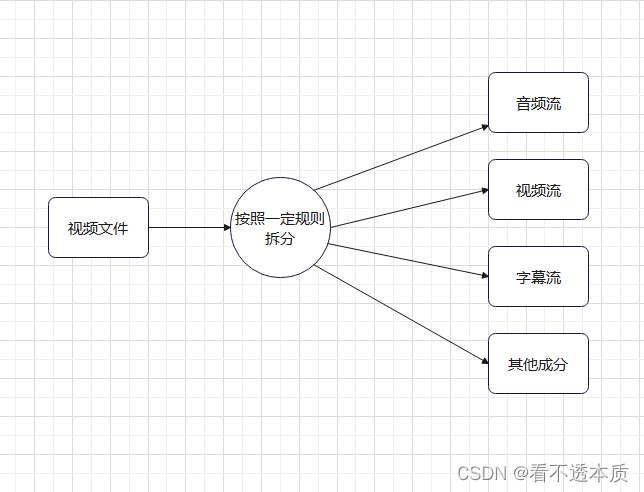
FFMpeg解复用流程
文章目录 解复用流程图复用器与解复用器小结 解复用流程图 流程图,如上图所示。 复用器与解复用器 复用器,就是视频流,音频流,字幕流,其他成分,按照一定规则组合成视频文件,视频文件可以是mp4…...
438. 找到字符串中所有字母异位词
题目 给定两个字符串 s 和 p,找到 s 中所有 p 的异位词的子串,返回这些子串的起始索引。不考虑答案输出的顺序。 异位词指由相同字母重排列形成的字符串(包括相同的字符串)。 示例 1: 输入: s "cbaebabacd", p &q…...
】- Qt信号和槽)
【Qt 快速入门(三)】- Qt信号和槽
目录 Qt 快速入门(三)- Qt信号和槽Qt信号和槽详解信号和槽的基本概念信号槽连接 信号和槽的声明与定义连接信号和槽信号和槽的高级特性自动参数匹配信号与信号连接lambda 表达式作为槽自定义信号和槽 信号和槽的线程支持跨线程连接 信号和槽的生命周期管…...

Debain12 离线安装docker
官网教程:https://docs.docker.com/engine/install/debian/ 步骤 1. 解压 docker-deb.7z 安装包并上传Linux (资源在PC端文章顶部) 2. 安装 .deb 包 sudo dpkg -i ./containerd.io_<version>_<arch>.deb \./docker-ce_<vers…...
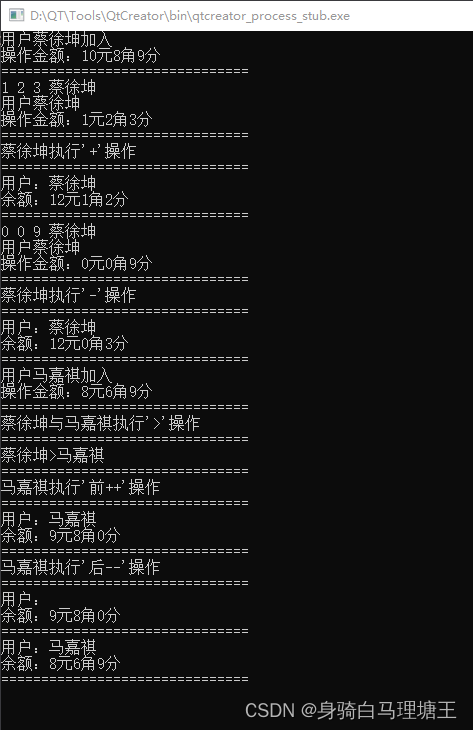
C++day5
思维导图 搭建一个货币的场景,创建一个名为 RMB 的类,该类具有整型私有成员变量 yuan(元)、jiao(角)和 fen(分),并且具有以下功能: (1)重载算术运算符 和 -…...
 呈现数据)
SHELL脚本学习(六) 呈现数据
一、标准文件描述符 linux系统会将每个对象当作文件来处理,包括输入和输出。linux用文件描述符来描述每个对象。文件描述符是一个非负整数,唯一会标识的是打开的文件。每个进程一次最多能打开9个文件描述符。处于特殊目的,bash shell保留了前…...
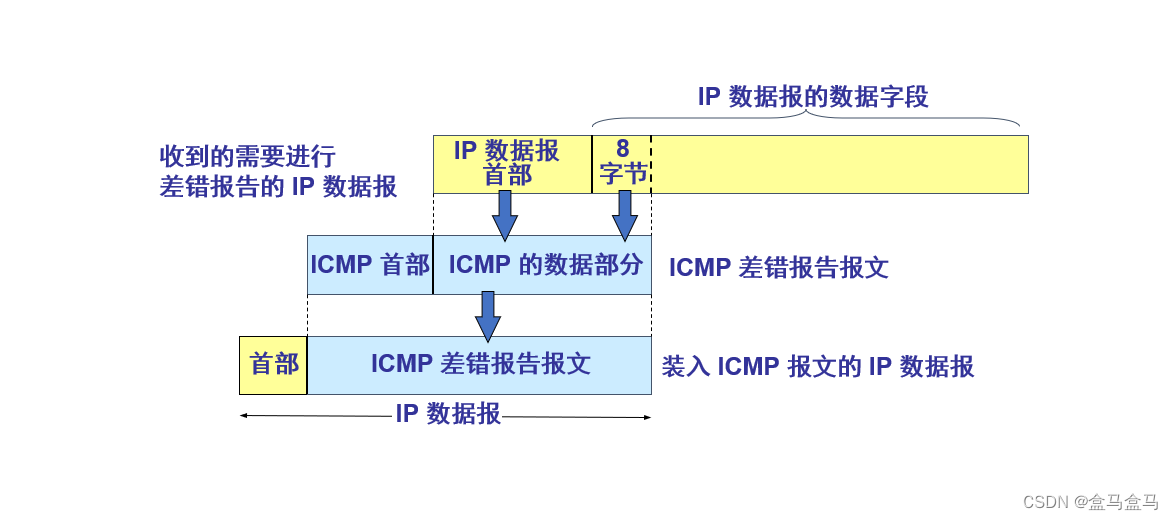
计算机网络:网络层 - IPv4数据报 ICMP协议
计算机网络:网络层 - IPv4数据报 & ICMP协议 IPv4数据报[版本 : 首部长度 : 区分服务 : 总长度][标识 : 标志 : 片偏移][生存时间 : 协议 : 首部检验和][可变部分 : 填充字段] ICMP协议 IPv4数据报 一个IPv4数据报,由首部和数据两部分组成ÿ…...
【需求设计】软件概要设计说明怎么写?概要设计说明书实际项目案例(63页Word直接套用)
软件概要设计说明书书写要点可以归纳为以下几个方面,以确保文档的准确性、完整性和可读性: 引言 目的:介绍编写该文档的目的、主要内容及目标读者。 背景:说明被开发软件的名称、项目提出者、开发者等背景信息。 需求概述…...
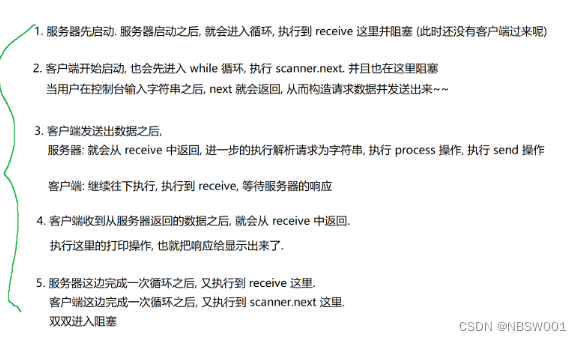
网络编程2----UDP简单客户端服务器的实现
首先我们要知道传输层提供的协议主要有两种,TCP协议和UDP协议,先来介绍一下它们的区别: 1、TCP是面向连接的,UDP是无连接的。 连接的本质是双方分别保存了对方的关键信息,而面向连接并不意味着数据一定能正常传输到对…...
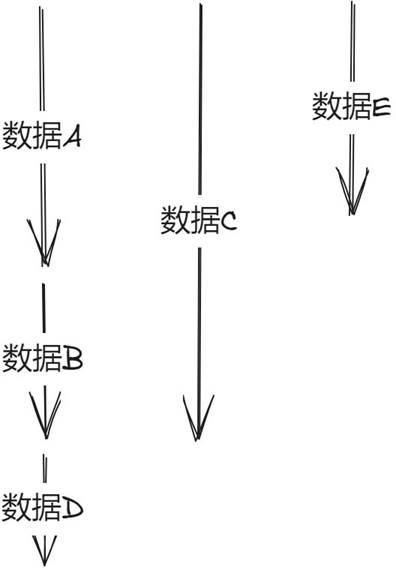
服务架构的设计原则
墨菲定律与康威定律 在系统设计的时候,可以依据于墨菲定律 任何事情都没有表面上看起来那么简单所有的事情都会比你预计的时间长可能出错的事总会出错担心的某一个事情的发送,那么它就更有可能发生 在系统划分的时候,可以依据康威定律 系…...
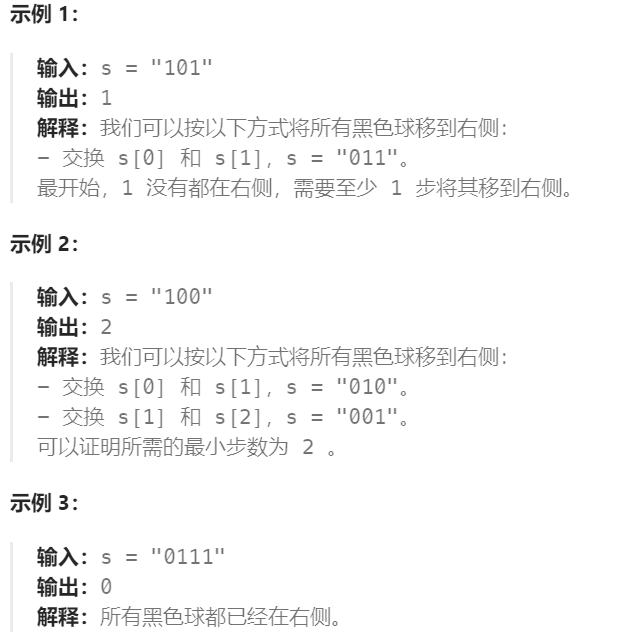
Day 14:2938. 区分黑球和白球
Leetcode 2938. 区分黑球和白球 桌子上有 n 个球,每个球的颜色不是黑色,就是白色。 给你一个长度为 n 、下标从 0 开始的二进制字符串 s,其中 1 和 0 分别代表黑色和白色的球。 在每一步中,你可以选择两个相邻的球并交换它们。 返…...
部署YUM仓库及NFS共享服务
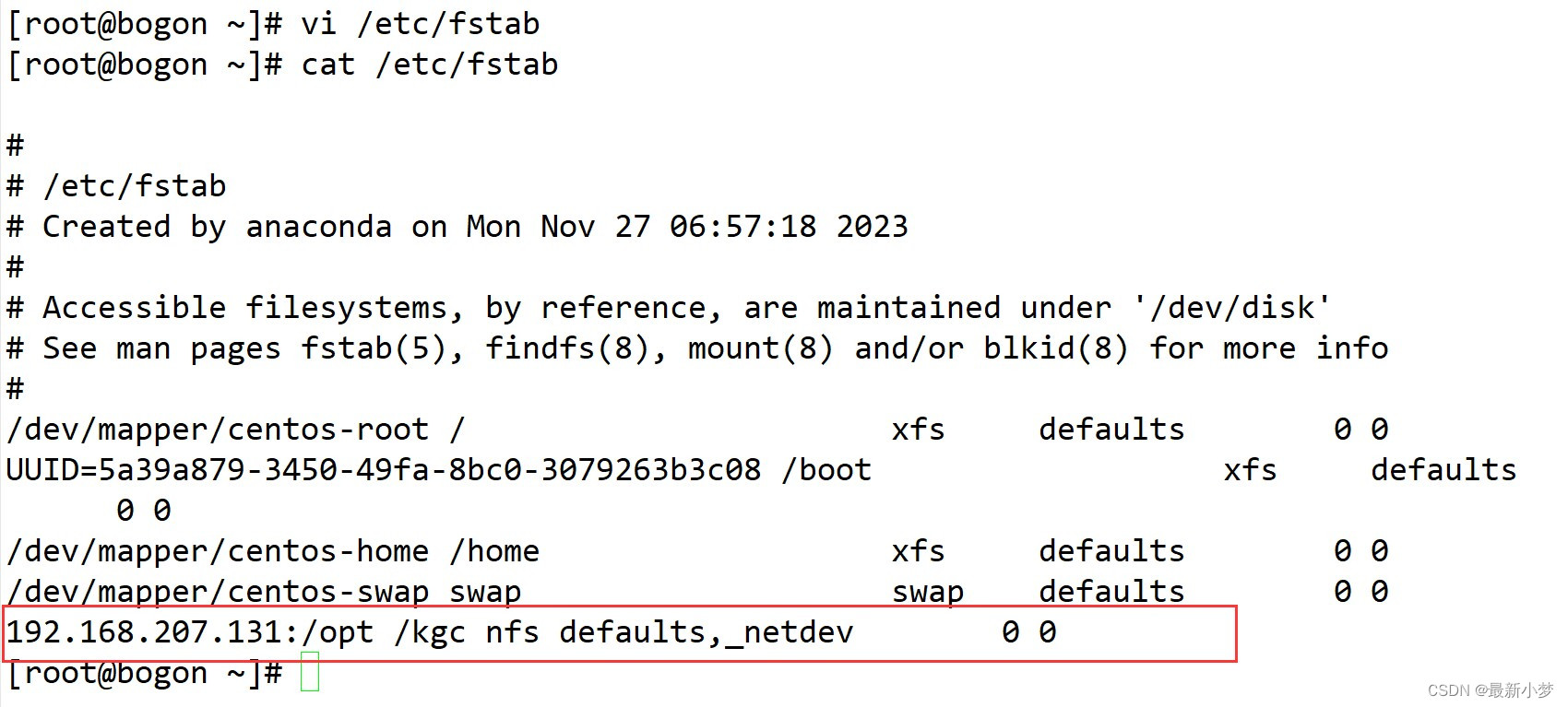
YUM概述 YUM 基于RPM包构建的软件更新机制 可以自动解决依赖关系 所有软件包由集中的YUM软件仓库提供 YUM只允许一个程序运行,虽然不影响命令的使用。DNF后,允许多个程序允许 YUM的配置文件在/etc/yum.conf 网络源(所有以repo为结尾都是源&am…...
web学习笔记(六十五)
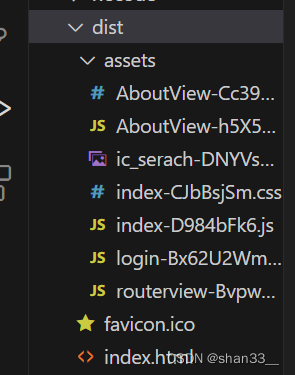
目录 1. Hash模式和History模式 2. 导航守卫 3. 路由元信息 4.路由懒加载 1. Hash模式和History模式 Hash模式(哈希模式)和History模式(历史模式)是匹配路由的两种模式,一般默认配置Hash模式,可以在in…...
66. UE5 RPG 实现远程攻击武器配合角色攻击动画
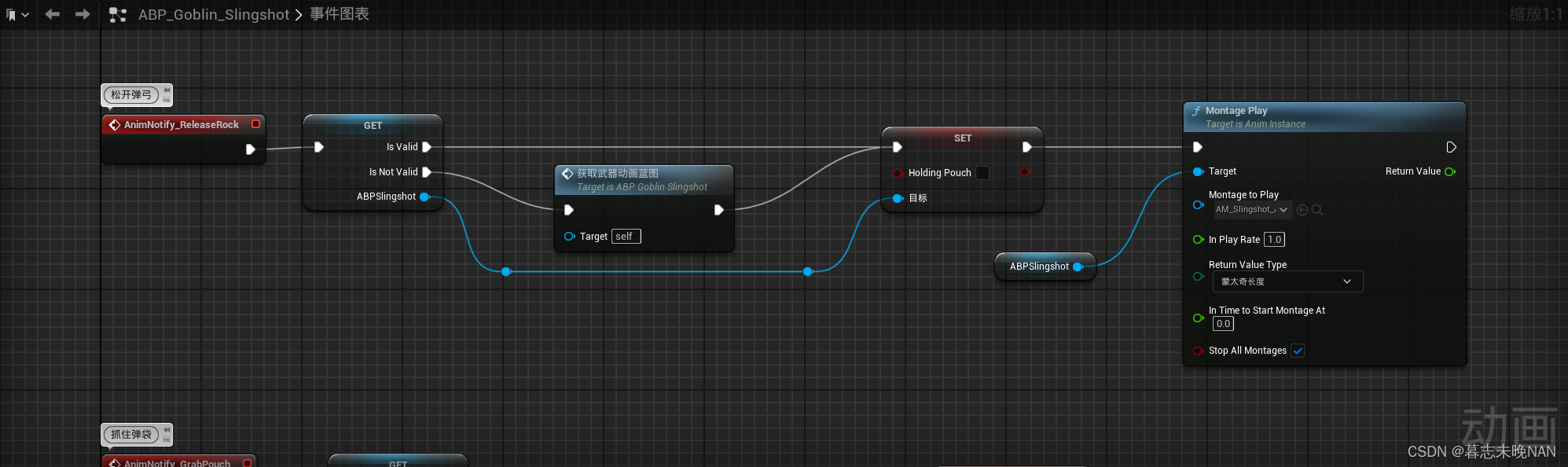
在制作游戏中,我们制作远程攻击角色,他们一般会使用弓箭,弩,弹弓等武器来进行攻击。比如你使用弓箭时,如果角色在播放拉弓弦的动画,但是弓箭武器没有对应的表现,会显得很突兀。所以,…...

用 Python 编写自动发送每日电子邮件报告的脚本,并指导我如何进行设置
编写一个自动发送每日电子邮件报告的脚本涉及几个步骤。我们需要使用 Python 编写脚本,并使用一些库来发送电子邮件。下面是一个示例脚本和设置步骤。 第一步:安装必要的库 我们需要安装 smtplib 和 email 库。可以通过以下命令安装: pip …...

AI大模型的战场:通用与垂直的较量
目录 AI大模型的战场:通用与垂直的较量 1.引言 2.通用大模型的优势 2.1 概念 2.2 谷歌的BERT模型 2.3 OpenAI的GPT模型 2.4 微软的Visual Studio Code 2.5 结论 3.垂直大模型的崛起 3.1 概念 3.2 医疗影像分析的AI模型 3.3 自动驾驶领域的AI模型 3.4 金…...
单目标应用:基于人工原生动物优化器APO的微电网优化(MATLAB代码)
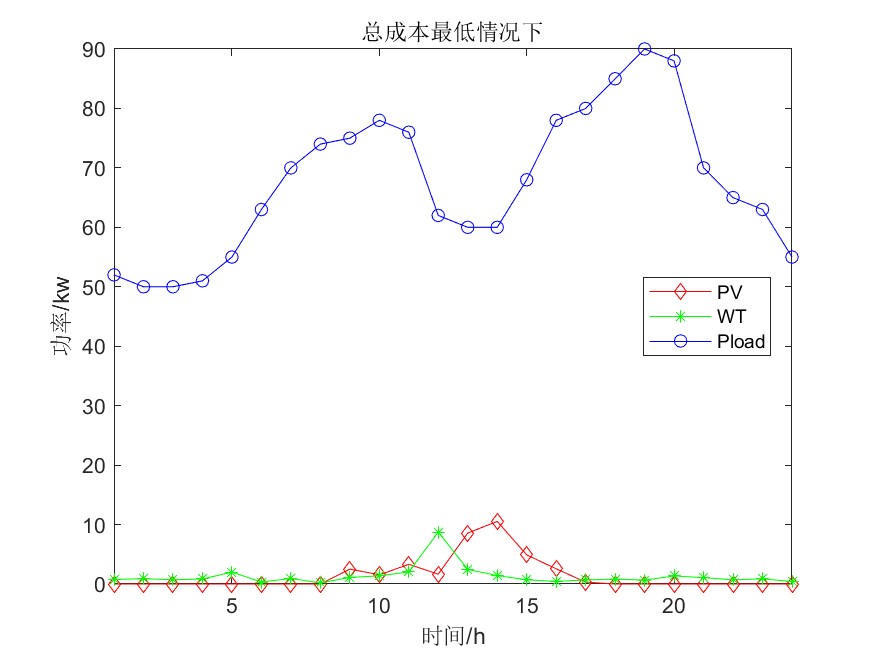
一、微电网模型介绍 微电网多目标优化调度模型简介_vmgpqv-CSDN博客 参考文献: [1]李兴莘,张靖,何宇,等.基于改进粒子群算法的微电网多目标优化调度[J].电力科学与工程, 2021, 37(3):7 二、人工原生动物优化算法求解微电网 2.1算法简介 人工原生动物优化器&am…...
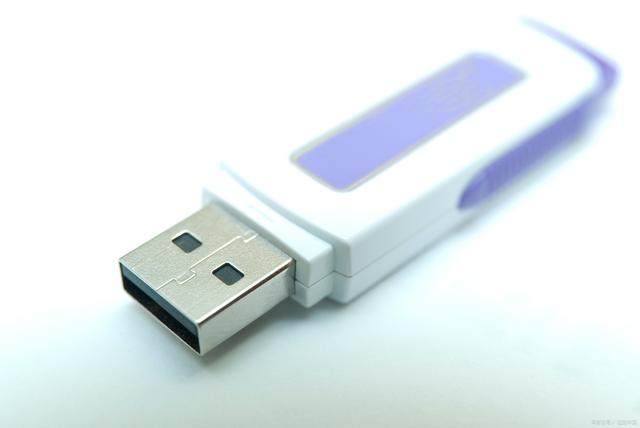
USB端口管控软件|USB端口控制软件有哪些(小技巧)
USB端口管控软件成为了保障企业数据安全的重要手段。 本文将为您介绍几款知名的USB端口控制软件,并分享一些实用的小技巧,帮助您更好地管理US端口,确保企业信息安全。#usb接口# 一、USB端口控制软件推荐 1,域智盾 域智盾是一…...

CorelDRAW2024官方最新中文破解版Crack安装包网盘下载安装方法
在设计的世界里,软件工具的更新与升级总是令人瞩目的焦点。近期,CorelDRAW 2024中文版及其终身永久版的发布,以及中文破解版Crack的出现,再次掀起了设计圈的热潮。对于追求专业精确的设计师而言,了解这些版本的下载安装…...

MCP Analytics Suite:用自然语言驱动AI数据分析,零代码生成专业报告
1. 项目概述:当AI助手遇上专业数据分析如果你和我一样,日常工作中需要处理大量的业务数据——可能是Shopify的订单报表、Stripe的支付流水,或者是一堆从各个渠道导出的CSV文件——那你一定体会过那种“数据在手,却无从下手”的焦虑…...
)
从CuteCom到minicom:手把手教你搭建Ubuntu嵌入式开发串口调试环境(附I.MX6ULL实战)
从CuteCom到minicom:Ubuntu嵌入式开发串口调试全攻略 嵌入式开发中,串口调试如同工程师的"听诊器"。当你在Ubuntu系统上面对I.MX6ULL这类开发板时,选择一款趁手的串口工具,往往能事半功倍。本文将带你深度对比CuteCom和…...

RE正则提取数字
RE正则提取数字import resddfff1234567890aasdfff s1s[::-1] print(fs:{s};s1:{s1}) option_str re.sub("\D", "", s) print(option_str )...

基于Helm Chart在Kubernetes中部署docker-mailserver邮件服务器
1. 项目概述与核心价值最近在折腾自建邮件服务器,发现了一个宝藏项目:docker-mailserver。它把邮件服务里那些复杂的组件,比如 Postfix、Dovecot、SpamAssassin、ClamAV 这些,全都打包进了一个 Docker 镜像里,开箱即用…...

[STM32U3] 【每周分享】【STM32U385RG 测评】+串口发送、接收数据
上篇串口通讯只是打印叔数据,这篇更进一步,将串口发送什么,就打印什么出来 一、查看原理图,确定自己需要的串口信息 还是一样的串口1 二、开始配置软件 上面基础配置结束之后,增加DMA以及NVIC配置 时钟可以根据自…...

医疗AI数据偏见:从耳镜图像分类看模型泛化陷阱与实战避坑指南
1. 项目概述与核心挑战作为一名在医疗AI领域摸爬滚打了十多年的从业者,我见过太多“实验室里天花乱坠,临床上寸步难行”的模型。最近,我和团队深入剖析了一项关于利用人工智能(AI)进行中耳炎耳镜图像分类的研究&#x…...

大语言模型微调实战:从LoRA到QLoRA,一站式开源框架详解
1. 项目概述与核心价值 如果你正在寻找一个能够一站式搞定主流大语言模型微调的开源项目,那么 ssbuild/llm_finetuning 绝对值得你花时间深入研究。这个项目本质上是一个基于 PyTorch 和 Hugging Face Transformers 生态的、高度工程化的微调框架。它最大的魅力在…...

Nitric常见问题解答:开发者最关心的25个问题汇总
Nitric常见问题解答:开发者最关心的25个问题汇总 【免费下载链接】nitric Nitric is a multi-language framework for cloud applications with infrastructure from code. 项目地址: https://gitcode.com/gh_mirrors/ni/nitric Nitric是一个多语言框架&…...

RAG:嵌入模型评估与选型
在RAG系统中,嵌入模型是检索质量的关键组件,它决定了系统能否真正“理解”用户意图并从海量知识中精准召回相关信息,其语义匹配精度直接决定了整个RAG的性能上限。 一、嵌入模型评估指标 1.1 公开基准 MTEB v2 是目前全球公认最权威的大规…...

Helm模板智能助手:提升Kubernetes应用部署效率的VSCode插件
1. 为什么你需要一个Helm模板智能助手如果你和我一样,每天都在和Kubernetes的Helm Charts打交道,那你一定对编写templates/目录下那些.yaml文件又爱又恨。爱的是Helm的模板引擎确实强大,能把一堆重复的YAML配置抽象成可复用的模板;…...