
WordPress——Argon主题美化
文章目录
- Argon主题美化
- 插件类
- 类别标签页面
- 更新管理器
- 文章头图URL
- 查询监视器
- WordPress提供Markdown语法
- 评论区头像设置
- 发信设置
- 隐藏登陆
- 备份设置
- 缓存插件
- 主题文件编辑器
- 页脚显示在线人数
- 备案信息(包含备案信息+网站运行时间)
- banner下方小箭头滚动效果
- 站点功能概览下方Links功能
- 额外CSS
- 页头脚本
- 页尾脚本
- 错误解决
- 413 request Entity too Large
- 设置http响应头Cache-Control及Pragma,增加CDN cache命中率
- wordpress更改固定链接模式后前台文件打开404
Argon主题美化
插件类
类别标签页面
Category Tag Pages插件
为您的页面添加类别和标签功能
更新管理器
Easy Updates Manager插件 可以关闭wordpress翻译更新
文章头图URL
Featured Image from URL (FIFU)插件
查询监视器
Query Monitor插件
- 页面生成时间(以秒为单位)
- 峰值内存使用量
- SQL 查询所用的总时间(以秒为单位)
- SQL 查询总数
WordPress提供Markdown语法
WP Githuber MD插件
评论区头像设置
WP-China-Yes 插件
发信设置
除了发信,还可以屏蔽一些WordPress不常用的功能
WPJAM BASIC 插件
隐藏登陆
可以自定义设置登陆地址
WPS Hide Login插件
备份设置
WPvivid 备份插件
缓存插件
WP super cache插件
主题文件编辑器
页脚显示在线人数
# 网站显示 外观 >> 主题文件编辑器 >> footer.php(主题页脚)也可以添加到Argon主题选项的页脚栏中
# 在第四行以后插入
<?php
$online_log = "/usr/local/nginx/html/wordpress/wp-content/themes/argon-theme-master/maplers.dat"; // 保存人数的文件路径(根据实际情况设置)
$timeout = 30; // 30秒内没动作者,认为掉线// 检查文件是否存在,如果不存在则创建它
if (!file_exists($online_log)) {$fp = fopen($online_log, "w");fclose($fp);chmod($online_log, 0666); // 设置文件权限为可读可写
}$entries = file($online_log);
$temp = array();for ($i = 0; $i < count($entries); $i++) {$entry = explode(",", trim($entries[$i]));if (($entry[0] != $_SERVER['REMOTE_ADDR']) && ($entry[1] > time())) {array_push($temp, $entry[0] . "," . $entry[1] . "\n");}
}
array_push($temp, $_SERVER['REMOTE_ADDR'] . "," . (time() + ($timeout)) . "\n");
$maplers = count($temp);$entries = implode("", $temp);// 写入文件
$fp = fopen($online_log, "w");
flock($fp, LOCK_EX);
fputs($fp, $entries);
flock($fp, LOCK_UN);
fclose($fp);echo "当前在线人数:".$maplers."人";
?>
备案信息(包含备案信息+网站运行时间)
# 网站显示 外观 >> 主题文件编辑器 >> footer.php(主题页脚) 也可以添加到Argon主题选项的页脚栏中
# 在第四行以后插入
<style>
/* 核心样式 */
.github-badge {
display: inline-block;
border-radius: 4px;
text-shadow: none;
font-size: 13.1px;
color: #fff;
line-height: 15px;
margin-bottom: 5px;
font-family: "Open Sans", sans-serif;
}
.github-badge .badge-subject {
display: inline-block;
background-color: #4d4d4d;
padding: 4px 4px 4px 6px;
border-top-left-radius: 4px;
border-bottom-left-radius: 4px;
font-family: "Open Sans", sans-serif;
}
.github-badge .badge-value {
display: inline-block;
padding: 4px 6px 4px 4px;
border-top-right-radius: 4px;
border-bottom-right-radius: 4px;
font-family: "Open Sans", sans-serif;
}
.github-badge-big {
display: inline-block;
border-radius: 6px;
text-shadow: none;
font-size: 14.1px;
color: #fff;
line-height: 18px;
margin-bottom: 7px;
}
.github-badge-big .badge-subject {
display: inline-block;
background-color: #4d4d4d;
padding: 4px 4px 4px 6px;
border-top-left-radius: 4px;
border-bottom-left-radius: 4px;
}
.github-badge-big .badge-value {
display: inline-block;
padding: 4px 6px 4px 4px;
border-top-right-radius: 4px;
border-bottom-right-radius: 4px;
}
.bg-orange {
background-color: #ec8a64 !important;
}
.bg-red {
background-color: #cb7574 !important;
}
.bg-apricots {
background-color: #f7c280 !important;
}
.bg-casein {
background-color: #dfe291 !important;
}
.bg-shallots {
background-color: #97c3c6 !important;
}
.bg-ogling {
background-color: #95c7e0 !important;
}
.bg-haze {
background-color: #9aaec7 !important;
}
.bg-mountain-terrier {
background-color: #99a5cd !important;
}
</style><div class="github-badge-big"><span class="badge-subject"><i class="fa fa-id-card"></i> 备案号 </span><span class="badge-value bg-orange"><!-- 备案链接 --><a href="https://beian.miit.gov.cn/" target="_blank" one-link-mark="yes">晋ICP备1111号</a> |<a href="https://www.beian.gov.cn/portal/index?token=e547b70c-fbe1-4c80-a4a2-857b17389a71" target="_blank" one-link-mark="yes"><img src="图片" alt="晋公网安备11111号">晋公网安备14050002001833号</a></span>
</div><!-- 运行时间 --><div class="github-badge-big"><span class="badge-subject"><i class="fa fa-clock-o"></i> Running Time</span><spanclass="badge-value bg-apricots"><span id="blog_running_days" class="odometer odometer-auto-theme"></span>days<span id="blog_running_hours" class="odometer odometer-auto-theme"></span> H<span id="blog_running_mins" class="odometer odometer-auto-theme"></span> M<span id="blog_running_secs" class="odometer odometer-auto-theme"></span>S</span><script no-pjax="">
var blog_running_days = document.getElementById("blog_running_days");
var blog_running_hours = document.getElementById("blog_running_hours");
var blog_running_mins = document.getElementById("blog_running_mins");
var blog_running_secs = document.getElementById("blog_running_secs");
function refresh_blog_running_time() {
var time = new Date() - new Date(2024, 4, 8, 0, 0, 0); /*此处日期的月份改为自己真正月份的前一个月*/
var d = parseInt(time / 24 / 60 / 60 / 1000);
var h = parseInt((time % (24 * 60 * 60 * 1000)) / 60 / 60 / 1000);
var m = parseInt((time % (60 * 60 * 1000)) / 60 / 1000);
var s = parseInt((time % (60 * 1000)) / 1000);
blog_running_days.innerHTML = d;
blog_running_hours.innerHTML = h;
blog_running_mins.innerHTML = m;
blog_running_secs.innerHTML = s;
}
refresh_blog_running_time();
if (typeof bottomTimeIntervalHasSet == "undefined") {
var bottomTimeIntervalHasSet = true;
setInterval(function () {
refresh_blog_running_time();
}, 500);
}
</script>
banner下方小箭头滚动效果
- 打开 外观->主题文件编辑器
- 在右侧 主题文件 处找到 主题页眉(header.php文件)
- CTRL + F 查询关键字cover-scroll-down
- 内容替换为如下图片内容
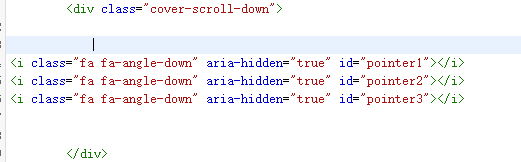
<i class="fa fa-angle-down" aria-hidden="true" id="pointer1"></i>
<i class="fa fa-angle-down" aria-hidden="true" id="pointer2"></i>
<i class="fa fa-angle-down" aria-hidden="true" id="pointer3"></i>
接着额外CSS(外观 >> 自定义 >> 额外CSS)添加
/* 滑动块 */
@keyframes up-down-move {
0% {
opacity:0;
transform:translate(-50%,-150px);
}
50% {
opacity:1;
transform:translate(-50%,-130px);
}
100% {
opacity:0;
transform:translate(-50%,-110px);
}
}.cover-scroll-down .fa-angle-down{
font-size: 3rem;
text-shadow: 0px 0px 8px #dc1111;
position:absolute;
transform: translate(-50%,-80px);
opacity:0;
}.cover-scroll-down #pointer1{
animation: up-down-move 3s linear infinite;}.cover-scroll-down #pointer2{
animation: up-down-move 3s 1s linear infinite;
}.cover-scroll-down #pointer3{
animation: up-down-move 3s 2s linear infinite;
}
站点功能概览下方Links功能
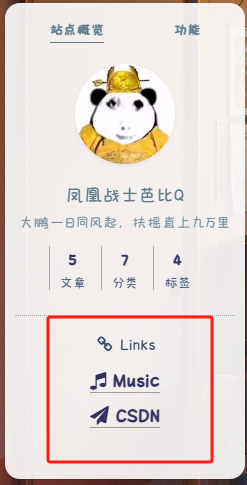
- 打开 外观->主题文件编辑器
- 在右侧 主题文件 处找到 边栏(sidebar.php文件)
- 找到对应行
- 内容替换为如下图片内容
<div class="site-friend-links">
<div class="site-friend-links-title"><i class="fa fa-fw fa-link"></i> Links</div>
<ul class="site-friend-links-ul">
<li class="site-friend-links-item">
<a href="https://music.163.com/#/playlist?id=2179738992" rel="noopener" target="_blank"><i class="fa fa-music" aria-hidden="true"></i> Music</a></li>
<li class="site-friend-links-item">
<a href="https://blog.csdn.net/qq_52089863" rel="noopener" target="_blank"><i class="fa fa-paper-plane" aria-hidden="true"></i> CSDN</a></li></ul></div>
额外CSS
外观 >> 自定义 >> 额外CSS
/*=========字体设置============*//*字体*/
@font-face {
font-family: myFont;
src:url('URL') format('woff2');
font-display: swap;
}body,
.nav-link-inner--text {
font-family: myFont;
}.navbar-brand {
font-size: 1.25rem;
font-weight: 100;
margin-right: 2rem;
padding-bottom: .1rem;
}/*设置加粗字体颜色*/
strong {/*白天*/color: black;
}
html.darkmode strong {/*夜晚*/color: black;
}/*说说预览模式的代码字体颜色*/
pre {/*白天*/color: #A7727D;
}
html.darkmode pre {/*夜晚*/color: #FAAB78;
}/*文章标题字体大小*/
.post-title {font-size: 30px
}/*正文字体大小(不包含代码)*/
.post-content p{font-size: 1.25rem;
}
li{font-size: 1.2rem;
}/*评论区字体大小*/
p {font-size: 1.2rem
}/*评论发送区字体大小*/
.form-control{font-size: 1.2rem
}/*评论勾选项目字体大小*/
.custom-checkbox .custom-control-input~.custom-control-label{font-size: 1.2rem
}/*评论区代码的强调色*/
code {color: rgba(var(--themecolor-rgbstr));
}/*说说字体大小和颜色设置*/
.shuoshuo-title {font-size: 25px;
/*  color: rgba(var(--themecolor-rgbstr)); */
}/*尾注字体大小*/
.additional-content-after-post{font-size: 1.2rem
}/*========颜色设置===========*//*文章或页面的正文颜色*/
body{color:#364863
}/*``引用颜色设置*/
code {color: #fb6340 !important;
}li {color: black !important;font-weight: bold !important;
}/*引文属性设置*/
blockquote {
border-left: 4px solid #607d8b!important;/*添加弱主题色为背景色*/background: rgba(var(--themecolor-rgbstr), 0.12) !important;width: 100%
}/*引文颜色 建议用主题色*/
:root {/*也可以用类似于--color-border-on-foreground-deeper: #009688;这样的命令*/--color-border-on-foreground-deeper: rgba(var(--themecolor-rgbstr));
}/*左侧菜单栏突出颜色修改*/
.leftbar-menu-item > a:hover, .leftbar-menu-item.current > a{background-color: #f9f9f980;
}/*站点概览分隔线颜色修改*/
.site-state-item{border-left: 1px solid #aaa;
}
.site-friend-links-title {border-top: 1px dotted #aaa;
}
#leftbar_tab_tools ul li {padding-top: 3px;padding-bottom: 3px;border-bottom:none;
}
html.darkmode #leftbar_tab_tools ul li {border-bottom:none;
}/*========排版设置===========*//*左侧栏层级置于上层*/
#leftbar_part1 {z-index: 1;
}/*分类卡片文本居中*/
#content > div.page-information-card-container > div > div{text-align:center;
}/*子菜单对齐及样式调整*/
.dropdown-menu .dropdown-item>i{width: 10px;
}
.dropdown-menu>a {color:var(--themecolor);
}
.dropdown-menu{min-width:max-content;
}
.dropdown-menu .dropdown-item {padding: .5rem 1.5rem 0.5rem 1rem;
}
.leftbar-menu-subitem{min-width:max-content;
}
.leftbar-menu-subitem .leftbar-menu-item>a{padding: 0rem 1.5rem 0rem 1rem;
}/*左侧栏边距修改*/
.tab-content{padding:10px 0px 0px 0px !important;
}
.site-author-links{padding:0px 0px 0px 10px ;
}/*目录位置偏移修改*/
#leftbar_catalog{margin-left: 0px;
}/*目录条目边距修改*/
#leftbar_catalog .index-link{padding: 4px 4px 4px 4px;
}/*左侧栏小工具栏字体缩小*/
#leftbar_tab_tools{font-size: 14px;
}/*正文图片边距修改*/
article figure {margin:0;}
/*正文图片居中显示*/
.fancybox-wrapper {margin: auto;
}/*正文表格样式修改*/
article table > tbody > tr > td,
article table > tbody > tr > th,
article table > tfoot > tr > td,
article table > tfoot > tr > th,
article table > thead > tr > td,
article table > thead > tr > th{padding: 8px 15px;border: 1px solid;
}/*表格居中样式*/
.wp-block-table.aligncenter{margin:10px auto;}/*========鼠标样式===========*/
body {
cursor: url(https://cdn.chenshiren.cool/images/202405141954908.cur), default;
}/** 链接指针样式**/
a:hover{cursor:url(https://cdn.chenshiren.cool/images/202405141954895.cur), pointer;}/*========背景样式===========*/
/*日间模式背景透明*/
.card{
background-color:rgba(255, 255, 255, 0.9) !important;-webkit-backdrop-filter:blur(6px);
}/*夜间模式背景透明*/
html.darkmode.bg-white,html.darkmode .card,html.darkmode #footer{
background:rgba(66, 66, 66, 0.9) !important;
}
html.darkmode #fabtn_blog_settings_popup{
background:rgba(66, 66, 66, 0.9) !important;
}/*小工具栏背景透明*/
.card .widget,.darkmode .card .widget,#post_content > div > div > div.argon-timeline-card.card.bg-gradient-secondary.archive-timeline-title{
background-color:#ffffff00 !important;
backdrop-filter:none;
-webkit-backdrop-filter:none;
}
.emotion-keyboard,#fabtn_blog_settings_popup{
background-color:rgba(255, 255, 255, 0.95) !important;
}/*顶栏标题放大*/
.navbar-nav .nav-link {
font-size: 1.2rem;
}
.navbar-brand {
font-size: 1.2rem;
margin-right: 0.5rem;
padding-bottom: .1rem;
}
.navbar-nav .nav-item {
margin-right:1;
}
.navbar-expand-lg .navbar-nav .nav-link {
padding-right: 0.9rem;
padding-left: 2rem;
}leftbar_overview_author_image {width: 100px;height: 100px;margin: auto;background-position: center;background-repeat: no-repeat;background-size: cover;background-color: rgba(127, 127, 127, 0.1);overflow: hidden;box-shadow: 0 0 5px rgba(116, 8, 204, 0.3);transition: transform 0.3s ease; /*变化速度*/
}/*头像放大*/
#leftbar_overview_author_image:hover {transform: scale(1.2); /*缩放大小*/filter: brightness(105%); /*调节亮度*/
}/* 标题缩放 */
.banner-title{transition: .8s cubic-bezier(.2,.8,.2,1);
}
.banner-title:hover {transform:scale(1.2) translateY(-50%);
}/* 作者名称 */
#leftbar_overview_author_name {
margin-top: 15px;
font-size: 18px;align-content;
color:#607d8b;
}/* 作者名称自动缩放 */
#leftbar_overview_author_name {background-position: center;background-repeat: no-repeat;background-size: cover;overflow: hidden;transition: transform 0.3s ease; /*变化速度*/
}
#leftbar_overview_author_name:hover {transform: scale(1.2); /*缩放大小*/filter: brightness(110%); /*调节亮度*/
}/* 简介 */
#leftbar_overview_author_description {
font-size: 14px;
margin-top: -4px;
opacity: 0.8;
color:#607d8b;
}/* 滑动块 */
@keyframes up-down-move {
0% {
opacity:0;
transform:translate(-50%,-150px);
}
50% {
opacity:1;
transform:translate(-50%,-130px);
}
100% {
opacity:0;
transform:translate(-50%,-110px);
}
}.cover-scroll-down .fa-angle-down{
font-size: 3rem;
text-shadow: 0px 0px 8px #dc1111;
position:absolute;
transform: translate(-50%,-80px);
opacity:0;
}.cover-scroll-down #pointer1{
animation: up-down-move 3s linear infinite;}.cover-scroll-down #pointer2{
animation: up-down-move 3s 1s linear infinite;
}.cover-scroll-down #pointer3{
animation: up-down-move 3s 2s linear infinite;
}
页头脚本
特效地址
放在页头脚本中
# 点击爱心特效
<script type="text/javascript">! function (e, t, a) {function r() {for (var e = 0; e < s.length; e++) s[e].alpha <= 0 ? (t.body.removeChild(s[e].el), s.splice(e, 1)) : (s[e].y--, s[e].scale += .004, s[e].alpha -= .013, s[e].el.style.cssText = "left:" + s[e].x +"px;top:" + s[e].y + "px;opacity:" + s[e].alpha + ";transform:scale(" + s[e].scale + "," + s[e].scale + ") rotate(45deg);background:" + s[e].color + ";z-index:99999");requestAnimationFrame(r)}function n() {var t = "function" == typeof e.onclick && e.onclick;e.onclick = function (e) {t && t(), o(e)}}function o(e) {var a = t.createElement("div");a.className = "heart", s.push({el: a,x: e.clientX - 5,y: e.clientY - 5,scale: 1,alpha: 1,color: c()}), t.body.appendChild(a)}function i(e) {var a = t.createElement("style");a.type = "text/css";try {a.appendChild(t.createTextNode(e))} catch (t) {a.styleSheet.cssText = e}t.getElementsByTagName("head")[0].appendChild(a)}function c() {return "rgb(" + ~~(255 * Math.random()) + "," + ~~(255 * Math.random()) + "," + ~~(255 * Math.random()) + ")"}var s = [];e.requestAnimationFrame = e.requestAnimationFrame || e.webkitRequestAnimationFrame || e.mozRequestAnimationFrame || e.oRequestAnimationFrame || e.msRequestAnimationFrame || function (e) {setTimeout(e, 1e3 / 60)}, i(".heart{width: 10px;height: 10px;position: fixed;background: #f00;transform: rotate(45deg);-webkit-transform: rotate(45deg);-moz-transform: rotate(45deg);}.heart:after,.heart:before{content: '';width: inherit;height: inherit;background: inherit;border-radius: 50%;-webkit-border-radius: 50%;-moz-border-radius: 50%;position: fixed;}.heart:after{top: -5px;}.heart:before{left: -5px;}"), n(), r()}(window, document);</script>
页尾脚本
3D卡片效果
<!--回顶图标修改--><script>
$("#fabtn_back_to_top > span > i").removeClass("fa fa-angle-up");
$("#fabtn_back_to_top > span > i").addClass("fa fa-arrow-up");
</script><!--卡片3D效果脚本--><script src="https://cdn.jsdelivr.net/gh/huangwb8/bloghelper/vanilla3D/vanilla-tilt.min.js"></script>
<!--判断是否为Safari浏览器--><script>var isSafari = /Safari/.test(navigator.userAgent) && !/Chrome/.test(navigator.userAgent);</script><!--以下内容每次跳转新页面都执行,pjax额外处理--><script>
window.pjaxLoaded = function () {//站点概览点击头像或作者名跳转到关于页$("#leftbar_overview_author_image").wrapAll('<a href="/about" /a>');$("#leftbar_overview_author_name").wrapAll('<a href="/about" /a>');//卡片3D效果if (screen.width >= 768 && !isSafari) {VanillaTilt.init(document.querySelectorAll("article.post:not(.post-full), .shuoshuo-preview-container"), {reverse: true,  // reverse the tilt directionmax: 8,     // max tilt rotation (degrees)startX: 0,      // the starting tilt on the X axis, in degrees.startY: 0,      // the starting tilt on the Y axis, in degrees.perspective: 1000,   // Transform perspective, the lower the more extreme the tilt gets.scale: 1.02,      // 2 = 200%, 1.5 = 150%, etc..speed: 600,    // Speed of the enter/exit transitiontransition: false,   // Set a transition on enter/exit.axis: "y",    // What axis should be banned. Can be "x", "y", or nullreset: true,   // If the tilt effect has to be reset on exit.easing: "cubic-bezier(.03,.98,.52,.99)",    // Easing on enter/exit.glare: false,  // if it should have a "glare" effect"max-glare": 0.8,      // the maximum "glare" opacity (1 = 100%, 0.5 = 50%)"glare-prerender": false,  // false = VanillaTilt creates the glare elements for you, otherwise// you need to add .js-tilt-glare>.js-tilt-glare-inner by yourself"mouse-event-element": null,   // css-selector or link to HTML-element what will be listen mouse eventsgyroscope: true,   // Boolean to enable/disable device orientation detection,gyroscopeMinAngleX: -45,    // This is the bottom limit of the device angle on X axis, meaning that a device rotated at this angle would tilt the element as if the mouse was on the left border of the element;gyroscopeMaxAngleX: 45,     // This is the top limit of the device angle on X axis, meaning that a device rotated at this angle would tilt the element as if the mouse was on the right border of the element;gyroscopeMinAngleY: -45,    // This is the bottom limit of the device angle on Y axis, meaning that a device rotated at this angle would tilt the element as if the mouse was on the top border of the element;gyroscopeMaxAngleY: 45,     // This is the top limit of the device angle on Y axis, meaning that a device rotated at this angle would tilt the element as if the mouse was on the bottom border of the element;})}
}
window.pjaxLoaded();
</script>
Argon主题美化参考文档:
Argon主题美化 - 北冥红烧鱼的芥子空间 (hongshaoyv.com)
Argon主题博客美化 – Echo小窝 (liveout.cn)
Docker系列 WordPress系列 特效 - Bensz (hwb0307.com)
错误解决
413 request Entity too Large
配置参数:
1)配置请求体缓存区大小
client_body_buffer_size 10m;
2)配置客户端请求体最大值
client_max_body_size 20m;
3)设置临时文件存放路径(可选配置)
client_body_temp_path /data/temp;
ps:设置临时文件存放路径。只有当上传的请求体超出缓存区大小时,才会写到临时文件 中,注意临时路径要有写入权限
配置设置:
1)在http{ }中设置:client_max_body_size 20m;
2)选择在server{ }中设置:client_max_body_size 20m;
3)选择在location{ }中设置:client_max_body_size 20m;
区别:http{} 中控制着所有nginx收到的请求;而报文大小限制设置在server{}中,则控制该 server收到的请求报文大小,同理,如果配置在location中,则报文大小限制,只对匹 配了location 路由规则的请求生效。
-
http{}中输入
设置到http{}内,控制全局nginx所有请求报文大小
#配置客户端请求体最大值
client_max_body_size 20M;
#配置请求体缓存区大小
client_body_buffer_size 10m;
-
server{}中输入
设置到server{}内,控制该server的所有请求报文大小
#配置客户端请求体最大值
client_max_body_size 20M;
#配置请求体缓存区大小
client_body_buffer_size 10m;
-
location{}中输入
设置到location{}内,控制满足该路由规则的请求报文大小
#配置客户端请求体最大值
client_max_body_size 20M;
#配置请求体缓存区大小
client_body_buffer_size 10m;
此内容报错来自:https://blog.csdn.net/ludp1997/article/details/114256809
设置http响应头Cache-Control及Pragma,增加CDN cache命中率
最近在折腾 [CDN cache](http://www.dnsdizhi.com/cdncache.html) 命中率。然后就发现在伪静态环境下, [cdn](http://www.dnsdizhi.com/cdn/) 缓存命中率非常低,一番折腾后发现如果源站的http头部包含一些不缓存的信息,那么CDN”也许“会相应的继承源站发出的HTTP状态。
通常喜欢用军哥LNMP安装包的朋友会发现,在动态及伪静态的环境中,HTTP头部信息会包含Cache-Control: no-store,no-cache,must-revalidate,post-check=0,pre-check=0 和 Pragma: no-cache,“可能“就是这种状态影响了CDN对源站缓存的判断。如何去掉Cache-Control及Pragma在http头部中的状态呢?
如果没有看到此文的话,你会非常痛苦的认为是网站程序本身所发出的状态,然后一番查找修改后发现依然无解,我理解这个过程,因为我就是这么干的。非常之痛苦。。。。其实解决Cache-Control: no-store,no-cache.....和Pragma: no-cache很简单,只需修改php.ini中的session.cache_limiter参数,军哥lnmp默认值是nocache,只要修改为none即可解决这个HTTP状态中的缓存问题。耶!耶!耶!耶!耶~~~~~~~~~
session.cache_limiter = nocache
改为
session.cache_limiter = none
重启apache
此内容来源于:http://www.dnsdizhi.com/cdncache.html
wordpress更改固定链接模式后前台文件打开404
首先更改wordpress固定链接
Nginx环境
vim /你的Nginx安装目录/conf/nginx.conf# 添加如下代码
if (-f $request_filename/index.html){rewrite (.*) $1/index.html break;
}
if (-f $request_filename/index.php){rewrite (.*) $1/index.php;
}
if (!-f $request_filename){rewrite (.*) /index.php;
}# 重启nginx
systemctl restart nginx
相关文章:
WordPress——Argon主题美化
文章目录 Argon主题美化插件类类别标签页面更新管理器文章头图URL查询监视器WordPress提供Markdown语法评论区头像设置发信设置隐藏登陆备份设置缓存插件 主题文件编辑器页脚显示在线人数备案信息(包含备案信息网站运行时间)banner下方小箭头滚动效果站点功能概览下方Links功能…...
Vue部分文件说明
1.eslintignore文件 Eslint会忽略的文件 # Eslint 会忽略的文件.DS_Store node_modules dist dist-ssr *.local .npmrc 2.gitignore # Git 会忽略的文件.DS_Store node_modules dist dist-ssr .eslintcache# Local env files *.local# Logs logs *.log npm-debug.log* yarn-de…...
图书管理系统(SpringBoot+SpringMVC+MyBatis)
目录 1.数据库表设计 2.引入MyBatis和MySQL驱动依赖 3.配置数据库&日志 4.Model创建 5.用户登录功能实现 6.实现添加图书功能 7.实现翻页功能 1.数据库表设计 数据库表是应⽤程序开发中的⼀个重要环节, 数据库表的设计往往会决定我们的应⽤需求是否能顺利实现, 甚至决…...
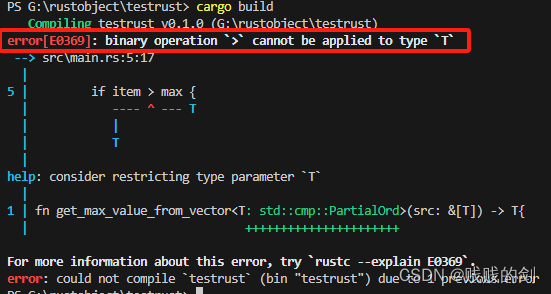
11.泛型、trait和生命周期(上)
标题 一、泛型数据的引入二、改写为泛型函数三、结构体/枚举中的泛型定义四、方法定义中的泛型 一、泛型数据的引入 下面是两个函数,分别用来取得整型和符号型vector中的最大值 use std::fs::File;fn get_max_float_value_from_vector(src: &[f64]) -> f64…...
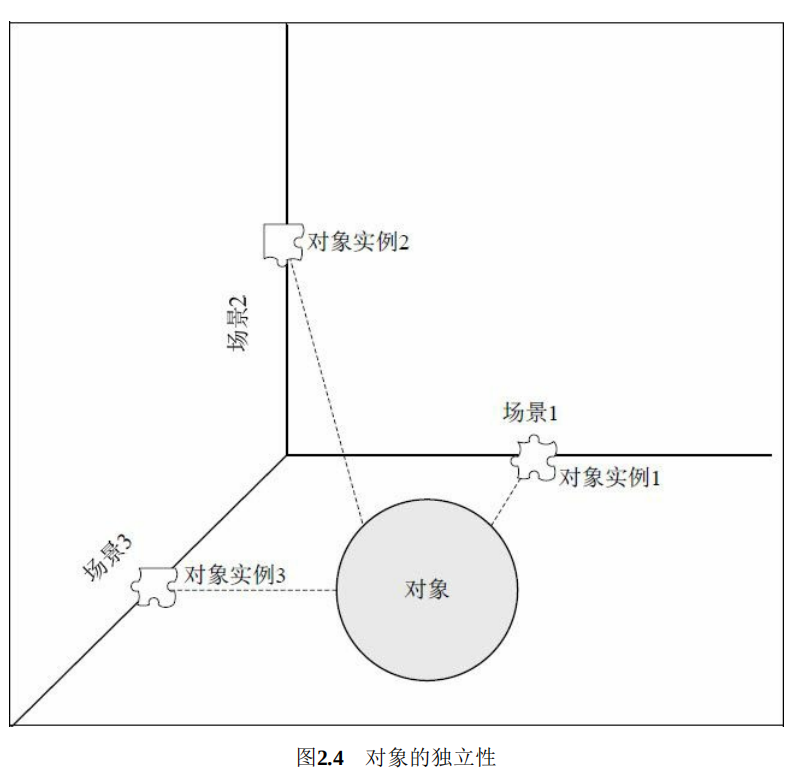
UML与设计模式
1、关联关系 关联关系用于描述不同类的对象之间的结构关系,它在一段时间内将多个类的实例连接在一起。关联关系是一种静态关系,通常与运行状态无关,而是由“常识”、“规则”、“法律”等因素决定的,因此关联关系是一种强关联的关…...
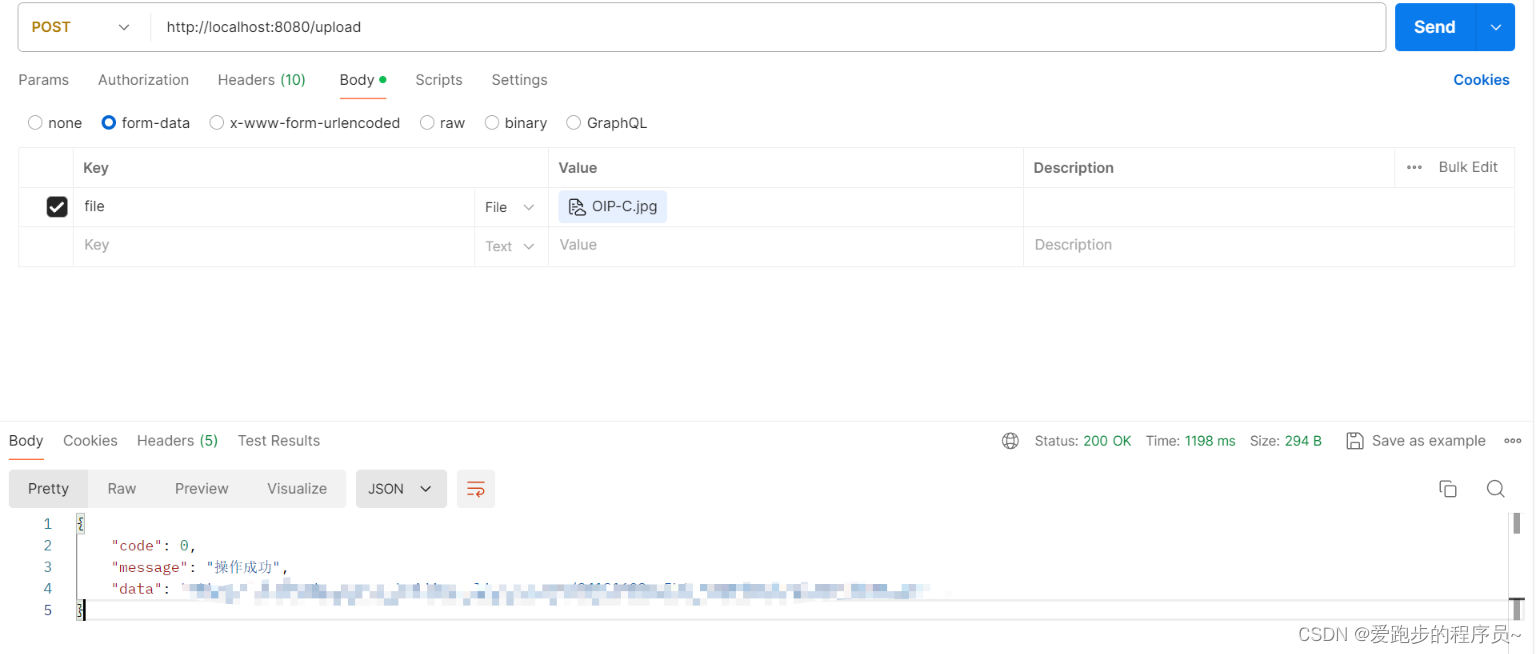
如何在Spring Boot中实现图片上传至本地和阿里云OSS
在开发Web应用时,处理文件上传是常见的需求之一,尤其是在涉及到图片、视频等多媒体数据时。本文将详细介绍如何使用Spring Boot实现图片上传至本地服务器以及阿里云OSS存储服务,并提供完整的代码示例。 一、上传图片至本地 首先,…...

几个小创新模型,KAN组合网络(LSTM、GRU、Transformer)时间序列预测,python预测全家桶...
截止到本期,一共发了8篇关于机器学习预测全家桶Python代码的文章。参考往期文章如下: 1.终于来了!python机器学习预测全家桶 2.机器学习预测全家桶-Python,一次性搞定多/单特征输入,多/单步预测!最强模板&a…...
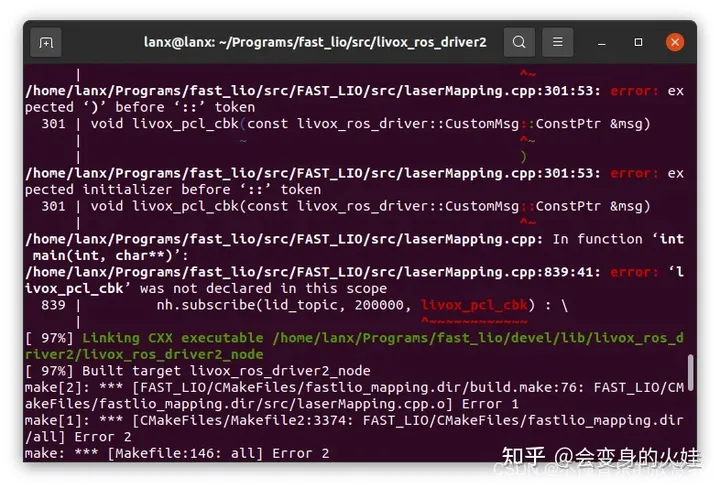
ubuntu18.04 配置 mid360并测试fast_lio
1.在买到Mid360之后,我们可以看到mid360延伸出来了三组线。 第一组线是电源线,包含了红色线正极,和黑色线负极。一般可以用来接9-27v的电源,推荐接12v的电源转换器,或者接14.4v的电源转换器。 第二组线是信号线&#x…...
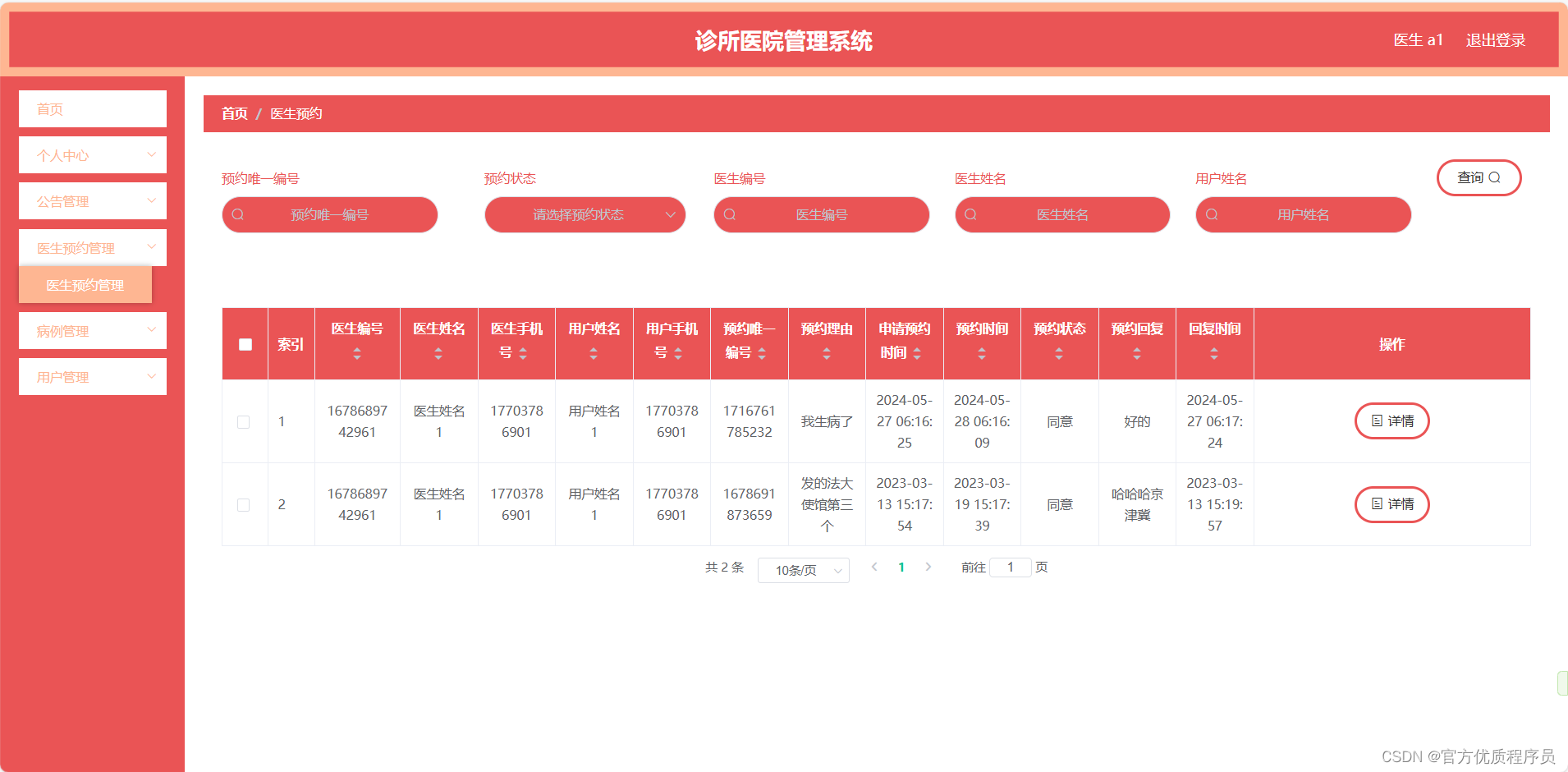
基于Java的诊所医院管理系统,springboot+html,MySQL数据库,用户+医生+管理员三种身份,完美运行,有一万一千字论文
演示视频 基本介绍 基于Java的诊所医院管理系统,springboothtml,MySQL数据库,用户医生管理员三种身份,完美运行,有一万一千字论文。 用户:个人信息管理、预约医生、查看病例、查看公告、充值、支付费用...…...

gvm 在ubuntu下安装
GVM (Go Version Manager) 是一个用于管理多个Go语言版本的工具。以下是使用GVM安装和切换Go版本的基本步骤和示例代码: 一键安装(如果网络没问题情况) bash < <(curl -s -S -L https://raw.githubusercontent.com/moovweb/gvm/master…...

ChatTTS开源项目推荐
开源热门项目推荐:ChatTTS 标题:对话式人工智能的未来——ChatTTS 随着开源程序的发展,越来越多的程序员开始关注并加入开源大模型的行列。对于开源行业和开源项目不同人有不同的关注点,但无论你是新手还是资深开发者,…...
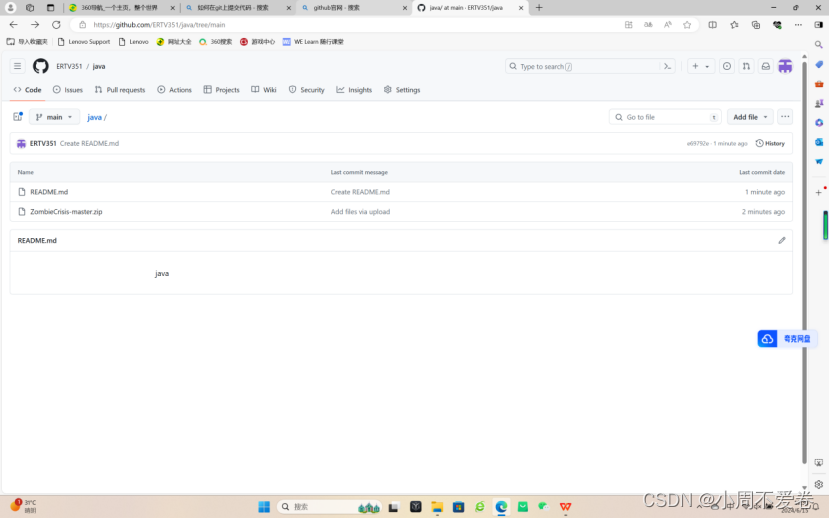
java课设
项目简介:射击生存类小游戏 项目采用技术: 游戏引擎: Unity编程语言: Java图形处理: NVIDIA PhysX (物理引擎), HDRP (High Definition Render Pipeline)音效与音乐: FMOD, Wwise版本控制: Git 功能需求分析: 角色控制:玩家能够使用键盘和鼠标控制角色移动、瞄准…...

【持久层】PostgreSQL使用教程
详细教程点击PostgreSQL 12.2 手册,观看官网中文手册。 PostgreSQL 是一个功能强大且开源的对象关系数据库系统,以其高扩展性和符合标准的优势广受欢迎。随着大数据时代的到来,PostgreSQL 也在大数据处理方面展示了其强大能力。本文将介绍 P…...
OpenCV 4.10 发布
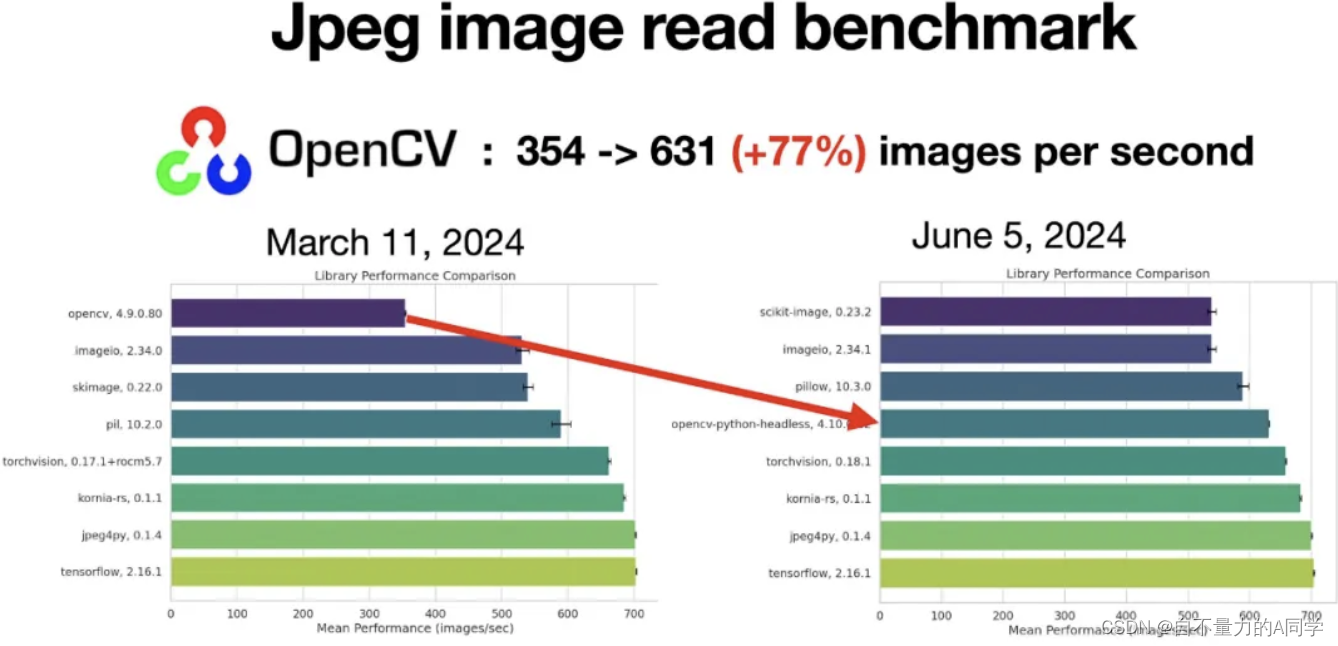
OpenCV 4.10 JPEG 解码速度提升 77%,实验性支持 Wayland、Win ARM64 根据 “OpenCV 中国团队” 介绍,从 4.10 开始 OpenCV 对 JPEG 图像的读取和解码有了 77% 的速度提升,超过了 scikit-image、imageio、pillow。 4.10 版本的一些亮点&…...

5、斐波那契数列、跳台阶
题目: 斐波那契数列 描述: 大家都知道斐波那契数列,现在要求输入一个整数n,请你输出斐波那契数列的第n项。 n<39 <?phpfunction Fibonacci($n) {if($n<0){$f1 0;}else if($n1||$n2){$f1 1;}else{$f1 1; $f2 1;whi…...
WPS相同字体但是部分文字样式不一样解决办法
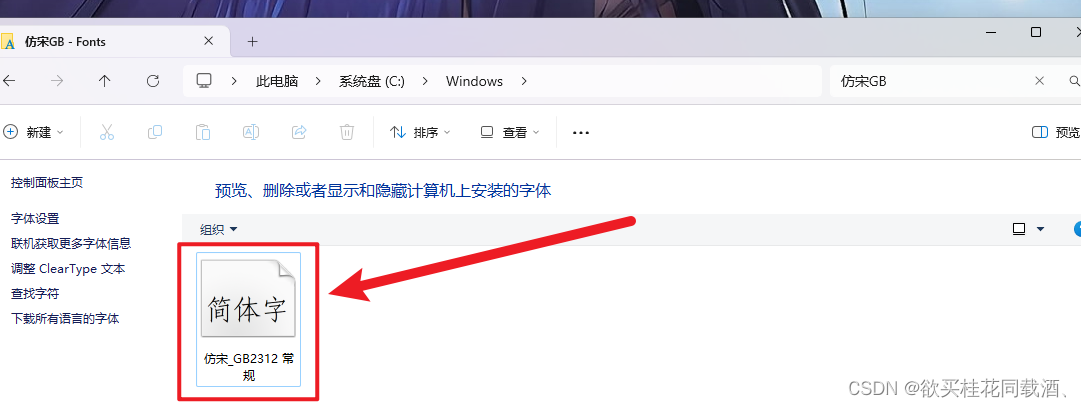
如下图,在使用wps编辑文档的时候发现有些电脑的文字字体很奇怪,但是把鼠标移到这个文字的位置,发现它和其他正常文字的字体是一样的,都是仿宋_GB2312 正常电脑的文字如下图所示 打开C:\Windows找到Fonts这个文件夹 把仿宋_GB2312这…...

Scala运算符及流程控制
Scala运算符及流程控制 文章目录 Scala运算符及流程控制写在前面运算符算数运算符关系运算符赋值运算符逻辑运算符位运算符运算符本质 流程控制分支控制单分支双分支多分支 循环控制for循环while循环循环中断嵌套循环 写在前面 操作系统:Windows10JDK版本ÿ…...

Github 2024-06-10开源项目周报 Top15
根据Github Trendings的统计,本周(2024-06-10统计)共有15个项目上榜。根据开发语言中项目的数量,汇总情况如下: 开发语言项目数量Python项目8Jupyter Notebook项目2Go项目2C++项目1Shell项目1Lua项目1JavaScript项目1MDX项目1C项目1HTML项目1Python - 100天从新手到大师 创建…...
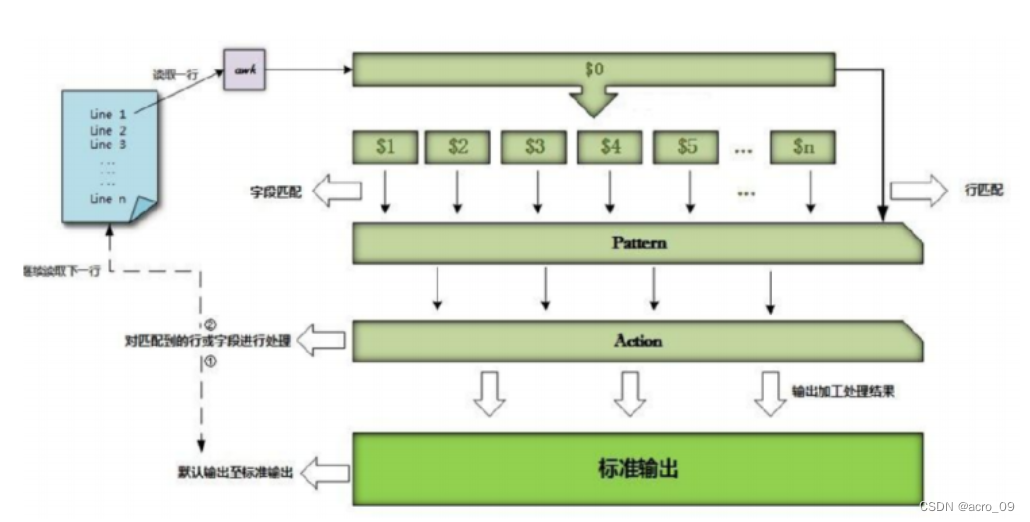
9. 文本三剑客之awk
文章目录 9.1 什么是awk9.2 awk命令格式9.3 awk执行流程9.4 行与列9.4.1 取行9.4.2 取列 9.1 什么是awk 虽然sed编辑器是非常方便自动修改文本文件的工具,但其也有自身的限制。通常你需要一个用来处理文件中的数据的更高级工具,它能提供一个类编程环境来…...

在vscode中调试,命令行出现错误信息ModuleNotFoundError: No module named ‘imp‘
在vscode中调试,命令行出现错误信息ModuleNotFoundError: No module named ‘imp’ 报错原因 VSCode的python扩展会使用debugpy库实现调试功能。在涉及qt组件加载时,debugpy的qt_loaders.py会尝试加载imp库。而在python3.12及以后的版本中,…...

Hperledger Fabric入门课程3 ——软硬件环境
购买专栏前请认真阅读:《Fabric项目学习笔记》专栏介绍 1. 硬件环境 不论是在当前系统上运行、云服务器还是虚拟机,建议内存4G或以上,硬盘空间建议50G以上。 2. 操作系统 Fabric 的操作一般在Linux 或 MacOS上,Mac暂时不支持Apple Silicon芯片即m1以后的芯片。 如果读者…...

珠海市高新技术企业资质认定流程及时间
珠海市暂未发布2026年高企申报通知,往年高新技术企业认定工作通常于每年5月至9月分批开展,目前非申报窗口期,建议您提前准备以备下一轮申报。根据往年(如2025年)的受理安排,申报主要通过线上平台进行&#…...

终极WebPShop插件:解锁Photoshop专业级WebP处理能力
终极WebPShop插件:解锁Photoshop专业级WebP处理能力 【免费下载链接】WebPShop Photoshop plug-in for opening and saving WebP images 项目地址: https://gitcode.com/gh_mirrors/we/WebPShop WebPShop是一款专为Adobe Photoshop设计的开源插件,…...

5V/7.4V/12V三个升压档位!智能门锁供电选它
在智能门锁硬件设计与实操过程中,常见的痛点是锂电池的常见电压(3.7V、3.2V)与门锁电机的工作电压需求(5V、7.4V、甚至12V)不匹配,电压不足直接导致电机无法正常驱动,进而影响门锁开关功能的实现…...

N41 SRS与LTE共用XPXT开关的一些考虑
n41 SRS 与 LTE 共存冲突分析与工程设计指南 核心结论:在 n41 与 LTE 共用 XSPxT(DPDT / DP3T / DP4T)架构下,冲突是物理必然;硬件目标是将干扰压缩至软件可调度范围,系统稳定性最终取决于软件互斥策略。 一、问题本质:为什么 n41 SRS 会和 LTE 冲突? 1️⃣ n41 SRS 的…...

Dify数据库查询插件:让AI应用轻松连接业务数据的实战指南
1. 项目概述与核心价值 如果你正在使用 Dify 构建企业级 AI 应用,并且经常需要让 AI 助手去查询数据库里的数据——比如让 LLM 帮你分析销售报表、查找用户信息或者生成业务洞察——那么你很可能遇到过这样的痛点:Dify 本身并不直接支持数据库连接。你需…...
)
Codex入门09-Git工作流(小白入门:不会写commit信息?AI帮你自动生成规范提交)
🎯 本文目标 学会用 Codex 自动化 Git 操作:提交、冲突解决、PR 描述生成。 😰 Git 新手的典型痛点 你的提交记录是不是这样的: git log --oneline a3f4b2c fix 9d1e8c4 update 4c7b91f 修改了一些东西 f0a2d3e 。。。 b5c8e7a 又改了这就是"屎山提交记录"—…...

多目标粒子群混合储能优化配置【附算法】
✨ 长期致力于混合储能、优化配置、风光互补微电网、多目标粒子群算法、CRITIC-TOPSIS研究工作,擅长数据搜集与处理、建模仿真、程序编写、仿真设计。 ✅ 专业定制毕设、代码 ✅ 如需沟通交流,点击《获取方式》 (1)风光-负荷多场景…...

如何快速掌握Unitree Go2机器人ROS2开发:面向初学者的完整教程
如何快速掌握Unitree Go2机器人ROS2开发:面向初学者的完整教程 【免费下载链接】go2_ros2_sdk Unofficial ROS2 SDK support for Unitree GO2 AIR/PRO/EDU 项目地址: https://gitcode.com/gh_mirrors/go/go2_ros2_sdk Unitree Go2 ROS2 SDK是一个强大的开源项…...

如何解决QQ音乐下载的歌曲在其他设备上无法播放的问题
如何解决QQ音乐下载的歌曲在其他设备上无法播放的问题 【免费下载链接】qmcflac2mp3 直接将qmcflac文件转换成mp3文件,突破QQ音乐的格式限制 项目地址: https://gitcode.com/gh_mirrors/qm/qmcflac2mp3 你是否曾经在QQ音乐下载了喜欢的歌曲,却发现…...