
C# yolov8 OpenVINO 同步、异步接口视频推理
C# yolov8 OpenVINO 同步、异步接口视频推理

目录
效果
项目
代码
下载
效果
同步推理效果
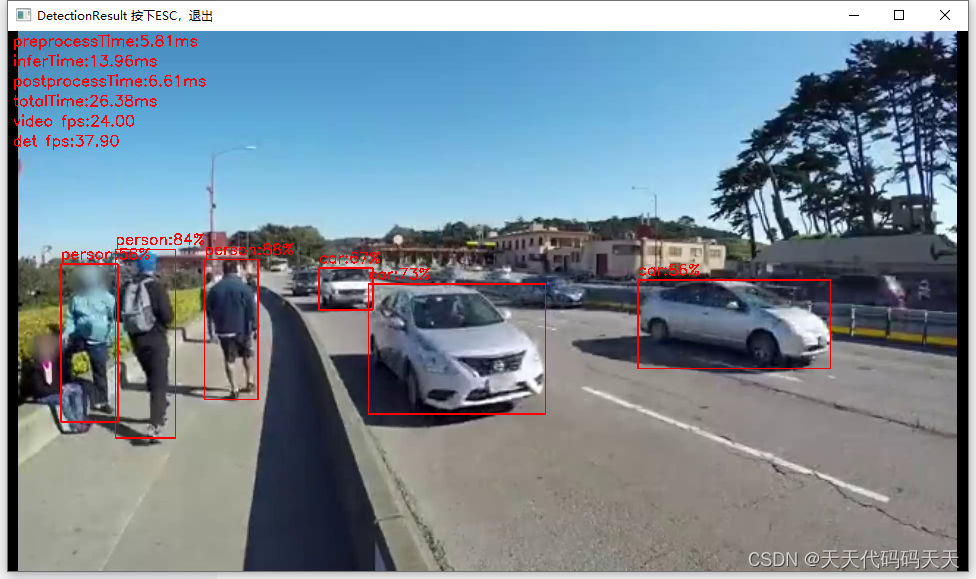
异步推理效果

项目
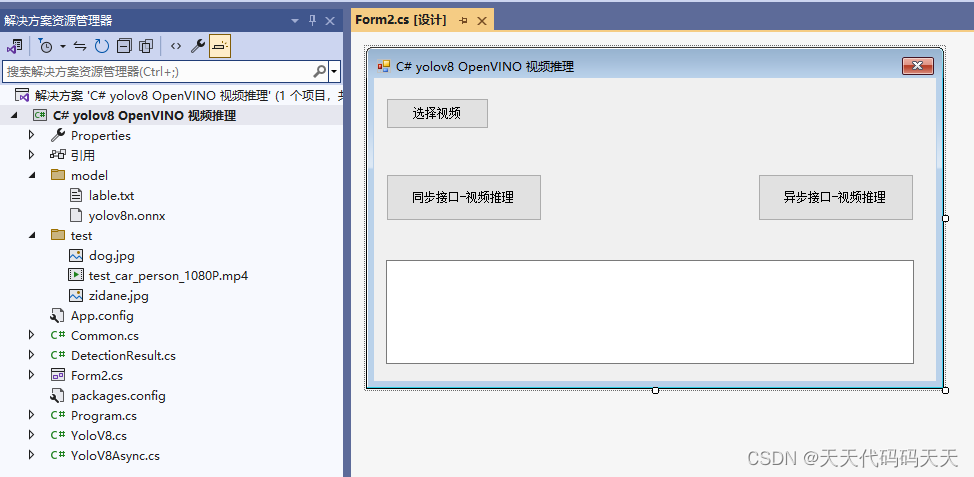
代码
using OpenCvSharp;
using System;
using System.Collections.Generic;
using System.Diagnostics;
using System.Threading;
using System.Windows.Forms;
namespace yolov8_OpenVINO_Demo
{
public partial class Form2 : Form
{
public Form2()
{
InitializeComponent();
}
string imgFilter = "*.*|*.bmp;*.jpg;*.jpeg;*.tiff;*.tiff;*.png";
YoloV8 yoloV8;
YoloV8Async yoloV8Async;
string model_path;
string video_path = "";
string videoFilter = "*.mp4|*.mp4;";
VideoCapture vcapture;
/// <summary>
/// 窗体加载,初始化
/// </summary>
/// <param name="sender"></param>
/// <param name="e"></param>
private void Form1_Load(object sender, EventArgs e)
{
model_path = "model/yolov8n.onnx";
yoloV8 = new YoloV8(model_path, "model/lable.txt");
yoloV8Async = new YoloV8Async(model_path, "model/lable.txt");
}
/// <summary>
/// 选择视频
/// </summary>
/// <param name="sender"></param>
/// <param name="e"></param>
private void button4_Click(object sender, EventArgs e)
{
OpenFileDialog ofd = new OpenFileDialog();
ofd.Filter = videoFilter;
ofd.InitialDirectory = Application.StartupPath + "\\test";
if (ofd.ShowDialog() != DialogResult.OK) return;
video_path = ofd.FileName;
textBox1.Text = "";
}
/// <summary>
/// 同步接口-视频推理
/// </summary>
/// <param name="sender"></param>
/// <param name="e"></param>
private void button3_Click(object sender, EventArgs e)
{
if (video_path == "")
{
MessageBox.Show("请先选择视频!");
return;
}
textBox1.Text = "开始检测";
Application.DoEvents();
Thread thread = new Thread(new ThreadStart(VideoDetection));
thread.Start();
thread.Join();
textBox1.Text = "检测完成!";
}
void VideoDetection()
{
vcapture = new VideoCapture(video_path);
if (!vcapture.IsOpened())
{
MessageBox.Show("打开视频文件失败");
return;
}
Mat frame = new Mat();
List<DetectionResult> detResults;
// 获取视频的fps
double videoFps = vcapture.Get(VideoCaptureProperties.Fps);
// 计算等待时间(毫秒)
int delay = (int)(1000 / videoFps);
Stopwatch _stopwatch = new Stopwatch();
Cv2.NamedWindow("DetectionResult 按下ESC,退出", WindowFlags.Normal);
Cv2.ResizeWindow("DetectionResult 按下ESC,退出", vcapture.FrameWidth / 2, vcapture.FrameHeight / 2);
while (vcapture.Read(frame))
{
if (frame.Empty())
{
MessageBox.Show("读取失败");
return;
}
_stopwatch.Restart();
delay = (int)(1000 / videoFps);
detResults = yoloV8.Detect(frame);
//绘制结果
foreach (DetectionResult r in detResults)
{
Cv2.PutText(frame, $"{r.Class}:{r.Confidence:P0}", new OpenCvSharp.Point(r.Rect.TopLeft.X, r.Rect.TopLeft.Y - 10), HersheyFonts.HersheySimplex, 1, Scalar.Red, 2);
Cv2.Rectangle(frame, r.Rect, Scalar.Red, thickness: 2);
}
Cv2.PutText(frame, "preprocessTime:" + yoloV8.preprocessTime.ToString("F2") + "ms", new OpenCvSharp.Point(10, 30), HersheyFonts.HersheySimplex, 1, Scalar.Red, 2);
Cv2.PutText(frame, "inferTime:" + yoloV8.inferTime.ToString("F2") + "ms", new OpenCvSharp.Point(10, 70), HersheyFonts.HersheySimplex, 1, Scalar.Red, 2);
Cv2.PutText(frame, "postprocessTime:" + yoloV8.postprocessTime.ToString("F2") + "ms", new OpenCvSharp.Point(10, 110), HersheyFonts.HersheySimplex, 1, Scalar.Red, 2);
Cv2.PutText(frame, "totalTime:" + yoloV8.totalTime.ToString("F2") + "ms", new OpenCvSharp.Point(10, 150), HersheyFonts.HersheySimplex, 1, Scalar.Red, 2);
Cv2.PutText(frame, "video fps:" + videoFps.ToString("F2"), new OpenCvSharp.Point(10, 190), HersheyFonts.HersheySimplex, 1, Scalar.Red, 2);
Cv2.PutText(frame, "det fps:" + yoloV8.detFps.ToString("F2"), new OpenCvSharp.Point(10, 230), HersheyFonts.HersheySimplex, 1, Scalar.Red, 2);
Cv2.ImShow("DetectionResult 按下ESC,退出", frame);
//for test
delay = 1;
//delay = (int)(delay - _stopwatch.ElapsedMilliseconds);
//if (delay <= 0)
//{
// delay = 1;
//}
//Console.WriteLine("delay:" + delay.ToString()) ;
if (Cv2.WaitKey(delay) == 27 || Cv2.GetWindowProperty("DetectionResult 按下ESC,退出", WindowPropertyFlags.Visible) < 1.0)
{
Cv2.DestroyAllWindows();
vcapture.Release();
break; // 如果按下ESC,退出循环
}
}
Cv2.DestroyAllWindows();
vcapture.Release();
}
/// <summary>
/// 异步接口-视频推理
/// </summary>
/// <param name="sender"></param>
/// <param name="e"></param>
private void button1_Click(object sender, EventArgs e)
{
if (video_path == "")
{
MessageBox.Show("请先选择视频!");
return;
}
textBox1.Text = "开始异步推理检测";
Application.DoEvents();
Thread thread = new Thread(new ThreadStart(VideoDetectionAsync));
thread.Start();
thread.Join();
textBox1.Text = "异步推理检测完成!";
}
void VideoDetectionAsync()
{
vcapture = new VideoCapture(video_path);
if (!vcapture.IsOpened())
{
MessageBox.Show("打开视频文件失败");
return;
}
Mat frame = new Mat();
List<DetectionResult> detResults;
// 获取视频的fps
double videoFps = vcapture.Get(VideoCaptureProperties.Fps);
// 计算等待时间(毫秒)
int delay = (int)(1000 / videoFps);
Stopwatch _stopwatch = new Stopwatch();
Cv2.NamedWindow("DetectionResult 按下ESC,退出", WindowFlags.Normal);
Cv2.ResizeWindow("DetectionResult 按下ESC,退出", vcapture.FrameWidth / 2, vcapture.FrameHeight / 2);
vcapture.Read(frame);
while (true)
{
if (!vcapture.Read(frame))
{
break;
}
detResults = yoloV8Async.Detect(frame);
//绘制结果
foreach (DetectionResult r in detResults)
{
Cv2.PutText(frame, $"{r.Class}:{r.Confidence:P0}", new OpenCvSharp.Point(r.Rect.TopLeft.X, r.Rect.TopLeft.Y - 10), HersheyFonts.HersheySimplex, 1, Scalar.Red, 2);
Cv2.Rectangle(frame, r.Rect, Scalar.Red, thickness: 2);
}
Cv2.PutText(frame, "preprocessTime:" + yoloV8Async.preprocessTime.ToString("F2") + "ms", new OpenCvSharp.Point(10, 30), HersheyFonts.HersheySimplex, 1, Scalar.Red, 2);
Cv2.PutText(frame, "inferTime:" + yoloV8Async.inferTime.ToString("F2") + "ms", new OpenCvSharp.Point(10, 70), HersheyFonts.HersheySimplex, 1, Scalar.Red, 2);
Cv2.PutText(frame, "postprocessTime:" + yoloV8Async.postprocessTime.ToString("F2") + "ms", new OpenCvSharp.Point(10, 110), HersheyFonts.HersheySimplex, 1, Scalar.Red, 2);
Cv2.PutText(frame, "totalTime:" + yoloV8Async.totalTime.ToString("F2") + "ms", new OpenCvSharp.Point(10, 150), HersheyFonts.HersheySimplex, 1, Scalar.Red, 2);
Cv2.PutText(frame, "video fps:" + videoFps.ToString("F2"), new OpenCvSharp.Point(10, 190), HersheyFonts.HersheySimplex, 1, Scalar.Red, 2);
Cv2.PutText(frame, "det fps:" + yoloV8Async.detFps.ToString("F2"), new OpenCvSharp.Point(10, 230), HersheyFonts.HersheySimplex, 1, Scalar.Red, 2);
Cv2.ImShow("DetectionResult 按下ESC,退出", frame);
// for test
delay = 1;
//delay = (int)(delay - _stopwatch.ElapsedMilliseconds);
//if (delay <= 0)
//{
// delay = 1;
//}
//Console.WriteLine("delay:" + delay.ToString()) ;
if (Cv2.WaitKey(delay) == 27 || Cv2.GetWindowProperty("DetectionResult 按下ESC,退出", WindowPropertyFlags.Visible) < 1.0)
{
Cv2.DestroyAllWindows();
vcapture.Release();
break; // 如果按下ESC,退出循环
}
}
Cv2.DestroyAllWindows();
vcapture.Release();
}
}
}
using OpenCvSharp;
using System;
using System.Collections.Generic;
using System.Diagnostics;
using System.Threading;
using System.Windows.Forms;namespace yolov8_OpenVINO_Demo
{public partial class Form2 : Form{public Form2(){InitializeComponent();}string imgFilter = "*.*|*.bmp;*.jpg;*.jpeg;*.tiff;*.tiff;*.png";YoloV8 yoloV8;YoloV8Async yoloV8Async;string model_path;string video_path = "";string videoFilter = "*.mp4|*.mp4;";VideoCapture vcapture;/// <summary>/// 窗体加载,初始化/// </summary>/// <param name="sender"></param>/// <param name="e"></param>private void Form1_Load(object sender, EventArgs e){model_path = "model/yolov8n.onnx";yoloV8 = new YoloV8(model_path, "model/lable.txt");yoloV8Async = new YoloV8Async(model_path, "model/lable.txt");}/// <summary>/// 选择视频/// </summary>/// <param name="sender"></param>/// <param name="e"></param>private void button4_Click(object sender, EventArgs e){OpenFileDialog ofd = new OpenFileDialog();ofd.Filter = videoFilter;ofd.InitialDirectory = Application.StartupPath + "\\test";if (ofd.ShowDialog() != DialogResult.OK) return;video_path = ofd.FileName;textBox1.Text = "";}/// <summary>/// 同步接口-视频推理/// </summary>/// <param name="sender"></param>/// <param name="e"></param>private void button3_Click(object sender, EventArgs e){if (video_path == ""){MessageBox.Show("请先选择视频!");return;}textBox1.Text = "开始检测";Application.DoEvents();Thread thread = new Thread(new ThreadStart(VideoDetection));thread.Start();thread.Join();textBox1.Text = "检测完成!";}void VideoDetection(){vcapture = new VideoCapture(video_path);if (!vcapture.IsOpened()){MessageBox.Show("打开视频文件失败");return;}Mat frame = new Mat();List<DetectionResult> detResults;// 获取视频的fpsdouble videoFps = vcapture.Get(VideoCaptureProperties.Fps);// 计算等待时间(毫秒)int delay = (int)(1000 / videoFps);Stopwatch _stopwatch = new Stopwatch();Cv2.NamedWindow("DetectionResult 按下ESC,退出", WindowFlags.Normal);Cv2.ResizeWindow("DetectionResult 按下ESC,退出", vcapture.FrameWidth / 2, vcapture.FrameHeight / 2);while (vcapture.Read(frame)){if (frame.Empty()){MessageBox.Show("读取失败");return;}_stopwatch.Restart();delay = (int)(1000 / videoFps);detResults = yoloV8.Detect(frame);//绘制结果foreach (DetectionResult r in detResults){Cv2.PutText(frame, $"{r.Class}:{r.Confidence:P0}", new OpenCvSharp.Point(r.Rect.TopLeft.X, r.Rect.TopLeft.Y - 10), HersheyFonts.HersheySimplex, 1, Scalar.Red, 2);Cv2.Rectangle(frame, r.Rect, Scalar.Red, thickness: 2);}Cv2.PutText(frame, "preprocessTime:" + yoloV8.preprocessTime.ToString("F2") + "ms", new OpenCvSharp.Point(10, 30), HersheyFonts.HersheySimplex, 1, Scalar.Red, 2);Cv2.PutText(frame, "inferTime:" + yoloV8.inferTime.ToString("F2") + "ms", new OpenCvSharp.Point(10, 70), HersheyFonts.HersheySimplex, 1, Scalar.Red, 2);Cv2.PutText(frame, "postprocessTime:" + yoloV8.postprocessTime.ToString("F2") + "ms", new OpenCvSharp.Point(10, 110), HersheyFonts.HersheySimplex, 1, Scalar.Red, 2);Cv2.PutText(frame, "totalTime:" + yoloV8.totalTime.ToString("F2") + "ms", new OpenCvSharp.Point(10, 150), HersheyFonts.HersheySimplex, 1, Scalar.Red, 2);Cv2.PutText(frame, "video fps:" + videoFps.ToString("F2"), new OpenCvSharp.Point(10, 190), HersheyFonts.HersheySimplex, 1, Scalar.Red, 2);Cv2.PutText(frame, "det fps:" + yoloV8.detFps.ToString("F2"), new OpenCvSharp.Point(10, 230), HersheyFonts.HersheySimplex, 1, Scalar.Red, 2);Cv2.ImShow("DetectionResult 按下ESC,退出", frame);//for testdelay = 1;//delay = (int)(delay - _stopwatch.ElapsedMilliseconds);//if (delay <= 0)//{//    delay = 1;//}//Console.WriteLine("delay:" + delay.ToString()) ;if (Cv2.WaitKey(delay) == 27 || Cv2.GetWindowProperty("DetectionResult 按下ESC,退出", WindowPropertyFlags.Visible) < 1.0){Cv2.DestroyAllWindows();vcapture.Release();break; // 如果按下ESC,退出循环}}Cv2.DestroyAllWindows();vcapture.Release();}/// <summary>/// 异步接口-视频推理/// </summary>/// <param name="sender"></param>/// <param name="e"></param>private void button1_Click(object sender, EventArgs e){if (video_path == ""){MessageBox.Show("请先选择视频!");return;}textBox1.Text = "开始异步推理检测";Application.DoEvents();Thread thread = new Thread(new ThreadStart(VideoDetectionAsync));thread.Start();thread.Join();textBox1.Text = "异步推理检测完成!";}void VideoDetectionAsync(){vcapture = new VideoCapture(video_path);if (!vcapture.IsOpened()){MessageBox.Show("打开视频文件失败");return;}Mat frame = new Mat();List<DetectionResult> detResults;// 获取视频的fpsdouble videoFps = vcapture.Get(VideoCaptureProperties.Fps);// 计算等待时间(毫秒)int delay = (int)(1000 / videoFps);Stopwatch _stopwatch = new Stopwatch();Cv2.NamedWindow("DetectionResult 按下ESC,退出", WindowFlags.Normal);Cv2.ResizeWindow("DetectionResult 按下ESC,退出", vcapture.FrameWidth / 2, vcapture.FrameHeight / 2);vcapture.Read(frame);while (true){if (!vcapture.Read(frame)){break;}detResults = yoloV8Async.Detect(frame);//绘制结果foreach (DetectionResult r in detResults){Cv2.PutText(frame, $"{r.Class}:{r.Confidence:P0}", new OpenCvSharp.Point(r.Rect.TopLeft.X, r.Rect.TopLeft.Y - 10), HersheyFonts.HersheySimplex, 1, Scalar.Red, 2);Cv2.Rectangle(frame, r.Rect, Scalar.Red, thickness: 2);}Cv2.PutText(frame, "preprocessTime:" + yoloV8Async.preprocessTime.ToString("F2") + "ms", new OpenCvSharp.Point(10, 30), HersheyFonts.HersheySimplex, 1, Scalar.Red, 2);Cv2.PutText(frame, "inferTime:" + yoloV8Async.inferTime.ToString("F2") + "ms", new OpenCvSharp.Point(10, 70), HersheyFonts.HersheySimplex, 1, Scalar.Red, 2);Cv2.PutText(frame, "postprocessTime:" + yoloV8Async.postprocessTime.ToString("F2") + "ms", new OpenCvSharp.Point(10, 110), HersheyFonts.HersheySimplex, 1, Scalar.Red, 2);Cv2.PutText(frame, "totalTime:" + yoloV8Async.totalTime.ToString("F2") + "ms", new OpenCvSharp.Point(10, 150), HersheyFonts.HersheySimplex, 1, Scalar.Red, 2);Cv2.PutText(frame, "video fps:" + videoFps.ToString("F2"), new OpenCvSharp.Point(10, 190), HersheyFonts.HersheySimplex, 1, Scalar.Red, 2);Cv2.PutText(frame, "det fps:" + yoloV8Async.detFps.ToString("F2"), new OpenCvSharp.Point(10, 230), HersheyFonts.HersheySimplex, 1, Scalar.Red, 2);Cv2.ImShow("DetectionResult 按下ESC,退出", frame);// for testdelay = 1;//delay = (int)(delay - _stopwatch.ElapsedMilliseconds);//if (delay <= 0)//{//    delay = 1;//}//Console.WriteLine("delay:" + delay.ToString()) ;if (Cv2.WaitKey(delay) == 27 || Cv2.GetWindowProperty("DetectionResult 按下ESC,退出", WindowPropertyFlags.Visible) < 1.0){Cv2.DestroyAllWindows();vcapture.Release();break; // 如果按下ESC,退出循环}}Cv2.DestroyAllWindows();vcapture.Release();}}}
下载
源码下载
相关文章:
C# yolov8 OpenVINO 同步、异步接口视频推理
C# yolov8 OpenVINO 同步、异步接口视频推理 目录 效果 项目 代码 下载 效果 同步推理效果 异步推理效果 项目 代码 using OpenCvSharp; using System; using System.Collections.Generic; using System.Diagnostics; using System.Threading; using System.Windows.Form…...
【STM32入门学习】定时器与PWM的LED控制
目录 一、定时器与PWM介绍 1.1定时器 1.1.1定时器分类简介 1.1.2STM32定时器分类比较表 1.1.3定时器启动操作: 1.2 PWM 1.2.1 简介: 1.2.2PWM工作原理 1.2.3使用步骤: 二、定时器计数控制LED灯亮灭 2.1HAL库 2.1.1使用HAL库创建…...
PyTorch实战:模型训练中的特征图可视化技巧
1.特征图可视化,这种方法是最简单,输入一张照片,然后把网络中间某层的输出的特征图按通道作为图片进行可视化展示即可。 2.特征图可视化代码如下: def featuremap_visual(feature, out_dirNone, # 特征图保存路径文件save_feat…...

有人@你!神工坊知识问答第二期中奖名单新鲜出炉
六月作为伟大的物理学家—麦克斯韦的诞辰月 神工坊特别推出 “ 辨 ‘麦克斯韦妖’,赢百元好礼” 夏日知识问答主题活动 活动一经推出 反响热烈 第二期中奖名单公布! 中奖的伙伴们速来兑奖! 听说还有同学没有参与? 活动最后…...

数据结构篇:旋转操作在AVL树中的实现过程
本节课在线学习视频(网盘地址,保存后即可免费观看): https://pan.quark.cn/s/06d5ed47e33b AVL树是平衡二叉搜索树的一种,它通过旋转操作来保持树的平衡。AVL树的特点是,任何节点的两个子树的高度最大差别…...

为什么Java默认使用UTF-16,Golang默认使用UTF-8呢?
Java 和 Go 语言在默认字符编码上做出了不同的选择,这是由它们的设计目标和使用场景决定的。下面是对 Java 默认使用 UTF-16 和 Go 默认使用 UTF-8 的原因进行的详细解释。 Java 默认使用 UTF-16 的原因 1. 历史背景和兼容性 Unicode 的发展: Java 诞生于 1995 年…...
)
JavaScript常见面试题(三)
文章目录 1.对原型、原型链的理解2.原型修改、重写3.原型链指向4.对闭包的理解5. 对作用域、作用域链的理解6.对执行上下文的理解7.对this对象的理解8. call() 和 apply() 的区别?9.异步编程的实现方式?10.setTimeout、Promise、Async/Await 的区别11.对…...

【Effective Modern C++】第1章 型别推导
【Effective Modern C】第1章 型别推导 文章目录 【Effective Modern C】第1章 型别推导条款1:理解模板型别推导基础概念模板型别推导的三种情况情景一 ParamType 是一个指针或者引用,但非通用引用情景二 ParamType是一个通过引用情景三 ParamType既不是…...
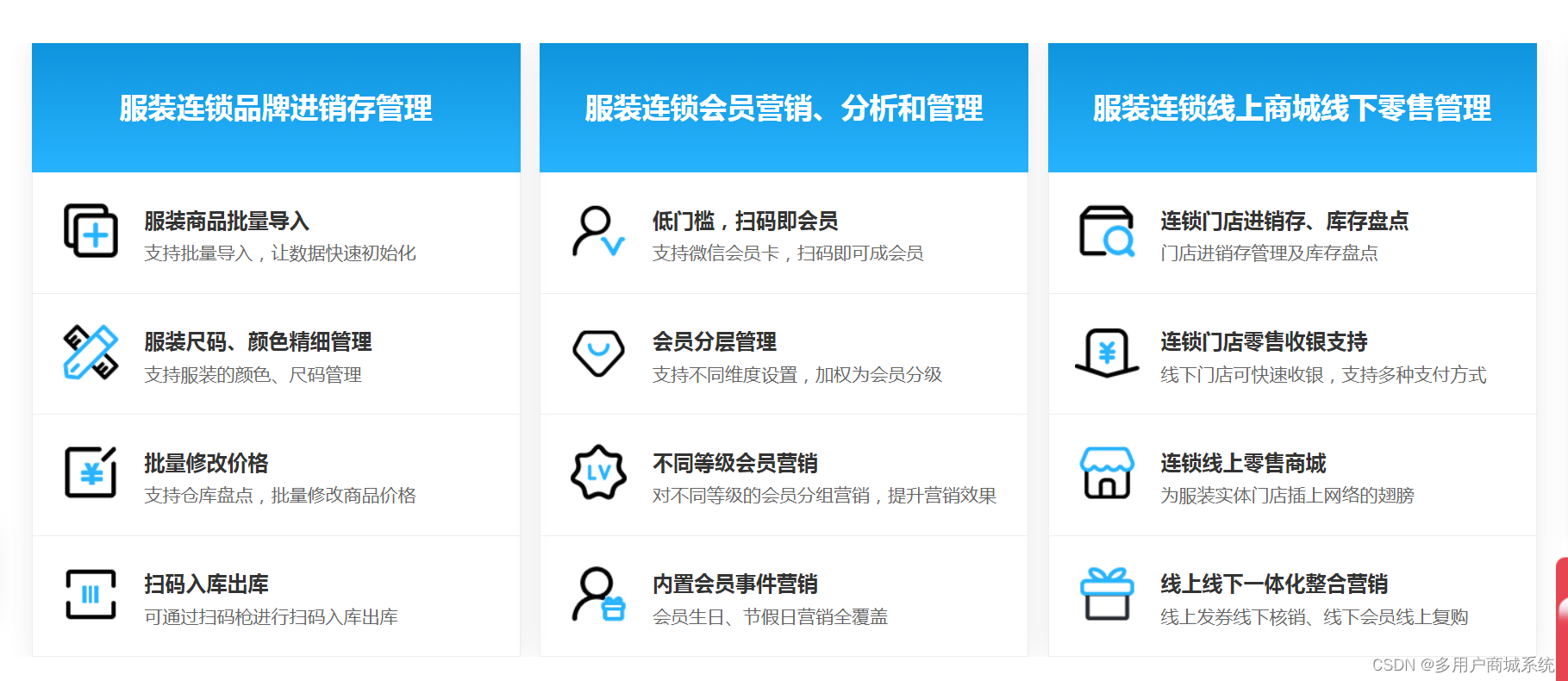
服装连锁实体店bC一体化运营方案
一、引言 随着互联网的快速发展和消费者购物习惯的变化,传统服装连锁实体店在面对新的市场环境下亟需转型升级。BC(Business to Consumer)一体化运营方案的实施将成为提升服装连锁实体店竞争力和顾客体验的关键举掖。商淘云详细介绍服装连锁…...
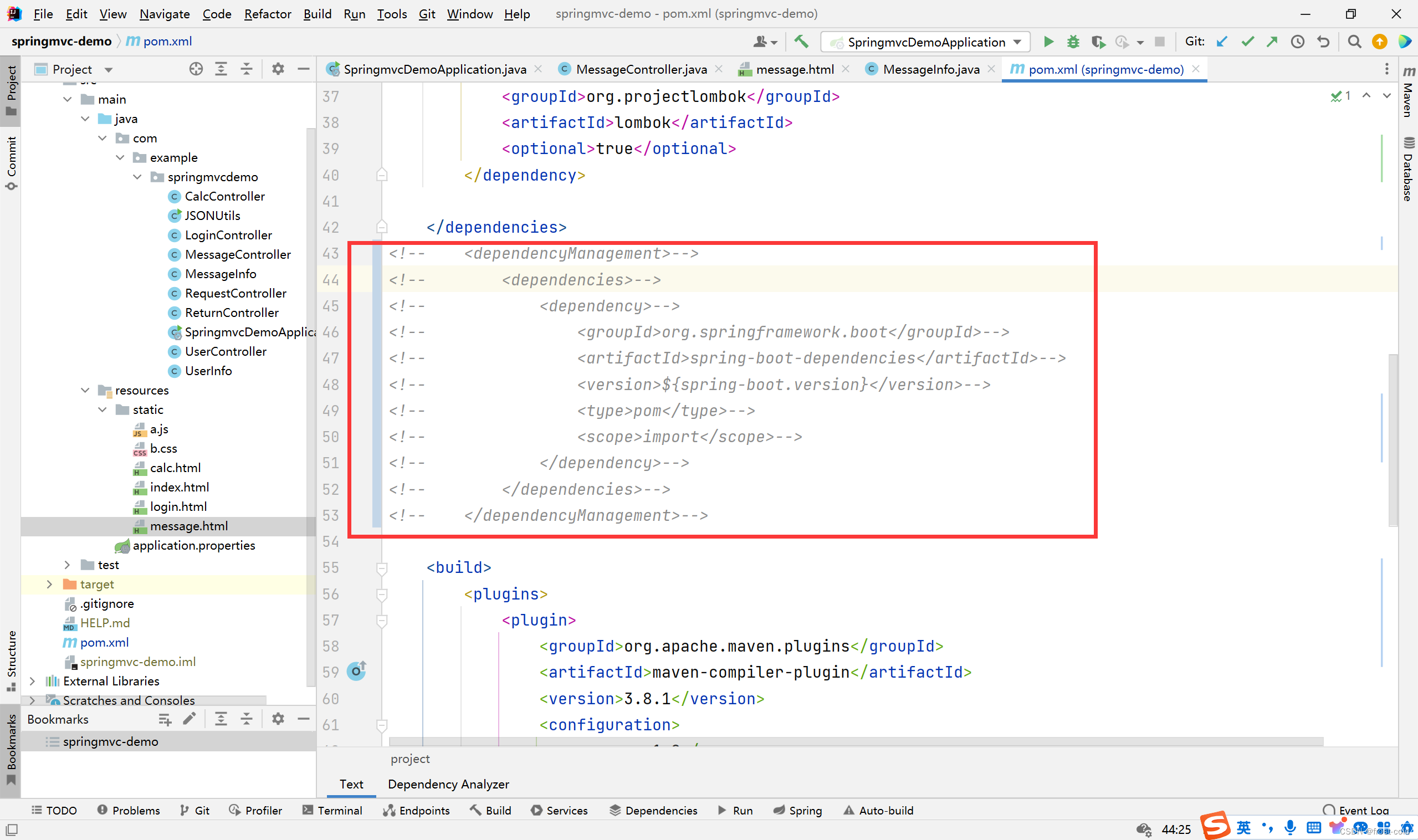
IDEA中SpringMVC的运行环境问题
文章目录 一、IEAD 清理缓存二、用阿里云和spring创建 SpringMVC 项目中 pom.xml 文件的区别 一、IEAD 清理缓存 springMVC 运行时存在一些之前运行过的缓存导致项目不能运行,可以试试清理缓存 二、用阿里云和spring创建 SpringMVC 项目中 pom.xml 文件的区别 以下…...

Python初体验
# Java基础知识学的差不多了,项目上又没什么事,学学py,方便以后对接 1、打包flask应用(好痛苦,在什么平台打包就只在那个平台可用想在linux用只能参考方法2了) pyinstaller --onefile app.py -n myapp 2…...

从零开始如何学习人工智能?
说说我自己的情况:我接触AI的时候,是在研一。那个时候AlphaGo战胜围棋世界冠军李世石是大新闻,人工智能第一次出现我面前,当时就想搞清楚背后的原理以及这些技术有什么作用。 就开始找资料,看视频。随着了解的深入&am…...

【仿真建模-anylogic】动态生成ConveyorCustomStation
Author:赵志乾 Date:2024-06-18 Declaration:All Right Reserved!!! 0. 背景 直接使用Anylogic组件开发的模型无法动态改变运输网布局;目前需求是要将运输网布局配置化;运输网配置化…...
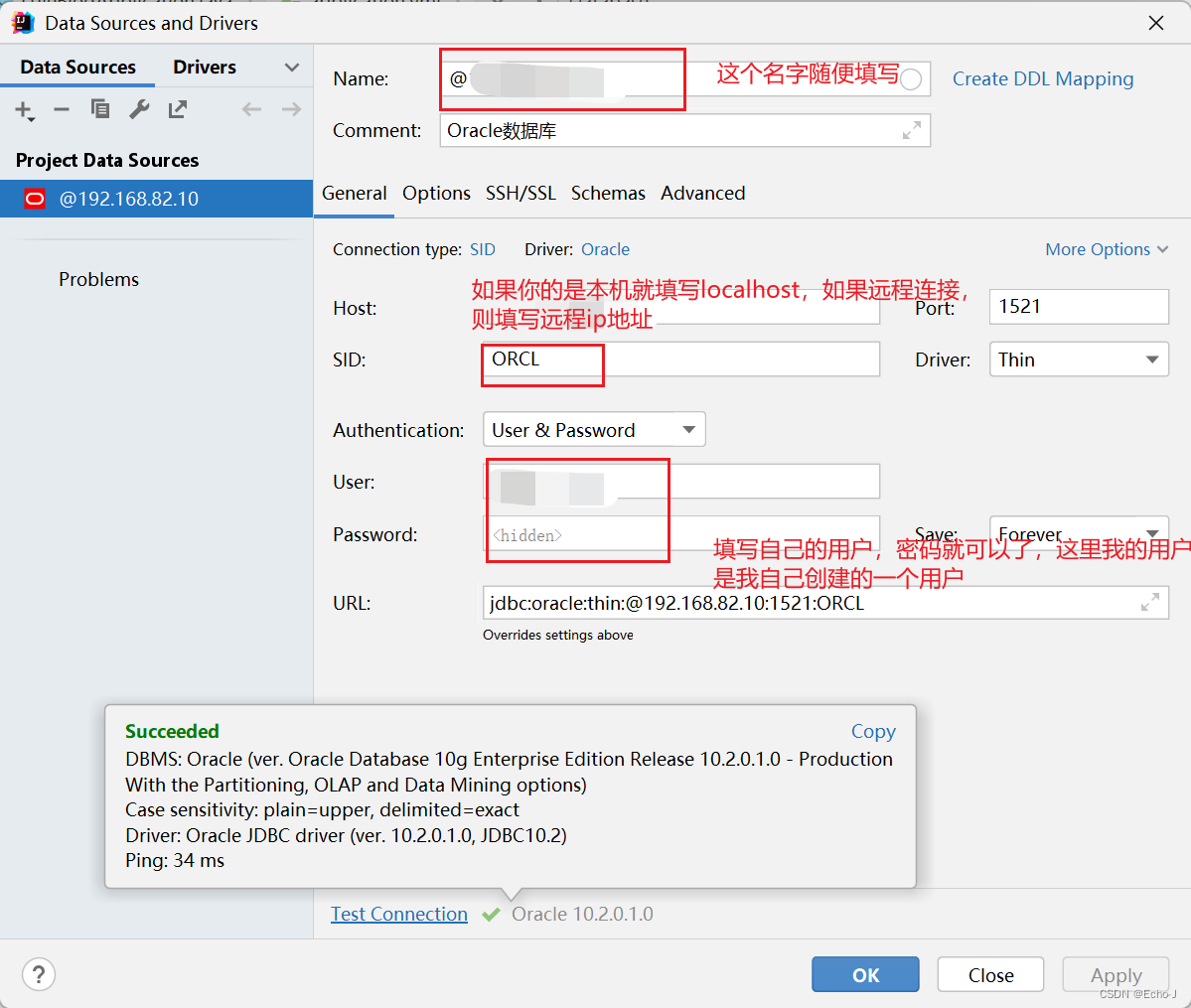
如何使用idea连接Oracle数据库?
idea版本:2021.3.3 Oracle版本:10.2.0.1.0(在虚拟机Windows sever 2003 远程连接数据库) 数据库管理系统:PLSQL Developer 在idea里面找到database,在idea侧面 选择左上角加号,新建ÿ…...

谈谈kafaka的并行处理,顺带讲讲rabbitmq
简介 Kafka 是一个分布式流处理平台,它支持高效的并行处理。Kafka 的并行处理能力主要体现在以下几个方面: 分区(Partition)并行 Kafka 将数据存储在称为"分区"的逻辑单元中。每个分区可以独立地并行地进行读写操作。生产者可以根据分区策略,将数据写入到指定的分…...

P3056 [USACO12NOV] Clumsy Cows S
[USACO12NOV] Clumsy Cows S 题目描述 Bessie the cow is trying to type a balanced string of parentheses into her new laptop, but she is sufficiently clumsy (due to her large hooves) that she keeps mis-typing characters. Please help her by computing the min…...

智赢选品,OZON数据分析选品利器丨萌啦OZON数据
在电商行业的激烈竞争中,如何快速准确地把握市场动态、洞察消费者需求、实现精准选品,是每个电商卖家都面临的挑战。而在这个数据驱动的时代,一款强大的数据分析工具无疑是电商卖家们的得力助手。今天,我们就来聊聊这样一款选品利…...

Canal自定义客户端
一、背景 在Canal推送数据变更信息至MQ(消息队列)时,我们遇到了特定问题,尤其是当消息体的大小超过了MQ所允许的最大限制。这种限制导致数据推送过程受阻,需要相应的调整或处理。 二、解决方法 采用Canal自定义客户…...
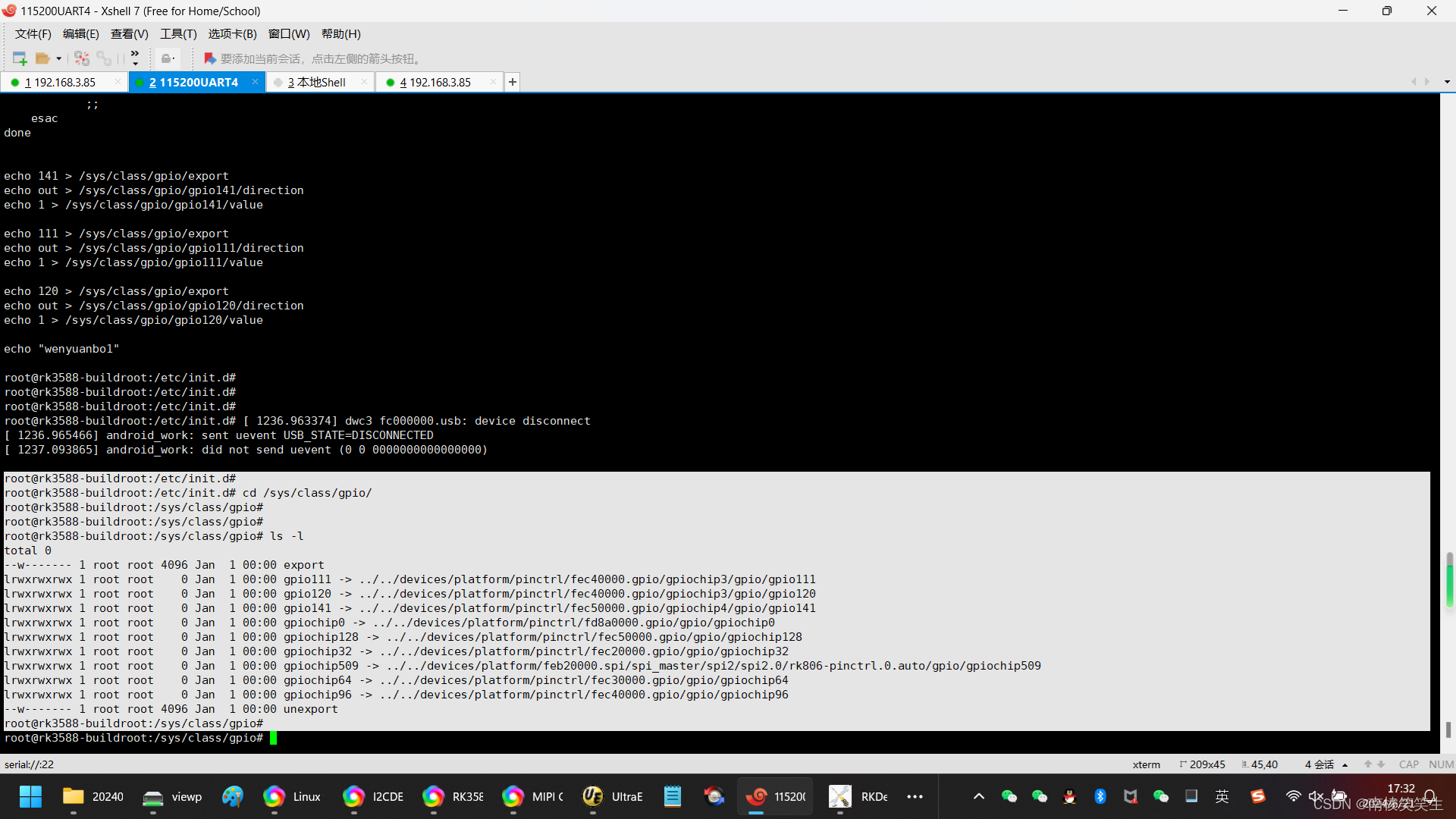
20240621将需要自启动的部分放到RK3588平台的Buildroot系统的rcS文件中
20240621将需要自启动的部分放到RK3588平台的Buildroot系统的rcS文件中 2024/6/21 17:15 开发板:飞凌OK3588-C SDK:Rockchip原厂的Buildroot 缘起:在凌OK3588-C的LINUX R4系统启动的时候,需要拉高GPIO4_B5、GPIO3_B7和GPIO3_D0。…...
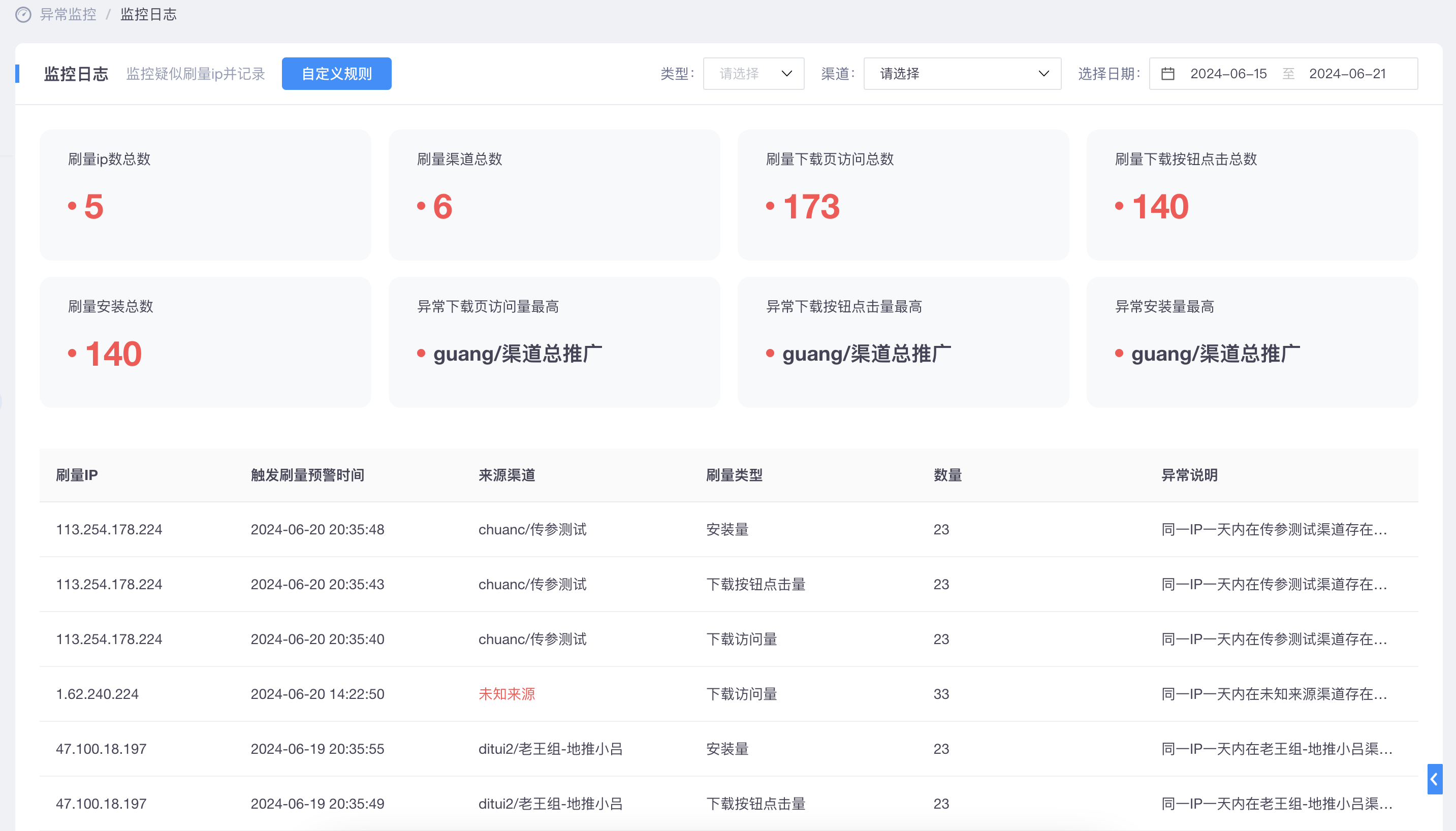
掌握数据魔方:Xinstall引领ASA全链路数据归因新纪元
一、引言 在数字化时代,数据是App推广和运营的核心驱动力。然而,如何准确获取、分析并应用这些数据,却成为了许多开发者和营销人员面临的痛点。Xinstall作为一款专业的App全渠道统计服务商,致力于提供精准、高效的数据解决方案&a…...

AI专著生成神器登场!快速输出20万字专著,写作不用愁!
学术专著写作困境与AI工具的崛起 对于许多学术研究者来说,撰写学术专著时面临的最大挑战,无疑是“有限的精力”和“无穷的需求”之间的矛盾。撰写专著通常需要三到五年,甚至更长时间,而研究者还需平衡教学、科研项目和学术交流等…...

为AI智能体构建持久记忆系统:Claw Recall部署与MCP集成指南
1. 项目概述:为AI智能体构建持久、可搜索的记忆系统如果你和我一样,深度使用Claude Code、OpenClaw这类AI智能体工具进行日常开发,那你一定遇到过这个让人头疼的问题:对话上下文被压缩(Context Compaction)…...

微信消息自动转发:5分钟实现跨群智能消息同步
微信消息自动转发:5分钟实现跨群智能消息同步 【免费下载链接】wechat-forwarding 在微信群之间转发消息 项目地址: https://gitcode.com/gh_mirrors/we/wechat-forwarding 在微信群管理和团队协作中,你是否经常需要将重要消息手动转发到多个群聊…...

为OpenClaw配置Taotoken实现高效AI智能体工作流
🚀 告别海外账号与网络限制!稳定直连全球优质大模型,限时半价接入中。 👉 点击领取海量免费额度 为OpenClaw配置Taotoken实现高效AI智能体工作流 OpenClaw 是一个流行的开源AI智能体框架,它允许开发者快速构建和编排复…...

3D Tiles Tools终极指南:如何快速掌握3D模型格式转换与优化
3D Tiles Tools终极指南:如何快速掌握3D模型格式转换与优化 【免费下载链接】3d-tiles-tools 项目地址: https://gitcode.com/gh_mirrors/3d/3d-tiles-tools 在3D地理空间数据可视化领域,3D Tiles Tools是一套功能强大的开源工具集,专…...

可穿戴设备十年演进:从技术突破到健康与生产力工具
1. 从预言到现实:可穿戴计算浪潮的十年回望与深度拆解十年前,当EE Times那篇关于Apple iWatch和Google Glasses将引领可穿戴计算浪潮的文章发表时,业界还弥漫着一种将信将疑的氛围。彼时,智能手机正处巅峰,人们很难想象…...

终极指南:5步安装Koikatu HF Patch解锁完整游戏体验
终极指南:5步安装Koikatu HF Patch解锁完整游戏体验 【免费下载链接】KK-HF_Patch Automatically translate, uncensor and update Koikatu! and Koikatsu Party! 项目地址: https://gitcode.com/gh_mirrors/kk/KK-HF_Patch KK-HF Patch是专为《恋活…...

Windows APK安装工具终极指南:轻松在电脑上安装Android应用
Windows APK安装工具终极指南:轻松在电脑上安装Android应用 【免费下载链接】APK-Installer An Android Application Installer for Windows 项目地址: https://gitcode.com/GitHub_Trending/ap/APK-Installer 您是否曾经希望在Windows电脑上直接安装Android…...

RCB-F9T-0,支持多频段多星座及纳秒级精度的多协议GNSS授时板
简介今天我要向大家介绍的是 u-blox 的多频段GNSS授时板——RCB-F9T-0。这是一款专为高精度授时应用设计的紧凑型定时板。该模块基于 u-blox ZED-F9T-00B 高精度授时模块,搭载AEC-Q100认证的GNSS芯片;集成SMB天线连接器和5V有源天线供电电路;…...

WaveTools终极指南:免费解锁鸣潮120FPS帧率限制的完整方案
WaveTools终极指南:免费解锁鸣潮120FPS帧率限制的完整方案 【免费下载链接】WaveTools 🧰鸣潮工具箱 项目地址: https://gitcode.com/gh_mirrors/wa/WaveTools WaveTools是一款专为《鸣潮》PC版设计的开源工具箱,通过创新技术方案帮助…...