
【尚庭公寓SpringBoot + Vue 项目实战】预约看房与租约管理(完结)
【尚庭公寓SpringBoot + Vue 项目实战】预约看房与租约管理(完结)
文章目录
- 【尚庭公寓SpringBoot + Vue 项目实战】预约看房与租约管理(完结)
- 1、业务说明
- 2、接口开发
- 2.1、预约看房管理
- 2.1.1.保存或更新看房预约
- 2.1.2. 查询个人预约看房列表
- 2.1.3. 根据ID查询预约详情信息
- 2.2、租约管理
- 2.2.1. 获取个人租约基本信息列表
- 2.2.2. 根据ID获取租约详细信息
- 2.2.3. 根据ID更新租约状态
- 2.2.4. 保存或更新租约
- 2.2.5. 根据房间ID获取可选支付方式
- 2.2.6.根据房间ID获取可选租期
1、业务说明
预约看房管理共需三个接口,分别是保存或更新看房预约、查询个人预约列表和根据ID查询预约详情信息
租约管理共有六个接口,分别是获取个人租约基本信息列表**、**根据ID获取租约详细信息、根据ID更新租约状态、保存或更新租约、根据房间ID获取可选支付方式和根据房间ID获取可选租期
2、接口开发
2.1、预约看房管理
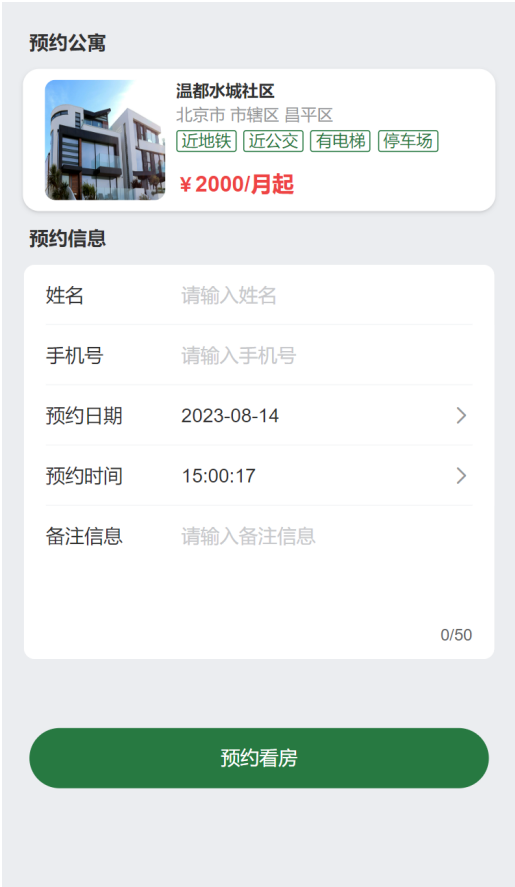
首先在ViewAppointmentController中注入ViewAppointmentService,如下
@Tag(name = "看房预约信息")
@RestController
@RequestMapping("/app/appointment")
public class ViewAppointmentController {@Autowiredprivate ViewAppointmentService service;
}
2.1.1.保存或更新看房预约
在ViewAppointmentController中增加如下内容
@Operation(summary = "保存或更新看房预约")
@PostMapping("/saveOrUpdate")
public Result saveOrUpdate(@RequestBody ViewAppointment viewAppointment) {viewAppointment.setUserId(LoginUserHolder.getLoginUser().getUserId());service.saveOrUpdate(viewAppointment);return Result.ok();
}
2.1.2. 查询个人预约看房列表
-
查看响应的数据结构
查看web-app模块下的
com.atguigu.lease.web.app.vo.appointment.AppointmentItemVo,如下@Data @Schema(description = "APP端预约看房基本信息") public class AppointmentItemVo {@Schema(description = "预约Id")private Long id;@Schema(description = "预约公寓名称")private String apartmentName;@Schema(description = "公寓图片列表")private List<GraphVo> graphVoList;@Schema(description = "预约时间")@JsonFormat(pattern = "yyyy-MM-dd HH:mm:ss")private Date appointmentTime;@Schema(description = "当前预约状态")private AppointmentStatus appointmentStatus; } -
编写Controller层逻辑
在
ViewAppointmentController中增加如下内容@Operation(summary = "查询个人预约看房列表") @GetMapping("listItem") public Result<List<AppointmentItemVo>> listItem() {List<AppointmentItemVo> list = service.listItemByUserId(LoginUserHolder.getLoginUser().getUserId());return Result.ok(list); } -
编写Service层逻辑
-
在
ViewAppointmentService中增加如下内容List<AppointmentItemVo> listItemByUserId(Long userId); -
在
ViewAppointmentServiceImpl中增加如下内容@Override public List<AppointmentItemVo> listItemByUserId(Long userId) {return viewAppointmentMapper.listItemByUserId(userId); }
-
-
编写Mapper层逻辑
-
在
ViewAppointmentMapper中增加如下内容List<AppointmentItemVo> listItemByUserId(Long userId); -
在
ViewAppointmentMapper.xml中增加如下内容<resultMap id="AppointmentItemVoMap" type="com.atguigu.lease.web.app.vo.appointment.AppointmentItemVo"autoMapping="true"><id column="id" property="id"/><collection property="graphVoList" ofType="com.atguigu.lease.web.app.vo.graph.GraphVo" autoMapping="true"/> </resultMap><select id="listItemByUserId" resultMap="AppointmentItemVoMap">select va.id,va.appointment_time,va.appointment_status,ai.name apartment_name,gi.name,gi.urlfrom view_appointment valeft join apartment_info ai on va.apartment_id = ai.id and ai.is_deleted = 0left join graph_info gi on gi.item_type = 1 and gi.item_id = ai.id and gi.is_deleted = 0where va.is_deleted = 0and va.user_id = #{userId}order by va.create_time desc </select>
-
2.1.3. 根据ID查询预约详情信息
-
查看相应的数据结构
查看
web-app模块下的com.atguigu.lease.web.app.vo.appointment.AppointmentDetailVo,内容如下@Data @Schema(description = "APP端预约看房详情") public class AppointmentDetailVo extends ViewAppointment {@Schema(description = "公寓基本信息")private ApartmentItemVo apartmentItemVo; } -
编写Controller层逻辑
在
ViewAppointmentController中增加如下内容@GetMapping("getDetailById") @Operation(summary = "根据ID查询预约详情信息") public Result<AppointmentDetailVo> getDetailById(Long id) {AppointmentDetailVo appointmentDetailVo = service.getDetailById(id);return Result.ok(appointmentDetailVo); } -
编写Service层逻辑
-
在
ViewAppointmentService中增加如下内容AppointmentDetailVo getDetailById(Long id); -
在
ViewAppointmentServiceImpl中增加如下内容@Override public AppointmentDetailVo getDetailById(Long id) {ViewAppointment viewAppointment = viewAppointmentMapper.selectById(id);ApartmentItemVo apartmentItemVo = apartmentInfoService.selectApartmentItemVoById(viewAppointment.getApartmentId());AppointmentDetailVo agreementDetailVo = new AppointmentDetailVo();BeanUtils.copyProperties(viewAppointment, agreementDetailVo);agreementDetailVo.setApartmentItemVo(apartmentItemVo);return agreementDetailVo; }
-
2.2、租约管理
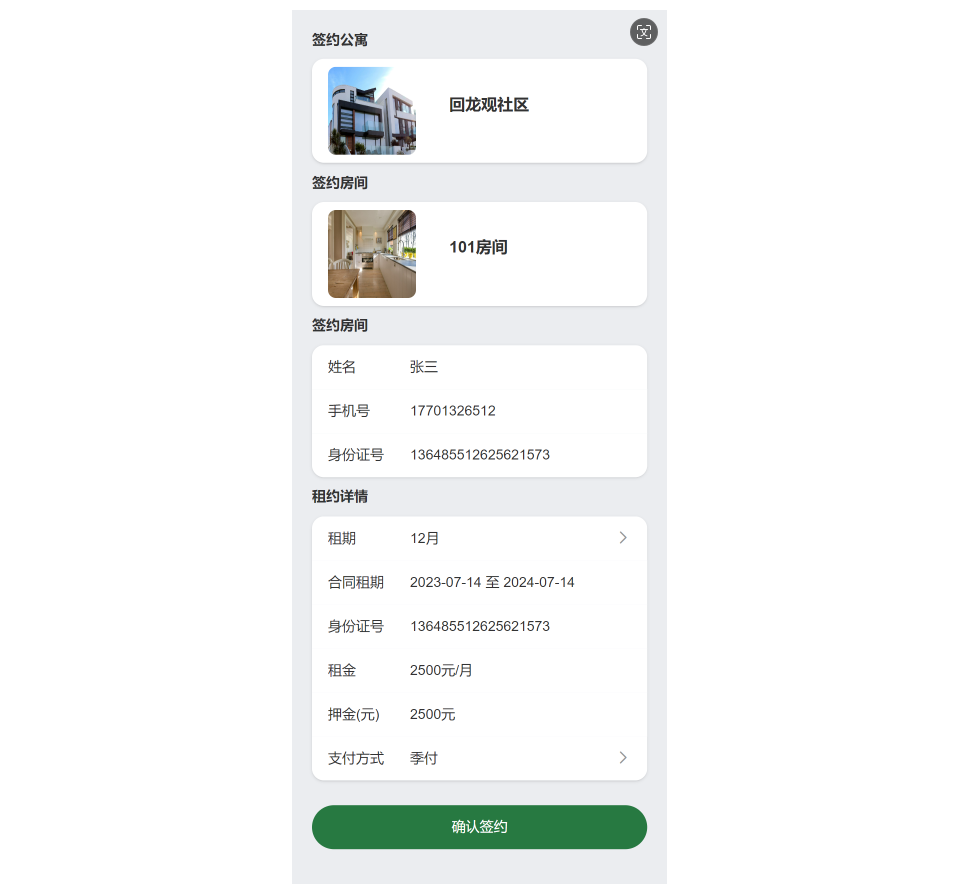
首先在LeaseAgreementController中注入LeaseAgreementService,如下
@RestController
@RequestMapping("/app/agreement")
@Tag(name = "租约信息")
public class LeaseAgreementController {@Autowiredprivate LeaseAgreementService service;
}
2.2.1. 获取个人租约基本信息列表
-
查看响应的数据结构
查看web-appp模块下的
com.atguigu.lease.web.app.vo.agreement.AgreementItemVo,内容如下@Data @Schema(description = "租约基本信息") public class AgreementItemVo {@Schema(description = "租约id")private Long id;@Schema(description = "房间图片列表")private List<GraphVo> roomGraphVoList;@Schema(description = "公寓名称")private String apartmentName;@Schema(description = "房间号")private String roomNumber;@Schema(description = "租约状态")private LeaseStatus leaseStatus;@Schema(description = "租约开始日期")@JsonFormat(pattern = "yyyy-MM-dd")private Date leaseStartDate;@Schema(description = "租约结束日期")@JsonFormat(pattern = "yyyy-MM-dd")private Date leaseEndDate;@Schema(description = "租约来源")private LeaseSourceType sourceType;@Schema(description = "租金")private BigDecimal rent; } -
编写Controller层逻辑
在
LeaseAgreementController中增加如下内容@Operation(summary = "获取个人租约基本信息列表") @GetMapping("listItem") public Result<List<AgreementItemVo>> listItem() {List<AgreementItemVo> result = service.listItemByPhone(LoginUserHolder.getLoginUser().getUsername());return Result.ok(result); } -
编写Service层逻辑
-
在
LeaseAgreementService中增加如下内容List<AgreementItemVo> listItemByPhone(String phone); -
在
LeaseAgreementServiceImpl中增加如下内容@Override public List<AgreementItemVo> listItemByPhone(String phone) {return leaseAgreementMapper.listItemByPhone(phone); }
-
-
编写Mapper层逻辑
-
在
LeaseAgreementMapper中增加如下内容List<AgreementItemVo> listItemByPhone(String phone); -
在
LeaseAgreementMapper.xml中增加如下内容<resultMap id="AgreementItemVoMap" type="com.atguigu.lease.web.app.vo.agreement.AgreementItemVo" autoMapping="true"><id property="id" column="id"/><collection property="roomGraphVoList" ofType="com.atguigu.lease.web.app.vo.graph.GraphVo" autoMapping="true"/> </resultMap><select id="listItemByPhone" resultMap="AgreementItemVoMap">select la.id,la.lease_start_date,la.lease_end_date,la.rent,la.payment_type_id,la.status lease_status,la.source_type,ai.name apartment_name,ri.room_number,gi.name,gi.urlfrom lease_agreement laleft join apartment_info ai on la.apartment_id = ai.id and ai.is_deleted = 0left join room_info ri on la.room_id = ri.id and ri.is_deleted = 0left join graph_info gi on gi.item_type = 2 and gi.item_id = ri.id and gi.is_deleted = 0where la.is_deleted = 0and la.phone = #{phone}</select>
-
2.2.2. 根据ID获取租约详细信息
-
查看响应的数据结构
查看web-app模块下的
com.atguigu.lease.web.app.vo.agreement.AgreementDetailVo,内容如下@Data @Schema(description = "租约详细信息") public class AgreementDetailVo extends LeaseAgreement {@Schema(description = "租约id")private Long id;@Schema(description = "公寓名称")private String apartmentName;@Schema(description = "公寓图片列表")private List<GraphVo> apartmentGraphVoList;@Schema(description = "房间号")private String roomNumber;@Schema(description = "房间图片列表")private List<GraphVo> roomGraphVoList;@Schema(description = "支付方式")private String paymentTypeName;@Schema(description = "租期月数")private Integer leaseTermMonthCount;@Schema(description = "租期单位")private String leaseTermUnit;} -
编写Controller层逻辑
在
LeaseAgreementController中增加如下内容@Operation(summary = "根据id获取租约详细信息") @GetMapping("getDetailById") public Result<AgreementDetailVo> getDetailById(@RequestParam Long id) {AgreementDetailVo agreementDetailVo = service.getDetailById(id);return Result.ok(agreementDetailVo); } -
编写Service层逻辑
-
在
LeaseAgreementService中增加如下内容AgreementDetailVo getDetailById(Long id); -
在
LeaseAgreementServiceImpl中增加如下内容@Override public AgreementDetailVo getDetailById(Long id) {//1.查询租约信息LeaseAgreement leaseAgreement = leaseAgreementMapper.selectById(id);if (leaseAgreement == null) {return null;}//2.查询公寓信息ApartmentInfo apartmentInfo = apartmentInfoMapper.selectById(leaseAgreement.getApartmentId());//3.查询房间信息RoomInfo roomInfo = roomInfoMapper.selectById(leaseAgreement.getRoomId());//4.查询图片信息List<GraphVo> roomGraphVoList = graphInfoMapper.selectListByItemTypeAndId(ItemType.ROOM, leaseAgreement.getRoomId());List<GraphVo> apartmentGraphVoList = graphInfoMapper.selectListByItemTypeAndId(ItemType.APARTMENT, leaseAgreement.getApartmentId());//5.查询支付方式PaymentType paymentType = paymentTypeMapper.selectById(leaseAgreement.getPaymentTypeId());//6.查询租期LeaseTerm leaseTerm = leaseTermMapper.selectById(leaseAgreement.getLeaseTermId());AgreementDetailVo agreementDetailVo = new AgreementDetailVo();BeanUtils.copyProperties(leaseAgreement, agreementDetailVo);agreementDetailVo.setApartmentName(apartmentInfo.getName());agreementDetailVo.setRoomNumber(roomInfo.getRoomNumber());agreementDetailVo.setApartmentGraphVoList(apartmentGraphVoList);agreementDetailVo.setRoomGraphVoList(roomGraphVoList);agreementDetailVo.setPaymentTypeName(paymentType.getName());agreementDetailVo.setLeaseTermMonthCount(leaseTerm.getMonthCount());agreementDetailVo.setLeaseTermUnit(leaseTerm.getUnit());return agreementDetailVo; }
-
2.2.3. 根据ID更新租约状态
-
编写Controller层逻辑
在
LeaseAgreementController中增加如下内容@Operation(summary = "根据id更新租约状态", description = "用于确认租约和提前退租") @PostMapping("updateStatusById") public Result updateStatusById(@RequestParam Long id, @RequestParam LeaseStatus leaseStatus) {LambdaUpdateWrapper<LeaseAgreement> updateWrapper = new LambdaUpdateWrapper<>();updateWrapper.eq(LeaseAgreement::getId, id);updateWrapper.set(LeaseAgreement::getStatus, leaseStatus);service.update(updateWrapper);return Result.ok(); }
2.2.4. 保存或更新租约
-
编写Controller层逻辑
在
LeaseAgreementController中增加如下内容@Operation(summary = "保存或更新租约", description = "用于续约") @PostMapping("saveOrUpdate") public Result saveOrUpdate(@RequestBody LeaseAgreement leaseAgreement) {service.saveOrUpdate(leaseAgreement);return Result.ok(); }
2.2.5. 根据房间ID获取可选支付方式
-
编写Controller层逻辑
在
PaymentTypeController中增加如下内容@Operation(summary = "根据房间id获取可选支付方式列表") @GetMapping("listByRoomId") public Result<List<PaymentType>> list(@RequestParam Long id) {List<PaymentType> list = service.listByRoomId(id);return Result.ok(list); } -
编写Service层逻辑
在
PaymentTypeService中增加如下内容List<PaymentType> listByRoomId(Long id);在
PaymentTypeServiceImpl中增加如下内容@Override public List<PaymentType> listByRoomId(Long id) {return paymentTypeMapper.selectListByRoomId(id); }
2.2.6.根据房间ID获取可选租期
-
编写Controller层逻辑
在
LeaseTermController中增加如下内容@GetMapping("listByRoomId") @Operation(summary = "根据房间id获取可选获取租期列表") public Result<List<LeaseTerm>> list(@RequestParam Long id) {List<LeaseTerm> list = service.listByRoomId(id);return Result.ok(list); } -
编写Service层逻辑
在
LeaseTermServcie中曾加如下内容List<LeaseTerm> listByRoomId(Long id);在
LeaseTermServiceImpl中增加如下内容@Override public List<LeaseTerm> listByRoomId(Long id) {return leaseTermMapper.selectListByRoomId(id); }
相关文章:
【尚庭公寓SpringBoot + Vue 项目实战】预约看房与租约管理(完结)
【尚庭公寓SpringBoot Vue 项目实战】预约看房与租约管理(完结) 文章目录 【尚庭公寓SpringBoot Vue 项目实战】预约看房与租约管理(完结)1、业务说明2、接口开发2.1、预约看房管理2.1.1.保存或更新看房预约2.1.2. 查询个人预约…...

java拼图小游戏项目
创建一个Java拼图小游戏是一个有趣且富有教育意义的项目,可以锻炼你的编程技能。以下是开发一个基本拼图游戏可能需要考虑的几个步骤: 项目规划: 确定游戏的基本规则和玩法。设计游戏的界面和用户交互。 环境搭建: 确保你的开发环…...

[C++][数据结构][跳表]详细讲解
目录 0.什么是跳表?1.SkipList的优化思路2.SkipList的效率如何保证?3.SkipList实现4.SkipList VS 平衡搜索树 && Hash 0.什么是跳表? SkipList本质上也是一种查找结构,用于解决算法中的查找问题,跟平衡搜索树…...

tinyxml
github下载相关的软件包,其中有四个文件需要主要需要关注就是分别是tinyxml12.cpp,tinyxml12.h,rss网页xml文件,还有就是官方给的test文件tinyxmltest.cpp。 example1就是提供一个打开文件的方式 int example_1() {XMLDocument …...
Docker(三)-Docker常用命令
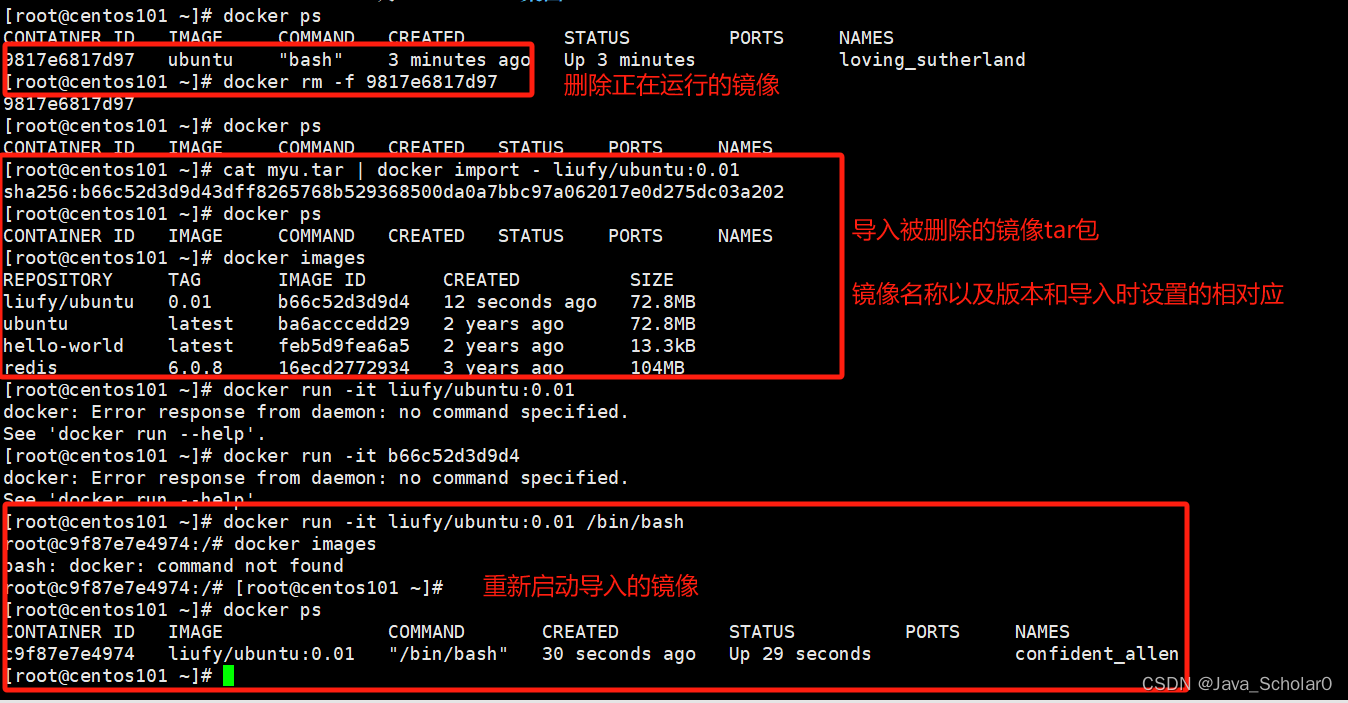
1.run run命令执行流程:2.帮助启动类命令 2.1 启动docker systemctl start docker2.2 停止docker systemctl stop docker2.3 重启docker systemctl restart docker2.4查看docker状态 systemctl status docker2.5开机启动 systemctl enable docker2.6查看docker概要信息 …...
[MRCTF2020]PixelShooter
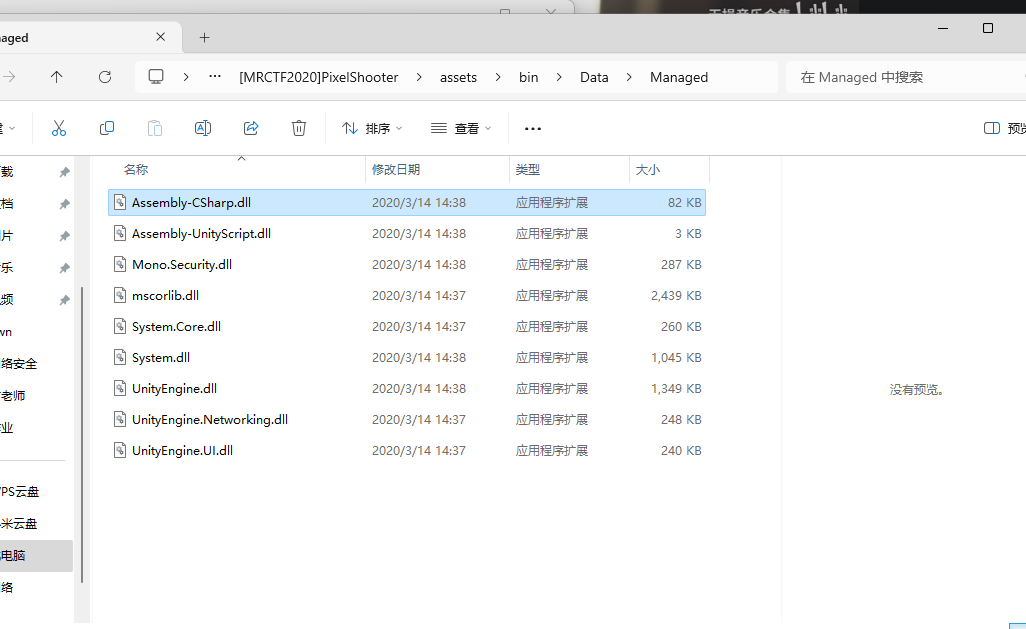
一个apk文件 jeb打开发现是apk文件 apk游戏逆向必须知道的知识: 一般关键数据在 Assets/bin/data/managed/assembly-csharp.dll这个文件里面 我不知道jeb为什么这里我没有 apk是个压缩包 直接解压 这个文件解压也可以发现flag {Unity_1S_Fun_233}...

vue实现的商品列表网页
一、商品列表效果如下 二、代码; vue实现的商品列表网页 , 图片在vue项目的Public文件夹里的 imgs中 <template><div class"common-layout"><!-- el-container:外层容器。 当子元素中包含 <el-header> 或 <el-foo…...

【泛微系统】e-cology非标配功能概览
关于泛微非标功能的功能编号、功能名称及支持版本 编号名称支持版本001考勤功能4.500.0124-9.00+KB900190206002短信通用接口5.000.0327+KB50001003 及以上版本004计划任务接口5.0+KB50001003及以上版本005集成登录接口6.0及以上版本006流程中自定义浏览框5.0+KB50001003及以上…...

Python基础教程(二十八):pip模块
💝💝💝首先,欢迎各位来到我的博客,很高兴能够在这里和您见面!希望您在这里不仅可以有所收获,同时也能感受到一份轻松欢乐的氛围,祝你生活愉快! 💝Ὁ…...
通信系统概述
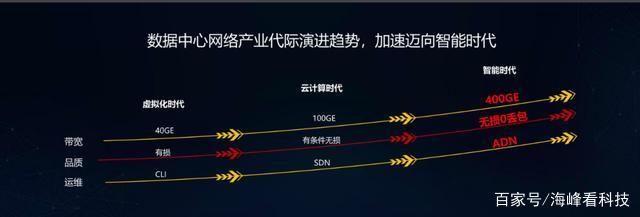
1.定义 通信系统(也称为通信网络)是利用各种通信线路将地理上分散的、具有独立功能的计算机系统和通信设备按不同的形式连接起来,依靠网络软件及通信协议实现资源共享和信息传递的系统。 2.概述 随着通信技术和网络技术的不断发展ÿ…...
http发展史(http0.9、http1.0、http1.1、http/2、http/3)详解
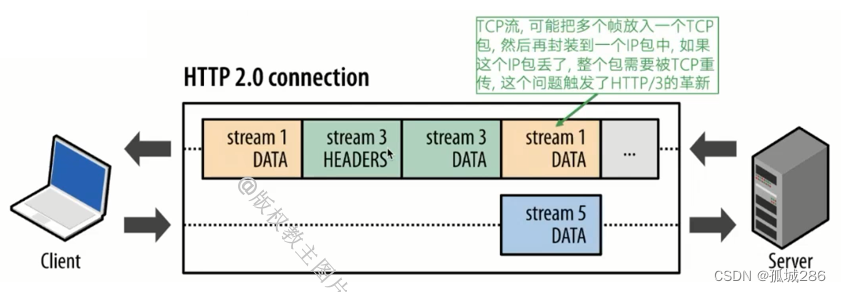
文章目录 HTTP/0.9HTTP/1.0HTTP/1.1队头阻塞(Head-of-Line Blocking)1. TCP 层的队头阻塞2. HTTP/1.1 的队头阻塞 HTTP/2HTTP/3 HTTP/0.9 发布时间:1991年 特点: 只支持 GET 方法没有 HTTP 头部响应中只有 HTML 内容࿰…...
)
Hadoop 面试题(四)
1. 简述Hadoop节点的动态上线下线的大概操作 ? 在Hadoop集群中,节点的动态上下线指的是在不停止整个集群服务的情况下,添加或移除节点。这种能力对于维护和扩展集群非常重要。以下是Hadoop节点动态上线下线的大概操作步骤: 动态…...

绽放光彩的小程序 UI 风格
绽放光彩的小程序 UI 风格...
电脑文件夹怎么加密?文件夹加密的5种方法
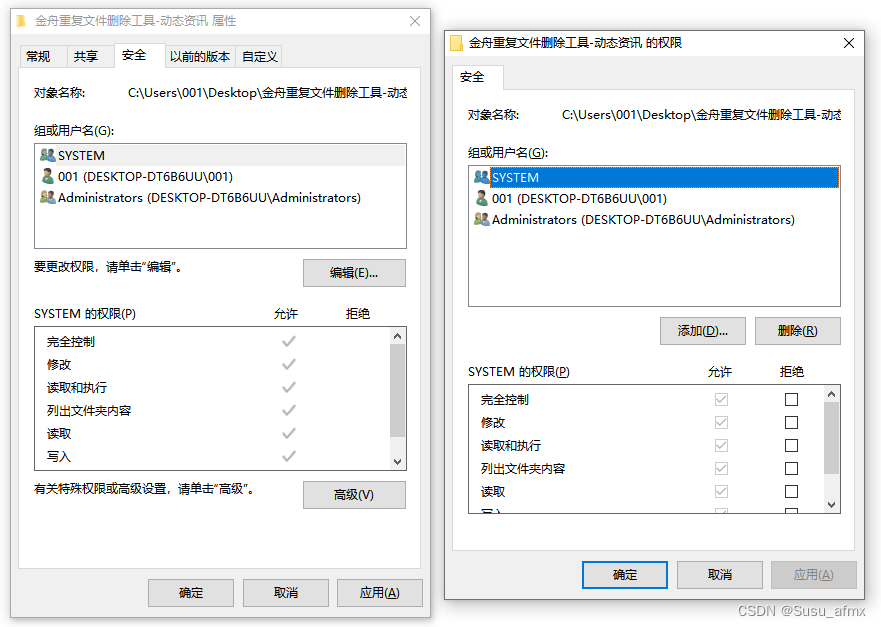
在数字化时代,信息安全显得尤为重要。对于个人电脑用户来说,文件夹加密是一种有效保护隐私和数据安全的方法。本文将介绍五种文件夹加密的方法,帮助您更好地保护自己的重要文件。 如何设置文件夹密码方法一:利用Windows系统自带的…...

异步复位同步释放
目录 描述 输入描述: 输出描述: 参考代码 描述 题目描述: 请使用异步复位同步释放来将输入数据a存储到寄存器中,并画图说明异步复位同步释放的机制原理 信号示意图: clk为时钟 rst_n为低电平复位 d信号输入…...
JupyterLab使用指南(七):JupyterLab使用 LaTeX 生成数学公式
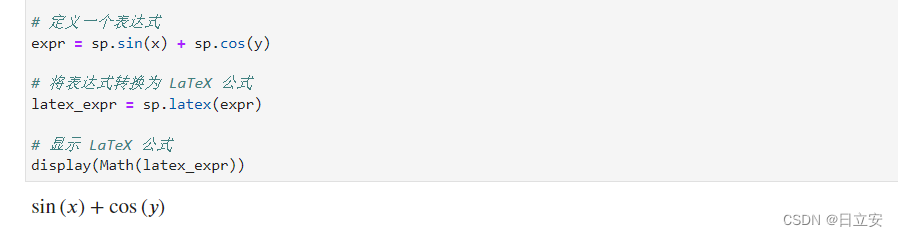
在 JupyterLab 中,可以使用 LaTeX 语法生成复杂的数学公式。JupyterLab 内置对 LaTeX 的支持,使得我们可以方便地在 notebook 中编写和展示数学公式。以下是详细的步骤和示例。 1. 使用 LaTeX 生成数学公式 LaTeX 是一种专门用于排版数学公式的语言。J…...
docker 环境部署
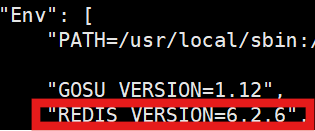
1.Redis部署 用docker拉取redis镜像 docker pull redis 用docker查看拉取的镜像版本号,这里查到的是 6.2.6 版本 docker inspect redis 通过wget指令下载对应版本的tar包,下载完成后解压 wget https://download.redis.io/releases/redis-6.2.6.tar.gz …...

Spring中的ContextPath总结
Spring中的ContextPath总结 大家好,我是免费搭建查券返利机器人省钱赚佣金就用微赚淘客系统3.0的小编,也是冬天不穿秋裤,天冷也要风度的程序猿! 1. ContextPath的概念 在Spring中,ContextPath是指Web应用程序的上下文…...

C++设计模式——Composite组合模式
一,组合模式简介 真实世界中,像企业组织、文档、图形软件界面等案例,它们在结构上都是分层次的。将系统分层次的方式使得统一管理和添加不同子模块变得容易,在软件开发中,组合模式的设计思想和它们类似。 组合模式是…...
Android提供的LruCache类简介(1)
* If your cached values hold resources that need to be explicitly released, * override {link #entryRemoved}. * 如果你cache的某个值需要明确释放,重写entryRemoved() * If a cache miss should be computed on demand for the corresponding keys, * ov…...

EB Garamond 12终极指南:如何免费获取经典优雅的学术排版字体
EB Garamond 12终极指南:如何免费获取经典优雅的学术排版字体 【免费下载链接】EBGaramond12 项目地址: https://gitcode.com/gh_mirrors/eb/EBGaramond12 在数字设计的世界里,寻找一款既具有历史韵味又能满足现代学术需求的字体常常让人头疼。今…...

Inkscape实战:用蒙版给你的Logo或文字快速添加酷炫的渐变效果
Inkscape蒙版进阶:打造专业级渐变Logo的5种创意技法 在矢量设计领域,一个普通的Logo与令人眼前一亮的作品之间,往往只差一层巧妙的渐变蒙版。作为开源矢量图形编辑器的标杆,Inkscape的蒙版功能远不止于基础遮罩——当它与渐变工具…...
详解)
Redis Sorted Set(有序集合)详解
Redis 里面有一种非常强大的数据结构: Sorted Set(有序集合)简称: ZSet这是 Redis 面试和项目里非常高频的东西。一、什么是 Sorted Set 先记住一句话: Sorted Set 自动排序的 Set它具备: Set 的去重自动排…...

犀牛开发者日记-犀牛论剑特辑 | 李江浩:一个 ROS 布道师的转身
熟悉ROS领域的朋友,对李江浩这个名字想必并不陌生。作为资深ROS布道师,他常年活跃在技术社区分享干货,面对同行提出的各类问题,总能给出快准狠的解决方案,精准直击技术痛点。熟悉他的人都有一个共同感受:李…...

终极指南:用DDrawCompat在现代Windows上完美复活经典游戏
终极指南:用DDrawCompat在现代Windows上完美复活经典游戏 【免费下载链接】DDrawCompat DirectDraw and Direct3D 1-7 compatibility, performance and visual enhancements for Windows Vista, 7, 8, 10 and 11 项目地址: https://gitcode.com/gh_mirrors/dd/DDr…...

5分钟解锁虚拟多屏生产力:Rust驱动打造Windows虚拟显示器终极方案
5分钟解锁虚拟多屏生产力:Rust驱动打造Windows虚拟显示器终极方案 【免费下载链接】virtual-display-rs A Windows virtual display driver to add multiple virtual monitors to your PC! For Win10. Works with VR, obs, streaming software, etc 项目地址: htt…...

ThinkPHP8.x全面升级:现代化PHP开发新标杆
好的,我们来梳理一下 ThinkPHP 8.x 版本(通常指 8.0 及后续小版本)的主要特性和改进方向。相较于之前的版本(如 5.x),8.x 版本在架构、性能、规范性和安全性上都有显著提升:核心方向与重大变更&…...

接入Taotoken多模型路由后服务端响应稳定性提升感受
🚀 告别海外账号与网络限制!稳定直连全球优质大模型,限时半价接入中。 👉 点击领取海量免费额度 接入Taotoken多模型路由后服务端响应稳定性提升感受 1. 背景:生产环境对AI服务稳定性的需求 在构建依赖大模型API的生…...

ARM MHU寄存器架构与核间通信优化指南
1. ARM MHU寄存器架构概述在ARM多核处理器架构中,MHU(Message Handling Unit)是实现核间通信的关键硬件模块。作为专门优化的消息传递单元,MHU通过精心设计的寄存器组实现了高效的数据传输和中断管理机制。不同于传统的共享内存通…...

在 Elasticsearch 中使用带有确定性护栏的 Agentic AI 搜索,以实现安全的查询执行
作者:来自 Elastic Alexander Marquardt, Honza Krl 及 Taylor Roy 当 LLM 直接生成查询时, Agentic AI 搜索系统通常会失败。了解确定性护栏和控制平面架构如何通过 Elasticsearch 实现安全、可靠且受治理的查询执行。 刚接触 Elasticsearch࿱…...