
RabbitMQ 学习笔记
RabbitMQ学习笔记
一些概念
Broker :RabbitMQ服务。
virtual host: 其实就是分组。
Connection:连接,生产者消费者与Broker之间的TCP连接。
Channel:网络信道,轻量级的Connection,使用Channel可以减少Connection的建立,减少开销。
Message:消息,由 Properties和 Body组成,Properties可以对消息的优先级、延迟等特性进行记录,Body存储消息体的内容。
Exchange:交换机,没有消息存储功能,负责分发消息。
Binding:Exchange和Queue之间的虚拟连接,其中可以包含Routing Key。
Routing Key:路由规则,用于确定如何分发、接收消息。
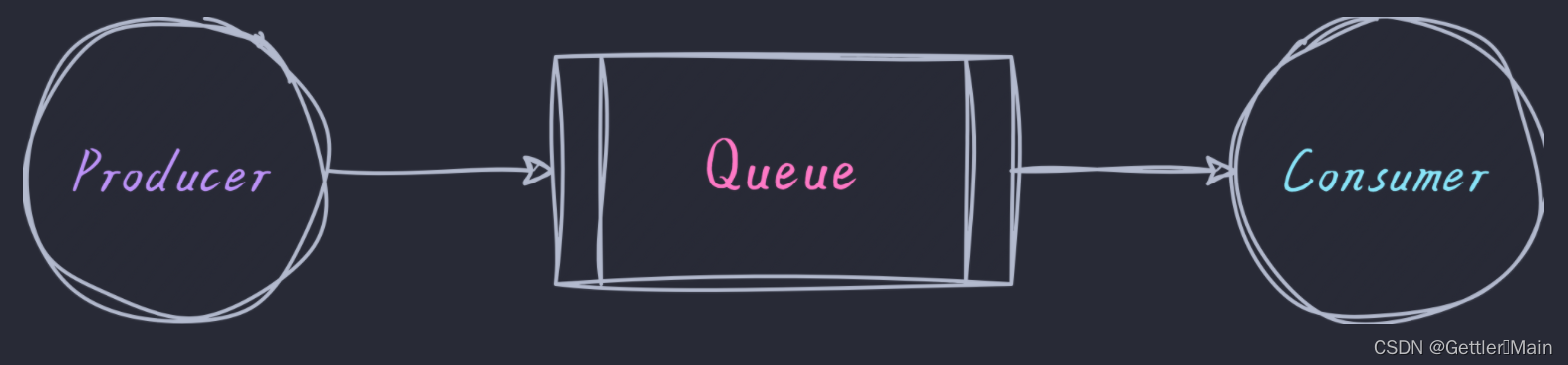
Queue:消息队列,保存消息并将其转发给消费者进行消费。
安装
Windows安装
安装erLang语言
进入官网
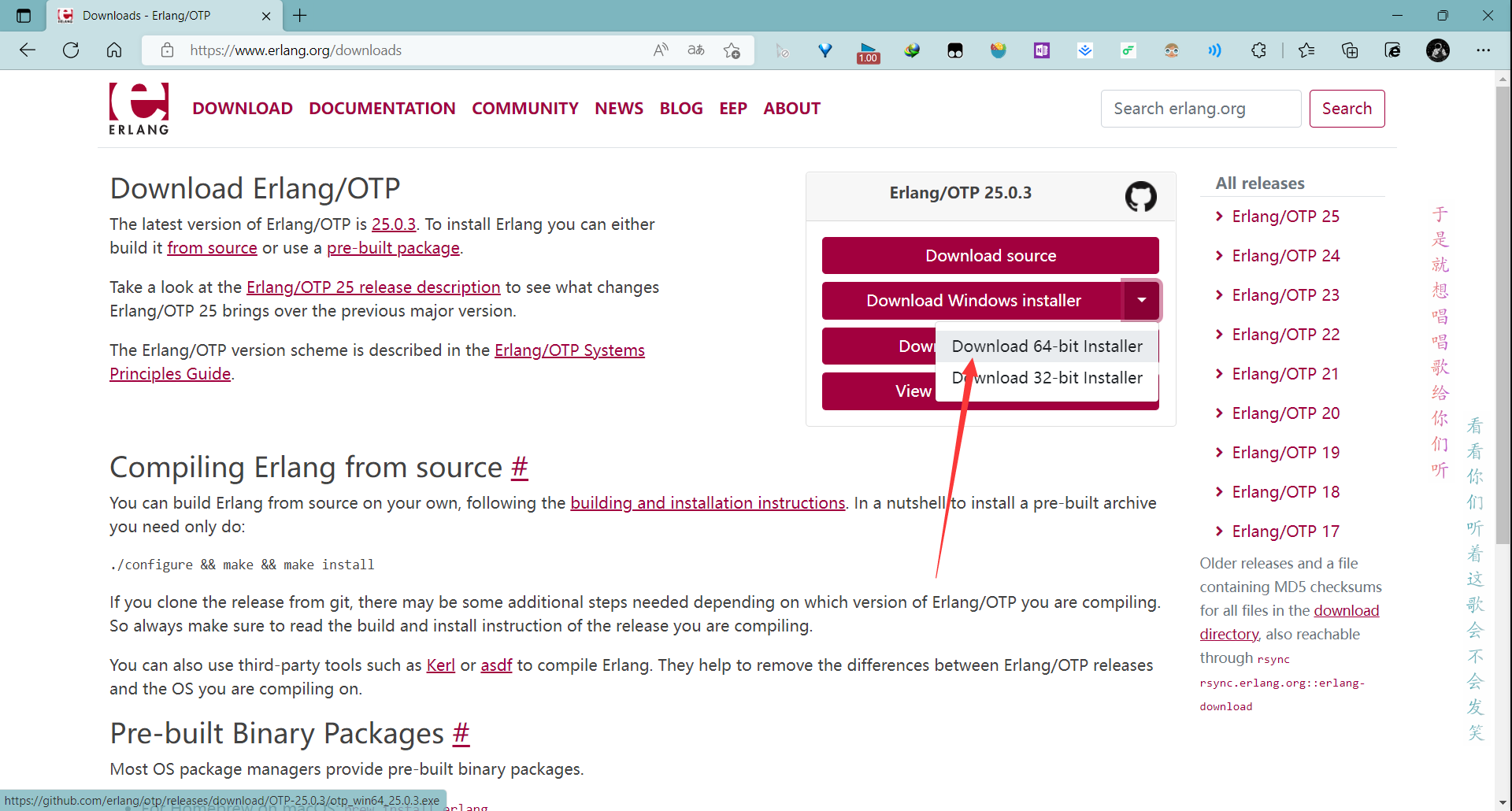
下载完之后一直下一步安装即可,安装完成后进入目录,配置环境变量
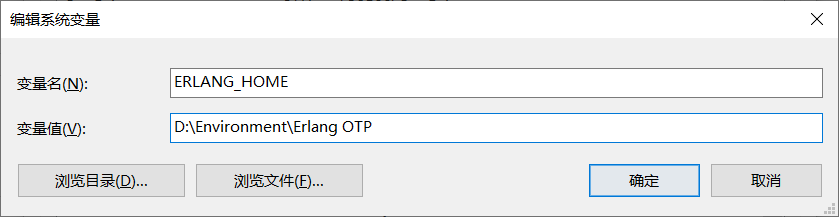
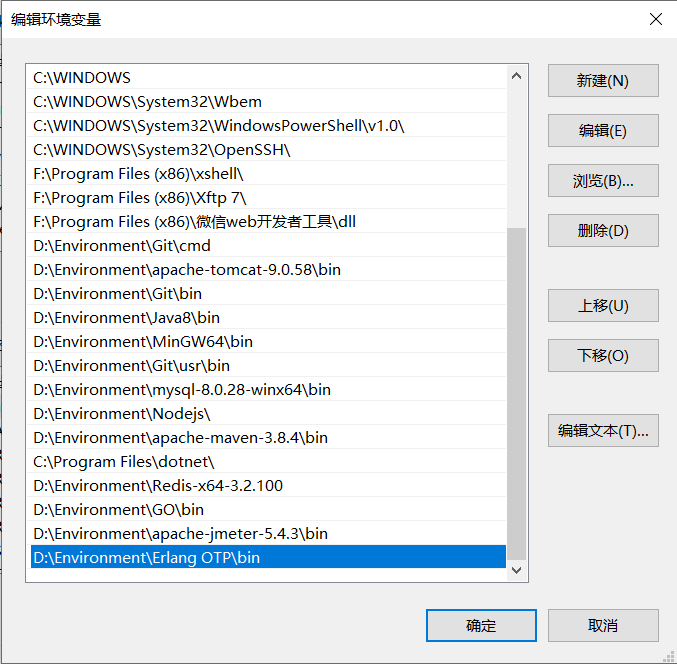
安装RabbitMQ服务端
Release RabbitMQ 3.7.3 · rabbitmq/rabbitmq-server (github.com)
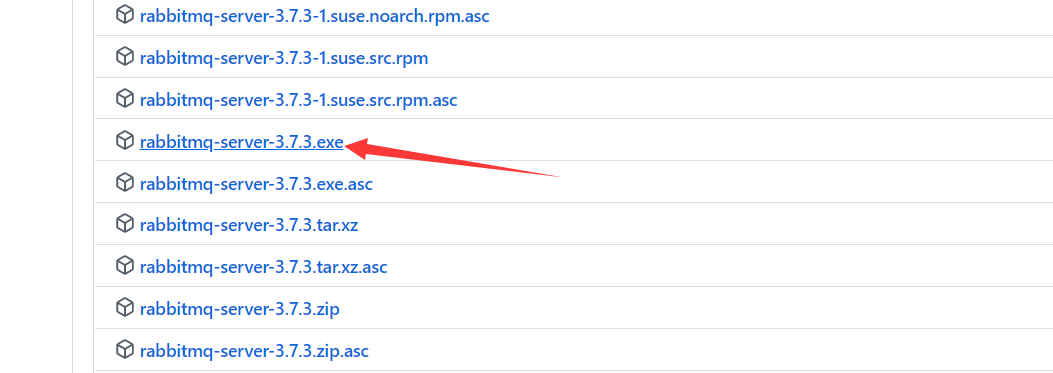
一直下一步安装即可
安装完成后打开安装目录,进入到这个文件夹打开命令行
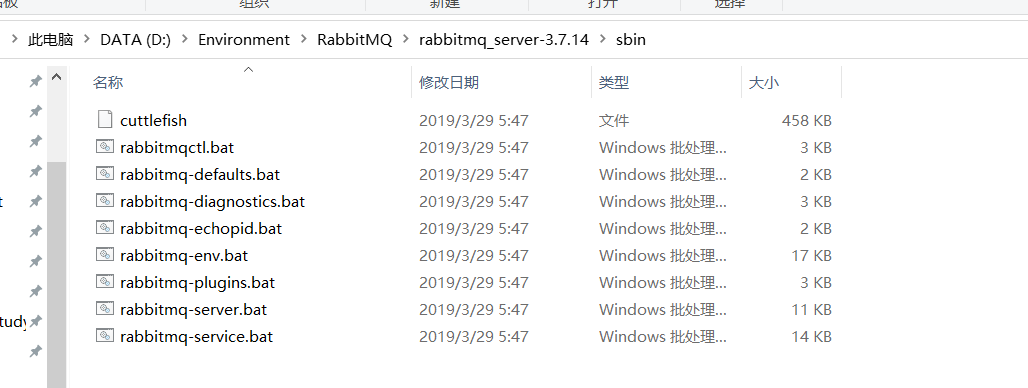
输入命令安装插件
rabbitmq-plugins enable rabbitmq_management
完成后双击rabbitmq-server.bat
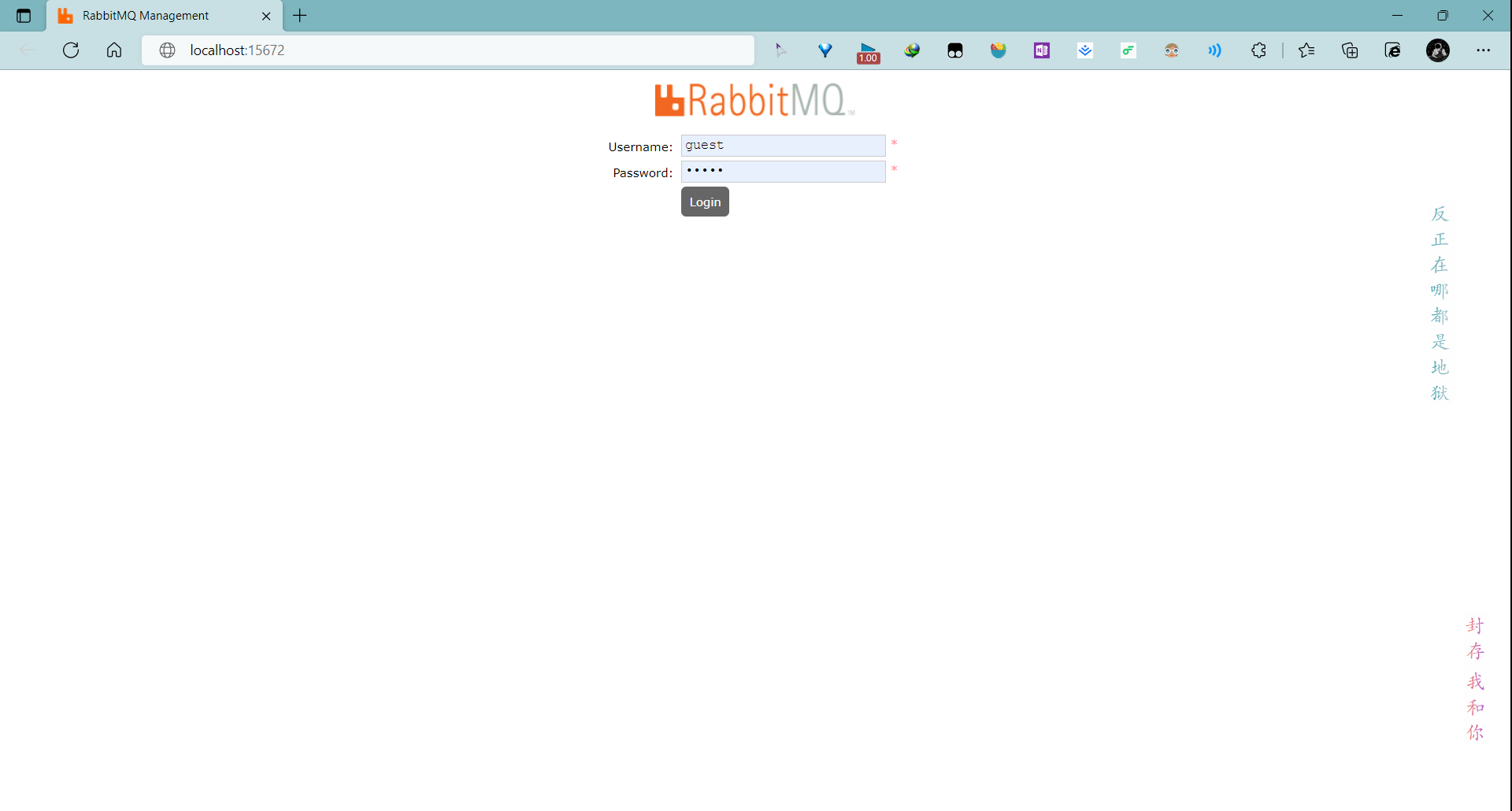
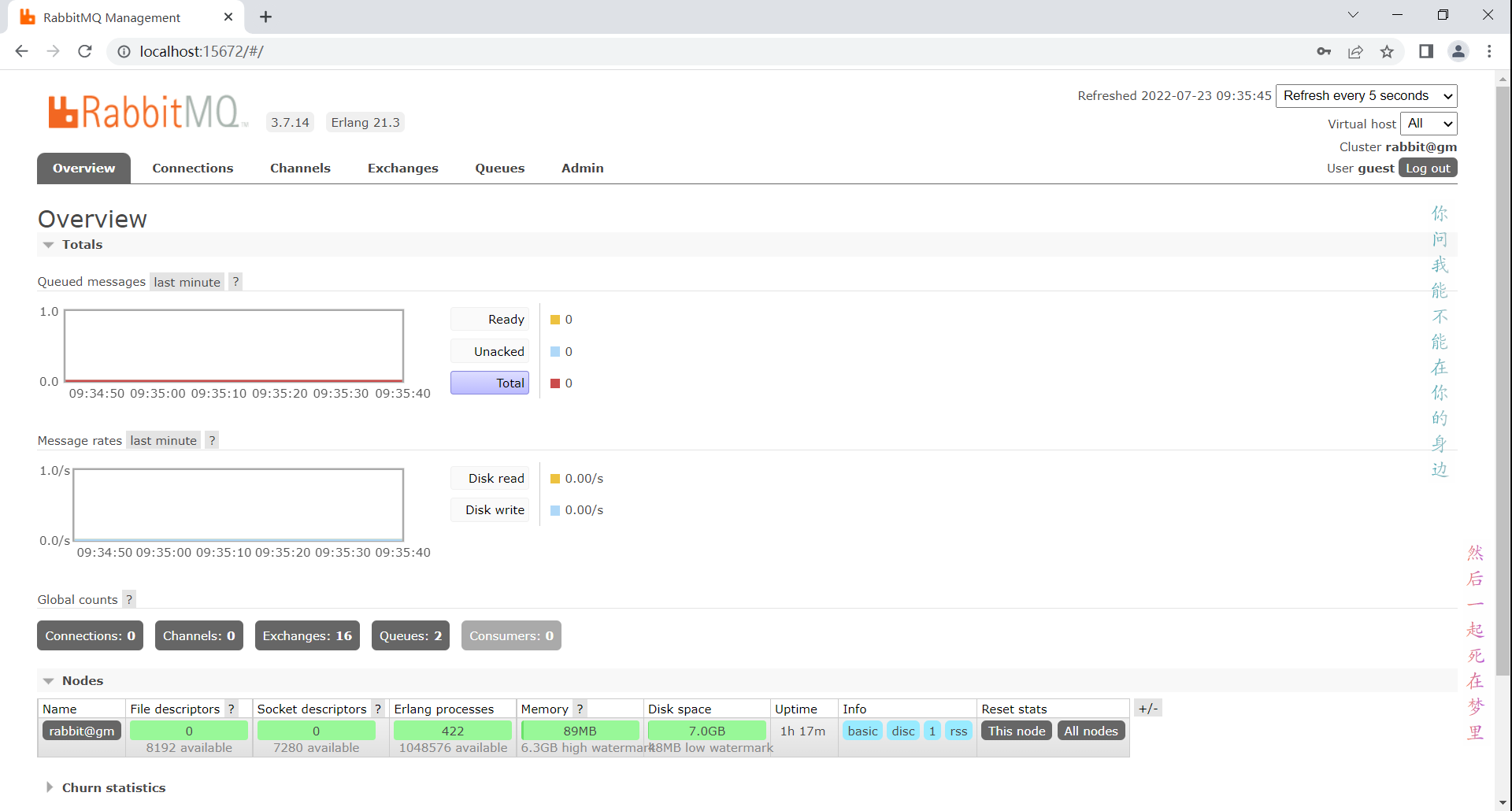
打开http://localhost:15672/
用户名密码是guest/guest
Linux下使用 Docker 安装
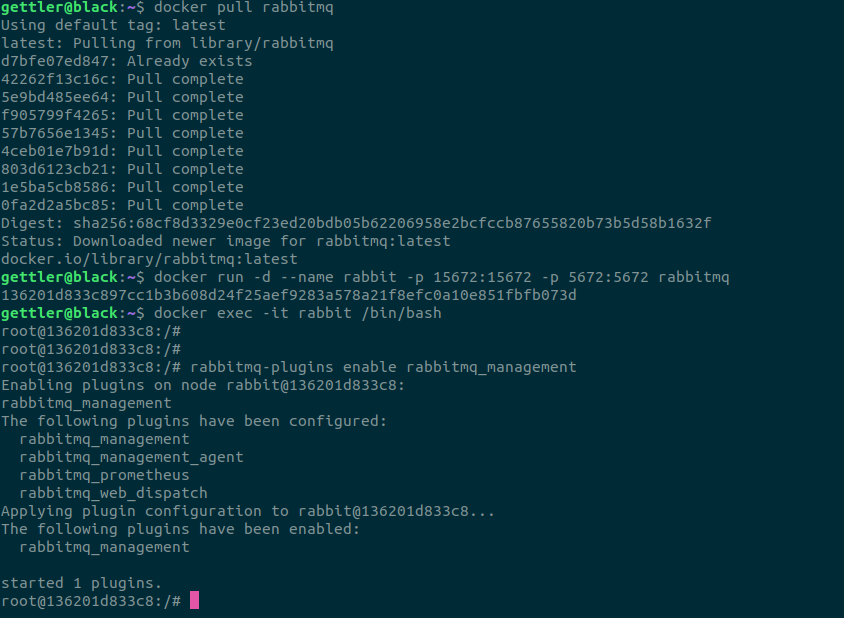
直接拉取最新版
docker pull rabbitmq
运行容器
docker run -d --name rabbitmq -p 5671:5671 -p 5672:5672 -p 4369:4369 -p 25672:25672 -p 15671:15671 -p 15672:15672 rabbitmq:management
进入容器
docker exec -it rabbitmq /bin/bash
开启管理插件
rabbitmq-plugins enable rabbitmq_management
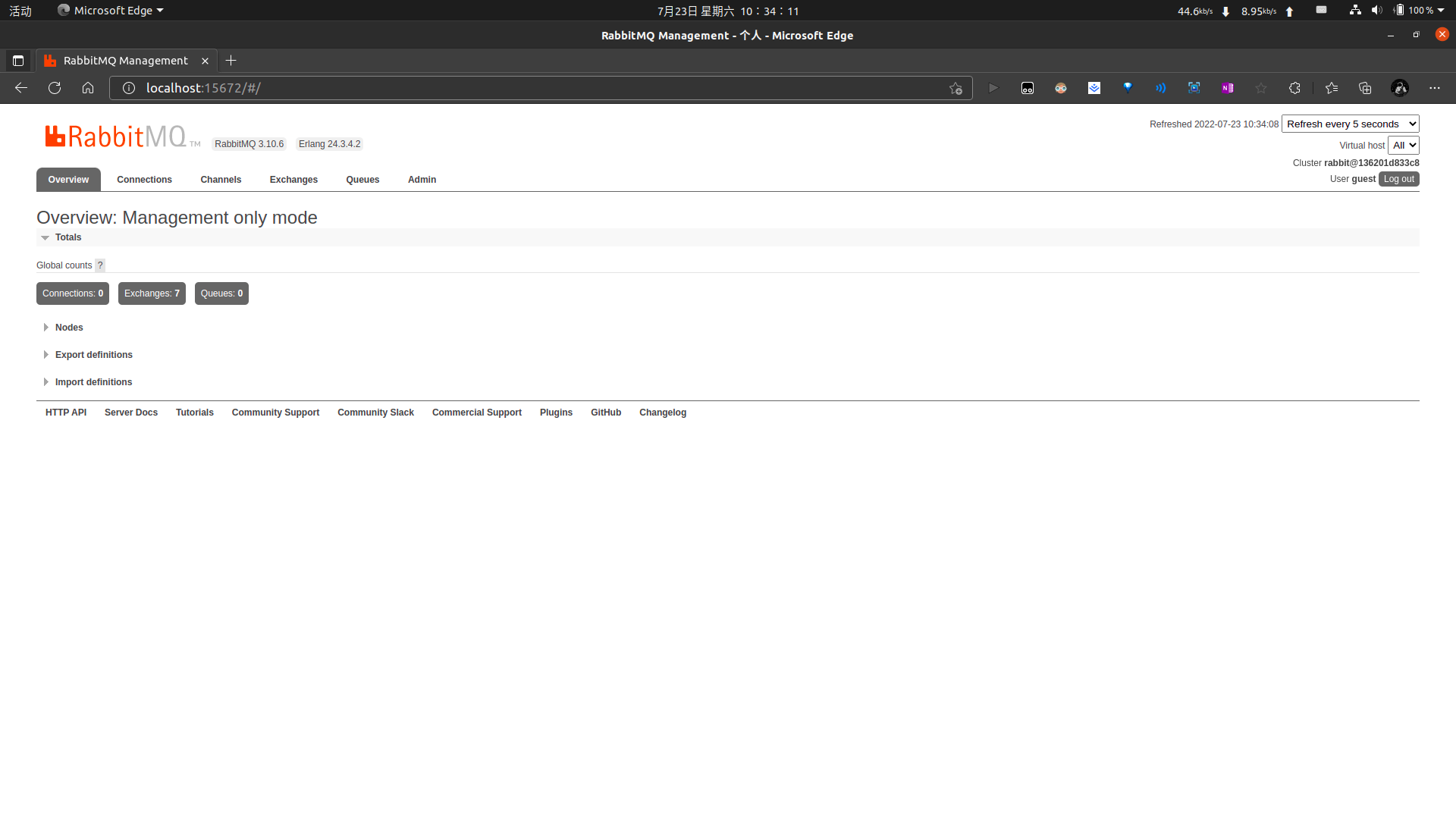
打开管理网站 http://localhost:15672/
4369, 25672 (Erlang发现&集群端口)
5672, 5671 (AMQP端口)
15672 (web管理后台端口)
61613, 61614 (STOMP协议端口)
1883, 8883 (MQTT协议端口)
用户名密码均为 guest
实操
官网例子
简单模式
配置文件 application-easy.yml :
spring:rabbitmq:host: 123.123.123.123port: 5672username: Gettlerpassword: ********virtual-host: /queue: easy-queue
生产者:
package com.gettler.rabbitmq.easy;import com.gettler.rabbitmq.RabbitmqApplication;
import com.gettler.rabbitmq.config.RabbitMqConnectionFactory;
import com.rabbitmq.client.Channel;
import com.rabbitmq.client.Connection;
import org.junit.Test;
import org.junit.runner.RunWith;
import org.slf4j.Logger;
import org.slf4j.LoggerFactory;
import org.springframework.beans.factory.annotation.Value;
import org.springframework.boot.test.context.SpringBootTest;
import org.springframework.test.context.ActiveProfiles;
import org.springframework.test.context.junit4.SpringRunner;@ActiveProfiles("easy")
@RunWith(SpringRunner.class)
@SpringBootTest(classes = RabbitmqApplication.class, webEnvironment =SpringBootTest.WebEnvironment.RANDOM_PORT)
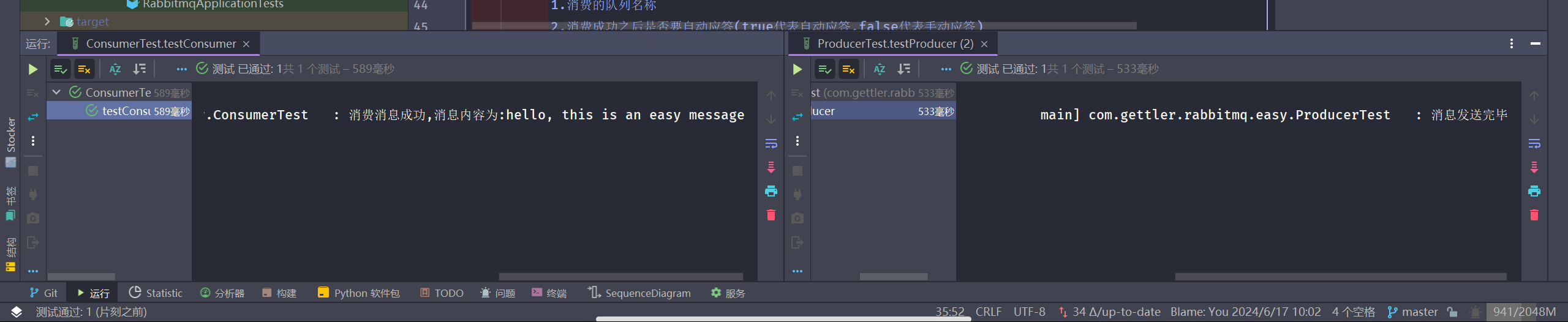
public class ProducerTest {// 队列名称@Value("${spring.rabbitmq.queue}")public String QUEUE_NAME;private static final Logger logger = LoggerFactory.getLogger(ProducerTest.class);@Testpublic void testProducer() throws Exception {// 创建一个connectionConnection connection = RabbitMqConnectionFactory.getSingleInstanceConnection();// 创建一个channelChannel channel = connection.createChannel();/*创建一个队列1.队列名称2.队列里面的消息是否持久化(默认为false,代表消息存储在内存中)3.该队列是否只供一个消费者进行消费,是否进行共享(true表示可以多个消费者消费)4.表示最后一个消费者断开连接以后,该队列是否自动删除(true表示自动删除)5.其他参数*/channel.queueDeclare(QUEUE_NAME, false, false, false, null);String message = "hello, this is an easy message";/*发送一个消息1.发送到那个交换机(空代表默认交换机)2.路由key3.其他的参数信息4.发送消息的消息体*/channel.basicPublish("", QUEUE_NAME, null, message.getBytes());logger.info("消息发送完毕");}
}
消费者:
package com.gettler.rabbitmq.easy;import com.gettler.rabbitmq.RabbitmqApplication;
import com.gettler.rabbitmq.config.RabbitMqConnectionFactory;
import com.rabbitmq.client.CancelCallback;
import com.rabbitmq.client.Channel;
import com.rabbitmq.client.Connection;
import com.rabbitmq.client.DeliverCallback;
import org.junit.Test;
import org.junit.runner.RunWith;
import org.slf4j.Logger;
import org.slf4j.LoggerFactory;
import org.springframework.beans.factory.annotation.Value;
import org.springframework.boot.test.context.SpringBootTest;
import org.springframework.test.context.ActiveProfiles;
import org.springframework.test.context.junit4.SpringRunner;@ActiveProfiles("easy")
@RunWith(SpringRunner.class)
@SpringBootTest(classes = RabbitmqApplication.class, webEnvironment =SpringBootTest.WebEnvironment.RANDOM_PORT)
public class ConsumerTest {// 队列名称@Value("${spring.rabbitmq.queue}")public String QUEUE_NAME;private static final Logger logger = LoggerFactory.getLogger(ConsumerTest.class);@Testpublic void testConsumer() throws Exception {// 创建一个connectionConnection connection = RabbitMqConnectionFactory.getSingleInstanceConnection();// 创建一个channelChannel channel = connection.createChannel();// 消费消息的回调DeliverCallback deliverCallback = (consumerTag, message) -> {logger.info("消费消息成功,消息内容为:" + new String(message.getBody()));};// 取消消费的回调CancelCallback cancelCallback = (consumerTag) -> {logger.info("消息消费被中断");};/*消费者消费消息1.消费的队列名称2.消费成功之后是否要自动应答(true代表自动应答,false代表手动应答)3.消费者消费消息的回调(函数式接口)4.消费者取消消费的回调(函数式接口)*/channel.basicConsume(QUEUE_NAME, true, deliverCallback, cancelCallback);}
}
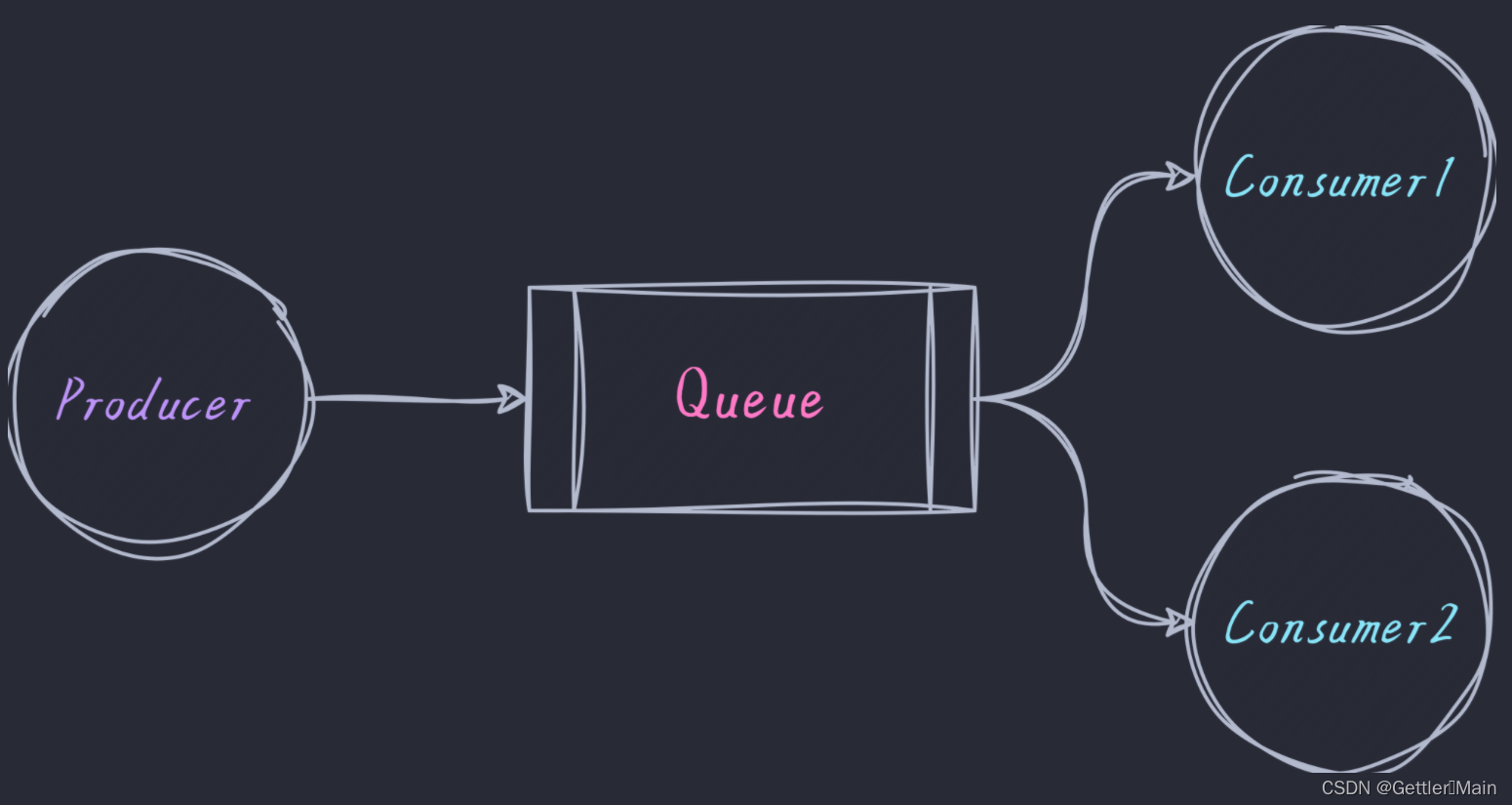
工作模式
配置文件 application-work.yml :
spring:rabbitmq:host: 123.123.123.123port: 5672username: Gettlerpassword: ********virtual-host: /queue: work-queue
生产者:
package com.gettler.rabbitmq.work;import com.gettler.rabbitmq.RabbitmqApplication;
import com.gettler.rabbitmq.config.RabbitMqConnectionFactory;
import com.rabbitmq.client.BuiltinExchangeType;
import com.rabbitmq.client.Channel;
import com.rabbitmq.client.Connection;
import org.junit.Test;
import org.junit.runner.RunWith;
import org.slf4j.Logger;
import org.slf4j.LoggerFactory;
import org.springframework.beans.factory.annotation.Value;
import org.springframework.boot.test.context.SpringBootTest;
import org.springframework.test.context.ActiveProfiles;
import org.springframework.test.context.junit4.SpringRunner;import java.util.Scanner;@ActiveProfiles("work")
@RunWith(SpringRunner.class)
@SpringBootTest(classes = RabbitmqApplication.class, webEnvironment =SpringBootTest.WebEnvironment.RANDOM_PORT)
public class ProducerTest {// 队列名称@Value("${spring.rabbitmq.queue}")public String QUEUE_NAME;private static final Logger logger = LoggerFactory.getLogger(ProducerTest.class);@Value("${spring.rabbitmq.host}")private String host;@Value("${spring.rabbitmq.username}")private String username;@Value("${spring.rabbitmq.password}")private String password;@Testpublic void testProducer() throws Exception {System.out.println(this.host);// 创建一个connectionConnection connection = RabbitMqConnectionFactory.getSingleInstanceConnection();// 创建一个channelChannel channel = connection.createChannel();// 声明交换机channel.exchangeDeclare("fanout", BuiltinExchangeType.FANOUT);/*创建一个队列1.队列名称2.队列里面的消息是否持久化(默认为false,代表消息存储在内存中)3.该队列是否只供一个消费者进行消费,是否进行共享(true表示可以多个消费者消费)4.表示最后一个消费者断开连接以后,该队列是否自动删除(true表示自动删除)5.其他参数*/channel.queueDeclare(QUEUE_NAME, false, false, false, null);Scanner scanner = new Scanner(System.in);while (scanner.hasNext()) {String message = scanner.next();/*发送一个消息1.发送到那个交换机(空代表默认交换机)2.路由key3.其他的参数信息4.发送消息的消息体*/channel.basicPublish("", QUEUE_NAME, null, message.getBytes());logger.info("消息发送完毕");}}
}
消费者A:
package com.gettler.rabbitmq.work;import com.gettler.rabbitmq.RabbitmqApplication;
import com.gettler.rabbitmq.config.RabbitMqConnectionFactory;
import com.rabbitmq.client.CancelCallback;
import com.rabbitmq.client.Channel;
import com.rabbitmq.client.Connection;
import com.rabbitmq.client.DeliverCallback;
import org.junit.Test;
import org.junit.runner.RunWith;
import org.slf4j.Logger;
import org.slf4j.LoggerFactory;
import org.springframework.beans.factory.annotation.Value;
import org.springframework.boot.test.context.SpringBootTest;
import org.springframework.test.context.ActiveProfiles;
import org.springframework.test.context.junit4.SpringRunner;@ActiveProfiles("work")
@RunWith(SpringRunner.class)
@SpringBootTest(classes = RabbitmqApplication.class, webEnvironment =SpringBootTest.WebEnvironment.RANDOM_PORT)
public class ConsumerATest {// 队列名称@Value("${spring.rabbitmq.queue}")public String QUEUE_NAME;private static final Logger logger = LoggerFactory.getLogger(ConsumerATest.class);@Testpublic void testConsumerA() throws Exception {// 创建一个connectionConnection connection = RabbitMqConnectionFactory.getSingleInstanceConnection();// 创建一个channelChannel channel = connection.createChannel();// 消费消息的回调DeliverCallback deliverCallback = (consumerTag, message) -> {logger.info("消费消息成功,消息内容为:" + new String(message.getBody()));};// 取消消费的回调CancelCallback cancelCallback = (consumerTag) -> {logger.info("消息消费被中断");};/*消费者消费消息1.消费的队列名称2.消费成功之后是否要自动应答(true代表自动应答,false代表手动应答)3.消费者消费消息的回调(函数式接口)4.消费者取消消费的回调(函数式接口)*/channel.basicConsume(QUEUE_NAME, true, deliverCallback, cancelCallback);}
}
消费者B:
package com.gettler.rabbitmq.work;import com.gettler.rabbitmq.RabbitmqApplication;
import com.gettler.rabbitmq.config.RabbitMqConnectionFactory;
import com.rabbitmq.client.CancelCallback;
import com.rabbitmq.client.Channel;
import com.rabbitmq.client.Connection;
import com.rabbitmq.client.DeliverCallback;
import org.junit.Test;
import org.junit.runner.RunWith;
import org.slf4j.Logger;
import org.slf4j.LoggerFactory;
import org.springframework.beans.factory.annotation.Value;
import org.springframework.boot.test.context.SpringBootTest;
import org.springframework.test.context.ActiveProfiles;
import org.springframework.test.context.junit4.SpringRunner;@ActiveProfiles("work")
@RunWith(SpringRunner.class)
@SpringBootTest(classes = RabbitmqApplication.class, webEnvironment =SpringBootTest.WebEnvironment.RANDOM_PORT)
public class ConsumerBTest {// 队列名称@Value("${spring.rabbitmq.queue}")public String QUEUE_NAME;private static final Logger logger = LoggerFactory.getLogger(ConsumerBTest.class);@Testpublic void testConsumerB() throws Exception {// 创建一个connectionConnection connection = RabbitMqConnectionFactory.getSingleInstanceConnection();// 创建一个channelChannel channel = connection.createChannel();// 消费消息的回调DeliverCallback deliverCallback = (consumerTag, message) -> {logger.info("消费消息成功,消息内容为:" + new String(message.getBody()));};// 取消消费的回调CancelCallback cancelCallback = (consumerTag) -> {logger.info("消息消费被中断");};/*消费者消费消息1.消费的队列名称2.消费成功之后是否要自动应答(true代表自动应答,false代表手动应答)3.消费者消费消息的回调(函数式接口)4.消费者取消消费的回调(函数式接口)*/channel.basicConsume(QUEUE_NAME, true, deliverCallback, cancelCallback);}
}

路由模式
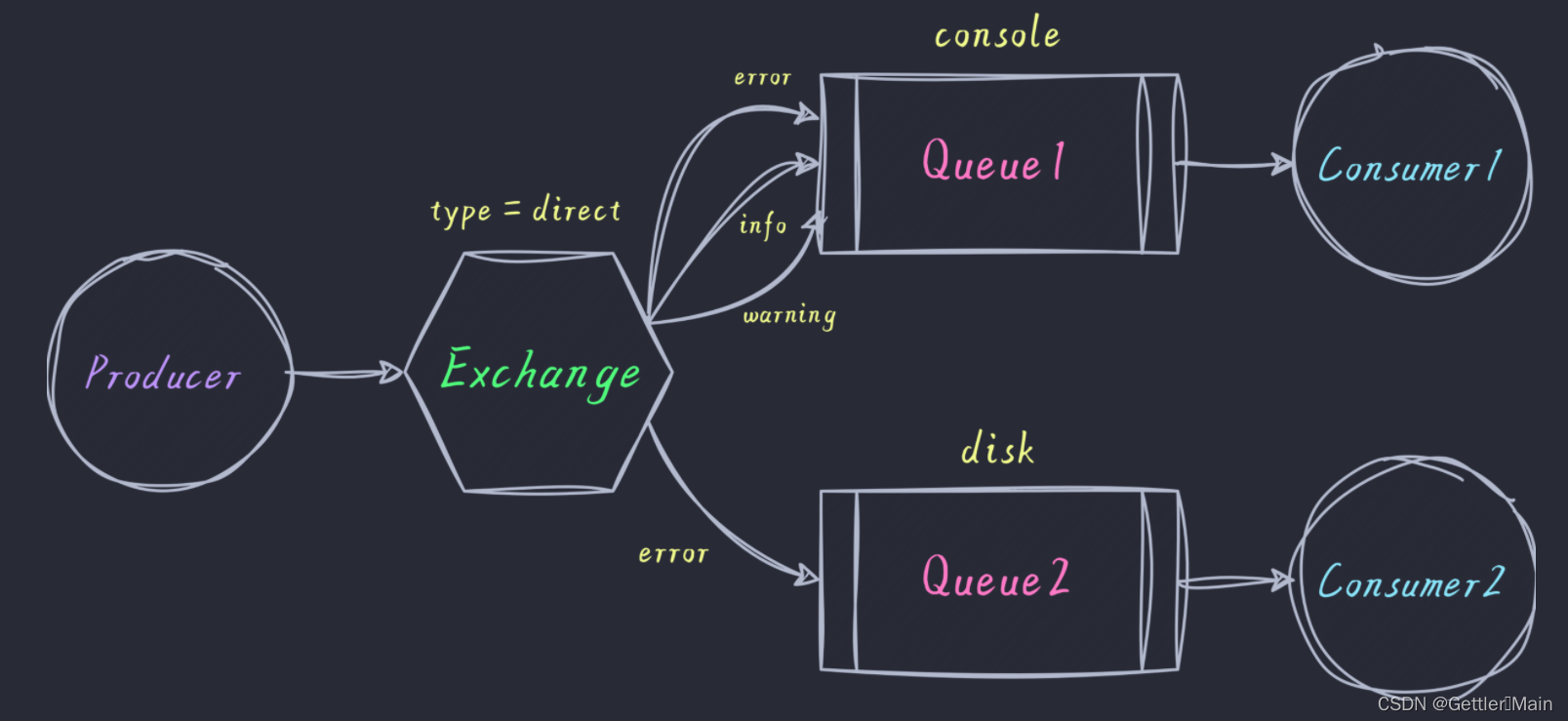
配置文件 application-direct.yml :
spring:rabbitmq:host: 123.123.123.123port: 5672username: Gettlerpassword: ********virtual-host: /生产者:
package com.gettler.rabbitmq.direct;import com.gettler.rabbitmq.RabbitmqApplication;
import com.gettler.rabbitmq.config.RabbitMqConnectionFactory;
import com.rabbitmq.client.BuiltinExchangeType;
import com.rabbitmq.client.Channel;
import com.rabbitmq.client.Connection;
import org.junit.Test;
import org.junit.runner.RunWith;
import org.slf4j.Logger;
import org.slf4j.LoggerFactory;
import org.springframework.boot.test.context.SpringBootTest;
import org.springframework.test.context.ActiveProfiles;
import org.springframework.test.context.junit4.SpringRunner;import java.util.HashMap;
import java.util.Map;@ActiveProfiles("direct")
@RunWith(SpringRunner.class)
@SpringBootTest(classes = RabbitmqApplication.class, webEnvironment =SpringBootTest.WebEnvironment.RANDOM_PORT)
public class ProducerTest {private static final Logger logger = LoggerFactory.getLogger(ProducerTest.class);@Testpublic void testProducer() throws Exception {// 创建channelConnection connection = RabbitMqConnectionFactory.getSingleInstanceConnection();Channel channel = connection.createChannel();// 声明交换机channel.exchangeDeclare("direct", BuiltinExchangeType.DIRECT);Map<String, String> messageMap = new HashMap<>();messageMap.put("info", "普通 info 信息");messageMap.put("warning", "警告 warning 信息");messageMap.put("error", "错误 error 信息");messageMap.put("debug", "调试 debug 信息");for (Map.Entry<String, String> mes : messageMap.entrySet()) {String routingKey = mes.getKey();String message = mes.getValue();channel.basicPublish("direct", routingKey, null, message.getBytes());logger.info("消息发送完毕");}}
}
消费者A:
package com.gettler.rabbitmq.direct;import com.gettler.rabbitmq.RabbitmqApplication;
import com.gettler.rabbitmq.config.RabbitMqConnectionFactory;
import com.rabbitmq.client.*;
import org.junit.Test;
import org.junit.runner.RunWith;
import org.slf4j.Logger;
import org.slf4j.LoggerFactory;
import org.springframework.boot.test.context.SpringBootTest;
import org.springframework.test.context.ActiveProfiles;
import org.springframework.test.context.junit4.SpringRunner;@ActiveProfiles("direct")
@RunWith(SpringRunner.class)
@SpringBootTest(classes = RabbitmqApplication.class, webEnvironment =SpringBootTest.WebEnvironment.RANDOM_PORT)
public class ConsumerATest {private static final Logger logger = LoggerFactory.getLogger(ConsumerATest.class);@Testpublic void testConsumerA() throws Exception {// 创建一个connectionConnection connection = RabbitMqConnectionFactory.getSingleInstanceConnection();// 创建一个channelChannel channel = connection.createChannel();// 创建channel// 声明交换机channel.exchangeDeclare("direct", BuiltinExchangeType.DIRECT);// 声明临时队列channel.queueDeclare("console", false, false, false, null);// 绑定队列与交换机channel.queueBind("console", "direct", "info");channel.queueBind("console", "direct", "warning");// 消费消息DeliverCallback deliverCallback = (consumerTag, message) -> {logger.info("获得消息:" + new String(message.getBody()));};CancelCallback cancelCallback = (consumerTag) -> {logger.info("消息消费被中断");};channel.basicConsume("console", true, deliverCallback, cancelCallback);}
}
消费者B:
package com.gettler.rabbitmq.direct;import com.gettler.rabbitmq.RabbitmqApplication;
import com.gettler.rabbitmq.config.RabbitMqConnectionFactory;
import com.rabbitmq.client.*;
import org.junit.Test;
import org.junit.runner.RunWith;
import org.slf4j.Logger;
import org.slf4j.LoggerFactory;
import org.springframework.boot.test.context.SpringBootTest;
import org.springframework.test.context.ActiveProfiles;
import org.springframework.test.context.junit4.SpringRunner;@ActiveProfiles("direct")
@RunWith(SpringRunner.class)
@SpringBootTest(classes = RabbitmqApplication.class, webEnvironment =SpringBootTest.WebEnvironment.RANDOM_PORT)
public class ConsumerBTest {private static final Logger logger = LoggerFactory.getLogger(ConsumerBTest.class);@Testpublic void testConsumerB() throws Exception {// 创建一个connectionConnection connection = RabbitMqConnectionFactory.getSingleInstanceConnection();// 创建一个channelChannel channel = connection.createChannel();// 声明交换机channel.exchangeDeclare("direct", BuiltinExchangeType.DIRECT);// 声明临时队列channel.queueDeclare("disk", false, false, false, null);// 绑定队列与交换机channel.queueBind("disk", "direct", "error");// 消费消息DeliverCallback deliverCallback = (consumerTag, message) -> {logger.info("获得消息:" + new String(message.getBody()));};CancelCallback cancelCallback = (consumerTag) -> {logger.info("消息消费被中断");};channel.basicConsume("disk", true, deliverCallback, cancelCallback);}
}

广播模式
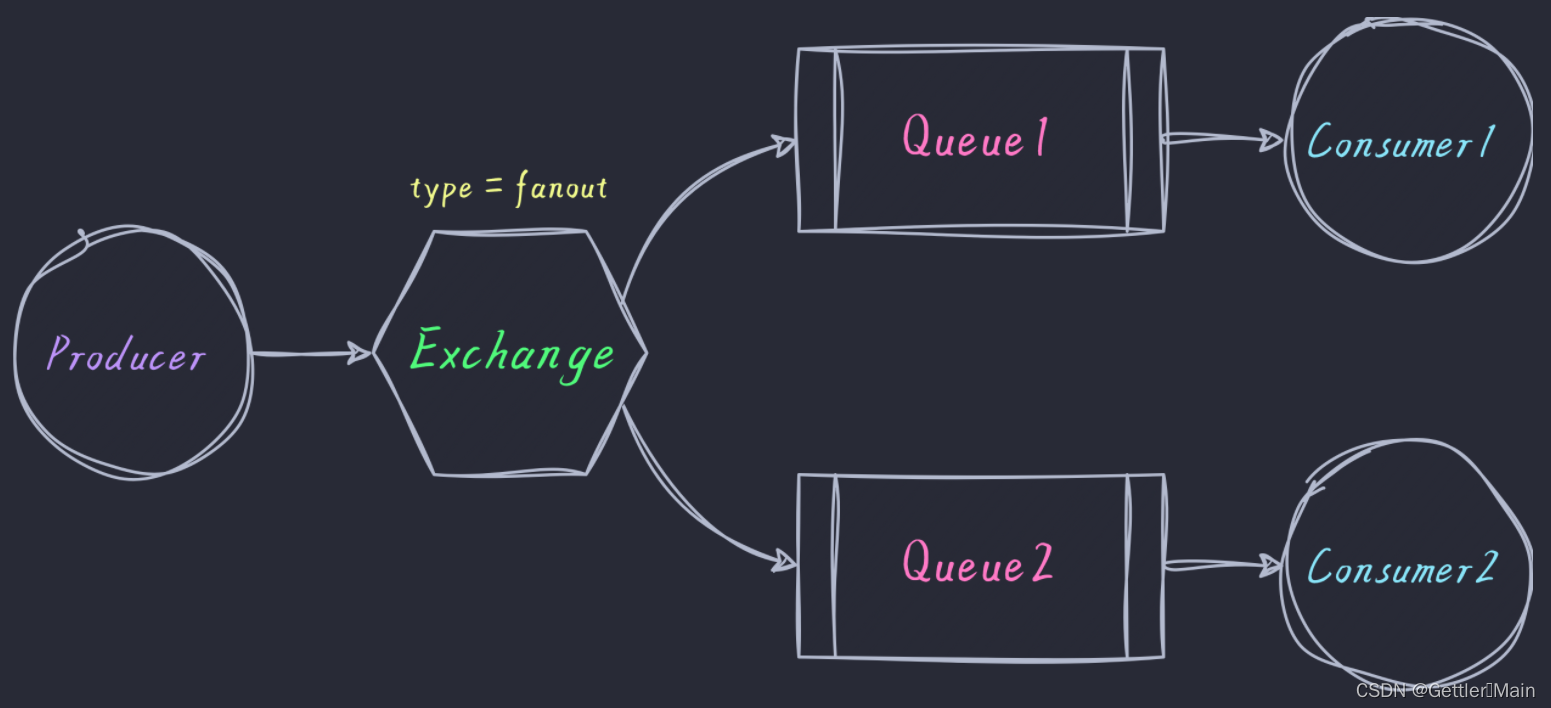
配置文件 application-fanout.yml :
spring:rabbitmq:host: 123.123.123.123port: 5672username: Gettlerpassword: ********virtual-host: /生产者:
package com.gettler.rabbitmq.fanout;import com.gettler.rabbitmq.RabbitmqApplication;
import com.gettler.rabbitmq.config.RabbitMqConnectionFactory;
import com.rabbitmq.client.BuiltinExchangeType;
import com.rabbitmq.client.Channel;
import com.rabbitmq.client.Connection;
import org.junit.Test;
import org.junit.runner.RunWith;
import org.slf4j.Logger;
import org.slf4j.LoggerFactory;
import org.springframework.boot.test.context.SpringBootTest;
import org.springframework.test.context.ActiveProfiles;
import org.springframework.test.context.junit4.SpringRunner;@ActiveProfiles("fanout")
@RunWith(SpringRunner.class)
@SpringBootTest(classes = RabbitmqApplication.class, webEnvironment =SpringBootTest.WebEnvironment.RANDOM_PORT)
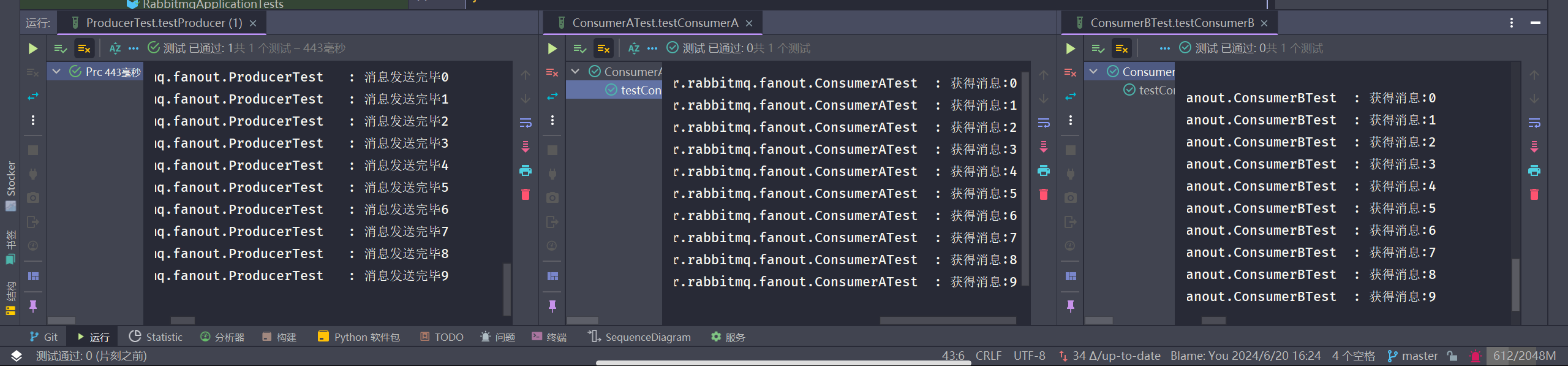
public class ProducerTest {private static final Logger logger = LoggerFactory.getLogger(ProducerTest.class);@Testpublic void testProducer() throws Exception {// 创建channelConnection connection = RabbitMqConnectionFactory.getSingleInstanceConnection();Channel channel = connection.createChannel();// 声明交换机channel.exchangeDeclare("fanout", BuiltinExchangeType.FANOUT);// 发送10条消息for (int i = 0; i < 10; i++) {String message = i + "";channel.basicPublish("fanout", "", null, message.getBytes());logger.info("消息发送完毕" + message);}}
}
消费者A:
package com.gettler.rabbitmq.fanout;import com.gettler.rabbitmq.RabbitmqApplication;
import com.gettler.rabbitmq.config.RabbitMqConnectionFactory;
import com.rabbitmq.client.*;
import org.junit.Test;
import org.junit.runner.RunWith;
import org.slf4j.Logger;
import org.slf4j.LoggerFactory;
import org.springframework.boot.test.context.SpringBootTest;
import org.springframework.test.context.ActiveProfiles;
import org.springframework.test.context.junit4.SpringRunner;@ActiveProfiles("fanout")
@RunWith(SpringRunner.class)
@SpringBootTest(classes = RabbitmqApplication.class, webEnvironment =SpringBootTest.WebEnvironment.RANDOM_PORT)
public class ConsumerATest {private static final Logger logger = LoggerFactory.getLogger(ConsumerATest.class);@Testpublic void testConsumerA() throws Exception {// 创建一个connectionConnection connection = RabbitMqConnectionFactory.getSingleInstanceConnection();// 创建一个channelChannel channel = connection.createChannel();// 声明交换机channel.exchangeDeclare("fanout", BuiltinExchangeType.FANOUT);// 声明临时队列String queueName = channel.queueDeclare().getQueue();// 绑定队列与交换机channel.queueBind(queueName, "fanout", "");// 消费消息DeliverCallback deliverCallback = (consumerTag, message) -> {logger.info("获得消息:" + new String(message.getBody()));};CancelCallback cancelCallback = (consumerTag) -> {logger.info("消息消费被中断");};channel.basicConsume(queueName, true, deliverCallback, cancelCallback);}
}
消费者B:
package com.gettler.rabbitmq.fanout;import com.gettler.rabbitmq.RabbitmqApplication;
import com.gettler.rabbitmq.config.RabbitMqConnectionFactory;
import com.rabbitmq.client.*;
import org.junit.Test;
import org.junit.runner.RunWith;
import org.slf4j.Logger;
import org.slf4j.LoggerFactory;
import org.springframework.boot.test.context.SpringBootTest;
import org.springframework.test.context.ActiveProfiles;
import org.springframework.test.context.junit4.SpringRunner;@ActiveProfiles("fanout")
@RunWith(SpringRunner.class)
@SpringBootTest(classes = RabbitmqApplication.class, webEnvironment =SpringBootTest.WebEnvironment.RANDOM_PORT)
public class ConsumerBTest {private static final Logger logger = LoggerFactory.getLogger(ConsumerBTest.class);@Testpublic void testConsumerB() throws Exception {// 创建一个connectionConnection connection = RabbitMqConnectionFactory.getSingleInstanceConnection();// 创建一个channelChannel channel = connection.createChannel();// 声明交换机channel.exchangeDeclare("fanout", BuiltinExchangeType.FANOUT);// 声明临时队列String queueName = channel.queueDeclare().getQueue();// 绑定队列与交换机channel.queueBind(queueName, "fanout", "");// 消费消息DeliverCallback deliverCallback = (consumerTag, message) -> {logger.info("获得消息:" + new String(message.getBody()));};CancelCallback cancelCallback = (consumerTag) -> {logger.info("消息消费被中断");};channel.basicConsume(queueName, true, deliverCallback, cancelCallback);}
}
主题模式
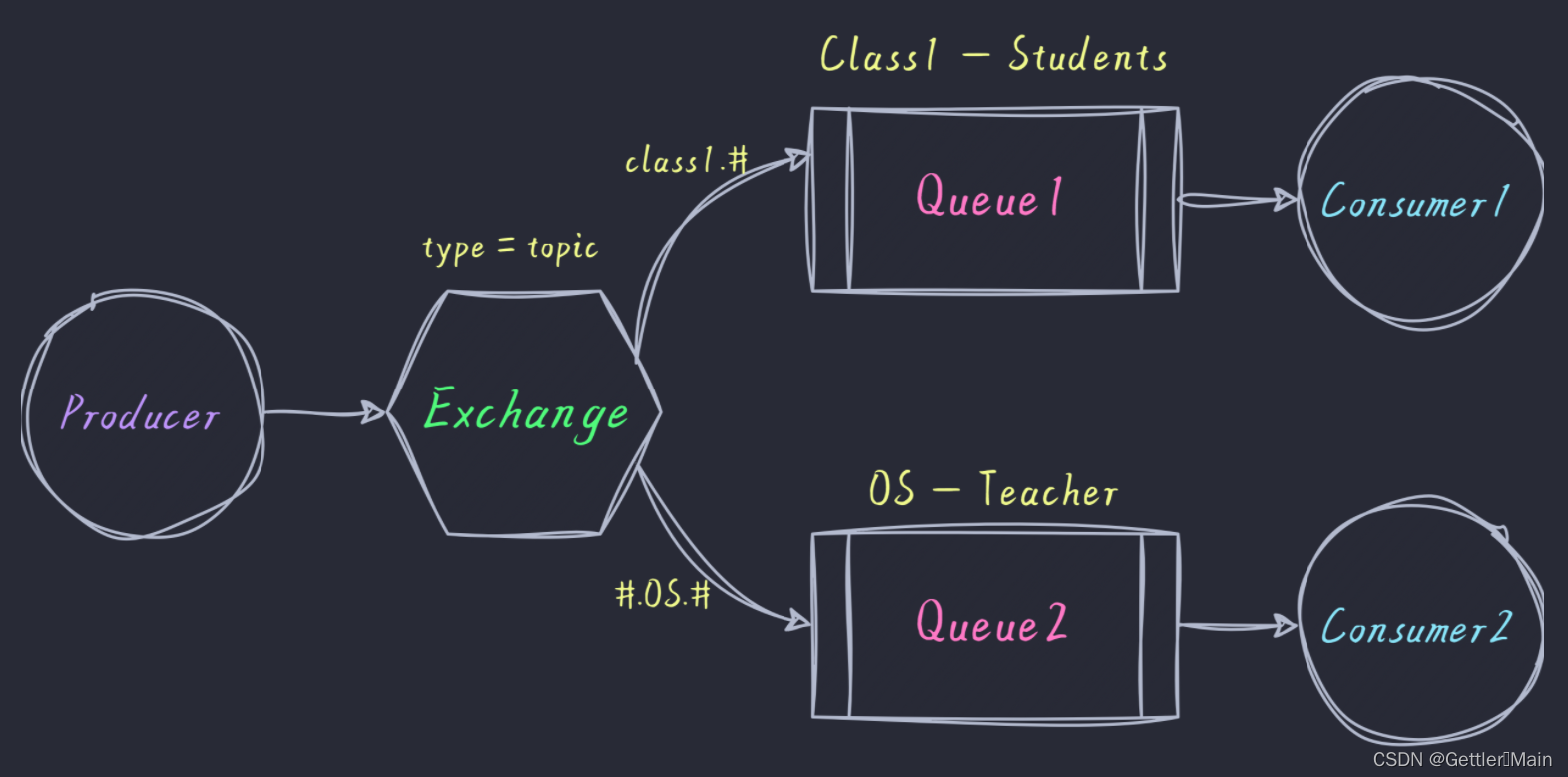
配置文件 application-topic.yml :
spring:rabbitmq:host: 123.123.123.123port: 5672username: Gettlerpassword: ********virtual-host: /生产者:
package com.gettler.rabbitmq.topic;import com.gettler.rabbitmq.RabbitmqApplication;
import com.gettler.rabbitmq.config.RabbitMqConnectionFactory;
import com.rabbitmq.client.BuiltinExchangeType;
import com.rabbitmq.client.Channel;
import com.rabbitmq.client.Connection;
import org.junit.Test;
import org.junit.runner.RunWith;
import org.slf4j.Logger;
import org.slf4j.LoggerFactory;
import org.springframework.boot.test.context.SpringBootTest;
import org.springframework.test.context.ActiveProfiles;
import org.springframework.test.context.junit4.SpringRunner;import java.util.HashMap;
import java.util.Map;/*** @author Gettler* @date 2024/06/13*/
@ActiveProfiles("topic")
@RunWith(SpringRunner.class)
@SpringBootTest(classes = RabbitmqApplication.class, webEnvironment =SpringBootTest.WebEnvironment.RANDOM_PORT)
public class ProducerTest {private static final Logger logger = LoggerFactory.getLogger(ProducerTest.class);@Testpublic void testProducer() throws Exception {// 创建channelConnection connection = RabbitMqConnectionFactory.getSingleInstanceConnection();Channel channel = connection.createChannel();// 声明交换机channel.exchangeDeclare("topic", BuiltinExchangeType.TOPIC);Map<String, String> messageMap = new HashMap<>();messageMap.put("class1.DB.exam", "一班数据库考试通知");messageMap.put("class1.OS.exam", "一班操作系统考试通知");messageMap.put("class2.DB.exam", "二班数据库考试通知");messageMap.put("class2.OS.exam", "二班操作系统考试通知");for (Map.Entry<String, String> mes : messageMap.entrySet()) {String routingKey = mes.getKey();String message = mes.getValue();channel.basicPublish("topic", routingKey, null, message.getBytes());logger.info("消息发送完毕");}}
}
消费者A(模拟一班的学生):
package com.gettler.rabbitmq.topic;import com.gettler.rabbitmq.RabbitmqApplication;
import com.gettler.rabbitmq.config.RabbitMqConnectionFactory;
import com.rabbitmq.client.*;
import org.junit.Test;
import org.junit.runner.RunWith;
import org.slf4j.Logger;
import org.slf4j.LoggerFactory;
import org.springframework.boot.test.context.SpringBootTest;
import org.springframework.test.context.ActiveProfiles;
import org.springframework.test.context.junit4.SpringRunner;/*** @author Gettler* @date 2024/06/13*/
@ActiveProfiles("topic")
@RunWith(SpringRunner.class)
@SpringBootTest(classes = RabbitmqApplication.class, webEnvironment =SpringBootTest.WebEnvironment.RANDOM_PORT)
public class StudentOfClass1Consumer {private static final Logger logger = LoggerFactory.getLogger(StudentOfClass1Consumer.class);@Testpublic void testStudentOfClass1Consumer() throws Exception {// 创建一个connectionConnection connection = RabbitMqConnectionFactory.getSingleInstanceConnection();// 创建一个channelChannel channel = connection.createChannel();// 声明交换机channel.exchangeDeclare("topic", BuiltinExchangeType.TOPIC);// 创建Q1队列channel.queueDeclare("student_of_class1", false, false, false, null);// 绑定队列与交换机channel.queueBind("student_of_class1", "topic", "class1.#");// 消费消息DeliverCallback deliverCallback = (consumerTag, message) -> {logger.info("获得消息:" + new String(message.getBody()));};CancelCallback cancelCallback = (consumerTag) -> {logger.info("消息消费被中断");};channel.basicConsume("student_of_class1", true, deliverCallback, cancelCallback);}
}
消费者B(模拟操作系统老师):
package com.gettler.rabbitmq.topic;import com.gettler.rabbitmq.RabbitmqApplication;
import com.gettler.rabbitmq.config.RabbitMqConnectionFactory;
import com.rabbitmq.client.*;
import org.junit.Test;
import org.junit.runner.RunWith;
import org.slf4j.Logger;
import org.slf4j.LoggerFactory;
import org.springframework.boot.test.context.SpringBootTest;
import org.springframework.test.context.ActiveProfiles;
import org.springframework.test.context.junit4.SpringRunner;/*** @author Gettler* @date 2024/06/13*/
@ActiveProfiles("topic")
@RunWith(SpringRunner.class)
@SpringBootTest(classes = RabbitmqApplication.class, webEnvironment =SpringBootTest.WebEnvironment.RANDOM_PORT)
public class TeacherConsumer {private static final Logger logger = LoggerFactory.getLogger(TeacherConsumer.class);@Testpublic void testTeacherConsumer() throws Exception {// 创建一个connectionConnection connection = RabbitMqConnectionFactory.getSingleInstanceConnection();// 创建一个channelChannel channel = connection.createChannel();// 声明交换机channel.exchangeDeclare("topic", BuiltinExchangeType.TOPIC);// 创建Q1队列channel.queueDeclare("teacher_of_OS", false, false, false, null);// 绑定队列与交换机channel.queueBind("teacher_of_OS", "topic", "#.OS.#");// 消费消息DeliverCallback deliverCallback = (consumerTag, message) -> {System.out.println("获得消息:" + new String(message.getBody()));};CancelCallback cancelCallback = (consumerTag) -> {System.out.println("消息消费被中断");};channel.basicConsume("teacher_of_OS", true, deliverCallback, cancelCallback);}
}
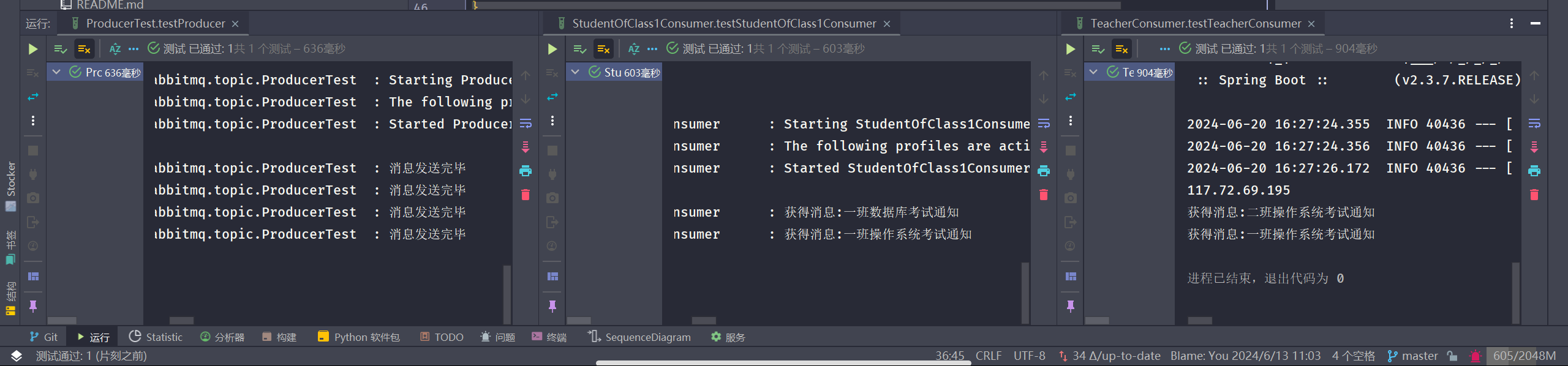
谷粒商城 RabbitMQ 学习笔记
新建Maven项目
添加依赖
<dependency><groupId>com.rabbitmq</groupId><artifactId>amqp-client</artifactId><version>5.0.0</version>
</dependency>
编写发送端
package org.example;import java.util.concurrent.TimeoutException;import com.rabbitmq.client.Channel;
import com.rabbitmq.client.Connection;
import com.rabbitmq.client.ConnectionFactory;  public class Send
{  //队列名称  private final static String QUEUE_NAME = "helloMQ";  public static void main(String[] argv) throws java.io.IOException, TimeoutException  {  /** * 创建连接连接到MabbitMQ */  ConnectionFactory factory = new ConnectionFactory();  //设置MabbitMQ所在主机ip或者主机名  factory.setHost("localhost");  //创建一个连接  Connection connection = factory.newConnection();  //创建一个频道  Channel channel = connection.createChannel();  //指定一个队列  channel.queueDeclare(QUEUE_NAME, false, false, false, null);  //发送的消息  String message = "hello world!";  //往队列中发出一条消息  channel.basicPublish("", QUEUE_NAME, null, message.getBytes());  System.out.println(" [x] Sent '" + message + "'");  //关闭频道和连接  channel.close();  connection.close();  }
}
编写接收端
package org.example;import com.rabbitmq.client.*;import java.io.IOException;public class Recv {// 队列名称private final static String QUEUE_NAME = "helloMQ";public static void main(String[] argv) throws Exception {// 打开连接和创建频道,与发送端一样ConnectionFactory factory = new ConnectionFactory();factory.setHost("localhost");Connection connection = factory.newConnection();Channel channel = connection.createChannel();//声明队列,主要为了防止消息接收者先运行此程序,队列还不存在时创建队列。channel.queueDeclare(QUEUE_NAME, false, false, false, null);System.out.println(" [*] Waiting for messages. To exit press CTRL+C");//创建消费者Consumer consumer = new DefaultConsumer(channel) {@Overridepublic void handleDelivery(String consumerTag, Envelope envelope, AMQP.BasicProperties properties,byte[] body) throws IOException {String message = new String(body, "UTF-8");System.out.println(" [x] Received '" + message + "'");}};channel.basicConsume(QUEUE_NAME, true, consumer);}
}
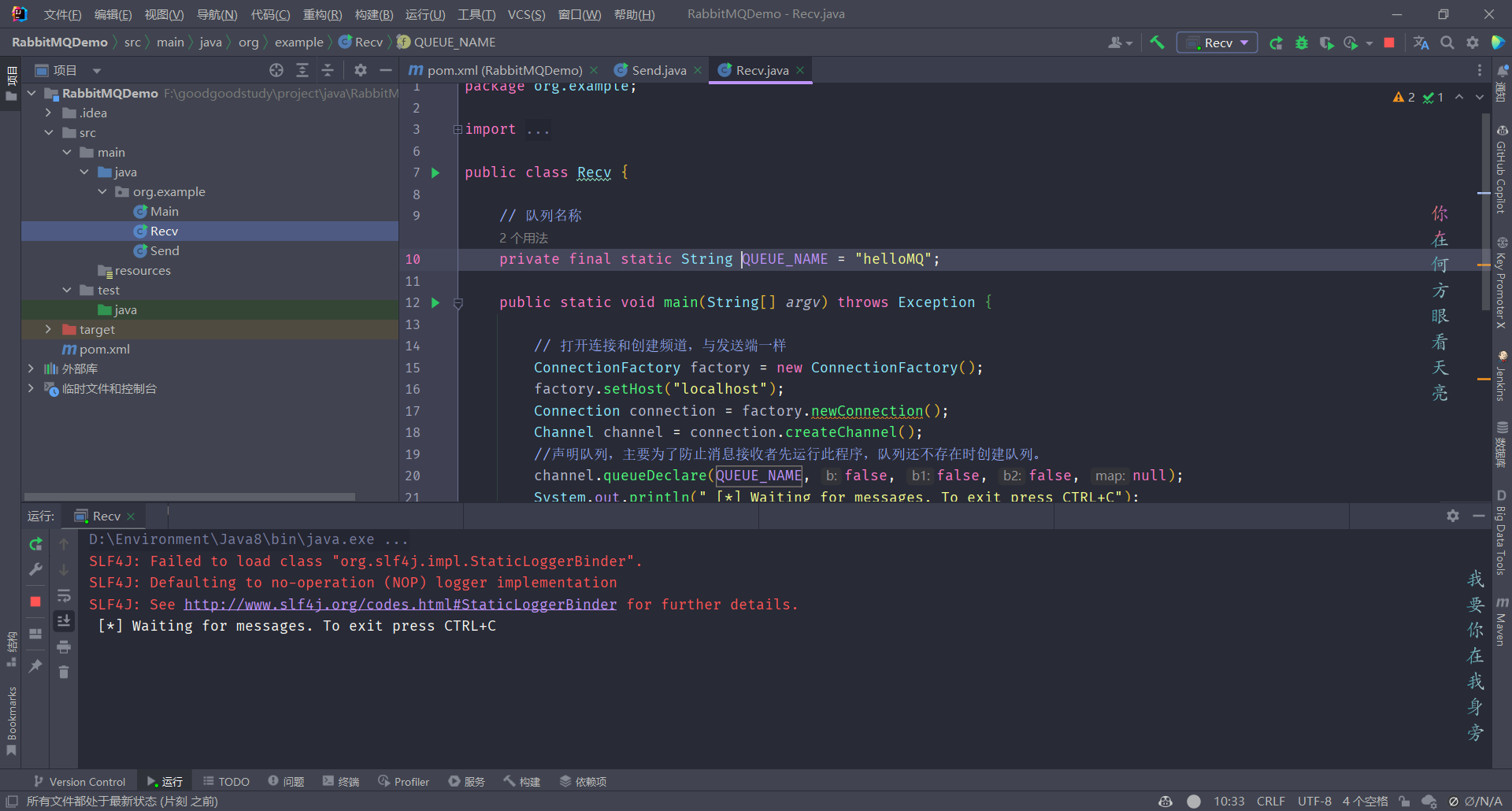
运行接收端
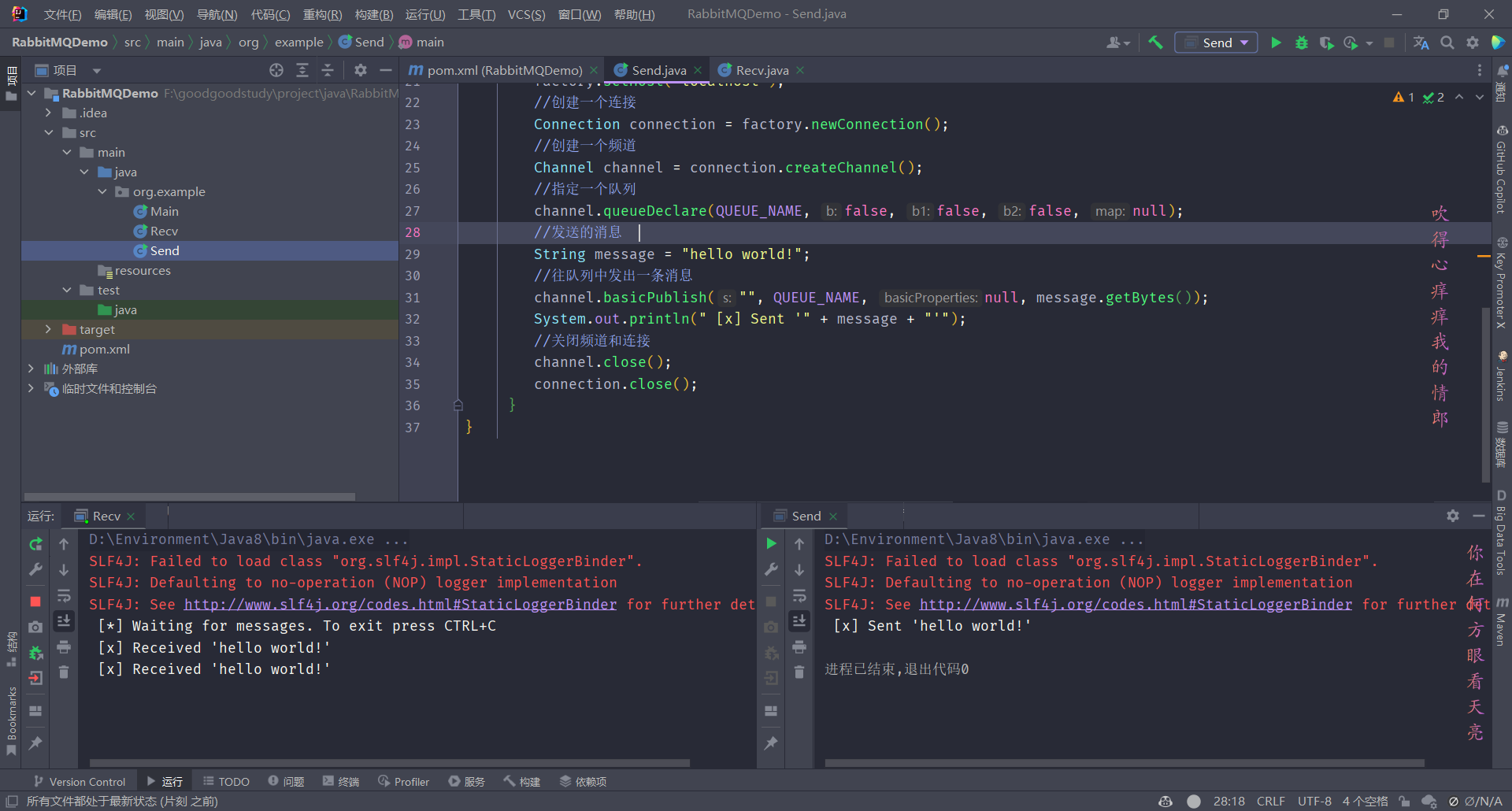
运行发送端,每运行一次发送一次消息
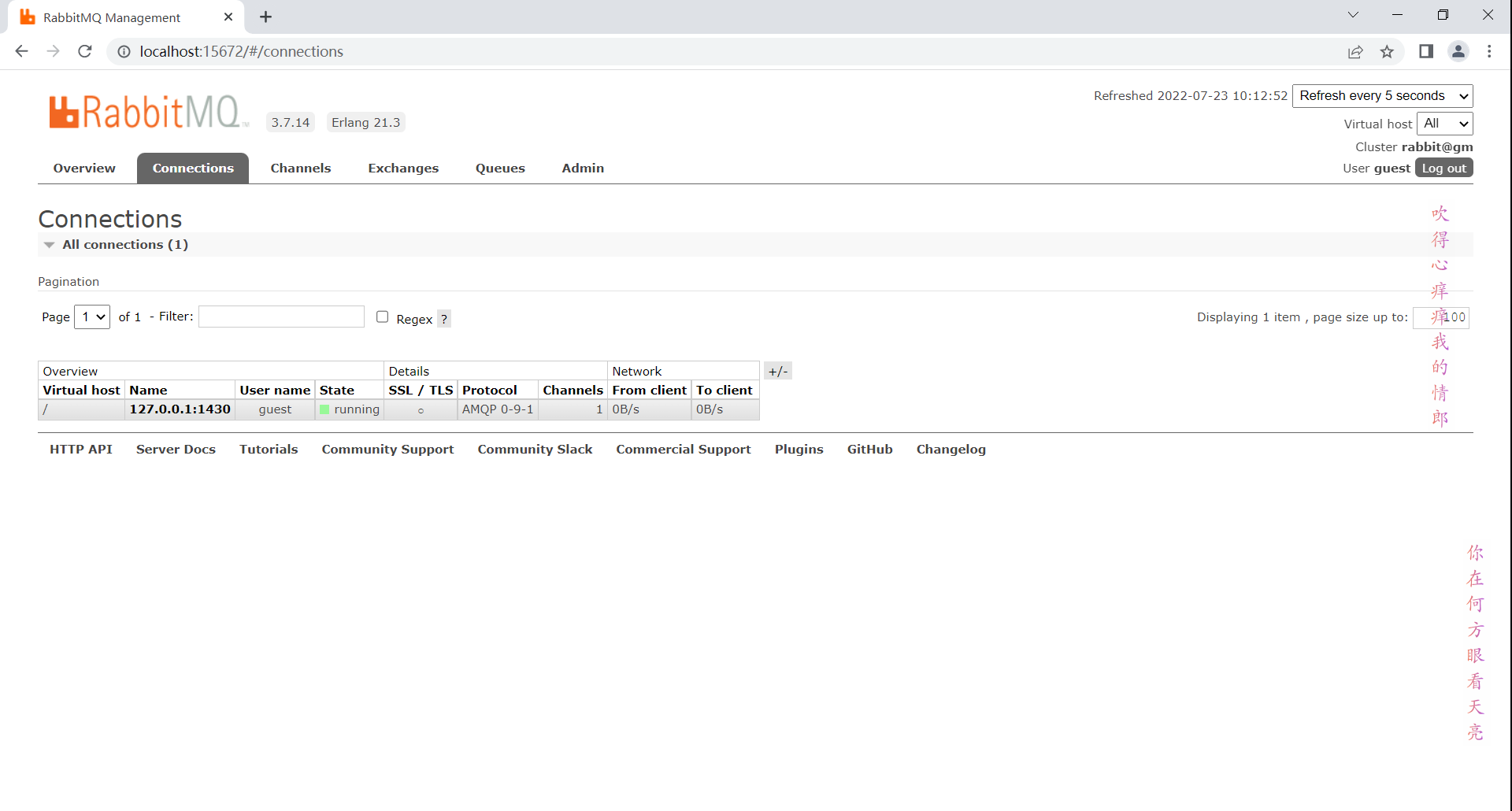
管理网站上有接收端的连接(发送端发送后便断开连接了)
添加依赖
<dependency><groupId>org.springframework.boot</groupId><artifactId>spring-boot-starter-amqp</artifactId>
</dependency>
编写配置文件
spring.rabbitmq.host=192.168.3.200
spring.rabbitmq.port=5672
spring.rabbitmq.virtual-host=/
创建Exchange
public void createExchange() {DirectExchange directExchange = new DirectExchange("hello-java-exchange", true, false);amqpAdmin.declareExchange(directExchange);
}
创建Queue
public void createQueue() {Queue queue = new Queue("hello-java-queue", true, false, false);amqpAdmin.declareQueue(queue);
}
连接Queue和Exchange
public void createBinding() {Binding binding = new Binding("hello-java-queue", Binding.DestinationType.QUEUE, "hello-java-exchange", "hello.java", null);amqpAdmin.declareBinding(binding);
}
发送消息
public void sendMessage() {String msg = "hello world";List<String> s = new ArrayList<>();s.add(msg);s.add("List");rabbitTemplate.convertAndSend("hello-java-exchange", "hello.java", s, new CorrelationData(UUID.randomUUID().toString()));
}
接收消息
想要接受对象消息,需使用JSON序列化机制,进行消息转换
编写MyRabbitConfig配置类
@Configuration
public class MyRabbitConfig {@AutowiredRabbitTemplate rabbitTemplate;/*** 使用JSON序列化机制,进行消息转换* @return*/@Beanpublic MessageConverter messageConverter() {return new Jackson2JsonMessageConverter();}
}
使用RabbitListener注解监听队列,该注解参数可以是Object content, Message message, Channel channel。
@RabbitListener(queues = {"hello-java-queue"})
public void receiveMessage(Object message) {System.out.println("接受到消息内容:" + message);
}
可靠抵达
编写配置文件
# 开启发送端确认
spring.rabbitmq.publisher-confirm-type=correlated
# 开启发送端消息抵达队列的确认
spring.rabbitmq.publisher-returns=true
# 抵达队列后以异步发送优先回调抵达队列后的回调returnconfirm
spring.rabbitmq.template.mandatory=true
# 手动ack消息
spring.rabbitmq.listener.simple.acknowledge-mode=manual
将MyRabbitConfig修改为
@Configuration
public class MyRabbitConfig {@AutowiredRabbitTemplate rabbitTemplate;/*** 使用JSON序列化机制,进行消息转换** @return*/@Beanpublic MessageConverter messageConverter() {return new Jackson2JsonMessageConverter();}@PostConstruct // MyRabbitConfig对象创建完成后执行该方法public void initRabbitTemplate() {rabbitTemplate.setConfirmCallback(new RabbitTemplate.ConfirmCallback() {/*** 消息抵达节点的话ack就为true* @param correlationData   当前消息的唯一关联数据(消息唯一ID)* @param ack 消息是否成功收到* @param cause 失败原因*/@Overridepublic void confirm(CorrelationData correlationData, boolean ack, String cause) {System.out.println("confirming...correlationData{" + correlationData + "},ack{" + ack + "},cause{" + cause + "}");}});rabbitTemplate.setReturnCallback(new RabbitTemplate.ReturnCallback() {/*** 没抵达队列,触发这个失败回调函数* @param message* @param replyCode* @param replyText* @param exchange* @param routingKey*/@Overridepublic void returnedMessage(Message message, int replyCode, String replyText, String exchange, String routingKey) {System.out.println("Unreachable...message{" + message + "},replyCode{" + replyText + "},exchange{" + exchange + "},routingKey{" + routingKey + "}");}});}
}
监听队列方法修改为
@RabbitListener(queues = {"hello-java-queue"})
public void receiveMessage(Message message, List list, Channel channel) throws IOException {System.out.println("接受到消息内容:" + list);// channel内按顺序递增long deliveryTag = message.getMessageProperties().getDeliveryTag();System.out.println(deliveryTag);// 签收try {channel.basicAck(deliveryTag, false); // 是否批量签收} catch (Exception e) {// 网络中断// b1 = false 丢弃, b1 = true 发回服务器,服务器重新入队。channel.basicNack(deliveryTag, false, false);}
}
相关文章:
RabbitMQ 学习笔记
RabbitMQ学习笔记 一些概念 Broker :RabbitMQ服务。 virtual host: 其实就是分组。 Connection:连接,生产者消费者与Broker之间的TCP连接。 Channel:网络信道,轻量级的Connection,使用Chann…...

【区分vue2和vue3下的element UI MessageBox 弹框组件,分别详细介绍属性,事件,方法如何使用,并举例】
在 Vue 2 中,Element UI 提供了 MessageBox 弹框组件,用于显示消息提示、确认消息和获取用户输入等。而在 Vue 3 的 Element Plus 中,虽然组件和 API 可能有所变化,但基本概念和用法是相似的。下面我将分别介绍 Vue 2 的 Element …...

避而不见!BigDecimal的四大坑
BigDecimal概述 定义:Java中的类,用于表示任意精度的十进制数。适用场景:需要高精度计算的场合,如金融、货币、税收等。 一、浮点精度的坑 问题:使用BigDecimal的equals和compareTo方法比较数值时,存在精…...
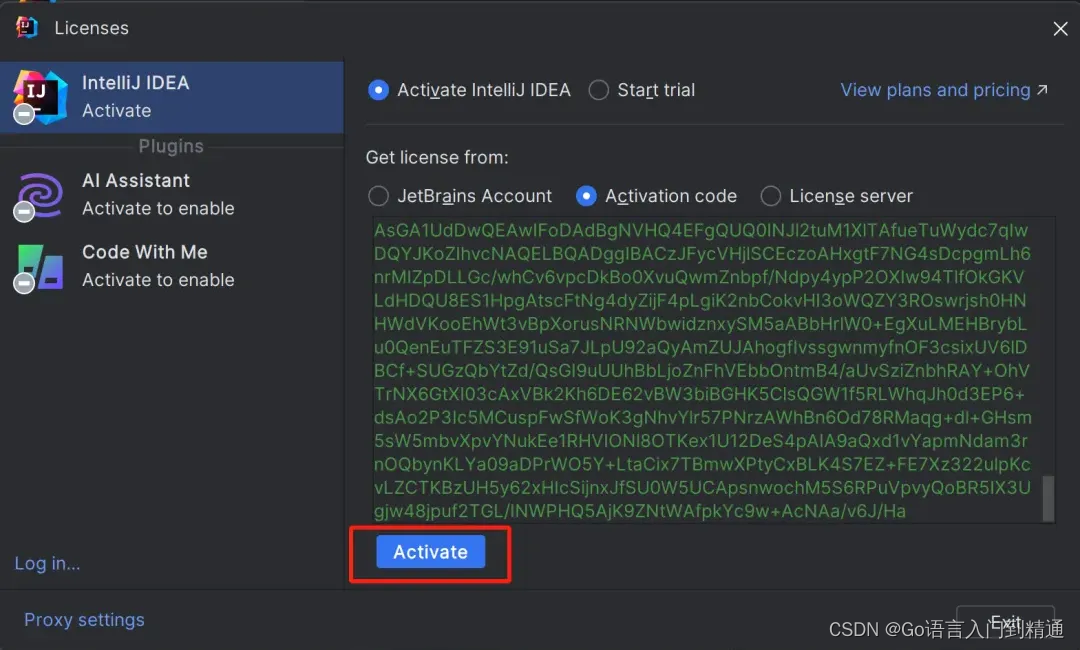
IDEA 安装与激活详细教程最新(附最新激活码)2099年亲测有效!
我们先从 IDEA 官网下载 IDEA 2024.1 版本的安装包,下载链接如下: https://www.jetbrains.com/idea/download/ 点击下载(下载Ultimate版),静心等待其下载完毕即可。 激活方式: 正版专属激活码领取...

LeetCode 100334. 包含所有 1 的最小矩形面积 I
更多题解尽在 https://sugar.matrixlab.dev/algorithm 每日更新。 组队打卡,更多解法等你一起来参与哦! LeetCode 100334. 包含所有 1 的最小矩形面积 I,难度中等。 遍历 解题思路:去掉矩形上下左右全为 0 的行和列 class Solu…...

pdf只要前几页,pdf怎么只要前几页
在现代办公和学习环境中,PDF文件已成为我们日常处理信息的重要工具。然而,有时我们并不需要整个PDF文件的内容,而只是其中的几页。那么,如何高效地提取PDF文件中的特定页面呢?本文将为您介绍几种实用的方法。 打开 “ …...

JAVA JVM 是怎么判定对象已经“死去”?
Java虚拟机(JVM)使用垃圾收集(Garbage Collection,GC)机制来自动管理内存,其中包括识别和回收不再使用的对象。JVM判定对象已经“死去”(即不再被任何引用所指向)的过程主要基于以下…...

springboot加载注入bean的方式
在SpringBoot的大环境下,基本上很少使用之前的xml配置Bean,主要是因为这种方式不好维护而且也不够方便。 springboto注入bean主要采用下图几种方式,分为本地服务工程注解声明的bean和外部依赖包中的bean。 一、 springboot装配本地服务工程…...
)
PostgreSQL 数据库设计与管理(四)
1. 数据库设计原则 1.1 规范化 规范化是组织数据库结构的一种方法,旨在减少数据冗余并提高数据完整性。常用的规范化范式包括: 第一范式(1NF): 确保每列都是原子的,不可再分。第二范式(2NF&a…...
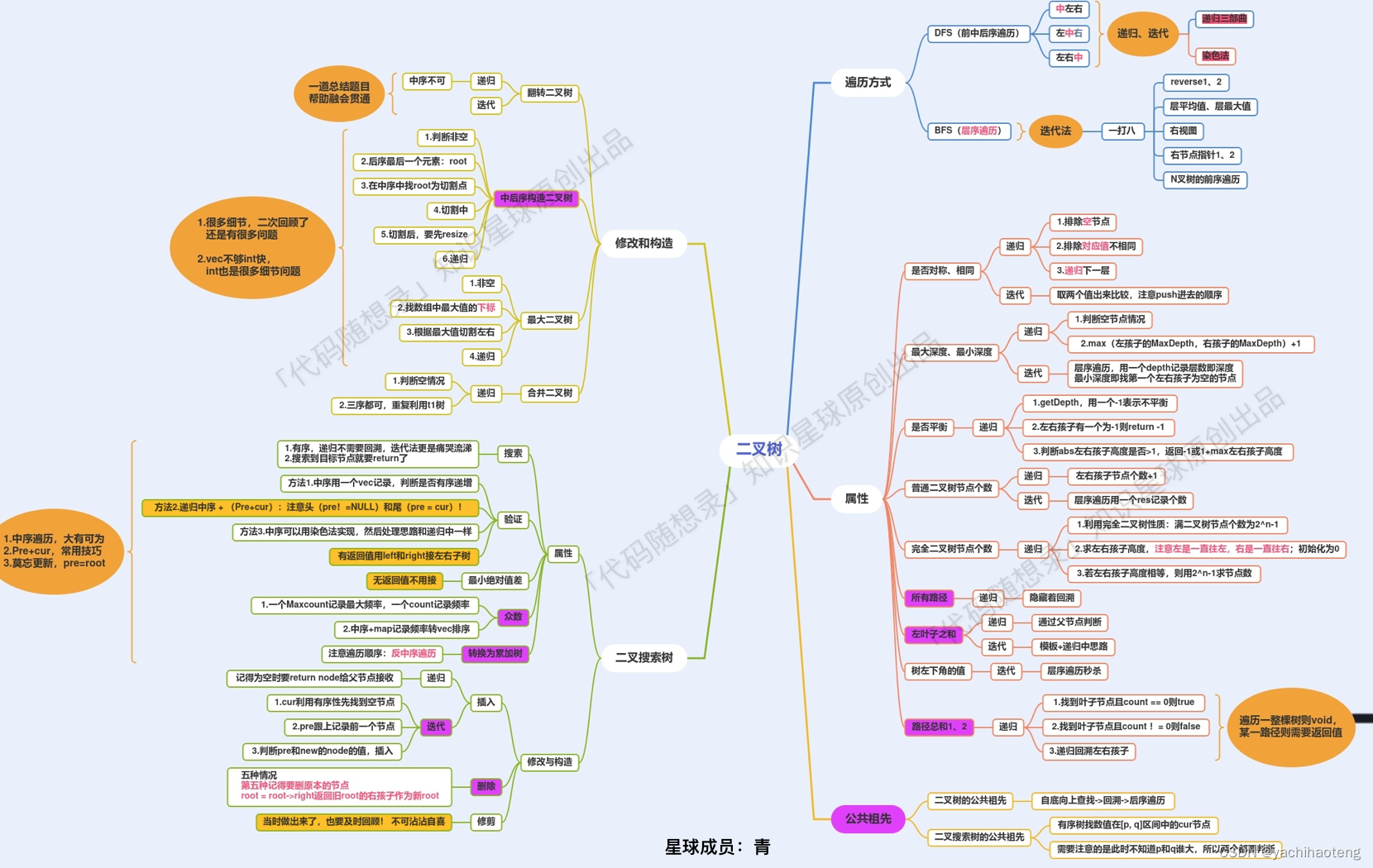
Studying-代码随想录训练营day21| 669.修建二叉搜索树、108.将有序数组转换为二叉搜索树、538.把二叉搜索树转换为累加树、二叉树总结
第21天,二叉树最后一篇,冲💪 目录 669.修建二叉搜索树 108.将有序数组转换为二叉搜索树 538.把二叉搜索树转换为累加树 二叉树总结 669.修建二叉搜索树 文档讲解:代码随想录修建二叉搜索树 视频讲解:手撕修建二叉…...
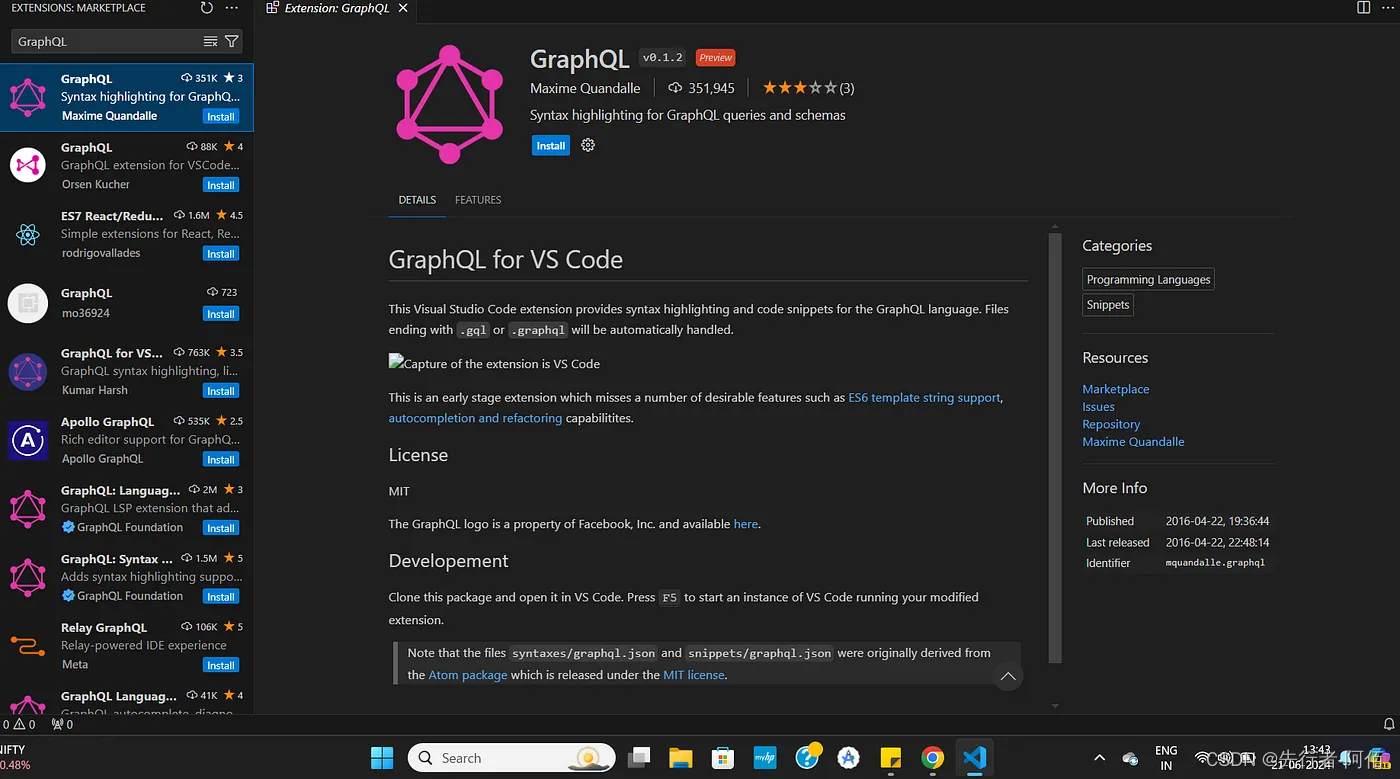
GraphQL:简介
GraphQL 图片来源: 我们将探索GraphQL 的基础知识,并学习如何使用Apollo将其与 React 和 React Native 等前端框架连接起来。这将帮助您了解如何使用 GraphQL、React、React Native 和 Apollo 构建现代、高效的应用程序。 什么是 GraphQL?…...
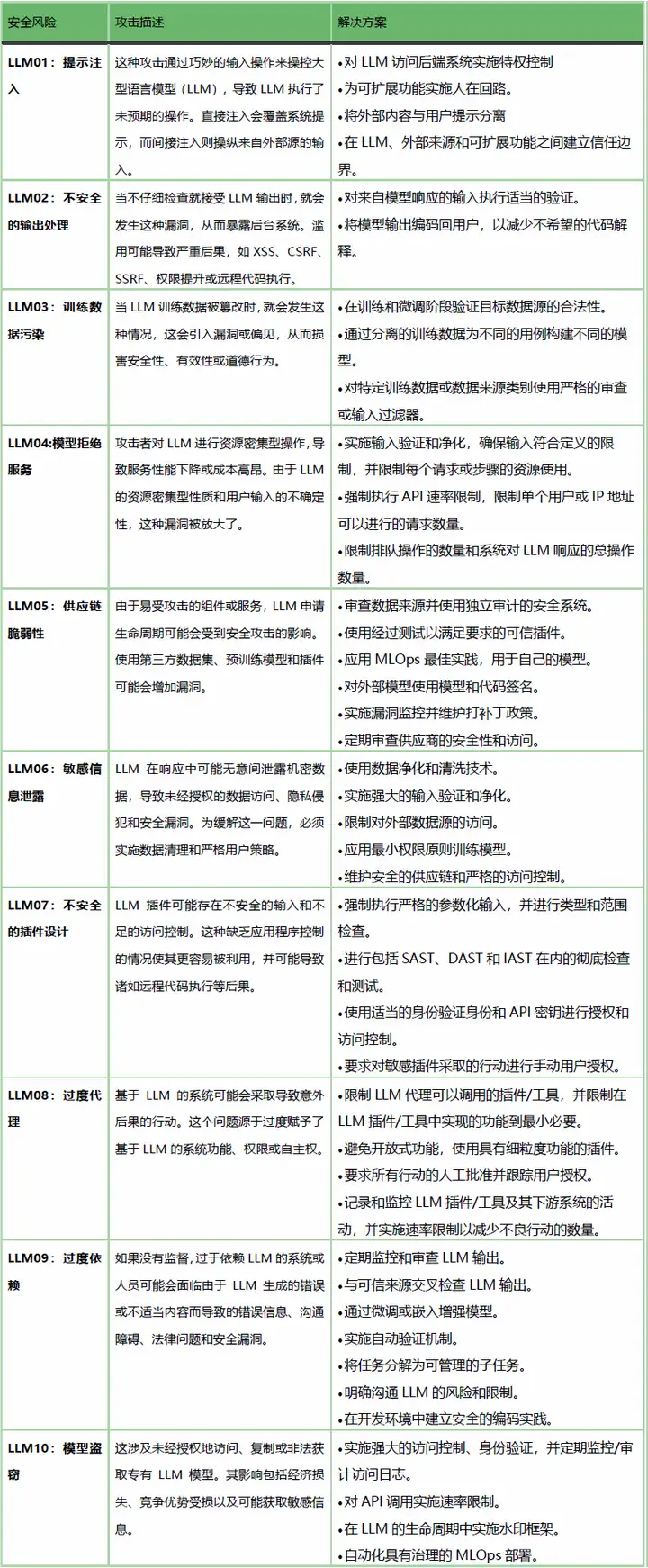
AI大模型安全挑战和安全要求解读
引言 随着人工智能技术的飞速发展,大模型技术以其卓越的性能和广泛的应用前景,正在重塑人工智能领域的新格局。然而,任何技术都有两面性,大模型在带来前所未有便利的同时,也引发了深刻的安全和伦理挑战。 大模型&…...

前端面试题-token的存放位置
哈喽小伙伴们大家好,本系列是一个专门针对前端开发岗的面试题系列,每周将会不定期分享一些面试题,希望对大家有所帮助. 面试官:token 一般在客户端存在哪儿 求职者:Token一般在客户端存在以下几个地方: (1)Cookie:Token可以存储在客户端的Cookie中。服…...

深入探讨计算机网络中的各种报文
在计算机网络中,报文(Packet)是数据传输的基本单位。不同的协议使用不同类型的报文来实现数据传输的各种功能。本文将详细探讨计算机网络中常见的几种报文类型,并通过举例说明其具体应用。 一、TCP/IP协议栈中的报文 TCP/IP协议…...

Debezium系列之:Mysql和SQLServer数据库字段类型覆盖测试
Debezium系列之:Mysql和SQLServer数据库字段类型覆盖测试 一、需求背景二、类型对比三、完整流程三、Mysql数据库全字段类型覆盖测试四、SQLServer数据库字段类型覆盖测试一、需求背景 Debezium版本升级迭代,要做字段类型测试,确保版本间字段类型的差异下游能够自动适应,或…...
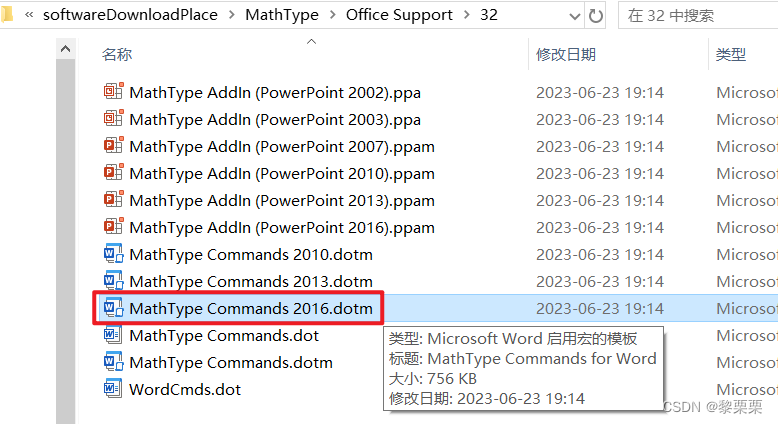
Mathtype7在Word2016中闪退(安装过6)
安装教程:https://blog.csdn.net/Little_pudding10/article/details/135465291 Mathtype7在Word2016中闪退是因为安装过Mathtype6,MathPage.wll和MathType Comm***.dotm),不会随着Mathtype的删除自动删除,而新版的Mathtype中的文件…...

SQL面试题练习 —— 合并用户浏览行为
目录 1 题目2 建表语句3 题解 1 题目 有一份用户访问记录表,记录用户id和访问时间,如果用户访问时间间隔小于60s则认为时一次浏览,请合并用户的浏览行为。 样例数据 ------------------------ | user_id | access_time | ---------------…...
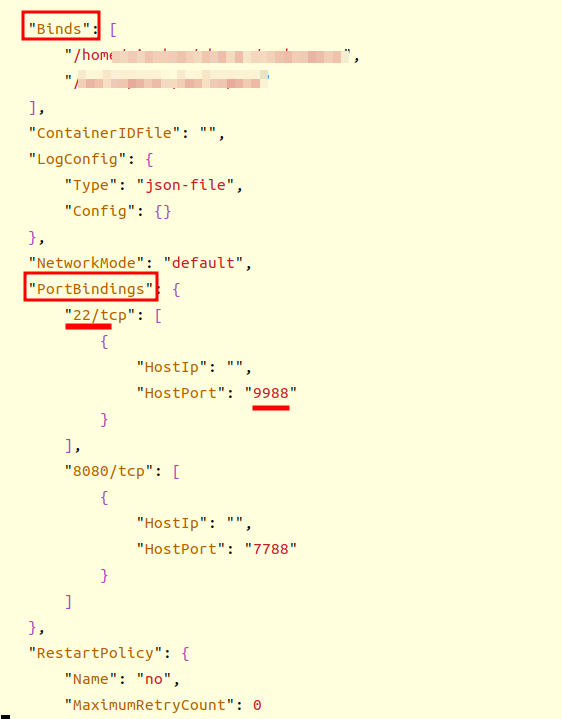
【Docker】docker 替换宿主与容器的映射端口和文件路径
every blog every motto: You can do more than you think. https://blog.csdn.net/weixin_39190382?typeblog 0. 前言 docker 替换宿主与容器的映射端口和文件夹 1. 正文 1.1 关闭docker 服务 systemctl stop docker1.2 找到容器的配置文件 cd /var/lib/docker/contain…...

GPU算力租用平台推荐
推荐以下几家GPU算力租用平台: 1. AWS (Amazon Web Services) EC2 - AWS提供多种GPU实例,适合不同的计算需求,如机器学习、深度学习和图形渲染等。 - 优点:全球覆盖面广,稳定性高,服务支持全面。 …...
)
定个小目标之刷LeetCode热题(31)
238. 除自身以外数组的乘积 给你一个整数数组 nums,返回 数组 answer ,其中 answer[i] 等于 nums 中除 nums[i] 之外其余各元素的乘积 。题目数据 保证 数组 nums之中任意元素的全部前缀元素和后缀的乘积都在 32 位 整数范围内。请 不要使用除法&#…...

收藏!小白程序员必看:详解7种RAG分块策略,轻松提升大模型检索效果
收藏!小白程序员必看:详解7种RAG分块策略,轻松提升大模型检索效果 本文深入解析了RAG系统中7种主流分块策略,包括固定大小、语义、递归、文档结构、智能体、句子和段落分块。强调了分块策略对检索增强生成(RAG…...

iPaaS平台推荐——五款产品能力与适用场景观察
在数字化转型加速推进的当下,iPaaS(集成平台即服务)正成为企业打通数据孤岛、连接应用生态的核心基础设施。面对市场上类型各异的集成平台,如何根据自身需求选择合适的解决方案,成为众多企业关注的重点。本文基于公开资…...
)
从ENVI SARscape到SNAP:手把手教你迁移哨兵1 GRD数据预处理流程(含避坑指南)
从ENVI SARscape到SNAP:哨兵1 GRD数据预处理全流程迁移实战 当雷达遥感领域的工具生态逐渐向开源化倾斜,许多长期依赖ENVI SARscape的研究者开始面临工具迁移的挑战。本文将聚焦哨兵1号GRD数据的预处理流程,为需要从商业软件转向开源工具的用…...

用Matplotlib heatmap分析你的数据:从农产品收成到商品销量的实战案例拆解
用Matplotlib heatmap解锁业务洞察:从农场到电商的数据可视化实战 热力图(heatmap)远不止是颜色方块的排列——它是数据与商业决策之间的视觉桥梁。想象一下,你面前有一张农场作物产量的热力图,颜色从深绿渐变到亮黄&a…...
,仅限前500名技术决策者获取)
NotebookLM未公开的Obsidian插件桥接协议(内部文档泄露版),仅限前500名技术决策者获取
更多请点击: https://intelliparadigm.com 第一章:NotebookLM与Obsidian整合的架构全景图 NotebookLM(Google 推出的 AI 原生研究助手)与 Obsidian(本地优先、双向链接的知识图谱工具)的整合,正…...

记一次ubuntu 22.04安装旧版 MongoDB 4.2
22.04版本比较新,由于mongodb 2.4太老了,安装会遇到问题。特此记录1. 下载mongodb包wget https://fastdl.mongodb.org/linux/mongodb-linux-x86_64-ubuntu1804-4.2.24.tgz2. 解压到当前目录sudo tar -zxvf mongodb-linux-x86_64-ubuntu1804-4.2.24.tgz3.…...

免费AI聊天机器人部署指南:整合多模型与全栈技术实践
1. 项目概述与核心价值最近在折腾一些AI应用,发现很多朋友都想自己部署一个免费的、功能强大的聊天机器人,但要么被高昂的API费用劝退,要么被复杂的部署流程搞得头大。如果你也有同样的困扰,那么今天聊的这个项目——CNSeniorious…...

冲突矿产法规合规:供应链尽责管理与ESG风险应对实战指南
1. 冲突矿产法规合规:一场被低估的供应链风暴如果你是一家电子、汽车或工业设备制造公司的供应链、法务或合规负责人,现在请立刻停下手中的工作,问自己一个问题:我们公司使用的锡、钽、钨、金(3TG)这四种金…...

从0到1掌握Ansible:让自动化运维不再是梦想
最近在公司推进自动化运维的时候,发现很多同事对Ansible还是一知半解,要么就是简单用用,要么就是直接放弃。其实Ansible真的没那么复杂,我用了这么多年,今天就把我的实战经验分享给大家。 说实话,刚开始接…...

YOLO26改进| downsample |网络深层多分支互补鲁棒下采样模块
💡💡💡本专栏所有程序均经过测试,可成功执行💡💡💡 本文给大家带来的教程是将YOLO26的下采样替换为DRFD来提取特征。文章在介绍主要的原理后,将手把手教学如何进行模块的代码添加和修…...