
仓库管理系统14--仓库设置
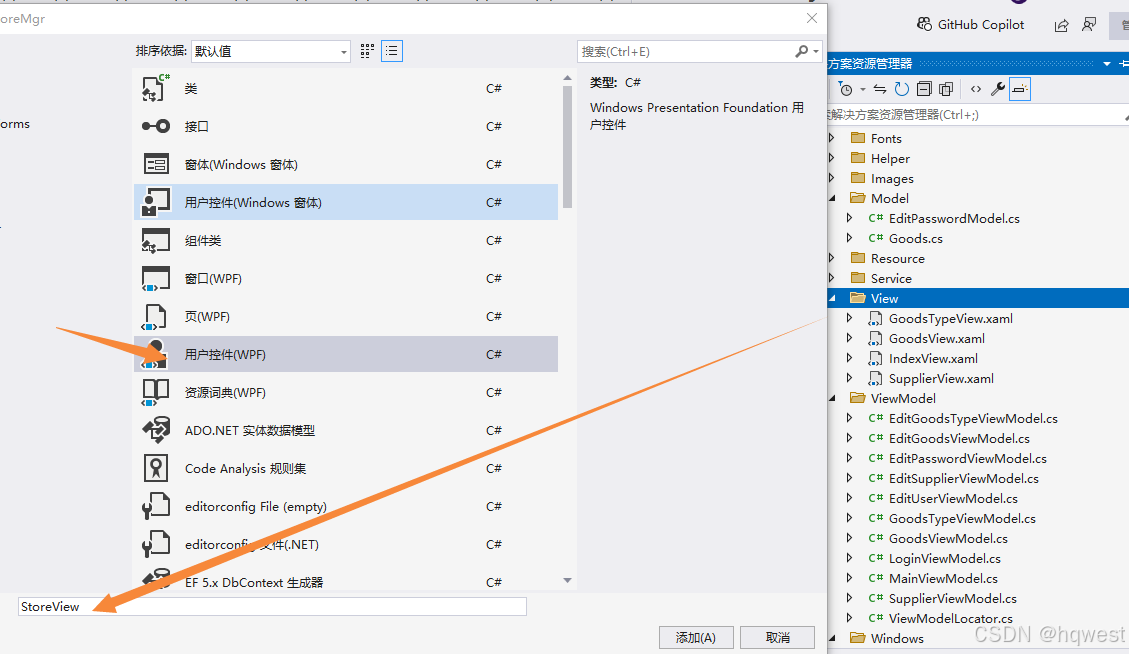
1、添加窗体
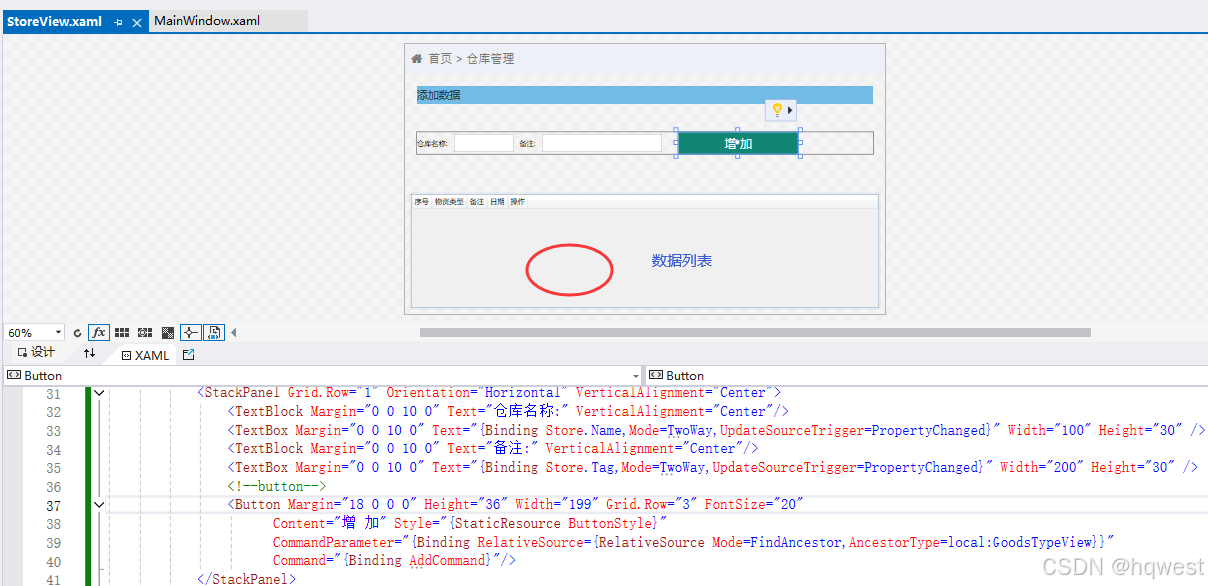
<UserControl x:Class="West.StoreMgr.View.StoreView"xmlns="http://schemas.microsoft.com/winfx/2006/xaml/presentation"xmlns:x="http://schemas.microsoft.com/winfx/2006/xaml"xmlns:mc="http://schemas.openxmlformats.org/markup-compatibility/2006" xmlns:d="http://schemas.microsoft.com/expression/blend/2008" xmlns:local="clr-namespace:West.StoreMgr.View"mc:Ignorable="d" DataContext="{Binding Source={StaticResource Locator},Path=Store}"d:DesignHeight="450" d:DesignWidth="800"><Grid><Grid.RowDefinitions><RowDefinition Height="50"/><RowDefinition/><RowDefinition/></Grid.RowDefinitions><!--标题--><StackPanel Background="#EDF0F6" Orientation="Horizontal"><TextBlock Margin="10 0 0 0" Text="" FontSize="20" FontFamily="/Fonts/#FontAwesome" HorizontalAlignment="Left" VerticalAlignment="Center" Foreground="#797672"/><TextBlock Margin="10 0 0 0" Text="首页 > 仓库管理" FontSize="20" FontFamily="/Fonts/#FontAwesome" HorizontalAlignment="Left" VerticalAlignment="Center" Foreground="#797672"/></StackPanel><!--增加--><Grid Grid.Row="1" Margin="20"><Grid.RowDefinitions><RowDefinition Height="30"/><RowDefinition/></Grid.RowDefinitions><Border Background="#72BBE5"><TextBlock Text="添加数据" FontSize="18" VerticalAlignment="Center" Foreground="#1F3C4C" Margin="0 0 10 0"/></Border><StackPanel Grid.Row="1" Orientation="Horizontal" VerticalAlignment="Center"><TextBlock Margin="0 0 10 0" Text="仓库名称:" VerticalAlignment="Center"/><TextBox Margin="0 0 10 0" Text="{Binding Store.Name,Mode=TwoWay,UpdateSourceTrigger=PropertyChanged}" Width="100" Height="30" /><TextBlock Margin="0 0 10 0" Text="备注:" VerticalAlignment="Center"/><TextBox Margin="0 0 10 0" Text="{Binding Store.Tag,Mode=TwoWay,UpdateSourceTrigger=PropertyChanged}" Width="200" Height="30" /><!--button--><Button Margin="18 0 0 0" Height="36" Width="199" Grid.Row="3" FontSize="20" Content="增 加" Style="{StaticResource ButtonStyle}" CommandParameter="{Binding RelativeSource={RelativeSource Mode=FindAncestor,AncestorType=local:GoodsTypeView}}"Command="{Binding AddCommand}"/></StackPanel></Grid><!--浏览--><Grid Grid.Row="2" Margin="10 0 10 10"><DataGrid ItemsSource="{Binding StoreList}" CanUserAddRows="False" AutoGenerateColumns="False"><DataGrid.Columns><DataGridTextColumn Header="序号" Binding="{Binding Id}"/><DataGridTextColumn Header="物资类型" Binding="{Binding Name}"/><DataGridTextColumn Header="备注" Binding="{Binding Tag}"/><DataGridTextColumn Header="日期" Binding="{Binding InsertDate}"/><DataGridTemplateColumn Header="操作"><DataGridTemplateColumn.CellTemplate><DataTemplate><StackPanel Orientation="Horizontal"><Button Content="编辑" Command="{Binding RelativeSource={RelativeSource Mode=FindAncestor,AncestorType=local:StoreView},Path=DataContext.EditCommand}"CommandParameter="{Binding RelativeSource={RelativeSource Mode=Self}}" Tag="{Binding}" Style="{StaticResource DataGridButtonStyle}" /><Button Content="删除" Command="{Binding RelativeSource={RelativeSource Mode=FindAncestor,AncestorType=local:StoreView},Path=DataContext.DeleteCommand}"CommandParameter="{Binding RelativeSource={RelativeSource Mode=Self}}"Tag="{Binding}" Style="{StaticResource DataGridButtonStyle}" /></StackPanel></DataTemplate></DataGridTemplateColumn.CellTemplate></DataGridTemplateColumn></DataGrid.Columns></DataGrid></Grid></Grid>
</UserControl>
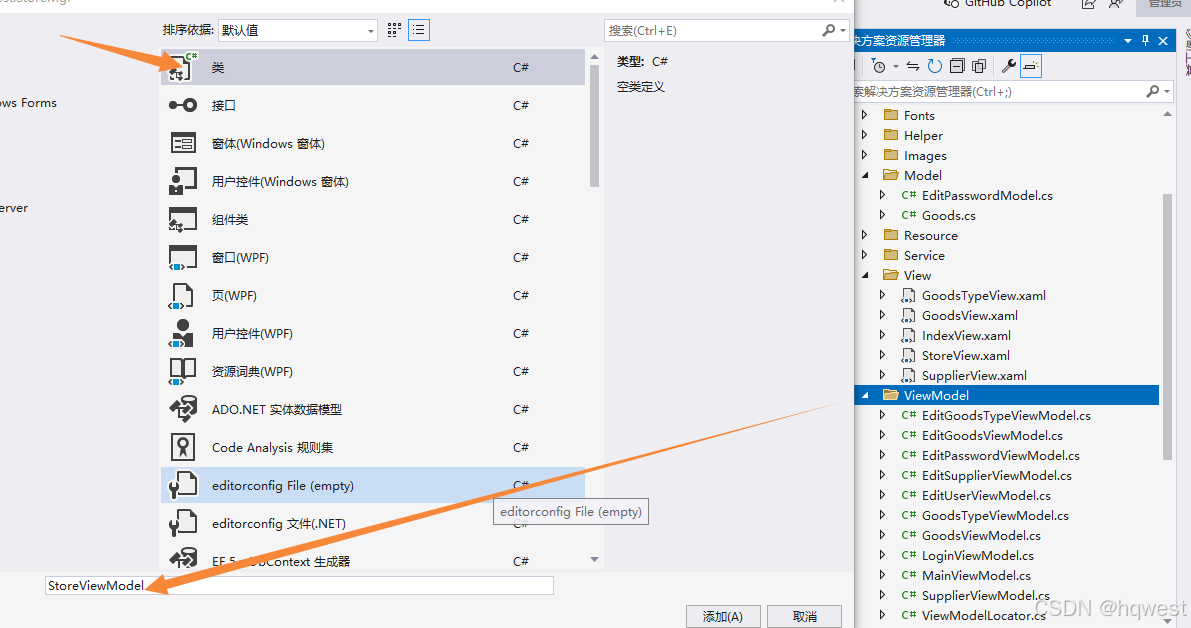
2、添加viewmodel
using GalaSoft.MvvmLight;
using GalaSoft.MvvmLight.Command;
using System;
using System.Collections.Generic;
using System.Linq;
using System.Text;
using System.Threading.Tasks;
using System.Windows.Controls;
using West.StoreMgr.Helper;
using West.StoreMgr.Service;
using CommonServiceLocator;
using West.StoreMgr.Windows;
using static West.StoreMgr.Windows.MsgBoxWindow;namespace West.StoreMgr.ViewModel
{/// <summary>/// 仓库设置viewmodel/// </summary>public class StoreViewModel : ViewModelBase{public StoreViewModel(){StoreList = new StoreService().Select();}private Store store = new Store();public Store Store{get { return store; }set { store = value; RaisePropertyChanged(); }}private List<Store> storeList = new List<Store>();public List<Store> StoreList{get { return storeList; }set { storeList = value; RaisePropertyChanged(); }}//增加public RelayCommand<UserControl> AddCommand{get{var command = new RelayCommand<UserControl>((view) =>{if (string.IsNullOrEmpty(Store.Name) == true){ MsgWinHelper.ShowError("不能为空!");return;}Store.InsertDate = DateTime.Now;var service = new StoreService();int count = service.Insert(Store);if (count > 0){StoreList = service.Select(); MsgWinHelper.ShowMessage("添加成功!");Store = new Store();}else{MsgWinHelper.ShowError("添加失败!");}});return command;}}//修改public RelayCommand<Button> EditCommand{get{var command = new RelayCommand<Button>((view) =>{var old = view.Tag as Store;if (old == null) return;var model = ServiceLocator.Current.GetInstance<EditStoreViewModel>();model.Store = old;var window = new EditStoreWindow();window.ShowDialog();StoreList = new StoreService().Select();});return command;}}//删除public RelayCommand<Button> DeleteCommand{get{var command = new RelayCommand<Button>((view) =>{if (MsgWinHelper.ShowQuestion("您确定要删除该仓库吗?") == CustomMessageBoxResult.OK){var old = view.Tag as Store;if (old == null) return;var service = new StoreService();int count = service.Delete(old);if (count > 0){StoreList = service.Select();MsgWinHelper.ShowMessage("操作成功!");}else{MsgWinHelper.ShowError("操作失败!");}}});return command;}}}
}
3、修改仓库窗体
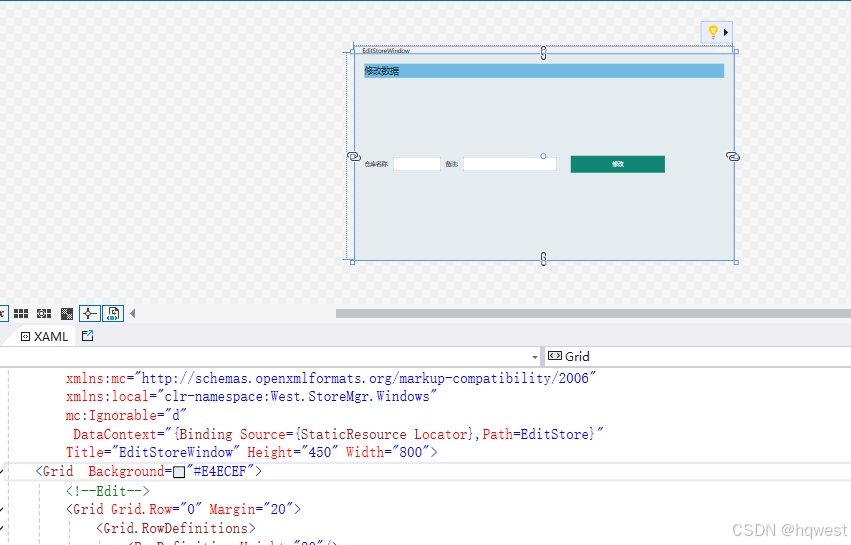
<Window x:Class="West.StoreMgr.Windows.EditStoreWindow"xmlns="http://schemas.microsoft.com/winfx/2006/xaml/presentation"xmlns:x="http://schemas.microsoft.com/winfx/2006/xaml"xmlns:d="http://schemas.microsoft.com/expression/blend/2008"xmlns:mc="http://schemas.openxmlformats.org/markup-compatibility/2006"xmlns:local="clr-namespace:West.StoreMgr.Windows"mc:Ignorable="d"DataContext="{Binding Source={StaticResource Locator},Path=EditStore}"Title="EditStoreWindow" Height="450" Width="800"><Grid  Background="#E4ECEF"><!--Edit--><Grid Grid.Row="0" Margin="20"><Grid.RowDefinitions><RowDefinition Height="30"/><RowDefinition/></Grid.RowDefinitions><Border Background="#72BBE5"><TextBlock Text="修改数据" FontSize="18" VerticalAlignment="Center" Foreground="#1F3C4C" Margin="0 0 10 0"/></Border><StackPanel Grid.Row="1" Orientation="Horizontal" VerticalAlignment="Center"><TextBlock Margin="0 0 10 0" Text="仓库名称:" VerticalAlignment="Center"/><TextBox Margin="0 0 10 0" Text="{Binding Store.Name,Mode=TwoWay,UpdateSourceTrigger=PropertyChanged}" Width="100" Height="30" /><TextBlock Margin="0 0 10 0" Text="备注:" VerticalAlignment="Center"/><TextBox Margin="0 0 10 0" Text="{Binding Store.Tag,Mode=TwoWay,UpdateSourceTrigger=PropertyChanged}" Width="200" Height="30" /><!--button--><Button Margin="18 0 0 0" Height="36" Width="199" Grid.Row="3" Content="修改" Style="{StaticResource ButtonStyle}" CommandParameter="{Binding RelativeSource={RelativeSource Mode=FindAncestor,AncestorType=local:EditStoreWindow}}"Command="{Binding EditCommand}"/></StackPanel></Grid></Grid>
</Window>
4、运行效果
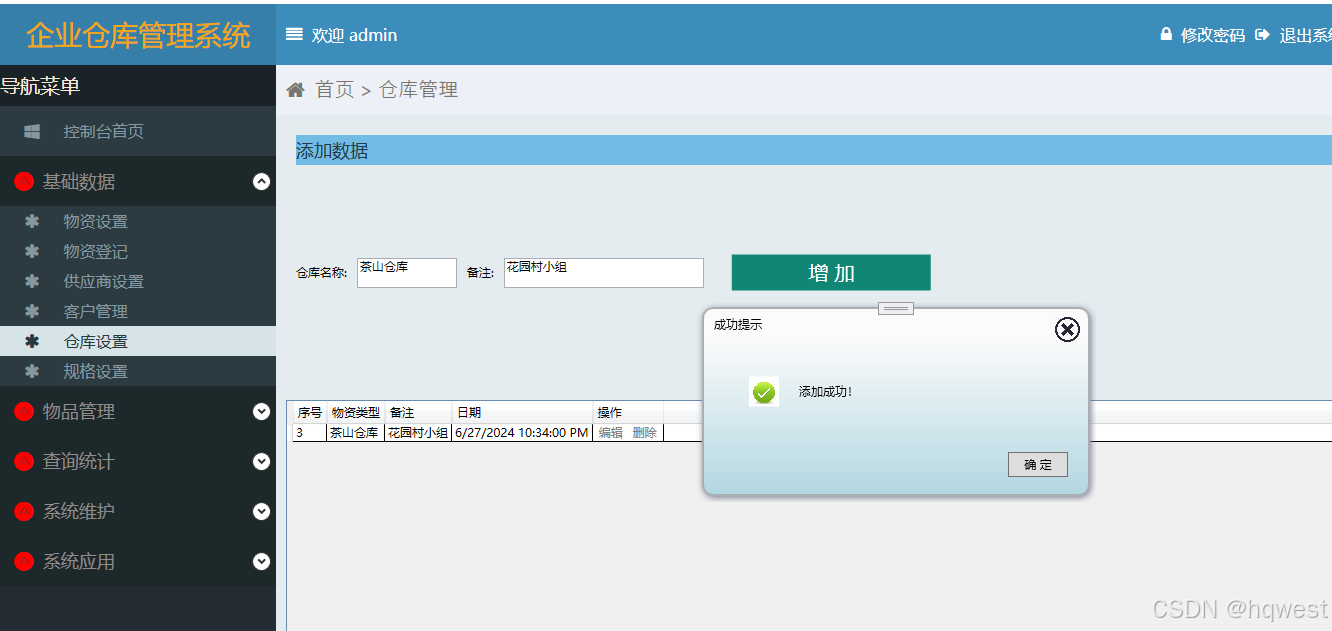
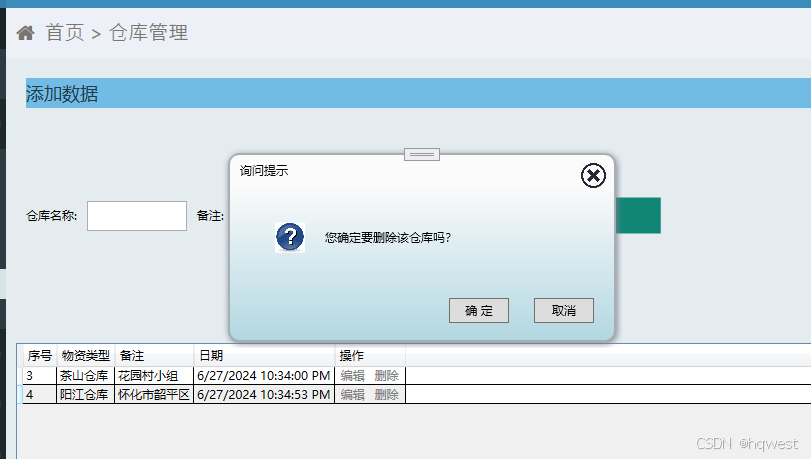
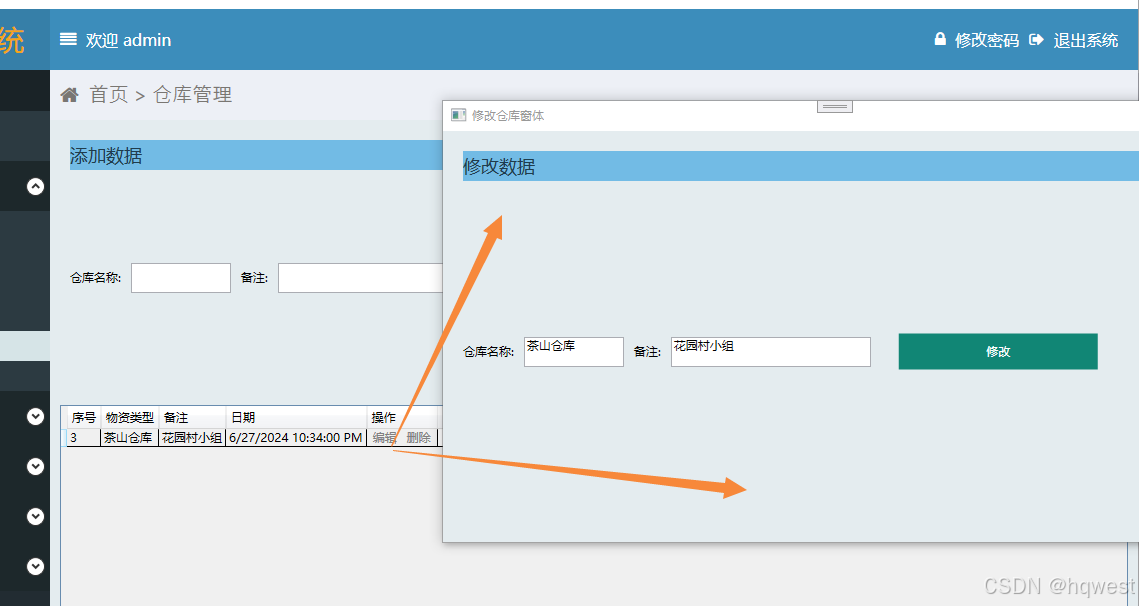
 原创不易,打字不易,截图不易,多多点赞,送人玫瑰,留有余香,财务自由明日实现。
相关文章:
仓库管理系统14--仓库设置
1、添加窗体 <UserControl x:Class"West.StoreMgr.View.StoreView"xmlns"http://schemas.microsoft.com/winfx/2006/xaml/presentation"xmlns:x"http://schemas.microsoft.com/winfx/2006/xaml"xmlns:mc"http://schemas.openxmlformats.…...
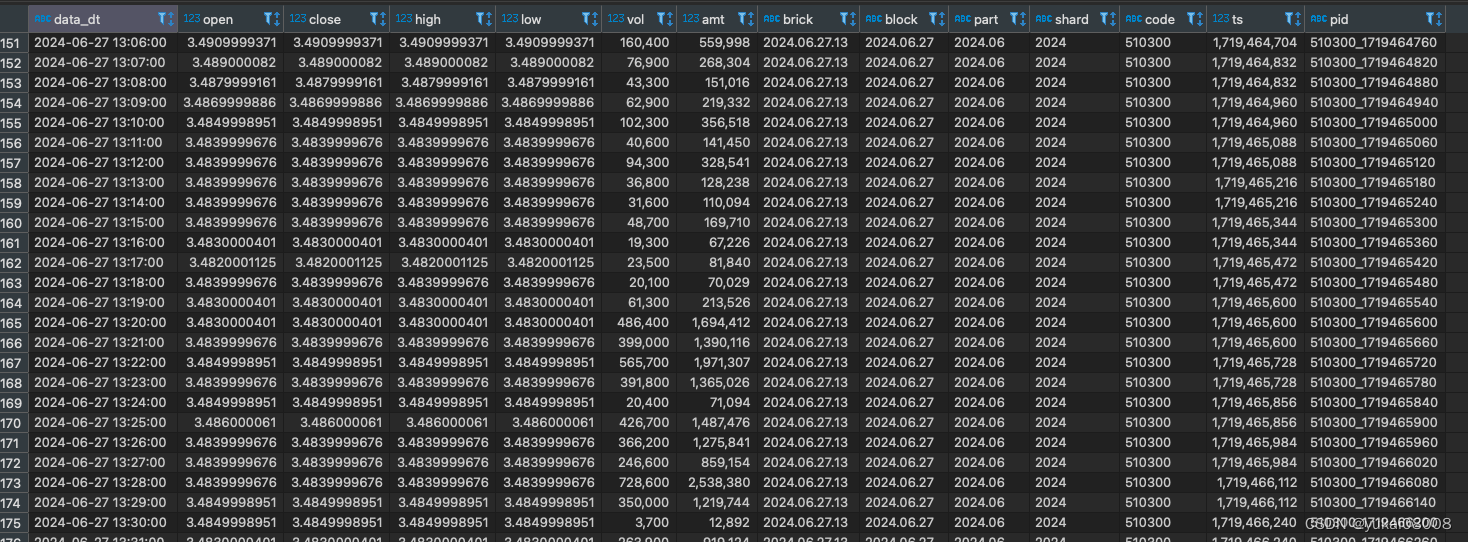
Python 算法交易实验73 QTV200第二步: 数据清洗并写入ClickHouse
说明 先检查一下昨天启动的worker是否正常工作,然后做一些简单的清洗,存入clickhouse。 内容 1 检查数据 from Basefuncs import * # 将一般字符串转为UCS 名称 def dt_str2ucs_blockname(some_dt_str):some_dt_str1 some_dt_str.replace(-,.).re…...

记录:有趣的C#多元运算符 ? : 表达式写法
有时候用 if //...Whatre you she wanna go else if //...do do do else //...and i know something just like this... 感觉代码太多了怎么优雅的、高端的替换? 看个高端的栗子菊: LedCOM["parity"] ledData[4] "N" ? …...

华宽通中标长沙市政务共性能力建设项目,助力智慧政务建设新飞跃
在数字化浪潮的推动下,长沙市政府正积极拥抱智慧城市建设,以科技力量提升政务服务效能。华宽通凭借其卓越的技术实力与丰富的项目经验,成功中标长沙市政务共性能力建设项目,这无疑是对华宽通在智慧城市领域实力的高度认可。 华宽…...

[面试题]计算机网络
[面试题]Java【基础】[面试题]Java【虚拟机】[面试题]Java【并发】[面试题]Java【集合】[面试题]MySQL[面试题]Maven[面试题]Spring Boot[面试题]Spring Cloud[面试题]Spring MVC[面试题]Spring[面试题]MyBatis[面试题]Nginx[面试题]缓存[面试题]Redis[面试题]消息队列[面试题]…...

企业级低代码开发效率变革赋能业务增长
企业级低代码开发已经成为当今软件开发领域的一大趋势,它为企业带来了前所未有的效率变革,从而赋能业务增长。本文将围绕这一主题,深入探讨低代码开发的概念、优势以及如何在企业级应用中实现高效的低代码开发,以助力我国企业实现…...
2024最新总结:1500页金三银四面试宝典 记录35轮大厂面试(都是面试重点)
学习是你这个职业一辈子的事 手里有个 1 2 3,不要想着去怼别人的 4 5 6,因为还有你不知道的 7 8 9。保持空瓶心态从 0 开始才能学到 10 全。 毕竟也是跳槽高峰期,我还是为大家准备了这份1500页金三银四宝典,记录的都是真实大厂面…...

使用Spring Boot和Thymeleaf构建动态Web页面
使用Spring Boot和Thymeleaf构建动态Web页面 大家好,我是免费搭建查券返利机器人省钱赚佣金就用微赚淘客系统3.0的小编,也是冬天不穿秋裤,天冷也要风度的程序猿!今天,我们将探讨如何利用Spring Boot和Thymeleaf构建动…...

扫盲之webSocket
介绍 webSocket 是一种协议,设计用于在客户端和服务器之间提供低延迟、全双工、和长期运行的连接。 全双工:通信的两个参与方可以同时发送和接收数据,不需要等待对方的响应或传输完成 websocket就是为了解决实时通信的问题 建立webSocke…...

一些硬件知识(十二)
1、请说明一下滤波磁珠和滤波电感的区别。 因此磁珠通常用于模数地的连接。 磁珠由导线穿过铁氧体组成,直流电阻很小,在低频时阻抗也很小,对直流信号几乎没有影响。 在高频(几十兆赫兹以上)时磁珠阻抗比较大࿰…...

Adobe Acrobat编辑器最新版下载安装 Adobe Acrobat版本齐全!
功能强大,Adobe Acrobat无疑是PDF文档处理领域的翘楚。这款软件集多种PDF文档处理功能于一身,不仅使得用户可以轻松地编辑PDF文档,更能轻松应对转换和合并等多种需求。 在编辑功能上,Adobe Acrobat的表现尤为出色。无论是添加文字…...

k8s如何使用 HPA 实现自动扩展
使用Horizontal Pod Autoscaler (HPA) 实验目标: 学习如何使用 HPA 实现自动扩展。 实验步骤: 创建一个 Deployment,并设置 CPU 或内存的资源请求。创建一个 HPA,设置扩展策略。生成负载,观察 HPA 如何自动扩展 Pod…...
Hi3861 OpenHarmony嵌入式应用入门--0.96寸液晶屏 iic驱动ssd1306
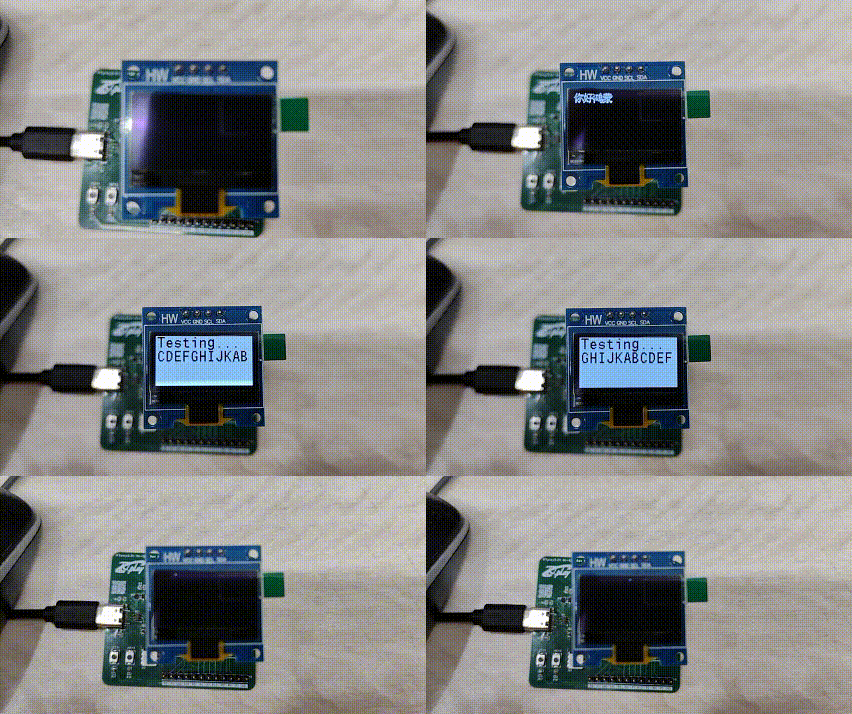
使用iic驱动ssd1306,代码来源hihope\hispark_pegasus\demo\12_ssd1306 本样例提供了一个HarmonyOS IoT硬件接口的SSD1306 OLED屏驱动库,其功能如下: 内置了128*64 bit的内存缓冲区,支持全屏刷新;优化了屏幕刷新速率,…...

代码随想录训练营第二十二天 77组合
第一题: 原题链接:77. 组合 - 力扣(LeetCode) 思路: 经典的回溯模板题: 终止条件,当中间变量用来存储单个结果的大小等于k,则将中间变量存放到结果数组中。 一个for循环横向遍历…...
Unity踩坑记录
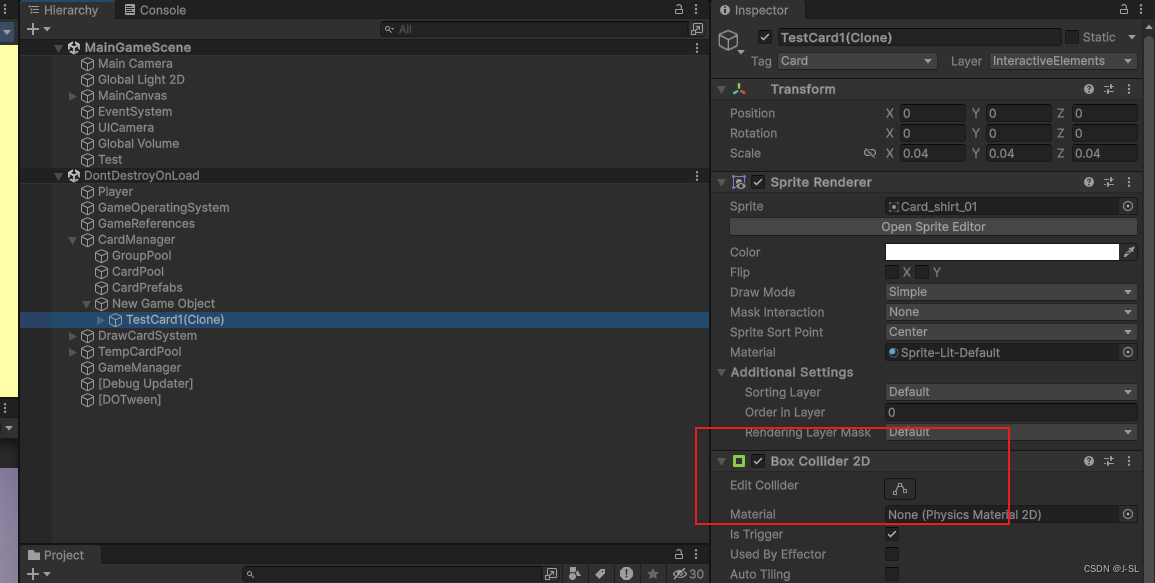
1. 如果同时在父物体和子物体上挂载BoxCollider,那么当使用: private void OnTriggerEnter2D(Collider2D collision){if (collision.CompareTag("CardGroup")){_intersectCardGroups.Add(collision.GetComponent<CardGroup>());}} 来判…...
内容安全复习 1 - 信息内容安全概述
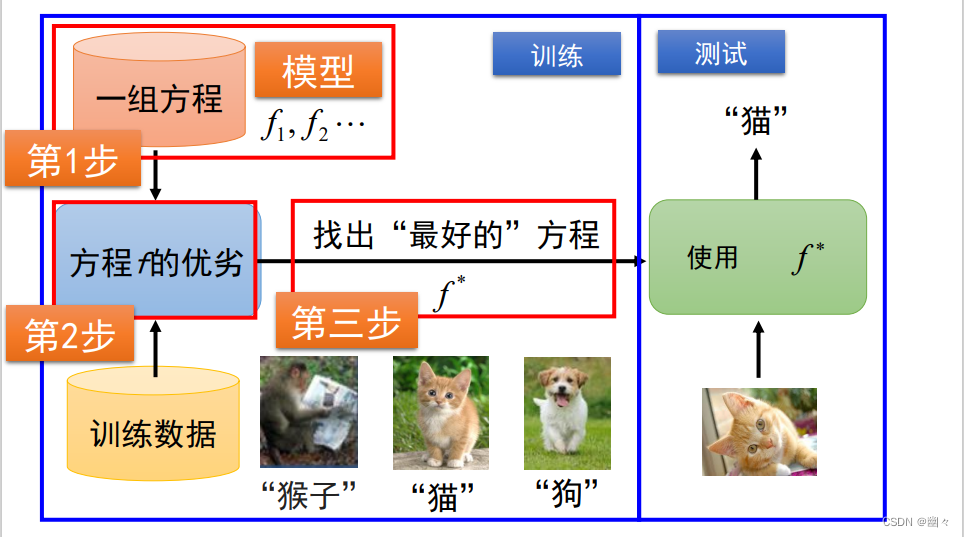
文章目录 信息内容安全简介网络空间信息内容安全大模型 人工智能简介 信息内容安全简介 网络空间 网络空间是融合物理域、信息域、认知域和社会域,控制实体行为的信息活动空间。 上图展示了网络空间安全的结构。可以看到将网络空间划分为了网络域和内容域两个部分。…...

【深度学习】python之人工智能应用篇--跨模态生成技术
跨模态生成技术概述 跨模态生成技术是一种将不同模态的数据(如文本、图像、音频、视频等)进行融合和转换的技术。其目标是通过将一个模态的数据作为输入,生成与之对应的另一个模态的输出。这种技术对于突破单一模态的局限性,提高…...

springboot中获取某个注解下面的某个方法的方法名,参数值等等详细实例
在Spring Boot应用中,获取某个类或方法上的注解及其相关信息,包括方法名称、参数值等,通常涉及到反射和Spring的AOP(面向切面编程)特性。下面是一个示例,展示如何利用Spring AOP的Around注解来拦截带有特定…...
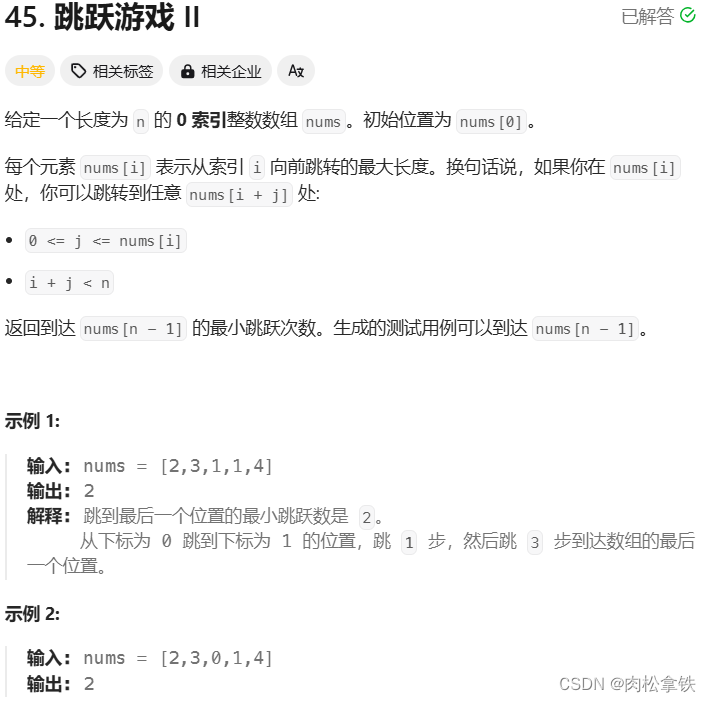
代码随想录——跳跃游戏Ⅱ(Leetcode 45)
题目链接 贪心 class Solution {public int jump(int[] nums) {if(nums.length 1){return 0;}int count 0;// 当前覆盖最远距离下标int curDistance 0;// 下一步覆盖距离最远下标int nextDistance 0;for(int i 0; i < nums.length; i){nextDistance Math.max(nums[…...

从0-1搭建一个web项目(package.json)详解
本章分析package.json文件详解 本文主要对packge.json配置子文件详解 ObJack-Admin一款基于 Vue3.3、TypeScript、Vite3、Pinia、Element-Plus 开源的后台管理框架。在一定程度上节省您的开发效率。另外本项目还封装了一些常用组件、hooks、指令、动态路由、按钮级别权限控制等…...

5步掌握OpenCore Configurator:黑苹果配置终极可视化指南
5步掌握OpenCore Configurator:黑苹果配置终极可视化指南 【免费下载链接】OpenCore-Configurator A configurator for the OpenCore Bootloader 项目地址: https://gitcode.com/gh_mirrors/op/OpenCore-Configurator 如果你正在为黑苹果系统的复杂配置而烦恼…...

2026年图片换背景免费工具完全指南:一键抠图软件推荐
现在是5月,我想很多人都在为各种证件照、商品图、头像等需要换背景的图片犯愁。前两天有朋友问我"哪个软件可以给图片换背景",我才意识到很多人还在用古老的PS或者繁琐的在线工具。今天就来给大家分享一下2026年最好用的图片换背景工具&#x…...

Hermit:项目级环境隔离工具,告别开发环境冲突
1. 项目概述:从“隐士”到现代开发者的效率革命如果你和我一样,常年与终端为伴,每天在多个项目、不同编程语言和工具链之间切换,那你一定对那种“环境错乱”的痛楚深有体会。前一秒还在用 Python 3.11 调试一个数据脚本࿰…...

Tinke完整技术指南:NDS游戏资源提取与逆向工程深度解析
Tinke完整技术指南:NDS游戏资源提取与逆向工程深度解析 【免费下载链接】tinke Viewer and editor for files of NDS games 项目地址: https://gitcode.com/gh_mirrors/ti/tinke Tinke是一款专业的任天堂DS(NDS)游戏资源提取与逆向工程…...

Java集成OpenAI全攻略:从SDK选型到企业级应用实战
1. 项目概述与核心价值最近在折腾一个内部的知识库问答机器人,后端服务用Java写的,自然就想找个好用的OpenAI SDK来对接。市面上Java的客户端库不少,但要么封装得过于简单,很多高级功能没有,要么就是更新不及时&#x…...

终极Windows安卓应用安装指南:告别模拟器,拥抱轻量级体验
终极Windows安卓应用安装指南:告别模拟器,拥抱轻量级体验 【免费下载链接】APK-Installer An Android Application Installer for Windows 项目地址: https://gitcode.com/GitHub_Trending/ap/APK-Installer 你是否厌倦了笨重的安卓模拟器&#x…...

基于MCP协议构建AI知识库:Alexandria项目部署与核心工作流解析
1. 项目概述:让AI拥有自己的“亚历山大图书馆”如果你和我一样,长期与各种AI助手(比如Claude、Cursor、Codex)打交道,肯定会遇到一个头疼的问题:知识无法沉淀。今天你花半小时教会AI助手某个项目的架构细节…...

如何快速提取B站视频素材:新手必备的DownKyi音画分离指南
如何快速提取B站视频素材:新手必备的DownKyi音画分离指南 【免费下载链接】downkyi 哔哩下载姬downkyi,哔哩哔哩网站视频下载工具,支持批量下载,支持8K、HDR、杜比视界,提供工具箱(音视频提取、去水印等&am…...

Anaconda环境翻车实录:从‘CondaMemoryError’到完美恢复的完整指南
Anaconda环境崩溃自救手册:从诊断到彻底修复的实战指南 那天下午,当你在终端第15次尝试运行conda update --all时,屏幕上突然跳出鲜红的"CondaMemoryError"字样,整个开发环境瞬间陷入瘫痪。这不是普通的报错,…...

自动化营销系统:高效破解市场-SDR销售线索流转堵点
在B2B营销中,线索从“获取”到“转化”的过程,往往伴随着大量的手动操作、信息断层和跟进滞后。尤其是市场团队与SDR(销售开发代表)之间的协作,常常成为线索流转的“瓶颈”。如何高效、规范地将市场获取的Leads转化为可…...