
仓库管理系统17--客户管理
原创不易,打字不易,截图不易,多多点赞,送人玫瑰,留有余香,财务自由明日实现

1、添加用户控件
<UserControl x:Class="West.StoreMgr.View.CustomerView"xmlns="http://schemas.microsoft.com/winfx/2006/xaml/presentation"xmlns:x="http://schemas.microsoft.com/winfx/2006/xaml"xmlns:mc="http://schemas.openxmlformats.org/markup-compatibility/2006" xmlns:d="http://schemas.microsoft.com/expression/blend/2008" xmlns:local="clr-namespace:West.StoreMgr.View"mc:Ignorable="d" DataContext="{Binding Source={StaticResource Locator},Path=Customer}"d:DesignHeight="450" d:DesignWidth="800"><Grid><Grid.RowDefinitions><RowDefinition Height="50"/><RowDefinition/><RowDefinition/></Grid.RowDefinitions><!--标题--><StackPanel Background="#EDF0F6" Orientation="Horizontal"><TextBlock Margin="10 0 0 0" Text="" FontSize="20" FontFamily="/Fonts/#FontAwesome" HorizontalAlignment="Left" VerticalAlignment="Center" Foreground="#797672"/><TextBlock Margin="10 0 0 0" Text="首页 > 客户管理" FontSize="20" FontFamily="/Fonts/#FontAwesome" HorizontalAlignment="Left" VerticalAlignment="Center" Foreground="#797672"/></StackPanel><!--增加--><Grid Grid.Row="1" Margin="10"><Grid.RowDefinitions><RowDefinition Height="30"/><RowDefinition/></Grid.RowDefinitions><Border Background="#72BBE5"><TextBlock Text="添加客户" FontSize="18" VerticalAlignment="Center" Foreground="#1F3C4C" Margin="0 0 10 0"/></Border><StackPanel Grid.Row="1"><StackPanel Orientation="Horizontal" VerticalAlignment="Center"><TextBlock Margin="0 0 10 0" Text="客户名称:" VerticalAlignment="Center"/><TextBox HorizontalAlignment="Left" VerticalAlignment="Center" TextAlignment="Left" VerticalContentAlignment="Center" Margin="0 0 10 0" Text="{Binding Customer.Name,Mode=TwoWay,UpdateSourceTrigger=PropertyChanged}" Width="230" Height="30" /><TextBlock Margin="0 0 10 0" Text="备注:" VerticalAlignment="Center"/><TextBox HorizontalAlignment="Left" VerticalAlignment="Center" TextAlignment="Left" VerticalContentAlignment="Center" Margin="0 0 10 0" Text="{Binding Customer.Tag,Mode=TwoWay,UpdateSourceTrigger=PropertyChanged}" Width="400" Height="30" /></StackPanel><StackPanel Orientation="Horizontal" Margin="0 10 0 10"><TextBlock Margin="0 0 10 0" Text="电话号码:" VerticalAlignment="Center"/><TextBox HorizontalAlignment="Left" VerticalAlignment="Center" TextAlignment="Left" VerticalContentAlignment="Center" Margin="0 0 10 0" Text="{Binding Customer.Telephone,Mode=TwoWay,UpdateSourceTrigger=PropertyChanged}" Width="120" Height="30" /><TextBlock Margin="0 0 10 0" Text="邮箱:" VerticalAlignment="Center"/><TextBox HorizontalAlignment="Left" VerticalAlignment="Center" TextAlignment="Left" VerticalContentAlignment="Center" Margin="0 0 10 0" Text="{Binding Customer.Email,Mode=TwoWay,UpdateSourceTrigger=PropertyChanged}" Width="150" Height="30" /><TextBlock Margin="0 0 10 0" Text="地址:" VerticalAlignment="Center"/><TextBox HorizontalAlignment="Left" VerticalAlignment="Center" TextAlignment="Left" VerticalContentAlignment="Center" Margin="0 0 10 0" Text="{Binding Customer.Address,Mode=TwoWay,UpdateSourceTrigger=PropertyChanged}" Width="315" Height="30" /></StackPanel><StackPanel Orientation="Horizontal" Margin="200 10 0 10" ><Button Margin="18 0 0 0" Height="36" Width="199" FontSize="20" Content="增 加" Style="{StaticResource ButtonStyle}" CommandParameter="{Binding RelativeSource={RelativeSource Mode=FindAncestor,AncestorType=local:GoodsTypeView}}"Command="{Binding AddCommand}"/></StackPanel></StackPanel> </Grid><!--浏览--><Grid Grid.Row="2" Margin="10 0 10 10"><DataGrid ItemsSource="{Binding CustomerList}" CanUserAddRows="False" AutoGenerateColumns="False"><DataGrid.Columns><DataGridTextColumn Header="序号" Binding="{Binding Id}"/><DataGridTextColumn Header="名字" Binding="{Binding Name}"/><DataGridTextColumn Header="电话" Binding="{Binding Telephone}"/><DataGridTextColumn Header="邮箱" Binding="{Binding Email}"/><DataGridTextColumn Header="地址" Binding="{Binding Address}"/><DataGridTextColumn Header="备注" Binding="{Binding Tag}"/><DataGridTextColumn Header="日期" Binding="{Binding InsertDate}"/><DataGridTemplateColumn Header="操作"><DataGridTemplateColumn.CellTemplate><DataTemplate><StackPanel Orientation="Horizontal"><Button Content="编辑" Command="{Binding RelativeSource={RelativeSource Mode=FindAncestor,AncestorType=local:CustomerView},Path=DataContext.EditCommand}"CommandParameter="{Binding RelativeSource={RelativeSource Mode=Self}}" Tag="{Binding}" Style="{StaticResource DataGridButtonStyle}" /><Button Content="删除" Command="{Binding RelativeSource={RelativeSource Mode=FindAncestor,AncestorType=local:CustomerView},Path=DataContext.DeleteCommand}"CommandParameter="{Binding RelativeSource={RelativeSource Mode=Self}}"Tag="{Binding}" Style="{StaticResource DataGridButtonStyle}" /></StackPanel></DataTemplate></DataGridTemplateColumn.CellTemplate></DataGridTemplateColumn></DataGrid.Columns></DataGrid></Grid></Grid>
</UserControl>
2、添加viewmodel

using GalaSoft.MvvmLight;
using GalaSoft.MvvmLight.Command;
using System;
using System.Collections.Generic;
using System.Linq;
using System.Text;
using System.Threading.Tasks;
using System.Windows.Controls;
using West.StoreMgr.Service;
using CommonServiceLocator;
using West.StoreMgr.Helper;
using static West.StoreMgr.Windows.MsgBoxWindow;
using West.StoreMgr.Windows;namespace West.StoreMgr.ViewModel
{/// <summary>/// 客户管理viewmodel/// </summary>public class CustomerViewModel : ViewModelBase{public CustomerViewModel(){CustomerList = new CustomerService().Select();}private Customer customer = new Customer();public Customer Customer{get { return customer; }set { customer = value; RaisePropertyChanged(); }}private List<Customer> customerList = new List<Customer>();/// <summary>/// 客户列表/// </summary>public List<Customer> CustomerList{get { return customerList; }set { customerList = value; RaisePropertyChanged(); }}//增加public RelayCommand<UserControl> AddCommand{get{var command = new RelayCommand<UserControl>((view) =>{if (string.IsNullOrEmpty(Customer.Name) == true){MsgWinHelper.ShowError("不能为空");return;}Customer.InsertDate = DateTime.Now;CustomerService service = new CustomerService();int count = service.Insert(Customer);if (count > 0){CustomerList = service.Select();MsgWinHelper.ShowMessage("操作成功");Customer = new Customer();}else{MsgWinHelper.ShowError("操作失败");}});return command;}}//修改public RelayCommand<Button> EditCommand{get{var command = new RelayCommand<Button>((view) =>{var old = view.Tag as Customer;if (old == null) return;var model = ServiceLocator.Current.GetInstance<EditCustomerViewModel>();model.Customer = old;var window = new EditCustomerWindow();window.ShowDialog();CustomerList = new CustomerService().Select();});return command;}}//删除public RelayCommand<Button> DeleteCommand{get{var command = new RelayCommand<Button>((view) =>{if (MsgWinHelper.ShowQuestion("您确定要删除该客户吗?") == CustomMessageBoxResult.OK){var old = view.Tag as Customer;if (old == null) return;CustomerService service = new CustomerService();int count = service.Delete(old);if (count > 0){CustomerList = service.Select();MsgWinHelper.ShowMessage("操作成功");}else{MsgWinHelper.ShowError("操作失败");}}});return command;}}}
}
3、修改客户窗体

<Window x:Class="West.StoreMgr.Windows.EditCustomerWindow"xmlns="http://schemas.microsoft.com/winfx/2006/xaml/presentation"xmlns:x="http://schemas.microsoft.com/winfx/2006/xaml"xmlns:d="http://schemas.microsoft.com/expression/blend/2008"xmlns:mc="http://schemas.openxmlformats.org/markup-compatibility/2006"xmlns:local="clr-namespace:West.StoreMgr.Windows"mc:Ignorable="d"DataContext="{Binding Source={StaticResource Locator},Path=EditCustomer}"Title="修改客户窗体" Height="320" Width="700"><Grid Background="#E4ECEF"><Grid.RowDefinitions><RowDefinition Height="50"/><RowDefinition Height="100"/><RowDefinition/></Grid.RowDefinitions><Border Background="#72BBE5" Grid.Row="0"  Margin="0"><TextBlock Text="修改客户数据" FontSize="18" VerticalAlignment="Center" Foreground="#1F3C4C" Margin="0 0 10 0"/></Border><StackPanel Grid.Row="1" Margin="0 10 0 0"><StackPanel  Orientation="Horizontal" VerticalAlignment="Center"><TextBlock Margin="0 0 10 0" Text="客户名称:" VerticalAlignment="Center"/><TextBox HorizontalAlignment="Left" VerticalAlignment="Center" TextAlignment="Left" VerticalContentAlignment="Center" Margin="0 0 10 0" Text="{Binding Customer.Name,Mode=TwoWay,UpdateSourceTrigger=PropertyChanged}" Width="220" Height="30" /><TextBlock Margin="0 0 10 0" Text="备注:" VerticalAlignment="Center"/><TextBox HorizontalAlignment="Left" VerticalAlignment="Center" TextAlignment="Left" VerticalContentAlignment="Center" Margin="0 0 10 0" Text="{Binding Customer.Tag,Mode=TwoWay,UpdateSourceTrigger=PropertyChanged}" Width="354" Height="30" /></StackPanel><StackPanel Orientation="Horizontal" Margin="0 10 0 10"><TextBlock Margin="0 0 10 0" Text="电话号码:" VerticalAlignment="Center"/><TextBox HorizontalAlignment="Left" VerticalAlignment="Center" TextAlignment="Left" VerticalContentAlignment="Center" Margin="0 0 10 0" Text="{Binding Customer.Telephone,Mode=TwoWay,UpdateSourceTrigger=PropertyChanged}" Width="130" Height="30" /><TextBlock Margin="0 0 10 0" Text="邮箱:" VerticalAlignment="Center"/><TextBox HorizontalAlignment="Left" VerticalAlignment="Center" TextAlignment="Left" VerticalContentAlignment="Center" Margin="0 0 10 0" Text="{Binding Customer.Email,Mode=TwoWay,UpdateSourceTrigger=PropertyChanged}" Width="160" Height="30" /><TextBlock Margin="0 0 10 0" Text="地址:" VerticalAlignment="Center"/><TextBox  HorizontalAlignment="Left" VerticalAlignment="Center" TextAlignment="Left" VerticalContentAlignment="Center" Margin="0 0 10 0" Text="{Binding Customer.Address,Mode=TwoWay,UpdateSourceTrigger=PropertyChanged}" Width="240" Height="30" /></StackPanel></StackPanel><StackPanel Grid.Row="2" Margin="0 10 0 0"><Button Margin="18 -10 0 0" Height="36" Width="199"  FontSize="20"Content="修 改" Style="{StaticResource ButtonStyle}" CommandParameter="{Binding RelativeSource={RelativeSource Mode=FindAncestor,AncestorType=local:EditCustomerWindow}}"Command="{Binding EditCommand}"/></StackPanel></Grid>
</Window>
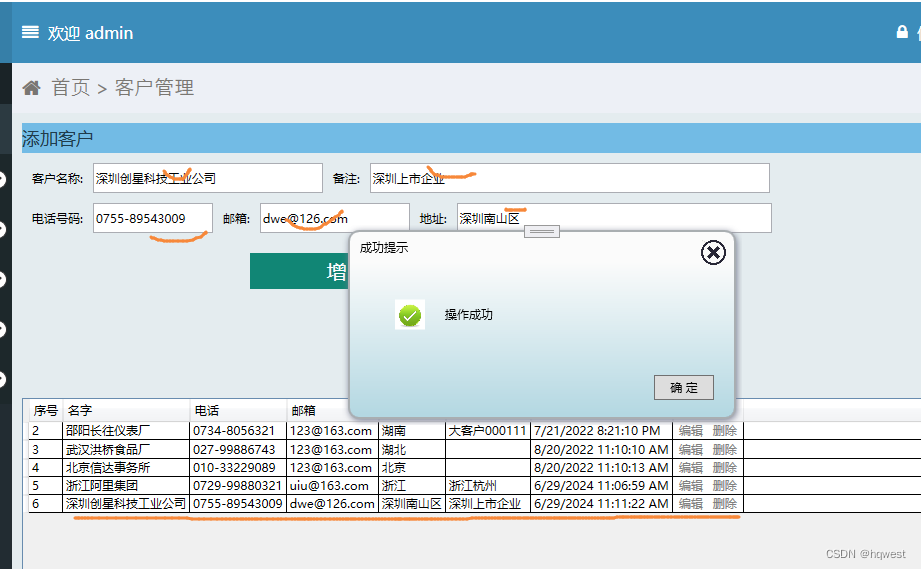
4、运行效果



原创不易,打字不易,截图不易,多多点赞,送人玫瑰,留有余香,财务自由明日实现。

相关文章:
仓库管理系统17--客户管理
原创不易,打字不易,截图不易,多多点赞,送人玫瑰,留有余香,财务自由明日实现 1、添加用户控件 <UserControl x:Class"West.StoreMgr.View.CustomerView"xmlns"http://schemas.microsof…...
笔记本重装系统怎么操作? windows电脑重装系统,超实用的四种方法
重新安装操作系统是维护计算机性能和确保系统稳定运行的重要步骤。对于 Windows 笔记本用户而言,熟悉重装系统的方法可以帮助他们解决各种问题,从提高系统速度到修复软件故障。然而具体来讲,笔记本重装系统怎么操作呢?接下来&…...

【高考志愿】计算机
目录 一、专业概述 二、就业方向 三、选择建议 四、注意事项 五、计算机专业学科排名 高考志愿选择计算机专业,无疑是一个充满挑战与机遇的决策。这个专业以其广泛的应用领域、前沿的技术研究和可观的就业前景,吸引了无数考生的目光。 一、专业概述…...

使用ExpandableListView创建可扩展列表
使用ExpandableListView创建可扩展列表 大家好,我是免费搭建查券返利机器人省钱赚佣金就用微赚淘客系统3.0的小编,也是冬天不穿秋裤,天冷也要风度的程序猿!今天我们将深入探讨如何使用Android中的ExpandableListView创建可扩展列…...

酒店新零售模式,亚朵酒店众筹模式, 社交新零售商业模式
抓住会员的需求,通过众筹让上万铁杆粉丝成为微股东! 作为一家高端酒店,它拥有近2000万会员,这些会员还抢着掏钱帮它开酒店。而且,这家酒店还直接融资了19亿,计划上市。这家酒店在全国开设了1000多家店&…...

2010-2023年 省级、地级市、地市州盟保障性住房面积数据
保障性住房是政府为解决中低收入家庭住房问题而实施的一项重要政策,旨在通过提供限定价格或租金的住房,实现社会公平和稳定。以下是对省级、地级市、地市州盟保障性住房面积数据的介绍: 数据简介 定义:保障性住房包括廉租住房、…...

Java 语言特定指南
Java 语言特定指南 本 Java 入门指南将教您如何使用 Docker 创建一个容器化的 Spring Boot 应用程序。在本模块中,您将学习如何: 使用 Maven 容器化并运行一个 Spring Boot 应用程序设置本地开发环境以将数据库连接到容器、配置调试器,并使…...

国内多个库被 rsc 钉上 Go 耻辱柱。。。
大家好,我是煎鱼。 这还是比较突然的,下午正努力打工。国内社区群里突然就闹腾起来了。 仔细一看,原来是 Go 核心团队负责人 rsc,又冷不丁搞大招 😅。他直接把国内好几个知名库给直接钉上了 Go 源码库的耻辱柱上了。 如…...

elasticsearch源码分析-03选举集群状态
选举集群状态 es中存储的数据有一下几种,state元数据、lucene索引文件、translog事务日志 元数据信息可以分为: 集群层面的元信息-对应着metaData数据结构,主要是clusterUUid、settings、templates等索引层面的元信息-对应着indexMetaData数…...

MySQL 重要参数优化
max_connections = 3000 innodb_buffer_pool_size = 8G max_allowed_packet = 32M innodb_file_io_threads = 8 innodb_thread_concurrency = 16 innodb_flush_log_at_trx_commit = 2 innodb_log_buffer_size = 16M 参数说明 max_connections = 3000 运行MySQL的最大连…...
软件测试之接口测试(Postman/Jmeter)
🍅 视频学习:文末有免费的配套视频可观看 🍅 点击文末小卡片,免费获取软件测试全套资料,资料在手,涨薪更快 一、什么是接口测试 通常做的接口测试指的是系统对外的接口,比如你需要从别的系统来…...
14 卡尔曼滤波及代码实现
文章目录 14 卡尔曼滤波及代码实现14.0 基本概念14.1 公式推导14.2 代码实现 14 卡尔曼滤波及代码实现 14.0 基本概念 卡尔曼滤波是一种利用线性系统状态方程,通过系统输入输出观测数据,对系统状态进行最优估计的算法。由于观测数据包括系统中的噪声和…...
计算机视觉 图像融合技术概览
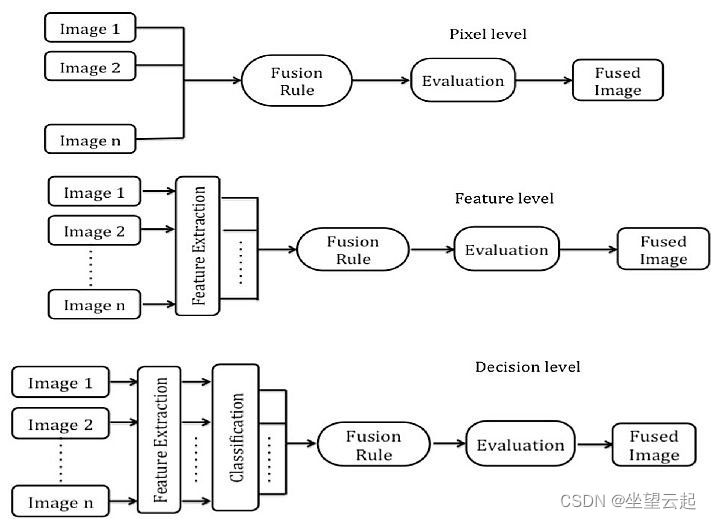
在许多计算机视觉应用中(例如机器人运动和医学成像),需要将来自多幅图像的相关信息集成到一幅图像中。这种图像融合将提供更高的可靠性、准确性和数据质量。 多视图融合可以提高图像的分辨率,同时恢复场景的 3D 表示。多模态融合结合了来自不同传感器的图像,称为多传感器融…...
计算机网络课程实训:局域网方案设计与实现(基于ensp)
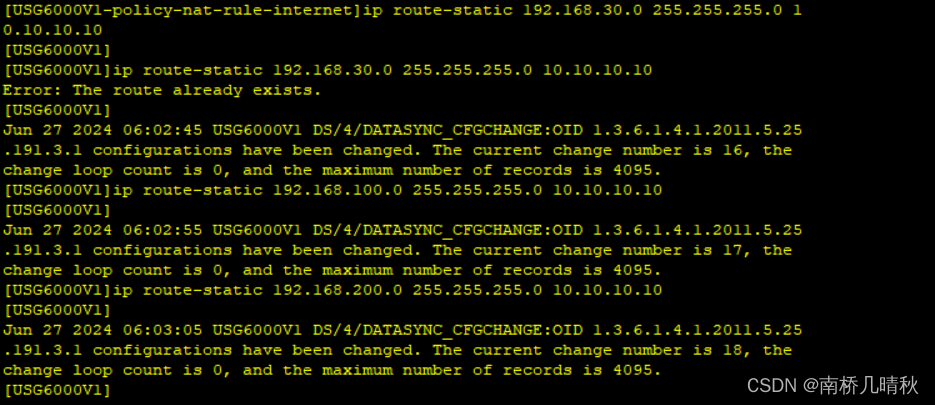
文章目录 前言基本要求操作分公司1分公司2总部核心交换机配置实现内部服务器的搭建acl_deny部分用户与服务器出口出口防火墙配置 前言 本篇文章是小编实训部分内容,内容可能会有错误,另外ensp对电脑兼容性及其挑剔,在使用之前一定要安装好。…...
【安全开发】内网扫描器
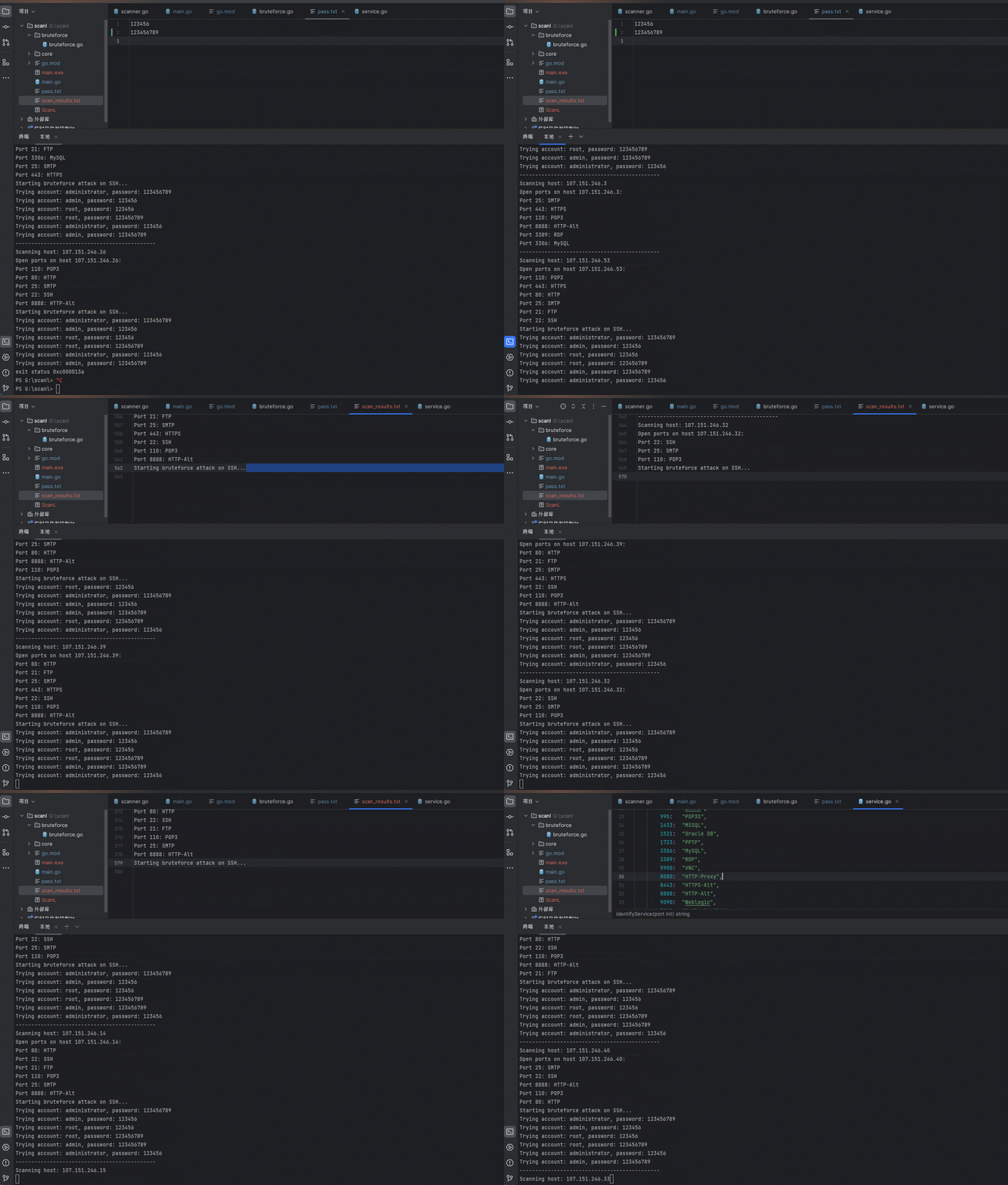
文章目录 前言现实现的功能较少后序开发会逐步加入简单漏洞探探测和代理功能。 一、开发过程1.项目结构2.main.go3.core模块3.1 scanner.go3.2 service.go 4.bruteforc4.1 bruteforce.go 二、使用步骤 前言 为什么要写这个? fscna被杀的概率太高(哪天二…...
)
ESP32-C3模组上跑通MQTT(5)
接前一篇文章:ESP32-C3模组上跑通MQTT(4) 本文内容参考: 《ESP32-C3 物联网工程开发实战》 一分钟了解MQTT协议 ESP32 MQTT API指南-CSDN博客 ESP-IDF MQTT 示例入门_mqtt outbox-CSDN博客 ESP32用自签CA进行MQTT的TLS双向认证通信_esp32 mqtt ssl-CSDN博客 特此致谢!…...
Arduino - LED 矩阵
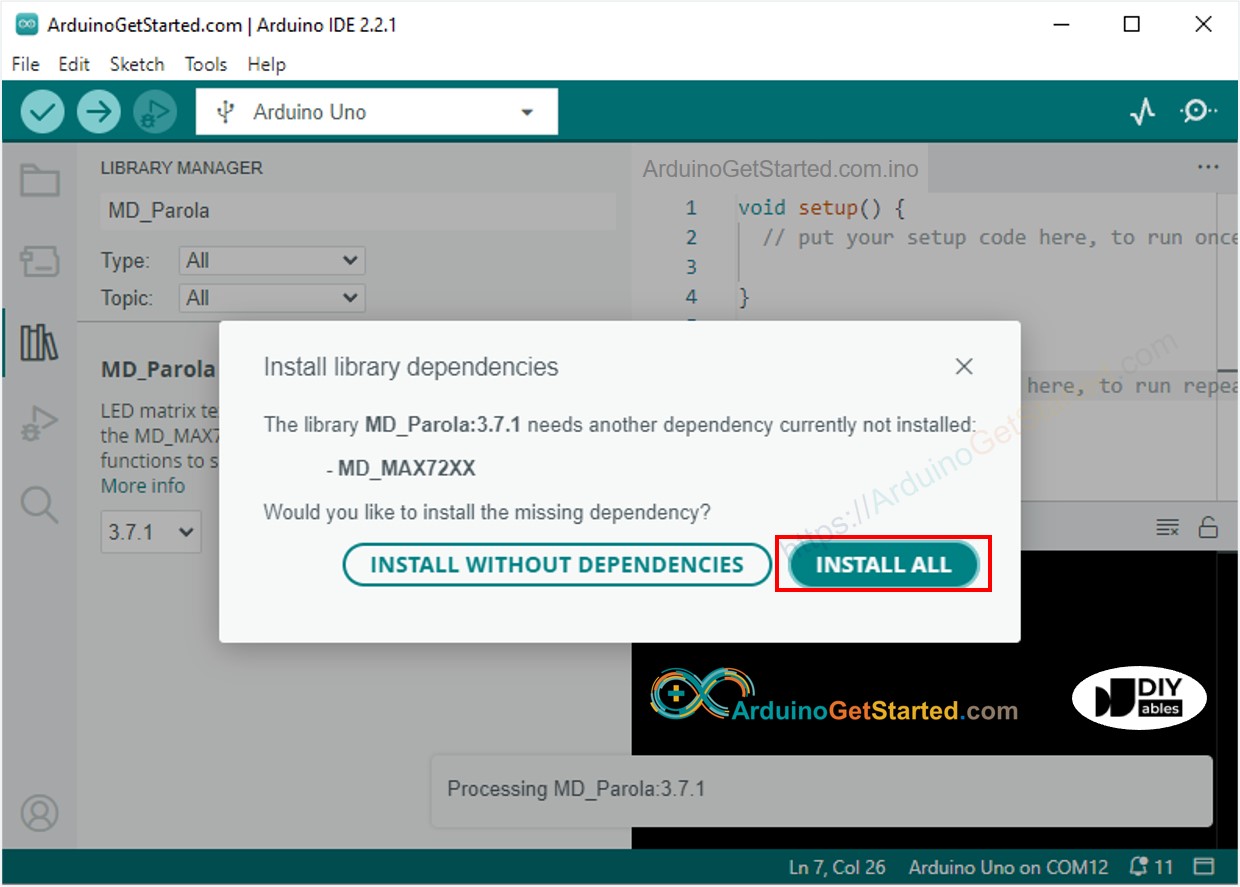
Arduino - LED 矩阵 Arduino - LED Matrix LED matrix display, also known as LED display, or dot matrix display, are wide-used. In this tutorial, we are going to learn: LED矩阵显示器,也称为LED显示器,或点阵显示器,应用广泛。在…...
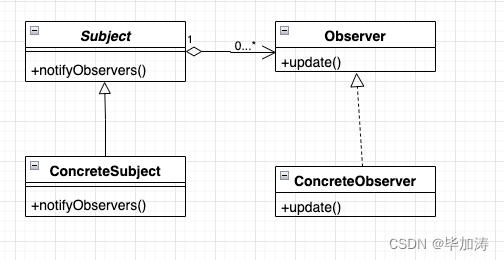
设计模式 - Observer Pattern 观察者模式
文章目录 定义观察者模式的实现构成构成UML图 观察者模式的代码实现场景代码实现 总结优点缺点应用场景 其他设计模式文章: 定义 观察者模式是行为型模式的一种,它定义对象间的一种一对多的依赖关系,使得每当一个对象改变状态,它…...

【面试系列】C++ 高频面试题
欢迎来到我的博客,很高兴能够在这里和您见面!欢迎订阅相关专栏: ⭐️ 全网最全IT互联网公司面试宝典:收集整理全网各大IT互联网公司技术、项目、HR面试真题. ⭐️ AIGC时代的创新与未来:详细讲解AIGC的概念、核心技术、…...

程序猿大战Python——实现简单的图书馆系统操作
步骤1:安装和导入库 首先,确保已经安装了 pymysql 库。如果没有安装,请执行以下命令: pip install pymysql 然后,导入必要的库: import pymysql 步骤2:创建数据库和表的函数 编写一个函数来…...
)
Qt实战:用QTreeWidget打造班级管理系统(含右键菜单完整源码)
Qt实战:用QTreeWidget构建高交互班级管理系统 在Qt框架中,QTreeWidget作为展示层级数据的利器,特别适合教育管理系统的开发需求。不同于简单的列表控件,树形结构能直观呈现班级、年级、学生等多级关系,配合右键菜单可实…...

LangChainJS智能代理开发:构建自主决策的AI系统完整指南
LangChainJS智能代理开发:构建自主决策的AI系统完整指南 【免费下载链接】langchainjs 项目地址: https://gitcode.com/GitHub_Trending/la/langchainjs LangChainJS是一个强大的JavaScript/TypeScript框架,专门用于构建基于大语言模型ÿ…...
)
保姆级教程:给你的ClickHouse 23.8装上‘仪表盘’(Prometheus+Grafana监控配置详解)
ClickHouse 23.8全链路监控实战:从Prometheus埋点到Grafana告警设计 当你的ClickHouse集群查询延迟突然从200ms飙升到5秒,是内存不足?磁盘IO瓶颈?还是并发查询堆积?本文将带你构建一套完整的监控告警体系,让…...

别再让AI芯片‘睡大觉’了:手把手教你用华为昇腾+CANN搞定异构算力调度
华为昇腾CANN实战:破解AI芯片利用率困局的5个关键策略 推开实验室玻璃门,迎面是十几台Atlas 800服务器闪烁的指示灯,而工程师小王正对着监控大屏上30%的平均利用率皱眉——这场景在采用国产AI芯片的团队中太常见了。当我们谈论异构算力调度时…...

vLLM-v0.17.1行业落地:法律科技公司合同关键条款抽取与风险提示服务
vLLM-v0.17.1行业落地:法律科技公司合同关键条款抽取与风险提示服务 1. vLLM框架简介 vLLM是一个专为大型语言模型(LLM)设计的高性能推理和服务库,最初由加州大学伯克利分校的天空计算实验室开发,现已发展成为社区驱动的开源项目。这个框架…...

突破软件授权限制:基于注册表权限控制的持久化使用方案——以下载工具为例
突破软件授权限制:基于注册表权限控制的持久化使用方案——以下载工具为例 【免费下载链接】IDM-Activation-Script IDM Activation & Trail Reset Script 项目地址: https://gitcode.com/gh_mirrors/id/IDM-Activation-Script 一、场景痛点:…...

STM32 GPIO模式实战:开漏输出与推挽输出的5个常见应用场景解析
STM32 GPIO模式实战:开漏输出与推挽输出的5个常见应用场景解析 在嵌入式开发中,GPIO(通用输入输出)是最基础也是最常用的外设之一。STM32系列微控制器提供了多种GPIO模式,其中开漏输出(Open-Drainÿ…...

ExcelJS 实战手册:从零构建企业级Excel报表系统
1. ExcelJS入门:为什么选择它构建企业报表? 第一次接触ExcelJS时,我正为一个电商项目头疼——每天要生成近万条订单数据的报表。尝试过直接输出CSV,但客户坚持要带格式的Excel文件;用PHPExcel处理又遇到内存溢出。直到…...

OpenClaw成本优化方案:ollama GLM-4.7-Flash自建模型接口实践
OpenClaw成本优化方案:ollama GLM-4.7-Flash自建模型接口实践 1. 为什么需要关注OpenClaw的token消耗问题 第一次用OpenClaw完成自动化周报任务时,我盯着账单倒吸一口凉气——生成三份周报竟然消耗了接近15万token。这让我意识到,如果不解决…...

VRCT:打破虚拟社交语言壁垒的实时翻译解决方案
VRCT:打破虚拟社交语言壁垒的实时翻译解决方案 【免费下载链接】VRCT VRCT(VRChat Chatbox Translator & Transcription) 项目地址: https://gitcode.com/gh_mirrors/vr/VRCT 在全球化的虚拟社交平台VRChat中,语言差异常常成为跨文化交流的最…...