
GraphRAG的实践
好久没有体验新技术了,今天来玩一下GraphRAG
顾名思义,一种检索增强的方法,利用图谱来实现RAG
1.配置环境
conda  create -n GraphRAG python=3.11
conda activate  GraphRAG
pip install graphrag
2.构建GraphRAG
mkdir -p ./ragtest/input
#这本书详细介绍了如何通过提示工程技巧来引导像ChatGPT这样的语言模型生成高质量的文本。
curl https://raw.githubusercontent.com/win4r/mytest/main/book.txt > ./ragtest/input/book.txt#初始化空间
python3 -m graphrag.index --init --root ./ragtest然后填写.env里面的内容,可以直接写openai的key,如下GRAPHRAG_API_KEY=sk-ZZvxAMzrl.....................或者可以写GRAPHRAG_API_KEY=ollama
1)如果是ollama的话
进入settings.yaml里面
# api_base: https://<instance>.openai.azure.com
取消注释,并改为 api_base: http://127.0.0.1:11434/v1
同时将model改为llama3(你自己的ollama模型)
2)用key的话,将模型改为model: gpt-3.5-turbo-1106
文档28行还有一个词嵌入模型,根据自己的选择更改
但是这个embeddings模型只能用openai的
如果上面用的是ollama的模型,这里要将api_base改一下,改为api_base: https://api.openai.com/v1
不然当进行到这一步的时候,会继承访问上面ollama设置的base——url,从而产生报错
#进行索引操作
python3 -m graphrag.index --root ./ragtest构建完成
encoding_model: cl100k_base
skip_workflows: []
llm:api_key: ${GRAPHRAG_API_KEY}type: openai_chat # or azure_openai_chatmodel: llama3model_supports_json: true # recommended if this is available for your model.# max_tokens: 4000# request_timeout: 180.0api_base: http://192.168.1.138:11434/v1# api_version: 2024-02-15-preview# organization: <organization_id># deployment_name: <azure_model_deployment_name># tokens_per_minute: 150_000 # set a leaky bucket throttle# requests_per_minute: 10_000 # set a leaky bucket throttle# max_retries: 10# max_retry_wait: 10.0# sleep_on_rate_limit_recommendation: true # whether to sleep when azure suggests wait-times# concurrent_requests: 25 # the number of parallel inflight requests that may be madeparallelization:stagger: 0.3# num_threads: 50 # the number of threads to use for parallel processingasync_mode: threaded # or asyncioembeddings:## parallelization: override the global parallelization settings for embeddingsasync_mode: threaded # or asynciollm:api_key: ${GRAPHRAG_API_KEY}type: openai_embedding # or azure_openai_embeddingmodel: text-embedding-3-smallapi_base: https://api.openai.com/v1# api_version: 2024-02-15-preview# organization: <organization_id># deployment_name: <azure_model_deployment_name># tokens_per_minute: 150_000 # set a leaky bucket throttle# requests_per_minute: 10_000 # set a leaky bucket throttle# max_retries: 10# max_retry_wait: 10.0# sleep_on_rate_limit_recommendation: true # whether to sleep when azure suggests wait-times# concurrent_requests: 25 # the number of parallel inflight requests that may be made# batch_size: 16 # the number of documents to send in a single request# batch_max_tokens: 8191 # the maximum number of tokens to send in a single request# target: required # or optionalchunks:size: 300overlap: 100group_by_columns: [id] # by default, we don't allow chunks to cross documentsinput:type: file # or blobfile_type: text # or csvbase_dir: "input"file_encoding: utf-8file_pattern: ".*\\.txt$"cache:type: file # or blobbase_dir: "cache"# connection_string: <azure_blob_storage_connection_string># container_name: <azure_blob_storage_container_name>storage:type: file # or blobbase_dir: "output/${timestamp}/artifacts"# connection_string: <azure_blob_storage_connection_string># container_name: <azure_blob_storage_container_name>reporting:type: file # or console, blobbase_dir: "output/${timestamp}/reports"# connection_string: <azure_blob_storage_connection_string># container_name: <azure_blob_storage_container_name>entity_extraction:## llm: override the global llm settings for this task## parallelization: override the global parallelization settings for this task## async_mode: override the global async_mode settings for this taskprompt: "prompts/entity_extraction.txt"entity_types: [organization,person,geo,event]max_gleanings: 0summarize_descriptions:## llm: override the global llm settings for this task## parallelization: override the global parallelization settings for this task## async_mode: override the global async_mode settings for this taskprompt: "prompts/summarize_descriptions.txt"max_length: 500claim_extraction:## llm: override the global llm settings for this task## parallelization: override the global parallelization settings for this task## async_mode: override the global async_mode settings for this task# enabled: trueprompt: "prompts/claim_extraction.txt"description: "Any claims or facts that could be relevant to information discovery."max_gleanings: 0community_report:## llm: override the global llm settings for this task## parallelization: override the global parallelization settings for this task## async_mode: override the global async_mode settings for this taskprompt: "prompts/community_report.txt"max_length: 2000max_input_length: 8000cluster_graph:max_cluster_size: 10embed_graph:enabled: false # if true, will generate node2vec embeddings for nodes# num_walks: 10# walk_length: 40# window_size: 2# iterations: 3# random_seed: 597832umap:enabled: false # if true, will generate UMAP embeddings for nodessnapshots:graphml: falseraw_entities: falsetop_level_nodes: falselocal_search:# text_unit_prop: 0.5# community_prop: 0.1# conversation_history_max_turns: 5# top_k_mapped_entities: 10# top_k_relationships: 10# max_tokens: 12000global_search:# max_tokens: 12000# data_max_tokens: 12000# map_max_tokens: 1000# reduce_max_tokens: 2000
3. 全局检索和本地检索
python3 -m graphrag.query \
--root ./ragtest \
--method global \
"show me some Prompts about Interpretable Soft Prompts."python3 -m graphrag.query \
--root ./ragtest \
--method local \
"show me some Prompts about Knowledge Generation."
4.可视化
#pip3 install chainlitimport chainlit as cl
import subprocess
import shlex@cl.on_chat_start
def start():cl.user_session.set("history", [])@cl.on_message
async def main(message: cl.Message):history = cl.user_session.get("history")# 从 Message 对象中提取文本内容query = message.content# 构建命令cmd = ["python3", "-m", "graphrag.query","--root", "./ragtest","--method", "local",]# 安全地添加查询到命令中cmd.append(shlex.quote(query))# 运行命令并捕获输出try:result = subprocess.run(cmd, capture_output=True, text=True, check=True)output = result.stdout# 提取 "SUCCESS: Local Search Response:" 之后的内容response = output.split("SUCCESS: Local Search Response:", 1)[-1].strip()history.append((query, response))cl.user_session.set("history", history)await cl.Message(content=response).send()except subprocess.CalledProcessError as e:error_message = f"An error occurred: {e.stderr}"await cl.Message(content=error_message).send()if __name__ == "__main__":cl.run()
相关文章:

GraphRAG的实践
好久没有体验新技术了,今天来玩一下GraphRAG 顾名思义,一种检索增强的方法,利用图谱来实现RAG 1.配置环境 conda create -n GraphRAG python3.11 conda activate GraphRAG pip install graphrag 2.构建GraphRAG mkdir -p ./ragtest/i…...

自动驾驶三维车道线检测系列—LATR: 3D Lane Detection from Monocular Images with Transformer
文章目录 1. 概述2. 背景介绍3. 方法3.1 整体结构3.2 车道感知查询生成器3.3 动态3D地面位置嵌入3.4 预测头和损失 4. 实验评测4.1 数据集和评估指标4.2 实验设置4.3 主要结果 5. 讨论和总结 1. 概述 3D 车道线检测是自动驾驶中的一个基础但具有挑战性的任务。最近的进展主要依…...
守护动物乐园:视频AI智能监管方案助力动物园安全与秩序管理
一、背景分析 近日,某大熊猫参观基地通报了4位游客在参观时,向大熊猫室外活动场内吐口水的不文明行为。这几位游客的行为违反了入园参观规定并可能对大熊猫造成严重危害,已经被该熊猫基地终身禁止再次进入参观。而在此前,另一熊猫…...

FairGuard游戏加固入选《嘶吼2024网络安全产业图谱》
2024年7月16日,国内网络安全专业媒体——嘶吼安全产业研究院正式发布《嘶吼2024网络安全产业图谱》(以下简称“产业图谱”)。 本次发布的产业图谱,共涉及七大类别,127个细分领域。全面展现了网络安全产业的构成和重要组成部分,探…...

数据仓库事实表
数据仓库中的三种常见事实表类型:事务事实表、周期快照事实表和累积快照事实表 事务事实表: 事务事实表是记录事务级别数据的事实表。它记录了每个事务发生的具体度量指标,如销售金额、数量等。事务事实表的优势在于能够提供详细的事务级别…...

LeetCode题练习与总结:两数之和Ⅱ-输入有序数组--167
一、题目描述 给你一个下标从 1 开始的整数数组 numbers ,该数组已按 非递减顺序排列 ,请你从数组中找出满足相加之和等于目标数 target 的两个数。如果设这两个数分别是 numbers[index1] 和 numbers[index2] ,则 1 < index1 < index…...

在 Java 中,怎样设计一个可扩展且易于维护的微服务架构?
在Java中设计一个可扩展且易于维护的微服务架构,可以考虑以下几个方面: 模块化设计:将应用拆分为多个小的、独立的模块,每个模块负责处理特定的业务逻辑。每个模块可以独立开发、测试和部署,增加或替换模块时不会影响其…...

零基础入门鸿蒙开发 HarmonyOS NEXT星河版开发学习
今天开始带大家零基础入门鸿蒙开发,也就是你没有任何编程基础的情况下就可以跟着石头哥零基础学习鸿蒙开发。 目录 一,为什么要学习鸿蒙 1-1,鸿蒙介绍 1-2,为什么要学习鸿蒙 1-3,鸿蒙各个版本介绍 1-4࿰…...
Chromium CI/CD 之Jenkins实用指南2024-在Windows节点上创建任务(九)
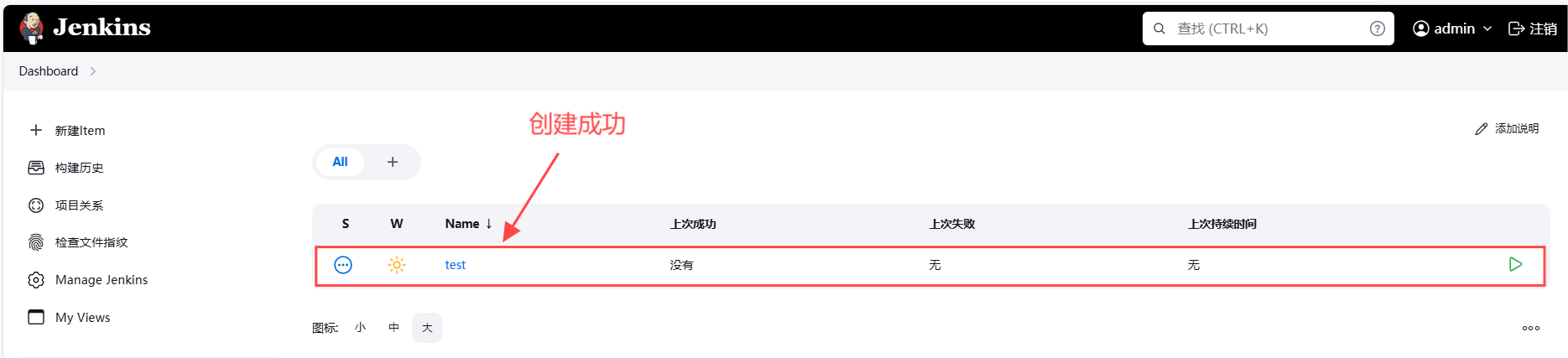
1. 引言 在现代软件开发流程中,持续集成(CI)和持续交付(CD)已成为确保代码质量和加速发布周期的关键实践。Jenkins作为一款广泛应用的开源自动化服务器,通过其强大的插件生态系统和灵活的配置选项…...

ceph进程网卡绑定逻辑
main() //如osd进程,是ceph_osd.cc文件的main函数;mon进程,是ceph_mon.cc文件的main函数 -->pick_addresses() // 会读取"cluster_network_interface"和"public_network_interface"这两个配置项来过滤ip ---->fill…...

学习opencv
初步学习可以参考: OpenCV学习之路(附加资料分享)_opencv资料-CSDN博客 【OpenCV】OpenCV常用函数合集【持续更新】_opencv函数手册-CSDN博客 整体框架可以参考: OpenCV学习指南:从零基础到全面掌握(零…...

利用双端队列 实现二叉树的非递归的中序遍历
双端队列:双向队列:支持插入删除元素的线性集合。 java官方文档推荐用deque实现栈(stack)。 pop(): 弹出栈中元素,也就是返回并移除队头元素,等价于removeFirst(),如果队列无元素,则…...

昇思25天学习打卡营第18天 | 基于MindSpore的GPT2文本摘要
昇思25天学习打卡营第18天 | 基于MindSpore的GPT2文本摘要 文章目录 昇思25天学习打卡营第18天 | 基于MindSpore的GPT2文本摘要数据集创建数据集数据预处理Tokenizer 模型构建构建GPT2ForSummarization模型动态学习率 模型训练模型推理总结打卡 数据集 实验使用nlpcc2017摘要数…...

科研绘图系列:R语言circos图(circos plot)
介绍 Circos图是一种数据可视化工具,它以圆形布局展示数据,通常用于显示数据之间的关系和模式。这种图表特别适合于展示分层数据或网络关系。Circos图的一些关键特点包括: 圆形布局:数据被组织在一个或多个同心圆中,每个圆可以代表不同的数据维度或层次。扇区:每个圆被划…...

追踪Conda包的踪迹:深入探索依赖关系与管理
追踪Conda包的踪迹:深入探索依赖关系与管理 Conda作为Python和其他科学计算语言的包管理器,不仅提供了安装、更新和卸载包的功能,还有一个强大的包跟踪功能,帮助用户理解包之间的依赖关系和管理环境。本文将详细解释如何在Conda中…...

苹果电脑pdf合并软件 苹果电脑合并pdf 苹果电脑pdf怎么合并
在数字化办公日益普及的今天,pdf文件因其跨平台兼容性强、格式稳定等特点,已经成为工作、学习和生活中不可或缺的文件格式。然而,我们常常面临一个问题:如何将多个pdf文件合并为一个?这不仅有助于文件的整理和管理&…...
)
axios(ajax请求库)
json-server(搭建http服务) json-server用来快速搭建模拟的REST API的工具包 使用json-server 下载:npm install -g json-server创建数据库json文件:db.json开启服务:json-srver --watch db.json axios的基本使用 <!doctype html>…...

Ideal窗口中左右侧栏消失了
不知道大家在工作过程中有没有遇到过此类问题,不论是Maven项目还是Gradle项目,突然发现Ideal窗口右侧图标丢失了,同事今天突然说大象图标不见了,不知道怎样刷新gradle。 不要慌张,下面提供一些解决思路: 1…...

麦芒30全新绽放,中国电信勾勒出AI手机的新方向
高通总裁兼CEO克里斯蒂亚诺阿蒙曾在媒体采访时表示:2024年将成为全球AI手机元年,生成式AI正在“非常快”的进入手机。 把大模型装进手机,由此成了智能终端演进的新方向。三星、华为、OPPO、小米等品牌动作频频,纷纷抢滩AI手机市场…...

数据结构之初始二叉树(3)
找往期文章包括但不限于本期文章中不懂的知识点: 个人主页:我要学编程(ಥ_ಥ)-CSDN博客 所属专栏:数据结构(Java版) 二叉树的基本操作 通过上篇文章的学习,我们简单的了解了二叉树的相关操作。接下来就是有…...

逆光也能精准识别人脸,门禁不再卡壳
人脸门禁普及的路上,安全质疑从未停止:照片能不能骗过摄像头?视频冒充会不会被放行?尤其在学校、幼儿园、医院等需要高度核验身份的场所,一丁点伪冒漏洞都可能酿成风险。ZUU中优云联ZU-YK751人脸识别门禁终端ÿ…...

飞蜂窝技术:从概念到5G室内覆盖核心的实战演进
1. 从“未来可期”到“正在爆发”:飞蜂窝技术的十年之约在通信行业里待久了,你总会听到一些技术名词被反复提起,它们像流星一样划过天际,被分析师们预言将“改变一切”,然后……似乎又沉寂了下去。飞蜂窝(F…...
)
面试记录 (2026/5/12)
问题一:java并发包下的AQS,了解多少? 这个真是没看过源码,就不班门弄斧了 直接学习下 大佬的经验 https://blog.csdn.net/qq_45772447/article/details/149126295?fromshareblogdetail&sharetypeblogdetail&sharerId149126295&…...

软考高项备考重点考点18:项目绩效域
一、历年真题分布 2023年5月 选择题3分 2023年11月 选择题3分 案例5分第1批,15分第3批,5分第4批 论文 75分 第2批 2024年5月 选择题3分 案例10分 第2批 2025年5月 选择题2分 论文 75分 第1批、第2批 二、备考重点…...

基于MCP协议与Google Apps Script的Google Workspace自动化集成实践
1. 项目概述:当Google Workspace遇上MCP如果你是一名开发者,或者负责企业内部的自动化流程,那么对Google Workspace(谷歌工作区)一定不陌生。从Gmail、Google Drive到Sheets、Docs和Calendar,它几乎构成了现…...

魔兽争霸3优化指南:5个常见问题与WarcraftHelper解决方案
魔兽争霸3优化指南:5个常见问题与WarcraftHelper解决方案 【免费下载链接】WarcraftHelper Warcraft III Helper , support 1.20e, 1.24e, 1.26a, 1.27a, 1.27b 项目地址: https://gitcode.com/gh_mirrors/wa/WarcraftHelper 你是否在玩《魔兽争霸3》时遇到过…...
)
用C8051F单片机自带的12位ADC,实现16位精度的温度测量(附完整代码)
基于C8051F单片机12位ADC实现16位温度测量的工程实践 在嵌入式系统开发中,高精度温度测量往往需要昂贵的16位ADC芯片,但通过合理的算法设计,我们可以利用C8051F系列单片机内置的12位ADC实现等效16位的测量精度。本文将深入探讨过采样技术的实…...

互联网大厂 Java 求职面试技巧揭秘
互联网大厂 Java 求职面试技巧揭秘 在当今互联网大厂求职面试中,技术与场景的交汇点常常成为面试官考察的重点。本文将通过一位搞笑的程序员燕双非与严肃的面试官的对话,展示 Java 技术栈下的面试问题,并深入解答其中的技术要点。第一轮面试 …...

MTKClient实战指南:联发科设备刷机与逆向工程全面解决方案
MTKClient实战指南:联发科设备刷机与逆向工程全面解决方案 【免费下载链接】mtkclient MTK reverse engineering and flash tool 项目地址: https://gitcode.com/gh_mirrors/mt/mtkclient MTKClient是一款专为联发科芯片设备设计的开源逆向工程与刷机工具&am…...

数据中台下半场比的是治理:六家主流厂商四维度横向测评
一、数据治理:决定数据中台价值兑现的关键变量2026年,一个行业的共识正在变得清晰:数据中台的上限由计算架构决定,但下限由数据治理决定。过去数年,大量企业投入资源搭建了数据中台的基础设施——数据湖、数仓、调度引…...