
数字信封+数字签名工具类测试样例(Java实现)
加解密过程
加密:
- 生成加密方SM2密钥对用于签名
- 使用生成的SM2私钥生成数字签名
- 生成SM4对称密钥对明文进行对称加密
- 使用与解密方提前约定好的SM2公钥对第三步中的SM4对称密钥进行非对称加密
- 把【加密方SM2公钥】、【数字签名】、【SM4对称加密后的密文】和【SM2非对称加密后的SM4密钥密文】四个参数封装成数字信封发送给解密方
解密:
- 获取加密方发送过来的数字信封
- 使用与加密方提前约定好的SM2私钥解密数字信封中的【SM2非对称加密后的SM4密钥密文】,得到SM4密钥
- 使用SM4密钥解密数字信封中的【SM4对称加密后的密文】,得到数据明文
- 使用数字信封中的【数字签名】、【加密方SM2公钥】对得到的数据明文进行数字签名验证,得到验证结果
- 如为true,表明数据未被篡改;否则,数据可能已被篡改
运行结果截图

下面为具体实现代码
DigitalEnvelopeUtilsTest.java
package utils;import utils.crypto.Constant;
import utils.crypto.exception.BadRequestException;
import org.bouncycastle.crypto.engines.SM4Engine;
import org.bouncycastle.crypto.modes.CBCBlockCipher;
import org.bouncycastle.crypto.paddings.PaddedBufferedBlockCipher;
import org.bouncycastle.crypto.params.*;
import org.bouncycastle.jce.ECNamedCurveTable;
import org.bouncycastle.jce.provider.BouncyCastleProvider;
import org.bouncycastle.jce.spec.ECNamedCurveParameterSpec;
import org.bouncycastle.jce.spec.ECParameterSpec;
import org.bouncycastle.jce.spec.ECPrivateKeySpec;
import org.bouncycastle.jce.spec.ECPublicKeySpec;
import org.bouncycastle.util.encoders.Hex;
import org.slf4j.Logger;
import org.slf4j.LoggerFactory;import javax.crypto.*;
import java.math.BigInteger;
import java.security.*;
import java.security.spec.InvalidKeySpecException;
import java.security.spec.KeySpec;
import java.security.spec.PKCS8EncodedKeySpec;
import java.security.spec.X509EncodedKeySpec;
import java.util.Arrays;
import java.util.Base64;/*** @className: DigitalEnvelopeUtilsTest* @description: 数字信封工具类测试* @author: liuzijian* @date: 2024/7/27 18:28* @version: 1.0**/
public class DigitalEnvelopeUtilsTest {private static final Logger logger = LoggerFactory.getLogger(DigitalEnvelopeUtilsTest.class);private static String privateKey = "ANmPM+GwxdM7Yo/YhftxmfEqqjiHl9qKuMU55+lEfcEW";private static String publicKey = "BBQgpX+nrdNbyVmhQYlcED631eIYGKFj05+AoPMthp3pnum04Na8LG8sMul4Ro2W+DZaO/7XZvRievGY8DG2OoU=";static {Security.addProvider(new BouncyCastleProvider());}//    /**
//     * 数字信封加密
//     * @param originalData
//     * @return encParam
//     */
//    public static EncParam enc(byte[] originalData){
//        try {
//            // 1. 生成数字签名和签名公钥
//            // 生成SM2密钥对用于签名
//            KeyPair keyPair = generateSm2KeyPair();
//            PrivateKey signPrivateKey = keyPair.getPrivate();
//            PublicKey signPublicKey = keyPair.getPublic();
//            // 生成数字签名
//            byte[] signature = signWithSm3(originalData, signPrivateKey);
//
//            // 2. 数字信封(生成数据密文+对称密钥密文)
//            // SM4对称加密
//            byte[] sm4Key = generateKey();
//            byte[] iv = generateIV();
//            byte[] encryptedData = encryptWithSm4(originalData, sm4Key, iv);
//            byte[] encryptionSm4Key = SM2Utils.asymmetricKeyEncrypt(Base64.getDecoder().decode(publicKey), Constant.SM2_ALGORITHM, sm4Key);
//
//            return new EncParam(signature, signPublicKey, encryptedData, encryptionSm4Key, iv);
//        }catch (Exception e){
//            logger.error("数字信封加密失败", e);
//            return null;
//        }
//    }
//
//    /**
//     * 数字信封解密
//     * @param encParam
//     * @return decParam
//     */
//    public static DecParam dec(EncParam encParam) throws Exception {
//        try {
//            // 1. SM2解密获取SM4密钥
//            byte[] deserializeSm4Key = SM2Utils.asymmetricKeyDecrypt(Base64.getDecoder().decode(privateKey), Constant.SM2_ALGORITHM, encParam.getEncryptionSm4Key());
//
//            // 2. SM4解密
//            byte[] decryptedData = decryptWithSm4(encParam.getEncryptedData(), deserializeSm4Key, encParam.getIv());
//
//            // 3. 验证签名
//            boolean isCorrect = verifyWithSm3(decryptedData, encParam.getSignature(), encParam.getSignPublicKey());
//            return new DecParam(decryptedData, isCorrect);
//        }catch (Exception e){
//            logger.error("数字信封解密失败", e);
//            throw new Exception("数字信封解密失败", e);
//        }
//    }/*** 生成SM2密钥对* @return SM2密钥对*/private static KeyPair generateSm2KeyPair() throws Exception{try {KeyPairGenerator keyPairGenerator = KeyPairGenerator.getInstance(Constant.EC_ALGORITHM, Constant.BC_ALGORITHM);ECNamedCurveParameterSpec ecSpec = ECNamedCurveTable.getParameterSpec(Constant.SM2_CURVES_NAME);keyPairGenerator.initialize(ecSpec);return keyPairGenerator.generateKeyPair();} catch (Exception e) {logger.error("生成SM2密钥对失败", e);throw new Exception("生成SM2密钥对失败", e);}}/*** 使用SM3签名* @param data* @param privateKey* @return  签名*/private static byte[] signWithSm3(String data, PrivateKey privateKey) throws Exception{try {Signature signature = Signature.getInstance(Constant.SIGN_ALGORITHM, Constant.BC_ALGORITHM);signature.initSign(privateKey);signature.update(data.getBytes());return signature.sign();} catch (Exception e) {logger.error("使用SM3签名失败", e);throw new Exception("使用SM3签名失败", e);}}/*** 使用SM3验证签名* @param input* @param signature* @param publicKey* @return 验证成功返回true*/private static boolean verifyWithSm3(String input, byte[] signature,PublicKey publicKey) throws Exception{try {Signature signature2 = Signature.getInstance(Constant.SIGN_ALGORITHM, Constant.BC_ALGORITHM);signature2.initVerify(publicKey);signature2.update(input.getBytes());return signature2.verify(signature);}catch (Exception e) {logger.error("使用SM3验证签名失败", e);throw new Exception("使用SM3验证签名失败", e);}}/*** SM4加密* @param plainText* @param key* @param iv* @return 密文*/private static String encryptWithSm4(String plainText, byte[] key, byte[] iv) throws Exception {try {SM4Engine engine = new SM4Engine();PaddedBufferedBlockCipher cipher = new PaddedBufferedBlockCipher(new CBCBlockCipher(engine));cipher.init(true, new ParametersWithIV(new KeyParameter(key), iv));byte[] input = plainText.getBytes(Constant.UTF8_CHARSET);byte[] output = new byte[cipher.getOutputSize(input.length)];int len = cipher.processBytes(input, 0, input.length, output, 0);cipher.doFinal(output, len);return Hex.toHexString(output);} catch (Exception e) {logger.error("SM4加密失败", e);throw new Exception("SM4加密失败", e);}}/*** SM4解密* @param cipherText* @param key* @param iv* @return 明文*/private static String decryptWithSm4(String cipherText, byte[] key, byte[] iv) throws Exception {try {SM4Engine engine = new SM4Engine();PaddedBufferedBlockCipher cipher = new PaddedBufferedBlockCipher(new CBCBlockCipher(engine));cipher.init(false, new ParametersWithIV(new KeyParameter(key), iv));byte[] input = Hex.decode(cipherText);byte[] output = new byte[cipher.getOutputSize(input.length)];int len = cipher.processBytes(input, 0, input.length, output, 0);cipher.doFinal(output, len);return new String(output, Constant.UTF8_CHARSET).trim();}catch (Exception e) {logger.error("SM4解密失败", e);throw new Exception("SM4解密失败", e);}}/*** 生成SM4密钥* @return SM4密钥* @throws Exception*/private static byte[] generateKey() throws Exception {try {KeyGenerator keyGenerator = KeyGenerator.getInstance(Constant.SM4_ALGORITHM, Constant.BC_ALGORITHM);// SM4密钥长度固定为128位keyGenerator.init(128, new SecureRandom());SecretKey secretKey = keyGenerator.generateKey();return secretKey.getEncoded();}catch (Exception e){logger.error("生成SM4密钥失败", e);throw new Exception("生成SM4密钥失败", e);}}/*** 生成IV* @return IV*/private static byte[] generateIV() throws Exception {try {// SM4的块大小是128位(16字节)byte[] iv = new byte[16];new SecureRandom().nextBytes(iv);return iv;}catch (Exception e){logger.error("生成IV失败", e);throw new Exception("生成IV失败", e);}}public static PublicKey generatePublicKeyByKeyValue(String algorithm, KeySpec keySpec){try {return KeyFactory.getInstance(algorithm, Constant.BOUNCY_CASTLE_PROVIDER).generatePublic(keySpec);} catch (InvalidKeySpecException e) {throw new BadRequestException(Constant.INVALID_KEY_SPEC_EXCEPTION_TIPS,e);} catch (NoSuchAlgorithmException e) {throw new BadRequestException(Constant.NO_SUCH_ALGORITHM_EXCEPTION_TIPS,e);}}public static PrivateKey generatePrivateKeyByKeyValue(String algorithm, KeySpec keySpec){try {return KeyFactory.getInstance(algorithm, Constant.BOUNCY_CASTLE_PROVIDER).generatePrivate(keySpec);} catch (InvalidKeySpecException e) {throw new BadRequestException(Constant.INVALID_KEY_SPEC_EXCEPTION_TIPS,e);} catch (NoSuchAlgorithmException e) {throw new BadRequestException(Constant.NO_SUCH_ALGORITHM_EXCEPTION_TIPS,e);}}/*** 功能:获取 Cipher 实例** @param transformations 转换信息* @return {@link Cipher}*/private static Cipher getCipherInstance(String transformations) {try {return Cipher.getInstance(transformations, Constant.BOUNCY_CASTLE_PROVIDER);} catch (NoSuchAlgorithmException e) {throw new BadRequestException(Constant.NO_SUCH_ALGORITHM_EXCEPTION_TIPS, e);} catch (NoSuchPaddingException e) {throw new BadRequestException(Constant.NO_SUCH_PADDING_EXCEPTION_TIPS, e);}}/*** 功能:非对称加密* @param publicKeyValue 公钥值* @param keyAlgorithm 密钥算法* @param message 待加密数据* @return 密文*/public static byte[] asymmetricKeyEncrypt(byte[] publicKeyValue, String keyAlgorithm, byte[] message) {PublicKey publicKey;String algorithm;if(Constant.EC_ALGORITHM.equalsIgnoreCase(keyAlgorithm)){algorithm = Constant.SM2_ALGORITHM;}else {algorithm = keyAlgorithm;}if ((Constant.SM2_ALGORITHM.equalsIgnoreCase(algorithm))) {final ECParameterSpec spec = ECNamedCurveTable.getParameterSpec(Constant.SM2_CURVES_NAME);final ECPublicKeySpec ecPublicKeySpec = new ECPublicKeySpec(spec.getCurve().decodePoint(publicKeyValue), spec);publicKey = generatePublicKeyByKeyValue(Constant.EC_ALGORITHM,ecPublicKeySpec);} else if (Constant.RSA_ALGORITHM.equalsIgnoreCase(algorithm)) {X509EncodedKeySpec x509EncodedKeySpec = new X509EncodedKeySpec(publicKeyValue);publicKey = generatePublicKeyByKeyValue(Constant.RSA_ALGORITHM,x509EncodedKeySpec);}else {throw new BadRequestException(String.format("not support algorithm  %s",keyAlgorithm));}Cipher cipher = getCipherInstance(algorithm);return encryptForAsymmetric(cipher, publicKey, message);}/*** 功能:非对称解密* @param privateKeyValue 公钥值* @param keyAlgorithm 密钥算法* @param cipherText 密文* @return 明文*/public static byte[] asymmetricKeyDecrypt(byte[] privateKeyValue, String keyAlgorithm, byte[] cipherText) {PrivateKey privateKey;String algorithm;if(Constant.EC_ALGORITHM.equalsIgnoreCase(keyAlgorithm)){algorithm = Constant.SM2_ALGORITHM;}else {algorithm = keyAlgorithm;}if ((Constant.SM2_ALGORITHM.equalsIgnoreCase(algorithm))) {final ECParameterSpec spec = ECNamedCurveTable.getParameterSpec(Constant.SM2_CURVES_NAME);final ECPrivateKeySpec ecPrivateKeySpec = new ECPrivateKeySpec(new BigInteger(1, privateKeyValue), spec);privateKey = generatePrivateKeyByKeyValue(Constant.EC_ALGORITHM,ecPrivateKeySpec);} else if (Constant.RSA_ALGORITHM.equalsIgnoreCase(algorithm)) {PKCS8EncodedKeySpec pkcs8EncodedKeySpec = new PKCS8EncodedKeySpec(privateKeyValue);privateKey = generatePrivateKeyByKeyValue(Constant.RSA_ALGORITHM,pkcs8EncodedKeySpec);}else {throw new BadRequestException(String.format("not support algorithm  %s",keyAlgorithm));}Cipher cipher = getCipherInstance(algorithm);return decryptForAsymmetric(cipher, privateKey, cipherText);}private static byte[] encryptForAsymmetric(Cipher cipher, Key key, byte[] message) {try {cipher.init(Cipher.ENCRYPT_MODE, key);return cipher.doFinal(message);} catch (InvalidKeyException e) {throw new BadRequestException(Constant.INVALID_KEY_EXCEPTION_TIPS, e);} catch (BadPaddingException e) {throw new BadRequestException(Constant.BAD_PADDING_EXCEPTION_TIPS, e);} catch (IllegalBlockSizeException e) {throw new BadRequestException(Constant.ILLEGAL_BLOCK_SIZE_EXCEPTION_TIPS, e);}}private static byte[] decryptForAsymmetric(Cipher cipher, Key key, byte[] cipherText) {try {cipher.init(Cipher.DECRYPT_MODE, key);return cipher.doFinal(cipherText);} catch (InvalidKeyException e) {throw new BadRequestException(Constant.INVALID_KEY_EXCEPTION_TIPS, e);} catch (BadPaddingException e) {throw new BadRequestException(Constant.BAD_PADDING_EXCEPTION_TIPS, e);} catch (IllegalBlockSizeException e) {throw new BadRequestException(Constant.ILLEGAL_BLOCK_SIZE_EXCEPTION_TIPS, e);}}public static void main(String[] args) throws Exception {// 敏感数据String originalText = "Hello, SM2 and SM3!";System.out.println("明文:"+ originalText);// 发送方System.out.println("=================发送方start====================");// 1. 生成数字签名和签名公钥// 生成SM2密钥对用于签名KeyPair keyPair = generateSm2KeyPair();PrivateKey signPrivateKey = keyPair.getPrivate();PublicKey signPublicKey = keyPair.getPublic();System.out.println("签名SM2私钥(base64):"+Base64.getEncoder().encodeToString(signPrivateKey.getEncoded()));System.out.println("签名SM2公钥(base64):"+Base64.getEncoder().encodeToString(signPublicKey.getEncoded()));// 生成数字签名byte[] signature = signWithSm3(originalText, signPrivateKey);// 2. 数字信封(生成数据密文+对称密钥密文)// SM4对称加密byte[] sm4Key = generateKey();byte[] iv = generateIV();String encryptedText = encryptWithSm4(originalText, sm4Key, iv);// SM2加密SM4密钥(base64)
//        String privateKey = "ANmPM+GwxdM7Yo/YhftxmfEqqjiHl9qKuMU55+lEfcEW";
//        String publicKey = "BBQgpX+nrdNbyVmhQYlcED631eIYGKFj05+AoPMthp3pnum04Na8LG8sMul4Ro2W+DZaO/7XZvRievGY8DG2OoU=";String privateKey = "bOoCZx5bcmoHDbJ+KKFqWBVLSBO7cCcV87cnJ1zCvs8=";String publicKey = "BJIv8Ctzj0Xb11a1OoeYNTqlDpeMFU0WLL2+vM6JuWqGGO1AseL2wW3lryMKX8sBqUmtXII/7+0QLc3Hb1sWf/8=";byte[] encryptionSm4Key = asymmetricKeyEncrypt(Base64.getDecoder().decode(publicKey), "SM2", sm4Key);// 得到以下四个数据System.out.println("数字签名:"+ Arrays.toString(signature));System.out.println("签名公钥:"+ signPublicKey);System.out.println("数据密文:"+ encryptedText);System.out.println("SM4对称密钥密文:"+ Arrays.toString(encryptionSm4Key));System.out.println("=================发送方end====================");// 接收方System.out.println("=================接收方start====================");// 1. SM2解密获取SM4密钥byte[] deserializeSm4Key = asymmetricKeyDecrypt(Base64.getDecoder().decode(privateKey), "SM2", encryptionSm4Key);// 2. SM4解密String decryptedText = decryptWithSm4(encryptedText, deserializeSm4Key, iv);// 3. 验证签名boolean isCorrect = verifyWithSm3(decryptedText, signature, signPublicKey);System.out.println("验证签名:"+isCorrect);System.out.println("解密结果:"+decryptedText);System.out.println("=================接收方end====================");}}
Constant.java
package utils.crypto;import org.bouncycastle.jce.provider.BouncyCastleProvider;import java.util.Arrays;
import java.util.List;public class Constant {private Constant(){throw new IllegalStateException("Utility class");}//commonspublic static final BouncyCastleProvider BOUNCY_CASTLE_PROVIDER = new BouncyCastleProvider();//curvespublic static final String SM2_CURVES_NAME = "sm2p256v1";//algorithm 算法public static final String RSA_ALGORITHM = "RSA";public static final String SM2_ALGORITHM = "SM2";public static final String EC_ALGORITHM = "EC";public static final String SM4_ALGORITHM = "SM4";public static final String BC_ALGORITHM = "BC";public static final String SIGN_ALGORITHM = "SM3withSM2";public static final String UTF8_CHARSET = "UTF-8";//需要确认一下具体使用哪种 hash 算法?public static final List<String> SUPPORT_HASH_ALGORITHM = Arrays.asList("SM3","SHA256","SHA512");//需要确认一下具体使用哪种 签名 算法?public static final List<String> SUPPORT_SIGNATURE_ALGORITHM = Arrays.asList("SM3-SM2","NONE-RSA","SHA256-RSA","SHA512-RSA");public static final List<String> PADDING = Arrays.asList("NoPadding","ISO10126Padding","PKCS5Padding");public static final List<String> MODE= Arrays.asList("ECB","CBC");// exception tipspublic static final String NOT_BE_NULL_OR_EMPTY_TIPS =" %s can not be null or empty !";public static final String NOT_BE_NULL_TIPS =" %s can not be null !";public static final String NOT_BE_EMPTY_TIPS =" %s can not be empty !";public static final String ONLY_SUPPORT_FOR_TIPS =" %s only support for %s ";public static final String KEY_SIZE_NOT_BE_ZERO_AND_MULTIPLE_OF_8_TIPS ="keySize can not be zero and must be a multiple of 8";public static final String NO_SUCH_ALGORITHM_EXCEPTION_TIPS ="No Such Algorithm Exception ";public static final String NO_SUCH_PADDING_EXCEPTION_TIPS ="No Such Padding Exception ";public static final String BAD_PADDING_EXCEPTION_TIPS ="Bad Padding Exception ";public static final String SIGNATURE_EXCEPTION_TIPS ="Signature Exception ";public static final String INVALID_KEY_EXCEPTION_TIPS ="Invalid CustomKey Exception ";public static final String INVALID_KEY_SPEC_EXCEPTION_TIPS ="Invalid CustomKey Spec Exception ";public static final String INVALID_ALGORITHM_PARAMETER_EXCEPTION_TIPS ="Invalid Algorithm Parameter Exception ";public static final String ILLEGAL_BLOCK_SIZE_EXCEPTION_TIPS ="Illegal Block Size Exception ";}
BadRequestException.java
package utils.crypto.exception;public class BadRequestException extends BasicException{private  static final String CODE = "400";public BadRequestException(String message){super(CODE,message);}public BadRequestException(String message,Throwable cause){super(cause,CODE,message);}public BadRequestException(String code, String message) {super(code, message);}public BadRequestException(Throwable cause, String code, String message) {super(cause, code, message);}
}
相关文章:
数字信封+数字签名工具类测试样例(Java实现)
加解密过程 加密: 生成加密方SM2密钥对用于签名使用生成的SM2私钥生成数字签名生成SM4对称密钥对明文进行对称加密使用与解密方提前约定好的SM2公钥对第三步中的SM4对称密钥进行非对称加密把【加密方SM2公钥】、【数字签名】、【SM4对称加密后的密文】和【SM2非对…...

The Schematic workflow failed. See above.
在使用 ng new 新建Angular项目的时候会报一个错误:The Schematic workflow failed. See above. 解决办法: 只需要在后面加上 --skip-install 参数,就不会报错了。 ng new myapp --skip-install...
操作系统面试知识点总结4
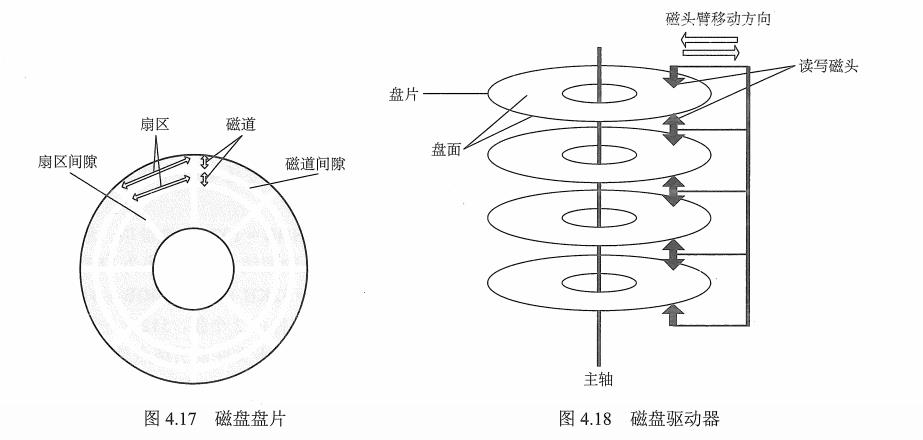
#来自ウルトラマンメビウス(梦比优斯) 1 文件系统基础 1.1 文件的相关概念 文件是以计算机硬盘为载体的存储在计算机上的信息集合,可以是文本文档、图片、程序。 文件的结构:数据项、记录、文件(有结构文件、无结构式…...

Lua实现面向对象以及类的继承
0.简单前言 1、面向对象主要四个特征:封装,继承,多态,抽象 2、Lua是种简单精致小巧的语言,其本质是个表(table),变量和方法皆可看作为该表的元素。 P.S. 该博客和代码为个人编写习…...
机器学习课程学习周报五
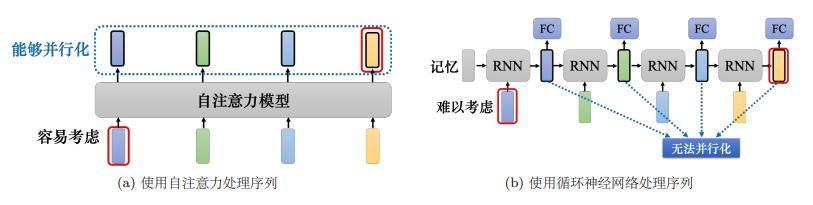
机器学习课程学习周报五 文章目录 机器学习课程学习周报五摘要Abstract一、机器学习部分1.1 向量序列作为模型输入1.1.1 文字的向量表达1.1.2 语音的向量表达 1.2 自注意力机制原理1.2.1 自注意力机制理论1.2.2 矩阵运算自注意力机制 1.3 多头自注意力1.4 位置编码1.5 截断自注…...

vue3.0学习笔记(二)——生命周期与响应式数据(ref,reactive,toRef,toRefs函数)
1. 组合API-setup函数 使用细节: setup 是一个新的组件选项,作为组件中使用组合API的起点。从组件生命周期来看,它的执行在组件实例创建之前vue2.x的beforeCreate执行。这就意味着在setup函数中 this 还不是组件实例,this 此时是…...

C++——QT:保姆级教程,从下载到安装到用QT写出第一个程序
登录官网,在官网选择合适的qt版本进行下载 这里选择5.12.9版本 点击exe文件下载,因为服务器在国外,国内不支持,所以可以从我的网盘下载 链接: https://pan.baidu.com/s/1XMILFS1uHTenH3mH_VlPLw 提取码: 1567 --来自百度网盘超级…...
掌握互联网路由选择协议:从基础入门到实战
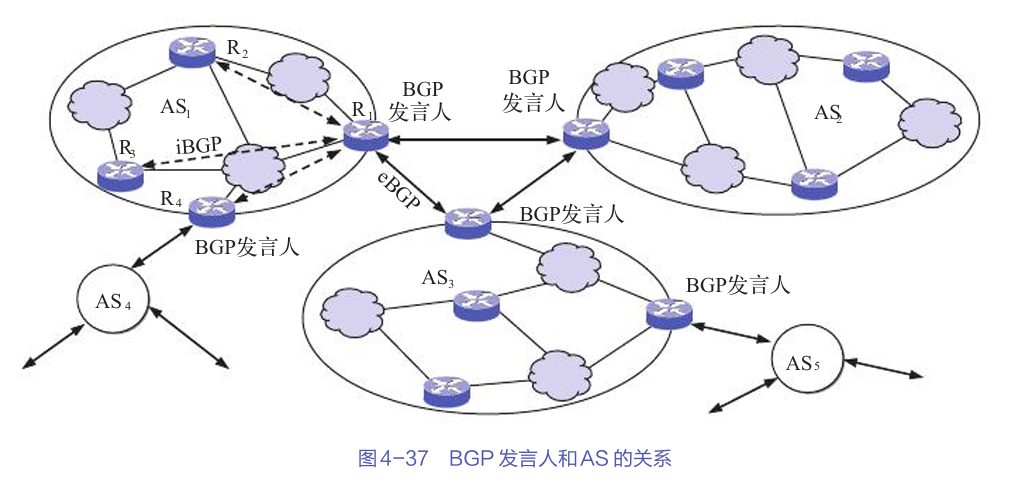
文章目录 路由选择协议的基本概念路由选择算法的分类分层次的路由选择协议路由信息协议(RIP)内部网关协议:OSPF外部网关协议:BGP互联网中的实际应用总结 互联网的路由选择协议是网络通信的核心,它决定了数据包如何在网…...

[笔记]ONVIF服务端实现[进行中...]
1.文档搜索: 从:https://www.cnblogs.com/liwen01/p/17337916.html 跳转到了:ONVIF协议网络摄像机(IPC)客户端程序开发(1):专栏开篇_onvif 许振坪-CSDN博客 1.1原生代码支持&…...

深度强化学习 ②(DRL)
参考视频:📺王树森教授深度强化学习 前言: 最近在学习深度强化学习,学的一知半解😢😢😢,这是我的笔记,欢迎和我一起学习交流~ 这篇博客目前还相对比较乱,后面…...
)
线性代数重要知识点和理论(下)
奇异值分解 奇异值分解非常重要且有趣。首先对于 n n n\times n nn对称矩阵 A A A,可以通过对角化得到其对角化形式 A P D P − 1 APDP^{-1} APDP−1,但是如果 A A A不是对称矩阵或者不是方阵,则不能进行对角化,但是可以通过奇…...

独立开发者系列(35)——python环境的理解
新手阶段,为了快速入门,基本都是直接开始写python代码实现自己想要的效果,类似搭建博客,写个web服务器,搭建简易聊天室,偶尔也写些爬虫,或者使用pygame写个简单小游戏,也有tk库做点简…...

中小企业常见的网络安全问题及防范措施
在数字化浪潮的推动下,我国中小企业的信息化建设取得了显著成就。然而,随着网络安全形势的日益严峻,中小企业在网络安全方面的短板逐渐暴露出来。本文将从中小企业网络安全现状出发,深入剖析其存在的问题,并提出针对性…...

Android 线程并发:线程通信:Handler机制
文章目录 API源码分析操作总结 API Handler相关 Handler对象.sendMessage(Message) 发送消息 Handler对象.handleMessage()空方法 自定义Handler重写handleMessage方法,处理Message Looper相关 Looper.getMainLooper() 获取App的UI线程的Looper对象 Looper…...

搭建自己的金融数据源和量化分析平台(三):读取深交所股票列表
深交所的股票信息读取比较简单: 看上图,爬虫读取到下载按钮的链接之后发起请求,得到XLS文件后直接解析就可以了。 这里放出深交所爬虫模块的代码: # -*- coding: utf-8 -*- # 深圳交易所爬虫 import osimport pandas as pd imp…...

企业级视频拍摄与编辑SDK的全面解决方案
视频已成为企业传播信息、展示品牌、连接用户的重要桥梁,如何高效、专业地制作高质量视频内容,成为众多企业面临的共同挑战。美摄科技,作为视音频技术领域的创新先锋,以其强大的视频拍摄与编辑SDK,为企业量身打造了一站…...

后端返回列表中包含图片id,如何将列表中的图片id转化成url
问题描述 如果我有一个列表数据,列表中每个对象都包含一个图片id,现在我需要将列表中的图片id转化成图片,然后再页面上显示出来 如果你有一个列表数据,列表中每个对象都包含一个图片 ID,并且你想将这些图片 ID 转化为…...
Python学习笔记44:游戏篇之外星人入侵(五)
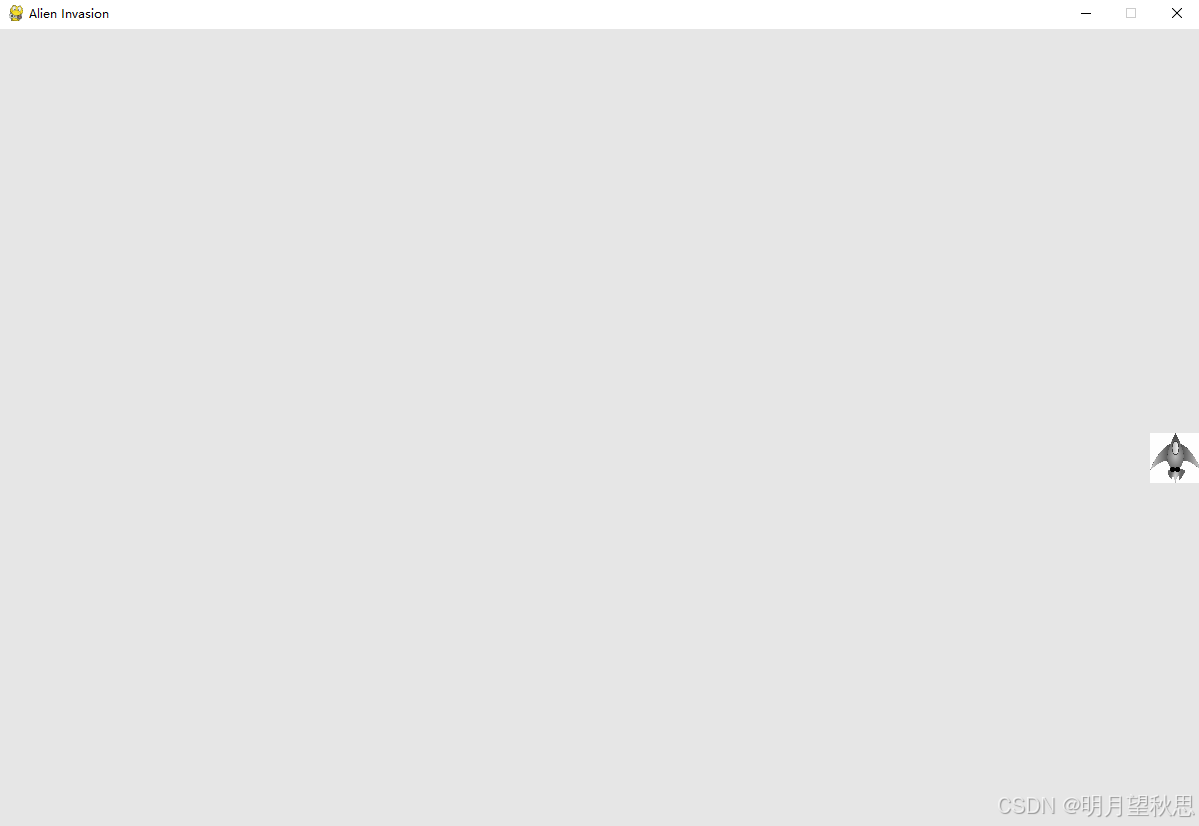
前言 上一篇文章中,我们成功的设置好了游戏窗口的背景颜色,并且在窗口底部中间位置将飞船加载出来了。 今天,我们将通过代码让飞船移动。 移动飞船 想要移动飞船,先要明白飞船位置变化的本质是什么。 通过上一篇文章࿰…...

export在linux中的作用
在某些项目中常常使用export命令。该命令的作用是设置环境变量,并且该环境变量为当前shell进程与其启动的子进程共享。 export MODEL_NAME"stable-diffusion-v1-4"比如以上命令,如果不采用export,设置的变量仅在当前shell命令/进程…...

FFmpeg解复用器如何从封装格式中解析出不同的音视频数据
目录 1、ffmpeg介绍 2、FFMPEG的目录结构 3、FFmpeg的格式封装与分离 3.1、数据结构 3.2、封装和分离(muxer和demuxer) 3.2.1、Demuxer流程 3.2.2、Muxer流程 4、总结 4.1、播放器 4.2、转码器 C++软件异常排查从入门到精通系列教程(专栏文章列表,欢迎订阅,持续…...

基于ChatGPT API构建全栈Web聊天机器人:技术解析与实战指南
1. 项目概述:一个基于ChatGPT API的现代Web聊天机器人最近在GitHub上看到一个挺有意思的项目,bradtraversy/chatgpt-chatbot。这名字一看就挺直白,就是利用OpenAI的ChatGPT API来构建一个聊天机器人。但如果你以为这只是个简单的API调用示例&…...

2026届学术党必备的AI论文网站实测分析
Ai论文网站排名(开题报告、文献综述、降aigc率、降重综合对比) TOP1. 千笔AI TOP2. aipasspaper TOP3. 清北论文 TOP4. 豆包 TOP5. kimi TOP6. deepseek 有着依托人工智能技术生成的免费AI论文工具,它为众多高校师生、科研从业者给予了…...

终极 ChatGPT-Google 扩展日志分析指南:深度洞察用户行为与功能使用统计 [特殊字符]
终极 ChatGPT-Google 扩展日志分析指南:深度洞察用户行为与功能使用统计 🔍 【免费下载链接】chatgpt-google-extension This project is deprecated. Check my new project ChatHub: 项目地址: https://gitcode.com/gh_mirrors/ch/chatgpt-google-ext…...

AI编程伴侣:基于LLM的IDE集成开发助手设计与实战
1. 项目概述:一个为开发者定制的AI编程伴侣如果你是一名开发者,每天在IDE里敲代码的时间超过8小时,那你一定对“上下文切换”带来的效率损耗深有体会。你正全神贯注地写一个复杂的业务逻辑,突然需要查一个API的用法,于…...

Vibe Coding:从环境配置到心流状态,打造高效编程工作流
1. 项目概述:从“氛围感”到“心流”的编程实践指南最近在开发者社区里,一个名为“Vibe Coding Playbook”的项目引起了我的注意。这个项目由 isumitsoni 发起,它不像传统的技术教程那样,一上来就教你如何配置环境、写什么代码&am…...

串口数据监控软件开发总结
1.飞控发送太快,串口传输太慢,导致大量数据包粘包,残包,丢失 本次针对串口数据解析,就使用了一个1k的buf作为缓冲,用递归函数解包,打包。线程只做读取,单独开子线程处理数据。 2套半…...

Tinke:如何轻松提取和修改NDS游戏资源的完整指南
Tinke:如何轻松提取和修改NDS游戏资源的完整指南 【免费下载链接】tinke Viewer and editor for files of NDS games 项目地址: https://gitcode.com/gh_mirrors/ti/tinke 你是否曾经想过探索任天堂NDS游戏内部的奥秘?想要提取游戏中的图像、音频…...

Code2Context:自动生成AI编程助手项目上下文,提升代码理解与生成质量
1. 项目概述:当AI助手需要“读懂”你的代码库如果你和我一样,日常开发已经离不开像 Cursor、Claude Code 或 GitHub Copilot 这样的 AI 编程助手,那你肯定也遇到过这个核心痛点:AI 给出的建议质量,严重依赖于它对当前项…...

创业团队如何利用 Taotoken 统一管理多模型 API 密钥与用量
🚀 告别海外账号与网络限制!稳定直连全球优质大模型,限时半价接入中。 👉 点击领取海量免费额度 创业团队如何利用 Taotoken 统一管理多模型 API 密钥与用量 对于同时使用多个大语言模型的创业团队而言,管理上的挑战是…...

隔着包装也能读、2m/s不串读:东集UF40如何应对管制药厂的RFID“极限大考”?
提到RFID固定式读写器,很多人的第一印象是仓库、货架与托盘。但在一些关乎生命安全的领域,RFID技术正面临着更严苛的考验。这一次,我们走进管制药厂——一个对精准追溯要求达到极致、不容任何差错的场景。核心痛点:一盒十瓶&#…...