
【无标题】web+http协议+nginx搭建+nginx反向代理(环境准备)
一.Web
为用户提供互联网上浏览信息的服务,web服务是动态的,可交互的。
1.安装httpd
yum -y install httpd
2.启动
systemctl start httpd
3.关闭防火墙
systemctl stop firewalld
[root@rs html]# echo "我手机号是" > index.html
[root@rs html]# ls
index.html
4.在浏览器中输入ip地址进行访问
二.http协议
1.http特点:

静态文件和动态文件
生成一个大文件
dd if=/dev/zero of=/var/www/html/a.txt bs=30M count=1
2.UEI和URL的区别

http状态码:

三.Apache
最早的web服务,基于http提供浏览器浏览
1.查看华为云主机所有打开的端口
firewall-cmd --list-ports
2.在虚拟机上停用防火墙,远程主机就无法访问web服务
3.搭建apache服务器
(1)查看安装情况
[root@rs ~]# rpm -qa|grep httpd
(2)配置文件
[root@rs ~]# vim /etc/httpd/conf/httpd.conf

启(3)启动http服务
[root@rs ~]# systemctl start httpd
(4)在浏览器访问
(5)在windows客户端scp一张图到/var/www/html下
[root@rs ~]# cd /var/www/html
[root@rs html]# mkdir img

[root@rs html]# vim /var/www/html/index.html
<!doctype html>
<html>
<head>
<meta charset="utf-8">
<title>正方形</title>
<style>
div{
background-color:red;
width:120px;
height:120px;
}
</style>
</head>
<body>
<div>正方形</div>
<img src="img/000.jpg" />
</body>
</html>
(6)在浏览器访问

四.Nginx
开源,轻量级,高性能的http和反向代理服务器
1.特点:占用内存少,并发能力强
2.作用:用来做负载均衡和反向代理
安装nginx
源码编译安装
3.下载源码包
[root@web ~]# wget https://nginx.org/download/nginx-1.26.1.tar.gz
4.解压
[root@web ~]# tar -zxvf nginx-1.26.1.tar.gz
[root@web ~]# yum -y install gcc gcc-c++
[root@web ~]# yum -y install openssl-devel
[root@web ~]# yum -y install pcre-devel
[root@web ~]# yum -y install make
5.编译安装nginx
[root@web nginx-1.26.1]# ./configure --prefix=/usr/local/nginx --user=nginx --group=nginx --with-http_ssl_module --with-http_stub_status_module --with-http_realip_module --with-stream

[root@web nginx-1.26.1]# make && make install
[root@web nginx-1.26.1]# useradd -s /bin/nologin -M nginx //创建nginx用户和组不然无法启动
6.检查目录
[root@web nginx-1.26.1]# tree /usr/local/nginx/
7.启动nginx
[root@web nginx]# ./sbin/nginx
8.查看主要配置文件
vim /usr/local/nginx/conf/nginx.conf
9.优化nginx服务控制
[root@web nginx]# ln -s /usr/local/nginx/sbin/nginx /usr/bin/ //做一个软连接
[root@web nginx]# nginx
之所以指令能在命令行使用,是因为在$PATH目录中能找到这个可执行文件或者是可执行文件的链接文件
(1)修改配置文件后重载nginx服务
./nginx -s reload
(2)脚本启动nginx
[root@web nginx]# vim ~/nginx.sh
#!/bin/bash
/usr/local/sbin/nginx &> /dev/null
netstat -lnput|grep nginx
if [ $? -eq 0 ];then
echo "nginx正在执行,或者80端口被占用"
fi
[root@web nginx]# source ~/nginx.sh

(3)以systemctl控制nginx
[root@web nginx]# ls /usr/lib/systemd/system
[root@web nginx]# vim /usr/lib/systemd/system/nginx.service
[Unit]
Description=nginx
After=network.target
[Service]
Type=forking
PIDFile=/usr/local/nginx/logs/nginx.pid
ExecStart=/usr/local/nginx/sbin/nginx
ExecReload=/usr/local/nginx/sbin/nginx -s reload
ExecStop=/usr/local/nginx/sbin/nginx -s stop
PrivateTmp=Flase
[Install]
WantedBy=multi-user.target
[root@web nginx]# systemctl daemon-reload //重置systemctl进程
如果使用sbin目录下的nginx,就无法使用systemctl
优化注意事项

10.开启nginx状态监听模块
(1)修改配置文件
[root@web ~]# vim /usr/local/nginx/conf/nginx.conf //在48行添加
location /status {
stub_status on; #nginx状态的监听模块
access_log off;
}
(2)重启nginx
[root@web ~]# systemctl reload nginx
(3)在浏览器访问,查看nginx状态信息
192.168.2.35/status

11.nginx虚拟主机配置
⼀个“location”相当于⼀个虚拟主机,也就是⽤户访问⽹站时,
点击跳转的另⼀个⻚⾯。
location 内可以添加 nginx 各种功能模块。
配置多个虚拟主机
[root@server ~]# vim /usr/local/nginx/conf/nginx.conf
......省略部分内容......
server {
listen 80; #监听端⼝
server_name localhost;
charset utf-8; #中文字符集
#access_log logs/host.access.log main;
location /status {
stub_status on;
access_log off;
}
location / {
root html; #⽹站在服务器上的⽬ 录,默认为/usr/local/nginx/html
index index.html index.htm; #跳转到的⽹站⾸⻚
}
}
......省略部分内容......
[root@server ~]# systemctl restart nginx.service
#重启nginx
12.nginx反向代理
再准备一台机器---tomcat 跟上面一样安装nginx编译并安装
[root@server ~]# wget https://nginx.org/download/nginx-1.26.1.tar.gz
解压
[root@server ~]# tar -zxvf nginx-1.26.1.tar.gz
[root@server ~]# yum -y install gcc gcc-c++
[root@server ~]# yum -y install openssl-devel
[root@server ~]# yum -y install pcre-devel
[root@server ~]# yum -y install make
编译安装nginx
[root@server nginx-1.26.1]# ./configure --prefix=/usr/local/nginx
[root@server nginx-1.26.1]# make && make install
[root@server nginx-1.26.1]# useradd -s /bin/nologin -M nginx
[root@server nginx-1.26.1]# echo "我是后端服务" > /usr/local/nginx/html/index.html
[root@server nginx-1.26.1]# firewall-cmd --zone=public --add-port=80/tcp --permanent //打开端口
success
[root@server nginx-1.26.1]# firewall-cmd --reload //重新加载防火墙
Success
[root@server nginx-1.26.1]# vim /usr/local/nginx/conf/nginx.conf
[root@server nginx-1.26.1]# /usr/local/nginx/sbin/nginx

相关文章:
【无标题】web+http协议+nginx搭建+nginx反向代理(环境准备)
一.Web 为用户提供互联网上浏览信息的服务,web服务是动态的,可交互的。 1.安装httpd yum -y install httpd 2.启动 systemctl start httpd 3.关闭防火墙 systemctl stop firewalld [rootrs html]# echo "我手机号是" > …...

c-periphery RS485串口库文档serial.md(serial.h)(非阻塞读)(VMIN、VTIME)
c-peripheryhttps://github.com/vsergeev/c-periphery 文章目录 NAMESYNOPSISENUMERATIONS关于奇偶校验枚举类型 DESCRIPTIONserial_new()serial_open()关于流控制软件流控制(XON/XOFF)硬件流控制(RTS/CTS)选择流控制方法 serial_…...

Matlab arrayfun 与 bsxfun——提高编程效率的利器!
许多人知道 MATLAB 向量化编程,少用 for 循环 可以提高代码运行效率,但关于代码紧凑化编程, arrayfun 与 bsxfun 两个重要函数却鲜有人能够用好,今天针对这两个函数举例说明其威力。 Matlab arrayfun 概述 arrayfun 是 Matlab …...
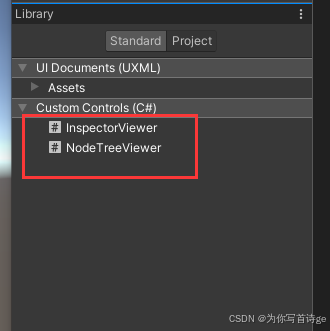
【Unity编辑器拓展】GraphView自定义可视化节点
1、创建节点区域脚本 其中的new class UxmlFactory,可以让该元素显示在UI Builder中,我们就可以在Library-Project中看到我们新建的这两个UI元素,就可以拖入我们的UI窗口编辑了 public class NodeTreeViewer : GraphView {public new class…...
教程系列4 | 趋动云『社区项目』极速体验 LivePortrait 人脸表情“移花接木”大法
LivePortrait LivePortrait 由快手可灵大模型团队开源,只需 1 张原图就能生成动态视频。 LivePortrait 的核心优势在于其卓越的表情"迁移"技术,能够令静态图像中的人物瞬间焕发活力,无论是眨眼、微笑还是转头,皆栩栩如…...

WGS84、GCJ-02、BD09三大坐标系详解
文章目录 前言WGS84坐标系定义应用WGS84 Web 墨卡托投影 GCJ-02坐标系(火星坐标系)定义应用GCJ-02经纬度投影与Web墨卡托投影 BD09坐标系(百度坐标系)定义应用BD09经纬度投影与Web墨卡托投影 坐标系之间的区别与注意事项总结 前言…...

css上下动画 和淡化
.popup_hidden_bg { transition: opacity .5s ease-out; opacity: 0; pointer-events: none; /* 防止在隐藏时仍然能点击 */ } keyframes popupShop { from { transform: translateY(100%); opacity: 0; } to {transform: translateY(0);opacity: 1; }} keyframes popupHidd…...

深入解析C#中的URI和URL编码:理解EscapeDataString、EscapeUriString和UrlEncode的区别及字符编码错误处理
在C#中,处理URI(统一资源标识符)和URL(统一资源定位符)时,可以使用Uri.EscapeDataString、Uri.EscapeUriString和HttpUtility.UrlEncode(或WebUtility.UrlEncode)方法来编码字符串。…...

【CSS】给图片设置 max-width
.logo img{width:100%; /* 缩成父盒子的100% */max-width:100%; /* (谁小用谁的百分之百) *//* max-width:100%;【1】图片比盒子大,缩成父盒子的100%【2】图片比盒子小,图片自身的100%*/ }示例 设置样式 .el-image {width: 100%;max-width: 100%;max-…...
)
区块链——代码格式检查(prettier、solhint)
一、引入依赖 // 导入prettier prettier-plugin-solidity yarn add --dev prettier prettier-plugin-solidity yarn add --dev solhint二、创建.prettierrc文件 {"tabWidth": 2,"semi": false,"useTabs": false,"singleQuote": fals…...
搭建自动化 Web 页面性能检测系统 —— 部署篇
作为一个前端想去做全栈的项目时,可能第一个思路是 node vue/react。一开始可能会新建多个工程目录去实现,假设分别为 web 和 server,也许还有管理后台的代码 admin,那么就有了三个工程的代码。此时为了方便管理就需要在远程仓库…...

知识图谱增强的RAG(KG-RAG)详细解析
转自:知识图谱科技 这是一个与任务无关的框架,它将知识图谱(KG)的显性知识与大型语言模型(LLM)的隐含知识结合起来。这是该工作的arXiv预印本 https://arxiv.org/abs/2311.17330 。 我们在这里利用一个名为…...

python中list的深拷贝和浅拷贝
其实这还是涉及到python中的可变对象和不可变对象的概念。 https://www.cnblogs.com/poloyy/p/15073168.html # -*- coding: utf-8 -*-person [name, [savings, 100.00]] hubby person[:] # slice copy wifey list(person) # fac func copy a [id(x) for x in person] b …...

【LeetCode】字母异位词分组
题目描述: 给你一个字符串数组,请你将字母异位词组合在一起。可以按任意顺序返回结果列表。 字母异位词 是由重新排列源单词的所有字母得到的一个新单词。 示例 1: 输入: strs [“eat”, “tea”, “tan”, “ate”, “nat”, “bat”] 输出: [[“bat”…...

Golang | Leetcode Golang题解之第295题数据流的中位数
题目: 题解: type MedianFinder struct {nums *redblacktree.Treetotal intleft, right iterator }func Constructor() MedianFinder {return MedianFinder{nums: redblacktree.NewWithIntComparator()} }func (mf *MedianFinder) AddNum(…...

【C语言】C语言期末突击/考研--数据的输入输出
目录 一、printf()输出函数介绍 二、scanf读取标准输入 (一)scanf函数的原理 (二)多种数据类型混合输入 三、练习题 今天我们学习printf和scanf读取标准输入。下面我们开始正式的学习吧。 C语言中有很多内置函数,今…...

How can I fix my Flask server‘s 405 error that includes OpenAi api?
题意:解决包含OpenAI API的Flask服务器中出现的405错误(Method Not Allowed,即方法不允许) 问题背景: Im trying to add an API to my webpage and have never used any Flask server before, I have never used Java…...
LeetCode Hot100 将有序数组转换为二叉搜索树
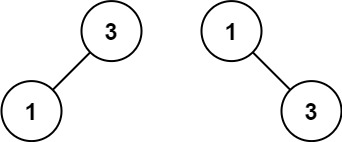
给你一个整数数组 nums ,其中元素已经按 升序 排列,请你将其转换为一棵 平衡 二叉搜索树。 示例 1: 输入:nums [-10,-3,0,5,9] 输出:[0,-3,9,-10,null,5] 解释:[0,-10,5,null,-3,null,9] 也将被视为正确…...

【Linux】线程的控制
目录 线程等待 线程退出 线程的优缺点 线程独占和共享的数据 我们说Linux是用进程模拟的线程,所以Linux中只有轻量级进程的概念,但是,用户是只认线程的,所以我们有一个叫原生线程库的东西,它就负责把轻量级进程的系…...

Vue3自研开源Tree组件:人性化的拖拽API设计
针对Element Plus Tree组件拖拽功能API用的麻烦,小卷开发了一个API使用简单的JuanTree组件。拖拽功能用起来非常简单! 文章目录 使用示例allowDragallowDrop支持节点勾选支持dirty检测后台API交互 源码实现 使用示例 组件的使用很简单: 通过…...

DwarfStar 4:Redis 之父打造 DeepSeek V4 Flash 本地推理引擎,MacBook 上跑出 26 tok/s
DwarfStar 4:Redis 之父打造 DeepSeek V4 Flash 本地推理引擎,MacBook 上跑出 26 tok/s 一、背景:本地运行 284B 大模型成为现实 2026 年 5 月,一个开源项目在 GitHub 上迅速获得 10k 星标——DwarfStar 4 (ds4),由 …...

51c自动驾驶~合集57
我自己的原文哦~ https://blog.51cto.com/whaosoft/13960249 #端到端自动驾驶算法实现原理 1从传感器数据到控制策略的端到端方法 端到端自动驾驶基本流程: (1)子任务模型被更大规模的神经网络模型取代,最终即为端到端神经网络模型; (2)…...

WordPress Playground部署实战:从开发到生产的完整流程指南
WordPress Playground部署实战:从开发到生产的完整流程指南 【免费下载链接】wordpress-playground Run WordPress in the browser via WebAssembly PHP 项目地址: https://gitcode.com/gh_mirrors/wo/wordpress-playground WordPress Playground 是一个革命…...

GELab-Zero:面向 Android 的开源移动端 GUI Agent,让 AI 像人一样用手机
GELab-Zero:面向 Android 的开源移动端 GUI Agent,让 AI 像人一样用手机 一、项目介绍:什么是 GELab-Zero?二、移动端 GUI Agent 的技术难点三、项目亮点:GELab-Zero 值得学习的地方1. 模型和基础设施一起开源2. 本地运…...

AI Agent Harness恶意指令识别拦截
AI Agent Harness恶意指令识别拦截:构建新一代智能应用安全屏障摘要/引言 开门见山(Hook) 想象一下这个场景:你花了3个月精心搭建了一个**“全栈AI编程助手Agent集群”**——主Agent负责理解需求并拆解任务,代码生成Ag…...

STM32F103C8T6最小系统板避坑指南:从ST-LINK接线到Keil5乱码,新手必看的5个实战问题
STM32F103C8T6最小系统板避坑指南:从ST-LINK接线到Keil5乱码,新手必看的5个实战问题 第一次点亮STM32开发板的LED时,那种成就感就像电子工程师的"成人礼"。但通往成功的路上往往布满荆棘——接错一根线可能导致整晚的调试失败&…...
:准确率、溯源性、逻辑连贯性三维评分,这份清单决定你是否该立刻升级)
NotebookLM问答功能终极评估报告(基于217份真实研究笔记测试):准确率、溯源性、逻辑连贯性三维评分,这份清单决定你是否该立刻升级
更多请点击: https://intelliparadigm.com 第一章:NotebookLM问答功能终极评估报告概览 NotebookLM 是 Google 推出的基于用户上传文档构建个性化知识代理的 AI 工具,其核心问答能力依赖于对私有资料的深度语义理解与上下文精准锚定。本章聚…...

前端工程化:Vite与Rollup构建优化
前端工程化:Vite与Rollup构建优化 大家好,我是欧阳瑞(Rich Own)。今天想和大家聊聊前端工程化这个重要话题。作为一个全栈开发者,构建工具是日常开发中不可或缺的一部分。今天就来分享一下Vite和Rollup的构建优化技巧…...

给排水设计新人必看:如何用SWMM快速搭建一个‘麻雀虽小五脏俱全’的练习模型?
SWMM实战入门:从零构建微型排水系统的设计思维训练 刚接触市政给排水设计的职场新人,面对SWMM软件界面总有种"知道每个按钮功能,却不知从何下手"的困惑。这就像拿到一套精良的绘图工具,却不知道如何组合线条构成有意义的…...

单传感器肌电假肢:DTW算法实现92%识别准确率
1. 项目概述肌电假肢技术在过去几十年里取得了显著进展,但传统多传感器系统的高成本和复杂性仍然是阻碍其普及的主要障碍。作为一名从事生物医学工程研究多年的从业者,我一直在寻找更经济高效的解决方案。这项研究提出了一种创新方法:仅使用单…...