
Linux运维_Bash脚本_源码安装Go-1.21.11
Linux运维_Bash脚本_源码安装Go-1.21.11
Bash (Bourne Again Shell) 是一个解释器,负责处理 Unix 系统命令行上的命令。它是由 Brian Fox 编写的免费软件,并于 1989 年发布的免费软件,作为 Sh (Bourne Shell) 的替代品。
您可以在 Linux 和 MacOS 机器上使用 Bash,甚至可以通过适用于 Linux 的 Windows 子系统在 Windows 10 机器上使用。
使用方法
- 下载源码包:
go1.4-bootstrap-20171003.tar.gz
go1.16.src.tar.gz
go1.17.3.src.tar.gz
go1.21.11.src.tar.gz
- 放于指定路径:
这里 Bash Shell 脚本的全局变量 STORAGE 指定的存放源码包的路径 /home/goufeng 可进行修改。
- 执行 Bash Shell 脚本:
输入 /[路径名]/[脚本名].sh 即可进行自动编译部署,过程中提示输入 (y/n) 输入 y 则进行下一步,这样分阶段确认的原因是为了确保能够看到上一个源码编译结果中可能的错误和提示。
完整脚本
#! /bin/bash
# Create By GF 2024-08-03 01:34# --------------------------------------------------
# Install First:
# * GCC# ----------------- Dep for Go 1.16 ----------------
# Need File: go1.4-bootstrap-20171003.tar.gz
# -------------------- Go - 1.16 -------------------
# Need File: go1.16.src.tar.gz
# ------------------- Go - 1.17.3 ------------------
# Need File: go1.17.3.src.tar.gz
# ------------------- Go - 1.21.11 -----------------
# Need File: go1.21.11.src.tar.gz# ##################################################
STORAGE=/home/goufeng# ########################################## Dep for Go 1.16 ########################################## Function: 制作安装(Make Install) Go-1.4-Bootstrap-20171003
# ##################################################
function Make_Install_Go_1_4_Bootstrap_20171003() {# Compile Error Handle:# ----------------------------------------------# /home/liu/go1.4/src/lib9/fmt/fltfmt.c: In function '__efgfmt':# /home/liu/go1.4/src/lib9/fmt/fltfmt.c:437:5: error: this statement may fall through [-Werror=implicit-fallthrough=]#    if(ndigits > prec) {#      ^# /home/liu/go1.4/src/lib9/fmt/fltfmt.c:451:2: note: here#   default:#   ^~~~~~~# cc1: all warnings being treated as errors# ..............................................# 1. 确认 switch 语句: 找到包含 default: 的 switch 语句。# 2. 检查 case 分支: 查看在 default: 之前的所有 case 分支, 确保每个分支在结束时都有适当的 break (或 return、continue 等, 取决于上下文)。# 3. 理解逻辑: 确保 switch 语句的逻辑是你所期望的。如果某个 case 分支确实应该允许控制流落入下一个 case 或 default, 那么确保这是有意的, 并且代码的可读性和可维护性不会因此受损。# 4. 修改代码: 如果发现有不必要的 fall through, 添加缺失的 break 语句。如果 fall through 是有意的, 但编译器警告你, 你可以考虑使用编译器特定的注释来指示这是预期的行为 (例如, 对于 GCC 和 Clang, 你可以在两个 case 之间添加 // fall through 注释)。# ----------------------------------------------# /home/goufeng/go/src/cmd/6c/txt.c: In function 'gmove':# /home/goufeng/go/src/cmd/6c/txt.c:995:28: error: left shift of negative value [-Werror=shift-negative-value]#      f->vconst |= (vlong)~0 << 32;#                             ^~# /home/goufeng/go/src/cmd/6c/txt.c:1045:28: error: left shift of negative value [-Werror=shift-negative-value]#      f->vconst |= (vlong)~0 << 32;#                             ^~# cc1: all warnings being treated as errors# ..............................................# 这个错误是由于在 C 语言中, 对负数进行左移操作是不被允许的, 尤其是在严格的编译环境下 (如你的编译器将所有警告视为错误)。# 在代码中, (vlong)~0 << 32 试图将一个全为 1 的负数 (通过 ~0 得到) 左移 32 位。这通常用于设置一个特定大小的数据类型的所有位为 1, 但在 C 语言中, 直接对负数进行位移操作可能会导致未定义行为。# 可以通过确保参与位移操作的值是正数或无符号数来避免这个错误。可以显式地将 ~0 转换为无符号类型来解决这个问题, 例如:# 将 "f->vconst |= (vlong)~0 << 32;" 改为 "f->vconst |= (vlong)((unsigned long long)~0ULL << 32);"。if [[ ! -d "/opt/go-1.4-bootstrap-20171003" ]]; thenlocal VERIFYlocal STEP_UNZIPPED=0local STEP_MOVED=0local STEP_CHANGE_DIRECTORY=0local STEP_MADE=0# ------------------------------------------read -p "[Confirm] Make and Install ( go-1.4-bootstrap-20171003 )? (y/n)>" VERIFYif [[ "$VERIFY" != "y" ]]; then exit 1; fi# ------------------------------------------tar -zxvf $STORAGE/go1.4-bootstrap-20171003.tar.gz && STEP_UNZIPPED=1# ------------------------------------------# The compilation directory of "Go" needs to be stored properly. After compilation, "GOROOT" defaults to the compilation directory.# Go 的编译目录需要妥善存放, 编译完成后, GOROOT 默认在编译目录下。cp -r $STORAGE/go /opt/go-1.4-bootstrap-20171003 && STEP_MOVED=1# ------------------------------------------cd /opt/go-1.4-bootstrap-20171003/src && STEP_CHANGE_DIRECTORY=1# ------------------------------------------sed -i "1045s%(vlong)~0 << 32%(vlong)((unsigned long long)~0ULL << 32)%" /opt/go-1.4-bootstrap-20171003/src/cmd/6c/txt.csed -i  "995s%(vlong)~0 << 32%(vlong)((unsigned long long)~0ULL << 32)%" /opt/go-1.4-bootstrap-20171003/src/cmd/6c/txt.c# ------------------------------------------sed -i "451i // fall through" /opt/go-1.4-bootstrap-20171003/src/lib9/fmt/fltfmt.c# ..........................................sed -i "204i // fall through" /opt/go-1.4-bootstrap-20171003/src/lib9/fmt/strtod.csed -i "198i // fall through" /opt/go-1.4-bootstrap-20171003/src/lib9/fmt/strtod.csed -i "187i // fall through" /opt/go-1.4-bootstrap-20171003/src/lib9/fmt/strtod.csed -i "145i // fall through" /opt/go-1.4-bootstrap-20171003/src/lib9/fmt/strtod.c# ..........................................sed -i "53i // fall through" /opt/go-1.4-bootstrap-20171003/src/libbio/bflush.c# ..........................................sed -i "53i // fall through" /opt/go-1.4-bootstrap-20171003/src/libbio/bseek.c# ..........................................sed -i "2618i // fall through" /opt/go-1.4-bootstrap-20171003/src/liblink/asm5.csed -i "1353i // fall through" /opt/go-1.4-bootstrap-20171003/src/liblink/asm5.c# ..........................................sed -i "3380i // fall through" /opt/go-1.4-bootstrap-20171003/src/liblink/asm6.csed -i "2702i // fall through" /opt/go-1.4-bootstrap-20171003/src/liblink/asm6.csed -i "2200i // fall through" /opt/go-1.4-bootstrap-20171003/src/liblink/asm6.csed -i "2158i // fall through" /opt/go-1.4-bootstrap-20171003/src/liblink/asm6.csed -i "2013i // fall through" /opt/go-1.4-bootstrap-20171003/src/liblink/asm6.csed -i "1985i // fall through" /opt/go-1.4-bootstrap-20171003/src/liblink/asm6.csed -i "1910i // fall through" /opt/go-1.4-bootstrap-20171003/src/liblink/asm6.c# ..........................................sed -i "2696i // fall through" /opt/go-1.4-bootstrap-20171003/src/liblink/asm8.csed -i "2138i // fall through" /opt/go-1.4-bootstrap-20171003/src/liblink/asm8.csed -i "1467i // fall through" /opt/go-1.4-bootstrap-20171003/src/liblink/asm8.c# ..........................................sed -i "385i // fall through" /opt/go-1.4-bootstrap-20171003/src/liblink/obj5.c# ..........................................sed -i "171i // fall through" /opt/go-1.4-bootstrap-20171003/src/liblink/sym.csed -i "151i // fall through" /opt/go-1.4-bootstrap-20171003/src/liblink/sym.c# ..........................................sed -i "177i // fall through" /opt/go-1.4-bootstrap-20171003/src/cmd/cc/acid.c# ..........................................sed -i "303i // fall through" /opt/go-1.4-bootstrap-20171003/src/cmd/cc/com64.csed -i "301i // fall through" /opt/go-1.4-bootstrap-20171003/src/cmd/cc/com64.csed -i "265i // fall through" /opt/go-1.4-bootstrap-20171003/src/cmd/cc/com64.c# ..........................................sed -i "297i // fall through" /opt/go-1.4-bootstrap-20171003/src/cmd/cc/dcl.c# ..........................................sed -i "122i // fall through" /opt/go-1.4-bootstrap-20171003/src/cmd/cc/dpchk.c# ..........................................sed -i "339i // fall through" /opt/go-1.4-bootstrap-20171003/src/cmd/cc/lex.csed -i "309i // fall through" /opt/go-1.4-bootstrap-20171003/src/cmd/cc/lex.c# ..........................................sed -i "1131i // fall through" /opt/go-1.4-bootstrap-20171003/src/cmd/cc/sub.csed -i  "956i // fall through" /opt/go-1.4-bootstrap-20171003/src/cmd/cc/sub.csed -i  "902i // fall through" /opt/go-1.4-bootstrap-20171003/src/cmd/cc/sub.csed -i  "882i // fall through" /opt/go-1.4-bootstrap-20171003/src/cmd/cc/sub.csed -i  "865i // fall through" /opt/go-1.4-bootstrap-20171003/src/cmd/cc/sub.csed -i  "530i // fall through" /opt/go-1.4-bootstrap-20171003/src/cmd/cc/sub.c# ..........................................sed -i "1428i // fall through" /opt/go-1.4-bootstrap-20171003/src/cmd/gc/const.csed -i "1051i // fall through" /opt/go-1.4-bootstrap-20171003/src/cmd/gc/const.csed -i  "472i // fall through" /opt/go-1.4-bootstrap-20171003/src/cmd/gc/const.csed -i  "240i // fall through" /opt/go-1.4-bootstrap-20171003/src/cmd/gc/const.csed -i  "226i // fall through" /opt/go-1.4-bootstrap-20171003/src/cmd/gc/const.c# ..........................................sed -i "900i // fall through" /opt/go-1.4-bootstrap-20171003/src/cmd/gc/esc.c# ..........................................sed -i "628i // fall through" /opt/go-1.4-bootstrap-20171003/src/cmd/gc/fmt.c# ..........................................sed -i "552i // fall through" /opt/go-1.4-bootstrap-20171003/src/cmd/gc/gen.c# ..........................................sed -i "1689i // fall through" /opt/go-1.4-bootstrap-20171003/src/cmd/gc/lex.csed -i "1683i // fall through" /opt/go-1.4-bootstrap-20171003/src/cmd/gc/lex.c# ..........................................sed -i "470i // fall through" /opt/go-1.4-bootstrap-20171003/src/cmd/gc/mparith1.csed -i "385i // fall through" /opt/go-1.4-bootstrap-20171003/src/cmd/gc/mparith1.csed -i "354i // fall through" /opt/go-1.4-bootstrap-20171003/src/cmd/gc/mparith1.c# ..........................................sed -i "733i // fall through" /opt/go-1.4-bootstrap-20171003/src/cmd/gc/order.csed -i "513i // fall through" /opt/go-1.4-bootstrap-20171003/src/cmd/gc/order.csed -i "455i // fall through" /opt/go-1.4-bootstrap-20171003/src/cmd/gc/order.csed -i "143i // fall through" /opt/go-1.4-bootstrap-20171003/src/cmd/gc/order.c# ..........................................sed -i "158i // fall through" /opt/go-1.4-bootstrap-20171003/src/cmd/gc/racewalk.c# ..........................................sed -i "146i // fall through" /opt/go-1.4-bootstrap-20171003/src/cmd/gc/range.c# ..........................................sed -i "291i // fall through" /opt/go-1.4-bootstrap-20171003/src/cmd/gc/select.csed -i "225i // fall through" /opt/go-1.4-bootstrap-20171003/src/cmd/gc/select.csed -i "130i // fall through" /opt/go-1.4-bootstrap-20171003/src/cmd/gc/select.c# ..........................................sed -i "1453i // fall through" /opt/go-1.4-bootstrap-20171003/src/cmd/gc/sinit.csed -i "1376i // fall through" /opt/go-1.4-bootstrap-20171003/src/cmd/gc/sinit.csed -i "1042i // fall through" /opt/go-1.4-bootstrap-20171003/src/cmd/gc/sinit.c# ..........................................sed -i "2986i // fall through" /opt/go-1.4-bootstrap-20171003/src/cmd/gc/subr.csed -i "2746i // fall through" /opt/go-1.4-bootstrap-20171003/src/cmd/gc/subr.csed -i "1293i // fall through" /opt/go-1.4-bootstrap-20171003/src/cmd/gc/subr.c# ..........................................sed -i "341i // fall through" /opt/go-1.4-bootstrap-20171003/src/cmd/gc/typecheck.c# ..........................................sed -i "1130i // fall through" /opt/go-1.4-bootstrap-20171003/src/cmd/gc/walk.csed -i  "221i // fall through" /opt/go-1.4-bootstrap-20171003/src/cmd/gc/walk.c# ..........................................sed -i "1142i // fall through" /opt/go-1.4-bootstrap-20171003/src/cmd/ld/elf.c# ..........................................sed -i "316i // fall through" /opt/go-1.4-bootstrap-20171003/src/cmd/ld/data.c# ..........................................sed -i "876i // fall through" /opt/go-1.4-bootstrap-20171003/src/cmd/ld/ldelf.c# ..........................................sed -i "299i // fall through" /opt/go-1.4-bootstrap-20171003/src/cmd/ld/ldpe.c# ..........................................sed -i "418i // fall through" /opt/go-1.4-bootstrap-20171003/src/cmd/ld/macho.csed -i "359i // fall through" /opt/go-1.4-bootstrap-20171003/src/cmd/ld/macho.c# ..........................................sed -i "618i // fall through" /opt/go-1.4-bootstrap-20171003/src/cmd/ld/pe.c# ..........................................sed -i "248i // fall through" /opt/go-1.4-bootstrap-20171003/src/cmd/ld/symtab.c# ..........................................sed -i "87i // fall through" /opt/go-1.4-bootstrap-20171003/src/cmd/6l/obj.c# ..........................................sed -i "753i // fall through" /opt/go-1.4-bootstrap-20171003/src/cmd/6c/peep.csed -i "577i // fall through" /opt/go-1.4-bootstrap-20171003/src/cmd/6c/peep.csed -i "113i // fall through" /opt/go-1.4-bootstrap-20171003/src/cmd/6c/peep.c# ..........................................sed -i "343i // fall through" /opt/go-1.4-bootstrap-20171003/src/cmd/6c/reg.c# ..........................................sed -i "773i // fall through" /opt/go-1.4-bootstrap-20171003/src/cmd/6c/txt.c# ..........................................sed -i "201i // fall through" /opt/go-1.4-bootstrap-20171003/src/cmd/gc/cplx.csed -i  "57i // fall through" /opt/go-1.4-bootstrap-20171003/src/cmd/gc/cplx.c# ..........................................sed -i "1130i // fall through" /opt/go-1.4-bootstrap-20171003/src/cmd/6g/cgen.c# ..........................................sed -i "1283i // fall through" /opt/go-1.4-bootstrap-20171003/src/cmd/6g/gsubr.csed -i "1216i // fall through" /opt/go-1.4-bootstrap-20171003/src/cmd/6g/gsubr.csed -i  "689i // fall through" /opt/go-1.4-bootstrap-20171003/src/cmd/6g/gsubr.csed -i  "387i // fall through" /opt/go-1.4-bootstrap-20171003/src/cmd/6g/gsubr.csed -i  "375i // fall through" /opt/go-1.4-bootstrap-20171003/src/cmd/6g/gsubr.c# ..........................................sed -i "526i // fall through" /opt/go-1.4-bootstrap-20171003/src/cmd/6g/reg.c# ------------------------------------------if [[ $STEP_CHANGE_DIRECTORY == 1 ]]; then# make.bash / all.bash must be run from $GOROOT/src./make.bash && STEP_MADE=1fi# ------------------------------------------cd $STORAGE && rm -rf $STORAGE/go && return 0elseecho "[Caution] Path: ( /opt/go-1.4-bootstrap-20171003 ) Already Exists."# ------------------------------------------return 0fi
}# ############################################# Go - 1.16 ############################################# Function: 制作安装(Make Install) Go-1.16
# ##################################################
function Make_Install_Go_1_16() {# 源码安装 Go 1.5 版本以上时会报 ERROR: Cannot find /root/go1.4/bin/go 这个错误。# 因为 Go 1.5 开始编译器和运行时用 Go 自身编写, 要编译它们, 首先要安装 Go 编译器。所以如果想要通过源码方式安装高版本 Go, 必须先安装好 Go 1.4 版本。if [[ ! -d "/opt/go-1.16" ]]; thenlocal VERIFYlocal STEP_UNZIPPED=0local STEP_MOVED=0local STEP_CHANGE_DIRECTORY=0local STEP_MADE=0# ------------------------------------------read -p "[Confirm] Make and Install ( go-1.16 )? (y/n)>" VERIFYif [[ "$VERIFY" != "y" ]]; then exit 1; fi# ------------------------------------------tar -zxvf $STORAGE/go1.16.src.tar.gz && STEP_UNZIPPED=1# ------------------------------------------# The compilation directory of "Go" needs to be stored properly. After compilation, "GOROOT" defaults to the compilation directory.# Go 的编译目录需要妥善存放, 编译完成后, GOROOT 默认在编译目录下。cp -r $STORAGE/go /opt/go-1.16 && STEP_MOVED=1# ------------------------------------------cd /opt/go-1.16/src && STEP_CHANGE_DIRECTORY=1# ------------------------------------------if [[ $STEP_CHANGE_DIRECTORY == 1 ]]; then# make.bash / all.bash must be run from $GOROOT/src./make.bash && STEP_MADE=1fi# ------------------------------------------cd $STORAGE && rm -rf $STORAGE/go && return 0elseecho "[Caution] Path: ( /opt/go-1.16 ) Already Exists."# ------------------------------------------return 0fi
}# ############################################ Go - 1.17.3 ############################################ Function: 制作安装(Make Install) Go-1.17.3
# ##################################################
function Make_Install_Go_1_17_3() {if [[ ! -d "/opt/go-1.17.3" ]]; thenlocal VERIFYlocal STEP_UNZIPPED=0local STEP_MOVED=0local STEP_CHANGE_DIRECTORY=0local STEP_MADE=0# ------------------------------------------read -p "[Confirm] Make and Install ( go-1.17.3 )? (y/n)>" VERIFYif [[ "$VERIFY" != "y" ]]; then exit 1; fi# ------------------------------------------tar -zxvf $STORAGE/go1.17.3.src.tar.gz && STEP_UNZIPPED=1# ------------------------------------------# The compilation directory of "Go" needs to be stored properly. After compilation, "GOROOT" defaults to the compilation directory.# Go 的编译目录需要妥善存放, 编译完成后, GOROOT 默认在编译目录下。cp -r $STORAGE/go /opt/go-1.17.3 && STEP_MOVED=1# ------------------------------------------cd /opt/go-1.17.3/src && STEP_CHANGE_DIRECTORY=1# ------------------------------------------if [[ $STEP_CHANGE_DIRECTORY == 1 ]]; then# make.bash / all.bash must be run from $GOROOT/src./make.bash && STEP_MADE=1fi# ------------------------------------------cd $STORAGE && rm -rf $STORAGE/go && return 0elseecho "[Caution] Path: ( /opt/go-1.17.3 ) Already Exists."# ------------------------------------------return 0fi
}# ############################################ Go - 1.21.11 ########################################### Function: 制作安装(Make Install) Go-1.21.11
# ##################################################
function Make_Install_Go_1_21_11() {# Compilation Time Error of "Go":# ----------------------------------------------# found packages main (build.go) and building_Go_requires_Go_1_17_13_or_later (notgo117.go) in /opt/Go-1.21.0/src/cmd/dist# ..............................................# Go 1.21.0 依赖的某个包需要 Go 语言的版本至少是 Go 1.17.13 或更高版本。# ..............................................# Building Go cmd/dist using /opt/go-1.4-bootstrap-20171003. (go1.4-bootstrap-20170531 linux/amd64)# cmd/dist/build.go:13:2: cannot find package "io/fs" in any of:#         /opt/go-1.4-bootstrap-20171003/src/io/fs (from $GOROOT)#         ($GOPATH not set)# ..............................................# 无法在指定的目录中找到 io/fs 包。这通常是因为 io/fs 包是在 Go 1.16 版本引入的, 而报错中提到的 Go 版本是 1.4。需要先安装 Go 1.16。if [[ ! -d "/opt/go-1.21.11" ]]; thenlocal VERIFYlocal STEP_UNZIPPED=0local STEP_MOVED=0local STEP_CHANGE_DIRECTORY=0local STEP_MADE=0# ------------------------------------------read -p "[Confirm] Make and Install ( go-1.21.11 )? (y/n)>" VERIFYif [[ "$VERIFY" != "y" ]]; then exit 1; fi# ------------------------------------------tar -zxvf $STORAGE/go1.21.11.src.tar.gz && STEP_UNZIPPED=1# ------------------------------------------# The compilation directory of "Go" needs to be stored properly. After compilation, "GOROOT" defaults to the compilation directory.# Go 的编译目录需要妥善存放, 编译完成后, GOROOT 默认在编译目录下。cp -r $STORAGE/go /opt/go-1.21.11 && STEP_MOVED=1# ------------------------------------------cd /opt/go-1.21.11/src && STEP_CHANGE_DIRECTORY=1# ------------------------------------------if [[ $STEP_CHANGE_DIRECTORY == 1 ]]; then# all.bash / make.bash must be run from $GOROOT/src./all.bash && STEP_MADE=1fi# ------------------------------------------cd $STORAGE && rm -rf $STORAGE/go && return 0elseecho "[Caution] Path: ( /opt/go-1.21.11 ) Already Exists."# ------------------------------------------return 0fi
}function main() {# ----------- Compilation Environment ----------ORIGINAL_PATH=$PATH# --------------- Dep for Go 1.16 --------------Make_Install_Go_1_4_Bootstrap_20171003# ------------------ Go - 1.16 -----------------export PATH=/opt/go-1.4-bootstrap-20171003/bin:$ORIGINAL_PATHMake_Install_Go_1_16# ----------------- Go - 1.17.3 ----------------export PATH=/opt/go-1.16/bin:$ORIGINAL_PATHMake_Install_Go_1_17_3# ----------------- Go - 1.21.11 ---------------export PATH=/opt/go-1.17.3/bin:$ORIGINAL_PATHMake_Install_Go_1_21_11
}main
总结
以上就是关于 Linux运维 Bash脚本 源码安装Go-1.21.11 的全部内容。
更多内容可以访问我的代码仓库:
https://gitee.com/goufeng928/public
https://github.com/goufeng928/public
相关文章:

Linux运维_Bash脚本_源码安装Go-1.21.11
Linux运维_Bash脚本_源码安装Go-1.21.11 Bash (Bourne Again Shell) 是一个解释器,负责处理 Unix 系统命令行上的命令。它是由 Brian Fox 编写的免费软件,并于 1989 年发布的免费软件,作为 Sh (Bourne Shell) 的替代品。 您可以在 Linux 和…...

ShareSDK Twitter
创建应用 1.登录Twitter控制台并通过认证 2.点击Developer Portal进入Twitter后台 3.点击Sign up for Free Account创建应用 4.配置应用信息 以下为创建过程示例,图中信息仅为示例,创建时请按照真实信息填写,否则无法正常使用。 权限申请…...

word2vec 如何用多个词表示一个句子
word2vec 模型通常用于将单词映射为固定大小的向量。为了使用多个词表示一个句子,我们可以采用以下几种方法: 词袋模型 (Bag of Words, BoW): 将句子中所有词的向量加起来,不考虑词的顺序。这种方法简单,但会丢失词序信息。 计算…...

IDEA中查看接口的所有实现类和具体实现类
1.IDEA中接口的所有实现类查看 1.CTRLH(hierarchy 结构) 我们选中要查看的接口 按住快捷键ctrlh 在界面右侧可以看到该接口的所有可能实现类 2.右击diagrams->show diagram 选中要查看的接口 右击选择diagrams->show diagram 即可以以图表的方式查看接口和所有实现类…...

DLL的导出和调用
动态链接库在C中非常重要,写了一个简单的例子用于DLL的导出和调用。 DLL的生成 头文件 #include<iostream> #include<stdexcept> using namespace std;#define TESTAPI __declspec(dllexport)// 函数定义 extern "C" {TESTAPI int add(in…...

vscode中调试cuda kernel
关于vscode中调试cpp可参考之前的博客:ubuntu vscode 基本设置 和 调试设置_ubuntu vscode 调试-CSDN博客 这篇我们来讲如何调试.cu的kernel,主要参考的是:https://www.zhihu.com/question/431782036/answer/2468791220 1、基本准备不多说&am…...

SQL的连接查询与pandas的对应关系
在SQL和Pandas中,连接查询(join)是处理数据集之间关系的重要工具。下面是SQL中的各种连接查询类型及其与Pandas中相应操作的对应关系: 1. INNER JOIN SQL: INNER JOIN 返回两个表中具有匹配值的行。 Pandas: merge() 方法的 how…...

【JS】中断和恢复任务序列
前言 封装processTasks函数,实现以下需求 /*** 依次顺序执行一系列任务* 所有任务全部完成后可以得到每个任务的执行结果* 需要返回两个方法,start用于启动任务,pause用于暂停任务* 每个任务具有原子性,即不可中断,只…...

CentOS系统下安装NVIDIA显卡驱动
一、安装显卡驱动 1.安装依赖项 yum -y install gcc pciutils yum -y install gcc yum -y install gcc-c yum -y install make2.查看内核版本 uname -a3.查看显卡版本 lspci | grep -i nvidia4.屏蔽系统自带的nouveau (1)查看nouveau lsmod | grep nouveau (2)打开blackl…...
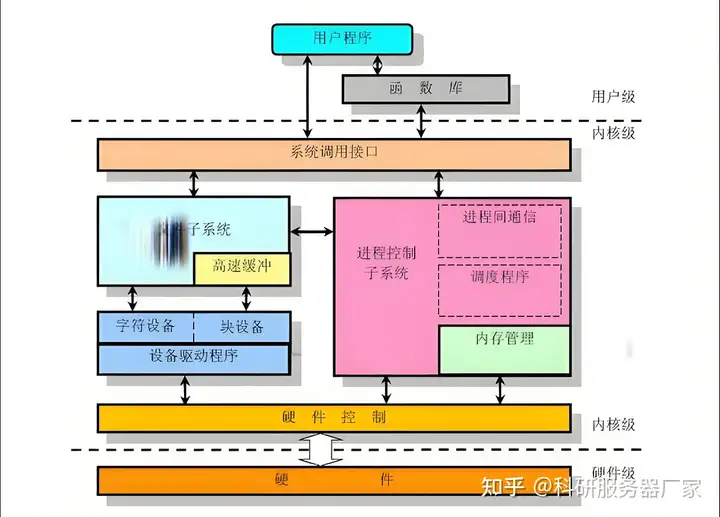
Linux 与 Windows 服务器操作系统 | 全面对比
在服务器操作系统的领域,Linux 和 Windows 一直是两个备受关注的选择。 首先来看 Windows 操作系统。它由 Microsoft Corporation 开发,在桌面领域占据显著份额,其中 Windows 10 是使用最广泛的版本,广泛应用于个人计算机和企业桌…...

给既有exe程序添加一机一码验证
原文地址:李浩的博客 lihaohello.top 本科期间开发过一款混凝土基本构件设计程序,该程序是一个独立的exe可执行文件,采用VC静态链接MFC库编制而成。近期,需要为该程序添加用户注册验证的功能,从而避免任何用户获取该程…...

【Datawhale X 魔搭 】AI夏令营第四期大模型方向,Task2:头脑风暴会,巧灵脑筋急转弯(持续更新)
队伍名称:巧灵脑筋急转弯 队伍技术栈:python,LLM,RAG,大模型,nlp,Gradio,Vue,java 队友:知唐(队长),我真的敲不动…...

mysql 多个外键
在MySQL中,一个表可以有多个外键约束,它们分别关联到不同的主表。在创建表时,可以在每个外键约束上指定不同的外键名称。以下是一个简单的例子,演示如何在创建表时定义多个外键: CREATE TABLE orders (order_id INT AU…...

解决方案上新了丨趋动科技推出基于银河麒麟操作系统的异构算力池化解决方案
趋动科技携手麒麟软件打造基于银河麒麟操作系统的异构算力池化解决方案,共同探索AI领域新场景。 人工智能技术作为数字经济发展的重要推手,在各行业业务场景中落地需要大量AI算力资源的有效保障。在IT基础设施普遍云化的今天,AI算力一方面需…...

14.创建一个实战maven的springboot项目
项目核心主要部分 pom.xml文件 <?xml version"1.0" encoding"UTF-8"?> <project xmlns"http://maven.apache.org/POM/4.0.0" xmlns:xsi"http://www.w3.org/2001/XMLSchema-instance"xsi:schemaLocation"http://mave…...

docker部署LNMP
docker部署LNMP nginx 1.22 172.111.0.10 docker-nginx mysql 8.0.30 172.111.0.20 docker-mysql php 8.1.27 172.111.0.30 docker-php docker:单节点部署,只能在一台机器上部署,如果跨机器容器无法操作,无法通信。 做高可用…...

在Spring Boot应用中,如果你希望在访问应用时加上项目的名称或者一个特定的路径前缀
在Spring Boot应用中,如果你希望在访问应用时加上项目的名称或者一个特定的路径前缀 在Spring Boot应用中,如果你希望在访问应用时加上项目的名称或者一个特定的路径前缀,你可以通过配置server.servlet.context-path属性来实现。这通常在app…...

东南大学:Wi-Fi 6搭档全光以太,打造“数智东南”信息高速路
东南大学:Wi-Fi 6搭档全光以太,打造“数智东南”信息高速路 - 华为企业业务 打好ICT底座,平台和应用层面就会非常通畅了。首先,出海企业的需求既有普遍性,也有垂直性行业的特性需求。普遍性需求需要通信、沟通数据和传…...

C++:stack类(vector和list优缺点、deque)
目录 前言 数据结构 deque vector和list的优缺点 push pop top size empty 完整代码 前言 stack类就是数据结构中的栈 C数据结构:栈-CSDN博客 stack类所拥有的函数相比与string、vector和list类都少很多,这是因为栈这个数据结构是后进先出的…...

负载均衡、高可用
负载均衡 负载均衡(Load Balance):可以利用多个计算机和组合进行海量请求处理,从而获得很高的处理效率,也可以用多个计算机做备份(高可用),使得任何一个机器坏了整个系统还是能正常…...

想转行做产品经理?看看你身上有没有这5个“隐藏技能”
在数字经济飞速发展的当下,产品经理早已不是互联网行业的“专属岗位”,而是横跨互联网、硬件、金融、制造业等多个领域的核心角色——连接用户需求与技术实现,主导产品从创意到落地的全流程,被称为“CEO的学前班”。正因如此&…...

dbg-macro配置完全指南:禁用宏、强制颜色输出与警告控制
dbg-macro配置完全指南:禁用宏、强制颜色输出与警告控制 【免费下载链接】dbg-macro A dbg(…) macro for C 项目地址: https://gitcode.com/gh_mirrors/db/dbg-macro dbg-macro是一款轻量级C调试宏工具,通过简单的dbg(...)语法即可实现变量值、类…...

从“三次握手”到文件落地:用Wireshark抓包带你彻底搞懂C++ Socket文件传输全过程
从“三次握手”到文件落地:用Wireshark抓包带你彻底搞懂C Socket文件传输全过程 当你在浏览器下载文件时,是否好奇过数据是如何跨越网络准确无误地到达你的电脑?本文将带你用C实现一个完整的TCP文件传输程序,并通过Wireshark抓包工…...

如何通过FCEUX实现NES游戏的完美模拟?超实用指南
如何通过FCEUX实现NES游戏的完美模拟?超实用指南 【免费下载链接】fceux FCEUX, a NES Emulator 项目地址: https://gitcode.com/gh_mirrors/fc/fceux 5个步骤3个技巧,让你快速掌握NES模拟器 核心价值:重温和探索经典游戏的最佳选择 …...

OpenClaw极简部署:Qwen3-VL:30B镜像+飞书5分钟接入
OpenClaw极简部署:Qwen3-VL:30B镜像飞书5分钟接入 1. 为什么选择这个组合? 上周我在测试各种开源模型与自动化工具的搭配方案时,发现了一个效率极高的组合:星图平台的Qwen3-VL:30B镜像OpenClaw框架。这个方案最吸引我的地方在于…...

深度解析IDM激活脚本:注册表锁定技术的完整实现指南
深度解析IDM激活脚本:注册表锁定技术的完整实现指南 【免费下载链接】IDM-Activation-Script IDM Activation & Trail Reset Script 项目地址: https://gitcode.com/gh_mirrors/id/IDM-Activation-Script Internet Download Manager(IDM&…...

Ludusavi完整指南:如何专业备份和管理PC游戏存档
Ludusavi完整指南:如何专业备份和管理PC游戏存档 【免费下载链接】ludusavi Backup tool for PC game saves 项目地址: https://gitcode.com/gh_mirrors/lu/ludusavi Ludusavi是一款基于Rust语言开发的跨平台PC游戏存档备份工具,专为保护玩家游戏…...

从LLaVA到Stable Diffusion:多模态融合选拼接还是交叉注意力?一张图帮你做技术选型
多模态融合技术选型指南:拼接与交叉注意力的深度对比与实践策略 在构建现代多模态AI系统时,工程师们常常面临一个关键决策点:如何有效地融合来自不同模态的信息?想象一下,你正在开发一个智能医疗影像分析系统ÿ…...

从‘偏差-方差’到一行代码:用NumPy/PyTorch五步实现GAE,附PPO实战避坑点
从‘偏差-方差’到一行代码:用NumPy/PyTorch五步实现GAE,附PPO实战避坑点 强化学习中的策略优化常常面临一个核心挑战:如何准确评估动作的价值?广义优势估计(GAE)通过巧妙平衡偏差与方差,成为PP…...

从‘它怎么又挂了’到‘服务稳如狗’:我是如何用Prometheus+Grafana给自家小项目做监控的
从零搭建轻量级服务监控:PrometheusGrafana实战指南 凌晨三点,手机突然响起刺耳的警报声——这已经是本周第三次被线上服务宕机惊醒。作为独立开发者或小团队,我们往往身兼数职,既要写代码又要维护基础设施。服务崩溃时才发现问题…...