
8.21-部署eleme项目
1.设置主从从mysql57服务器
(1)配置主数据库
[root@msater_5 ~]# systemctl stop firewalld[root@msater_5 ~]# setenforce 0[root@msater_5 ~]# systemctl disable firewalldRemoved symlink /etc/systemd/system/multi-user.target.wants/firewalld.service.Removed symlink /etc/systemd/system/dbus-org.fedoraproject.FirewallD1.service.[root@msater_5 ~]# lsanaconda-ks.cfg mysql-5.7.44-linux-glibc2.12-x86_64.tar.gz[root@msater_5 ~]# tar -xf mysql-5.7.44-linux-glibc2.12-x86_64.tar.gz [root@msater_5 ~]# lsanaconda-ks.cfg mysql-5.7.44-linux-glibc2.12-x86_64.tar.gzmysql-5.7.44-linux-glibc2.12-x86_64[root@msater_5 ~]# cp -r mysql-5.7.44-linux-glibc2.12-x86_64 /usr/local/mysql[root@msater_5 ~]# rm -rf /etc/my.cnf[root@msater_5 ~]# mkdir /usr/local/mysql/mysql-files[root@msater_5 ~]# useradd -r -s /sbin/nologin mysql[root@msater_5 ~]# chown mysql:mysql /usr/local/mysql/mysql-files/[root@msater_5 ~]# chown 750 /usr/local/mysql/mysql-files/[root@msater_5 ~]# /usr/local/mysql/bin/mysqld --initialize --user=mysql --basedir=/usr/local/mysql2024-08-21T09:39:14.991434Z 0 [Warning] TIMESTAMP with implicit DEFAULT value is deprecated. Please use --explicit_defaults_for_timestamp server option (see documentation for more details).2024-08-21T09:39:15.126969Z 0 [Warning] InnoDB: New log files created, LSN=457902024-08-21T09:39:15.150963Z 0 [Warning] InnoDB: Creating foreign key constraint system tables.2024-08-21T09:39:15.214887Z 0 [Warning] No existing UUID has been found, so we assume that this is the first time that this server has been started. Generating a new UUID: 3ac52ccc-5fa1-11ef-98a1-000c29374e2c.2024-08-21T09:39:15.215926Z 0 [Warning] Gtid table is not ready to be used. Table 'mysql.gtid_executed' cannot be opened.2024-08-21T09:39:16.034519Z 0 [Warning] A deprecated TLS version TLSv1 is enabled. Please use TLSv1.2 or higher.2024-08-21T09:39:16.034537Z 0 [Warning] A deprecated TLS version TLSv1.1 is enabled. Please use TLSv1.2 or higher.2024-08-21T09:39:16.036321Z 0 [Warning] CA certificate ca.pem is self signed.2024-08-21T09:39:16.384066Z 1 [Note] A temporary password is generated for root@localhost: RV3DtuxCi;A-[root@msater_5 ~]# cp /usr/local/mysql/support-files/mysql.server /etc/init.d/mysql57[root@msater_5 ~]# vim /usr/local/mysql/my.cnf[mysqld]basedir=/usr/local/mysqldatadir=/usr/local/mysql/datasocket=/tmp/mysql.sockport=3306log-error=/usr/local/mysql/data/db01-master.errlog-bin=/usr/local/mysql/data/binlogserver-id=10character_set_server=utf8mb4[root@msater_5 ~]# service mysql57 startStarting MySQL.Logging to '/usr/local/mysql/data/db01-master.err'.SUCCESS! [root@msater_5 ~]# /usr/local/mysql/bin/mysql -pEnter password: mysql> alter user 'root'@'localhost' identified by 'root';Query OK, 0 rows affected (0.00 sec)mysql> create user 'zzz'@'%' identified by 'zzz';Query OK, 0 rows affected (0.00 sec)mysql> grant all on *.* to 'zzz'@'%';Query OK, 0 rows affected (0.01 sec)mysql> flush privileges;Query OK, 0 rows affected (0.01 sec)mysql> create user 'slave'@'%' identified by 'slave';Query OK, 0 rows affected (0.00 sec)mysql> grant replication slave on *.* to 'slave'@'%';Query OK, 0 rows affected (0.00 sec)mysql> flush privileges;Query OK, 0 rows affected (0.00 sec)
(2)配置slave01数据库
[root@slave01_5 ~]# lsanaconda-ks.cfg mysql-5.7.44-linux-glibc2.12-x86_64.tar.gz[root@slave01_5 ~]# systemctl stop firewalld[root@slave01_5 ~]# systemctl disable firewalldRemoved symlink /etc/systemd/system/multi-user.target.wants/firewalld.service.Removed symlink /etc/systemd/system/dbus-org.fedoraproject.FirewallD1.service.[root@slave01_5 ~]# setenforce 0[root@slave01_5 ~]# tar -xf mysql-5.7.44-linux-glibc2.12-x86_64.tar.gz [root@slave01_5 ~]# cp -r mysql-5.7.44-linux-glibc2.12-x86_64 /usr/local/mysql[root@slave01_5 ~]# rm -rf /etc/my.cnf[root@slave01_5 ~]# mkdir /usr/local/mysql/mysql-files[root@slave01_5 ~]# useradd -r -s /sbin/nologin mysql[root@slave01_5 ~]# chown mysql:mysql /usr/local/mysql/mysql-files/[root@slave01_5 ~]# chown 750 /usr/local/mysql/mysql-files/[root@slave01_5 ~]# yum -y install rsync
(3)配置slave02数据库
[root@slave02_5 ~]# lsanaconda-ks.cfg mysql-5.7.44-linux-glibc2.12-x86_64.tar.gz[root@slave02_5 ~]# scp mysql-5.7.44-linux-glibc2.12-x86_64.tar.gz 192.168.2.57:/rootThe authenticity of host '192.168.2.57 (192.168.2.57)' can't be established.ECDSA key fingerprint is SHA256:E2ARFFif/HyOpjlCgDRoPqYSl2OL4PwdcX1h9cPRJiY.ECDSA key fingerprint is MD5:35:b0:cd:3b:e0:fa:10:4a:22:5e:94:aa:b7:5c:e2:79.Are you sure you want to continue connecting (yes/no)? yesWarning: Permanently added '192.168.2.57' (ECDSA) to the list of known hosts.root@192.168.2.57's password: mysql-5.7.44-linux-glibc2.12-x86_64.tar.gz 100% 663MB 85.5MB/s 00:07 [root@slave02_5 ~]# scp mysql-5.7.44-linux-glibc2.12-x86_64.tar.gz 192.168.2.58:/rootThe authenticity of host '192.168.2.58 (192.168.2.58)' can't be established.ECDSA key fingerprint is SHA256:E2ARFFif/HyOpjlCgDRoPqYSl2OL4PwdcX1h9cPRJiY.ECDSA key fingerprint is MD5:35:b0:cd:3b:e0:fa:10:4a:22:5e:94:aa:b7:5c:e2:79.Are you sure you want to continue connecting (yes/no)? yesWarning: Permanently added '192.168.2.58' (ECDSA) to the list of known hosts.root@192.168.2.58's password: mysql-5.7.44-linux-glibc2.12-x86_64.tar.gz 100% 663MB 83.1MB/s 00:07 [root@slave02_5 ~]# systemctl stop firewalld[root@slave02_5 ~]# systemctl disable firewalld[root@slave02_5 ~]# setenforce 0[root@slave02_5 ~]# tar -xf mysql-5.7.44-linux-glibc2.12-x86_64.tar.gz [root@slave02_5 ~]# cp -r mysql-5.7.44-linux-glibc2.12-x86_64 /usr/local/mysql[root@slave02_5 ~]# rm -rf /etc/my.cnf[root@slave02_5 ~]# mkdir /usr/local/mysql/mysql-files[root@slave02_5 ~]# useradd -r -s /sbin/nologin mysql[root@slave02_5 ~]# chown mysql:mysql /usr/local/mysql/mysql-files/[root@slave02_5 ~]# chown 750 /usr/local/mysql/mysql-files/[root@slave02_5 ~]# yum -y install rsync
(4)同步data
[root@msater_5 ~]# service mysql57 stopShutting down MySQL.... SUCCESS! [root@msater_5 ~]# rm -rf /usr/local/mysql/data/auto.cnf[root@msater_5 ~]# yum -y install rsync[root@msater_5 ~]# rsync -av /usr/local/mysql/data root@192.168.2.58:/usr/local/mysql/[root@msater_5 ~]# rsync -av /usr/local/mysql/data root@192.168.2.59:/usr/local/mysql/
(5)修改slave01配置文件
[root@slave01_5 ~]# ls /usr/local/mysql/bin docs lib man README support-filesdata include LICENSE mysql-files share[root@slave01_5 ~]# vim /usr/local/mysql/my.cnf[mysqld]basedir=/usr/local/mysqldatadir=/usr/local/mysql/datasocket=/tmp/mysql.sockport=3306log-error=/usr/local/mysql/data/err.logrelay-log=/usr/local/mysql/data/relaylogcharacter_set_server=utf8mb4server-id=11[root@slave01_5 ~]# cp /usr/local/mysql/support-files/mysql.server /etc/init.d/mysql57[root@slave01_5 ~]# sed -i '$aexport PATH=$PATH:/usr/local/mysql/bin' /etc/profile[root@slave01_5 ~]# source /etc/profile
(6)修改slave02配置文件
[root@slave02_5 ~]# ls /usr/local/mysqlbin docs lib man README support-filesdata include LICENSE mysql-files share[root@slave02_5 ~]# vim /usr/local/mysql/my.cnf[mysqld]basedir=/usr/local/mysqldatadir=/usr/local/mysql/datasocket=/tmp/mysql.sockport=3306log-error=/usr/local/mysql/data/err.logrelay-log=/usr/local/mysql/data/relaylogcharacter_set_server=utf8mb4server-id=12[root@slave02_5 ~]# cp /usr/local/mysql/support-files/mysql.server /etc/init.d/mysql57[root@slave02_5 ~]# sed -i '$aexport PATH=$PATH:/usr/local/mysql/bin' /etc/profile[root@slave02_5 ~]# source /etc/profile
(7)主服务器锁表
[root@msater_5 ~]# mysql -prootmysql: [Warning] Using a password on the command line interface can be insecure.Welcome to the MySQL monitor. Commands end with ; or \g.Your MySQL connection id is 3Server version: 5.7.44-log MySQL Community Server (GPL)Copyright (c) 2000, 2023, Oracle and/or its affiliates.Oracle is a registered trademark of Oracle Corporation and/or itsaffiliates. Other names may be trademarks of their respectiveowners.Type 'help;' or '\h' for help. Type '\c' to clear the current input statement.mysql> select user,host from mysql.user;+---------------+-----------+| user | host |+---------------+-----------+| slave | % || zzz | % || mysql.session | localhost || mysql.sys | localhost || root | localhost |+---------------+-----------+5 rows in set (0.00 sec)mysql> flush tables with read lock;Query OK, 0 rows affected (0.00 sec)mysql> show master status;+---------------+----------+--------------+------------------+-------------------+| File | Position | Binlog_Do_DB | Binlog_Ignore_DB | Executed_Gtid_Set |+---------------+----------+--------------+------------------+-------------------+| binlog.000002 | 154 | | | |+---------------+----------+--------------+------------------+-------------------+1 row in set (0.00 sec)
(8)配置主从服务
[root@slave01_5 ~]# mysql -uroot -prootmysql: [Warning] Using a password on the command line interface can be insecure.Welcome to the MySQL monitor. Commands end with ; or \g.Your MySQL connection id is 2Server version: 5.7.44 MySQL Community Server (GPL)Copyright (c) 2000, 2023, Oracle and/or its affiliates.Oracle is a registered trademark of Oracle Corporation and/or itsaffiliates. Other names may be trademarks of their respectiveowners.Type 'help;' or '\h' for help. Type '\c' to clear the current input statement.mysql> change master to master_host="192.168.2.57",master_user="slave",master_password="slave",master_log_file="binlog.000002",master_log_pos=154;Query OK, 0 rows affected, 2 warnings (0.01 sec)mysql> start slave;Query OK, 0 rows affected (0.01 sec)mysql> show slave status\G;*************************** 1. row ***************************Slave_IO_State: Waiting for master to send eventMaster_Host: 192.168.2.57Master_User: slaveMaster_Port: 3306Connect_Retry: 60Master_Log_File: binlog.000002Read_Master_Log_Pos: 154Relay_Log_File: relaylog.000002Relay_Log_Pos: 317Relay_Master_Log_File: binlog.000002Slave_IO_Running: YesSlave_SQL_Running: Yes
(9)配置主从从服务
[root@slave02_5 ~]# mysql -prootmysql> change master to master_host="192.168.2.57",master_user="slave",master_password="slave",master_log_file="binlog.000002",master_log_pos=154;Query OK, 0 rows affected, 2 warnings (0.01 sec)mysql> start slave;Query OK, 0 rows affected (0.01 sec)mysql> show slave status\G;*************************** 1. row ***************************Slave_IO_State: Waiting for master to send eventMaster_Host: 192.168.2.57Master_User: slaveMaster_Port: 3306Connect_Retry: 60Master_Log_File: binlog.000002Read_Master_Log_Pos: 154Relay_Log_File: relaylog.000002Relay_Log_Pos: 317Relay_Master_Log_File: binlog.000002Slave_IO_Running: YesSlave_SQL_Running: Yes
2.在mysql中添加eleme数据库设置为utf8mb4
[root@msater_5 ~]# mysql -prootmysql> unlock tables;Query OK, 0 rows affected (0.00 sec)mysql> create database if not exists eleme charset utf8mb4;Query OK, 1 row affected (0.00 sec)mysql> show databases;+--------------------+| Database |+--------------------+| information_schema || eleme || mysql || performance_schema || sys || test |+--------------------+6 rows in set (0.00 sec)
3.添加表t_user(master)
mysql> use eleme;Database changedmysql> create table t_user(-> id int primary key auto_increment,-> name varchar(45) not null,-> username varchar(45) not null,-> password varchar(45) not null,-> remark varchar(45)-> );Query OK, 0 rows affected (0.01 sec)mysql> show tables;+-----------------+| Tables_in_eleme |+-----------------+| t_user |+-----------------+1 row in set (0.00 sec)
4.添加2行记录(master)
mysql> insert into t_user (id,name,username,password,remark)values(1,"超级管理员","adm"in","admin","超级管理员");Query OK, 1 row affected (0.01 sec)mysql> insert into t_user (id,name,username,password,remark)values(2,"普通用户","guest,","guest","普通用户");Query OK, 1 row affected (0.00 sec)mysql> select * from t_user;+----+-----------------+----------+----------+-----------------+| id | name | username | password | remark |+----+-----------------+----------+----------+-----------------+| 1 | 超级管理员 | admin | admin | 超级管理员 || 2 | 普通用户 | guest | guest | 普通用户 |+----+-----------------+----------+----------+-----------------+2 rows in set (0.00 sec)
5.远程登录工具查看表数据:

6.使用mycat为三台数据库设置负载均衡(读写分离)
(1)前期环境部署
[root@mycat ~]# lsanaconda-ks.cfg Mycat-server-1.6.5-release-20180122220033-linux.tar.gzjdk-8u192-linux-x64.tar.gz[root@mycat ~]# tar -xf jdk-8u192-linux-x64.tar.gz [root@mycat ~]# tar -xf Mycat-server-1.6.5-release-20180122220033-linux.tar.gz [root@mycat ~]# cp -r jdk1.8.0_192/ /usr/local/jdk[root@mycat ~]# cp -r mycat/ /usr/local/mycat[root@mycat ~]# sed -i '$aexport JAVA_HOME=/usr/local/jdk' /etc/profile[root@mycat ~]# source /etc/profile[root@mycat ~]# sed -i '$aexport PATH=$PATH:$JAVA_HOME/bin' /etc/profile[root@mycat ~]# source /etc/profile[root@mycat ~]# javac -versionjavac 1.8.0_192[root@mycat ~]# /usr/local/mycat/bin/mycat console
(2)修改server.xml配置文件
[root@mycat ~]# vim /usr/local/mycat/conf/server.xml93 <user name="haha" defaultAccount="true">94 <property name="password">haha</property>95 <property name="schemas">eleme</property># 注释107 <!--108 <user name="user">109 <property name="password">user</property>110 <property name="schemas">TESTDB</property>111 <property name="readOnly">true</property>112 </user>113 -->
(3)修改schema.xml 配置文件
1.设置schema标签 添加dataNode="xxx" name=eleme
2.修改dataHost标签
[root@mycat ~]# vim /usr/local/mycat/conf/schema.xml 1 <?xml version="1.0"?>2 <!DOCTYPE mycat:schema SYSTEM "schema.dtd">3 <mycat:schema xmlns:mycat="http://io.mycat/">4 5 <schema name="eleme" dataNode="dn1" checkSQLschema="false" sqlMaxLimit="10 0"> 6 </schema>7 <!-- <dataNode name="dn1$0-743" dataHost="localhost1" database="db$0-743"8 /> -->9 <dataNode name="dn1" dataHost="localhost1" database="eleme" />10 <!-- <dataNode name="dn2" dataHost="localhost1" database="db2" />11 <dataNode name="dn3" dataHost="localhost1" database="db3" />-->12 <!--<dataNode name="dn4" dataHost="sequoiadb1" database="SAMPLE" />13 <dataNode name="jdbc_dn1" dataHost="jdbchost" database="db1" />14 <dataNode name="jdbc_dn2" dataHost="jdbchost" database="db2" />15 <dataNode name="jdbc_dn3" dataHost="jdbchost" database="db3" /> -->16 <dataHost name="localhost1" maxCon="1000" minCon="10" balance="0" 17 writeType="0" dbType="mysql" dbDriver="native" switchTyp e="1" slaveThreshold="100">18 <heartbeat>select user()</heartbeat>19 <!-- can have multi write hosts -->20 <writeHost host="hostM1" url="192.168.2.57:3306" user="haha"21 password="haha">22 <!-- can have multi read hosts --> 23 <readHost host="hostS2" url="192.168.2.58:3306" user="haha " password="haha" /> 24 <readHost host="hostS3" url="192.168.2.59:3306" user="haha " password="haha" />25 </writeHost>26 <!--27 <writeHost host="hostS1" url="localhost:3316" user="root"28 password="123456" />29 --> 30 <!-- <writeHost host="hostM2" url="localhost:3316" user="root" pas sword="123456"/> -->31 </dataHost>
(4)启动服务
[root@mycat ~]# /usr/local/mycat/bin/mycat startStarting Mycat-server...[root@mycat ~]# netstat -lntup | grep 8066tcp6 0 0 :::8066 :::* LISTEN 1916/j
7.客户端测试mycat
[root@client ~]# cd /usr/local/mysql/bin[root@client bin]# ./mysql -h192.168.2.19 -P8066 -uhaha -phahamysql: [Warning] Using a password on the command line interface can be insecure.Welcome to the MySQL monitor. Commands end with ; or \g.Your MySQL connection id is 83Server version: 5.6.29-mycat-1.6.5-release-20180122220033 MyCat Server (OpenCloundDB)Copyright (c) 2000, 2023, Oracle and/or its affiliates.Oracle is a registered trademark of Oracle Corporation and/or itsaffiliates. Other names may be trademarks of their respectiveowners.Type 'help;' or '\h' for help. Type '\c' to clear the current input statement.mysql> show databases;+----------+| DATABASE |+----------+| eleme |+----------+1 row in set (0.01 sec)mysql> use eleme;Reading table information for completion of table and column namesYou can turn off this feature to get a quicker startup with -ADatabase changedmysql> show tables;+-----------------+| Tables_in_eleme |+-----------------+| t_user |+-----------------+1 row in set (0.01 sec)mysql> select * from t_user;+----+-----------------+----------+----------+-----------------+| id | name | username | password | remark |+----+-----------------+----------+----------+-----------------+| 1 | 超级管理员 | admin | admin | 超级管理员 || 2 | 普通用户 | guest | guest | 普通用户 |+----+-----------------+----------+----------+-----------------+2 rows in set (0.01 sec)mysql>
8.部署java17环境
(1)java01
[root@java01 ~]# lsanaconda-ks.cfg jdk-17_linux-x64_bin.tar.gz [root@java01 ~]# tar -xf jdk-17_linux-x64_bin.tar.gz [root@java01 ~]# lsanaconda-ks.cfg jdk-17.0.12 jdk-17_linux-x64_bin.tar.gz [root@java01 ~]# cp -r jdk-17.0.12/ /usr/local/jdk[root@java01 ~]# vim /etc/profileexport JAVA_HOME=/usr/local/jdkexport PATH=$PATH:$JAVA_HOME/bin[root@java01 ~]# source /etc/profile[root@java01 ~]# javac --versionjavac 17.0.12[root@java01 ~]# firewall-cmd --add-port=8080/tcp --permanentsuccess[root@java01 ~]# firewall-cmd --reloadsuccess[root@java01 ~]# lsanaconda-ks.cfg application_(1).yml eleme_server-0.0.1-SNAPSHOT.jar jdk-17.0.12 jdk-17_linux-x64_bin.tar.gz[root@java01 ~]# mv application_\(1\).yml application.yml [root@java01 ~]# lsanaconda-ks.cfg application.yml eleme_server-0.0.1-SNAPSHOT.jar jdk-17.0.12 jdk-17_linux-x64_bin.tar.gz[root@java01 ~]# vim application.yml server:port: 8080spring:datasource:driver-class-name: com.mysql.cj.jdbc.Driverurl: jdbc:mysql://192.168.2.19:8066/elemeusername: hahapassword: haha[root@java01 ~]# java -jar eleme_server-0.0.1-SNAPSHOT.jar
(2)浏览器访问:192.168.2.11:8080

(3)java02
[root@java02 ~]# lsanaconda-ks.cfg eleme_server-0.0.1-SNAPSHOT.jar jdk-17_linux-x64_bin.tar.gzapplication.yml [root@java02 ~]# tar -xf jdk-17_linux-x64_bin.tar.gz [root@java02 ~]# cp -r jdk-17.0.12/ /usr/local/jdk[root@java02 ~]# vim /etc/profile[root@java02 ~]# source /etc/profile[root@java02 ~]# javac -versionjavac 17.0.12[root@java02 ~]# vim application.yml server:port: 8080spring:datasource:driver-class-name: com.mysql.cj.jdbc.Driverurl: jdbc:mysql://192.168.2.19:8066/elemeusername: hahapassword: haha[root@java02 ~]# java -jar eleme_server-0.0.1-SNAPSHOT.jar
(4)浏览器访问:192.168.2.12:8080

9.部署LVS-nat模式
(1)lvs
[root@lvs ~]# ifconfig ens33:0 192.168.2.150 broadcast 192.168.2.121 netmask 255.255.255.255 up[root@lvs ~]# route add -host 192.168.2.150 dev ens33:0[root@lvs ~]# yum -y install ipvsadm[root@lvs ~]# ipvsadm -C[root@lvs ~]# ipvsadm -A -t 192.168.2.150:8080 -s rr[root@lvs ~]# ipvsadm -a -t 192.168.2.150:8080 -r 192.168.2.11 -g[root@lvs ~]# ipvsadm -a -t 192.168.2.150:8080 -r 192.168.2.12 -g[root@lvs ~]# systemctl stop firewalld[root@lvs ~]# systemctl disable firewalldRemoved symlink /etc/systemd/system/multi-user.target.wants/firewalld.service.Removed symlink /etc/systemd/system/dbus-org.fedoraproject.FirewallD1.service.[root@lvs ~]# setenforce 0[root@lvs ~]# systemctl stop firewalld[root@lvs ~]# ipvsadm -LnIP Virtual Server version 1.2.1 (size=4096)Prot LocalAddress:Port Scheduler Flags-> RemoteAddress:Port Forward Weight ActiveConn InActConnTCP 192.168.2.150:8080 rr-> 192.168.2.11:8080 Route 1 0 1 -> 192.168.2.12:8080 Route 1 0 1
(2)java01
[root@java01 ~]# ifconfig lo:0 192.168.2.150 broadcast 192.168.2.150 netmask 255.255.255.255 up[root@java01 ~]# route add -host 192.168.2.150 dev lo:0[root@java01 ~]# vim arp.sh[root@java01 ~]# source arp.sh
(3)java02
[root@java02 ~]# ifconfig lo:0 192.168.2.150 broadcast 192.168.2.150 netmask 255.255.255.255 up[root@java02 ~]# route add -host 192.168.2.150 dev lo:0[root@java02 ~]# vim arp.sh[root@java02 ~]# source arp.sh
(4)浏览器访问:192.168.2.150:8080(外网地址)

相关文章:
8.21-部署eleme项目
1.设置主从从mysql57服务器 (1)配置主数据库 [rootmsater_5 ~]# systemctl stop firewalld[rootmsater_5 ~]# setenforce 0[rootmsater_5 ~]# systemctl disable firewalldRemoved symlink /etc/systemd/system/multi-user.target.wants/firewalld.serv…...

多目标跟踪之ByteTrack论文(翻译+精读)
ByteTrack:通过关联每个检测框进行多对象跟踪 摘要 翻译 多对象跟踪(MOT)旨在估计视频中对象的边界框和身份。大多数方法通过关联分数高于阈值的检测框来获取身份。检测分数低的物体,例如被遮挡的物体被简单地丢弃,…...

【实践】Java开发常用工具类或中间件
在Java开发中,有许多常用的工具类和中间件,它们可以显著提高开发效率,简化代码,并提供强大的功能。这些工具类和中间件广泛应用于各种类型的Java应用程序中,包括Web应用、企业级应用、微服务等。以下是一些在Java开发中…...

Vue2移动端(H5项目)项目封装车牌选择组件
一、最终效果 二、参数配置 1、代码示例: <t-keyword:isShow"isShow"ok"isShowfalse"cancel"isShowfalse"inputchange"inputchange":finalValue"trailerNo"/>2、配置参数(TKeyword Attribute…...

四川财谷通信息技术有限公司抖音小店的优势
在数字化浪潮的推动下,电商行业迎来了前所未有的发展机遇,而抖音小店作为新兴的电商平台,凭借其独特的社交属性和便捷的购物体验,迅速赢得了广大消费者的青睐。在众多抖音小店中,四川财谷通信息技术有限公司旗下的抖音…...

2025届八股文:计算机网络高频重点面试题
鉴于排版复杂且篇幅过长,本文仅列举出问题,而未给出答案,有需要答案的同学可后台私信。整理总结不易,请尊重劳动成果,转载请注明出处。 目录 网络基础 HTTP TCP UDP IP PING WebSocket DNS 网络安全 网络基础…...

嵌入式和单片机有什么区别?
目录 (1)什么是嵌入式? (2)什么是单片机? (3)嵌入式和单片机的共同点 (4)嵌入式和单片机的区别 (1)什么是嵌入式? 关…...

JSON.stringify 和 JSON.parse
JSON.stringify 是一个将 JavaScript 对象转换为 JSON 字符串的方法,它有三个参数: JSON.stringify(value, replacer, space) 参数详解 value (必需): 这是你想要转换为 JSON 字符串的 JavaScript 对象或数组。例如:…...

APP架构设计_2.用MVVM架构实现一个具体业务
2.MVVM架构图 3.MVVM 实现一个具体业务 3.1 界面层的实现 界面层实现时,需要遵循以下几点。 1)选择实现界面的元素 界面元素可以用 view 或 compose 来实现,这里用 view 实现。 2)提供一个状态容器 这里使用 ViewModel 作为状态容…...
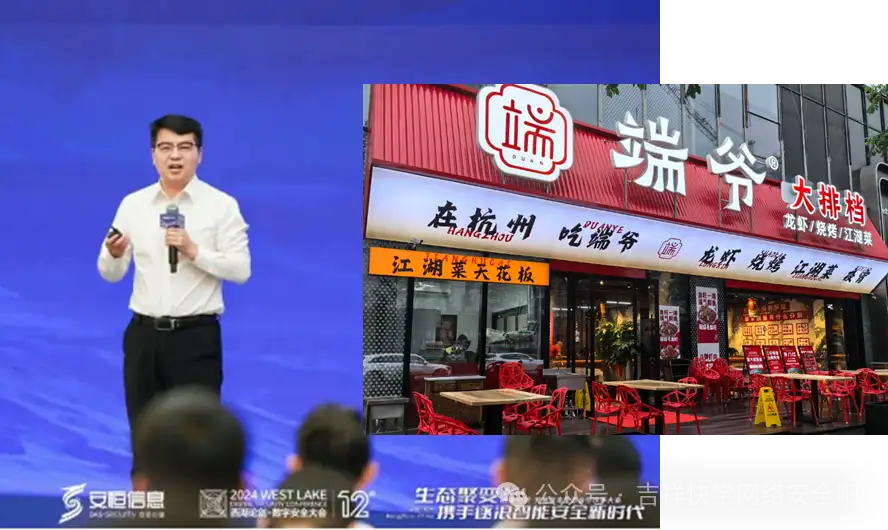
安恒信息总裁宋端智,辞职了!活捉一枚新鲜出炉的餐饮人!
吉祥知识星球http://mp.weixin.qq.com/s?__bizMzkwNjY1Mzc0Nw&mid2247485367&idx1&sn837891059c360ad60db7e9ac980a3321&chksmc0e47eebf793f7fdb8fcd7eed8ce29160cf79ba303b59858ba3a6660c6dac536774afb2a6330#rd 《网安面试指南》http://mp.weixin.qq.com/s?…...

《javaEE篇》--定时器
定时器概念 当我们不需要某个线程立刻执行,而是在指定时间点或指定时间段之后执行,假如我们要定期清理数据库里的一些信息时,如果每次都手动清理的话就太麻烦,所以就可以使用定时器。定时器就可以比作一个闹钟,可以让…...

OpenLayers3, 缩放、平移、复位操作
文章目录 一、前言二、代码示例 一、前言 本文基于OpenLayers3实现地图缩放、平移和复位操作 二、代码示例 <!DOCTYPE HTML PUBLIC "-//W3C//DTD XHTML 1.0 Transitional//EN""http://www.w3.org/TR/xhtml1/DTD/xhtml1-transitional.dtd"><htm…...

进程与线程(7)
IPC通信方式: 一、共享内存 system v : 共享内存 是一块,内核预留的空间 最高效的通信方式 (避免了用户空间 到 内核空间的数据拷贝) 二、IPC对象操作通用框架: key值 > 申请 》读写 》关闭 》卸载 1.ftok函数:…...

传知代码-自动化细胞核分割与特征分析(论文复现)
代码以及视频讲解 本文所涉及所有资源均在传知代码平台可获取 引言 细胞核分割和分类在医学研究和临床诊断中具有重要意义。精准的细胞核分割能够帮助医生更好地识别和分析细胞核的形态学特征,从而辅助疾病诊断、癌症检测以及药物研发。HoverNet是一种基于深度学…...

Vue UI - 可视化的Vue项目管理器
概述 Vue CLI 3.0 更新后,提供了一套全新的可视化Vue项目管理器 —— Vue UI。所以要想使用它,你的 Vue CL I版本必须要在v3.0以上。 一、启动Vue UI 1.1 环境准备 1.1.1 安装node.js 访问官网(外网下载速度较慢)或 http://nod…...

团队管理之敏捷开发
一、敏捷实践 敏捷开发中一直秉承的理念和宣言是:我们正在通过亲身实践以及帮助他人实践,揭示更好的软件开发方法。通过这项工作,我们认为:个体和交互胜过过程和工具、可以工作的软件胜过面面俱到的文档、客户合作胜过合同谈判、…...

Hive3:表的常用修改语句
1、表重命名 ALTER TABLE old_table_name RENAME TO new_table_name;如: ALTER TABLE score4 RENAME TO score5;2、修改表属性值 ALTER TABLE table_name SET TBLPROPERTIES table_properties; table_properties:: (property_name property_value, property…...
MidJourney付费失败的原因以及失败后如何取消或续订(文末附MidJourney,GPT-4o教程)
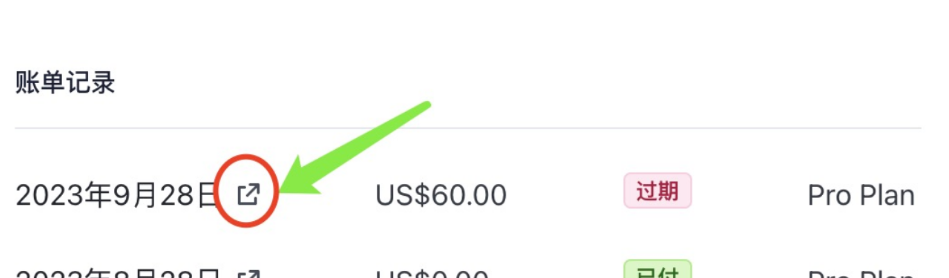
MidJourney付费失败的原因 MidJourney付费失败的原因可能包括支付方式无效、支付信息错误、网络问题、账户设置问题等。 支付方式无效或信息错误:如果用户提供的支付方式(如信用卡)信息不正确,或者支付方式本身不支持该地区…...

PHP安全开发
安全开发 PHP 基础 增:insert into 表名(列名 1, 列名 2) value(‘列 1 值 1’, ‘列 2 值 2’); 删:delete from 表名 where 列名 ‘条件’; 改:update 表名 set 列名 数据 where 列名 ‘条件’; 查:select * from 表名 wher…...

【大模型从入门到精通32】开源库框架LangChain RAG 系统中的问答技术2
这里写目录标题 探索高级问答链类型MapReduce 和 Refine 技术 实用建议和最佳实践解决 RetrievalQA 限制结论进一步阅读和探索理论问题实践问题 探索高级问答链类型 MapReduce 和 Refine 技术 MapReduce 和 Refine 是设计用来规避由语言模型 (LM) 上下文窗口大小所导致的限制…...

基于Argo Tunnel的轻量级容器PaaS部署实践
1. 项目概述与核心价值最近在折腾容器化部署和边缘计算场景时,我一直在寻找一个足够轻量、灵活且能快速拉起服务的方案。传统的Kubernetes集群对于小型项目或个人开发者来说,学习成本和运维负担都太重了,而单纯的Docker Compose又缺乏服务发现…...
:涵盖217家认证出版机构、11种非标准署名格式及4类灰色地带处理协议)
Perplexity出版社信息查询终极清单(2024Q3独家更新):涵盖217家认证出版机构、11种非标准署名格式及4类灰色地带处理协议
更多请点击: https://intelliparadigm.com 第一章:Perplexity出版社信息查询 Perplexity 是一家以 AI 增强研究为定位的技术出版与知识平台,其核心产品并非传统纸质出版物,而是基于实时网络检索、引用溯源与结构化摘要的交互式问…...

2026年南京本地实测整理,值得入手的高性价比全屋定制品牌推荐
讲真,南京准备装房子、换柜子的姊妹们、老少爷们,谁没为全屋定制头大过?刚收了江北核心区的新房,还是鼓楼老破小准备翻新,跑了三五家门店就会发现:水太深了!低价套餐勾你进去,签约后…...

Boss-Key:Windows下一键隐藏窗口的终极隐私保护工具
Boss-Key:Windows下一键隐藏窗口的终极隐私保护工具 【免费下载链接】Boss-Key 老板来了?快用Boss-Key老板键一键隐藏静音当前窗口!上班摸鱼必备神器 项目地址: https://gitcode.com/gh_mirrors/bo/Boss-Key 在数字化办公时代…...

【技术底稿 35】低配单机混跑 Dev/Test 微服务环境,Jenkins 部署包错乱踩坑全复盘
一、核心背景在不新增服务器、沿用现有 7G 低配开发机前提下,同时承载:开发环境(2 个 admin 节点)测试环境(1 个 admin 节点)Jenkins 打包编译MySQL / Redis / Zookeeper / Milvus 等全套中间件机器硬件资源…...

物联网技术如何重塑智能电网的底层架构
1. 物联网技术重塑智能电网的底层逻辑2003年美加大停电事故导致5000万人陷入黑暗,这场灾难直接催生了现代智能电网的诞生。如今,当我们谈论智能电网时,本质上是在讨论一个由物联网(IoT)技术重构的能源神经系统。这个系统通过海量智能终端实时…...

Sora 2 + Premiere = 新一代“AI剪辑OS”?深度拆解其MediaCore架构、Timeline Graph API及动态权重调度算法
更多请点击: https://intelliparadigm.com 第一章:Sora 2 Premiere 新一代“AI剪辑OS”?概念演进与范式重构 传统视频编辑正经历一场静默但深刻的底层迁移——当 Sora 2 的原生时空建模能力与 Adobe Premiere Pro 的专业时间线引擎深度耦合…...

AI记忆库CoPaw-Memory:向量检索与结构化存储融合实践
1. 项目概述:当AI学会“记笔记”,一个开源记忆库的诞生最近在折腾AI应用开发的朋友,可能都遇到过同一个痛点:如何让AI记住我们说过的话?无论是构建一个长期陪伴的聊天机器人,还是开发一个能理解复杂上下文的…...

基于Circuit Playground Express与MakeCode的阿基米德螺旋桨智能小船制作
1. 项目概述:当古老智慧遇见现代创客阿基米德螺旋,这个诞生于两千多年前的巧妙发明,最初被用来从低处向高处提水。它的核心原理简单而强大:一个旋转的螺旋面,能将流体或颗粒物沿着轴向“推”动。今天,我们不…...

别再“另存为”了!职场人90%的无效内耗都源于这一个操作。企业文档如何管理?
加班到晚上八点,职场人小林终于改完了项目方案,随手点了“另存为”,命名为“方案_最终版.doc“后发到了工作群。本以为可以安心下班,群里却炸锅了:“小林,你这个最终版和我手里的不一样啊?”“我…...