
微信小程序手写签名
微信小程序手写签名组件
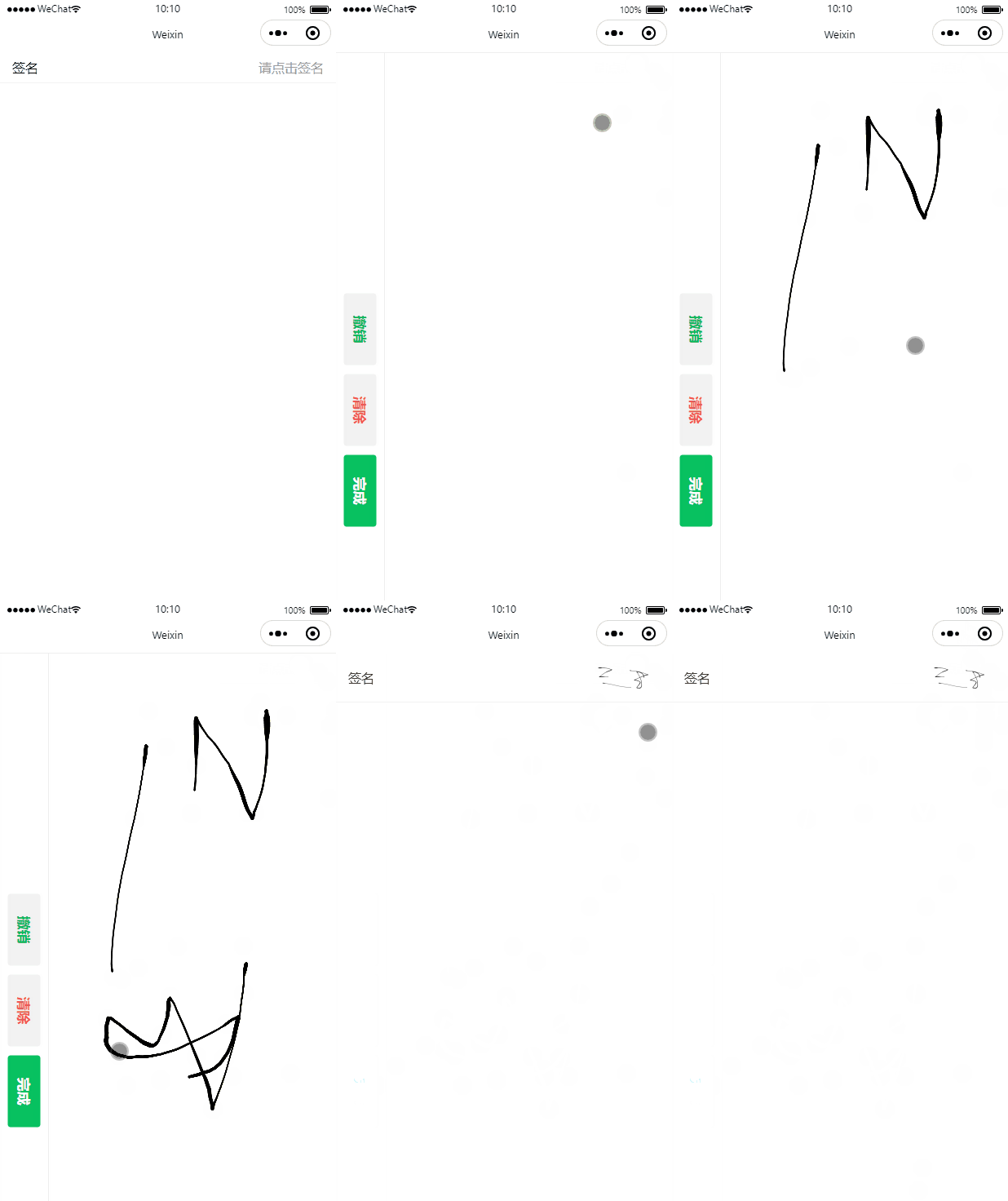
该组件基于signature_pad封装,signature_pad本身是web端的插件,此处将插件代码修改为小程序端可用。
signature_pad.js
/*!* Signature Pad v5.0.3 | https://github.com/szimek/signature_pad* (c) 2024 Szymon Nowak | Released under the MIT license*/
!(function (t, e) {"object" == typeof exports && "undefined" != typeof module? (module.exports = e()): "function" == typeof define && define.amd? define(e): ((t ="undefined" != typeof globalThis? globalThis: t || self).SignaturePad = e());
})(this, function () {"use strict";class t {constructor(t, e, i, n) {if (isNaN(t) || isNaN(e))throw new Error(`Point is invalid: (${t}, ${e})`);(this.x = +t),(this.y = +e),(this.pressure = i || 0),(this.time = n || Date.now());}distanceTo(t) {return Math.sqrt(Math.pow(this.x - t.x, 2) + Math.pow(this.y - t.y, 2));}equals(t) {return (this.x === t.x &&this.y === t.y &&this.pressure === t.pressure &&this.time === t.time);}velocityFrom(t) {return this.time !== t.time? this.distanceTo(t) / (this.time - t.time): 0;}}class e {static fromPoints(t, i) {const n = this.calculateControlPoints(t[0], t[1], t[2]).c2,s = this.calculateControlPoints(t[1], t[2], t[3]).c1;return new e(t[1], n, s, t[2], i.start, i.end);}static calculateControlPoints(e, i, n) {const s = e.x - i.x,o = e.y - i.y,r = i.x - n.x,h = i.y - n.y,a = (e.x + i.x) / 2,c = (e.y + i.y) / 2,d = (i.x + n.x) / 2,l = (i.y + n.y) / 2,u = Math.sqrt(s * s + o * o),v = Math.sqrt(r * r + h * h),_ = u + v == 0 ? 0 : v / (u + v),p = d + (a - d) * _,m = l + (c - l) * _,g = i.x - p,w = i.y - m;return { c1: new t(a + g, c + w), c2: new t(d + g, l + w) };}constructor(t, e, i, n, s, o) {(this.startPoint = t),(this.control2 = e),(this.control1 = i),(this.endPoint = n),(this.startWidth = s),(this.endWidth = o);}length() {let t,e,i = 0;for (let n = 0; n <= 10; n += 1) {const s = n / 10,o = this.point(s,this.startPoint.x,this.control1.x,this.control2.x,this.endPoint.x),r = this.point(s,this.startPoint.y,this.control1.y,this.control2.y,this.endPoint.y);if (n > 0) {const n = o - t,s = r - e;i += Math.sqrt(n * n + s * s);}(t = o), (e = r);}return i;}point(t, e, i, n, s) {return (e * (1 - t) * (1 - t) * (1 - t) +3 * i * (1 - t) * (1 - t) * t +3 * n * (1 - t) * t * t +s * t * t * t);}}class i {constructor() {try {this._et = new EventTarget();} catch (t) {this._et = document;}}dispatchEvent(t) {return this._et.dispatchEvent(t);}}class n extends i {constructor(t, e = {}) {var i, s, o;super(),(this.canvas = t),(this._drawingStroke = !1),(this._isEmpty = !0),(this._lastPoints = []),(this._data = []),(this._lastVelocity = 0),(this._lastWidth = 0),(this._handleMouseDown = (t) => {this._isLeftButtonPressed(t, !0) &&!this._drawingStroke &&this._strokeBegin(this._pointerEventToSignatureEvent(t));}),(this._handleMouseMove = (t) => {this._isLeftButtonPressed(t, !0) && this._drawingStroke? this._strokeMoveUpdate(this._pointerEventToSignatureEvent(t)): this._strokeEnd(this._pointerEventToSignatureEvent(t), !1);}),(this._handleMouseUp = (t) => {this._isLeftButtonPressed(t) ||this._strokeEnd(this._pointerEventToSignatureEvent(t));}),(this._handleTouchStart = (t) => {1 !== t.touches.length ||this._drawingStroke ||(t.cancelable && t.preventDefault(),this._strokeBegin(this._touchEventToSignatureEvent(t)));}),(this._handleTouchMove = (t) => {1 === t.touches.length &&(t.cancelable && t.preventDefault(),this._drawingStroke? this._strokeMoveUpdate(this._touchEventToSignatureEvent(t)): this._strokeEnd(this._touchEventToSignatureEvent(t), !1));}),(this._handleTouchEnd = (t) => {0 === t.touches.length &&(t.cancelable && t.preventDefault(),this._strokeEnd(this._touchEventToSignatureEvent(t)));}),(this._handlePointerDown = (t) => {this._isLeftButtonPressed(t) &&!this._drawingStroke &&(t.preventDefault(),this._strokeBegin(this._pointerEventToSignatureEvent(t)));}),(this._handlePointerMove = (t) => {this._isLeftButtonPressed(t, !0) && this._drawingStroke? (t.preventDefault(),this._strokeMoveUpdate(this._pointerEventToSignatureEvent(t))): this._strokeEnd(this._pointerEventToSignatureEvent(t), !1);}),(this._handlePointerUp = (t) => {this._isLeftButtonPressed(t) ||(t.preventDefault(),this._strokeEnd(this._pointerEventToSignatureEvent(t)));}),(this.velocityFilterWeight = e.velocityFilterWeight || 0.7),(this.minWidth = e.minWidth || 0.5),(this.maxWidth = e.maxWidth || 2.5),(this.throttle = null !== (i = e.throttle) && void 0 !== i ? i : 16),(this.minDistance =null !== (s = e.minDistance) && void 0 !== s ? s : 5),(this.dotSize = e.dotSize || 0),(this.penColor = e.penColor || "black"),(this.backgroundColor = e.backgroundColor || "rgba(0,0,0,0)"),(this.compositeOperation = e.compositeOperation || "source-over"),(this.canvasContextOptions =null !== (o = e.canvasContextOptions) && void 0 !== o ? o : {}),(this._strokeMoveUpdate = this.throttle? (function (t, e = 250) {let i,n,s,o = 0,r = null;const h = () => {(o = Date.now()),(r = null),(i = t.apply(n, s)),r || ((n = null), (s = []));};return function (...a) {const c = Date.now(),d = e - (c - o);return ((n = this),(s = a),d <= 0 || d > e? (r && (clearTimeout(r), (r = null)),(o = c),(i = t.apply(n, s)),r || ((n = null), (s = []))): r || (r = setTimeout(h, d)),i);};})(n.prototype._strokeUpdate, this.throttle): n.prototype._strokeUpdate),(this._ctx = t.getContext("2d", this.canvasContextOptions)),this.clear();}clear() {const { _ctx: t, canvas: e } = this;(t.fillStyle = this.backgroundColor),t.clearRect(0, 0, e.width, e.height),t.fillRect(0, 0, e.width, e.height),(this._data = []),this._reset(this._getPointGroupOptions()),(this._isEmpty = !0);}fromDataURL(t, e = {}) {return new Promise((i, n) => {const s = new Image(),o = e.ratio || window.devicePixelRatio || 1,r = e.width || this.canvas.width / o,h = e.height || this.canvas.height / o,a = e.xOffset || 0,c = e.yOffset || 0;this._reset(this._getPointGroupOptions()),(s.onload = () => {this._ctx.drawImage(s, a, c, r, h), i();}),(s.onerror = (t) => {n(t);}),(s.crossOrigin = "anonymous"),(s.src = t),(this._isEmpty = !1);});}toDataURL(t = "image/png", e) {return ("number" != typeof e && (e = void 0), this.canvas.toDataURL(t, e));}isEmpty() {return this._isEmpty;}fromData(t, { clear: e = !0 } = {}) {e && this.clear(),this._fromData(t, this._drawCurve.bind(this), this._drawDot.bind(this)),(this._data = this._data.concat(t));}toData() {return this._data;}_isLeftButtonPressed(t, e) {return e ? 1 === t.buttons : !(1 & ~t.buttons);}_pointerEventToSignatureEvent(t) {return {event: t,type: t.type,x: t.x,y: t.y,pressure: "pressure" in t ? t.pressure : 0,};}_touchEventToSignatureEvent(t) {const e = t.changedTouches[0];return {event: t,type: t.type,x: e.x,y: e.y,pressure: e.force,};}_getPointGroupOptions(t) {return {penColor: t && "penColor" in t ? t.penColor : this.penColor,dotSize: t && "dotSize" in t ? t.dotSize : this.dotSize,minWidth: t && "minWidth" in t ? t.minWidth : this.minWidth,maxWidth: t && "maxWidth" in t ? t.maxWidth : this.maxWidth,velocityFilterWeight:t && "velocityFilterWeight" in t? t.velocityFilterWeight: this.velocityFilterWeight,compositeOperation:t && "compositeOperation" in t? t.compositeOperation: this.compositeOperation,};}_strokeBegin(event) {this._drawingStroke = !0;const i = this._getPointGroupOptions()const n = Object.assign(Object.assign({}, i), { points: [] })this._data.push(n);this._reset(i);this._strokeUpdate(event);}_strokeUpdate(t) {if (!this._drawingStroke) return;if (0 === this._data.length) return void this._strokeBegin(t);const e = this._createPoint(t.x, t.y, t.pressure),i = this._data[this._data.length - 1],n = i.points,s = n.length > 0 && n[n.length - 1],o = !!s && e.distanceTo(s) <= this.minDistance,r = this._getPointGroupOptions(i);if (!s || !s || !o) {const t = this._addPoint(e, r);s ? t && this._drawCurve(t, r) : this._drawDot(e, r),n.push({ time: e.time, x: e.x, y: e.y, pressure: e.pressure });}}_strokeEnd(t, e = !0) {this._drawingStroke &&(e && this._strokeUpdate(t),(this._drawingStroke = !1));}_reset(t) {(this._lastPoints = []),(this._lastVelocity = 0),(this._lastWidth = (t.minWidth + t.maxWidth) / 2),(this._ctx.fillStyle = t.penColor),(this._ctx.globalCompositeOperation = t.compositeOperation);}_createPoint(e, i, n) {return new t(e , i, n, new Date().getTime());}_addPoint(t, i) {const { _lastPoints: n } = this;if ((n.push(t), n.length > 2)) {3 === n.length && n.unshift(n[0]);const t = this._calculateCurveWidths(n[1], n[2], i),s = e.fromPoints(n, t);return n.shift(), s;}return null;}_calculateCurveWidths(t, e, i) {const n =i.velocityFilterWeight * e.velocityFrom(t) +(1 - i.velocityFilterWeight) * this._lastVelocity,s = this._strokeWidth(n, i),o = { end: s, start: this._lastWidth };return (this._lastVelocity = n), (this._lastWidth = s), o;}_strokeWidth(t, e) {return Math.max(e.maxWidth / (t + 1), e.minWidth);}_drawCurveSegment(t, e, i) {const n = this._ctx;n.moveTo(t, e), n.arc(t, e, i, 0, 2 * Math.PI, !1), (this._isEmpty = !1);}_drawCurve(t, e) {const i = this._ctx,n = t.endWidth - t.startWidth,s = 2 * Math.ceil(t.length());i.beginPath(), (i.fillStyle = e.penColor);for (let i = 0; i < s; i += 1) {const o = i / s,r = o * o,h = r * o,a = 1 - o,c = a * a,d = c * a;let l = d * t.startPoint.x;(l += 3 * c * o * t.control1.x),(l += 3 * a * r * t.control2.x),(l += h * t.endPoint.x);let u = d * t.startPoint.y;(u += 3 * c * o * t.control1.y),(u += 3 * a * r * t.control2.y),(u += h * t.endPoint.y);const v = Math.min(t.startWidth + h * n, e.maxWidth);this._drawCurveSegment(l, u, v);}i.closePath(), i.fill();}_drawDot(t, e) {const i = this._ctx,n = e.dotSize > 0 ? e.dotSize : (e.minWidth + e.maxWidth) / 2;i.beginPath(),this._drawCurveSegment(t.x, t.y, n),i.closePath(),(i.fillStyle = e.penColor),i.fill();}_fromData(e, i, n) {for (const s of e) {const { points: e } = s,o = this._getPointGroupOptions(s);if (e.length > 1)for (let n = 0; n < e.length; n += 1) {const s = e[n],r = new t(s.x, s.y, s.pressure, s.time);0 === n && this._reset(o);const h = this._addPoint(r, o);h && i(h, o);}else this._reset(o), n(e[0], o);}}}return n;
});
//# sourceMappingURL=signature_pad.umd.min.js.map
组件代码
这里封装展示的是横向签名,但其实画布是竖向,最后获取的是将画布旋转-90度的图片。

signature.wxml
<page-container show="{{show}}" position="right" bind:afterleave="pageLeave"><view hidden="{{!show}}" class="signature-wrap"><view class="actions-wrap"><view class="actions"><button type="default" class="sign-button" bindtap="tapUndo">撤销</button><button type="warn" class="sign-button" bindtap="tapClear">清除</button><button type="primary" class="sign-button" bindtap="tapConfirm">完成</button></view></view><canvastype="2d"id="signature"class="signature"style="width:{{width}}px; height:{{height}}px;"disable-scroll="{{true}}"bindtouchstart="handleTouchStart"bindtouchmove="handleTouchMove"bindtouchend="handleTouchEnd"></canvas><!-- 旋转图片canvas容器,不在页面上展示 --><view class="offscreen"><canvasid="targetSignature"type="2d"style="width:{{height}}px; height:{{width}}px;"/></view></view>
</page-container>
signature.js 这里需要注意,我的引用路径是'@/static/signature_pad',这种写法需要在app.json处配置resolveAlias自定义路径映射
import SignaturePad from '@/static/signature_pad'Component({/*** 组件的属性列表*/properties: {show: false},/*** 组件的初始数据*/data: {signature: null,width: 0,height: 0,dpr: 1},lifetimes: {ready() {const { windowWidth, windowHeight, pixelRatio } = wx.getWindowInfo()this.setData({width: windowWidth - 60, // 减去按钮区域height: windowHeight,dpr: Math.max(pixelRatio || 1, 2),}, () => {this.init()})}},/*** 组件的方法列表*/methods: {init() {this.createSelectorQuery().select('#signature').fields({ node: true, size: true }).exec((res) => {const { width, height, dpr } = this.dataconst canvas = res[0].nodeconst ctx = canvas.getContext('2d')canvas.width = width * dprcanvas.height = height * dprctx.scale(dpr, dpr)const signature = new SignaturePad(canvas, {ratio: dpr,minWidth: 1,maxWidth: 4,backgroundColor: '#fff'});this.setData({signature})})},handleTouchStart(e) {this.data.signature._handleTouchStart(e)},handleTouchMove(e) {this.data.signature._handleTouchMove(e)},handleTouchEnd(e) {this.data.signature._handleTouchEnd(e)},tapClear() {this.data.signature.clear()},tapUndo() {let data = this.data.signature.toData()if (data) {data.pop()this.data.signature.fromData(data)}},async tapConfirm() {let isEmpty = this.data.signature.isEmpty()if (isEmpty) {return wx.showToast({title: '未签名',icon: 'none'})}const base64Url = this.data.signature.toDataURL()const targetSign = await this.getRotateImage(base64Url)this.triggerEvent('confirm', targetSign)},// 获取旋转后的图片getRotateImage(url) {return new Promise((resolve, reject) => {const query = this.createSelectorQuery()query.select('#targetSignature').node(res => {let canvas = res.nodeconst { width, height } = this.dataconst ctx = canvas.getContext('2d')canvas.width = heightcanvas.height = widthctx.clearRect(0, 0, height, width)ctx.translate(0, width)ctx.rotate(-Math.PI / 2)const image = canvas.createImage()image.onload = () => {ctx.drawImage(image, 0, 0, width, height)// 如果只需要base64,只取这部分就可以const rotatedSign = canvas.toDataURL()ctx.clearRect(0, 0, height, width)resolve(rotatedSign)// 如果需要上传文件等相关处理,写到本地临时文件后做你自己的处理// wx.canvasToTempFilePath({//   canvas,//   success(res) {//     resolve(res.tempFilePath)//   }// })}image.src = url}).exec()})}}
})
signature.wxss
.signature-wrap {width: 100vw;height: 100vh;display: flex;z-index: 99;background-color: #fff;border-top: 2rpx solid #eee;
}
.actions-wrap {width: 60px;display: flex;justify-content: center;align-items: flex-end;padding-bottom: 320rpx;border-right: 2rpx solid #eee;
}
.actions {white-space: nowrap;transform: rotate(90deg);display: flex;
}
.actions .sign-button {width: 160rpx;margin-left: 20rpx;
}
.offscreen {position: fixed;left: 9999px;
}
调用组件
index.wxml
<view class="row"><view class="label">签名</view><view class="value" bind:tap="tapSignature"><image wx:if="{{signImg}}" class="sign-img" src="{{signImg}}" mode="heightFix" /><text wx:else class="input">请点击签名</text></view>
</view><!-- 签名组件 -->
<signature wx:if="{{showSign}}" show="{{showSign}}" bindconfirm="confirmSign" bindcancel="cancelSign"></signature>
index.wxss
	.row {display: flex;align-items: center;padding: 16rpx 30rpx;border-bottom: 2rpx solid #f2f2f2;
}
.row .label {flex-shrink: 0;
}
.row .value {flex: 1;display: flex;justify-content: flex-end;
}
.row .value .input {color: #999;
}
.row .value .sign-img {height: 80rpx;
}
index.json
{"usingComponents": {"signature": "/components/signature/signature"}
}
相关文章:
微信小程序手写签名
微信小程序手写签名组件 该组件基于signature_pad封装,signature_pad本身是web端的插件,此处将插件代码修改为小程序端可用。 signature_pad.js /*!* Signature Pad v5.0.3 | https://github.com/szimek/signature_pad* (c) 2024 Szymon Nowak | Releas…...

Javascript 使用中点查找矩形的角(Find Corners of Rectangle using mid points)
考虑一个矩形 ABCD,我们给出了边 AD 和 BC 中点(分别为 p 和 q)的坐标以及它们的长度 L(AD BC L)。现在给定参数,我们需要打印 4 个点 A、B、C 和 D 的坐标。 例子: 输入:p (1,…...

【困难】 猿人学web第一届 第18题 jsvmp 洞察先机
文章目录 数据接口分析还原加密参数插桩调试分析日志插桩补充 python 代码 数据接口分析 数据接口 https://match.yuanrenxue.cn/match/18data 请求参数 {page: 页码, t: 时间戳, v: 加密值} 请求第一页不需要携带 t, v 参数 cookie 只需要携带 sessionid 只要 还原加密字段…...

IDEA Maven 源修改为国内阿里云镜像的正确方式
💝💝💝欢迎莅临我的博客,很高兴能够在这里和您见面!希望您在这里可以感受到一份轻松愉快的氛围,不仅可以获得有趣的内容和知识,也可以畅所欲言、分享您的想法和见解。 推荐:「storm…...

OpenCV 旋转矩形边界
边界矩形是用最小面积绘制的,所以它也考虑了旋转。使用的函数是**cv.minAreaRect**()。 import cv2 import numpy as npimgcv2.imread(rD:\PythonProject\thunder.jpg) img1cv2.cvtColor(img,cv2.COLOR_BGR2GRAY) print(img.dtype) ret,threshcv2.threshold(img1,1…...
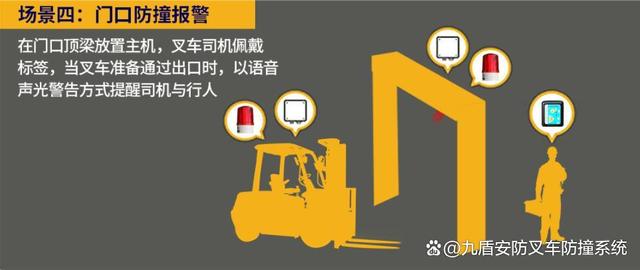
人车防撞系统安全生产方案
根据《市场监管总局关于2021~2023年全国特种设备安全状况的通告》数据显示:2023年:全国共发生特种设备事故和相关事故71起,其中死亡69人。包含叉车在内的场(厂)内专用机动车辆事故29起、死亡28人,占事故总数的40.85%、死亡人数的4…...
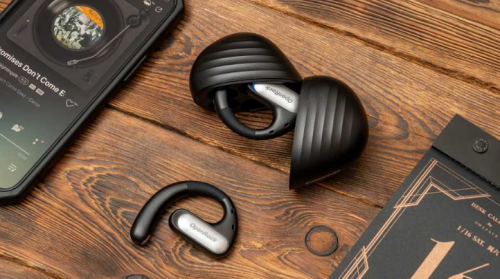
开放式耳机哪个牌子好?长文传授6招秘籍,彻底远离坑货!
大家好,作为一位专注于评测各类数码产品的博主,今天我特别推荐开放式耳机作为我们日常的首选。这种耳机以其独特的设计,避免了传统耳机长时间佩戴可能带来的不适和感染风险。开放式耳机佩戴简便且稳固,尤其适合热爱跑步和运动的…...

vue2和vue3双向绑定的原理
Vue.js 的双向绑定是 Vue 框架的核心特性之一,它允许数据和视图之间保持同步。虽然 Vue 2 和 Vue 3 都实现了双向绑定,但它们在实现细节上有所不同。 Vue 2 双向绑定的原理 在 Vue 2 中,双向绑定主要依赖于 Object.defineProperty 和观察者…...
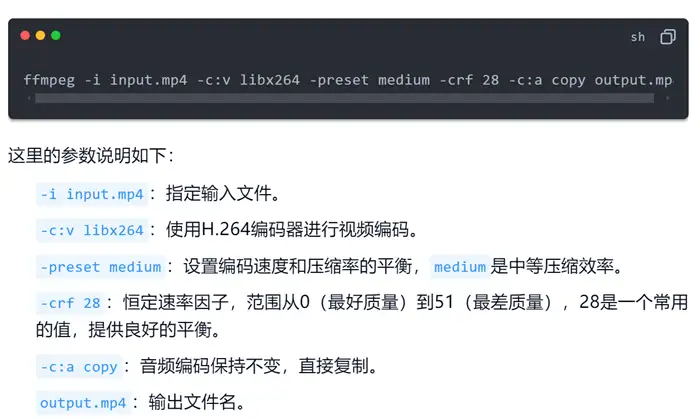
别为大文件烦恼!mp4文件太大怎么变小?3个管用方法
你是否曾经遇到过mp4视频文件过大的困扰?每当想要分享或存储mp4文件时,巨大的文件就成了阻碍。明明感觉感觉没占用多少空间,但是设备却常常出现空间过满警告。 没多少空间的设备真是让人大为恼火,没人想多花一份钱买设备。那么只…...

cocotb的接收和发送逻辑,还是没有弄明白
发送有两种方式 1、定义这样的发 通过前缀连接DUT里面的信号 发送的时候,通过.去访问就可以 2、如果是AXI总线,可以直接调用cocotb的库文件 AXIS总线可以包含以下的信号 通过这个类,可以产生一个AXIS的一帧数据 类的实现大概如下 然后也…...

XXL-JOB调度中心与执行器
XXL-JOB是一个轻量级的分布式任务调度平台,主要由调度中心和执行器两部分组成。下面详细讲解调度中心与执行器的功能和作用。 调度中心 调度中心是XXL-JOB的核心组件,负责任务的调度管理。其主要功能包括: 任务管理:调度中心提供…...
 绿色版)
Notepad++ 8.6.9 (代码编辑) 绿色版
Notepad编辑器是一款非常流行的编辑软件,对于技术白菜来说,有这么个神器真是方便多了,Notepad界面简洁明了,而且可以定制界面,又支持多国语言,是站长们的得力助手。免费、开源、绿色,对中文支持…...

【例003】利用MATLAB绘制有趣平面图形
题目: 用 ezplot 画出由方程 sin ( x 2 m y 2 1000 ) cos ( x y ) \sin(x^2\frac{my^2}{1000})\cos(xy) sin(x21000my2)cos(xy) 确定隐函数的图形。 求解: 我们分别取m为100,1000,10000不同的值,绘制不同情况下的图…...

Ignis公链探索生态建设新范式:产业区块链与GameFi双轨驱动
Ignis公链凭借其独特的技术架构,选择了产业区块链与GameFi这两个赛道作为生态建设的双轮驱动,逐步形成了一个多元化的Web3生态系统。 一、产业区块链的革新:Vessel Chain的成功案例 在产业区块链领域,Ignis公链通过推出Vessel Ch…...

河南测绘资质申请中的技术装备需求
技术装备要求概览 购置与测绘业务相适应的技术设备:需要购置与测绘业务相适应的技术设备,如全站仪、水准仪、GNSS接收机等。 需要建立技术装备清单,并确保这些设备处于良好的工作状态。 技术装备的精度要求:GNSS接收机、全站仪…...

如何使用C# 读写西门子PLC
在C# WPF应用程序中,与西门子S7系列PLC进行通信是一个常见的需求,尤其是在工业自动化领域。以下是三种实现WPF上位机与西门子S7系列PLC通信同步的方式,每种方式都提供了代码实例、优缺点和使用场景。 1. 使用S7.Net库 代码示例: // 创建PLC连接 var plc = new S7.Net.Pl…...

反向沙箱-安全上网解决方案
随着信息化的发展,企业日常办公越来越依赖互联网。终端以及普通PC终端在访问互联网过程中,会遇到各种各样不容忽视的风险,例如员工主动故意的数据泄漏,后台应用程序偷偷向外部发信息,木马间谍软件的外联,以…...

尚品汇-延迟插件实现订单超时取消(四十五)
目录: (1)延迟插件封装 (2)基于延迟插件测试 如何保证消息幂等性? (3)改造订单service-order模块-实现订单超时取消 (1)延迟插件封装 把消息带过去&#…...

欺诈文本分类检测(十一):LLamaFactory多卡微调
1. 引言 前文训练时都做了一定的编码工作,其实有一些框架可以支持我们零代码微调,LLama-Factory就是其中一个。这是一个专门针对大语言模型的微调和训练平台,有如下特性: 支持常见的模型种类:LLaMA、Mixtral-MoE、Qw…...
SprinBoot+Vue健康管管理微信小程序的设计与实现
目录 1 项目介绍2 项目截图3 核心代码3.1 Controller3.2 Service3.3 Dao3.4 application.yml3.5 SpringbootApplication3.5 Vue3.6 uniapp代码 4 数据库表设计5 文档参考6 计算机毕设选题推荐7 源码获取 1 项目介绍 博主个人介绍:CSDN认证博客专家,CSDN平…...
)
绕过Boss直聘反爬:用Selenium+本地Chrome Profile实现稳定数据采集(附防封号心得)
企业招聘数据采集实战:基于用户行为模拟的合规解决方案 在数字化招聘时代,市场情报分析已成为企业人力资源战略的重要组成部分。许多技术团队希望通过自动化手段获取公开的招聘平台数据,用于行业人才分布分析、薪资水平调研和技能需求趋势预测…...

Flutter The Dart VM Service was not discovered after 60 seconds.
更新系统配置好 Flutter 环境报错: The Dart VM Service was not discovered after 60 seconds. This is taking much longer than expected... Open the Xcode window the project is opened in to ensure the app is running. If the app is not running, try …...
:当技术让一切趋同,我们还剩什么?克)
代码之外周刊(第期):当技术让一切趋同,我们还剩什么?克
1. 前言 本文详细介绍如何使用 kylin v10 iso 文件构建出 docker image,docker 版本为 20.10.7。 2. 构建 yum 离线源 2.1. 挂载 ISO 文件 mount Kylin-Server-V10-GFB-Release-030-ARM64.iso /media 2.2. 添加离线 repo 文件 在/etc/yum.repos.d/下创建kylin-local…...

龙芯k - 走马观碑组MPU驱动移植儇
先回顾:三次握手(建立连接)核心流程(实际版) 为了让挥手流程衔接更顺畅,咱们先快速回顾三次握手的实际核心,避免上下文脱节: 第一步(客户端→服务器)…...

【权威实测|2026.03.15 CPython核心团队签发】:Python原生AOT插件下载失败率骤降92%,但90%开发者仍卡在第2步安装验证
第一章:Python原生AOT编译方案2026插件下载与安装概览Python原生AOT(Ahead-of-Time)编译方案2026是CPython官方实验性路线图中的关键演进,旨在为Python代码提供零运行时依赖的二进制输出能力。该方案不依赖PyInstaller或Nuitka等第…...
多输入单输出回归模型【MATLAB】)
基于贝叶斯优化的稀疏高斯过程回归(BO-SGPR)多输入单输出回归模型【MATLAB】
基于贝叶斯优化的稀疏高斯过程回归(BO-SGPR)多输入单输出回归模型【MATLAB】 在处理复杂的非线性回归、小样本学习以及带有不确定性量化的预测任务时,高斯过程回归(Gaussian Process Regression, GPR) 因其强大的理论基…...

从Time-MoE到KAN与Mamba:拆解ICLR 2025时间序列论文里的那些‘网红’架构与核心思想
从Time-MoE到KAN与Mamba:拆解ICLR 2025时间序列论文里的那些‘网红’架构与核心思想 当时间序列分析遇上现代深度学习,技术迭代的速度正在以指数级增长。ICLR 2025收录的论文中,一批融合创新架构与经典理论的方法正在重塑这个领域——从基于混…...
)
别再手动配环境了!用vcpkg在Windows上无痛安装osgEarth 3.7(附VS2019+避坑指南)
现代C开发者的效率革命:vcpkg一键部署osgEarth全攻略 在三维地理信息系统(GIS)和可视化领域,osgEarth作为开源地理空间工具包一直备受开发者青睐。然而,其复杂的依赖链和繁琐的编译过程常常让开发者望而却步——从OpenSceneGraph(OSG)基础库到…...
)
深入解析C++中的CRTP(奇异递归模板模式)
深入解析C中的CRTP(奇异递归模板模式) 在C的模板编程领域,CRTP(Curiously Recurring Template Pattern)作为一种独特的设计模式,为代码复用和类型安全提供了有效的解决方案。本文将探讨CRTP的基本概念、实现…...

从14k+star的goview到完整解决方案:手把手教你集成dcluster实现数据可视化全流程
从14kstar的goview到完整解决方案:手把手教你集成dcluster实现数据可视化全流程 在数据驱动的时代,企业对于可视化分析的需求日益增长。开源项目goview凭借其14k的star数,已成为前端数据可视化领域的明星产品。但真正要在企业环境中落地&…...