
SpringBoot整合Oauth2开放平台接口授权案例
<!-- SpringBoot整合Web组件 --><dependency><groupId>org.springframework.boot</groupId><artifactId>spring-boot-starter-web</artifactId></dependency><dependency><groupId>org.projectlombok</groupId><artifactId>lombok</artifactId></dependency><!-- springboot整合freemarker --><dependency><groupId>org.springframework.boot</groupId><artifactId>spring-boot-starter-freemarker</artifactId></dependency><!-->spring-boot 整合security --><dependency><groupId>org.springframework.boot</groupId><artifactId>spring-boot-starter-security</artifactId></dependency><!-- spring-cloud-starter-oauth2 --><dependency><groupId>org.springframework.cloud</groupId><artifactId>spring-cloud-starter-oauth2</artifactId></dependency>二、授权中心案例代码
Oauth2相关配置:
/*** @author Mr.Zheng* @Program: parent* @Description: 配置授权中心信息* @date 2020-05-03 13:21*/
@Configuration
@EnableAuthorizationServer
public class AuthorizationServerConfig extends AuthorizationServerConfigurerAdapter {/*** accessToken有效期 两小时*/private int accessTokenValiditySeconds = 7200;/*** refreshToken有效期 两小时*/private int refreshTokenValiditySeconds = 7200;/*** 添加商户信息** @param clients 商户* @throws Exception 异常*/@Overridepublic void configure(ClientDetailsServiceConfigurer clients) throws Exception {clients.inMemory()//商户id.withClient("client_1")//商户secret.secret(passwordEncoder().encode("123456"))//回调地址.redirectUris("https://www.baidu.com/")/* OAuth2为我们提供了四种授权方式:* 1、授权码模式(authorization code)用在客户端与服务端应用之间授权* 2、简化模式(implicit)用在移动app或者web app(这些app是在用户的设备上的,如在手机上调起微信来进行认证授权)* 3、密码模式(resource owner password credentials)应用直接都是受信任的(都是由一家公司开发的)* 4、客户端模式(client credentials)用在应用API访问*/.authorizedGrantTypes("password", "client_credentials", "refresh_token", "authorization_code")//授权范围.scopes("all")//accessToken有效期.accessTokenValiditySeconds(accessTokenValiditySeconds)//refreshToken有效期.refreshTokenValiditySeconds(refreshTokenValiditySeconds);}/*** 设置token类型* @param endpoints*/@Overridepublic void configure(AuthorizationServerEndpointsConfigurer endpoints) {endpoints.authenticationManager(authenticationManager()).allowedTokenEndpointRequestMethods(HttpMethod.GET,HttpMethod.POST);endpoints.authenticationManager(authenticationManager());endpoints.userDetailsService(userDetailsService());}@Overridepublic void configure(AuthorizationServerSecurityConfigurer oauthServer) {// 允许表单认证oauthServer.allowFormAuthenticationForClients();// 允许check_token访问oauthServer.checkTokenAccess("permitAll()");}@BeanAuthenticationManager authenticationManager() {AuthenticationManager authenticationManager = new AuthenticationManager() {@Overridepublic Authentication authenticate(Authentication authentication) throws AuthenticationException {return daoAuhthenticationProvider().authenticate(authentication);}};return authenticationManager;}@Beanpublic AuthenticationProvider daoAuhthenticationProvider() {DaoAuthenticationProvider daoAuthenticationProvider = new DaoAuthenticationProvider();daoAuthenticationProvider.setUserDetailsService(userDetailsService());daoAuthenticationProvider.setHideUserNotFoundExceptions(false);daoAuthenticationProvider.setPasswordEncoder(passwordEncoder());return daoAuthenticationProvider;}/*** 设置添加用户信息,正常应该从数据库中读取** @return UserDetailsService*/@BeanUserDetailsService userDetailsService() {InMemoryUserDetailsManager userDetailsService = new InMemoryUserDetailsManager();userDetailsService.createUser(User.withUsername("user_1").password(passwordEncoder().encode("123456")).authorities("ROLE_USER").build());userDetailsService.createUser(User.withUsername("user_2").password(passwordEncoder().encode("1234567")).authorities("ROLE_USER").build());return userDetailsService;}/*** 设置加密方式** @return PasswordEncoder*/@BeanPasswordEncoder passwordEncoder() {return new BCryptPasswordEncoder();}
}
Security相关配置:
/*** @author Mr.Zheng* @Program: parent* @Description: 添加Security权限配置* @date 2020-05-03 13:59*/
@Component
public class SecurityConfig  extends WebSecurityConfigurerAdapter {/***  授权中心管理器* @return AuthenticationManager* @throws Exception 异常*/@Bean@Overridepublic AuthenticationManager authenticationManagerBean() throws Exception {return super.authenticationManagerBean();}@Beanpublic PasswordEncoder passwordEncoder() {return new BCryptPasswordEncoder();}/***  拦截所有请求,使用httpBasic方式登陆* @param http 请求* @throws Exception 异常*/@Overrideprotected void configure(HttpSecurity http) throws Exception {http.authorizeRequests().antMatchers("/**").fullyAuthenticated().and().httpBasic();}}
测试授权码模式:
访问http://localhost:8080/oauth/authorize?response_type=code&client_id=client_1&redirect_uri=https://www.baidu.com/


使用该授权码获取accessToken:
访问http://localhost:8080/oauth/token?grant_type=authorization_code&client_id=client_1&client_secret=123456&code=EwaTib&redirect_uri=https://www.baidu.com/&scope=all

测试密码模式获取accessToken:

三、受保护应用端案例代码
全局配置:
server:port: 8081logging:level:org.springframework.security: DEBUGsecurity:oauth2:resource:####从认证授权中心上验证tokentokenInfoUri: http://localhost:8080/oauth/check_tokenpreferTokenInfo: trueclient:accessTokenUri: http://localhost:8080/oauth/tokenuserAuthorizationUri: http://localhost:8080/oauth/authorize###appidclientId: client_1###appSecretclientSecret: 123456资源拦截配置:
/*** @author Mr.Zheng* @Program: parent* @Description: 资源拦截配置* @date 2020-05-03 15:43*/
@Configuration
@EnableResourceServer
public class ResourceServerConfiguration extends ResourceServerConfigurerAdapter {@Overridepublic void configure(HttpSecurity http) throws Exception {// 对 api/order 请求进行拦截http.authorizeRequests().antMatchers("/api/test/**").authenticated();}}
资源服务请求测试类:
/*** @author Mr.Zheng* @Program: parent* @Description:* @date 2020-05-03 15:44*/
@RestController
@RequestMapping("/api/test")
public class TestController {@RequestMapping("/add")public String addOrder() {return "add success!";}
启动类开启Oauth2
/*** @author Mr.Zheng* @Program: parent* @Description:* @date 2020-05-03 15:42*/
@SpringBootApplication
@EnableOAuth2Sso
public class TestOauth2Server {public static void main(String[] args) {SpringApplication.run(TestOauth2Server.class,args);}
}
四、授权中心和受保护应用端联合测试
1)、没授权时:

2)、授权时:
先获取token

再用token访问资源

五、修改授权中心改成动态数据库查询的方式
下载官方数据库脚本:spring-security-oauth/schema.sql at main · spring-attic/spring-security-oauth · GitHub

新增数据库依赖:
<!-- mysql --><dependency><groupId>mysql</groupId><artifactId>mysql-connector-java</artifactId></dependency><dependency><groupId>org.springframework.boot</groupId><artifactId>spring-boot-starter-jdbc</artifactId></dependency>
spring:datasource:hikari:connection-test-query: SELECT 1minimum-idle: 1maximum-pool-size: 5pool-name: dbcp1driver-class-name: com.mysql.jdbc.Driverurl: jdbc:mysql://localhost:3306/zhq_test_oauth?autoReconnect=true&useSSL=falseusername: rootpassword: root
修改Oauth2配置:
/*** @author Mr.Zheng* @Program: parent* @Description: 配置授权中心信息* @date 2020-05-03 13:21*/
@Configuration
@EnableAuthorizationServer
public class AuthorizationServerConfig extends AuthorizationServerConfigurerAdapter {@Autowired@Qualifier("dataSource")private DataSource dataSource;/*** accessToken有效期 两小时*/private int accessTokenValiditySeconds = 7200;/*** refreshToken有效期 两小时*/private int refreshTokenValiditySeconds = 7200;@Beanpublic TokenStore tokenStore() {// return new InMemoryTokenStore(); //使用内存中的 token storereturn new JdbcTokenStore(dataSource); /// 使用Jdbctoken store}/*** 添加商户信息** @param clients 商户* @throws Exception 异常*/@Overridepublic void configure(ClientDetailsServiceConfigurer clients) throws Exception {clients.jdbc(dataSource)//测试首次运行可以指定测试数据,如果数据库中没有则不报错,如果有或者第二次运行会报错,因为数据库已经存在了,需要注释掉.withClient("client_1")//商户secret.secret(passwordEncoder().encode("123456"))//回调地址.redirectUris("https://www.baidu.com/")/* OAuth2为我们提供了四种授权方式:* 1、授权码模式(authorization code)用在客户端与服务端应用之间授权* 2、简化模式(implicit)用在移动app或者web app(这些app是在用户的设备上的,如在手机上调起微信来进行认证授权)* 3、密码模式(resource owner password credentials)应用直接都是受信任的(都是由一家公司开发的)* 4、客户端模式(client credentials)用在应用API访问*/.authorizedGrantTypes("password", "client_credentials", "refresh_token", "authorization_code")//授权范围.scopes("all")//accessToken有效期.accessTokenValiditySeconds(accessTokenValiditySeconds)//refreshToken有效期.refreshTokenValiditySeconds(refreshTokenValiditySeconds);}/*** 设置token类型* @param endpoints*/@Overridepublic void configure(AuthorizationServerEndpointsConfigurer endpoints) {endpoints.authenticationManager(authenticationManager()).allowedTokenEndpointRequestMethods(HttpMethod.GET,HttpMethod.POST);endpoints.authenticationManager(authenticationManager());endpoints.userDetailsService(userDetailsService());}@Overridepublic void configure(AuthorizationServerSecurityConfigurer oauthServer) {// 允许表单认证oauthServer.allowFormAuthenticationForClients();// 允许check_token访问oauthServer.checkTokenAccess("permitAll()");}@BeanAuthenticationManager authenticationManager() {AuthenticationManager authenticationManager = new AuthenticationManager() {@Overridepublic Authentication authenticate(Authentication authentication) throws AuthenticationException {return daoAuhthenticationProvider().authenticate(authentication);}};return authenticationManager;}@Beanpublic AuthenticationProvider daoAuhthenticationProvider() {DaoAuthenticationProvider daoAuthenticationProvider = new DaoAuthenticationProvider();daoAuthenticationProvider.setUserDetailsService(userDetailsService());daoAuthenticationProvider.setHideUserNotFoundExceptions(false);daoAuthenticationProvider.setPasswordEncoder(passwordEncoder());return daoAuthenticationProvider;}/*** 设置添加用户信息,正常应该从数据库中读取** @return UserDetailsService*/@BeanUserDetailsService userDetailsService() {InMemoryUserDetailsManager userDetailsService = new InMemoryUserDetailsManager();userDetailsService.createUser(User.withUsername("user_1").password(passwordEncoder().encode("123456")).authorities("ROLE_USER").build());userDetailsService.createUser(User.withUsername("user_2").password(passwordEncoder().encode("1234567")).authorities("ROLE_USER").build());return userDetailsService;}/*** 设置加密方式** @return PasswordEncoder*/@BeanPasswordEncoder passwordEncoder() {return new BCryptPasswordEncoder();}
}
测试运行:

检查数据库发现测试商户已经导入到数据库了

相关文章:
SpringBoot整合Oauth2开放平台接口授权案例
<!-- SpringBoot整合Web组件 --><dependency><groupId>org.springframework.boot</groupId><artifactId>spring-boot-starter-web</artifactId></dependency><dependency><groupId>org.projectlombok</groupId>&l…...

Linux_创建用户
创建一个名为hello的用户,并指定/home/hello为根目录useradd -d /home/hello -m hello 设置密码 ,密码会输入两次,一次设置密码,一次确认密码,两次密码要输入的一样passwd hellouseradd的常用参数含义-d指定用户登入时的主目录&am…...

RDD(弹性分布式数据集)总结
文章目录一、设计背景二、RDD概念三、RDD特性四、RDD之间的依赖关系五、阶段的划分六、RDD运行过程七、RDD的实现一、设计背景 1.某些应用场景中,不同计算阶段之间会重用中间结果,即一个阶段的输出结果会作为下一个阶段的输入。如:迭代式算法…...

服务器版RstudioServer安装与配置详细教程
Docker部署Rstudio server 背景:如果您想在服务器上运行RstudioServer,可以按照如下方法进行操作,笔者测试时使用腾讯云服务器(系统centos7),需要在管理员权限下运行 Rstudio 官方提供了使用不同 R 版本的 …...

如何在Java中将一个列表拆分为多个较小的列表
在Java中,有多种方法可以将一个列表拆分为多个较小的列表。在本文中,我们将介绍三种不同的方法来实现这一目标。 方法一:使用List.subList()方法 List接口提供了一个subList()方法,它可以用来获取列表中的一部分元素。我们可以使…...

TryHackMe-Inferno(boot2root)
Inferno 现实生活中的机器CTF。该机器被设计为现实生活(也许不是?),非常适合刚开始渗透测试的新手 “在我们人生旅程的中途,我发现自己身处一片黑暗的森林中,因为直截了当的道路已经迷失了。我啊…...

微信原生开发中 JSON配置文件的作用 小程序中有几种JSON配制文件
关于json json是一种数据格式,在实际开发中,JSON总是以配制文件的形式出现,小程序与不例外,可对项目进行不同级别的配制。Q:小程序中有几种配制文件A:小程序中有四种配制文件分别是:project.config.json si…...

【python】为什么使用python Django开发网站这么火?
关注“测试开发自动化” 弓中皓,获取更多学习内容) Django 是一个基于 Python 的 Web 开发框架,它提供了许多工具和功能,使开发者可以更快地构建 Web 应用程序。以下是 Django 开发中的一些重要知识点: MTV 模式&#…...

Java设计模式(五)—— 责任链模式
责任链模式定义如下:使多个对象都有机会处理请求,从而避免请求的发送者与接收者之间的耦合关系。将这些对象连成一条链,并沿着这条链传递该请求,知道有一个对象处理它为止。 适合使用责任链模式的情景如下: 有许多对…...

VMLogin:虚拟浏览器提供的那些亮眼的功能
像VMLogin这样的虚拟浏览器具有多种功能,如安全的浏览环境、可定制的设置、跨平台的兼容性、更快的浏览速度、广告拦截等等。 虚拟浏览器的不同功能可以为您做什么? 使用虚拟浏览器是浏览互联网和完成其他任务的安全方式,没有风险。您可以在…...

第一个错误的版本
题目 你是产品经理,目前正在带领一个团队开发新的产品。不幸的是,你的产品的最新版本没有通过质量检测。由于每个版本都是基于之前的版本开发的,所以错误的版本之后的所有版本都是错的。 假设你有 n 个版本 [1, 2, …, n],你想找出…...

2023爱分析·AIGC市场厂商评估报告:拓尔思
AIGC市场定义 市场定义: AIGC,指利用自然语言处理技术(NLP)、深度神经网络技术(DNN)等人工智能技术,基于与人类交互所确定的主题,由AI算法模型完全自主、自动生成内容,…...

MobTech|场景唤醒的实现
什么是场景唤醒? 场景唤醒是moblink的一项核心功能,可以实现从打开的Web页面,一键唤醒App,并恢复对应的场景。 场景是指用户在App内的某个特定页面或状态,比如商品详情页、活动页、个人主页等。每个场景都有一个唯一…...
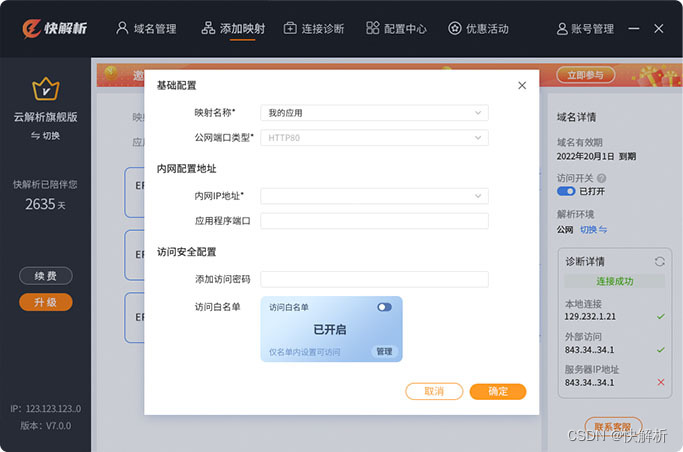
不在路由器上做端口映射,如何访问局域网内网站
假设现在外网有一台ADSL直接拨号上网的电脑,所获得的是公网IP。然后它想访问局域网内的电脑上面的网站,那么就需要在路由器上做端口映射。在路由器上做端口映射的具体规则是:将所有发向自己端口的数据,都转发到内网的计算机。 访…...

ChatGPT 辅助科研写作
前言 总结一些在科研写作中 ChatGPT 的功能,以助力提升科研写作的效率。 文章目录前言一、ChatGPT 简介1. ChatGPT 普通版与 Plus 版的区别1)普通账号2)Plus账号二、New Bing 简介1. 快速通过申请三、辅助学术写作1. 改写论文表述2. 语言润色…...
MySQL最大建议行数 2000w,靠谱吗?
本文已经收录到Github仓库,该仓库包含计算机基础、Java基础、多线程、JVM、数据库、Redis、Spring、Mybatis、SpringMVC、SpringBoot、分布式、微服务、设计模式、架构、校招社招分享等核心知识点,欢迎star~ Github地址 1 背景 作为在后端圈开车的多年…...
【Tomcat 学习】
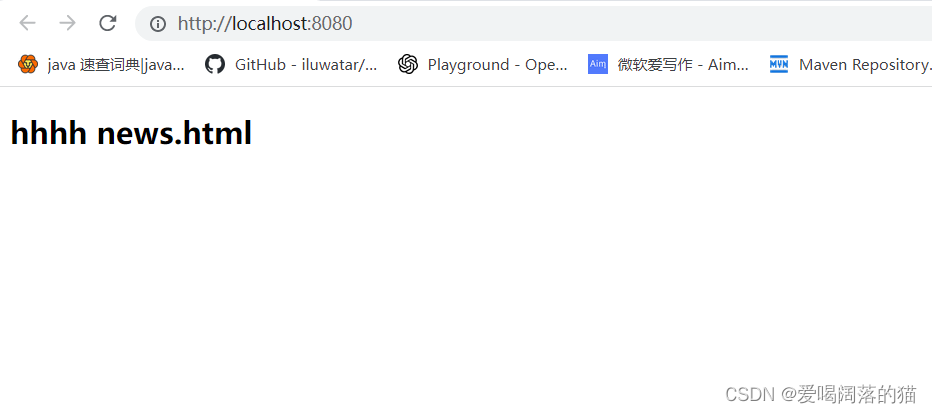
Tomcat 学习 笔记记录一、Tomcat1. Tomcat目录2. Tomcat启动3. Tomcat部署项目4. 解决Tomcat启动乱码问题5. JavaWeb项目创建部署6. 打war包发布项目7. Tomcat配置文件8. Tomcat配置虚拟目录(不用在webapps目录下)9. Tomcat配置虚拟主机10. 修改web项目默认加载资源路径一、Tom…...
重装系统如何做到三步装机
小白三步版在给电脑重装系统的过程中,它会提供系统备份、还原和重装等多种功能。下面也将介绍小白三步版的主要功能,以及使用技巧和注意事项。 主要功能 系统备份和还原:小白三步版可以帮助用户备份系统和数据,以防止重要数据丢失…...

蓝桥杯单片机第十一届省赛客观题(深夜学习——单片机)
第一场 (1)模电——》多级放大电路 阻容耦合,只通交流,不通直流。 变压器耦合,只通交流,不通直流。 光电耦合,主要是起隔离作用,更多的用在非线性的应用电路中 (2&a…...

Pandas对Excel文件进行读取、增删、打开、保存等操作的代码实现
文章目录前言一、Pandas 的主要函数包括二、使用步骤1.简单示例2.保存Excel操作3.删除和添加数据4.添加新的表单总结前言 Pandas 是一种基于 NumPy 的开源数据分析工具,用于处理和分析大量数据。Pandas 模块提供了一组高效的工具,可以轻松地读取、处理和…...

小白程序员看过来!TS同学半年逆袭AI大模型产品经理,收藏这份转行避坑指南!
TS同学从景观设计转行AI大模型产品经理的经历分享。他经历了离职、脱产学习、国企子公司项目被裁等波折,最终以20%薪资涨幅加入AI公司。文章重点介绍了他的心态调整、求职策略变化以及对“稳定”的新理解,同时探讨了AI时代教育孩子的思考。 本期嘉宾TS同…...

Android AI助手开发实战:基于MVVM与OpenAI API的AnywhereGPT项目解析
1. 项目概述与核心价值最近在折腾移动端AI应用,发现一个挺有意思的开源项目,叫AnywhereGPT-Android。简单来说,它就是一个让你能在Android手机上,通过调用OpenAI的API(比如GPT-3.5/4)或者本地部署的模型&am…...

AI智能体技能开发实战:从awesome-agent-skills到工程化应用
1. 项目概述:一个智能体技能的知识宝库最近在折腾AI智能体(Agent)开发,发现一个挺有意思的现象:大家都能用LangChain、AutoGen这些框架搭出个智能体的架子,但真想让这个“智能体”干点具体、有用、甚至有点…...

国产信创电脑是什么意思?为什么政府和企业都在用?
国产信创电脑——这个名词虽然听起来有些陌生,但它正在深刻影响着我们的工作和生活。从政府采购到企业信息化方案,再到科技媒体的报道,“国产信创电脑”已经成为了关键词之一。那么,它究竟是什么?为什么如此重要&#…...
)
蕲艾壹号模式开发介绍(代码)
以下是关于蕲艾壹号模式开发的介绍和代码示例:蕲艾壹号模式开发介绍蕲艾壹号通常指基于蕲艾(一种中药材)相关产品的电商或健康管理平台。开发模式可能包含以下核心模块:电商功能模块 商品展示、购物车、订单管理、支付接口集成&am…...

基于Docker Compose的容器化数据抓取平台OpenClaw部署与实战
1. 项目概述:一个容器化的开源自动化抓取与处理平台最近在折腾一些数据采集和自动化处理的工作流,发现一个挺有意思的项目:alexleach/openclaw-compose。光看名字,openclaw直译是“开放之爪”,compose则明确指向了 Doc…...

Arm Neoverse CMN-650时钟与电源管理架构解析
1. Arm Neoverse CMN-650时钟与电源管理架构解析在现代SoC设计中,时钟与电源管理子系统如同城市的水电供应网络,其设计优劣直接决定了系统性能与能耗效率的平衡。Arm Neoverse CMN-650作为新一代互连架构,通过创新的时钟域划分和电源域管理机…...

四个数字,能组成多少个互不重复且无重复数字的三位数
题目:有 1、2、3、4 四个数字,能组成多少个互不相同且无重复数字的三位数?都是多少?思路:用三层嵌套循环让百位、十位、个位各自在 1~4 上枚举(共 444 种组合)。printf 把三个循环变…...

极简静态站点生成器Minima:从核心原理到工程实践
1. 项目概述:一个极简静态站点的构建哲学 最近在整理个人博客和项目文档时,我又一次把目光投向了静态站点生成器。市面上选择很多,从功能庞大的Hugo、Jekyll,到追求速度的Zola、11ty,各有拥趸。但当我需要一个纯粹、轻…...

开源清理工具OpenClearn:透明可控的数字垃圾管理方案
1. 项目概述:一个开源的“清洁工”如何重塑你的数字生活如果你和我一样,是个在数字世界里摸爬滚打了十几年的老鸟,那你电脑里肯定也有一堆“数字垃圾”。这些垃圾不是指那些过时的文件,而是那些你明明已经删除了,但操作…...