
Android 12 Launcher3 去掉Hotseat
1.概述
在12.0 产品定制化开发中 由产品需求Launcher3 页面布局的原因,要求Launcher3 需要去掉Hotseat 不显示Hotseat下面几个图标,而做满屏app的显示,从而达到美观的效果,下面就来分析去掉Hotseat从而实现这个功能
2.Launcher3 去掉Hotseat的核心类
packages/apps/Launcher3/res/layout/launcher.xml
packages/apps/Launcher3/src/com/android/launcher3/DeviceProfile.java
3.Launcher3 去掉Hotseat的核心功能分析和实现
在Launcher3中主页面就是launcher.xml只布局,hotseat布局也在这里面,所以隐藏hotseat可以从这里先看launcher.xml的布局。
首先看下launcher.xml的布局
3.1 launcher.xml hotseat布局
<com.android.launcher3.LauncherRootView
xmlns:android="http://schemas.android.com/apk/res/android"
xmlns:launcher="http://schemas.android.com/apk/res-auto"
android:id="@+id/launcher"
android:layout_width="match_parent"
android:layout_height="match_parent"
android:fitsSystemWindows="true">
<com.android.launcher3.dragndrop.DragLayerandroid:id="@+id/drag_layer"android:layout_width="match_parent"android:layout_height="match_parent"android:clipChildren="false"android:clipToPadding="false"android:importantForAccessibility="no"><!-- The workspace contains 5 screens of cells --><!-- DO NOT CHANGE THE ID --><com.android.launcher3.Workspaceandroid:id="@+id/workspace"android:layout_width="match_parent"android:layout_height="match_parent"android:layout_gravity="center"android:theme="@style/HomeScreenElementTheme"launcher:pageIndicator="@+id/page_indicator" /><include layout="@layout/memoryinfo_ext" /><!-- DO NOT CHANGE THE ID --><includeandroid:id="@+id/hotseat"layout="@layout/hotseat" /><includeandroid:id="@+id/overview_panel"layout="@layout/overview_panel"android:visibility="gone" /><!-- Keep these behind the workspace so that they are not visible whenwe go into AllApps --><com.sprd.ext.pageindicators.WorkspacePageIndicatorLineandroid:id="@+id/page_indicator"android:layout_width="match_parent"android:layout_height="@dimen/vertical_drag_handle_size"android:layout_gravity="bottom"android:theme="@style/HomeScreenElementTheme" /><includeandroid:id="@+id/page_indicator_customize"layout="@layout/page_indicator_customize" /><includeandroid:id="@+id/drop_target_bar"layout="@layout/drop_target_bar" /><includeandroid:id="@+id/scrim_view"layout="@layout/scrim_view" /><includeandroid:id="@+id/apps_view"layout="@layout/all_apps"android:layout_width="match_parent"android:layout_height="match_parent" /></com.android.launcher3.dragndrop.DragLayer></com.android.launcher3.LauncherRootView>
从布局中可以看到android:id="@+id/hotseat"就是hotseat布局,所以隐藏hotseat就是需要设置属性为gone。
<includeandroid:id="@+id/hotseat"layout="@layout/hotseat"android:visibility="gone" />
3.2 DeviceProfile.java 关于hotseat高度的修改
public DeviceProfile(Context context, InvariantDeviceProfile inv,
Point minSize, Point maxSize,
int width, int height, boolean isLandscape, boolean isMultiWindowMode) {this.inv = inv;this.isLandscape = isLandscape;this.isMultiWindowMode = isMultiWindowMode;// Determine sizes.widthPx = width;heightPx = height;if (isLandscape) {availableWidthPx = maxSize.x;availableHeightPx = minSize.y;} else {availableWidthPx = minSize.x;availableHeightPx = maxSize.y;}Resources res = context.getResources();DisplayMetrics dm = res.getDisplayMetrics();// Constants from resourcesisTablet = res.getBoolean(R.bool.is_tablet);isLargeTablet = res.getBoolean(R.bool.is_large_tablet);isPhone = !isTablet && !isLargeTablet;aspectRatio = ((float) Math.max(widthPx, heightPx)) / Math.min(widthPx, heightPx);boolean isTallDevice = Float.compare(aspectRatio, TALL_DEVICE_ASPECT_RATIO_THRESHOLD) >= 0;// Some more constantstransposeLayoutWithOrientation =res.getBoolean(R.bool.hotseat_transpose_layout_with_orientation);context = getContext(context, isVerticalBarLayout()? Configuration.ORIENTATION_LANDSCAPE: Configuration.ORIENTATION_PORTRAIT);res = context.getResources();edgeMarginPx = res.getDimensionPixelSize(R.dimen.dynamic_grid_edge_margin);desiredWorkspaceLeftRightMarginPx = isVerticalBarLayout() ? 0 : edgeMarginPx;int cellLayoutPaddingLeftRightMultiplier = !isVerticalBarLayout() && isTablet? PORTRAIT_TABLET_LEFT_RIGHT_PADDING_MULTIPLIER : 1;int cellLayoutPadding = res.getDimensionPixelSize(R.dimen.dynamic_grid_cell_layout_padding);if (isLandscape) {cellLayoutPaddingLeftRightPx = 0;cellLayoutBottomPaddingPx = cellLayoutPadding;} else {cellLayoutPaddingLeftRightPx = cellLayoutPaddingLeftRightMultiplier * cellLayoutPadding;cellLayoutBottomPaddingPx = 0;}verticalDragHandleSizePx = res.getDimensionPixelSize(R.dimen.vertical_drag_handle_size);verticalDragHandleOverlapWorkspace =res.getDimensionPixelSize(R.dimen.vertical_drag_handle_overlap_workspace);IconLabelController ilc = LauncherAppMonitor.getInstance(context).getIconLabelController();maxIconLabelLines = ilc != null ?ilc.getIconLabelLine() : IconLabelController.MIN_ICON_LABEL_LINE;iconDrawablePaddingOriginalPx =res.getDimensionPixelSize(R.dimen.dynamic_grid_icon_drawable_padding);dropTargetBarSizePx = res.getDimensionPixelSize(R.dimen.dynamic_grid_drop_target_size);workspaceSpringLoadedBottomSpace =res.getDimensionPixelSize(R.dimen.dynamic_grid_min_spring_loaded_space);workspaceCellPaddingXPx = res.getDimensionPixelSize(R.dimen.dynamic_grid_cell_padding_x);hotseatBarTopPaddingPx =res.getDimensionPixelSize(R.dimen.dynamic_grid_hotseat_top_padding);hotseatBarBottomPaddingPx = (isTallDevice ? 0: res.getDimensionPixelSize(R.dimen.dynamic_grid_hotseat_bottom_non_tall_padding))+ res.getDimensionPixelSize(R.dimen.dynamic_grid_hotseat_bottom_padding);hotseatBarSidePaddingEndPx =res.getDimensionPixelSize(R.dimen.dynamic_grid_hotseat_side_padding);// Add a bit of space between nav bar and hotseat in vertical bar layout.hotseatBarSidePaddingStartPx = isVerticalBarLayout() ? verticalDragHandleSizePx : 0;hotseatBarSizePx = ResourceUtils.pxFromDp(inv.iconSize, dm) + (isVerticalBarLayout()? (hotseatBarSidePaddingStartPx + hotseatBarSidePaddingEndPx): (res.getDimensionPixelSize(R.dimen.dynamic_grid_hotseat_extra_vertical_size)+ hotseatBarTopPaddingPx + hotseatBarBottomPaddingPx));....}
在DeviceProile构造函数中的hotseatBarSizePx 就是设置的导航栏高度,在这里构建hotseat布局的时候,可以通过设置这个高度了布后hotseatBarSizePx就是hotseat的高度
直接设为0即可
修改如下:
hotseatBarSizePx = 0/*ResourceUtils.pxFromDp(inv.iconSize, dm) + (isVerticalBarLayout()? (hotseatBarSidePaddingStartPx + hotseatBarSidePaddingEndPx): (res.getDimensionPixelSize(R.dimen.dynamic_grid_hotseat_extra_vertical_size)+ hotseatBarTopPaddingPx + hotseatBarBottomPaddingPx))*/;
相关文章:

Android 12 Launcher3 去掉Hotseat
1.概述 在12.0 产品定制化开发中 由产品需求Launcher3 页面布局的原因,要求Launcher3 需要去掉Hotseat 不显示Hotseat下面几个图标,而做满屏app的显示,从而达到美观的效果,下面就来分析去掉Hotseat从而实现这个功能 2.Launcher3 …...

Nginx实用篇:实现负载均衡、限流与动静分离
Nginx实用篇:实现负载均衡、限流与动静分离 | 原创作者/编辑:凯哥Java | 分类:Nginx学习系列教程 Nginx 作为一款高性能的 HTTP 服务器及反向代理解决方案,在互联网架构中扮演着至关重要的角色。它…...

python | Python中的类多态:方法重写和动态绑定
本文来源公众号“python”,仅用于学术分享,侵权删,干货满满。 原文链接:Python中的类多态:方法重写和动态绑定 多态(Polymorphism)是面向对象编程的核心特性之一,它允许同一接口在…...

Rust编写Windows服务
文章目录 Rust编写Windows服务一:Windows服务程序大致原理二:Rust中编写windows服务三:具体实例 Rust编写Windows服务 编写Windows服务可选语言很多, 其中C#最简单。本着练手Rust语言,尝试用Rust编写一个服务。 一:Win…...

MATLAB 从 R2024B 开始支持树莓派 5
树莓派(Raspberry Pi)系列是一系列基于单板计算机的微型电脑,由英国的树莓派基金会于 2012 年开始发布。它的目标是提供一个低成本、易于学习和玩耍的平台,用于教育和初学者学习计算机科学和编程。 目前市面上,最新最…...

MiniBlogum项目简介
MiniBlogum项目简介 文章目录 MiniBlogum项目简介一、引言二、技术栈与开发环境三、主要功能(一)用户注册与登录(二)查看当前登录用户/作者头像、昵称、Gitee仓库地址(三)查看博客列表(四&#…...

如何用 OBProxy 实现 OceanBase 的最佳路由策略
引言 OBProxy,即OceanBase Database Proxy,也简称为ODP,是 OceanBase数据库的专属服务代理。通过应用OBProxy,由后端OceanBase集群的分布式特性所带来的复杂性得以屏蔽,从而使得访问分布式数据库的体验如同访问单机数…...

new/delete和malloc/free到底有什么区别
new和malloc 文章目录 new和malloc前言一、属性上的区别二、使用上的区别三、内存位置的区别四、返回类型的区别五、分配失败的区别六、扩张内存的区别七、系统调度过程的区别总结 前言 new和malloc的知识点,作为一个嵌入式工程师是必须要了解清楚的。new和malloc的…...

Flutter启动无法运行热重载
当出现这种报错时,大概率是flutter的NO_Proxy出问题。 请忽略上面的Android报错因为我做的是windows开发这个也就不管了哈,解决下面也有解决报错的命令大家执行一下就行。 着重说一下Proxy的问题, 我们看到提示NO_PROXY 没有设置。 这个时候我…...

CSS调整背景
一、设置背景颜色 通过 background-color 属性指定,值可以是十六进制 #ffffff,也可以是rgb(0, 255, 255),或是颜色名称 "red" div {background-color: red; /* 通过颜色名称设置 */background-color: #ff0000; /* 通过十六进制设…...

FinalShell连接Linux服务器并解决反复输入密码问题
FinalShell是一款由国人开发的SSH客户端工具,它支持多平台,包括Windows、Mac OS X和Linux。FinalShell主要用于一体化服务器管理,它不仅是一个SSH客户端,还具备强大的开发和运维功能,能够充分满足开发和运维的需求。 本…...
实用类工具!分享6款AI论文一键生成器免费8000字
在当前的学术研究和写作领域,AI论文生成工具的出现极大地提高了写作效率和质量。这些工具不仅能够帮助研究人员快速生成论文草稿,还能进行内容优化、查重和排版等操作。千笔-AIPassPaper是一款备受推荐的AI论文一键生成器。 千笔-AIPassPaper是一个一站式…...

vue使用TreeSelect设置带所有父级节点的回显
Element Plus的el-tree-select组件 思路: 选中节点时,给选中的节点赋值 pathLabel,pathLabel 为函数生成的节点名字拼接,数据源中不包含。 在el-tree-select组件中设置 props“{ label: ‘pathLabel’ }” 控制选中时input框中回…...
智能机巢+无人机:自动化巡检技术详解
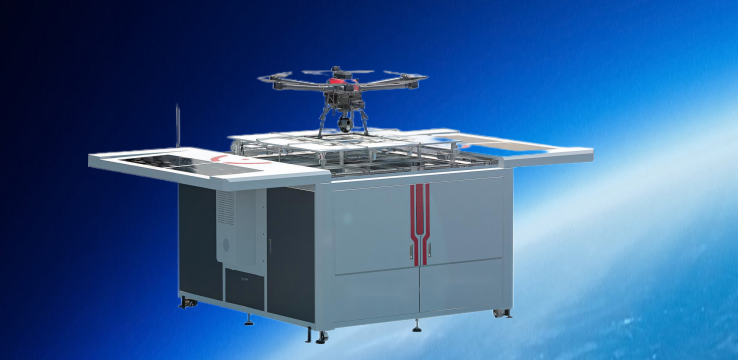
智能机巢与无人机的结合,在自动化巡检领域展现出了巨大的潜力和优势。以下是对这一技术的详细解析: 一、智能机巢概述 智能机巢,也被称为无人机机场或无人机机巢,是专门为无人机提供停靠、充电、维护等服务的智能化设施。它不仅…...

摩托车加装车载手机充电usb方案/雅马哈USB充电方案开发
长途骑行需要给手机与行车记录仪等设备供电,那么,加装USB充电器就相继在两轮电动车上应用起来了。摩托车加装usb充电方案主要应用于汽车、电动自行车、摩托车、房车、渡轮、游艇等交通工具。提供电动车USB充电器方案/摩托车加装usb充电方案/渡轮加装usb充…...

进阶岛 任务3: LMDeploy 量化部署进阶实践
进阶岛 任务3: LMDeploy 量化部署进阶实践 任务:https://github.com/InternLM/Tutorial/blob/camp3/docs/L2/LMDeploy/task.md 使用结合W4A16量化与kv cache量化的internlm2_5-1_8b-chat模型封装本地API并与大模型进行一次对话,作业截图需包…...

vue 使用jszip,file-saver下载压缩包,自定义文件夹名,文件名打包下载为zip压缩包文件,全局封装公共方法使用。
记录一下后台管理全局封装一个压缩包下载方法,文件夹名自定义,文件名自定义,压缩包名自定义。 安装必要的库 npm install jszip npm install file-saver自定义一个公共方法全局注入 页面使用 /** 下载按钮操作 */handleDownload() {const i…...

计网八股文
1.HTTP和HTTPS的区别 安全性: HTTP:是未加密的协议,意味着数据在传输过程中可以被截获、篡改或监听。它不提供任何数据加密。HTTPS:在HTTP的基础上加入了SSL/TLS协议,提供了数据加密、完整性校验和身份验证。这使得传输…...

[001-03-007].第07节:Redis中的事务
我的后端学习大纲 我的Redis学习大纲 1、Redis事务是什么: 1.可以一次执行多个命令,本质是一组命令的集合。一个事务中的所有命令都会序列化, 按顺序地串行化执行而不会被其他命令插入,不许加塞2.一个队列中,一次性、…...

WLAN实验简述
一:配置生产AP1上级接入层交换机LSW3 sys [Huawei]sysname LSW3 [LSW3]undo info-center enable [LSW3]vlan batch 10 100 [LSW3]int g0/0/2 [LSW3-GigabitEthernet0/0/2]port link-type trunk [LSW3-GigabitEthernet0/0/2]port trunk allow-pass vlan 10 100 [LSW…...

告别窗口切换烦恼:Mac窗口置顶神器Topit让你的多任务效率飙升300%
告别窗口切换烦恼:Mac窗口置顶神器Topit让你的多任务效率飙升300% 【免费下载链接】Topit Pin any window to the top of your screen / 在Mac上将你的任何窗口强制置顶 项目地址: https://gitcode.com/gh_mirrors/to/Topit 还在为频繁切换窗口打断工作流而烦…...

PPSSPP模拟器:这款安卓psp模拟器如何让你在手机上畅玩PSP经典游戏
还记得小时候躲在被窝里玩《怪物猎人》《战神》《最终幻想》的日子吗?那台黑白相间的PSP掌机承载了无数人的青春回忆。如今,PSP早已停产,但那些经典游戏并没有消失——只要你有PPSSPP模拟器,就能在手机、电脑甚至平板上重新体验它…...

3秒破解百度网盘提取码:告别资源获取困扰的智能解决方案
3秒破解百度网盘提取码:告别资源获取困扰的智能解决方案 【免费下载链接】baidupankey 项目地址: https://gitcode.com/gh_mirrors/ba/baidupankey 你是否曾经面对一个急需的学习资料或软件资源,却因为不知道百度网盘提取码而束手无策࿱…...

小白也能学会!EasyAnimateV5图生视频模型快速部署与使用指南
小白也能学会!EasyAnimateV5图生视频模型快速部署与使用指南 1. 从一张图到一段视频,到底有多简单? 想象一下这个场景:你有一张特别喜欢的照片,可能是你家猫咪的可爱瞬间,或者是一张绝美的风景照。你看着…...

Lychee-Rerank实战案例:专利文献检索中权利要求与技术方案的语义匹配
Lychee-Rerank实战案例:专利文献检索中权利要求与技术方案的语义匹配 1. 引言:当专利检索遇上语义匹配难题 如果你是专利工程师、知识产权分析师,或者从事技术研发工作,一定遇到过这样的场景:面对海量的专利文献&…...

RexUniNLU教育场景实战:学生问答意图识别+知识点槽位定位效果展示
RexUniNLU教育场景实战:学生问答意图识别知识点槽位定位效果展示 1. 引言:当AI老师遇上“十万个为什么” 想象一下这个场景:一个学生正在使用在线学习平台,他输入了一个问题:“老师,为什么三角形的内角和…...

Thymeleaf项目部署指南:从开发到生产环境的完整流程
Thymeleaf项目部署指南:从开发到生产环境的完整流程 【免费下载链接】thymeleaf Thymeleaf is a modern server-side Java template engine for both web and standalone environments. 项目地址: https://gitcode.com/gh_mirrors/th/thymeleaf Thymeleaf是一…...

OpenClaw生活助手:Qwen3-4B-Thinking-2507-GPT-5-Codex-Distill-GGUF管理家庭购物清单与比价
OpenClaw生活助手:Qwen3-4B-Thinking-2507-GPT-5-Codex-Distill-GGUF管理家庭购物清单与比价 1. 为什么需要AI管理购物清单? 上周六早上,我站在超市冷藏柜前盯着三款不同品牌的有机牛奶发呆——这个场景已经重复了三个月。每次采购都要花20…...
:嵌入层和位置编码的实现上篇文章讲过,Transformer 可分为四个部分:输入、输出、编码器、解)
手撕 Transformer (2):嵌入层和位置编码的实现上篇文章讲过,Transformer 可分为四个部分:输入、输出、编码器、解
嵌入层的作用:为了将文本中词汇的数字表示转换为向量表示(语义向量),这样后续神经网络就可以对其进行计算了。 1.1 代码实现 import torchimport torch.nn as nnimport mathfrom torch.autograd import Variableclass Embeddings…...
核心知识点)
Elasticsearch(ES)核心知识点
Elasticsearch(ES)核心知识点1. 核心概念 Document:文档,一条数据(JSON)Field:字段,文档里的属性Index:索引,相当于数据库的“库/表”Type:类型&a…...