
【保姆级教程】批量下载Pexels视频Python脚本(以HumanVid数据集为例)
目录
方案一:转换链接为download模式
方案二:获取源链接后下载
附录:HumanVid链接
方案一:转换链接为download模式
将下载链接的后缀加入 /download 然后用下面的脚本下载:
import argparse
import json
import os
import timeimport requests
import tqdm
from pexels_api import APIPEXELS_API_KEY = os.environ['PEXELS_KEY']
MAX_IMAGES_PER_QUERY = 100
RESULTS_PER_PAGE = 10
PAGE_LIMIT = MAX_IMAGES_PER_QUERY / RESULTS_PER_PAGEdef get_sleep(t):def sleep():time.sleep(t)return sleepdef main(args):sleep = get_sleep(args.sleep)api = API(PEXELS_API_KEY)query = args.querypage = 1counter = 0photos_dict = {}# Step 1: Getting urls and meta informationwhile page <= PAGE_LIMIT:api.search(query, page=page, results_per_page=RESULTS_PER_PAGE)photos = api.get_entries()for photo in tqdm.tqdm(photos):photos_dict[photo.id] = vars(photo)['_Photo__photo']counter += 1if not api.has_next_page:breakpage += 1sleep()print(f"Finishing at page: {page}")print(f"Images were processed: {counter}")# Step 2: Downloadingif photos_dict:os.makedirs(args.path, exist_ok=True)# Saving dictwith open(os.path.join(args.path, f'{query}.json'), 'w') as fout:json.dump(photos_dict, fout)for val in tqdm.tqdm(photos_dict.values()):url = val['src'][args.resolution]fname = os.path.basename(val['src']['original'])image_path = os.path.join(args.path, fname)if not os.path.isfile(image_path):  # ignore if already downloadedresponse = requests.get(url, stream=True)with open(image_path, 'wb') as outfile:outfile.write(response.content)else:print(f"File exists: {image_path}")if __name__ == '__main__':parser = argparse.ArgumentParser()parser.add_argument('--query', type=str, required=True)parser.add_argument('--path', type=str, default='./results_pexels')parser.add_argument('--resolution', choices=['original', 'large2x', 'large','medium', 'small', 'portrait','landscape', 'tiny'], default='original')parser.add_argument('--sleep', type=float, default=0.1)args = parser.parse_args()main(args)
方案二:获取源链接后下载
例如这个链接:
https://www.pexels.com/video/5901660/浏览器打开:

然后单击右键,获取视频链接地址:
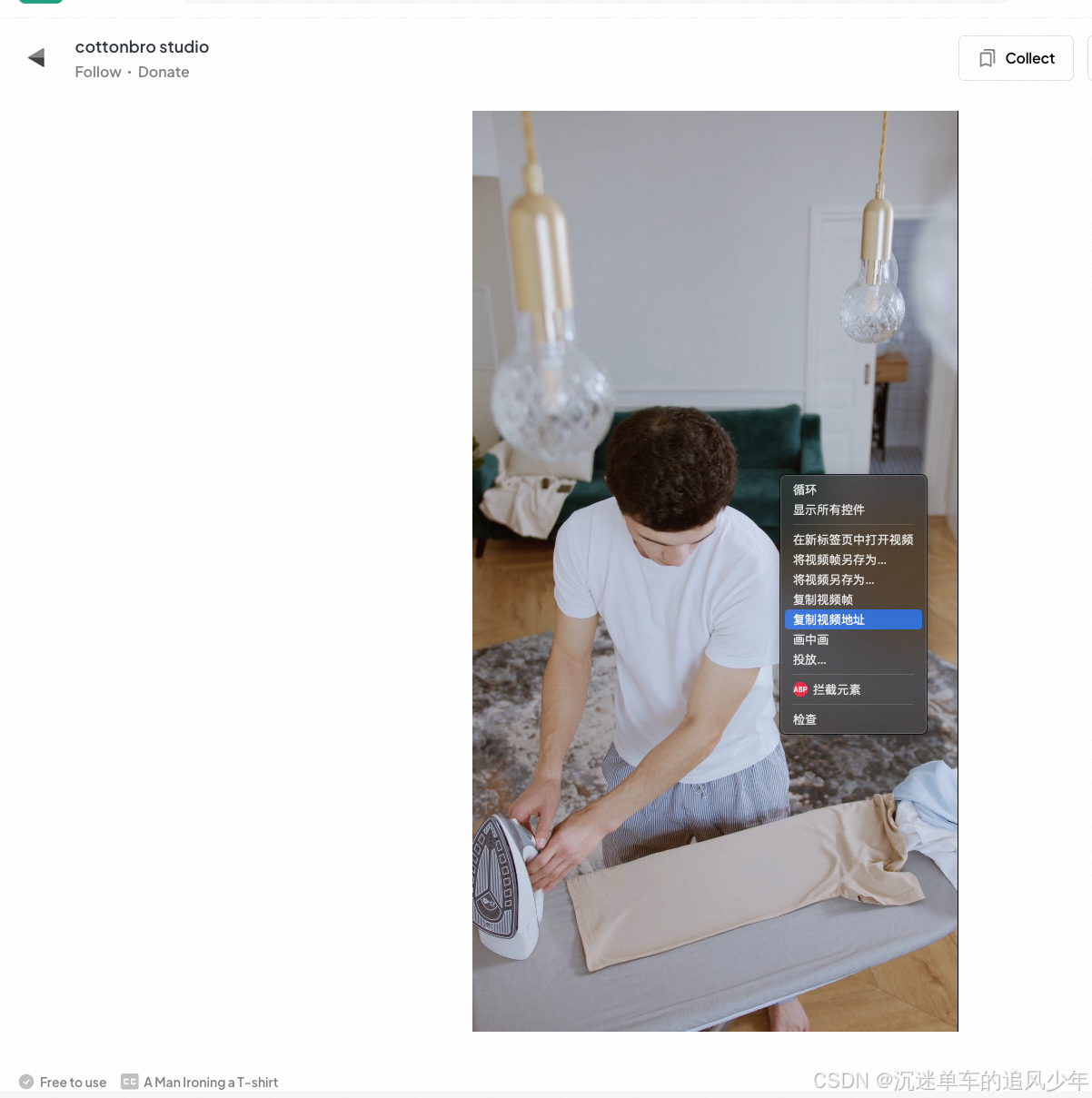
这个链接地址就是原视频的链接地址了,因此可以直接wget下载,也可以用response下载。
那么用脚本如何批量下载呢?以下是源代码:
import os
import requests
from tqdm import tqdmfolder_path = "./videos/vertical1"
os.makedirs(folder_path, exist_ok=True)
url_path = "./pexels-vertical-urls.txt"headers = {"user-agent": "Mozilla/5.0 (Macintosh; Intel Mac OS X 10_13_6) AppleWebKit/537.36 (KHTML, like Gecko) Chrome/68.0.3440.106 Safari/537.36"}def get_video(video_id, url):response = requests.get(url , stream=True, headers=headers)if response.status_code == 200:with open(save_path, 'wb') as outfile:outfile.write(response.content)return Trueelse:return Falseif __name__ == "__main__":error_cnt = 0error_list = []with open(url_path, 'r', encoding='utf-8') as file:for line in tqdm(file):try:origin_url = line.strip()video_id = origin_url.split('/')[-2]url = f"https://videos.pexels.com/video-files/{video_id}/{video_id}-hd_1080_1920_30fps.mp4"save_path = os.path.join(folder_path, str(video_id)+".mp4")if os.path.exists(save_path):# print(f"{save_path} exists!")continueif not get_video(video_id, url):url = f"https://videos.pexels.com/video-files/{video_id}/{video_id}-hd_1080_1920_25fps.mp4"if not get_video(video_id, url):url = f"https://videos.pexels.com/video-files/{video_id}/{video_id}-uhd_1440_2732_25fps.mp4"if not get_video(video_id, url):url = f"https://videos.pexels.com/video-files/{video_id}/{video_id}-uhd_1440_2560_24fps.mp4"if not get_video(video_id, url):url = f"https://videos.pexels.com/video-files/{video_id}/{video_id}-hd_1066_1920_25fps.mp4"if not get_video(video_id, url):url = f"https://videos.pexels.com/video-files/{video_id}/{video_id}-hd_720_1280_24fps.mp4"if not get_video(video_id, url):url = f"https://videos.pexels.com/video-files/{video_id}/{video_id}-hd_720_1280_20fps.mp4"if not get_video(video_id, url):url = f"https://videos.pexels.com/video-files/{video_id}/{video_id}-hd_1080_1902_24fps.mp4"if not get_video(video_id, url):url = f"https://videos.pexels.com/video-files/{video_id}/{video_id}-uhd_1440_2732_24fps.mp4"if not get_video(video_id, url):      url = f"https://videos.pexels.com/video-files/{video_id}/{video_id}-hd_720_1280_25fps.mp4"if not get_video(video_id, url):   url = f"https://videos.pexels.com/video-files/{video_id}/{video_id}-uhd_1440_2496_30fps.mp4"if not get_video(video_id, url):               url = f"https://videos.pexels.com/video-files/{video_id}/{video_id}-uhd_1440_2732_30fps.mp4"if not get_video(video_id, url):     url = f"https://videos.pexels.com/video-files/{video_id}/uhd_25fps.mp4"if not get_video(video_id, url):      url = f"https://videos.pexels.com/video-files/{video_id}/{video_id}-hd_1080_1830_25fps.mp4"if not get_video(video_id, url):                                                                                                                                                                                                                                                                                                                                print(f"The url is {url} response error! the response. The video id is: {video_id}")error_cnt += 1error_list.append(video_id)except Exception as e:print(e)error_cnt += 1error_list.append(video_id)continueprint(f"error_cnt: {error_cnt}")print(error_list)
import os
import requests
from tqdm import tqdmfolder_path = "./videos/horizontal1"
os.makedirs(folder_path, exist_ok=True)
url_path = "./pexels-horizontal-urls.txt"headers = {"user-agent": "Mozilla/5.0 (Macintosh; Intel Mac OS X 10_13_6) AppleWebKit/537.36 (KHTML, like Gecko) Chrome/68.0.3440.106 Safari/537.36"}def get_video(video_id, url, save_path):response = requests.get(url , stream=True, headers=headers)if response.status_code == 200:with open(save_path, 'wb') as outfile:outfile.write(response.content)return Trueelse:return Falseif __name__ == "__main__":error_cnt = 0error_list = []with open(url_path, 'r', encoding='utf-8') as file:for line in tqdm(file):try:origin_url = line.strip()video_id = origin_url.split('/')[-2]url = f"https://videos.pexels.com/video-files/{video_id}/{video_id}-uhd_2732_1440_25fps.mp4"save_path = os.path.join(folder_path, str(video_id)+".mp4")if os.path.exists(save_path):# print(f"{save_path} exists!")continue# https://videos.pexels.com/video-files/5547220/5547220-hd_1280_720_25fps.# https://videos.pexels.com/video-files/4156500/4156500-hd_1608_1080_30fps.mp4# https://videos.pexels.com/video-files/8142750/uhd_25fps.mp4# https://videos.pexels.com/video-files/4536510/4536510-hd_1280_720_50fps.mp4if not get_video(video_id, url, save_path):url = f"https://videos.pexels.com/video-files/{video_id}/{video_id}-uhd_2732_1440_30fps.mp4"if not get_video(video_id, url, save_path):url = f"https://videos.pexels.com/video-files/{video_id}/{video_id}-uhd_2560_1440_24fps.mp4"if not get_video(video_id, url, save_path):url = f"https://videos.pexels.com/video-files/{video_id}/{video_id}-uhd_2560_1440_25fps.mp4"if not get_video(video_id, url, save_path):url = f"https://videos.pexels.com/video-files/{video_id}/{video_id}-uhd_2560_1440_30fps.mp4"if not get_video(video_id, url, save_path):url = f"https://videos.pexels.com/video-files/{video_id}/{video_id}-hd_1920_1080_25fps.mp4"if not get_video(video_id, url, save_path):url = f"https://videos.pexels.com/video-files/{video_id}/{video_id}-uhd_2732_1440_24fps.mp4"if not get_video(video_id, url, save_path):url = f"https://videos.pexels.com/video-files/{video_id}/{video_id}-hd_1920_1080_24fps.mp4"if not get_video(video_id, url, save_path):url = f"https://videos.pexels.com/video-files/{video_id}/{video_id}-hd_1920_1080_30fps.mp4"if not get_video(video_id, url, save_path):url = f"https://videos.pexels.com/video-files/{video_id}/{video_id}-uhd_2560_1080_25fps.mp4"if not get_video(video_id, url, save_path):url = f"https://videos.pexels.com/video-files/{video_id}/{video_id}-uhd_2732_1318_30fps.mp4"if not get_video(video_id, url, save_path):url = f"https://videos.pexels.com/video-files/{video_id}/{video_id}-uhd_2732_1122_25fps.mp4"if not get_video(video_id, url, save_path): url = f"https://videos.pexels.com/video-files/{video_id}/{video_id}-2732_1026_25fps.mp4"if not get_video(video_id, url, save_path):url = f"https://videos.pexels.com/video-files/{video_id}/{video_id}-hd_1280_720_25fps.mp4"if not get_video(video_id, url, save_path): url = f"https://videos.pexels.com/video-files/{video_id}/{video_id}-hd_1608_1080_30fps.mp4"if not get_video(video_id, url, save_path): url = f"https://videos.pexels.com/video-files/{video_id}/uhd_25fps.mp4"if not get_video(video_id, url, save_path): url = f"https://videos.pexels.com/video-files/{video_id}/{video_id}-hd_1280_720_50fps.mp4"if not get_video(video_id, url, save_path): print(f"The url is {url} response error! The video id is: {video_id}")error_cnt += 1error_list.append(video_id)except Exception as e:print(e)error_cnt += 1error_list.append(video_id)print(f"error_cnt: {error_cnt}")print(error_list)附录:HumanVid链接
pexels-vertical-urls.txt
https://www.pexels.com/video/7080900/download
https://www.pexels.com/video/6952520/download
https://www.pexels.com/video/6349070/download
https://www.pexels.com/video/7331390/download
https://www.pexels.com/video/7570280/download
https://www.pexels.com/video/6860990/download
https://www.pexels.com/video/6944620/download
https://www.pexels.com/video/6764050/download
https://www.pexels.com/video/8873210/download
https://www.pexels.com/video/6389830/download
https://www.pexels.com/video/6565400/download
https://www.pexels.com/video/6930970/download
https://www.pexels.com/video/8469970/download
https://www.pexels.com/video/7326810/download
https://www.pexels.com/video/4325510/download
https://www.pexels.com/video/7169950/download
https://www.pexels.com/video/8926860/download
https://www.pexels.com/video/5995130/download
https://www.pexels.com/video/8217050/download
https://www.pexels.com/video/8224270/download
https://www.pexels.com/video/8371250/download
https://www.pexels.com/video/6455330/download
https://www.pexels.com/video/9947050/download
https://www.pexels.com/video/9047370/download
https://www.pexels.com/video/6688050/download
https://www.pexels.com/video/4838220/download
https://www.pexels.com/video/7239800/download
https://www.pexels.com/video/5999210/download
https://www.pexels.com/video/9187960/download
https://www.pexels.com/video/6487450/download
https://www.pexels.com/video/7140160/download
https://www.pexels.com/video/5999650/download
https://www.pexels.com/video/7077040/download
https://www.pexels.com/video/3894700/download
https://www.pexels.com/video/6082570/download
https://www.pexels.com/video/7579880/download
https://www.pexels.com/video/8401740/download
https://www.pexels.com/video/8217240/download
https://www.pexels.com/video/8944110/download
https://www.pexels.com/video/5683800/download
https://www.pexels.com/video/7551190/download
https://www.pexels.com/video/6732430/download
https://www.pexels.com/video/8027280/download
https://www.pexels.com/video/6347120/download
https://www.pexels.com/video/8216940/download
https://www.pexels.com/video/7424400/download
https://www.pexels.com/video/8436000/download
https://www.pexels.com/video/6446180/download
https://www.pexels.com/video/6799740/download
https://www.pexels.com/video/6935810/download
https://www.pexels.com/video/7957280/download
https://www.pexels.com/video/8382490/download
https://www.pexels.com/video/6306030/download
https://www.pexels.com/video/8456640/download
https://www.pexels.com/video/8113110/download
https://www.pexels.com/video/7673610/download
https://www.pexels.com/video/6197560/download
https://www.pexels.com/video/6198550/download
https://www.pexels.com/video/9371260/download
https://www.pexels.com/video/12910150/download
https://www.pexels.com/video/5834600/download
https://www.pexels.com/video/7730520/download
https://www.pexels.com/video/7140210/download
https://www.pexels.com/video/5716220/download
https://www.pexels.com/video/7706010/download
https://www.pexels.com/video/6172960/download
https://www.pexels.com/video/7644230/download
https://www.pexels.com/video/7173140/download
https://www.pexels.com/video/6578980/download
https://www.pexels.com/video/6774470/download
https://www.pexels.com/video/6570560/download
https://www.pexels.com/video/7484280/download
https://www.pexels.com/video/7896900/download
https://www.pexels.com/video/6617220/download
https://www.pexels.com/video/6944280/download
https://www.pexels.com/video/8416580/download
https://www.pexels.com/video/8511010/download
https://www.pexels.com/video/8076890/download
https://www.pexels.com/video/5981910/download
https://www.pexels.com/video/6707470/download
https://www.pexels.com/video/5901660/download
https://www.pexels.com/video/5319930/download
https://www.pexels.com/video/7329850/download
https://www.pexels.com/video/9613990/download
https://www.pexels.com/video/5384950/download
https://www.pexels.com/video/6437920/download
https://www.pexels.com/video/7148070/download
https://www.pexels.com/video/8111740/download
https://www.pexels.com/video/4540340/download
https://www.pexels.com/video/9001930/download
https://www.pexels.com/video/12331340/download
https://www.pexels.com/video/6784470/download
https://www.pexels.com/video/5515570/download
https://www.pexels.com/video/5973230/download
https://www.pexels.com/video/7198890/download
https://www.pexels.com/video/7267510/download
https://www.pexels.com/video/6730930/download
https://www.pexels.com/video/8057650/download
https://www.pexels.com/video/7424390/download
https://www.pexels.com/video/7550840/download
https://www.pexels.com/video/8362620/download
https://www.pexels.com/video/8376450/download
https://www.pexels.com/video/8056690/download
https://www.pexels.com/video/8087310/download
https://www.pexels.com/video/8544230/download
https://www.pexels.com/video/4860330/download
https://www.pexels.com/video/12433210/download
https://www.pexels.com/video/4753980/download
https://www.pexels.com/video/5184350/download
https://www.pexels.com/video/6323270/download
https://www.pexels.com/video/7945890/download
https://www.pexels.com/video/8777100/download
https://www.pexels.com/video/8170730/download
https://www.pexels.com/video/5370830/download
https://www.pexels.com/video/7671930/download
https://www.pexels.com/video/8224600/download
https://www.pexels.com/video/4098440/download
https://www.pexels.com/video/6153970/download
https://www.pexels.com/video/6615310/download
https://www.pexels.com/video/6892550/download
https://www.pexels.com/video/8087090/download
https://www.pexels.com/video/4976900/download
https://www.pexels.com/video/7354940/download
https://www.pexels.com/video/8345820/download
https://www.pexels.com/video/4671960/download
https://www.pexels.com/video/6875170/download
https://www.pexels.com/video/7699750/download
https://www.pexels.com/video/10536910/download
https://www.pexels.com/video/8217090/download
https://www.pexels.com/video/8729420/download
https://www.pexels.com/video/6913260/download
https://www.pexels.com/video/7329840/download
https://www.pexels.com/video/8448090/download
https://www.pexels.com/video/6890230/download
https://www.pexels.com/video/3201200/download
https://www.pexels.com/video/6447700/download
https://www.pexels.com/video/6245810/download
https://www.pexels.com/video/7187450/download
https://www.pexels.com/video/8322000/download
https://www.pexels.com/video/6324550/download
https://www.pexels.com/video/6525480/download
https://www.pexels.com/video/6389560/download
https://www.pexels.com/video/5974320/download
https://www.pexels.com/video/7545940/download
https://www.pexels.com/video/4507230/download
https://www.pexels.com/video/7480490/download
https://www.pexels.com/video/6132710/download
https://www.pexels.com/video/7525810/download
https://www.pexels.com/video/7901510/download
https://www.pexels.com/video/7016530/download
https://www.pexels.com/video/7680770/download
https://www.pexels.com/video/7793360/download
https://www.pexels.com/video/6202100/download
https://www.pexels.com/video/7809650/download
https://www.pexels.com/video/6984840/download
https://www.pexels.com/video/7540250/download
https://www.pexels.com/video/7253250/download
https://www.pexels.com/video/7804490/download
https://www.pexels.com/video/7728220/download
https://www.pexels.com/video/8047410/download
https://www.pexels.com/video/7597260/download
https://www.pexels.com/video/6951180/download
https://www.pexels.com/video/6297140/download
https://www.pexels.com/video/7957040/download
https://www.pexels.com/video/9511850/download
https://www.pexels.com/video/8987290/download
https://www.pexels.com/video/6930230/download
https://www.pexels.com/video/6245510/download
https://www.pexels.com/video/5124240/download
https://www.pexels.com/video/7576310/download
https://www.pexels.com/video/6547780/download
https://www.pexels.com/video/7881190/download
https://www.pexels.com/video/7969760/download
https://www.pexels.com/video/8160260/download
https://www.pexels.com/video/7551200/download
https://www.pexels.com/video/8043430/download
https://www.pexels.com/video/6063030/download
https://www.pexels.com/video/8192040/download
正文放不下了…
相关文章:
【保姆级教程】批量下载Pexels视频Python脚本(以HumanVid数据集为例)
目录 方案一:转换链接为download模式 方案二:获取源链接后下载 附录:HumanVid链接 方案一:转换链接为download模式 将下载链接的后缀加入 /download 然后用下面的脚本下载: import argparse import json import o…...
Python画笔案例-067 绘制配乐七角星
1、绘制橙子 通过 python 的turtle 库绘制 配乐七角星,如下图: 2、实现代码 绘制 配乐七角星 ,以下为实现代码: """配乐七角星.py本程序需要coloradd模块支持,安装方法:pip install coloradd""" import turtle from coloradd import color…...

Spark Job 对象 详解
在 Apache Spark 中,Job 对象是执行逻辑的核心组件之一,它代表了对一系列数据操作(如 transformations 和 actions)的提交。理解 Job 的本质和它在 Spark 中的运行机制,有助于深入理解 Spark 的任务调度、执行模型和容…...

C#中NModbus4中常用的方法
NModbus4 是一个用于 Modbus 协议通信的 C# 库,它支持串行 ASCII、RTU、TCP 和 UDP 协议。以下是 NModbus4 中常用的一些方法: 创建连接: ModbusSerialMaster.CreateRtu(SerialPort serialPort): 创建一个 RTU 串行连接。ModbusSerialMaster.…...
【Linux】线程同步与互斥
一、线程间互斥 1 .进程线程间的互斥相关概念 临界资源:多线程执行流共享的资源就叫做临界资源 临界区:每个线程内部,访问临界资源的代码,就叫做临界区 互斥:任何时刻,互斥保证有且只有一个执行流进入临界…...
003、网关路由问题
1. nginx配置404跳转回默认路由 https://blog.csdn.net/masteryee/article/details/83689954 https://blog.csdn.net/IbcVue/article/details/133230460 https://www.jb51.net/server/317970ynk.htm https://blog.csdn.net/u014438244/article/details/120531287 https://blog…...

Eclipse 快捷键:提高开发效率的利器
Eclipse 快捷键:提高开发效率的利器 Eclipse 是一款广泛使用的集成开发环境(IDE),它为Java、C、PHP等编程语言提供了强大的开发支持。对于开发者来说,熟练掌握Eclipse的快捷键不仅能提高编码效率,还能减少…...

Agent智能体
Agent(智能体)是一个能够感知环境并采取行动的自主实体,通常被设计用于在特定的环境中执行任务。智能体可以通过学习、推理等方式来决策,目标是最大化某种效用或实现某个预定的目标。它们广泛应用于自动化系统、游戏AI、机器人、自…...
用Promise实现前端并发请求
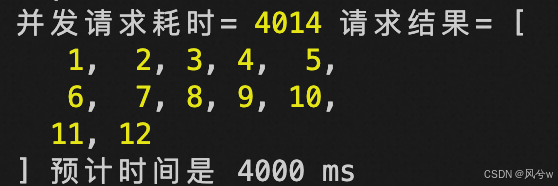
/** * 构造假请求 */ async function request(url) {return new Promise((resolve) > {setTimeout(() > {resolve(url);},// Math.random() * 500 800,1000,);}); }请求一次,查看耗时,预计应该是1s: async function requestOnce() {c…...
通过队列实现栈
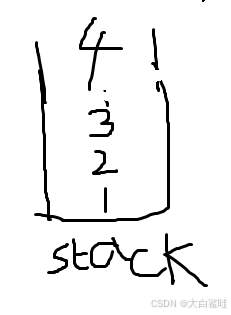
请你仅使用两个队列实现一个后入先出(LIFO)的栈,并支持普通栈的全部四种操作(push、top、pop 和 empty)。 实现 MyStack 类: void push(int x) 将元素 x 压入栈顶。int pop() 移除并返回栈顶元素。int to…...
Mac下可以平替paste的软件pastemate,在windows上也能用,还可以实现数据多端同步
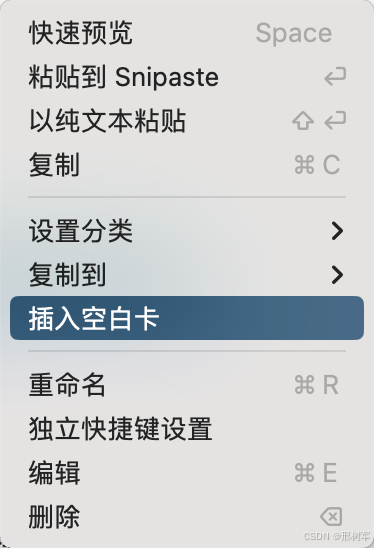
Mac平台上非常经典的剪贴板管理工具:「Paste」。作为一款功能完善且易用的工具,「Paste」在实际使用中体现出了许多令人欣赏的特点。但是它是一个收费软件,一年至少要24美元. 现有一平替软件pastemate,功能更加丰富,使用更加方便。 下载地址…...
106. 从中序与后序遍历序列构造二叉树
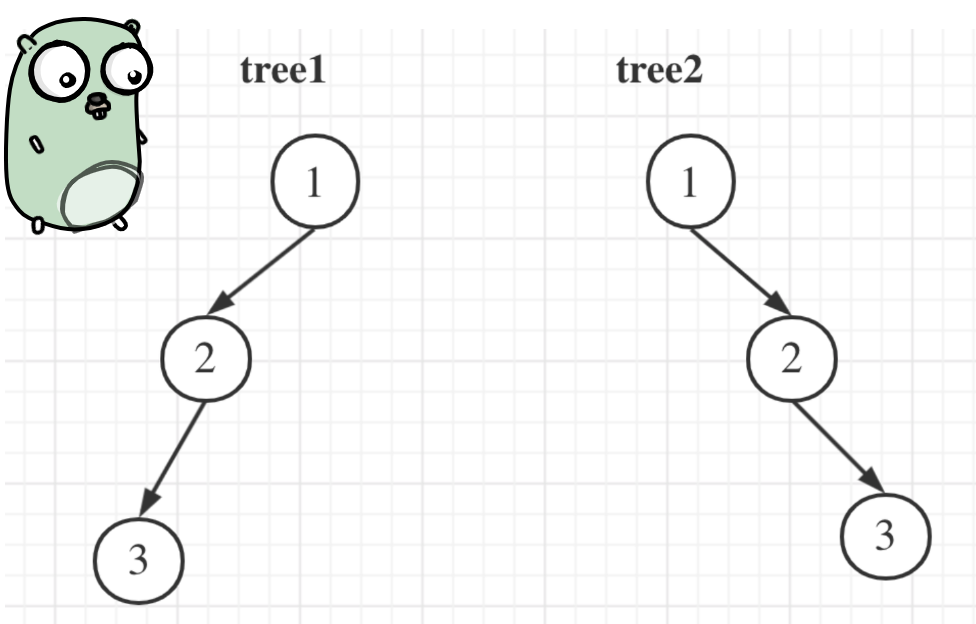
文章目录 106. 从中序与后序遍历序列构造二叉树思路 105. 从前序与中序遍历序列构造二叉树思路 思考 106. 从中序与后序遍历序列构造二叉树 106. 从中序与后序遍历序列构造二叉树 给定两个整数数组 inorder 和postorder,其中 inorder 是二叉树的中序遍历ÿ…...

监控和日志管理:深入了解Nagios、Zabbix和Prometheus
在现代IT运维中,监控和日志管理是确保系统稳定性和性能的关键环节。本文将介绍三种流行的监控工具:Nagios、Zabbix和Prometheus,帮助您了解它们的特点、使用场景以及如何进行基本配置。 一、Nagios Nagios 是一个强大的开源监控系统&#x…...

Win10下载Python:一步步指南
Win10下载Python:一步步指南 在Win10操作系统中下载并安装Python可能是一项挑战性的任务,但是在本文中,我们将向您提供三个不同的方法,以便轻松地完成这项任务。 方法一:使用Microsoft Store Microsoft Store是一个…...

Race Karts Pack 全管线 卡丁车赛车模型素材
是8辆高细节、可定制的赛车,内部有纹理。经过优化,可在手机游戏中使用。Unity车辆系统已实施-准备驾驶。 此套装包含8种不同的车辆,每种车辆有8-10种颜色变化,总共有75种车辆变化! 技术细节: -每辆卡丁车模型使用4种材料(车身、玻璃、车轮和BrakeFlare) 纹理大小: -车…...

C#——switch案例讲解
案例:根据输入的内容判断执行哪一条输出语句 string number txtUserName.Text; switch(number) { case"101":MessageBox.Show("您进入了101房间");break; case"102":MessageBox.Show("您进入了102房间");break; case&quo…...
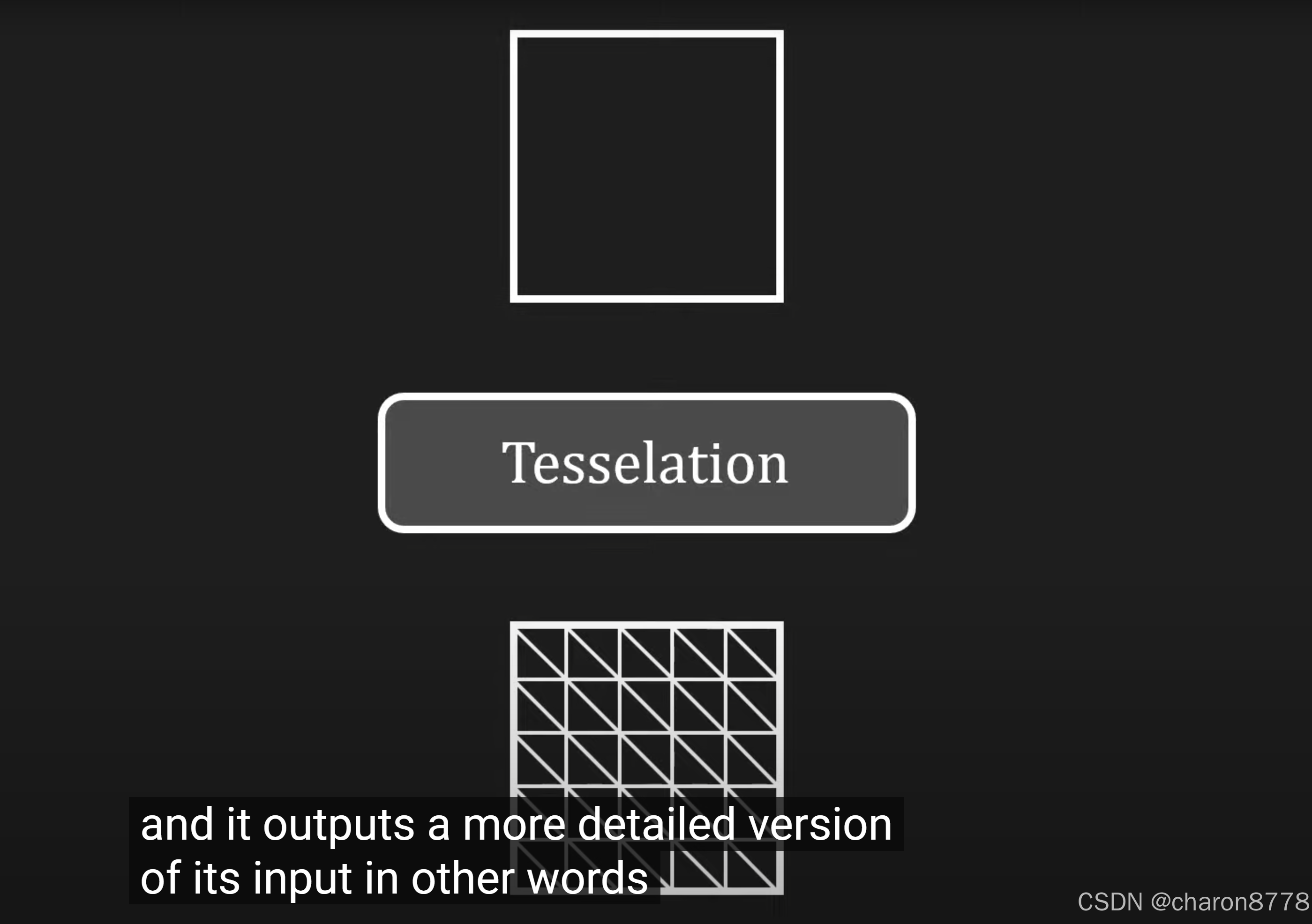
技术美术一百问(02)
问题 前向渲染和延迟渲染的流程 前向渲染和延迟渲染的区别 G-Buffer是什么 前向渲染和延迟渲染各自擅长的方向总结 GPU pipeline是怎么样的 Tessellation的三个阶段 什么是图形渲染API? 常见的图形渲染API有哪些? 答案 1.前向渲染和延迟渲染的流程 【例图…...

12 函数的应用
函数的应用 一、Shell递归函数 函数优点: 函数在程序设计中是一个非常重要的概念,它可以将程序划分成一个个功能相对独立的代码块,使代码的模块化更好,结构更加清晰,并可以有效地减少程序的代码量。 递归…...
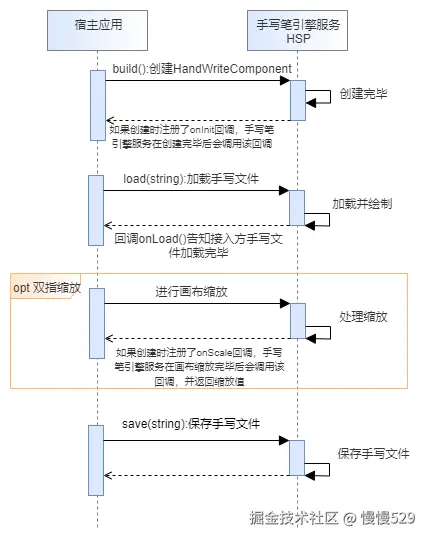
鸿蒙开发(NEXT/API 12)【硬件(接入手写套件)】手写功能开发
接入手写套件后,可以在应用中创建手写功能界面。界面包括手写画布和笔刷工具栏两部分,手写画布部分支持手写笔和手指的书写效果绘制,笔刷工具栏部分提供多种笔刷和编辑工具,并支持对手写功能进行设置。接入手写套件后将自动开启一…...
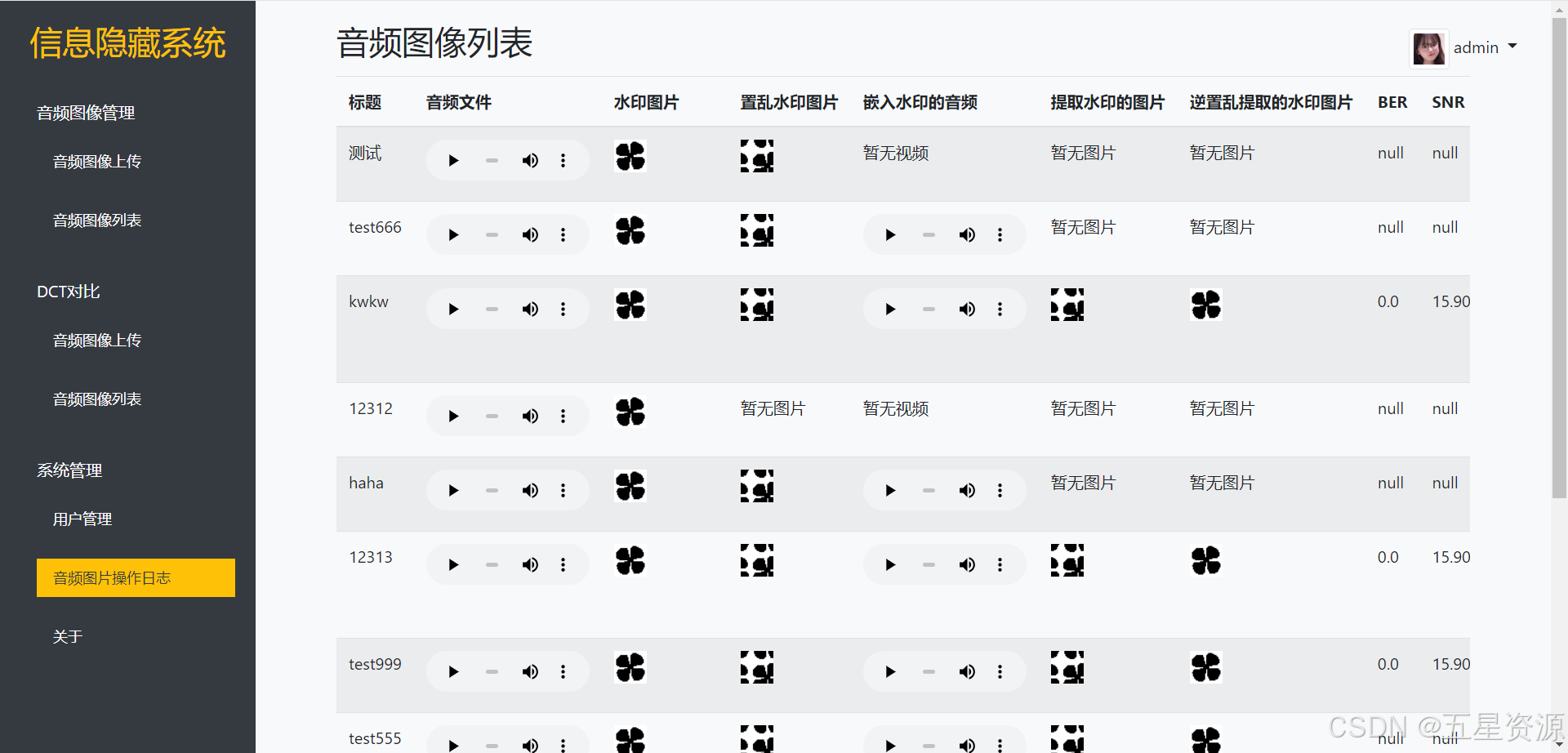
基于python+flask+mysql的音频信息隐藏系统
博主介绍: 大家好,本人精通Java、Python、C#、C、C编程语言,同时也熟练掌握微信小程序、Php和Android等技术,能够为大家提供全方位的技术支持和交流。 我有丰富的成品Java、Python、C#毕设项目经验,能够为学生提供各类…...

CodeWeaver:多仓库聚合分析工具的设计、部署与实战指南
1. 项目概述与核心价值最近在折腾一个老项目,需要把一堆陈年的、用不同语言和框架写的代码仓库整合到一个统一的视图里进行管理和分析。手动去每个仓库里翻看提交记录、统计代码行数、检查依赖关系,这活儿想想就头大。就在我准备硬着头皮写脚本的时候&am…...

避坑指南:在Python 3.7环境用ModelScope部署speech_campplus_sv_zh-cn_16k-common语音识别模型的完整流程
避坑指南:Python 3.7环境部署ModelScope语音识别模型的完整实践 在人工智能语音处理领域,说话人验证技术正逐渐成为身份认证和语音交互系统的核心组件。阿里云达摩院开源的speech_campplus_sv_zh-cn_16k-common模型作为轻量级解决方案,特别适…...
)
告别U盘!用PXE网络批量装UOS,一台电脑搞定所有(附Arm/Mips/X86全架构配置)
告别U盘!用PXE网络批量装UOS,一台电脑搞定所有(附Arm/Mips/X86全架构配置) 在国产化替代的大背景下,UOS操作系统凭借其出色的兼容性和安全性,正被越来越多的企业和机构采用。然而,当面对数十台甚…...

从零理解无刷电机方波驱动:用STM32CubeMX配置TIM1 PWM与EXTI中断实现换相
STM32无刷电机方波驱动实战:CubeMX配置与六步换相详解 1. 无刷电机驱动基础认知 无刷直流电机(BLDC)凭借高效率、长寿命和低噪音特性,已成为工业自动化、消费电子和智能家居领域的核心动力元件。与传统有刷电机相比,BL…...
)
手把手教你为AK7739音频芯片移植TDM接口(基于Linux ALSA框架)
手把手教你为AK7739音频芯片移植TDM接口(基于Linux ALSA框架) 在嵌入式音频系统开发中,TDM(Time Division Multiplexing)接口因其高带宽和多通道支持能力,成为专业音频设备的首选方案。AK7739作为一款高性能…...
)
Unity SLG大地图实战:用TileManager和AOI搞定网格管理与视野同步(附Demo代码)
Unity SLG大地图开发实战:网格管理与AOI视野同步的工程化解决方案 在SLG游戏开发中,大地图系统是核心体验的基石。面对动辄数万网格的动态管理需求,以及需要与后端高效协作的视野同步问题,传统开发方式往往陷入性能瓶颈和逻辑混乱…...

Adobe-GenP终极指南:5分钟免费解锁Adobe全家桶的完整方案
Adobe-GenP终极指南:5分钟免费解锁Adobe全家桶的完整方案 【免费下载链接】Adobe-GenP Adobe CC 2019/2020/2021/2022/2023 GenP Universal Patch 3.0 项目地址: https://gitcode.com/gh_mirrors/ad/Adobe-GenP 还在为Adobe Creative Cloud昂贵的订阅费用而苦…...

嵌入式Linux SPI转CAN-FD扩展实战:基于i.MX8MP与MCP2518FD
1. 项目概述:当开发板的CAN口不够用时在嵌入式产品开发中,尤其是工业控制、汽车电子或机器人领域,CAN总线因其高可靠性和实时性被广泛应用。飞凌嵌入式的OKMX8MP-C开发板基于强大的i.MX8M Plus处理器,原生提供了两路CAN-FD总线&am…...

电赛信号分析不止于FFT:用STM32F407的ADC-DMA与加窗技术提升THD测量稳定性的实操指南
电赛信号分析进阶:STM32F407的ADC-DMA与加窗技术实战 在电子设计竞赛的信号分析环节,许多队伍止步于基础的FFT实现,却忽略了采样质量与频谱处理对THD(总谐波失真)测量结果的深远影响。当你的系统已经能够输出波形和基础…...

对比直接采购使用Taotoken Token Plan套餐在长期开发中的成本优势
🚀 告别海外账号与网络限制!稳定直连全球优质大模型,限时半价接入中。 👉 点击领取海量免费额度 对比直接采购与使用Taotoken Token Plan套餐在长期开发中的成本优势 在长期的技术项目开发中,模型API调用成本是团队必…...