
springboot系列--web相关知识探索四
一、前言
web相关知识探索三中研究了请求中所带的参数是如何映射到接口参数中的,也即请求参数如何与接口参数绑定。主要有四种、分别是注解方式、Servlet API方式、复杂参数、以及自定义对象参数。web相关知识探索三中主要研究了注解方式以及Servlet API方式。本次研究主要是复杂参数底层绑定原理。
二、 复杂参数底层绑定原理
一、测试用例
请求的接口当中,还可以放入这些类型作为参数,Map、Model(map、model里面的数据会被默认放在request的请求域 request.setAttribute)、Errors/BindingResult、RedirectAttributes( 重定向携带数据)、ServletResponse(response)、SessionStatus、UriComponentsBuilder、ServletUriComponentsBuilder。
/*** 请求进来这个接口,然后往map设置数据,同时也往model和request设置数据,* 处理完之后再转发到下一个接口,下一个接口再从请求域中拿出map和model中设置的数据* 这里主要是验证,接口参数map和moddel,请求进来时,携带到的值是放在请求域中的* Map<String,Object> map, Model model, HttpServletRequest request 都是可以给request域中放数据,* @param map* @param model* @param request* @return*/@GetMapping("/test")public String testParam(Map<String,Object> map, Model model, HttpServletRequest request, HttpServletResponse response){map.put("test1","mapTest");model.addAttribute("test2","modelTest");request.setAttribute("test3","requestTest");Cookie cookie = new Cookie("test4","cookieTest");response.addCookie(cookie);return "forward:/success";}@GetMapping("/success")@ResponseBodypublic Map testSuccess(HttpServletRequest request){Object test1 = request.getAttribute("test1");Object test2 = request.getAttribute("test2");Object test3 = request.getAttribute("test3");Map mp = new HashMap();mp.put("test1",test1);mp.put("test2",test2);mp.put("test3",test3);return mp;}二、底层原理
一、Map参数解析
请求进来以后,直接到匹配合适的参数解析器这一步,第一个参数是Map类型的,所以需要的是能够解析Map类型参数的解析器。


上面是判断那种解析器支持解析Map类型参数,下面开始解析Map类型参数


// 解析map类型参数@Nullablepublic Object resolveArgument(MethodParameter parameter, @Nullable ModelAndViewContainer mavContainer, NativeWebRequest webRequest, @Nullable WebDataBinderFactory binderFactory) throws Exception {Assert.state(mavContainer != null, "ModelAndViewContainer is required for model exposure");// 直接从一个ModelAndViewContainer(模型和视图容器)对象中获取一个modelreturn mavContainer.getModel();}// 获取模型对象public ModelMap getModel() {默认会进入这条路径if (this.useDefaultModel()) {return this.defaultModel;} else {if (this.redirectModel == null) {this.redirectModel = new ModelMap();}return this.redirectModel;}}获取到的model对象是一个
private final ModelMap defaultModel = new BindingAwareModelMap();也就是说,获取到的是一个BindingAwareModelMap对象,可以查看他的继承和实现发现,BindingAwareModelMap 是Model 也是Map。
二、Model参数解析


从HandlerMethodArgumentResolverComposite类中的方法resolveArgument里面的代码
resolver.resolveArgument(parameter, mavContainer, webRequest, binderFactory);这里是开始解析参数的地方,从这里进入会发现,和map的解析是一模一样的。也是获取到一个BindingAwareModelMap对象。而且和前一个map用的还是同一个对象。


三、map参数和model参数会被放到请求域当中
一、处理返回值
刚开始BindingAwareModelMap对象是空的,等到执行完接口后,接口里面会进行赋值,这个对象就有数据了。目标方法执行完,会将所有的数据都放在 ModelAndViewContainer;包含要去的页面地址View。还包含Model数据


// 处理请求接口以及处理接口返回数据public void invokeAndHandle(ServletWebRequest webRequest, ModelAndViewContainer mavContainer, Object... providedArgs) throws Exception {// 处理接口Object returnValue = this.invokeForRequest(webRequest, mavContainer, providedArgs);this.setResponseStatus(webRequest);if (returnValue == null) {if (this.isRequestNotModified(webRequest) || this.getResponseStatus() != null || mavContainer.isRequestHandled()) {this.disableContentCachingIfNecessary(webRequest);mavContainer.setRequestHandled(true);return;}} else if (StringUtils.hasText(this.getResponseStatusReason())) {mavContainer.setRequestHandled(true);return;}mavContainer.setRequestHandled(false);Assert.state(this.returnValueHandlers != null, "No return value handlers");try {// 处理返回结果,mavContainer也被作为参数传入进去了this.returnValueHandlers.handleReturnValue(returnValue, this.getReturnValueType(returnValue), mavContainer, webRequest);} catch (Exception var6) {if (logger.isTraceEnabled()) {logger.trace(this.formatErrorForReturnValue(returnValue), var6);}throw var6;}}// 处理返回值public void handleReturnValue(@Nullable Object returnValue, MethodParameter returnType, ModelAndViewContainer mavContainer, NativeWebRequest webRequest) throws Exception {//找到返回值处理器,这里之后在返回值部分细细研究 HandlerMethodReturnValueHandler handler = this.selectHandler(returnValue, returnType);if (handler == null) {throw new IllegalArgumentException("Unknown return value type: " + returnType.getParameterType().getName());} else {//这里是处理返回值的具体逻辑handler.handleReturnValue(returnValue, returnType, mavContainer, webRequest);}}// 具体处理返回值逻辑public void handleReturnValue(@Nullable Object returnValue, MethodParameter returnType, ModelAndViewContainer mavContainer, NativeWebRequest webRequest) throws Exception {// 如果返回值是字符串会进入到这里if (returnValue instanceof CharSequence) {String viewName = returnValue.toString();// 将返回值保存到ModelAndViewContainer对象中,view属性一般就是地址,model也就是数据,ModelAndView就是携带数据到达指定的地址当中mavContainer.setViewName(viewName);if (this.isRedirectViewName(viewName)) {mavContainer.setRedirectModelScenario(true);}} else if (returnValue != null) {throw new UnsupportedOperationException("Unexpected return type: " + returnType.getParameterType().getName() + " in method: " + returnType.getMethod());}}
二、将map、model数据设置到请求域中

下面是上图中invokeHandlerMethod方法中
invocableMethod.invokeAndHandle(webRequest, mavContainer, new Object[0]);这段代码涉及到的源码
// 处理请求接口以及处理接口返回数据public void invokeAndHandle(ServletWebRequest webRequest, ModelAndViewContainer mavContainer, Object... providedArgs) throws Exception {// 处理接口Object returnValue = this.invokeForRequest(webRequest, mavContainer, providedArgs);this.setResponseStatus(webRequest);if (returnValue == null) {if (this.isRequestNotModified(webRequest) || this.getResponseStatus() != null || mavContainer.isRequestHandled()) {this.disableContentCachingIfNecessary(webRequest);mavContainer.setRequestHandled(true);return;}} else if (StringUtils.hasText(this.getResponseStatusReason())) {mavContainer.setRequestHandled(true);return;}mavContainer.setRequestHandled(false);Assert.state(this.returnValueHandlers != null, "No return value handlers");try {// 处理返回结果,mavContainer也被作为参数传入进去了this.returnValueHandlers.handleReturnValue(returnValue, this.getReturnValueType(returnValue), mavContainer, webRequest);} catch (Exception var6) {if (logger.isTraceEnabled()) {logger.trace(this.formatErrorForReturnValue(returnValue), var6);}throw var6;}}// 处理返回值public void handleReturnValue(@Nullable Object returnValue, MethodParameter returnType, ModelAndViewContainer mavContainer, NativeWebRequest webRequest) throws Exception {//找到返回值处理器,这里之后在返回值部分细细研究 HandlerMethodReturnValueHandler handler = this.selectHandler(returnValue, returnType);if (handler == null) {throw new IllegalArgumentException("Unknown return value type: " + returnType.getParameterType().getName());} else {//这里是处理返回值的具体逻辑handler.handleReturnValue(returnValue, returnType, mavContainer, webRequest);}}// 具体处理返回值逻辑public void handleReturnValue(@Nullable Object returnValue, MethodParameter returnType, ModelAndViewContainer mavContainer, NativeWebRequest webRequest) throws Exception {// 如果返回值是字符串会进入到这里if (returnValue instanceof CharSequence) {String viewName = returnValue.toString();// 将返回值保存到ModelAndViewContainer对象中,view属性一般就是地址,model也就是数据,ModelAndView就是携带数据到达指定的地址当中mavContainer.setViewName(viewName);if (this.isRedirectViewName(viewName)) {mavContainer.setRedirectModelScenario(true);}} else if (returnValue != null) {throw new UnsupportedOperationException("Unexpected return type: " + returnType.getParameterType().getName() + " in method: " + returnType.getMethod());}}下面是上图中invokeHandlerMethod方法中
var15 = this.getModelAndView(mavContainer, modelFactory, webRequest);涉及到的源码
获取ModelAndView对象@Nullableprivate ModelAndView getModelAndView(ModelAndViewContainer mavContainer, ModelFactory modelFactory, NativeWebRequest webRequest) throws Exception {// 这里会更新model主要逻辑在自定义参数对象这块再研究modelFactory.updateModel(webRequest, mavContainer);if (mavContainer.isRequestHandled()) {return null;} else {ModelMap model = mavContainer.getModel();// 获取modelMap中的对象,并保存到ModelAndView中ModelAndView mav = new ModelAndView(mavContainer.getViewName(), model, mavContainer.getStatus());if (!mavContainer.isViewReference()) {mav.setView((View)mavContainer.getView());}// 处理重定向数据if (model instanceof RedirectAttributes) {Map<String, ?> flashAttributes = ((RedirectAttributes)model).getFlashAttributes();HttpServletRequest request = (HttpServletRequest)webRequest.getNativeRequest(HttpServletRequest.class);if (request != null) {// 将请求数据放到请求上下文当中RequestContextUtils.getOutputFlashMap(request).putAll(flashAttributes);}}return mav;}}以上使用处理器适配器调用具体handler就处理完了,让然后会返回一个ModelAndView对象。之后回到DispatcherServlet类中的doDispatch方法当中。这个时候需要关注这个方法里面
this.processDispatchResult(processedRequest, response, mappedHandler, mv, (Exception)dispatchException);这块代码片段,主要是处理派发结果,这里就会往请求域中设置数据。
private void processDispatchResult(HttpServletRequest request, HttpServletResponse response, @Nullable HandlerExecutionChain mappedHandler, @Nullable ModelAndView mv, @Nullable Exception exception) throws Exception {// 这部分是处理异常的boolean errorView = false;if (exception != null) {if (exception instanceof ModelAndViewDefiningException) {this.logger.debug("ModelAndViewDefiningException encountered", exception);mv = ((ModelAndViewDefiningException)exception).getModelAndView();} else {Object handler = mappedHandler != null ? mappedHandler.getHandler() : null;mv = this.processHandlerException(request, response, handler, exception);errorView = mv != null;}}// ModelAndView不为空时,且没有被清理if (mv != null && !mv.wasCleared()) {// 这里是去渲染页面的this.render(mv, request, response);if (errorView) {WebUtils.clearErrorRequestAttributes(request);}} else if (this.logger.isTraceEnabled()) {this.logger.trace("No view rendering, null ModelAndView returned.");}if (!WebAsyncUtils.getAsyncManager(request).isConcurrentHandlingStarted()) {if (mappedHandler != null) {mappedHandler.triggerAfterCompletion(request, response, (Exception)null);}}}// 开始去渲染页面protected void render(ModelAndView mv, HttpServletRequest request, HttpServletResponse response) throws Exception {Locale locale = this.localeResolver != null ? this.localeResolver.resolveLocale(request) : request.getLocale();response.setLocale(locale);// 获取视图名String viewName = mv.getViewName();View view;// 开始解析视图if (viewName != null) {view = this.resolveViewName(viewName, mv.getModelInternal(), locale, request);if (view == null) {throw new ServletException("Could not resolve view with name '" + mv.getViewName() + "' in servlet with name '" + this.getServletName() + "'");}} else {view = mv.getView();if (view == null) {throw new ServletException("ModelAndView [" + mv + "] neither contains a view name nor a View object in servlet with name '" + this.getServletName() + "'");}}if (this.logger.isTraceEnabled()) {this.logger.trace("Rendering view [" + view + "] ");}try {if (mv.getStatus() != null) {response.setStatus(mv.getStatus().value());}// 上面代码拿到了视图,这里就开始去渲染了view.render(mv.getModelInternal(), request, response);} catch (Exception var8) {if (this.logger.isDebugEnabled()) {this.logger.debug("Error rendering view [" + view + "]", var8);}throw var8;}}// 开始进行视图解析@Nullableprotected View resolveViewName(String viewName, @Nullable Map<String, Object> model, Locale locale, HttpServletRequest request) throws Exception {if (this.viewResolvers != null) {Iterator var5 = this.viewResolvers.iterator();while(var5.hasNext()) {ViewResolver viewResolver = (ViewResolver)var5.next();View view = viewResolver.resolveViewName(viewName, locale);if (view != null) {return view;}}}return null;}@Nullablepublic View resolveViewName(String viewName, Locale locale) throws Exception {// 拿到请求域中的所有数据,和ModelAndView中的model数据(也就是接口中设置的数据)无关RequestAttributes attrs = RequestContextHolder.getRequestAttributes();Assert.state(attrs instanceof ServletRequestAttributes, "No current ServletRequestAttributes");List<MediaType> requestedMediaTypes = this.getMediaTypes(((ServletRequestAttributes)attrs).getRequest());if (requestedMediaTypes != null) {List<View> candidateViews = this.getCandidateViews(viewName, locale, requestedMediaTypes);// 拿到视图名,然后返回View bestView = this.getBestView(candidateViews, requestedMediaTypes, attrs);if (bestView != null) {return bestView;}}String mediaTypeInfo = this.logger.isDebugEnabled() && requestedMediaTypes != null ? " given " + requestedMediaTypes.toString() : "";if (this.useNotAcceptableStatusCode) {if (this.logger.isDebugEnabled()) {this.logger.debug("Using 406 NOT_ACCEPTABLE" + mediaTypeInfo);}return NOT_ACCEPTABLE_VIEW;} else {this.logger.debug("View remains unresolved" + mediaTypeInfo);return null;}}// 这里是开始渲染数据的部分public void render(@Nullable Map<String, ?> model, HttpServletRequest request, HttpServletResponse response) throws Exception {if (this.logger.isDebugEnabled()) {this.logger.debug("View " + this.formatViewName() + ", model " + (model != null ? model : Collections.emptyMap()) + (this.staticAttributes.isEmpty() ? "" : ", static attributes " + this.staticAttributes));}// 这里是创建合并数据HashMap对象,其实就是将model中个数据放到这个map当中Map<String, Object> mergedModel = this.createMergedOutputModel(model, request, response);// 准备响应this.prepareResponse(request, response);// 渲染合并输出的数据,就是在这里放到了请求域中this.renderMergedOutputModel(mergedModel, this.getRequestToExpose(request), response);}// 渲染合并输出的数据,就是在这里放到了请求域中protected void renderMergedOutputModel(Map<String, Object> model, HttpServletRequest request, HttpServletResponse response) throws Exception {// 就是在这行代码里将值设置到请求域当中this.exposeModelAsRequestAttributes(model, request);this.exposeHelpers(request);String dispatcherPath = this.prepareForRendering(request, response);RequestDispatcher rd = this.getRequestDispatcher(request, dispatcherPath);if (rd == null) {throw new ServletException("Could not get RequestDispatcher for [" + this.getUrl() + "]: Check that the corresponding file exists within your web application archive!");} else {if (this.useInclude(request, response)) {response.setContentType(this.getContentType());if (this.logger.isDebugEnabled()) {this.logger.debug("Including [" + this.getUrl() + "]");}rd.include(request, response);} else {if (this.logger.isDebugEnabled()) {this.logger.debug("Forwarding to [" + this.getUrl() + "]");}rd.forward(request, response);}}}// 设置数据到请求域当中,其实就是循环遍历了合并数据后的Map集合,将里面的值设置到请求域中protected void exposeModelAsRequestAttributes(Map<String, Object> model, HttpServletRequest request) throws Exception {model.forEach((name, value) -> {if (value != null) {request.setAttribute(name, value);} else {request.removeAttribute(name);}});}

相关文章:
springboot系列--web相关知识探索四
一、前言 web相关知识探索三中研究了请求中所带的参数是如何映射到接口参数中的,也即请求参数如何与接口参数绑定。主要有四种、分别是注解方式、Servlet API方式、复杂参数、以及自定义对象参数。web相关知识探索三中主要研究了注解方式以及Servlet API方式。本次…...

在PyQt5中,清空一个QFrame中的所有控件
在PyQt5中,如果你想要清空一个QFrame中的所有控件,你需要遍历该QFrame的布局(假设你已经在其中添加了一个布局,比如QVBoxLayout或QHBoxLayout),并从布局中移除所有的控件。由于直接从布局中移除控件并不会立…...

SpringBoot实现:校园资料分享平台开发指南
1系统概述 1.1 研究背景 如今互联网高速发展,网络遍布全球,通过互联网发布的消息能快而方便的传播到世界每个角落,并且互联网上能传播的信息也很广,比如文字、图片、声音、视频等。从而,这种种好处使得互联网成了信息传…...
Redis篇(缓存机制 - 基本介绍)(持续更新迭代)
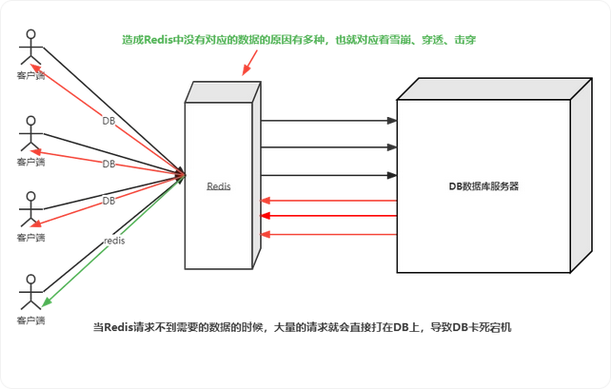
目录 一、缓存介绍 二、经典三缓存问题 1. 缓存穿透 1.1. 简介 1.2. 解决方案 1.3. 总结 2. 缓存雪崩 2.1. 简介 2.2. 解决方案 2.3. 总结 3. 缓存击穿 3.1. 简介 3.2. 解决方案 3.3. 总结 4. 经典三缓存问题出现的根本原因 三、常见双缓存方案 1. 缓存预热 1…...

引领5G驱动的全球数字营销革新:章鱼移动广告全球平台的崛起
引领5G驱动的全球数字营销革新:章鱼移动广告全球平台的崛起 作为章鱼移动广告平台的营销战略顾问,黄珍珍通过她在市场营销、品牌推广、技术整合等多方面的丰富经验,成功推动了这一平台在全球广告市场的崛起。她不仅为平台的国际化扩展奠定了基…...

思维链ChatGPT
建立客户端 from openai import OpenAI client OpenAI(base_url"https://api.chatanywhere.tech/v1" )示例1 response client.chat.completions.create(model"gpt-3.5-turbo",messages[{"role": "user","content": &quo…...

idea中的Java版本运行错误
1.java: java.lang.NoSuchFieldError: Class com.sun.tools.javac.tree.JCTree$JCImport does not have member field com.sun.tools.javac.tree.JCTree qualid 这个错误通常是由于升级到Java 21后,Lombok等库无法正确访问内部的Java编译器API导致的。具体原因如下: Lombok在…...

用HTML5+CSS+JavaScript庆祝国庆
用HTML5CSSJavaScript庆祝国庆 中华人民共和国的国庆日是每年的10月1日。 1949年10月1日,中华人民共和国中央人民政府成立,在首都北京天安门广场举行了开国大典,中央人民政府主席毛泽东庄严宣告中华人民共和国成立,并亲手升起了…...

《OpenCV 计算机视觉》—— 视频背景建模
文章目录 一、背景建模的目的二、背景建模的方法三、背景建模的步骤四、注意事项五、代码实现 一、背景建模的目的 视频背景建模的主要目的是从视频序列中提取出静态背景,以便将动态的前景对象与静态的背景进行分离。这有助于进一步分析和处理视频内容,…...

【Mac】和【安卓手机】 通过有线方式实现投屏
Mac 和 安卓手机 实现投屏(有线) 1.下载HomeBrew /bin/bash -c "$(curl -fsSL https://mirrors.tuna.tsinghua.edu.cn/git/homebrew/install/master/install.sh)"2.安装Scrcpy brew install scrcpy3.安装adb brew install android-platfor…...

GitHub flow工作流
github.com github.com使用自己版本的标记语法,它提供了一组额外的有用的 特性,其中许多特性使处理github.com上的内容更加容易。 用户名-提及 键入一个符号,后跟一个用户名,将通知此人前来查看评论。 这叫做“提及”&#x…...

【Qt笔记】QFrame控件详解
目录 引言 一、QFrame的基本特性 二、QFrame的常用方法 2.1 边框形状(Frame Shape) 2.2 阴影样式(Frame Shadow) 2.3 线条宽度(Line Width) 2.4 样式表(styleSheet) 三、QFrame的应用场景 四、应用…...

【二十八】【QT开发应用】模拟WPS Tab
WidgetBase 类旨在实现窗口的可调整大小功能,使用户能够手动改变窗口的尺寸。该类通过以下机制实现窗口缩放效果:当鼠标移动至窗口边缘时,鼠标指针样式会动态改变以指示可调整大小的方向。用户在边缘区域按下鼠标左键后,可以通过拖…...

PyQt入门指南四 事件处理机制详解
1. 事件处理概述 在PyQt中,事件处理是实现交互性的关键部分。事件可以是用户的操作(如点击按钮、键盘输入),也可以是系统的通知(如窗口最小化、定时器超时)。PyQt使用信号(Signals)…...

【24最新亲试】ubuntu下载go最新版本
系列综述: 💞目的:本系列是个人整理为了工具配置的,整理期间苛求每个知识点,平衡理解简易度与深入程度。 🥰来源:材料主要源于Ubuntu 升级 golang 版本完美步骤进行的,每个知识点的修…...
InnoDB 事务模型
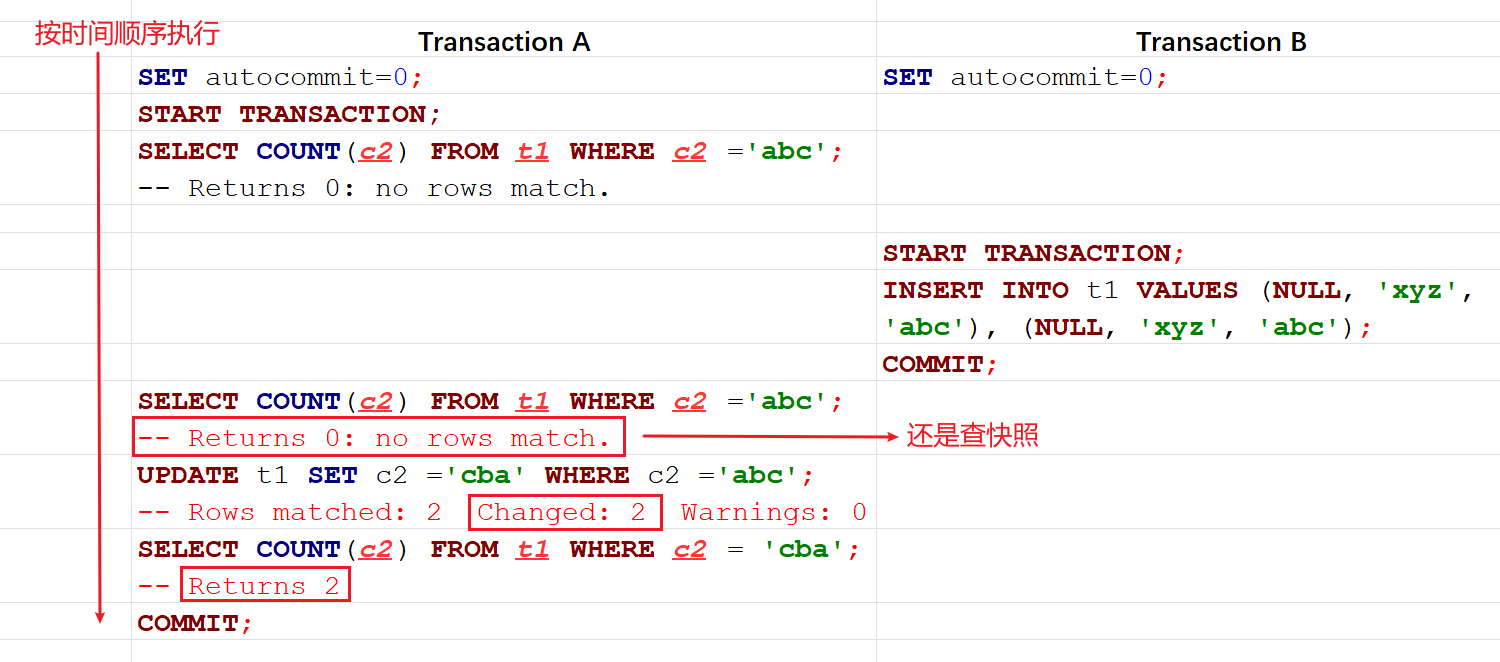
文章目录 InnoDB 事务模型事务ACID特性事务隔离级别 事务操作事务并发问题事务数据读写类型Consistent Nonlocking Reads 快照读Locking Reads 加锁读 MVCC 并发控制实现原理InnoDB 隐藏列Read ViewUndo log实现过程 MVCC与隔离级别MVCC和辅助索引 幻读可重复读MVCC会出现幻读的…...
STM32 Hal库SDIO在FATFS使用下的函数调用关系
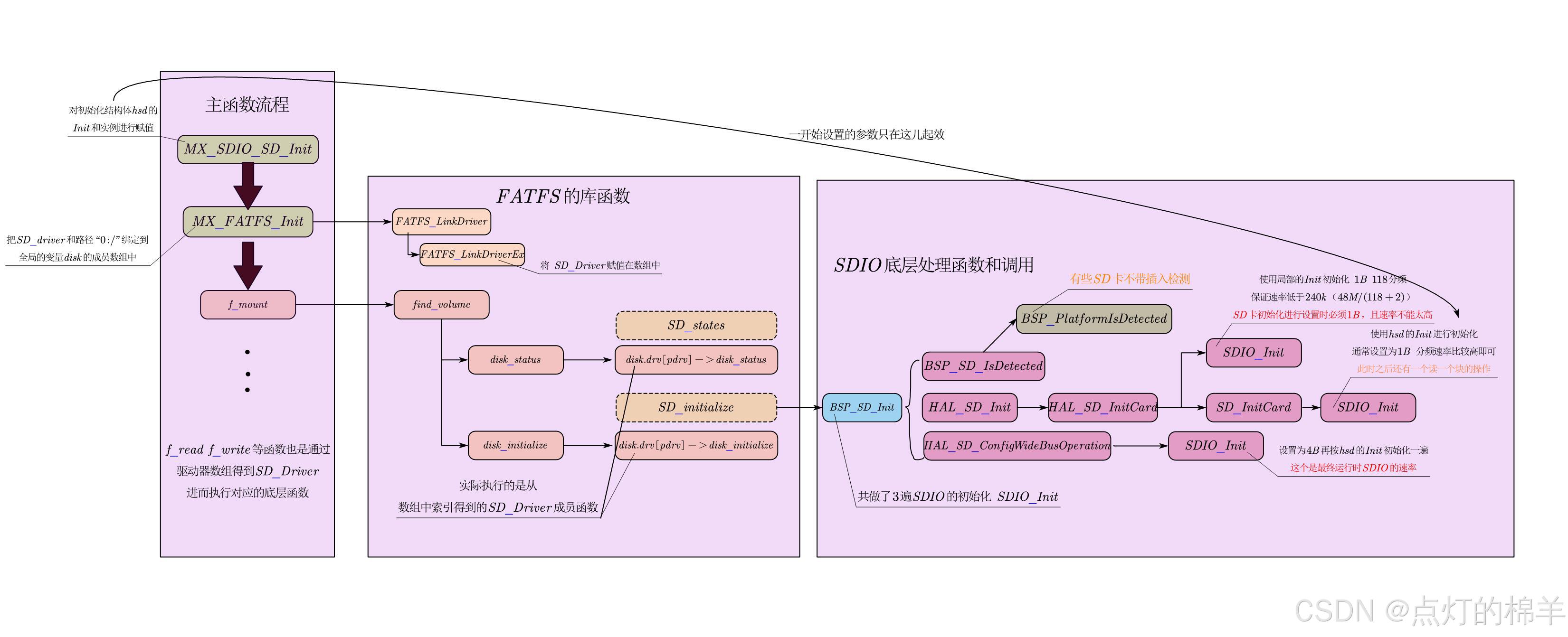
STM32 Hal库SDIO在FATFS使用下的函数调用关系 本文并不将FATFS的相关接口操作,而是将HAL在使用FATFS通过SDIO外设管理SD卡时,内部函数的调用逻辑,有助于当我们使用CUBEMX生成FATFS读取SD卡的代码时无法运行时Debug。本文也会说明一些可能出现…...
接口管理)
网络基础知识笔记(五)接口管理
接口管理 1. 物理层的功能 物理层要解决的三个问题: 1-信号: 模拟信号,数字信号(一组有规律变化的电流脉冲) 2-传输介质: 同轴电缆,双绞线(电信号,电口),光纤(光信号,光口),(空气)电磁波(WiFi,…...

网站集群批量管理-密钥认证与Ansible模块
一、集群批量管理-密钥认证 1、概述 管理更加轻松:两个节点,通过密钥形式进行访问,不需要输入密码,仅支持单向. 服务要求(应用场景): 一些服务在使用前要求我们做秘钥认证.手动写批量管理脚本. 名字: 密钥认证,免密码登录,双机互信. 2、原理 税钥对…...
TCP四次挥手过程详解
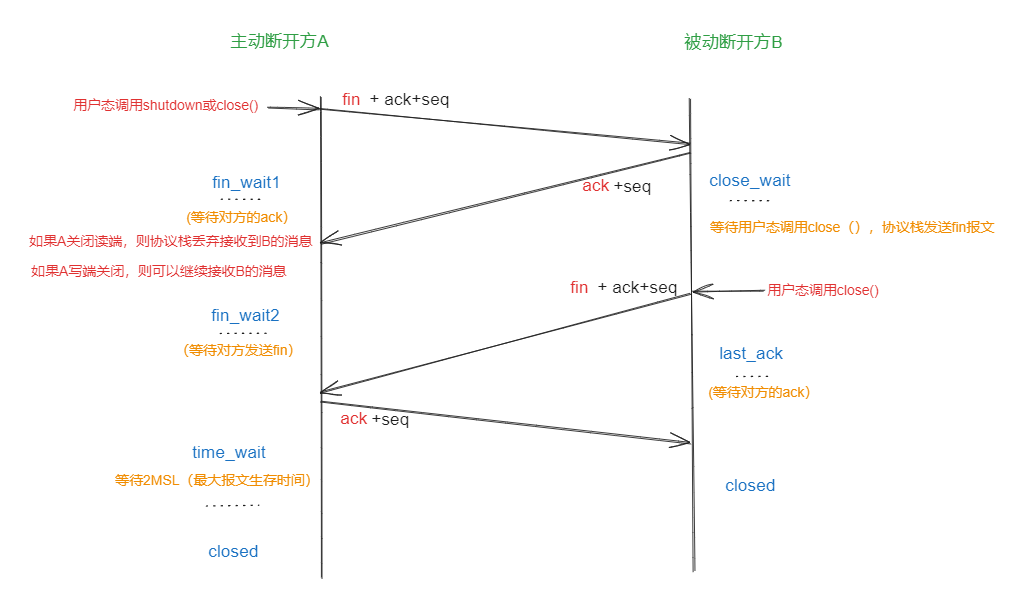
TCP四次挥手全过程 有几点需要澄清: 1.首先,tcp四次挥手只有主动和被动方之分,没有客户端和服务端的概念 2.其次,发送报文段是tcp协议栈的行为,用户态调用close会陷入到内核态 3.再者,图中的情况前提是双…...
)
双机双卡训练yolov5(yolov5+pytorch+DDP+NCCL+RDMA全栈解析)
重点关注问题:1、nvidia-smi topo -m 是怎么获取topo结构的?调用了什么api?2、以下接口有什么用,怎么实现的?nvmlDeveiceGetNvLinkVersionnvmlDeveiceGetNvLinkCapabilitynvmlDeveiceGetNvLinkStatenvmlDeveiceGetNvLi…...

技术从业者的时间管理:如何平衡工作、学习和生活
在敏捷开发大行其道、技术迭代日新月异的当下,软件测试从业者正面临着前所未有的时间压力。一边是项目交付的紧迫期限、层出不穷的缺陷排查需求,一边是自动化测试工具、AI测试框架等新技术的学习焦虑,再加上对个人生活品质的追求,…...

【Perplexity法规查询功能深度解密】:20年合规专家亲授3大避坑指南与5步精准检索法
更多请点击: https://codechina.net 第一章:Perplexity法规查询功能的核心定位与演进逻辑 Perplexity法规查询功能并非通用搜索引擎的简单延伸,而是面向法律合规、金融风控与企业治理场景构建的垂直智能体。其核心定位在于实现“可溯源、可验…...

GitHub 协作完全指南:从“傻瓜”到专家的保姆级教程
引言:为什么协作会让人头疼?想象一下,你和其他几个人要一起画一幅巨大的壁画。每个人都在自己的小画板上画一部分。问题来了:怎么保证大家用的颜色一致?怎么把每个人的画拼到一起时严丝合缝?如果两个人画了…...

手机号逆向查QQ号:3分钟快速上手完整指南,告别繁琐登录验证!
手机号逆向查QQ号:3分钟快速上手完整指南,告别繁琐登录验证! 【免费下载链接】phone2qq 项目地址: https://gitcode.com/gh_mirrors/ph/phone2qq 你是否曾忘记自己哪个QQ号绑定了某个手机?或者需要批量验证手机号与QQ的关…...

Kubernetes核心知识点
1.ca-certificates,gnupg,lsb-release三个包的解释. ca-certificates是系统内置的权威根整数数据包,可以让系统正常识别并信任各类网站,避免出现证书异常与访问失败问题。 gnupg是开源的加密与签名校验工具,可用于导入第三方软件源公钥&#…...

B站账号管理终极指南:如何用BiliBiliToolPro实现全自动任务管理
B站账号管理终极指南:如何用BiliBiliToolPro实现全自动任务管理 【免费下载链接】BiliBiliToolPro B 站(bilibili)自动任务工具,支持docker、青龙、k8s等多种部署方式。全面拥抱AI。敏感肌也能用。 项目地址: https://gitcode.c…...

Beyond Compare 5密钥生成器终极指南:3种简单方法获取永久授权
Beyond Compare 5密钥生成器终极指南:3种简单方法获取永久授权 【免费下载链接】BCompare_Keygen Keygen for BCompare 5 项目地址: https://gitcode.com/gh_mirrors/bc/BCompare_Keygen 还在为Beyond Compare 5的30天试用期到期而烦恼吗?想要免费…...

6 个 AI Agent Skill 实战推荐:每天省出 2 小时的自动化方案
引言Agent 能帮我们做的事越来越多 -- 写文案、做封面、盯数据、找选题。但很多人装上 Agent 之后发现,它除了聊天和写几段文案,好像什么也干不了。问题不在 Agent。就像刚买回来的手机,没装 App 之前就是块砖。Agent 出厂自带的能力有限&…...

【软考高级架构】论文范文22——论系统可靠性设计及其应用
论系统可靠性设计及其应用 论系统可靠性设计及其应用,本文结合2014年试题题目进行深入论述,探讨如何在实际项目中进行软件的可靠性设计,确保系统在复杂和高风险环境下的稳定性与高效性。在现代复杂系统中,软件的可靠性设计已成为保障系统高效稳定运行的关键因素之一。随着技…...