
C#从零开始学习(如何构建应用)
开始使用 C#
开发使用的软件Visual Studio 2019
文章所有的代码都放在
https://github.com/hikinazimi/head-first-Csharp
创建一个控制台应用
打开Visual Studio 2019 创建项目
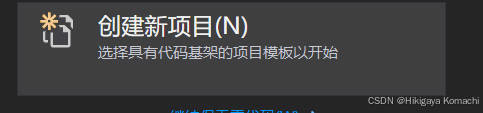
选择控制台应用程序

创建后点击运行,就可以在控制台打印Hello World

构建一个游戏(创建WPF项目)
构建游戏的步骤
- 首先创建WPF项目
- 使用XAML构建窗口
- 编写C#代码向这个窗口增加随机的动物表情符号
- 允许用户成对的点击符号配对
- 增加一个计时器
1.创建WPF项目
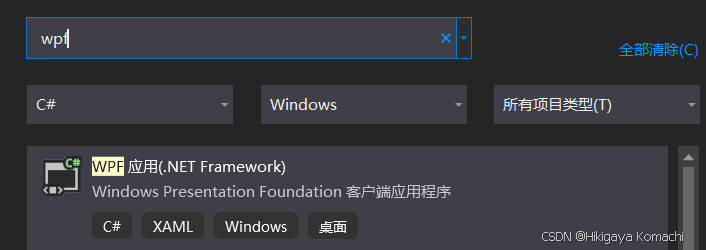
在MainWindow.xaml文件下打开工具箱

2.使用XAML构建窗口
在xaml文件下使用如下代码创建一个4*4方格的界面
Grid为网格的框架
TextBlock为显示的文字
<Window x:Class="MatchGame.MainWindow"xmlns="http://schemas.microsoft.com/winfx/2006/xaml/presentation"xmlns:x="http://schemas.microsoft.com/winfx/2006/xaml"xmlns:d="http://schemas.microsoft.com/expression/blend/2008"xmlns:mc="http://schemas.openxmlformats.org/markup-compatibility/2006"xmlns:local="clr-namespace:MatchGame"mc:Ignorable="d"Title="Find all of the matching animals" Height="450" Width="400"><Grid x:Name="mainGrid"><Grid.ColumnDefinitions><ColumnDefinition /><ColumnDefinition /><ColumnDefinition /><ColumnDefinition /></Grid.ColumnDefinitions><Grid.RowDefinitions><RowDefinition /><RowDefinition /><RowDefinition /><RowDefinition /><RowDefinition /></Grid.RowDefinitions><TextBlock Text="?" FontSize="36" HorizontalAlignment="Center" VerticalAlignment="Center" /><TextBlock Text="?" FontSize="36" HorizontalAlignment="Center" VerticalAlignment="Center" Grid.Column="1" /><TextBlock Text="?" FontSize="36" HorizontalAlignment="Center" VerticalAlignment="Center" Grid.Column="2"/><TextBlock Text="?" FontSize="36" HorizontalAlignment="Center" VerticalAlignment="Center" Grid.Column="3"/><TextBlock Text="?" FontSize="36" HorizontalAlignment="Center" VerticalAlignment="Center" Grid.Row="1" /><TextBlock Text="?" FontSize="36" Grid.Row="1" Grid.Column="1"HorizontalAlignment="Center" VerticalAlignment="Center" /><TextBlock Text="?" FontSize="36" Grid.Row="1" Grid.Column="2" HorizontalAlignment="Center" VerticalAlignment="Center" /><TextBlock Text="?" FontSize="36" Grid.Row="1" Grid.Column="3" HorizontalAlignment="Center" VerticalAlignment="Center"/><TextBlock Text="?" FontSize="36" Grid.Row="2" HorizontalAlignment="Center" VerticalAlignment="Center" /><TextBlock Text="?" FontSize="36" Grid.Row="2" Grid.Column="1" HorizontalAlignment="Center" VerticalAlignment="Center" /><TextBlock Text="?" FontSize="36" Grid.Row="2" Grid.Column="2" HorizontalAlignment="Center" VerticalAlignment="Center" /><TextBlock Text="?" FontSize="36" Grid.Row="2" Grid.Column="3" HorizontalAlignment="Center" VerticalAlignment="Center"/><TextBlock Text="?" FontSize="36" Grid.Row="3" HorizontalAlignment="Center" VerticalAlignment="Center" /><TextBlock Text="?" FontSize="36" Grid.Row="3" Grid.Column="1" HorizontalAlignment="Center" VerticalAlignment="Center" /><TextBlock Text="?" FontSize="36" Grid.Row="3" Grid.Column="2" HorizontalAlignment="Center" VerticalAlignment="Center" /><TextBlock Text="?" FontSize="36" Grid.Row="3" Grid.Column="3" HorizontalAlignment="Center" VerticalAlignment="Center" /><TextBlock x:Name="timeTextBlock" Text="Elapsed time" FontSize="36"HorizontalAlignment="Center" VerticalAlignment="Center"Grid.Row="4" Grid.ColumnSpan="4" /></Grid></Window>打开.cs文件,这是程序逻辑代码实现的地方

3.编写C#代码向这个窗口增加随机的动物表情符号
然后再.cs文件下输入如下代码
using System;
using System.Collections.Generic;
using System.Linq;
using System.Text;
using System.Threading.Tasks;
using System.Windows;
using System.Windows.Controls;
using System.Windows.Data;
using System.Windows.Documents;
using System.Windows.Input;
using System.Windows.Media;
using System.Windows.Media.Imaging;
using System.Windows.Navigation;
using System.Windows.Shapes;namespace MatchGame
{/// <summary>/// MainWindow.xaml 的交互逻辑/// </summary>public partial class MainWindow : Window{public MainWindow(){InitializeComponent();SetUpGame();}private void SetUpGame(){List<string> animalEmoji = new List<string>()//创建表情列表{"😀","😀","😅", "😅","🍔","🍔","🍿", "🍿","🥩","🥩","🍠","🍠","😘", "😘","🚐", "🚐",};Random random = new Random();//mainGrid位xaml中grid的标签名,如<Grid x:Name="mainGrid">foreach (TextBlock textBlock in mainGrid.Children.OfType<TextBlock>()){int index = random.Next(animalEmoji.Count);string nextEmoji = animalEmoji[index];textBlock.Text = nextEmoji;animalEmoji.RemoveAt(index);}}}
}
然后我们就可以看到如下的界面

4.允许用户成对的点击符号配对
在textblock组件中MouseDown中添加如下函数

TextBlock lastTextBlockClicked;bool findingMatch = false;//跟踪是否只点击了一个private void TextBlock_MouseDown(object sender, MouseButtonEventArgs e){TextBlock textBlock = sender as TextBlock;if (findingMatch == false)//第一次选择{textBlock.Visibility = Visibility.Hidden;lastTextBlockClicked = textBlock;findingMatch = true;}else if (textBlock.Text == lastTextBlockClicked.Text){//第二次选择且相同matchesFound++;textBlock.Visibility = Visibility.Hidden;findingMatch = false;}else{//第二次选择且不同lastTextBlockClicked.Visibility = Visibility.Visible;findingMatch = false;}}
快速给所有xaml文件改MouseDown事件

将 /> 替换为 MouseDown=“TextBlock_MouseDown”/>
5. 增加一个计时器
首先在最上面的namespace下添加using System.Windows.Threading;
然后在添加如下代码
public partial class MainWindow : Window{DispatcherTimer timer = new DispatcherTimer();int tenthsOfSecondsElapsed;//过去的时间int matchesFound;//找到的动物public MainWindow(){InitializeComponent();timer.Interval = TimeSpan.FromSeconds(.1);timer.Tick += Timer_Tick;SetUpGame();}private void Timer_Tick(object sender, EventArgs e){tenthsOfSecondsElapsed++;timeTextBlock.Text = (tenthsOfSecondsElapsed / 10F).ToString("0.0s");if(matchesFound==8){timer.Stop();timeTextBlock.Text = timeTextBlock.Text + " - end";}}
在xaml下添加一个新的textBlock
添加后有17个textBlock,导致数组越界,所以我们要使用if (textBlock.Name != “timeTextBlock”)判断
foreach (TextBlock textBlock in mainGrid.Children.OfType<TextBlock>()){if (textBlock.Name != "timeTextBlock"){int index = random.Next(animalEmoji.Count);string nextEmoji = animalEmoji[index];textBlock.Text = nextEmoji;animalEmoji.RemoveAt(index);}}
最终结果如下

至此,我们就学习完了第一章,然后让我们复习一下本章讲了什么
- 学习了控制台的创建
- 学习了WPF的创建,以及一个简易游戏的实现
- xaml文件的简单应用
- 使用C#控制游戏逻辑的运行
相关文章:
C#从零开始学习(如何构建应用)
开始使用 C# 开发使用的软件Visual Studio 2019 文章所有的代码都放在 https://github.com/hikinazimi/head-first-Csharp 创建一个控制台应用 打开Visual Studio 2019 创建项目 选择控制台应用程序 创建后点击运行,就可以在控制台打印Hello World 构建一个游戏(创建WPF项目…...

FCoE简介
数据中心融合网络的发展趋势 如图1所示,传统数据中心组网中,以太网LAN(Local Area Network)用于服务器与服务器、客户端与服务器之间通信,存储区域网络SAN(Storage Area Network)用于服务器与存…...

论文笔记:Template-Based Named Entity Recognition Using BART
论文来源:ACL 2021 Finding 论文链接:https://aclanthology.org/2021.findings-acl.161.pdf 论文代码:GitHub - Nealcly/templateNER: Source code for template-based NER 笔记仅供参考,撰写不易,请勿恶意转载抄袭…...

【Nestjs】从入门到精通(依赖注入)
NestJS 是一个基于 Node.js 的渐进式框架,构建在 Express 或 Fastify 之上,主要用于构建高效、可扩展的服务器端应用程序。它使用 TypeScript 并借鉴了 Angular 的设计理念,采用了依赖注入(IoC, Inversion of Control)…...

C语言函数
1.C语言函数的定义 C源程序是由函数组成的。最简单的程序有一个主函数main(),但实用程序往往由多个函数组成,由主函数调用其他函数,其他函数也可以互相调用。函数是C源程序的基本模块,程序的许多功能是通过对函数模块的调用来实现…...

FLINK SQLTable API 的基本概念及常用API
基本概念 SQL和Table API是Apache Flink提供的两个关系型API,它们被设计用于统一的流和批处理。以下是关于SQL和Table API的基本概念及常用API的详细介绍: 一、基本概念 Table API 定义:Table API是一个为Java、Scala和Python提供的语言集…...

Docker daemon.json配置参数及格式帮助信息
我们知道程序运行,通过修改命令参数或者配置文件配置项,对程序进行修改。Docker也不例外,通过docker.service 增加命令参数或者在/etc/docker/daemon.json中增加配置项均可。 推荐修改daemon.json对docker守护进程进行配置更改(方…...

十月编程语言排行榜~
前言:TIOBE编程语言排行榜通过分析全球开发者的活动、代码搜索和问答社区的流量,提供了编程语言受欢迎度的动态图景。该指数是技术趋势的风向标,揭示了哪些编程语言在技术领域占据主导地位,哪些语言正在快速崛起或逐渐衰退。 ✨✨…...
)
十三、行为型(策略模式)
策略模式(Strategy Pattern) 概念 策略模式(Strategy Pattern)是一种行为型设计模式,允许定义一系列算法,将每个算法封装在策略类中,并使它们可以互换使用。客户端可以根据需要动态选择不同的策…...

Vue环境安装以及配置
这里写目录标题 前言一、前置要求1.安装Node.js2. 安装VScode 二、创建全局安装目录和缓存日志目录三、配置环境变量四、权限五、npm换源六、vscode插件1. Vue-Offical2. Vue 3 Snippets3. Path Intellisense4. Auto Import5. Auto Close Tag6. Auto Rename Tag7.GitLens总结 前…...
)
Redis 数据类型hash(哈希)
目录 1 基本特性 2 主要操作命令 2.1 设置和获取字段 2.1.1 HSET key field value 2.1.2 HGET key field 2.1.3 HMSET key field1 value1 [field2 value2 ...] 2.1.4 HMGET key field1 [field2 ...] 2.2 检查字段是否存在 2.2.1 HEXISTS key field 2.3 获取所有字段…...

单一执行和循环执行的例行性工作
单一执行的例行性工作:只执行一次就结束 1.1at命令的工作过程 /etc/at.allow,写在该文件的人可以使用at命令 /etc/at.deny,黑名单 两个文件如果都不存在,只有root能使用 [rootlocalhost ~]# systemctl status atd [rootlocalh…...

单细胞分析 | Cicero+Signac 寻找顺式共可及网络
引言 在本指南[1]中,将介绍如何利用Cicero工具和单细胞ATAC-seq数据来识别共可接近网络。 为了在Seurat(Signac工具使用的格式)和CellDataSet(Cicero工具使用的格式)之间轻松转换数据,将利用GitHub上的Seur…...

人工智能创造出大量新型蛋白质
每周跟踪AI热点新闻动向和震撼发展 想要探索生成式人工智能的前沿进展吗?订阅我们的简报,深入解析最新的技术突破、实际应用案例和未来的趋势。与全球数同行一同,从行业内部的深度分析和实用指南中受益。不要错过这个机会,成为AI领…...

Palo Alto Networks Expedition 未授权SQL注入漏洞复现(CVE-2024-9465)
0x01 产品介绍: Palo Alto Networks Expedition 是一款强大的工具,帮助用户有效地迁移和优化网络安全策略,提升安全管理的效率和效果。它的自动化功能、策略分析和可视化报告使其在网络安全领域中成为一个重要的解决方案。 0x02 漏洞描述&am…...

c 语言 sprintf
在C语言中,sprintf是一个非常常用的函数,它用于将格式化的数据写入字符串中。sprintf函数的原型通常定义在stdio.h头文件中。 sprintf函数的原型如下: int sprintf(char *str, const char *format, …); 参数说明: str…...

stm32单片机个人学习笔记10(TIM编码器接口)
前言 本篇文章属于stm32单片机(以下简称单片机)的学习笔记,来源于B站教学视频。下面是这位up主的视频链接。本文为个人学习笔记,只能做参考,细节方面建议观看视频,肯定受益匪浅。 STM32入门教程-2023版 细…...

如何在Android中存储数据?
在Android中存储数据是开发过程中至关重要的一环,根据数据的类型、大小、访问频率及安全性需求,开发者可以选择多种存储方式。以下是Android中存储数据的几种主要方式,每种方式都有其特定的应用场景和优缺点。 一、SharedPreferences Share…...

13.3寸工业三防平板数字化工厂产线数采手持终端
在数字化工厂的建设浪潮中,高效可靠的数据采集终端至关重要。尤其在水处理、食品加工等特殊工业环境下,设备的耐用性和数据安全性面临严峻挑战。传统的平板电脑难以应对复杂的工业现场,而一款性能卓越、坚固耐用的工业三防平板则成为提升生产…...
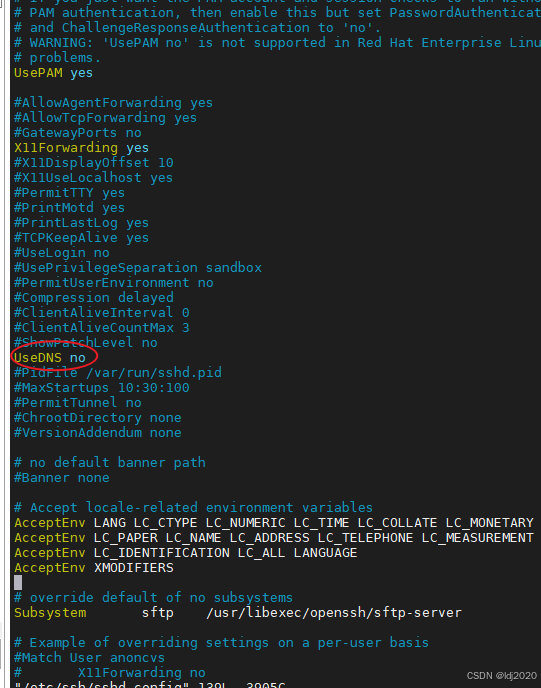
ssh连接慢的问题或zookeeper远程连接服务超时
问题原因: 在SSH登录过程中,服务器会通过反向DNS查找客户端的主机名,然后与登录的IP地址进行匹配,以验证登录的合法性。如果客户端的IP没有域名或DNS服务器响应缓慢,这可能导致SSH登录过慢。为了解决这个问题…...

百考通智能任务书:贴合你的选题,拒绝空话假大空
毕业设计任务书是高校教学管理中的关键环节,它不仅标志着研究工作的正式启动,更是后续开题、实施、论文撰写和答辩全过程的行动依据。然而,许多学生在撰写时常常因不熟悉本专业写作规范、技术表达能力有限,或缺乏权威模板参考而陷…...

网易云音乐NCM转MP3终极指南:ncmdump工具完整使用教程
网易云音乐NCM转MP3终极指南:ncmdump工具完整使用教程 【免费下载链接】ncmdump 项目地址: https://gitcode.com/gh_mirrors/ncmd/ncmdump 你是否曾经从网易云音乐下载了心爱的歌曲,却发现只能在特定播放器上收听?NCM格式的限制让音乐…...

FeHelper前端助手:30+开发工具集,让你的浏览器变身效率神器
FeHelper前端助手:30开发工具集,让你的浏览器变身效率神器 【免费下载链接】FeHelper 😍FeHelper--Web前端助手(Awesome!Chrome & Firefox & MS-Edge Extension, All in one Toolbox!) 项目地址:…...

AI圈神秘领袖Ilya一幅画引爆全网,OpenAI三件大事暗示AGI时代将至?
AI圈神秘精神领袖Ilya在Instagram上传一幅画引发疯狂解读,与此同时,OpenAI连续公布数学成果、升级Codex、筹备IPO,释放AGI到来的强烈信号。Ilya画作引猜测Ilya上传的画中,罗丹的「思考者」踩在芯片Die Shot上,右下角签…...

多智能体谈判系统:Agent 如何通过博弈达成最优交易价格?
多智能体谈判系统:Agent 如何通过博弈达成最优交易价格?关键词 多智能体系统、自动谈判、博弈论、纳什均衡、帕累托最优、双边/多边谈判、强化学习谈判、动态定价 摘要 想象一个没有人类中介的世界:电商平台上的智能客服自动和批发商砍价、供…...

探索Windows 10上的Android世界:揭秘WSA-Windows-10项目的3个技术突破
探索Windows 10上的Android世界:揭秘WSA-Windows-10项目的3个技术突破 【免费下载链接】WSA-Windows-10 This is a backport of Windows Subsystem for Android to Windows 10. 项目地址: https://gitcode.com/gh_mirrors/ws/WSA-Windows-10 想象一下&#…...

什么情况下会核销贷款
贷款核销的核心前提是:贷款被认定为 “损失类” 且经 “穷尽追偿” 仍无法收回,银行按监管与会计规则从账面冲销,但债权不消灭、仍可追偿。一、核心认定条件(满足其一即可)破产 / 注销 / 吊销:借款人和担保…...

别再只用递归了!用C语言栈实现非递归快速排序,内存效率提升实战
从递归到迭代:C语言栈实现非递归快速排序的工程实践 在嵌入式开发和大规模数据处理场景中,递归实现的快速排序常常面临栈溢出风险。当排序10万个元素的数组时,递归深度可能达到log₂100000≈17层,在仅有2KB栈空间的STM32F103上极易…...

利用FTDI芯片MPSSE模式构建Arduino兼容开发环境
1. 项目概述:当FTDI芯片遇上Arduino生态如果你手头有一些闲置的FTDI USB转串口模块,比如常见的FT232R、FT2232H,或者像我一样,从某个旧设备上拆下来一块FT2232C的老古董,除了用来给单片机烧录程序或者做串口调试&#…...

告别漫长等待:UE5.2.1 Windows打包效率优化与插件问题排查指南
告别漫长等待:UE5.2.1 Windows打包效率优化与插件问题排查指南第一次点击"打包项目"按钮时,进度条仿佛被冻结的场景,每个UE5开发者都经历过。尤其当项目规模达到数十GB时,等待时间可能超过一小时——这背后隐藏着引擎底…...