
8.Linux按键驱动-中断下半部

1.编程思路
1.1在gpio结构体中添加tasklet_struct结构体

1.2在probe函数中初始化tasklet结构体

1.3在中断服务程序中调度tasklet

1.4在这个函数中执行其它任务

2.代码:
应用程序和Makefile和上节一致
https://blog.csdn.net/weixin_40933496/article/details/143263990?sharetype=blogdetail&sharerId=143263990&sharerefer=PC&sharesource=weixin_40933496&spm=1011.2480.3001.8118
驱动
#include <linux/module.h>
#include <linux/fs.h>
#include <linux/errno.h>
#include <linux/miscdevice.h>
#include <linux/kernel.h>
#include <linux/major.h>
#include <linux/mutex.h>
#include <linux/proc_fs.h>
#include <linux/seq_file.h>
#include <linux/stat.h>
#include <linux/init.h>
#include <linux/device.h>
#include <linux/tty.h>
#include <linux/kmod.h>
#include <linux/gfp.h>
#include <linux/gpio/consumer.h>
#include <linux/platform_device.h>
#include <linux/of_gpio.h>
#include <linux/of_irq.h>
#include <linux/interrupt.h>
#include <linux/irq.h>
#include <linux/slab.h>
#include <linux/poll.h>
#include <linux/fcntl.h>/* 定义结构体来描述gpio */
struct gpio_key{int gpio;struct gpio_desc* gpiod;int flag;int irq;struct timer_list key_timer;struct tasklet_struct tasklet;
};/* 定义全局变量来存储设备树中的所有gpio节点信息 */
static struct gpio_key* gpio_keys_100ask;/* 字符设备的主设备号 */
static unsigned int major = 0;
static struct class *gpio_class;
//static int g_key = 0;/* 定义等待队列 */
static DECLARE_WAIT_QUEUE_HEAD(gpio_key_wait);
struct fasync_struct * button_fasync;/* 环形缓冲区 */
#define BUF_LEN 128
static int g_keys[BUF_LEN];
static int r, w;#define NEXT_POS(x) ((x+1) % BUF_LEN)int is_key_buf_empty(void)
{return (r == w);
}int is_key_buf_full(void)
{return (r == NEXT_POS(w));
}void put_key(int key)
{if (!is_key_buf_full()){g_keys[w] = key;w = NEXT_POS(w);}
}int get_key(void)
{int key = 0;if (!is_key_buf_empty()){key = g_keys[r];r = NEXT_POS(r);}return key;
}static ssize_t gpio_read(struct file *fp, char __user *buf, size_t size, loff_t * offset)
{int err;int key;if(is_key_buf_empty() && (fp->f_flags & O_NONBLOCK)){return -EAGAIN;}wait_event_interruptible(gpio_key_wait, !is_key_buf_empty());key = get_key();//err = copy_to_user(buf, &g_key, 4);err = copy_to_user(buf, &key, 4);//g_key = 0;//printk("%s %s line %d\n", __FILE__, __FUNCTION__, __LINE__);return 4;
}static unsigned int gpio_poll(struct file *fp, struct poll_table_struct *wait)
{//printk("%s %s line %d\n", __FILE__, __FUNCTION__, __LINE__);poll_wait(fp, &gpio_key_wait, wait);return is_key_buf_empty() ? 0 : POLLIN | POLLRDNORM;
}static int gpio_fasync(int fd , struct file *file, int on)
{//printk("%s %s line %d\n", __FILE__, __FUNCTION__, __LINE__);if (fasync_helper(fd, file, on, &button_fasync) >= 0){return 0;}else{return -EIO;}
}static const struct file_operations gpio_fops = {.owner = THIS_MODULE,.read  = gpio_read,.poll  = gpio_poll,.fasync = gpio_fasync,
};static irqreturn_t gpio_key_isr(int irq, void *dev_id)
{struct gpio_key* gpio_key = dev_id;//int val;//int key;//val = gpio_get_value(gpio_key->gpio);//printk("key %d %d\n", gpio_key->gpio, val);//g_key = (gpio_key->gpio << 8) | val;//key = (gpio_key->gpio << 8) | val;//put_key(key);//wake_up_interruptible(&gpio_key_wait);/* 发信号 *///kill_fasync(&button_fasync, SIGIO, POLL_IN);//printk("%s %s line %d\n", __FILE__, __FUNCTION__, __LINE__);/* 调度tasklet函数 */tasklet_schedule(&gpio_key->tasklet);/* 修改定时器超时时间 */printk("%s %s line %d\n", __FILE__, __FUNCTION__, __LINE__);mod_timer(&gpio_key->key_timer, jiffies + HZ / 5);return IRQ_HANDLED;
}/* 定时器超时函数 */
static void key_timer_expire(unsigned long arg)
{struct gpio_key* gpio_key = arg;int val;int key;val = gpio_get_value(gpio_key->gpio);//printk("key %d %d\n", gpio_key->gpio, val);//g_key = (gpio_key->gpio << 8) | val;key = (gpio_key->gpio << 8) | val;put_key(key);wake_up_interruptible(&gpio_key_wait);/* 发信号 */kill_fasync(&button_fasync, SIGIO, POLL_IN);printk("%s %s line %d\n", __FILE__, __FUNCTION__, __LINE__);/* 修改定时器超时时间 *///mod_timer(&gpio_key->key_timer, jiffies + HZ / 5);
}/* tasklet处理函数 */
static void key_tasklet_func(unsigned long data)
{struct gpio_key* key = data;int val;val = gpio_get_value(key->gpio);printk("进入了tasklet函数\n");printk("%s %s line %d\n", __FILE__, __FUNCTION__, __LINE__);printk("key %d value is %d\n", key->gpio, val);
}static int gpio_probe(struct platform_device *pdev)
{int count, i;struct device_node *node;int err;node = pdev->dev.of_node;count = of_gpio_count(node);if (!count){printk("%s %s line %d, there isn't any gpio available\n", __FILE__, __FUNCTION__, __LINE__);return -1;}/* 申请资源 */gpio_keys_100ask = kzalloc(sizeof(struct gpio_key) * count, GFP_KERNEL);if (!gpio_keys_100ask){printk("kzalloc error\n");return -1;}/* 获得资源 */for (i = 0; i < count; i++){gpio_keys_100ask[i].gpio = of_get_gpio(node, i);if (gpio_keys_100ask[i].gpio < 0){printk("%s %s line %d, of_get_gpio_flags fail\n", __FILE__, __FUNCTION__, __LINE__);return -1;}gpio_keys_100ask[i].gpiod = gpio_to_desc(gpio_keys_100ask[i].gpio);gpio_keys_100ask[i].irq   = gpio_to_irq(gpio_keys_100ask[i].gpio);/* 申请中断 */err = request_irq(gpio_keys_100ask[i].irq, gpio_key_isr, IRQF_TRIGGER_RISING | IRQF_TRIGGER_FALLING, "test1_gpio_keys_100ask", &gpio_keys_100ask[i]);if (err) {printk("request_irq err\n");}/* 设置定时器 */setup_timer(&gpio_keys_100ask[i].key_timer, key_timer_expire, &gpio_keys_100ask[i]);//设置定时器超时时间为无穷gpio_keys_100ask[i].key_timer.expires = ~0;/* 添加定时器 */add_timer(&gpio_keys_100ask[i].key_timer);/* 初始化tasklet */tasklet_init(&gpio_keys_100ask[i].tasklet, key_tasklet_func, &gpio_keys_100ask[i]);}/* 注册字符设备 */major = register_chrdev(major, "100ask_key", &gpio_fops);if(major < 0){printk("register_chrdev err'\n");return -1;}/* 注册类 */gpio_class = class_create(THIS_MODULE, "100ask_key_class");/* 注册设备 */device_create(gpio_class, NULL, MKDEV(major,0), NULL, "100ask_key_button");printk("%s %s line %d\n", __FILE__, __FUNCTION__, __LINE__);return 0;
}static int gpio_remove(struct platform_device *pdev)
{int count, i;struct device_node *node;node = pdev->dev.of_node;count = of_gpio_count(node);device_destroy(gpio_class, MKDEV(major,0));class_destroy(gpio_class);unregister_chrdev(major, "100ask_key");for (i = 0; i < count; i++){free_irq(gpio_keys_100ask[i].irq, &gpio_keys_100ask[i]);}kfree(gpio_keys_100ask);printk("%s %s line %d\n", __FILE__, __FUNCTION__, __LINE__);return 0;
}/*
* 在设备树中添加的节点的compatible属性为:"test1_100ask,test1_gpio_key"
*/
static const struct of_device_id gpio_key_of_match[] = {{.compatible = "test1_100ask,test1_gpio_key"},{/* 这里必须要有一个空项,表示结束 */}
};static struct platform_driver gpio_driver = {.driver = {.name	= "test1_gpio_keys_100ask",.of_match_table = gpio_key_of_match,},.probe	= gpio_probe,.remove = gpio_remove,
};/* 基于platform总线来实现这个程序 */
static int gpio_init(void)
{int ret;ret = platform_driver_register(&gpio_driver);if (ret != 0){printk("platform_driver_register err\n");return -1;}else{printk("%s %s line %d\n", __FILE__, __FUNCTION__, __LINE__);}return ret;
}static void gpio_exit(void)
{platform_driver_unregister(&gpio_driver);printk("%s %s line %d\n", __FILE__, __FUNCTION__, __LINE__);
}module_init(gpio_init);
module_exit(gpio_exit);
MODULE_LICENSE("GPL");
3.运行结果

由运行结果可知,在驱动中检测到两次按键按压事件(tasklet函数被调用两次),由于上节中的定时器消抖,导致key_timer_expire函数只被调用了一次,故read函数只执行了一次,应用程序只能获取后一个按键值。
4.代码路径
/home/book/nfs_rootfs/CSDN/01_gpio_irq/08_read_key_irq_poll_fasync_block_timer_tasklet
相关文章:
8.Linux按键驱动-中断下半部
1.编程思路 1.1在gpio结构体中添加tasklet_struct结构体 1.2在probe函数中初始化tasklet结构体 1.3在中断服务程序中调度tasklet 1.4在这个函数中执行其它任务 2.代码: 应用程序和Makefile和上节一致 https://blog.csdn.net/weixin_40933496/article/details/1…...

Redis 线程控制 总结
前言 相关系列 《Redis & 目录》(持续更新)《Redis & 线程控制 & 源码》(学习过程/多有漏误/仅作参考/不再更新)《Redis & 线程控制 & 总结》(学习总结/最新最准/持续更新)《Redis &a…...

Scrapy框架原理与使用流程
一.Scrapy框架特点 框架(Framework)是一种软件设计方法,它提供了一套预先定义的组件和约定,帮助开发者快速构建应用程序。框架通常包括一组库、工具和约定,它们共同工作以简化开发过程。scrapy框架是python写的 为了爬…...

【C语言】字符型在计算机中的存储方式
ASCII对照表:https://www.jyshare.com/front-end/6318/ ASCII(American Standard Code for Information Interchange,美国信息互换标准代码,ASCII)是基于拉丁字母的一套电脑编码系统。它主要用于显示现代英语和其他西…...

python:ADB通过包名打开应用
一、依赖库 os 二、命令 1.这是查看设备中所有应用包名的最简单方法。只需在命令行中输入以下命令: adb shell pm list packages 2.打印启动的程序包名 adb shell am monitor回车,然后启动你想要获取包名的那个应用,即可获得 3.查看正在运…...

机器翻译技术:AI 如何跨越语言障碍
大家好,我是Shelly,一个专注于输出AI工具和科技前沿内容的AI应用教练,体验过300款以上的AI应用工具。关注科技及大模型领域对社会的影响10年。关注我一起驾驭AI工具,拥抱AI时代的到来。 AI工具集1:大厂AI工具【共23款…...
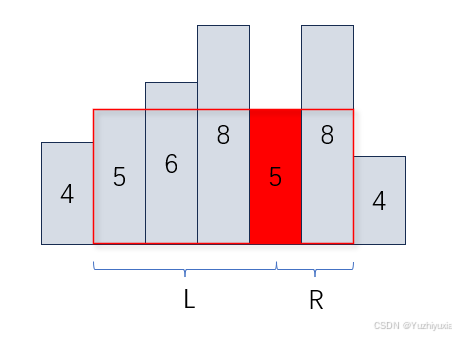
单调栈应用介绍
单调栈应用介绍 定义应用场景实现模板具体示例下一个最大元素I问题描述问题分析代码实现柱状图中最大的矩形问题描述问题分析代码实现接雨水问题描述问题分析代码实现最大宽度坡问题描述问题分析代码实现132模式问题描述问题分析代码实现定义 栈(Stack)是另一种操作受限的线性…...

部署前后端分离若依项目--CentOS7Docker版
一、准备 centos7虚拟机或服务器一台 若依前后端分离项目:可在下面拉取 RuoYi-Vue: 🎉 基于SpringBoot,Spring Security,JWT,Vue & Element 的前后端分离权限管理系统,同时提供了 Vue3 的版本 二、环…...

PH47代码框架功能速查
1. PH47框架逻辑层全局引用对象 全局引用 功能简介 快速访问 bus 数据总线系统功能实现,如对总线数据项读写操作等 数据总线bus drv 驱动层功能实现,如飞控板相关的各种硬件传感器设备进行操作等 驱动层drv mcu 对mcu的片内接口及设备进行操作…...
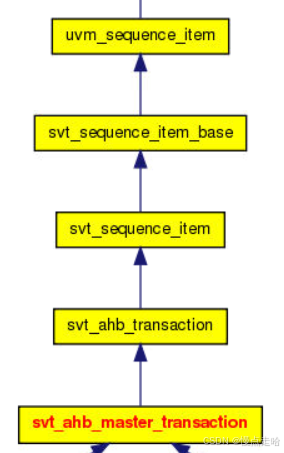
UVM寄存器模型:uvm_reg_adapter
文章目录 一、什么是uvm_reg_adapter1、what2、Example2.1、代码详解 二、如何使用uvm_reg_adapter三、为什么要引入uvm_reg_adapter 一、什么是uvm_reg_adapter 1、what uvm_reg_adapter继承于uvm_object,定义了用于在 uvm_reg_bus_op 和特定总线事务之间进行转换…...

总结OpenGL和pyrender安装和使用过程中的坑
目录 报错一:AttributeError: NoneType object has no attribute glGetError 报错二:ImportError: (Unable to load OpenGL library, OSMesa: cannot open shared object file: No such file or directory, OSMesa, None) 报错三:raise ImportError("Unable to load…...
)
温湿传感器(学习笔记下)
接着我们温湿传感器上半部分的学习,现在我们学习接下来的部分,编写GXHTC3驱动程序,也就是给gxhtc3.c文件添加代码,我们要判断gxhtc3芯片是否存在和正常,就要先读取gxhtc3的ID号,根据gxhtc3的数据手册,读取命…...
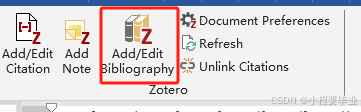
期刊论文写作之word模板
一、zotero参考文献使用 下载zotero软件,请搜索相关帖子或者小破站即可; 把pdf拖到zotero软件里面,直接拉进去; 下面建立一个word演示: 1.导入pdf点击红框部分,根据期刊要求选择参考文献样式࿰…...

雷池社区版OPEN API使用教程
OPEN API使用教程 新版本接口支持API Token鉴权 接口文档官方没有提供,有需要可以自行爬取,爬了几个,其实也很方便 使用条件 需要使用默认的 admin 用户登录才可见此功能版本需要 > 6.6.0 使用方法 1.在系统管理创建API TOKEN 2.发…...

LSTM(Long Short-Term Memory,长短期记忆网络)在高端局效果如何
lstm 杂乱数据分析 LSTM(Long Short-Term Memory,长短期记忆网络)在高端局,即复杂的机器学习和深度学习应用中,展现出了其独特的优势和广泛的应用价值。以下是对LSTM在高端局中的详细解析: 一、LSTM的优势…...
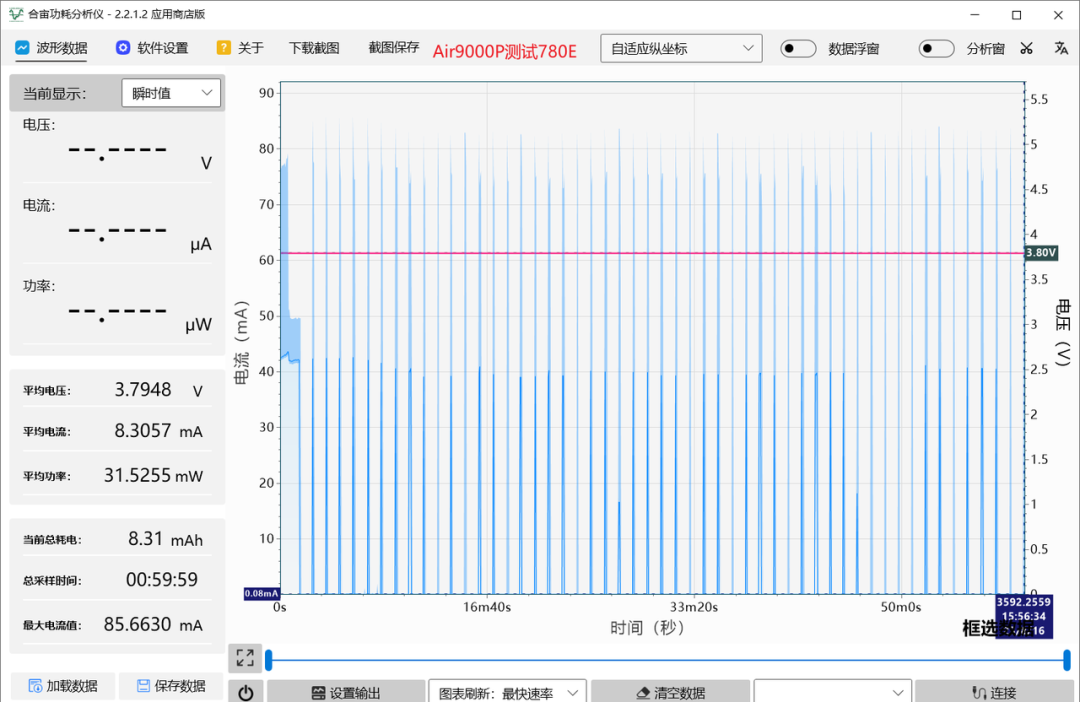
模组操作宝典:4种关机重启技巧,让你的设备运行无忧
今天我说的是关于关机重启技巧。 给4G模组VBAT断电关机,模组关机前未能及时退出当前基站,会有什么影响呢? 基站会误以为设备还在线,下次开机仍会拿着上次驻网信息去连基站。基站一看,上次链接还在——认为你是非法设…...
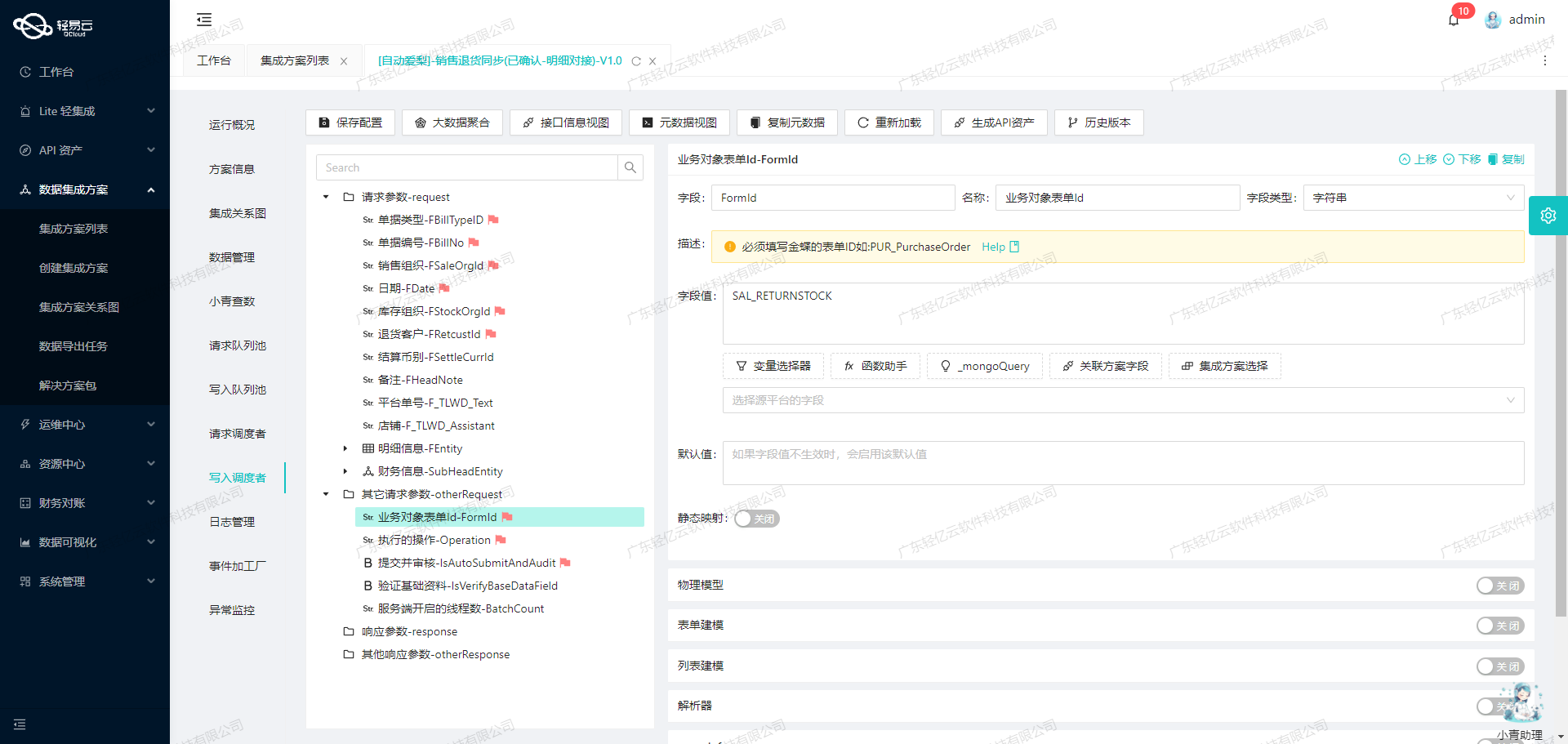
利用API接口实现旺店通和金蝶系统的无缝数据对接
旺店通销售出库对接金蝶销售订单(线下)的技术实现 在企业日常运营中,数据的高效流转和准确对接是确保业务顺畅运行的关键。本文将聚焦于一个具体案例:如何通过轻易云数据集成平台,实现旺店通企业奇门的数据无缝对接到金蝶云星空系统。我们将…...
)
热题100(hash)
热题100(Hash) 三道题目 1.两数之和(√) 49.字母异位词分组(题解) 128.最长连续序列(题解) 思路 第1题简单hash映射,O(n) 第49题,关键点在于Hashmap的形式,‘HashMap<Stri…...

Ubuntu下Mysql修改默认存储路径
首先声明,亲身经验,自己实践,网上百度了好几个帖子,全是坑,都TMD的不行,修改各种配置文件,就是服务起不来,有以下几种配置文件需要修改 第一个文件/etc/mysql/my.cnf 这个文件是存…...

LVGL移植教程(超详细)——基于GD32F303X系列MCU
版本:LVGL Kernel V8.3.0,运行压力测试Demo Stress首先放一张最终Stress Demo 运行图: 一、准备 1. GD32 Keil工程 准备任意一个屏幕可以正常显示的GD32工程: 2. LVGL源码 最新版现在已经是V9.2了,这里我选择了…...

Flutter 轻量存储方案介绍、区别、对比和使用场景
在 Flutter 项目中,本地存储通常可以分为几类: 第一类是轻量 Key-Value 存储,例如 shared_preferences、get_storage、mmkv,适合保存开关、配置、登录状态等简单数据。 第二类是安全存储,例如 flutter_secure_storage&…...

dotUI设计系统生成器:基于品牌配置一键生成React组件库
1. 项目概述:dotUI,一个为品牌而生的设计系统在当今的Web开发领域,尤其是基于React的生态中,我们常常面临一个两难的选择:是使用现成的UI组件库快速搭建界面,还是投入大量时间从零开始构建一套完全符合品牌…...
)
基于微信小程序的家政服务预约系统(30291)
有需要的同学,源代码和配套文档领取,加文章最下方的名片哦 一、项目演示 项目演示视频 二、资料介绍 完整源代码(前后端源代码SQL脚本)配套文档(LWPPT开题报告/任务书)远程调试控屏包运行一键启动项目&…...

中国半导体设计产业:从制造到创新的演进逻辑与未来挑战
1. 从“制造”到“设计”:中国半导体产业的真实图景2012年,当《EE Times》那篇题为“Why China?”的文章发表时,它所描绘的中国半导体产业图景,在今天看来更像是一份精准的预言书。文章里提到,将中国仅仅视为技术产品…...

别再死记硬背截止、放大、饱和了!用Arduino+面包板,5分钟直观演示三极管三种工作状态
用Arduino实战破解三极管工作状态的秘密 记得第一次学三极管时,盯着课本上那些截止区、放大区、饱和区的曲线图,我完全无法理解这些抽象概念和实际电路有什么关系。直到有一天,我在实验室里用Arduino和几个简单元件搭建了一个测试电路&#x…...

家用扫地机器人研发技术路线
第四部分:如何一步步做出来 | 18个月 4阶段 从原型到量产 摘要:本文详细介绍了扫地机器人从原型到量产的研发流程,分为4个关键阶段。首先聚焦四大技术难点:SLAM定位、AI视觉识别、仿生机械臂和静音风机系统。研发过程包括实验室原型验证、工程样机测试、小批量真实场景测…...

Windows Cleaner:彻底告别C盘爆红的免费开源解决方案
Windows Cleaner:彻底告别C盘爆红的免费开源解决方案 【免费下载链接】WindowsCleaner Windows Cleaner——专治C盘爆红及各种不服! 项目地址: https://gitcode.com/gh_mirrors/wi/WindowsCleaner 面对Windows系统使用过程中C盘空间不断告急的困扰…...

热间隙填充材料在PCB散热设计中的关键应用与选型
1. 热间隙填充材料在PCB散热设计中的核心作用热间隙填充材料(Thermal Gap Filler)是现代电子散热系统中不可或缺的功能性材料。作为一名经历过数十个散热方案设计的工程师,我深刻理解这类材料在解决"散热器与PCB之间公差累积"问题上…...
)
SpringCloud微服务里,用Zuul网关聚合Swagger文档的完整配置流程(含踩坑记录)
SpringCloud微服务架构下Zuul网关聚合Swagger文档的实战指南 在微服务架构中,API文档的管理一直是个令人头疼的问题。想象一下,当你的系统由十几个甚至几十个微服务组成时,开发人员要记住每个服务的接口地址和文档路径几乎是不可能的任务。更…...

Cursor-Learner:基于编辑器历史数据,自动生成个性化AI编程助手Prompt
1. 项目概述:一个帮你“诊断”编程习惯的智能助手 如果你和我一样,每天都在和 Cursor 或 WindSurf 这类 AI 驱动的代码编辑器打交道,那你肯定也遇到过这样的困惑:为什么有时候 AI 助手能精准地理解你的意图,写出漂亮的…...