
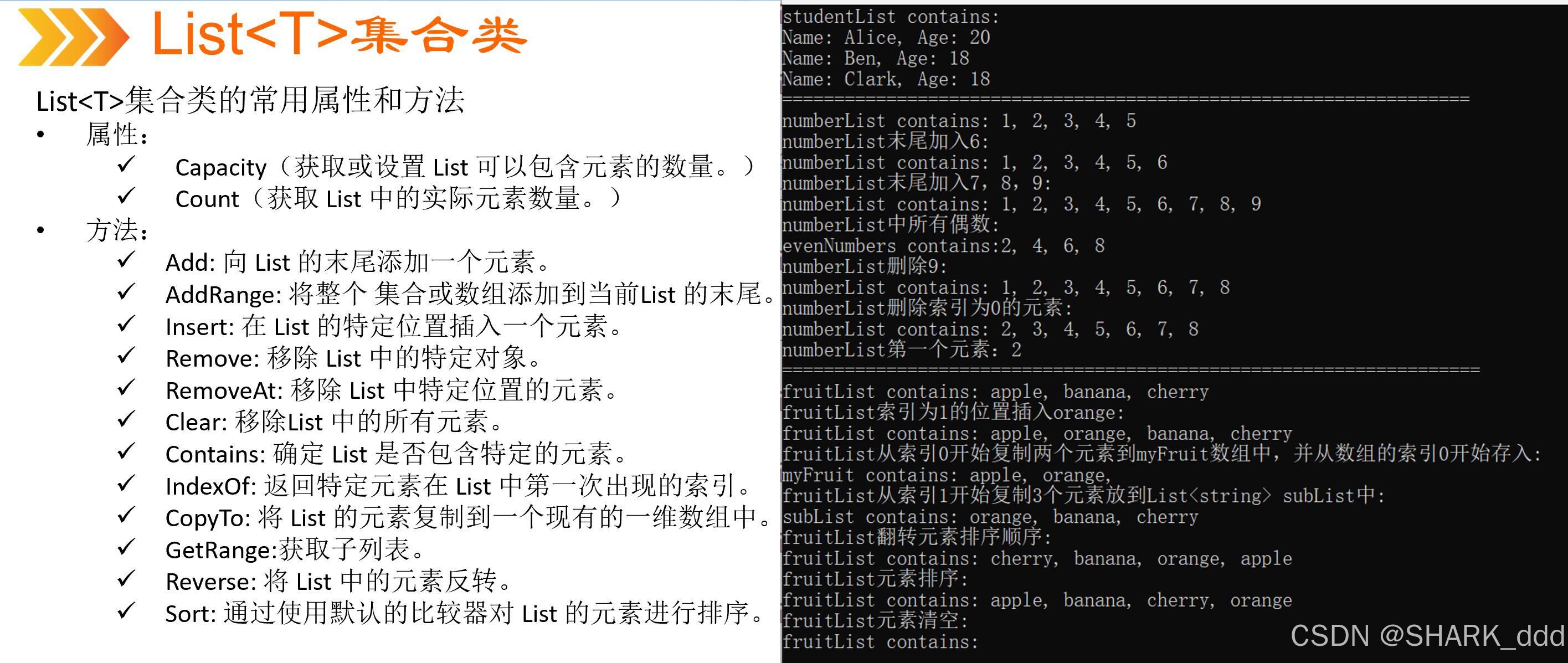
List<T>属性和方法使用
//@author:shark_ddd
using System;
using System.Collections.Generic;
using System.Linq;
using System.Text;
using System.Threading.Tasks;//使用函数来减少长度namespace List_T
{class Student{public string Name { get; set; }public int Age { get; set; }}internal class Program{static void PrintStudents(List<Student> students){foreach (Student student in students){Console.Write("Name:" + student.Name);Console.WriteLine(", Age:" + student.Age);}}static void PrintNumbers(List<int> numbers){foreach (int number in numbers){Console.Write(" " + number);}Console.WriteLine();}static void PrintStrings(List<string> strings){foreach (string str in strings){Console.Write(" " + str);}Console.WriteLine();}static void Main(string[] args){List<Student> studentList = new List<Student>{new Student { Name = "Alice", Age = 20 },new Student { Name = "Ben", Age = 18 },new Student { Name = "Clark", Age = 18 }};Console.WriteLine("Students:");PrintStudents(studentList);Console.WriteLine("=================================================================================");// 创建数字列表List<int> numberList = new List<int> { 1, 2, 3, 4, 5 };// 在数字列表末尾加入 6numberList.Add(6);// 在数字列表末尾加入 7、8、9numberList.AddRange(new List<int> { 7, 8, 9 });Console.WriteLine("now_List:");PrintNumbers(numberList);// 获取数字列表中的所有偶数List<int> evenNumbers = numberList.FindAll(n => n % 2 == 0);Console.WriteLine("获取的偶数有:");PrintNumbers(evenNumbers);// 删除数字列表中的 9numberList.Remove(9);Console.WriteLine("now_List:");PrintNumbers(numberList);// 删除数字列表中索引为 0 的元素numberList.RemoveAt(0);Console.WriteLine("now_List:");PrintNumbers(numberList);// 打印第一个Console.WriteLine("First_number:" + numberList.First());Console.WriteLine("=================================================================================");// 水果列表List<string> fruitList = new List<string> { "apple", "banana", "cherry" };// 在索引为 1 的位置插入 orangefruitList.Insert(1, "orange");Console.WriteLine("now_Fruit:");PrintStrings(fruitList);// 复制水果列表从索引 0 开始的两个元素到 myFruit 数组中,并从数组的索引 0 开始存入string[] myFruit = new string[2];fruitList.CopyTo(0, myFruit, 0, 2);Console.WriteLine("myFruit:");Console.WriteLine(string.Join(" ", myFruit));// 复制水果列表从索引 1 开始的三个元素到 subList 中List<string> subList = fruitList.GetRange(1, 3);Console.WriteLine("subList:");PrintStrings(subList);// 翻转水果列表元素排序顺序fruitList.Reverse();Console.WriteLine("now_Fruit:");PrintStrings(fruitList);// 对水果列表元素进行排序fruitList.Sort();Console.WriteLine("now_Fruit:");PrintStrings(fruitList);// 清空水果列表fruitList.Clear();Console.WriteLine("now_Fruit:");PrintStrings(fruitList);Console.ReadLine();}}
}//转换成字符串string.Join
//using System;
//using System.Collections.Generic;
//using System.Linq;
//using System.Text;
//using System.Threading.Tasks;//namespace List_T
//{
//    class Student
//    {
//        public string Name { get; set; }
//        public int Age { get; set; }
//    }//    internal class Program
//    {
//        static void Main(string[] args)
//        {
//            List<Student> studentList = new List<Student>
//            {
//                new Student { Name = "Alice", Age = 20 },
//                new Student { Name = "Ben", Age = 18 },
//                new Student { Name = "Clark", Age = 18 }
//            };//            Console.WriteLine("Students: " + string.Join(", ", studentList.Select(s => $"Name:{s.Name}, Age:{s.Age}")));//            Console.WriteLine("=================================================================================");//            // 创建数字列表
//            List<int> numberList = new List<int> { 1, 2, 3, 4, 5 };//            // 在数字列表末尾加入 6
//            numberList.Add(6);//            // 在数字列表末尾加入 7、8、9
//            numberList.AddRange(new List<int> { 7, 8, 9 });//            Console.WriteLine("now_List: " + string.Join(" ", numberList));//            // 获取数字列表中的所有偶数
//            List<int> evenNumbers = numberList.FindAll(n => n % 2 == 0);
//            Console.WriteLine("获取的偶数有: " + string.Join(" ", evenNumbers));//            // 删除数字列表中的 9
//            numberList.Remove(9);
//            Console.WriteLine("now_List: " + string.Join(" ", numberList));//            // 删除数字列表中索引为 0 的元素
//            numberList.RemoveAt(0);
//            Console.WriteLine("now_List: " + string.Join(" ", numberList));//            // 打印第一个
//            Console.WriteLine("First_number:" + numberList.First());//            Console.WriteLine("=================================================================================");//            // 水果列表
//            List<string> fruitList = new List<string> { "apple", "banana", "cherry" };//            // 在索引为 1 的位置插入 orange
//            fruitList.Insert(1, "orange");
//            Console.WriteLine("now_Fruit: " + string.Join(" ", fruitList));//            // 复制水果列表从索引 0 开始的两个元素到 myFruit 数组中,并从数组的索引 0 开始存入
//            string[] myFruit = new string[2];
//            fruitList.CopyTo(0, myFruit, 0, 2);
//            Console.WriteLine("myFruit: " + string.Join(" ", myFruit));//            // 复制水果列表从索引 1 开始的三个元素到 subList 中
//            List<string> subList = fruitList.GetRange(1, 3);
//            Console.WriteLine("subList: " + string.Join(" ", subList));//            // 翻转水果列表元素排序顺序
//            fruitList.Reverse();
//            Console.WriteLine("now_Fruit: " + string.Join(" ", fruitList));//            // 对水果列表元素进行排序
//            fruitList.Sort();
//            Console.WriteLine("now_Fruit: " + string.Join(" ", fruitList));//            // 清空水果列表
//            fruitList.Clear();
//            Console.WriteLine("now_Fruit: " + string.Join(" ", fruitList));//            Console.ReadLine();
//        }
//    }
//}    /*冗长的foreach
using System;
using System.Collections.Generic;
using System.Linq;
using System.Text;
using System.Threading.Tasks;namespace List_T
{class Student{public string Name { get; set; }public int Age { get; set; }}internal class Program{static void Main(string[] args){List<Student> studentList = new List<Student>{new Student { Name = "Alice", Age = 20 },new Student { Name = "Ben", Age = 18 },new Student { Name = "Clark", Age = 18 }};foreach (Student student in studentList){Console.Write("Name:" + student.Name);Console.WriteLine(",  Age:" + student.Age);}Console.WriteLine("=================================================================================");// 创建数字列表List<int> numberList = new List<int> { 1, 2, 3, 4, 5 };// 在数字列表末尾加入 6numberList.Add(6);// 在数字列表末尾加入 7、8、9numberList.AddRange(new List<int> { 7, 8, 9 });Console.Write("now_List:");foreach (int number in numberList){Console.Write(" " + number);}Console.WriteLine();// 获取数字列表中的所有偶数List<int> evenNumbers = numberList.FindAll(n => n % 2 == 0);Console.Write("获取的偶数有:");foreach (int number in evenNumbers){Console.Write(" " + number);}Console.WriteLine();// 删除数字列表中的 9numberList.Remove(9);Console.Write("now_List:");foreach (int number in numberList){Console.Write(" " + number);}Console.WriteLine();// 删除数字列表中索引为 0 的元素numberList.RemoveAt(0);Console.Write("now_List:");foreach (int number in numberList){Console.Write(" " + number);}Console.WriteLine();//打印第一个Console.WriteLine("First_number:" + numberList.First());Console.WriteLine("=================================================================================");// 水果列表List<string> fruitList = new List<string> { "apple", "banana", "cherry" };// 在索引为 1 的位置插入 orangefruitList.Insert(1, "orange");Console.Write("now_Fruit:");foreach (string number in fruitList){Console.Write(" " + number);}Console.WriteLine();// 复制水果列表从索引 0 开始的两个元素到 myFruit 数组中,并从数组的索引 0 开始存入string[] myFruit = new string[2];fruitList.CopyTo(0, myFruit, 0, 2);Console.Write("myFruit:");foreach (string number in myFruit){Console.Write(" " + number);}Console.WriteLine();// 复制水果列表从索引 1 开始的三个元素到 subList 中List<string> subList = fruitList.GetRange(1, 3);Console.Write("subList:");foreach (string number in subList){Console.Write(" " + number);}Console.WriteLine();// 翻转水果列表元素排序顺序fruitList.Reverse();Console.Write("now_Fruit:");foreach (string number in fruitList){Console.Write(" " + number);}Console.WriteLine();// 对水果列表元素进行排序fruitList.Sort();Console.Write("now_Fruit:");foreach (string number in fruitList){Console.Write(" " + number);}Console.WriteLine();// 清空水果列表fruitList.Clear();Console.Write("now_Fruit:");foreach (string number in fruitList){Console.Write(" " + number);}Console.WriteLine();Console.ReadLine();}}
}*/
相关文章:
List<T>属性和方法使用
//author:shark_ddd using System; using System.Collections.Generic; using System.Linq; using System.Text; using System.Threading.Tasks;//使用函数来减少长度namespace List_T {class Student{public string Name { get; set; }public int Age { get; set; …...

记一次:使用使用Dbeaver连接Clickhouse
前言:使用了navicat连接了clickhouse我感觉不太好用,就整理了一下dbeaver连接 0、使用Navicat连接clickhouse 测试连接 但是不能双击打开,可是使用命令页界面,右键命令页界面,然后可以用sql去测试 但是不太好用&#…...

Java面向对象编程进阶(四)
Java面向对象编程进阶(四) 一、equals()方法的使用二、toString()方法的使用三、复习 一、equals()方法的使用 适用性:任何引用数据都可以使用。 自定义的类在没有重写Object中equals()方法的情况下,调用的就是Object类中声明的…...

【51单片机】第一个小程序 —— 点亮LED灯
学习使用的开发板:STC89C52RC/LE52RC 编程软件:Keil5 烧录软件:stc-isp 开发板实图: 文章目录 单片机介绍LED灯介绍练习创建第一个项目点亮LED灯LED周期闪烁 单片机介绍 单片机,英文Micro Controller Unit࿰…...

如何通过自动化有效地简化 Active Directory 操作?
我们都知道规模稍微大一点的企业为了便于计算机的管理,基本都上了微软的AD域控制器。 那么肯定就会存在这么一个问题, 不断的会有计算机加入或者是退出域控制器,批量的创建、修改、删除AD域用户,如果企业的架构需要改变ÿ…...
)
Java-POI导出EXCEL(动态表头)
1、主要功能 导出excel,表头有固定的和动态的。动态表头之间不能穿插固定表头。 2、使用方法 引入下方两个工具类,定义excel固定表头类。调用方法即可。 调用方法: ExcelDynamicHeader<MajorNameChangeReport> ledgerSafetyProblemEx…...

利用 Direct3D 绘制几何体—9.流水线状态对象
到目前为止展示过编写输入布局描述、创建顶点着色器和像素着色器,以及配置光栅器状态组这 3 个步骤。接下来讲如何将这些对象绑定到图形流水线上,用以实际绘制图形。大多数控制图形流水线状态的对象被统称为流水线状态对象(Pipeline State Ob…...

【开源项目】libfaketime安装、使用——小白教程
项目 Github:GitHub - wolfcw/libfaketime: libfaketime modifies the system time for a single application libfaketime安装 01.切换路径,目标路径:/usr/local (在/usr/local路径下git clone 开源项目) 切换路径指令: cd …...

java.util.concurrent包
java.util.concurrent包是Java中用于并发编程的重要工具集,提供了丰富的并发原语和组件,以简化多线程编程的复杂性,并帮助开发者编写高效、可伸缩和线程安全的并发程序。其主要功能包括以下几个方面: 一、线程池和任务执行框架 …...

Django创建项目模块+创建映射类+视图
确保你的项目已经正确链接数据库 链接数据库的工具有很多,数据库的种类也有很多,我使用的数据库是mysql,工具是pmysql,使用pymysql链接数据库,在settings文件中这么设置: DATABASES {# default: {# ENGINE: dja…...

使用AMD GPU和LangChain构建问答聊天机器人
Question-answering Chatbot with LangChain on an AMD GPU — ROCm Blogs 作者:Phillip Dang 2024年3月11日 LangChain是一个旨在利用语言模型强大功能来构建前沿应用程序的框架。通过将语言模型连接到各种上下文资源并基于给定的上下文提供推理能力,L…...

2024年808数据结构答案
1.已知带头结点单链表,H为头指针。设计一个算法,查找到链表的第m个结点(不包含头结点),并将元 素值为X的结点插入到该结点后,形成一个新的链表。 // 定义单链表节点结构 typedef struct Node {int data;struct Node* next; } Nod…...

Amazon Linux 2023 安装 Docker
Amazon Linux 2023 安装 Docker 1. 简介 在公司需要将代码部属到 Amazon Linux 2023 系统上时,去 Docker 官方文档里面看也没有针对该系统的部属文档。虽然有通用的 Linux 部属方案但不能应用包管理工具。 首先执行yum、dnf、apt,执行yum和dnf都有正确…...

接口测试(八)jmeter——参数化(CSV Data Set Config)
一、CSV Data Set Config 需求:批量注册5个用户,从CSV文件导入用户数据 1. 【线程组】–>【添加】–>【配置元件】–>【CSV Data Set Config】 2. 【CSV数据文件设置】设置如下 3. 设置线程数为5 4. 运行后查看响应结果...

GGD证明推导学习
GGD证明推导学习 这篇文章,建议先看相关的论文。这篇是我读证明的感悟,因此,不会论文的主体内容 首先,给出命题: DGI的sumary向量是一个常数 给定一个图: G { X ∈ R N D , A ∈ R N N } \mathcal{G…...

Flink难点和高频考点:Flink的反压产生原因、排查思路、优化措施和监控方法
目录 反压定义 反压影响 WebUI监控 Metrics指标 backPressureTimeMsPerSecond idleTimeMsPerSecond busyTimeMsPerSecond 反压可视化 资源优化 算子优化 数据倾斜优化 复杂算子优化 背压机制 反压预防 性能调优 内置工具 第三方工具 反压定义 在探讨Flink的性…...
Swarm - Agent 编排工具
文章目录 一、关于 Swarm(实验性、教育性)为什么选择蜂群文档 二、安装使用安装基本用法其它示例 三、Running Swarmclient.run()ArgumentsResponse字段 四、AgentFields Agent指令函数切换和更新上下文变量函数模式 流媒体评估工具 一、关于 Swarm&…...

使用Python中的jieba库进行简单情感分析
在自然语言处理(NLP)领域,情感分析是一项重要的任务,它可以帮助我们理解文本背后的情感倾向。本文将通过一个简单的例子来介绍如何使用Python的jieba库对中文文本进行基本的情感分析。 1. 环境准备 首先,确保已经安装…...

`pip` 下载速度慢
pip 下载速度慢(例如只有 50KB/s)可能由多个因素导致,以下是一些常见原因和解决方法: 1. 使用国内镜像源 国内访问 PyPI 服务器可能会较慢,您可以通过配置国内镜像源来提升下载速度。以下是一些常用的国内镜像源&…...

【WRF数据准备】基于GEE下载静态地理数据-叶面积指数LAI及绿色植被率Fpar
【WRF数据准备】基于GEE下载静态地理数据 准备:WRF所需静态地理数据(Static geographical data)数据范围说明基于GEE下载叶面积指数及绿色植被率GEE数据集介绍数据下载:LAI(叶面积指数)和Fpar(绿色植被率)数据处理:基于Python处理为单波段LAI数据参考GEE的介绍可参见另…...

3分钟掌握缠论可视化:通达信智能技术分析插件终极指南
3分钟掌握缠论可视化:通达信智能技术分析插件终极指南 【免费下载链接】Indicator 通达信缠论可视化分析插件 项目地址: https://gitcode.com/gh_mirrors/ind/Indicator 还在为复杂的缠论理论头疼吗?还在手工画线分析K线图吗?CZSC缠论…...

Linux串口通信终极指南:3步搞定CH341SER驱动安装,让Arduino开发不再卡壳
Linux串口通信终极指南:3步搞定CH341SER驱动安装,让Arduino开发不再卡壳 【免费下载链接】CH341SER CH341SER driver with fixed bug 项目地址: https://gitcode.com/gh_mirrors/ch/CH341SER 你是否曾经兴奋地拿起一块Arduino开发板,准…...

FreeRTOS和RT-Thread的内存管理实战:如何正确使用pvPortMalloc与rt_malloc替代C库malloc
FreeRTOS与RT-Thread内存管理实战:从标准库陷阱到RTOS最佳实践 在嵌入式实时操作系统开发中,动态内存分配就像高空走钢丝——一步失误可能导致系统崩溃。传统C库的malloc/free在RTOS环境中如同穿着拖鞋走钢丝,而pvPortMalloc和rt_malloc则是专…...

修复肝衰竭的“免疫刹车”:ANXA1是控制炎症失控、促进消退的关键内源信号
慢加急性肝衰竭(ACLF)的发病进程主要由全身性炎症反应及免疫功能紊乱共同驱动,其病理机制复杂且临床预后较差。2026年4月,浙江大学与斯坦福大学,在Hepatology期刊在线发表了题为“Dissecting the liver inflammation e…...

3步自动化优化:智能管理Cursor AI开发环境的革命性方案
3步自动化优化:智能管理Cursor AI开发环境的革命性方案 【免费下载链接】cursor-free-vip [Support 0.45](Multi Language 多语言)自动注册 Cursor Ai ,自动重置机器ID , 免费升级使用Pro 功能: Youve reached your tr…...

Loop:三步快速配置,让你的Mac窗口管理效率提升300%
Loop:三步快速配置,让你的Mac窗口管理效率提升300% 【免费下载链接】Loop Window management made elegant. 项目地址: https://gitcode.com/GitHub_Trending/lo/Loop 你是否经常在多个应用窗口间来回切换,感觉自己像个杂技演员&#…...

Java 注解底层原理、组合注解实现与 AOP 协同机制全解析
Java 注解底层原理与 AOP 协同工作机制 系统性总结 本文严格基于 Java 注解底层原理及 AOP 结合使用的核心技术论述,对知识点进行系统性梳理、重组与优化。全文遵循元注解构建组合注解 → 注解编译与运行底层机制 → 注解AOP 协同工作原理 → 实战问题与解决方案的逻…...

毫米波雷达测心率靠谱吗?聊聊TI方案在车载健康监测中的真实挑战与未来
毫米波雷达在车载健康监测中的技术突破与实践挑战 当方向盘成为健康监测的第一道防线,毫米波雷达正在重新定义智能座舱的生物感知能力。不同于医院里笨重的心电监护仪或智能手表上时灵时不灵的光电传感器,藏在汽车顶棚或座椅背后的毫米波芯片,…...
)
从键盘到5G模组:深入浅出聊聊USB那些五花八门的‘设备类’(HID/CDC/MSC)
从键盘到5G模组:深入浅出聊聊USB那些五花八门的‘设备类’(HID/CDC/MSC) 当你在键盘上敲下字符、用U盘拷贝文件,或是通过4G模块联网时,背后都有一群看不见的"协议翻译官"在忙碌——它们就是USB设备类&#x…...

ESP32-S3-DevKitC-1 v1.8开箱实测:从驱动安装到‘Hello World’串口打印全记录
ESP32-S3-DevKitC-1 v1.8实战指南:从开箱到首个串口通信项目 第一次拿到ESP32-S3-DevKitC-1开发板时,那种既兴奋又略带忐忑的心情记忆犹新。作为乐鑫科技推出的新一代Wi-Fi蓝牙双模开发板,ESP32-S3系列在性能和外设支持上都有显著提升&#x…...