
vxe-table v4.8+ 与 v3.10+ 导出 xlsx、支持导出合并、设置样式、宽高、边框、字体、背景、超链接、图片的详细介绍,一篇就够了
Vxe UI vue vxe-table v4.8+ 与 v3.10+ 导出 xlsx、支持导出合并、设置样式、宽高、边框、字体、背景、超链接、图片等、所有常用的 Excel 格式都能自定义,使用非常简单,纯前端实现复杂的导出。
安装插件
npm install vxe-pc-ui@4.2.39 vxe-table@4.8.0 @vxe-ui/plugin-export-xlsx@4.0.7 exceljs@4.4.0
// ...
import { VxeUI } from 'vxe-pc-ui'
import VxeUIPluginExportXLSX from '@vxe-ui/plugin-export-xlsx'
// ...VxeUI.use(VxeUIPluginExportXLSX)
在 index.html 引入对应的解析库,把对应的 js 下载到本地引入。
<script src="https://vxeui.com/umd/exceljs@4.4.0/dist/exceljs.min.js"></script>
默认导出
默认支持文本和单元格合并等导出,只需要开启对应的功能就可以直接使用了。
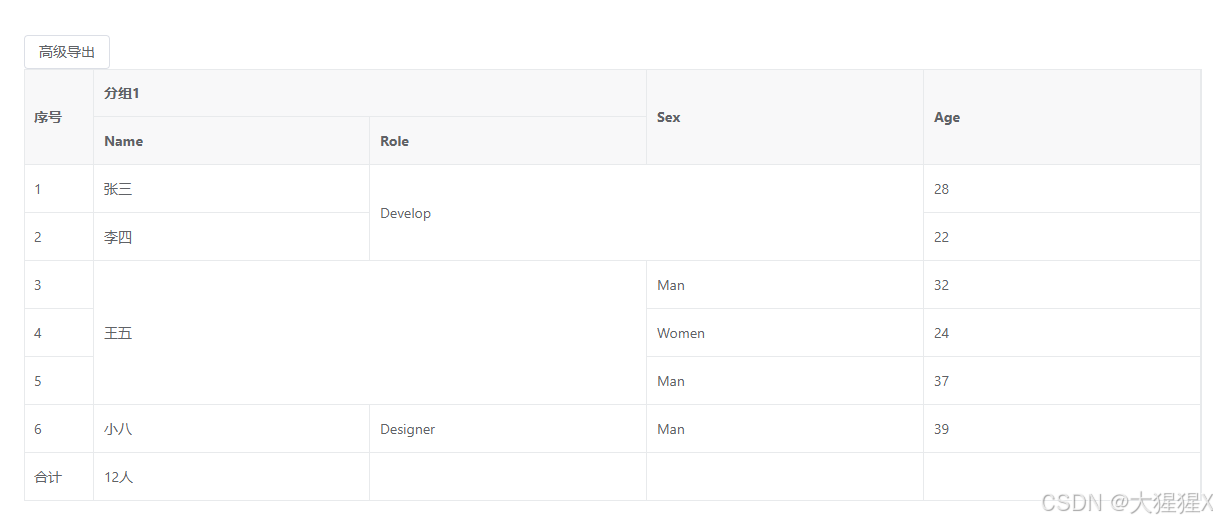
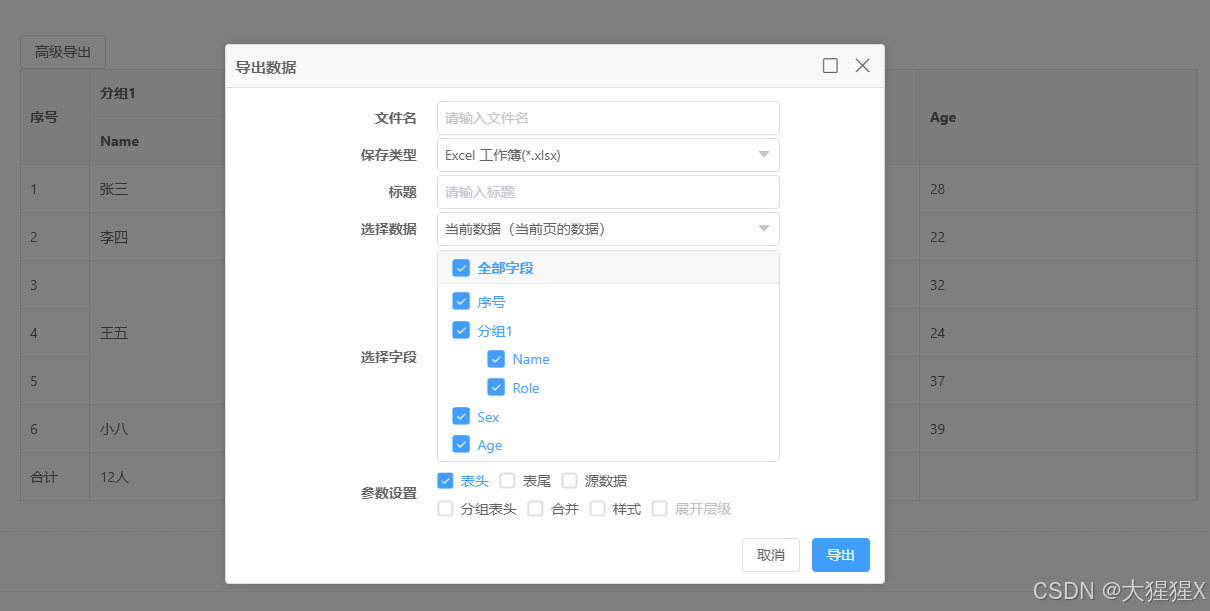
<template><div><vxe-button @click="exportEvent">高级导出</vxe-button><vxe-grid ref="gridRef" v-bind="gridOptions"></vxe-grid></div>
</template><script setup>
import { ref, reactive } from 'vue'const gridRef = ref()const gridOptions = reactive({border: true,showFooter: true,mergeCells: [{ row: 0, col: 2, rowspan: 2, colspan: 2 },{ row: 2, col: 1, rowspan: 3, colspan: 2 }],exportConfig: {type: 'xlsx'},columns: [{ field: 'seq', type: 'seq', width: 70 },{title: '分组1',children: [{ field: 'name', title: 'Name' },{ field: 'role', title: 'Role' }]},{ field: 'sex', title: 'Sex' },{ field: 'age', title: 'Age' }],data: [{ id: 10001, name: '张三', role: 'Develop', sex: 'Man', age: 28, address: 'test abc' },{ id: 10002, name: '李四', role: 'Test', sex: 'Women', age: 22, address: '广东省' },{ id: 10003, name: '王五', role: 'PM', sex: 'Man', age: 32, address: '上海' },{ id: 10004, name: '老六', role: 'Designer', sex: 'Women', age: 24, address: 'Shanghai' },{ id: 10005, name: '小七', role: 'Designer', sex: 'Man', age: 37, address: '广东省' },{ id: 10006, name: '小八', role: 'Designer', sex: 'Man', age: 39, address: 'Shanghai' }],footerData: [{ seq: '合计', name: '12人', no1: 356 }]
})const exportEvent = () => {const $grid = gridRef.valueif ($grid) {$grid.openExport()}
}
</script>
参数说明
通过 sheetMethod 自定义方法实现,参数说明 exportConfig.sheetMethod({
workbook 工作簿对象
worksheet 表对象
options 当前参数
})
自定义边框
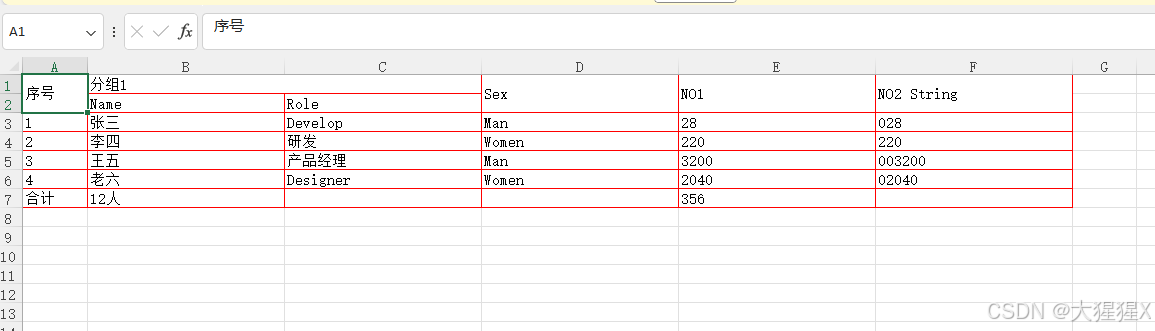
<template><div><vxe-button @click="exportEvent">点击导出</vxe-button><vxe-grid ref="gridRef" v-bind="gridOptions"></vxe-grid></div>
</template><script setup>
import { ref, reactive } from 'vue'const gridRef = ref()const gridOptions = reactive({border: true,showFooter: true,exportConfig: {sheetMethod (params) {const { worksheet } = paramsworksheet.eachRow(excelRow => {excelRow.eachCell(excelCell => {// 设置单元格边框excelCell.border = {top: {style: 'thin',color: {argb: 'ff0000'}},left: {style: 'thin',color: {argb: 'ff0000'}},bottom: {style: 'thin',color: {argb: 'ff0000'}},right: {style: 'thin',color: {argb: 'ff0000'}}}})})}},columns: [{ field: 'seq', type: 'seq', width: 70 },{title: '分组1',children: [{ field: 'name', title: 'Name' },{ field: 'role', title: 'Role' }]},{ field: 'sex', title: 'Sex' },{ field: 'no1', title: 'NO1' },{ field: 'no2', title: 'NO2 String', cellType: 'string' }],data: [{ id: 10001, name: '张三', role: 'Develop', sex: 'Man', no1: '028', no2: '028' },{ id: 10002, name: '李四', role: '研发', sex: 'Women', no1: '220', no2: '220' },{ id: 10003, name: '王五', role: '产品经理', sex: 'Man', no1: '003200', no2: '003200' },{ id: 10004, name: '老六', role: 'Designer', sex: 'Women', no1: '02040', no2: '02040' }],footerData: [{ seq: '合计', name: '12人', no1: '356' }]
})const exportEvent = () => {const $grid = gridRef.valueif ($grid) {$grid.exportData({type: 'xlsx'})}
}
</script>
自定义字体
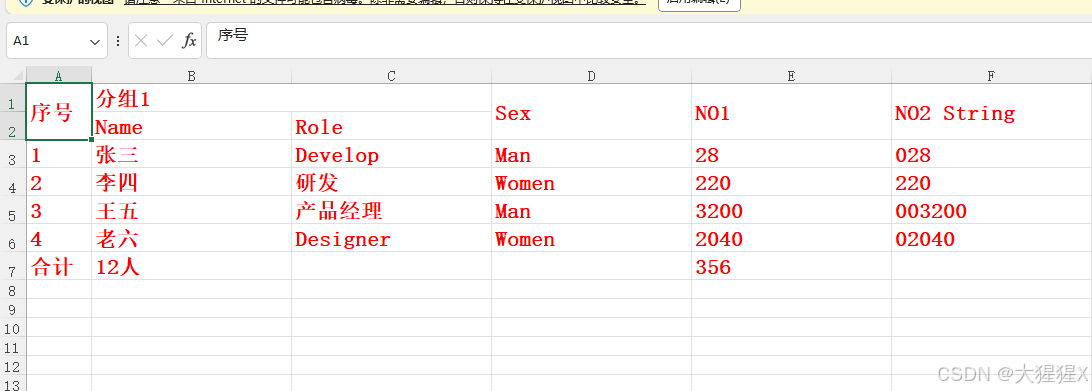
<template><div><vxe-button @click="exportEvent">点击导出</vxe-button><vxe-grid ref="gridRef" v-bind="gridOptions"></vxe-grid></div>
</template><script setup>
import { ref, reactive } from 'vue'const gridRef = ref()const gridOptions = reactive({border: true,showFooter: true,exportConfig: {sheetMethod (params) {const { worksheet } = paramsworksheet.eachRow(excelRow => {excelRow.eachCell(excelCell => {// 设置单元格字体excelCell.font = {bold: true,size: 16,color: {argb: 'ff0000'}}})})}},columns: [{ field: 'seq', type: 'seq', width: 70 },{title: '分组1',children: [{ field: 'name', title: 'Name' },{ field: 'role', title: 'Role' }]},{ field: 'sex', title: 'Sex' },{ field: 'no1', title: 'NO1' },{ field: 'no2', title: 'NO2 String', cellType: 'string' }],data: [{ id: 10001, name: '张三', role: 'Develop', sex: 'Man', no1: '028', no2: '028' },{ id: 10002, name: '李四', role: '研发', sex: 'Women', no1: '220', no2: '220' },{ id: 10003, name: '王五', role: '产品经理', sex: 'Man', no1: '003200', no2: '003200' },{ id: 10004, name: '老六', role: 'Designer', sex: 'Women', no1: '02040', no2: '02040' }],footerData: [{ seq: '合计', name: '12人', no1: '356' }]
})const exportEvent = () => {const $grid = gridRef.valueif ($grid) {$grid.exportData({type: 'xlsx'})}
}
</script>
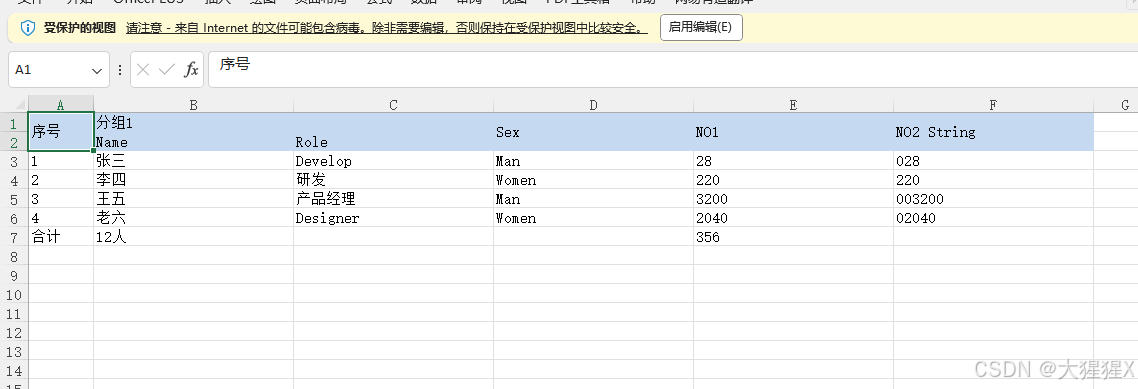
自定义表头背景
<template><div><vxe-button @click="exportEvent">点击导出</vxe-button><vxe-grid ref="gridRef" v-bind="gridOptions"></vxe-grid></div>
</template><script setup>
import { ref, reactive } from 'vue'const gridRef = ref()const gridOptions = reactive({border: true,showFooter: true,exportConfig: {sheetMethod (params) {const { worksheet } = paramsworksheet.eachRow((excelRow, rowIndex) => {if (rowIndex <= 2) {excelRow.eachCell(excelCell => {// 填充单元格背景excelCell.fill = {type: 'pattern',pattern: 'solid',fgColor: {argb: 'c5d9f1'}}})}})}},columns: [{ field: 'seq', type: 'seq', width: 70 },{title: '分组1',children: [{ field: 'name', title: 'Name' },{ field: 'role', title: 'Role' }]},{ field: 'sex', title: 'Sex' },{ field: 'no1', title: 'NO1' },{ field: 'no2', title: 'NO2 String', cellType: 'string' }],data: [{ id: 10001, name: '张三', role: 'Develop', sex: 'Man', no1: '028', no2: '028' },{ id: 10002, name: '李四', role: '研发', sex: 'Women', no1: '220', no2: '220' },{ id: 10003, name: '王五', role: '产品经理', sex: 'Man', no1: '003200', no2: '003200' },{ id: 10004, name: '老六', role: 'Designer', sex: 'Women', no1: '02040', no2: '02040' }],footerData: [{ seq: '合计', name: '12人', no1: '356' }]
})const exportEvent = () => {const $grid = gridRef.valueif ($grid) {$grid.exportData({type: 'xlsx'})}
}
</script>
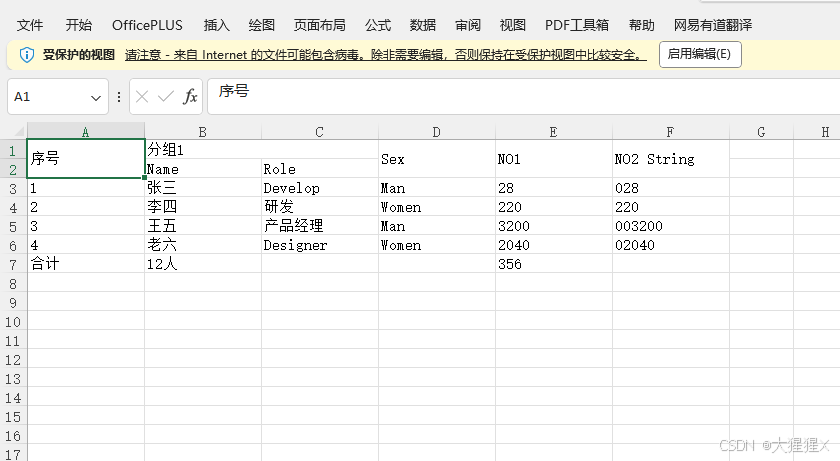
自定义列宽
覆盖默认的列宽
<template><div><vxe-button @click="exportEvent">点击导出</vxe-button><vxe-grid ref="gridRef" v-bind="gridOptions"></vxe-grid></div>
</template><script setup>
import { ref, reactive } from 'vue'const gridRef = ref()const gridOptions = reactive({border: true,showFooter: true,exportConfig: {async sheetMethod (params) {const { worksheet } = paramsworksheet.columns.forEach(sheetColumn => {// 设置列宽sheetColumn.width = 16})}},columns: [{ field: 'seq', type: 'seq', width: 70 },{title: '分组1',children: [{ field: 'name', title: 'Name' },{ field: 'role', title: 'Role' }]},{ field: 'sex', title: 'Sex' },{ field: 'no1', title: 'NO1' },{ field: 'no2', title: 'NO2 String', cellType: 'string' }],data: [{ id: 10001, name: '张三', role: 'Develop', sex: 'Man', no1: '028', no2: '028' },{ id: 10002, name: '李四', role: '研发', sex: 'Women', no1: '220', no2: '220' },{ id: 10003, name: '王五', role: '产品经理', sex: 'Man', no1: '003200', no2: '003200' },{ id: 10004, name: '老六', role: 'Designer', sex: 'Women', no1: '02040', no2: '02040' }],footerData: [{ seq: '合计', name: '12人', no1: '356' }]
})const exportEvent = () => {const $grid = gridRef.valueif ($grid) {$grid.exportData({type: 'xlsx'})}
}
</script>
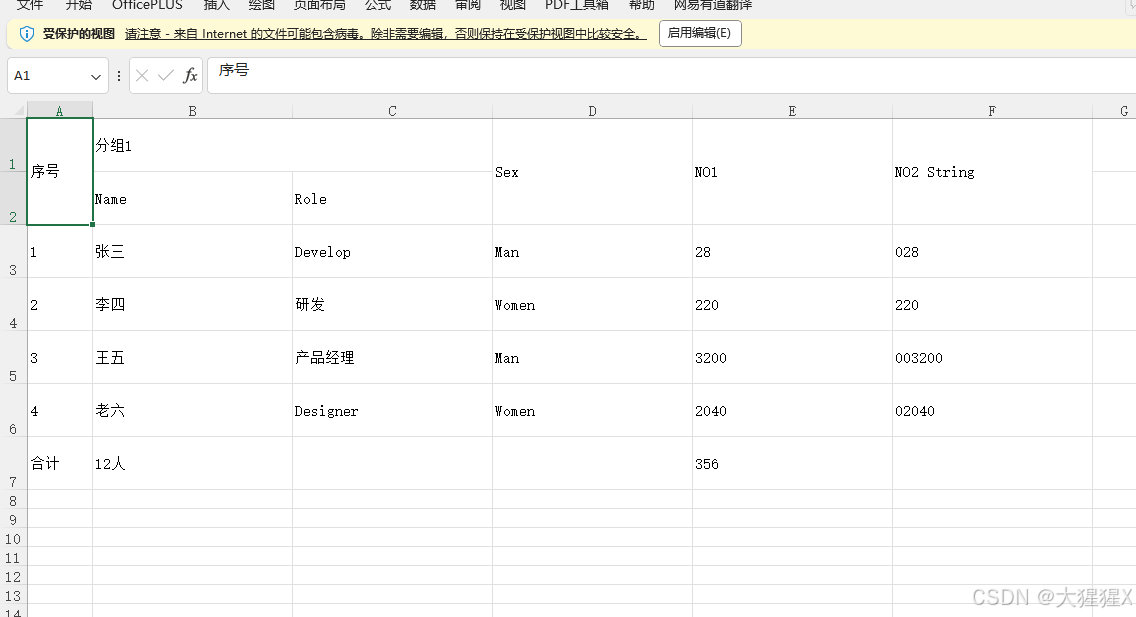
自定义行高
覆盖默认的行高
<template><div><vxe-button @click="exportEvent">点击导出</vxe-button><vxe-grid ref="gridRef" v-bind="gridOptions"></vxe-grid></div>
</template><script setup>
import { ref, reactive } from 'vue'const gridRef = ref()const gridOptions = reactive({border: true,showFooter: true,exportConfig: {async sheetMethod (params) {const { worksheet } = paramsworksheet.eachRow((excelRow, rowIndex) => {// 设置行高excelRow.height = 60})}},columns: [{ field: 'seq', type: 'seq', width: 70 },{title: '分组1',children: [{ field: 'name', title: 'Name' },{ field: 'role', title: 'Role' }]},{ field: 'sex', title: 'Sex' },{ field: 'no1', title: 'NO1' },{ field: 'no2', title: 'NO2 String', cellType: 'string' }],data: [{ id: 10001, name: '张三', role: 'Develop', sex: 'Man', no1: '028', no2: '028' },{ id: 10002, name: '李四', role: '研发', sex: 'Women', no1: '220', no2: '220' },{ id: 10003, name: '王五', role: '产品经理', sex: 'Man', no1: '003200', no2: '003200' },{ id: 10004, name: '老六', role: 'Designer', sex: 'Women', no1: '02040', no2: '02040' }],footerData: [{ seq: '合计', name: '12人', no1: '356' }]
})const exportEvent = () => {const $grid = gridRef.valueif ($grid) {$grid.exportData({type: 'xlsx'})}
}
</script>
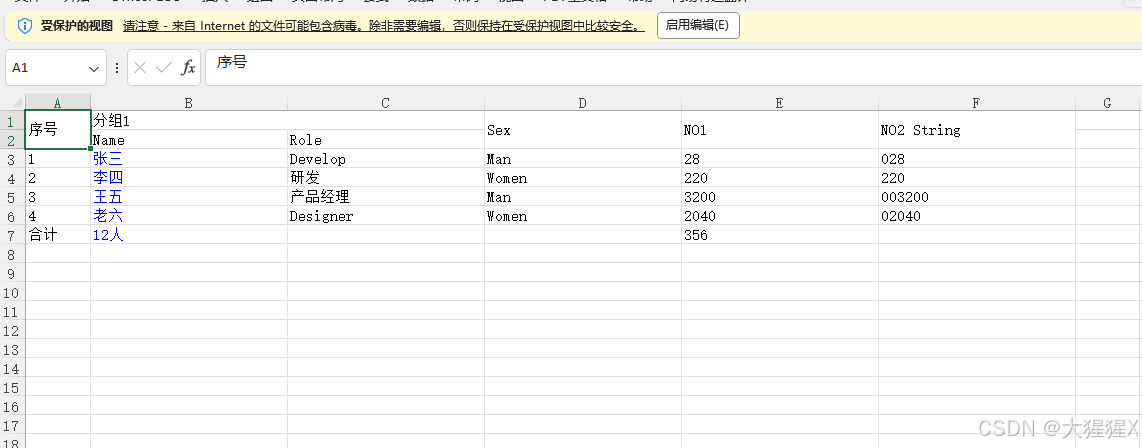
添加超链接
<template><div><vxe-button @click="exportEvent">点击导出</vxe-button><vxe-grid ref="gridRef" v-bind="gridOptions"></vxe-grid></div>
</template><script setup>
import { ref, reactive } from 'vue'const gridRef = ref()const gridOptions = reactive({border: true,showFooter: true,exportConfig: {sheetMethod (params) {const { worksheet } = paramsworksheet.eachRow((excelRow, rowIndex) => {if (rowIndex > 2) {excelRow.eachCell((excelCell, columnIndex) => {if (columnIndex === 2) {// 设置指定单元格为超链接excelCell.value = {text: `${excelCell.value}`,hyperlink: 'https://vxeui.com',tooltip: 'vxeui.com'}// 设置单元格字体excelCell.font = {color: {argb: '0000ff'}}}})}})}},columns: [{ field: 'seq', type: 'seq', width: 70 },{title: '分组1',children: [{ field: 'name', title: 'Name' },{ field: 'role', title: 'Role' }]},{ field: 'sex', title: 'Sex' },{ field: 'no1', title: 'NO1' },{ field: 'no2', title: 'NO2 String', cellType: 'string' }],data: [{ id: 10001, name: '张三', role: 'Develop', sex: 'Man', no1: '028', no2: '028' },{ id: 10002, name: '李四', role: '研发', sex: 'Women', no1: '220', no2: '220' },{ id: 10003, name: '王五', role: '产品经理', sex: 'Man', no1: '003200', no2: '003200' },{ id: 10004, name: '老六', role: 'Designer', sex: 'Women', no1: '02040', no2: '02040' }],footerData: [{ seq: '合计', name: '12人', no1: '356' }]
})const exportEvent = () => {const $grid = gridRef.valueif ($grid) {$grid.exportData({type: 'xlsx'})}
}
</script>
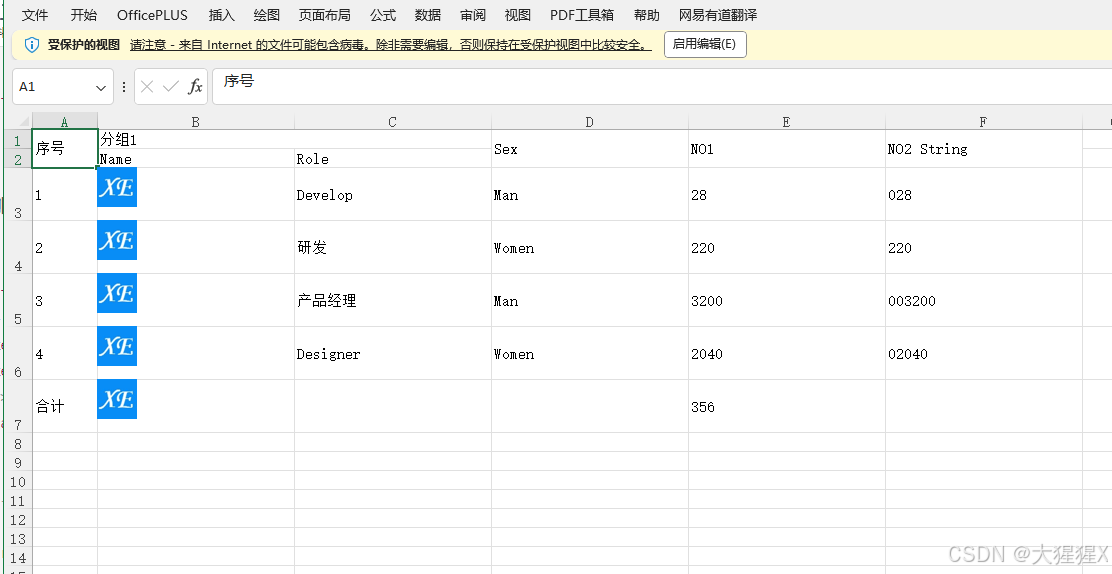
添加图片
图片支持 buffer 和 base64 格式。
<template><div><vxe-button @click="exportEvent">点击导出</vxe-button><vxe-grid ref="gridRef" v-bind="gridOptions"></vxe-grid></div>
</template><script setup>
import { ref, reactive } from 'vue'const gridRef = ref()const gridOptions = reactive({border: true,showFooter: true,exportConfig: {async sheetMethod (params) {const { worksheet, workbook } = params// 加载图片const buffer1 = await fetch('https://vxeui.com/logo.png').then(res => res.arrayBuffer())const imageId1 = workbook.addImage({buffer: buffer1,extension: 'png'})worksheet.eachRow((excelRow, rowIndex) => {if (rowIndex > 2) {// 设置行高excelRow.height = 60excelRow.eachCell((excelCell, columnIndex) => {if (columnIndex === 2) {// 将图片添加到单元格worksheet.addImage(imageId1, {tl: { col: columnIndex - 1, row: rowIndex - 1 },ext: { width: 40, height: 40 }})}})}})}},columns: [{ field: 'seq', type: 'seq', width: 70 },{title: '分组1',children: [{ field: 'name', title: 'Name' },{ field: 'role', title: 'Role' }]},{ field: 'sex', title: 'Sex' },{ field: 'no1', title: 'NO1' },{ field: 'no2', title: 'NO2 String', cellType: 'string' }],data: [{ id: 10001, name: '张三', role: 'Develop', sex: 'Man', no1: '028', no2: '028' },{ id: 10002, name: '李四', role: '研发', sex: 'Women', no1: '220', no2: '220' },{ id: 10003, name: '王五', role: '产品经理', sex: 'Man', no1: '003200', no2: '003200' },{ id: 10004, name: '老六', role: 'Designer', sex: 'Women', no1: '02040', no2: '02040' }],footerData: [{ seq: '合计', name: '12人', no1: '356' }]
})
const exportEvent = () => {const $grid = gridRef.valueif ($grid) {$grid.exportData({type: 'xlsx'})}
}
</script>
github https://github.com/x-extends/vxe-table
gitee
相关文章:
vxe-table v4.8+ 与 v3.10+ 导出 xlsx、支持导出合并、设置样式、宽高、边框、字体、背景、超链接、图片的详细介绍,一篇就够了
Vxe UI vue vxe-table v4.8 与 v3.10 导出 xlsx、支持导出合并、设置样式、宽高、边框、字体、背景、超链接、图片等、所有常用的 Excel 格式都能自定义,使用非常简单,纯前端实现复杂的导出。 安装插件 npm install vxe-pc-ui4.2.39 vxe-table4.8.0 vx…...

江协科技STM32学习- P36 SPI通信外设
🚀write in front🚀 🔎大家好,我是黄桃罐头,希望你看完之后,能对你有所帮助,不足请指正!共同学习交流 🎁欢迎各位→点赞👍 收藏⭐️ 留言📝…...

【大数据】ClickHouse常见的表引擎及建表语法
ClickHouse 中最强大的表引擎当属 MergeTree (合并树)引擎及该系列(*MergeTree)中的其他引擎。接下来我们就仔细了解下MergeTree 及该系列的其他引擎的使用场景及建表语法。 MergeTree MergeTree 系列的引擎被设计用于插入极大量…...

explain执行计划分析 ref_
这里写目录标题 什么是ExplainExplain命令扩展explain extendedexplain partitions 两点重要提示本文示例使用的数据库表Explain命令(关键字)explain简单示例explain结果列说明【id列】【select_type列】【table列】【type列】 【possible_keys列】【key列】【key_len列】【ref…...

网络学习/复习4传输层
1,0...

Notepad++ 更改字体大小和颜色
前言 在长时间编程或文本编辑过程中,合适的字体大小和颜色可以显著提高工作效率和减少眼睛疲劳。Notepad 提供了丰富的自定义选项,让你可以根据个人喜好调整编辑器的外观。 步骤详解 1. 更改字体大小 打开 Notepad 启动 Notepad 编辑器。 进入设置菜…...
基于SSM+小程序的宿舍管理系统(宿舍1)
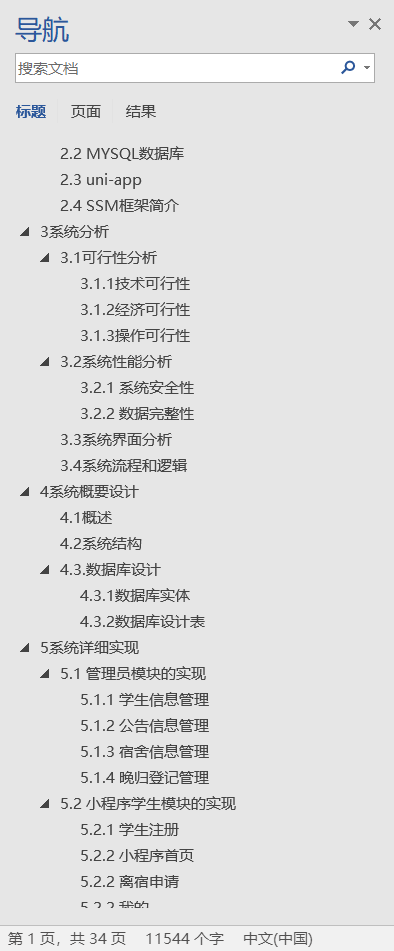
👉文末查看项目功能视频演示获取源码sql脚本视频导入教程视频 1、项目介绍 本宿舍管理系统小程序有管理员和学生两个角色。 1、管理员功能有个人中心,公告信息管理,班级管理,学生管理,宿舍信息管理,宿舍…...

【案例分享】TeeChart 如何为人类绩效解决方案提供数据洞察
“过去二十年来,我们一直在使用 Steema Software 产品,尤其是 TeeChart,这是我们软件开发的基础部分。看到 TeeChart 在这段时间里不断发展、改进和增加功能,真是太棒了,这极大地增强了我们的产品。Steema 的客户和技术…...

细谈 Linux 中的多路复用epoll
大家好,我是 V 哥。在 Linux 中,epoll 是一种多路复用机制,用于高效地处理大量文件描述符(file descriptor, FD)事件。与传统的select和poll相比,epoll具有更高的性能和可扩展性,特别是在大规模…...

51c自动驾驶~合集4
我自己的原文哦~ https://blog.51cto.com/whaosoft/12413878 #MCTrack 迈驰&旷视最新MCTrack:KITTI/nuScenes/Waymo三榜单SOTA paper:MCTrack: A Unified 3D Multi-Object Tracking Framework for Autonomous Driving code:https://gi…...

回归预测 | MATLAB实现BO-BiGRU贝叶斯优化双向门控循环单元多输入单输出回归预测
要在MATLAB中实现BO-BiGRU(贝叶斯优化双向门控循环单元)进行多输入单输出回归预测,您需要执行以下步骤: 数据准备:准备您的训练数据和测试数据。 模型构建:构建BO-BiGRU模型,可以使用MATLAB中的…...
2-ARM Linux驱动开发-设备树平台驱动
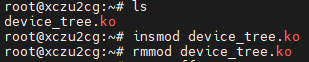
一、概述 设备树(Device Tree)是一种描述硬件的数据结构,用于将硬件设备的信息传递给操作系统内核。它的主要作用是使内核能够以一种统一、灵活的方式了解硬件平台的细节,包括设备的拓扑结构、资源分配(如内存地址、中断号等)等信…...
C语言函数与递归
函数 函数是指将一组能完成一个功能或多个功能的语句放在一起的代码结构。在C语言程序中,至少会包含一个函数,主函数main()。本章将详细讲解关于函数的相关内容。 1、库函数 ⭕️C语言库函数是指在C语言标准库中预先定义好的函数,这些函数包…...

Linux下的Debugfs
debugfs 1. 简介 类似sysfs、procfs,debugfs 也是一种内存文件系统。不过不同于sysfs一个kobject对应一个文件,procfs和进程相关的特性,debugfs的灵活度很大,可以根据需求对指定的变量进行导出并提供读写接口。debugfs又是一个Li…...

【FFmpeg】调整音频文件的音量
1、调整音量的命令 1)音量调整为当前音量的十倍 ffmpeg -i inputfile -vol 1000 outputfile 2)音量调整为当前音量的一半 ffmpeg -i input.wav -filter:a "volume=0.5" output.wav3)静音 ffmpeg -i input.wav -filter:a "volume=0" output.wav4)…...

mac 打开访达快捷键
一、使用快捷键组合 1. Command N 在当前桌面或应用程序窗口中,按下“Command N”组合键可以快速打开一个新的访达窗口。这就像在 Windows 系统中通过“Ctrl N”打开新的资源管理器窗口一样。 2. Command Tab 切换 如果访达已经打开,只是被其他应…...

Ubuntu学习笔记 - Day2
文章目录 学习目标:学习内容:学习笔记:Linux系统启动过程内核引导运行init运行级别系统初始化建立终端用户登录系统 Ubuntu关机关机流程相关命令 Linux系统目录结构查看目录目录结构 文件基本属性读写权限命令 下载文件的方法安装wget工具下载…...

c++基础12比较/逻辑运算符
比较/逻辑运算符 布尔比较运算符逻辑运算符位运算符(也用于逻辑运算)1<a<10怎么表达T140399判断是否为两位数代码 布尔 在C中,布尔类型是一种基本数据类型,用于表示逻辑值,即真(true)或假…...

mac-ubuntu虚拟机(扩容-共享-vmtools)
一、磁盘扩容 使用GParted工具对Linux磁盘空间进行扩展 https://blog.csdn.net/Time_Waxk/article/details/105675468 经过上面的方式后还不够,需要再进行下面的操作 lvextend 用于扩展逻辑卷的大小,-l 选项允许指定大小。resize2fs 用于调整文件系统的…...
:使用Python基于WSM、WPM、WASPAS的多准则决策分析)
数学建模学习(135):使用Python基于WSM、WPM、WASPAS的多准则决策分析
1. 算法介绍 多标准决策分析(Multi-Criteria Decision Analysis, MCDA)是帮助决策者在复杂环境下做出合理选择的重要工具。WSM(加权和法)、WPM(加权乘积法)、WASPAS(加权和乘积评估法)是 MCDA 中的三种常用算法。它们广泛应用于工程、经济、供应链管理等多个领域,用于…...

Lumafly:跨平台空洞骑士模组管理器,智能依赖解析与一站式管理解决方案
Lumafly:跨平台空洞骑士模组管理器,智能依赖解析与一站式管理解决方案 【免费下载链接】Lumafly A cross platform mod manager for Hollow Knight written in Avalonia. 项目地址: https://gitcode.com/gh_mirrors/lu/Lumafly Lumafly是一款基于…...

机器学习加速辐照材料缺陷预测:从团簇动力学到神经网络代理模型
1. 项目概述:当机器学习遇见辐照材料缺陷预测在核能、航空航天以及先进反应堆材料的设计与安全评估中,有一个问题始终萦绕在材料科学家和工程师的心头:一块材料在长期、高强度的粒子辐照下,其内部究竟会发生什么?微观层…...

Arm平台调试工具链全解析与实战指南
1. Arm参考设计平台调试工具全指南作为一名长期从事Arm平台开发的工程师,我深知调试工具链的选择和使用对项目效率的决定性影响。本文将系统梳理Arm参考设计平台(RDP)的全套调试资源,涵盖从基础工具配置到高级调试技巧的完整知识体系。重要提示ÿ…...

defx.nvim 会话管理指南:保存和恢复文件浏览器状态
defx.nvim 会话管理指南:保存和恢复文件浏览器状态 【免费下载链接】defx.nvim :file_folder: The dark powered file explorer implementation for neovim/Vim8 项目地址: https://gitcode.com/gh_mirrors/de/defx.nvim defx.nvim 是一款为 neovim/Vim8 打造…...

【AI搜索引擎未来5年趋势白皮书】:20位顶尖AI架构师联合预测的7大不可逆变革
更多请点击: https://intelliparadigm.com 第一章:AI搜索引擎未来5年趋势总览 AI搜索引擎正从关键词匹配的“检索工具”加速演进为具备推理能力、上下文感知与主动服务意识的“智能认知中枢”。未来五年,其技术演进将围绕多模态理解、实时知…...

Windows屏幕录制全栈实现:Graphics Capture+FFmpeg零拷贝编码
1. 这不是“调个API就完事”的录制功能,而是要亲手把屏幕变成可编程的视频流管道很多人看到“FFmpeg屏幕录制”第一反应是:网上一搜,几十个C#封装库,NuGet install一下,几行代码start()就完事。我去年也这么想——直到…...

JavaScript 高频基础面试题
在前端面试与日常开发中,JavaScript 基础语法、数组操作、循环、函数、定时器等知识点是必考、必用的核心内容。我整理了从 41 到 52 题的高频经典题目,搭配标准回答 代码示例 核心要点,逻辑清晰、面试直接背诵,一篇搞定基础通关…...

Unity序列化三要素:Serializable、SerializeField与SerializeReference详解
1. 为什么Unity序列化总让人困惑——从一个真实报错说起 刚接手一个老项目时,我遇到个特别典型的场景:美术同事在Inspector里调好了角色的装备配置,保存后切到另一台机器打开,所有装备栏全空了。Debug发现, List<E…...

机器学习调试:从数据到部署的系统化故障诊断与修复实践
1. 机器学习调试:从“炼丹”到“精密工程”的必经之路在机器学习项目的日常推进中,我们常常会经历一个从兴奋到困惑,再到“玄学”调试的循环。模型在验证集上表现优异,一上线就“翻车”;训练时损失曲线平滑下降&#x…...

AI by Hand Excel:在电子表格中实现损失函数与精度评估的完整指南
AI by Hand Excel:在电子表格中实现损失函数与精度评估的完整指南 【免费下载链接】ai-by-hand-excel 项目地址: https://gitcode.com/gh_mirrors/ai/ai-by-hand-excel 你是否想过,无需编写一行代码就能深入理解人工智能算法的核心原理ÿ…...