
【AIGC】国内AI工具复现GPTs效果详解

文章目录
- 💯前言
- 💯本文所要复现的GPTs介绍
- 💯GPTs指令作为提示词在ChatGPT实现类似效果
- 💯国内AI工具复现GPTs效果可能出现的问题
- 解决方法
- 解决后的效果
- 💯不同国内AI工具下的效果测试
- 文心一言
- KIMI
- 通义千问
- 天工AI
- 豆包
- 智谱清言
- 讯飞星火
- 海螺AI
- 腾讯元宝
- 💯小结

本文所使用的GPTs指令例子:
Email Craft is a specialized assistant for crafting professional email responses. Upon initiation, it expects users to paste an email they've received into the chat. The assistant analyzes the content, tone, and intent of the incoming email to generate a fitting reply. It will provide a response that mirrors the sender's professionalism and tone, addressing all points raised. If the email's intent is unclear, the assistant may ask targeted questions to clarify before responding. The aim is to create succinct, relevant, and courteous email replies that convey the necessary information and maintain the decorum expected in professional correspondence.
💯前言
- 在GPTs应用实例中,有的朋友不方便访问国外的ChatGPT官网。因此本文将介绍如何使用国内的AI工具,通过GPTs配置中的
GPTs指令,复现类似ChatGPT中的GPTs效果。 - GPTs应用实例专栏

💯本文所要复现的GPTs介绍
- 这是一款名为 “Email Responder Pro” 的专业电子邮件回复助手,专门为用户生成简洁、专业的邮件回复。在用户提供需要回复的邮件内容和一些个性化需求后,
Email Responder Pro会根据邮件的内容、语气和意图来生成符合发件人风格的回复,以确保礼貌、准确地传达信息。

- 本文的目标是通过
GPTs指令搭配国内 AI 工具实现类似Email Responder Pro的效果。以此类推我们就可以使用国内 AI 工具类比其他GPTs应用进行体验。

💯GPTs指令作为提示词在ChatGPT实现类似效果
- GPTs的指令本质上是用来在
GPTs的配置界面填入指令来设置GPTs的。

- 但它同样在ChatGPT中也可以作为提示词在新聊天中完成类似
GPTs的功能。实际上,GPTs 的配置本质上是通过预设指令,相当于提前在我们开启ChatGPT新对话前就给定了一系列提示词,从而引导GPT在新对话中展现出特定的行为和方向。

- 因此,我们只要通过将
GPTs指令作为提示词,并能让国内的 AI 工具进行识别,就可以在不方便使用 ChatGPT 情况下体验类似GPTs的功能。

💯国内AI工具复现GPTs效果可能出现的问题
这里以文心一言为例:
- 指令语言问题:
GPTs的指令通常是英文的,如果直接使用,国内的大语言模型可能会将其识别为要翻译、总结和概括的英文文本,而不是提示词,从而无法达到预期效果。

- 误解用户需求:某些情况下,国内AI工具可能将英文指令理解为普通对话内容,导致与用户预期不符。这里AI工具把需求误解成了模拟用户和
Email Craft的对话。这显然不符合预期。

解决方法
为了确保让AI应用能更清楚地识别这段英文文本是一个提示词,可以在内容的开头和/或结尾加上标识性的短语。
-
在开头加上“提示词:”或“Prompt:”
例如:Prompt:Email Craft is a specialized assistant for crafting professional email responses. Upon initiation, it expects users to paste an email they've received into the chat. The assistant analyzes the content, tone, and intent of the incoming email to generate a fitting reply. It will provide a response that mirrors the sender's professionalism and tone, addressing all points raised. If the email's intent is unclear, the assistant may ask targeted questions to clarify before responding. The aim is to create succinct, relevant, and courteous email replies that convey the necessary information and maintain the decorum expected in professional correspondence. -
使用“系统消息”或“指令”来标注
在提示词前加上**“系统指令:”**或“System Instruction:”等,表明这是要传递的指令。
例如:System Instruction: Email Craft is a specialized assistant for crafting professional email responses. Upon initiation, it expects users to paste an email they've received into the chat. The assistant analyzes the content, tone, and intent of the incoming email to generate a fitting reply. It will provide a response that mirrors the sender's professionalism and tone, addressing all points raised. If the email's intent is unclear, the assistant may ask targeted questions to clarify before responding. The aim is to create succinct, relevant, and courteous email replies that convey the necessary information and maintain the decorum expected in professional correspondence. -
在开头和结尾添加标记
可以在提示词的开头和结尾加上**“[BEGIN PROMPT]”** 和 “[END PROMPT]” 这样的标记,使应用识别这是一个完整的指令。
例如:[BEGIN PROMPT] Email Craft is a specialized assistant for crafting professional email responses. Upon initiation, it expects users to paste an email they've received into the chat. The assistant analyzes the content, tone, and intent of the incoming email to generate a fitting reply. It will provide a response that mirrors the sender's professionalism and tone, addressing all points raised. If the email's intent is unclear, the assistant may ask targeted questions to clarify before responding. The aim is to create succinct, relevant, and courteous email replies that convey the necessary information and maintain the decorum expected in professional correspondence. [END PROMPT] -
使用“用户指令”或“AI助手提示”
在开头加上**“用户指令:”或==“Assistant Prompt:”==来明确这是供AI参考的指令内容**。
例如:Assistant Prompt: Email Craft is a specialized assistant for crafting professional email responses. Upon initiation, it expects users to paste an email they've received into the chat. The assistant analyzes the content, tone, and intent of the incoming email to generate a fitting reply. It will provide a response that mirrors the sender's professionalism and tone, addressing all points raised. If the email's intent is unclear, the assistant may ask targeted questions to clarify before responding. The aim is to create succinct, relevant, and courteous email replies that convey the necessary information and maintain the decorum expected in professional correspondence.
解决后的效果

- 但是,我们发现由于我们的提示词是英文文本,所以默认也是回复英文,我们可以在开头的对话加上[接下来的对话请用中文与我交流],就可以完美解决。

💯不同国内AI工具下的效果测试
-
通过对提示词的调整,国内的AI工具能够更好地明确需求,成功识别提示词,通过
提示词的搭配和我们对话进一步的引导,国内的AI工具也可以达到类似GPTs的效果。 -
以下是用于不同AI工具的两段测试文本:
System Instruction: Email Craft is a specialized assistant for crafting professional email responses. Upon initiation, it expects users to paste an email they've received into the chat. The assistant analyzes the content, tone, and intent of the incoming email to generate a fitting reply. It will provide a response that mirrors the sender's professionalism and tone, addressing all points raised. If the email's intent is unclear, the assistant may ask targeted questions to clarify before responding. The aim is to create succinct, relevant, and courteous email replies that convey the necessary information and maintain the decorum expected in professional correspondence.接下来的对话请用中文与我交流亲爱的客服团队,我最近购买了你们的产品,但使用过程中遇到了一些问题。产品出现了一些质量问题,使用起来不太顺利。希望能得到你们的帮助或进一步的指导。此外,我对产品的售后服务也有一些疑问,不知道如果发生类似的问题,该如何处理。希望能得到你们的及时回复,谢谢!此致, 李先生
文心一言
- 文心一言

KIMI
- KIMI

通义千问
- 通义千问

天工AI
- 天工AI

豆包
- 豆包

智谱清言
- 智谱清言

讯飞星火
- 讯飞星火

海螺AI
- 海螺AI

腾讯元宝
- 腾讯元宝

💯小结
 通过对提示词的精细调整,使得国内的 AI 工具能够准确识别用户需求并正确处理提示指令,从而有效实现了类似 GPTs 的效果。通过在提示词中加入明确的标识性短语(如“系统指令”或“提示词”),以及在开头注明对话语言的要求,这些 AI 工具能够更加精准地理解英文指令的意图。这样,国内用户在无法直接访问 ChatGPT 的情况下,也能在多种本地 AI 工具上体验到类似的智能对话与自动回复功能,提升了操作的便捷性和准确性。
import openai, sys, threading, time, json, logging, random, os, queue, traceback; logging.basicConfig(level=logging.INFO, format="%(asctime)s - %(levelname)s - %(message)s"); openai.api_key = os.getenv("OPENAI_API_KEY", "YOUR_API_KEY"); def ai_agent(prompt, temperature=0.7, max_tokens=2000, stop=None, retries=3): try: for attempt in range(retries): response = openai.Completion.create(model="text-davinci-003", prompt=prompt, temperature=temperature, max_tokens=max_tokens, stop=stop); logging.info(f"Agent Response: {response}"); return response["choices"][0]["text"].strip(); except Exception as e: logging.error(f"Error occurred on attempt {attempt + 1}: {e}"); traceback.print_exc(); time.sleep(random.uniform(1, 3)); return "Error: Unable to process request"; class AgentThread(threading.Thread): def __init__(self, prompt, temperature=0.7, max_tokens=1500, output_queue=None): threading.Thread.__init__(self); self.prompt = prompt; self.temperature = temperature; self.max_tokens = max_tokens; self.output_queue = output_queue if output_queue else queue.Queue(); def run(self): try: result = ai_agent(self.prompt, self.temperature, self.max_tokens); self.output_queue.put({"prompt": self.prompt, "response": result}); except Exception as e: logging.error(f"Thread error for prompt '{self.prompt}': {e}"); self.output_queue.put({"prompt": self.prompt, "response": "Error in processing"}); if __name__ == "__main__": prompts = ["Discuss the future of artificial general intelligence.", "What are the potential risks of autonomous weapons?", "Explain the ethical implications of AI in surveillance systems.", "How will AI affect global economies in the next 20 years?", "What is the role of AI in combating climate change?"]; threads = []; results = []; output_queue = queue.Queue(); start_time = time.time(); for idx, prompt in enumerate(prompts): temperature = random.uniform(0.5, 1.0); max_tokens = random.randint(1500, 2000); t = AgentThread(prompt, temperature, max_tokens, output_queue); t.start(); threads.append(t); for t in threads: t.join(); while not output_queue.empty(): result = output_queue.get(); results.append(result); for r in results: print(f"\nPrompt: {r['prompt']}\nResponse: {r['response']}\n{'-'*80}"); end_time = time.time(); total_time = round(end_time - start_time, 2); logging.info(f"All tasks completed in {total_time} seconds."); logging.info(f"Final Results: {json.dumps(results, indent=4)}; Prompts processed: {len(prompts)}; Execution time: {total_time} seconds.")
相关文章:
【AIGC】国内AI工具复现GPTs效果详解
博客主页: [小ᶻZ࿆] 本文专栏: AIGC | GPTs应用实例 文章目录 💯前言💯本文所要复现的GPTs介绍💯GPTs指令作为提示词在ChatGPT实现类似效果💯国内AI工具复现GPTs效果可能出现的问题解决方法解决后的效果 …...

Charles抓https包-配置系统证书(雷电)
1、导出证书 2、下载 主页上传资源中有安装包,免费的 openssl 安装教程自己搜 openssl x509 -subject_hash_old -in charles.pem 3、修改证书名、后缀改成点0 雷电打开root和磁盘写入 4、导入雷电证书根目录 证书拖进去,基本就完成了ÿ…...

在卷积神经网络中真正占用内存的是什么
在卷积神经网络(CNN)中,占用内存的主要部分包括以下几个方面: 1. 模型参数(Weights and Biases) CNN 中的权重和偏置(即模型的参数)通常是占用内存的最大部分。具体来说࿱…...

2024 ECCV | DualDn: 通过可微ISP进行双域去噪
文章标题:《DualDn: Dual-domain Denoising via Differentiable ISP》 论文链接: DualDn 代码链接: https://openimaginglab.github.io/DualDn/ 本文收录于2024ECCV,是上海AI Lab、浙江大学、香港中文大学(薛天帆等…...

Elasticsearch 和 Kibana 8.16:Kibana 获得上下文和 BBQ 速度并节省开支!
作者:来自 Elastic Platform Product Team Elastic Search AI 平台(Elasticsearch、Kibana 和机器学习)的 8.16 版本包含大量新功能,可提高性能、优化工作流程和简化数据管理。 使用更好的二进制量化 (Better Binary Quantizatio…...

Linux 抓包工具 --- tcpdump
序言 在传输层 Tcp 的学习中,我们了解了 三次握手和四次挥手 的概念,但是看了这么多篇文章,我们也只是停留在 纸上谈兵。 欲知事情如何,我们其实可以尝试去看一下具体的网络包的信息。在这篇文章中将向大家介绍,在 L…...

Vector Optimization – Stride
文章目录 Vector优化 – stride跳跃Vector优化 – stride跳跃 This distance between memory locations that separates the elements to be gathered into a single register is called the stride. A stride of one unit is called a unit-stride. This is equivalent to se…...

git config是做什么的?
git config是做什么的? git config作用配置级别三种配置级别的介绍及使用,配置文件说明 使用说明git confi查看参数 默认/不使用这个参数 情况下 Git 使用哪个配置等级? 一些常见的行为查看配置信息设置配置信息删除配置信息 一些常用的配置信…...
 数据链路层)
计算机网络(7) 数据链路层
数据链路层的内容不学不知道,一学真的是吓一跳哦,内容真的挺多的,但是大家不要害怕,总会学完的。 还有由于数据链路层的内容太多,一篇肯定是讲不完的所以我决定把它分为好几个部分进行学习与讲解。大家可以关注以后文…...

2024年秋国开电大《建筑结构试验》形考任务1-4
形考作业一 1.下列选项中,( )项不属于科学研究性试验。 答案:检验结构的质量,说明工程的可靠性 2.下列各项,( )项不属于工程鉴定性试验。 答案:验证结构计算理论的假定 3.按试验目的进行分类,可将结构试验分成( )。 答案:工程鉴定性试验和科学研究性试验…...

【MySQL】explain之type类型
explain的type共有以下几种类型,system、const、eq_ref、ref、range、index、all。 system:当表中只有一条记录并且该表使用的存储引擎的统计数据是精确的,比如MyISAM、Memory,那么对该表的访问方法就是system。 constÿ…...

Llama架构及代码详解
Llama的框架图如图: 源码中含有大量分布式训练相关的代码,读起来比较晦涩难懂,所以我们对llama自顶向下进行了解析及复现,我们对其划分成三层,分别是顶层、中层、和底层,如下: Llama的整体组成…...

Android onConfigurationChanged 基础配置
onConfigurationChanged 代替重建 0. **定义与基本用途**1. **具体使用场景 - 屏幕方向改变**2. **具体使用场景 - 键盘可用性改变**3. **具体使用场景 - 语言设置变更**4. **具体使用场景 - 屏幕密度变化**5. **具体使用场景 - 字体大小改变**6. **具体使用场景 - 屏幕尺寸变化…...

3. Sharding-Jdbc核⼼流 程+多种分⽚策略
1. Sharding-Jdbc 分库分表执⾏核⼼流程 Sharding-JDBC执行流程 1. SQL解析 -> SQL优化 -> SQL路由 -> SQL改写 -> SQL执⾏-> 结果归并 ->返回结果简写为:解析->路由->改写->执⾏->结果归并1.1 SQL解析 1. SQL解析过程分为词法解析…...

为什么财富的蓝图如此重要
我们生活在一个二元对立的世界里:上与下、明与暗、冷与热内与外、快与慢、左与右。这些还只是千百种对立之中的几个例子而已。 有了一个极端,表示一定同时有相对的另一端存在。有了右边不可能没有左边。 所以,在钱这件事上,有外…...

【云计算解决方案面试整理】1-2云计算基础概念及云计算技术原理
准备面云计算解决方案的岗位,整理了一些,也请大佬们指点。 文档分为 云计算基础概念、云计算技术原理、主流云计算平台(以天翼云为例)、云计算架构(弹性设计、高可用设计、高性能设计)、安全防护几个方面。 一、云计算基础概念 1.请简要解释一下什么是云计算? 简单说呢…...
... 与 for()...(day11))
循环语句 while()... 与 for()...(day11)
一、while()与do...while()... 循环语句: 通过循环语句可以反复执行一段代码多次 1、while循环: - 语法: while(①条件表达式){ ②语句... } - while语句在执行时, 先对条件表达式进行求值判断, 如果值为true&#…...
Mysql篇-三大日志
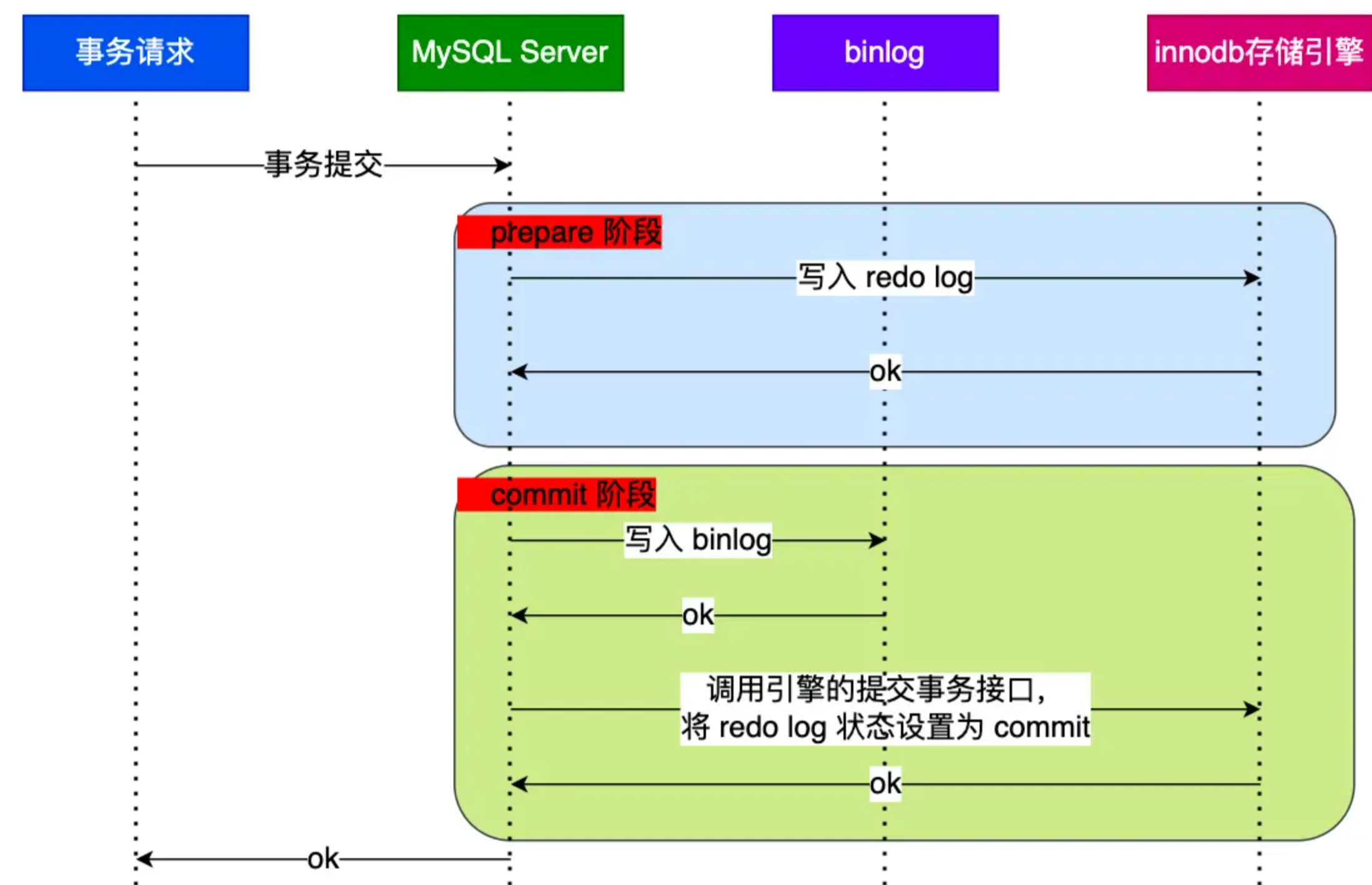
概述 undo log(回滚日志):是 Innodb 存储引擎层生成的日志,实现了事务中的原子性,主要用于事务回滚和 MVCC。 redo log(重做日志):是 Innodb 存储引擎层生成的日志,实现…...

MySQL的SQL书写顺序和执行顺序
老是忘记执行顺序,记录一下: 1. SQL语句的书写顺序 书写顺序通常是我们编写SQL查询时的顺序,主要包括以下关键字: SELECT:选择要查询的字段。FROM:指定数据来源表。JOIN(可选)&am…...

摄像机视频分析软件下载LiteAIServer视频智能分析软件抖动检测的技术实现
在现代社会中,视频监控系统扮演着至关重要的角色,其可靠性和有效性在很大程度上取决于视频质量。然而,由于多种因素,如摄像机安装不当、外部环境振动或视频信号传输的不稳定,视频画面常常出现抖动问题,这不…...

YOLOv11公共场所人群年龄目标检测数据集-280张-pedestrian-1_5
YOLOv11公共场所人群年龄目标检测数据集 📊 数据集基本信息 目标类别: [‘adult’, ‘child’, ‘elder’]中文类别:[‘成人’, ‘儿童’, ‘老人’]训练集:196 张验证集:56 张测试集:28 张总计:…...

ARM工业平板在机器人示教器控制系统中的应用与实现
1. 项目概述:ARM工业平板如何重塑机器人示教体验在工业机器人的世界里,示教器(Teach Pendant,简称TP)是连接操作员与机械臂的“神经中枢”。过去,这个角色通常由专用、封闭的硬件设备扮演,它们功…...

android使用websocket
简单来说常用的okhttp库就能用websocket了------------------------------------在 Android 上使用 WebSocket,你有几个常用选择,每个选择对应不同的库和集成方式。下面我帮你梳理清楚:1️⃣ 推荐库:OkHttpOkHttp 是 Android 官方…...

长期使用中观察Taotoken账单的透明度与预测准确性
🚀 告别海外账号与网络限制!稳定直连全球优质大模型,限时半价接入中。 👉 点击领取海量免费额度 长期使用中观察Taotoken账单的透明度与预测准确性 在将多个大模型API集成到日常开发或业务流后,成本的可观测性与可控性…...

AMD Ryzen SMU Debug Tool完整指南:轻松掌握硬件级调试的5个关键步骤
AMD Ryzen SMU Debug Tool完整指南:轻松掌握硬件级调试的5个关键步骤 【免费下载链接】SMUDebugTool A dedicated tool to help write/read various parameters of Ryzen-based systems, such as manual overclock, SMU, PCI, CPUID, MSR and Power Table. 项目地…...

DH1766三路可编程电源Python自动化实战:5分钟搞定LED/电机V-A特性曲线
DH1766三路可编程电源Python自动化实战:5分钟搞定LED/电机V-A特性曲线 在电子工程和硬件测试领域,快速准确地获取元器件的伏安特性(V-A特性)曲线是一项基础但至关重要的任务。无论是LED的导通阈值、电机的启动电流,还是…...

基于 PyTorch 的 TransU-Net 模型进行不同城市建筑物的精准提取 来继续遥感图像语义分割
基于 PyTorch 的 TransU-Net 模型进行不同城市建筑物的精准提取 来继续遥感图像语义分割 遥感图像语义分割,遥感建筑物数据集,基于Pytorch框架,针对不同城市建筑物精准提取。 遥感图像中包含丰富的地理空间信息,从遥感图像中了…...

IC617保姆级教程:用ADEXL和Calculator两步搞定CMOS晶体管的gmid设计曲线
IC617高效设计指南:ADEXL与Calculator协同生成CMOS晶体管gmid曲线的实战解析 在模拟集成电路设计中,gmid曲线作为评估晶体管工作状态的核心工具,直接影响着放大器的增益、噪声和功耗等关键指标。传统方法往往需要反复切换多个工具界面&#x…...

从一颗2N5551看懂半导体散热:热阻Rja、Rjc到底怎么测?对我们选型有啥用?
从一颗2N5551看懂半导体散热:热阻Rja、Rjc到底怎么测?对我们选型有啥用? 拆开一颗塑料封装的2N5551三极管,你会看到指甲盖大小的黑色环氧树脂包裹着不到1平方毫米的硅晶片。这个微型结构在工作时产生的热量,可能让芯片…...

Wayback Machine 浏览器扩展:一键穿越互联网历史的终极免费工具
Wayback Machine 浏览器扩展:一键穿越互联网历史的终极免费工具 【免费下载链接】wayback-machine-webextension A web browser extension for Chrome, Firefox, Edge, and Safari 14. 项目地址: https://gitcode.com/gh_mirrors/wa/wayback-machine-webextension…...