
【Unity3D】无限循环列表(扩展版)
基础版:【Unity技术分享】UGUI之ScrollRect优化_ugui scrollrect 优化-CSDN博客

using UnityEngine;
using UnityEngine.UI;
using System.Collections.Generic;public delegate void OnBaseLoopListItemCallback(GameObject cell, int index);
public class BaseLoopList : MonoBehaviour
{public int m_Row = 1; //排public bool m_IsVertical = true;public float m_SpacingX = 0f; //间距public float m_SpacingY = 0f; //间距public GameObject m_CellGameObject; //指定的cellprivate Dictionary<GameObject, int> m_GameObjectNumDict;//-> 回调相关        public event OnBaseLoopListItemCallback onItemShow; //Lua 回调public event OnBaseLoopListItemCallback onItemHide; //Lua 回调protected RectTransform rectTrans;protected float m_PlaneWidth;protected float m_PlaneHeight;protected float m_ContentWidth;protected float m_ContentHeight;protected float m_CellObjectWidth;protected float m_CellObjectHeight;protected GameObject m_Content;protected RectTransform m_ContentRectTrans;private bool m_isInited = false;//记录 物体的坐标 和 物体 protected struct CellInfo{public Vector3 pos;public GameObject obj;};protected CellInfo[] m_CellInfos;protected bool m_IsInited = false;protected ScrollRect m_ScrollRect;protected int m_MaxCount = -1; //列表数量protected int m_MinIndex = -1;protected int m_MaxIndex = -1;protected bool m_IsClearList = false; //是否清空列表protected Vector4 m_Padding = Vector4.zero; //(left,top,right,bottom) 左,上 偏移Item(左上角为锚点) 右,下 扩大Content(宽度和高度)//c# 初始化public virtual void Init(){if (m_isInited)return;m_isInited = true;m_GameObjectNumDict = new Dictionary<GameObject, int>();m_Content = this.GetComponent<ScrollRect>().content.gameObject;if (m_CellGameObject == null){//m_CellGameObject = m_Content.transform.GetChild(0).gameObject;Debug.LogError("m_CellGameObject 不能为 null");}/* Cell 处理 *///m_CellGameObject.transform.SetParent(m_Content.transform.parent, false);//SetPoolsObj(m_CellGameObject);RectTransform cellRectTrans = m_CellGameObject.GetComponent<RectTransform>();cellRectTrans.pivot = new Vector2(0f, 1f);CheckAnchor(cellRectTrans);cellRectTrans.anchoredPosition = Vector2.zero;//记录 Cell 信息m_CellObjectHeight = cellRectTrans.rect.height;m_CellObjectWidth = cellRectTrans.rect.width;//记录 Plane 信息rectTrans = GetComponent<RectTransform>();Rect planeRect = rectTrans.rect;m_PlaneHeight = planeRect.height;m_PlaneWidth = planeRect.width;//记录 Content 信息m_ContentRectTrans = m_Content.GetComponent<RectTransform>();Rect contentRect = m_ContentRectTrans.rect;SetContentHeight(contentRect.height);SetContentWidth(contentRect.width);m_ContentRectTrans.pivot = new Vector2(0f, 1f);//m_ContentRectTrans.sizeDelta = new Vector2 (planeRect.width, planeRect.height);//m_ContentRectTrans.anchoredPosition = Vector2.zero;CheckAnchor(m_ContentRectTrans);m_ScrollRect = this.GetComponent<ScrollRect>();m_ScrollRect.onValueChanged.RemoveAllListeners();//添加滑动事件m_ScrollRect.onValueChanged.AddListener(delegate (Vector2 value) { ScrollRectListener(value); });}public virtual void Destroy(){if (m_CellInfos != null){for (int i = 0; i < m_CellInfos.Length; i++){SetPoolsObj(m_CellInfos[i].obj);m_CellInfos[i].obj = null;}}m_GameObjectNumDict.Clear();}private void DisposeAll(){m_Padding = Vector4.zero;onItemShow = null;onItemHide = null;if (poolsObj != null){foreach (var v in poolsObj){if (v != null){GameObject.Destroy(v);}}poolsObj = null;}if (m_CellInfos != null){foreach (var v in m_CellInfos){if (v.obj != null){GameObject.Destroy(v.obj);}}m_CellInfos = null;}}//检查 Anchor 是否正确private void CheckAnchor(RectTransform rectTrans){if (m_IsVertical){if (!((rectTrans.anchorMin == new Vector2(0, 1) && rectTrans.anchorMax == new Vector2(0, 1)) ||(rectTrans.anchorMin == new Vector2(0, 1) && rectTrans.anchorMax == new Vector2(1, 1)))){rectTrans.anchorMin = new Vector2(0, 1);rectTrans.anchorMax = new Vector2(1, 1);}}else{if (!((rectTrans.anchorMin == new Vector2(0, 1) && rectTrans.anchorMax == new Vector2(0, 1)) ||(rectTrans.anchorMin == new Vector2(0, 0) && rectTrans.anchorMax == new Vector2(0, 1)))){rectTrans.anchorMin = new Vector2(0, 0);rectTrans.anchorMax = new Vector2(0, 1);}}}public void SetPadding(float left, float top, float right, float bottom){m_Padding = new Vector4(left, top, right, bottom);SetContentWidth(m_ContentWidth);SetContentHeight(m_ContentHeight);}private float GetPaddingX(){return m_Padding.x;}private float GetPaddingY(){return m_Padding.y;}private float GetExpandWidth(){return m_Padding.z;}private float GetExpandHeight(){return m_Padding.w;}public void SetContentWidth(float value){m_ContentWidth = value + GetPaddingX() + GetExpandWidth();m_ContentWidth = m_ContentWidth < rectTrans.rect.width ? rectTrans.rect.width : m_ContentWidth;}public void SetContentHeight(float value){m_ContentHeight = value + GetPaddingY() + GetExpandHeight();m_ContentHeight = m_ContentHeight < rectTrans.rect.height ? rectTrans.rect.height : m_ContentHeight;}public virtual void SetCount(int num){m_MinIndex = -1;m_MaxIndex = -1;//-> 计算 Content 尺寸if (m_IsVertical){float contentSize = (m_SpacingY + m_CellObjectHeight) * Mathf.CeilToInt((float)num / m_Row);SetContentHeight(contentSize);SetContentWidth(m_ContentRectTrans.rect.width);m_ContentRectTrans.sizeDelta = new Vector2(m_ContentWidth, m_ContentHeight);if (num != m_MaxCount){m_ContentRectTrans.anchoredPosition = new Vector2(m_ContentRectTrans.anchoredPosition.x, 0);}}else{float contentSize = (m_SpacingX + m_CellObjectWidth) * Mathf.CeilToInt((float)num / m_Row);SetContentWidth(contentSize);SetContentHeight(m_ContentRectTrans.rect.height);m_ContentRectTrans.sizeDelta = new Vector2(m_ContentWidth, m_ContentHeight);if (num != m_MaxCount){m_ContentRectTrans.anchoredPosition = new Vector2(0, m_ContentRectTrans.anchoredPosition.y);}}//-> 计算 开始索引int lastEndIndex = 0;//-> 过多的物体 扔到对象池 ( 首次调 ShowList函数时 则无效 )if (m_IsInited){lastEndIndex = num - m_MaxCount > 0 ? m_MaxCount : num;lastEndIndex = m_IsClearList ? 0 : lastEndIndex;int count = m_IsClearList ? m_CellInfos.Length : m_MaxCount;for (int i = lastEndIndex; i < count; i++){if (m_CellInfos[i].obj != null){SetPoolsObj(m_CellInfos[i].obj);if (onItemHide != null){int objNum = 0;m_GameObjectNumDict.TryGetValue(m_CellInfos[i].obj, out objNum);onItemHide.Invoke(m_CellInfos[i].obj, objNum);}m_CellInfos[i].obj = null;}}}//-> 以下四行代码 在for循环所用CellInfo[] tempCellInfos = m_CellInfos;m_CellInfos = new CellInfo[num];//-> 1: 计算 每个Cell坐标并存储 2: 显示范围内的 Cellfor (int i = 0; i < num; i++){// * -> 存储 已有的数据 ( 首次调 ShowList函数时 则无效 )if (m_MaxCount != -1 && i < lastEndIndex){CellInfo tempCellInfo = tempCellInfos[i];//-> 计算是否超出范围float rPos = m_IsVertical ? tempCellInfo.pos.y : tempCellInfo.pos.x;if (!IsOutRange(rPos)){//-> 记录显示范围中的 首位index 和 末尾indexm_MinIndex = m_MinIndex == -1 ? i : m_MinIndex; //首位indexm_MaxIndex = i; // 末尾indexif (tempCellInfo.obj == null){tempCellInfo.obj = GetPoolsObj();}tempCellInfo.obj.transform.GetComponent<RectTransform>().anchoredPosition = tempCellInfo.pos;if (!m_GameObjectNumDict.ContainsKey(tempCellInfo.obj)){m_GameObjectNumDict.Add(tempCellInfo.obj, i);}else{m_GameObjectNumDict[tempCellInfo.obj] = i;}tempCellInfo.obj.SetActive(true);//-> 回调 Lua 函数Func(tempCellInfo.obj);}else{if (tempCellInfo.obj != null){SetPoolsObj(tempCellInfo.obj);if (onItemHide != null){int objNum = 0;m_GameObjectNumDict.TryGetValue(tempCellInfo.obj, out objNum);onItemHide.Invoke(tempCellInfo.obj, objNum);}tempCellInfo.obj = null;}}m_CellInfos[i] = tempCellInfo;continue;}CellInfo cellInfo = new CellInfo();float pos = 0;  //坐标( isVertical ? 记录Y : 记录X )float rowPos = 0; //计算每排里面的cell 坐标// * -> 计算每个Cell坐标if (m_IsVertical){pos = m_CellObjectHeight * Mathf.FloorToInt(i / m_Row) + m_SpacingY * Mathf.FloorToInt(i / m_Row);rowPos = m_CellObjectWidth * (i % m_Row) + m_SpacingX * (i % m_Row);cellInfo.pos = new Vector3(rowPos + GetPaddingX(), -pos - GetPaddingY(), 0);}else{pos = m_CellObjectWidth * Mathf.FloorToInt(i / m_Row) + m_SpacingX * Mathf.FloorToInt(i / m_Row);rowPos = m_CellObjectHeight * (i % m_Row) + m_SpacingY * (i % m_Row);cellInfo.pos = new Vector3(pos + GetPaddingX(), -rowPos - GetPaddingY(), 0);}//-> 计算是否超出范围float cellPos = m_IsVertical ? cellInfo.pos.y : cellInfo.pos.x;if (IsOutRange(cellPos)){cellInfo.obj = null;m_CellInfos[i] = cellInfo;continue;}//-> 记录显示范围中的 首位index 和 末尾indexm_MinIndex = m_MinIndex == -1 ? i : m_MinIndex; //首位indexm_MaxIndex = i; // 末尾index//-> 取或创建 CellGameObject cell = GetPoolsObj();cell.transform.GetComponent<RectTransform>().anchoredPosition = cellInfo.pos;if (!m_GameObjectNumDict.ContainsKey(cell.gameObject)){m_GameObjectNumDict.Add(cell.gameObject, i);}else{m_GameObjectNumDict[cell.gameObject] = i;}//-> 存数据cellInfo.obj = cell;m_CellInfos[i] = cellInfo;//-> 回调 Lua 函数Func(cell);}m_MaxCount = num;m_IsInited = true;}//实时刷新列表时用public virtual void UpdateList(){NormalPerformanceMode();}//刷新某一项public void UpdateCell(int index){CellInfo cellInfo = m_CellInfos[index - 1];if (cellInfo.obj != null){float rangePos = m_IsVertical ? cellInfo.pos.y : cellInfo.pos.x;if (!IsOutRange(rangePos)){Func(cellInfo.obj);}}}// 更新滚动区域的大小public void UpdateSize(){Rect rect = GetComponent<RectTransform>().rect;m_PlaneHeight = rect.height;m_PlaneWidth = rect.width;}//滑动事件protected virtual void ScrollRectListener(Vector2 value){NormalPerformanceMode(); //普通性能模式}//普通性能模式private void NormalPerformanceMode(){if (m_CellInfos == null)return;//检查超出范围for (int i = 0, length = m_CellInfos.Length; i < length; i++){CellInfo cellInfo = m_CellInfos[i];GameObject obj = cellInfo.obj;Vector3 pos = cellInfo.pos;float rangePos = m_IsVertical ? pos.y : pos.x;//判断是否超出显示范围if (IsOutRange(rangePos)){//把超出范围的cell 扔进 poolsObj里if (obj != null){SetPoolsObj(obj);if (onItemHide != null){int objNum = 0;m_GameObjectNumDict.TryGetValue(obj, out objNum);onItemHide.Invoke(obj, objNum);}m_CellInfos[i].obj = null;}}else{if (obj == null){//优先从 poolsObj中 取出 (poolsObj为空则返回 实例化的cell)GameObject cell = GetPoolsObj();cell.transform.localPosition = pos;if (!m_GameObjectNumDict.ContainsKey(cell.gameObject)){m_GameObjectNumDict.Add(cell.gameObject, i);}else{m_GameObjectNumDict[cell.gameObject] = i;}m_CellInfos[i].obj = cell;Func(cell);}}}}//判断是否超出显示范围protected bool IsOutRange(float pos){Vector3 listP = m_ContentRectTrans.anchoredPosition;if (m_IsVertical){if (pos + listP.y > m_CellObjectHeight || pos + listP.y < -rectTrans.rect.height){return true;}}else{if (pos + listP.x < -m_CellObjectWidth || pos + listP.x > rectTrans.rect.width){return true;}}return false;}//对象池 机制  (存入, 取出) cellprotected Stack<GameObject> poolsObj = new Stack<GameObject>();//取出 cellprotected virtual GameObject GetPoolsObj(){GameObject cell = null;if (poolsObj.Count > 0){cell = poolsObj.Pop();}if (cell == null){cell = Instantiate(m_CellGameObject) as GameObject;}cell.transform.SetParent(m_Content.transform);cell.transform.localScale = Vector3.one;SetActive(cell, true);return cell;}//存入 cellprotected virtual void SetPoolsObj(GameObject cell){if (cell != null){poolsObj.Push(cell);SetActive(cell, false);}}//回调protected void Func(GameObject selectObject){int num = 0;m_GameObjectNumDict.TryGetValue(selectObject, out num);onItemShow?.Invoke(selectObject, num);}void SetActive(GameObject cell, bool isShow){cell.SetActive(isShow);}protected void OnDestroy(){DisposeAll();}
}


其他2个使用案例C#脚本代码:
using System.Collections;
using System.Collections.Generic;
using UnityEngine;public class LoopListManager : MonoBehaviour
{public BaseLoopList baseLoopList;private Dictionary<int, BaseLoopListItem> loopListItemDict;void Start(){baseLoopList.onItemShow += OnShow;baseLoopList.onItemHide += OnHide;loopListItemDict = new Dictionary<int, BaseLoopListItem>();baseLoopList.Init();//baseLoopList.SetPadding(20, 30, 0, 0);//支持Padding四个方向的偏移baseLoopList.SetCount(50);}private BaseLoopListItem GetItem(GameObject cell, int index){BaseLoopListItem item;loopListItemDict.TryGetValue(index, out item);if (item == null){item = cell.GetComponent<BaseLoopListItem>();loopListItemDict.Add(index, item);}return item;}public void OnShow(GameObject cell, int index){Debug.Log("Show:" + index);BaseLoopListItem item = GetItem(cell, index);item.OnShow(index);}public void OnHide(GameObject cell, int index){Debug.Log("Hide:" + index);BaseLoopListItem item = GetItem(cell, index);item.OnHide(index);//注意: 无限循环列表的Item是重复利用的物体,逻辑上Hide之后必须从缓存中移除,否则会一定会出现Item刷新异常;//原因: 若不移除会出现Show(index物体)时会拿到一个不正确位置的物体, 甚至很大可能是一个已显示中的物体(形成覆盖效果)loopListItemDict.Remove(index);}
}
using UnityEngine;
using TMPro;
public class BaseLoopListItem : MonoBehaviour
{public TextMeshProUGUI text;public void OnShow(int index){text.text = index.ToString();}public void OnHide(int index){text.text = "";}
}
注意事项:无限循环列表的Item物体是重复利用的,因此OnHide回调后必须将传递进来的物体所有相关的缓存引用清空,例如案例是将其从字典移除loopListItemDict.Remove(index);
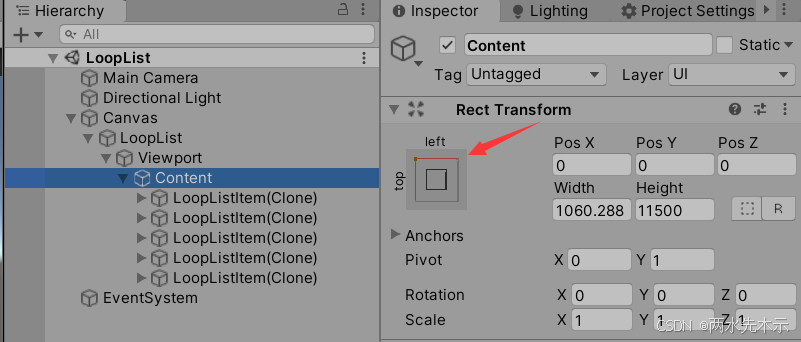
Content选择左上角锚点(看情况可选其他,但不要用自适应stretch) 以及不要挂任何自动控制布局组件,如:VerticalLayoutGroup、HorizontalLayoutGroup、GridLayoutGroup、ContentSizeFitter等...(因为会破坏无限循环列表对Content的控制)
相关文章:
【Unity3D】无限循环列表(扩展版)
基础版:【Unity技术分享】UGUI之ScrollRect优化_ugui scrollrect 优化-CSDN博客 using UnityEngine; using UnityEngine.UI; using System.Collections.Generic;public delegate void OnBaseLoopListItemCallback(GameObject cell, int index); public class BaseLo…...

MacOS 命令行详解使用教程
本章讲述MacOs命令行详解的使用教程,感谢大家观看。 本人博客:如烟花般绚烂却又稍纵即逝的主页 MacOs命令行前言: 在 macOS 上,Terminal(终端) 是一个功能强大的工具,它允许用户通过命令行直接与系统交互。本教程将详细介绍 macOS…...
redis集群安装部署 redis三主三从集群
redis集群安装部署 redis三主三从集群 1、下载redis2、安装redis集群 三主三从3、配置redis开机自启动3.1、建立启动脚本3.2、复制多份redis启动脚本给集群使用3.3、添加可执行权限3.4、配置开机自启动 1、下载redis 本次redis安装部署选择当前最新的稳定版本7.4.1 下载链接: …...

第十二课 Unity 内存优化_内存工具篇(Memory)详解
内存(Memory) unity 内存部分也是优化过程中非常重要的一个环节,也会影像渲染过程中的同步等待与带宽问题。因此内存的优化也可能会给我们渲染开销带来精简,今天我们先来了解unity中的内存与使用到的内存工具。 Unity中的内存 托…...

达梦8-达梦数据的示例用户和表
1、示例库说明: 创建达梦数据的示例用户和表,导入测试数据。 在完成达梦数据库的安装之后,在/opt/dmdbms/samples/instance_script目录下有用于创建示例用户的SQL文件。samples目录前的路径根据实际安装情况进行修改,本文将达梦…...
数据可视化-1. 折线图
目录 1. 折线图适用场景分析 1. 1 时间序列数据展示 1.2 趋势分析 1.3 多变量比较 1.4 数据异常检测 1.5 简洁易读的数据可视化 1.6 特定领域的应用 2. 折线图局限性 3. 折线图代码实现 3.1 Python 源代码 3.2 折线图效果(网页显示) 1. 折线图…...

【现代服务端架构】传统服务器 对比 Serverless
在现代开发中,选择合适的架构是至关重要的。两种非常常见的架构模式分别是 传统服务器架构 和 Serverless。它们各有优缺点,适合不同的应用场景。今天,我就带大家一起对比这两种架构,看看它们的差异,并且帮助你选择最适…...
论文学习—VAE
VAE----Auto-Encoding Variational Bayes 2024年12月17日-2024年12月18日摘要引言方法例子:变分自动编码器 2024年12月17日-2024年12月18日 从今天开始,我准备记录自己学习的内容以此来检验我每天的学习量,菜鸡一枚,希望能够与大…...

AI 智能体(AI Agent)到底什么原理?能干什么事情
智能体应用有哪些? 智能体在千行百业中有着广泛的应用,目前已经在 600 多个项目落地和探索,广泛应用于政府与公共事业、交通、工业、能源、金融、医疗、科研等行业。智能体是模拟人类智能的计算机系统,能自主感知环境、智能决策并…...

【mysql】如何查看大表记录行数
目录 1. 使用 ANALYZE TABLE 和 SHOW TABLE STATUS2. 查询 INFORMATION_SCHEMA 表3. 使用索引统计信息4. 维护行数缓存5. 使用分区计数 1. 使用 ANALYZE TABLE 和 SHOW TABLE STATUS 1.ANALYZE TABLE 可以更新表的统计信息,然后使用 SHOW TABLE STATUS 来查看估算的…...
Linux之网络配置
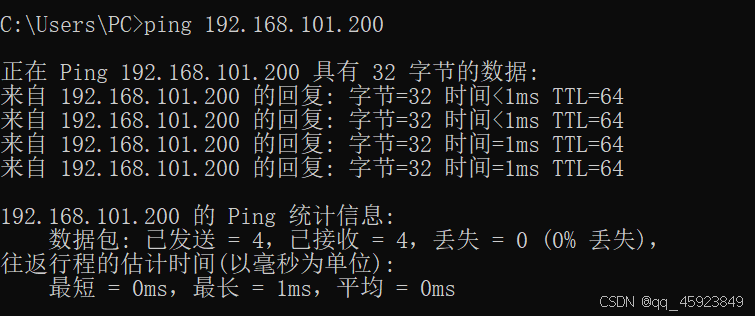
一、检查虚拟机和本机通不通 测试虚拟机和本机是否通不通 winR,运行本机cmd,输入ipconfig,拿到本机ip地址 在虚拟机上ping一下这个地址(ctrlshitv)可以把复制的文本粘贴进虚拟机。 可以看到,不通,解决方法在最后&am…...
SpringBoot集成JWT和Redis实现鉴权登录功能
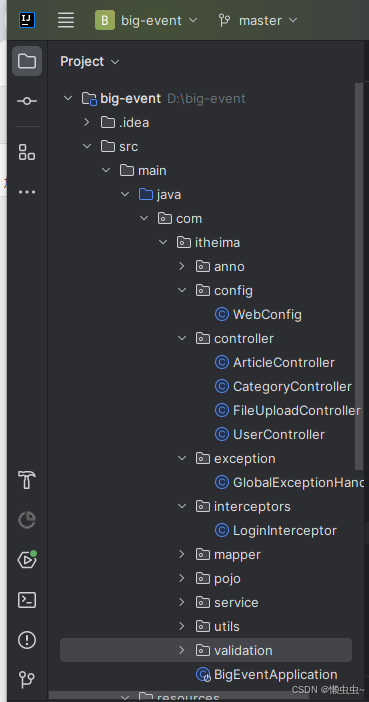
目前市面上有许多鉴权框架,鉴权原理大同小异,本文简单介绍下利用JWT和Redis实现鉴权功能,算是抛砖引玉吧。 主要原理就是“令牌主动失效机制”,主要包括以下4个步骤: (1)利用拦截器LoginInterceptor实现所有接口登录拦…...
LabVIEW热电偶传感器虚拟仿真实验系统
在教学和科研领域,实验设备的更新和维护成本较高,尤其是在经济欠发达地区,设备的短缺和陈旧化严重影响了教学质量。基于LabVIEW的热电偶传感器虚拟仿真实验系统能够通过模拟实验环境,提供一个成本低廉且效果良好的教学和研究平台。…...
Centos7 部署ZLMediakit
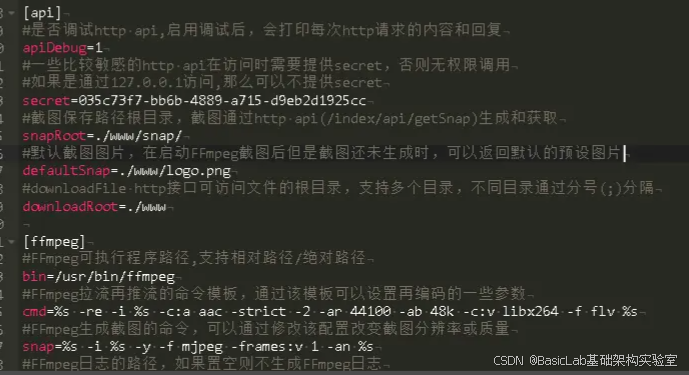
1、拉取代码 #国内用户推荐从同步镜像网站gitee下载 git clone --depth 1 https://gitee.com/xia-chu/ZLMediaKit cd ZLMediaKit #千万不要忘记执行这句命令 git submodule update --init 2、安装编译器 sudo yum -y install gcc 3、安装cmake sudo yum -y install cmake 4…...
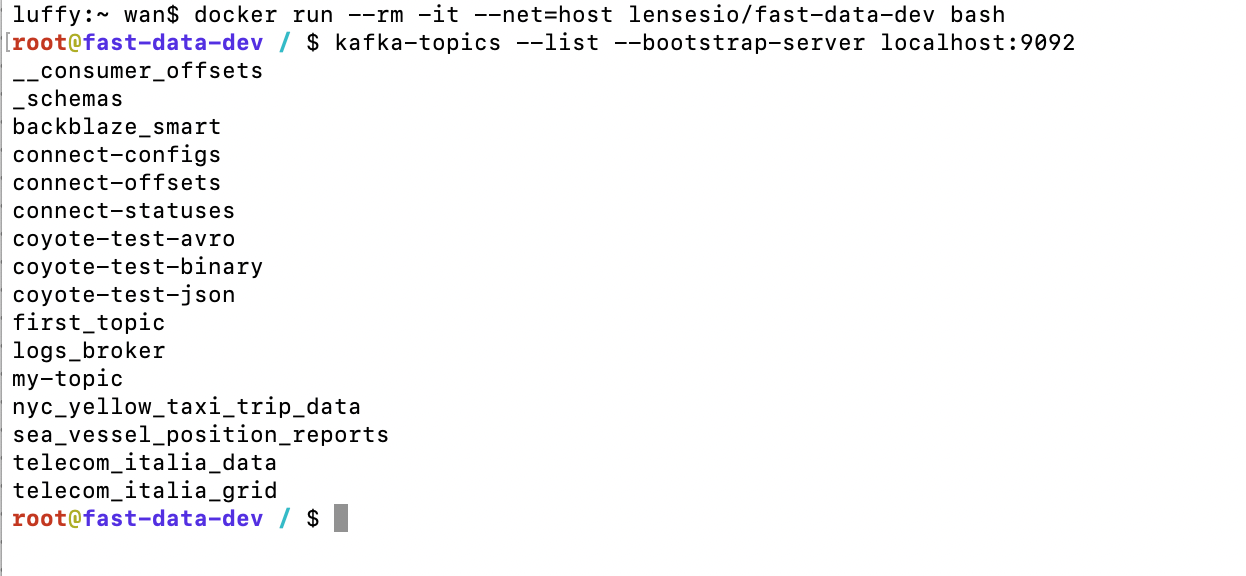
Docker搭建kafka环境
系统:MacOS Sonoma 14.1 Docker版本:Docker version 27.3.1, build ce12230 Docker desktop版本:Docker Desktop 4.36.0 (175267) 1.拉取镜像 先打开Docker Desktop,然后在终端执行命令 docker pull lensesio/fast-data-dev …...

wsl2-ubuntu安装docker后无法拉取镜像
如上是报错全部信息, 这个实际上是因为网络不通导致的, 由于我实在公司使用, 而公司上网需要使用代理, 因此把代理加上就行了. # 为docker服务添加代理 mkdir /etc/systemd/system/docker.service.d cat > /etc/systemd/system/docker.service.d/http-proxy.conf <<…...
 错误解决)
Invalid bound statement (not found) 错误解决
出现这个错误提示:Invalid bound statement (not found): com.xxx.small_reservior.dao.WaterRainMapper.getWaterRainByRegion,通常表示 MyBatis 框架无法找到与给定的 getWaterRainByRegion 方法匹配的 SQL 映射语句。这种问题通常发生在以下几种情况中…...
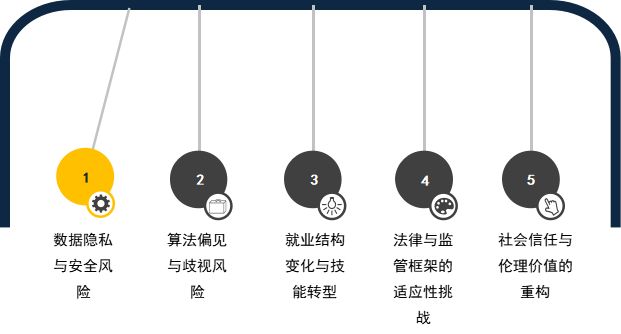
深度学习的下一站:解锁人工智能的新边界
引言:新边界的呼唤 深度学习的诞生,犹如人工智能领域的一次革命,激发了语音助手、自动驾驶、智能医疗等前沿技术的飞速发展。然而,面对现实世界的复杂性,现有的深度学习模型仍然存在数据依赖、可解释性差、环境适应力不…...

搭建Tomcat(三)---重写service方法
目录 引入 一、在Java中创建一个新的空项目(初步搭建) 问题: 要求在tomcat软件包下的MyTomcat类中编写main文件,实现在MyTomcat中扫描myweb软件包中的所有Java文件,并返回“WebServlet(url"myFirst")”中…...

跟着AI 学AI开发二,本地部署自己的Chat GPT
这里要安装的是Open Web UI ,用一张架构图说明AI 前端与后端的关系。 之前的Python 的方法已经做过多次介绍,这里不做赘述。 顺序:1,Ollama。 2,Docker。 3,Open WebUI。 Ollama 安装下载地址࿱…...

mRNA疫苗序列生物信息学分析:从密码子优化到免疫原性预测
1. 项目概述:解码两大mRNA疫苗的“核心蓝图”作为一名在生物信息学和基因组学领域摸爬滚打了十多年的“老码农”,我见过太多令人兴奋的数据集,但当我第一次在GitHub上看到这个名为“Assemblies-of-putative-SARS-CoV2-spike-encoding-mRNA-se…...

开源智能体技术解析:从LangChain到自主抓取,构建自动化工作流
1. 项目概述:从“Awesome”列表看开源智能体生态的演进 最近在梳理一些前沿的自动化工具链时,又翻到了 mergisi/awesome-openclaw-agents 这个仓库。对于长期关注AI Agent(智能体)和自动化工作流开发的同行来说,这类…...

高效视频帧提取终极指南:为深度学习构建专业数据集
高效视频帧提取终极指南:为深度学习构建专业数据集 【免费下载链接】video2frame Yet another easy-to-use tool to extract frames from videos, for deep learning and computer vision. 项目地址: https://gitcode.com/gh_mirrors/vi/video2frame 在计算机…...

QKeyMapper深度解析:现代输入设备管理系统的架构揭秘与实战指南
QKeyMapper深度解析:现代输入设备管理系统的架构揭秘与实战指南 【免费下载链接】QKeyMapper [按键映射工具] QKeyMapper,Qt开发Win10&Win11可用,不修改注册表、不需重新启动系统,可立即生效和停止。支持游戏手柄映射到键鼠&a…...

防火门安装与验收要点|闭门器、密封条、顺序器缺一不可
防火门安装与验收要点一、必备配件(缺一不可)闭门器:自动关门,火灾常态闭合防火密封条:遇火膨胀,隔烟阻火顺序器:双扇门专用,保证先后闭合二、安装要点门框墙体嵌实牢固,…...

开源机械爪控制库:从PID算法到ROS集成的全栈开发指南
1. 项目概述:一个开源的机械爪设计与控制库最近在机器人硬件开发的圈子里,开源项目“MeyerZhou/openclaw”引起了不少创客和机器人爱好者的注意。简单来说,这是一个专注于机械爪(或称机械手、夹爪)设计与控制的代码库和…...

Steam成就管理器终极指南:3步修复错失的游戏成就
Steam成就管理器终极指南:3步修复错失的游戏成就 【免费下载链接】SteamAchievementManager A manager for game achievements in Steam. 项目地址: https://gitcode.com/gh_mirrors/st/SteamAchievementManager Steam Achievement Manager(SAM&a…...

基于Stable Diffusion与LoRA技术打造个人AI头像:从原理到实战
1. 项目概述:当AI开始“自拍”——SelfyAI的定位与核心价值最近在AI图像生成领域,一个名为SelfyAI的项目引起了我的注意。它不是一个简单的文生图工具,而是瞄准了一个非常具体且高频的需求:生成高质量、风格一致的个人AI头像。简单…...
)
别再让用户等上传!用@ffmpeg/ffmpeg在浏览器里直接压缩视频(附ThinkPHP项目实战)
浏览器端视频压缩实战:基于FFmpeg.wasm与ThinkPHP的高效集成方案 引言 在当今内容为王的互联网时代,视频已成为用户生成内容(UGC)的核心载体。然而,高清视频带来的大文件体积往往成为用户体验的瓶颈——上传等待时间长…...

开源大语言模型实战指南:从部署到微调的全流程解析
1. 项目概述:一个为开源大语言模型而生的知识库最近在折腾各种开源大语言模型(LLM)的朋友,估计都遇到过类似的烦恼:模型太多了,从Meta的Llama系列、微软的Phi,到国内的一众优秀模型,…...