
C# GDI+数码管数字控件
调用方法
int zhi = 15;private void button1_Click(object sender, EventArgs e){if (++zhi > 19){zhi = 0;}lcdDisplayControl1.DisplayText = zhi.ToString();}运行效果

控件代码
using System;
using System.Collections.Generic;
using System.Drawing.Drawing2D;
using System.Drawing;
using System.Linq;
using System.Text;
using System.Threading.Tasks;
using System.Windows.Forms;namespace WindowsFormsApp1
{public class LcdDisplayControl : Control{private string _displayText = "0";private Color _digitColor = Color.LightGreen;private Color _backgroundColor = Color.Black;private const float SEGMENT_WIDTH_RATIO = 0.15f; //每个发光段的宽度比例private const float DIGIT_HEIGHT_RATIO = 0.8f;  //数字显示区域的高度比例private const float SEGMENT_GAP_RATIO = 0.05f; //段之间的间隙比例private float _padding = 2f;private Color _shadowColor = Color.FromArgb(30, Color.LightGreen); // 默认投影颜色  private float _shadowOffset = 1.5f; // 默认投影偏移量  private bool _enableGlassEffect = true;private Color _glassHighlightColor = Color.FromArgb(40, Color.White);private float _glassEffectHeight = 0.4f; // 玻璃效果占控件高度的比例  private Timer _animationTimer;private double _currentValue = 0;private double _targetValue = 0;private bool _isAnimating = false;private int _animationDuration = 1000; // 默认动画持续时间(毫秒)  private DateTime _animationStartTime;private string _originalFormat = "0"; // 保存显示格式  public float Padding{get => _padding;set{if (_padding != value){_padding = Math.Max(0, value);Invalidate();}}}public int AnimationDuration{get => _animationDuration;set{if (_animationDuration != value && value > 0){_animationDuration = value;}}}public bool EnableGlassEffect{get => _enableGlassEffect;set{if (_enableGlassEffect != value){_enableGlassEffect = value;Invalidate();}}}public Color GlassHighlightColor{get => _glassHighlightColor;set{if (_glassHighlightColor != value){_glassHighlightColor = value;Invalidate();}}}public Color ShadowColor{get => _shadowColor;set{if (_shadowColor != value){_shadowColor = value;Invalidate();}}}public float ShadowOffset{get => _shadowOffset;set{if (_shadowOffset != value){_shadowOffset = Math.Max(0, value); // 确保偏移量不为负数  Invalidate();}}}public LcdDisplayControl(){SetStyle(ControlStyles.DoubleBuffer |ControlStyles.AllPaintingInWmPaint |ControlStyles.UserPaint |ControlStyles.ResizeRedraw, true);ForeColor = _digitColor;EnableGlassEffect = true; // 默认启用玻璃效果  _animationTimer = new Timer();_animationTimer.Interval = 16; // 约60fps  _animationTimer.Tick += AnimationTimer_Tick;}public string DisplayText{get => _displayText;set{if (_displayText != value){// 尝试解析新值  if (double.TryParse(value, out double newValue)){// 保存显示格式  _originalFormat = value.Contains(".") ?"F" + (value.Length - value.IndexOf('.') - 1) : "0";// 开始动画  StartAnimation(newValue);}else{// 如果不是数字,直接设置  _displayText = value;Invalidate();}}}}public Color DigitColor{get => _digitColor;set{if (_digitColor != value){_digitColor = value;Invalidate();}}}private void StartAnimation(double targetValue){_targetValue = targetValue;_currentValue = double.TryParse(_displayText, out double currentValue) ?currentValue : 0;if (_currentValue == _targetValue)return;_animationStartTime = DateTime.Now;_isAnimating = true;_animationTimer.Start();}private void AnimationTimer_Tick(object sender, EventArgs e){var elapsed = (DateTime.Now - _animationStartTime).TotalMilliseconds;var progress = Math.Min(elapsed / _animationDuration, 1.0);// 使用缓动函数使动画更自然  progress = EaseOutCubic(progress);// 计算当前值  _currentValue = _currentValue + (_targetValue - _currentValue) * progress;// 更新显示  _displayText = _currentValue.ToString(_originalFormat);Invalidate();// 检查动画是否完成  if (progress >= 1.0){_animationTimer.Stop();_isAnimating = false;_currentValue = _targetValue;_displayText = _targetValue.ToString(_originalFormat);Invalidate();}}// 缓动函数  private double EaseOutCubic(double t){return 1 - Math.Pow(1 - t, 3);}protected override void OnPaint(PaintEventArgs e){base.OnPaint(e);Graphics g = e.Graphics;g.SmoothingMode = SmoothingMode.HighQuality;g.InterpolationMode = InterpolationMode.HighQualityBicubic;g.PixelOffsetMode = PixelOffsetMode.HighQuality;g.CompositingQuality = CompositingQuality.HighQuality;// 绘制背景和边框  using (var bgBrush = new SolidBrush(_backgroundColor)){g.FillRectangle(bgBrush, ClientRectangle);}// 计算实际显示区域(考虑内边距和边框)  float effectivePadding = _padding;float displayAreaWidth = Width - (effectivePadding * 2);float displayAreaHeight = Height - (effectivePadding * 2);// 计算单个数字的大小  float digitWidth = displayAreaWidth / _displayText.Length;float digitHeight = displayAreaHeight * 0.8f;// 起始位置(考虑内边距和边框)  float x = effectivePadding;float y = effectivePadding + (displayAreaHeight - digitHeight) / 2;// 绘制数字  for (int i = 0; i < _displayText.Length; i++){if (_displayText[i] == '.'){DrawDecimalPoint(g, x, y, digitWidth, digitHeight);x += digitWidth * 0.3f;}else{DrawDigit(g, _displayText[i], x, y, digitWidth, digitHeight);x += digitWidth;}}// 如果启用玻璃效果,绘制玻璃效果  if (_enableGlassEffect){DrawGlassEffect(g);}}// 玻璃效果绘制方法  private void DrawGlassEffect(Graphics g){float glassHeight = Height * _glassEffectHeight;// 创建渐变画笷  using (var path = new GraphicsPath()){path.AddRectangle(new RectangleF(0, 0, Width, glassHeight));// 创建渐变  using (var brush = new LinearGradientBrush(new PointF(0, 0),new PointF(0, glassHeight),Color.FromArgb(60, _glassHighlightColor),Color.FromArgb(10, _glassHighlightColor))){g.FillPath(brush, path);}// 添加微弱的边缘高光  float highlightThickness = 1.0f;using (var highlightBrush = new LinearGradientBrush(new RectangleF(0, 0, Width, highlightThickness),Color.FromArgb(100, _glassHighlightColor),Color.FromArgb(0, _glassHighlightColor),LinearGradientMode.Vertical)){g.FillRectangle(highlightBrush, 0, 0, Width, highlightThickness);}}}private void DrawDigit(Graphics g, char digit, float x, float y, float width, float height){bool[] segments = GetSegments(digit);float segmentWidth = width * SEGMENT_WIDTH_RATIO;float segmentLength = width * 0.8f;float gap = width * SEGMENT_GAP_RATIO;// 水平段  if (segments[0]) DrawHorizontalSegment(g, x + gap, y, segmentLength, segmentWidth); // 顶段  if (segments[3]) DrawHorizontalSegment(g, x + gap, y + height / 2, segmentLength, segmentWidth); // 中段  if (segments[6]) DrawHorizontalSegment(g, x + gap, y + height - segmentWidth, segmentLength, segmentWidth); // 底段  // 垂直段  if (segments[1]) DrawVerticalSegment(g, x, y + gap, segmentWidth, height / 2 - gap); // 左上  if (segments[2]) DrawVerticalSegment(g, x + segmentLength, y + gap, segmentWidth, height / 2 - gap); // 右上  if (segments[4]) DrawVerticalSegment(g, x, y + height / 2 + gap, segmentWidth, height / 2 - gap); // 左下  if (segments[5]) DrawVerticalSegment(g, x + segmentLength, y + height / 2 + gap, segmentWidth, height / 2 - gap); // 右下  }private void DrawHorizontalSegment(Graphics g, float x, float y, float length, float width){using (var path = new GraphicsPath()){// 创建水平段的路径  path.AddLine(x + width / 2, y, x + length - width / 2, y);path.AddLine(x + length, y + width / 2, x + length - width / 2, y + width);path.AddLine(x + width / 2, y + width, x, y + width / 2);path.CloseFigure();// 绘制阴影效果  using (var shadowBrush = new SolidBrush(_shadowColor)){var shadowPath = (GraphicsPath)path.Clone();var shadowMatrix = new Matrix();shadowMatrix.Translate(_shadowOffset, _shadowOffset);shadowPath.Transform(shadowMatrix);g.FillPath(shadowBrush, shadowPath);shadowPath.Dispose();}// 绘制主体  using (var brush = new SolidBrush(_digitColor)){g.FillPath(brush, path);}// 如果启用玻璃效果,添加额外的光泽  if (_enableGlassEffect){using (var glassBrush = new LinearGradientBrush(new RectangleF(x, y, length, width),Color.FromArgb(40, Color.White),Color.FromArgb(10, Color.White),LinearGradientMode.Vertical)){g.FillPath(glassBrush, path);}}// 添加发光边缘  using (var pen = new Pen(Color.FromArgb(100, _digitColor), 0.5f)){g.DrawPath(pen, path);}}}private void DrawVerticalSegment(Graphics g, float x, float y, float width, float length){using (var path = new GraphicsPath()){path.AddLine(x, y + width / 2, x + width / 2, y);path.AddLine(x + width, y + width / 2, x + width / 2, y + length);path.AddLine(x, y + length - width / 2, x, y + width / 2);path.CloseFigure();// 绘制阴影  using (var shadowBrush = new SolidBrush(_shadowColor)){var shadowPath = (GraphicsPath)path.Clone();var shadowMatrix = new Matrix();shadowMatrix.Translate(_shadowOffset, _shadowOffset);shadowPath.Transform(shadowMatrix);g.FillPath(shadowBrush, shadowPath);shadowPath.Dispose();}// 绘制主体  using (var brush = new SolidBrush(_digitColor)){g.FillPath(brush, path);}// 如果启用玻璃效果,添加额外的光泽  if (_enableGlassEffect){using (var glassBrush = new LinearGradientBrush(new RectangleF(x, y, width, length),Color.FromArgb(40, Color.White),Color.FromArgb(10, Color.White),LinearGradientMode.Vertical)){g.FillPath(glassBrush, path);}}// 添加发光边缘  using (var pen = new Pen(Color.FromArgb(100, _digitColor), 0.5f)){g.DrawPath(pen, path);}}}private void DrawDecimalPoint(Graphics g, float x, float y, float width, float height){float dotSize = width * 0.2f;// 绘制阴影效果  using (var shadowBrush = new SolidBrush(_shadowColor)){g.FillEllipse(shadowBrush,x + _shadowOffset,y + height - dotSize + _shadowOffset,dotSize,dotSize);}// 绘制主体  using (var brush = new SolidBrush(_digitColor)){g.FillEllipse(brush, x, y + height - dotSize, dotSize, dotSize);}// 添加发光边缘  using (var pen = new Pen(Color.FromArgb(100, _digitColor), 0.5f)){g.DrawEllipse(pen, x, y + height - dotSize, dotSize, dotSize);}}private bool[] GetSegments(char digit){// 7段显示的状态表 [顶, 左上, 右上, 中, 左下, 右下, 底]  switch (digit){case '0': return new bool[] { true, true, true, false, true, true, true };case '1': return new bool[] { false, false, true, false, false, true, false };case '2': return new bool[] { true, false, true, true, true, false, true };case '3': return new bool[] { true, false, true, true, false, true, true };case '4': return new bool[] { false, true, true, true, false, true, false };case '5': return new bool[] { true, true, false, true, false, true, true };case '6': return new bool[] { true, true, false, true, true, true, true };case '7': return new bool[] { true, false, true, false, false, true, false };case '8': return new bool[] { true, true, true, true, true, true, true };case '9': return new bool[] { true, true, true, true, false, true, true };default: return new bool[] { false, false, false, false, false, false, false };}}protected override void Dispose(bool disposing){if (disposing){if (_animationTimer != null){_animationTimer.Stop();_animationTimer.Dispose();}}base.Dispose(disposing);}}
}
参考链接
C# GDI+ 自定义液晶数字显示控件实现 https://mp.weixin.qq.com/s?__biz=MzUxMjI3OTQzMQ==&mid=2247492775&idx=2&sn=4d9ebea27a83f5d8b126f2a12ab814ff&chksm=f898d37124d498cd3679d8eeb087628128d88d5aad24894436e18c92ac88b0c8bb87dab626d4&mpshare=1&scene=1&srcid=1227wTdlchamy68RzROrTh1n&sharer_shareinfo=91591cbc57360386ce01226fefa68fea&sharer_shareinfo_first=ced9494296615bca82d9118cef9b2a63&exportkey=n_ChQIAhIQ%2BOKdOkcv%2FxioQG8f08%2F7QBKfAgIE97dBBAEAAAAAAD1%2BOc5nK1QAAAAOpnltbLcz9gKNyK89dVj0XeVuyql%2F1aB8a7B5UUEJ50Jp43nndJjF0zdyTORUnAgO0mKKprVb6%2FtFZovUk3Zb3Rs27dOnI%2FMrKVUz6p7jURoFUhTBmK%2B%2B5%2BdUm6sLkPUwLSHmrRpDm96WBI%2F4%2BjyXSDEWceHct1KQz%2BQwZGLrrP79wUcpYKcYFrm6k22sox5Yl9Z0gwB1Hm32kegC58sCv5JlOm7deiL2YPL9DK3Jy%2BTNNHBNp9CnejYgbEjCHpPqasDEZCntntqKoqZPcR6xr7WAXm2DpBjBxqAhIfzT0BpUArzrlVnB1g4ZKHpteq1Y4p30CgfdA4fuWw9rdsT1X%2BKXHQfdfJnG&acctmode=0&pass_ticket=til6Grkg7Hy%2FLLLcFHsrar09TbMKp9qdr5Vnsoq6563Z%2FVtuuVASoekDIseEXV%2B8&wx_header=0#rd特此记录
anlog
2024年12月27日
相关文章:
C# GDI+数码管数字控件
调用方法 int zhi 15;private void button1_Click(object sender, EventArgs e){if (zhi > 19){zhi 0;}lcdDisplayControl1.DisplayText zhi.ToString();} 运行效果 控件代码 using System; using System.Collections.Generic; using System.Drawing.Drawing2D; using …...

在交叉编译中,常见的ELF(elf)到底是什么意思?
ELF 是 Executable and Linkable Format 的缩写,中文翻译为“可执行与可链接格式”。它是一种通用的文件格式,主要用于存储可执行文件、目标文件(编译后的中间文件)、动态库(.so 文件)以及内存转储文件&…...

Unity开发AR之Vuforia-MultiTarget笔记
前言 在增强现实(AR)技术蓬勃发展的今天,越来越多的开发者开始探索如何将AR应用于各种场景中。Vuforia作为一个领先的AR开发平台,为开发者提供了强大的工具和功能,使得创建AR体验变得更加简单和直观。本文将为您介绍Vuforia的基本概念、特点,以及如何配置和使用MultiTar…...

深入解析 Oracle 的聚合函数 ROLLUP
目录 深入解析 Oracle 的聚合函数 ROLLUP一、ROLLUP 函数概述二、ROLLUP 函数语法三、ROLLUP 实例详解(一)基础分组聚合(二)引入 ROLLUP 函数(三)ROLLUP 与 NULL 值(四)多列复杂分组…...

Wend看源码-Java-集合学习(List)
摘要 本篇文章深入探讨了基于JDK 21版本的Java.util包中提供的多样化集合类型。在Java中集合共分类为三种数据结构:List、Set和Queue。本文将详细阐述这些数据类型的各自实现,并按照线程安全性进行分类,分别介绍非线程安全与线程安全的实现方…...

【软件】教务系统成绩提交工具使用步骤
【软件】教务系统成绩提交工具使用步骤 零、快速开始 安装 与大多数软件一样,安装步骤很简单,一直点击“下一步”即可快速完成安装,安装完成后,在桌面会有一个软件图标,双击即可打开软件主界面。 导入成绩到Excel中…...

IPsec协议,网络安全的秘密
IPsec概述 IPsec是一组基于网络层的安全协议,是保护IP数据包在网络传输过程中保持安全、隐秘以及真实。通过对IP数据包进行一些加密、认证,来防止数据在传输过程中被窃取、篡改甚至伪造,IPsec在企业内部网络的通信、远程办公、云服务连接等场…...

浅谈下Spring MVC的执行流程
什么是Spring MVC Spring MVC是一个基于Java的Web框架,用于构建Web应用程序。 它是Spring Framework的一部分,它提供了模型-视图-控制器(MVC)架构。 支持RESTful风格的URL请求,易于与其他视图技术集成,如…...
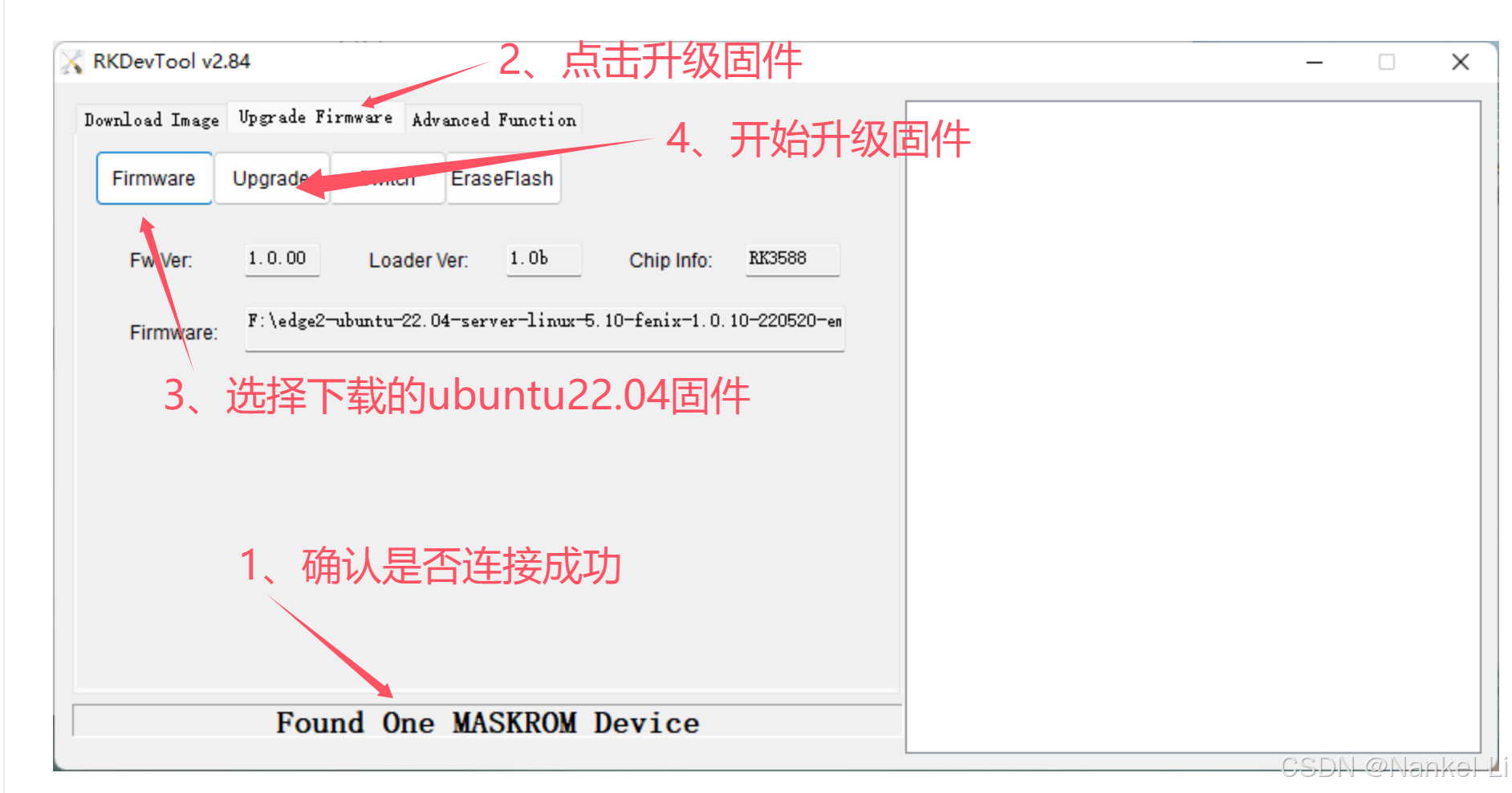
khadas edge2安装ubuntu22.04与ubuntu20.04 docker镜像
khadas edge2安装ubuntu22.04与ubuntu20.04 docker镜像 一、资源准备1.1 镜像文件1.2 刷机工具1.3 ubuntu20.04 docker镜像(具备demon无人机所需各种驱动) 二、开始刷机(安装ubuntu22.04系统)2.1 进入刷机状态2.2 刷机 三、docker…...

GitLab 服务变更提醒:中国大陆、澳门和香港用户停止提供服务(GitLab 服务停止)
目录 前言 一. 变更详情 1. 停止服务区域 2. 邮件通知 3. 新的服务提供商 4. 关键日期 5. 行动建议 二. 迁移指南 三. 注意事项 四. 相关推荐 前言 近期,许多位于中国大陆、澳门和香港的 GitLab 用户收到了一封来自 GitLab 官方的重要通知。根据这封邮件…...

主成分分析是线性降维方法
主成分分析是线性降维方法 主成分分析(PCA)是一种常用的线性降维方法。它通过线性变换将原始数据映射到新的坐标系中,使得数据在新坐标系中的第一个坐标(第一个主成分)具有最大的方差,以此类推,…...

Webpack在Vue CLI中的应用
webpack 作为目前最流行的项目打包工具,被广泛使用于项目的构建和开发过程中,其实说它是打包工具有点大材小用了,我个人认为它是一个集前端自动化、模块化、组件化于一体的可拓展系统,你可以根据自己的需要来进行一系列的配置和安…...

继承超详细介绍
一 、继承 1 继承的概念 继承是面向对象程序设计使得代码可以复用的最重要手段,它使得我们可以在原有类的特性的基础上进行扩展,增加方法和属性(成员函数与成员变量),这样产生新的类,叫作派生类。继承呈现了…...

wordpress调用指定ID分类下浏览最多的内容
要在WordPress中调用指定ID分类下浏览最多的内容,你可以通过以下方法实现: <?php $post_num 8; // 设置调用条数 $wdpidproduct 2; // 假设这是你要查询的分类ID $args array(post_password > ,post_status > publish, // wodepress.comca…...

18.springcloud_openfeign之扩展组件二
文章目录 一、前言二、子容器默认组件FeignClientsConfigurationDecoder的注入Contract约定 对注解的支持对类上注解的支持对方法上注解的支持对参数上注解的支持MatrixVariablePathVariableRequestParamRequestHeaderSpringQueryMapRequestPartCookieValue FormattingConversi…...

FreePBX修改IP地址和端口以及添加SSL证书开启HTTPS访问
最近给单位部署了freepbx网络电话系统,我的系统是安装在ibm x3650 m4物理机上的,iso镜像下载后直接用Rufus烧录到U盘,服务器上先做好了raid1,插上U盘重启服务器开撸。安装过程略过了,在虚拟机上安装就不用那么麻烦。 …...

运算符 - 算术、关系、逻辑运算符
引言 在编程中,运算符是用于执行特定操作的符号。C 提供了多种类型的运算符,包括算术运算符、关系运算符和逻辑运算符等。理解这些运算符及其用法对于编写高效且无误的代码至关重要。本文将详细介绍 C 中的这三种基本运算符,并通过实例帮助读…...

大模型-ChatGLM2-6B模型部署与微调记录
大模型-ChatGLM2-6B模型部署与微调记录 模型权重下载: 登录魔塔社区:https://modelscope.cn/models/ZhipuAI/chatglm2-6b 拷贝以下代码执行后,便可快速权重下载到本地 # 备注:最新模型版本要求modelscope > 1.9.0 # pip insta…...

RDFS—RDF模型属性扩展解析
目录 前言1. 什么是RDFS?1.1 RDFS的核心概念1.2 RDFS与RDF的区别 2. RDFS的基础概念2.1 类(Class)2.2 属性(Property)2.3 关系(Relation)2.4 定义域(Domain)2.5 值域&…...

pyqt和pycharm环境搭建
安装 python安装: https://www.python.org/downloads/release/python-3913/ python3.9.13 64位(记得勾选Path环境变量) pycharm安装: https://www.jetbrains.com/pycharm/download/?sectionwindows community免费版 换源: pip config se…...

Android项目中的Gradle文件详解:从基础配置到高级技巧
Android项目中的Gradle文件详解:从基础配置到高级技巧 在Android开发的世界里,Gradle文件就像是一个项目的"大脑",它控制着构建过程的方方面面。对于有一定经验的Android开发者来说,深入理解Gradle文件的配置不仅能够提…...

异构计算与边缘协同:基于 ARM/X86 的企业级 AI 视频中台架构设计
引言:算力碎片化时代的“异构”挑战 在 AI 落地安防的深水区,架构师面临的最大挑战不再是算法模型的精度,而是算力底座的碎片化。项目现场往往呈现出复杂的“万国牌”局面:总部机房可能部署着 NVIDIA A100 的 x86 服务器用于离线训…...

Z-Image-Turbo问题解决:手把手教你配置Gradio WebUI并映射本地端口
Z-Image-Turbo问题解决:手把手教你配置Gradio WebUI并映射本地端口 1. 为什么选择Z-Image-Turbo 如果你正在寻找一款既快速又高质量的AI图像生成工具,Z-Image-Turbo绝对值得考虑。这个由阿里通义实验室开源的高效文生图模型,在速度和质量的…...

如何一键下载国内主流视频平台的在线视频:Video-Downloader完全指南
如何一键下载国内主流视频平台的在线视频:Video-Downloader完全指南 【免费下载链接】Video-Downloader 下载youku,letv,sohu,tudou,bilibili,acfun,iqiyi等网站分段视频文件,提供mac&win独立App。 项目地址: https://gitcode.com/gh_mirrors/vi/V…...

YOLOFuse实战案例:如何利用红外+RGB融合提升森林火情监测精度
YOLOFuse实战案例:如何利用红外RGB融合提升森林火情监测精度 1. 森林火情监测的痛点与挑战 森林火灾是全球性的生态灾难,每年造成巨大经济损失和生态破坏。传统监测手段主要依赖可见光摄像头和人工巡查,存在明显局限性: 夜间失…...

新手福音,用快马AI生成2048论坛登录页,轻松理解Web开发基础
今天想和大家分享一个特别适合新手入门的Web开发小项目——用InsCode(快马)平台快速搭建2048论坛的登录页面。作为刚接触编程的小白,我第一次看到这个需求时有点懵,但通过平台提供的AI生成功能,不仅快速实现了页面,还弄懂了每个环…...

【AI编程工具系列:第13篇】华为CodeArts与豆包MarsCode实战:企业级AI编程工具深度对比
摘要 本文全面对比分析华为CodeArts和豆包MarsCode两款企业级AI编程工具。华为CodeArts凭借三层融合架构(AI原生IDE集成层、代码智能体引擎层、Codebase语义索引系统层),在安全合规、信创兼容和私有化部署方面表现卓越,代码补全延…...

无需编程!Qwen3-ASR语音识别服务5分钟快速部署指南
无需编程!Qwen3-ASR语音识别服务5分钟快速部署指南 1. 开篇:语音识别零门槛体验 想象一下,你刚结束一场跨国会议,需要将录音快速转为文字;或者你收集了大量方言访谈,急需整理成文档。传统方法要么费时费力…...

CLIP 实战宝典:从零开始掌握文本与图像编码的终极技巧
1. CLIP模型基础入门:图文匹配的魔法钥匙 第一次听说CLIP模型时,我正被一个图像搜索项目折磨得焦头烂额。传统方法需要先标注海量数据,再训练复杂的分类器,整个过程就像用算盘计算火箭轨道。直到遇见CLIP,才发现原来图…...

避坑指南:Matplotlib调用LaTeX渲染公式时,你可能会遇到的5个报错及解决方法
Matplotlib与LaTeX公式渲染:5个典型报错排查手册 当你第一次在Matplotlib中启用usetexTrue时,屏幕上突然弹出的红色LaTeX错误信息往往让人手足无措。这不是你代码逻辑的问题,而是两个强大工具在握手时产生的"语言障碍"。本文将带你…...