
React低代码项目:问卷编辑器 I
问卷编辑器
Date: February 20, 2025 4:17 PM (GMT+8)
目标
- 完成问卷编辑器的设计和开发
- 完成复杂系统的 UI 组件拆分
- 完成复杂系统的数据结构设计
内容
- 需求分析
- 技术方案设计
- 开发
注意事项:
- 需求指导设计,设计指导开发。前两步很重要
- 页面复杂的话,可以设计边开发
画布 UI 分析
画布UI组成:
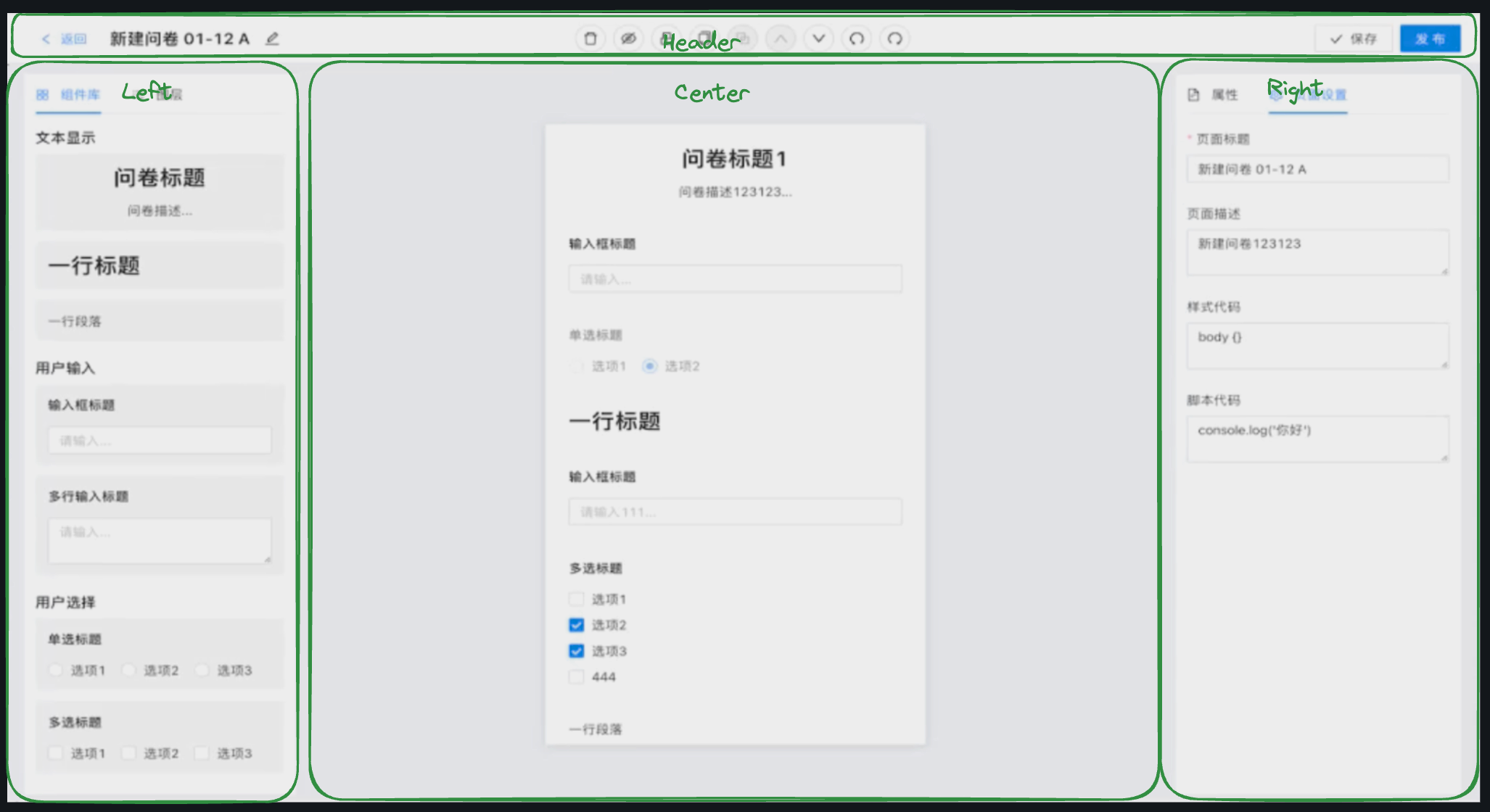
画布基础构建
画布Y轴滚动
要点:
- flex 布局
- 居中对齐
- 画布 Y 向滚动
效果:
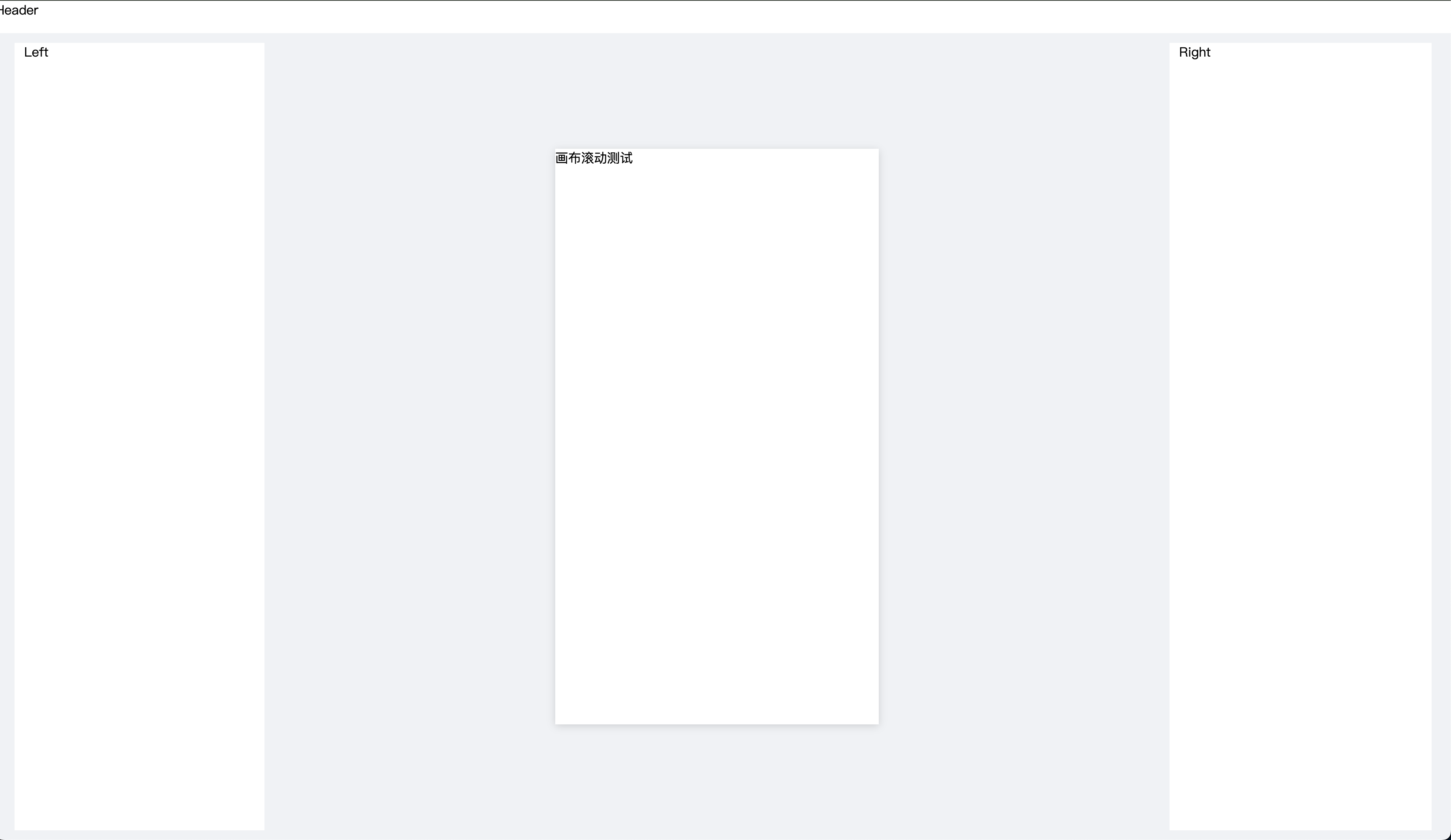
question/Edit/index.tsx
import React, { FC } from 'react'
import styles from './index.module.scss'
// import { useParams } from 'react-router-dom'
// import useLoadQuestionData from '../../../hooks/useLoadQuestionData'const Edit: FC = () => {// const { id = '' } = useParams()// const { loading, data } = useLoadQuestionData()return (<div className={styles.container}><div style={{ backgroundColor: '#fff', height: '40px' }}>Header</div><div className={styles['content-wrapper']}><div className={styles.content}><div className={styles.left}>Left</div><div className={styles.main}><div className={styles['canvas-wrapper']}><div style={{ height: '900px' }}>画布滚动测试</div></div></div><div className={styles.right}>Right</div></div></div></div>)
}export default Edit
question/Edit/index.module.scss
.container {display: flex;flex-direction: column;height: 100vh;background-color: #f0f2f5;
}.content-wrapper {flex: auto;padding: 12px 0;
}.content {display: flex;margin: 0 24px;height: 100%;.left {width: 285px;background-color: #fff;padding: 0 12px;}.main {flex: 1;position: relative;overflow: hidden;.canvas-wrapper {position: absolute;top: 50%;left: 50%;transform: translate(-50%, -50%);width: 400px;height: 712px;background-color: #fff; overflow: auto;box-shadow: 0 2px 10px rgba(0, 0, 0, 0.15);}}.right {width: 300px;background-color: #fff;padding: 0 12px;}
}
开发问卷组件:Title 和 Input
开发组件 Title
目标:
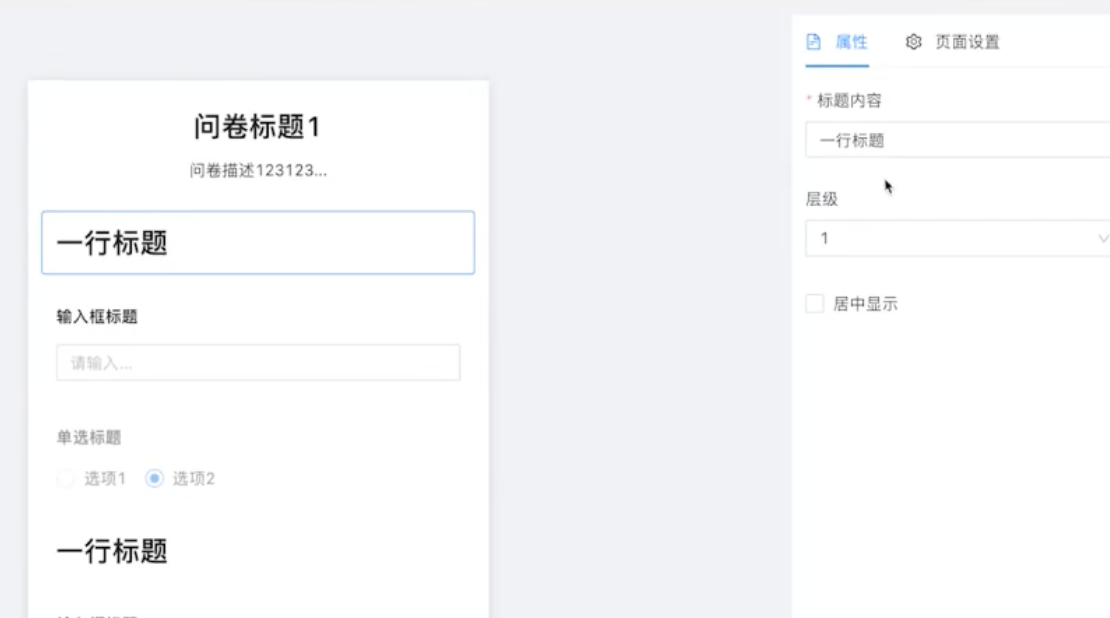
要点:
- 组件默认参数设置
{ ...QuestionInputDefaultProps, ...props }
Component.ts
import React, { FC } from 'react'
import { Typography, Input } from 'antd'
import { QuestionTitleProps, QuestionInputDefaultProps } from './interface'const { Paragraph } = Typography
const QuestionTitle: FC<QuestionTitleProps> = (props: QuestionTitleProps) => {const { title = '', placeholder = '' } = {...QuestionInputDefaultProps,...props,}return (<div><Paragraph strong>{title}</Paragraph><div><Input placeholder={placeholder}></Input></div></div>)
}
export default QuestionTitle
interface.ts
export type QuestionTitleProps = {title?: stringplaceholder?: string
}export const QuestionInputDefaultProps: QuestionTitleProps = {title: '输入框标题',placeholder: '请输入内容',
}
开发组件 Input
目标:
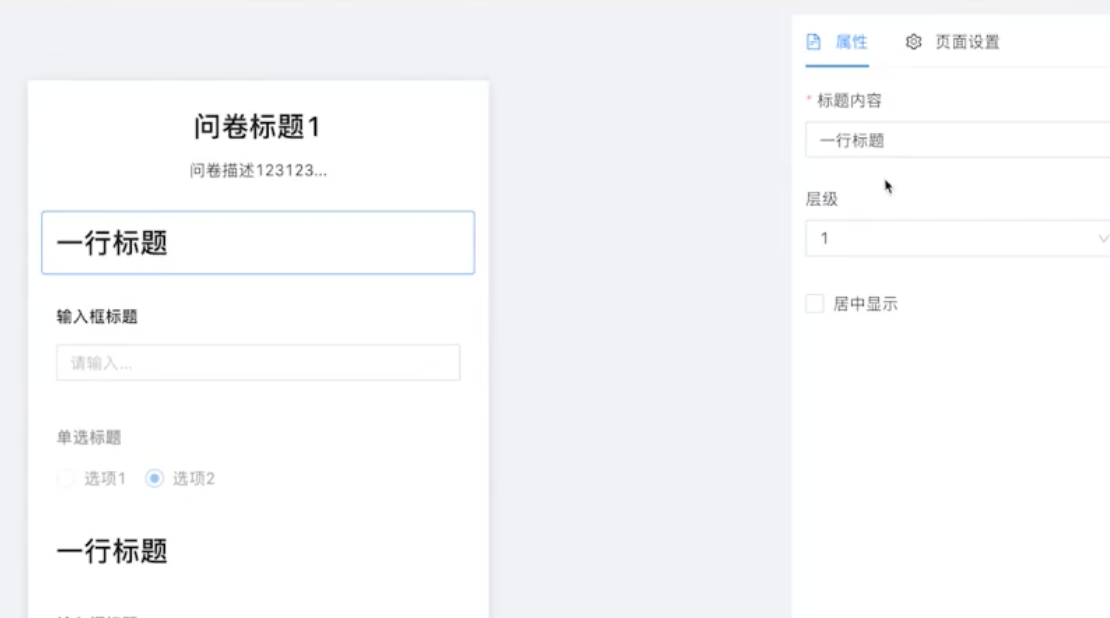
要点:
- Input标题样式函数设计
genFontSize
Component.ts
import React, { FC } from 'react'
import { Typography } from 'antd'
import { QuestionTitleProps, defaultQuestionTitleProps } from './interface'const { Title } = Typography
const QuestionTitle: FC<QuestionTitleProps> = (props: QuestionTitleProps) => {const {text = '',level = 1,isCenter = false,} = { ...defaultQuestionTitleProps, ...props }const genFontSize = (level: number) => {if (level === 1) return '24px'if (level === 2) return '20px'if (level === 3) return '16px'if (level === 4) return '14px'if (level === 5) return '12px'return '24px'}return (<Titlelevel={level}style={{textAlign: isCenter ? 'center' : 'left',marginBottom: '0px',fontSize: genFontSize(level),}}>{text}</Title>)
}export default QuestionTitle
interface.ts
export type QuestionTitleProps = {text?: stringlevel?: 1 | 2 | 3 | 4 | 5isCenter?: boolean
}export const defaultQuestionTitleProps: QuestionTitleProps = {text: '一行标题',level: 1,isCenter: false,
}
画布集成组件测试
目标:
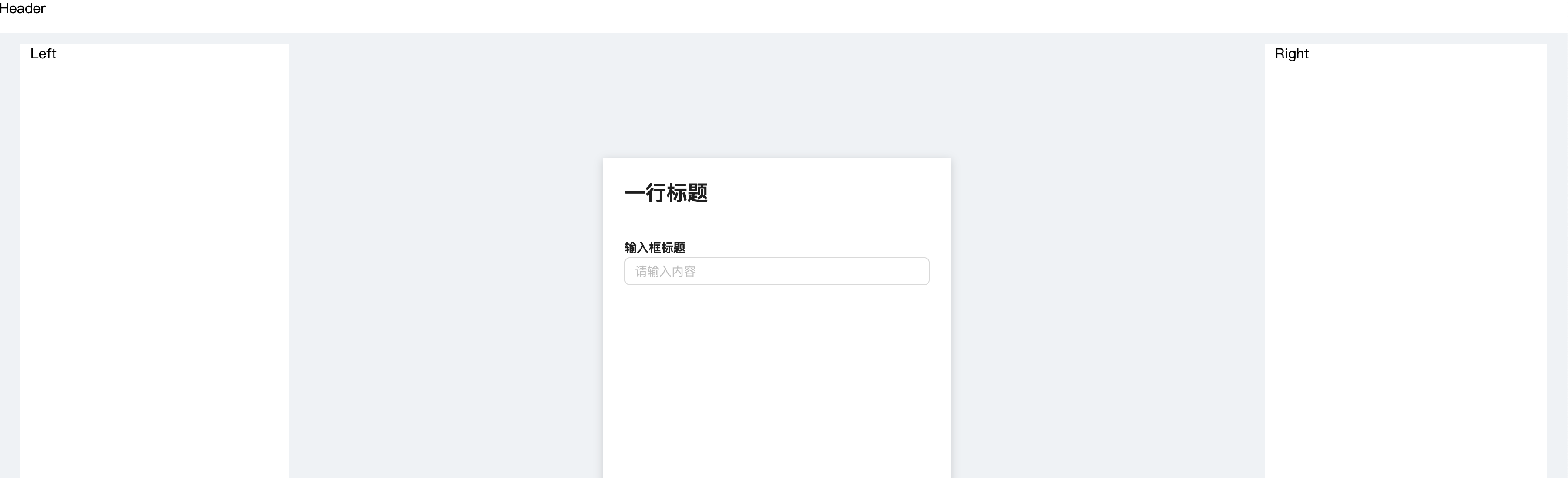
要点:
- 画布元素禁止点击,样式设计
.componet - 标题样式上方多余空距问题处理(见下方)
EditCanvas.tsx
import React, { FC } from 'react'
import styles from './EditCanvas.module.scss'
import QuestionTitle from '../../../component/QuestionComponents/QuestionTitle/Component'
import QuestionInput from '../../../component/QuestionComponents/QuestionInput/Component'const EditCanvas: FC = () => {return (<div className={styles.canvas}><div className={styles['component-wrapper']}><div className={styles.component}><QuestionTitle /></div></div><div className={styles['component-wrapper']}><div className={styles.component}><QuestionInput /></div></div></div>)
}export default EditCanvas
EidtCanvas.module.scss
.canvas {min-height: 100%;background-color: #fff;overflow: hidden;
}.component-wrapper {margin: 12px;border: 1px solid #fff;padding: 12px;border-radius: 3px;// 新增修复代码(推荐方案):global(.ant-typography) {margin-block-start: 0 !important;margin-block-end: 0 !important;}&:hover {border: 1px solid #d9d9d9;}
}.componet {pointer-events: none; // 禁止点击
}
问卷数据获取与存储
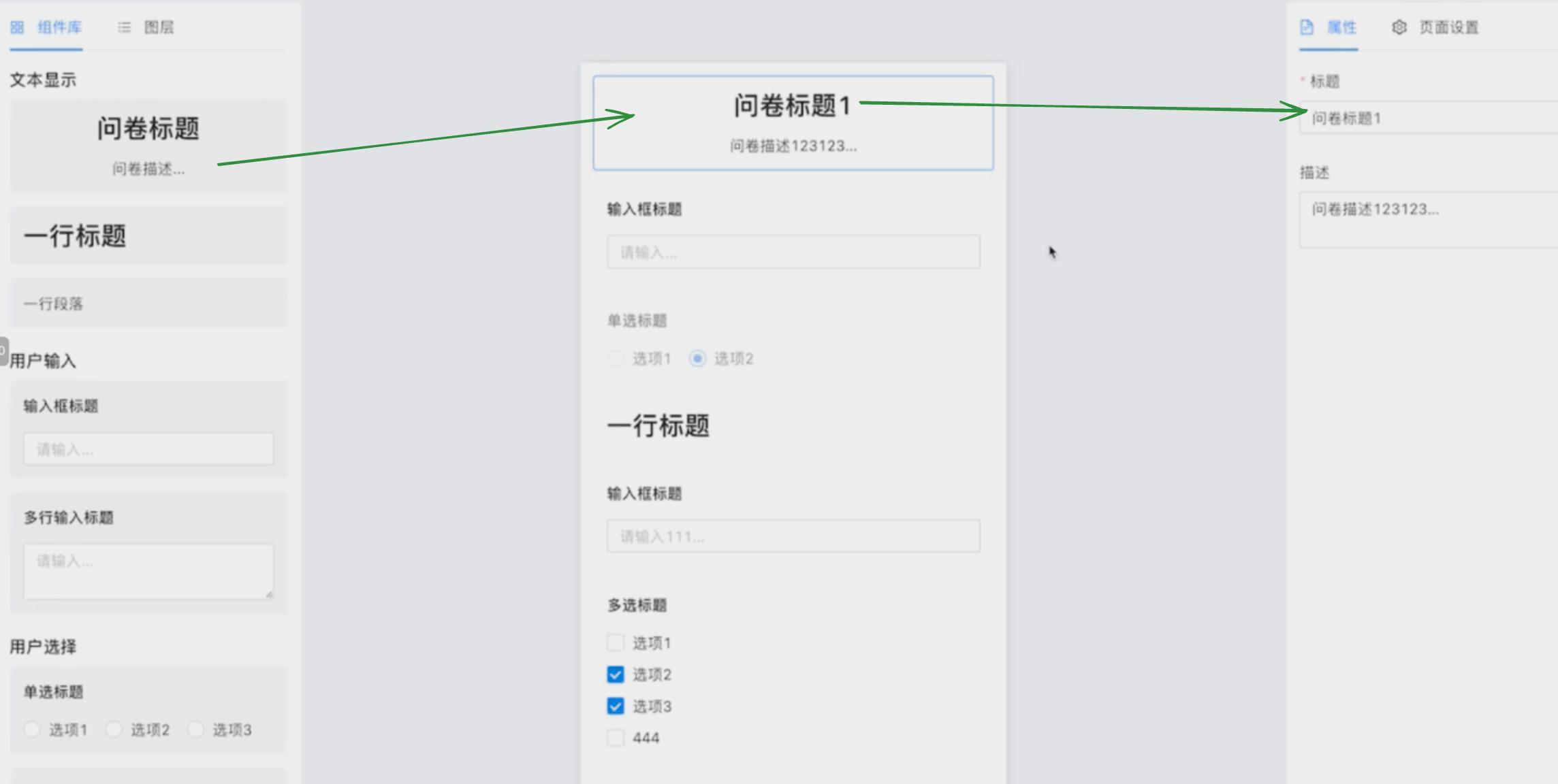
问卷信息存储在 Redux 中的原因:
组件间需要不断联动,如下所示,段落的选中以及修改,都涉及到相同的数据的访问。因此,建议把问卷信息存储在 Redux 中,便于组件间共享使用。
组件数据结构设计
服务端mock数据:
{url: '/api/question/:id',method: 'get',response() {return {errno: 0,data: {id: Random.id(),title: Random.ctitle(),componentList: [{id: Random.id(),type: 'questionTitle', // 组件类型,不能重复,前后端统一好title: '这是一个文本组件',props: {text: '文本内容',level1,isCenter: false}},{id: Random.id(),type: 'questionInput',title: '这是一个输入框组件',props: {title: '你的名字',placeholder: '请输入内容'}},{id: Random.id(),type: 'questionInput',title: '这是一个输入框组件',props: {title: '你的电话',placeholder: '请输入内容'}}],}}}},
Ajax 加载数据
要点:
- Hook
useLoadQuestionData设计- 问卷信息获取函数
- id 变化,更新问卷信息
- 数据更新后,存储在 Redux 中
useLoadQuestionData.ts
import { useEffect } from 'react'
import { useParams } from 'react-router-dom'
import { useDispatch } from 'react-redux'
import { getQuestionService } from '../services/question'
import { useRequest } from 'ahooks'
import { resetComponentList } from '../store/componentReducer'function useLoadQuestionData() {const { id = '' } = useParams()const dispatch = useDispatch()// 问卷信息获取函数const { data, loading, error, run } = useRequest(async (id: string) => {const data = await getQuestionService(id)return data},{manual: true,})// 数据更新后,存储在 Redux 中useEffect(() => {if (!data) returnconst { title = '', componentList } = dataif (!componentList || componentList.length === 0) returnconst action = resetComponentList({ componentList })dispatch(action)}, [data])// id 变化,更新问卷信息useEffect(() => {run(id)}, [id])return {loading,error,}
}export default useLoadQuestionData
Redux 数据存储
要点:
- 设计 componentReducer,定义类型以及切片
- 设计 index,作为各个切片 类型 和 reducer 的统一收口
文件树:
│   ├── store
│   │   ├── componentReducer
│   │   │   └── index.ts
│   │   ├── index.ts
│   │   └── userReducer.ts
componentReducer/index.ts
import { createSlice, PayloadAction } from '@reduxjs/toolkit'
import { ComponentPropsType } from '../../component/QuestionComponents'export type ComponentInfoType = {fe_id: stringtype: stringtitle: stringprops: ComponentPropsType
}export type ComponentsStateType = {componentList: Array<ComponentInfoType>
}const INIT_STATE: ComponentsStateType = {componentList: [],// 其他拓展
}export const componentsSlice = createSlice({name: 'component',initialState: INIT_STATE,reducers: {resetComponentList: (state: ComponentsStateType,action: PayloadAction<ComponentsStateType>) => {return action.payload},},
})export const { resetComponentList } = componentsSlice.actions
export default componentsSlice.reducer
index.ts
import { configureStore } from '@reduxjs/toolkit'
import userReducer, { UserStateType } from './userReducer'
import componentReducer, { ComponentsStateType } from './componentReducer'export type StateType = {user: UserStateTypecomponents: ComponentsStateType
}export default configureStore({reducer: {user: userReducer,components: componentReducer,// 组件列表// 问卷信息},
})
画布显示问卷列表
组件类型设定
要点:
- 整合各组件 prop type
- 整合各组件 配置列表
文件树:
│   │   ├── QuestionComponents
│   │   │   ├── QuestionInput
│   │   │   │   ├── Component.tsx
│   │   │   │   ├── index.ts
│   │   │   │   └── interface.ts
│   │   │   ├── QuestionTitle
│   │   │   │   ├── Component.tsx
│   │   │   │   ├── index.ts
│   │   │   │   └── interface.ts
│   │   │   └── index.ts
QuestionComponents/index.ts
import QuestionInputConf, { QuestionInputPropsType } from './QuestionInput'
import QuestionTitleConf, { QuestionTitlePropsType } from './QuestionTitle'// 各个组件的 prop type
export type ComponentPropsType = QuestionInputPropsType & QuestionTitlePropsType// 组件的配置
export type ComponentConfType = {title: stringtype: stringComponent: React.FC<ComponentPropsType>defaultProps: ComponentPropsType
}// 全部组件配置的列表
const componentConfList: ComponentConfType[] = [QuestionInputConf,QuestionTitleConf,
]export function getComponentConfByType(type: string) {return componentConfList.find(c => c.type === type)
}
画布动态显示组件列表
效果:
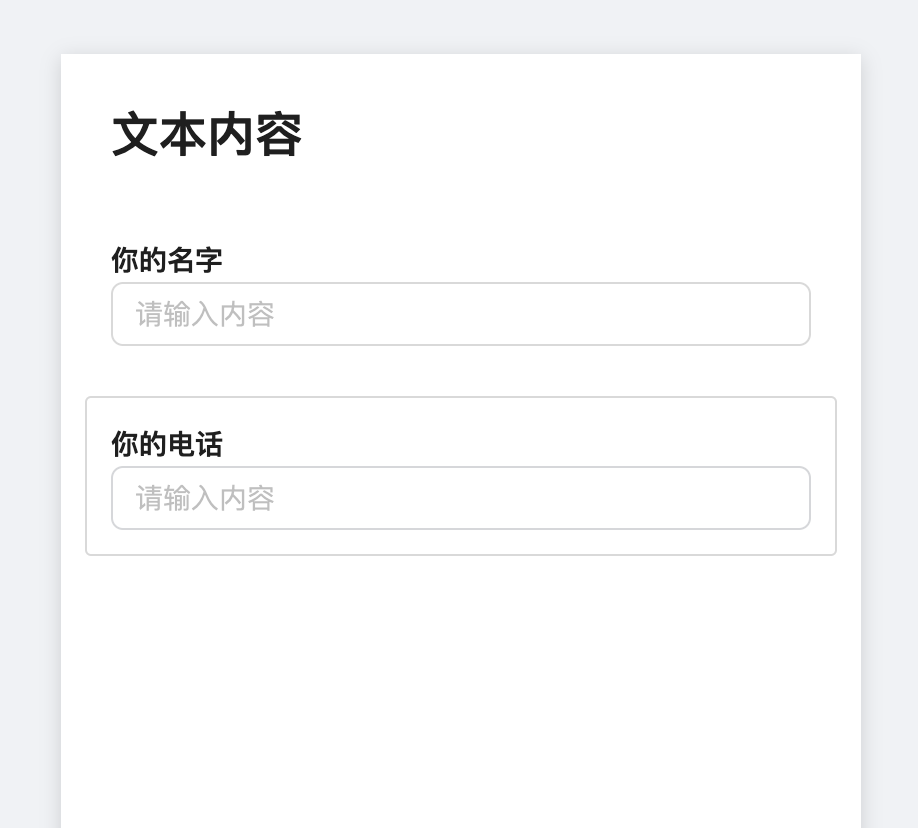
要点:
- 根据组件类型动态渲染指定组件
- 返回组件函数实现:
getComponent用于根据组件类型返回指定组件
- 返回组件函数实现:
question/Edit/EditCanvas.tsx
import React, { FC } from 'react'
import styles from './EditCanvas.module.scss'
// import QuestionTitle from '../../../component/QuestionComponents/QuestionTitle/Component'
// import QuestionInput from '../../../component/QuestionComponents/QuestionInput/Component'
import { Spin } from 'antd'
import useGetComponentInfo from '../../../hooks/useGetComponentInfo'
import { getComponentConfByType } from '../../../component/QuestionComponents'
import { ComponentInfoType } from '../../../store/componentReducer'type PropsType = {loading: boolean
}function getComponent(componentInfo: ComponentInfoType) {const { type, props } = componentInfoconst componentConf = getComponentConfByType(type)if (!componentConf) {return null}const { Component } = componentConfreturn <Component {...props} />
}const EditCanvas: FC<PropsType> = ({ loading }) => {const { componentList } = useGetComponentInfo()if (loading) {return (<div style={{ textAlign: 'center', padding: '20px' }}><Spin /></div>)}return (<div className={styles.canvas}>{componentList.map(c => {const { fe_id } = creturn (<div key={fe_id} className={styles['component-wrapper']}><div className={styles.component}>{getComponent(c)}</div></div>)})}</div>)// <div className={styles.canvas}>//   <div className={styles['component-wrapper']}>//     <div className={styles.component}>//       <QuestionTitle />//     </div>//   </div>//   <div className={styles['component-wrapper']}>//     <div className={styles.component}>//       <QuestionInput />//     </div>//   </div>// </div>
}export default EditCanvas
点击画布选中组件
效果:
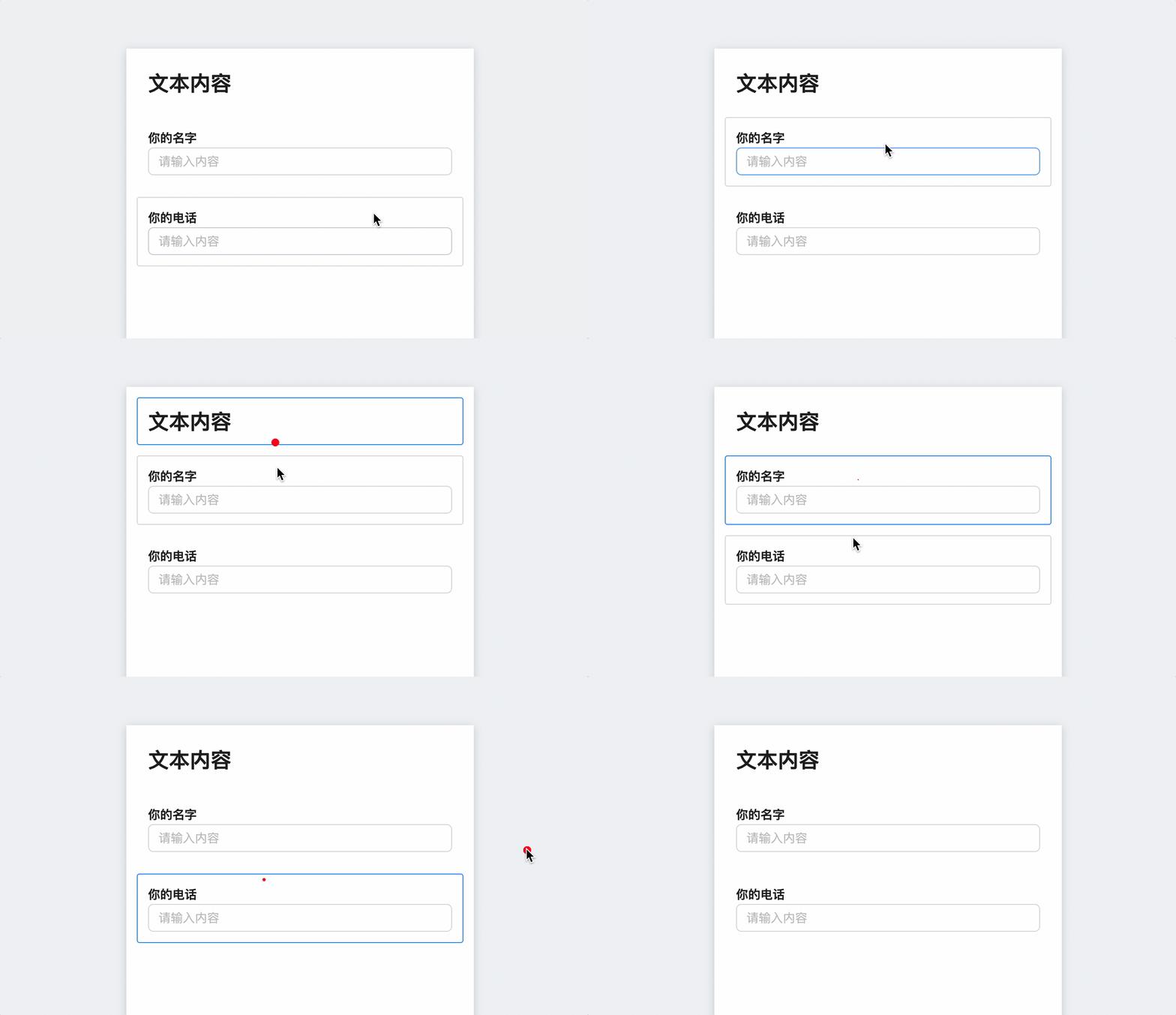
要点:
- 选中画布中组件显示
- 点击画布组件选中,点击空白不选中。
clearSelectedId()和handleClick()实现- 冒泡机制实现
- 组件 selectedId 与 Redux 绑定
- ComponentsStateType 设定 selectedId
useLoadQuestionData设定进入画布时默认选中组件
- 点击画布组件选中,点击空白不选中。
- 处理 Immer 中 draft 为空的问题
EditCanvas.tsx
import React, { FC, MouseEvent } from 'react'
import styles from './EditCanvas.module.scss'
import { useDispatch } from 'react-redux'
import useGetComponentInfo from '../../../hooks/useGetComponentInfo'
import { getComponentConfByType } from '../../../component/QuestionComponents'
import classNames from 'classnames'
import {ComponentInfoType,changeSelectedId,
} from '../../../store/componentReducer'type PropsType = {loading: boolean
}function getComponent(componentInfo: ComponentInfoType) {const { type, props } = componentInfoconst componentConf = getComponentConfByType(type)if (!componentConf) {return null}const { Component } = componentConfreturn <Component {...props} />
}const EditCanvas: FC<PropsType> = ({ loading }) => {const { componentList, selectedId } = useGetComponentInfo()const dispatch = useDispatch()// 点击冒泡机制实现function handleClick(event: MouseEvent, id: string) {event.stopPropagation()dispatch(changeSelectedId(id))}if (loading) {return (<div style={{ textAlign: 'center', padding: '20px' }}><Spin /></div>)}return (<div className={styles.canvas}>{componentList.map(c => {const { fe_id } = c// 拼接 class nameconst wrapperDefaultClassName = styles['component-wrapper']const selectedClassName = styles.selectedconst wrapperClassName = classNames({[wrapperDefaultClassName]: true,[selectedClassName]: fe_id === selectedId,})return (<divkey={fe_id}className={wrapperClassName}onClick={e => handleClick(e, fe_id || '')}><div className={styles.component}>{getComponent(c)}</div></div>)})}</div>)
}export default EditCanvas
/Edit/index.tsx
import React, { FC } from 'react'
import styles from './index.module.scss'
import EditCanvas from './EditCanvas'
import { changeSelectedId } from '../../../store/componentReducer'
import { useDispatch } from 'react-redux'
import useLoadQuestionData from '../../../hooks/useLoadQuestionData'const Edit: FC = () => {const { loading } = useLoadQuestionData()const dispatch = useDispatch()function clearSelectedId() {dispatch(changeSelectedId(''))}return (<div className={styles.container}><div style={{ backgroundColor: '#fff', height: '40px' }}>Header</div><div className={styles['content-wrapper']}><div className={styles.content}><div className={styles.left}>Left</div><div className={styles.main} onClick={clearSelectedId}><div className={styles['canvas-wrapper']}><div style={{ height: '900px' }}><EditCanvas loading={loading} /></div></div></div><div className={styles.right}>Right</div></div></div></div>)
}export default Edit
store/componentReducer/index.ts
import { createSlice, PayloadAction } from '@reduxjs/toolkit'
import { ComponentPropsType } from '../../component/QuestionComponents'export type ComponentInfoType = {fe_id: stringtype: stringtitle: stringprops: ComponentPropsType
}// ComponentsStateType 设定 selectedId
export type ComponentsStateType = {selectedId: stringcomponentList: Array<ComponentInfoType>
}const INIT_STATE: ComponentsStateType = {selectedId: '',componentList: [],// 其他拓展
}export const componentsSlice = createSlice({name: 'component',initialState: INIT_STATE,reducers: {resetComponentList: (state: ComponentsStateType,action: PayloadAction<ComponentsStateType>) => {return action.payload},changeSelectedId: (draft: ComponentsStateType,action: PayloadAction<string>) => {draft.selectedId = action.payload || ''},},
})export const { resetComponentList, changeSelectedId } = componentsSlice.actions
export default componentsSlice.reducer
useLoadQuestionData.ts
useEffect(() => {if (!data) returnconst { componentList } = data// 获取默认的 idlet selectedId = ''if (componentList.length > 0) {const { fe_id } = componentList[0]selectedId = fe_id}if (!componentList || componentList.length === 0) returnconst action = resetComponentList({ componentList, selectedId })dispatch(action)
}, [data])
fix:immer draft 为空
**问题:**draft打印出来为null,请问是什么原因?
// ... 其他代码保持不变 ...export const componentsSlice = createSlice({name: 'component',initialState: INIT_STATE,reducers: {// 错误写法:多层嵌套 producechangeSelectedId: produce( // 需移除外层 produce(draft: ComponentsStateType, action: PayloadAction<string>) => {console.log('payload', action.payload)console.log(draft) // 此时 draft 为 nulldraft.selectedId = action.payload || ''}),},
})
原因:
- Redux Toolkit 已内置 Immer 集成,无需额外使用
produce包装 - 双重 Immer 包装会导致状态代理失效,此时
draft参数无法正确接收 Redux 状态树 - 直接通过
state参数操作即可实现安全的不可变更新
方案:
export const componentsSlice = createSlice({name: 'component',initialState: INIT_STATE,reducers: {// 正确写法:直接使用 Immer(Redux Toolkit 已内置)changeSelectedId: (state: ComponentsStateType, action: PayloadAction<string>) => {console.log('payload', action.payload)state.selectedId = action.payload || ''},// ...其他 reducer 保持不变...},
})
注意点:
- RTK 从 1.0 版本开始内置 Immer。
- Immer 默认用于
createSlice和createReducer,允许开发者以“可变”的方式更新状态。 - 如果需要,可以通过配置禁用 Immer,但绝大多数情况下,默认启用 Immer 是推荐的做法。
组件库面板
组件分组显示
需求:
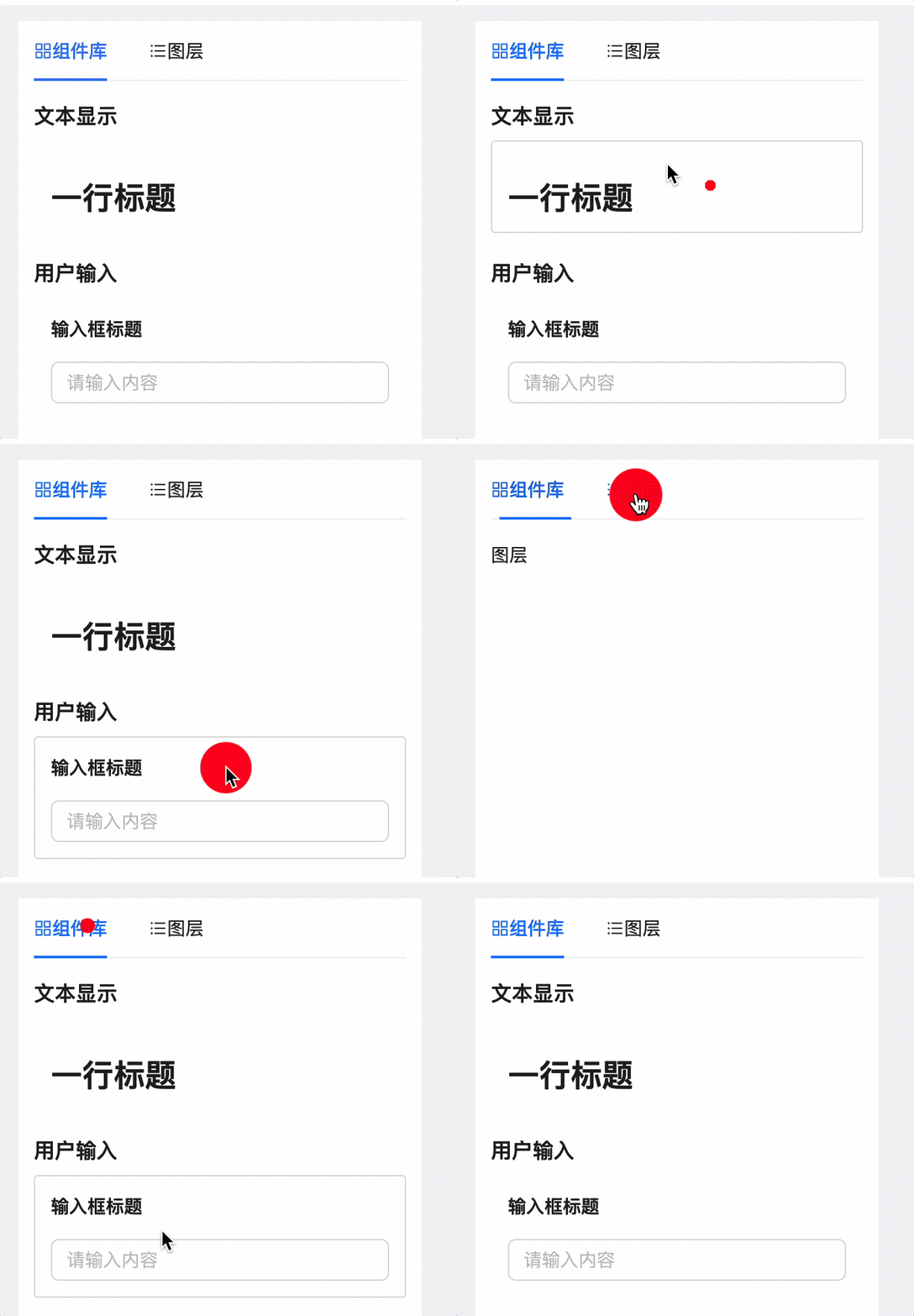
要点:
- 组件库配置
- 组件库组件列表渲染显示
- 组件库组件点击框图、鼠标样式设计
思路:
先对组件库进行配置,然后在页面中对应位置进行渲染组件即可。
QuestionComponents/index.ts
import QuestionInputConf, { QuestionInputPropsType } from './QuestionInput'
import QuestionTitleConf, { QuestionTitlePropsType } from './QuestionTitle'export type ComponentPropsType = QuestionInputPropsType & QuestionTitlePropsTypeexport type ComponentConfType = {title: stringtype: stringComponent: React.FC<ComponentPropsType>defaultProps: ComponentPropsType
}const componentConfList: ComponentConfType[] = [QuestionInputConf,QuestionTitleConf,
]// 组件库配置
export const componentConfGroup = [{groupId: 'textGroup',groupName: '文本显示',components: [QuestionTitleConf],},{groupId: 'inputGroup',groupName: '用户输入',components: [QuestionInputConf],},
]export function getComponentConfByType(type: string) {return componentConfList.find(c => c.type === type)
}
ComponentLib.tsx
import React, { FC } from 'react'
import { componentConfGroup } from '../../../component/QuestionComponents'
import { Typography } from 'antd'
import { ComponentConfType } from '../../../component/QuestionComponents'
import styles from './ComponentLib.module.scss'const { Title } = Typographyfunction genComponent(c: ComponentConfType) {const { Component } = creturn (<div className={styles.wrapper}><div className={styles.component}><Component /></div></div>)
}const Lib: FC = () => {return (<>{componentConfGroup.map((item, index) => {const { groupId, groupName } = itemreturn (<div key={groupId}><Titlelevel={3}style={{ fontSize: '16px', marginTop: index > 0 ? '20px' : '0' }}>{groupName}</Title><div>{item.components.map(c => genComponent(c))}</div></div>)})}</>)
}
export default Lib
ComponentLib.scss
.wrapper {padding: 12px;margin-bottom: 12px;cursor: cursor;border: 1px solid #fff;border-radius: 3px;background-color: #fff;&:hover {border-color: #d9d9d9;}
}.component {pointer-events: none; // 屏蔽鼠标
} No newline at end of file
组件库添加到画布
需求:
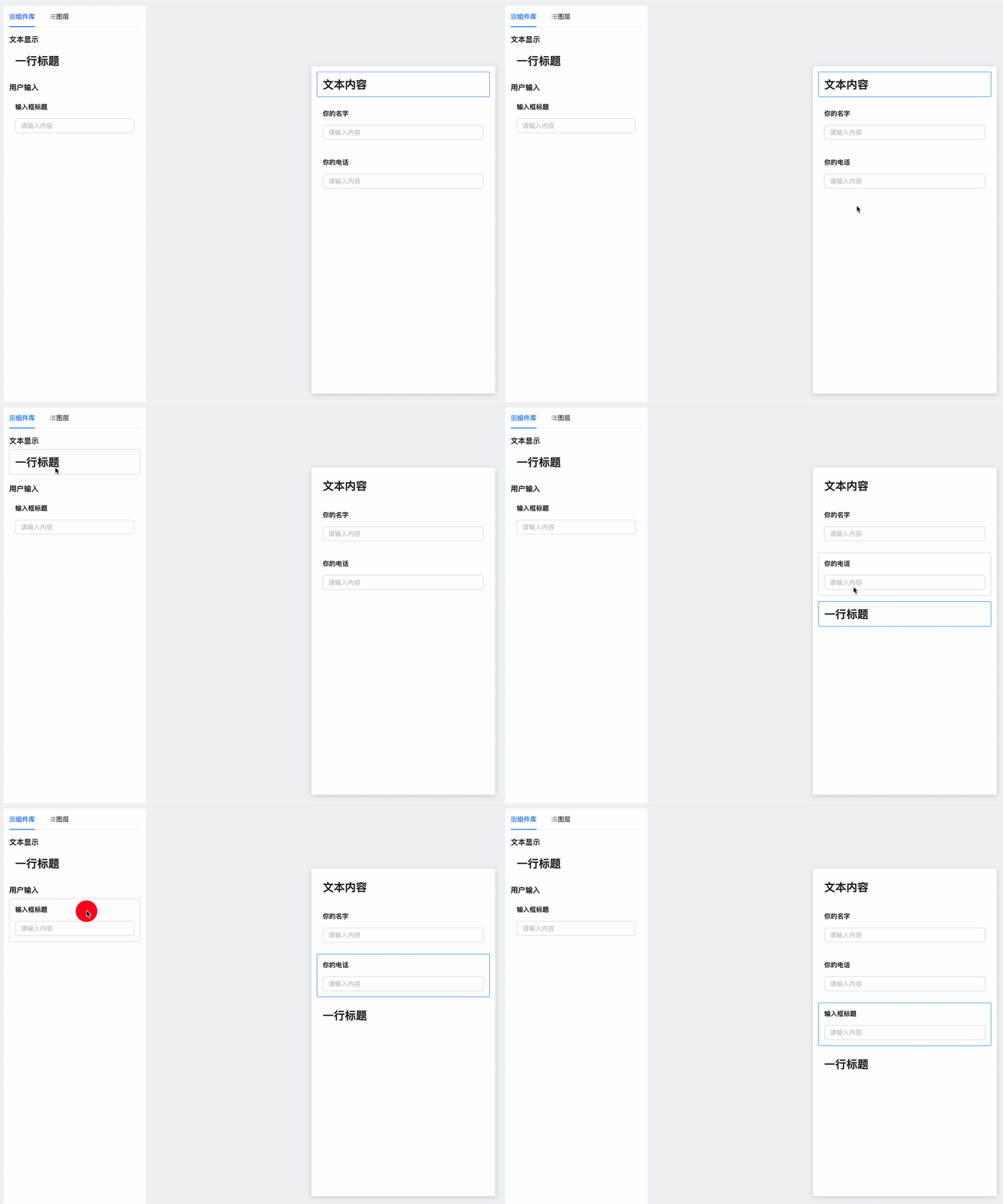
要点:
- 组件与画布交互逻辑
- 组件默认插入画布末尾
- 画布中组件选定后,组件插入会在其之后
- 交互逻辑数据实现
ComponentLib组件插入画布位置逻辑实现addComponent通过 selected 判断组件插入画布位置
ComponentLib.tsx
import React, { FC } from 'react'
import { componentConfGroup } from '../../../component/QuestionComponents'
import { Typography } from 'antd'
import { ComponentConfType } from '../../../component/QuestionComponents'
import styles from './ComponentLib.module.scss'
import { useDispatch } from 'react-redux'
import { addComponent } from '../../../store/componentReducer'
import { nanoid } from '@reduxjs/toolkit'const { Title } = Typographyconst Lib: FC = () => {const dispatch = useDispatch()function genComponent(c: ComponentConfType) {const { type, Component } = cfunction handleClick(c: ComponentConfType) {const { title, type, defaultProps } = cdispatch(addComponent({fe_id: nanoid(),type,title,props: defaultProps,}))}return (<div key={type} className={styles.wrapper} onClick={() => handleClick(c)}><div className={styles.component}><Component /></div></div>)}return (<>{componentConfGroup.map((item, index) => {const { groupId, groupName } = itemreturn (<div key={groupId}><Titlelevel={3}style={{ fontSize: '16px', marginTop: index > 0 ? '20px' : '0' }}>{groupName}</Title><div>{item.components.map(c => genComponent(c))}</div></div>)})}</>)
}
export default Lib
componentReducer/index.ts
import { createSlice, PayloadAction } from '@reduxjs/toolkit'
import { ComponentPropsType } from '../../component/QuestionComponents'export type ComponentInfoType = {fe_id: stringtype: stringtitle: stringprops: ComponentPropsType
}export type ComponentsStateType = {selectedId: stringcomponentList: Array<ComponentInfoType>
}const INIT_STATE: ComponentsStateType = {selectedId: '',componentList: [],// 其他拓展
}export const componentsSlice = createSlice({name: 'component',initialState: INIT_STATE,reducers: {......addComponent: (draft: ComponentsStateType,action: PayloadAction<ComponentInfoType>) => {const newCompontent = action.payloadconst { selectedId, componentList } = draftconst index = componentList.findIndex(c => c.fe_id === selectedId)if (index < 0) {draft.componentList.push(newCompontent)} else {draft.componentList.splice(index + 1, 0, newCompontent)}draft.selectedId = newCompontent.fe_id},},
})export const { resetComponentList, changeSelectedId, addComponent } =componentsSlice.actions
export default componentsSlice.reducer
注意:fe_id 和 _id 区别
要点:
- _id是服务端的数据,_是因为 mongodb 会为每条数据生成id,这是不重复的,由 _id 表示
- fe_id 是前端用于区分组件是否被选中的标记,用于组件库与画布的交互
QuestionCart.tsx
type PropsType = {_id: stringtitle: stringisPublished: booleanisStar: booleananswerCount: numbercreatedAt: string
}
组件属性面板
点击组件显示属性
需求:
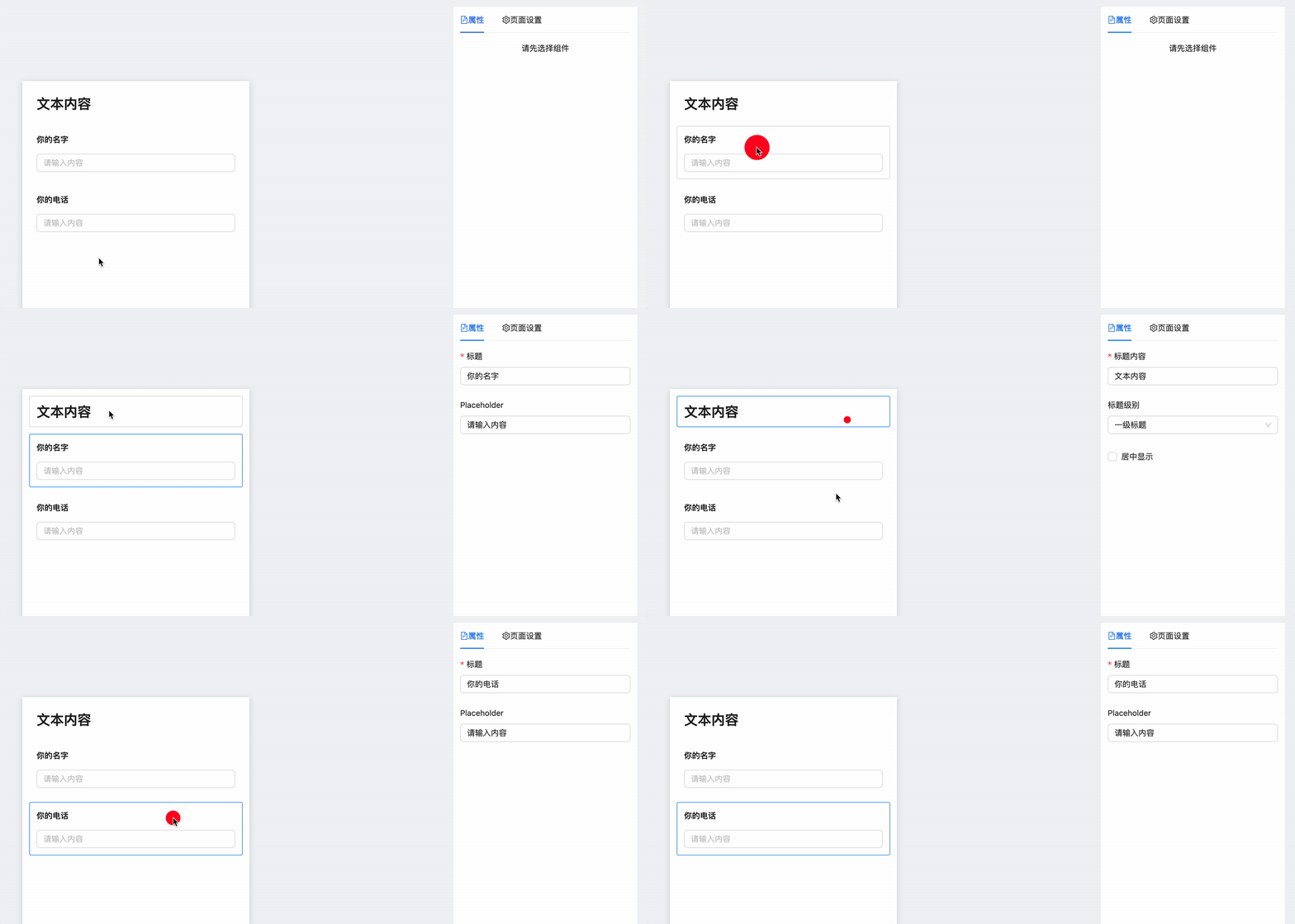
要点:
- 构建属性面板
- 构造组件属性模块
PropComponet,用于配制组件属性
│   │   ├── QuestionComponents
│   │   │   ├── QuestionInput
│   │   │   │   ├── Component.tsx
│   │   │   │   ├──+ PropComponent.tsx
│   │   │   │   ├── index.ts
│   │   │   │   └── interface.ts
│   │   │   ├── QuestionTitle
│   │   │   │   ├── Component.tsx
│   │   │   │   ├──+ PropComponent.tsx
│   │   │   │   ├── index.ts
│   │   │   │   └── interface.ts
│   │   │   └──m index.ts
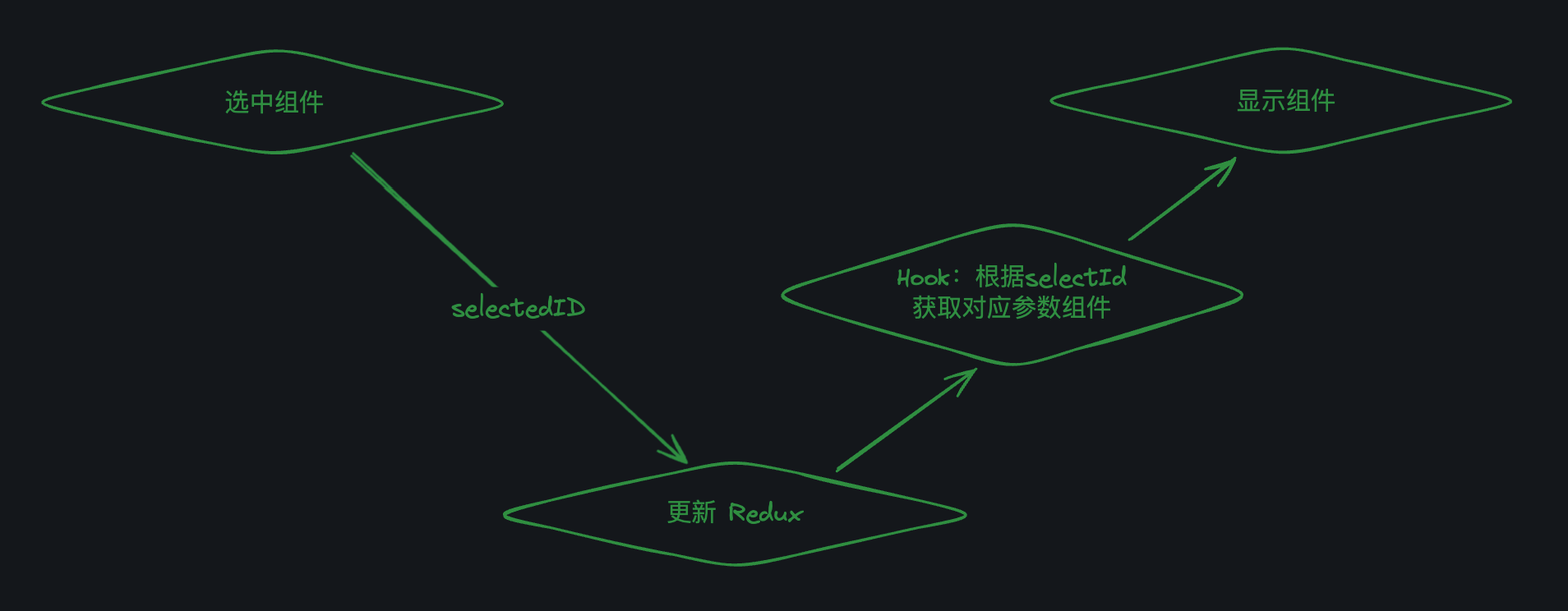
思路:
- 当我们点击画布中的组件后,更新组件
selectedId - 属性面板通过
useGetComponentInfo获取selectedComponent-
从
selectedComponent中层层解构出组件参数props和参数组件PropComponent,返回
<PropComponent {...props} />传参后的组件即可。
-
构建属性面板
RightPanel.tsx
import React, { FC } from 'react'
import { Tabs } from 'antd'
import { FileTextOutlined, SettingOutlined } from '@ant-design/icons'
import ComponentProp from './componentProp'const RightPanel: FC = () => {const tabsItems = [{key: 'prop',label: (<span><FileTextOutlined />属性</span>),children: <ComponentProp />,},{key: 'setting',label: (<span><SettingOutlined />页面设置</span>),children: <div>页面设置</div>,},]return <Tabs defaultActiveKey="prop" items={tabsItems} />
}export default RightPanel
构造组件属性模块 PropComponet ,用于配制组件属性
question/Edit/ComponentProp.tsx
import React, { FC } from 'react'
import useGetComponentInfo from '../../../hooks/useGetComponentInfo'
import { getComponentConfByType } from '../../../component/QuestionComponents'const NoProp = () => {return <div style={{ textAlign: 'center' }}>请先选择组件</div>
}const ComponentProp: FC = () => {const { selectedComponent } = useGetComponentInfo()if (!selectedComponent) return <NoProp />const { type, props } = selectedComponentconst componentConf = getComponentConfByType(type)if (!componentConf) return <NoProp />const { PropComponent } = componentConfreturn <PropComponent {...props} />
}
export default ComponentProp
QuestionComponents/index.ts 新增 PropComponent
import QuestionInputConf, { QuestionInputPropsType } from './QuestionInput'
import QuestionTitleConf, { QuestionTitlePropsType } from './QuestionTitle'
import { FC } from 'react'export type ComponentPropsType = QuestionInputPropsType & QuestionTitlePropsType// 组件的配置: 新增 PropComponent
export type ComponentConfType = {title: stringtype: stringComponent: FC<ComponentPropsType>PropComponent: FC<ComponentPropsType> // HeredefaultProps: ComponentPropsType
}const componentConfList: ComponentConfType[] = [QuestionInputConf,QuestionTitleConf,
]export const componentConfGroup = [{groupId: 'textGroup',groupName: '文本显示',components: [QuestionTitleConf],},{groupId: 'inputGroup',groupName: '用户输入',components: [QuestionInputConf],},
]export function getComponentConfByType(type: string) {return componentConfList.find(c => c.type === type)
}
QuestionInput/PropComponent.tsx
import React, { FC } from 'react'
import { useEffect } from 'react'
import { Form, Input } from 'antd'
import { QuestionInputPropsType } from './interface'const PropComponent: FC<QuestionInputPropsType> = (props: QuestionInputPropsType
) => {const { title, placeholder } = propsconst [form] = Form.useForm()useEffect(() => {form.setFieldsValue({ title, placeholder })}, [title, placeholder])return (<Form layout="vertical" initialValues={{ title, placeholder }} form={form}><Form.Itemlabel="标题"name="title"rules={[{ required: true, message: '请输入标题' }]}><Input /></Form.Item><Form.Item label="Placeholder" name="placeholder"><Input /></Form.Item></Form>)
}export default PropComponent
QuestionTitle/PropComponent.tsx
import React, { FC } from 'react'
import { useEffect } from 'react'
import { Form, Input, Select, Checkbox } from 'antd'
import { QuestionTitlePropsType } from './interface'const PropComponent: FC<QuestionTitlePropsType> = (props: QuestionTitlePropsType
) => {const { text, level, isCenter } = propsconst [form] = Form.useForm()useEffect(() => {form.setFieldsValue({ text, level, isCenter })}, [text, level, isCenter])return (<Formlayout="vertical"initialValues={{ text, level, isCenter }}form={form}><Form.Itemlabel="标题内容"name="text"rules={[{ required: true, message: '请输入标题内容' }]}><Input /></Form.Item><Form.Item label="标题级别" name="level"><Selectoptions={[{ value: 1, label: '一级标题' },{ value: 2, label: '二级标题' },{ value: 3, label: '三级标题' },]}/></Form.Item><Form.Item name="isCenter" valuePropName="checked"><Checkbox>居中显示</Checkbox></Form.Item></Form>)
}export default PropComponent
组件属性数据同步画布
需求:
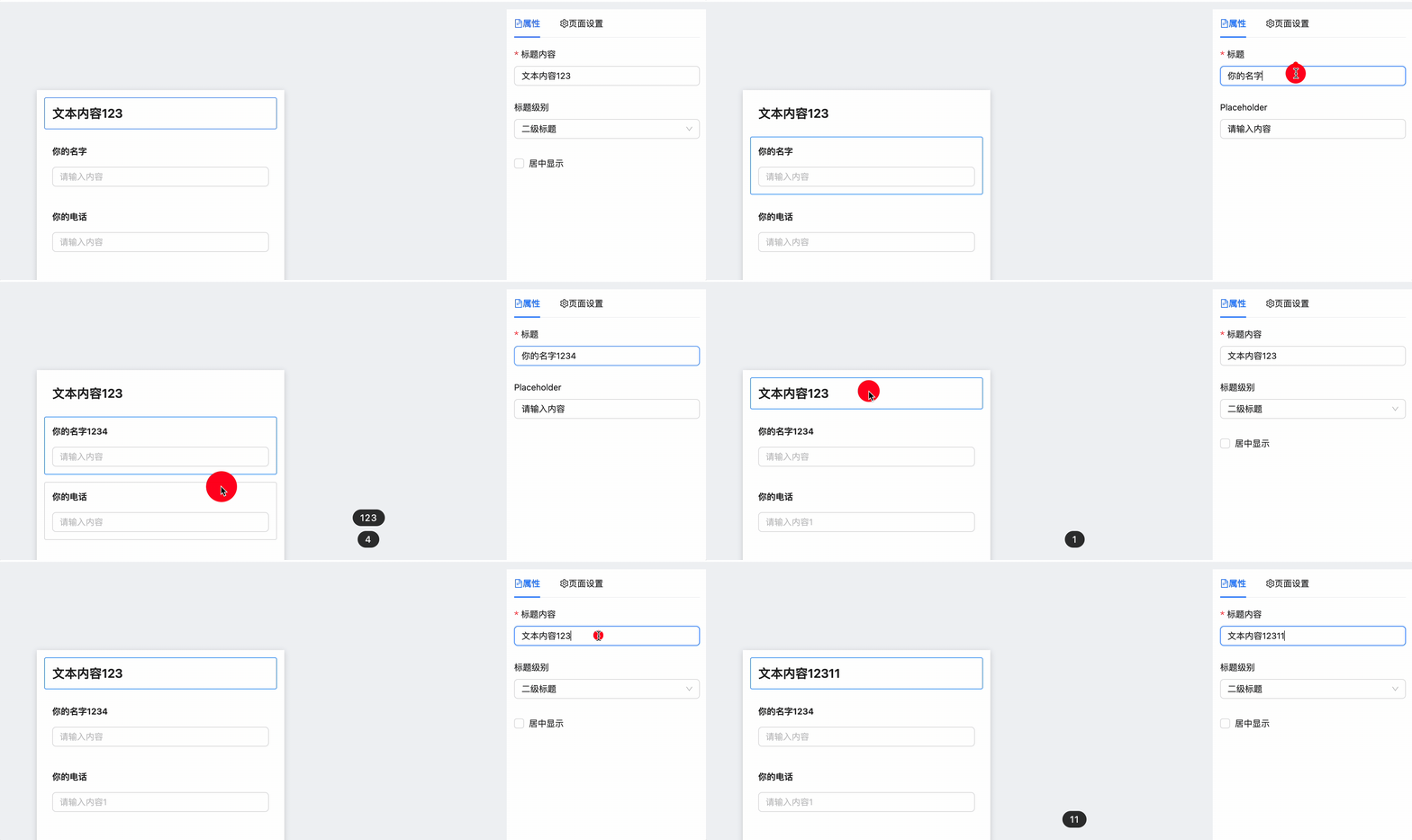
要点:
componentProp统一更新组件数据,更新方式传递给PropComponent- Redux 设计
changeComponentProps参数更新函数
思路:
- 用户选择画布组件后,传递
selectedId到Redux中 - 用户更新组件属性面板数值,会通过
onChange事件传递参数到Redux,采用changeComponentProps对画布中组件数据进行修改
Edit/componentProp.tsx
import React, { FC } from 'react'
import useGetComponentInfo from '../../../hooks/useGetComponentInfo'
import {getComponentConfByType,ComponentPropsType,
} from '../../../component/QuestionComponents'
import { useDispatch } from 'react-redux'
import { changeComponentProps } from '../../../store/componentReducer'const NoProp = () => {return <div style={{ textAlign: 'center' }}>请先选择组件</div>
}const ComponentProp: FC = () => {const dispatch = useDispatch()const { selectedComponent } = useGetComponentInfo()if (!selectedComponent) return <NoProp />const { type, props } = selectedComponentconst componentConf = getComponentConfByType(type)if (!componentConf) return <NoProp />const { PropComponent } = componentConf// 组件参数更新:传递组件参数到 Redux 进行更新function changeProps(newProps: ComponentPropsType) {if (!selectedComponent) returndispatch(changeComponentProps({ fe_id: selectedComponent.fe_id, newProps }))}return <PropComponent {...props} onChange={changeProps} />
}
export default ComponentProp
store/componentReducer/index.tsx
import { createSlice, PayloadAction } from '@reduxjs/toolkit'
import { ComponentPropsType } from '../../component/QuestionComponents'......
export const componentsSlice = createSlice({name: 'component',initialState: INIT_STATE,reducers: {......changeComponentProps: (draft: ComponentsStateType,action: PayloadAction<{ fe_id: string; newProps: ComponentPropsType }>) => {const { fe_id, newProps } = action.payloadconst component = draft.componentList.find(c => c.fe_id === fe_id)if (component) {component.props = {...component.props,...newProps,}}},},
})export const {resetComponentList,changeSelectedId,addComponent,changeComponentProps,
} = componentsSlice.actions
export default componentsSlice.reducer
相关文章:
React低代码项目:问卷编辑器 I
问卷编辑器 Date: February 20, 2025 4:17 PM (GMT8) 目标 完成问卷编辑器的设计和开发完成复杂系统的 UI 组件拆分完成复杂系统的数据结构设计 内容 需求分析技术方案设计开发 注意事项: 需求指导设计,设计指导开发。前两步很重要页面复杂的话&…...

蓝桥杯2024年真题java B组 【H.拼十字】
蓝桥杯2024年真题java B组 【H.拼十字】 原题链接:拼十字 思路: 使用树状数组或线段树解决。 先将输入的信息存入到一个n行3列的数组中,将信息排序,按照长度小到大,长相同时,宽度小到大 排序。 建立三个…...

Spring MVC 程序开发(1)
目录 1、什么是 SpringMVC2、返回数据2.1、返回 JSON 对象2.2、请求转发2.3、请求重定向2.4、自定义返回的内容 1、什么是 SpringMVC 1、Tomcat 和 Servlet 分别是什么?有什么关系? Servlet 是 java 官方定义的 web 开发的标准规范;Tomcat 是…...
PyCharm接入本地部署DeepSeek 实现AI编程!【支持windows与linux】
今天尝试在pycharm上接入了本地部署的deepseek,实现了AI编程,体验还是很棒的。下面详细叙述整个安装过程。 本次搭建的框架组合是 DeepSeek-r1:1.5b/7b Pycharm专业版或者社区版 Proxy AI(CodeGPT) 首先了解不同版本的deepsee…...

Linux服务升级:Almalinux 升级 DeepSeek-R1
目录 一、实验 1.环境 2.Almalinux 部署 Ollama 3.Almalinux 升级 DeepSeek-R1 4.Almalinux 部署 docker 5. docker 部署 DeepSeek-R1 6.Almalinux 部署 Cpolar (内网穿透) 7.使用cpolar内网穿透 二、问题 1.构建容器失败 一、实验 1.环境 (1)…...

Linux操作系统5- 补充知识(可重入函数,volatile关键字,SIGCHLD信号)
上篇文章:Linux操作系统5-进程信号3(信号的捕捉流程,信号集,sigaction)-CSDN博客 本篇Gitee仓库:myLerningCode/l26 橘子真甜/Linux操作系统与网络编程学习 - 码云 - 开源中国 (gitee.com) 目录 一. 可重入…...

ctfshow刷题笔记—栈溢出—pwn61~pwn64
目录 前言 一、pwn61(输出了什么?) 二、pwn62(短了一点) 三、pwn63(又短了一点) 四、pwn64(有时候开启某种保护并不代表这条路不通) 五、一些shellcode 前言 这几道都是与shellcode有关的题,实在是…...

java23种设计模式-责任链模式
责任链模式(Chain of Responsibility Pattern)学习笔记 编程相关书籍分享:https://blog.csdn.net/weixin_47763579/article/details/145855793 DeepSeek使用技巧pdf资料分享:https://blog.csdn.net/weixin_47763579/article/details/145884039 🌟 模式定义 责任链模式是…...

新一代跨境电商ERP系统:从订单到发货的全流程自动化管理
随着全球电商市场的持续扩张,跨境电商卖家面临着多平台运营、国际物流、税务合规等复杂挑战。如何高效整合订单、库存、物流和财务数据,实现从客户下单到商品交付的无缝衔接,成为企业降本增效的关键。Zoho Books作为一款专为跨境商家设计的智…...

苹果廉价机型 iPhone 16e 影像系统深度解析
【人像拍摄差异】 尽管iPhone 16e支持后期焦点调整功能,但用户无法像iPhone 16系列那样通过点击屏幕实时切换拍摄主体。前置摄像头同样缺失人像深度控制功能,不过TrueTone原彩闪光灯系统在前后摄均有保留。 很多人都高估了 iPhone 的安全性,查…...

hive 面试题
Hive基础概念 1.1 Hive是什么? 基于Hadoop的数据仓库工具,支持类SQL(HiveQL)查询,底层转换为MapReduce/Tez/Spark任务。 核心功能:数据ETL、查询、分析;定位:OLAP(分析…...

VScode在windows10上使用clang-format
用途:自动调整代码格式,如缩进等。 clang-format官方文档:ClangFormat — Clang 21.0.0git documentation 前提:有一个.clang-format文件 下载LLVM:https://github.com/llvm/llvm-project/releases,将可…...

AWS API Gateway灰度验证实现
在微服务架构中,灰度发布(金丝雀发布)是验证新版本稳定性的核心手段。通过将小部分流量(如 10%)导向新版本服务,可以在不影响整体系统的情况下快速发现问题。AWS API Gateway 原生支持流量按比例分配功能,无需复杂编码即可实现灰度验证。本文将详细解析其实现方法、最佳…...
:索引(上))
【每日八股】MySQL篇(三):索引(上)
目录 MySQL 为什么使用 B 树来做索引,它的优势是什么?特性和定义B 树和 B 树的对比拓展:既然 B 树相较于 B 树优势如此之大,为什么 nosql 的 MongoDB 底层仍采用 B 树而不是 B 树? 使用 B 树做索引的优势补充ÿ…...

在Pycharm中将ui文件修改为py文件
在Pycharm中将ui文件修改为py文件 有些时候,我们需要把QTDesigner生成的.ui文件修改为.py文件 在一些教程中,通常使用cmd打开终端修改,或者是有一些人写了一些脚本来修改 这里我们可以使用pycharm来快速的修改 首先,我们在pyc…...

看视频学习方法总结
以下是提高教学视频吸收率的系统性方法,结合认知科学原理和实际学习场景,帮助您最大化学习效果: 一、观看前的黄金准备阶段 60秒快速扫描法 用1分钟快速浏览视频目录、章节标题和简介,建立知识框架。荷兰伊拉斯姆斯大学实验表明&…...

Matlab 大量接单
分享一个matlab接私活、兼职的平台 1、技术方向满足任一即可 2、技术要求 3、最后 技术方向满足即可 MATLAB:熟练掌握MATLAB编程语言,能够使用MATLAB进行数据处理、机器学习和深度学习等相关工作。 机器学习、深度学习、强化学习、仿真、复现、算法、…...

《深度剖析:生成对抗网络中生成器与判别器的高效协作之道》
在人工智能的前沿领域,生成对抗网络(GAN)以其独特的对抗学习机制,为数据生成和处理带来了革命性的变革。生成器与判别器作为GAN的核心组件,它们之间的协作效率直接决定了GAN在图像生成、数据增强、风格迁移等众多应用中…...

Android6到Android15版本新增的功能和api
Android6到Android15版本新增的功能和api 文章目录 Android6到Android15版本新增的功能和api一、前言二、Android6 后的版本迭代1、Android 6.0(Marshmallow,API 级别 23)新增功能重要 API 2、Android 7.0(Nougat,API …...

【现代Web布局与动画技术:卡片组件实战分享】
📱 现代Web布局与动画技术:卡片组件实战分享 🚀 引言 🌟 在过去的开发过程中,我们共同实现了一个功能丰富的卡片组件,它不仅美观,还具有交互性和响应式设计。这篇文章将分享这个组件背后的技术…...

“10车道变4车道“——一家建筑施工企业CFO的数字化突围实录
——业务说赚钱、财务说亏钱,这笔账到底听谁的?一个在建筑行业天天上演的场景项目经理拍着胸脯说:"这个项目我们肯定是赚钱的,利润至少15%。"财务部出完报表,毛利率只有3%,甚至亏损。项目经理冲到…...

Unity 2D项目初始化实战:从零搭建可维护游戏骨架
1. 这不是“又一个Unity入门教程”,而是我带三个实习生从零做出第一个可玩Demo的真实路径你搜“Unity 2D 教程”,首页全是“5分钟创建角色”“10行代码实现跳跃”——画面很炫,但关掉视频后,你连项目文件夹里该删哪个.meta、该留哪…...

嵌入式工控机在AGV叉车中的核心应用与工程实践
1. 项目概述:当AGV叉车遇上嵌入式工控机在制造业和物流仓储领域,智能AGV(自动导引运输车)叉车早已不是什么新鲜概念。但真正深入到项目一线,你会发现,从“能跑起来”到“跑得稳、算得准、管得好”ÿ…...

随机森林在精准农业中的落地实践:地理空间建模与田间部署
1. 项目概述:当随机森林遇上农田里的厘米级变量在华北平原某农场的冬小麦田里,我第一次用随机森林模型预测氮肥施用量时,手里的无人机刚飞完第三圈,地面传感器网络正把土壤电导率、含水量、温度的实时数据推送到边缘计算节点。这不…...

FLUX.1-dev FP8量化模型:让中低端显卡畅享专业级AI图像生成的终极方案
FLUX.1-dev FP8量化模型:让中低端显卡畅享专业级AI图像生成的终极方案 【免费下载链接】flux1-dev 项目地址: https://ai.gitcode.com/hf_mirrors/Comfy-Org/flux1-dev 在AI图像生成技术快速发展的今天,硬件限制成为许多开发者和创作者面临的主要…...

SpringBoot+Vue体育赛事志愿者管理系统源码+论文
代码可以查看文章末尾⬇️联系方式获取,记得注明来意哦~🌹 分享万套开题报告任务书答辩PPT模板 作者完整代码目录供你选择: 《SpringBoot网站项目》1800套 《SSM网站项目》1500套 《小程序项目》1600套 《APP项目》1500套 《Python网站项目》…...

智慧树自动刷课插件终极指南:三步实现高效网课自动化学习
智慧树自动刷课插件终极指南:三步实现高效网课自动化学习 【免费下载链接】zhihuishu 智慧树刷课插件,自动播放下一集、1.5倍速度、无声 项目地址: https://gitcode.com/gh_mirrors/zh/zhihuishu 还在为智慧树平台冗长的网课视频而烦恼吗…...

消费电子贴膜的光学技术革新:圆偏振光与磁控溅射AR的原理解析
摘要随着用户对屏幕使用健康关注的提升,消费电子贴膜行业正在经历从“物理防护”到“光学级视觉守护”的技术升级。本文从光学原理出发,解析圆偏振光柔光标准与磁控溅射AR抗眩镀膜两项核心技术的工作机制,并分析其在屏幕保护场景中的应用逻辑…...

系统设计 012:从用户系统出发,吃透缓存、数据库与高并发设计
系统设计 012:从用户系统出发,吃透缓存、数据库与高并发设计Bilibili 同步视频一、用户系统,藏着后端设计的核心考点💡二、4S 分析法:先读懂用户系统的流量挑战📊1. Scenario:四大需求ÿ…...

GOM三维扫描在GDT分析中的应用:几何公差评价为何越来越依赖全场数据
随着工业产品结构复杂度持续提高,传统基于尺寸链的质量控制方式正在逐步向几何公差控制体系演进。尤其在汽车制造、精密模具、航空零部件及新能源结构件等领域,产品质量评价已不仅取决于尺寸是否符合要求,更关注零件在真实装配条件下的几何状…...