
Ubuntu 下 nginx-1.24.0 源码分析 - ngx_modules
定义在 objs\ngx_modules.c
#include <ngx_config.h>
#include <ngx_core.h>extern ngx_module_t  ngx_core_module;
extern ngx_module_t  ngx_errlog_module;
extern ngx_module_t  ngx_conf_module;
extern ngx_module_t  ngx_openssl_module;
extern ngx_module_t  ngx_regex_module;
extern ngx_module_t  ngx_events_module;
extern ngx_module_t  ngx_event_core_module;
extern ngx_module_t  ngx_epoll_module;
extern ngx_module_t  ngx_http_module;
extern ngx_module_t  ngx_http_core_module;
extern ngx_module_t  ngx_http_log_module;
extern ngx_module_t  ngx_http_upstream_module;
extern ngx_module_t  ngx_http_v2_module;
extern ngx_module_t  ngx_http_static_module;
extern ngx_module_t  ngx_http_gzip_static_module;
extern ngx_module_t  ngx_http_autoindex_module;
extern ngx_module_t  ngx_http_index_module;
extern ngx_module_t  ngx_http_mirror_module;
extern ngx_module_t  ngx_http_try_files_module;
extern ngx_module_t  ngx_http_auth_basic_module;
extern ngx_module_t  ngx_http_access_module;
extern ngx_module_t  ngx_http_limit_conn_module;
extern ngx_module_t  ngx_http_limit_req_module;
extern ngx_module_t  ngx_http_geo_module;
extern ngx_module_t  ngx_http_map_module;
extern ngx_module_t  ngx_http_split_clients_module;
extern ngx_module_t  ngx_http_referer_module;
extern ngx_module_t  ngx_http_rewrite_module;
extern ngx_module_t  ngx_http_ssl_module;
extern ngx_module_t  ngx_http_proxy_module;
extern ngx_module_t  ngx_http_fastcgi_module;
extern ngx_module_t  ngx_http_uwsgi_module;
extern ngx_module_t  ngx_http_scgi_module;
extern ngx_module_t  ngx_http_grpc_module;
extern ngx_module_t  ngx_http_memcached_module;
extern ngx_module_t  ngx_http_empty_gif_module;
extern ngx_module_t  ngx_http_browser_module;
extern ngx_module_t  ngx_http_upstream_hash_module;
extern ngx_module_t  ngx_http_upstream_ip_hash_module;
extern ngx_module_t  ngx_http_upstream_least_conn_module;
extern ngx_module_t  ngx_http_upstream_random_module;
extern ngx_module_t  ngx_http_upstream_keepalive_module;
extern ngx_module_t  ngx_http_upstream_zone_module;
extern ngx_module_t  ngx_http_write_filter_module;
extern ngx_module_t  ngx_http_header_filter_module;
extern ngx_module_t  ngx_http_chunked_filter_module;
extern ngx_module_t  ngx_http_v2_filter_module;
extern ngx_module_t  ngx_http_range_header_filter_module;
extern ngx_module_t  ngx_http_gzip_filter_module;
extern ngx_module_t  ngx_http_postpone_filter_module;
extern ngx_module_t  ngx_http_ssi_filter_module;
extern ngx_module_t  ngx_http_charset_filter_module;
extern ngx_module_t  ngx_http_userid_filter_module;
extern ngx_module_t  ngx_http_headers_filter_module;
extern ngx_module_t  ngx_http_copy_filter_module;
extern ngx_module_t  ngx_http_range_body_filter_module;
extern ngx_module_t  ngx_http_not_modified_filter_module;
extern ngx_module_t  ngx_stream_module;
extern ngx_module_t  ngx_stream_core_module;
extern ngx_module_t  ngx_stream_log_module;
extern ngx_module_t  ngx_stream_proxy_module;
extern ngx_module_t  ngx_stream_upstream_module;
extern ngx_module_t  ngx_stream_write_filter_module;
extern ngx_module_t  ngx_stream_ssl_module;
extern ngx_module_t  ngx_stream_limit_conn_module;
extern ngx_module_t  ngx_stream_access_module;
extern ngx_module_t  ngx_stream_geo_module;
extern ngx_module_t  ngx_stream_map_module;
extern ngx_module_t  ngx_stream_split_clients_module;
extern ngx_module_t  ngx_stream_return_module;
extern ngx_module_t  ngx_stream_set_module;
extern ngx_module_t  ngx_stream_upstream_hash_module;
extern ngx_module_t  ngx_stream_upstream_least_conn_module;
extern ngx_module_t  ngx_stream_upstream_random_module;
extern ngx_module_t  ngx_stream_upstream_zone_module;ngx_module_t *ngx_modules[] = {&ngx_core_module,&ngx_errlog_module,&ngx_conf_module,&ngx_openssl_module,&ngx_regex_module,&ngx_events_module,&ngx_event_core_module,&ngx_epoll_module,&ngx_http_module,&ngx_http_core_module,&ngx_http_log_module,&ngx_http_upstream_module,&ngx_http_v2_module,&ngx_http_static_module,&ngx_http_gzip_static_module,&ngx_http_autoindex_module,&ngx_http_index_module,&ngx_http_mirror_module,&ngx_http_try_files_module,&ngx_http_auth_basic_module,&ngx_http_access_module,&ngx_http_limit_conn_module,&ngx_http_limit_req_module,&ngx_http_geo_module,&ngx_http_map_module,&ngx_http_split_clients_module,&ngx_http_referer_module,&ngx_http_rewrite_module,&ngx_http_ssl_module,&ngx_http_proxy_module,&ngx_http_fastcgi_module,&ngx_http_uwsgi_module,&ngx_http_scgi_module,&ngx_http_grpc_module,&ngx_http_memcached_module,&ngx_http_empty_gif_module,&ngx_http_browser_module,&ngx_http_upstream_hash_module,&ngx_http_upstream_ip_hash_module,&ngx_http_upstream_least_conn_module,&ngx_http_upstream_random_module,&ngx_http_upstream_keepalive_module,&ngx_http_upstream_zone_module,&ngx_http_write_filter_module,&ngx_http_header_filter_module,&ngx_http_chunked_filter_module,&ngx_http_v2_filter_module,&ngx_http_range_header_filter_module,&ngx_http_gzip_filter_module,&ngx_http_postpone_filter_module,&ngx_http_ssi_filter_module,&ngx_http_charset_filter_module,&ngx_http_userid_filter_module,&ngx_http_headers_filter_module,&ngx_http_copy_filter_module,&ngx_http_range_body_filter_module,&ngx_http_not_modified_filter_module,&ngx_stream_module,&ngx_stream_core_module,&ngx_stream_log_module,&ngx_stream_proxy_module,&ngx_stream_upstream_module,&ngx_stream_write_filter_module,&ngx_stream_ssl_module,&ngx_stream_limit_conn_module,&ngx_stream_access_module,&ngx_stream_geo_module,&ngx_stream_map_module,&ngx_stream_split_clients_module,&ngx_stream_return_module,&ngx_stream_set_module,&ngx_stream_upstream_hash_module,&ngx_stream_upstream_least_conn_module,&ngx_stream_upstream_random_module,&ngx_stream_upstream_zone_module,NULL
};char *ngx_module_names[] = {"ngx_core_module","ngx_errlog_module","ngx_conf_module","ngx_openssl_module","ngx_regex_module","ngx_events_module","ngx_event_core_module","ngx_epoll_module","ngx_http_module","ngx_http_core_module","ngx_http_log_module","ngx_http_upstream_module","ngx_http_v2_module","ngx_http_static_module","ngx_http_gzip_static_module","ngx_http_autoindex_module","ngx_http_index_module","ngx_http_mirror_module","ngx_http_try_files_module","ngx_http_auth_basic_module","ngx_http_access_module","ngx_http_limit_conn_module","ngx_http_limit_req_module","ngx_http_geo_module","ngx_http_map_module","ngx_http_split_clients_module","ngx_http_referer_module","ngx_http_rewrite_module","ngx_http_ssl_module","ngx_http_proxy_module","ngx_http_fastcgi_module","ngx_http_uwsgi_module","ngx_http_scgi_module","ngx_http_grpc_module","ngx_http_memcached_module","ngx_http_empty_gif_module","ngx_http_browser_module","ngx_http_upstream_hash_module","ngx_http_upstream_ip_hash_module","ngx_http_upstream_least_conn_module","ngx_http_upstream_random_module","ngx_http_upstream_keepalive_module","ngx_http_upstream_zone_module","ngx_http_write_filter_module","ngx_http_header_filter_module","ngx_http_chunked_filter_module","ngx_http_v2_filter_module","ngx_http_range_header_filter_module","ngx_http_gzip_filter_module","ngx_http_postpone_filter_module","ngx_http_ssi_filter_module","ngx_http_charset_filter_module","ngx_http_userid_filter_module","ngx_http_headers_filter_module","ngx_http_copy_filter_module","ngx_http_range_body_filter_module","ngx_http_not_modified_filter_module","ngx_stream_module","ngx_stream_core_module","ngx_stream_log_module","ngx_stream_proxy_module","ngx_stream_upstream_module","ngx_stream_write_filter_module","ngx_stream_ssl_module","ngx_stream_limit_conn_module","ngx_stream_access_module","ngx_stream_geo_module","ngx_stream_map_module","ngx_stream_split_clients_module","ngx_stream_return_module","ngx_stream_set_module","ngx_stream_upstream_hash_module","ngx_stream_upstream_least_conn_module","ngx_stream_upstream_random_module","ngx_stream_upstream_zone_module",NULL
};
ngx_modules 是一个全局数组,类型为 ngx_module_t *[],它的作用是存储 Nginx 中所有模块的指针。
Nginx 是一个高度模块化的 Web 服务器,无论是核心功能(如事件处理、HTTP 处理)还是扩展功能(如反向代理、负载均衡、SSL 支持),都是通过模块实现的。
ngx_modules 提供了一个集中式的注册表,Nginx 在启动时通过遍历这个数组来初始化和配置所有模块。
具体来说:
-
模块注册:每个模块(无论是内置模块还是第三方模块)在编译时都会生成一个
ngx_module_t结构体,描述该模块的元信息(如名称、版本、命令、钩子函数等),而ngx_modules数组则将这些模块的指针集中起来。 -
动态加载的基础:通过
ngx_modules,Nginx 可以在运行时动态决定哪些模块需要被加载和执行,这为模块的灵活性和可扩展性奠定了基础。 -
初始化顺序控制:
ngx_modules数组中的顺序通常由编译时的配置决定(例如通过./configure指定),Nginx 会按照这个顺序依次初始化模块,确保依赖关系正确处理。
ngx_modules 是自动生成的代码,这个文件是在编译过程中由配置脚本根据用户的选择生成的
ngx_module_t 定义在 src/core/ngx_core.h
typedef struct ngx_module_s ngx_module_t;
ngx_module_s 定义在 src/core/ngx_module.h
struct ngx_module_s {ngx_uint_t            ctx_index;ngx_uint_t            index;char                 *name;ngx_uint_t            spare0;ngx_uint_t            spare1;ngx_uint_t            version;const char           *signature;void                 *ctx;ngx_command_t        *commands;ngx_uint_t            type;ngx_int_t           (*init_master)(ngx_log_t *log);ngx_int_t           (*init_module)(ngx_cycle_t *cycle);ngx_int_t           (*init_process)(ngx_cycle_t *cycle);ngx_int_t           (*init_thread)(ngx_cycle_t *cycle);void                (*exit_thread)(ngx_cycle_t *cycle);void                (*exit_process)(ngx_cycle_t *cycle);void                (*exit_master)(ngx_cycle_t *cycle);uintptr_t             spare_hook0;uintptr_t             spare_hook1;uintptr_t             spare_hook2;uintptr_t             spare_hook3;uintptr_t             spare_hook4;uintptr_t             spare_hook5;uintptr_t             spare_hook6;uintptr_t             spare_hook7;
};
name 字段保存的是模块的名称,是每个模块的唯一标识符
index 是每个模块的唯一标识符,与 name 提供字符串标识不同,index 提供了一个整数形式的标识符,便于快速索引和引用
name 主要用于日志和配置文件,便于人的阅读理解,index 主要用于程序内索引,更加高效
相关文章:

Ubuntu 下 nginx-1.24.0 源码分析 - ngx_modules
定义在 objs\ngx_modules.c #include <ngx_config.h> #include <ngx_core.h>extern ngx_module_t ngx_core_module; extern ngx_module_t ngx_errlog_module; extern ngx_module_t ngx_conf_module; extern ngx_module_t ngx_openssl_module; extern ngx_modul…...

css错峰布局/瀑布流样式(类似于快手样式)
当样式一侧比较高的时候会自动换行,尽量保持高度大概一致, 例: 一侧元素为5,另一侧元素为6 当为5的一侧过于高的时候,可能会变为4/7分部dom节点 如果不需要这样的话删除样式 flex-flow:column wrap; 设置父级dom样…...

【并发编程】聊聊定时任务ScheduledThreadPool的实现原理和源码解析
ScheduledThreadPoolExecutor 是在线程池的基础上 拓展的定时功能的线程池,主要有四种方式,具体可以看代码, 这里主要描述下 scheduleAtFixedRate : 除了第一次执行的时间,后面任务执行的时间 为 time MAX(任务执行时…...

【虚拟化】Docker Desktop 架构简介
在阅读前您需要了解 docker 架构:Docker architecture WSL 技术:什么是 WSL 2 1.Hyper-V backend 我们知道,Docker Desktop 最开始的架构的后端是采用的 Hyper-V。 Docker daemon (dockerd) 运行在一个 Linux distro (LinuxKit build) 中&…...

DeepSeek 医疗大模型微调实战讨论版(第一部分)
DeepSeek医疗大模型微调实战指南第一部分 DeepSeek 作为一款具有独特优势的大模型,在医疗领域展现出了巨大的应用潜力。它采用了先进的混合专家架构(MoE),能够根据输入数据的特性选择性激活部分专家,避免了不必要的计算,极大地提高了计算效率和模型精度 。这种架构使得 …...

c++实现最大公因数和最小公倍数
最大公因数和最小公倍数的介绍 读这篇文章,请你先对最大公因数以及最小公倍数进行了解: 最大公因数(英文名:gcd) 定义:最大公因数,也称最大公约数,指两个或多个整数共有约数&…...

知识库Dify和cherry无法解析影印pdf word解决方案
近期收到大量读者反馈:上传pdf/图文PDF到Dify、Cherry Studio等知识库时,普遍存在格式错乱、图片丢失、表格失效三大痛点。 在试用的几款知识库中除了ragflow具备图片解析的能力外,其他的都只能解析文本。 如果想要解析扫描件,…...

【记录一下学习】Embedding 与向量数据库
一、向量数据库 向量数据库(Vector Database),也叫矢量数据库,主要用来存储和处理向量数据。 在数学中,向量是有大小和方向的量,可以使用带箭头的线段表示,箭头指向即为向量的方向,…...

【第21节】C++设计模式(行为模式)-Chain of Responsibility(责任链)模式
一、问题背景 在 VC/MFC 开发中,消息处理机制是核心部分之一。VC 是基于消息和事件驱动的框架,消息的处理流程通常是通过链式传递的方式进行的。例如,一个 WM_COMMAND 消息的处理流程可能如下: (1)MDI 主窗…...

createrepo centos通过nginx搭建本地源
yum update 先安装一个nginx。 安装Nginx yum install gcc gcc-c pcre pcre-devel openssl openssl-devel libtool zlib zlib-devel -y cd /usr/local/src wget http://nginx.org/download/nginx-1.22.0.tar.gz tar -zxvf nginx-1.22.0.tar.gz cd nginx-1.22.0 ./configu…...

在 Docker 中搭建GBase 8s主备集群环境
本文介绍了如何在同一台机器上使用 Docker 容器搭建GBase 8s主备集群环境。 拉取镜像 拉取GBase 8s的最新镜像 docker pull liaosnet/gbase8s或者docker pull liaosnet/gbase8s:v8.8_3513x25_csdk_x64注:在tag为v8.8_3513x25_csdk_x64及之后的版本中,…...

【MySQL-数据类型】数据类型分类+数值类型+文本、二进制类型+String类型
一、数据类型分类 二、数值类型 1.bit类型 测试环境ubuntu 基本语法: bit[(M)]:位字段类型,M表示每个值的位数,范围从1~64;如果M被忽略,默认为1举例: create table testBit(id i…...

小谈java内存马
基础知识 (代码功底不好,就找ai优化了一下) Java内存马是一种利用Java虚拟机(JVM)动态特性(如类加载机制、反射技术等)在内存中注入恶意代码的攻击手段。它不需要在磁盘上写入文件,…...

简单的二元语言模型bigram实现
内容总结归纳自视频:【珍藏】从头开始用代码构建GPT - 大神Andrej Karpathy 的“神经网络从Zero到Hero 系列”之七_哔哩哔哩_bilibili 项目:https://github.com/karpathy/ng-video-lecture Bigram模型是基于当前Token预测下一个Token的模型。例如&#x…...

【清华大学】实用DeepSeek赋能家庭教育 56页PDF文档完整版
清华大学-56页:实用DeepSeek赋能家庭教育.pdf https://pan.baidu.com/s/1BUweVDeG2M8-t0QaIs3LHQ?pwd1234 提取码: 1234 或 https://pan.quark.cn/s/8a9473493bb0 《实用DeepSeek赋能家庭教育》基于清华大学研究成果,系统阐述了DeepSeek人工智能技…...
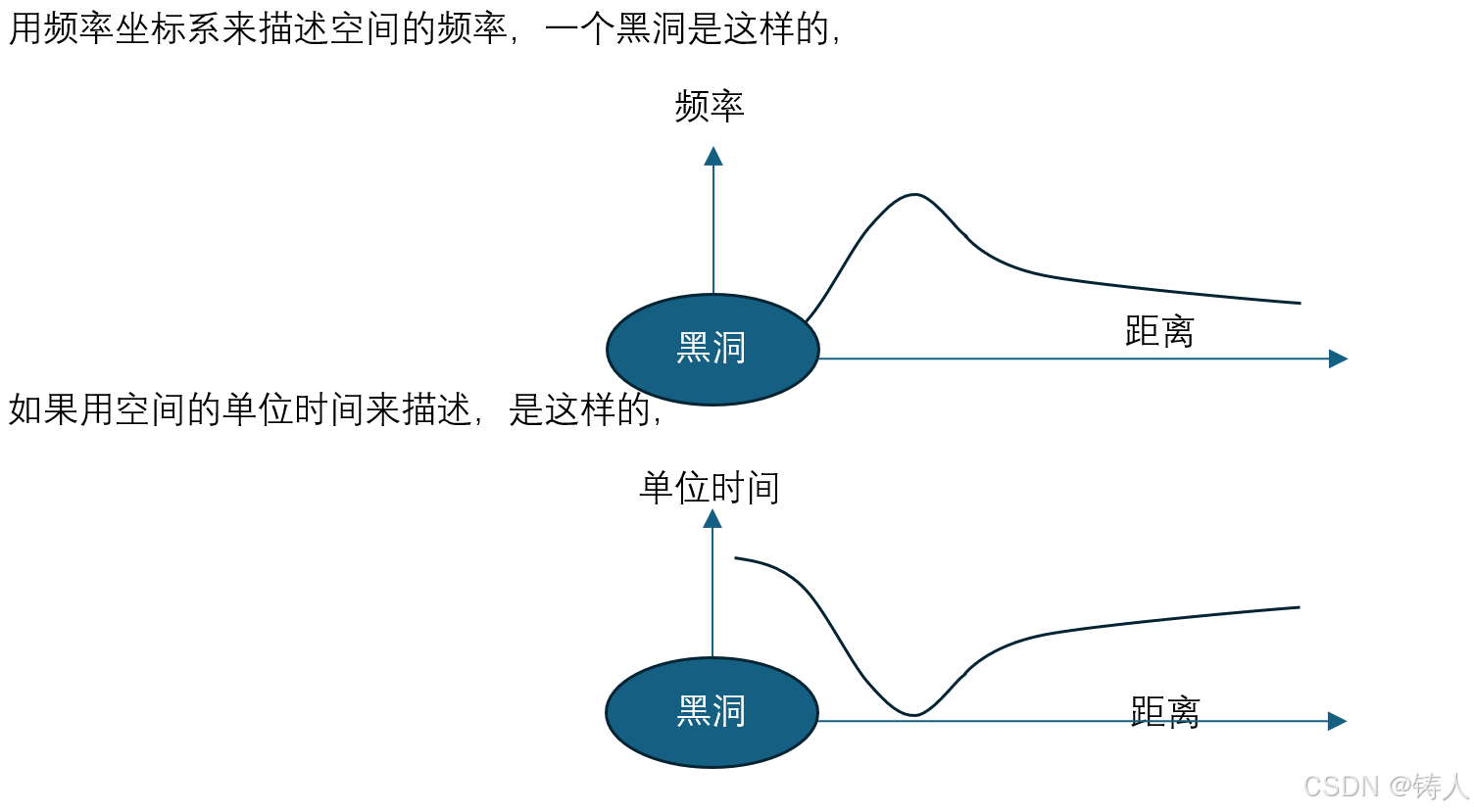
黑洞如何阻止光子逃逸
虽然涉及广义相对论,但广义相对论说的是大质量物体对周围空间的影响,而不是说周围空间和空间中的光子之间的关系。也就是说,若讨论光子逃逸问题,则不必限定于大质量的前提,也就是说,若质量周围被扭曲的空间…...

1.4 单元测试与热部署
本次实战实现Spring Boot的单元测试与热部署功能。单元测试方面,通过JUnit和Mockito等工具,结合SpringBootTest注解,可以模拟真实环境对应用组件进行独立测试,验证逻辑正确性,提升代码质量。具体演示了HelloWorld01和H…...

window系统中的start命令详解
start 是 Windows 系统中用于启动新进程或打开新窗口来运行指定程序或命令的命令。以下是对 start 命令参数的详细解释: 基本语法 start ["title"] [/Dpath] [/I] [/MIN] [/MAX] [/SEPARATE | /SHARED] [/LOW | /NORMAL | /HIGH | /REALTIME | /ABOVENO…...

AI编程工具节选
1、文心快码 百度基于文心大模型推出的一款智能编码助手, 官网地址:文心快码(Baidu Comate)更懂你的智能代码助手 2、通义灵码 阿里云出品的一款基于通义大模型的智能编码辅助工具, 官网地址:通义灵码_你的智能编码助手-阿里云 …...

正则表达式,idea,插件anyrule
package lx;import java.util.regex.Pattern;public class lxx {public static void main(String[] args) {//正则表达式//写一个电话号码的正则表达式String regex "1[3-9]\\d{9}";//第一个数字是1,第二个数字是3-9,后面跟着9个数字…...

UABEA:终极跨平台Unity资源编辑器,免费解锁游戏资源分析新境界
UABEA:终极跨平台Unity资源编辑器,免费解锁游戏资源分析新境界 【免费下载链接】UABEA c# uabe for newer versions of unity 项目地址: https://gitcode.com/gh_mirrors/ua/UABEA UABEA(Unity Asset Bundle Extractor Avalonia&#…...

开源自动驾驶系统终极指南:从入门到精通
开源自动驾驶系统终极指南:从入门到精通 【免费下载链接】openpilot openpilot is an operating system for robotics. Currently, it upgrades the driver assistance system on 300 supported cars. 项目地址: https://gitcode.com/GitHub_Trending/op/openpilo…...

深入Transformer内部:LoRA到底改动了哪部分权重才让模型“学会”新任务?
深入Transformer内部:LoRA如何通过低秩更新重塑大模型能力 在自然语言处理领域,大型预训练模型的微调一直是个计算密集型任务。传统全参数微调需要更新数十亿甚至数千亿参数,这对大多数研究者和企业来说都是难以承受的负担。低秩适应(LoRA)技…...

如何快速突破平台限制:跨平台Steam创意工坊模组下载终极指南
如何快速突破平台限制:跨平台Steam创意工坊模组下载终极指南 【免费下载链接】WorkshopDL WorkshopDL - The Best Steam Workshop Downloader 项目地址: https://gitcode.com/gh_mirrors/wo/WorkshopDL 还在为Epic Games或GOG平台无法访问Steam创意工坊而烦恼…...

ncmdumpGUI:解锁网易云音乐格式限制的智能解密工具
ncmdumpGUI:解锁网易云音乐格式限制的智能解密工具 【免费下载链接】ncmdumpGUI C#版本网易云音乐ncm文件格式转换,Windows图形界面版本 项目地址: https://gitcode.com/gh_mirrors/nc/ncmdumpGUI 在数字音乐时代,我们经常面临一个尴…...

Google Labs Jules Awesome List:构建与维护高质量开发者资源清单指南
1. 项目概述:一份面向开发者的“Awesome List”清单在开源社区和开发者圈子里,有一个约定俗成的传统:当某个技术领域或工具生态变得足够庞大和复杂时,总会有热心的贡献者站出来,整理一份名为“Awesome List”的清单。这…...

UVa 366 Cutting Up
题目描述 拼布者经常需要将布料切割成 111 \times 111 的小正方形。他们有一种特殊工具(旋转切割刀),可以一次切割多层布料,切割层数的上限由布料类型决定(题目输入的第一个参数 KKK)。切割时,无…...

基于PWM舵机与NeoPixel的万圣节互动蝙蝠制作全解析
1. 项目概述:一个会动的万圣节蝙蝠又快到万圣节了,想给家里的装饰来点不一样的“活物”吗?每年都摆静态的南瓜灯和蜘蛛网,总觉得少了点气氛。今年我琢磨着,不如自己动手做一个能扑腾翅膀、眼睛还会发光的机械蝙蝠&…...

RTX 5090功耗600W:高功耗显卡的系统级挑战与实战装机指南
1. 项目概述:从一则功耗新闻到显卡生态的深度解构最近,一则关于英伟达下一代旗舰显卡RTX 5090功耗可能高达600W的消息,在硬件圈和AI计算领域激起了不小的波澜。对于普通玩家而言,这或许只是一个“电老虎”又升级了的谈资ÿ…...

MIMO-OFDM在ISAC系统中的同步技术与性能优化
1. MIMO-OFDM技术在ISAC系统中的核心价值 毫米波频段下的集成感知与通信(ISAC)系统正成为6G网络的关键使能技术。作为其物理层核心,MIMO-OFDM架构通过正交子载波和空间复用技术,同时实现了高速数据传输与高精度环境感知。这种双功能集成并非简单叠加&…...