
用到的C++的相关知识-----未完待续
文章目录
- 前言
- 一、vector函数的使用
- 1.1 构造向量
- 二、常用函数
- 2.1 矩阵输出函数
- 2.2 向量输出函数
- 2.3 矩阵的使用
- 2.4
- 三、new的用法
- 3.1 内存的四种分区
- 3.2 new的作用
- 3.3
- 3.4
- 四、
- 4.1
- 4.2
- 4.3
- 4.4
- 总结
前言
只是为方便学习,不做其他用途
一、vector函数的使用
有关的文章
- C++ vector的用法(整理)
- C++中vector的用法详解
1.1 构造向量
//vector():创建一个空vectorvector<int> v1 = vector<int>(); //v1 = []//vector(int nSize):创建一个vector,元素个数为nSizevector<int> v2 = vector<int>(3); //v2 = [0, 0, 0]//vector(int nSize,const t& t): 创建一个vector,元素个数为nSize,且值均为tvector<int> v3 = vector<int>(3, 10); //v3 = [10, 10, 10]//vector(const vector&): 复制构造函数vector<int> v4 = vector<int>(v3); //v4 = [10, 10, 10]//vector(begin,end): 复制[begin,end)区间内另一个数组的元素到vector中vector<int> v5 = vector<int>(v4.begin(), v4.end() - 1); //v5 = [10, 10]vector<vector<int>> v6 = vector<vector<int>>(3, vector<int>(3);); //v6 = [[0, 0, 0][0, 0, 0][0, 0, 0]]二、常用函数
2.1 矩阵输出函数
// 输出矩阵的各个值
void Print(MatrixXd K)
{for (int j = 0; j < K.rows(); j++){for (int i = 0; i < K.cols(); i++){cout << K(j, i) << "  ";}cout << endl;}
}
2.2 向量输出函数
#include <vector>
// 输出向量的各个值
void Print_Vector(vector<double> U)
{for (int i = 0; i < U.size(); i++){cout << " U_ " << i << " = " << U[i] << endl;}
}
2.3 矩阵的使用
eigen库和matlab中对应命令
// A simple quickref for Eigen. Add anything that's missing.
// Main author: Keir Mierle
#include<iostream>
#include <gismo.h>
#include <Eigen/Dense>
using namespace Eigen;
using namespace gismo;
using namespace std;
#include <vector>int main()
{gsMatrix<double, 3, 3> A;               // Fixed rows and cols. Same as Matrix3d.Matrix<double, 3, Dynamic> B;         // Fixed rows, dynamic cols.Matrix<double, Dynamic, Dynamic> C;   // Full dynamic. Same as MatrixXd.Matrix<double, 3, 3, RowMajor> E;     // Row major; default is column-major.Matrix3f P, Q, R;                     // 3x3 float matrix.Vector3f x, y, z;                     // 3x1 float matrix.RowVector3f a, b, c;                  // 1x3 float matrix.VectorXd v;                           // Dynamic column vector of doublesdouble s;// Basic usage// Eigen          // Matlab           // commentsx.size()          // length(x)        // vector sizeC.rows()          // size(C,1)        // number of rowsC.cols()          // size(C,2)        // number of columnsx(i)              // x(i+1)           // Matlab is 1-basedC(i, j)            // C(i+1,j+1)       //A.resize(4, 4);   // Runtime error if assertions are on.B.resize(4, 9);   // Runtime error if assertions are on.A.resize(3, 3);   // Ok; size didn't change.B.resize(3, 9);   // Ok; only dynamic cols changed.A << 1, 2, 3,     // Initialize A. The elements can also be4, 5, 6,     // matrices, which are stacked along cols7, 8, 9;     // and then the rows are stacked.B << A, A, A;     // B is three horizontally stacked A's.A.fill(10);       // Fill A with all 10's.// Eigen                            // MatlabMatrixXd::Identity(rows, cols)       // eye(rows,cols)C.setIdentity(rows, cols)            // C = eye(rows,cols)MatrixXd::Zero(rows, cols)           // zeros(rows,cols)C.setZero(rows, cols)                // C = ones(rows,cols)MatrixXd::Ones(rows, cols)           // ones(rows,cols)C.setOnes(rows, cols)                // C = ones(rows,cols)MatrixXd::Random(rows, cols)         // rand(rows,cols)*2-1        // MatrixXd::Random returns uniform random numbers in (-1, 1).C.setRandom(rows, cols)              // C = rand(rows,cols)*2-1VectorXd::LinSpaced(size, low, high)   // linspace(low,high,size)'v.setLinSpaced(size, low, high)        // v = linspace(low,high,size)'// Matrix slicing and blocks. All expressions listed here are read/write.// Templated size versions are faster. Note that Matlab is 1-based (a size N// vector is x(1)...x(N)).// Eigen                           // Matlabx.head(n)                          // x(1:n)x.head<n>()                        // x(1:n)x.tail(n)                          // x(end - n + 1: end)x.tail<n>()                        // x(end - n + 1: end)x.segment(i, n)                    // x(i+1 : i+n)x.segment<n>(i)                    // x(i+1 : i+n)P.block(i, j, rows, cols)          // P(i+1 : i+rows, j+1 : j+cols)P.block<rows, cols>(i, j)          // P(i+1 : i+rows, j+1 : j+cols)P.row(i)                           // P(i+1, :)P.col(j)                           // P(:, j+1)P.leftCols<cols>()                 // P(:, 1:cols)P.leftCols(cols)                   // P(:, 1:cols)P.middleCols<cols>(j)              // P(:, j+1:j+cols)P.middleCols(j, cols)              // P(:, j+1:j+cols)P.rightCols<cols>()                // P(:, end-cols+1:end)P.rightCols(cols)                  // P(:, end-cols+1:end)P.topRows<rows>()                  // P(1:rows, :)P.topRows(rows)                    // P(1:rows, :)P.middleRows<rows>(i)              // P(i+1:i+rows, :)P.middleRows(i, rows)              // P(i+1:i+rows, :)P.bottomRows<rows>()               // P(end-rows+1:end, :)P.bottomRows(rows)                 // P(end-rows+1:end, :)P.topLeftCorner(rows, cols)        // P(1:rows, 1:cols)P.topRightCorner(rows, cols)       // P(1:rows, end-cols+1:end)P.bottomLeftCorner(rows, cols)     // P(end-rows+1:end, 1:cols)P.bottomRightCorner(rows, cols)    // P(end-rows+1:end, end-cols+1:end)P.topLeftCorner<rows, cols>()       // P(1:rows, 1:cols)P.topRightCorner<rows, cols>()      // P(1:rows, end-cols+1:end)P.bottomLeftCorner<rows, cols>()    // P(end-rows+1:end, 1:cols)P.bottomRightCorner<rows, cols>()   // P(end-rows+1:end, end-cols+1:end)// Of particular note is Eigen's swap function which is highly optimized.// Eigen                           // MatlabR.row(i) = P.col(j);               // R(i, :) = P(:, i)R.col(j1).swap(mat1.col(j2));      // R(:, [j1 j2]) = R(:, [j2, j1])// Views, transpose, etc; all read-write except for .adjoint().// Eigen                           // MatlabR.adjoint()                        // R'R.transpose()                      // R.' or conj(R')R.diagonal()                       // diag(R)x.asDiagonal()                     // diag(x)R.transpose().colwise().reverse(); // rot90(R)R.conjugate()                      // conj(R)// All the same as Matlab, but matlab doesn't have *= style operators.// Matrix-vector.  Matrix-matrix.   Matrix-scalar.y = M * x;          R = P * Q;        R = P * s;a = b * M;          R = P - Q;      R = s * P;a *= M;            R = P + Q;      R = P / s;R *= Q;          R = s * P;R += Q;          R *= s;R -= Q;          R /= s;// Vectorized operations on each element independently// Eigen                  // MatlabR = P.cwiseProduct(Q);    // R = P .* QR = P.array() * s.array();// R = P .* sR = P.cwiseQuotient(Q);   // R = P ./ QR = P.array() / Q.array();// R = P ./ QR = P.array() + s.array();// R = P + sR = P.array() - s.array();// R = P - sR.array() += s;           // R = R + sR.array() -= s;           // R = R - sR.array() < Q.array();    // R < QR.array() <= Q.array();   // R <= QR.cwiseInverse();         // 1 ./ PR.array().inverse();      // 1 ./ PR.array().sin()           // sin(P)R.array().cos()           // cos(P)R.array().pow(s)          // P .^ sR.array().square()        // P .^ 2R.array().cube()          // P .^ 3R.cwiseSqrt()             // sqrt(P)R.array().sqrt()          // sqrt(P)R.array().exp()           // exp(P)R.array().log()           // log(P)R.cwiseMax(P)             // max(R, P)R.array().max(P.array())  // max(R, P)R.cwiseMin(P)             // min(R, P)R.array().min(P.array())  // min(R, P)R.cwiseAbs()              // abs(P)R.array().abs()           // abs(P)R.cwiseAbs2()             // abs(P.^2)R.array().abs2()          // abs(P.^2)(R.array() < s).select(P, Q);  // (R < s ? P : Q)// Reductions.int r, c;// Eigen                  // MatlabR.minCoeff()              // min(R(:))R.maxCoeff()              // max(R(:))s = R.minCoeff(&r, &c)    // [s, i] = min(R(:)); [r, c] = ind2sub(size(R), i);s = R.maxCoeff(&r, &c)    // [s, i] = max(R(:)); [r, c] = ind2sub(size(R), i);R.sum()                   // sum(R(:))R.colwise().sum()         // sum(R)R.rowwise().sum()         // sum(R, 2) or sum(R')'R.prod()                  // prod(R(:))R.colwise().prod()        // prod(R)R.rowwise().prod()        // prod(R, 2) or prod(R')'R.trace()                 // trace(R)R.all()                   // all(R(:))R.colwise().all()         // all(R)R.rowwise().all()         // all(R, 2)R.any()                   // any(R(:))R.colwise().any()         // any(R)R.rowwise().any()         // any(R, 2)// Dot products, norms, etc.// Eigen                  // Matlabx.norm()                  // norm(x).    Note that norm(R) doesn't work in Eigen.x.squaredNorm()           // dot(x, x)   Note the equivalence is not true for complexx.dot(y)                  // dot(x, y)x.cross(y)                // cross(x, y) Requires #include <Eigen/Geometry>// Eigen                           // MatlabA.cast<double>();                  // double(A)A.cast<float>();                   // single(A)A.cast<int>();                     // int32(A)A.real();                          // real(A)A.imag();                          // imag(A)// if the original type equals destination type, no work is done// Note that for most operations Eigen requires all operands to have the same type:MatrixXf F = MatrixXf::Zero(3, 3);A += F;                // illegal in Eigen. In Matlab A = A+F is allowedA += F.cast<double>(); // F converted to double and then added (generally, conversion happens on-the-fly)// Eigen can map existing memory into Eigen matrices.float array[3];Vector3f::Map(array).fill(10);            // create a temporary Map over array and sets entries to 10int data[4] = { 1, 2, 3, 4 };Matrix2i mat2x2(data);                    // copies data into mat2x2Matrix2i::Map(data) = 2 * mat2x2;           // overwrite elements of data with 2*mat2x2MatrixXi::Map(data, 2, 2) += mat2x2;      // adds mat2x2 to elements of data (alternative syntax if size is not know at compile time)// Solve Ax = b. Result stored in x. Matlab: x = A \ b.x = A.ldlt().solve(b));  // A sym. p.s.d.    #include <Eigen/Cholesky>x = A.llt().solve(b));  // A sym. p.d.      #include <Eigen/Cholesky>x = A.lu().solve(b));  // Stable and fast. #include <Eigen/LU>x = A.qr().solve(b));  // No pivoting.     #include <Eigen/QR>x = A.svd().solve(b));  // Stable, slowest. #include <Eigen/SVD>// .ldlt() -> .matrixL() and .matrixD()// .llt()  -> .matrixL()// .lu()   -> .matrixL() and .matrixU()// .qr()   -> .matrixQ() and .matrixR()// .svd()  -> .matrixU(), .singularValues(), and .matrixV()// Eigenvalue problems// Eigen                          // MatlabA.eigenvalues();                  // eig(A);EigenSolver<Matrix3d> eig(A);     // [vec val] = eig(A)eig.eigenvalues();                // diag(val)eig.eigenvectors();               // vec// For self-adjoint matrices use SelfAdjointEigenSolver<>
}
2.4
:
三、new的用法
参考文章 c++中new的作用、C++如何让函数返回数组
//可以在new后面直接赋值int* p = new int(3);//也可以单独赋值//*p = 3;//如果不想使用指针,可以定义一个变量,在new之前用“*”表示new出来的内容int q = *new int;q = 1;cout << q << endl;
3.1 内存的四种分区
栈区(stack): 编译器自动分配和释放的,主要存储的是函数的参数值,局部变量等值。发生函数调用时就为函数运行时用到的数据分配内存,函数调用结束后就将之前分配的内存全部销毁。所以局部变量、参数只在当前函数中有效,不能传递到函数外部。栈内存的大小和编译器有关,编译器会为栈内存指定一个最大值,在 VC/VS 下,默认是 1M。
堆区(heap): 动态分配。一般由程序员分配和释放(动态内存申请malloc与释放free),需要手动free。否则会一直存在,若程序员不释放,程序结束时可能由操作系统回收。
全局区(静态区)(static): 静态分配。全局变量和静态变量的存储是放在一块的,该区域在程序结束后由操作系统释放。
代码区:: 通常用来存放程序执行代码(包含类成员函数和全局函数及其他函数代码),这部分区域的大小在程序运行前就已经确定,也有可能包含一些只读的常数变量,例如字符串变量。
3.2 new的作用

用法示例:
int *a = new int[5];
class A {...}   //声明一个类 A
A *obj = new A();  //使用 new 创建对象
delete []a;
delete obj;
3.3
:
3.4
:
四、
4.1
:
4.2
:
4.3
:
4.4
:
总结
:
| 二维数 |
相关文章:
用到的C++的相关知识-----未完待续
文章目录前言一、vector函数的使用1.1 构造向量二、常用函数2.1 矩阵输出函数2.2 向量输出函数2.3 矩阵的使用2.4三、new的用法3.1 内存的四种分区3.2 new的作用3.33.4四、4.14.24.34.4总结前言 只是为方便学习,不做其他用途 一、vector函数的使用 有关的文章 C v…...

JavaScript刷LeetCode拿offer-贪心算法
前言 学习算法的时候,总会有一些让人生畏的名词,比方动态规划,贪心算法 等,听着就很难;而这一 part 就是为了攻破之前一直没有系统学习的 贪心算法; 有一说一,做了这些贪心题,其实…...

selenium
下载并安装selenium 安装:cmd中执行 pip install -i https://pypi.douban.com/simple selenium执行完成后 pip show selenium 可查看安装是否成功安装浏览器驱动,查看当前浏览器的版本选择合适的驱动并下载 chrome的链接:https://chromedrive…...

SpringMVC的视图
转发视图ThymeleafView若使用的视图技术为Thymeleaf,在SpringMVC的配置文件中配置了Thymeleaf的视图解析器,由此视图解析器解析之后所得到的是ThymeleafView。解析:当控制器方法中所设置的视图名称没有任何前缀时,此时的视图名称会…...
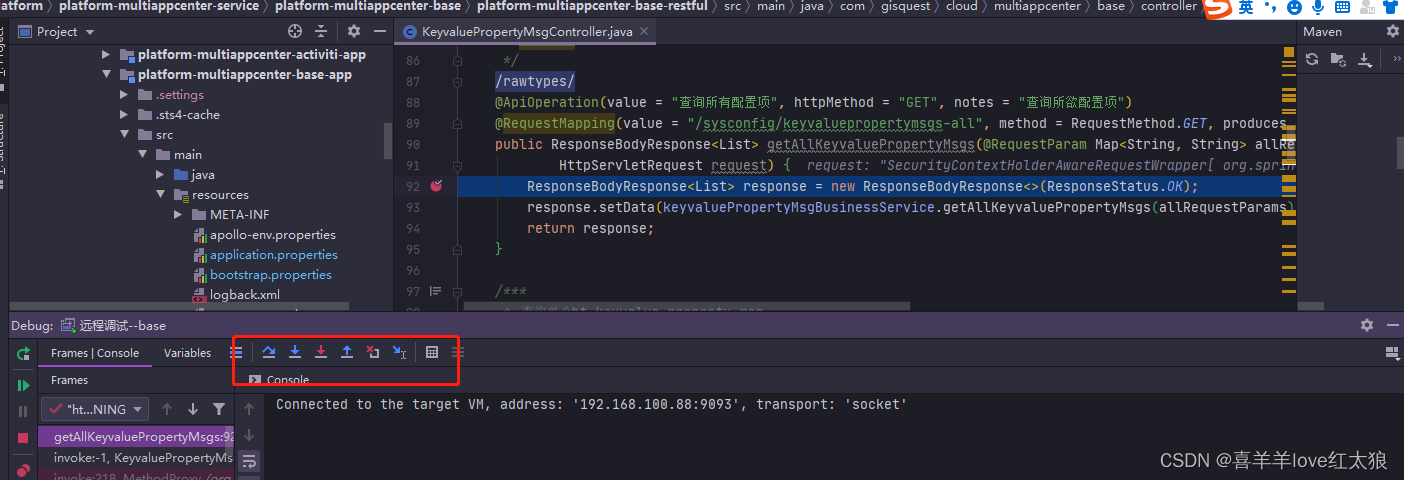
idea使用本地代码远程调试线上运行代码---windows环境
场景: 今天在书上看了一个代码远程调试的方法,自己本地验证了一下感觉十分不错!! windows环境: 启动测试jar包:platform-multiappcenter-base-app-1.0.0-SNAPSHOT.jar 测试工具:postman,idea 应…...

简单记录简单记录
目录1.注册Gmail2.注册ChatGPT3.验证“真人”使用4.开始使用1.注册Gmail 第一步先注册一个谷歌邮箱,你也可以使用微软账号,大部分人选择使用gmail。 申请谷歌邮箱 选择个人用途创建账号即可。 📌温馨提示: 你直接使用guo内的网…...
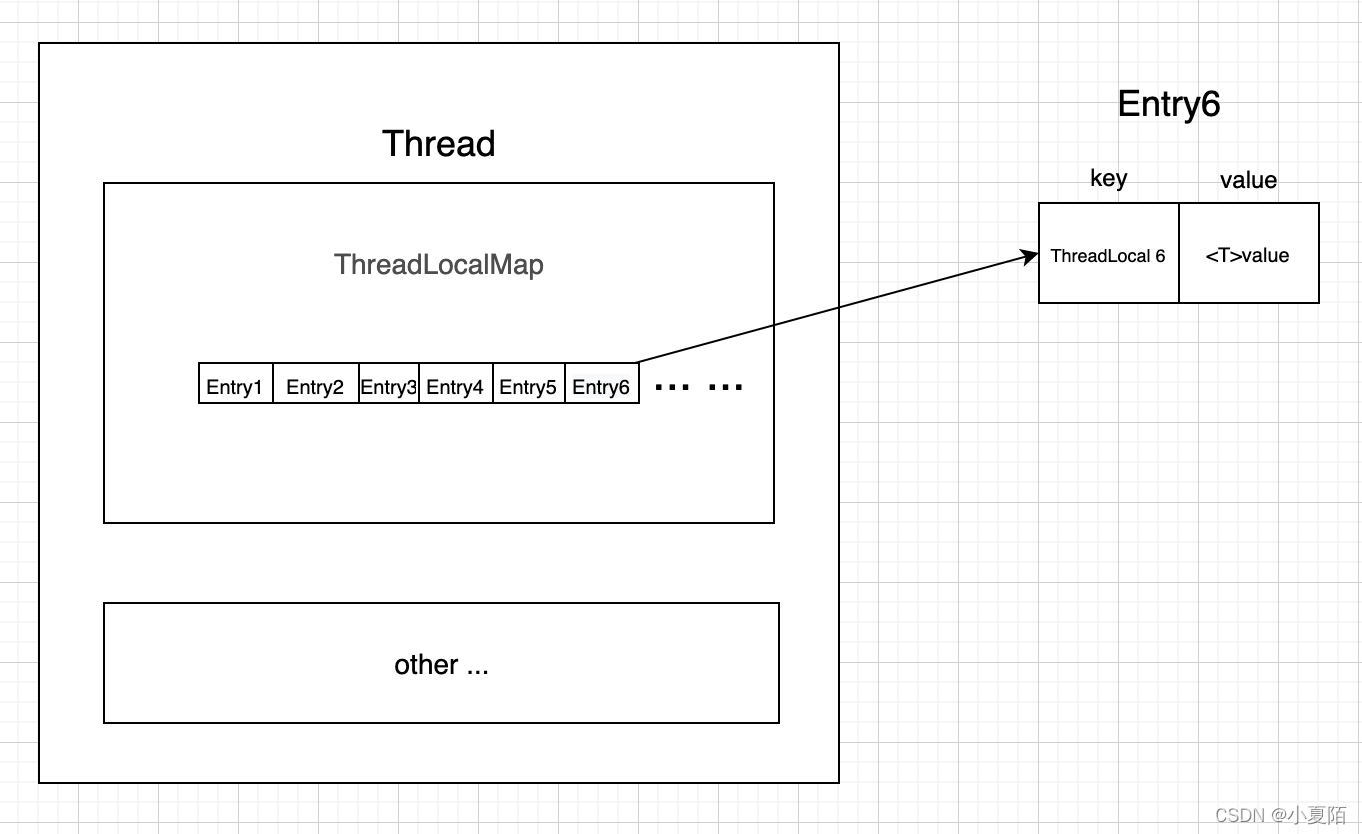
源码系列 之 ThreadLocal
简介 ThreadLocal的作用是做数据隔离,存储的变量只属于当前线程,相当于当前线程的局部变量,多线程环境下,不会被别的线程访问与修改。常用于存储线程私有成员变量、上下文,和用于同一线程,不同层级方法间传…...
——特点及关键字)
C语言入门(1)——特点及关键字
1、C特点及与Java区别 1.1、C特点 面向过程 一般用于嵌入式开发、编写最底层的程序、操作系统 可以直接操作内存 可以封装动态库 不容易跨平台 有指针 可以直接操作串口 线程更加灵活 和硬件打交道速度是最快的 1.2、和Java区别 C是C的增强版,增加了一些新的特性&…...

react中useEffect和useLayoutEffect的区别
布局上 useEffect在浏览器渲染完成后执行useLayoutEffect在DOM更新后执行 特点 useLayoutEffect 总是比 useEffect 先执行;useLayoutEffect与componentDidMount、componentDidUpdate调用时机相同,都是在DOM更新后,页面渲染前调用࿱…...
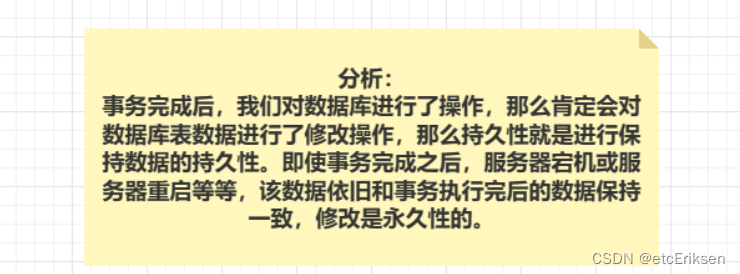
NoSQL(非关系型数据库)与SQL(关系型数据库)的差别
目录 NoSQL(非关系型数据库)与SQL(关系型数据库)的差别 1.数据结构:结构化与非结构化 2.数据关联:关联性与非关联性 3.查询方式:SQL查询与非SQL查询 4.事务特性:ACID与BASE 分析ACID与BASE的含义: 5.存储方式&am…...

new bing的申请与使用教程
文章目录新必应申请新必应免代使用教程总结新必应申请 下载安装 Edge dev 版本,这个版本可以直接使用 对于没有更新的用户而言,不容易找到入口,所以我们直接使用 集成new bing的dev版本 Edge dev 下载链接:https://www.microso…...

yaml配置文件
最近在写代码,发现随着网络的增加,代码变得越来越冗余,所以就想着写一个网络的配置文件,把网络的配置放到一个文件中,而不再主函数中,这样代码开起来就好看了,调试的时候也方便了。之前写过一篇…...

284. 顶端迭代器
请你在设计一个迭代器,在集成现有迭代器拥有的 hasNext 和 next 操作的基础上,还额外支持 peek 操作。 实现 PeekingIterator 类: PeekingIterator(Iterator nums) 使用指定整数迭代器 nums 初始化迭代器。 int next() 返回数组中的下一个元…...

自学前端最容易犯的10个的错误,入门学前端快来看看
在前端学习过程中,有很多常见的误区,包括过度关注框架和库、缺乏实践、忽视算法和数据结构、忽视浏览器兼容性、缺乏团队合作经验、忽视可访问性、重构次数过多、没有关注性能、缺乏设计知识以及没有持续学习等。要避免这些误区,应该注重基础…...
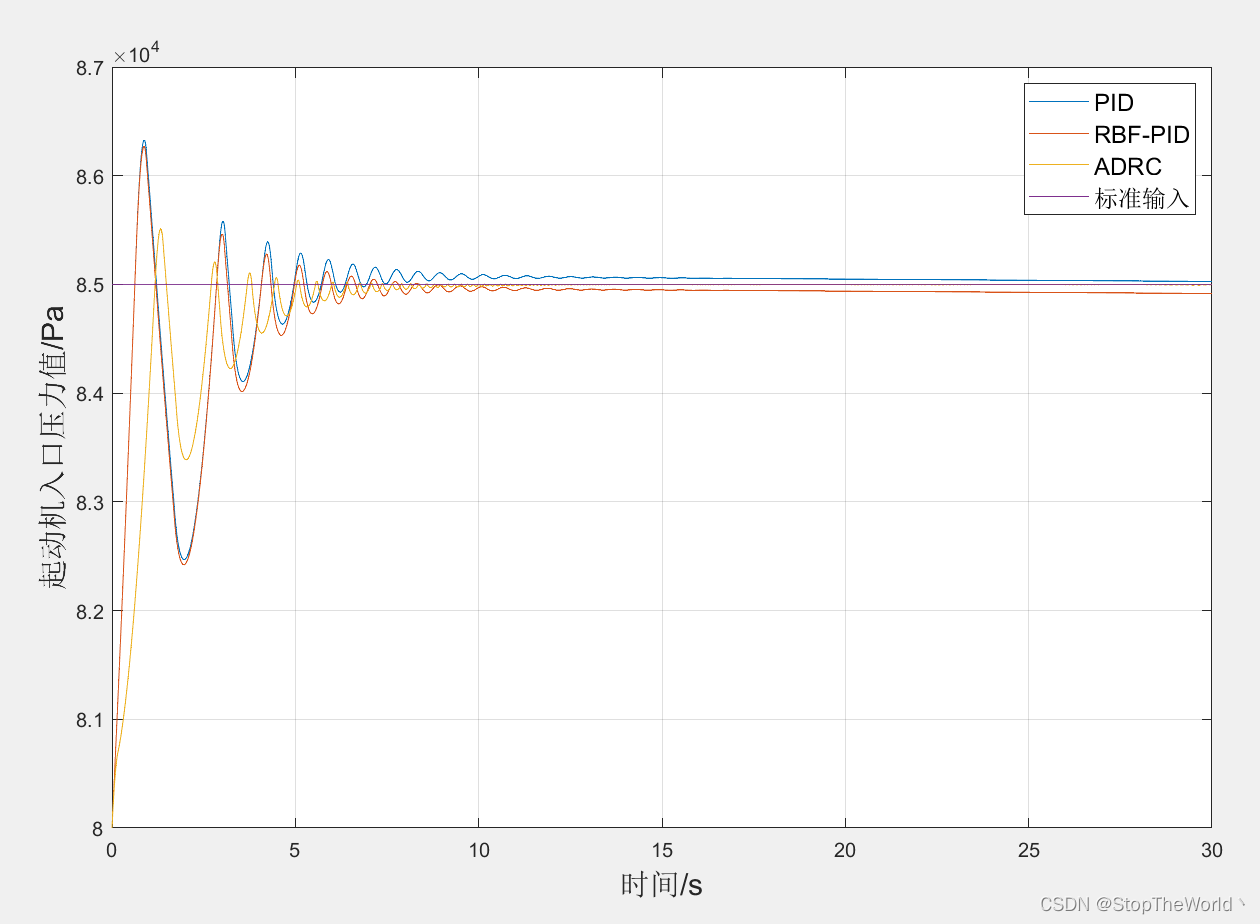
【ADRC控制】使用自抗扰控制器调节起动机入口压力值
以前只知道工业控制中用的是PID控制,然而最近了解到实际生产中还在使用ADRC控制,而且使用效果还优于PID控制,遂找了几篇文献学习学习。 0 引言 自抗扰控制(Active Disturbances Rejection Controller,ADRC)…...
)
剑指 Offer Day2——链表(简单)
目录剑指 Offer 06. 从尾到头打印链表剑指 Offer 24. 反转链表剑指 Offer 35. 复杂链表的复制剑指 Offer 06. 从尾到头打印链表 原题链接:06. 从尾到头打印链表 最容易想到的思路就是先从头到尾打印下来,然后 reverse 一下,但这里我们使用递归…...

Final Cut Pro 10.6.5
软件介绍Final Cut Pro 10.6.5 已通过小编安装运行测试 100%可以使用。Final Cut Pro 10.6.5 破解版启用了全新的矩形图标,与最新的macOS Ventura设计风格统一,支持最新的macOS 13 文图拉系统,支持Apple M1/M2芯片。经过完整而彻底的重新设计…...
Modelsim仿真操作指导
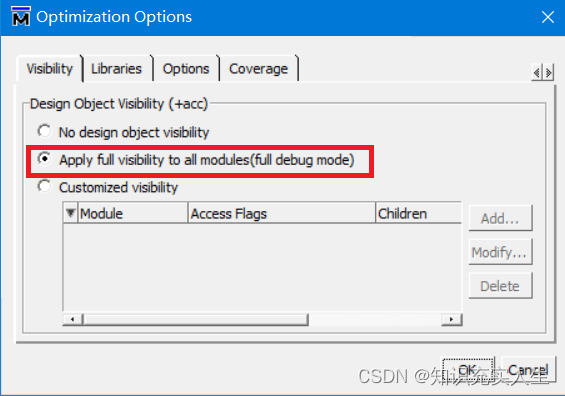
目录 一、前言 二、仿真分类 三、RTL级仿真 3.1创建库 3.2 仿真配置设置 3.3 运行仿真 四、常见问题 4.1 运行仿真时报错“cant read "Startup(-L)": no such element in array” 4.2 运行仿真时无任何报错,但object窗口为空,可正常运…...

你知道这20个数组方法是怎么实现的吗?
前言你们一定对JavaScript中的数组很熟悉,我们每天都会用到它的各种方法,比如push、pop、forEach、map……等等。但是仅仅使用它就足够了吗?如此出色,您一定不想停在这里。我想和你一起挑战实现20数组方法的功能。1、forEachforEa…...

《系统架构设计》-01-架构和架构师概述
文章目录1. 架构的基本定义1.1 架构组成理论1.1.1 系统元素1)概念2)静态结构和动态结构1.1.2 基本系统属性1.1.3 设计和发展原则1.2 架构的决策理论1.2.1 统一软件过程(Rational Unified Process,统一软件过程)1.2.2 决…...

ClawMorph:为OpenClaw AI智能体实现安全可逆的“一键换装”
1. 项目概述:一个为AI智能体“一键换装”的开发者工具如果你正在使用OpenClaw这类AI智能体框架,并且厌倦了每次想让智能体扮演不同角色(比如从产品经理切换到设计师)时,都需要手动去修改一堆配置文件、提示词文件&…...

无线充电技术:从手机标配到多场景应用的挑战与机遇
1. 无线充电市场现状:繁荣表象下的应用困境手机无线充电,现在几乎成了旗舰机的标配。从咖啡馆、机场到汽车中控台,充电垫的身影随处可见。作为一名在电源管理和消费电子领域摸爬滚打了十几年的工程师,我亲眼见证了Qi标准从实验室走…...

芯粒技术:从封装协同到UCIe标准,破解芯片设计新范式
1. 芯片设计范式的演进:从单片到芯粒在半导体行业摸爬滚打了十几年,亲眼见证了芯片设计从追求单一巨无霸的“单片系统”(SoC)时代,逐渐转向一个更灵活、也更复杂的“乐高积木”时代。这个转变的核心,就是芯…...

ARM TPIU调试接口原理与应用实践
1. ARM TPIU调试接口深度解析在嵌入式系统开发中,调试接口的设计与实现往往是决定开发效率的关键因素。作为ARM CoreSight调试架构的重要组成部分,Trace Port Interface Unit(TPIU)承担着处理器跟踪数据格式化与输出的核心功能。本文将深入剖析TPIU的寄存…...

OpenClaw数据包工厂:从非结构化业务信息到可审查工作包的AI自动化实践
1. 项目概述:从混乱业务输入到可审查工作包的转变如果你是一名创业者、服务运营商或者任何需要处理大量非结构化业务信息的人,那么“信息过载”和“行动泄漏”这两个词你一定不陌生。每天,会议录音、客户邮件、CRM导出数据、表单提交像潮水一…...

多智能体协同AI Coding:Multica、vibe-kanban、Maestro、OpenCove
AI辅助编码系列包括: Vibe Coding、AI IDE/插件Claude Code实战AI IDE/插件(二):Zed、SpecKit、OpenCode、Roo Code、Plandex、Flyde、iFlow CLIAI IDE/插件(三):OpenHands、TaskMaster、DeepCode、cc-swi…...

安全代码沙盒实践:从Docker到seccomp的多层防御架构
1. 项目概述:安全代码执行的沙盒化实践在开发、测试乃至在线教育、代码评测平台等场景中,我们经常面临一个核心挑战:如何安全地执行一段来源未知、意图不明的代码?直接在生产服务器上运行用户提交的代码,无异于敞开大门…...

AI编程代理全景导航:从技术选型到实战评估指南
1. 项目概述:一个探索智能编码代理的“藏宝图”最近在GitHub上闲逛,发现了一个挺有意思的项目,叫tndata/CodingAgentExplorer。光看名字,你可能会觉得这又是一个关于AI代码生成或者大语言模型(LLM)的常规仓…...

AI工具搭建自动化视频生成生成日志审计
1,它是个啥 其实就是拿AI当黑盒,把视频生成这件事拆成按脚本跑的一连串动作,然后全程记下谁在什么时候调了哪个模型、输出了啥、花了多少秒、花了多少钱。做这件事的人,多半是公司里管产研的那几位,他们怕的不是AI干砸…...
)
从零搭建AI-ready数据管道:2026奇点大会现场复刻的3小时极速部署流水线(含LLM元数据自动标注模块)
更多请点击: https://intelliparadigm.com 第一章:AI原生数据管道搭建:2026奇点智能技术大会数据工程实践 在2026奇点智能技术大会上,核心数据平台团队首次全栈落地了真正意义上的AI原生数据管道(AI-Native Data Pipe…...