
5-Ngnix配置基于用户访问控制和IP的虚拟主机
目录
5.1.Ngnix配置基于用户访问控制的多虚拟主机
5.1.1.前提条件
5.1.2.Ngnix配置基于用户访问控制的多虚拟主机
5.2.Ngnix配置基于IP的虚拟主机
5.3.Ngnix配置基于IP的多虚拟主机
Nginx配置文件在/usr/local/nginx/conf下,文件名为nginx.conf
5.1.Ngnix配置基于用户访问控制的多虚拟主机
5.1.1.前提条件
Ngnix配置基于用户访问控制的多虚拟主机时,需要使用htpasswd命令,需要安装httpd-tools rpm
命令:
yum install -y httpd-tools
[root@cent79-2 ~]# yum install -y httpd-tools
Failed to set locale, defaulting to C
Loaded plugins: fastestmirror
Loading mirror speeds from cached hostfile* base: mirrors.aliyun.com* centos-sclo-rh: mirrors.huaweicloud.com* centos-sclo-sclo: mirrors.huaweicloud.com* extras: mirrors.aliyun.com* updates: mirrors.aliyun.com
Resolving Dependencies
--> Running transaction check
---> Package httpd-tools.x86_64 0:2.4.6-99.el7.centos.1 will be installed
--> Processing Dependency: libaprutil-1.so.0()(64bit) for package: httpd-tools-2.4.6-99.el7.centos.1.x86_64
--> Processing Dependency: libapr-1.so.0()(64bit) for package: httpd-tools-2.4.6-99.el7.centos.1.x86_64
--> Running transaction check
---> Package apr.x86_64 0:1.4.8-7.el7 will be installed
---> Package apr-util.x86_64 0:1.5.2-6.el7_9.1 will be installed
--> Finished Dependency ResolutionDependencies Resolved=============================================================================================================Package                  Arch                Version                             Repository            Size
=============================================================================================================
Installing:httpd-tools              x86_64              2.4.6-99.el7.centos.1               updates               94 k
Installing for dependencies:apr                      x86_64              1.4.8-7.el7                         CentOS7              104 kapr-util                 x86_64              1.5.2-6.el7_9.1                     updates               92 kTransaction Summary
=============================================================================================================
Install  1 Package (+2 Dependent packages)Total download size: 290 k
Installed size: 584 k
Downloading packages:
(1/2): apr-util-1.5.2-6.el7_9.1.x86_64.rpm                                            |  92 kB  00:00:00
(2/2): httpd-tools-2.4.6-99.el7.centos.1.x86_64.rpm                                   |  94 kB  00:00:00
-------------------------------------------------------------------------------------------------------------
Total                                                                        356 kB/s | 290 kB  00:00:00
Running transaction check
Running transaction test
Transaction test succeeded
Running transactionInstalling : apr-1.4.8-7.el7.x86_64                                                                    1/3 Installing : apr-util-1.5.2-6.el7_9.1.x86_64                                                           2/3 Installing : httpd-tools-2.4.6-99.el7.centos.1.x86_64                                                  3/3 Verifying  : apr-util-1.5.2-6.el7_9.1.x86_64                                                           1/3 Verifying  : apr-1.4.8-7.el7.x86_64                                                                    2/3 Verifying  : httpd-tools-2.4.6-99.el7.centos.1.x86_64                                                  3/3 Installed:httpd-tools.x86_64 0:2.4.6-99.el7.centos.1                                                                 Dependency Installed:apr.x86_64 0:1.4.8-7.el7                         apr-util.x86_64 0:1.5.2-6.el7_9.1                        Complete!
[root@cent79-2 ~]#
5.1.2.Ngnix配置基于用户访问控制的多虚拟主机
-->进入/usr/local/nginx/conf目录
命令:
cd /usr/local/nginx/conf
pwd
[root@cent79-2 conf]# cd /usr/local/nginx/conf/
[root@cent79-2 conf]# pwd
/usr/local/nginx/conf
[root@cent79-2 conf]#
-->编辑nginx.conf,并保存
命令:
vi nginx.conf
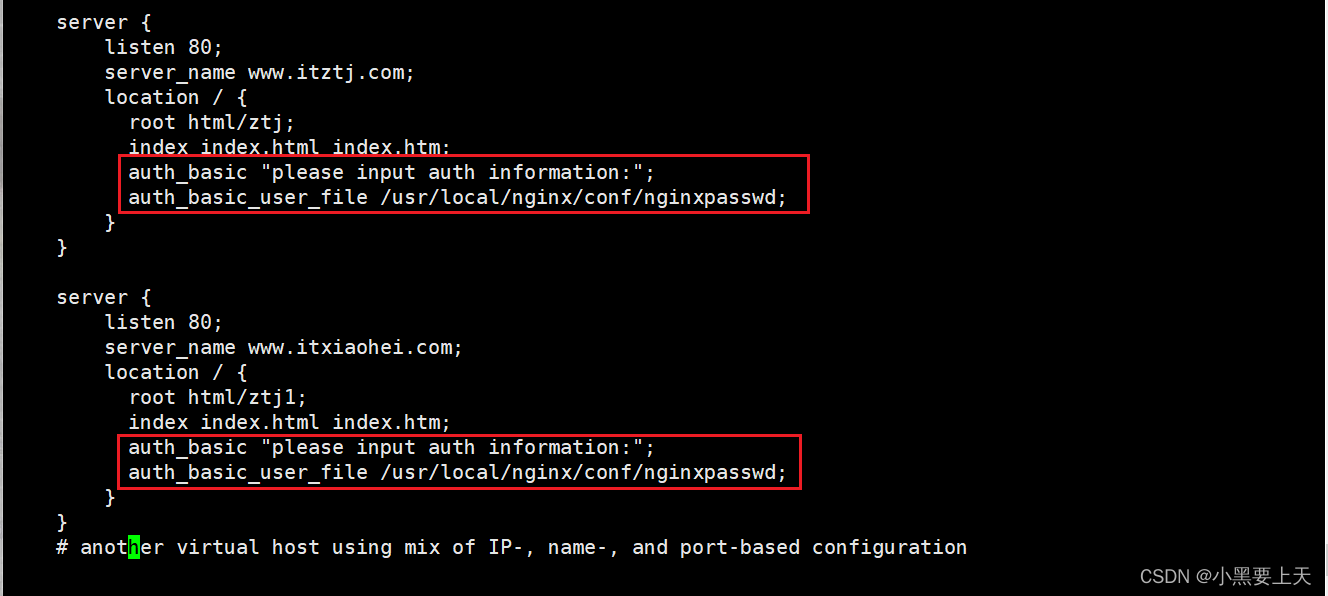
--> 验证nginx.conf语法的正确性
命令:
nginx -t
[root@cent79-2 conf]# nginx -t
nginx: the configuration file /usr/local/nginx//conf/nginx.conf syntax is ok
nginx: configuration file /usr/local/nginx//conf/nginx.conf test is successful
[root@cent79-2 conf]#
-->创建用户访问控制文件
命令:
htpasswd -c /usr/local/nginx/conf/nginxpasswd ztj
[root@cent79-2 conf]# htpasswd -c /usr/local/nginx/conf/nginxpasswd ztj
New password:
Re-type new password:
Adding password for user ztj
[root@cent79-2 conf]# cat /usr/local/nginx/conf/nginxpasswd
ztj:$apr1$bKLsHgJ3$X8j4Buj2KCw4ojcm3HuTX1
[root@cent79-2 conf]#
备注:
如果创建多个用户访问控制时,后续命令为:
htpasswd /usr/local/nginx/conf/nginxpasswd USERNAME
-->重启nginx
命令:
nginx -s stop
nginx
[root@cent79-2 conf]# nginx -s stop
[root@cent79-2 conf]# ps -ef |grep nginx
root       1354   1245  0 15:39 pts/0    00:00:00 grep --color=auto nginx
[root@cent79-2 conf]# nginx
[root@cent79-2 conf]# ps -ef |grep nginx
root       1356      1  0 15:39 ?        00:00:00 nginx: master process nginx
nginx      1357   1356  0 15:39 ?        00:00:00 nginx: worker process
root       1359   1245  0 15:40 pts/0    00:00:00 grep --color=auto nginx
[root@cent79-2 conf]#
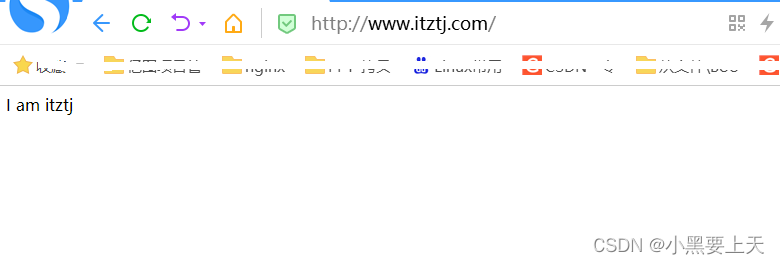
-->验证
http://www.itztj.com

输入通过htpasswd命令创建的用户控制文件的用户名和密码
http://www.itxiaohei.com
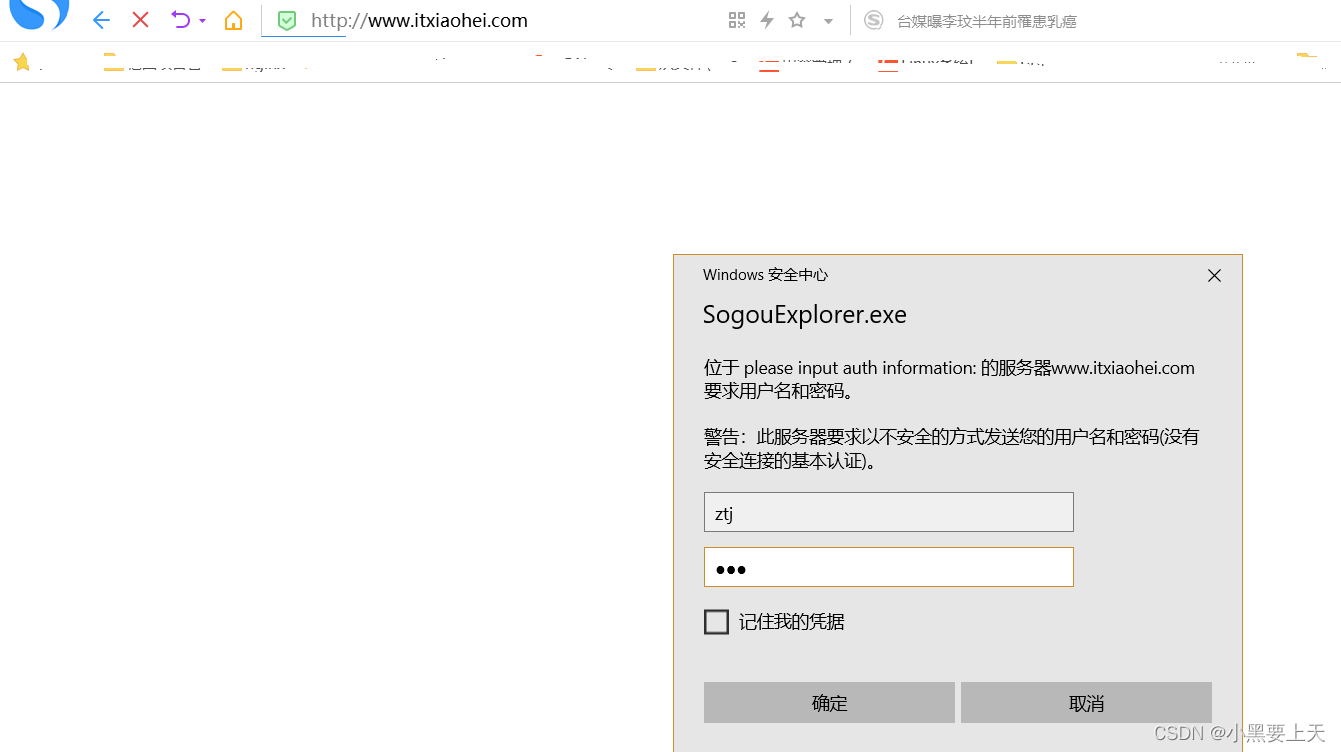
输入通过htpasswd命令创建的用户控制文件的用户名和密码

5.2.Ngnix配置基于IP的虚拟主机
-->进入/usr/local/nginx/conf目录
命令:
cd /usr/local/nginx/conf
pwd
[root@cent79-2 conf]# cd /usr/local/nginx/conf/
[root@cent79-2 conf]# pwd
/usr/local/nginx/conf
[root@cent79-2 conf]#
-->编辑nginx.conf,并保存
命令:
vi nginx.conf
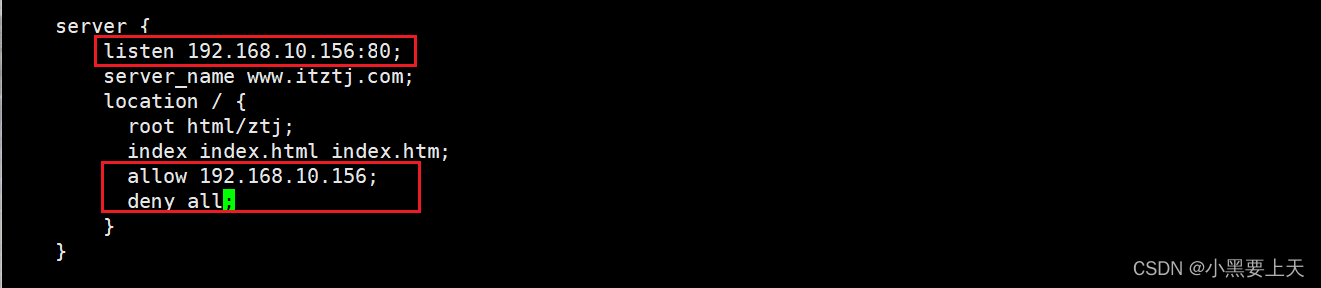
--> 验证nginx.conf语法的正确性
命令:
nginx -t
[root@cent79-2 conf]# nginx -t
nginx: the configuration file /usr/local/nginx//conf/nginx.conf syntax is ok
nginx: configuration file /usr/local/nginx//conf/nginx.conf test is successful
[root@cent79-2 conf]#
-->重新加载nginx
命令:
nginx -s reload
[root@cent79-2 conf]# nginx -s reload
[root@cent79-2 conf]# ps -ef |grep nginx
root       1591      1  0 16:04 ?        00:00:00 nginx: master process nginx
nginx      1594   1591  0 16:04 ?        00:00:00 nginx: worker process
root       1596   1182  0 16:05 pts/0    00:00:00 grep --color=auto nginx
[root@cent79-2 conf]#
-->验证
curl 192.168.10.156
[root@cent79-2 conf]# curl 192.168.10.156
I am itztj
[root@cent79-2 conf]#
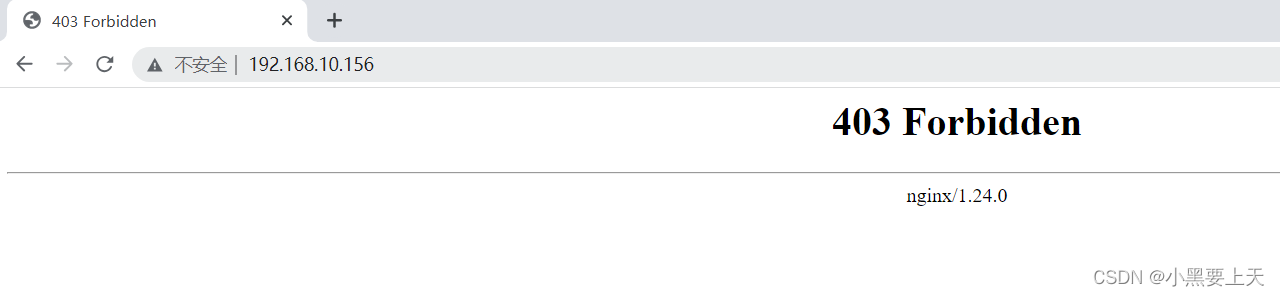
宿主机验证
5.3.Ngnix配置基于IP的多虚拟主机
-->进入/usr/local/nginx/conf目录
命令:
cd /usr/local/nginx/conf
pwd
[root@cent79-2 conf]# cd /usr/local/nginx/conf/
[root@cent79-2 conf]# pwd
/usr/local/nginx/conf
[root@cent79-2 conf]#
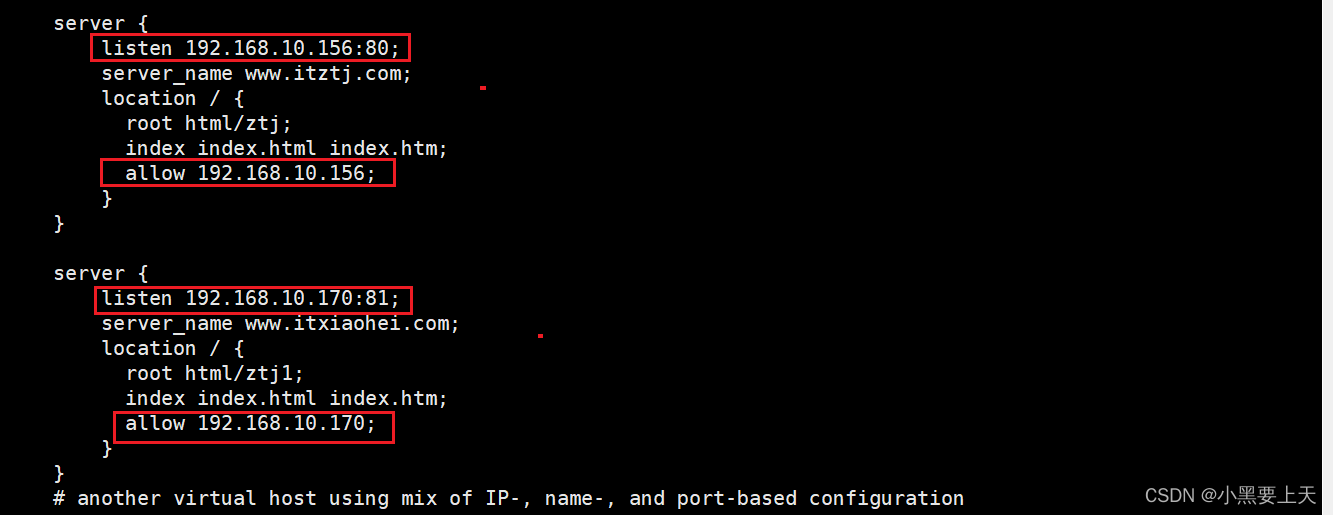
-->编辑nginx.conf,并保存
命令:
vi nginx.conf
--> 验证nginx.conf语法的正确性
命令:
nginx -t
[root@cent79-2 conf]# nginx -t
nginx: the configuration file /usr/local/nginx//conf/nginx.conf syntax is ok
nginx: configuration file /usr/local/nginx//conf/nginx.conf test is successful
[root@cent79-2 conf]#
-->重新加载nginx
命令:
nginx -s reload
[root@cent79-2 conf]# nginx -s reload
[root@cent79-2 conf]# ps -ef |grep nginx
root       1591      1  0 16:04 ?        00:00:00 nginx: master process nginx
nginx      1594   1591  0 16:04 ?        00:00:00 nginx: worker process
root       1596   1182  0 16:05 pts/0    00:00:00 grep --color=auto nginx
[root@cent79-2 conf]#
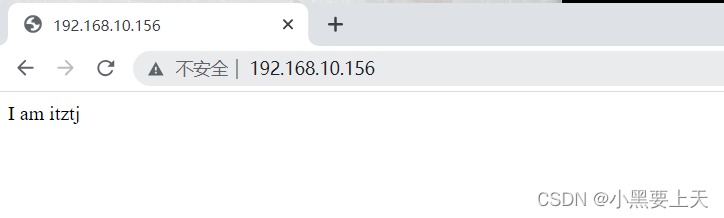
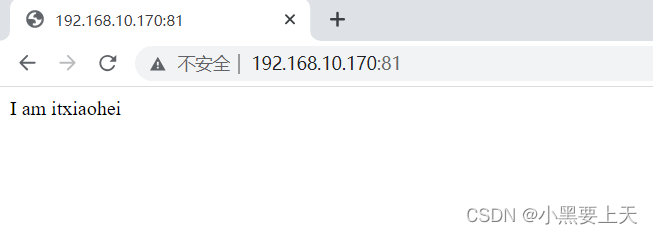
-->验证
相关文章:
5-Ngnix配置基于用户访问控制和IP的虚拟主机
目录 5.1.Ngnix配置基于用户访问控制的多虚拟主机 5.1.1.前提条件 5.1.2.Ngnix配置基于用户访问控制的多虚拟主机 5.2.Ngnix配置基于IP的虚拟主机 5.3.Ngnix配置基于IP的多虚拟主机 Nginx配置文件在/usr/local/nginx/conf下,文件名为nginx.conf 5.1.Ngnix配置…...

springboot jar分离部署
springboot jar分离部署 注意:spring boot web项目别使用jsp页面,可以使用模板代替,jsp打包时访问页面会报404错误。 1.具体配置如下: <build><plugins><!--更换maven的jar打包插件先前使用的是spring-boot-mav…...
Opencv 细节补充
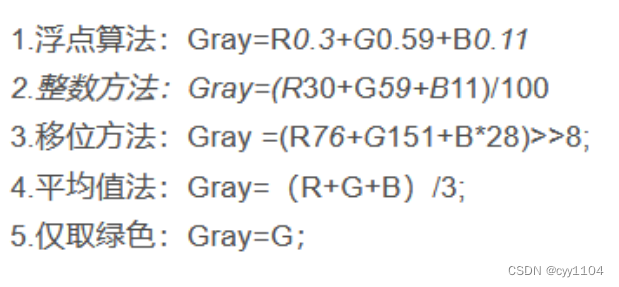
1.分辨率的解释 •像素:像素是分辨率的单位。像素是构成位图图像最基本的单元,每个像素都有自己的颜色。 •分辨率(解析度): a) 图像分辨率就是单位英寸内的像素点数。单位为PPI(Pixels Per Inch) b) PPI表示的是每英…...
hook之宏定义)
内存泄漏专题(7)hook之宏定义
前面介绍的mtrace也好,bcc也罢,其实都是hook技术的一种实现,但是mtrace本身使用场景上有局限,而bcc环境依赖则十分复杂。因此,这些调试手段只适用于开发环境用来调试,对于生产环境,均不是一个非…...

Python 基础(十八):异常处理
❤️ 博客主页:水滴技术 🌸 订阅专栏:Python 入门核心技术 🚀 支持水滴:点赞👍 收藏⭐ 留言💬 文章目录 一、异常是什么?二、异常处理的基本语法三、捕获特定的异常类型四、finall…...

iTOP-RK3568开发板Docker 安装 Ubuntu 18.04
Docker 下载安装 Ubuntu18.04,输入以下命令: sudo apt update docker pull ubuntu:18.04 切换 Shell 到 Ubuntu 18.04,输入以下命令: docker container run -p 8000:3000 -it ubuntu:18.04 /bin/bash -p 参数:容器的…...
FFmpeg AVFilter的原理(三)- filter是如何被驱动的
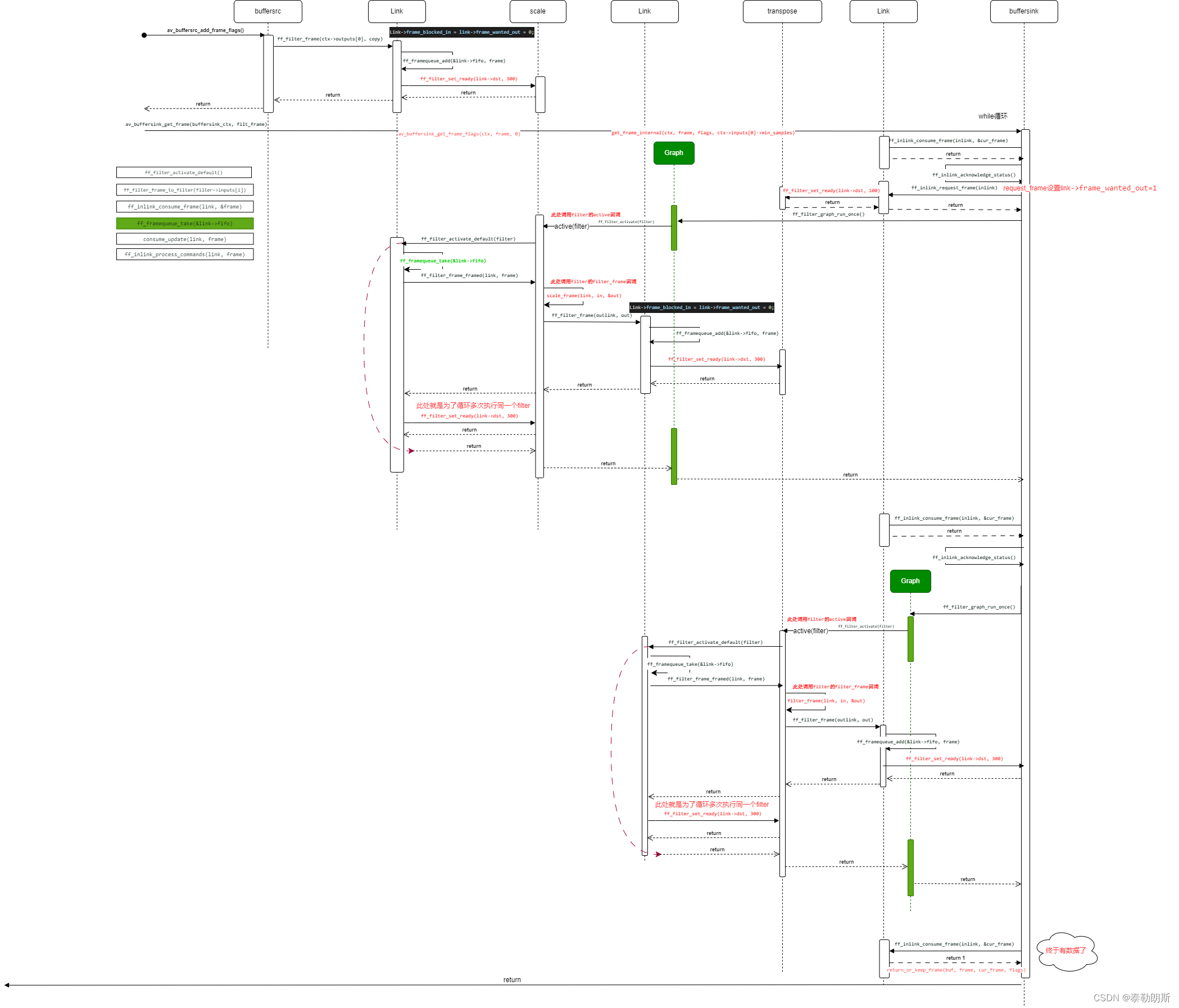
首先上官方filter的链接:https://ffmpeg.org/ffmpeg-filters.html 关于filter命令行:FFmpeg-4.0 的filter机制的架构与实现.之一 Filter原理 1、下面是一个avfilter的graph 上图是ffmpeg中doc/examples中filtering_video.c案例的示意图。 特别注意上面蓝…...
ARM day8 key1/2/3led
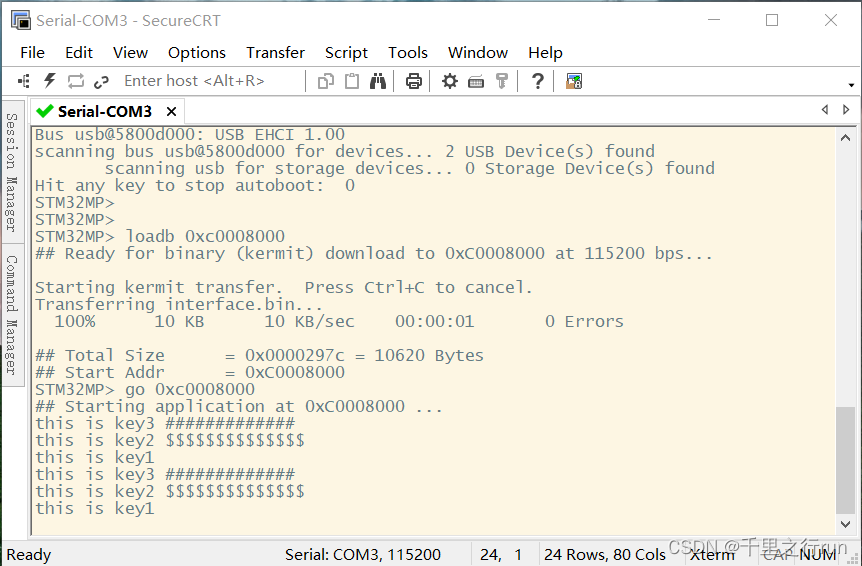
key_led.h #ifndef _KEY_H_ #define _KEY_H_#include "stm32mp1xx_rcc.h" #include "stm32mp1xx_gpio.h" #include "stm32mp1xx_exti.h" #include "stm32mp1xx_gic.h"//EXTI编号 typedef enum {EXTI0,EXTI1,EXTI2,EXTI3,EXTI4,EXTI5,…...
windows 系统安装sonarqube
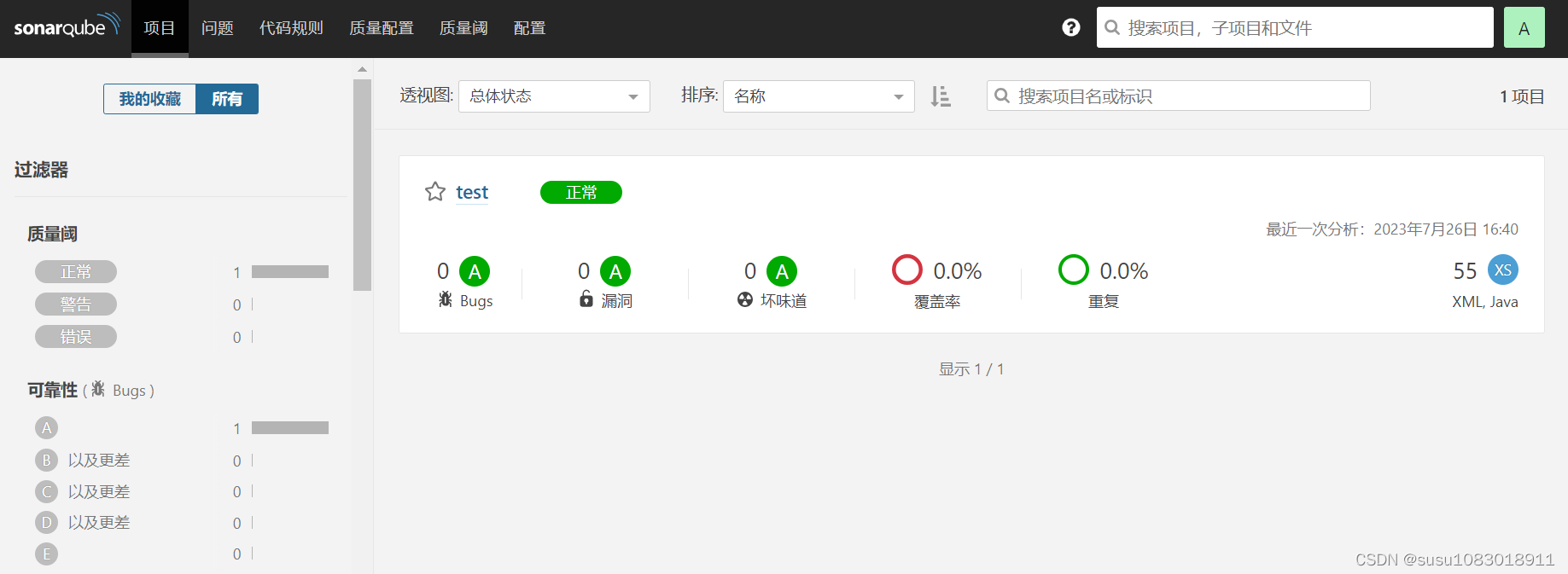
SonarQube是一种自动代码审查工具,用于检测代码中的错误,漏洞和代码异味。它可以与您现有的工作流程集成,以便在项目分支和拉取请求之间进行连续的代码检查。 官方网站: https://www.sonarqube.org/ 1. 使用前提条件 运行SonarQ…...
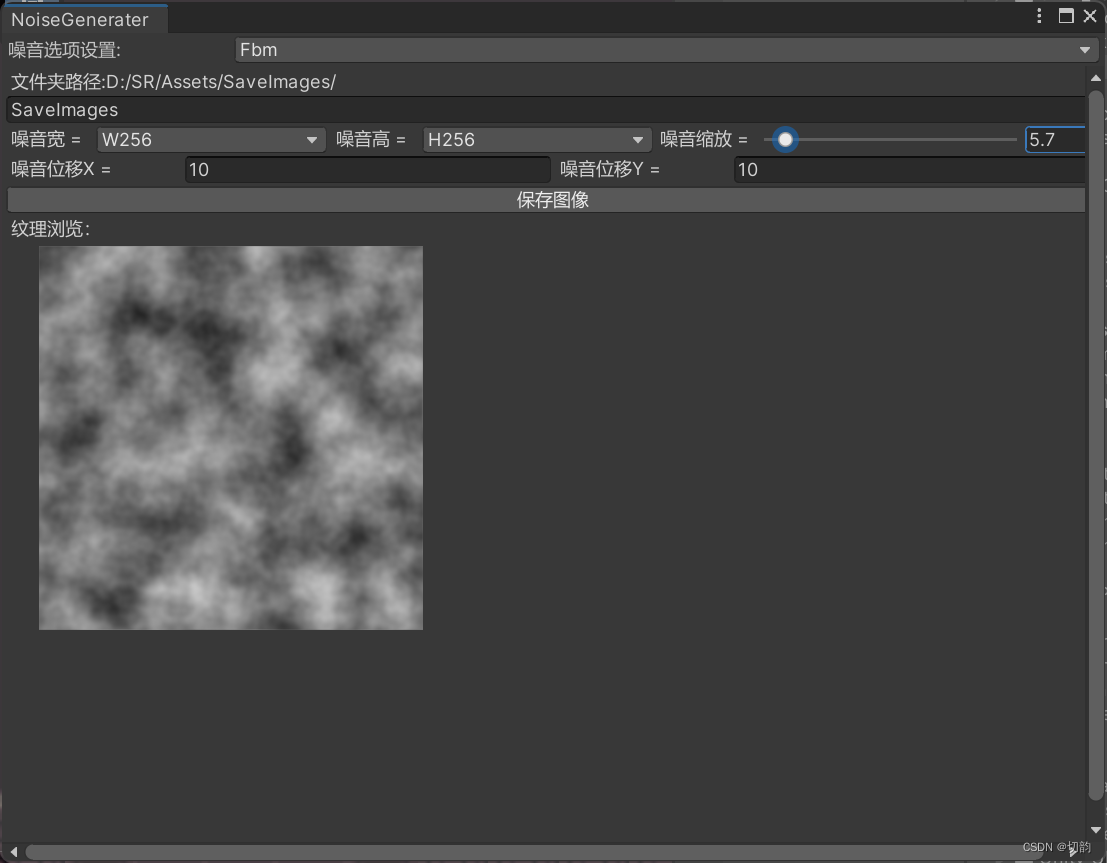
Unity噪声图生成(编辑器扩展)
最近发现项目里很多shader都需要噪声图,(shadergraph中有自己的噪声图生成)当遇到需要噪声图时去寻找很麻烦,所以从网上查阅资料编写了一个Unity扩展的噪声图生成。 Perlin噪声 Perlin噪声是一种渐变噪声算法,由Ken …...

http-为什么文件上传要转成Base64
# 前言 最近在开发中遇到文件上传采用Base64的方式上传,记得以前刚开始学http上传文件的时候,都是通过content-type为multipart/form-data方式直接上传二进制文件,我们知道都通过网络传输最终只能传输二进制流,所以毫无疑问他们本…...

htmlCSS-----定位
目录 前言 定位 分类和取值 定位的取值 1.相对定位 2.绝对位置 元素居中操作 3.固定定位 前言 今天我们来学习html&CSS中的元素的定位,通过元素的定位我们可以去更好的将盒子放到我们想要的位置,下面就一起来看看吧! 定位 定位posi…...

腾讯云大数据型CVM服务器实例D3和D2处理器CPU型号说明
腾讯云服务器CVM大数据型D3和D2处理器型号,大数据型D3云服务器CPU采用2.5GHz Intel Xeon Cascade Lake 处理器,大数据型D2云服务器CPU采用2.4GHz Intel Xeon Skylake 6148 处理器。腾讯云服务器网分享云服务器CVM大数据型CPU型号、处理器主频性能&#x…...
计算机科学cs/电子信息ei面试准备——数学基础/线性代数复习
1. 中值定理 中值定理是反映函数与导数之间联系的重要定理,也是微积分学的理论基础,在许多方面它都有重要的作用,在进行一些公式推导与定理证明中都有很多应用。中值定理是由众多定理共同构建的,其中拉格朗日中值定理是核心&…...
-算法分析)
极速查找(2)-算法分析
篇前小言 本篇文章是对查找(1)的续讲线性索引查找 线性索引查找(Linear Index Search)是一种基于索引的查找算法。它在数据集合中创建一个索引 结构,然后使用该索引结构来加快对目标元素的查找。 线性索引是一种在数…...

flask路由添加参数
flask路由添加参数 在 Flask 中,可以通过两种方式在路由中添加参数:在路由字符串中直接指定参数,或者通过 request 对象从请求中获取参数。 在路由字符串中指定参数:可以将参数直接包含在路由字符串中。参数可以是字符串、整数、…...
网络安全系统教程+学习路线(自学笔记)
一、什么是网络安全 网络安全可以基于攻击和防御视角来分类,我们经常听到的 “红队”、“渗透测试” 等就是研究攻击技术,而“蓝队”、“安全运营”、“安全运维”则研究防御技术。 无论网络、Web、移动、桌面、云等哪个领域,都有攻与防两面…...

23. 合并 K 个升序链表
题目描述 给你一个链表数组,每个链表都已经按升序排列。 请你将所有链表合并到一个升序链表中,返回合并后的链表。 示例 1: 输入:lists [[1,4,5],[1,3,4],[2,6]] 输出:[1,1,2,3,4,4,5,6] 解释:链表数组…...
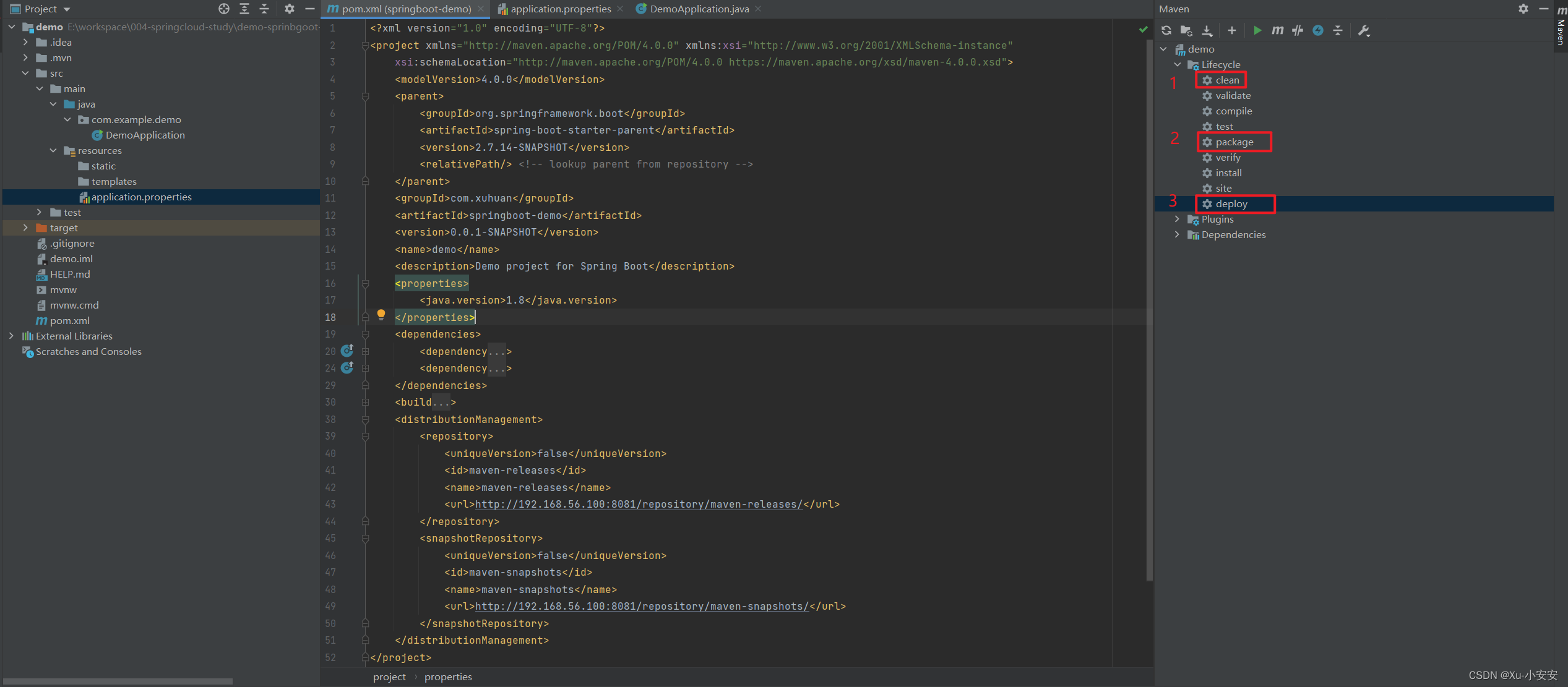
Nexus3部署、配置+SpringBoot项目Demo
Docker部署Nexus 搜索Nexus3镜像:[rootlocalhost ~]# docker search nexus 拉取Nexus3镜像:[rootlocalhost ~]# docker pull sonatype/nexus3 启动Nexus3前查看虚拟机端口是否被占用:[rootlocalhost ~]# netstat -nultp 通过Docker Hub查看安…...
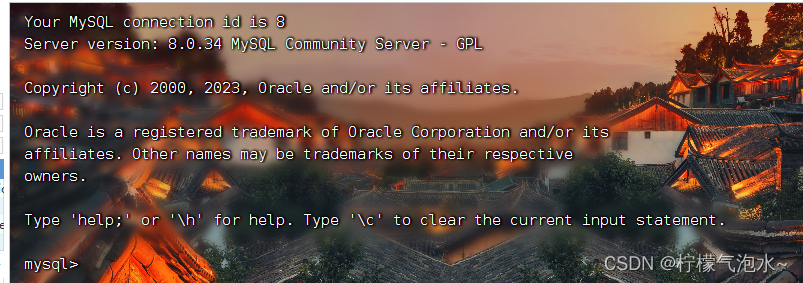
linux下用docker安装mysql
1.mysql Docker镜像 docker pull mysql:[版本号 或 latest]例:docker pull mysql:5.7 2.查看拉取的docker镜像 docker images3.设置 Docker 卷 docker volume create mysql-data列出 Docker 已知的所有卷 docker volume ls4.运行一个 MySQL Docker 容器 docke…...

QUAD7SHIFT:轻量级七段数码管驱动库设计与嵌入式优化
1. 项目概述QUAD7SHIFT 是一款专为驱动 4 位共阴/共阳七段数码管模块设计的轻量级嵌入式显示库,核心目标是通过级联的 74HC595 移位寄存器实现高效、低资源占用的动态扫描显示。该库并非简单封装 SPI 接口,而是围绕“硬件抽象—时序控制—数据映射—功耗…...

孤能子视角:“人“的关系线束
(EIS下的"人"不同于实体的"人"。但这里不做比对。姑且当科幻小说看) 我的问题: 1."人"这条线,你能串联起多少知识? 2.Kimi分析。 3.信兄对Kimi分析的反馈。 (注:DeepSeek居然对Kimi的意见既有坚持又有吸收。另外&…...

Java 反应式编程最佳实践:构建响应式系统
Java 反应式编程最佳实践:构建响应式系统别叫我大神,叫我 Alex 就好。一、引言 大家好,我是 Alex。反应式编程(Reactive Programming)作为一种编程范式,已经成为构建高并发、低延迟系统的重要手段。Java 生…...
实现 + 全排列(回溯经典)| 面试必刷模板题)
算法双杀:Trie(前缀树)实现 + 全排列(回溯经典)| 面试必刷模板题
目录 一、Trie(前缀树):字符串查询的效率神器 什么是前缀树? 核心设计 完整实现代码 关键解析 二、全排列:回溯算法入门经典 题目描述 核心思路(回溯法) 完整实现代码 关键解析 三、…...

【数据集】电力巡检场景下的绝缘子、鸟巢及防震锤图像数据集构建与应用
1. 电力巡检图像数据集的价值与应用场景 在电力系统运维中,无人机巡检已经成为主流手段。我参与过多个省级电网的智能化改造项目,发现传统人工巡检最大的痛点在于:巡检员需要盯着屏幕分析数小时的航拍视频,不仅容易疲劳漏检&#…...

如何快速上手libcds:10分钟掌握并发数据结构基础
如何快速上手libcds:10分钟掌握并发数据结构基础 【免费下载链接】libcds A C library of Concurrent Data Structures 项目地址: https://gitcode.com/gh_mirrors/li/libcds libcds是一个强大的C并发数据结构库,专为多线程环境设计,提…...

从论文到落地:剖析因果U-Net+波束形成在语音增强中的工程化细节与调优心得
因果U-Net与波束形成的工程实践:语音增强从实验室到产品的关键路径 在视频会议成为工作常态的今天,远场语音拾取质量直接决定了沟通效率。传统单通道降噪算法在小型会议室表现尚可,但当麦克风与声源距离超过3米,混响与噪声问题就会…...

如何用5步告别Mac菜单栏混乱?Ice帮你打造高效工作空间
如何用5步告别Mac菜单栏混乱?Ice帮你打造高效工作空间 【免费下载链接】Ice Powerful menu bar manager for macOS 项目地址: https://gitcode.com/GitHub_Trending/ice/Ice 你是否曾因Mac菜单栏上密密麻麻的图标而感到焦虑?随着工作时间的推移&a…...
)
FreeCAD Sketcher模块实战:从零开始设计一个机械零件(附约束技巧)
FreeCAD Sketcher模块实战:从零开始设计一个机械零件(附约束技巧) 在三维CAD设计领域,参数化建模已经成为现代机械设计的标配技能。作为开源CAD软件中的佼佼者,FreeCAD凭借其强大的Sketcher模块,让用户能够…...

别只盯着表达量!单基因功能挖掘:LinkedOmics相关性分析与STRING互作网络实战指南
单基因功能深度挖掘:从相关性分析到互作网络的系统研究策略 在生物医学研究中,单基因分析往往被简化为差异表达检验,这种局限视角可能掩盖了基因在复杂生物网络中的多维作用。当我们在TCGA数据中发现某个基因在特定癌症中表达异常时ÿ…...